

Page 1
About Warnings
WARNING: A WARNING indicates a potential for property damage, personal injury,
or death.
Dell Precision™ Workstation T5500/T5500n
Setup and Features Information
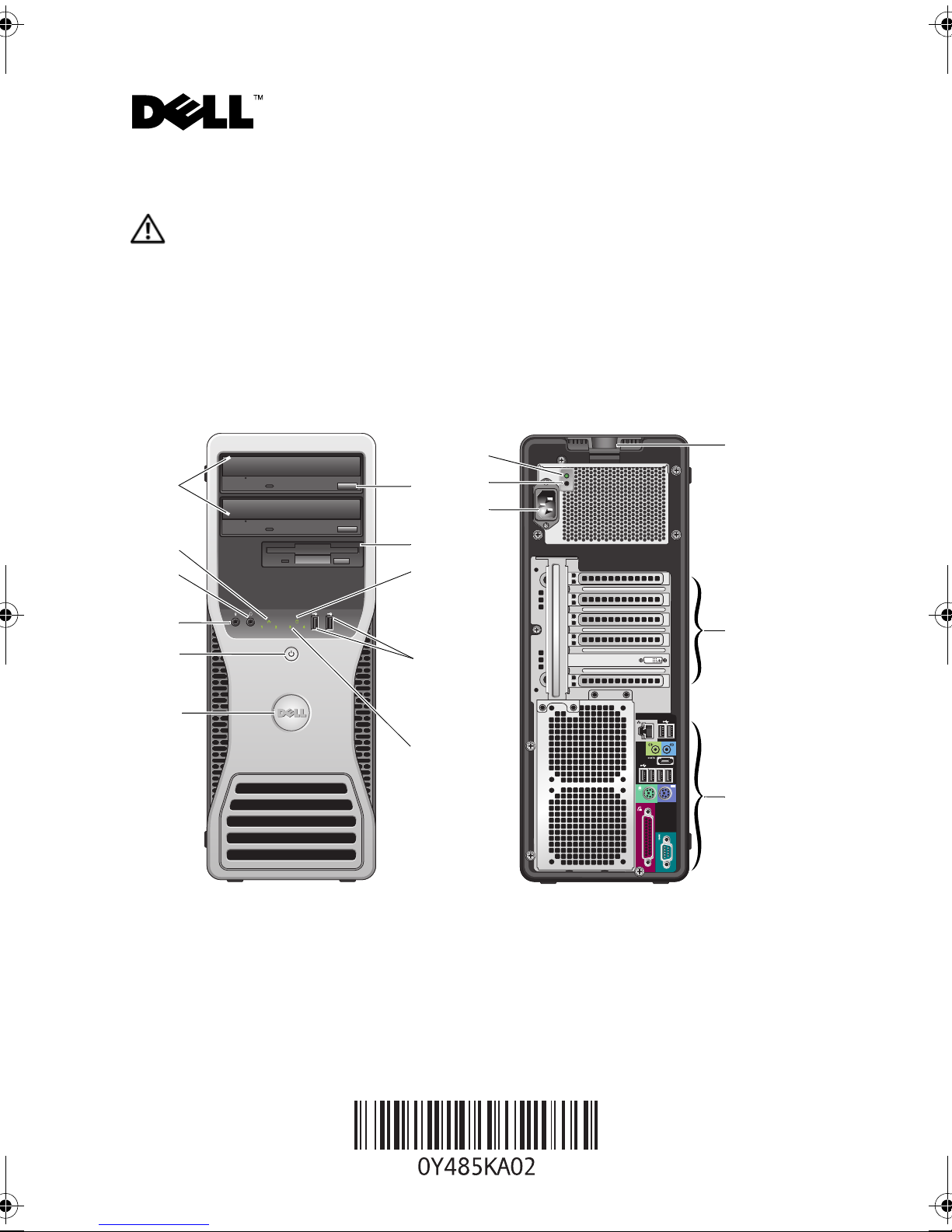
Tower — Front and Back View
12
1
2
3
4
5
6
11
10
9
8
7
13
14
17
16
15
1 optical drives (2) 2 link integrity light
3 headphone connector 4 microphone connector
5 power button, power light 6 Dell rotatable badge
7 diagnostic lights (4) 8 USB 2.0 connectors (2)
June 2009
Model: DCTA
Page 2
9 drive activity light 10 flex bay
11 optical drive eject button 12 power supply diagnostic light
13 power supply diagnostic button 14 power connector
15 back panel connectors 16 expansion card slots (6)
17 cover-release latch and padlock ring
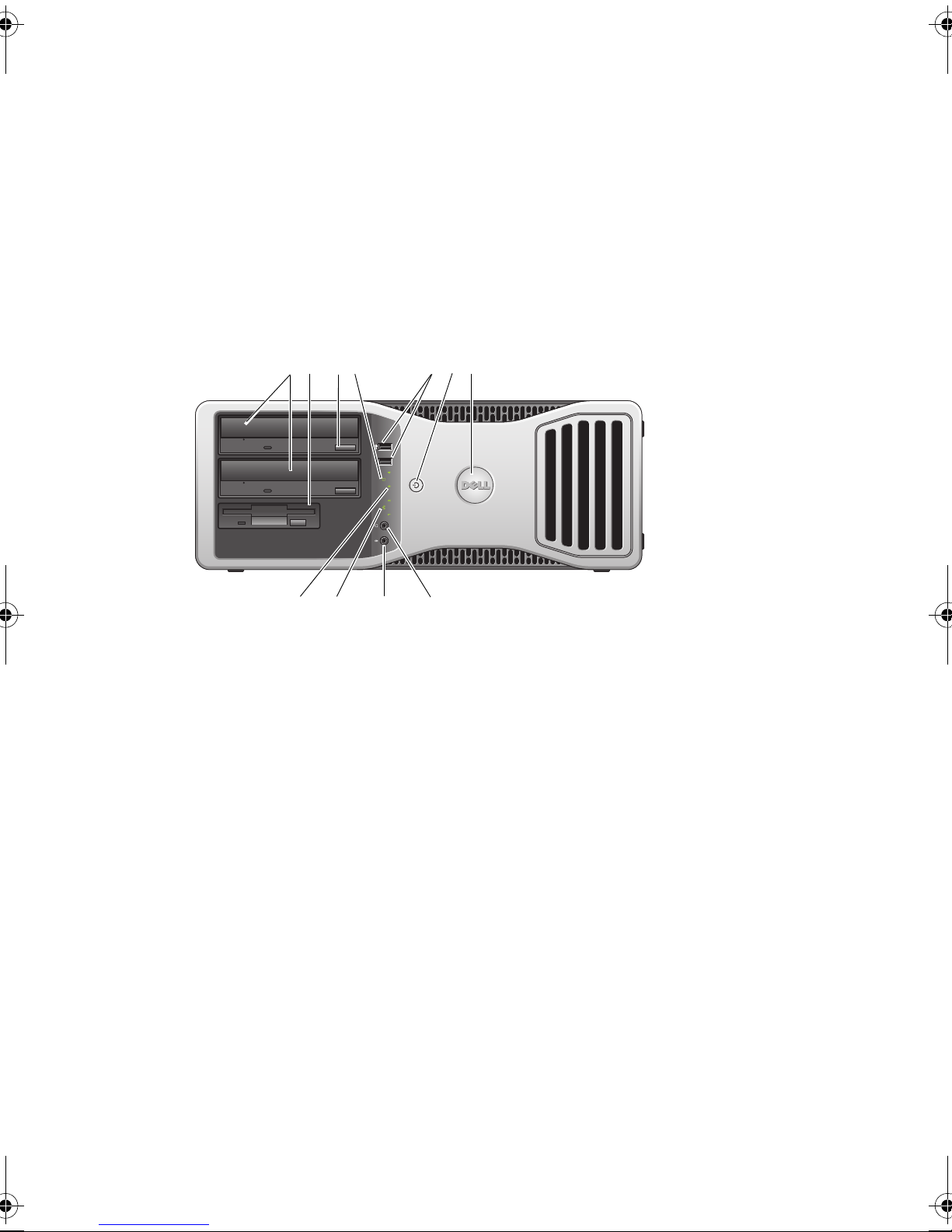
Desktop — Front View
12 67
354
891011
1 optical drives (2) 2 flex bay
3 optical drive eject button 4 drive activity light
5 USB 2.0 connectors (2) 6 power button, power light
7 Dell rotatable badge 8 headphone connector
9 microphone connector 10 link integrity light
11 diagnostic lights (4)
Page 3
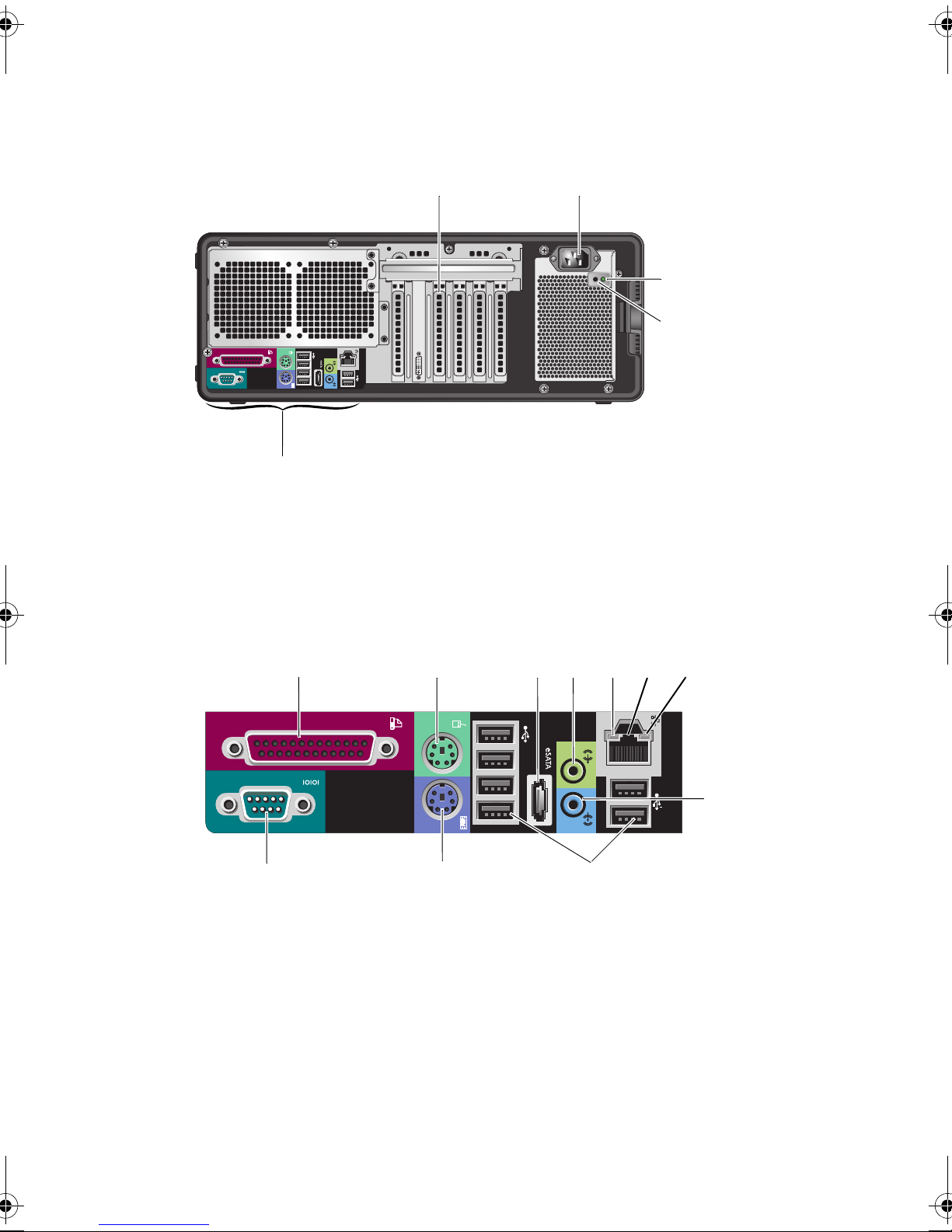
Desktop — Back View
12
3
4
5
1 expansion card slots (6) 2 power connector
3 power supply diagnostic light 4 power supply diagnostic button
5 back panel connectors
Tower and Desktop — Back Panel Connectors
1
11
1 parallel connector 2 PS/2 mouse connector
3 eSATA connector 4 line-out connector
5 network activity light 6 network adapter connector
7 link integrity light 8 line-in connector
9 USB 2.0 connectors (6) 10 PS/2 keyboard connector
2
10
4
3
5
9
7
6
8
11 serial connector
Page 4
Quick Setup
WARNING: Before you begin any of the procedures in this section, read the safety information
that shipped with your computer. For additional best practices information see
www.dell.com/regulatory_compliance.
CAUTION: Do not install your computer in an enclosure where there is limited, restricted or no
airflow. Restricting the airflow impacts your computer’s performance, possibly causing it to
overheat. If your computer is installed in a corner on a desk leave at least 5.1 cm (2 in) clearance
from the back of the computer to the wall to permit the airflow required for proper ventilation.
NOTE: Clean dust off the grill at the back of the computer whenever it is dusty.
NOTE: Some devices may not be included if you did not order them.
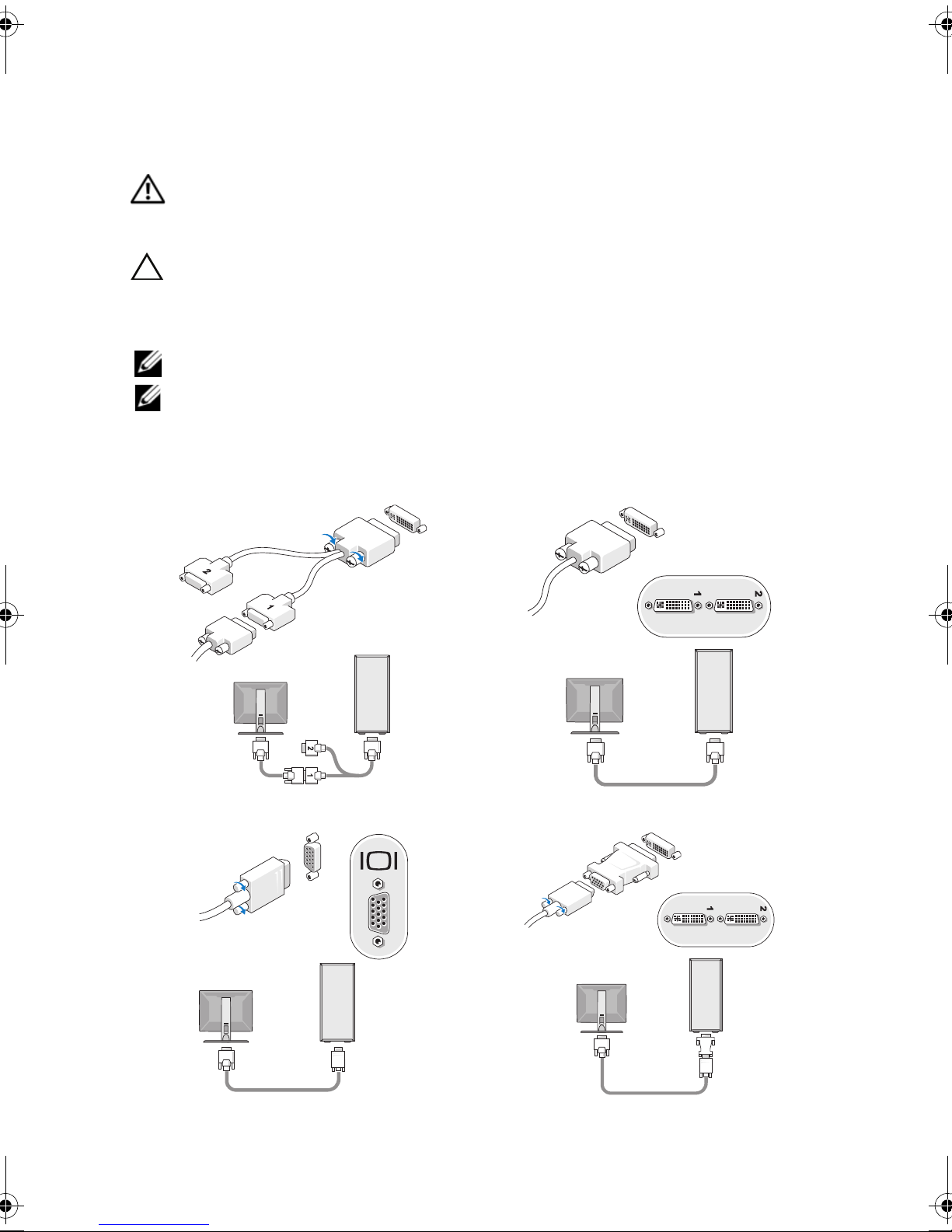
Connect the monitor using one of the following cables:
1
a
The dual monitor Y-adapter cable
b
The white DVI cable
c
The blue VGA cable
d
The blue VGA cable to a DVI adapter
Page 5
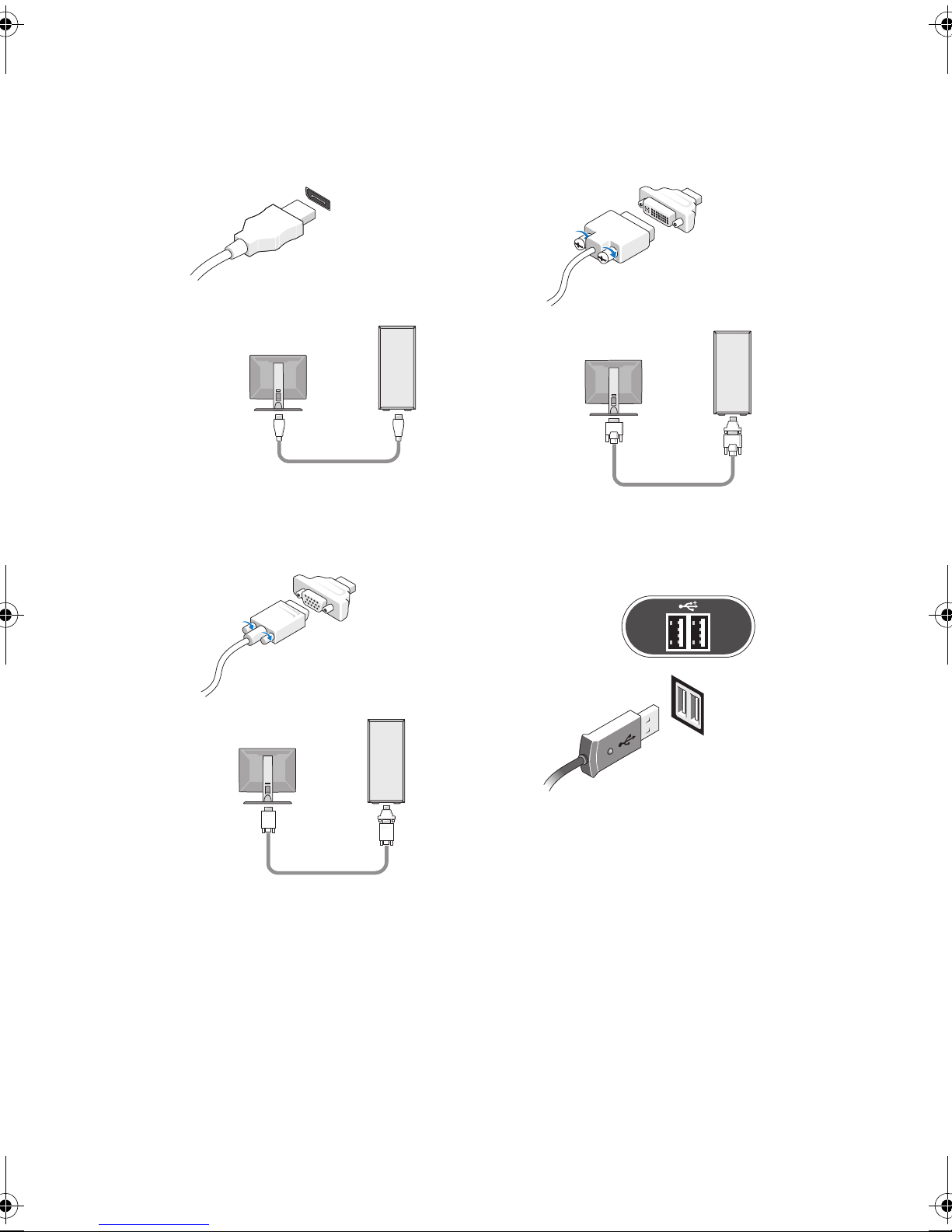
e
The DisplayPort cable
g
The DisplayPort to a VGA adapter
f
The DisplayPort to a DVI adapter
2
Connect a USB device, such as a
keyboard or mouse.
Page 6
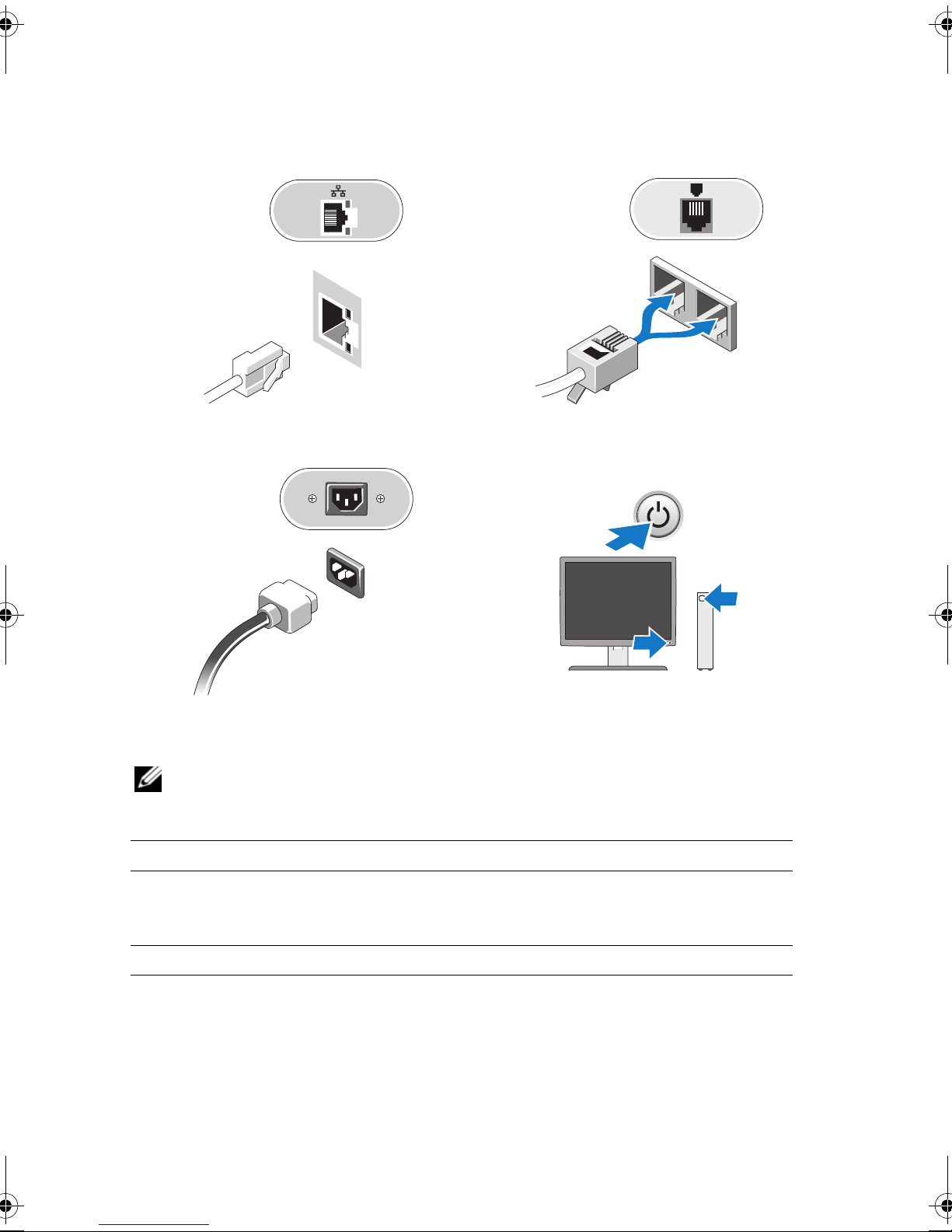
Connect the network cable.
3
5
Connect the power cable(s).
4
Connect the modem (if installed).
6
Press the power buttons on the monitor
and the computer.
Specifications
NOTE: The following specifications are only those required by law to ship with your computer.
For a complete and current listing of the specifications for your computer, go to support.dell.com.
Processor
Type: Dual-Core Intel® Xeon® Processor 5500 series
®
Quad-Core Intel
System Information
System chipset Intel 5500/5520
Data bus width 64 bits
Xeon® Processor 5500 series
Page 7
Video
Type:
Discrete
PCI Express 2.0 x16 (two slots)
NOTE: Support for two full height, full length graphics cards
using the PCIe x16 graphics card slot
Drives
Externally accessible two 5.25 inch drive bays and one 3.5 inch drive bay (flex bay)
Internally accessible three 3.5 inch SATA drive bays
Available devices
• up to two of the following 5.25 inch devices: SATA
DVD-ROM/CD-RW Combo, DVD+/-RW Blu-ray™ drive,
HD/DVD Combo Blu-ray drive
• internal 1.44 MB 3.5 inch drive
• external USB 3.5 inch drive
• internal USB Flash Reader
• up to three 3.5-inch SATA or SAS hard drives (hard drives
may be placed in 5.25 inch bays with an optional adapter)
NOTE: Supports a maximum of three hard drives
Controls and Lights
Front of the computer:
Power button
Power light
Drive activity light
Link integrity light
push button
green light — Blinking green in sleep state; solid green for
power-on state
amber light — The blinking amber light indicates a problem
with the system board. A solid amber light indicates that the
system board cannot start initialization but that the power
supply is good - in normal operating state
no light — System is in the off state
green light — indicates that the computer is reading data
from or writing data to the SATA hard drive or CD/DVD
green light — A good connection exists between the network
and the computer
off (no light) — The computer is not detecting a physical
connection to the network
Page 8
Controls and Lights (continued)
Back of the computer:
Link integrity light (on
integrated network adapter)
Network activity light (on
integrated network adapter)
Power supply diagnostic LED
Power
AC power supply:
Voltage (see the safety
information that shipped with
your computer for important
voltage setting information)
green light — A good connection at 10Mbs exists between
the network and the computer
orange light — A good connection at 100Mbs exists between
the network and the computer
yellow light — A good connection at 1000Mbs exists
between the network and the computer
off (no light) — The computer is not detecting a physical
connection to the network
yellow blinking light
green light — Indicates the power supply is working properly
off (no light) — Indicates that no power is available for the
power supply
100–240 VAC, 50–60 Hz, 12.0 A
Coin-cell battery 3 V CR2032 lithium coin cell
Physical
Height 44.71 cm (17.60 inches)
Width 17.25 cm (6.80 inches)
Depth 46.83 cm (18.40 inches)
Weight 17.20 kg (38 lbs)
Page 9
Environmental
Temperature:
Operating
Storage
Relative humidity 20% to 80% (noncondensing)
Altitude:
Operating
Storage
Airborne contaminant level G2 or lower as defined by ISA-S71.04-1985
10° to 35° C (50° to 95° F)
–40° to 65° C (–40° to 149° F)
–15.2 to 3048 m (–50 to 10,000 ft)
–15.2 to 10,668 m (–50 to 35,000 ft)
Finding More Information and Resources
If you need to: See:
Find safety best practices information for your
computer, review Warranty information, Terms
and Conditions(U.S only), Safety instructions,
Regulatory information, Ergonomics
information, and End User License Agreement.
The safety and regulatory documents that shipped
with your computer and the Regulatory
Compliance Homepage at
www.dell.com/regulatory_compliance.
Page 10

______________
Information in this document is subject to change without notice.
© 2009 Dell Inc. All rights reserved. Printed in the U.S.A.
Reproduction of these materials in any manner whatsoever without the written permission of Dell Inc.
is strictly forbidden.
Trademarks used in this text: Dell, the DELL logo, and Dell Pr ecision, are trademarks of Dell Inc.; Intel is
a registered trademark of Intel Corporation in the U.S. and other countries; Blu-ray Disc is a trademark of
the Blu-ray Disc Association.
Other trademarks and trade names may be used in this document to refer to either the entities claiming the
marks and names or their products. Dell Inc. disclaims any proprietary interest in trademarks and trade
names other than its own.
 Loading...