

Page 1

TECHNICAL GUIDEBOOK
INSIDE THE OPTIPLEX 360
TM
TM
DELL
OPTIPLEX 360
Page 2

OV E RV IEW
Dell OptiPlex 360 3
Mini Tower, Desktop Computer (MT) View 4
System Board 4
MA R KE T IN G S Y ST EM CO N F I GU R AT I ON S
Operating System 4
Chipset, Processors 6
Memory, Drives and Removeable Storage 7
System Board Connectors, Graphics/Video Controller 8
External Ports/Connectors, Communications—Network Adapter (NIC), Modem 9
Audio and Speakers, Keyboard and Mouse, Security, Service and Support, Software 10
DE T AI L ED EN GIN EER IN G S P EC IFI C AT ION S
System Dimensions (Physical), System Board Connector Maximum Allowable Dimensions 11
System Level Environmental and Operating Conditions 12
Power (non EPA) 13
Power (EPA) 14
Audio, Communications NIC 15
Communications Modem 16
Graphics/Video Controller 17
Hard Drives 20
Optical Drives 22
Chassis Enclosure & Ventilation Requirements 25
Acoustic Noise Emission Information 26
TABLE OF CONTENTS
Page 3

DELL™ OPTIPLEX™ 360 TECHNICAL GUIDE
3
DELL™ OPTIPLEX™ 360
Designed with growing businesses and organizations with less complex IT infrastructures in mind, the OptiPlex
360 is built with practical features focused on providing essential business value. The OptiPlex 360 delivers
reliable, cost effective business productivity with Intel® Core™2 Duo processors, high-speed memory options
and integrated video support. Customizable to meet your business needs, the OptiPlex 360 offers technology
that provides basic manageability, security, and energy efficiency. All backed by a choice of smart, desktopfocused services that provide your IT professionals the tools they need throughout the technology lifecycle,
from acquisition to asset retirement. Essential business value of the OptiPlex 360 is just one of the reasons Dell
is a leader in business desktops – and why OptiPlex is the easiest choice you’ll make today.
OPTIPLEX MEANS BUSINESS
The OptiPlex 360 delivers essential performance to help keep your business running:
Exceptional value for reliable business class computing, featuring Intel® Core™2 Duo,Pentium Dual Core and
Celeron
(R)
processors
Planning support with up to 12 month lifecycle, stable images, managed transitions and Dell ImageWatchTM to
provide early notification of upcoming technology changes
Customizable Global service and support through Dell ProSupportTM service options
Dell Client Manager remote manager allows easy system manageability
OPTIPLEX IS EASY TO OWN
The OptiPlex 360 is designed and built to be both flexible and easily scalable to meet your changing needs:
The right fit for basic user productivity with choice of two form factors
Time-saving tool-less design and Dell exclusive DirectDetectTM troubleshooting LED’s help result in reduced
maintenance and service costs
Add predictability to the IT management process with a minimum 60-day transition period between product
transitions
Dell client manager enabling, remote inventory, diagnosis & system hardware management
OPTIPLEX SECURITY
OptiPlex provides basic security offerings to help protect your critical data:
System and BIOS passwords to help prevent unauthorized access
Chassis loop lock provides physical system protection
Proactive Dell ProSupport services help reduce risk and protect your sensitive data with Hard Drive Data Recovery
and Certified Data Destruction
OPTIPLEX GETS GREEN
Dell is committed to being the greenest PC Company on the planet. And the OptiPlex 360 delivers smart energy choices
so that you can:
Achieve outstanding performance with less energy through Dell’s Energy Smart power management
Help reduce power consumption—and cost— with Dell’s power supply, which is up to 88% efficient, available after
Nov 17, 2008 on selected models
Recycle your current desktops free of charge with the purchase of a new Dell OptiPlex
Page 4
DELL™ OPTIPLEX™ 360 TECHNICAL GUIDE
4
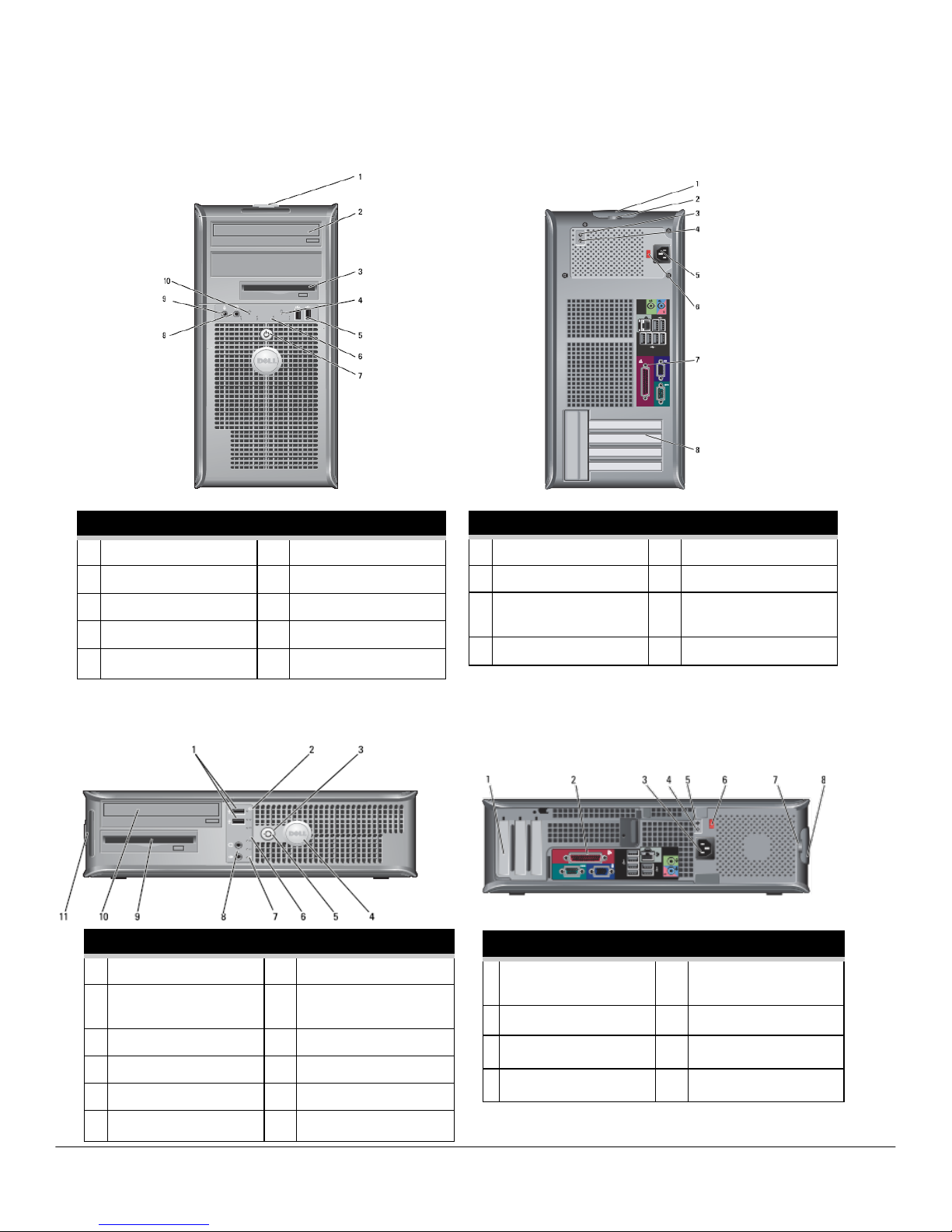
FRONT VIEW
1
Service Tag
6
Diagnostic lights
2
Optical drive
7
power button
3
Floppy drive
8
headphone connector
4
Drive activity light
9
microphone connector
5
USB 2.0 connectors(2)
10
LAN indicator light
BACK VIEW
1 cover-release latch 5 power connector
2 padlock ring 6 voltage selector switch
3 Built in Self Test
(BIST) LED
7 back panel connectors
4 BIST switch 8 card slots
FRONT VIEW
1 USB 2.0 connectors (2) 7 LAN indicator light
2 drive activity light 8 headphone and
microphone connectors
3 power button 9 floppy drive
4 Dell badge 10 optical drive
5 power light 11 Service Tag
6 diagnostic lights
BACK VIEW
1 card slots 5 Built in Self Test
(BIST) LED
2 back panel connectors 6 voltage selection switch
3 power connector 7 padlock ring
4 BIST switch 8 cover-release latch
MI N I T OW ER C O M PU T ER (M T ) V IE W
DE S KT O P C O M PU T ER (D T ) V IE W
Page 5

DELL™ OPTIPLEX™ 360 TECHNICAL GUIDE
5
COMPONENTS
1
speaker connector
(INT_SPKR)
10
password jumper (PSWD)
2
processor connector (CPU)
11
battery socket (BATTERY)
3
processor power connector
(12VPOWER)
12
PCI Express x16 card connector
(SLOT1)
4
memory module connectors
(DIMM_1, DIMM_2)
13
PCI card connectors
(SLOT2 and SLOT3)
5
SATA drive connectors
(SATA0, SATA1)
14
internal buzzer (SPKR)
6
front-panel connector
(FRONTPANEL)
15
serial/ PS/2 connector (PS2/
SER2)
7
power connector (POWER)
16
fan connector (FAN_CPU)
8
SATA drive connectors
(SATA2,)
17
floppy drive connector
(FLOPPY)
9
RTC reset jumper (RTCRST)
MARKETING SYSTEM CONFIGURATIONS
NO T E: Of fe r i ng s m a y va ry b y re g io n . Fo r mo r e i n fo r m at i on re ga r di n g t h e co n f ig u ra t i on of yo ur co mp u t er , c li c k
S t a rt > H el p a n d S up p o r t a n d s e l ec t t h e o pti o n t o v i ew i n fo r m at i o n a bo u t y o u r co m pu t e r.
OP E RA TIN G S YST EM
NO T E: On e of t he fo l lo w in g O p e ra t in g Sy s te m s w il l b e pr e in s ta l l ed .
MT DT
Windows Vista® operating system
Windows Vista® Business SP1, Windows Vista® Home
Basic SP1
Windows XP® operating system (through downgrade right)
Windows® XP Professional SP3
Other
FreeDOS for (n-series all countries except China),
Novell SLED (China only)
OS Media Support
X X
SY S TE M B O AR D
Page 6
DELL™ OPTIPLEX™ 360 TECHNICAL GUIDE
6
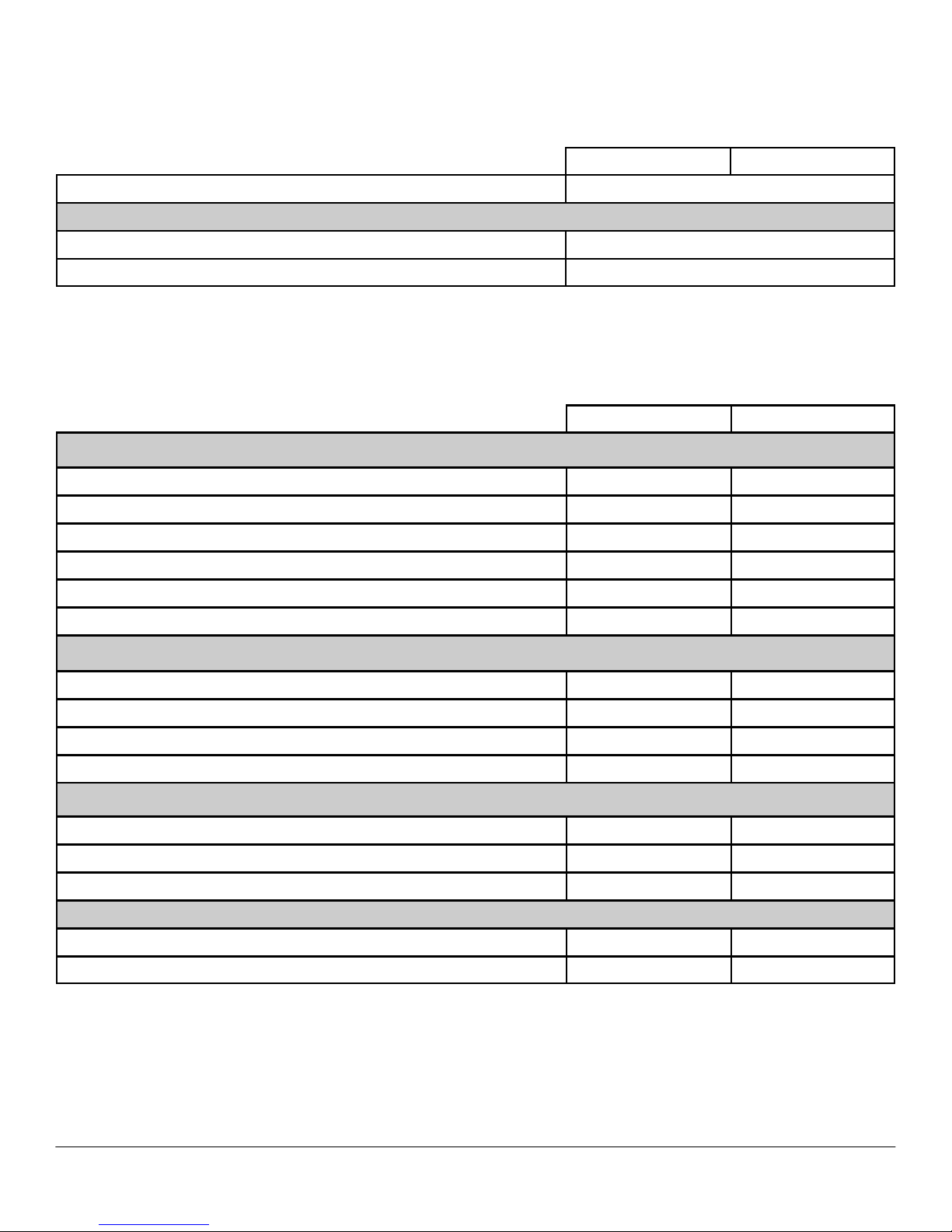
CH I PS E T
PR O CE SSO R
NO T E: Pr o c es s or n um b er s ar e n o t a me a su r e o f p er f o rm a nc e .
MT DT
Chipset
Intel® G31Express Chipset (ICH7)
Non-volatile memory on chipset
BIOS Configuration FWH (firmware hub) 8Mb located at SPI_FLASH on chipset
NIC EEPROM 2Kb located at LOM_FLASH on chipset
Processor (Speed, Cache, FSB)
MT DT
Intel® Core 2 Duo with Intel, Enhanced Intel Speed Step Technology and Execute Disable Bit
Intel Core 2 Duo E8600 Processor (3.33GHz, 6MB L2 cache, 1333MHz FSB) X X
Intel Core 2 Duo E8500 Processor (3.16GHz, 6MB L2 cache, 1333MHz FSB) X X
Intel Core 2 Duo E8400 Processor (3.00GHz, 6MB L2 cache, 1333MHz FSB) X X
Intel Core 2 Duo E7600 Processor (3.06GHz, 3MB L2 cache, 1066MHz FSB) X X
Intel Core 2 Duo E7500 Processor (2.93GHz, 3MB L2 cache, 1066MHz FSB) X X
Intel Core 2 Duo E7400 Processor (2.80GHz, 3MB L2 cache, 1066MHz FSB) X X
Intel® Pentium dual core with Intel, Enhanced Intel Speed Step Technology and Execute Disable Bit
Intel Core 2 Duo E6300 Processor (2.8Hz, 2MB L2 cache, 1066MHz FSB) X X
Intel Core 2 Duo E5400 Processor (2.7GHz, 2MB L2 cache, 800MHz FSB) X X
Intel Core 2 Duo E5300 Processor (2.6Hz, 2MB L2 cache, 800MHz FSB) X X
Intel Core 2 Duo E5200 Processor (2.5GHz, 2MB L2 cache, 800MHz FSB) X X
Intel® Celeron dual core with Intel, Enhanced Intel Speed Step Technology and Execute Disable Bit
Intel Celeron Dual Core E1600 Processor (2.4GHz, 512K L2 cache, 800MHz FSB) X X
Intel Celeron Dual Core E1500 Processor (2.2GHz, 512K L2 cache, 800MHz FSB) X X
Intel Celeron Dual Core E1400 Processor (2.0GHz, 512K L2 cache, 800MHz FSB) X X
Intel® Celeron with Enhanced Execute Disable Bit
Intel Celeron 450 Processor (2.5GHz, 512K L2 cache, 800MHz FSB) X X
Intel Celeron 440 Processor (2.0GHz, 512K L2 cache, 800MHz FSB) X X
Page 7

DELL™ OPTIPLEX™ 360 TECHNICAL GUIDE
7
ME MOR Y
Yo u r c o mp u te r s u pp o r ts a m ax i mu m o f 4 G B o f m em o r y w he n yo u u s e t w o 2 - G B D I MM s .
M e m or y mo du l es sh ou l d be in st a ll e d i n p ai r s of ma tc h e d me mo r y si z e, sp ee d , an d t ec h n ol o g y . If th e me m or y
m o d ul e s a r e no t i n st a l le d i n ma t c he d p a ir s , t he co mp u te r wi ll co n t in u e t o op e r a t e , b u t wi th a s li g ht r e d uc t i on
MT DT
Type: DDR2 Synch DRAM Non-ECC Memory 800MHz speeds
DIMM Slots 2 2
DIMM Capacities
Up to 2GB Up to 2GB
Minimum Memory 1GB 1GB
Maximum Memory with 800MHz speed memory 4GB 4GB
800MHz Memory configurations
4GB1 DDR2 Non-ECC SDRAM, 800MHz, (2 DIMM) X X
2GB DDR2 Non-ECC SDRAM, 800MHz, (1DIMM) X X
2GB DDR2 Non-ECC SDRAM, 800MHz, (2 DIMM) X X
1GB DDR2 Non-ECC SDRAM, 800MHz, (2 DIMM) X X
1GB DDR2 Non-ECC SDRAM, 800MHz, (1 DIMM) X X
MT DT
Bays:
3.5-inch bay (External Floppy) 1 1
5.25-inch bay (External Optical) 2 1
Hard Drives Supported (Internal) 2 1
Optical Drives Supported (External) 2 1
Interface:
SATA (number of connectors) 3 2
Floppy/Diskette 1 1
Hard Drive: Size, type, speed, RPM
320GB1 SATA 7200 RPM HDD X X
250GB SATA 7200 RPM HDD X X
160GB1 SATA 7200 RPM HDD X X
80GB SATA 7200 RPM HDD X X
2nd HDD support: (includes two matching capacity/speed hard drives)
320GB SATA 7200 RPM HDD X (no Raid support)
250GB SATA 7200 RPM HDD X (no RAID support)
160GB SATA 7200 RPM HDD X (no Raid support)
80GB SATA 7200 RPM HDD X (no RAID support)
DR I VE S A N D REM OV A BL E S T OR A GE
1
The total amount of available memory will be less than 4GB. The amount less depends on the actual system configuration. To fully utilize 4GB or
more of memory requires a 64-bit enabled processor and 64-bit operating system.
Page 8
DELL™ OPTIPLEX™ 360 TECHNICAL GUIDE
8
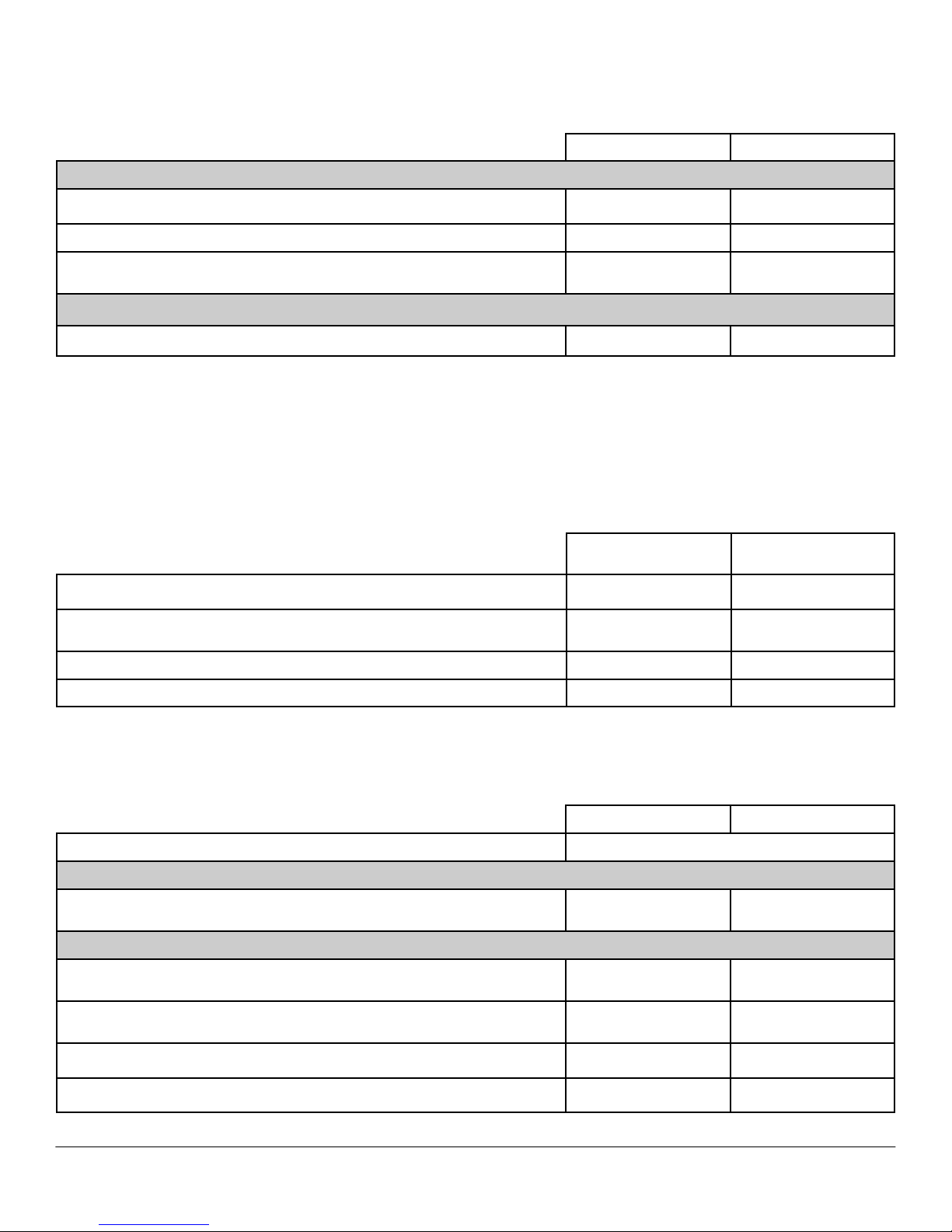
MT DT
Optical Drive: (SFF/USFF requires a slimline optical drive)
DVD +/- RW2 16x SATA 16x SATA
DVD-ROM3 16x SATA 16x SATA
Combo Drive CDRW/DVD
48x/32CDRW/DVD
Combo SATA
48x/32CDRW/DVD
Combo SATA
Floppy Diskette Drive: (SFF requires a slimline floppy drive)
Floppy Drive 1.44MB 1.44MB
DR I VE S A N D REM OV A BL E S T OR A GE
SY S TE M B O AR D C ON N EC T OR S
NO T E: Se e De t ai l e d E ng i ne e r in g Sp e ci fi c a ti o ns fo r ma x im u m c a rd di m en s i on s s u pp o rt .
MT DT
PCI Slot(s): number of 2 FH 2LP or 2FH with riser
PCIe x16 Slot: number of
1 FH
1 LP Native or 1 FH
with Combo Riser
Serial ATA (SATA)
3 2
Serial (native)
1 1
GR A PH I CS / VI D E O C O NTR O L LE R
NO T E: MT s up p or t s f u ll h ei gh t c a r d, D T s up p or t s l ow pr o f il e c a r d o r f u ll he i gh t c a rd wi t h o p ti o na l ri s er .
MT DT
Integrated Intel® Graphics Media Accelerator 3100* Integrated on system board
Enhanced Graphic/Video* Options 1
256MB ATI Radeon™ HD 2400 PRO with DVI and TV Out
Optional full height or
low profile card
Optional low profile
card
Enhanced Graphic/Video Options 1
DVI (Digital) Adapter Card
Optional full height or
low profile card
Optional low profile
card
256MB ATI Radeon™ HD 3450 Graphics Dual VGA and TV Out
Optional full height or
low profile card
Optional low profile
card
256MB ATI Radeon™ HD 3450 Graphics Dual DVI or VGA and TV Out
Optional full height or
low profile card
Optional low profile
card
256MB nVidia GeForce 9300 GE
Optional full height or
low profile card
Optional low profile
card
1
For hard drives, GB means 1 billion bytes and TB equals 1 trillion bytes; actual capacity varies with preloaded material and operating environment
and will be less.
2
Discs burned with this drive may not be compatible with some existing drives and players; using DVD+R media provides maximum compatibility.
3
DVD-ROM drives may have write-capable hardware that has been disabled via firmware modifications.
Page 9

DELL™ OPTIPLEX™ 360 TECHNICAL GUIDE
9
EX T ER NAL PO R TS /C O NN E C T OR S
NO T E: MT su pp o rt s f u ll he ig h t c ar d , D T su pp o r ts lo w pr of i le c a r d o r fu l l he ig h t c ar d w it h op ti o na l r is e r . S FF
su p po r t s l ow pr o fi l e c ar d .
See chassis diagrams section for port/connector locations
MT DT
USB 2.0 8
Serial (native) One rear
PS/2 and Serial (low profile card includes PS/2 dongle) Optional full height or low profile card
Parallel One rear
Network Connector (RJ-45) One rear
Video:
VGA One rear
Audio:
Microphone-in One minijack front
Headphone One minijack front
Stereo line-in One minijack rear
Speakers line out One minijack rear
Risers: (PCI riser card will replace two PCI slots and Combo riser card will replace one PCI and one PCIe slots.)
Combo full height riser with 1 PCI and 1 PCIe connector Optional
Dual full height riser with 2 PCI connectors Optional
CO M MU N IC AT I ON S - NE TW O RK AD A PT ER (N I C)
NO T E: MT s up p or t s f u ll h ei gh t c a r d, D T s up p or t s l ow pr o f il e c a r d o r f u ll he i gh t c a rd wi t h o p ti o na l ri s er .
MT DT
Broadcom (BCM5784M) Gigabit LAN 10/100/1000 (WOL, PXE) Integrated on system board
Broadcom NetXtreme 10/100/1000 PCIe Gigabit Networking Card Optional full height
Optional Low-profile or
full height card with
optional riser
CO M MU N IC AT I ON S – MO DEM
NO T E: MT s up p or t s f u ll h ei gh t c a r d, D T s up p or t s l ow pr o f il e c a r d o r f u ll he i gh t c a rd wi t h o p ti o na l ri s er .
MT DT
V.92 Data/Fax Controllerless Modem Optional full height or low profile card
1
This term does not connote an actual operating speed of 1 Gb/sec. For high speed transmission, connection to a Gigabit Ethernet server and network
infrastructure is required.
Page 10
DELL™ OPTIPLEX™ 360 TECHNICAL GUIDE
10
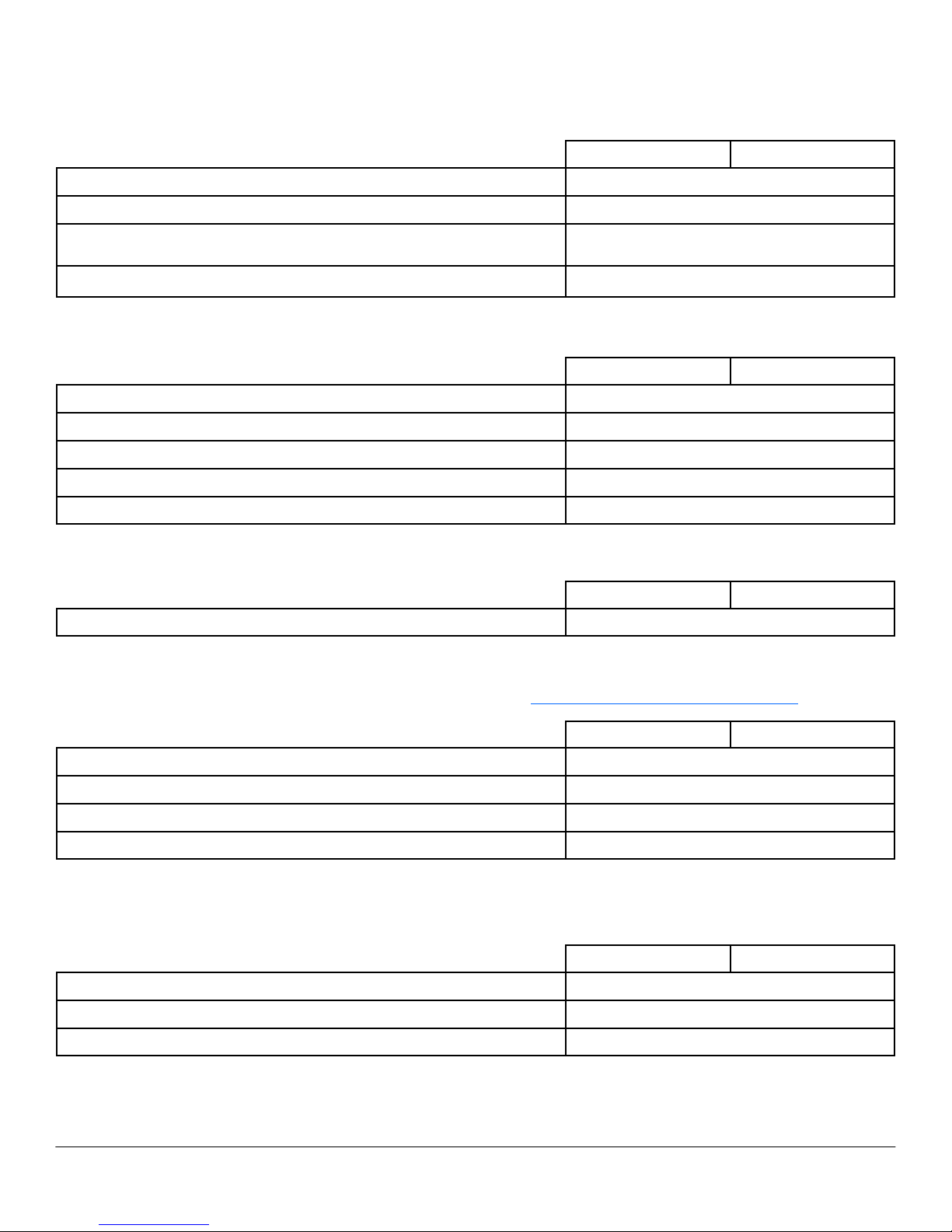
AU D IO AN D S PEA KER S
MT DT
ADI 1984A High Definition Audio Integrated on system board
Internal Chassis Speaker Optional
Dell AX210
(USB powered) Speakers
Optional
Dell A510/AX510PA Speakers Optional
KE Y BO A RD AN D M OU S E
MT DT
Dell USB Entry Keyboard Optional
Dell USB Entry QuietKey Keyboard (after Nov) Optional
Dell USB Entry Mouse Optional
Dell Palmrest Optional
Dell Logo Mouse Pad Optional
SE C UR ITY
MT DT
Chassis lock slot Standard
SE R VI C E A ND SU PP O RT
NO T E: Fo r mo r e d e ta i ls o n De l l S e rv i ce P la n s p l ea se t o g o t o: ww w. de l l .c o m/ s erv i ce / se r v ic e _p l a ns
MT DT
1 Year Next Business Day On-Site Service (1-1-1)
Standard
3 Year Limited Hardware Warranty (3-3-0)
Optional
3 Year Next Business Day On-site Service (3-3-3)
Optional
Gold Tech Support
Optional
SO F TW A RE
MT DT
Dell Client Manager Standard Available via Dell.com
Norton Internet Security 90 Day Trial or optional subscription
McAfee Security Center 90 Day Trial or optional subscription
Page 11
DELL™ OPTIPLEX™ 360 TECHNICAL GUIDE
11
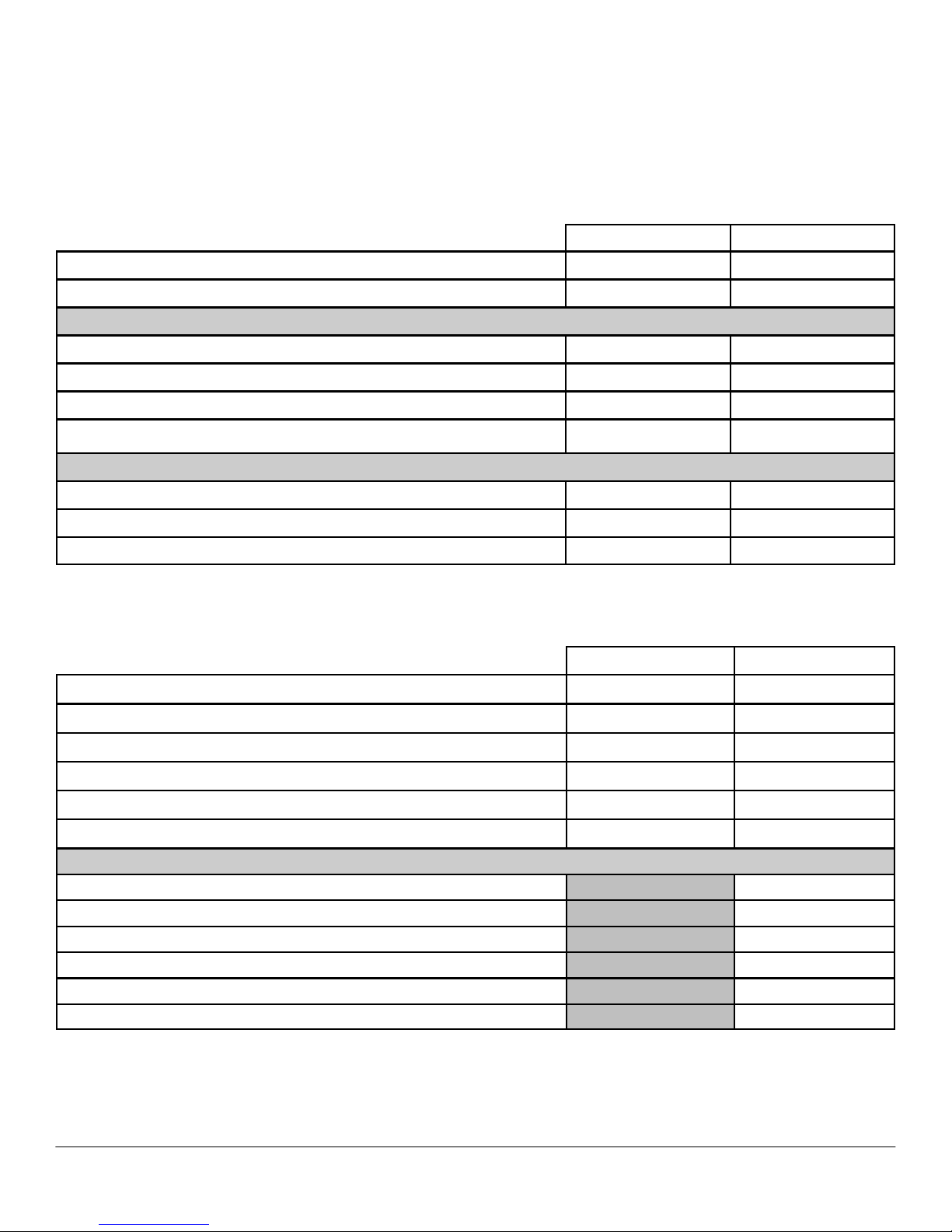
DETAILED ENGINEERING SPECIFICATIONS
SY S TE M D I ME NS I ON S ( P H Y SI C AL )
NO T E: S y s te m W e ig h t * an d S h i pp i ng W e i gh t * is bas e d on a t y p ic a l co nf i gu r a ti o n and m a y v a r y ba s ed on P C
co n fi g u r a t io n . A t y p ic a l co n fi g ur a t io n in c l ud es: in t e gr at e d gr a p hi c s, on e h a r d dr i ve , o n e op ti c a l dr i v e, an d
o n e d i s ke t te dr i ve .
MT DT
Chassis Volume LITERS
33 16
Chassis Weight* POUNDS/KILOGRAMS
27.2 / 12.34 23 / 10.4
Chassis Dimensions: (HxWxD)
Height INCHES/CENTIMETERS 16.3 / 41.4 4.5 / 11.4
Width INCHES/CENTIMETERS 7.3 / 18.5 15.7 / 39.9
Depth INCHES/CENTIMETERS 17.3 / 43.9 13.9 / 35.3
Shipping Weight* POUNDS/KILOGRAMS INCLUDES PACKAGING MATERIALS
19.73kg 12.7kg
Packaging Parameters (HxWxD)
Height INCHES/CENTIMETERS 22.38 / 56.8 20.63 / 52.4
Width INCHES/CENTIMETERS 22.25 / 56.5 20.31 / 51.6
Depth INCHES/CENTIMETERS 14.25 / 36.2 11.75 / 29.8
SY S TE M B O AR D C ON N EC T OR M A XI MUM AL LOW AB L E D I M EN S IO N S
MT DT
PCI Slot(s) Dimensions: (HxL) 2 2
Height INCHES/CENTIMETERS 4.376/11.115 2.731/6.89
Length INCHES/CENTIMETERS 6.6/16.765* 6.6/16.765
PCIe x16 Slot Dimensions: (HxL) 1 1
Height INCHES/CENTIMETERS 4.376/11.115 2.731/6.89
Length INCHES/CENTIMETERS 6.6/16.765* 6.6/16.765
Risers: (PCI riser card will replace two PCI slots and Combo riser card will replace one PCI and one PCIe slots.)
Combo Full Height Riser with 1 PCI and 1 PCIe connector (HxL)
Height INCHES/CENTIMETERS 4.376/11.115
Length INCHES/CENTIMETERS 6.9/17.53**
Dual Full Height Riser with 2 PCI connectors (HxL) 1
Height INCHES/CENTIMETERS 4.376/11.115
Length INCHES/CENTIMETERS 6.9/17.53**
* Card length can be longer than standard Half-Length Card but cannot be a Full-Length Card.
** 6.9/17.53 in/cm is longer than the standard Half-Length Card
Page 12
DELL™ OPTIPLEX™ 360 TECHNICAL GUIDE
12
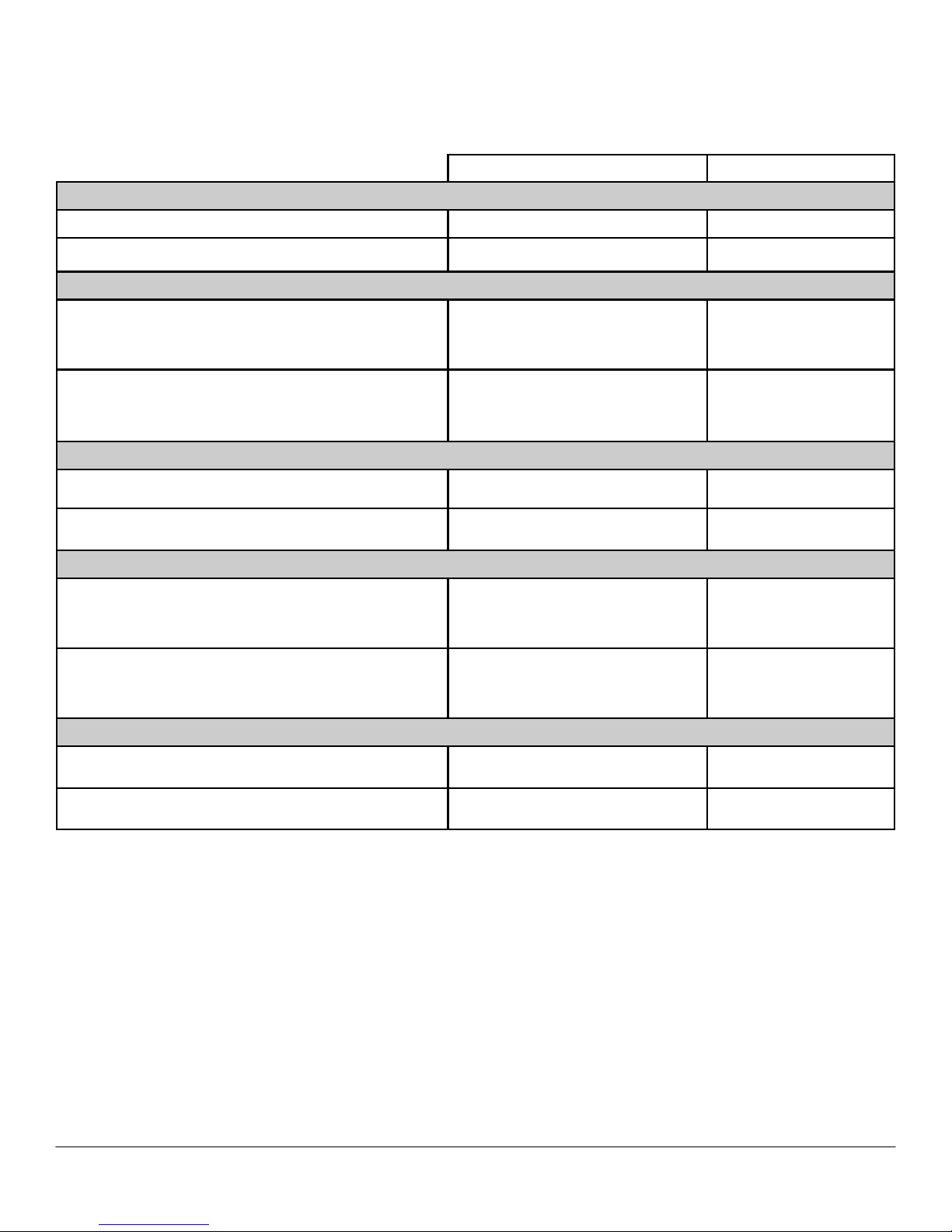
SY S TE M L EVE L E NV I RO N M E NT A L A ND O P ERA TI N G C O N DI T IO N S
MT DT
Temperature
Operating 10° to 35°C (50° to 95°F) 10° to 35°C (50° to 95°F)
Non-Operating -40° to 65°C (–40° to 149°F)
-40° to 65°C (–40° to 149°
F)
Relative Humidity
Operating (Noncondensing)
20 to 80 %*
(*Max Wet bulb temperature= 29 °C)
20 to 80 %*
(*Max Wet bulb
temperature= 29 °C)
Non-Operating (Noncondensing)
5 to 95 %+
(+Max Wet bulb temperature= 38 °C)
5 to 95 %+
(+Max Wet bulb
temperature= 38 °C)
Maximum vibration
Operating 5 to 350 Hz at 0.0002 G2/Hz
0.25 G at 3 to 200 Hz at
0.5 octave/min
Non-Operating 5 to 500 Hz at 0.001 to 0.01 G2/Hz
0.5 G at 3 to 200 Hz at 1
octave/min
Maximum Shock
Operating
40 G +/- 5% with pulse duration of 2
msec +/- 10% (equivalent to 51 cm/
sec[20 in/sec])
40 G +/- 5% with pulse
duration of 2 msec +/- 10%
(equivalent to 51 cm/sec
[20 in/sec])
Non-Operating
105 G +/- 5% with pulse duration of 2
msec +/- 10% (equivalent to 127 cm/
sec[50 in/sec])
105 G +/- 5% with pulse
duration of 2 msec +/- 10%
(equivalent to 127 cm/sec
[50 in/sec])
Maximum Altitude
Operating –15.2 to 3048 m (–50 to 10,000 ft)
–15.2 to 3048 m (–50 to
10,000 ft)
Non-Operating –15.2 to 10,668 m (–50 to 35,000 ft)
–15.2 to 10,668 m (–50 to
35,000 ft)
Page 13
DELL™ OPTIPLEX™ 360 TECHNICAL GUIDE
13
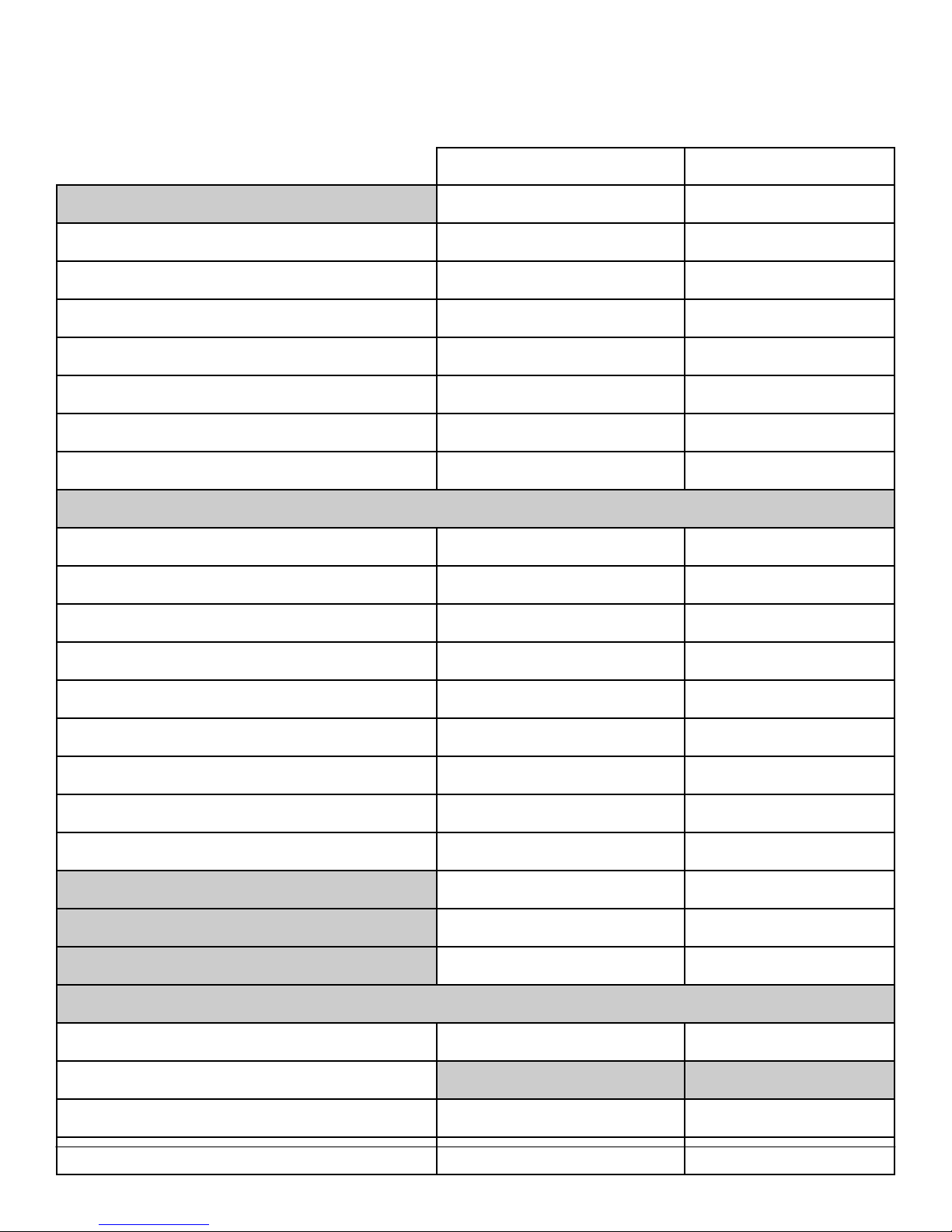
PO W ER
Non EPA Power
MT DT
Power Supply Wattage 255W 235W
AC input Voltage Range 90~135Vac,180~264Vac (PFC)
90~135Vac,180~264Vac
(PFC)
AC input current 9A/3.5A(PFC), 6.5/3.5A(PFC)
AC input Frequency 47~63Hz 47~63Hz
AC holdup time >16ms >16ms
Minimum Efficiency (Active PFC, Energy Star Compliant) NA NA
Minimum Efficiency (Active PFC) NA NA
Minimum Efficiency (PFC) 65% 65%
DC parameters
+3.3v output 11A 9A
+5.0v output 17A 15A
+12.0v output (add as many 12v rails as needed) 16A 14A
+5.0v auxiliary output 4A 4A
-12.0v output 0.2A 0.2A
Max total power 255W 235W
Max combined +3.3v / +5.0v power 121W 105W
Max combined 12.0v power (note: only if more than one
12v rail)
NA NA.
BTUs/h (based on PSU max wattage) 870BTUs/h 801BTUs/h
3.3v CMOS battery (type and estimated battery life)
CR2032, 5years CR2032, 5years
RTC accuracy (time of day)
4 second/24 hours 4 second/24hours
Power Supply Fan (size and type)
80mm 92mm
Compliance: (add all that apply)
Energy star compliant No No
Blue Angel Compliant
1W requirement Yes Yes
UL/cUL, CE, CCC, Nemko, TUV, BSMI Yes Yes
Page 14

DELL™ OPTIPLEX™ 360 TECHNICAL GUIDE
14
EPA Power
MT DT
Power Supply Wattage
255W 255W
AC input Voltage Range
90~264Vac 90~264Vac
AC input current
3.6A/1.8A, 4/2A
AC input Frequency
47~63Hz 47~63Hz
AC holdup time
>16ms >16ms
Minimum Efficiency (Active PFC)
83% 83%
DC parameters
+3.3v output
8A 5A
+5.0v output
15A 15A
+12.0v1 output
13A 18A
+12.0v2 output
7A NA
+5.0v auxiliary output
4A 4A
-12.0v output
0.5A 0.5A
Max total power
255W 255W
Max combined +3.3v / +5.0v power
80W 91.5W
Max combined 12.0v power (note: only if more than one 12v rail)
220W NA.
BTUs/h (based on PSU max wattage) 870BTUs/h
870BTUs/h
Power Supply Fan (size and type)
80mm 92mm
Compliance: (add all that apply)
Energy Star compliant
Yes Yes
Blue Angel Compliant
Yes Yes
1W requirement
Yes Yes
UL/cUL, CE, CCC, Nemko, TUV, BSMI
Yes Yes
Page 15
DELL™ OPTIPLEX™ 360 TECHNICAL GUIDE
15
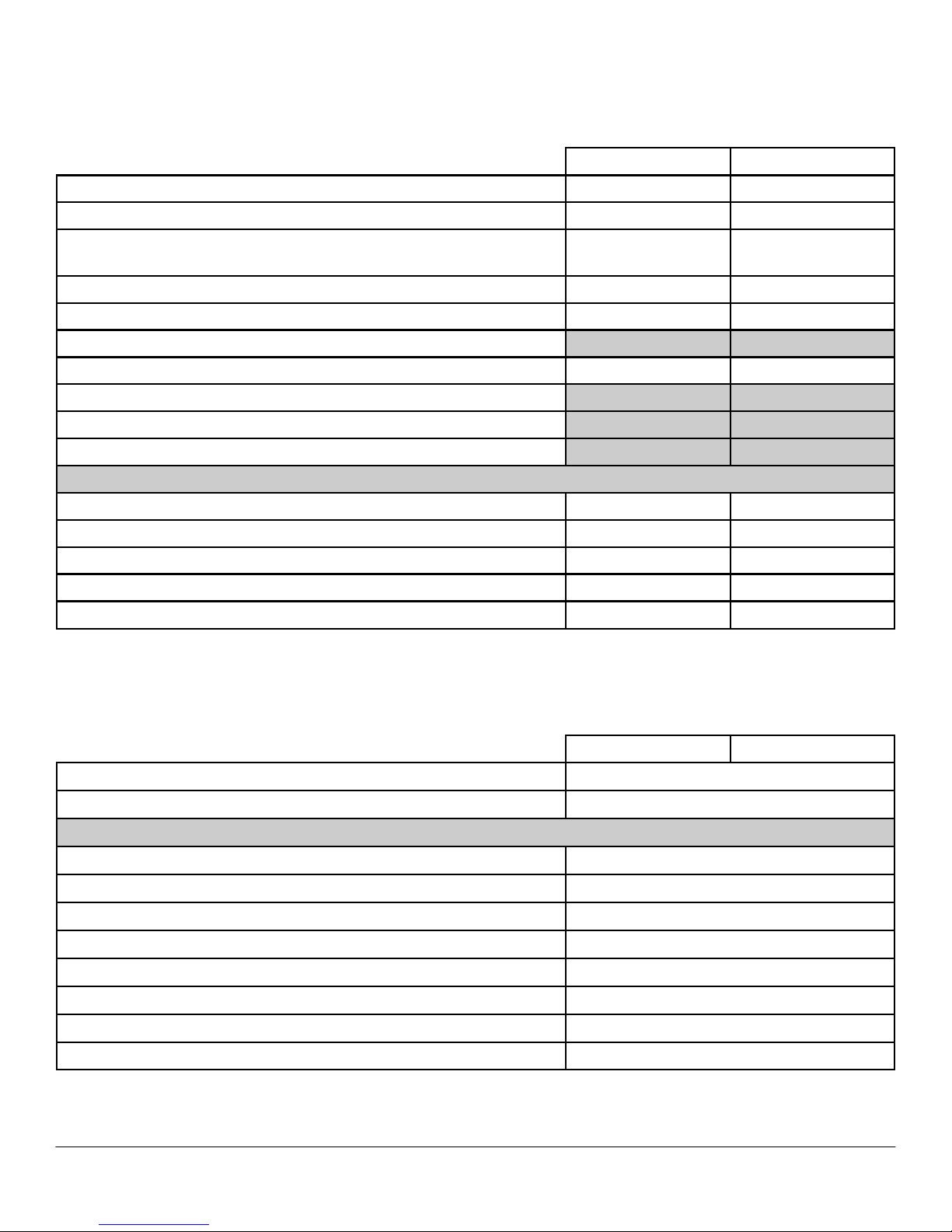
AU D IO
Integrated ADI 1984A High Definition Audio
MT DT
High Definition Stereo support Yes Yes
Number of channels 2 2
Number of Bits / Audio resolution
16,20 and 24-bit reso-
lution
16,20 and 24-bit reso-
lution
Sampling rate (recording/playback) Up to 192KHz Up to 192KHz
Signal to Noise Ratio 96dB 96dB
Wavetable voices
Analog Audio Yes Yes
Dolby Digital
THX
Digital out (S/PDIF)
Audio Jack Impedance
Microphone 1K~2Kohm 1K~2Kohm
Line-In >10Kohm >10Kohm
Line-Out >10Kohm >10Kohm
Headphone 16~500ohm 16~500ohm
Internal Speaker Power Rating
2W 2W
CO M MU N IC AT I ON S - NE TW O RK AD A PT ER (N I C)
NO T E: MT su pp o rt s f u ll he ig h t c ar d , D T su pp o r ts lo w pr of i le c a r d o r fu l l he ig h t c ar d w it h op ti o na l r is e r . S FF
su p po r t s l ow pr o fi l e c ar d .
Integrated Broadcom5784M Gigabit1 LAN
MT DT
Connector Type
RJ-45
Data Rates supported
10/100/1000M
Controller Details
Controller bus architecture (example PCIe 1.0a x1) PCIe V1.1 x 1
Integrated memory Yes (buffer memory)
Data transfer mode (example Bus-Master DMA) DMA
Power consumption (full operation per data rate connection speed) 752 mW
Power consumption (standby operation) 64 mW
IEEE standards compliance (example 802.1P)
IEEE802.3, IEEE802.3u, IEEE802.3x
Hardware Certifications (example FCC, B, GS mark…)
IEEE
Boot ROM Support
Yes
1
This term does not connote an actual operating speed of 1 Gb/sec. For high speed transmission, connection to a
Gigabit Ethernet server and network infrastructure is required.
Page 16
DELL™ OPTIPLEX™ 360 TECHNICAL GUIDE
16
CO M MU N IC AT I ON S - NE TW O RK AD A PT ER (N I C) (C ONT .)
MT DT
Network Transfer Mode (example Full Duplex, Half Duplex)
Network Transfer Rate (example 10BASE-T (half-duplex) 10 Mbps
10BASE-T (full-duplex) 20 Mbps
100BASE-TX (half-duplex) 100 Mbps
100BASE-TX (full-duplex) 200 Mbps
1000BASE-T (full-duplex) 2000 Mbps
10BASE-T (half-duplex) 10 Mbps
10BASE-T (full-duplex) 20 Mbps
100BASE-TX (half-duplex) 100 Mbps
100BASE-TX (full-duplex) 200 Mbps
1000BASE-T (full-duplex) 2000 Mbps
Environmental
Operating temperature 0 to 125°C
Operating humidity NA
Operating System Driver Support
Windows XP(32bit), Windows Vista (32bit)
Manageability (examples WOL, PXE..)
WoL, PXE
Management Capabilities Alerting (examples ASF 2.0 AMT…)
CO M MU N IC AT I ON S – MO DEM
NO T E: MT su pp o rt s f u ll he ig h t c ar d , D T su pp o r ts lo w pr of i le c a r d o r fu l l he ig h t c ar d w it h op ti o na l r is e r . S FF
su p po r t s l ow pr o fi l e c ar d .
V.92 DATA/FAX CONTROLLERLESS MODEM
MT DT
Bus
PCI
Connector
RJ-11
Data Transmission
PCM - Pulse Coded Modulation (V.92/V.90)
TCM - Trellis Coded Modulation (V.90/V.34/V.32
bis/V.32)
Data Speeds
56kbps receive, 48kbps transmit
Data Standards
ITU V.92/V.90, V.34/V.32 bis/V.32
Fax Speeds
14.4kbps
Fax Mode Capabilities
2-wire, half-duplex, synchronous
Error Correction and Data Compression
V.44, V.42, V.42bis, MNP 2-4, MNP 5
Power Management
WOR (wake on ring) capable
Upgradeability
Driver upgradeable
Video
V.80 Synchronous Access Mode (SAM) can be
supported by software applications (not driver)
Operating Temperature
0~50 degree C
Operating Humidity
45 degree C 90% max
Operating System Support
Vista 32, Windows XP 32
Operating System Driver Support
Vista 32, Windows XP 32
Page 17
DELL™ OPTIPLEX™ 360 TECHNICAL GUIDE
17
CO M MU N IC AT I ON S – MO DEM ( CON T. )
MT DT
Power Requirements
+3.0V~+3.6V, 116.6mW max
Chipset
Conexant SmartHSFs/LF (CX11256 & CX20493)
Dimensions of full height card INCHES/CENTIMETERS (L X H)
L: 5.25'/13.325cm
H: 4.73'/12.002cm
Dimensions of low profile card INCHES/CENTIMETERS (L X H)
L: 5.26'/13.366cm
H: 3.12'/7.923cm
GR A PH I CS / VI D E O C O NTR O L LE R
NO T E: MT su pp o rt s f u ll he ig h t c ar d , D T su pp o r ts lo w pr of i le c a r d o r fu l l he ig h t c ar d w it h op ti o na l r is e r . S FF
su p po r t s l ow pr o fi l e c ar d .
INTEGRATED INTEL GRAPHICS MEDIA ACCELERATOR 3100*
MT DT
Bus Type (example integrated or PCIe x16) Integrated
GPU core clock 400 MHz
Frame Buffer Memory (onboard and shared) Size and Speed Up to 256MB of shared system memory
Maximum power consumption 9.0 W
Overlay Planes Yes
Maximum Color Depth 32 bit
Maximum Vertical Refresh Rate 85 Hz
Multiple Display Support No
Operating Systems Graphics/ Video API Support OpenGL 1.4/DirectX 9.0C
Supported Resolutions and Max Refresh Rates (Hz) (Note: Analog and/or
digital)
Up to 2048x1536 @ 75 Hz
Supports flat panels up to 1920x1200 @ 60 Hz or
digital CRT/HDTV at 1400x1050 @ 85 Hz
External connectors VGA
Dimensions INCHES/CENTIMETERS (L X H) N/A
Environmental Operating Conditions (Non-Condensing):
Operating Temperature Range 0° to 106° C (32° to 223° F)
Relative Humidity Range 20% to 80% (non-condensing)
Altitude Range -15.2 to 3048 m (–50 to 10,000 ft)
Page 18
DELL™ OPTIPLEX™ 360 TECHNICAL GUIDE
18
256MB ATI RADEON™ HD 2400 PRO WIT H DVI AND TV OUT*
MT DT
Bus Type (example integrated or PCIe x16)
PCIEx16
GPU core clock
400MHz
Frame Buffer Memory (onboard and shared) Size and Speed
256MB 500Mhz
Maximum power consumption
21W
Overlay Planes
Yes
Maximum Color Depth
32-bit
Maximum Vertical Refresh Rate
85Hz
Multiple Display Support
No
Operating Systems Graphics/ Video API Support
D3D and Open GL
Supported Resolutions and Max Refresh Rates (Hz) (Note: Analog and/or
digital)
Max : 1920x1440/32bpp @ 75Hz
Min : 640x480/8bpp @ 60Hz
External connectors
DVI-D and S-video
Dimensions of full height card INCHES/CENTIMETERS (L X H)
167.64mm x 120mm 167.64mm x 120mm
Dimensions of low profile card INCHES/CENTIMETERS (L X H)
167.64mm x 85mm
Environmental Operating Conditions (Non-Condensing):
Operating Temperature Range 10°-50° C
Relative Humidity Range 5-90% RH
Altitude Range 0-20,000 ft.
GR A PH I CS / VI D E O C O NTR O L LE R ( C ON T .)
256MB AMD RADEON™ HD 3450 GRAPHICS
DUAL DVI OR VGA AND TV OUT
MT DT
Bus Type (example integrated or PCIe x16)
PCIEx16
GPU core clock
600Mhz
Frame Buffer Memory (onboard and shared) Size and Speed
500Mhz
Maximum power consumption
22W
Overlay Planes
Yes
Maximum Color Depth
32-bit
Maximum Vertical Refresh Rate
85Hz
Multiple Display Support
Yes
Operating Systems Graphics/ Video API Support
D3D and OpenGL
Supported Resolutions and Max Refresh Rates (Hz) (Note: Analog and/or
digital)
Max : 1920x1440/32bpp @ 75Hz
Min : 640x480/8bpp @ 60Hz
External connectors
DMS-59 and S-video
Dimensions of full height card INCHES/CENTIMETERS (L X H)
167.64mm x 120mm 167.64mm x 120mm
Dimensions of low profile card inches/centimeters (L x H)
167.64mm x 85mm
Page 19
DELL™ OPTIPLEX™ 360 TECHNICAL GUIDE
19
256MB nVidia GeForce 9300 GE MT DT
Bus Type (example integrated or PCIe x16)
PCIEx16
GPU core clock
540Mhz
Frame Buffer Memory (onboard and shared) Size and Speed
500Mhz
Maximum power consumption
25W
Overlay Planes
Yes
Overlay Planes
Yes
Maximum Color Depth
32-bit
Maximum Vertical Refresh Rate
85Hz
Multiple Display Support
Yes
Operating Systems Graphics/ Video API Support
D3D and OpenGL
Supported Resolutions and Max Refresh Rates (Hz) (Note: Analog and/or digital)
Max : 1920x1440/32bpp @ 75Hz
External connectors
DMS-591 and S-video
Dimensions of full height card inches/centimeters (L x H)
167.64mm x 120mm 167.64mm x 120mm
Dimensions of low profile card inches/centimeters (L x H)
167.64mm x 85mm
Environmental Operating Conditions (Non-Condensing):
Operating Temperature Range 10°-50° C
Relative Humidity Range 5-90% RH
256MB AMD RADEON™ HD 3450 GRAPHICS
DUAL DVI OR VGA AND TV OUT (CONT.)
MT DT
Environmental Operating Conditions (Non-Condensing):
Operating Temperature Range 10°-50° C
Relative Humidity Range 5-90% RH
Altitude Range 0-20,000 ft.
* Significant of system memory may be allocated to support integrated graphics, depending on operating system, system memory size and other
factors.
* Populating a up-graphics card in the x16 slot disabled onboard video.
Page 20
DELL™ OPTIPLEX™ 360 TECHNICAL GUIDE
20
160GB SATA 7200 RPM HDD
MT DT
Capacity* (bytes) 160GB
Dimensions inches/centimeters (W x H x D) 4/10.16 x 1.028/2.61 x 5.787/14.7
Interface type and Maximum speed SATA, 3Gbps
Internal buffer size (range) 2MB, 8MB, 16MB
Seek Time (RD/WR) 8.9/10.9ms
Rotational Speed 7200Rpm
Logical Blocks 512-byte
Power Source
DC Power Requirements
+5V ± 5%,+12V ± 10%
DC Current (Peak) 0.86A(5V), 2.0A(12V)
Environmental Operating Conditions (Non-Condensing):
Operating Temperature Range 5° to 55°C
Relative Humidity Range 5 to 90%
Maximum Wet Bulb Temperature 37.7°C
Altitude Range -200~10000ft.
Environmental Non-Operating Conditions (Non-Condensing):
Operating Temperature Range -40° to 65°C
Relative Humidity Range 5 to 95%
Maximum Wet Bulb Temperature 40°C
Altitude Range -200~40000ft.
HA R D D RI VES
80GB SATA 7200 RPM HDD
MT DT
Capacity* (bytes) 80GB
Dimensions inches/centimeters (W x H x D) 4/10.16 x 1.028/2.61 x 5.787/14.7
Interface type and Maximum speed SATA, 3Gbps
Internal buffer size (range) 2MB, 8MB
Seek Time (RD/WR) 8.9/10.9ms
Rotational Speed 7200Rpm
Logical Blocks 512-byte
Power Source
DC Power Requirements
+5V ± 5%,+12V ± 10%
DC Current (Peak) 1.6A(5V), 1.9A(12V)
Environmental Operating Conditions (Non-Condensing):
Operating Temperature Range 0° to 60°C
Relative Humidity Range 8 to 90%
Maximum Wet Bulb Temperature 37.7°C
Altitude Range -200~10000ft.
Environmental Non-Operating Conditions (Non-Condensing):
Operating Temperature Range -40° to 65°C
Relative Humidity Range 5 to 95%
Maximum Wet Bulb Temperature 40°C
Altitude Range -200~40000ft.
Page 21
DELL™ OPTIPLEX™ 360 TECHNICAL GUIDE
21
250GB SATA 7200 RPM HDD
MT DT
Capacity (bytes)
250,059,350,016
Dimensions inches (W x D x H)
5.87 x 4 x 1
Interface type and Maximum speed
Up to 3Gb/s
Internal buffer size
8 MB
Average Seek Time
8.5 ms
Rotational Speed
7200 rpm
Logical Blocks
488,397,168
Power Source
DC Power (Max) Idle 7.0W, Active 10.0W
DC Current 5V (.8A) and 12V (1.8A)
Environmental Operating Conditions (Non-Condensing):
Temperature Range 50C to 600C
Relative Humidity Range 20% to 80% non-condensing
Maximum Wet Bulb Temperature 290C
Altitude Range -50 ft to 10000 ft
Environmental Non-Operating Conditions (Non-Condensing):
Temperature Range -400C to 650C
Relative Humidity Range 10% to 90% non-condensing
Maximum Wet Bulb Temperature 380C
Altitude Range -50 ft to 35000 ft
320GB SATA 7200 RPM HDD
MT DT
Capacity (bytes)
320,072,933,376
Dimensions inches (W x D x H)
5.87 x 4 x 1
Interface type and Maximum speed
Up to 3Gb/s
Internal buffer size
16 MB
Average Seek Time
8.5 ms
Rotational Speed
7200 rpm
Logical Blocks
625,142,448
Power Source
DC Power (Max) Idle 7.0W, Active 10.0W
DC Current 5V (.8A) and 12V (1.8A)
Environmental Operating Conditions (Non-Condensing):
Temperature Range 50C to 600C
Relative Humidity Range 20% to 80% non-condensing
Maximum Wet Bulb Temperature 290C
Altitude Range -50 ft to 10000 ft
Environmental Non-Operating Conditions (Non-Condensing):
Temperature Range -400C to 650C
Relative Humidity Range 10% to 90% non-condensing
Maximum Wet Bulb Temperature 380C
Altitude Range -50 ft to 35000 ft
Page 22
DELL™ OPTIPLEX™ 360 TECHNICAL GUIDE
22
OP T IC A L D RI V ES
DVD +/- RW1
MT DT
External Dimensions inches/centimeters (Without Bezel – W x H x D)
148.2 x 42 x 170mm (± 0.5mm)
Weight (max) pounds/kilograms
0.8kg
Interface type and speed
SATA, 1.5Gbps
Disc Capacity
8cm and 12cm
Internal buffer size
Supplier Dependant
Access Times (typical)
Supplier Dependant
Maximum Data Transfer Rates
Writes
16x DVD/48x CD
Reads
16x DVD/48x CD
Power Source
DC Power Requirements
12V, 5V
DC Current
1200mA (12V)/ 900mA (5V)
Environmental Operating Conditions (Non-Condensing):
Operating Temperature Range
5° to 50°C
Relative Humidity Range
20 to 80% RH
Maximum Wet Bulb Temperature
29°C
Altitude Range
-200 to 3048m
Environmental Non-Operating Conditions (Non-Condensing):
Operating Temperature Range
-40° to 65°C
Relative Humidity Range
15 to 90% RH
Maximum Wet Bulb Temperature
38°C
Altitude Range
-200 to 10600m
1
Discs burned with this drive may not be compatible with some existing drives and players; using DVD+R media provides maximum compatibility.
Page 23
DELL™ OPTIPLEX™ 360 TECHNICAL GUIDE
23
DVD-ROM1
MT DT
External Dimensions inches/centimeters (Without Bezel – W x H x D)
148.2mm(6in)/42mm (2in)/ 190.5 (max)
Weight (max) pounds/kilograms
750g
Interface type and speed
SATA 1.5Gbit/s
Disc Capacity
Standard
Internal buffer size
supplier dependent
Access Times (typical)
supplier dependent
Maximum Data Transfer Rates
Writes N/A
Reads
16x DVD/48x CD
Power Source
DC Power Requirements
12V, 5V
DC Current (Peak)
1200mA (12V)/ 900mA (5V)
Environmental Operating Conditions (Non-Condensing):
Operating Temperature Range
5C to 50C
Relative Humidity Range
20% to 80% RH
Maximum Wet Bulb Temperature
29C
Altitude Range
-200 to 3048m
Environmental Non-Operating Conditions (Non-Condensing):
Operating Temperature Range
-40C to 65C
Relative Humidity Range
5% to 95% RH
Maximum Wet Bulb Temperature
38C
Altitude Range
-200 to 10600m
OP T IC A L D RI V ES ( C ONT .)
COMBO DRIVE CD-RW
MT DT
External Dimensions inches/centimeters (Without Bezel – W x H x D)
148.2mm(6in)/42mm (2in)/ 190.5 (max)
Weight (max) pounds/kilograms
750g
Interface type and speed
SATA 1.5Gbit/s
Disc Capacity
Standard
Internal buffer size
supplier dependent
Access Times (typical)
supplier dependent
Maximum Data Transfer Rates
Writes
48x CD
Reads
16x DVD/48x CD
1
DVD-ROM drives may have write-capable hardware that has been disabled via firmware modifications.
Page 24
DELL™ OPTIPLEX™ 360 TECHNICAL GUIDE
24
OP T IC A L D RI V ES ( C ONT .)
COMBO DRIVE CD-RW
MT DT
Power Source
DC Power Requirements
12V, 5V
DC Current (Peak)
1200mA (12V)/ 900mA (5V)
Environmental Operating Conditions (Non-Condensing):
Operating Temperature Range
5C to 50C
Relative Humidity Range
20% to 80% RH
Maximum Wet Bulb Temperature
29C
Altitude Range
-200 to 3048m
Environmental Non-Operating Conditions (Non-Condensing):
Operating Temperature Range
-40C to 65C
Relative Humidity Range
5% to 95% RH
Maximum Wet Bulb Temperature
38C
Altitude Range
-200 to 10600m
BIOS Factory Defaults (All Chassis’s)
BIOS address
F0000h
USB front panel
On
Low power mode
Off
BIOS chip
(NVRAM)
8Mb
Module bay
Password
Disabled
Setup Option
Default Factory Value
Serial #1 Port
Auto
POST hot keys
Setup& Boot Menu
Parallel Port mode
PS/2
Keyboard Num
lock
Report
SATA drives
On
Parallel Port address
378
Keyboard error
report
On
Floppy
Internal or
USB if no internal
Wake on LAN
Off
Onboard Video
Auto
Limit CPUID
Off
EIST
Off
HD Acoustic mode
Bypass
ASF Settings
Off
Onboard Audio
On
Onboard Video
buffer
HD Password
Disabled
Onboard Modem
On
Primary Video
Auto
Hyper-threading
On
Flex bay
Suspend mode
S3
Auto Power on
Off
Execute Disable
On
Chassis intrusion
Auto Power time
12:00am
Onboard NIC
On (without PXE)
TPM
SERR
On
PS2 Mouse
On
Smart drive error
report
Off
Fast Boot
On
Onboard USB
On
A/C recovery
Off
BI O S D EF A UL TS
More details for optical drives can be found at: http://support.dell.com/support/systemsinfo/documentation.aspx?c=us&l=en&s=gen&~cat=7
Page 25
DELL™ OPTIPLEX™ 360 TECHNICAL GUIDE
25
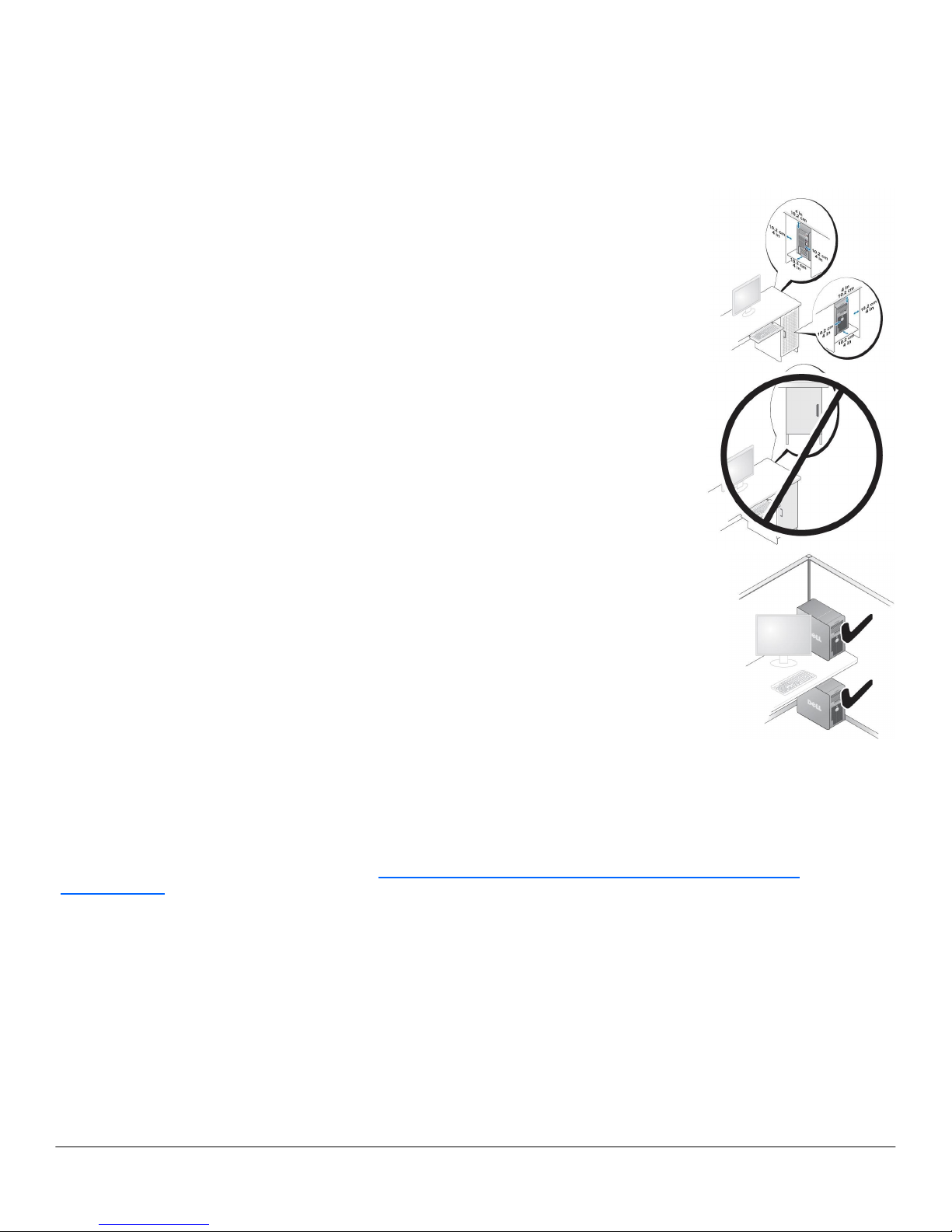
CH A SS IS E NC LOS UR E & VE N TI L AT I ON RE QU I RE M E NTS
ENCLOSURE VENTILATION
If your enclosure has doors, they need to be of a type that allows at least 30% airflow through
the enclosure (front and back).
ENCLOSURE MINIMUM CLEARANCE
Leave a 10.2 cm (4 in.) minimum clearance on all vented sides of the computer to permit the
airflow required for proper ventilation.
RECOMMENDED ENCLOSURE
Do not install your computer in an enclosure that does not allow airflow. This restricts the
airflow and impacts your computer’s performance, possibly causing it to overheat.
OPEN DESK MINIMUM CLEARANCE
If your computer is installed in a corner, on a desk, or under a desk, leave at least 5.1 cm (2 in.)
clearance from the back of the computer to the wall to permit the airflow required for proper
ventilation.
REG ULA TORY CO MPL IAN CE AN D EN VIR ONM ENT AL
Product related conformity assessment and regulatory authorizations including Product Safety, Electromagnetic Compatibility (EMC),
Ergonomics, and Communication Devices relevant to this product may be viewed at www.dell.com/regulatory_compliance. The
Regulatory Datasheet for this product is located at: http://www.dell.com/content/topics/global.aspx/corp/environment/en/
prod_datasheets
Details of Dell's environmental stewardship program to conserve product energy consumption, reduce or eliminate materials for
disposal, prolong product life span and provide effective and convenient equipment recovery solutions may be viewed at
www.dell.com/environment. Product related conformity assessment, regulatory authorizations, and information encompassing
Environmental, Energy Consumption, Noise Emissions, Product Materials Information, Packaging, Batteries, and Recycling relevant
to this product may be viewed by clicking the Design for Environment link on the webpage.
Page 26
DELL™ OPTIPLEX™ 360 TECHNICAL GUIDE
26
ACO UST IC NOISE EMIS SIO N I NFO RMAT ION
Component Typical Configuration High-end Configuration
CPU E2220 E7300
Memory 1 GB DDRII 667MHz x1 1 GB DDRII 800MHz x2
HDD (#, capacity) 80 GB 7200 RPM SATA x1 160 GB 7200 RPM SATA x2
RMSD CDRW/DVD Combo x1 DVDRW/DVD dual x1
Graphics Adapter Integrated GMA3100 Integrated GMA3100
OPTIPLEX 360 MT
Operating Mode
Typical Configuration
Declared Sound Power
(L
WAd
)
High-end Configuration
Declared Sound Power
(L
WAd
)
Idle
3.8 3.8
HDD Operating
3.8 3.8
ODD Operating
5.2 5.3
90% CPU
3.8 3.7
The Declared Noise Emission in accordance with ISO 9296 for the Dell Optiplex 360 MT is as follows:
(all values L
WAd
expressed in bels; 1 bel=10 decibels, re 10
-12
Watts)
The Declared A-weighted Sound Pressure Level in decibels (re 2x10⁻⁵ Pa), at Operator, Bystander, and Desk Side Positions are
measured in accordance with ISO 7779 7.6.1, 7.6.2, and C.15.2 and declared in accordance with ISO 9296 for this product is as
follows1:
Operating Mode
Typical Configuration Declared Sound
Pressure (LpA)
High-end Configuration Declared Sound
Pressure (LpA)
Table-Top Floor-Standing Table-Top Floor- Standing
Operator Po-
sition
(LpA)
By-
stander
Position
(LpA)
Operator Po-
sition
(LpA)
By-
stander
Position
(LpA)
Operator
Position
(LpA)
By-
stander
Position
(LpA)
Operator
Position
(LpA)
By-
stander
Position
(LpA)
Idle 27.1 22.3 23.1 21.6 29.0 23.1 22.8 20.7
HDD Operating 27.2 22.4 22.2 21.7 28.5 23.1 22.9 20.8
ODD Operating 44.2 39.0 35.7 33.1 44.6 38.2 36.8 34.5
90% CPU 27.3 22.6 22.2 21.9 27.5 22.5 22.3 21.0
All tests are conducted according to ISO 7779 and declared according to ISO 9296 except 90% CPU. For this mode, the system CPU was stressed at
90% utilization with no other peripheral device actively seeking. This test mode is not specified in ISO 7779, but was measured using the same
microphone distances and measurement techniques defined for the other reported operating modes.
Declared Sound Power rounded to nearest tenth of a bel per ISO 9296 section 4.4.2
Page 27
DELL™ OPTIPLEX™ 360 TECHNICAL GUIDE
27
ACO UST IC NOISE EMIS SIO N I NFO RMAT ION (C ONT .)
Component Typical Configuration High-end Configuration
CPU E2220 E4700
Memory 1 GB DDRII 667MHz x2 1 GB DDRII 800MHz x2
HDD (#, capacity) 80 GB 7200 RPM SATA x1 160 GB 7200 RPM SATA x1
RMSD CDRW/DVD Combo x1 DVDRW/DVD dual x1
Graphics Adapter Integrated GMA3100 Integrated GMA3100
OPTIPLEX 360 DT
Operating Mode
Typical Configuration
Declared Sound Power
(L
WAd
)
High-end Configuration
Declared Sound Power
(L
WAd
)
Idle
3.8 3.9
HDD Operating
3.8 3.9
ODD Operating
5.2 5.2
90% CPU
4.1 4.0
The Declared Noise Emission in accordance with ISO 9296 for the Dell Optiplex 360 MT is as follows:
(all values L
WAd
expressed in bels; 1 bel=10 decibels, re 10
-12
Watts)
The Declared A-weighted Sound Pressure Level in decibels (re 2x10⁻⁵ Pa), at Operator, Bystander, and Desk Side Positions are
measured in accordance with ISO 7779 7.6.1, 7.6.2, and C.15.2 and declared in accordance with ISO 9296 for this product is as
follows1:
Operating Mode
Typical Configuration Declared Sound
Pressure (LpA)
High-end Configuration Declared Sound
Pressure (LpA)
Table-Top Floor-Standing Table-Top Floor- Standing
Operator Po-
sition
(LpA)
By-
stander
Position
(LpA)
Operator Po-
sition
(LpA)
By-
stander
Position
(LpA)
Operator
Position
(LpA)
By-
stander
Position
(LpA)
Operator
Position
(LpA)
By-
stander
Position
(LpA)
Idle
26.8
22.5 21.3 20.2 28.2 23.6 23.0 21.8
HDD Operating 26.8 22.5 21.7 20.4 28.3 23.8 22.1 22.3
ODD Operating 42.3 37.6 36.4 34.5 42.0 37.3 22.5 21.8
90% CPU 33.2 26.4 22.9 21.5 31.6 26.0 23.5 22.8
All tests are conducted according to ISO 7779 and declared according to ISO 9296 except 90% CPU. For this mode, the system CPU was stressed at
90% utilization with no other peripheral device actively seeking. This test mode is not specified in ISO 7779, but was measured using the same
microphone distances and measurement techniques defined for the other reported operating modes.
Declared Sound Power rounded to nearest tenth of a bel per ISO 9296 section 4.4.2
 Loading...