

Page 1

Dell Networking W-IAP134
and W-IAP135 Instant Access Points
Dell Networking W-IAP134 and W-IAP135 are 802.11n based instant access points (IAPs)
that delivers enterprise grade Wi-Fi network with affordability and simplicity of an entry
level Wi-Fi network.
The W-IAP134 features two 3x3 MIMO dual-band 2.4-GHz/5GHz radios with the interface to connect external antennas
while the W-IAP135 features the same radios with integrated
internal antennas. Both delivers data rate of 450Mbit/s per
radio and are built to provide years of trouble-free operation
and are backed by a Extended Lifetime Warranty.
Virtual controller technology
The virtual controller technology in Networking
W-IAP134/135 delivers enterprise grade controller capabilities
without needing a separate access point controller. The
virtual controller in a single IAP is capable of controlling
multiple number of other IAPs in a network that are either
local or dispersed across multiple locations. Like a dedicated
controller an IAP is able to perform key tasks such as AP auto
discovery, 802.1X authentication, role- and device-based
policy enforcement, rogue detection as well as specialized
Adaptive Radio Management (ARM) that optimizes Wi-Fi
client behavior by making sure that IAPs stay clear of RF
interference. When multiple IAPs are connected together,
a single IAP acts as a primary virtual controller. In the event
of primary virtual controller failure, another W-Series IAP in
a chain automatically takes on the role with no disruption
to services. Scalability of IAP network is bounded by Layer-2
network design best practices. However, for W-IAP92/93
based networks the maximum limit is sixteen.
of remote locations. With W-Series AirWave, IT has real-time
visibility into users, mobile devices, Wired and Wireless LANs
infrastructure all from a single management console.
In addition, Dell also oers the OpenManage Network
Manager 5.0 (OMNM 5.0) management software that is an
easy-to-use, web-based management interface tool that
can be customized. OMNM 5.0 delivers support for the full
line of Dell Networking products, including Networking and
W-Series wireless devices and oers enhanced features
for trac flow analysis, deployment, monitoring, and
management. OMNM 5.0 comes with ten free licenses.
Each IAP based network uses one license, you can use
remaining nine licenses to use for your other devices.
Investment protection
As WLAN requirements expand, PowerConnect W-IAP can
be re-imaged as an 802.11n campus AP and migrate to
a centralized Mobility Controller architecture capable of
supporting hundreds and thousands of APs. Firmware to
covert IAP to campus AP is available upon request. In addition
to providing WLAN access, campus APs in a centralized,
controller architecture can provide wireless intrusion
protection and powerful spectrum analysis capabilities.
Ease of deployment
W-IAP is designed to be up and running in minutes. From
a laptop, simply connect wirelessly to perform over-the-air
provisioning in quick easy steps. To expand the network,
simply add more W-IAPs—configuration is automatically
uploaded to new units. You can dedicate one radio in a dualradio W-IAPs to form a wireless mesh type of network and
eliminate cabling between W-IAPs.
Management and visibility
Multiple W-IAP networks can be securely and centrally
managed by Dell Networking W-Series AirWave software
management suite, allowing W-IAPs to operate in hundreds
Ultra high performance
900 Mbps 802.11n access
point, with built in virtual
controller oering simplicity, manageability and access
point clustering capability.
Page 2

Specifications
Operating mode
• Multiservice concurrent 802.11a/n + b/g/n
• Backward compatible with 802.11a/b/g and mixed mode
802.11a/b/g/n deployments
• Air Monitor, Remote AP, Spectrum Monitor, Secure enterprise mesh
Radios
• Multifunction, dual radio capable of 2.4-GHz and 5-GHz operation
• Both 802.11n radios implement 3x3 MIMO with up to three spatial
streams, providing up to 450Mbps data rate per radio
• Maximum ratio combining (MRC) for improved receiver performance
• Maximum transmit power per radio: 23dBm
Wireless radio specifications
• AP type: Dual-radio, dual-band 802.11n indoor
• Supported Frequency Bands (country-specific restrictions apply):
- 2.400 - 2.4835 GHz
- 5.150 - 5.250 GHz/5.250 - 5.350 GHz/5.470 - 5.725 GHz/5.725 -
-----5.850 GHz with Dynamic Frequency Selection (DFS) capability
• Available Channels: Controller-managed, dependent upon
configured regulatory domain Supported Radio Technologies:
- 802.11b: Direct-sequence spread-spectrum (DSSS)
- 802.11a/g/n: Orthogonal frequency division multiplexing (OFDM)
- 802.11n: 3x3 MIMO with up to three spatial streams
• Supported Modulation Types:
- 802.11b: BPSK, QPSK, CCK
- 802.11a/g/n: BPSK, QPSK, 16-QAM, 64-QAM
• Maximum Transmit Power (aggregated for three active transmit chains):
- 2.4 GHz: up to 23 dBm (limited by local regulatory requirements)
- 5 GHz: up to 23 dBm (limited by local regulatory requirements)
• Association Rates (Mbps):
- 802.11b: 1, 2, 5.5, 11
- 802.11a/g: 6, 9, 12, 18, 24, 36, 48, 54
- 802.11n: MCS0—MCS23 (6.5 Mbps to 450 Mbps)
• 802.11n High-Throughput (HT) Support: HT 20/40
• 802.11n Packet Aggregation: A-MPDU, A-MSDU
Interfaces
• Network:
- 1 x 10/100/1000Base-T Ethernet (RJ45),auto-sensing, MDI/MDX
• Power:
- 1 x DC power connector
• Other:
- 1 x RJ45 console interfaceMounting
• Standard:
- Wall mounting using built-in mount features
- Recessed ceiling-tile rail mounting using one of two adapters
supplied with the AP (9/16” and 15/16” rails)
Mechanical
• Dimensions/Weight:
- 170 mm x 170 mm x 45 mm (6.69" x 6.69" x 1.77")
- Unit: 760 g (1.68lb)
Environmental
• Operating:
- Temp: 0° C to +50° C (+32° F to +122° F)
- Relative humidity: 5 to 95% non-condensing
• Storage and Transportation Temperature Range:
- Temp: -40° C to +70° C (-40° F to +158° F)
Certifications/Regulartory
• Wi-Fi certified: 802.11a/b/g/n
Product meets EMC, safety and wireless standards of over 50
countries inclusive of; USA (FCC), Canada, EU, Japan, Korea,
China. For more country-specific regulatory information, and
approvals, please see your Dell representative.
Minimum OS Version
6.1.2.3 - 2.0.0.3
Extended Life Warranty*
Antenna
• IAP-134: Three RP-SMA antenna interfaces for external dual-band
antennas. External Antenna selection guide is available from Dell
representative or downloadable from Dell.com/Wireless
• IAP-135: Six internal downtilt omni-directional antennas; three
per frequency band
- 2.4 to 2.5 GHz/3.5 dBi
- 5.150 to 5.875 GHz/4.5 dBi
Power
• 48 V DC 802.3af PoE or 802.3at PoE+
• 12 V DC external AC supplied power (adapter sold separately)
• Maximum power consumption: 15 watts
Page 3
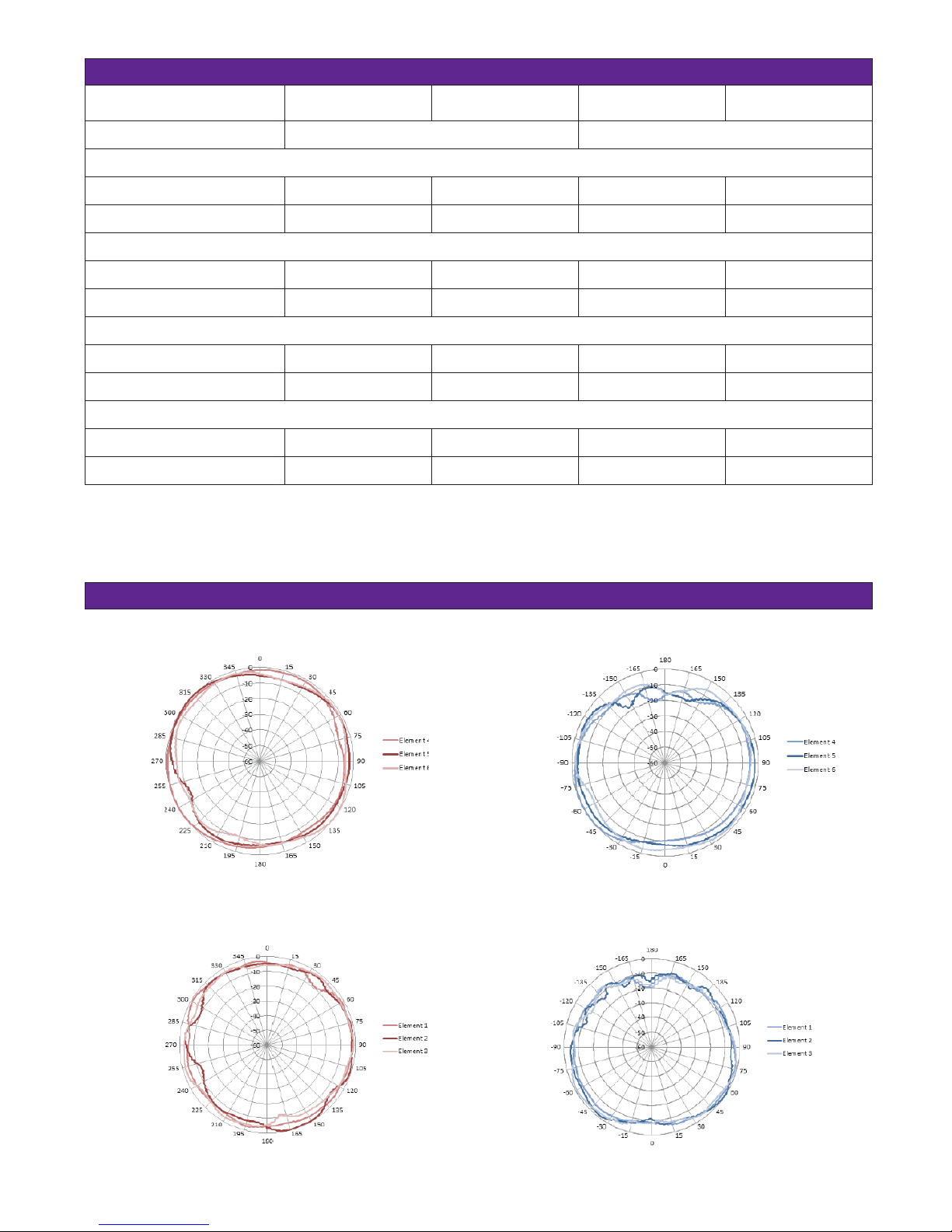
W- IAP135 RF PERFORMANCE TABLE
Max TX power per
active TX chain (dBm)
RX Sensitivity (dBm)
2.4 GHz 5 GHz
Max TX power per
active TX chain (dBm)
RX Sensitivity (dBm)
802.11b
1Mbps 18 -97 -- --
11Mbps 18 -92 -- --
802.11a/g
6 Mbps 18 -94 18 -94
54 Mbps 16 -81 16 -82
802.11n HT20
MCS0/8/16 17 -94 17 -94
MCS7/15/23 12 -78 12 -78
802.11n HT40
MCS0/8/16 17 -92 17 -92
MCS7/15/23 11 -75 11 -74
RF performance numbers for W-IAP134 slightly lower due to additional internal RF circuitry.
W-IAP135 ANTENNA PATTERN PLOTS
2.450 GHz, H-Plane, 20 degrees down-tilt
H-plane
5.500 GHz, H-Plane, 20 degrees down-tilt
2.450 GHz, E-Plane, AP facing down
E-plane
5.500 GHz, E-Plane, AP facing down
H-plane
E-plane
Page 4
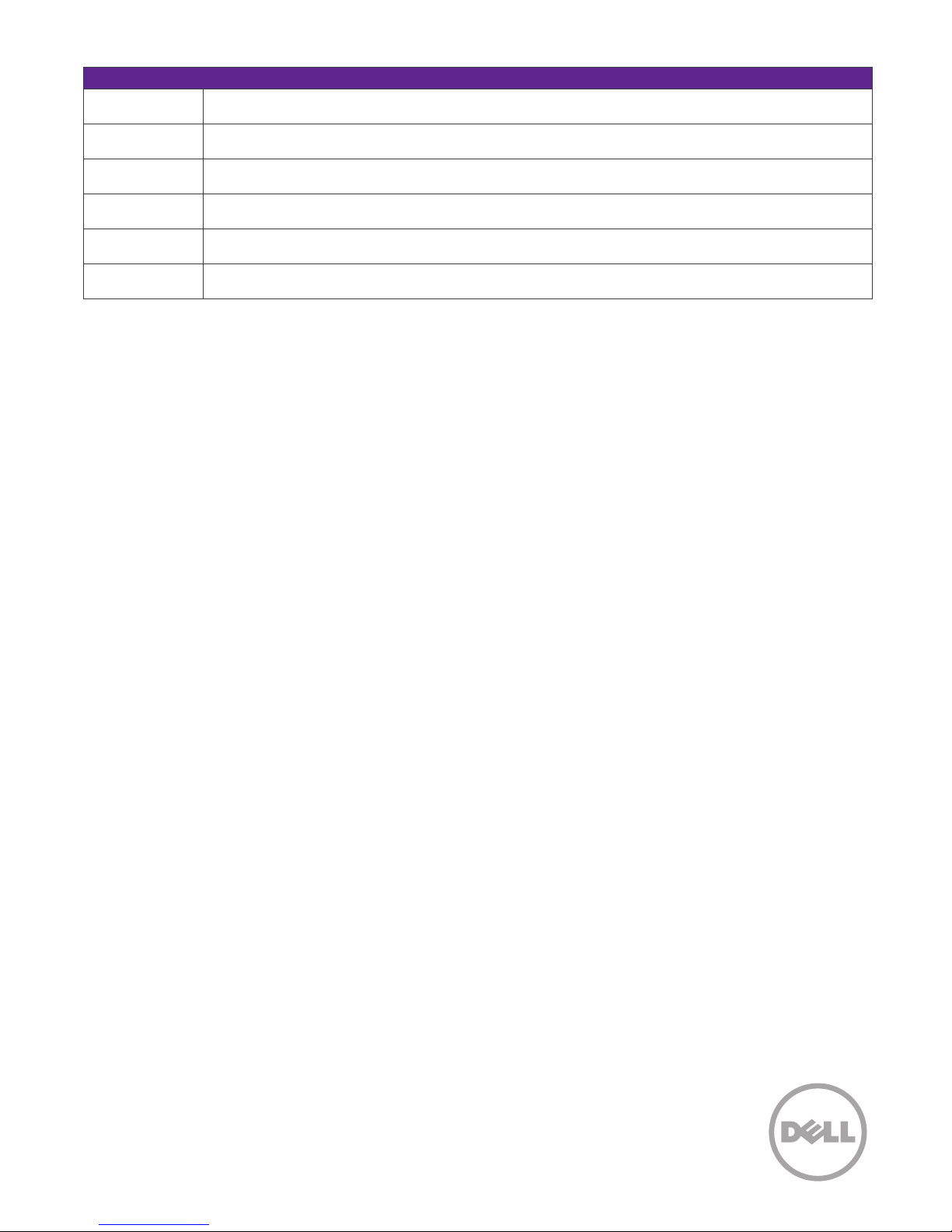
Ordering Information
Part number Description
W-IAP134 W-AP134 AP (802.11a/n and 802.11b/g/n) with the interface to connect external antennas
W-IAP135 W-AP135 AP (802.11a/n and 802.11b/g/n) – Integrated Antennas.
W-AP-AC-UN
12 V DC Universal AC Power Adapter Kit - North America, Japan, United Kingdom, Italy, EC (Schuko), Australia, China,
India, Korea
AP-DC-CAR 12VDC Car Power Adapter Kit
W-AP130-MNT W-IAP134/135 Access Point Mounting Kit for flat surfaces
*Select PowerConnect products carry an Extended Life Warranty with Basic Hardware Service. Warranty covers repair or replacement of the product for as long as it remains in use by
the customer. In the event of discontinuance of product manufacture, Dell Extended Life Warranty extends until five (5) years after end of product model sales. Warranty limits any power
supply, antennae or accessories to one (1) year from date of purchase. Warranty does not include troubleshooting, configuration, or other advanced service provided by Dell ProSupport.
The Extended Life Limited Hardware Warranty is not transferrable. For more information see dell.com/warranty
© 2013 Dell Networking W-series Networks, Inc. AirWave®, Dell Networking W-series Networks®, Dell Networking W-series Mobility Management System®, and other registered marks are
trademarks of Dell Networking W-series Networks, Inc. Dell™, and the DELL™ logo are trademarks of Dell Inc. Reproduction of these materials in any manner whatsoever without the written
permission of Dell Inc. is strictly forbidden.
All rights reserved. Specifications are subject to change without notice.
Originated in the USA. Any other trademarks appearing in this manual are the property of their respective companies.
Learn more at Dell.com/Wireless
July 2013 | Version 1
dell-networking-w-iap134-135-spec-sheet
 Loading...