

Page 1
Installing the LSI 9285 PCIe Card on
Dell PowerEdge C6220 Systems
Follow the procedure in this document to install the LSI 9285 PCIe card on your
Dell PowerEdge C6220 1U node.
CAUTION:
should only perform troubleshooting and simple repairs as authorized in your product
documentation, or as directed by the online or telephone service and support team.
Damage due to servicing that is not authorized by Dell is not covered by your warranty.
Read and follow the safety instructions that came with the product.
The following items are available in the PCIe card kit:
• LSI 9285 PCIe card
• rubber jumper
To install the LSI 9285 PCIe card:
Turn off the system, including any attached peripherals, and disconnect the
1
system from the electrical outlet.
Many repairs may only be done by a certified service technician. You
2
Open the system.
3
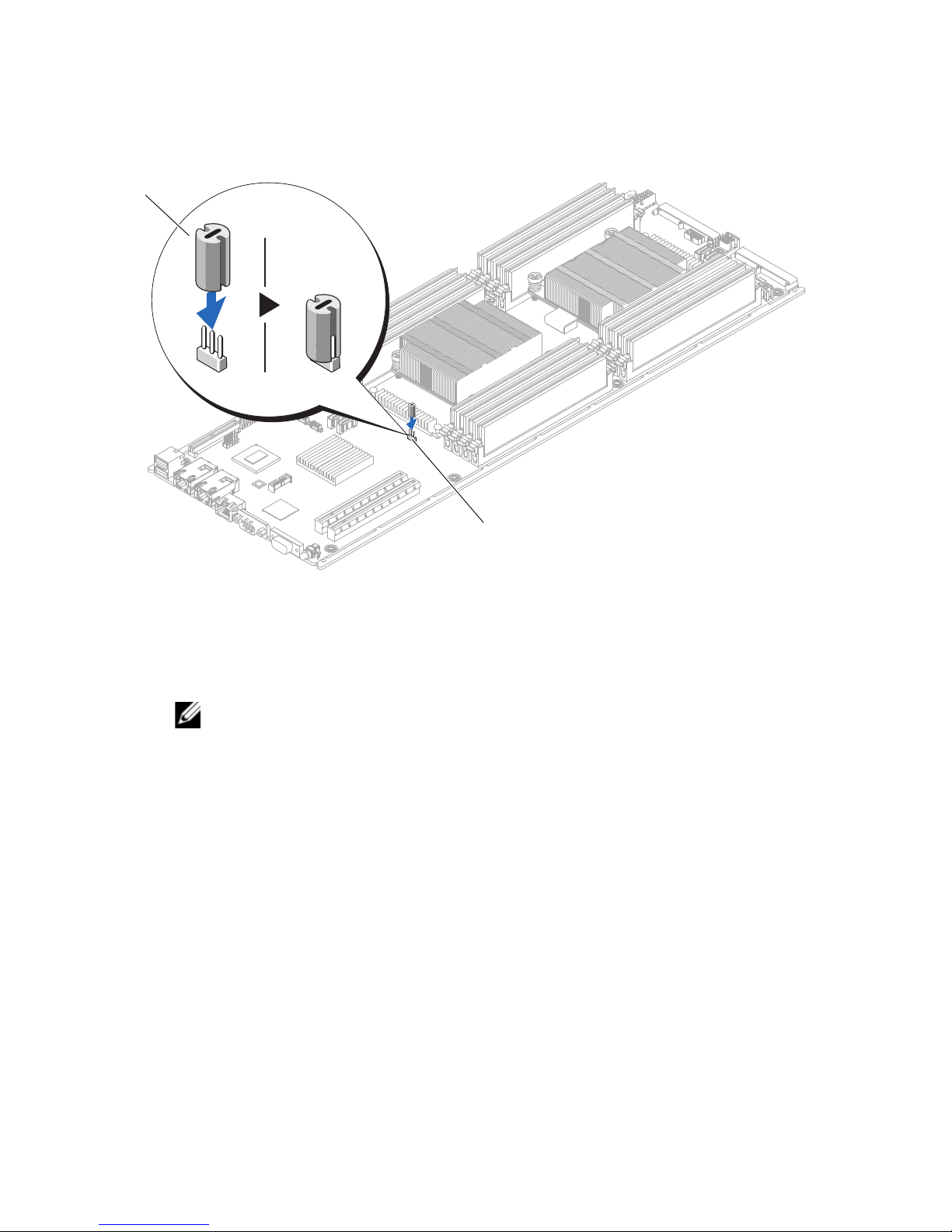
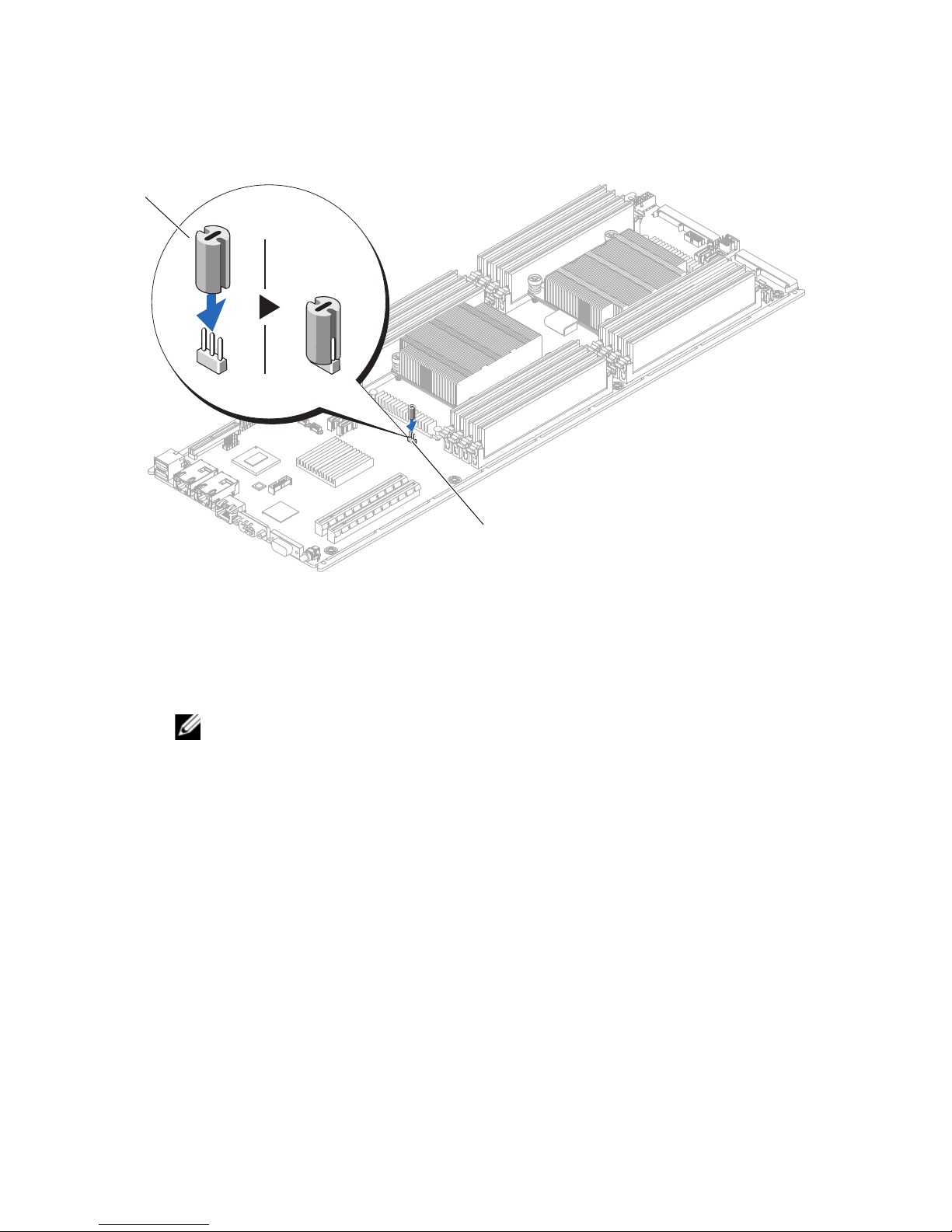
Locate the jumper PCN3 on the system board.
4
Ensure that you place the rubber jumper on pin 2 of the system-board jumper.
For more information see Figure 1.
Page 2
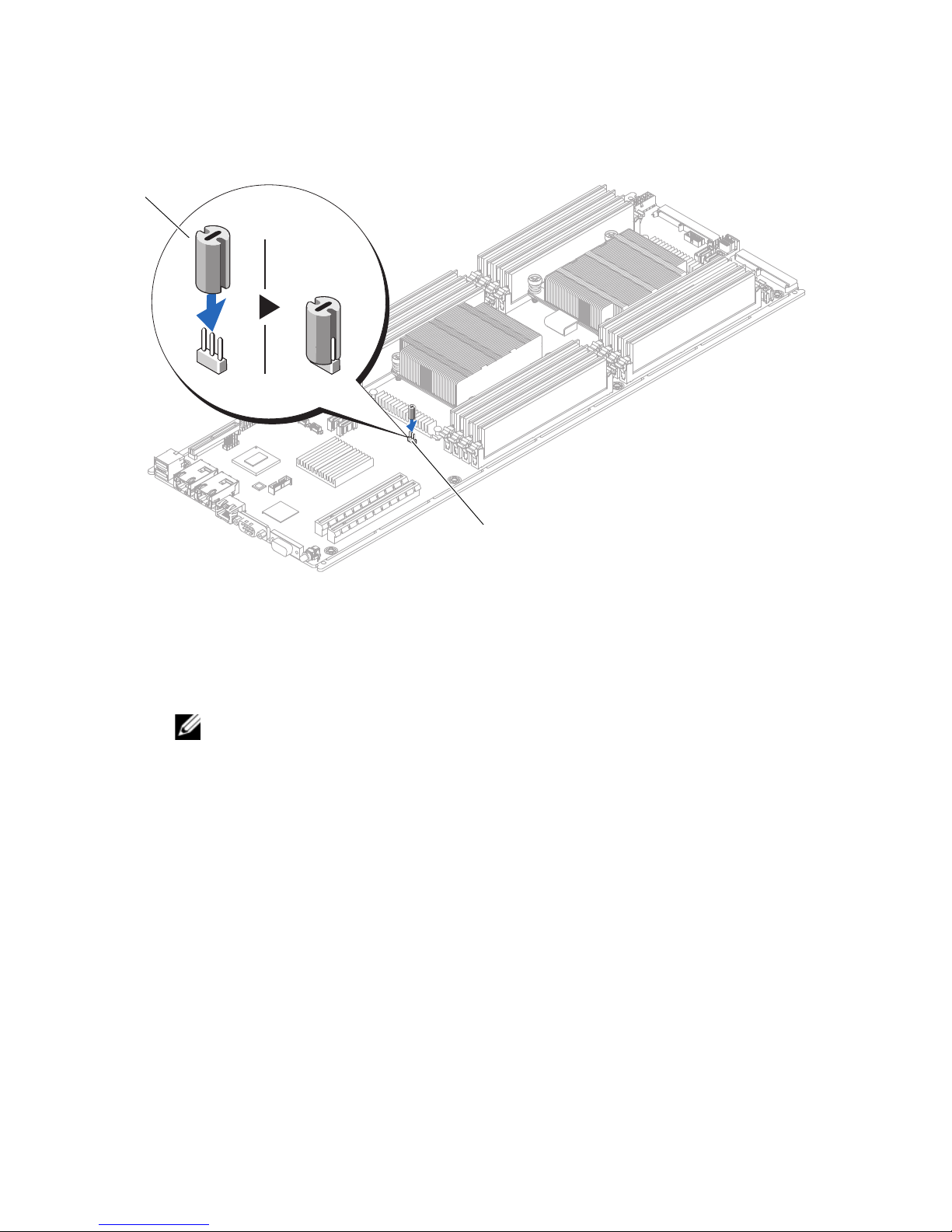
Figure 1. Installing the Rubber Jumper
1
2
1 rubber jumper 2 system-board jumper (PCN3)
5
Install the LSI 9285 PCIe card.
NOTE:
Manual at dell.com/cloudedgemanuals.
6
Close the system.
7
Reconnect the system to its electrical outlet and turn the system on, including
For more information on installing a PCIe card, see the Hardware Owner’s
any attached peripherals.
____________________
© 2013 Dell Inc. Printed in the U.S.A.
Trademarks used in this text: Dell™ and the DELL logo are trademarks of Dell Inc. LSI is a trademark or
registered trademark of LSI Corporation or its subsidiaries.
2013 - 04
Page 3

在 Dell PowerEdge C6220 系统上安
装 LSI 9285 PCIe 卡
按照本说明文件中所述的步骤,在您的 Dell PowerEdge C6220 1U 节点上安
装 LSI 9285 PCIe 卡。
警告 :
中的授权,或者在联机或电话服务和支持小组的指导下,进行故障排除和简单
的维修。未经 Dell 授权的维修所造成的损坏不在保修范围之内。请阅读并遵循
产品附带的安全说明。
在 PCIe 卡套件中有下列物品:
多数维修只能由经认证的维修技术人员进行。您只能根据产品说明文件
• LSI 9285 PCIe
•
橡胶跳线
要安装 LSI 9285 PCIe 卡,请:
1
关闭系统和所有连接的外围设备,并断开系统与电源插座的连接。
2
打开系统护盖。
3
主机板上找到
4
请确保将橡皮跳线插接在系统板跳线的插针
1
。
图
卡
PCN3
跳线。
2
上。有关更多信息,请参阅
Page 4
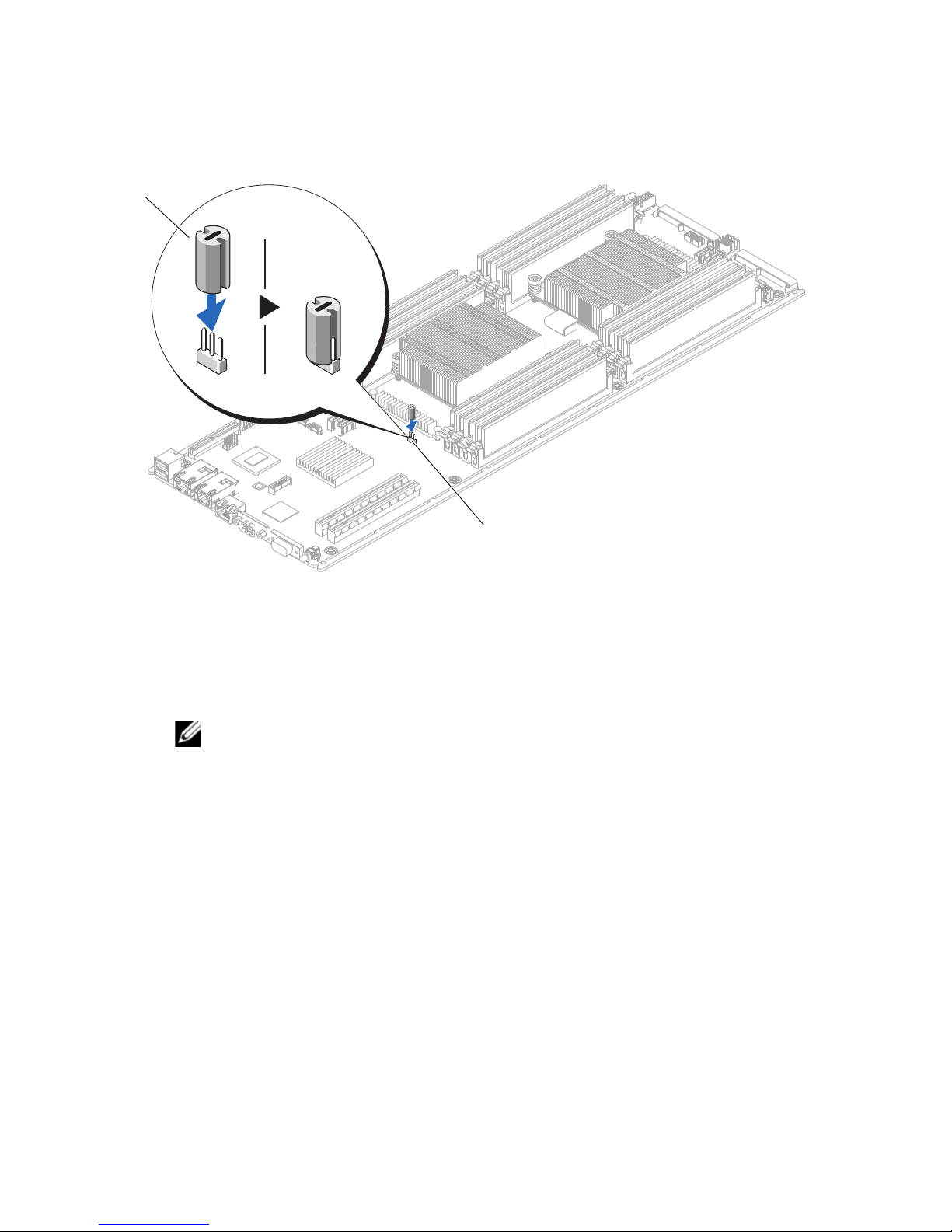
图 1. 安装橡胶跳线
1
2
1
橡胶跳线
5
安装
LSI 9285 PCIe
注 :
有关安装 PCIe 卡的更多信息,请参阅位于 dell.com/cloudedgemanuals
上的 《硬件用户手册》。
合上系统护盖。
6
7
将系统重新连接至电源插座,并打开系统和所有连接的外围设备。
卡。
2
系统板跳线
(PCN3)
____________________
© 2013 Dell Inc. 美国印制 .
本文中使用的商标:Dell™ 和 DELL 徽标是 Dell Inc. 的商标。LSI 是 LSI Corporation 或其附属机
构的商标或注册商标。
2013 - 04
Page 5

Installation de la carte PCIe
LSI 9285 sur les systèmes
Dell PowerEdge C6220
Suivez la procédure décrite dans ce document pour installer la carte PCIe
LSI 9285 sur votre nœud Dell PowerEdge C6220 1U.
PRÉCAUTION :
technicien de maintenance agréé. N'effectuez que les opérations de dépannage et les
petites réparations autorisées par la documentation de votre produit et suivez les
instructions fournies en ligne ou par téléphone par l'équipe de maintenance et
d'assistance technique. Tout dommage causé par une réparation non autorisée par
Dell est exclu de votre garantie. Consultez et respectez les consignes de sécurité
fournies avec votre produit.
Les éléments suivants sont disponibles dans le kit de carte PCIe :
• carte PCIe LSI 9285
• cavalier en caoutchouc
la plupart des réparations ne peuvent être effectuées que par un
Pour installer la carte PCIe LSI 9285 :
Mettez le système et les périphériques qui y sont connectés hors tension,
1
puis débranchez le système de la prise secteur.
2
Ouvrez le système.
3
Localisez le cavalier PCN3 sur la carte système.
4
Assurez-vous de placer le cavalier en caoutchouc sur la broche 2 du cavalier de
la carte système. Pour plus d'informations, voir Figure 1.
Page 6
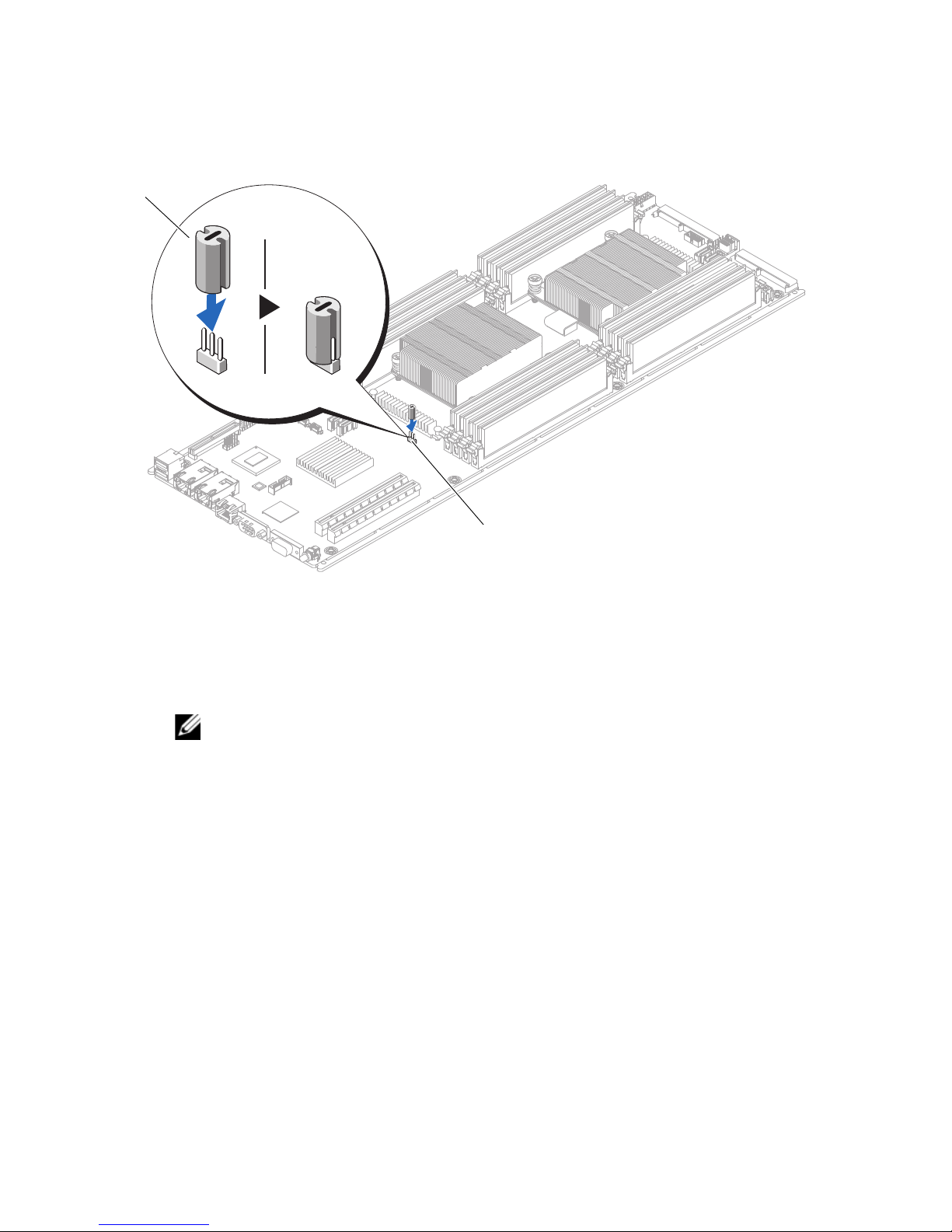
Figure 1. Installation du cavalier en caoutchouc
1
2
1 cavalier en caoutchouc 2 cavalier de la carte système (PCN3)
5
Installez la carte PCIe LSI 9285.
REMARQUE :
consultez le Manuel du propriétaire du matériel à l'adresse
dell.com/cloudedgemanuals.
6
Refermez le système.
7
Rebranchez le système à la prise secteur et mettez-le sous tension, ainsi que
pour plus d'informations sur l'installation d'une carte PCIe,
les périphériques qui y sont connectés.
____________________
© 2013 Dell Inc. Imprimé aux U.S.A.
Marques utilisées dans ce document : Dell™ et le logo DELL sont des marques de Dell Inc. LSI est une
marque ou une marque déposée de LSI Corporation ou de ses filiales.
04 - 2013
Page 7

Installieren der LSI 9285 PCIe-Karte
auf Dell PowerEdge C6220-Systemen
Befolgen Sie die Anweisungen in diesem Dokument, um die LSI 9285
PCIe-Karte auf Ihrem Dell PowerEdge C6220 1U-Knoten zu installieren.
VORSICHTSHINWEIS:
Servicetechnikern durchgeführt werden. Fehlerbehebungsmaßnahmen oder
einfache Reparaturen sollten Sie nur dann selbst vornehmen, wenn dies mit der
Produktdokumentation im Einklang steht oder Sie vom Team des Online- oder
Telefonsupports dazu aufgefordert werden. Schäden durch nicht von Dell genehmigte
Wartungsversuche werden nicht durch die Garantie abgedeckt. Lesen und befolgen
Sie die zusammen mit dem Produkt gelieferten Sicherheitshinweise.
Folgende Komponenten stehen im PCIe-Karten-Kit zur Verfügung:
• LSI 9285 PCIe-Karte
• Gummi-Jumper
So installieren Sie die LSI 9285 PCIe-Karte:
Manche Reparaturarbeiten dürfen nur von qualifizierten
1
Schalten Sie das System und die Peripheriegeräte aus und trennen Sie das
System vom Netzstrom.
2
Öffnen Sie das System.
3
Machen Sie den Jumper PCN3 auf der Systemplatine ausfindig.
4
Stellen Sie sicher, dass Sie den Gummi-Jumper auf Stift 2 des
Systemplatinen-Jumpers setzen. Weitere Informationen finden Sie unter
Abbildung 1.
Page 8
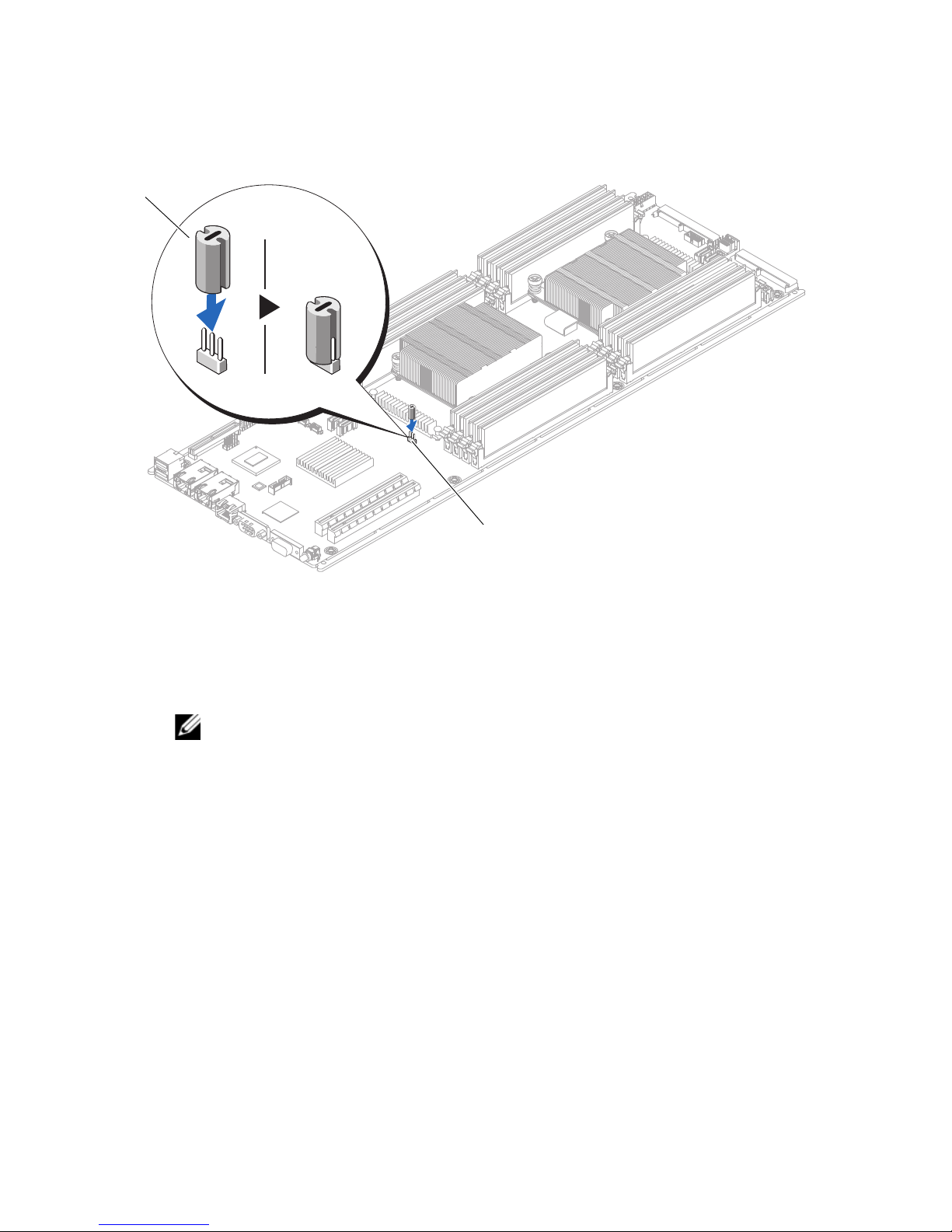
Abbildung 1. Installieren des Gummi-Jumpers
1
2
1 Gummi-Jumper 2 Systemplatinen-Jumper (PCN3)
5
So installieren Sie die LSI 9285 PCIe-Karte:
ANMERKUNG:
Sie im Hardware Owner's Manual (Hardware-Benutzerhandbuch) unter
dell.com/cloudedgemanuals.
6
Schließen Sie das System.
7
Verbinden Sie das System wieder mit dem Netzstrom und schalten Sie das
Weitere Informationen zum Installieren einer PCIe-Karte finden
System und alle angeschlossenen Peripheriegeräte ein.
____________________
© 2013 Dell Inc. Gedruckt in den USA.
In diesem Text verwendete Marken: Dell™ und das DELL Logo sind Marken von Dell Inc. LSI ist eine
Marke oder eingetragene Marke von LSI Corporation oder deren Tochtergesellschaften.
2013 - 04
Page 9

Dell PowerEdge C 6220
システムへ
LSI 9285 PCIe
の
お使いの
るには、本書の手順に従ってください。
PCIe
• LSI 9285 PCIe
•
LSI 9285 PCIe
1
2
3
Dell PowerEdge C 6220 1 U
注意:
品マニュアルで許可されている範囲に限り、またはオンラインサービスもしくはテレホ
ンサービスとサポートチームの指示によってのみ、トラブルシューティングと簡単な修
理を行うようにしてください。デルで認められていない修理による損傷は、保証の対象
となりません。製品に付属しているマニュアルの「安全にお使いいただくために」をお
読みになり、指示に従ってください。
カードキットには次のアイテムが同梱されています。
ゴム製ジャンパ
システムおよび接続されているすべての周辺機器の電源を切り、システムをコ
ンセントから外します。
システムカバーを開きます。
システム基板上のジャンパ
修理作業の多くは、認定されたサービス技術者のみが行うことができます。製
カード
カードを取り付けるには、次の手順を実行します。
PCN3
カードの取り付け
ノードに
の位置を確認します。
LSI 9285 PCIe
カードを取り付け
4
ゴム製ジャンパは、システム基板ジャンパのピン
1
さい。詳細については、図
を参照してください。
2
に設置するようにしてくだ
Page 10
図
1
2
1.
ゴム製ジャンパの取り付け
1
ゴム製ジャンパ
5
LSI 9285 PCIe
メモ
で『
Hardware Owner's Manual
してください。
6
システムカバーを閉じます。
7
システムおよびシステムに接続されているすべての周辺機器をコンセントに接
カードを取り付けます。
:
PCIe
カードの取り付けについての詳細は、
2
システム基板ジャンパ(
dell.com/cloudedgemanuals
』(ハードウェアオーナーズマニュアル)を参照
PCN3
)
続し、電源を入れます。
____________________
© 2013 Dell Inc. Printed in the U.S.A.
本書に使用されている商標:Dell™ および DELL ロゴは Dell Inc. の商標です。LSI は LSI Corporation
またはその関連子会社の商標または登録商標です。
2013 年 04 月
Page 11

Dell PowerEdge C6220 시스템에
LSI 9285 PCIe 카드 설치
이 설명서의 절차에 따라 Dell PowerEdge C6220 1U 노드에 LSI 9285 PCIe 카
드를 설치합니다 .
주의 :
자는 제품 설명서에서 허가한 경우나 온라인 또는 전화서비스 / 지원팀에서 지시
한 경우에만 문제 해결 절차 및 단순 수리 작업을 수행할 수 있습니다 . Dell 의 승
인을 받지 않은 서비스 작업으로 인한 손상에 대해서는 보상을 받을 수 없습니다.
제품과 함께 제공된 안전 지침을 읽고
PCIe 카드 키트에서 다음 항목을 사용할 수 있습니다 :
대부분의 수리 작업은 공인된 서비스 기술자만 수행할 수 있습니다 . 사용
따르십시오 .
• LSI 9285 PCIe
•
고무 점퍼
LSI 9285 PCIe 카드를 설치하려면 :
시스템과 시스템에 장착된 모든 주변 장치의 전원을 끄고 전원 콘센트에서
1
시스템을 분리합니다
2
시스템을 엽니다
3
시스템 보드의 점퍼
4
시스템 보드 점퍼의 핀2에 고무 점퍼를 두었는지 확인합니다. 자세한 내용
은
그림 1을 참조하십시오
카드
.
.
PCN3를
.
찾습니다
.
Page 12
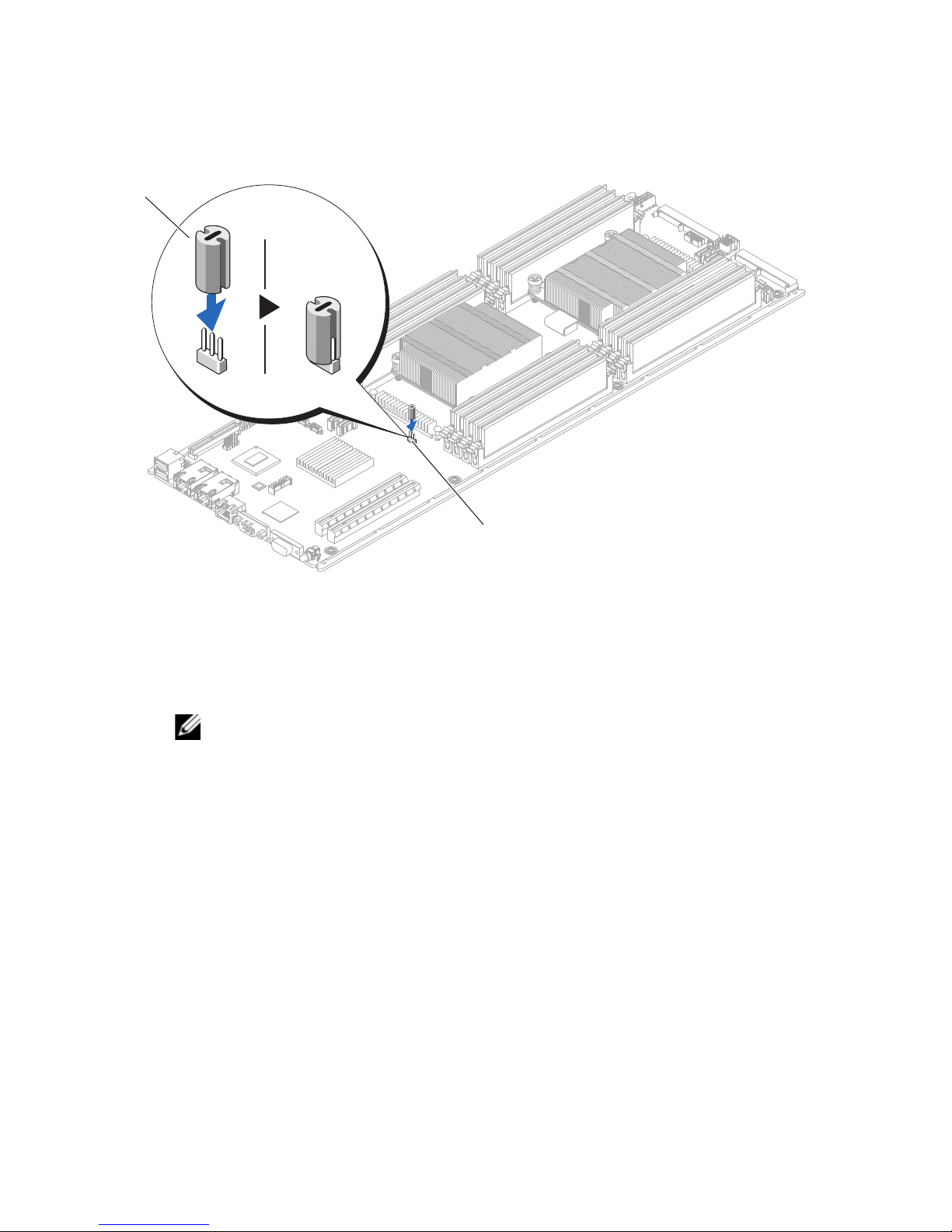
그림 1. 고무 점퍼 설치
1
2
1
고무 점퍼
5
LSI 9285 PCIe
주 :
PCIe 카드 설치에 대한 자세한 내용은 하드웨어 소유자 매뉴얼
(dell.com/cloudedgemanuals) 을 참조하십시오 .
6
시스템을 닫습니다
7
시스템을 전원 콘센트에 다시 연결하고 시스템 및 시스템에 연결된 주변 장
치의
전원을 모두 켭니다
카드를 설치합니다
.
2
시스템 보드 점퍼 (PCN3)
.
.
____________________
© 2013 Dell Inc. 미국에서 인쇄 .
본 설명서에 사용된 상표 : Dell™ 및 DELL 로고는 Dell Inc. 의 상표입니다 . LSI 는 LSI Corporation
또는 자회사의 상표 또는 등록 상표입니다 .
2013 - 04
Page 13

Instalación de la tarjeta PCIe LSI 9285
en los sistemas Dell PowerEdge C6220
Siga el procedimiento descrito en este documento para instalar la tarjeta PCIe
LSI 9285 en el nodo 1U Dell PowerEdge C6220.
PRECAUCIÓN:
servicio autorizados. El usuario debe llevar a cabo únicamente las tareas de solución
de problemas y las reparaciones sencillas autorizadas en la documentación del
producto o indicadas por el personal de servicio y asistencia en línea o telefónica.
La garantía no cubre los daños ocasionados por reparaciones que Dell no haya
autorizado. Lea y siga las instrucciones de seguridad entregadas con el producto.
Los siguientes artículos están disponibles en el kit de tarjeta PCIe:
• Tarjeta PCIe LSI 9285
• Puente de goma
Para instalar la tarjeta PCIe LSI 9285:
Apague el sistema, incluidos todos los periféricos conectados, y desconéctelo
1
de la toma eléctrica.
Muchas de las reparaciones sólo pueden realizarlas los técnicos de
2
Abra el sistema.
3
Encuentre el puente PCN3 en la placa base.
4
Asegúrese de colocar el puente de goma en el pin 2 del puente de la placa base.
Para obtener más información, ver Ilustración 1.
Page 14
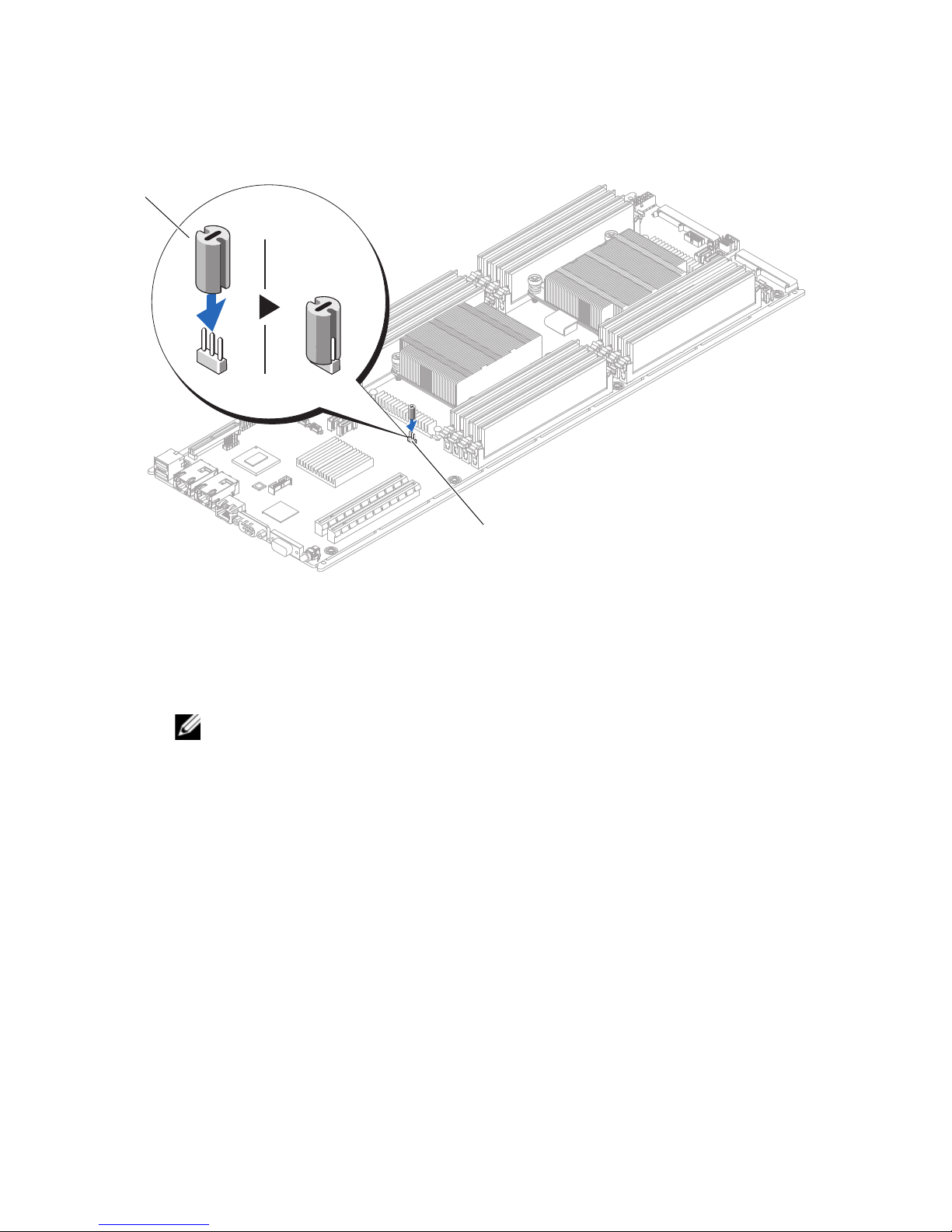
Ilustración 1. Instalación de los puentes de goma
1
2
1 Puente de goma 2 Puente de la placa base (PCN3)
5
Para instalar la tarjeta PCIe LSI 9285:
NOTA:
consulte el Hardware Owner’s Manual (Manual del propietario de hardware) en
dell.com/cloudedgemanuals.
6
Cierre el sistema.
7
Vuelva a conectar el sistema a la toma eléctrica y enciéndalo junto con los
Para obtener más información sobre la instalación de una tarjeta PCIe,
periféricos que tenga conectados.
____________________
© 2013 Dell Inc. Impreso en los EE.UU.
Marcas comerciales utilizadas en este texto: Dell™ y el logotipo de DELL son marcas comerciales de
Dell Inc. LSI es una marca comercial o una marca comercial registrada de LSI Corporation o de sus filiales.
04/2013
Page 15

LSI 9285 PCIe Kartını Dell
PowerEdge C6220 Sistemlerine
Takma
LSI 9285 PCIe kartını Dell PowerEdge C6220 1U düğümüne takmak için bu
belgedeki prosedürü izleyin.
DİKKAT:
Sorun giderme işlemlerini ve basit onarımları yalnızca ürününüzün belgelerinde
izin verildiği gibi ya da çevrimiçi hizmet veya telefon hizmeti ve destek ekibi
tarafından belirtildiği gibi yapmalısınız. Dell tarafından yetkilendirilmemiş
servislerden kaynaklanan zararlar garantinizin kapsamında değildir. Ürününüzle
birlikte verilen güvenlik yönergelerini okuyun ve izleyin.
PCIe kart kitinde aşağıdaki öğeler mevcuttur:
•
LSI 9285 PCIe kartı
•
plastik atlatma teli
Çoğu onarım yalnızca yetkili bir servis teknisyeni tarafından yapılabilir.
LSI 9285 PCIe kartını takmak için:
1
Sistemi, bağlı çevre birimleri ile birlikte kapatın ve sistemin fişini prizden çekin
2
Sistemi açın.
3
PCN3 atlatma telini sistem kartına yerleştirin.
4
Plastik atlatma telini sistem kartı atlatma telinin 2. pimine yerleştirdiğinizden
emin olun. Daha fazla bilgi için bkz. Şekil 1.
Page 16
Şekil 1. Plastik Atlatma Telinin Takılması
1
2
1
plastik atlatma teli
5
LSI 9285 PCIe kartını takın.
NOT:
Kılavuzu -
6
Sistemi kapatın.
7
Sistemin fişini prize takın ve takılı olan çevre birimleri de dahil olmak üzere
PCIe kartını takma hakkında daha fazla bilgi için bkz. Donanım Kullanım
dell.com/cloudedgemanuals
2
sistem kartı atlatma teli (PCN3)
.
sistemi açın.
____________________
© 2013 Dell Inc. A.B.D.'de basılmıştır.
Bu metinde kullanılan ticari markalar: Dell™ ve DELL logosu, Dell Inc. şirketine ait ticari markalardır.
LSI, LSI Corporation ve bağlı kuruluşlarının tescilli ticari markasıdır.
2013 - 04
 Loading...