

Page 1
Page 2

This document is for informational purposes only. Dell reserves the right to make changes without further
notice to any products herein. The content provided is as is and without express or implied warranties of
any kind.
Dell, the DELL logo, PowerEdge, EqualLogic, PowerVault, PowerConnect, OpenManage, KACE, and ReadyRails
are trademarks of Dell, Inc. Intel and Xeon are registered trademarks of Intel Corporation in the U.S. and other
countries. Microsoft, Windows, Windows Server, SQL Server, BitLocker, ActiveX, Internet Explorer, and Hyper-V
are either registered trademarks or trademarks of Microsoft Corporation in the United States and/or other
countries. SUSE is a registered trademark of Novell, Inc. in the United States and other countries. IBM, Tivoli,
and Netcool are registered trademarks of IBM in the United States. Other trademarks and trade names may be
used in this document to refer to either the entities claiming the marks and names or their products. Dell
disclaims proprietary interest in the marks and names of others.
©Copyright 2012 Dell Inc. All rights reserved. Reproduction or translation of any part of this work beyond that
permitted by U.S. copyright laws without the written permission of Dell Inc. is unlawful and strictly forbidden.
October 2012 | Version 2.0
Page 3
Table of contents
1 System overview ..................................................................................................................................................................5
Introduction .........................................................................................................................................................................5
New technologies ............................................................................................................................................................. 6
2 System features ................................................................................................................................................................... 7
Comparison of PowerEdge systems ............................................................................................................................... 7
Specifications ..................................................................................................................................................................... 8
3 Chassis views and features .............................................................................................................................................. 11
Chassis views ..................................................................................................................................................................... 11
Chassis features ................................................................................................................................................................14
4 Processor ............................................................................................................................................................................ 17
Processor features ............................................................................................................................................................ 17
Supported processors ...................................................................................................................................................... 17
GPU support ......................................................................................................................................................................18
Chipset ................................................................................................................................................................................18
5 Memory ............................................................................................................................................................................... 19
Supported memory .......................................................................................................................................................... 19
Memory configurations .................................................................................................................................................. 20
Memory speed .................................................................................................................................................................. 21
Memory RAS features....................................................................................................................................................... 21
6 Storage ............................................................................................................................................................................... 23
Internal storage ................................................................................................................................................................ 23
External storage ............................................................................................................................................................... 23
Storage controllers .......................................................................................................................................................... 24
Optical drive ..................................................................................................................................................................... 25
Tape drive .......................................................................................................................................................................... 25
7 Networking and PCIe ...................................................................................................................................................... 26
Embedded NIC controller .............................................................................................................................................. 26
PCIe expansion ................................................................................................................................................................ 26
8 Power, thermal, and acoustics ...................................................................................................................................... 28
Power consumption and energy efficiency ................................................................................................................ 28
Power supply units .......................................................................................................................................................... 29
Thermal and acoustics.................................................................................................................................................... 30
9 Rack rails and cable management ................................................................................................................................ 33
Sliding rails ........................................................................................................................................................................ 33
Cable management arm................................................................................................................................................. 34
10 Operating systems and virtualization ........................................................................................................................... 35
Supported operating systems ........................................................................................................................................ 35
Supported virtualization ................................................................................................................................................. 36
11 Dell OpenManage systems management .................................................................................................................... 36
Systems management solutions ................................................................................................................................... 37
OpenManage systems management ........................................................................................................................... 38
Dell server management operations ............................................................................................................................ 43
Appendix A. Additional specifications .......................................................................................................................... 45
Chassis dimensions and weight .................................................................................................................................... 45
Power supply specifications .......................................................................................................................................... 45
Environmental specifications ........................................................................................................................................ 46
Video specifications ........................................................................................................................................................ 47
Rack rail specifications ................................................................................................................................................... 47
USB peripherals ................................................................................................................................................................ 48
Appendix B. Standards compliance ............................................................................................................................. 49
Page 4
Appendix C. Additional resources ................................................................................................................................. 50
Appendix D. System board block diagram .................................................................................................................. 52
Table 1. New technologies ................................................................................................................................................ 6
Table 2. Comparing the PowerEdge T410 to PowerEdge T420 .................................................................................. 7
Table 3. Technical specifications ...................................................................................................................................... 8
Table 4. Chassis configurations ....................................................................................................................................... 11
Table 5. Chassis features ...................................................................................................................................................14
Table 6. Security features .................................................................................................................................................. 16
Table 7. Supported processors ........................................................................................................................................18
Table 8. Memory technologies supported ..................................................................................................................... 19
Table 9. DIMMs supported ............................................................................................................................................... 20
Table 10. Memory speed capabilities ................................................................................................................................ 21
Table 11. Memory RAS features ......................................................................................................................................... 21
Table 12. Supported hard drives ....................................................................................................................................... 23
Table 13. Supported RAID controllers.............................................................................................................................. 24
Table 14. Supported external storage .............................................................................................................................. 25
Table 15. Supported NICs and HBAs ................................................................................................................................ 26
Table 16. Power tools and technologies ......................................................................................................................... 28
Table 17. Power supply efficiency .................................................................................................................................... 30
Table 18. Acoustical performance .................................................................................................................................... 32
Table 19. Supported rack types ......................................................................................................................................... 33
Table 20. Primary operating system support .................................................................................................................. 35
Table 21. Virtualization support ........................................................................................................................................ 36
Table 22. iDRAC7 with Lifecycle Controller functions and benefits ........................................................................... 38
Table 23. Feature comparison for basic management, iDRAC7 Express, and iDRAC7 Enterprise ....................... 39
Table 24. One-to-one and one-to-many operations .................................................................................................. 44
Table 25. Power supply specifications ............................................................................................................................. 45
Table 26. Environmental specifications ........................................................................................................................... 46
Table 27. Supported video modes for back VGA port .................................................................................................. 47
Table 28. Supported video modes for front VGA port .................................................................................................. 47
Table 29. Rail adjustability range ....................................................................................................................................... 48
Table 30. Industry standard documents .......................................................................................................................... 49
Table 31. Additional resources .......................................................................................................................................... 50
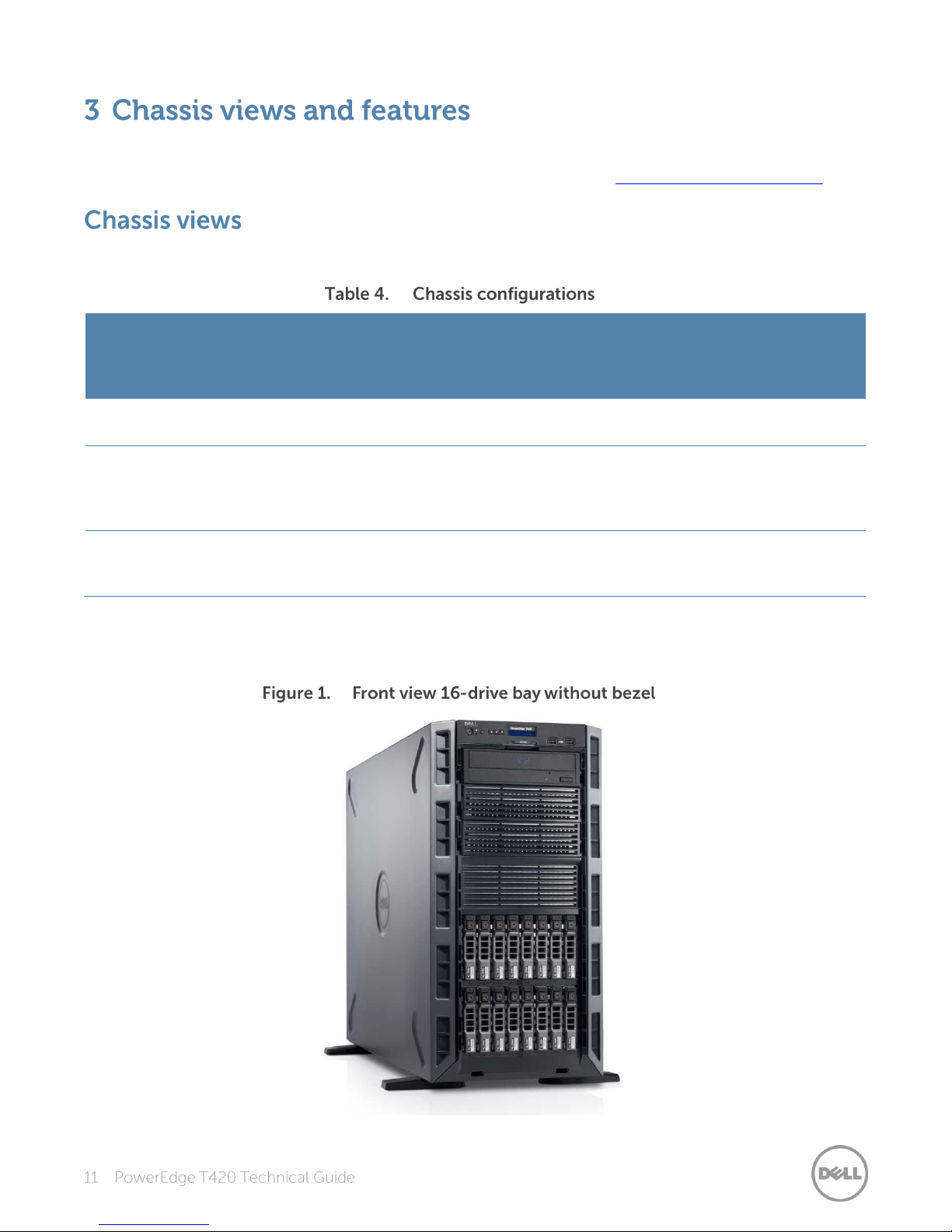
Figure 1. Front view 16-drive bay without bezel ............................................................................................................ 11
Figure 2. Front view with bezel.......................................................................................................................................... 12
Figure 3. Back view .............................................................................................................................................................. 12
Figure 4. Internal view ......................................................................................................................................................... 13
Figure 5. Rackable front view without bezel ................................................................................................................... 13
Figure 6. LCD control panel ............................................................................................................................................... 15
Figure 7. QRL location ........................................................................................................................................................ 15
Figure 8. 750W power supply unit ................................................................................................................................... 30
Figure 9. Sliding rails with optional CMA ........................................................................................................................ 33
Figure 10. Dell systems management solutions .............................................................................................................. 37
Figure 11. Systems management server lifecycle ........................................................................................................... 43
Figure 12. Tower and rack chassis dimensions ............................................................................................................... 45
Figure 13. T420 system board block diagram ................................................................................................................. 52
Page 5
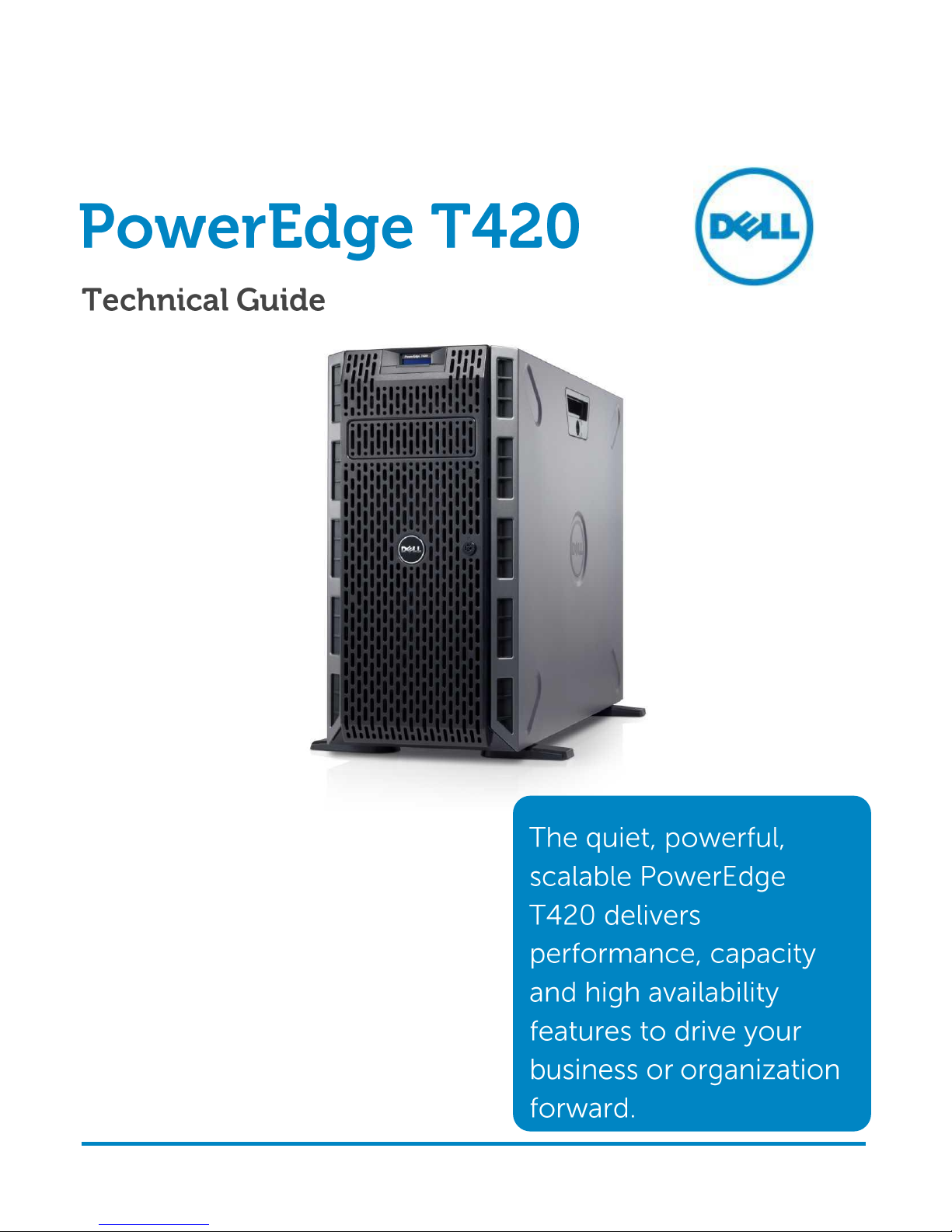
The 2-socket Dell™ PowerEdge™ T420 tower server delivers balanced performance and
expandability for non-disruptive growth. Optional redundancy and hot pluggability of key
components helps to protect data and keep the business running. The T420 is an excellent fit for a
wide range of applications, including workgroup collaboration, email, file and print, and small- to
mid-size database applications such as Business Analytics and Intelligence. In addition, the T420’s
performance and capacities make it highly attractive for consolidation and virtualization.
Featuring the powerful performance of two Intel
®
Xeon® processors E5-2400 product family, and
complemented by substantial memory capacity and broad I/O bandwidth, the T420 provides high,
balanced performance and built-in room for growth. Its twelve DIMM slots and six PCIe slots
provide memory density and wide I/O bandwidth to support both memory-intensive and dataintensive applications and databases. Built-in capacity for up to eight 3.5-inch or sixteen 2.5-inch
hard drives accommodate data storage as your business or organization grows. These combined
technology features are highly beneficial when implementing consolidated and virtualized
environments, a role in which the T420 also shines.
To protect your virtualized workloads, the PowerEdge T420 offers dual SD media making your
hypervisors redundant and failsafe. Other reliability and availability features include hot-plug hard
drives, both hardware and software RAID options, redundant fans and hot-plug power supplies.
The PowerEdge family is engineered with the right combination of features and performance
scalability to handle tough workloads for businesses and organizations of all sizes.
The Dell OpenManage™ systems management portfolio includes Integrated Dell Remote Access
Controller 7 (iDRAC7) with Lifecycle Controller. This embedded feature helps IT administrators
manage Dell servers in physical, virtual, local and remote environments, operating in-band or
out-of-band, with or without a systems management software agent. Dell OpenManage solutions
integrate with and connect to third-party systems management solutions so you can maintain your
single point of control and capitalize on your existing investment. Dell OpenManage capabilities
simplify IT administrator tasks and reduce potential for error throughout the server lifecycle,
spanning deployment deploying, updating, monitoring, and maintaining your Dell PowerEdge
servers.
Page 6
Table 1 summarizes the newest technologies used in the Dell PowerEdge T420 tower server.
New technologies
Detailed descriptions
Intel Xeon processor
E5-2400 product family
This new family of Intel processors has embedded PCIe lanes for improved I/O
performance. See the Processor section for details.
Intel C600 series chipset
The Intel Platform Controller Hub (PCH) chip is implemented on the T420 server.
1600MT/s DDR3
memory
Certain models of the Intel Xeon processor E5-2400 product family support
1600MT/s memory. The T420 supports two DIMMs per channel at 1600MT/s with
certain models. See the Memory section for details.
Next generation PERC
options
The T420 supports the new PERC controller cards with improved functionality and
faster performance. See the Storage section for details.
PERC S110 software
RAID Solution
This new software RAID solution supports RAID 0, 1, 5 and 10, and supports a
maximum of four hot-plug SATA hard drives or SATA solid-state drives. See the
Storage section for details.
iDRAC7 with Lifecycle
Controller
The new embedded system management solution for Dell servers features
hardware and firmware inventory and alerting, in-depth memory alerting, faster
performance, a dedicated gigabit port, and many more features. See the Dell
OpenManage systems management section for details.
Internal GPU support
The T420 supports internal graphics processing units (GPUs) for virtual desktop
infrastructure (VDI) and medical imaging. See the Processor section for details.
Advanced power
management
The T420 supports advanced power monitoring and power capping tools that can
help manage power consumption. See the Power, thermal, and acoustics section
for details.
Fresh Air cooling
Dell has tested and validated an integrated data center solution that enables you
to operate at higher temperatures or even chiller-less. See the Power, thermal, and
acoustics section for details.
Failsafe hypervisors
The internal dual SD module enables Dell's unique failsafe virtualization
architecture, ensuring uptime by providing failover capability for embedded
hypervisors such as VMware® vSphere® ESXi™. See the Supported virtualization
section for details.
Fan fault tolerance
Failure of one fan rotor is tolerated with degradation in performance through
active throttling and increased fan speeds. This feature helps reduce downtime by
allowing you to schedule a fan replacement within 360 hours of a fan failure.
Page 7
Feature
PowerEdge T410
PowerEdge T420
Chassis
5U tower
5U rackable tower1
Processors
Intel Xeon processors 5500 and
5600 series
Intel Xeon processor E5-2400 product family
Internal interconnect
Intel QuickPath Interconnect
Intel QuickPath Interconnect
Memory
2
Up to 8 x DDR3 RDIMM and
UDIMM
Up to 12 x DDR3 RDIMM and UDIMM
Hard drive bays
Up to 6 x 3.5”or 2.5” hot-plug or
cabled
16 x 2.5“ hot-plug or
8 x 3.5“/2.5” hot-plug or 4 x 3.5” cabled
RAID controller
PERC 6/i, SAS 6/iR, PERC 6/E,
H200, H700, H800, S100, S300
PERC H310, H710, H710P, H810, S110
PCI slots
Up to 4 PCIe 2.0 and 1 PCIe 1.0
Up to 4 PCIe 3.0 and 2 PCIe 2.0
Embedded NICs
Dual Broadcom® 1GbE LOM
Dual Broadcom 1GbE LOM
Power supplies
Non-redundant 525W
Redundant 580W
Non-redundant 550W or hot-plug, redundant
495W, 750W, or 1100W
Dell OpenManage
Systems Management
Dell OpenManage
Dell Management Console (DMC)
Lifecycle Controller 1.x
iDRAC6 (Express or Enterprise) with
Lifecycle Controller
OpenManage Essentials
Dell Management Console
IT Assistant
OMSA Agent
OpenManage Power Center (requires iDRAC7
Enterprise with Lifecycle Controller)
OpenManage Integrations and Connections
Basic management (standard option)
Internal GPU
Not supported
Up to 2 single-width or 1 double-width
Power efficiency
Gold
Platinum
Availability
Hot-plug drives
Hot-plug redundant power supply
units
Hot-plug drives
Hot-plug redundant power supply units
Fan fault tolerance
Fault-resilient memory
Internal dual SD modules
Compared to the previous generation PowerEdge T410, the T420 supports up to 33% more
processor cores, 50% more DIMM slots, 166% more internal hard drive storage capacity, and the
greater I/O bandwidth of PCIe 3.0. Its high quality is backed by high availability features including
redundant SD cards for failsafe hypervisors and soft, fault-tolerant fans, and optional features such
as redundant high-efficiency power supplies and hot-plug hard drives.
The T420 is the new generation PowerEdge server replacing the T410. Table 2 compares some of
the T420 features to the T410 features.
1
Optional kit available for field conversion from tower to rackable unit.
2
GB means 1 billion bytes and TB equals 1 trillion bytes; actual capacity varies with preloaded material and operating environment and will be less.
Page 8
Table 3 summarizes the specifications for each of the PowerEdge T420 features. For the latest
Feature
PowerEdge T420 technical specification
Form factor
5U rackable tower1
Processors
Intel Xeon processor E5-2400 product family
Processor sockets
2 sockets
Internal interconnect
1 Intel QuickPath Interconnect (QPI) link: 6.4GT/s, 7.2GT/s, 8.0GT/s
Cache
2.5MB per core with core options of 4, 6, or 8
Chipset
Intel C600
Memory2
Up to 384GB (12 DIMM slots): 2GB/4GB/8GB/16GB/32GB DDR3 up to 1600MT/s
PCIe slots
6 PCIe slots
2x16 slots with x16 bandwidth, 3.0, full-height, full-length
1x 8 slot with x4 bandwidth, 3.0, full-height, half-length
1x 8 slot with x4 bandwidth, 2.0, full-height, half-length
1x 8 slot with x4 bandwidth, 3.0, full-height, full-length
1x 8 slot with x1 bandwidth, 2.0, full-height, full-length
RAID controller
Internal controllers:
PERC S110 (SW RAID)
PERC H310
PERC H710
PERC H710P
Internal HBAs (non-RAID):
Internal tape adapter
External HBAs (RAID):
PERC H810
External HBAs (non-RAID):
6Gbps SAS HBA
Hard drives
Drive bay options:
4 x 3.5” cabled SAS or SATA drives or
8 x 3.5” or 2.5” hot-plug SAS, SATA or SSD drives or
16 x 2.5” hot-plug SAS, SATA or SSD drives
Hot-plug hard drive options:
2.5” SATA (7.2K), nearline SAS (7.2K), SAS (15K, 10K), SAS SSD, SATA SSD
3.5” SATA (7.2K), nearline SAS (7.2K), SAS (15K)
Self-encrypting drives available
Cabled hard drive options:
3.5” SATA or SAS
Embedded NIC
Broadcom 5720 1GbE Dual Port LOM
I/O adapter options
1Gb Ethernet:
Broadcom 5720 Dual Port 1Gb Base-T
Broadcom 5719 Quad Port 1Gb Base-T
Intel I350 Dual Port 1Gb Base-T
Intel I350 Quad Port 1Gb Base-T
information on supported features for the PowerEdge T420, visit Dell.com.
Page 9
Feature
PowerEdge T420 technical specification
10Gb Converged Ethernet:
Brocade
®
BR1020 Dual Port 10Gb SPF+
QLogic
®
QLE8262 Dual Port 10Gb DA/SFP+
Broadcom 57810S Dual Port 10Gb Base-T
Broadcom 57810S Dual Port 10Gb DA/SFP+
10Gb Ethernet:
Intel X520 Dual Port 10Gb DA/SFP+
Intel X540 Dual Port 10Gb Base-T
FC8/FC4 HBA:
QLogic QLE2460 Single Port 4Gbps
QLogic QLE2462 Dual Port 4Gbps
QLogic QLE2560 Single Port 8Gbps
QLogic QLE2562 Dual Port 8Gbps
Emulex
®
LPe-12000-E Single Port 8Gbps
Emulex LPe-12002-E Dual Port 8Gbps
Brocade 815 Single Port 8Gbps
Brocade 825 Dual Port 8Gbps
Power supply
Platinum efficiency 495W, 750W or 1100W power supply
Silver efficiency cabled 550W power supply
Auto-ranging power supplies
Availability
Optional high-efficiency, hot-plug, redundant power supplies; hot-plug hard drives;
TPM; dual internal SD support; redundant fans; optional bezel; information tag; ECC
memory; interactive LCD screen; extended power range; ENERGY STAR® compliant;
switch independent partitioning
Dell OpenManage
Systems Management
(Agent-free or with
OpenManage Server
Administrator [OMSA]
Agent)
OpenManage Essentials
Dell Management Console
IT Assistant
OMSA Agent
OpenManage Power Center (requires iDRAC7 Enterprise with Lifecycle
Controller)
OpenManage Integrations and Connections:
- OpenManage Integration Suite for Microsoft® System Center
- Dell Management Plug-in for VMware
®
vCenter™
- Connections for HP
®
Operations Manager, IBM® Tivoli® Netcool® and CA
Network and Systems Management
Basic management (standard option)
- Upgrade to iDRAC7 (Express or Enterprise) with Lifecycle Controller
- Upgrade to 8GB vFlash media or 16GB vFlash media for iDRAC7 Enterprise
with Lifecycle Controller
- Trial evaluations available for IDRAC7 (Express and Enterprise) with Lifecycle
Controller
Rack support
ReadyRailsTM II sliding rails for tool-less mounting in 4-post racks with square or
unthreaded round holes or tooled mounting in 4-post threaded hole racks, with
support for optional tool-less cable management arm
Operating systems
Microsoft Windows Server® 2012
Microsoft Windows Server 2008 R2 SP1, x64 (includes Hyper-V® v2)
Microsoft Windows® Small Business Server 2011
SUSE® Linux® Enterprise Server
Red Hat® Enterprise Linux®
Page 10
Feature
PowerEdge T420 technical specification
Optional embedded hypervisors:
Citrix® XenServer®
VMware vSphere including ESX™ and ESXi
Red Hat Enterprise Virtualization®
For more information on the specific versions and additions, visit
Dell.com/OSsupport.
1
Optional kit available for field conversion from tower to rackable unit.
2
GB means 1 billion bytes and TB equals 1 trillion bytes; actual capacity varies with preloaded material and operating environment and
will be less.
Page 11
Number of
drive bays
Drive types
Controller
Front
control
panel
Power supply
Rack
option
4 cabled
drive bays
3.5” SATA and
SAS HHD
PERC S110, H310, H710, H710P
LED
Cabled 550W
No
8 hot-plug
drive bays
3.5” SATA and
SAS HHD
2.5” SAS
SSD/HHD
PERC S110, H310, H710, H710P
LCD
Cabled 550W
or hot-plug
495W, 750W,
or 1100W
Yes
16 hot-plug
drive bays
2.5” SATA and
SAS SSD/HHD
PERC H310, H710, H710P
LCD
Hot-plug
495W, 750W,
1100W
Yes
The Dell PowerEdge T420 is a 5U, 2-socket, rackable tower server. For additional system views and
features, see the
Table 4 lists the possible chassis configurations available for the T420.
Dell PowerEdge T420 Systems Owner’s Manual
on Support.Dell.com/Manuals.
Figure 1 shows the features on the front of the T420 16-drive bay chassis including the front control
panel, USB connectors, and many other components and features described in this guide.
Page 12
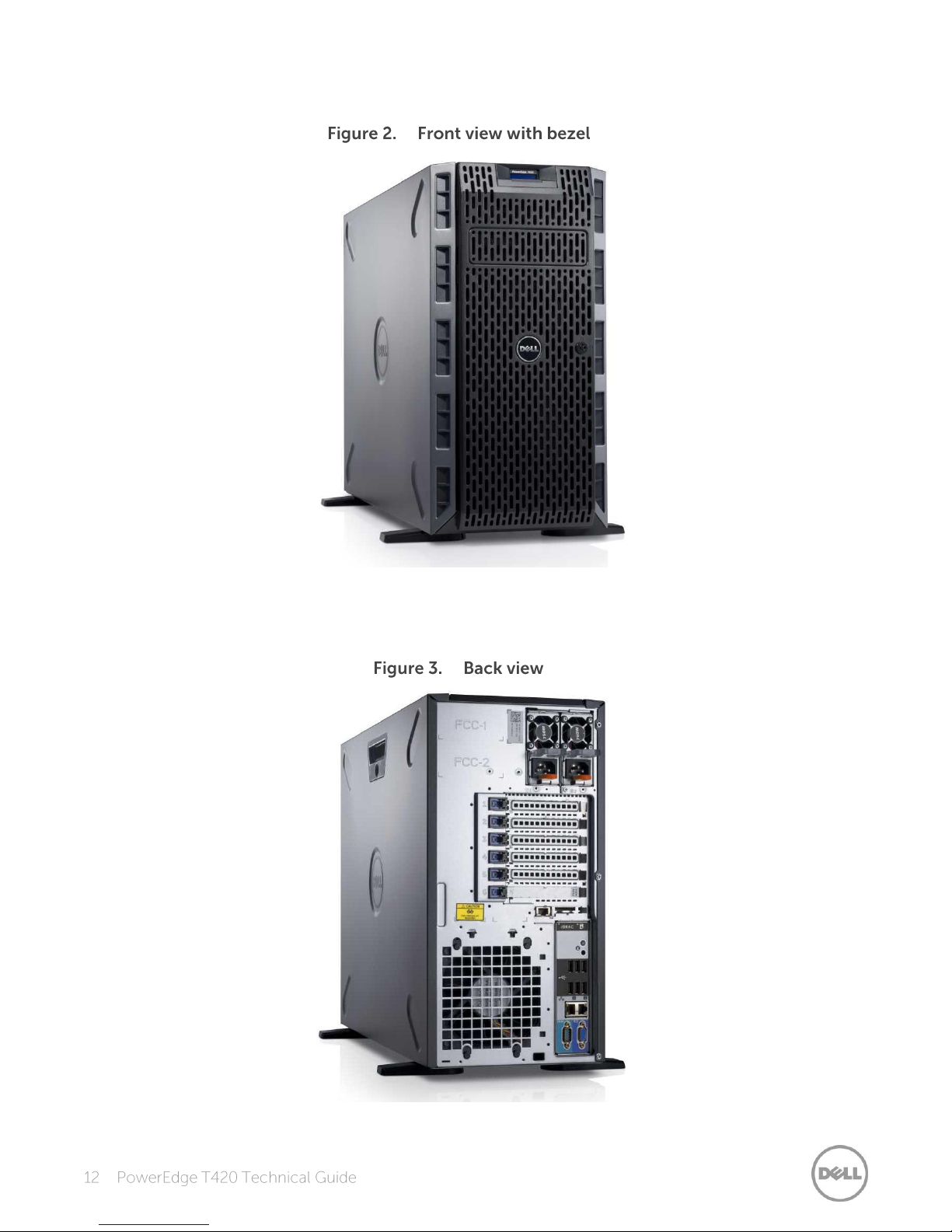
Figure 2 shows the optional lockable bezel on the front of the T420 chassis.
Figure 3 shows the features on the back panel of the T420 including USB connectors, Ethernet
connectors, serial connector, video connector, PCIe slots, power supplies, iDRAC dedicated port,
and many other components and features described in this guide.
Page 13
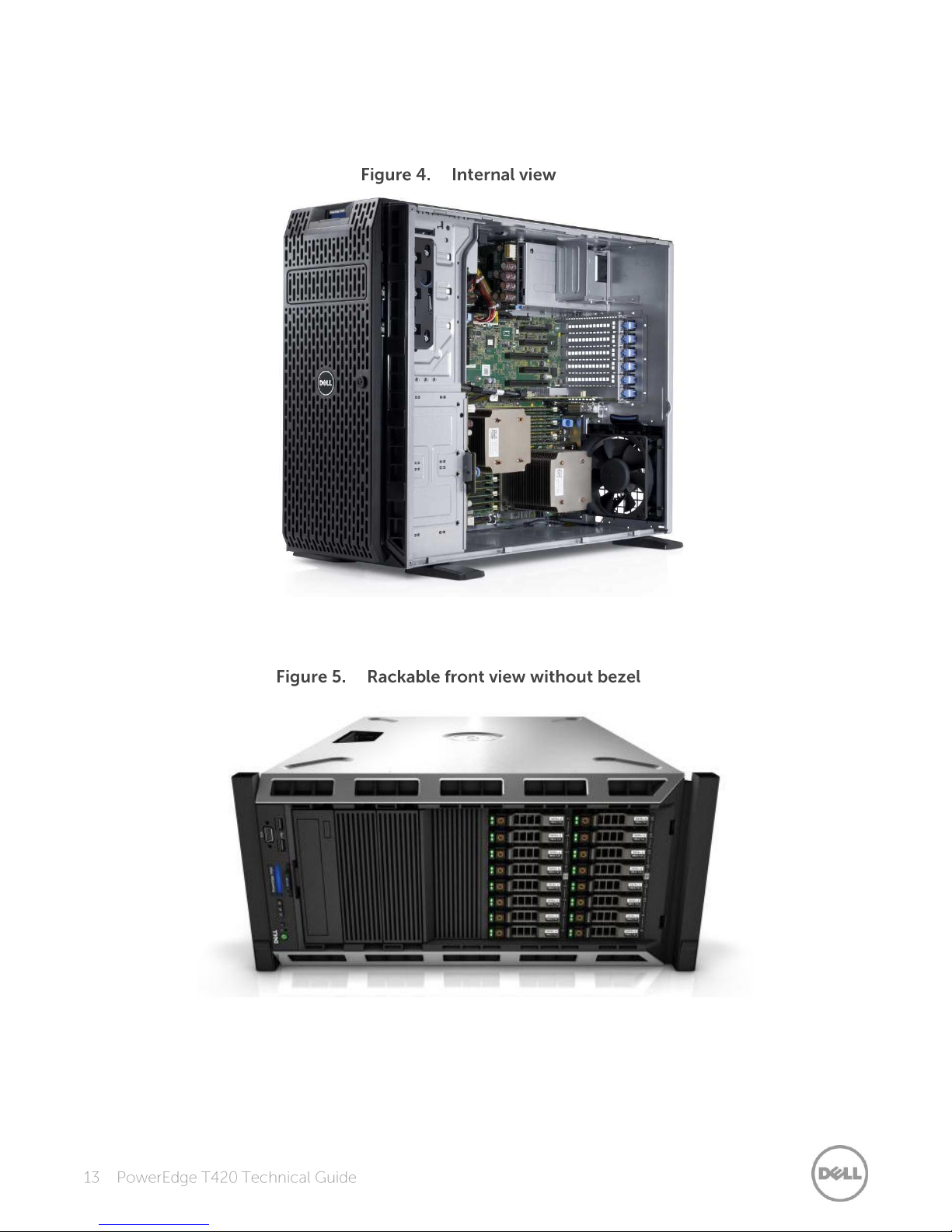
The chassis design of the T420 is optimized for easy access to components and for airflow for
effective and efficient cooling. Figure 4 provides an internal view of the T420 including the DIMMs,
PCIe card slots, power supplies, fans, and processors.
Figure 5 shows the front view of the rackable T420 chassis without a bezel.
Page 14
Table 5 lists the various features on the T420. For additional information, see the
Feature
Description
Power button
ACPI-compliant power button with an integrated green power LED
Front bezel
Covers the system’s front-loading hard drives and locks for security
NMI button
Used to troubleshoot software and device driver errors; use only if directed
to do so by qualified support personnel or by the operating system's
documentation
System identification button
Buttons on the back and front of a system to help identify the unit in a data
center environment
Hard drives
Up to sixteen 2.5-inch drives
USB connectors
Connects USB devices to the server
Information tag
Slide-out label panel for recording system information
Video connector
Connects a monitor to the server; the tower chassis has one port on the
back of the chassis; the rack chassis has a port on both the front and back of
the chassis
LCD panel and buttons
Displays system ID, status information, and system error messages;
the hot-plug chassis has two navigation buttons to scroll through the menu
on the LCD and one select button
Optical drive
Optional half-height DVD or DVD+RW drive
Power supply units
Supplies power to the server
Power supply indicators
Indicates whether server has power
NIC indicators
Indicates network activity and status
PCIe slots
Connects PCIe expansion cards to the server
Ethernet connectors
Connects integrated 10/100/1000 NICs to the server
Serial connector
Connects a serial device to the server
iDRAC7 Enterprise port
Dedicated management port for optional iDRAC Ports card
T420 Systems Owner’s Manual
on Support.Dell.com/Manuals.
Dell PowerEdge
Page 15
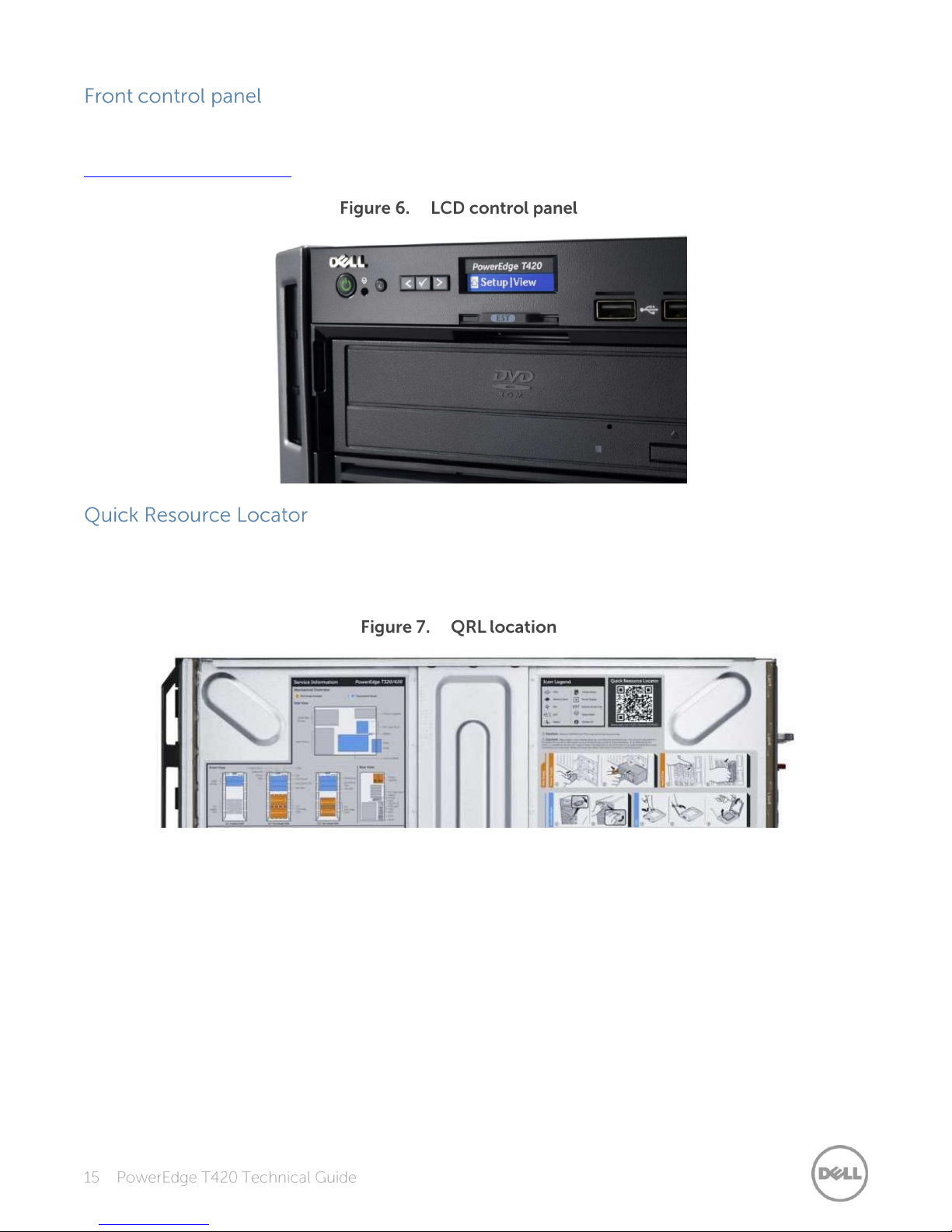
The T420 control panel is located on the front of the chassis as shown in Figure 6. For more
information about the LCD control panel, see the
Dell PowerEdge T420 Systems Owner’s Manual
on
Support.Dell.com/Manuals.
A useful feature included with Dell PowerEdge 12th generation servers is the Quick Resource Locator
(QRL)—a model-specific Quick Response (QR) code that is located inside the T420 chassis cover
(see Figure 7). Use your smartphone to access the Dell QRL app to learn more about the server.
This QRL code allows you to:
View step-by-step videos, including overviews of system internals and externals, as well as
detailed, concise, task-oriented videos and installation wizards
Locate reference materials, including searchable owner’s manual content, LCD diagnostics, and
an electrical overview
Look up your service tag so you can quickly gain access to your specific hardware configuration
info and warranty information
Contact Dell directly (by link) to get in touch with technical support and sales teams and provide
feedback to Dell
These codes provide an easy way to retrieve the critical support information you need when you
need it, making you more efficient and effective in managing your hardware.
Page 16
The latest generation of PowerEdge servers has the features listed in Table 6 to help ensure the
Security feature
Description
Cover latch
A tooled latch is integrated on the chassis (top of rack chassis or side of tower
chassis) with a coin key lock to secure the system.
Bezel
An optional metal bezel is mounted to the chassis front to provide the Dell ID. A
lock on the bezel protects un-authorized access to the hard drives and optical
drive. Although the bezel has an open area to allow access to the tape backup in
bay 2, the rest of the system remains locked. System status is viewable on the
LCD screen when the bezel is installed.
TPM
The Trusted Platform Module (TPM) is used to generate/store keys,
protect/authenticate passwords, and create/store digital certificates. It also
supports the Intel Xeon TXT functionality. TPM can also be used to enable the
BitLocker™ hard drive encryption feature in Windows Server 2008. TPM 1.2 is
supported. No TPM version is available for China or Russia.
Power-off security
BIOS has the ability to disable the power button function.
Intrusion alert
An internal switch is used to detect chassis intrusion.
Secure mode
BIOS has the ability to enter a secure boot mode through system setup. This
mode includes the option to lock out the power and NMI switches on the
control panel or set up a system password.
security of your data center.
Page 17
The Dell PowerEdge T420 features the Intel Xeon processor E5-2400 product family, which offers
an ideal combination of performance, power efficiency, and cost. These processors provide
substantial performance and capacity for entry and mainstream workloads, as well as applications
requiring significant memory and I/O scalability no matter what your constraint is—floor space,
power, or budget. In addition to providing raw performance gains, improved I/O is also made
possible with Intel Integrated I/O, which can reduce latency by adding more lanes and doubling
bandwidth. This helps to reduce network and storage bottlenecks, unleashing the processor’s
performance capabilities.
The new Intel Xeon processor E5-2400 product family provides the following features:
2-socket processor design with power and dimensions optimized for density
Up to 8 execution cores per processor
Intel Hyper-Threading technology enables up to 16 computational threads
Micro-architecture on 32nm process for greater performance per watt
Support for more memory—4 additional DIMMs (up to 12 DIMM slots) and support for up to
32GB DIMMs increasing the memory capacity from 128GB to 384GB
Integrated memory controller with 3 channels of DDR3 and 46-bit physical addressing facilitate
greater memory capacity
Intel Integrated I/O has support for up to 24 lanes per socket of PCIe 3.0 links (for more
information on PCIe lanes, see the specifications in the System features section)
Faster connections throughout the system with support for DDR3 1600MT/s memory and
8.0GT/s QPI
Intel Data Direct I/O (DDIO) allows I/O traffic to skip the main system memory and be directed
straight to the processor cache, which can provide a significant reduction in latency as well as
allowing memory to remain in a low-power state
High bandwidth, low latency, bidirectional ring interconnect allows faster access to the 20MB
multi-banked last level cache
Intel Advanced Vector Extensions offer up to double the floating point operations per clock
cycle by doubling the length of registers, which can be useful for addressing very complex
problems or dealing with large-number calculations, which are integral to many technical,
financial, and scientific computing problems
Intel Turbo Boost Technology 2.0, which allows processor cores to run faster than the base
operating frequency if it's operating below power, current, and temperature specification limits,
delivers up to double the boost than the previous generation
Continued improvements to both Intel TXT and AES-NI help to better protect systems and data
For more information on the Intel Xeon processor E5-2400 product family, visit Intel.com.
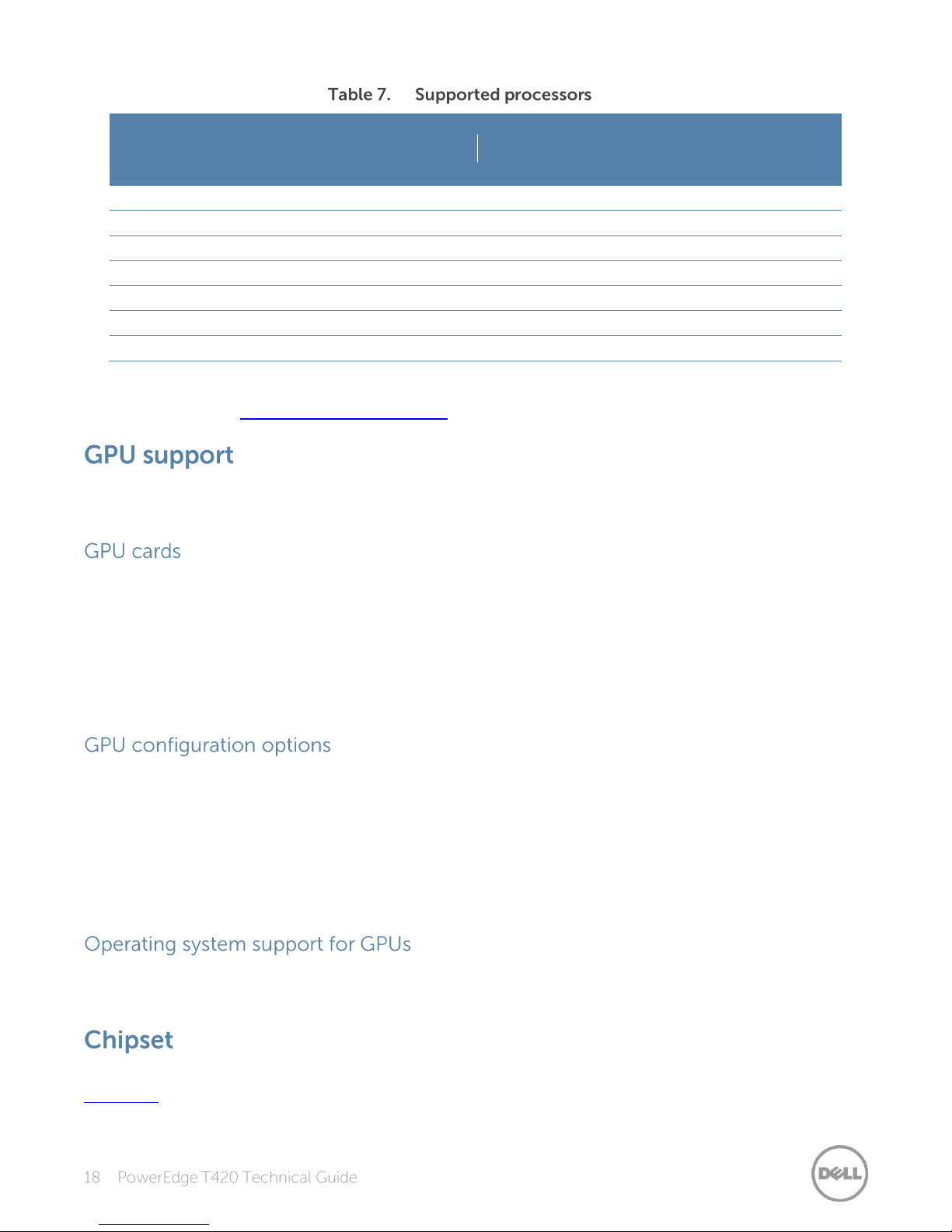
Table 7 lists the Intel Xeon processors supported by the PowerEdge T420. For the latest information
on supported processors, visit Dell.com/PowerEdge.
Page 18
Model
Speed
TDP
Cache
Cores/
threads
QPI
Max
memory
speed
Turbo
E5-2450
2.1GHz
95W
20MB
8/16
8.0 GT/s
1600MT/s
Yes
E5-2440
2.4GHz
95W
15MB
6/12
7.2 GT/s
1333MT/s
Yes
E5-2430L
2.0GHz
60W
15MB
6/12
7.2 GT/s
1333MT/s
Yes
E5-2430
2.2GHz
95W
15MB
6/12
7.2 GT/s
1333MT/s
Yes
E5-2420
1.9GHz
95W
15MB
6/12
7.2 GT/s
1333MT/s
Yes
E5-2407
2.2GHz
80W
10MB
4/8
6.4 GT/s
1066MT/s
NA
E5-2403
1.8GHz
80W
10MB
4/8
6.4 GT/s
1066MT/s
NA
For information on processor installation and configuration, see the
Owner’s Manual
on Support.Dell.com/Manuals.
Dell PowerEdge T420 Systems
The T420 supports graphics processing unit (GPU) technology, providing accelerated performance
for a variety of applications such as VDI and medical imaging.
The T420 supports two nVidia® Q4000 full-length, single-width or one nVidia Q6000 full-length,
double-width GPU. GPU cards are available through certified factory installation (CFI) or field
upgrade only.
Each GPU supports up to 6GB of dedicated GDDR5 memory and is actively cooled. Each GPU has
one or two power connectors to meet the high demand for power delivery. The power connectors
are located on the back of the card.
The GPUs from nVidia have PCIe 2.0 that can be installed in the T420 PCIe x16 3.0 slots 3 and 5 (slot
5 requires a two-processor configuration). The interface for the next generation GPU cards will be
PCIe 3.0.
The following system configuration restrictions apply when a GPU is installed:
1100W redundant power supply is recommended
System can support only one 5.25-inch device
Some operating systems have not been validated to support GPUs. See Table 20 for more
information on operating system support of GPUs.
The Intel C600 chipset is implemented on the PowerEdge T420. For more information, visit
Intel.com.
Page 19
Feature
UDIMM
RDIMM
Register
No
Yes
Buffer
No
No
Frequencies*
800, 1066, or 1333MT/s
800, 1066, 1333, or 1600MT/s
Ranks supported
1 or 2
1, 2, or 4
Capacity per DIMM
2 or 4GB
2, 4, 8, 16, or 32GB
Maximum DIMMs per channel
2 2 DRAM technology
x8
x4 or x8
Temperature sensor
Yes
Yes
Error Correction Code (ECC)
Yes
Yes
Single Device Disable Code
(SDDC)
Yes (with advanced ECC mode)
Yes
Address parity
Yes
Yes
More options are available for the Dell PowerEdge 12th generation servers than in previous
generations—more capacity choices and more frequency choices. The PowerEdge T420 supports
up to 384GB of memory with speeds of up to 1600MT/s, providing high performance in a variety of
applications. The new reliability, availability, serviceability (RAS) features like memory mirroring and
sparing help you increase your uptime and reduce data loss. RAS aids in the rapid and accurate
diagnosis of faults that require service, increasing your memory reliability.
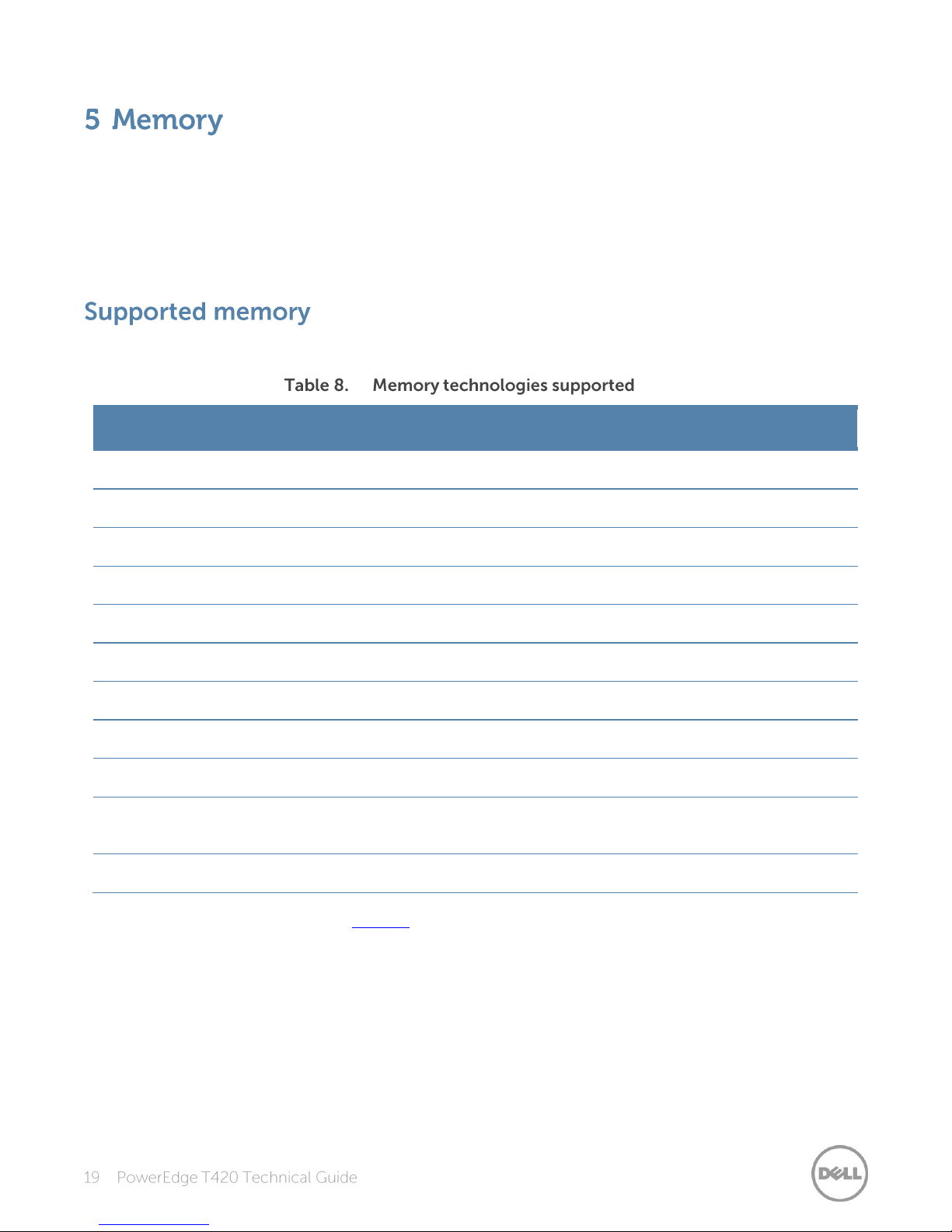
The T420 supports the memory technologies shown in Table 8.
*Although the T420 supports DIMM speeds of 800MT/s and 1066MT/s, you can only purchase this system with DIMM
speeds of 1333MT/s and 1600MT/s on Dell.com.
Page 20
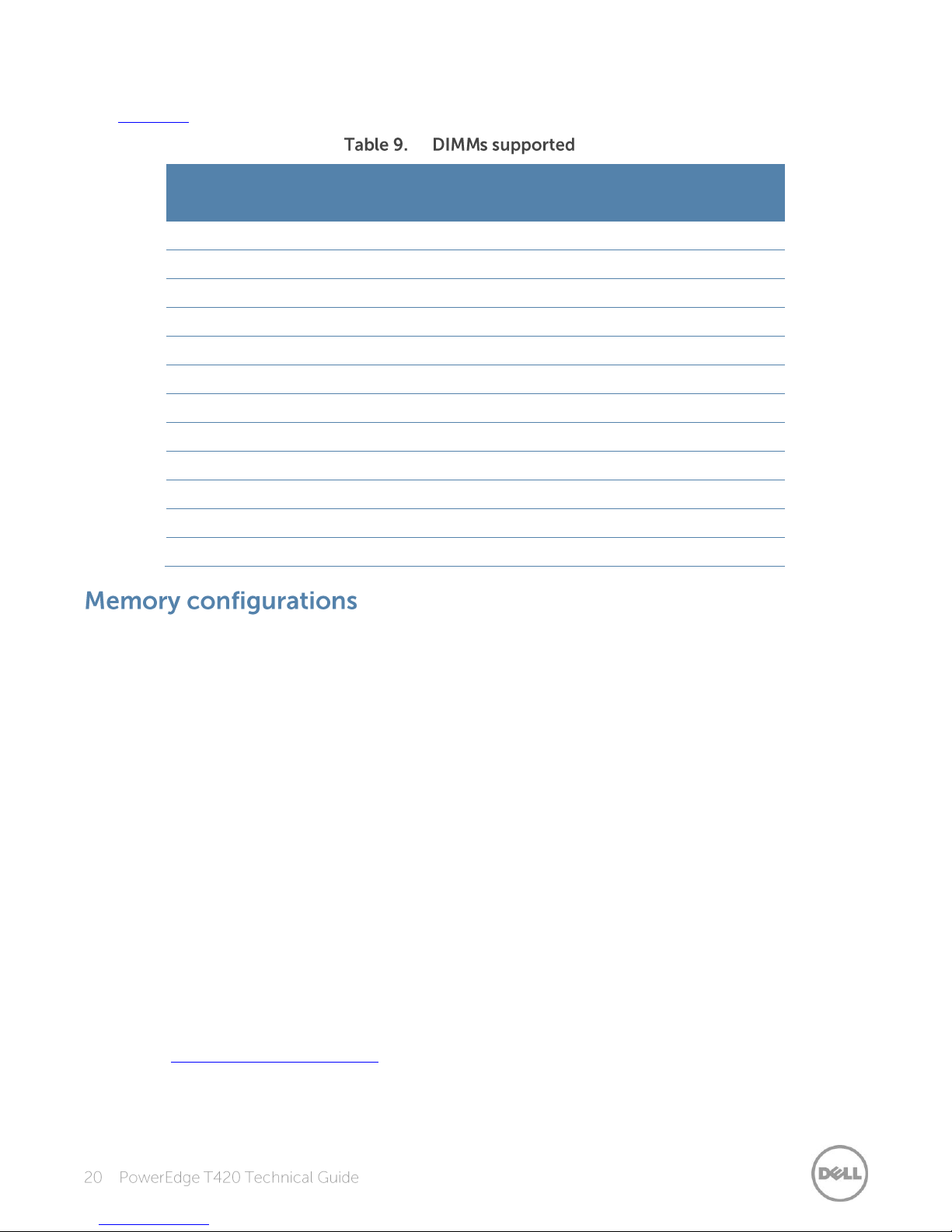
The T420 supports the DIMMs listed in Table 9. For the latest information on supported memory,
Capacity
(GB)
Speed
(MT/s)
Type
Ranks per
DIMM
Data
width
SDDC support
Voltage
2
1333
RDIMM
1
x8
Advanced ECC
1.35
2
1333
UDIMM
1
x8
Advanced ECC
1.35
2
1600
RDIMM
1
x8
Advanced ECC
1.5
4
1333
RDIMM
2
x8
Advanced ECC
1.35
4
1333
RDIMM
1
x4
All modes
1.35
4
1333
UDIMM
2
x8
Advanced ECC
1.35
4
1600
RDIMM
2
x8
Advanced ECC
1.5 8 1333
RDIMM
2
x4
All modes
1.35
8
1600
RDIMM
2
x4
All modes
1.5
16
1333
RDIMM
2
x4
All modes
1.35
16
1600
RDIMM
2
x4
All modes
1.5
32
1333
RDIMM
4
x4
All modes
1.35
visit Dell.com.
Flexible memory configurations are supported on the T420, ranging from capacities of 2GB to
384GB. The system supports up to 6 DIMMs per processor (up to 12 DIMMs in a 2-processor
configuration). The T420 has 3 memory channels per processor, with each channel supporting up to
2 DIMMs.
The T420 supports a flexible memory configuration according to these basic rules:
Speed: If DIMMs of different speeds are mixed, all channels across all processors operate at the
slowest DIMM’s common frequency.
DIMM type: Only one type of DIMM can be used in a system. UDIMMs and RDIMMs cannot be
mixed.
The following additional memory population guidelines apply to the T420:
Up to two quad-rank (QR), dual-rank (DR), or single-rank (SR) DIMMs may be populated per
channel.
DIMMs must be installed in each channel, starting with the DIMM farthest from the processor.
DIMMs should be installed with largest rank count to smallest. For example, if DR DIMMS are
mixed with SR DIMMs, DR DIMMS should be placed in the lowest DIMM slots, followed by the SR
DIMMs.
For more information on memory configuration, see the
Manual
on Support.Dell.com/Manuals.
Dell PowerEdge T420 Systems Owner’s
Page 21
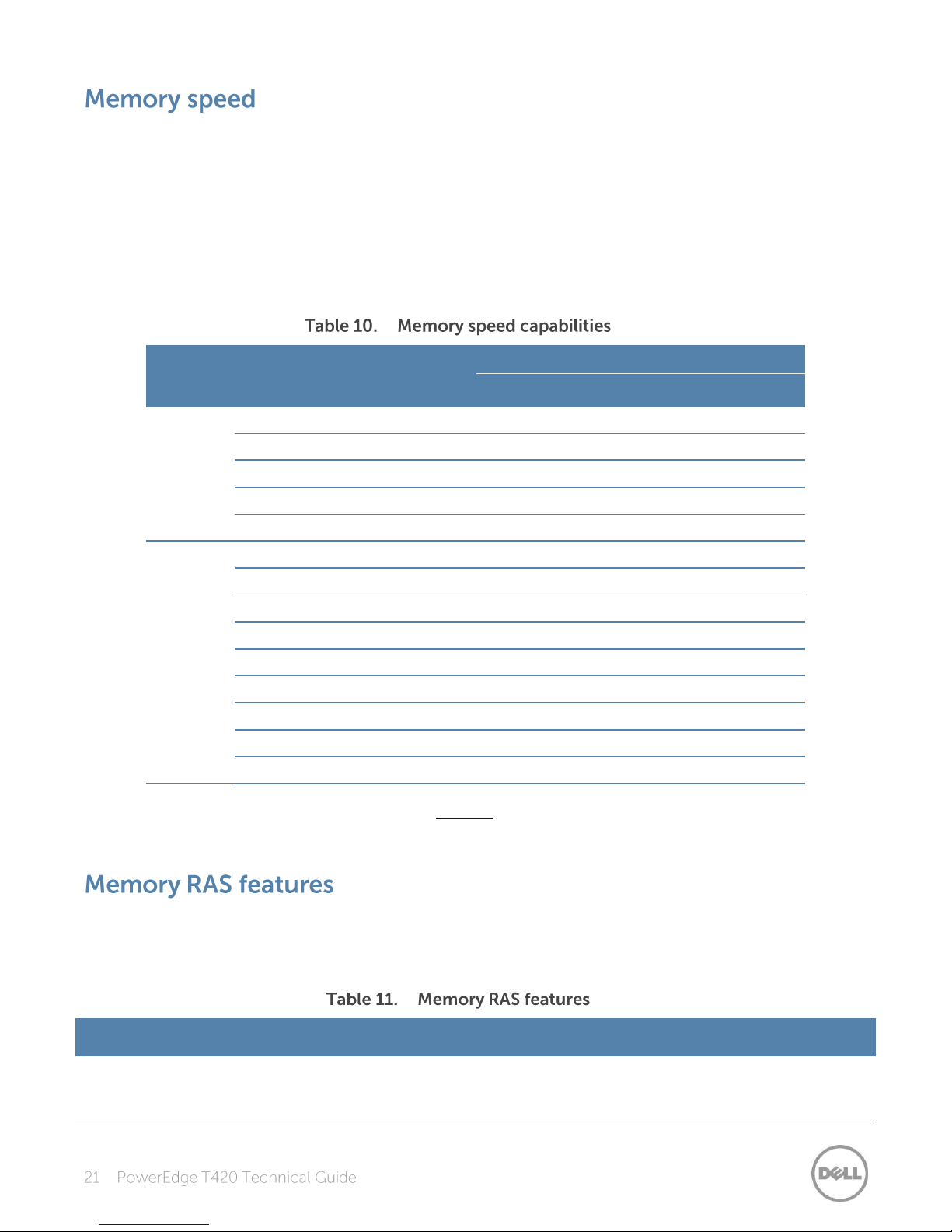
The T420 supports memory speeds of 1600MT/s, 1333MT/s, 1066MT/s, and 800MT/s depending on
DIMM
type
DIMM 0
DIMM 1
Number
of
DIMMs
Speed (MT/s)
800*
1066*
1333
1600
UDIMM
SR 1 ∞ ∞ ∞
DR 1 ∞ ∞ ∞
SR
SR 2 ∞ ∞ ∞
SR
DR 2 ∞ ∞ ∞
DR
DR 2 ∞ ∞ ∞
RDIMM
SR 1 ∞ ∞ ∞
∞
DR 1 ∞ ∞ ∞ ∞ QR 1 ∞ ∞ ∞
SR
SR 2 ∞ ∞ ∞
∞
SR
DR 2 ∞ ∞ ∞ ∞ DR
DR 2 ∞ ∞ ∞ ∞ QR
SR 2 ∞ ∞ QR
DR 2 ∞ ∞ QR
QR 2 ∞ ∞
Feature
Description
Dense configuration
optimized profile
Increased memory reliability can be a result from this selectable platform profile
that adjusts parameters to reduce faults regarding refresh rates, speed,
temperature and voltage
the DIMM types installed and the configuration. All memory on all processors and channels run at
the same speed and voltage. By default, the systems run at the highest speed for the channel with
the lowest DIMM voltage and speed. The operating speed of the memory is also determined by the
maximum speed supported by the processor, the speed settings in the BIOS, and the operating
voltage of the system.
Table 10 lists memory configuration and performance details for the T420 based on the population
of the number and type of DIMMs per memory channel.
*Although the T420 supports DIMM speeds of 800MT/s and 1066MT/s, you can only purchase this system with
DIMM speeds of 1333MT/s and 1600MT/s on Dell.com.
RAS features help keep the system online and operational without significant impact to performance,
and can decrease data loss and crashing due to errors. RAS aids in rapid, accurate diagnosis of faults
that require service. Table 11 describes the RAS features supported on the T420.
Page 22
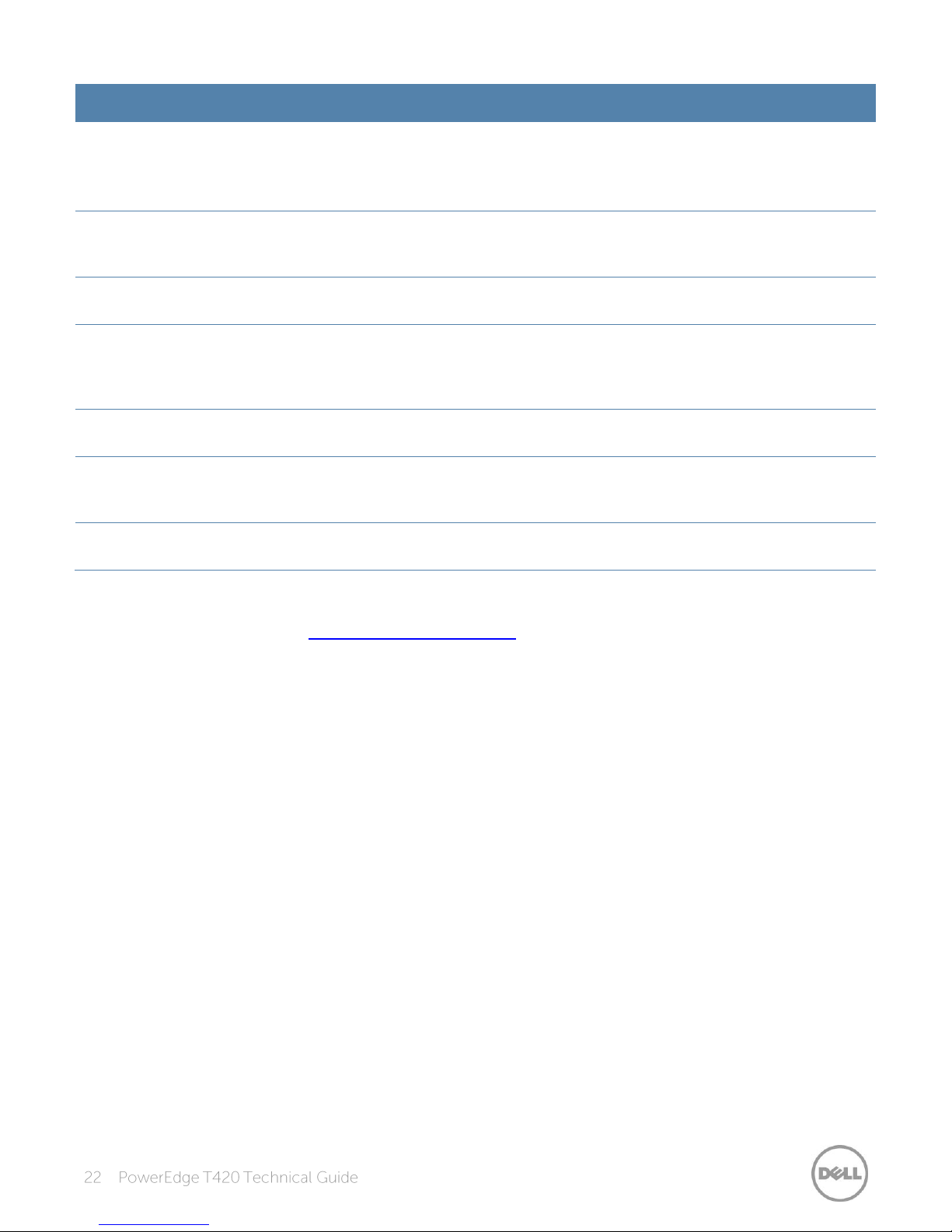
Feature
Description
Memory demand and
patrol scrubbing
Demand scrubbing is the ability to write corrected data back to the memory once
a correctable error is detected on a read transaction.
Patrol scrubbing proactively searches the system memory, repairing correctable
errors.
Recovery from single
DRAM device failure
Recovery from Single DRAM Device Failure (SDDC) provides error checking and
correction that protects against any single memory chip failure as well as multi-bit
errors from any portion of a single memory chip.
Failed DIMM isolation
This feature provides the ability to identify a specific failing DIMM channel pair,
thereby enabling the user to replace only the failed DIMM pair.
Memory mirroring:
intra-socket
Memory mirroring is a method of keeping a duplicate (secondary or mirrored)
copy of the contents of memory as a redundant backup for use if the primary
memory fails. The mirrored copy of the memory is stored in memory of the same
processor socket.
Memory address parity
protection
This feature provides the ability to detect transient errors on the address lines of
the DDR channel.
Memory sparing (rank)
Memory sparing allocates one rank per channel as a spare. If excessive correctable
errors occur in a rank or channel, it is moved to the spare area while the operating
system is running to prevent the error from causing an uncorrectable failure.
Memory thermal
throttling
This feature helps to optimize power/performance and can also be used to
prevent DIMMs from overheating.
For information on memory mirroring and sparing configurations, see the
Systems Owner’s Manual
on Support.Dell.com/Manuals.
Dell PowerEdge T420
Page 23

Form
factor
Type
Speed
(rpm)
Capacities
Nearline SAS
7.2K
500G, 1TB
SAS
10K
300GB, 600GB, 900GB
SAS
15K
146GB, 300GB
SAS SSD
N/A
200GB, 400GB
SATA SSD
N/A
100GB, 200GB
SATA
7.2K
250GB, 500GB, 1TB
SATA
7.2K
500GB, 1TB, 2TB, 3TB
Nearline SAS
7.2K
1TB, 2TB, 3TB
SAS
15K
300GB, 600GB
The Dell PowerEdge T420 supports internal and external storage options and controllers, different
drive types, and different chassis configurations for a varied number of drives.
The T420 has one chassis that supports three different drive bay options:
4 x 3.5-inch cabled drive bays
8 x 2.5-inch or 3.5-inch hot-plug drive bays
16 x 2.5-inch hot-plug drive bays
The T420 supports up to sixteen 2.5-inch or eight 3.5-inch hard drives or solid-state drives.
Self-encrypting drives (SED) are available. Table 12 lists more information about these drives. For
additional information, see Dell.com/PowerEdge.
External storage for the T420 is available through SAS 6Gbps. For more information, see
Dell.com/Storage.
Page 24

Dell provides highly capable RAID options for you to ensure that your data remains safe. Dell’s RAID
Controller
Description
Features
RAID
modes
supported
Form factor
Usage
model
PERC H810
External
Eight-port, external and
6Gp/s PCIe RAID controller
Includes 1GB NV DDR3
cache, premium
performance and feature
set, security SED/EKMS,
and SSD as cache
0, 1, 10, 5,
50, 6, 60
Adapter
Premium
performance
PERC H710P
Internal
Eight-port, internal 6Gb/s
PCIe RAID controller
Includes 1GB NV DDR3
cache, premium
performance and feature
set, security SED/EKMS,
and SSD as cache
0, 1, 10, 5,
50, 6, 60
Adapter
Premium
performance
PERC H710
Internal
Eight-port, internal 6Gb/s
PCIe RAID controller
Includes 512MB NV
DDR3 cache, advanced
feature set, security
SED/EKMS
0, 1, 10, 5,
50, 6, 60
Adapter
Performance
PERC H310
Internal
Eight-port, internal 6Gb/s
PCIe RAID
Supports hot-plug drives,
expansion, pass-through
0, 1, 10, 5,
50
Adapter
Value
controller options offer impressive performance improvements, including the following features:
FastPath™ I/O: This feature can help accelerate performance when operating on SSDs.
Split mirror: This function allows you to break mirrored disk connection in order to quickly
replace a drive.
Physical disk power management (Dimmer Switch™): This feature allows for power control of
spare or idle drives, which can save energy and operating expenses.
The newest line of PERC (PowerEdge RAID Controller) cards offer high I/O performance for
database applications and streaming digital media environments. The internal RAID controllers have
a dedicated connection to the system board. The T420 supports the new PERC 8 family of
controllers with improved functionality and faster performance.
The T420 supports the adapter-type PERC only plus the new software RAID solution that supports
RAID 0, 1, 5 and 10 as shown in Table 13. For more information about the latest PERC offerings, see
Dell.com/PERC.
Page 25

Controller
Description
Features
RAID
modes
supported
Form factor
Usage
model
PERC S110
Software
RAID
3Gb/s SATA software RAID
controller that supports up
to 4 physical disks or 8
virtual disks
Supports up to 4
hot-plug SATA drives ,
no expansion, Microsoft
Windows only
0, 1, 5, 10
System
boardembedded
SATA
Entry-level
Tape devices
Interface cards
LTO5-140 SAS
Internal tape adapter
LTO4-120 HH SAS
Internal tape adapter
LTO3-080 SAS
Internal tape adapter
RD1000 SATA
Onboard SATA
External SAS tape
6Gb SAS HBA
External FC tape
FC HBA
External RD1000
USB
The T420 hot-plug chassis supports up to three media bays through one of the following options:
Up to two SATA half-height DVD-ROM or DVD R/W drive + one SAS interface tape drive
Up to one SATA half-height DVD-ROM or DVD R/W drive + one internal RD1000 drive+ one SAS
interface tape drive.
The T420 cabled chassis supports up to two media bays through one of the following options:
Up to two SATA half-height DVD-ROM or DVD R/W drive
Up to one SATA half-height DVD-ROM or DVD R/W drive + one internal RD1000 drive/or SAS
interface tape drive
Up to one internal RD1000 drive+ one SAS interface tape drive
The T420 supports the external storage device types listed in Table 14. For additional information,
visit Dell.com/Storage.
Page 26
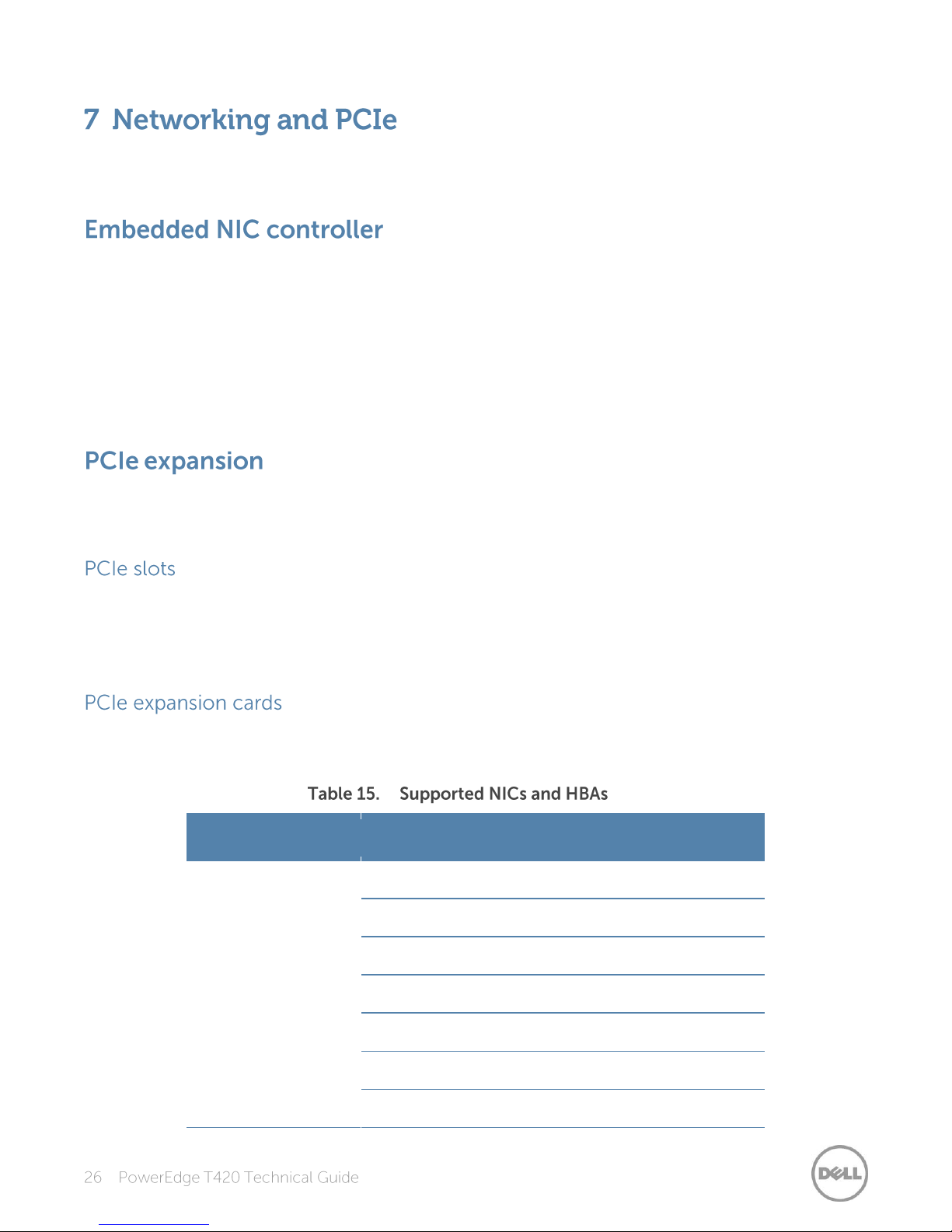
Type
Adapter
1Gb/10Gb NICs
Broadcom 5720 Dual Port 1Gb Base-T
Broadcom 5719 Quad Port 1Gb Base-T
Intel I350 Dual Port 1Gb Base-T
Intel I350 Quad Port 1Gb Base-T
Broadcom 57810S Dual Port 10Gb Base-T CNA
Broadcom 57810S Dual Port 10Gb DA/SFP+ CNA
Intel X520 Dual Port 10Gb SFP+
The Dell PowerEdge T420 offers balanced, scalable I/O capabilities, including integrated PCIe 3.0
capable expansion slots. The T420 supports up to six PCIe slots.
The T420 system board has one embedded NIC controller. The Broadcom 5720 Gigabit NIC chip is
connected to the platform controller hub through a PCIe 2.0 x 2 link.
The Broadcom 5720 is a 14th generation 10/100/1000Base-T Ethernet LAN controller solution
suitable for high-performance server applications. The Broadcom 5720 combines dual triple-speed
IEEE 802.3 compliant Media Access Controllers (MACs) with dual 10/100/1000 Ethernet transceivers
(PHYs), selectable individually per port, a network controller sideband interface (NC-SI), and an
on-chip memory buffer in a single device. The device provides a PCIe 2.1-compliant interface,
which operates at 5GT/s or 2.5GT/s x2 link width.
The T420 provides expanded PCIe slot capability over the previous servers. This is made possible by
the 24 PCIe lanes available from each processor in the system. Dell designed the T420 to be PCIe
3.0-compliant in order to take full advantage of the processor capabilities.
PCIe connectivity is integrated with the processor in that the number of processors in a system
impacts the number of PCIe slots and the bandwidth of each PCIe slot. For a system with one
processor, five of the PCIe slots are available. For a system with two processors, all six slots are
available.
The T420 supports a variety of PCIe expansion cards. Table 15 lists the supported add-in NICs and
HBAs for the T420.
Page 27

Type
Adapter
Intel X540 Dual Port 10Gb Base-T
QLogic QLE8262 Dual Port 10Gb DA/SFP+
Brocade BR1020 Dual Port 10Gb SFP+ CNA
FC4/FC8 HBAs
QLogic QLE2460 Single Port 4Gbps
QLogic QLE2462 Dual Port 4Gbps
QLogic QLE2560 Single Port 8Gbps
QLogic QLE2562 Dual Port 8Gbps
Emulex LPe12000 Single Port 8Gbps
Emulex LPe12002 Dual Port 8Gbps
Brocade BR815 Single Port 8Gbps
Brocade BR825 Dual Port 8Gbps
For the latest information on all supported add-in PCIe expansion cards for the T420, visit Dell.com.
Page 28
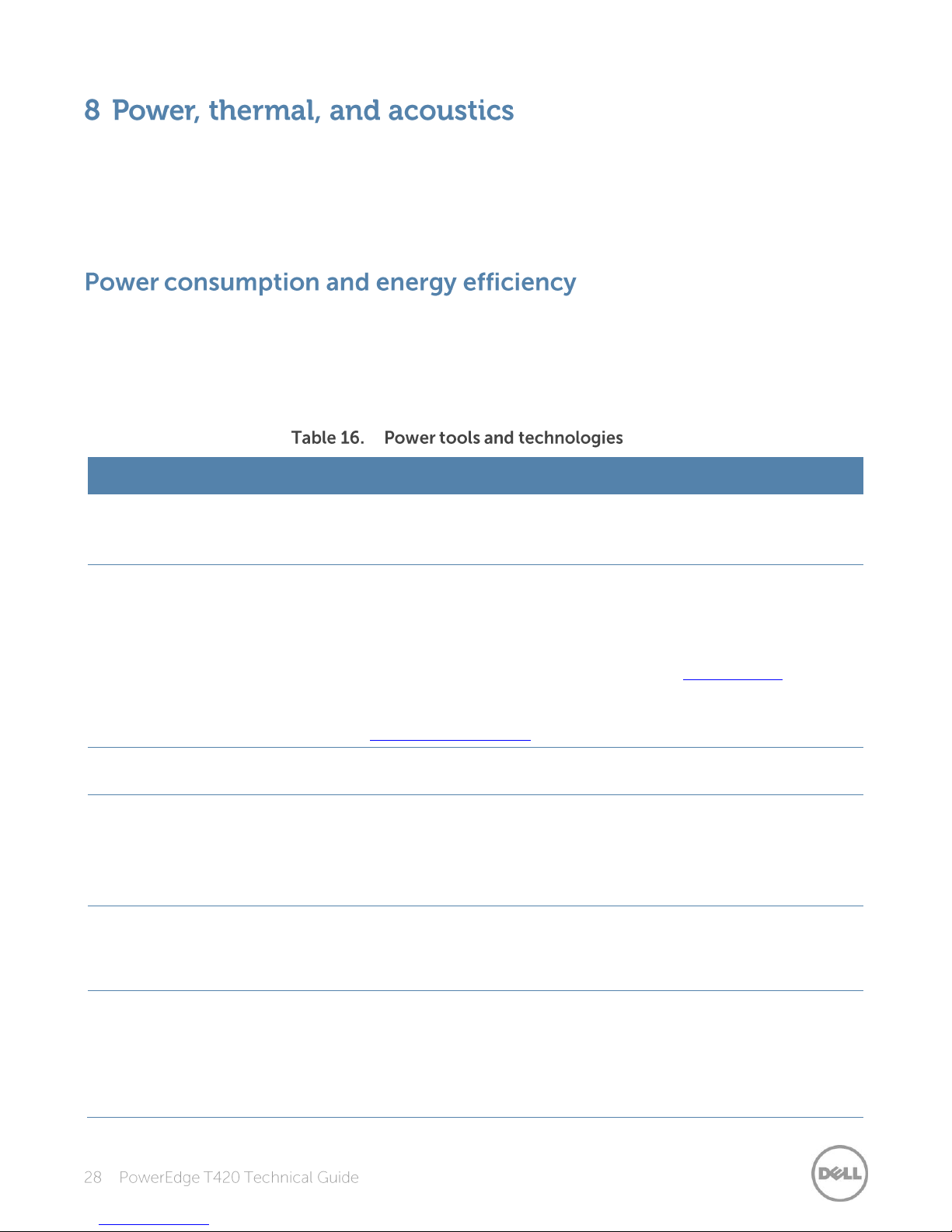
Feature
Description
Power supply unit (PSU)
portfolio
(redundant PSU only)
Dell’s PSU portfolio includes intelligent features such as dynamically
optimizing efficiency while maintaining availability and redundancy. Find
additional information in the Power supply units section.
Tools for right-sizing
Dell Energy Smart Solution Advisor (ESSA) is a tool that helps you determine
the most efficient configuration possible. With ESSA, you can calculate the
power consumption of your hardware, power infrastructure, and storage.
ESSA can help you determine exactly how much power your server will use
at a given workload, and the PSU Advisor can help you choose the best,
most efficient PSU for your workload. Learn more at Dell.com/calc.
Energy Smart Data Center Assessment is a Dell Services offering that uses
infrastructure and thermal analysis to help maximize system efficiency. Learn
more at Dell.com/EnergySmart.
Industry compliance
Dell’s servers are compliant with all relevant industry certifications and
guidelines, including 80 PLUS, Climate Savers, and ENERGY STAR.
Power monitoring
accuracy
(redundant PSU only)
PSU power monitoring improvements include:
Dell’s power monitoring accuracy is currently 1%, whereas the industry
standard is 5%
More accurate reporting of power
Better performance under a power cap
Power capping
(redundant PSU only)
Use Dell’s systems management to set the power cap limit for your systems
to limit the output of a PSU and reduce system power consumption. Dell is
the first hardware vendor to leverage Intel Node Manager for
circuit-breaker fast capping.
Systems management
(redundant PSU only)
iDRAC7 Enterprise provides server-level management that monitors,
reports, and controls power consumption at the processor, memory, and
system level.
Dell OpenManage Power Center delivers group power management at the
rack, row, and data center level for servers, power distribution units, and
uninterruptible power supplies.
Lower overall system-level power draw is a result of breakthrough system design. The Dell
PowerEdge T420 server maximizes performance per watt through a combination of power and
cooling, energy efficient technologies, and tools. Additionally, the PowerEdge T420 has an extensive
collection of sensors that automatically track thermal activity, which helps regulate temperature
thereby reducing server noise and power consumption.
With the rise in the cost of energy coupled with increasing data center density, Dell provides tools
and technologies to help you realize greater performance with less energy cost and waste. More
efficient data center usage can reduce costs by slowing the need for additional center space.
Table 16 lists the tools and technologies Dell offers to help you achieve your data center goals by
lowering power consumption and increasing energy efficiency.
Page 29
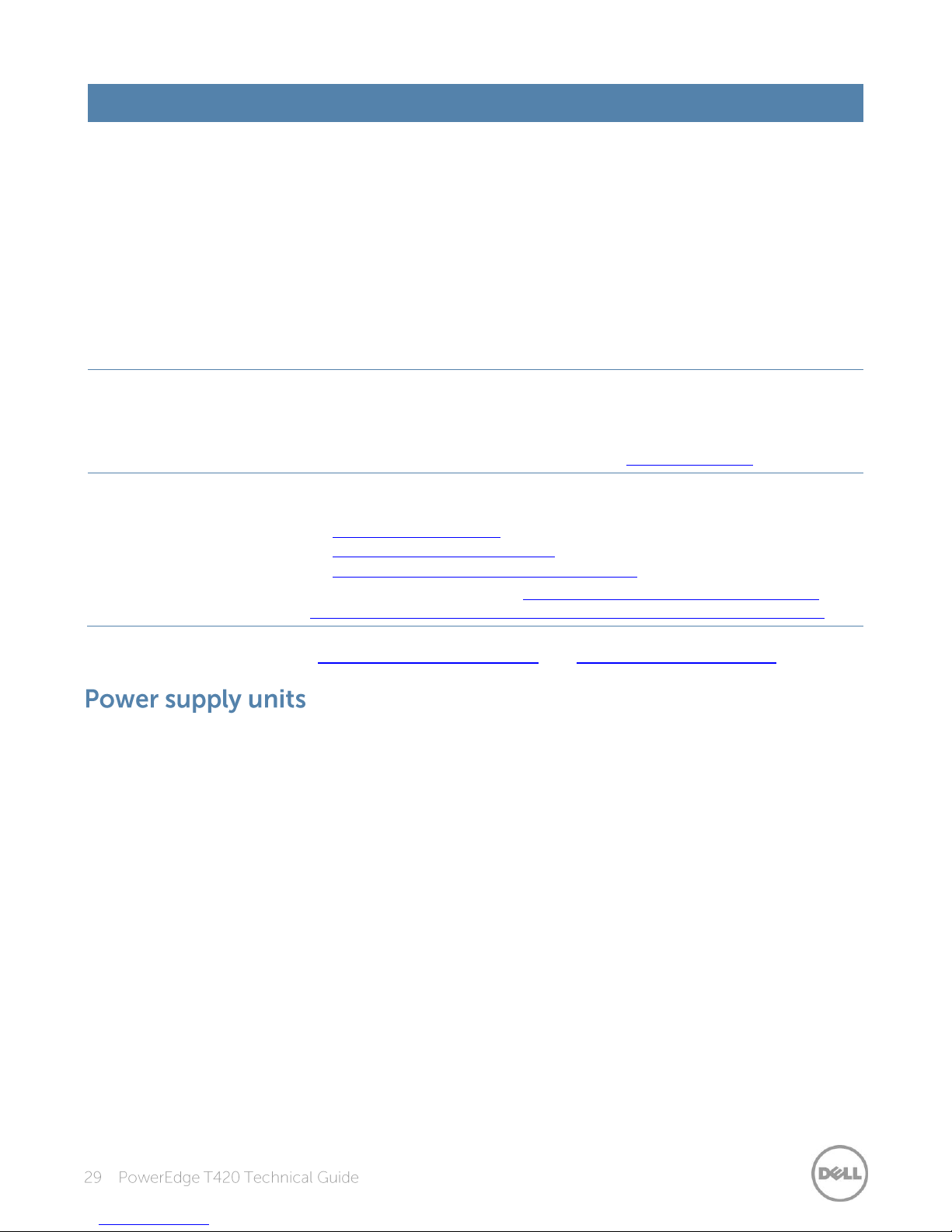
Feature
Description
Active power management
(redundant PSU only)
Intel Node Manager is an embedded technology that provides individual
server-level power reporting and power limiting functionality. Dell offers a
complete power management solution comprised of Intel Node Manager
accessed through Dell iDRAC7 Enterprise and OpenManage Power Center
that allows policy-based management of power and thermals at the
individual server, rack and data center level.
Hot spare reduces power consumption of redundant power supplies.
Thermal control of fan speed optimizes the thermal settings for your
environment to reduce fan consumption and lower system power
consumption.
Idle power enables Dell servers to run as efficiently when idle as when at full
workload.
Fresh Air cooling
(redundant PSU only)
With the thermal design and reliability of Dell products, you can have the
capability to operate at excursion-based temperatures beyond the industry
standard of 35°C (95°F) without impacting your availability model. This
solution takes into account servers, networking, storage, and other
infrastructure. Find additional information at Dell.com/FreshAir.
Rack infrastructure
Dell offers some of the industry’s highest-efficiency power infrastructure
solutions, including:
Power distribution units (PDUs)
Uninterruptible power supplies (UPS)
Energy Smart containment rack enclosures
Find additional information at http://content.dell.com/us/en/enterprise/
power-and-cooling-technologies-components-rack-infrastructure.aspx.
Find additional information at Dell.com/PowerAndCooling and Power.com/PowerCenter.
Energy Smart power supplies (redundant PSUs only) have intelligent features, such as the ability to
dynamically optimize efficiency while maintaining availability and redundancy. Also featured are
enhanced power-consumption reduction technologies, such as high-efficiency power conversion
and advanced thermal-management techniques, and embedded power-management features,
including high-accuracy power monitoring.
The T420 power supply subsystem consists of a single, cabled power supply or up to two AC-DC
redundant power supplies. The following power supply options are available for the T420:
550W AC, cabled, non-redundant
495W AC, hot-plug redundant
750W AC, hot-plug redundant
1100W AC, hot-plug redundant
Page 30
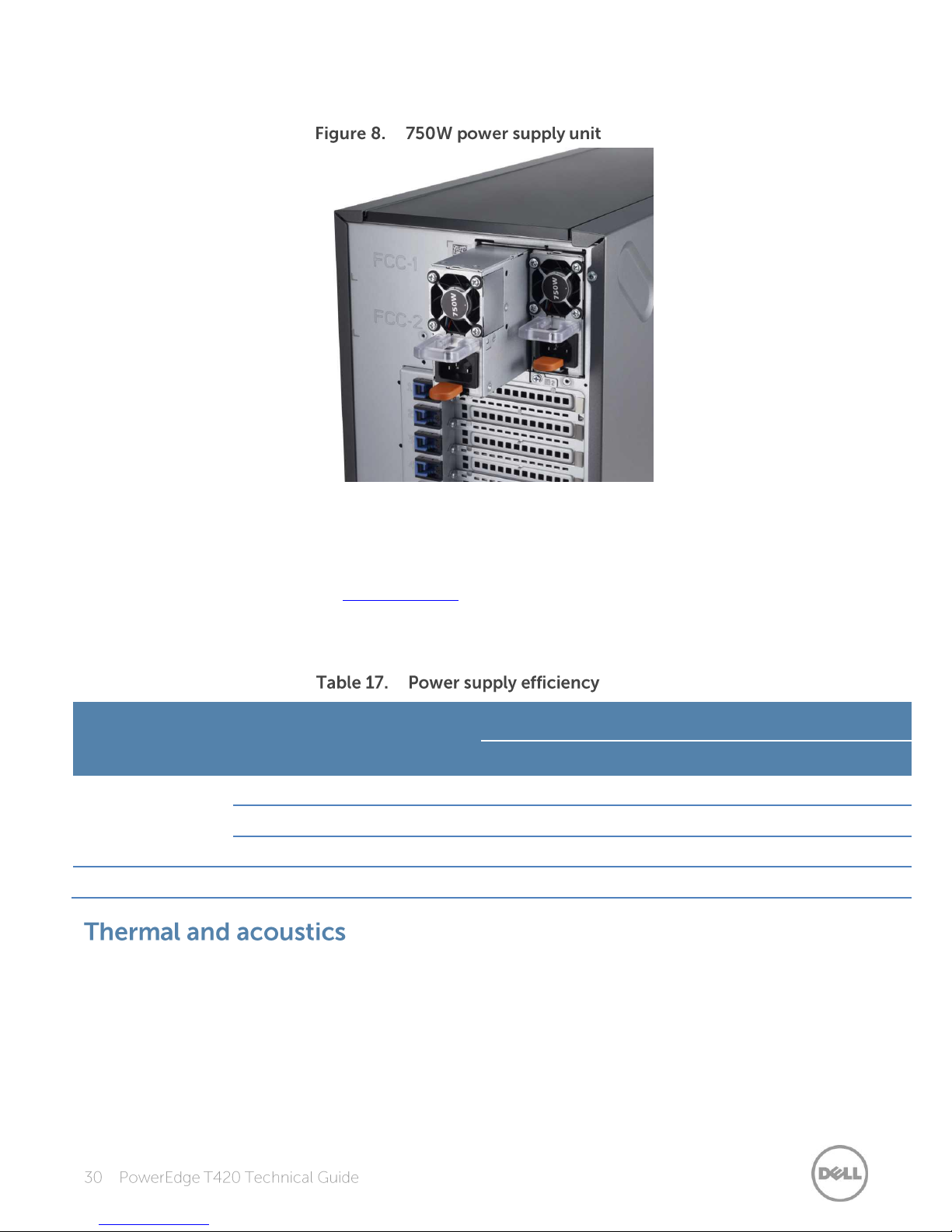
Figure 8 shows a 750W power supply unit extended from the T420 chassis.
Form factor
Output
Class
Efficiency targets by load
10%
20%
50%
100%
Redundant 86mm
495W AC
Platinum
82.0%
90.0%
94.0%
91.0%
750W AC
Platinum
82.0%
90.0%
94.0%
91.0%
1100W AC
Platinum
89.0%
93.0%
94.5%
92.0%
Non-redundant
550W AC
Silver
N/A
85.0%
88.0%
85.0%
The PowerEdge T420 supports up to two PSUs with 1+1 redundancy, auto-sensing, and
auto-switching capability. The T420 also supports PSU 2+0 configurations for configurations that
exceed the output of a single PSU; in this case, 1+1 redundancy is not supported. Use the Dell
Energy Smart Solution Advisor at Dell.com/ESSA to help you configure your system optimal power
performance.
Dell PSUs have achieved Platinum efficiency levels as shown in Table 17.
Optimized thermal management makes the PowerEdge T420 cool and quiet. Benefiting from smart
cooling fan speed control, the T420 can keep both high performance and good acoustics across a
wide range of ambient temperatures from 10°C to 35°C (50°F to 95°F) and to extended ambient
temperature ranges (see Table 26). Operating environments for the T420 can vary from the data
center to general-use spaces. In a typical configuration, the T420 is suitable for an open office
environment.
Page 31
The thermal design of the PowerEdge T420 reflects the following:
Multiple sensors are monitored for thermal feedback control: The PowerEdge T420
dynamically controls system cooling fan speed based on responses from component
temperature sensors, including processors, hard disk drives, DIMMs, storage cards, and the inlet
ambient temperature. Thermal control detects and responds to hardware configuration. Thermal
management adjusts cooling according to what the system really needs, and draws lower fan
power draw and generates lower acoustical noise levels than servers without such controls.
Environmental specifications: The optimized thermal management makes the T420 reliable
under a wide range of operating environments as shown in the environmental specifications in
Table 26. Many configurations are also compliant under expanded operating temperature
environments, but a few are not.
The acoustical design of the PowerEdge T420 reflects the following:
Quiet library acoustics: The PowerEdge T420 is quiet enough for an office setting when
minimally configured and for the office under the desk with a typical configuration.
Adherence to Dell’s high sound quality standards: Sound quality is different from sound power
level and sound pressure level in that it describes how humans respond to annoyances in sound,
like whistles, hums, and so on. One of the sound quality metrics in the Dell specification is
prominence ratio of a tone, which is listed in Table 18.
Configurable for low acoustics: The following are configuration considerations you should make
if acoustics is important to you:
- Storage devices:
> Because hard drive noise scales with spindle speed, the quietest option for rotational
storage media is a 7200-rpm SATA drive. The loudest option is a 15k SAS drive.
> Solid-state drives are even quieter than rotational drives because they have no sound
associated with spinning.
> Noise levels increase with the quantity of hard drives; using fewer hard drives will have a
lower acoustical output.
- Impact of cards:
> Quantity of PCIe cards: When more than two PCIe cards are installed, the system fan
speed/noise level will be higher.
> Types of PCIe cards: The fan speed/noise level will be higher if a GPU and PERC H710 are
installed.
- System Profile settings in BIOS and Thermal settings in iDRAC: Performance Per Watt is the quietest
option. Other options such as Performance Optimized or Dense Configuration require higher fan
speeds, which produce higher acoustic levels.
- Hot spare feature of power supply unit: In system default setting, the hot spare feature is disabled;
acoustical output from the power supplies is lowest in this setting. If the feature is enabled and the
system power loading is low, the power supply fan speed hence noise will be higher.
- RAID Setup with PERC H310: A system configured as non-RAID will have a higher noise level than a
system configured as RAID. With non-RAID, the temperature of the hard disk drives is not monitored,
which causes the fan speed to be higher to ensure sufficient cooling resulting in higher noise level.
Noise ramp and descent during bootup from power off: Fan speed noise levels ramp during the
boot process (from power off to power on) to add a layer of protection for component cooling in
case the system does not boot properly. To keep the bootup process as quiet as possible, the fan
speed reached during bootup is limited to about half of full speed.
Page 32
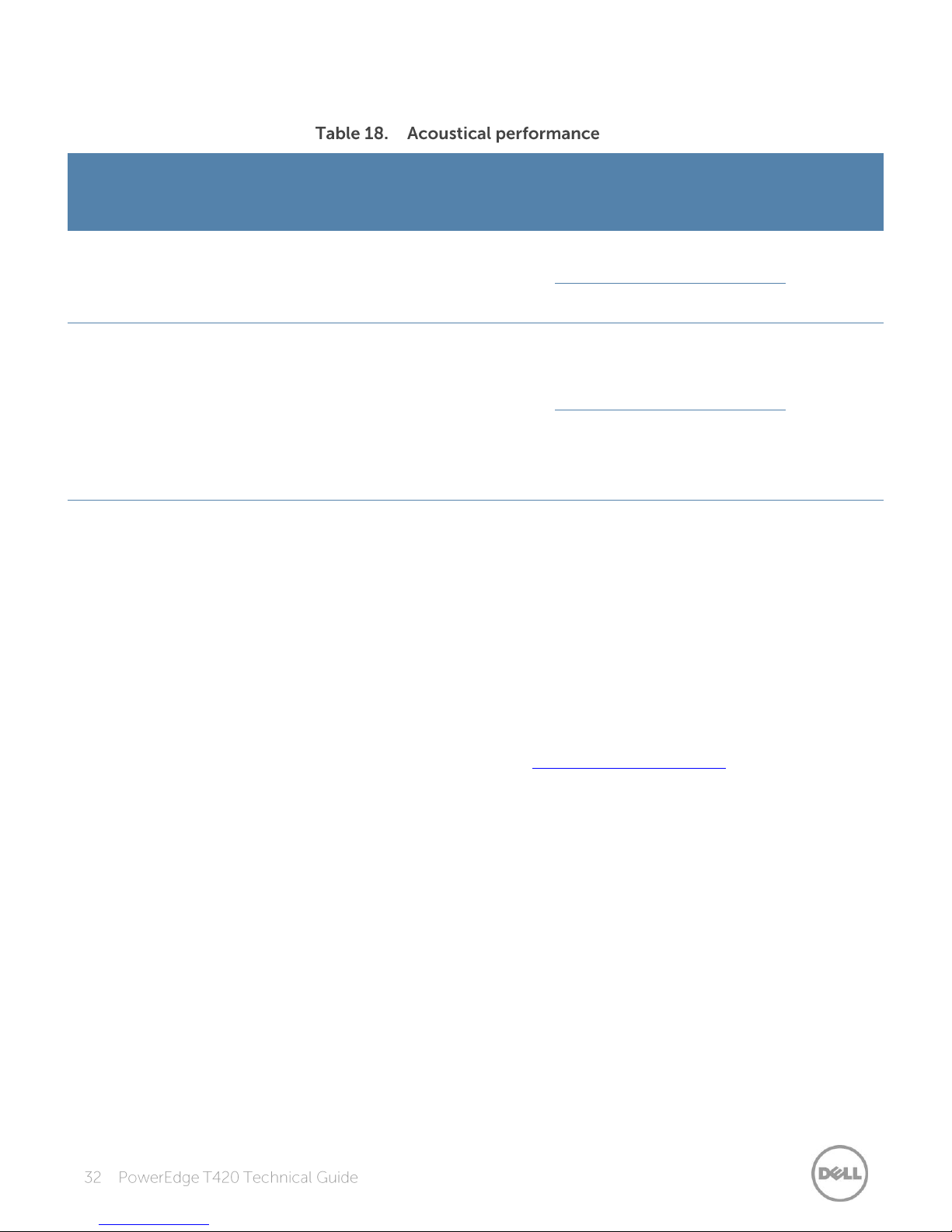
Table 18 details the acoustical performance for the T420.
Configuration
(23 ± 2°C
ambient)
CPUs
Hard
drives
Power
supply
unit
Memory
PCI
card/HDD
controller
Operating
mode
LWA-UL
1
(bels)
L
pA
2
(dBA)
Prominent
tones
3
Typical
2
4 x 3.5“
SAS
(15K)
2 x
750W
6 x 4GB
1 x 10GbE
NIC
1 x PERC
H710P
Idle4
5.1
41
Yes, by hard
drive at idle
and CPU at
stress
Stress5
5.2
42
Feature rich
2
8 x 2.5“
SATA
(10K)
2 x
1100W
12 x
8GB
1 x 10GbE
NIC
1 x 1GbE
NIC
1 x PERC
H310
2 x 150W
GPU
Idle4
4.7
38
Yes, by hard
drive at
stress
Stress5
4.7
38
1
LWA-UL is the upper limit sound power levels (LWA) calculated per section 4.4.1 of ISO 9296 (1988) and measured in
accordance to ISO 7779 (2010).
2
LpA is the average bystander position A-weighted sound pressure level calculated per section 4.3 of ISO 9296 (1988) and
measured in accordance with ISO 7779 (2010). The system is placed within a rack enclosure (base of system is 75 cm
above floor).
3
Prominent tone: Criteria of D.6 and D.11 of ECMA-74 11th ed. (2010) are followed to determine if discrete tones are
prominent. The system is placed in center of ISO 7779 table and binaural head is at front operator position, reference ISO
7779 (2010) Section 8.6.1, position P4.
4
Idle: Reference ISO 7779 (2010) definition 3.1.7; system is running in its operating system but no other specific activity.
5
Stress: An operating mode per ISO 7779 (2010) definition 3.1.6. The software MemBW4 is activated to stress the
processors.
For more information on Dell’s acoustical design, see the Dell Enterprise Acoustics white paper.
Page 33
Product
Rail
Identifier
Mounting Interface
Rail Type
Rack Types Supported
4-Post
2-Post
Square
Round
Thread
Flush
Center
T420
C2
ReadyRails II
Sliding
X
X
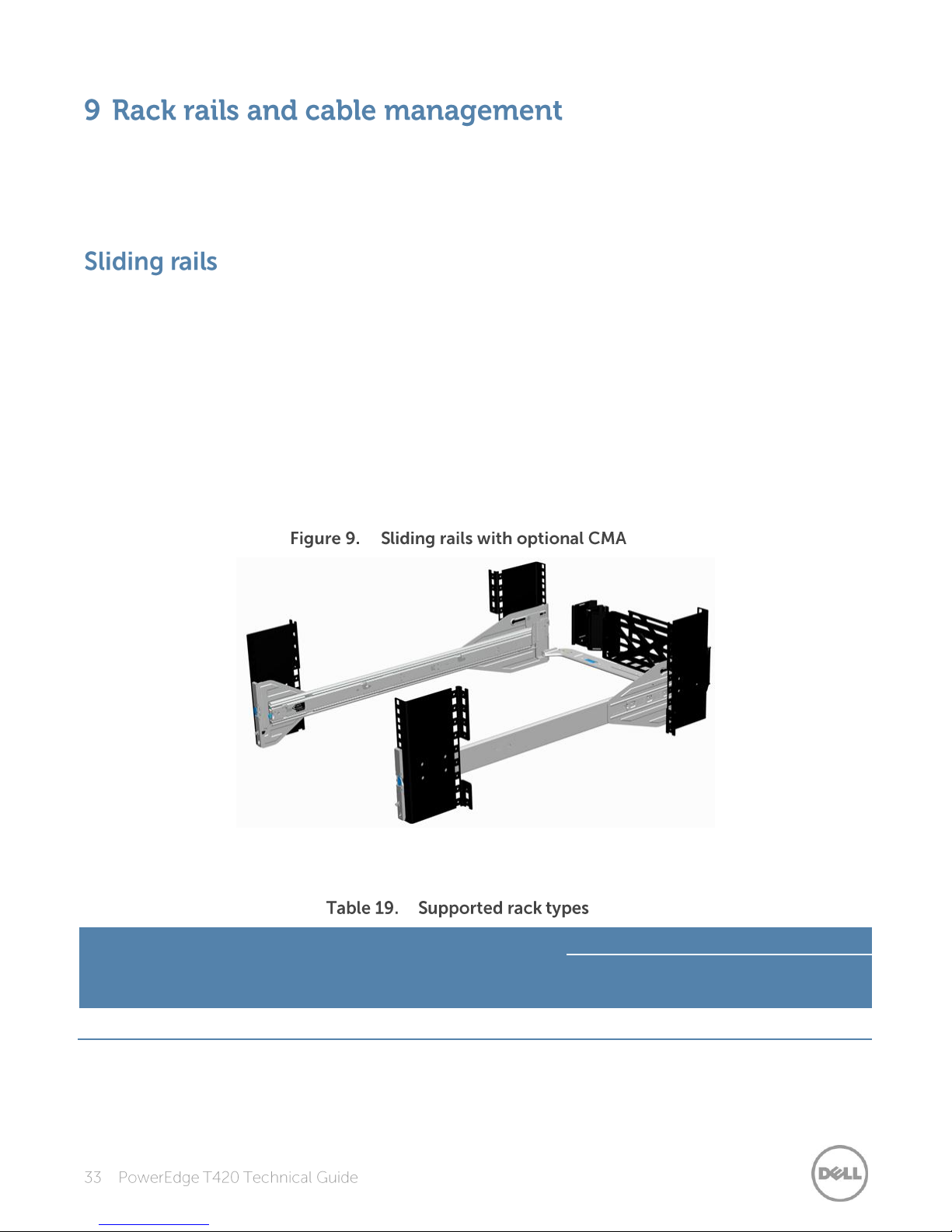
The sliding rail system for the Dell PowerEdge T420 provides tool-less support for 4-post racks with
square or unthreaded round mounting holes. Compared to the T610 sliding rails that required the
use of adapter brackets, the sliding rails for the T420 now offer support for threaded hole racks with
the ReadyRails II mounting interface.
The ReadyRails II sliding rails for the T420 support tool-less mounting in 19”-wide, EIA-310-E
compliant square hole and unthreaded round hole 4-post racks. The rails also support tooled
mounting in threaded hole 4-post racks and are available with or without the optional cable
management arm (CMA).
The rails ship in the tool-less mounting configuration, but can be easily converted to the tooled
configuration. The optional CMA can be mounted on either the left or right side of the sliding rails
without the use of tools for fast and easy deployment. The T420 is backward compatible with the
T610 rails and CMA. The T420 supports sliding rails only. Static rails are not supported. Mounting in
2-post racks is not supported.
Figure 9 shows the sliding rails with the CMA installed.
Table 19 lists the supported rack types for the T420.
Screws are not included in the kit due to the fact that threaded racks are offered with a variety of
thread designations. Other factors to consider when deploying the T420 include the spacing
between the front and rear mounting flanges of the rack, the type and location of any equipment
Page 34
mounted in the back of the rack such as power distribution units (PDUs), and the overall depth of
the rack.
For detailed information about sliding rails, see the Rack rail specifications section in Appendix A. For
more information on installing the T420 in a rack, see the
Rack Installation Instructions
on
Support.Dell.com/Manuals.
The optional CMA organizes and secures the cords and cables exiting the back of the server and
unfolds to allow the server to extend out of the rack without having to detach the cables. Some key
features of the T420 CMA include:
Large U-shaped baskets to support dense cable loads
Open vent pattern for optimal airflow
Ability to be mounted on either side
Use of hook-and-loop straps rather than plastic tie wraps to eliminate the risk of cable damage
during cycling
Low-profile fixed tray to both support and retain the CMA in its fully closed position
Ability to mount the CMA and tray without the use of tools, due to snap-in designs
Page 35
Operating System
Platform
Edition
Red Hat Enterprise Linux 5.8 SP8
x32
x64
N/A
Red Hat Enterprise Linux 6.2 SP2
x64
N/A
SUSE Linux Enterprise Server 11 SP2
x64
N/A
SUSE Linux Enterprise Server 10 SP4
x64
N/A
Microsoft Windows Server 2012
x64
Standard
Data center
Microsoft Windows Small Business Server 20111
x64
Standard
Premium Add-on
Microsoft Windows Server 2008 R2 with SP1
x64
(with Hyper-V
role enabled)
Web
Standard
Enterprise
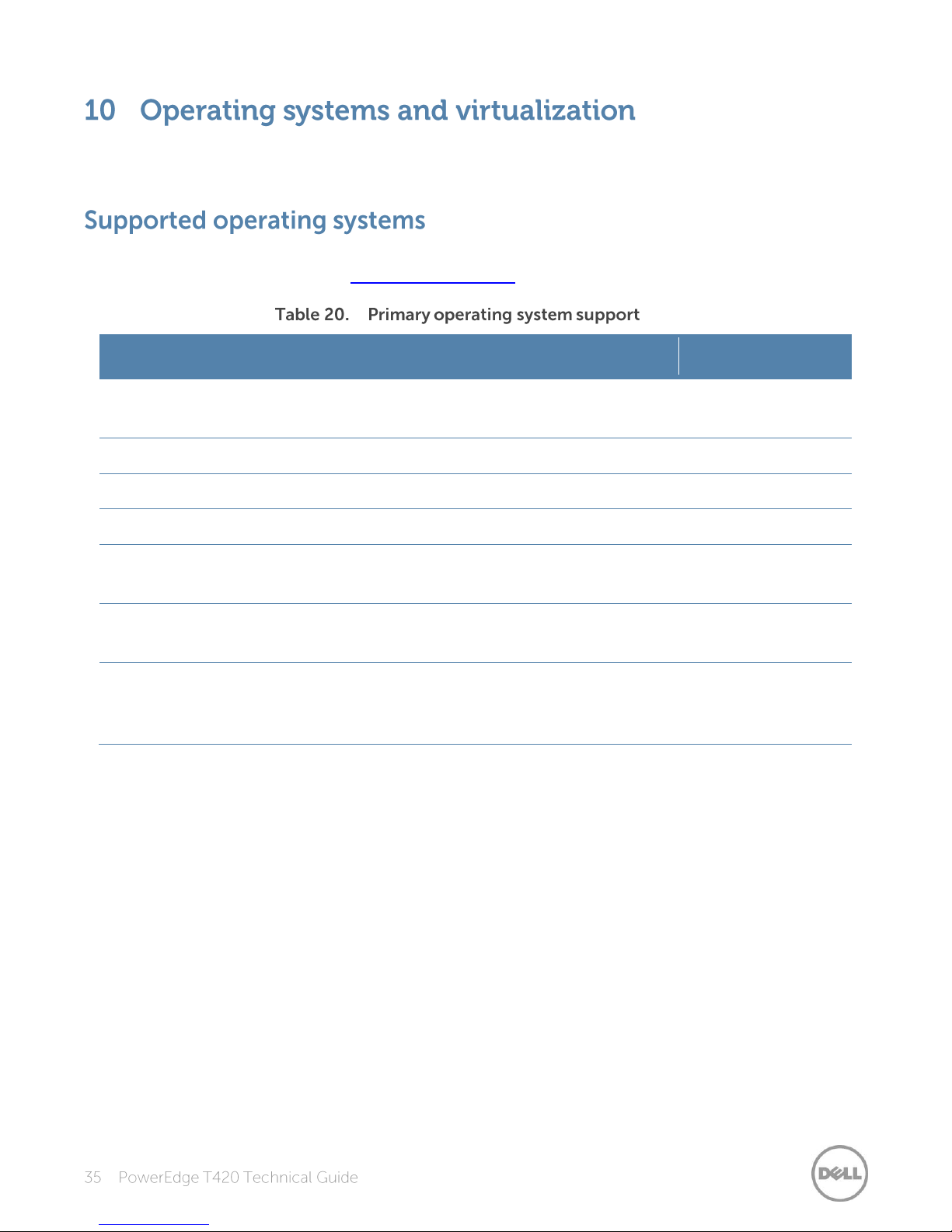
The Dell PowerEdge T420 supports a wide range of industry-standard operating systems and
virtualization software.
Table 20 lists the primary operating systems supported on the T420. For the latest information on
supported operating systems, see Dell.com/OSsupport.
1
Not validated for use with GPUs
Page 36
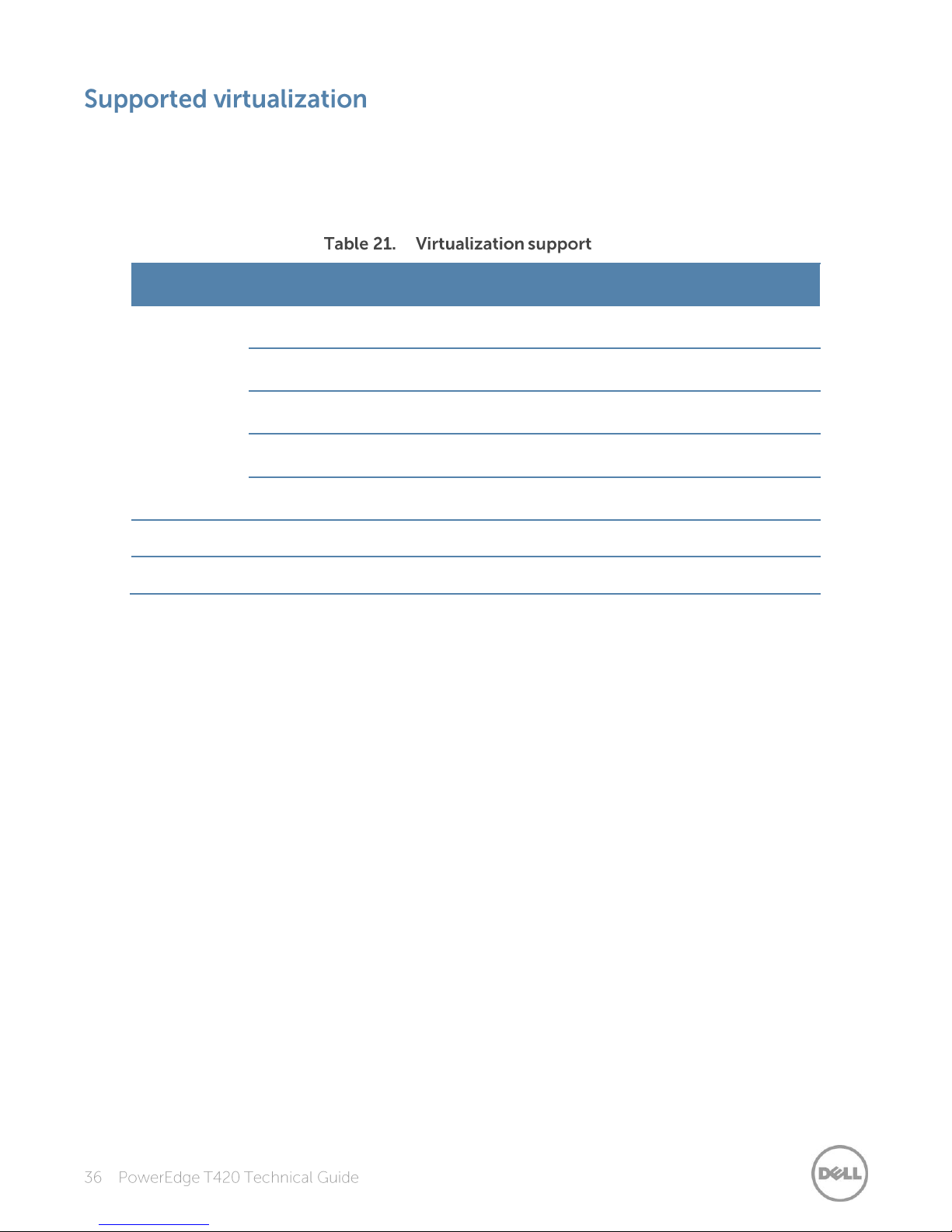
One of the key features for virtualization on the PowerEdge T420 is the support for a fail-safe
Operating systems
Version
Options
VMware1
vSphere v4.1 U2
ESX Classic
DIB
vSphere v4.1 U2
ESXi Installable
DIB
vSphere v4.1 U2
ESXi Embedded
FI
vSphere v5.0 U1
ESXi (one version)
FI/DIB
vSphere v5.1
ESXi (one version)
DIB
Citrix
XenServer v6.0
N/A
DIB
Red Hat2
Enterprise Virtualization v3.0
N/A
DIB
hypervisor. By running a hypervisor on an optional SD card and installing a backup copy on the
other mirrored SD card, you can protect against hardware failure and maximize virtualization uptime.
Table 21 highlights the virtualization support for the T420.
FI = factory install; DIB = drop in box
1
vSphere Fault Tolerance is supported with these versions
2
No OpenManage support; drop-in-box license registration card only
Page 37
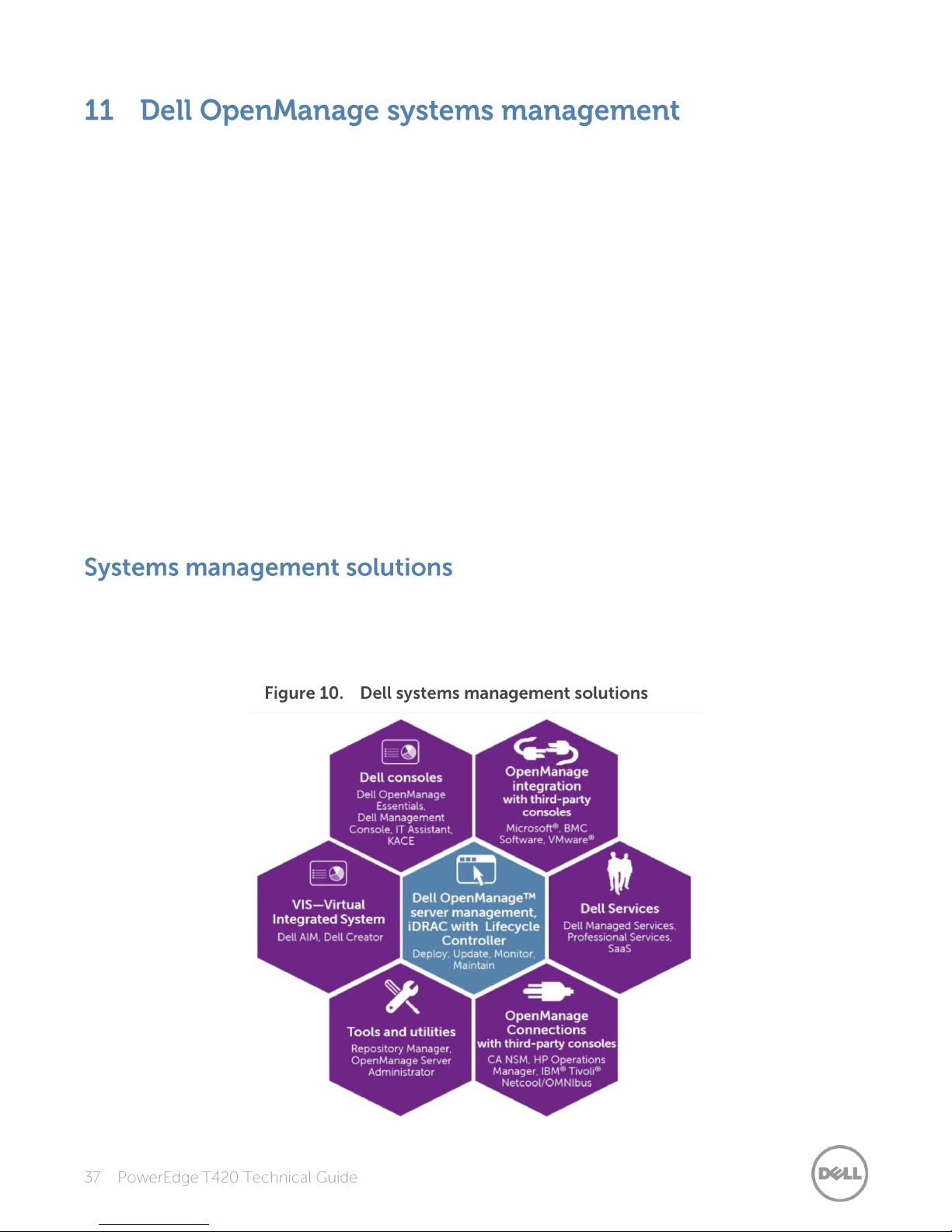
Whether your IT environment consists of a few servers or a few thousand servers,
Dell OpenManage systems management solutions provide comprehensive management for
evolving IT environments. OpenManage is based on open standards and provides agent-based and
agent-free server lifecycle management functionality for Dell PowerEdge servers. OpenManage
solutions help you automate and streamline essential hardware management tasks.
The advanced management capabilities of Dell OpenManage also integrates into offerings from
other popular systems management solutions that you may already use, making Dell platforms easy
to manage and deploy in any IT environment. This ensures your IT services are available when your
business needs them. If you have already standardized on offerings from industry leaders, such as
BMC Software, Microsoft, Symantec™, VMware, or other vendors, you can leverage OpenManage
integration and connections developed to use with your existing systems management framework
to efficiently manage Dell servers, storage, business-client PCs, and network devices.
Start with a firm foundation for efficient hardware management using OpenManage tools, utilities,
and management consoles. OpenManage systems management solutions consist of a combination
of embedded management features and software products that help you automate and simplify the
entire server lifecycle: deploy, update, monitor, and maintain. OpenManage solutions are
innovatively designed for simplicity and ease of use to help you reduce complexity, save time,
achieve efficiency, control costs, and empower productivity.
Dell systems management solutions include a wide variety of tools, products, and services that
enable you to leverage an existing systems management framework. As shown in Figure 10, Dell
systems management solutions are centered around OpenManage server management, featuring
iDRAC with Lifecycle Controller.
Page 38
The Dell OpenManage systems management portfolio includes powerful hardware and software
Feature
Function
Benefit
Out of band
(OOB)
iDRAC7 offers real-time OOB
discovery, inventory, deployment
monitoring, alerting and updates for
servers and internal storage
Manage servers independent of the OS type
or status—even if an OS is not installed
Single code base
All server types have the same
embedded management hardware
and firmware
Simplified and consistent maintenance
across server platforms
Dedicated
GigE port
(PowerEdge
rack and tower
systems)
Gigabit Ethernet replaces 10/100 on
predecessor iDRAC6
Fast throughput for better performance;
compatibility with setup for switches
Email alerts
Simplified, more informative, and
expanded coverage than previous
versions of iDRAC
More detail allows IT administrators to be
more efficient in diagnosing and remediating
an issue; alerts include a direct, embedded
URL in the email notification to further speed
resolution
vFlash media
Enabled with iDRAC7 Enterprise
Allows for use of a non-Dell SD card
Enhanced power
management
Integration with Intel Node Manager
provides data center level power
monitoring and capping
(requires iDRAC7 Enterprise)
Fine tune data center power policies,
capping, and usage; report on historical
power usage by rack, row or room using
Power Center Manager (new)
management tools and consoles. OpenManage simplifies the lifecycle of deploying, updating,
monitoring, and maintaining your Dell PowerEdge servers.
The Integrated Dell Remote Access Controller 7 (iDRAC7) with Lifecycle Controller is the heart of the
second generation of Dell PowerEdge server embedded management functionality. In addition to
enabling agent-free management, iDRAC7 with Lifecycle Controller provides remote access to the
system—whether or not there is a functioning operating system running on the server. These
embedded features improve all aspects of a typical server lifecycle. Table 22 describes the functions
and benefits of iDRAC7 with Lifecycle Controller.
Page 39
Feature
Function
Benefit
Electronic
licensing
Upgrades to iDRAC7 Express or
iDRAC7 Enterprise by software
licensing key and license portal (may
require installation of hardware option
for 200-500 series servers)
If iDRAC7 Express or iDRAC7 Enterprise is
ordered during initial point of sale, license
key is installed. If Basic Management is
ordered during initial point of sale, customer
must request a license key through the Dell
Licensing Portal.
For most server models, embedded server
management and electronic licensing
enables feature enhancements that do not
require installation of additional hardware or
system downtime.
Basic
management
iDRAC7
Express
iDRAC7
Enterprise
Local configuration with Lifecycle
Controller GUI
∞ ∞ ∞
IPMI 2.0 ∞ ∞
∞
Embedded diagnostics
∞ ∞ ∞
Local OS install
∞ ∞ ∞
Local updates
∞ ∞ ∞
Driver pack
∞ ∞ ∞
Shared NIC (LOM)
1
∞ ∞ ∞
Remote update
∞2 ∞ ∞
Power control
∞2 ∞ ∞
Power monitoring
∞ ∞
Encryption
∞ ∞
IPv6 ∞
∞
Auto-discovery
∞ ∞
Auto-recovery
∞ ∞
Web GUI ∞
∞
The systems management default for the T420 is basic management with an upgrade option for
iDRAC7 Express or iDRAC7 Enterprise. A detailed feature comparison of basic management, iDRAC7
Express, and iDRAC7 Enterprise is shown in Table 23.
Page 40

Basic
management
iDRAC7
Express
iDRAC7
Enterprise
Remote CLI
∞ ∞
Local/SSH CLI
∞ ∞
Serial redirection
∞ ∞
Remote config
∞ ∞
Email alerts
∞ ∞
SNMP alerts
∞ ∞
Comprehensive monitoring
∞ ∞
Crash screen capture3
∞ ∞
Dedicated NIC 1Gbps (100MB in iDRAC6)
∞4
Part replacement
∞
Backup and restore configurations
∞
Virtual console (4 user)
∞
Virtual console chat
∞
Support for customer supplied SD cards
for vFlash media
∞
Virtual flash partitions
∞
Virtual media
∞
Virtual folders
∞
Remote file share
∞
Crash video playback
∞
Boot record/playback
∞
Power capping
∞
Enterprise group power management
∞
Directory services (AD, LDAP)
∞
PK authentication
∞
Two-factor authentication4
∞
1
Rack and tower systems only
2
Feature available with IPMI, not web GUI
3
Requires OMSA agent on target server
4
Uses Microsoft® ActiveX® on Internet Explorer® only
Page 41

Most systems management solutions require pieces of software, called agents, to be installed on
each node in order to be managed within the IT environment. Additionally, the same agent is often
used as a local interface into the hardware health and may be accessed remotely as a management
interface, typically referred to as a one-to-one interface. For customers that continue to use agentbased solutions, Dell provides OpenManage Server Administrator.
The Dell OpenManage Server Administrator (OMSA) agent gives you a comprehensive, one-to-one
systems management solution for both local and remote servers and their storage. OMSA can help
simplify single-server monitoring with a secure command-line interface (CLI) or Web-based
management graphical user interface (GUI). It can also be used to view system configuration,
inventory, health, and performance.
Because Dell PowerEdge servers have embedded server lifecycle management, in many cases, there
is no need to install an OpenManage systems management software agent into the operating
system of a Dell PowerEdge server. This greatly simplifies and streamlines the management footprint.
The central console in a systems management solution is often referred to as the one-to-many
console. The central console provides a rapid view and insight into the overall health of all systems
in the IT environment. The Dell systems management portfolio includes several powerful consoles,
depending upon your needs, including the following:
Dell OpenManage Essentials— OpenManage Essentials (OME) is a recently released systems
management console that provides a comprehensive view of Dell systems, devices, and
components in an enterprise network. It is used to monitor Dell PowerEdge servers,
EqualLogic™ and PowerVault™ storage, and PowerConnect™ switches; to update and configure
Dell servers; and to create asset reports. OpenManage Essentials also communicates health
status alerts for Dell servers, storage, and network devices to the Dell KACE™ K1000 service desk.
OpenManage Essentials is available as a no-charge software download from Support.Dell.com.
Dell Management Console—Dell Management Console (DMC) offers sophisticated data center
management capabilities with comprehensive reporting features. DMC can perform basic
hardware management and can manage operating systems and applications using various
plug-ins from Symantec.
Dell IT Assistant—Dell IT Assistant (ITA) is a console for managing Dell servers, storage arrays,
and other components distributed throughout a network. Dell IT Assistant allows for easy
identification of system issues through alerts, helping to reduce system downtime. Systems
administrators can easily monitor systems anywhere within their network using ITA. ITA is
supported on the T420, however, enhanced functionality is now available with OpenManage
Essentials.
Dell OpenManage systems management tools and utilities consist of the following:
Dell Repository Manager—The Dell Repository Manager (RM) is a standalone GUI-based
productivity tool that helps simplify the process of managing downloads and baseline BIOS,
firmware, and driver updates. Repository Manager can create deployment disks as well as create
and manage customized repositories.
Page 42
Dell OpenManage Server Update Utility—The Dell Server Update Utility (SUU) is a DVD-based
application for identifying and applying BIOS and firmware updates to your Dell PowerEdge
servers.
Dell OpenManage Systems Build and Update Utility—The Dell System Build and Update Utility
(SBUU) provides one-to-one and one-to-many deployment and single-server update
capabilities in the pre-operating system environment.
Dell Update Packages—The Dell Update Packages (DUP) is a self-contained executable in a
standard package format that updates a software element on a Dell server such as the BIOS, a
driver, firmware and other software updates.
Dell OpenManage Deployment Toolkit—The Dell OpenManage Deployment Toolkit (DTK) is a
CLI-based tool that includes a set of utilities for configuring and deploying Dell PowerEdge
systems, and can be used to build scripted, unattended OS installations to deploy large numbers
of servers in a reliable fashion.
RACADM—The RACADM command-line utility provides a scriptable interface that allows you to
locally or remotely configure iDRAC7.
IPMITool—IPMITool includes scriptable console application programs used to control and
manage remote systems using the IPMI version 1.5 and later protocol.
Dell OpenManage easily integrates with several leading third-party consoles, including:
Dell Server Management Pack Suite for Microsoft System Center Operations
Manager (SCOM)—This suite of server management packs enables several functions through
System Center Operations Manager, including in-band discovery and monitoring of racks and
towers, out-of-band discovery and monitoring through iDRAC with Lifecycle Controller, as well
as performance and advanced monitoring.
Dell Lifecycle Controller Integration (DLCI) for Microsoft System Center Configuration
Manager (SCCM)—This pack contains Dell Lifecycle Controller Integration (DLCI), which
integrates OpenManage functions in SCCM to manage the Dell PowerEdge servers, including
auto-discovery, operating system deployment and configuration of hardware elements, (RAID,
NIC, BIOS, iDRAC), OS and hypervisor agnostic updates, firmware management, and system
viewer utilities.
Dell Server PRO Management Pack for Microsoft System Center Virtual Machine
Manager (SCVMM)—This pack manages Dell physical servers and hosts of virtual machines (VMs)
by using Microsoft System Center Operations Manager/System Center Essentials (SCOM/SCE)
and System Center Virtual Machine Manager (SCVMM). It provides guidance for remedial actions
based on alerts to best manage virtual machines and handle the impacts appropriately.
Dell Management Plug-in for VMware vCenter—This plug-in allows IT administrators to monitor,
provision, and manage the physical PowerEdge server hardware and firmware from a dedicated
Dell menu accessed through the VMware vCenter console using the same role-based access
control model as vCenter, combining physical server management.
BMC Software—Dell and BMC Software work together to simplify IT by ensuring tight integration
between Dell server, storage, and network management functionality and the BMC Software
process and data center automation products.
Page 43

Dell OpenManage provides connections with many third-party consoles, including:
Dell OpenManage Connection for Computer Associates Network and
Systems Management—This connection allows you to monitor PowerEdge servers and
PowerVault storage arrays from within the Computer Associates Network and Systems
Management (CA NSM) console.
Dell OpenManage Connection for HP Operations Manager—This connection enables several
functions through HP Operations Manager, including auto-grouping, SNMP trap reception,
global health monitoring, and a context-sensitive launch of OpenManage Server Administrator.
Dell OpenManage Connection for IBM Tivoli Netcool/OMNIBus—This connection provides
event monitoring capabilities to monitor Dell PowerEdge servers and Dell EqualLogic systems. It
allows event monitoring, automatic event correlation, and launching device consoles from the
Netcool/OMNIbus console.
Dell OpenManage systems management is centered on automating the server management
lifecycle—deploy, update, monitor, and maintain. To manage an infrastructure properly and
efficiently, you must perform all of these functions easily and quickly. iDRAC7 with Lifecycle
Controller technology provides you with these intelligent capabilities embedded within the server
infrastructure. This allows you to invest more time and energy on business improvements and less
on maintenance. Figure 11 illustrates the various operations that can be performed during the
server’s lifecycle.
Table 24 lists the products that are available for one-to-one and one-to-many operations, and
when they are used in the server’s lifecycle:
Page 44
Operation
One-to-one
One-to-many
Deploy
Lifecycle Controller
GUI
DTK
SBUU
Symantec Deployment
Server
Dell Management Plug-in
for VMware vCenter
KACE K1000 Appliance
Lifecycle Controller
Remote Services
BMC BladeLogic
integration with Lifecycle
Controller
Dell Server Deployment Pack
(DSDP) for Microsoft System
Center Configuration Manager
and Dell Lifecycle Controller
Integration (DLCI) for Microsoft
System Center Configuration
Manager
Update
iDRAC7 with LifeCycle
Controller
Lifecycle Controller
GUI
Repository Manager
DUP
SUU
SBUU
Dell Management
Plug-in for VMware
vCenter
Dell OpenManage
Essentials
Dell OpenManage ITA
Dell Management Console
Lifecycle Controller
Remote Services
Dell Update Catalogs for
Microsoft System Center
Configuration Manager
Dell Lifecycle Controller
Integration (DLCI) for Microsoft
System Center Configuration
Manager
Monitor
iDRAC7
OMSA
Dell OpenManage
Essentials
Dell OpenManage ITA
BMC ProactiveNet
Performance Management
Dell OpenManage Power
Center
Dell Management Console
Dell Management Plug-in for
VMware vCenter
BMC ProactiveNet
Dell Server Management Pack
Suite for Microsoft System
Center Operations Manager
(SCOM)
Maintain
IPMI
iDRAC7
Lifecycle Controller
GUI
Lifecycle Controller
Remote Services
Remediate:
Dell Server PRO Management
Pack for Microsoft System
Center Virtual Machine
Manager (SCVMM)
Replace parts:
Dell Lifecycle Controller
Integration (DLCI) for Microsoft
System Center Configuration
Manager
For additional detailed information on Dell’s systems management portfolio, see the
Management Overview Guide
on Support.Dell.com/Manuals.
Dell Systems
Page 45

Xa
Xb
Ya
Yb
Yc
Za
with
bezel
Za
without
bezel
Zb1
Zc
218.0mm
304.5mm (foot)
307.9mm (caster)
430.3mm
443.3mm
471.3mm
16.4mm
0.0mm
542.2mm
578.42mm
Specification
Redundant 1100W
Redundant 750W
Redundant 495W
Non-redundant 550W
Current consumption
12A–6.5A
10A–5A
6.5A–3A
7.4A–3.7A
Supply voltage
100–240VAC1
100–240VAC1
100–240VAC1
100–240VAC1
Frequency
50/60Hz
50/60Hz
50/60Hz
50/60Hz
Heat dissipation
(BTU/hr max)
4100
2891
1908
2317
Figure 12 details the dimensions of the Dell PowerEdge T420 chassis.
1
Zb goes to the nominal back wall external surface where the I/O connectors reside.
The maximum system weight for the T420 is 30.2 kg (66.57 lb).
Table 25 lists power supply specifications for the PowerEdge T420.
1
Auto-ranging
Page 46
Table 26 details the environmental specifications for the T420. For additional information about
Fresh Air: temperature, humidity, altitude de-rating
Continuous
operation
10°C to 35°C (50°F to 95°F) at 10% to 80% relative humidity with 26°C (78.8°F) maximum
dew point (maximum wet bulb temperature). De-rate maximum allowable dry bulb
temperature at 1°C per 300m above 950m (1°F per 547 ft above 3117 ft).
Expanded
operation
When operating in the expanded temperature range, system performance may be impacted,
and ambient temperature warnings may be reported on the LCD and in the System Event
Log.
≤ 10% of annual operating hours: 5°C to 10°C and 35°C to 40°C (with no direct sunlight on
the equipment) at 5% to 85% relative humidity with 26°C dew point (maximum wet bulb
temperature). Outside the standard operating temperature (10°C to 35°C), the system can
operate down to 5°C or up to 40°C for a maximum of 10% of its annual operating hours. For
temperatures between 35°C and 40°C (95°F to 104°F), de-rate maximum allowable dry bulb
temperature by 1°C per 175m above 950m (1°F per 319 ft above 3117 ft).
≤ 1% of annual operating hours: –5°C to 5°C and 40°C to 45°C (with no direct sunlight on
the equipment) at 5% to 90% relative humidity with 26°C dew point (maximum wet bulb
temperature). Outside the standard operating temperature (10°C to 35°C), the system can
operate down to –5°C or up to 45°C for a maximum of 1% of its annual operating hours. For
temperatures between 40°C and 45°C (104°F to 113°F), de-rate maximum allowable dry bulb
temperature by 1°C per 125m above 950m (1°F per 228 ft above 3117 ft).
Expanded operation restrictions:
No cold startup below 5°C
Maximum altitude for the operating temperature must be 3050m (10,000ft)
Up to two redundant fans (back fans required)
Redundant PSU configuration required
Not supported:
— GPU
— LRDIMM
— Peripheral cards not qualified by Dell
— Peripheral cards greater than 25W
Temperature
Operating
See Fresh Air for temperature information
Storage
–40oC to 65oC (-40oF to 149oF) with a maximum temperature gradation of 20oC per hour
Relative humidity
Operating
See Fresh Air for relative humidity information
Storage
5% to 95% at a maximum wet bulb temperature of 33°C (91°F); atmosphere must be
condensing at all times
Maximum vibration
Operating
0.26 Grms at 5Hz to 350Hz in all orientations
Storage
1.87 Grms at 10Hz to 500Hz for 15 minutes (all six sides tested)
environmental measurements for specific system configurations, see
Dell.com/environmental_datasheets.
Page 47

Maximum shock
Operating
Half sine shock in all operational orientations of 31G +/– 5% with a pulse duration of 2.6ms
+/– 10%
Storage
Half sine shock on all six sides of 71G +/– 5% with a pulse duration of 2ms +/–10%; square
wave shock on all six sides of 27G with velocity change at 235 in/sec or greater
Altitude
Operating
–15.2m to 3048m (–50 ft to 10,000 ft)
Storage
–15.2m to 12,000m (–50 ft to 39,370 ft)
Airborne contaminant level
Class G1 or lower as defined by ISA-S71.04-1985
The Dell PowerEdge T420 iDRAC incorporates an integrated video subsystem. The graphics
Resolution
Refresh Rate (Hz)
Color Depth (bit)
640 x 480
60, 70
8, 16, 32
800 x 600
60, 75
8, 16, 32
1024 x 768
60, 75
8, 16, 32
1152 x 864
60, 75
8, 16, 32
1280 x 1024
60
8, 16, 32
Resolution
Refresh Rate (Hz)
Color Depth (bit)
640 x 480
60, 70
8, 16, 32
800 x 600
60, 75
8, 16, 32
1024 x 768
60
8, 16, 32
controller is the 2D Matrox
®
G200. The video frame buffer (16MB) is contained within the iDRAC
RAM (256MB) device.
The T420 system supports the 2D graphics video modes listed in Table 27 and Table 28.
Table 29 lists the spacing dimensions for the T420 sliding rails.
Page 48
Product
Rail
identifier
Rail type
Rail adjustability range (mm)
Rail depth (mm)
Square
Round
Threaded
without
CMA
with
CMA
Min
Max
Min
Max
Min
Max
T420
C2
Sliding
686
756
672
749
686
771
760
840
The adjustment range of the rails is a function of the type of rack in which they are being mounted.
The min-max values listed above represent the allowable distance between the front and rear
mounting flanges in the rack. Rail depth without the CMA represents the minimum depth of the rails
with the outer CMA brackets removed (if applicable) as measured from the front mounting flanges
of the rack.
USB peripherals are supported through the front and back USB ports on the T420. These ports are
USB 2.0 compliant.
Page 49
Standard
URL for information and specifications
ACPI
Advance Configuration and Power
Interface Specification, v2.0c
www.acpi.info
Ethernet
IEEE 802.3-2005
standards.ieee.org/getieee802/802.3.html
HDG
Hardware Design Guide Version 3.0
for Microsoft Windows Server
www.microsoft.com/whdc/system/platform/pcdesign/desguide/serverd
g.mspx
IPMI
Intelligent Platform Management
Interface, v2.0
www.intel.com/design/servers/ipmi
DDR3 Memory
DDR3 SDRAM Specification,
Rev. 3A
www.jedec.org/download/search/JESD79-3C.pdf
LPC
Low Pin Count Interface
Specification, Rev. 1.1
developer.intel.com/design/chipsets/industry/lpc.htm
PCI Express
PCI Express Base Specification Rev.
2.0 and 3.0
www.pcisig.com/specifications/pciexpress/
PMBus
Power System Management
Protocol Specification, v1.2
pmbus.info/specs.html
SAS
Serial Attached SCSI, v1.1
www.t10.org
SATA
Serial ATA Rev. 2.6; SATA II, SATA
1.0a Extensions, Rev. 1.2
www.sata-io.org
SMBIOS
System Management BIOS
Reference Specification, v2.7
www.dmtf.org/standards/smbios
TPM
Trusted Platform Module
Specification, v1.2
www.trustedcomputinggroup.org
UEFI
Unified Extensible Firmware
Interface Specification, v2.1
www.uefi.org/specs
USB
Universal Serial Bus Specification,
Rev. 2.0
www.usb.org/developers/docs
Windows Logo
Windows Logo Program System and
Device Requirements, v3.10
www.microsoft.com/whdc/winlogo/hwrequirements.mspx
The Dell PowerEdge T420 conforms to the industry standards listed in Table 30.
Page 50
Resource
Description of contents
Location
This manual is provided in HTML format on the CD
provided with the T420 system, and also in HTML and
PDF format at the Dell support site. A printed version is
available in Asian languages as a customer-orderable
option. This manual provides information on the
following:
Chassis features
System Setup program
System messages
System codes and indicators
System BIOS
Remove and replace procedures
Troubleshooting
Diagnostics
Jumpers and connectors
Support.Dell.com/Manuals
This guide is printed and shipped with the system, and is
also available in PDF format on the Dell support site. This
guide provides information on the following:
Initial setup steps
Key system features
Technical specifications
Support.Dell.com/Manuals
This printed document is provided with the rack kits. The
document provides the instructions for installing the
server in a rack.
Support.Dell.com/Manuals
This printed document is provided with the CMA kits. The
document provides the instructions for installing the
cable management arm on the rails.
Support.Dell.com/Manuals
This document is printed and shipped with the system,
and is also available in PDF format on the Dell support
site. This document provides information on system
updates.
Support.Dell.com/Manuals
The system information label documents the system
board layout and system jumper settings. Text is
minimized due to space limitations and translation
considerations. The label size is standardized across
platforms.
Inside the system chassis
cover
Table 31 provides a list of documents and websites that provide for more information on the Dell
PowerEdge T420.
Page 51
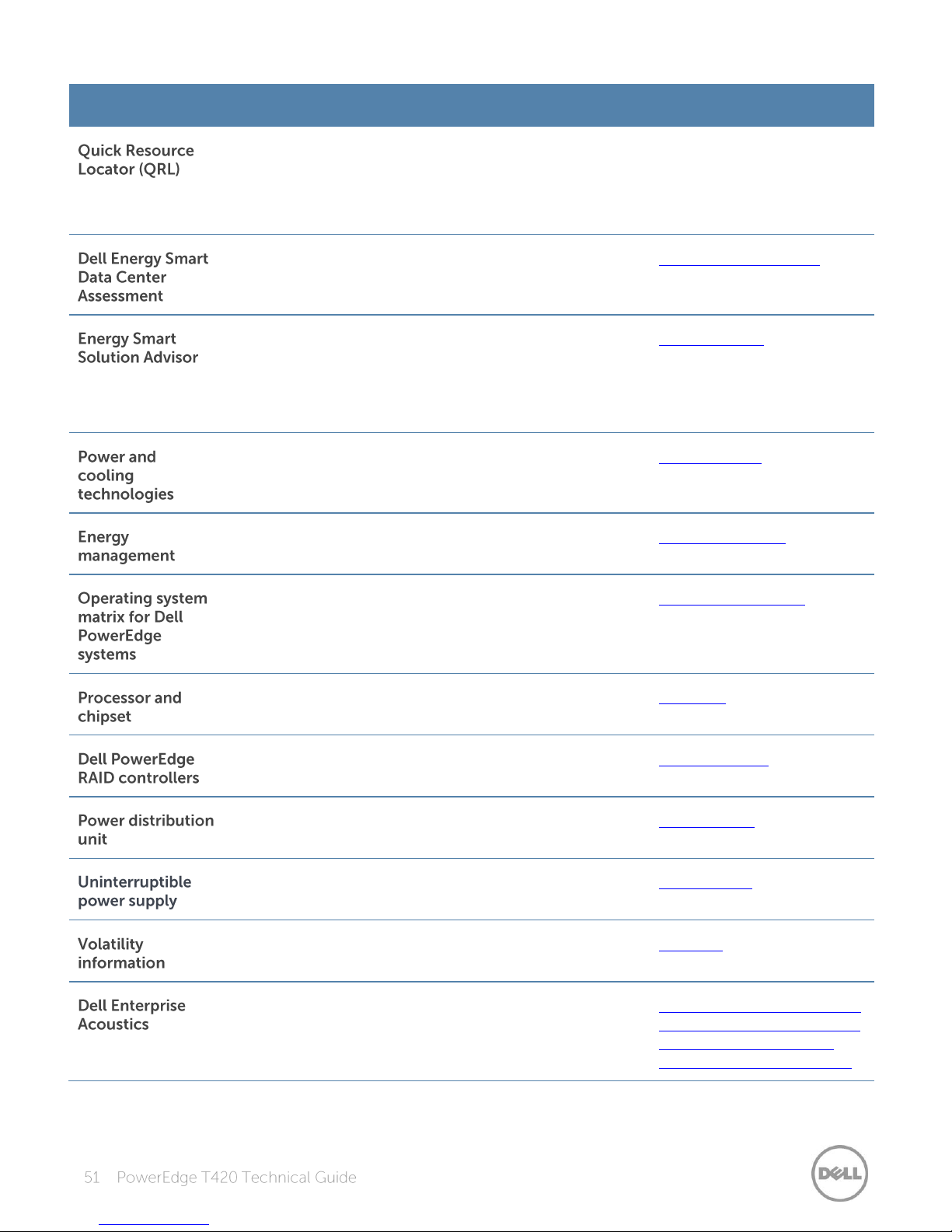
Resource
Description of contents
Location
This code on the chassis can be scanned by a phone
application to access additional information and
resources for the server, including videos, reference
materials, service tag information, and Dell contact
information.
Inside the system chassis
cover
This tool uses infrastructure and thermal analysis to help
maximize system efficiency.
Dell.com/EnergySmart
The Dell Energy Smart Solution Advisor (ESSA) enables
easier and more meaningful estimates to help you
determine the most efficient configuration possible. Use
ESSA to calculate the power consumption of your
hardware, power infrastructure, and storage.
Dell.com/ESSA
Provides details for improving energy efficiency in the
data center.
Dell.com/PNC
Provides information on Dell’s Fresh Air cooling solutions.
Dell.com/FreshAir
Provides updated information on which operating
systems are available on which PowerEdge systems.
Dell.com/OSsupport
Provides more information about the T420 processors
and chipset.
Intel.com
Provides more information about Dell PERCs.
Dell.com/PERC
Provides help selecting a rack-based power distribution
unit.
DellPDU.com
Provides help selecting an uninterruptible power supply
model.
DellUPS.com
Contact your Dell sales representative.
Dell.com
White paper that explores the mechanisms of, people’s
reaction to, language of, and Dell’s work to control noise
from Enterprise products.
www.dell.com/downloads/g
lobal/products/pedge/en/ac
oustical-education-dellenterprise-white-paper.pdf
Page 52

 Loading...