

Page 1
A
p
s managed Layer 2
networks continue to
grow, the need for
interoperable, industrystandard Layer 3 LAN
routing switches becomes
even more important.
Enterprise-class Layer 3
switches must
interoperate with existing
network equipment and
leverage established
networking knowledge,
such as Command Line
Interface (CLI).
Standards-based
networking equipment
should maximize currently
deployed tools, such as
SNMP-based software
applications. The
PowerConnect 6024 and
6024F switches provide
the network administrator
the ability to route data
between multiple
subnetworks or VLANs,
rioritize network traffic,
and manage multicast
data.
Dell | PowerConnect
INFOBrief
PowerConnect 6024 and
6024F Routing Switches
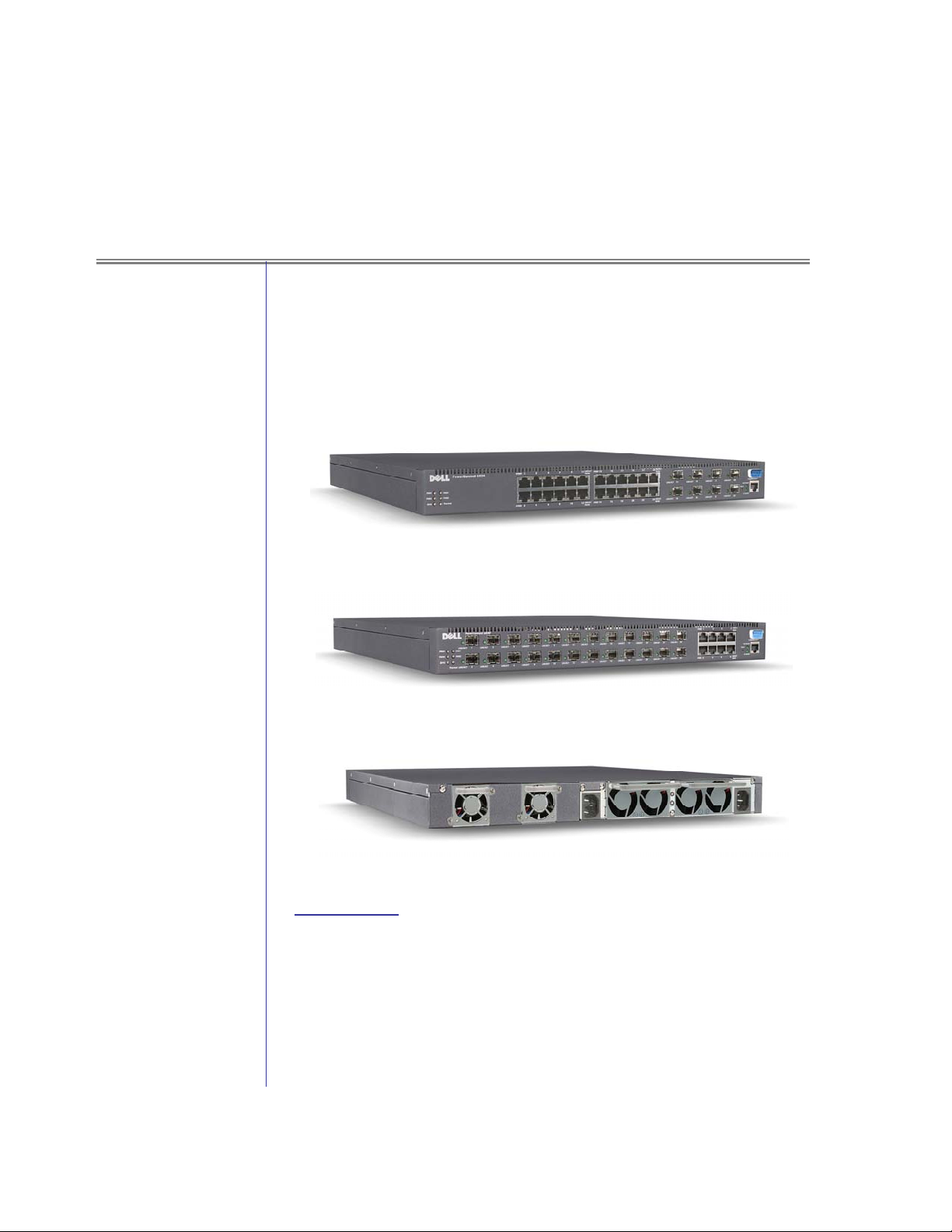
Front view of PowerConnect 6024
Front view of PowerConnect 6024F
Rear view of PowerConnect 6024/6024F
Key Points
• The Dell PowerConnectTM 6000 Series Gigabit Ethernet routing switches
are designed to address the connectivity needs of medium and large
organizations. These switches provide Layer 3 protocol support, highavailability features and flexible copper and fiber connectivity options
with advanced Quality of Service, security and management tools.
Page 2

• The PowerConnect 6024 and 6024F are rack-dense, fixed-port Gigabit
Ethernet Layer 3 switches delivering wire-speed switching performance.
Offering 24 Gigabit Ethernet ports in a 1U form factor, the
PowerConnect 6024 and 6024F each have a total switching capacity of 48
Gbps and a maximum forwarding rate of 35.6 Mpps. The PowerConnect
6024 has 24 copper Gigabit Ethernet ports and 8 combo fiber SFP slots,
while the PowerConnect 6024F has 24 Gigabit fiber SFP slots and 8
combo copper ports. The SFP transceiver slots can be used
interchangeably with the copper ports to yield exactly 24 usable ports of
Gigabit Ethernet on either switch. Optional 1000 Base-SX transceiver
modules support transmission distances up to 550m, while optional 1000
Base-LX transceiver modules support transmission distances up to 10km.
Both distances are based on fiber type.
• The PowerConnect 6000 Series switches support a variety of advanced
industry standards-based routing and switching features, allowing an
administrator to optimize traffic flow in the network. Routing
Information Protocol (RIP), Open Shortest Path First (OSPF), and Virtual
Redundant Routing Protocol (VRRP) are supported, along with IP
Multicast (IGMP) and Distance Vector Multicast Routing Protocol
(DVMRP). The PowerConnect 6024 and 6024F can support up to 4063
VLANs, the addition of which enables limitation of broadcast domains
in order to increase network security. GVRP (GARP VLAN Registration
Protocol) provides for dynamic port-based VLAN configuration as per
IEEE 802.1Q and helps reduce administrative tasks associated with static
VLANs. Other advanced features include port mirroring, and static and
dynamic link aggregation (LACP).
• The PowerConnect 6024 and 6024F switches support a number of
management interfaces, including an easy-to-use embedded Web
interface as well as an industry-standard CLI, which allows network
administrators to utilize existing switch configuration skills. Out-ofBand management access is enabled via a dedicated Fast Ethernet port or
a serial RS-232 connection. The switches can be managed via Dell
OpenManage IT Assistant and Dell OpenManage Network Manager, as
well as third party SNMP-based management console applications. The
PowerConnect 6024 and 6024F support a comprehensive Management
Information Base (MIB) and four RMON groups (history, statistics,
alarms and events). To assist with centralized management of the
network infrastructure, the switches also support remote logging via
syslog.
• Network traffic prioritization is a key requirement for deploying
emerging applications like videoconferencing and voice-over-IP. The
PowerConnect 6024 and 6024F provide eight priority queues per port.
Packets can be classified based on the Layer 2 IEEE 802.1p standard, the
Layer 3 IP Precedence or IP Differentiated Services Code Point (DSCP)
standard, or Layer 4 utilizing TCP/IP ports. Advanced flow-based
policies enable the network administrator to implement rate limiting,
metering and bandwidth guarantees to ports, link aggregation groups
and VLANs. These capabilities help increase capability of the network
Page 2 January 2004
Page 3

to scale with growth while protecting networking infrastructure
investments.
• Advanced security features of the PowerConnect 6000 Series help protect
the network from accidental or malicious interference. MAC-based port
security is designed to prevent unauthorized MAC addresses from
accessing the network. This feature can send an SNMP trap to alert
select administrators whenever an unknown MAC address attempts to
access the network, and can shut down the port if desired. Access
Control Lists (ACLs) deliver even tighter control over the network by
limiting what types and volumes of traffic are allowed based upon the
flow’s source or destination MAC address, source or destination IP
address, source or destination TCP/UDP port, DSCP value or IP
Precedence. SSL and SSH encryption offer the added security of
encrypting switch management traffic. RADIUS support enables
centralized, remote authentication of administrative access to the switch.
SNMP access filtering provides a mechanism to limit network hosts that
have SNMP access to the switches.
• The PowerConnect 6000 Series offers several high availability features to
meet demanding enterprise networking needs. Hot-swappable power
supplies and cooling fans on the switches help minimize network
downtime. The PowerConnect 6024 and 6024F support Virtual
Redundant Routing Protocol (VRRP) to dynamically replicate the
routing information across the LAN. Dual configuration files and
firmware images are also available for rollback purposes if the switch
setup has a problem for any reason. In addition, the switches also
support an Integrated Cable Tester (ICT) feature that can identify and
locate a variety of potential cable problems.
Product Description
The PowerConnect 6024 and 6024F are Layer 3 routing switches offering 24
ports of Gigabit Ethernet in a rack-dense 1U form factor. The
PowerConnect 6024 has 24 copper RJ-45 connections and 8 combo fiber
SFP slots, while the PowerConnect 6024F has 24 fiber SFP slots and 8
combo copper RJ-45 connections. PowerConnect 6000 series switches
support various Layer 3 routing protocols such as RIP, OSPF, and VRRP,
while further enhancing availability through dual internal hot-pluggable
power supplies and cooling fans. These switches support an industrystandard Command Line Interface (CLI) as well as a web-based Graphical
User Interface (GUI) for easy, powerful switch management.
PowerConnect 6024 versus PowerConnect 5224
Table 1 below compares the PowerConnect 6024 to the PowerConnect
5224. The PowerConnect 6024 is designed for customers who need high
availability Layer 3 Gigabit Ethernet solutions, while the PowerConnect
5224 is ideal for networks where cost-effective, high-performance Layer 2
Gigabit Ethernet connectivity is required.
Page 3 January 2004
Page 4

Table 1
PowerConnect 6024 comparison to the PowerConnect 5224
Features PowerConnect 5224 PowerConnect 6024
Total Switching
Capacity
Maximum
Forwarding Rate
Gigabit Ethernet
Ports
High Availability Optional RPS-600 Integrated redundant hot-
Layer 3 Protocols None RIP v1 / v2, OSPF v1 / v2
802.1Q VLAN Up to 256 Up to 4063
GVRP Yes Yes
Quality of Service L2/L3-aware Trust Mode L2/L3/L4-aware Trust
Priority Queues 4 8
48 Gbps 48 Gbps
35.6 Mpps 35.6 Mpps
24 copper GbE ports OR
4 optional fiber GbE via
SFP transceivers
24 Copper GbE ports OR 8
optional Fiber GbE via SFP
transceivers
swappable power supplies
and cooling fans, VRRP
protocol, ECMP, Integrated
Cable Tester
w/ ECMP, CIDR, IGMP,
VRRP, Static Routes (up to
128)
Mode; L2-L4 Advanced
Mode
Link Aggregation Yes, LACP and manual
(IEEE 802.3ad)
Multicast Support Yes, IGMP Snooping Yes, IGMP Snooping,
Spanning Tree
Support
Remote
Management
Authentication
Support
MAC-based Port
Security
Management
Traffic Encryption
Dual Firmware
Image Support
Configuration File
Spanning Tree and Rapid
Spanning Tree
Yes Yes
RADIUS and TACACS+ RADIUS & Local user
Yes Yes
SSL and SSH SSL and SSH
Yes Yes
File upload and download File upload and download;
Yes, LACP and manual
(IEEE 802.3ad)
IGMP, DVMRP
Spanning Tree and Rapid
Spanning Tree
authentication
Page 4 January 2004
Page 5

Features PowerConnect 5224 PowerConnect 6024
Management copy files support
SNMP Support SNMP v2c SNMP v1/v2c
Remote Logging Syslog Syslog
Industry-standard
CLI
Form Factor 1U, rack mountable 1U, rack mountable
Yes Yes
Target Markets/Applications
The PowerConnect 6000 Series is designed for customers who require
high-performance Layer 3 connectivity to resources like high-speed
network backbones and servers, or for customers who need LAN routing
at the edge of the network. Additionally, these routing switches are ideal
for customers with growing networks because of their support of copper
and fiber Gigabit Ethernet media to help future proof the network
topology.
• Traffic Aggregation to Network Backbone: The PowerConnect
6024F can form a Gigabit Ethernet aggregation layer/backbone via
its SFP fiber slots and the appropriate transceivers (1000SX or
1000LX). Also, seven Gigabit Ethernet aggregated links (with up to 7
member ports each) can be created to offer multi-Gigabit link
bandwidth as well as automatic fail-over in the case of a failed link
within the aggregation group.
• Cost-Effective Gigabit Ethernet Datacenter Switch: Up to 23 Gigabit-
enabled servers can be connected to the PowerConnect 6024 in the
datacenter to support Gigabit connectivity between datacenter
servers and the network core. Alternatively, 20 servers can be
connected to a PowerConnect 6024 while a trunk that supports 4
Gbps can be established as the uplink to the core or backbone. Other
combinations for each switch are also possible depending upon
individual datacenter needs.
• Mini-Core / Branch Office Solution: Customers needing a cost
effective solution for a branch office or mini-core Layer 3 application
can find the features they are looking for in the PowerConnect
6024/6024F. The PowerConnect 6000 series can easily accommodate
the routing needs of over 300 end stations. With dual integrated hotswappable power supplies and cooling fans in a 1U chassis, these
switches provide high availability in a small form factor. The
flexible port configuration allows for high speed Gigabit Ethernet
backbone and server connectivity. Users can enable static routes or
Layer 3 routing protocols like RIP v1/v2, and OSPF v1/v2.
Advanced Quality of Service features can also be deployed to shape
network traffic and groom bandwidth.
Page 5 January 2004
Page 6

Features and Benefits
The features and benefits of the PowerConnect 6024 and 6024F are shown
in the following table.
Table 2
Features, Functions and Benefits of the PowerConnect 6000 Series
Feature Function Benefit
Total Switching Capacity Enables full wire-speed
switching across all ports,
including Gigabit Ethernet
ports/slots.
Maximum Forwarding Rate Enables wire-speed switching
and routing across all ports,
including Gigabit Ethernet ports
and SFP slots.
Built-in Copper Gigabit
Ethernet Ports
Fiber-Capable Gigabit
Ethernet Ports
High Availability Delivers high availability with
Provides up to 10-times higher
bandwidth than Fast Ethernet
ports.
Accommodates various types of
fiber interface modules (e.g.,
1000SX, 1000LX; modules sold
separately).
redundant hot-swappable power
supplies, cooling fans and
VRRP protocol.
Can maximize the available
bandwidth of your network.
Helps take full advantage of the
speed of the devices
connected to the switch.
Helps eliminate performance
bottleneck at critical traffic
aggregation points; can use
Gigabit Ethernet with standard
Cat5 cabling, but Cat5e cabling
is recommended.
Flexibility to use fiber media if
large distances have to be
covered by the network.
Provides additional reliability
for mission critical networks
while helping to save money
when compared to deploying
external redundant power
supplies.
MAC Address Table Stores MAC addresses in
internal memory.
MAC-Based Port Security Port locking feature. Network security based on
Access Control List (ACL) Up to 1024 ACLs supported in
the system. ACLs are
comprised of Access Control
Elements (ACE). Up to 1024
ACEs are supported in the
system. ACLs can be either IPbased or MAC-based.
RIP RIP allows routers to exchange
routing table information.
Page 6 January 2004
Provides lower-latency
forwarding of data to a
maximum of 14,000 MAC
addresses stored in memory.
MAC addresses associated on
a specific port of the switch.
Provides added security to the
switch, and also serves as a
basis for Quality of Service
mechanisms.
Perhaps the easiest routing
protocol to install and manage,
RIP provides simple LAN
Page 7

Feature Function Benefit
routing for small and medium
sized networks.
OSPF Open Shortest Path First
routing protocol sends
information to all nodes in the
network to calculate the
shortest path to each hop.
CIDR Provides a single IP address
that can be used to designate
many unique IP addresses.
IRDP Helps the PowerConnect
6024/6024F to discover the IP
addresses of their neighboring
routers.
ICMP Used for out-of-band messages
related to network operation or
malfunction.
VRRP Virtual Router Redundancy
Protocol is used to replicate
routing tables between routers.
Provides a method of
determining the networks
topology, flexible in a topology
that is subject to changes.
OSPF provides less “Network
Chatter” and can scale into
larger environments.
Helps reduce the size of
routing tables and makes more
IP addresses available.
Provides the ability to track
dynamic changes in router
availability.
Helps routing devices to
communicate with each other
to determine the network
status.
Defines a master and backup
routers to maintain a copy of
the networks routing table. The
backup router is elected if the
master is no longer available.
ARP
IGMP The standard protocol for
DVMRP
Static Routes
802.1Q VLAN Virtual LANs combine a number
A TCP/IP protocol used to
convert an IP address into a
physical address.
Multicast traffic.
Distance Vector Multicast
Routing protocol.
Allows the user to manually
enter static addresses of other
network routes.
of ports into distinct, separated
sub-networks. GVRP allows for
Allows a routing device to
determine the physical
addresses of other devices
connected to it.
The protocol allows a host to
inform its local router, using
Host Membership Reports, that
it wants to receive messages
addressed to a specific
multicast group.
Allows the network to advertise
the shortest-path (as counted
in hops).
Provides an easy method to
recording known hops in small
or static networks.
Allows for limitation of
broadcast domains as well as
improved security. GVRP
Page 7 January 2004
Page 8

Feature Function Benefit
dynamic port-based VLAN
configuration as per IEEE
802.1Q.
802.1p Priority Utilizes separate transmission
queues for low and high priority
traffic.
Quality of Service (QoS) Prioritizes traffic based upon
user-defined criteria, including
L2, L3 and L4 information.
Link Aggregation (802.3ad) Groups up to seven ports
together into a single, highbandwidth trunk. LACP provides
automatic detection of link
aggregation groups.
provides dynamic VLAN
configurations and reduces
administrative tasks associated
with static VLANs.
Helps ensure low-latency
delivery of time critical network
traffic, e.g., traffic associated
with voice or video
communication.
Helps ensure time-critical
network traffic is delivered as
per network administrator’s
prioritization needs. Helps
expedite traffic based upon L2,
L3 or L4 information, such as
IP ToS, and provides greater
control over traffic flow within
the network.
Helps increase bandwidth for
critical network links (e.g.,
uplinks to a network backbone)
and creates link redundancy.
LACP provides easy to deploy
and resilient link aggregation
groups.
Multicast Support Detects ports that are
participating in IP Multicast
communication, e.g.,
multimedia streams.
Spanning Tree Support Automatically configures ports
for speed, duplex mode, flow
control and cabling used. Rapid
spanning tree improves the time
to reconfigure the topology as
compared to standard spanning
tree.
Management Enables remote configuration
and monitoring of the switch via
a Web-browser or a SNMPbased management console
application. Industry standard
CLI provides command line
interface for switch
configuration.
Authentication Support SSL provides encryption of
management traffic when
accessing the switch via the
embedded web server. SSH
Limits broadcast traffic to those
ports that are actually
participating in the
communication.
Helps reduce network set-up
time and improves network
availability by automatically
activating standby links when
current link goes down.
Allows a network administrator
to detect and remedy problems
at local and remote locations.
Industry standard CLI
leverages network
administrator’s knowledge of
industry-standard CLI and
provide a common platform for
switch configurations.
Helps enhance the security of
the network by encrypting
network management traffic.
Page 8 January 2004
Page 9

Feature Function Benefit
provides encryption of
management traffic when
accessing the switch via CLI.
IP Address Management Allows the network
administrator to assign an IP
address statically or
dynamically.
Configuration File
Management
Redundant Power Supply Provides continuous power in
Form Factor Height of switch is limited to 1U. Saves rack space.
Standard Service Provides end-user unit
Enables the uploading and
downloading of configuration
files, as well as copying
configuration files (running,
startup, backup).
the event the primary power
supply fails.
replacement in the event of a
failure.
Provides the network
administrator options for
assigning IP addresses to a
switch, including the flexibility
to use a BootP or DHCP server
for IP assignment.
Provides the network
administrator an easy and
expedient mechanism to
configure a switch or multiple
switches; administrator can
leverage one switch
configuration for multiple
switches.
Helps increase system
availability and reduce system
down-time.
Provides next-business day
Advance Exchange Service
replacement to help improve
network up-time.
2
Key Customer Benefits
• Scalability
The PowerConnect 6024 and 6024 F provide a variety of Layer 3
features that allow them to be deployed in applications such as routing
at the network edge, aggregation of network traffic to the backbone,
and core routing in small to medium networks or branch office
applications.
• Support for standards-based advanced switching features as well as
standards-based remote management
The PowerConnect 6024 and 6024F support a variety of open
standards to deliver advanced features that help optimize overall
network performance (e.g., Layer 2/3/4 Class of Service or IGMP
snooping), availability (port trunking) and security (VLAN). Remote
management is supported via a web browser-based switch
management interface as well as Telnet access to the CLI (Command
Line Interface). SNMP-based remote management is also
Page 9 January 2004
Page 10
accomplished with a broad variety of management tools like the Dell
OpenManage Network Manager.
• Advanced security capabilities
With MAC-based port security, multi-layer Access Control Lists
(ACL), SSL/SSH management traffic encryption, management
authentication (including RADIUS) and SNMP access filtering, the
PowerConnect 6024/6024F switches deliver advanced usercustomizable network security capabilities.
• Enhanced availability
Integrated dual hot-swappable power supplies and cooling fans
improve system uptime and minimize the potential for an inoperable
switch. The dual hot-swappable power supplies can also help save on
infrastructure costs during deployment by providing the integrated
function of an external redundant power supply. The PowerConnect
6024 and 6024F switches also support Virtual Redundant Routing
Protocol (VRRP) to enhance availability at the router level.
• Ideal solution for customers with growing and consolidated
datacenters
The PowerConnect 6024 and 6024F switches provide a highperformance, wire-speed Gigabit Ethernet routing solution. The 1U
form-factor allows customers to grow their datacenters while
minimizing the amount of rack space required (additionally, no
external redundant power supply is necessary.) When the customer
network has to cover extended distances, the PowerConnect 6024F can
aggregate fiber-based Gigabit Ethernet connections (via SFP modules)
into the datacenter.
Typical Implementations
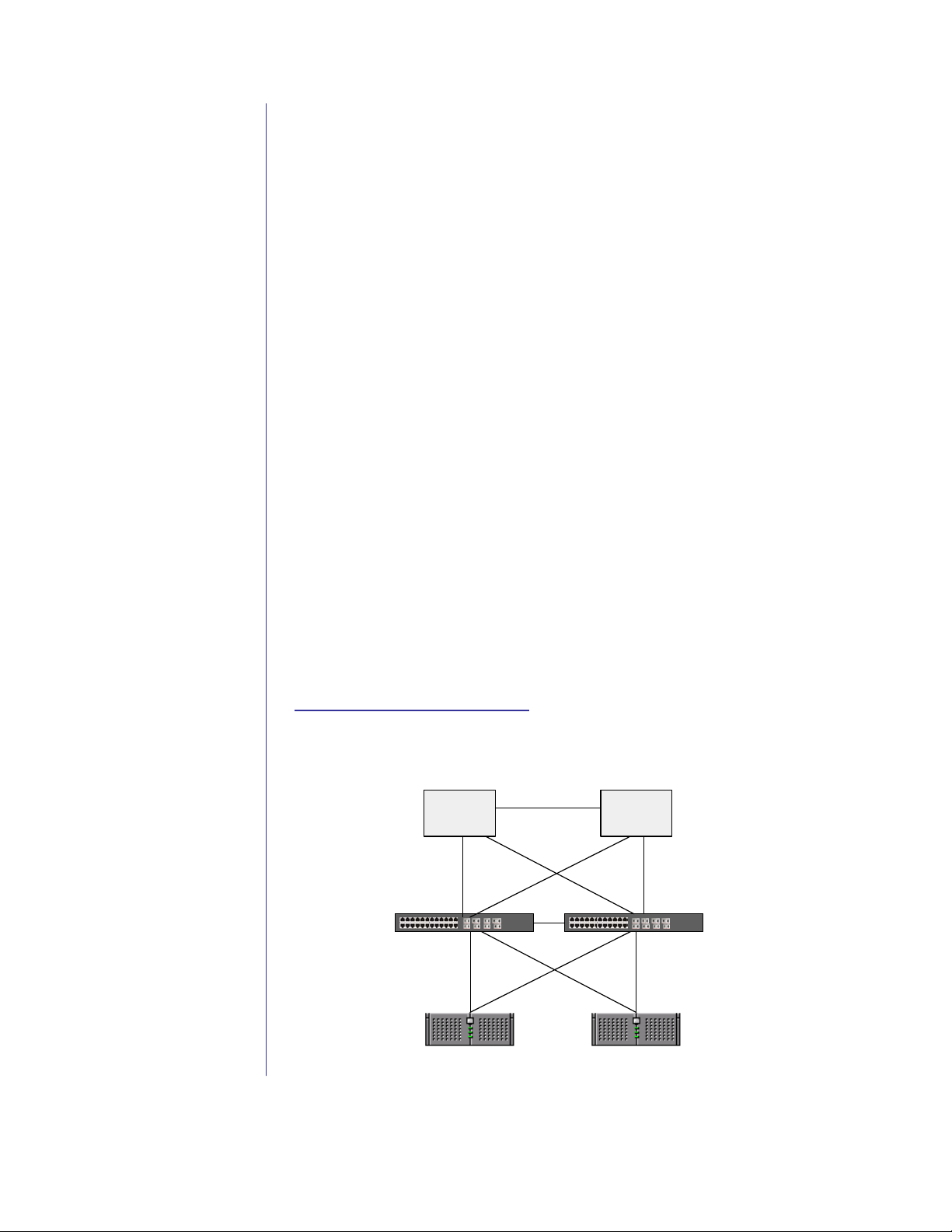
Diagram 1. Cost-Effective Gigabit Datacenter Solution
Redundant
Core
Dual homed
connec tions
Aggregation Switch
PowerConnect 6024
Dual homed
connect ions
PowerEdge
Server
Redundant
Core
PowerEdge
Server
Aggregation Swit ch
PowerC onnect 6024
Page 10 January 2004
Page 11
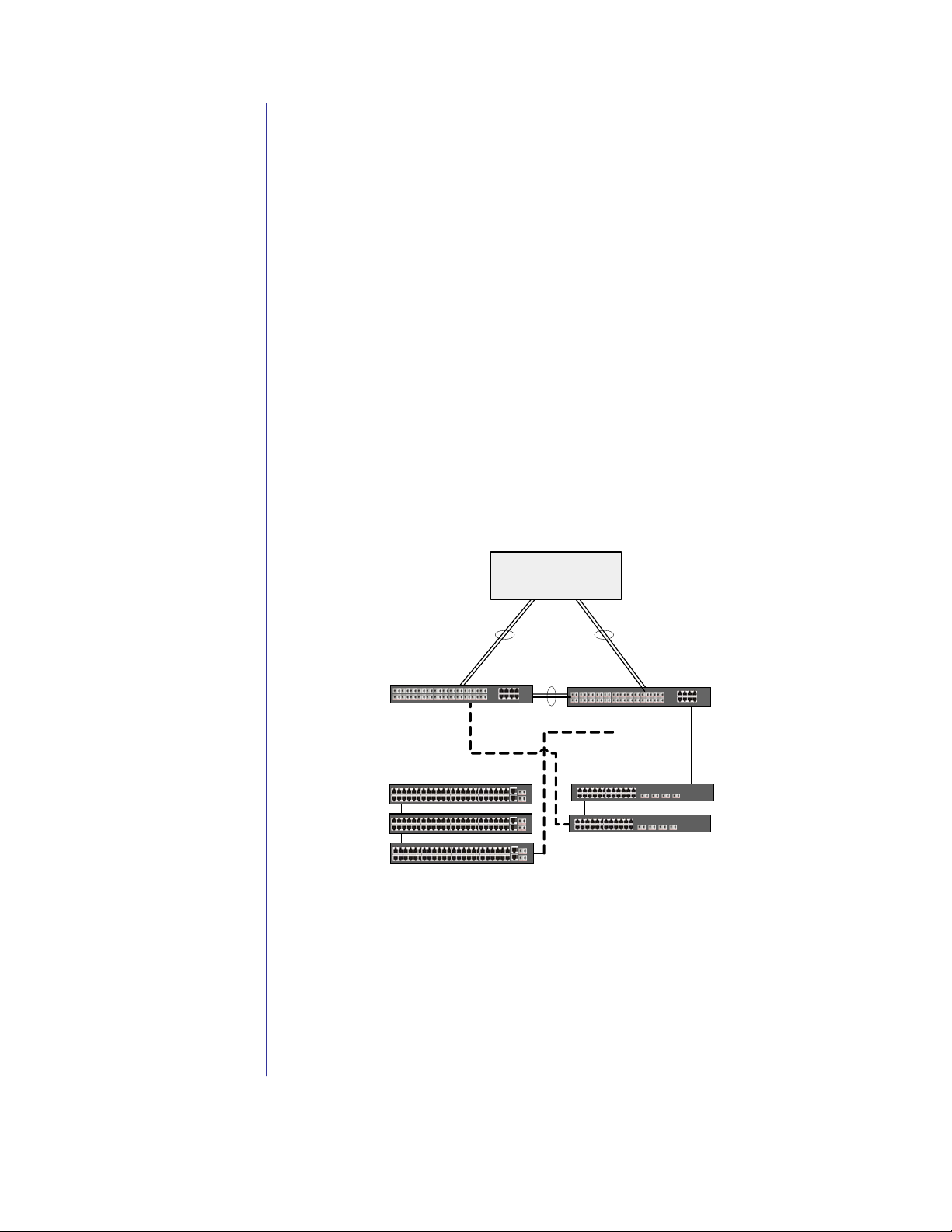
Diagram 1 is an example of a resilient datacenter center designed using
PowerConnect 6024 switches. This solution provides high availability
wire-speed Gigabit routing capabilities to access a large number of servers.
Servers can be connected to the switches using either copper or fiber
cabling. Each switch is capable of supporting up to 21 servers while
providing resilient Gigabit Ethernet uplinks to the network core.
Additionally, the two PowerConnect 6024 switches are connected to each
other to provide higher availability. In the event of an uplink from either
switch losing communication with the core, traffic can still be routed via
the failover links. With the Virtual Redundant Routing Protocol (VRRP),
the routing tables are replicated between the two switches. To ensure high
availability, the PowerConnect 6024’s integrated redundant hot-swappable
power supplies and cooling fans maximize the uptime of the network.
Standards based networking protocols help keep deployment challenges to
a minimum.
Application benefits include:
- Highly-available network connectivity
- High-performance server connectivity
- Cost-effective server connectivity
Diagram 2. Aggregation Solution
Network Core
Aggregation Sw itch
PowerConnect 6024 F
Edge Switch 1
PowerConnect 3348
stacked
2 GBPS LAG Trunks
PowerConnect 5224s
Aggregation Sw itch
PowerConnect 6024 F
Subnet BSubnet A
Edge Switch 2
cascaded
Diagram 2 is an example of a traffic aggregation solution designed using
PowerConnect 3348, 5224 and 6024F switches. This solution can provide
high availability and fail-over protection for a large number of desktop
clients.
In this example, the PowerConnect 6024F switches connect different
subnets or VLANs to the network core using multiple fiber SFP ports as a
single IEEE 802.3ad aggregated link. The aggregation switch provides
Layer 3 capabilities which enable it to route traffic without having to
Page 11 January 2004
Page 12
switch all packets to the core. Data leaving the stack of Edge Switch 1 with
a destination address at Edge Switch 2 would not have to take the
additional hops of going to the core of the network and then back out to
Edge Switch 2.
In this scenario, the aggregation switch can actually run multiple links to
the network core and to the edge switches to provide faster connectivity.
Edge Switch 1 consists of three stacked PowerConnect 3348s that are
linked together via their stacking modules. One uplink is connected to the
first PowerConnect 6024F at the top of the stack, while a second uplink is
connected to the redundant PowerConnect 6024 F. This creates multiple
data paths to the core, providing high availability of the network data.
Edge Switch 2 is similar except the switches are cascaded to each other via
their Gigabit ports. Multiple Spanning Tree protocol on the PowerConnect
6024 switches is enabled to help prevent a broadcast storm. RIP or OSPF
routing can be enabled to route data between these subnets.
Application benefits include:
- High bandwidth network from the desktop to the core
- Resilient and cost-effective wiring closet solutions
- Cost-effective aggregation solution
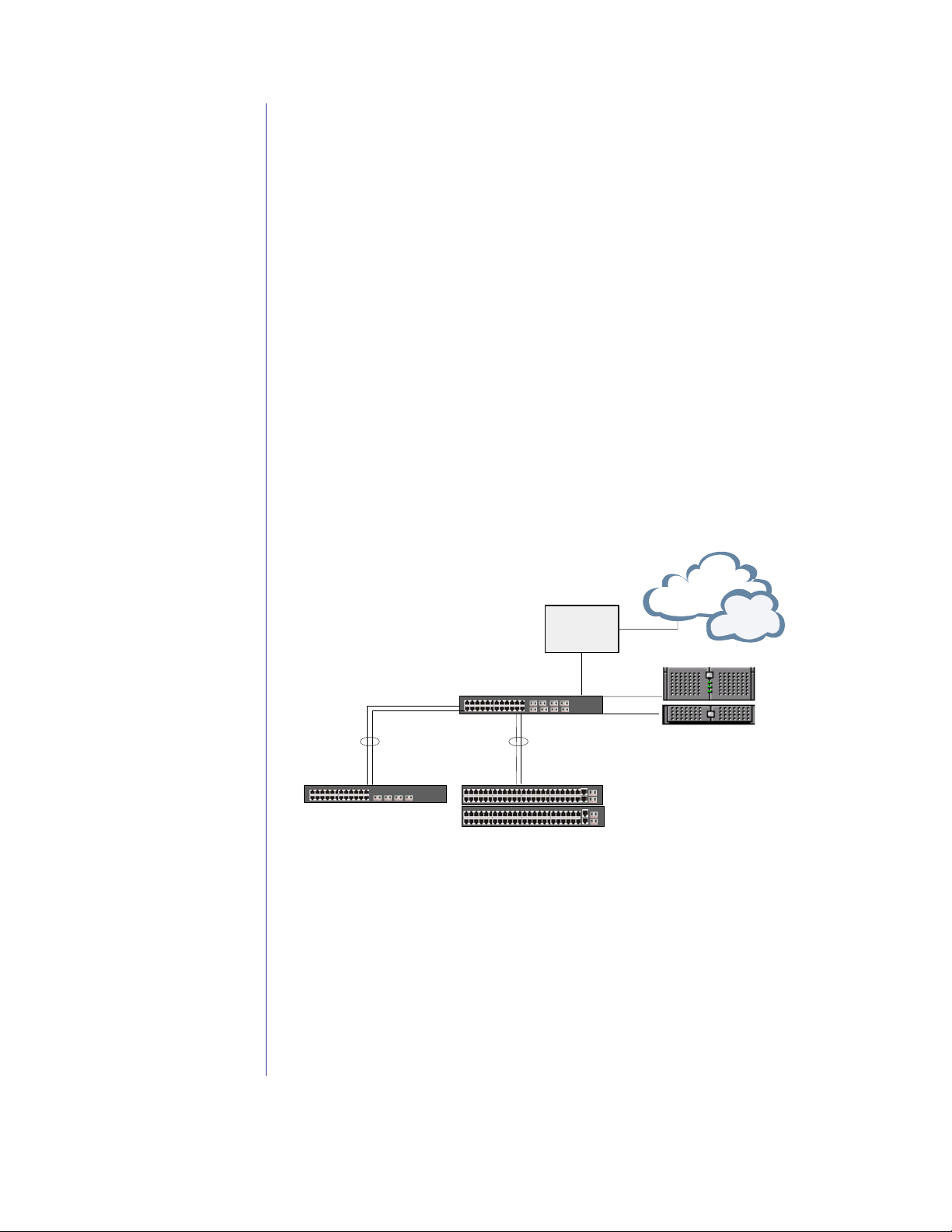
Diagram 3. Mini-Core or Remote Office Solution
WAN Router
Firewall
Mini-Core / Rem ote
PowerConnec t 6024
2Gbps LAG
(Trunk A)
Switch 1
PowerC onnect 5224
2Gbps LAG
(Trunk B)
Switch 2 & 3
PowerConnec t 3348
Servers
Diagram 3 is an example of a Gigabit Ethernet mini-core or remote office
solution designed using the PowerConnect 6024. This solution provides
Gigabit Ethernet connectivity to the local servers and WAN/firewall
devices. Uplink trunks from switches 1, 2 and 3 are aggregated to the
PowerConnect 6024, thus providing a high speed connection from the edge
switches. This solution provides both high-performance and high
reliability while offering Layer 3 routing functionality in a mini-core
application. The solution can easily scale by adding additional
PowerConnect 6024 switches to create a redundant mini-core network.
Page 12 January 2004
Page 13

With the Virtual Redundant Routing Protocol (VRRP), the PowerConnect
6024 switches will synchronize their routing tables with one another to
ensure fail-over support in the event of a switch or link failure.
Additionally, the PowerConnect 6024 can be configured with up to seven
trunk groups (with a maximum) of seven ports in a trunk group to provide
high performance link aggregation.
Both a Web-based GUI and a Command Line Interface are available to
manage the device. The PowerConnect 6024 can also be managed
remotely via common SNMP management tools and supports switch
access password protection. SNMP access filtering is used to provide
secure access to the device along with SSH/SSL encryption of the
management traffic. Dell OpenManage IT Assistant provides a single
console to manage your servers, workstations and network switches. If a
more advanced network management tool is required, Dell’s OpenManage
Network Manager allows you to easily administer your managed
PowerConnect switches in a one-to-many fashion.
Application benefits include:
- High availability
- High-performance connectivity to server workgroups
- Scalability
- Security
- Remote management capabilities
Service and Support
Standard Warranty and Service Plan
• Three-year limited warranty
Business Day Advanced Exchange Service
• 7-day/24-hour Telephone Technical Support for troubleshooting and
diagnosis of Dell hardware
• 7-day/24-hour Online Support Services
• Lifetime firmware upgrades (available for download via
support.dell.com)
Warranty and Service Upgrades
You can upgrade to three years of Advanced Exchange Service with Same
Day response, or five years of Advanced Exchange Service, with either
Same Day or Next Business Day response. You may also choose three or
five years of On-Site Hardware Support Service
Next Business Day response.
ENTERPRISE SUPPORT SERVICES
Silver Enterprise Services
Enhanced, prompt hardware and software support services. Includes:
• 4-Hour Same Day onsite
hardware replacement
• 7x24 Remote Hardware Support by the Silver Queue
1
supplemented with three years of Next
2
response service with advance exchange
2
2
, with either Same Day or
Page 13 January 2004
Page 14

• Remote Software and Storage Support
Gold Enterprise Services
Rapid, expert support services for critical systems. Includes:
2
• 4-Hour Same Day onsite
hardware replacement
• Engineer-to-Engineer Telephone Support with direct access to Dell's
senior-level Gold Queue
• Technical Account Management Team for attentive support and
escalation management
• Customer-defined Call Priority so that you maintain control of your
case
• On-Demand Engineer Dispatch for select Severity 1 incidents to
quickly receive on-site service
• Software Support Resolution Pack
• Web-Based Remote Troubleshooting to quickly mobilize experts
Dell PowerConnect 6000 Series switches feature the Prestera
Dell cannot be responsible for errors in typography or photography.
1. For a copy of our guarantees or limited warranties, please write Dell USA L.P., Attn:
Warranties, One Dell Way, Round Rock, TX 78682. For more information, visit
www.dell.com/us/en/gen/misc/policy_010_policy.htm.
2. Technician, replacement part or unit (depending on service contract) will be dispatched
if necessary following phone-based troubleshooting in advance of receipt of returned
defective unit. Service may be provided by third-party provider. Subject to parts
availability, geographical restrictions and terms of service contract. Service timing
dependent upon time of day call placed to Dell. Defective unit must be returned.
Replacements may be refurbished. U.S. only.
________________________________________________________
Dell, the Dell logo, and PowerConnect are trademarks of Dell Inc. Other trademarks and trade names
may be used in this document to refer to either the entities claiming the marks and names or their
products. Dell disclaims proprietary interest in the marks and names of others. Printed in U. S. A.
©Copyright 2004 Dell Inc. All rights reserved. Reproduction in any manner whatsoever without the
express written permission of Dell Inc. is strictly forbidden. For more information contact Dell.
response Service with advance exchange
TM
chipset from Marvell®.
Page 14 January 2004
 Loading...