

Page 1
About Warnings
WARNING: A WARNING indicates a potential for property damage, personal injury, or death.
Dell™ Vostro™ 320
Setup and Features Information Tech Sheet
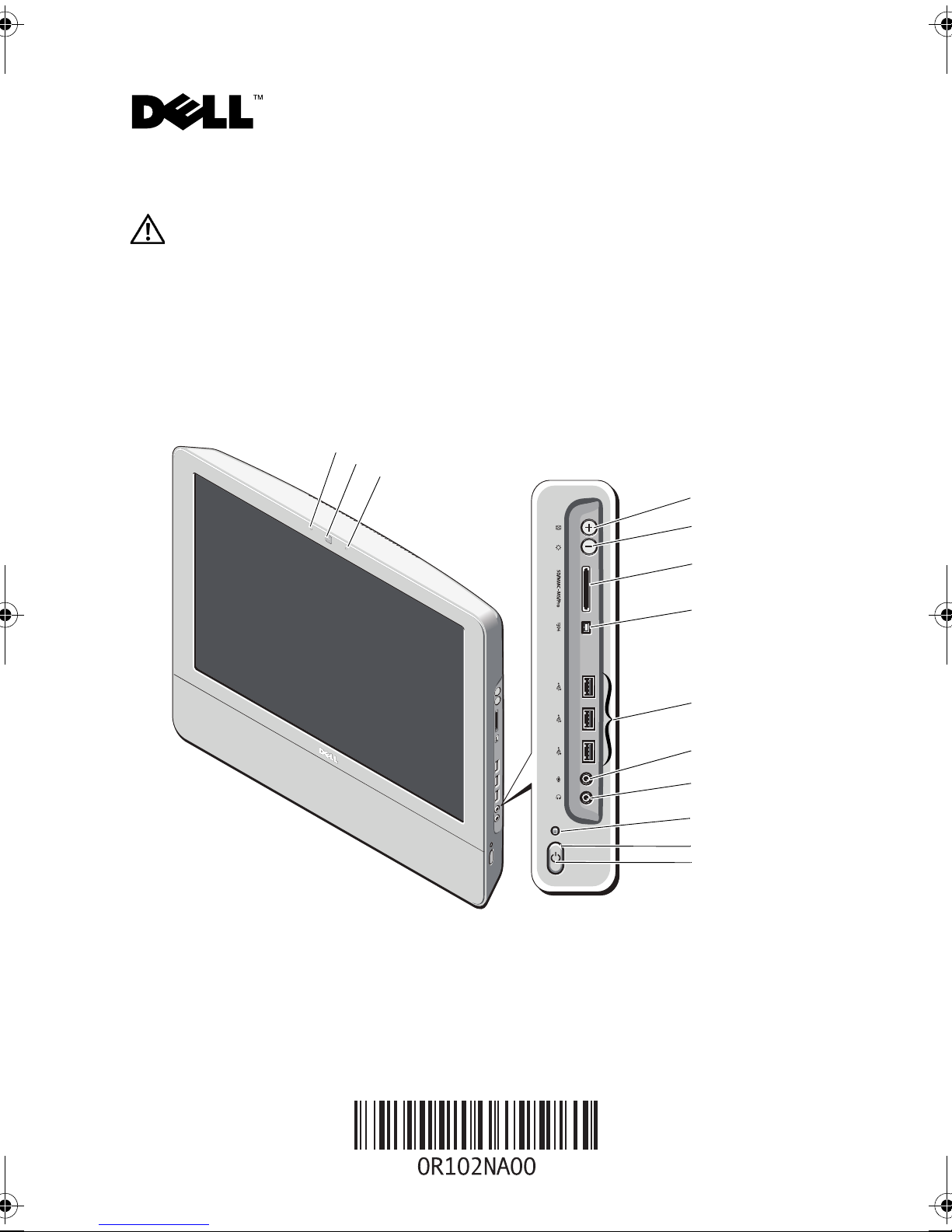
Front View
1
2
3
4
5
6
7
8
9
10
11
12
13
1 camera status light (optional) 2 camera (optional)
3 microphone (optional) 4 auto adjust/brightness increase
July 2009
Regulatory Model: W01B
Regulatory Type: W01B001
Page 2
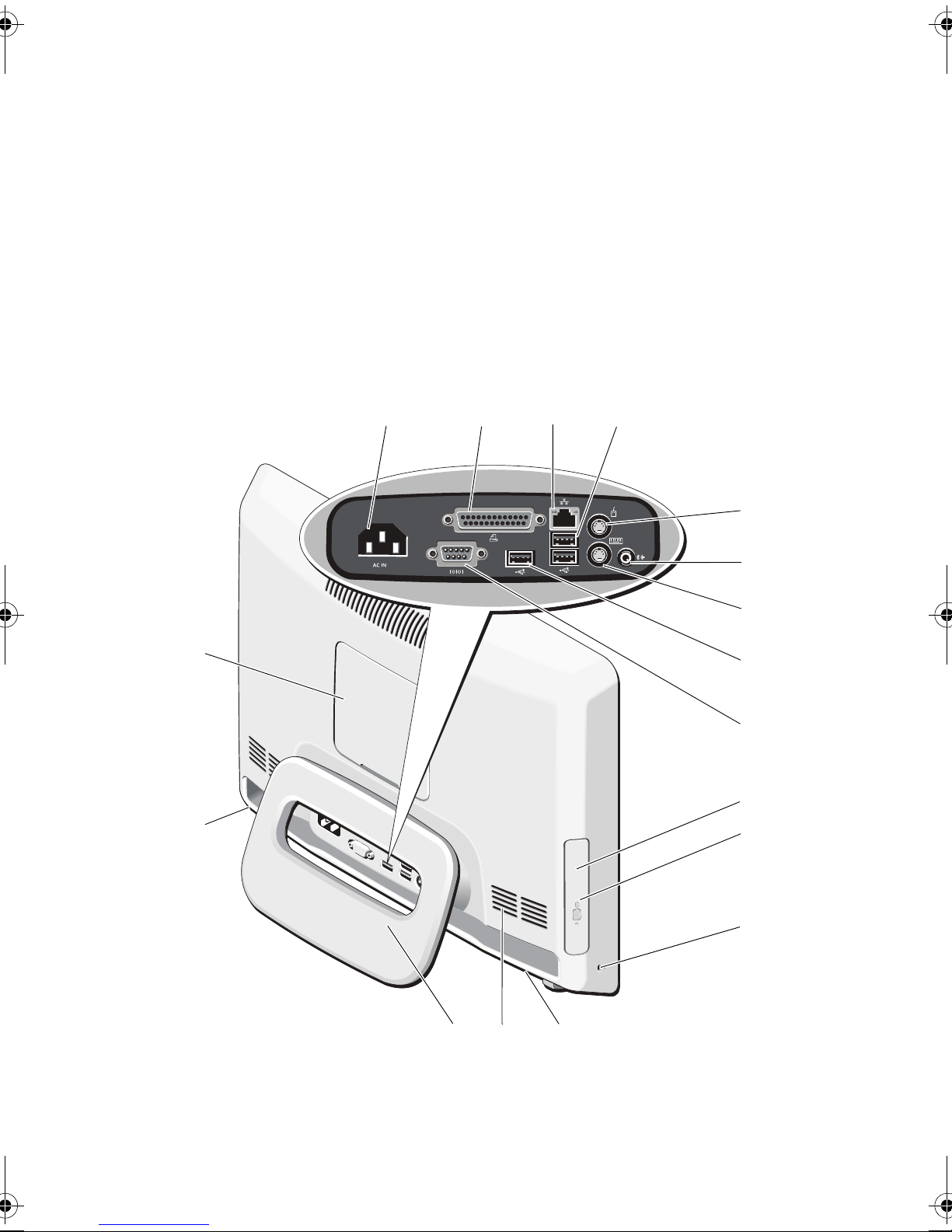
5 brightness adjust mode/brightness
decrease
7 IEEE 1394a port (optional) 8 USB 2.0 connectors (3)
9 microphone connector 10 headphone connector
11 drive activity light 12 power button
13 power LED
6 8-in-1 media card reader (optional)
Back View
16
13
1
23
4
5
6
7
8
9
10
11
15
14
12
13
Page 3
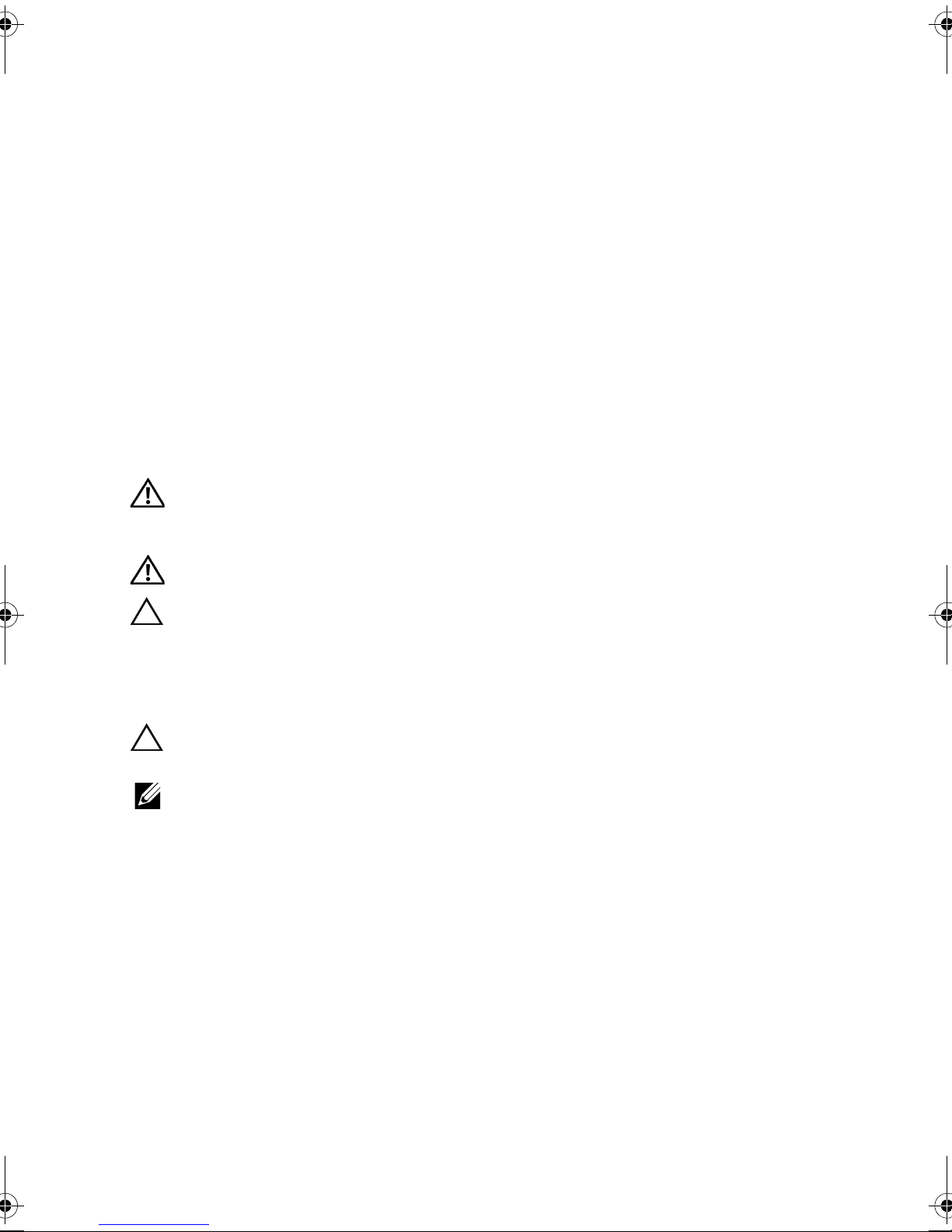
1 power connector 2 parallel connector
3 Gigabit network connector 4 USB 2.0 connectors (2)
5 PS2 mouse connector 6 line-out connector
7 PS2 keyboard connector 8 USB 2.0 connector
9 serial connector 10 optical drive (optional)
11 optical drive activity light (optional) 12 security cable slot
13 2W stereo speakers–at base of
computer (optional)
15 rear stand 16 VESA
14 air vent (3)
®
mount cover
Quick Setup
WARNING: Before you begin any of the procedures in this section, read the safety
information that shipped with your computer. For additional best practices information,
see www.dell.com/regulatory_compliance.
WARNING: Do not use the stand to carry the computer.
CAUTION: Do not install your computer in an enclosure where there is limited,
restricted, or no airflow. Restricting the airflow impacts your computer’s performance,
possibly causing it to overheat. If your computer is installed in a corner on a desk,
leave at least a 5.1 cm (2 in) clearance from the back of the computer to the wall to
permit the airflow required for proper ventilation.
CAUTION: Ensure that you do not damage any cables or USB devices connected to
the rear I/O ports when adjusting the angle of the rear stand.
NOTE: Some devices may not be included if you did not order them.
Page 4
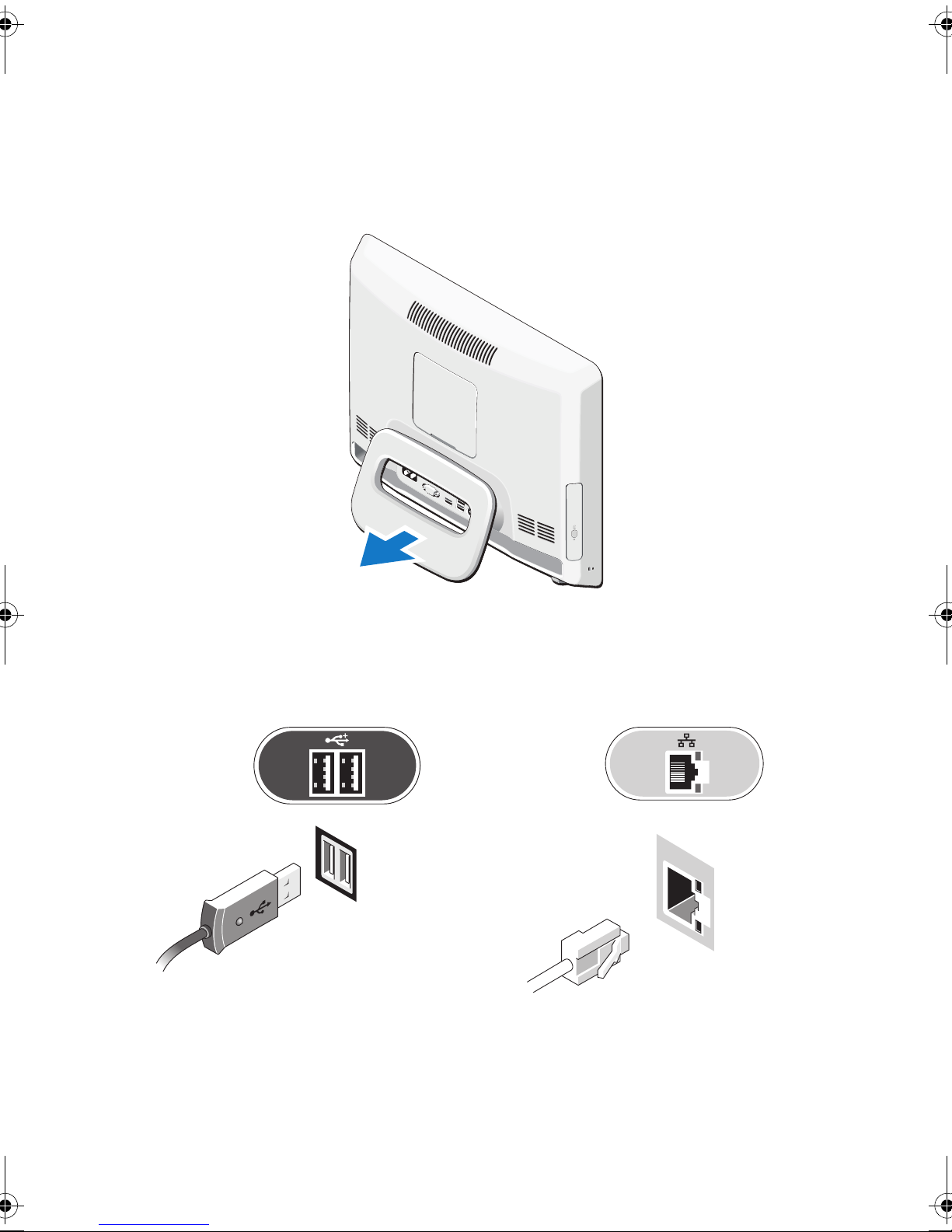
1
Pull the stand to
work angle
as shown.
A distinct click is heard when the stand is opened or closed over the initial work angle.
Vostro 320 also supports UL-certified VESA wall mounts (100 mm x 100 mm only).
For proper mounting, use four (ea.) 4 mm dia, 0.7 pitch x 10 mm long screws (Base on the pad
thickness is 2.6 mm.).
Connect the USB keyboard or mouse.
2
3
Connect the network cable (optional).
Page 5
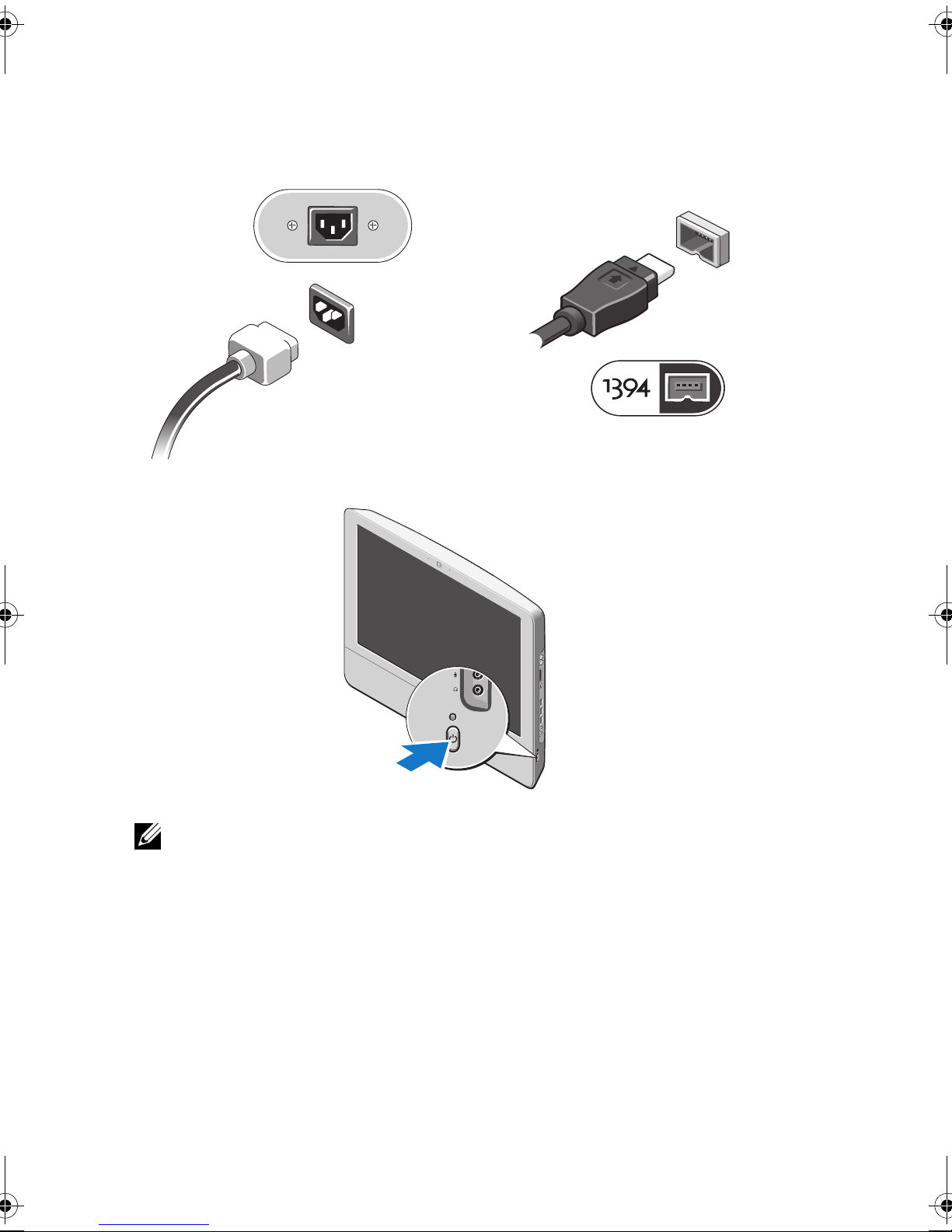
4
Connect the power cable.
6
Press the power button to turn on the computer.
5
Connect IEEE 1394a devices, such as a DVD
player (optional).
NOTE: It is recommended that you turn on and shut down your computer at least once before
you install any external device, such as a printer.
Page 6
Specifications
NOTE: Offerings may vary by region. The following specifications are only those required by law
to ship with your computer. For more information regarding the configuration of your computer,
click Start →Help and Support and select the option to view information about your computer.
System Information
®
Chipset Intel
Processor type Intel Celeron
Video
Display sizes 17 inches wide (resolution 1440 x 900)
Video type Integrated Graphics
Data bus Low-voltage differential signaling (LVDS)
Video controller Intel GMA X4500
G41+ICH7
®
, Intel Pentium®, Intel Core™2 Duo, or
Intel Core™ 2 Quad 65W TDP
18.5 inches wide (resolution 1366 x 768)
19 inches wide (resolution 1440 x 900)
Video memory 1 MB–256 MB
Memory
Memory module connector 2 DIMM slots
Memory module capacity 1 GB or 2 GB
Memory type DDR2 800 MHz
Minimum memory
1 GB
Maximum memory 4 GB Dual Channel
Drives
Internally accessible One
Available devices
5.25 inch drive bay
One
3.5 inch SATA drive bay
One
3.5 inch SATA hard drive (7200 rpm)
One
5.25 inch SATA DVD-ROM, DVD+/-RW
Page 7
Control Lights and Diagnostic Lights
Power light white light — solid white light indicates power-on state;
blinking white light indicates standby power state of the
computer.
amber light — solid amber light indicates a problem with
the system board or power supply; blinking amber light
indicates a problem with the system board.
Drive activity light Displays the SATA hard drive or CD/DVD activity.
white light — blinking white light indicates that the
computer is reading data from or writing data to the
hard drive.
green light — blinking green light indicates that the
computer is reading data from or writing data to the
optical drive.
Camera status light white light — solid white light indicates that the camera is
turned on.
Power
Wattage 130 W
Maximum heat dissipation 497.8 BTU/hr
Power supply:
Voltage
100–240 V∼, 50/60 Hz, 2–1 A
Coin-cell battery 3 V CR2032 lithium coin cell
Physical
Height 386.39 mm (15.21 inches)
Width 477.39 mm (18.79 inches)
Depth 103.98 mm (4.09 inches)
Wei gh t
6.5–8.0 Kgs (14.3–17.6 lbs) (varies with different LCD
panels and configurations)
Page 8
Environmental
Temperature range
Operating
Storage
Relative humidity (maximum)
Operating
Storage
Altitude:
Operating
Storage
Airborne contaminant level G2 or lower as defined by ISA-S71.04-1985
10° to 35°C (50° to 95°F)
–40° to 65°C (–40° to 149°F)
10% to 90% (noncondensing)
5% to 95% (noncondensing)
–15.2 to 3048 m (–50 to 10,000 ft)
–15.2 to 10,668 m (–50 to 35,000 ft)
Finding More Information and Resources
If you need to: See:
Find safety best practices information for your
computer, review
Warranty information, Terms and
Conditions(U.S only), Safety instructions,
Regulatory information, Ergonomics
information, and End User License Agreement.
The safety and regulatory documents that shipped
with your computer and the Regulatory
Compliance Homepage at
www.dell.com/regulatory_compliance.
__________________
Information in this document is subject to change without notice.
© 2009 Dell Inc. All rights reserved. Printed in China. Printed on recycled paper.
Reproduction of these materials in any manner whatsoever without the written permission of Dell Inc.
is strictly forbidden.
Trademarks used in this text: Dell, the DELL logo, and Vo s t ro are trademarks of Dell Inc.; Intel, Pentium,
and Celeron are registered trademarks and Core is a trademark of Intel Corporation in the U.S. and
other countries; Ve s a is a registered trademark of Video Electronics Standards Association.
Other trademarks and trade names may be used in this document to refer to either the entities claiming the
marks and names or their products. Dell Inc. disclaims any proprietary interest in trademarks and trade
names other than its own.
 Loading...