

Page 1
Dell™ 3200MP 投影机用
以下信 由所引用 的供 商提供且未 Dell独立核 。 信 服从下 所述 束条件及否 声明。
安全 明
于投影机
安装
使用投影机
故障 理
格
管制通告
系Dell
注 、注意和警告
注 "注 "表示重要信 可帮助您更好 使用投影机。
注意 "注意" 表示潜在的 件 害或 据 失 并且告 您如何 免 。
警告 "警告"表示潜在的人身 害 亡或 失。
本 内含信 若有 更 恕不通知。
©2002 Coretronic Corporation.
©2002 Dell Computer Corporation. 所有。
未 Dell 算机公 的 面 可 禁 何人以 何方式 行 制。
本 所用商 Dell 和DELL 徽 是Dell 算机公 的商 。DLP 和Texas Instruments 是 州 器公 的注册
商 。Microsoft 和Windows 是Microsoft公 的注册商 。Macintosh 是Apple 算机有 公 的注册商 。
本 中可能用到的其 商 和商品名称 或者 声明相 商 或者名称的 体 或者 他 的 品。除其自身的商 和
商品名称 外 Dell 算机公 否 其 商 和商品名称的 何 益。
束条件及否 声明
本 内含的信 包括所有的使用 明、警告和 章 可及 均由供 商提供且未 Dell独立核 或者
。Dell 于因 遵守或者没有遵守 明所引 的 坏无法承担 。
有 本 中引用 件的所有 、 能、速度或者 量的所有 述或者声明均由供 商而非Dell提供。Dell特别否 了
何 述的正确
2002年11月Rev. A01
性、完 性或者已 。
Page 2

返回目
使用注意事 Dell™ 3200MP 投影机
警告
遵守下述安全 明以 免 投影机造成可能的 坏并确保您的人身安全。
使用中的灯泡极 。投影机使用完 后 至少 要冷却30分 方可更 灯泡。并且一定要按照更 灯
泡中的全 明 行操作。
何 候都不要接触灯泡或者灯泡 。如果灯泡握持不正确 包括接触灯泡或者灯泡 灯泡可能爆
炸。
在打开投影机 前 先 走 盖。如果不 做 可能会使 盖温度 。
免 坏投影机和灯泡 在 投影机 前 容 冷却 扇运 2分 。
遥控器配 有 出 射的II 激光。 降低 害危 切勿 激光 也不要将激光 向人眼。
切勿阻塞 上用于通 的狭 和开口。
如果本 品 期不用 将 插 从交流插座中拔下。
返回目
切勿在极 炎 、寒冷或者潮湿的 中使用投影机。
切勿在易受 量 和泥 侵 的区域使用投影机。
切勿在 何生成 磁 的 近使用投影机。
切勿使投影机 受日晒。
在投影机打开 切勿 。亮光可能会 害您的眼睛。
降低 灾或者触 危 切勿将本 品暴露于雨淋或者潮湿 。
免触 除了更 灯泡所必 的操作 外 切勿再行打开或者拆卸投影机。
免 坏投影机 在 投影机或者将投影机装入其 提箱 前一定要将 和升降支架底脚完全收回。
免 坏投影机 在 其 行清 前将其 并且从 插座上断开。使用 有温和 的 布擦
拭 机外壳。切勿使用擦 、 蜡或者溶 擦拭 。
Page 3
返回目
于投影机 Dell™ 3200MP 投影机
特征
机
控制面板
接 口
有鼠 能和激光 的遥控器
特征
芯片0.7" Texas Instruments DLP™
度双 据 率 DDR 字微
真正XGA 1024×768可 像素
3.5 磅 (1.6 千克) 重量 凑
1300 ANSI流明亮度 1200 ANSI流明亮度 平均
像自 整到1024×768全屏 例 容 UXGA、 SXGA+、SVGA、XGA、SVGA、VGA及MAC
卓越的 适配 件 可以用3:2和2:2非隔行抓拍。
150-瓦用 可更 P-VIP灯泡
容Macintosh® 算机
容 NTSC, NTSC4.43, PAL, PAL- M, PAL -N, SECAM, 和 HDTV (1080i, 720P, 576P, 480i/P)
遥控器 有鼠 能和激光
M1-DA 接 用于 字和模 接
容 清 度
用 友好的多 屏
先 的 子梯形失真校正
用 友好的控制面板 背光
包括 提箱
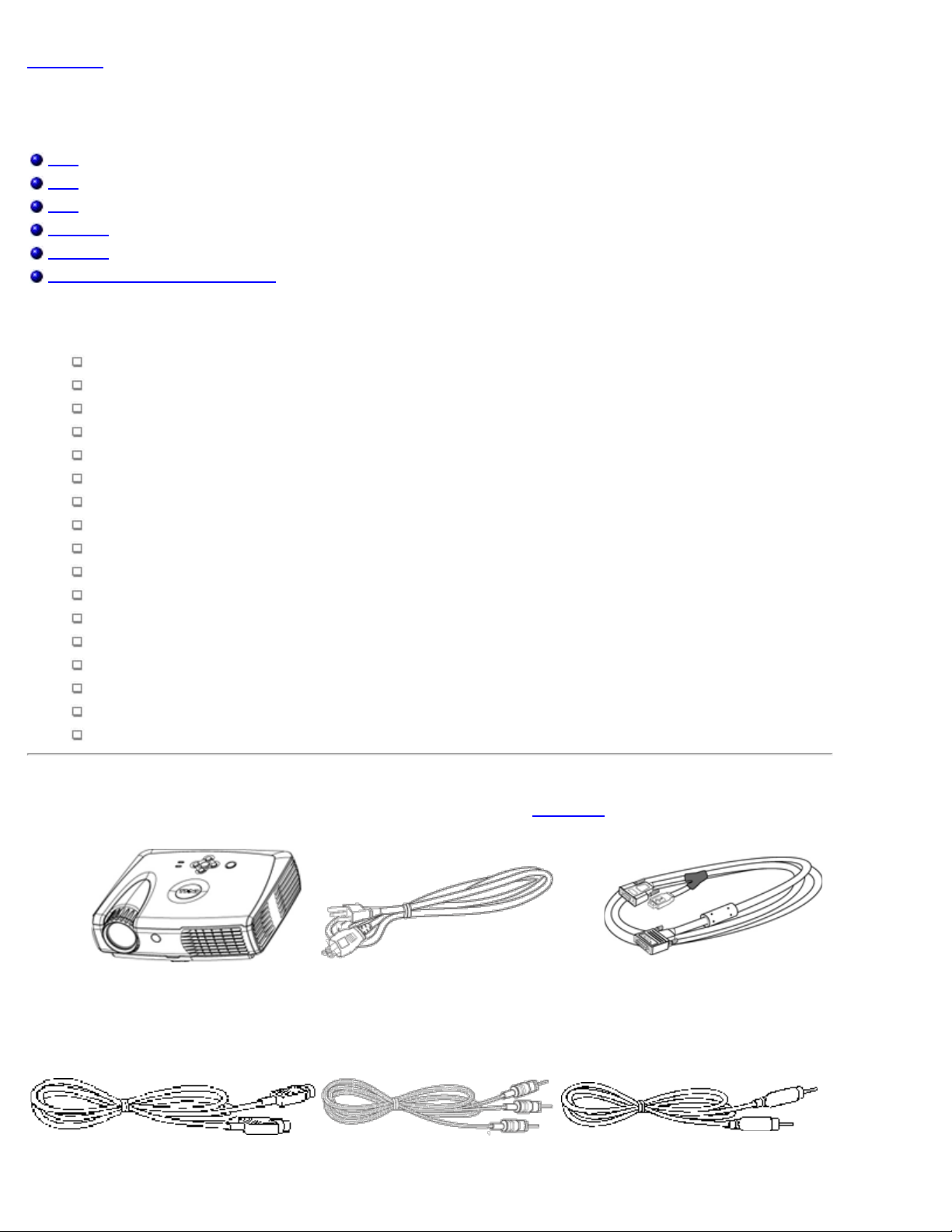
投影机随机 有如下所示的所有物件。 装箱确保物件完整,如有 失 与Dell 系。
机 M1-A 到VGA 接
Page 4
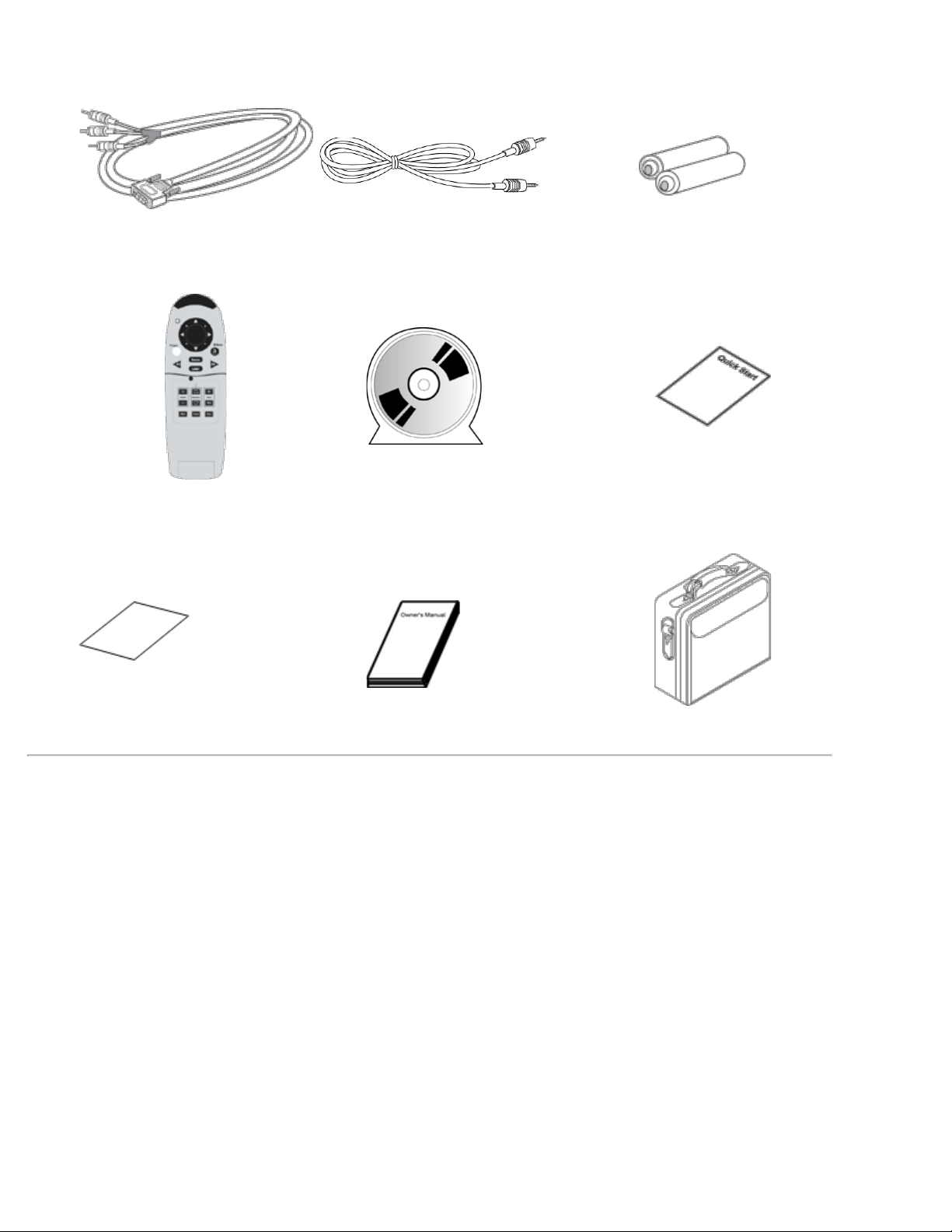
S-video RCA
音 合
M1-A信号 用于HDTV/分量 微 插 接
遥控器 鼠 能和激光 Dell 3200MP 投影机用 册 Dell 3200MP投影机快速启 卡
Dell 3200MP 投影机安全及保修 册 使用 册 提箱
机
Page 5

控制面板
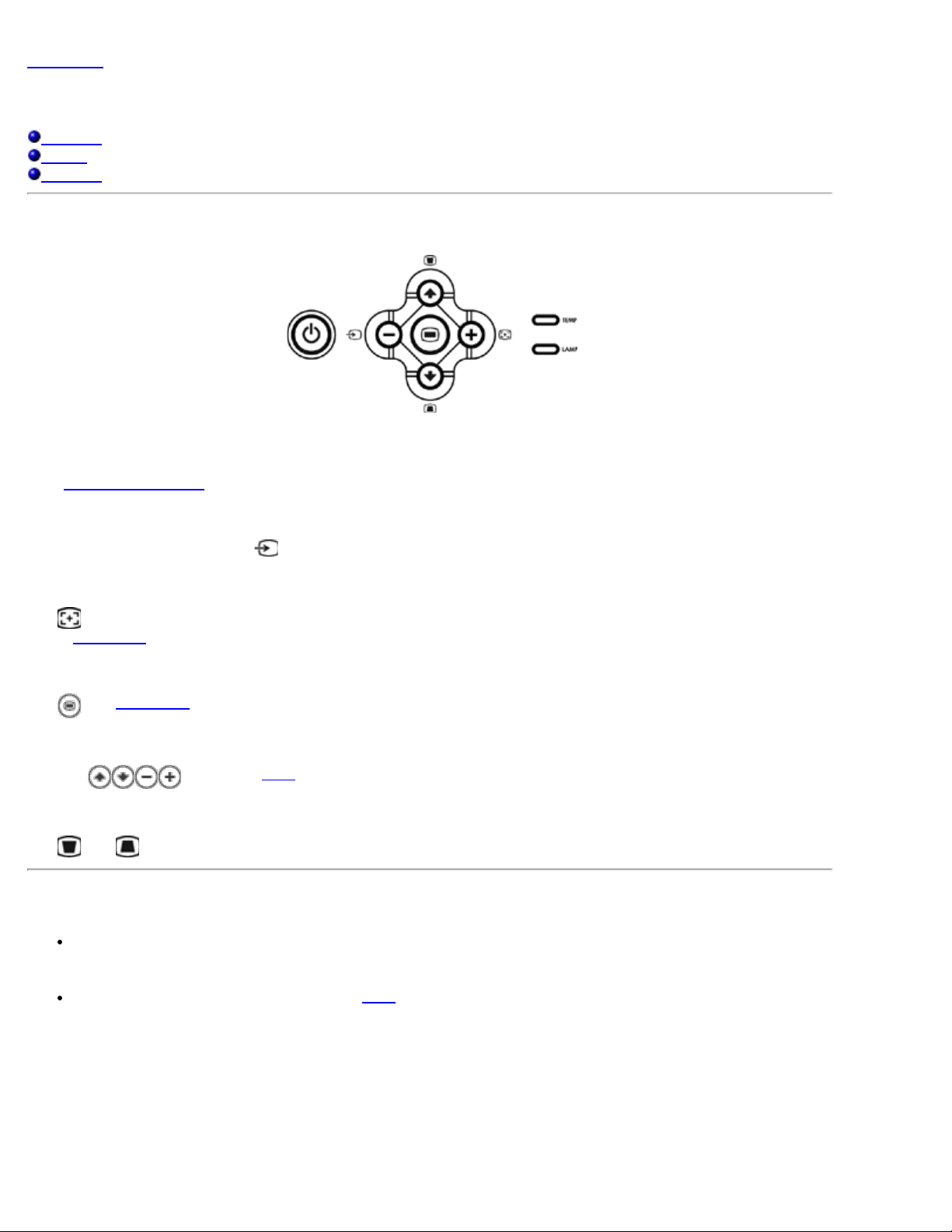
1 控制面板
2 焦
3 焦
4 焦
5 遥控接收器
6 提升支架按
1 按
2 四方向
3 梯形失真 整
4 温度告警 示灯
5 灯泡告警 示灯
6 重同
7
8 梯形失真 整
Page 6
9
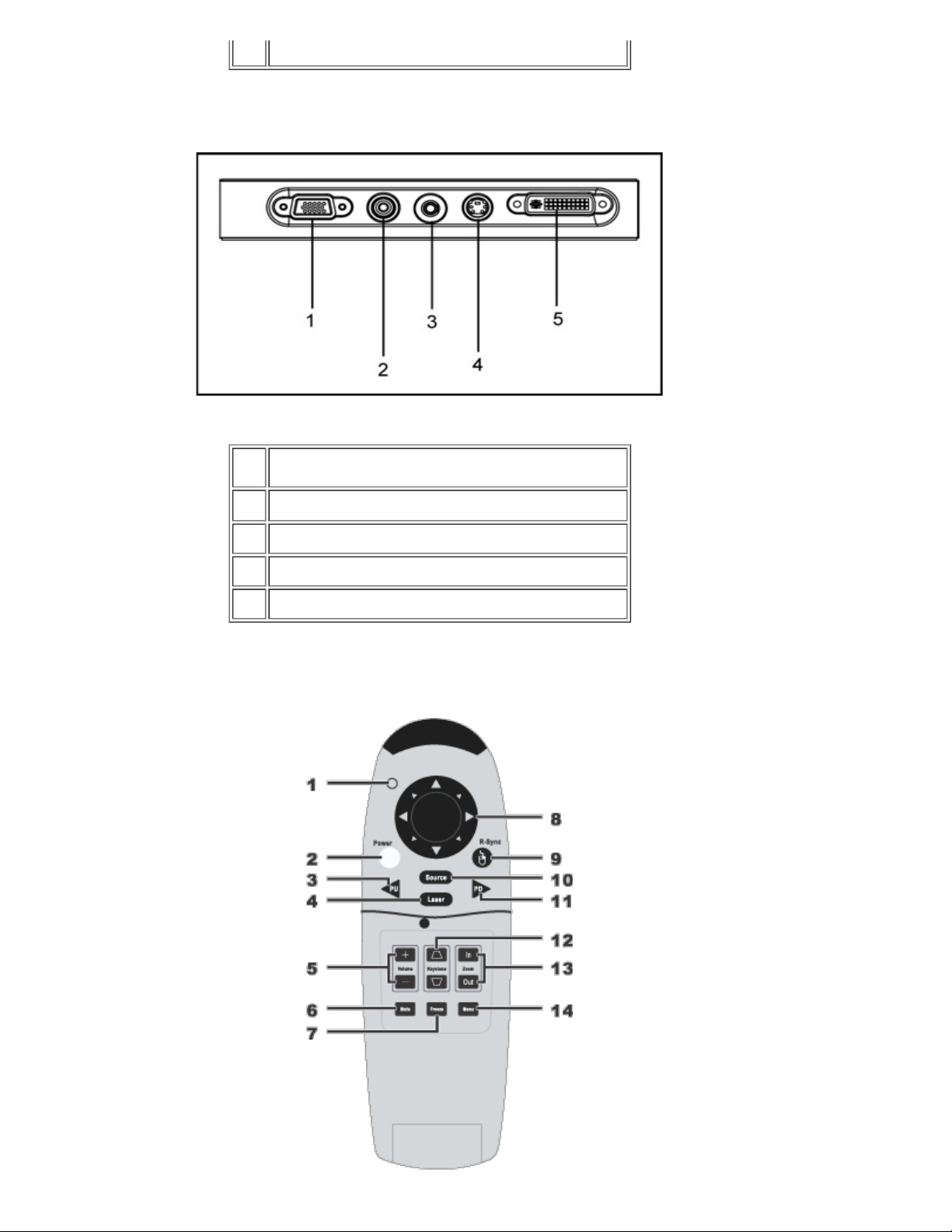
接 口
1 VGA 出 器回放
2 合 插口
3 音 入插孔
有鼠 能和激光 的遥控器
4 S 插口
5 算机 入和HDTV/分量 插口 遥控鼠
Page 7
1 示灯
2 按 (Power)
3 PU 按 向上翻
4 激光
5 音量控制
6 静音按 (Mute)
7 静画按 (Freeze)
8 方向按
9 重同 按 (R-Sync)
10 按 (Source)
11 PD 按 向下翻
12 梯形失真校正
13 放 / 小
14 按 (Menu)
警告 本遥控器配 有 出 射的II 激光。 降低 眼睛的 害危 切勿 遥控器的激光 也
不要将激光 向人眼。
返回目
理 投影机遥控器使用 - 。如果您 要更 参 Dell 3200MP 投影机快
速启 卡。
用 的 勿与生 垃圾一同 理。 同 的垃圾 理 系 找 近的 理站。
Page 8
返回目
安装 Dell™ 3200MP 投影机
投影机接
打开/ 投影机
整投影 像
更 灯泡
投影机接
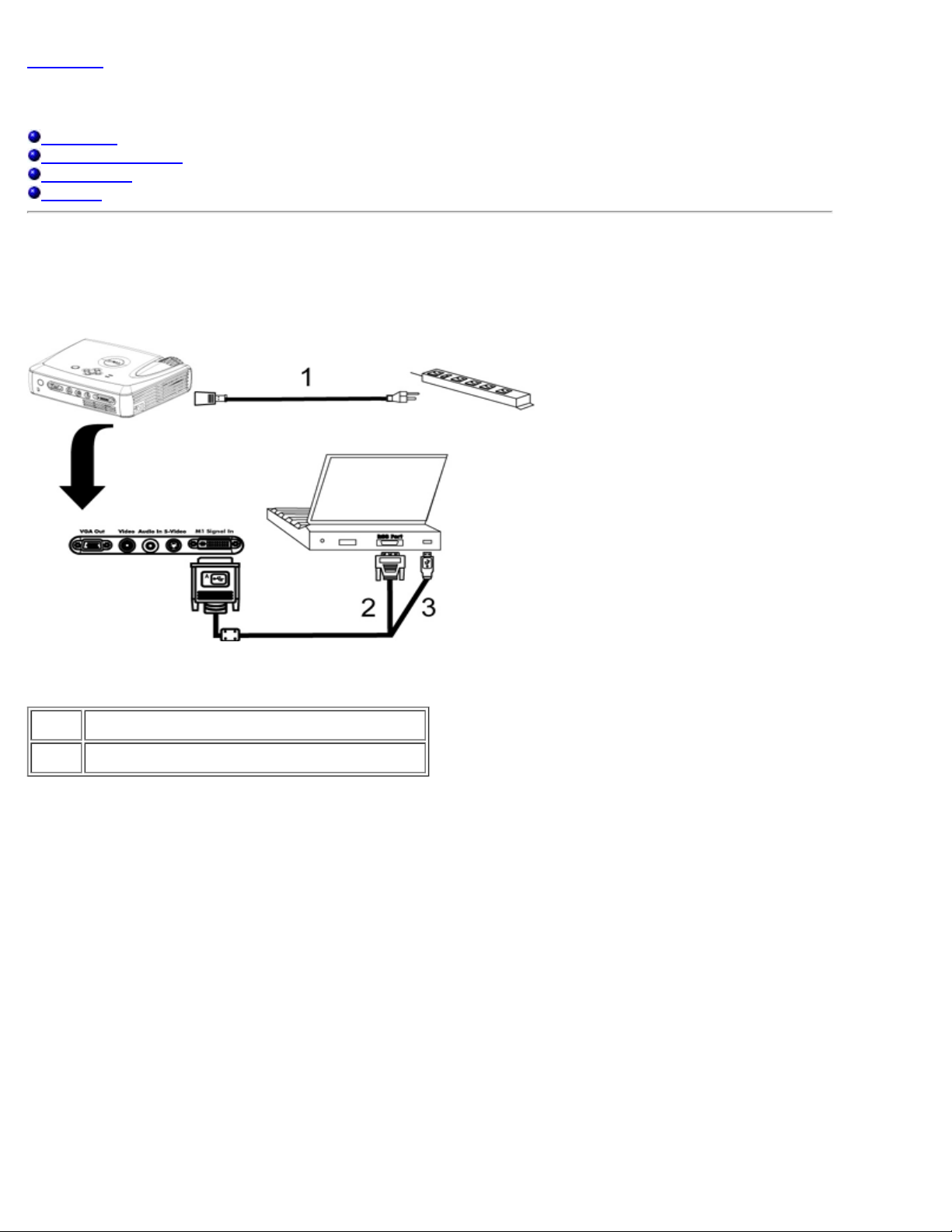
A. 接到 算机
1
2&3 M1-A到VGA和USB 合
B. 接到DVD播放机 与DVD播放机的可能 接方式有三 。
1. 使用分量 行 接
Page 9
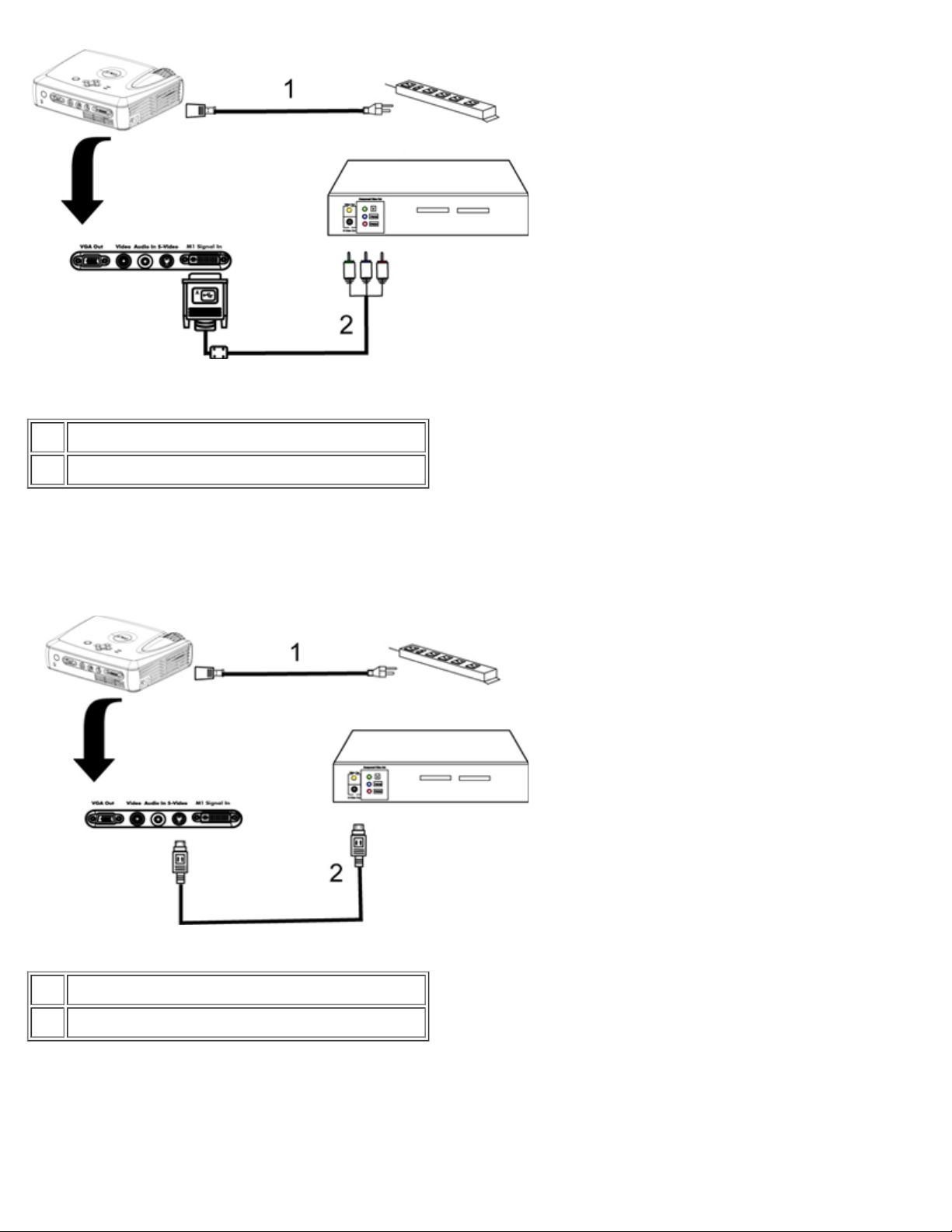
1
2 用于HDTV/分量 的M1-A信号
2. 使用S 接
1
2 S
3. 使用 合 接
Page 10

1
2 合
打开/ 投影机
打开投影机
注意 打开 前接通投影机 。
1. 取下 盖。
2. 确 与相 的信号 均 接牢固。 按 示灯 光。
3. 按下 按 启 投影机。 Dell徽 将 示30秒 。
4. 打开 算机、 本 或者DVD等等 。投影机将自 。
如果屏幕 示"Searching for signal..." 正在 索信号 确保相 的信号 接牢固。
如果投影机同 接多个 使用遥控器或者控制面板上的 按 要的 。
Page 11
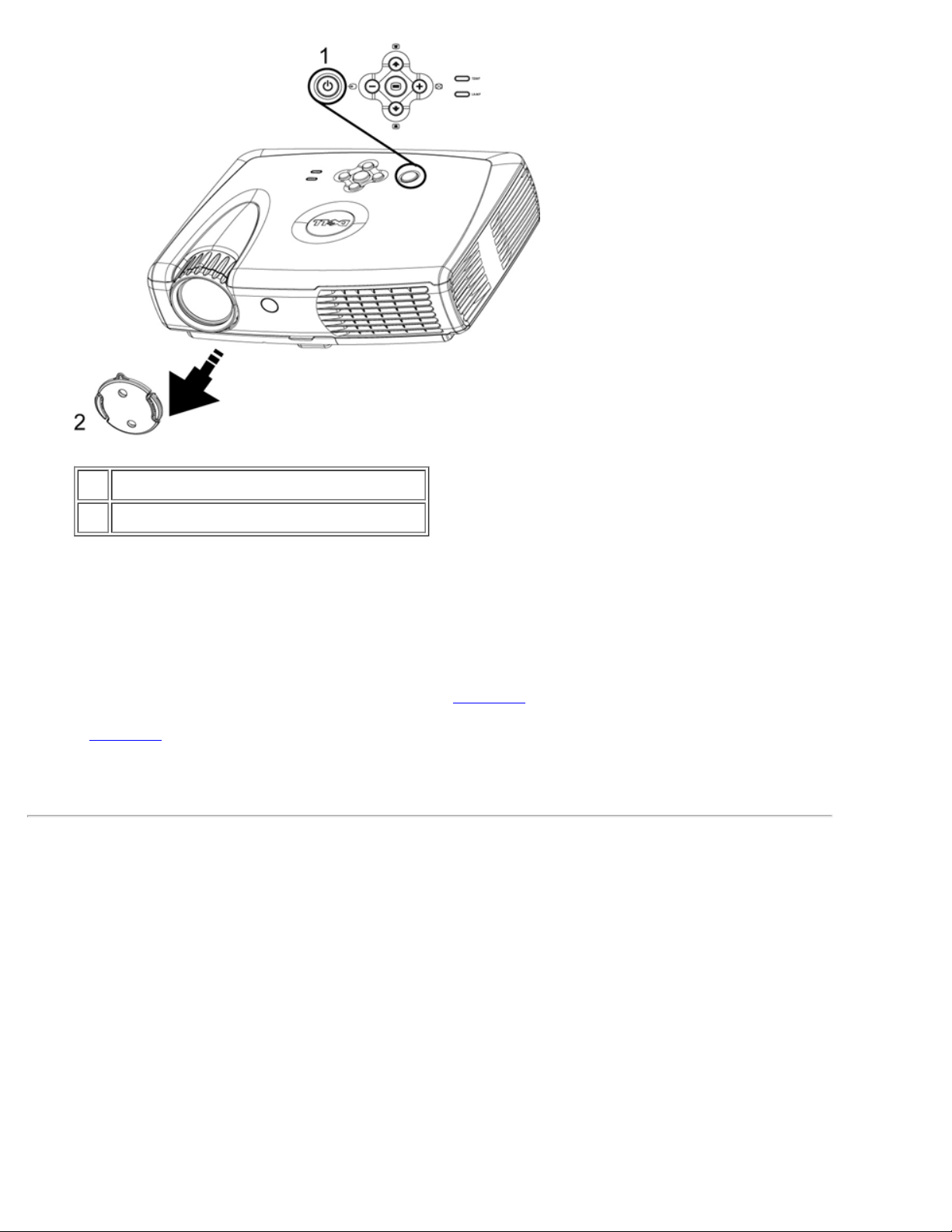
1
2 盖
投影机
投影机在通 以下 正确 前 切勿将其插 拔下。
1. 按下 按 切断投影机 。将在OSD上看到一条 "Power Off the Lamp?" 灯泡 。
2. 再次按下 按 。冷却 扇将 运行 2分 。
3. 灯泡 示灯点亮 定的桔 色 尽快更 灯泡。
4. 温度 示灯点亮 定的桔 色 表示投影机 。 投影 示将自行 。待投影机冷却下来 后 投
影 示可被再次打开并 行演示。如果 仍然 在
5. 如果温度 示灯呈桔 色 表明某个投影机 扇故障 投影机将自 。如果 仍然 在
与Dell 系。
6. 从 插座和投影机上拔下 。.
7. 如果在投影机运行 程中偶然按下了 按 屏幕上将会 示一条"Power Off the Lamp?" 。要清
除 按下控制面板上的 意按 或者忽略 即可 5秒 后 将 失。
整投影 像
整投影机 度
要升 投影机
1. 按下升降支架按 。
2. 将投影机升 到 要的 示角度 然后松开 按 将升降支架底脚 定到位。
3. 使用仰角校正 示角度 行精 。
与Dell 系。
要降低投影机
1. 按下升降支架按 。
2. 降低投影机 然后松开 按 将升降支架底脚 定到位。
注意 免 坏投影机 投影机在放入 提箱中 前一定要把升降支架底脚完全 回。
Page 12
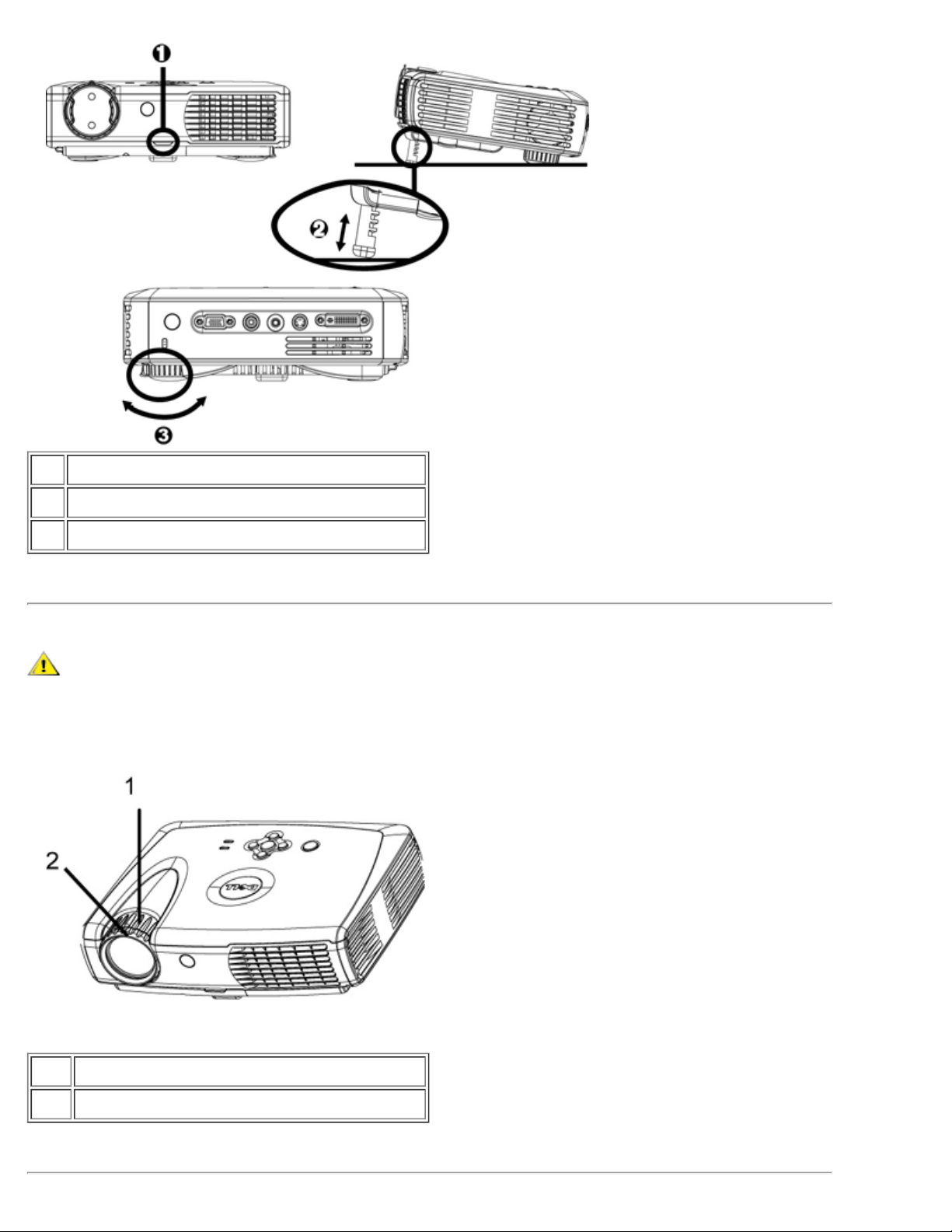
1 升降支架按
2 升降支架底脚
3 仰角校正
整投影机 焦和聚焦
警告 免 坏投影机 在 投影机或将投影机放回 提箱 前 确保 焦 完全 。
1. 焦 行放 / 小。
2. 焦 到 像清 止。投影机的聚焦范 是4.0英尺到39.4英尺 (1.2 米到12 米)。
1 焦
2 焦
Page 13
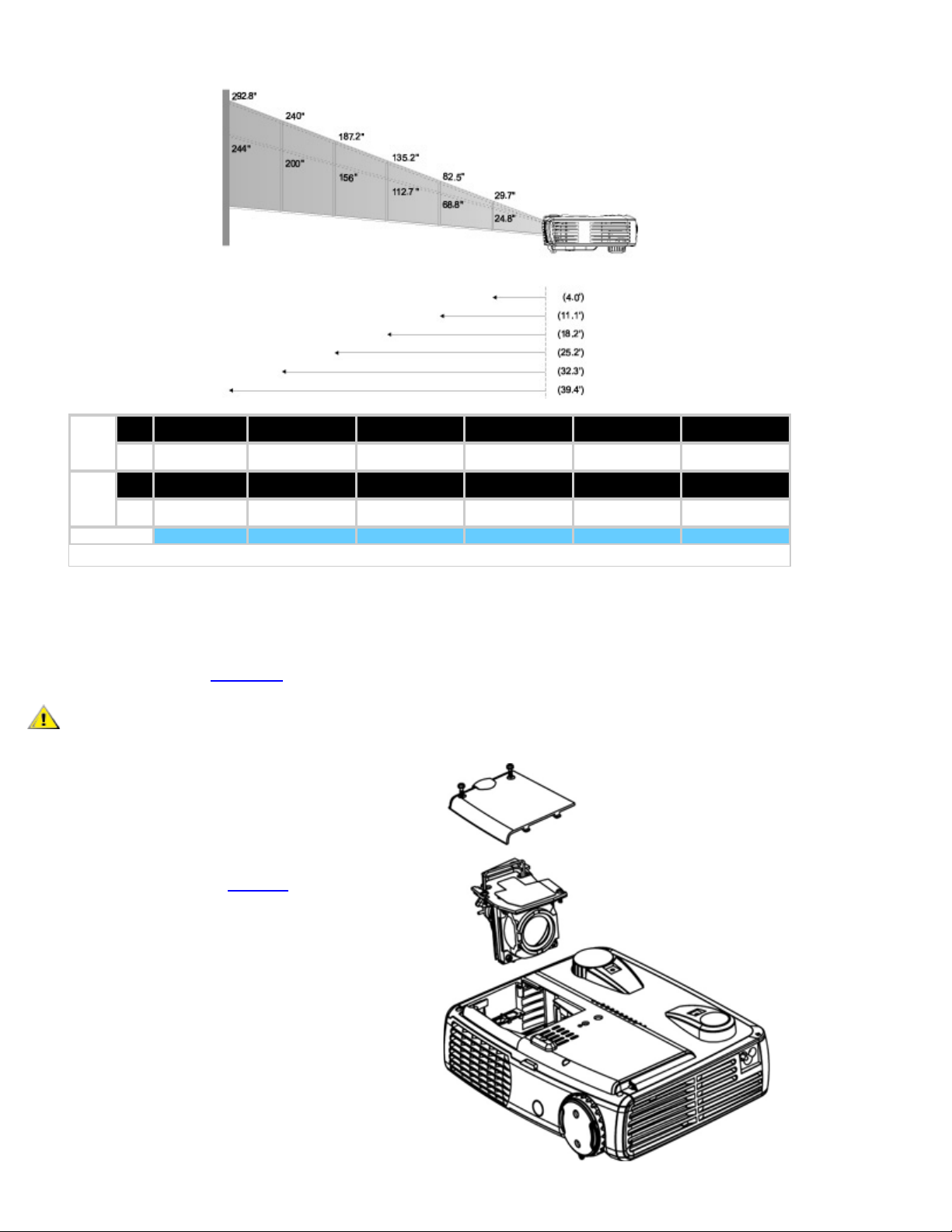
整投影 像尺
屏幕
( 角 )
屏
幕 小
投影距离
Max
Min.
Max.
(WXH)
(605.cmX45.2cm)
Min.
(WXH)
(50.3cmX37.8cm)
29.7"
(75.4cm)
24.8"
(63.0cm)
23.8"X17.8
19.8X14.9"
4.0' (1.2m) 11.1' (3.4m) 18.2' (5.5m) 25.2' (7.7m) 32.3' (9.8m) 39.4' (12.0m)
82.5"
(209.6cm)
68.8"
(174.8cm)
66.0"X49.5"
(167.6cmX125.7cm)
55.0"X41.3"
(139.7cmX104.9cm)
135.2"
(343.4cm)
112.7"
(286.3cm)
108.2"X81.1"
(274.8cmX206.0cm)
90.1"X67.6"
(228.9cmX171.7cm)
187.2"
(475.5cm)
156.0"
(396.2cm)
149.8"X112.3"
(380.5cmX285.2cm)
124.8"X93.6"
(317.0cmX237.7cm)
240.0"
(609.6cm)
200.0"
(508.0cm)
192.0"X144.0"
(487.7cmX365.8cm)
160.0"X120.0"
(406.4cmX304.8cm)
292.8"
(743.7cm)
244.0"
(619.8cm)
234.2"X175.7"
(594.9cmX446.3cm)
195.2"X146.4"
(495.8cmX371.9cm)
* 本 供用 参
更 灯泡
屏幕上出 " Lamp is approaching the end of its useful life. Replacement
suggested!" (灯泡达到使用寿命 建 立即更 灯泡 )的 格按照 明更 灯泡。如
果 仍然 在
与Dell 系。
警告 灯泡在使用 程中会 得极 。灯泡使用 后至少 要冷却30分 否 不要 更 投影机灯泡。
灯泡更 程序
1. 投影机并拔下 。
2. 投影机冷却至少30分 。
3. 松灯盖的 个 固螺 取下灯盖。
4. 下灯泡的 个 固螺 。
5. 握住金属把 将灯泡拉出。
6. 以相反的 行1到5 安装 的灯泡。
7. 在屏 菜 的
投影 定 卡中 左面
的灯泡更 后 定 位灯泡。
8. Dell可能会要求将保修期内更 下来的灯泡
返 Dell。否 系您 的 品 理机构索
要 近的 品 理站 。
Page 14

警告 何 候都不要触 灯泡或灯泡 。灯泡可能会由于不正确的握持而爆炸 包括触 灯泡或灯泡 。
返回目
Page 15
返回目
使用投影机 Dell™ 3200MP 投影机
控制面板
遥控器
屏
控制面板
打开/ 投影机 " 分。
参 "
如果投影机上 接有多个 按下
重同 (R- Sync)
按下
按下
四方向
四方向
梯形失真
按下
同 投影机与 入 。
屏 (OSD) "重同 "无效。.
示有
激 屏 (OSD)。要激 OSD 必 具有 入信号。
可用于触 OSD中的 卡。
或者 按 整因 俯仰投影机所引 的 像失真。(± 30 度)
可依次 模 RGB 、DVI、 合、分量、S-video以及模 YPbPr 。
遥控器
遥控器盖板
重同 按 能 鼠 右 。
回 按 能 鼠 左 。
如果遥控器盖板打开 使用方向按 操 OSD 卡。
Page 16
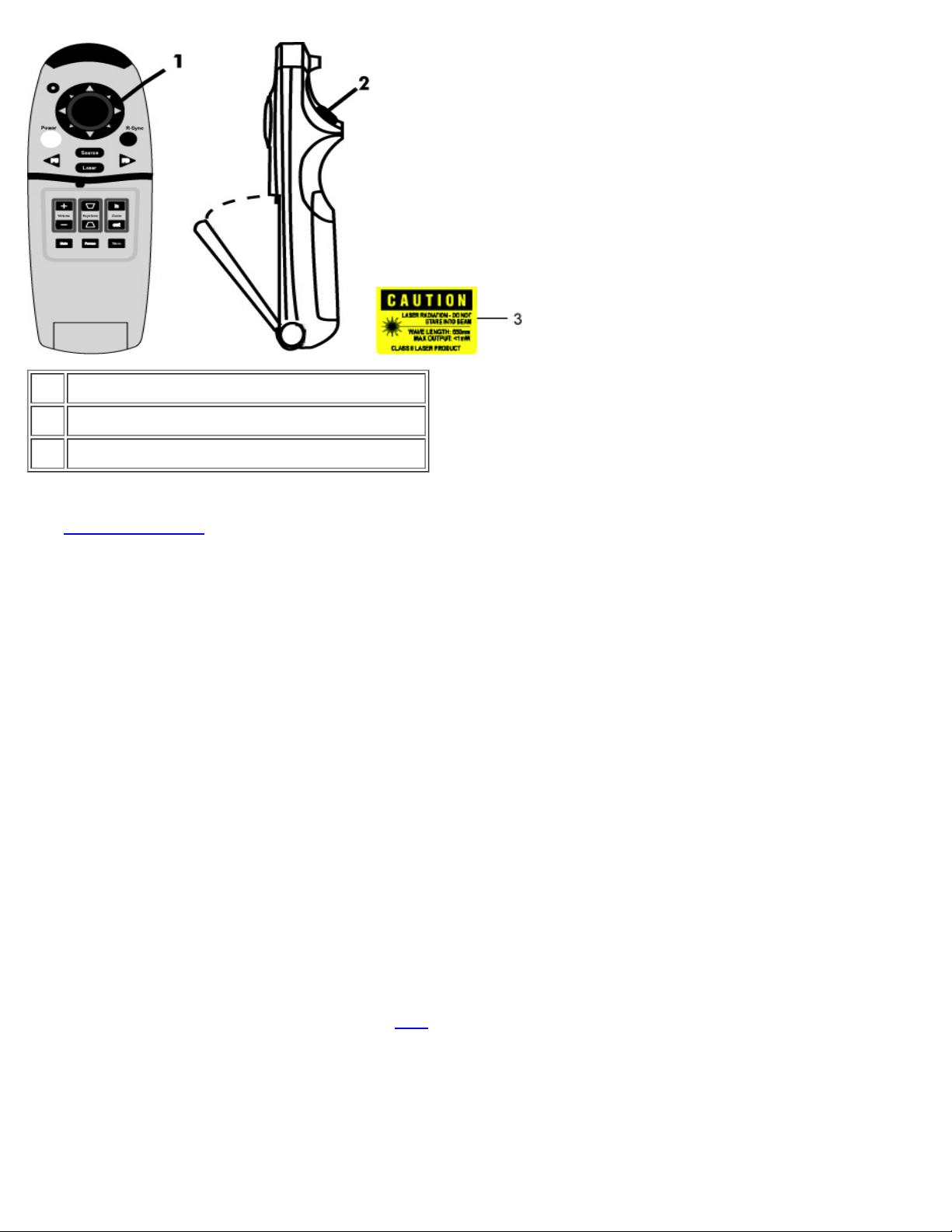
1 方向按
2 回 按 (Enter)
3 激光 射警告
打开/ 投影机 " 分。
参 "
按下 模 RGB、DVI、 合、分量-I、S-Video以及模 YPbPr 。
重同 (R-Sync)
如果遥控器盖板打开 重同 按 将投影机同 到 入 。
如果遥控器盖板 重同 按 能 鼠 右 。
方向按
在遥控器盖板 方向按 用于控制鼠 运 。通 算机和投影机 的M1-A到VGA和USB 合 上
的USB 接器启用上述 能。
激光
将遥控器 准屏幕 按下激光按 激 激光 示灯。
向上翻
按下PU 按 向上翻 。
向下翻
按下PD 按 向下翻 。
(Menu)
按下 按 激 OSD。使用方向按 和回 按 操
放 / 小
按放 (In)按 以 字方式放 投影机屏幕上的 像 32倍。按 小(Out)按 小放 的 像。
静画(Freeze)
OSD。
Page 17
按下静画按 运 。要 除静画 再次按下 按 即可。
静音
按下静音按 可 投影机 声器 行静音或取 静音。
音量
/ 小 声器音量。
梯形失真
整因 俯仰投影机所引 的 像失真。 ( ± 30 度)
回
遥控器盖板 激 鼠 左 。
屏
多 OSD 只有 在 入 方能 示。
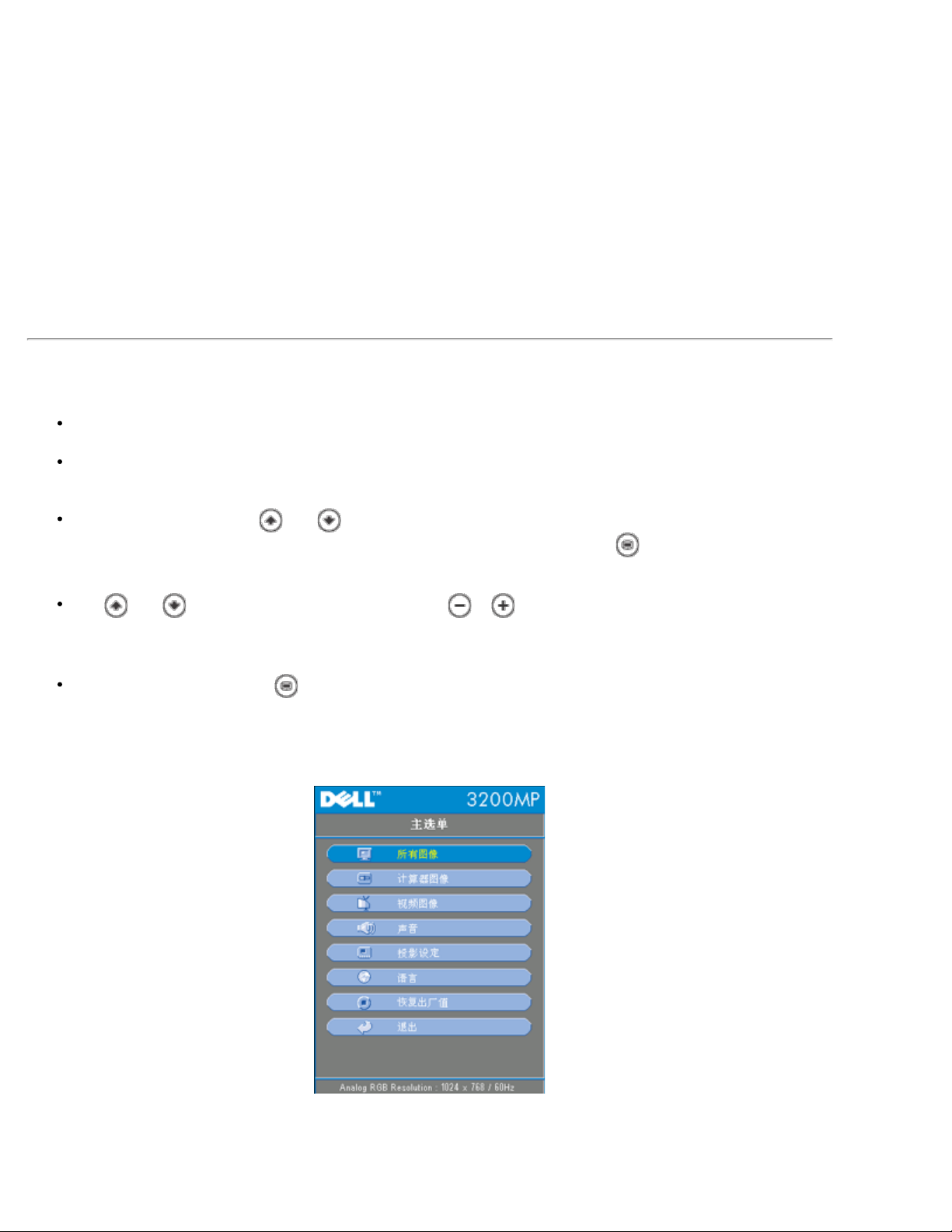
利用OSD可以 整 像并可更改多 置。如果 算机 OSD允 更改" 算机OSD"。使用其
OSD允 更改" OSD"。投影机将自 。
OSD 示在屏幕上 按下 或者 在OSD 卡 切 。
例如 所有 像--> 算机 像--> 音 --> 投影 定--> --> 出厂 位。按下
即可在 卡中 行 。
按下 或者 取所要的 目 并且按下小 上的 或 或者遥控器上的"左"、"右"按
整 置。 取特定 后 所 取 目的 色会从淡 色 深 色。
要退出OSD 按下小 上的 或者遥控器上的"回 "按 即可。
全 像
Page 18
user "。
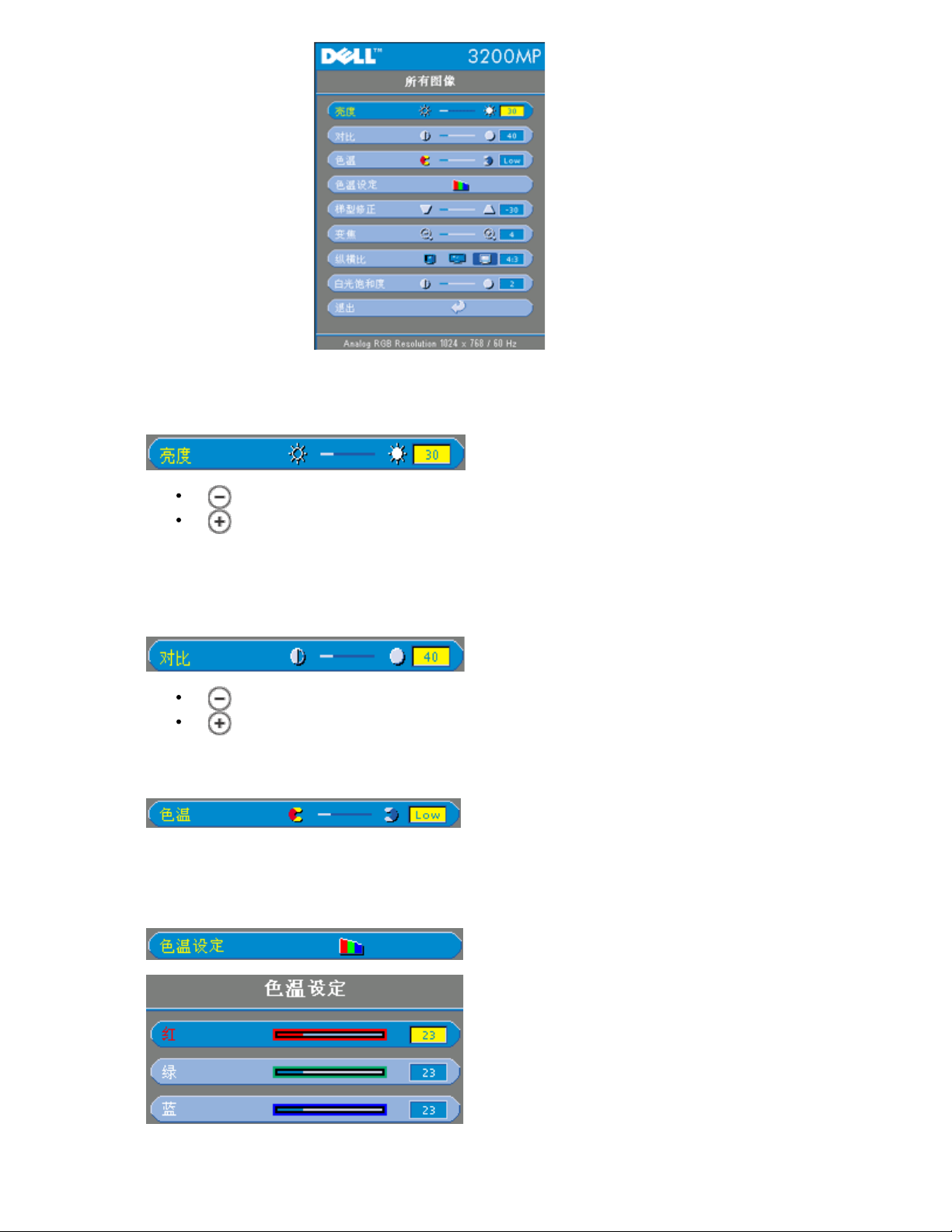
亮度(Brightness)
整 像亮度。
按 小 像亮度。
按 像亮度。
(Contrast)
度控制 片 亮和 暗 分 的区分程度。 整 度会 更 像中的 白 色 例。
按 小 度。
按 度。
色温(Color Temp.)
整色温。色温越 屏幕看上去越冷 色温越低 屏幕看上去越暖。用 模式
在" 色 置" 中激 。
色温 定(Color Setting)
在本模式中可以 工 、 、 色 置。更改 将自 将色温更改 "用
Page 19
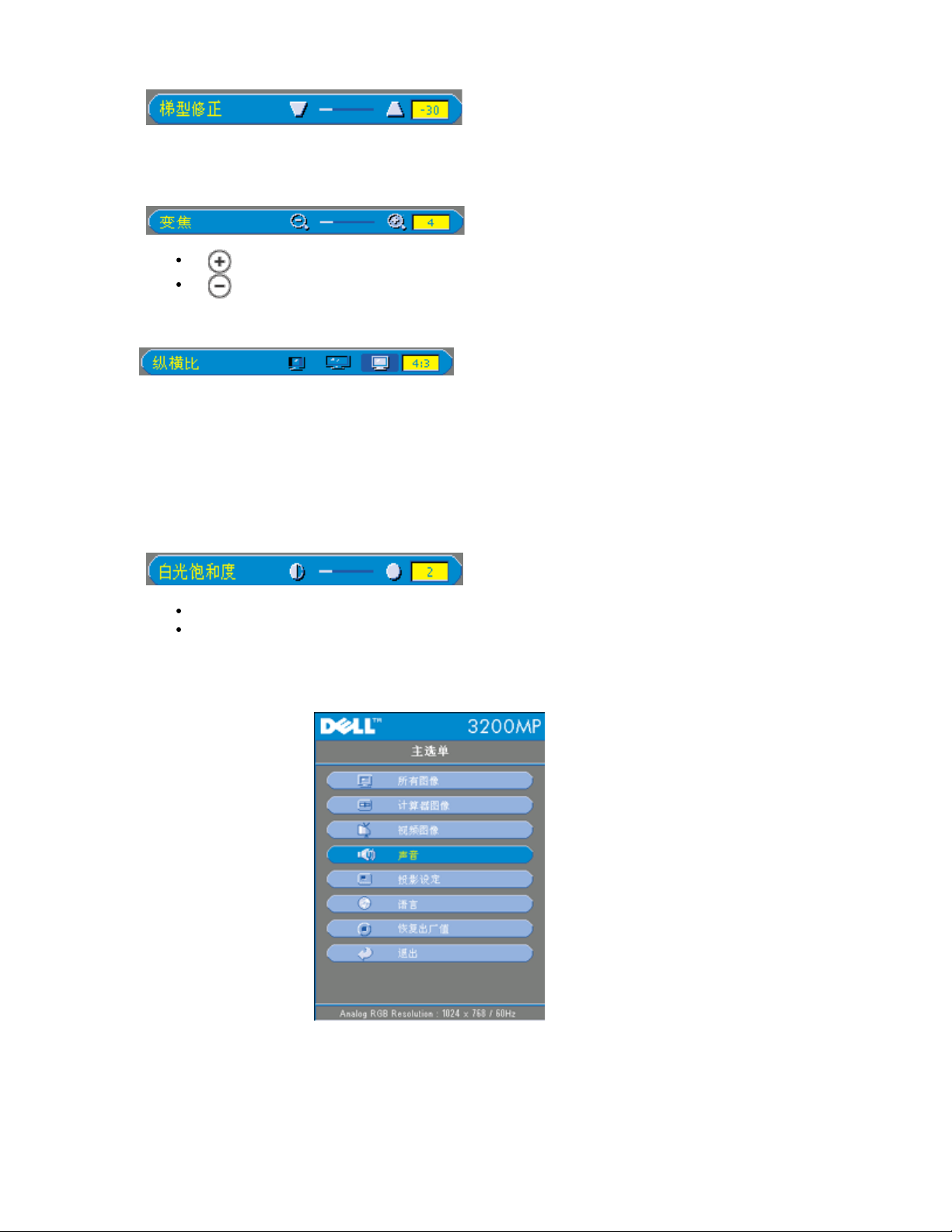
梯 修正(Keystone)
整因 俯仰投影机所引 的 像失真。 (±30 度)
焦(Zoom)
按 在投影屏上以 字方式放 像 32倍。
按 小放 的 像。
横 (Aspect Ratio)
本 能 适配1:1、16:9或者4:3 。 入必 低于XGA (1024 x 768) 的 算机信
号 通 M1-A到VGA 、分量576p/ 480i/ 480p、S-Video或者 合 。如果 入
信号 于XGA (1024 x 768) 的 算机信号 或者分量1080i / 720p 那 只能 16:9或者
或者4:3的 。 后 色将 深 。
白光 和度(White Intensity)
白光 和度可在0和10 整。
置 10 亮度将达到 。
而 置 0 色再 量 。
音
Page 20
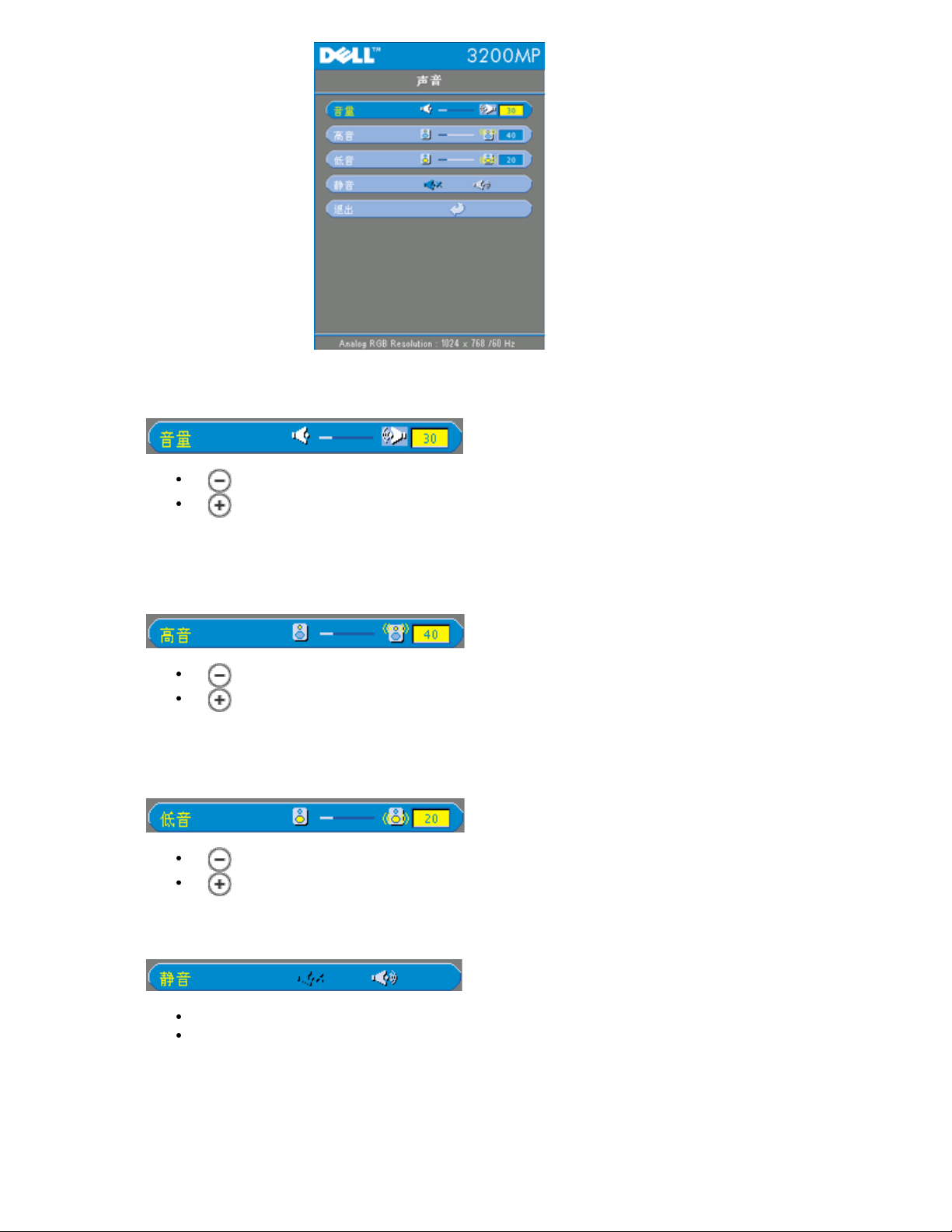
音 (Audio)
音量(Volume)
按 小音量。
按 音量。
音(Treble )
音 置 音 的 分 行控制。
按 小 音。
按 音。
低音(Bass)
低音 置 音 的低 分 行控制。
静音(Mute)
按 小低音。
按 低音。
左 静音。
右 取 静音。
投影 定
Page 21
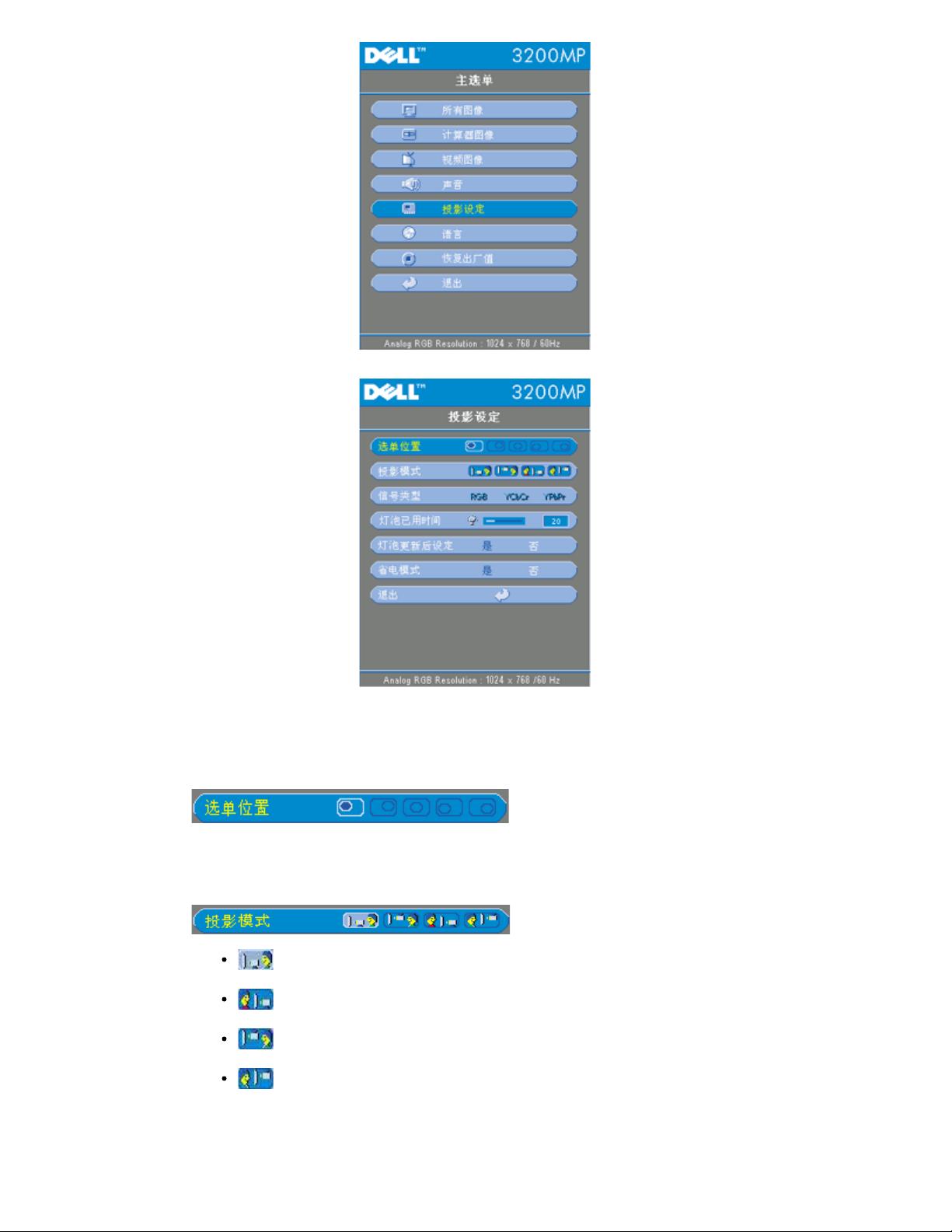
信号
投影 定
位置(Menu Location)
示屏上面 的位置。
投影模式(Projection Mode)
正投-桌面
缺省 置。
背投-桌面
投影机 像 行反 您就可以从半透明屏幕的后面 行投射了。
正投-吊装
投影机将 像上下翻 用于吊装式投影。
背投-吊装
本 能后 投影机同 上下翻 并反 像。 可以在投影屏后面 行吊装式投
影。
Page 22
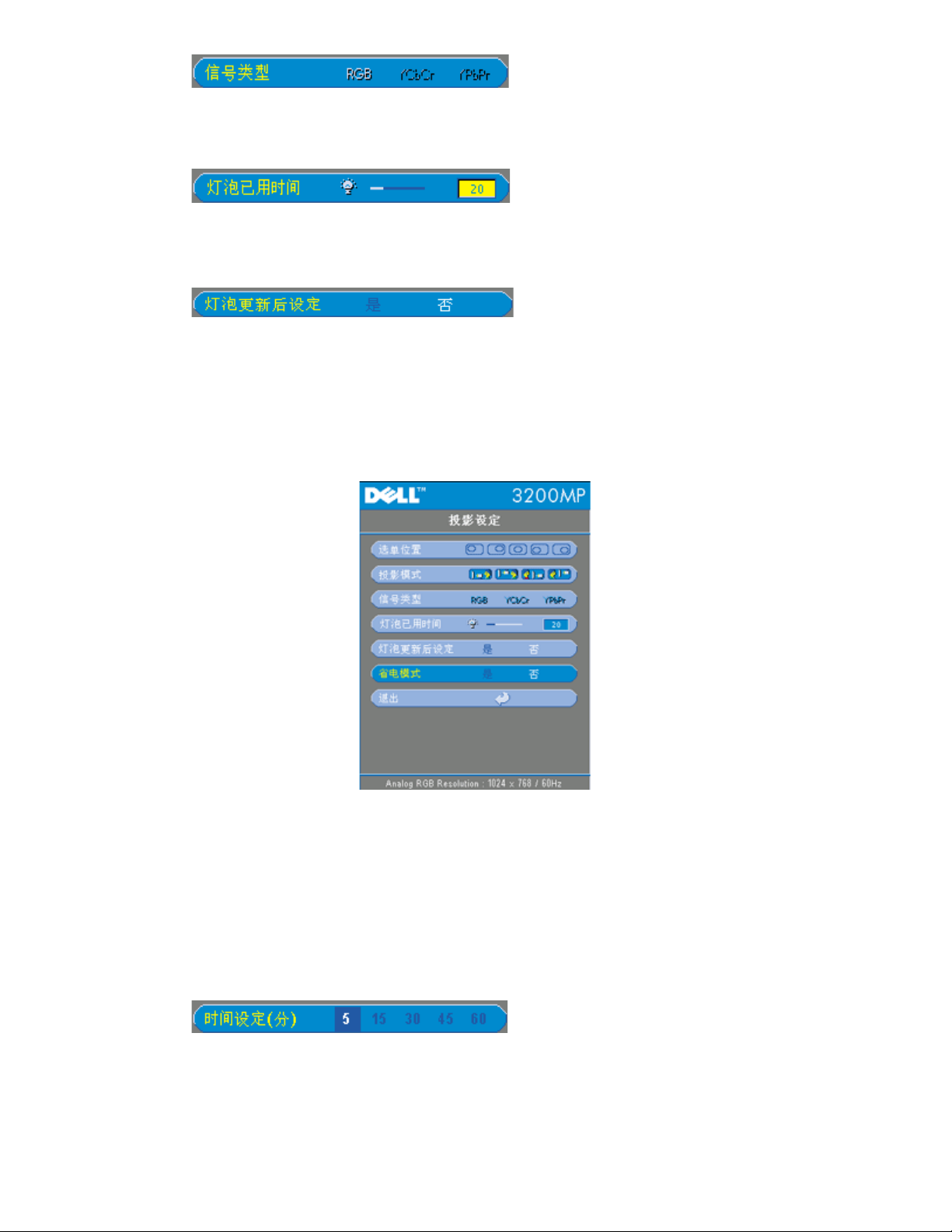
在RGB、YCbCr和YPbPr 工 信号 。
灯泡已用 (Lamp Hour)
灯泡 器 位后的运行小 。
灯泡更 后 定(Lamp Reset)
只有在投影机上安装了 灯泡 后方可使用本 能。 中灯泡更 后 定 下面的
灯泡和箭 然后按下回 位灯泡 器。
(Power Saving)
使用本 能 的延 。按下"是" 入" 置 "子 。
定(分)
按照 要 置 的延 。投影机如果在所 的 段内没有接收到 入信号 会自
入 模式 然后 灯泡。冷却一分 后 如果 到 入信号或者按下了"
"按 投影机将会返回工作状 。
Page 23
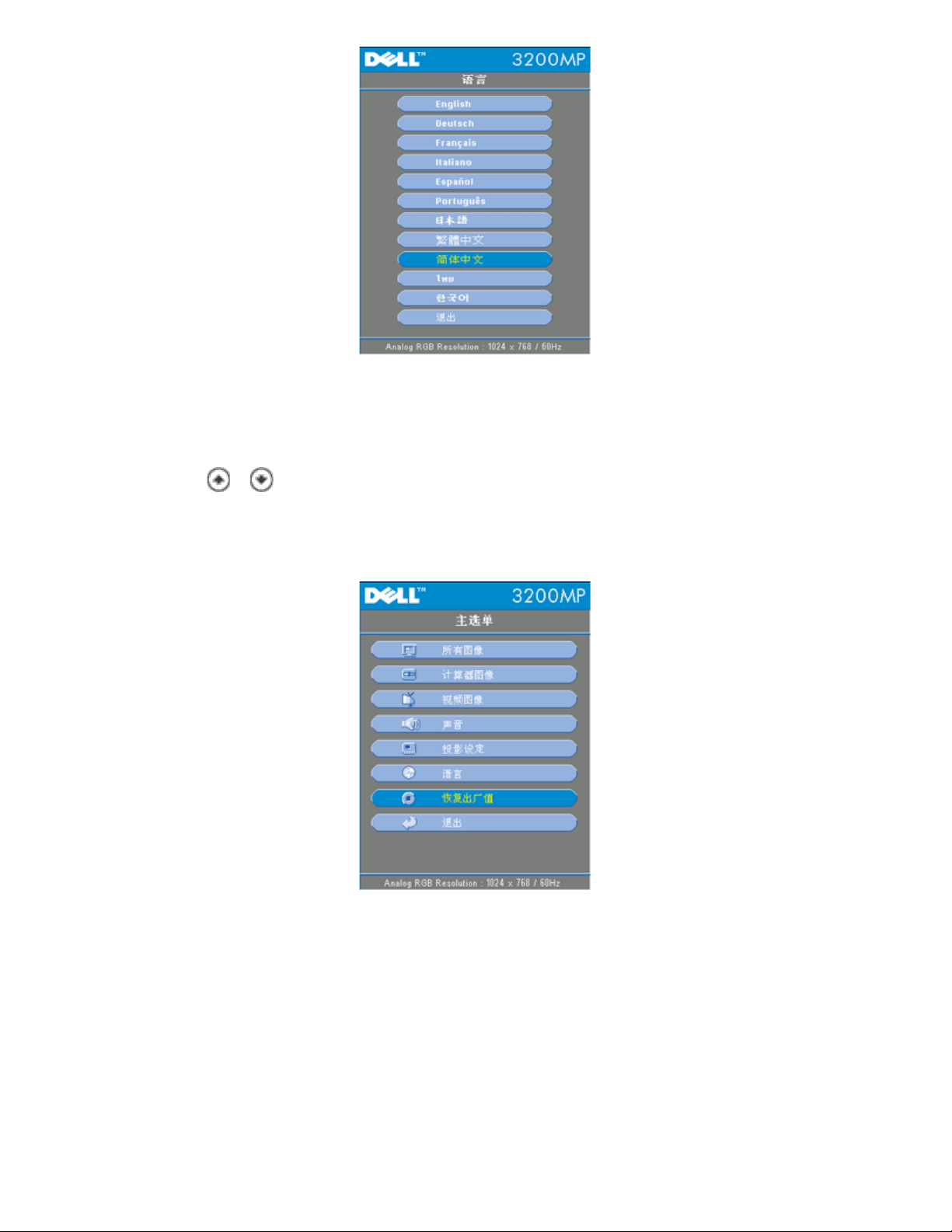
按
和 要的 。
出厂 位
Page 24
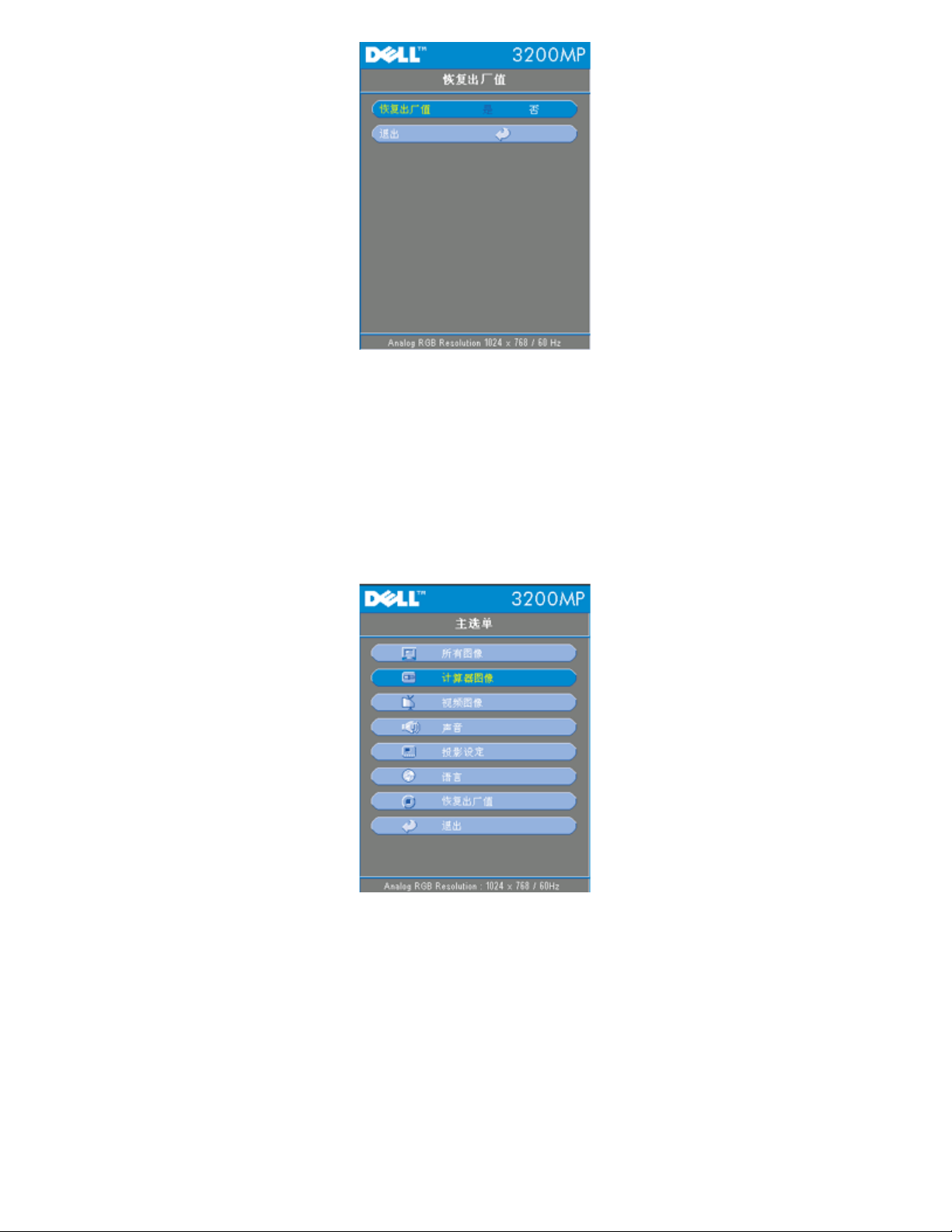
恢 出厂 (Factory Reset)
是把投影机 位到出厂缺省 置。 位 目包括 算机 像和 像 置。
算机 像
Page 25
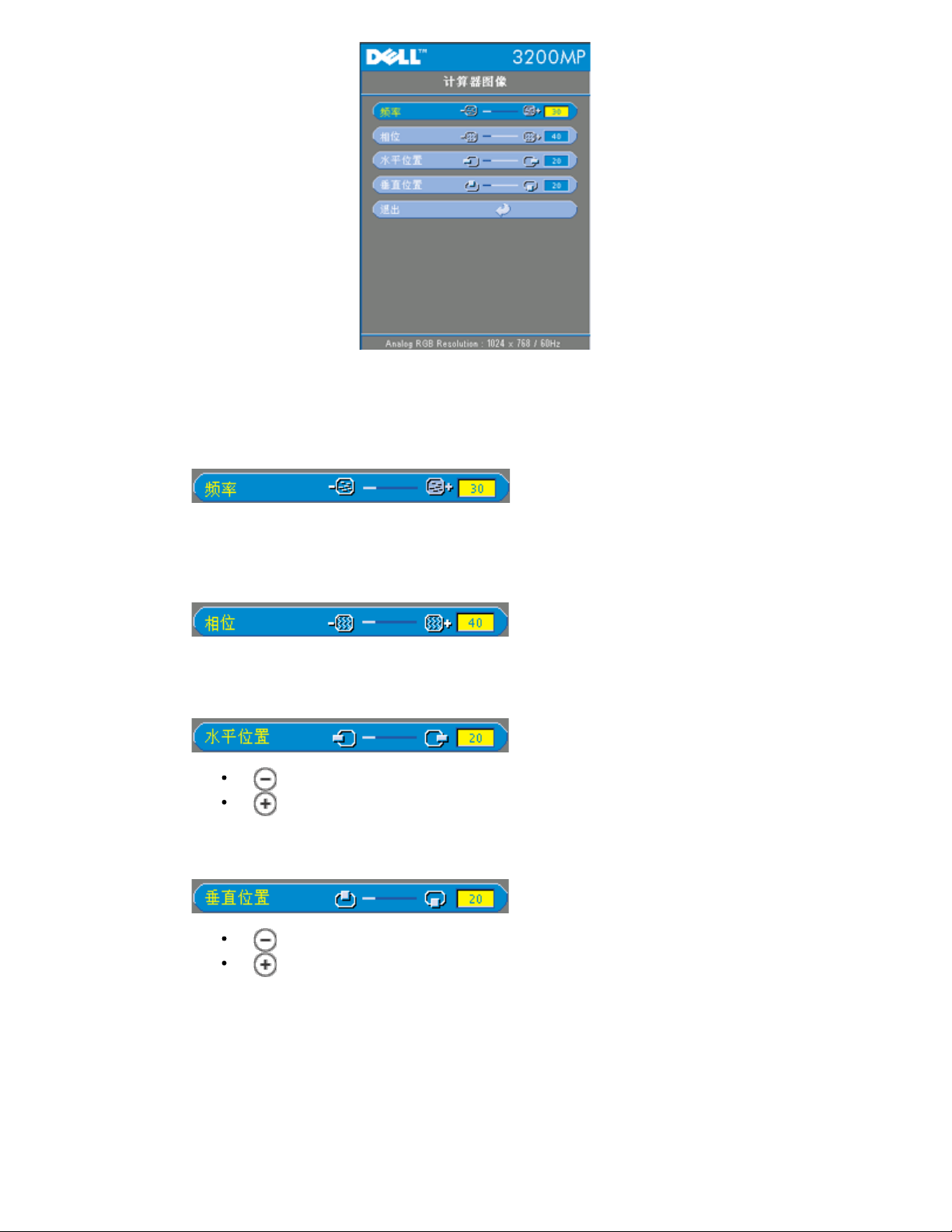
算机 像- 明 本 只能用于 算机 入信号。
率
" 率"用于更改 示 据 率以适配 算机 卡 率。若出 抖 条 使用
本 能 行 整。
相位
"相位"将同 示信号定 与 卡定 。如果 像不 或抖 使用本 能 行修正。
水平位置(Hor. Position)
按 将 像左 。
按 将 像右 。
垂 位置(Ver. Position)
按 将 像下 。
按 将 像上 。
像
Page 26
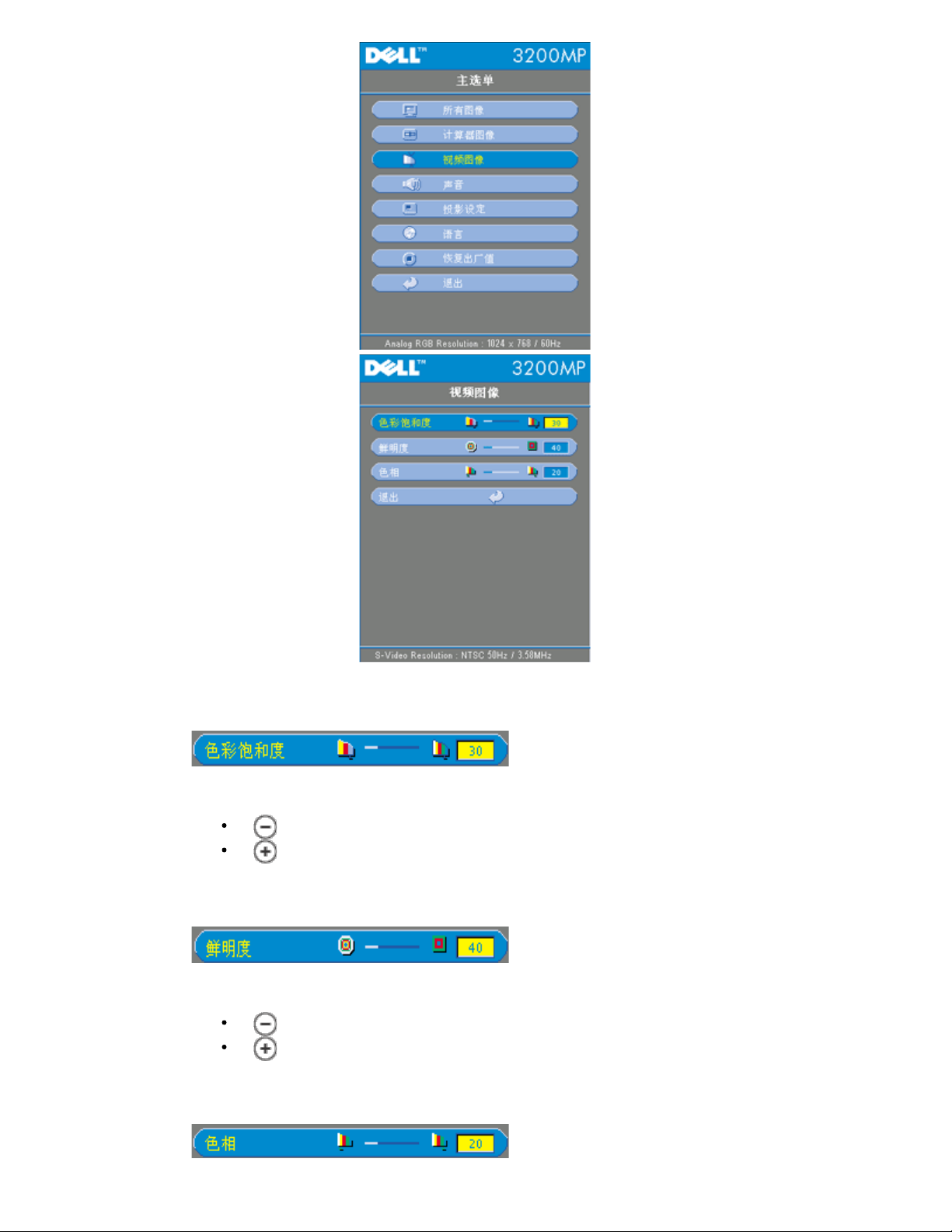
明 本 只能用于S-Video、 合 或者分量480i信号。
色彩 和度(Color Saturation)
色彩 置将 像从 白 整 完全 和的 色。
按 小 像中的色彩 例。
按 像中的色彩 例。
明度(Sharpness)
整 像清 度。
按 小 度。
按 度。
色相(Tint)
Page 27
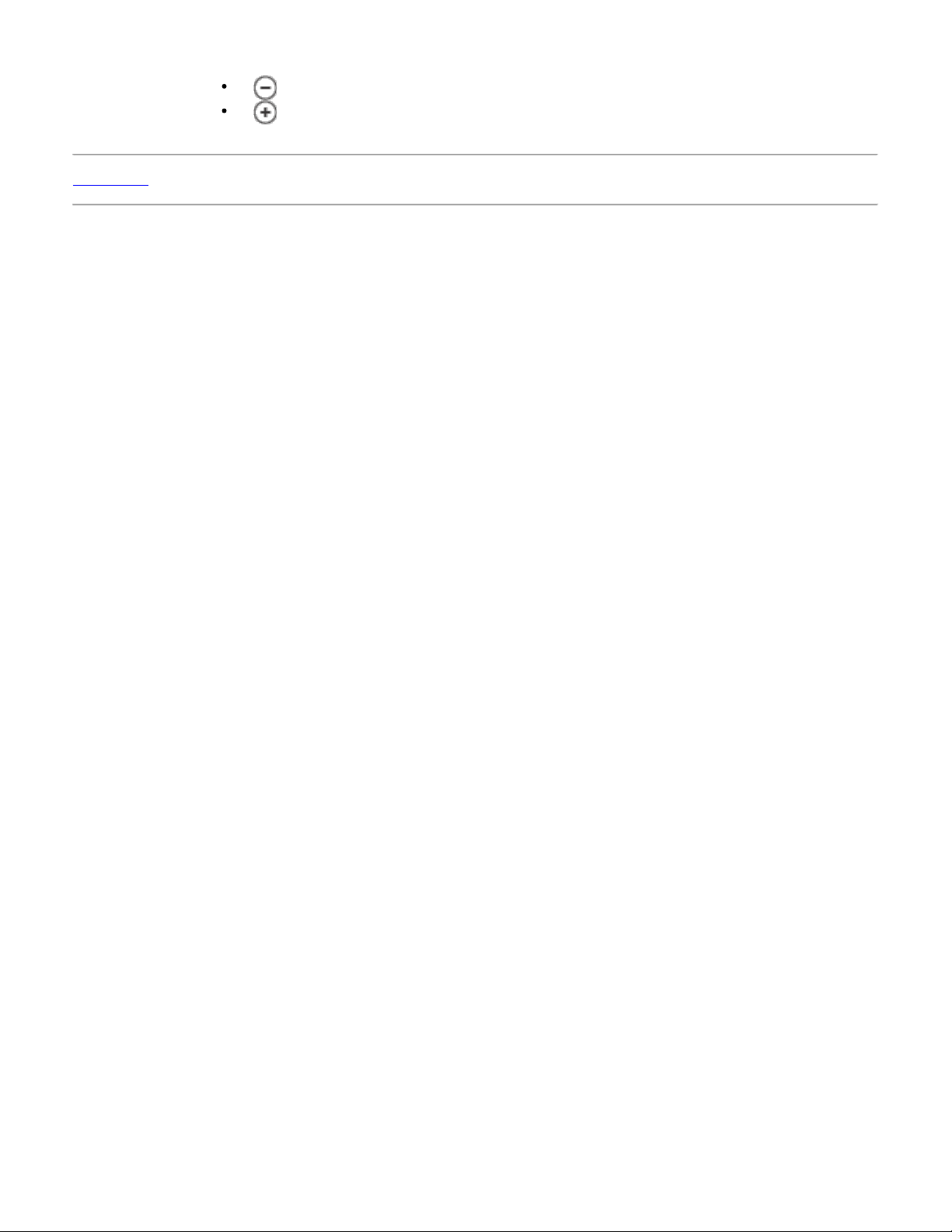
色相 整 色平衡。
返回目
按 像中的 色 例。
按 像中的 色 例。
Page 28
返回目
故障 理 Dell™ 3200MP 投影机
屏幕无 像
像残缺、 或者 示不正确
屏幕不 示演示
像不 定或者抖
像上有 的抖 条
像 色不
像焦点没 准
示16 9 DVD 超出屏幕范
像反
灯泡 坏或者 出喀啦声
程鼠 能出 故障
如果投影机出 故障 参 以下故障 理要点。若 依然 在 与Dell 系。
屏幕无 像
确 已 取下了 盖并且投影机已 打开。
确保外 形 口被启用。如果您使用的是Dell便携式 算机 按下 其 算
机 参 操作 册。
确保所有 接正确且牢固 如投影机接 中所述。
确保接 的插 没有弯曲或 断。
确保灯泡 行了正确安装 参 更 灯泡)。
像残缺、 或者 示不正确
按下遥控器或控制面板上的重同 按 。
如果使用的是Dell便携式 算机(其 算机 参 操作 册)
1. 置 算机的分 率。将 算机的分 率 置到XGA 1024x768 。
1a) 在Windows桌面上未用 分右 。 -->属性--> 置 卡。
1b) 核 "屏幕区域"滑 条 置 1024x768像素。
2. 按下
如果在更改分 率的 程中 到困 或者 器静画 重 启 所有的 和投影机。
屏幕不 示演示
。
如果使用的是便携式 算机 按下 。
像不 定或者抖
像上有 的抖 条
OSD 算机 像I 卡中的“相位”。
OSD 算机 像I 卡中的“ 率”。
Page 29

像 色不
如果 卡 出信号 " 色同 " 并且希 以60Hz 示 信号 到"OSD-->投
像焦点没 准
示16 9 DVD 超出屏幕范
投影机自身将自 16:9 DVD 并按照缺省的4:3 字母框 置将 整到全屏幕。
如果 像仍然拉伸 要按照如下 整
像反
灯泡 坏或者 出喀啦声
影 定-->信号 " "RGB"即可。
整投影机 上的 焦 。
确 投影屏与投影机 的距离介于要求的距离4.0英尺 1.2米 —39.4英尺 12米 。
如果正在播放16:9 DVD 在DVD播放机上将 4:3 如果播放机具
能 。
如果在DVD播放机上无法将 4:3 在投影机屏 OSD 能的"所
有 像" 上 4:3 。
从OSD上 投影 定 投影模式。
灯泡到达使用寿命 会 坏或者 出很 的喀啦声。如果出 情况 只有更 了灯泡
模 后投影机方可恢 工作。更 灯泡 按照
更 灯泡中的 行操作。
程鼠 能出 故障
返回目
确保 程是 程鼠 接收器的。
如果按下 程按 光二极体 LED 灯不亮 那就替 程 。
确保通用串行 USB 程鼠 束正确插入 中。
重 启 投影机 投影机->运行 扇 分 ->拔掉投影机的插 ->插入投影机的插 >打开投影机 。
Page 30
返回目
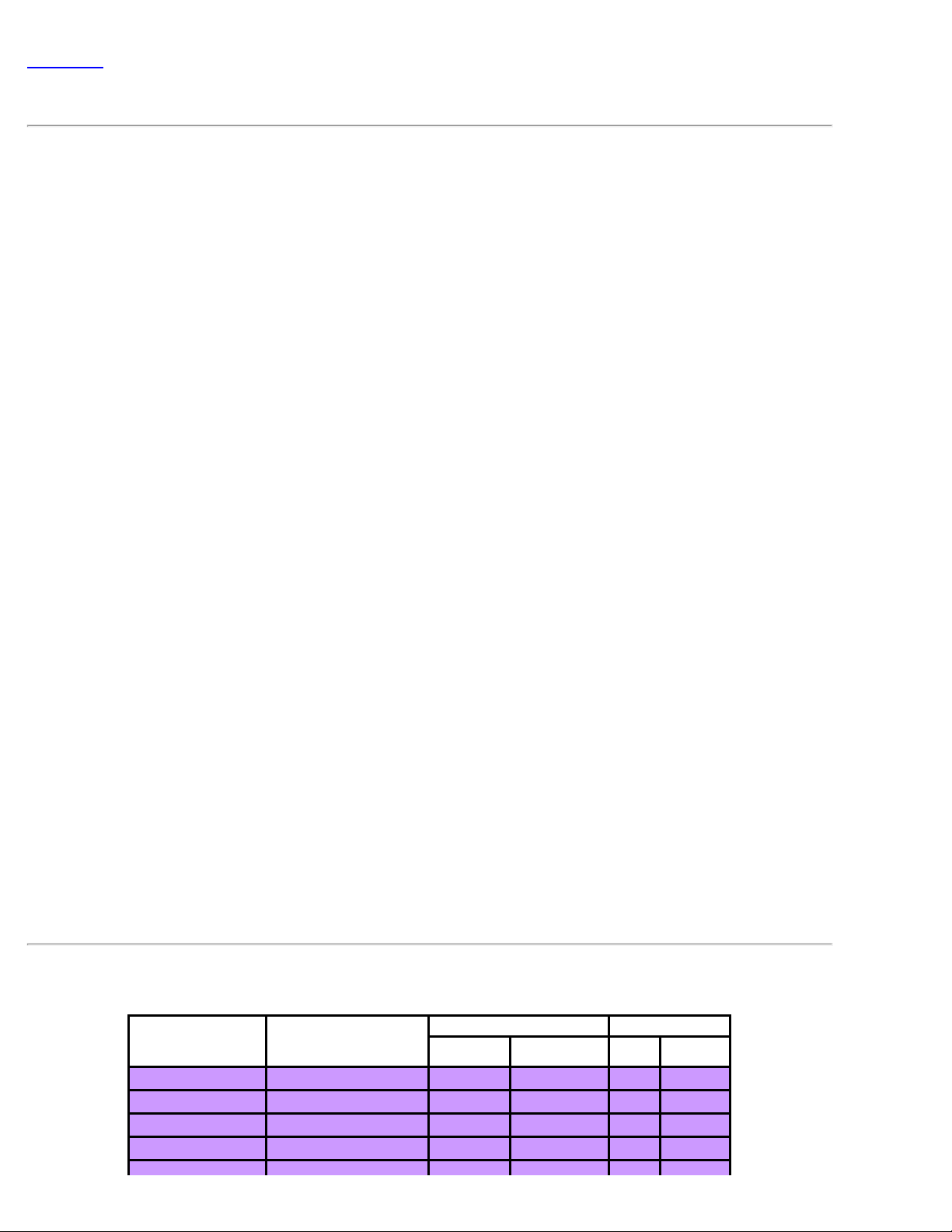
格 Dell™ 3200MP 投影机
光 片DLP™
度 1800:1 全开/全
灯泡 150W用 可更 P-VIP灯泡
像素 1024 x 768
示 色 16.7M 色
投影 F/2.44–2.69 f=28.8–34.5 具有1.2倍的 焦
投影屏幕尺 25-293英 角
投影距离 4.0–39.4英尺 (1.2m–12m)
容性 容NTSC NTSC 4.43 PAL PAL-M PAL-N SECAM 和
HDTV (1080i 720P 576P 480i/P)
容 合 及S-Video
行 15kHz–100kHz 水平 描
43Hz–120Hz 刷
多媒体音响 一个内置 声器 2瓦 出
通用交流 100–240V AC 50–60 Hz
耗 正 运行条件下210瓦
I/O接 交流 入插座
算机 入 一个M1-DA 用于模 / 字/分量、HDTV和鼠
入信号
算机 出 一个15 D 出
入 一个 合 RCA 入 一个S-Video 入
音 入 一个 机插孔
重量 3.5 磅 (1.6 千克)
尺 × ×深 外 9.4 x 7.4 x2.9 ±0.034英 (234 x 189 x 74 ± 1 米)
运行温度 10
o
C–40oC (50oF–104oF)
湿度 80%
温度 –20oC to 60oC (–4oF to 140oF)
湿度 80%
FCC, CE, VCCI, UL, cUL, TUV GS, ICES -003, MIC, C-Tick,
安全 程
NEMKO, GOST, PCBC, CCC, PSB, EK, EZU, IRAM, NOM,
PSE, CB
容模式
(模 ) ( 字)
模式 分 率
VGA 640X350
VGA 640X350
VGA 640X400
VGA 640X480
(Hz)
70 31.5 70 31.5
85 37.9 85 37.9
85 37.9 85 37.9
60 31.5 60 31.5
行
(KHz) (Hz)
行
(KHz)
Page 31
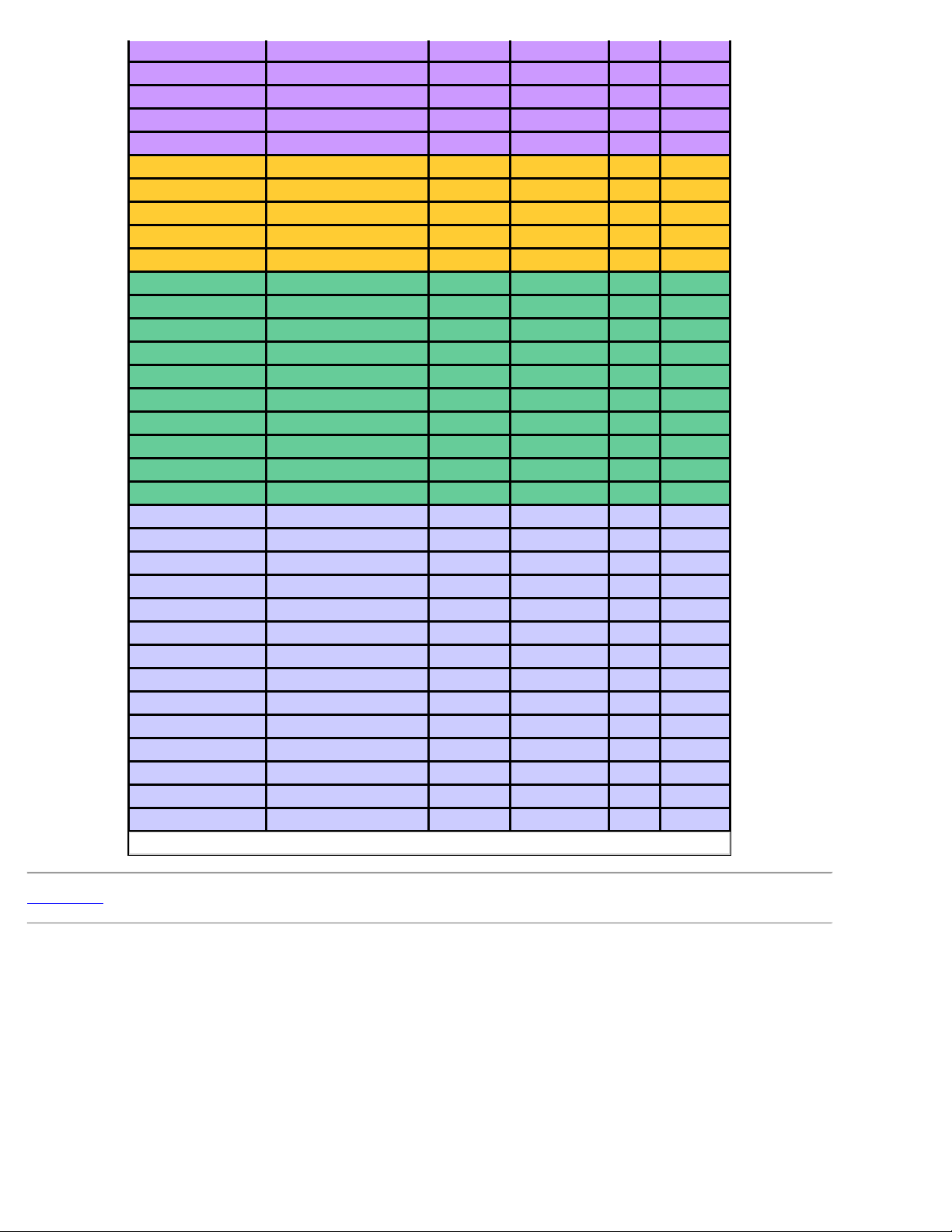
VGA 640X480
72 37.9 72 37.9
VGA 640X480
VGA 640X480
VGA 720X400
VGA 720X400
SVGA
SVGA
SVGA
SVGA
SVGA
XGA 1024X768
XGA
XGA
XGA
XGA
*SXGA
*SXGA
*SXGA
800X600 56 35.2 56 35.2
800X600 60 37.9 60 37.9
800X600 72 48.1 72 48.1
800X600 75 46.9 75 46.9
800X600 85 53.7 85 53.7
1024X768 60 48.4 60 48.4
1024X768 70 56.5 70 56.5
1024X768 75 60.0 75 60.0
1024X768 85 68.7 - 1280X1024 60 63.98 - 1280X1024 75 79.98 - 1280X1024 85 91.1 - -
75 37.5 75 37.5
85 43.3 85 43.3
70 31.5 70 31.5
85 37.9 85 37.9
43.4 35.5 - -
*SXGA+ 1400X1050 60 63.98 - -
*UXGA
MAC LC13*
MAC II 13*
1600X1200 60 75.0 - -
640X480 66.66 34.98 - -
640X480 66.68 35 - MAC 16* 832X624 74.55 49.725 - MAC 19* 1024X768
75 60.24 - -
*MAC 1152X870 75.06 68.68 - MAC G4 640X480 60 31.35 - MAC G4 640X480 120 68.03 - MAC G4 1024X768 120 97.09 - -
IMAC DV 640X480 117 60 - IMAC DV 800X600 95 60 - IMAC DV 1024X768 75 60 - IMAC DV 1152X870 75 68.49 - IMAC DV 1280X960 75 75 - IMAC DV 1280X1024 85 91.1 - -
* 算机 像
返回目
Page 32
Back to Contents Page
Regulatory Notices: Dell™ 3200MP Projector
Federal Communications Commission (FCC) Notice (U.S. Only)
FCC Declaration of Conformity
CE Declaration of Conformity for a Class B Digital Device
Canadian Regulatory Information (Canada Only)
EN 55022 Compliance (Czech Republic Only)
VCCI Class 2 Notice (Japan Only)
MIC Notice (South Korea Only)
Polish Center for Testing and Certification Notice
NOM Information (Mexico Only)
Regulatory Listing
Federal Communications Commission (FCC) Notice (U.S. Only)
NOTICE: This equipment has been tested and found to comply with the limits for a Class B digital
device, pursuant to Part 15 of the FCC Rules. These limits are designed to provide reasonable protection
against harmful interference in a residential installation. This equipment generates, uses, and can radiate
radio frequency energy and, if not installed and used in accordance with the instructions, may cause
harmful interference to radio communications. However, there is no guarantee that interference will not
occur in a particular installation. If this equipment does cause harmful interference to radio or television
reception, which can be determined by turning the equipment off and on, the user is encouraged to try to
correct the interference by one or more of the following measures:
Reorient or relocate receiving antenna.
Increase the separation between the equipment and receiver.
Connect the equipment into an outlet on a circuit different from that to which the receiver is connected.
Consult the dealer or an experienced radio/TV technician for help.
This device complies with Part 15 of the FCC rules. Operation is subject to the following two conditions:
This device may not cause harmful interference.
This device must accept any interference received including interference that may cause undesired operation.
Instructions to Users: This equipment complies with the requirements of FCC (Federal Communication
Commission) equipment provided that the following conditions are met.
1. Power cable: Shielded power cable must be used.
2. Video inputs: The input signal amplitude must not exceed the specified level.
NOTICE: Changes or modifications not expressly approved by the party responsible for compliance
could void the user's authority to operate the equipment.
FCC Declaration of Conformity
According to 47 CFR, Part 15 of the FCC Rules
* For the following named product:
Page 33
DLP Projector
3200MP/DELL CHC7229
* Manufactured at:
Coretronic Corporation
We hereby declare that this device complies with Part 15 of the FCC Rules.
Operation is subject to the following two conditions:
1. This device may not cause harmful interference, and
* FCC Rules: Tested to comply with FCC part 15, class B
* Test site at: Advance Data Technology Corporation
* Responsible Party for Product
Compliance:
* Manufacturer Information: Coretronic Corporation RD Center
2. This device must accept any interference received,
including interference that may cause undesired operation.
No.81- 1, Lu Liao Keng, 9 Ling, Wu Lung Tsung, Chiung Lin Hsiang, Hsin Chu
Hsien, Taiwan
Coretronic Corporation
No 11, Li Hsing Rd, Scienced - Based Industrial Park, Hsinchu, Taiwan
Tel: 886-3- 5772000 Fax: 886-3-5790066
No 11, Li Hsing Rd, Scienced
based Industrial Park, Hsinchu, 300,
Taiwan
Technology Engineering
Associate Vice President
November 30, 2002
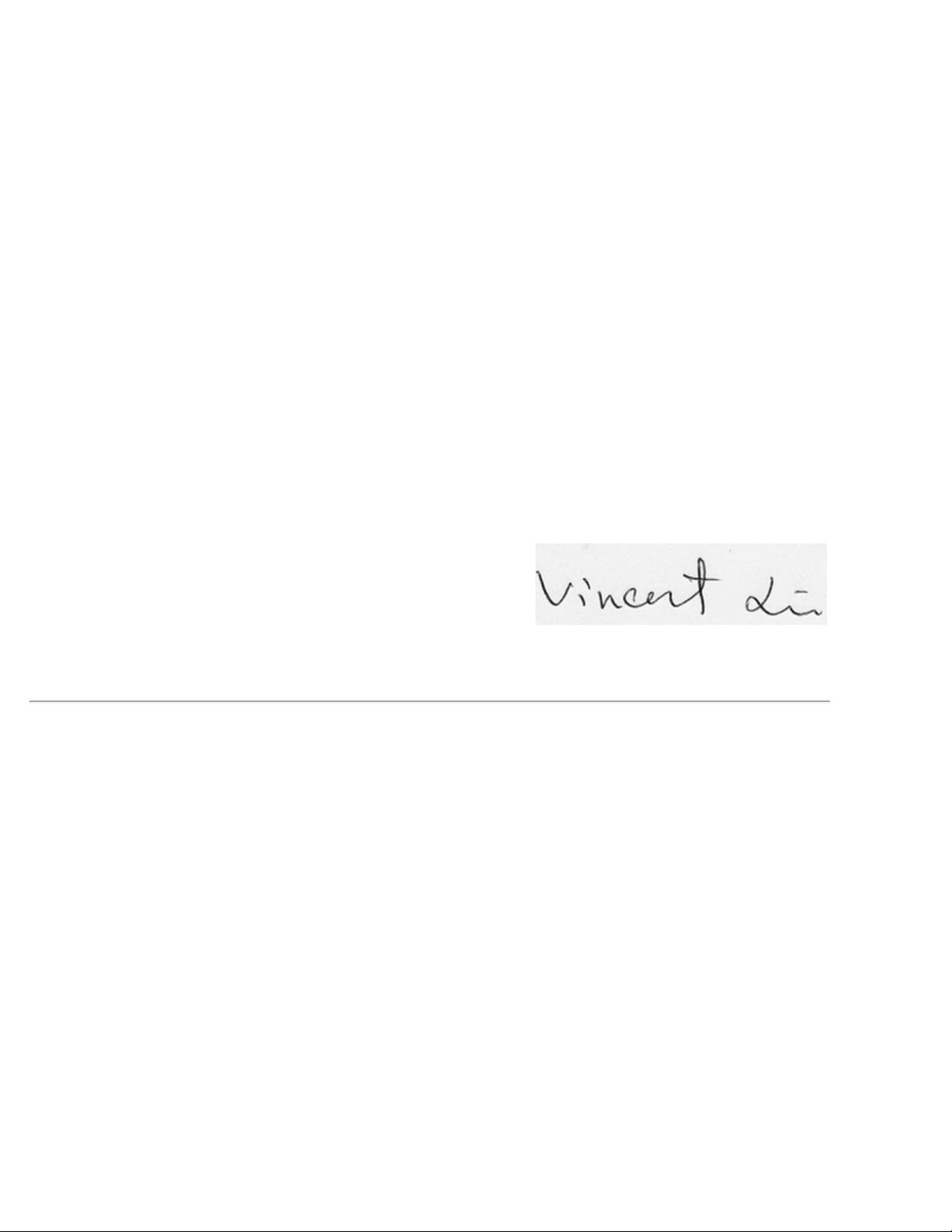
Hsinchu, November 30, 2002 Mr. Vincent Lin
CE Declaration of Conformity for a Class B Digital Device
Directives to which conformity is declared:
EMC Directives 89/336/EEC and Amending Directive 92/31/EEC
And
Low Voltage Directive 73/23/EEC
Standards to which conformity is declared
EN55022: 1998; EN55024: 1998; EN60950: 2000;
EN61000-3- 2: 1995; EN61000-3-3: 1995
Manufacturer's Name: Coretronic Corporation
Manufacturer's Address: No 11, Li Hsing Rd, Scienced- Based Industrial Park, Hsinchu, Taiwan
Importer's Address: Dell Products Europe BV
Raheen Industrial Estate, Limerick, Ireland
Type of Equipment: DLP Projector
Model Number(s): 3200MP
Reference Report Number:
Previously Declared Models:
I, the undersigned, hereby declare that the equipment specified above conforms to the above Directive(s) and
standards.
Page 34
Hsinchu, Taiwan
November 30, 2002 Mr. Vincent Lin Head of RD Center
Canadian Regulatory Information (Canada Only)
This digital apparatus does not exceed the Class B limits for radio noise emissions from digital apparatus set out in
the Radio Interference Regulations of the Canadian Department of Communications.
Note that Industry Canada regulations provided, that changes or modifications not expressly approved by Dell
Computer Corporation could void your authority to operate this equipment.
This Class B digital apparatus meets all requirements of the Canadian Interference-Causing Equipment Regulations.
Cet appareil numerique de la classe B respecte toutes les exigences du Reglement sur le materiel brouilleur du
Canada.
EN 55022 Compliance (Czech Republic Only)
This device belongs to Class B devices as described in EN 55022, unless it is specifically stated that it is a Class A
device on the specification label. The following applies to devices in Class A of EN 55022 (radius of protection up to
30 meters). The user of the device is obliged to take all steps necessary to remove sources of interference to
telecommunication or other devices.
VCCI Class 2 Notice (Japan Only)
This equipment complies with the limits for a Class 2 digital device (devices used in or adjacent to a residential
environment) and conforms to the standards for information technology equipment that are set by the Voluntary
Control Council for Interference for preventing radio frequency interference in residential areas.
Class B ITE
Page 35
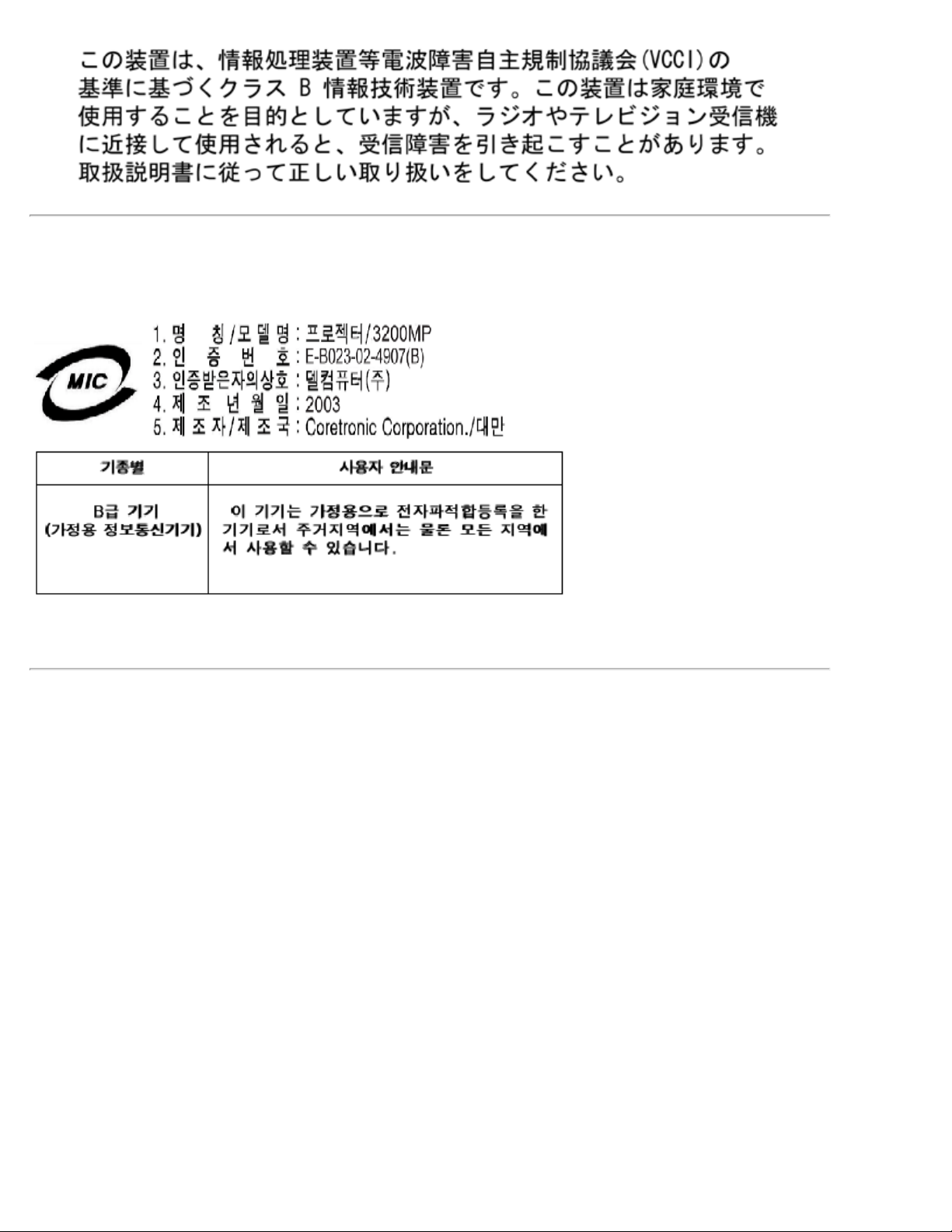
MIC Notice (South Korea Only)
B Class Device
Please note that this device has been approved for non-business purposes and may be used in any environment,
including residential areas.
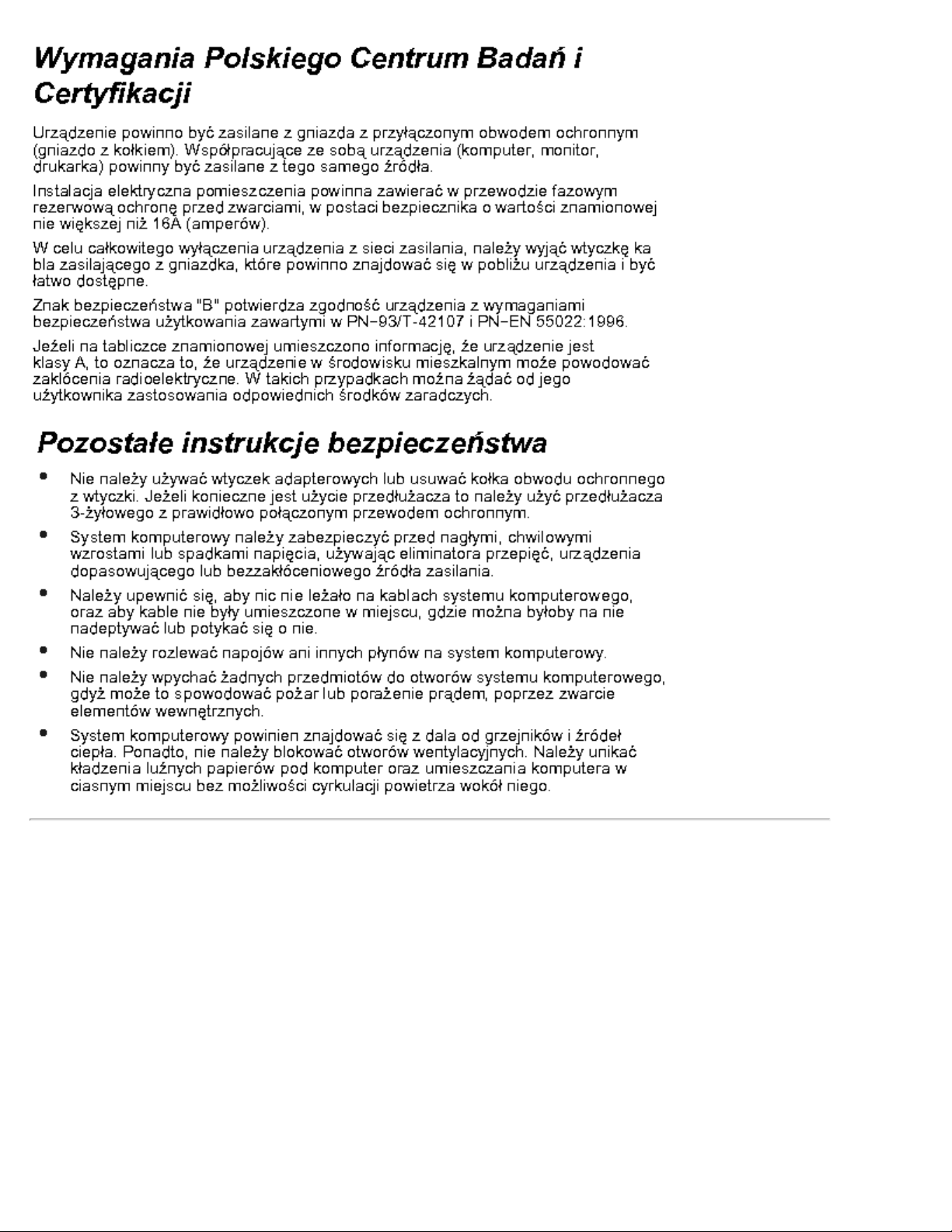
Polish Center for Testing and Certification Notice
The equipment should draw power from a socket with an attached protection circuit (a three-prong socket). All
equipment that works together (computer, monitor, printer, and so on) should have the same power supply source.
The phasing conductor of the room's electrical installation should have a reserve short-circuit protection device in
the form of a fuse with a nominal value no larger than 16 amperes (A).
To completely switch off the equipment, the power supply cable must be removed from the power supply socket,
which should be located near the equipment and easily accessible.
A protection mark "B" confirms that the equipment is in compliance with the protection usage requirements of
standards PN-93/T-42107 and PN - 89/E -06251.
Page 36
NOM Information (Mexico Only)
The following information is provided on the device(s) described in this document in compliance with the
requirements of the official Mexican standards (NOM)
Exporter: Dell Computer Corporation
One Dell Way
Round Rock, TX 78682
Importer: Dell Computer de México,
Paseo de la Reforma 2620, 11th Floor
Col. Lomas Altas
México DF
CP 11950
Ship to: Dell Computer de Mexico,
S.A. de C.V. al Cuidado de Kuehne & Nagel
de México S. de R.I., Avenida Soles No. 55
Col. Peñon de los Baños, 15520 Mexico, D.F.
Page 37

Supply voltage: > 100–240 VAC
Frequency: 50–60 Hz
Current consumption: 1.2 A
Regulatory Listing
Safety Certifications:
UL 1950
cUL
NOM
CE Mark--EN60950: 2000
NEMKO
EZU
IEC 950
TUV GS
PCBC
GOST
CCC
PSB
IRAM
EMC Certifications:
FCC Part 15 Class B
CE Mark--EN55022:1998 Class B, EN61003- 3:1995, EN55024:1998
ICES-003
EZU
NEMKO
PCBC
C-Tick
VCCI Class B ITE
MIC
Back to Contents Page
Page 38
返回目
系 Dell
要通 子方式 系Dell 可 以下网站
www.dell.com
support.dell.com( 支持)
premiersupport.dell.com (面向教育、政 、医 和媒体/ 商 客 提供 支持 其中包括 客 、
白金客 以及金 客 )
要得到您所在国度的具体网 在下表中找到相 的国家。
注意 免 适用于列出的国家 内。
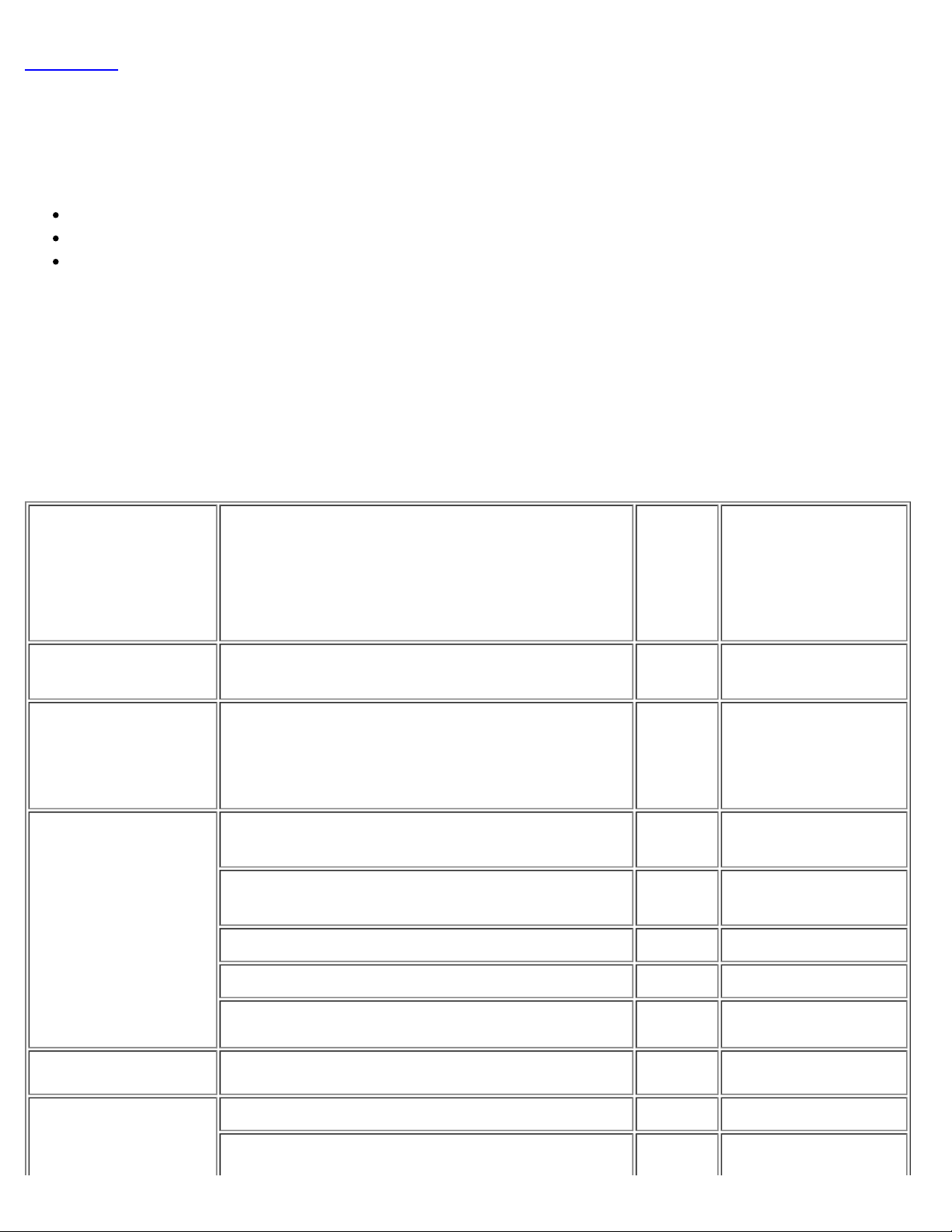
如果 要 系Dell 您可以使用下表提供的 子 、 号 和代 。如果 要确定使用哪 代
系 的或者国 性 信运 商。
国家 城市
国 接入
国家代
城市代
Anguilla General Support
Antigua and
Barbuda
Argentina
(Buenos Aires)
International Access
Code:00
Country Code:54
名称或者服 区、网站及 子 件 区号 本
General Support
Technical Support and Customer Care
Sales
Tech Support Fax 11 4515-7139
号 及 肥
号
toll free:800-3350031
1-800-805-5924
toll free: 0800 444
0733
toll free: 0810 444
3355
Aruba General Support
Australia
(Sydney)
Customer Care Fax 11 4515-7138
Website: www.dell.com.ar
E-mail (Australia): [email protected]
E-mail (New Zealand):
toll-free:800-1578
Page 39
International Access
Country Code:32
Code:0011
Country Code:61
Home and Small Business 1-300-65-55-33
Government and Business toll free: 1-800-633-
559
Preferred Accounts Division (PAD) toll free: 1-800-060-
889
Austria
(Vienna)
International Access
Code:900
Country Code:43
Customer Care
Corporate Sales toll free: 1-800-808-
Transaction Sales toll free: 1-800-808-
Fax toll free: 1-800-818-
Switchboard 01 491 040
Home/Small Business Sales 01 795676-02
Home/Small Business Fax 01 795676-05
Home/Small Business Customer Care 01 795676-03
Preferred Accounts/Corporate Customer Care
Home/Small Business Technical Support 01 795676-04
0660-8056
toll free: 1-800-819-
339
385
312
341
Preferred Accounts/Corporate Technical
Support
Bahama General Support
Barbados General Support
Belgium (Brussels)
International Access
Code:00
Technical Support 02 481 92 88
Customer Care 02 481 91 19
Home/Small Business Sales
0660-8779
toll free: 0800 16884
toll-free:1-866-2786818
1-800-534-3142
Page 40
Corporate Sales 02 481 91 00
Fax 02 481 92 99
Switchboard 02 481 91 00
Website: support.euro.dell.com
E-mail: [email protected]
E-mail for French Speaking Customers:
support.euro.dell.com/be/fr/emaildell/
Bermuda General Support
Bolivia General Support
Brazil
Customer Support, Technical Support
International Access
Code:00
Country Code:55
Technical Support Fax 51 481-5470
Customer Care Fax 51 481-5480
Sales
1-800-890-0748
toll free: 800-100238
toll free: 0800 90
3355
toll free: 0800 90
3390
British Virgin
Islands
Brunei
Country Code:673
Canada
(North York, Ontario)
International Access
Code:011
Website: www.dell.com/br
General Support
Customer Technical Support
(Penang, Malaysia)
Customer Service
(Penang, Malaysia)
Transaction Sales
(Penang, Malaysia)
Automated Order-Status System toll free: 1-800-433-
AutoTech (Automated technical support) toll free: 1-800-247-
Customer Service Home & Home Office & Small
Business
604 633 4966
604 633 4949
604 633 4955
1-800-847-4096
toll-free:1-866-278-
6820
9014
9362
Page 41
Customer Service Medium, Large, Commercial,
Government (100+ Employees)
Technical Support Home & Home Office & Small
Business
1-800-847-4096
1-800-326-9463
Technical Support Medium, Large, Commercial,
Government (100+ Employees)
Sales (General)
TechFax toll free: 1-800-950-
Cayman Islands General Support
Chile
(Santiago)
Country Code:56
China
(Xiamen)
Country Code:86
Sales, Customer Support, and Technical
Support
Tech Support website:
support.ap.dell.com/china
Tech Support E-mail: [email protected]
1-800-387-5757
toll free: 1230-020-
1-800-387-5752
1-800-805-7541
1329
4823
Tech Support Fax
Home and Small Business Technical Support toll free: 800 858
Corporate Accounts Technical Support
Customer Experience toll free: 800 858
Home and Small Business
Preferred Accounts Division
Large Corporate Accounts North
toll free: 800 858
toll free: 800 858
toll free: 800 858
toll free: 800 858
818-1350
2437
2333
2060
2222
2062
2999
Page 42
Large Corporate Accounts North Government
and Education
toll free: 800 858
2955
Large Corporate Accounts East
Large Corporate Accounts East Government
and Education
Large Corporate Accounts Queue Team
Large Corporate Accounts South
Large Corporate Accounts West
Large Corporate Accounts GCP
Large Corporate Account Key Accounts
Large Corporate Accounts Spare Parts
toll free: 800 858
2020
toll free: 800 858
2669
toll free: 800 858
2572
toll free: 800 858
2355
toll free: 800 858
2811
toll free: 800 858
2055
toll-free:800-858-
2628
toll free: 800-858--
2621
Colombia General Support
Costa Rica General Support
Czech Republic
(Prague)
International Access
Code:00
Country Code:420
Denmark
(Horsholm)
Technical Support 02 22 83 27 27
Customer Care 02 22 83 27 11
Fax 02 22 83 27 14
TechFax 02 22 83 27 28
Switchboard 02 22 83 27 11
Website: support.euro.dell.com
E-mail: [email protected]
Technical Support 70230182
Customer Care(Relational) 70230184
0800-012-0435
980-9-15-3978
International Access
Code:00
Country Code:45
Home/Small Business Customer Care 32875505
Switchboard (Relational) 32871200
Fax Switchboard (Relational)
32871201
Page 43
Switchboard (Home/Small Business)
32875000
Dominica General Support
Dominican
Republic
Fax Switchboard (Home/Small Business) 32875001
Website: support.euro.dell.com
E-mail Support (portable computers):
[email protected]
E-mail Support (desktop computers):
[email protected]
E-mail Support (servers):
[email protected]
General Support
toll free: 1-866-278-
toll free: 1-800-156-
6821
1588
Ecuador General Support
El Salvador General Support
Finland
(Helsinki)
International Access
Code:990
Country Code:358
France
(Paris) (Montpellier)
Technical Support 09 253 313 60
Technical Support Fax 09 253 313 81
Relational Customer Care 09 253 313 38
Home/Small Business Customer Care 09 693 791 94
Fax 09 253 313 99
Switchboard 09 253 313 00
Website: support.euro.dell.com
E-mail: [email protected]
Home and Small Business
Technical Support 0825 387 270
toll-free 999-119
01-889-753-0777
International Access
Code:00
Country Code:33
Customer Care 0825 823 833
Switchboard 0825 004700
Page 44
Switchboard (calls from outside of France) 04 99 75 40 00
Sales 0825 004 700
Fax (calls from outside of France) 04 99 75 40 001
Germany
(Langen)
Website: support.euro.dell.com
E-mail: support.euro.dell.com/fr/fr/emaildell/
Corporate
Technical Support 0825 004 719
Customer Care 0825 338 339
Fax 01 55 94 71 01
Switchboard 01 55 94 71 00
Sales
01 55 94 71 00
Technical Support 06103 766-7200
Home/Small Business Customer Care 0180-5-224 400
International Access
Code:00
Country Code:49
Grenda General Support
Guatemala General Support
Guyana General Support
Global Segment Customer Care 06103 766-9570
Preferred Accounts Customer Care 06103 766-9420
Large Accounts Customer Care 06103 766-9560
Public Accounts Customer Care 06103 766-9555
Switchboard 06103 766-7000
Website: support.euro.dell.com
toll free:1-866-5403355
1-800-999-0136
toll free:1-877-4406511
Hong Kong Technical Support(Dimension™ and 296-93188
Page 45
International Access
Code:001
Inspiron™ )
Country Code:852
Technical Support (OptiPlex™,
Latitude ™ , and Dell Precision™ )
296-93191
Customer Service (non-technical, post-sales
issues)
Transaction Sales toll free: 800 96
Large Corporate Accounts HK
Large Corporate Accounts GCP HK toll free: 800 90
India Technical Support
Sales
Ireland
(Cherrywood)
International Access
Code:16
Country Code:353
Ireland Technical Support 1850 543 543
UK Technical Support (dial within UK only)
Home User Customer Care 01 204 4095
Small Business Customer Care 01 204 4444
800-93-8291
4109
0870 908 0800
toll free: 800 96
4108
3708
1600-33-8045
1600-33-8044
Italy
(Milan)
Corporate Customer Care 01 204 4003
UK Customer Care (dial number within UK only)
Ireland Sales 01 204 4444
UK Sales (dial within UK only) 0870 907 4000
SalesFax 01 204 0144
Fax 01 204 5960
Switchboard 01 204 4444
Website: support.euro.dell.com
E-mail: [email protected]
Home and Small Business
Technical Support 02 577 826 90
0870 906 0010
International Access
Code:00
Customer Care 02 696 821 14
Fax 02 696 821 13
Page 46
Country Code:39
Switchboard 02 696 821 12
Website: support.euro.dell.com
E-mail: support.euro.dell.com/it/it/emaildell/
Corporate
Technical Support 02 577 826 90
Customer Care 02 577 825 55
Fax 02 577 035 30
Switchboard 02 577 821
Website: support.euro.dell.com
E-mail: support.euro.dell.com/it/it/emaildell/
Jamaica General Support (dial from within Jamaica only)
Japan
(Kawasaki)
International Access
Code:001
Country Code:81
Korea
(Seoul)
International Access
Code:001
Country Code:82
Web site: support.jp.dell.com
Technical Support
Technical Support outside of Japan 44 556-3468
Customer Care 44 556-4240
Technical Support toll free: 080-200-
Sales toll free: 080-200-
Customer Service (Penang, Malaysia) toll free: 604-633-
1-800-404-9205
toll free: 0120-981-
690
3800
3600
4949
Latin America
Customer Service (Seoul, Korea)
Fax 2194-6202
Switchboard 2194-6000
Customer Technical Support (Austin, Texas,
U.S.A.)
Customer Service (Austin, Texas, U.S.A.) 512 728-3619
512 728-4093
080-200-3800
Page 47
Fax (Technical Support and Customer Service)
(Austin, Texas, U.S.A.)
512 728-3883
Luxembourg
International Access
Code:00
Country Code:352
Macao
Sales (Austin, Texas, U.S.A.) 512 728-4397
SalesFax (Austin, Texas, U.S.A.) 512 728-4600
Technical Support (Brussels, Belgium) 02 481 92 88
Home/Small Business Sales (Brussels,
Belgium)
Corporate Sales (Brussels, Belgium) 02 481 91 00
Customer Care (Brussels, Belgium) 02 481 91 19
Switchboard (Brussels, Belgium) 02 481 91 00
Fax (Brussels, Belgium) 02 481 92 99
Website: support.euro.dell.com
Technical Support toll free: 0800 582
or 728-3772
toll free: 080016884
Country Code:853
Malaysia
(Penang)
International Access
Code:00
Country Code:60
Mexico Customer Technical Support 001-877-384-8979
Customer Service (Penang, Malaysia) 604 633 4949
Transaction Sales toll free: 0800 581
Technical Support toll free: 1 800 888
298
Customer Service 4 633 4949
Transaction Sales toll free: 1 800 888
202
Corporate Sales toll free: 1 800 888
213
or 001-877-269-
3383
Sales 50-81-8800
or 01-800-888-3355
Customer Service 001-877-384-8979
or001-877-269-3383
Main 50-81-8800
Page 48
or 01-800-888-3355
Montserrat General Support
Netherlands
Antilles
Netherlands
(Amsterdam)
International Access
Code:00
Country Code:31
General Support
Technical Support 20 674 4500
Home/Small and Medium Business 20 674 5500
Home/Small and Medium Business Fax
Home/Small and Medium Business Customer
Care
Corporate 20 674 5000
Corporate Fax 20 674 4779
20 674 4775
20 674 4200
toll free:1-866-278-
001-800-882-1519
6822
Corporate Customer Care 20 674 4325
Website: support.euro.dell.com
E-mail: support.euro.dell.com/nl/nl/emaildell/
New Zealand E-mail (New Zealand):
E-mail (Australia): [email protected]
Home and Small Business 0800 446 255
Government and Business 0800 444 617
Sales 0800 441 567
Fax 0800 441 566
Nicaragua General Support
Norway
(Lysaker)
Technical Support 671 16882
Relational Customer Care 671 17514
001-800-220-1006
International Access
Code:00
Country Code:47
Home/Small Business Customer Care 231 62298
Switchboard 671 16800
Page 49
Fax Switchboard 671 16865
Website: support.euro.dell.com
E-mail Support (portable computers):
[email protected]
E-mail Support (desktop computers):
[email protected]
E-mail Support (servers):
Panama General Support
Peru General Support
Poland
(Warsaw)
International Access
Code:011
Country Code:48
Customer Service Phone 22 57 95 700
Customer Care 22 57 95 999
Sales 22 57 95 999
Switchboard 22 57 95 999
Customer Service Fax 22 57 95 806
001-800-507-0962
0800-50-669
Portugal
International Access
Code:00
Country Code:47
Puerto Rico General Support
Technical Support 35 800 834 077
Customer Care 800 300 415
Sales
Fax 35 121 424 01 12
E-mail: support.euro.dell.com/es/es/emaildell/
or 800 834 075
800 300 410
or 800 300 411
or 800 300 412
or 121 422 07 10
1-800-805-7545
Page 50
St. Kitts and Nevis General Support
toll free:1-877-441-
4731
St. Lucia General Support
St. Vincent and the
Grenadines
Singapore
(Singapore)
International Access
Code:005
Country Code:65
South Africa
(Johannesburg)
International Access
Code:09/091
Country Code:27
General Support
Technical Support toll free: 800 6011
Customer Service (Penang, Malaysia) 604 633 4949
Transaction Sales toll free: 800 6011
Corporate Sales toll free: 800 6011
Technical Support 011 709 7710
Customer Care 011 709 7707
Sales 011 709 7700
Fax 011 706 0495
Switchboard 011 709 7700
Website: support.euro.dell.com
1-800-882-1521
toll free:1-877-441-
4740
051
054
053
Southeast
Asian/Pacific
Countries
Spain
(Madrid)
International Access
Code:00
Country Code:34
and Sales (Penang, Malaysia)
Home and Small Business
Technical Support 91 902 100 130
Customer Care 91 902 118 540
Sales 91 902 118 541
Switchboard 91 902 118 541
Fax 91 902 118 539
Website: support.euro.dell.com
E-mail: support.euro.dell.com/es/es/emaildell/
604 633-4810
Page 51
Corporate
Technical Support 91 902 100 130
Customer Care 91 902 118 546
Switchboard 91 722 92 00
Fax 91 722 95 83
Website: support.euro.dell.com
E-mail: support.euro.dell.com/es/es/emaildell/
Sweden
(Upplands Vasby)
International Access
Code:00
Country Code:46
Technical Support 08 590 05 199
Relational Customer Care 08 590 05 642
Home/Small Business Customer Care 08 587 70 527
Employee Purchase Program (EPP) Support 20 140 14 44
Fax Technical Support 08 590 05 594
Sales 08 590 05 185
Website: support.euro.dell.com
E-mail Suport for Latitude and Inspiron:
E-mail Suport for OptiPlex:
E-mail Suport for Servers:
[email protected]
Switzerland
(Geneva)
International Access
Code:00
Country Code:41
Technical Support (Home and Small Business)
Technical Support (Corporate) 22 0844 822 844
Customer Care (Home and Small Business)
Customer Care(Corporate) 0848 821 721
Switchboard 22 799 01 01
Fax 22 799 01 90
Website: support.euro.dell.com
Customers:
22 0844 811 411
22 0848 802 202
Page 52
support.euro.dell.com/ch/fr/emaildell/
Taiwan
Home/Small Business Sales 0870 907 4000
International Access
Code:002
Country Code:886
Technical Support (portable and desktop
computers)
Technical Support (Servers) toll free: 0080 60
Transaction Sales toll free:0800 651
Corporate Sales toll free:
toll free: 00801 86
228 or 0800 33 556
0080 651 227/ 0800
33 555
1011
1256
Thailand
International Access
Code:001
Country Code:66
Trinidad and
Tobago
Turks and Caicos
Islands
U.K.
(Bracknell)
Technical Support toll free: 088 006
007
Customer Service (Penang, Malaysia) 604 633 4949
Sales toll free: 088 006
009
General Support
General Support
Technical Support (Corporate/Preferred
Accounts/PAD [1000+ employees])
0870 908 0500
1-800-805-8035
toll free:1-866-540-
3355
International Access
Code:44
Country Code:44
Technical Support (Direct/PAD and general)
Global Accounts Customer Care
Corporate Customer Care 0870 908 0500
Preferred Accounts (500-5000 employees)
Customer Care
Central Government Customer Care 01344 373 193
Local Government & Education Customer Care 01344 373 199
Health Customer Care
0870 908 0800
373 185
01344
or 373 186
01344 373 196
01344 373 194
Page 53
Home/Small Business Customer Care 0870 906 0010
Corporate/Public Sector Sales 01344 860 456
Website: support.euro.dell.com
Customer Care website:
dell.co.uk/lca/customerservices
Uruguay General Support
U.S.A.
(Austin, Texas)
International Access
Code:011
Country Code:1
Automated Order-Status System toll free: 1-800-433-
AutoTech (portable and desktop computers) toll free: 1-800-247-
Projectors Technical Support
Customer Service toll free: 1-800-624-
Dell Sales toll free: 1-800-289-
toll free: 1-877-459-
toll free:000-413598-2521
or toll free: 1-800879-3355
9014
9362
7298
9897
3355
Dell Outlet Store (Dell refurbished computers) toll free: 1-888-798-
7561
Software and Peripherals Sales toll free: 1-800-671-
3355
Spare Parts Sales
Extended Service and Warranty Sales toll free: 1-800-247-
Fax toll free: 1-800-727-
Dell Services for the Deaf, Hard-of-Hearing, or
Speech-Impaired
toll free: 1-800-357-
3355
4618
8320
toll free: 1-877-
DELLTTY
(1-877-335-5889)
Page 54
U.S. Virgin Islands General Support
Venezuela General Support
返回目
1-877-673-3355
8001-3605
 Loading...