

Page 1
www.delfintech.com
ElastiMeter
User Manual
Page 2

ElastiMeter User Manual version 1.6
15.8.2018
1
INTRODUCTION ................................................................................................................... 3
MEASUREMENT PRINCIPLE ................................................................................................. 3
APPLICATIONS .................................................................................................................... 3
CONTENTS OF PACKAGE ..................................................................................................... 4
USER INTERFACE DESCRIPTION ........................................................................................... 4
OPERATING INSTRUCTIONS ................................................................................................. 5
ADJUSTING SETTINGS ......................................................................................................... 7
RECOMMENDATIONS FOR MEASURING WITH THE ELASTIMETER ........................................ 8
MAINTENANCE, CLEANING AND DISINFECTING ................................................................... 9
CALIBRATION ................................................................................................................... 10
TECHNICAL DATA ............................................................................................................. 11
APPENDIX A: DISPLAY MESSAGES .................................................................................... 13
APPENDIX B: TROUBLESHOOTING .................................................................................... 15
APPENDIX C: GUARANTEE ............................................................................................... 17
Manual version 1.6 for device software version 1
CONTENTS
Page 3

2
Page 4

ElastiMeter User Manual version 1.6
15.8.2018
3
DELFIN ELASTIMETER
INTRODUCTION
Thank you for purchasing a Delfin ElastiMeter. The ElastiMeter measures the
instant skin elasticity (ISE).
The ElastiMeter is safe and easy to operate and this manual is designed to help
perform measurements accurately and reliably. The measurement process is
totally non-invasive.
It is advisable to read this guide carefully before using the ElastiMeter.
MEASUREMENT PRINCIPLE
The ElastiMeter utilizes an indenter which is briefly pressed on the skin. The
skin resists the change in shape when an external force is applied and thus the
skin’s response under a short term load indicates its instant elastic properties.
APPLICATIONS
Instant skin elasticity measurements give important information on the
biophysical properties of the skin. The ElastiMeter gives information that can
be used to assess elasticity changes related to skin aging, UV damage, hydration
and seasonal variations of the skin. Effects of skin treatments and different skin
care products on the skin can also be examined.
The ElastiMeter can be used in numerous applications in skin research, in
service laboratories and the promotion and marketing of skin care products, and
in product development and claims substantiation within cosmetic and personal
care industries.
Note that the ElastiMeter is intended to measure only the skin, not any other
material.
Page 5
4
CONTENTS OF PACKAGE
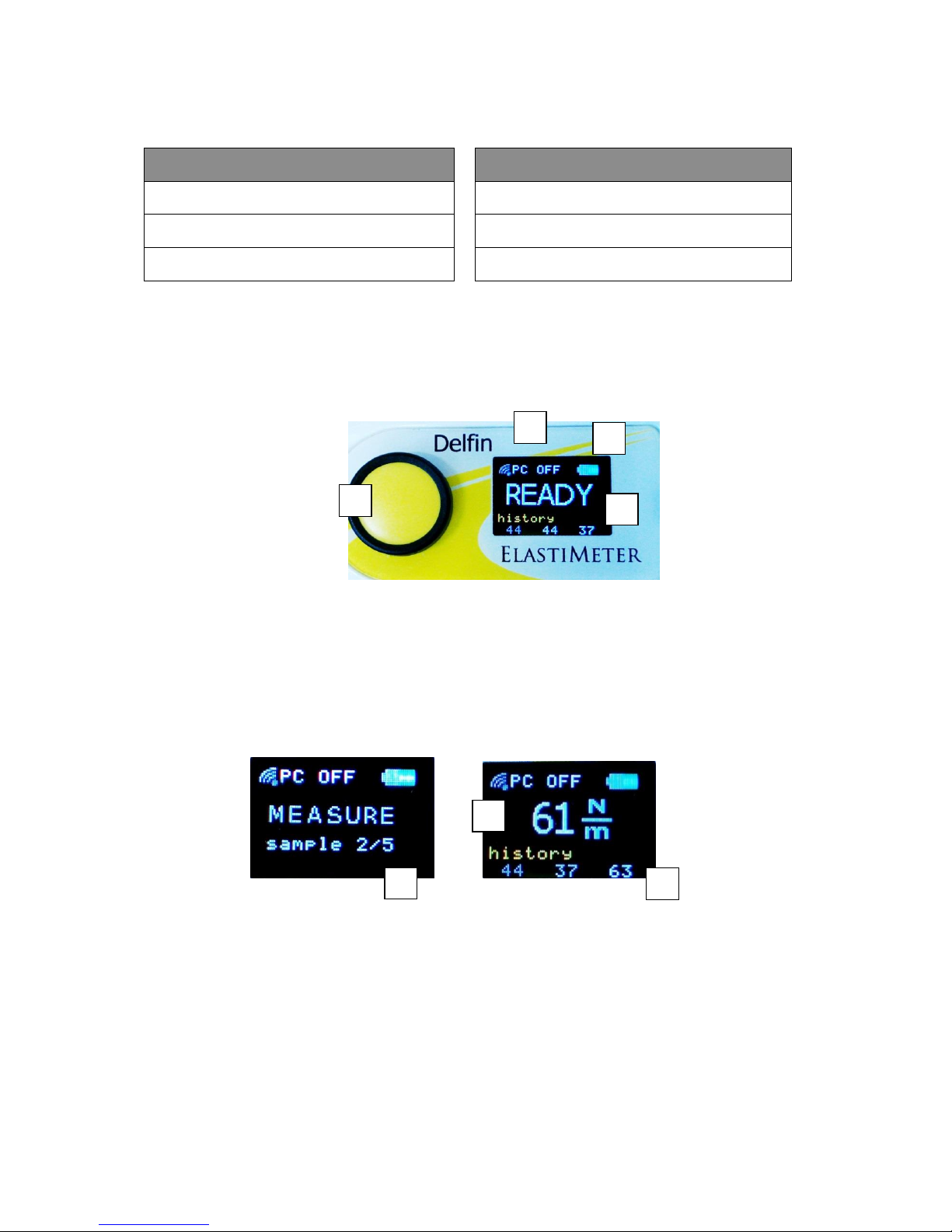
USER INTERFACE DESCRIPTION
1. Operating button
2. PC connection indicator
3. Battery voltage indicator
4. Display
5. Number of the sample
6. Instant skin elasticity (ISE) value
7. Past values
ElastiMeter
Accessories available
ElastiMeter measuring unit
DMC data collection software
User manual
Wireless receiver unit
Carrying case
RoomSensor
6 4 1 3 2 7 5
Page 6
ElastiMeter User Manual version 1.6
15.8.2018
5
OPERATING INSTRUCTIONS
1. Switch the power on by pressing the yellow operating button. The
message WAIT is displayed.
o The ElastiMeter is ready to measure when the message READY
is displayed with a short tone.
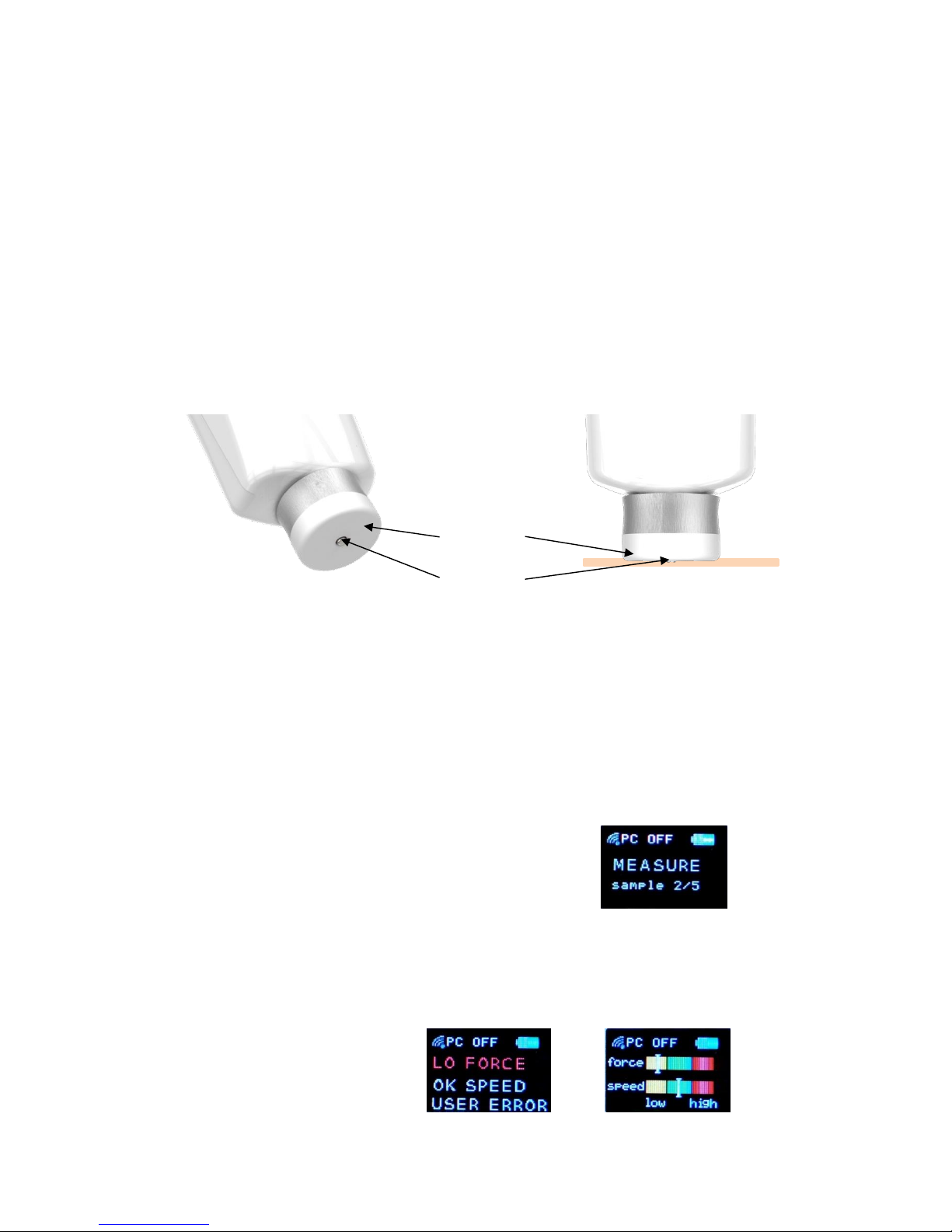
2. Place the probe perpendicularly, slightly and shortly on the skin, only
for about 0.5 seconds.
o The indenter touches the skin first, then the base plate.
o The indenter imposes a constant deformation when the base
plate is in full contact with the skin.
o The force sensors recognize the skin contact and the
measurement starts automatically.
o If necessary, support your hand to get a proper contact.
o If the measurement was correctly performed, the message
“MEASURE sample 2/5” is displayed.
o If the measurement was not correctly done, the message USER
ERROR is displayed and the following messages alter.
Base plate
Indenter
Skin
Page 7
6
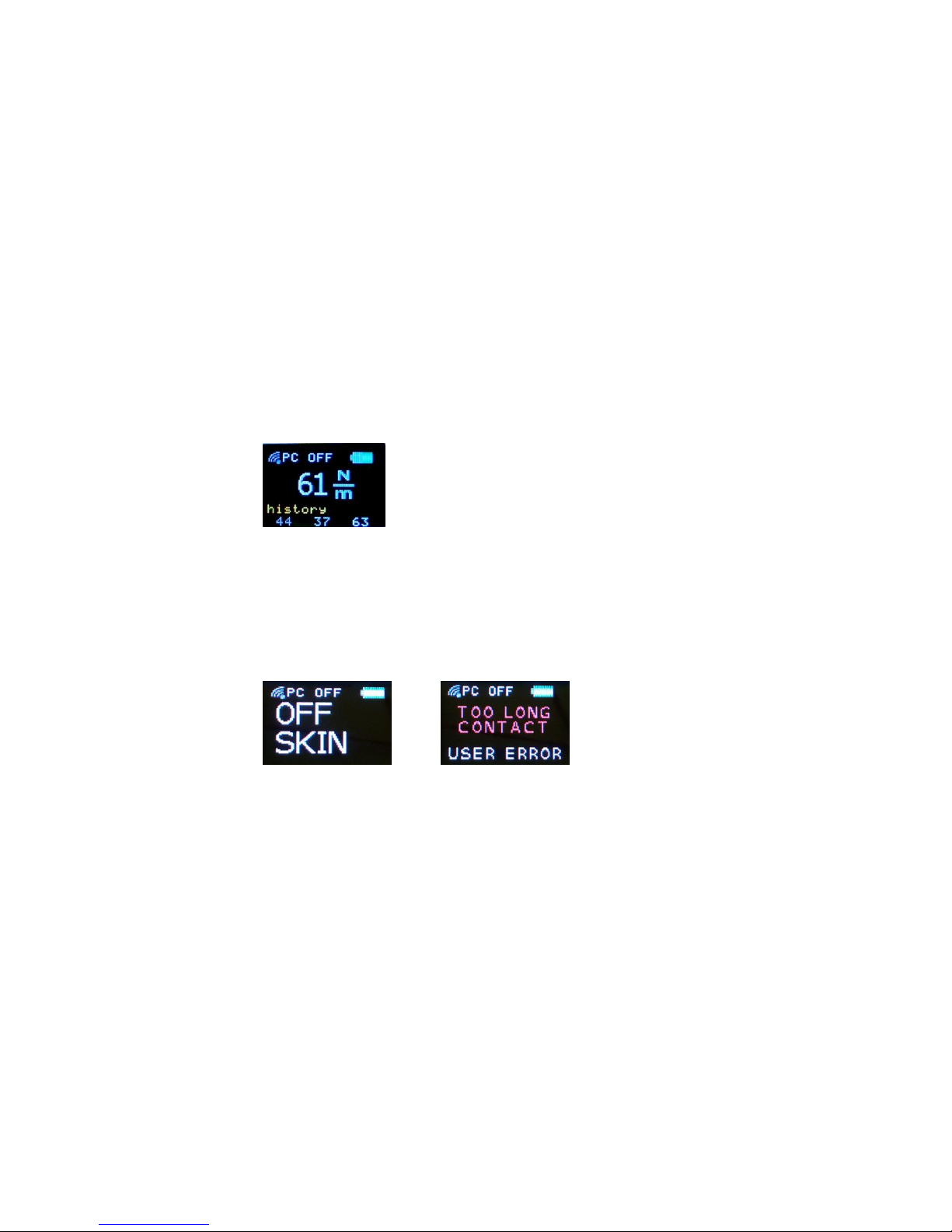
Used contact force and measurement speed levels are shown on
the display. Recommended force and speed levels are indicated
with a green bar on the display. High speed warning may also
occur if the indenter is not placed perpendicularly on the skin.
Proceed by pressing the operate button and re-measure, or wait
until the message READY is displayed.
3. Five short, successful measurements on the same site have to be done
to get the ISE reading. The shown ISE reading is the mean of 5
consecutive measurements. Readings under the recent value are means
of previous measurements.
If the probe is left on the skin for too long, the message OFF SKIN is displayed.
Remove the probe from the skin and press the operating button to re-measure.
Avoid touching the indenter and the base plate with your hand or fingers. They
should touch the skin only during the measurement.
The ElastiMeter is automatically switched off, if the next measurement is not
started within 30 seconds.
The ISE reading is a quantity which indicates the instant skin elasticity in units
N/m. The measured values increase with increasing elasticity.
Page 8
ElastiMeter User Manual version 1.6
15.8.2018
7
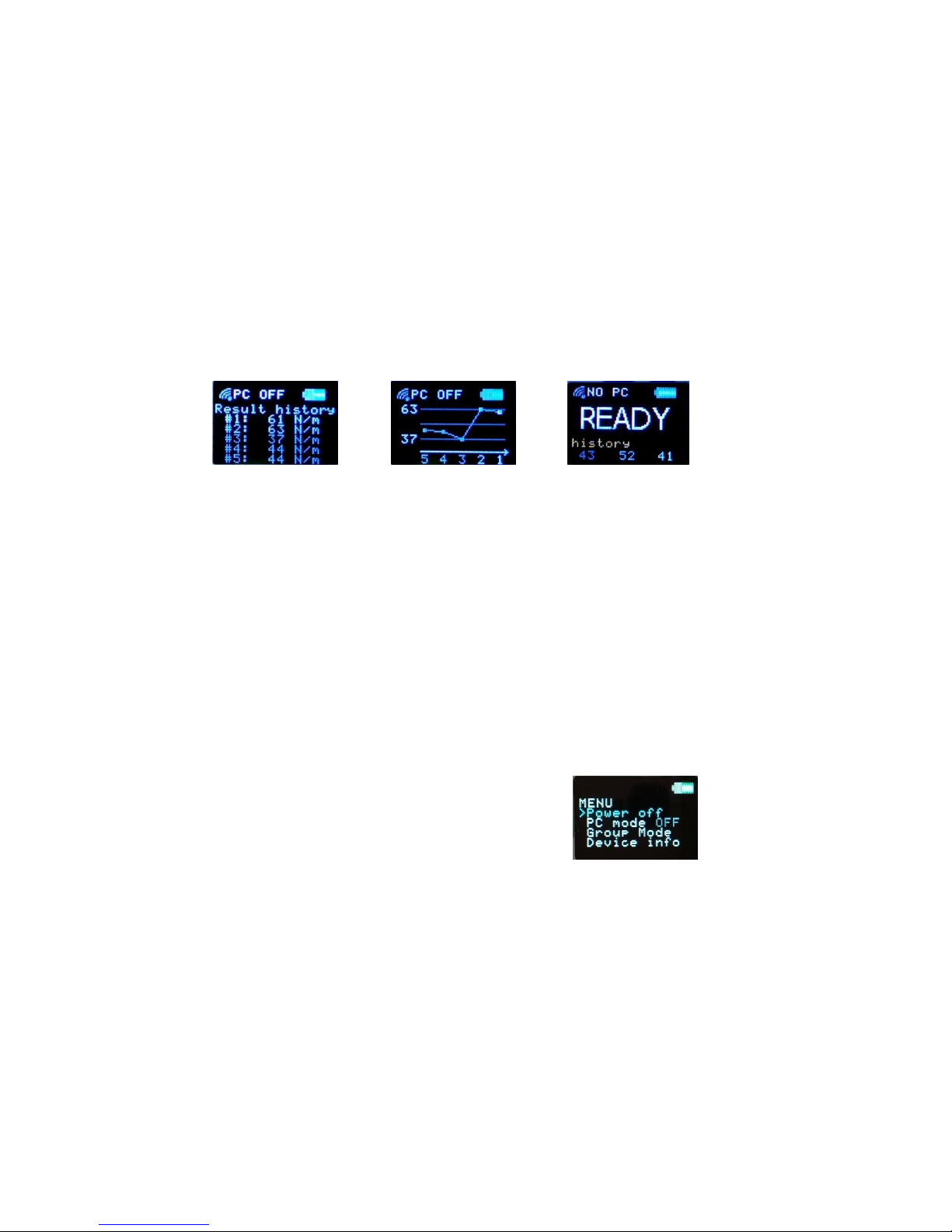
Measurement history
When the ElastiMeter is at the READY stage, the measurement history can be
shown by pressing the operate button briefly. Five previous ISE readings are
shown as numbers first and then as a graph. The view from numerical to
graphical changes automatically in 10 seconds, but can also be changed by
pressing the operating button briefly. After the graph view the message READY
is shown on the display again. The instrument is ready to measure also during
the history display.
ADJUSTING SETTINGS
1. Turn the ElastiMeter on by pressing the operating button briefly.
2. When the device is on, press the button again and hold it until the MENU
is displayed. Then release.
3. The indicator “>” starts to scroll downwards through the menu.
4. Press the operating button once again when the indicator ”>” is in front
of the desired row to select from the menu.
Power Off
The ElastiMeter is switched off.
PC Mode OFF/ON
Turns the PC connection OFF or ON. The wireless connection to the computer
can be used only when the wireless receiver unit is connected to the PC, the
DMC software is running and the PC mode of the ElastiMeter is ON.
Group Mode
The ElastiMeter is paired with the wireless receiver unit, which comes together
with the instrument. Select Group Mode, if other than the original receiver unit
Page 9

8
is used with the DMC program and the ElastiMeter. See the user manual of the
DMC for further instructions.
Device info
Displays the software version, the manufacturing date, the serial number of the
device, the serial number of the programmed receiver unit and the measurement
counter.
RECOMMENDATIONS FOR MEASURING WITH THE ELASTIMETER
Skin surface
o Smooth and even skin site is the most reliable measurement site.
o Skin hair, scars and folds may prevent a good contact between the probe
and the skin.
o Skin surface should be dry.
o Avoid skin sites over superficial bones, tendons and large veins.
Environmental conditions
The ElastiMeter can be used in normal room temperature. Recommended
operating conditions are mentioned in the section Technical data in this manual.
Test person related factors
Measurements with the ElastiMeter can be performed when the subject has
been resting for 5-10 minutes. Hot drinks and smoking should be avoided for
at least 60 min before measurements.
o Make sure that the tested person is totally relaxed before the
measurement. No muscle tension should occur.
o The tested person should be in the same position at every measurement
session during a study (e.g. sitting on the chair the arm resting on the
table, if an arm is measured).
Page 10
ElastiMeter User Manual version 1.6
15.8.2018
9
User related factors
o Support your hand during the measurement.
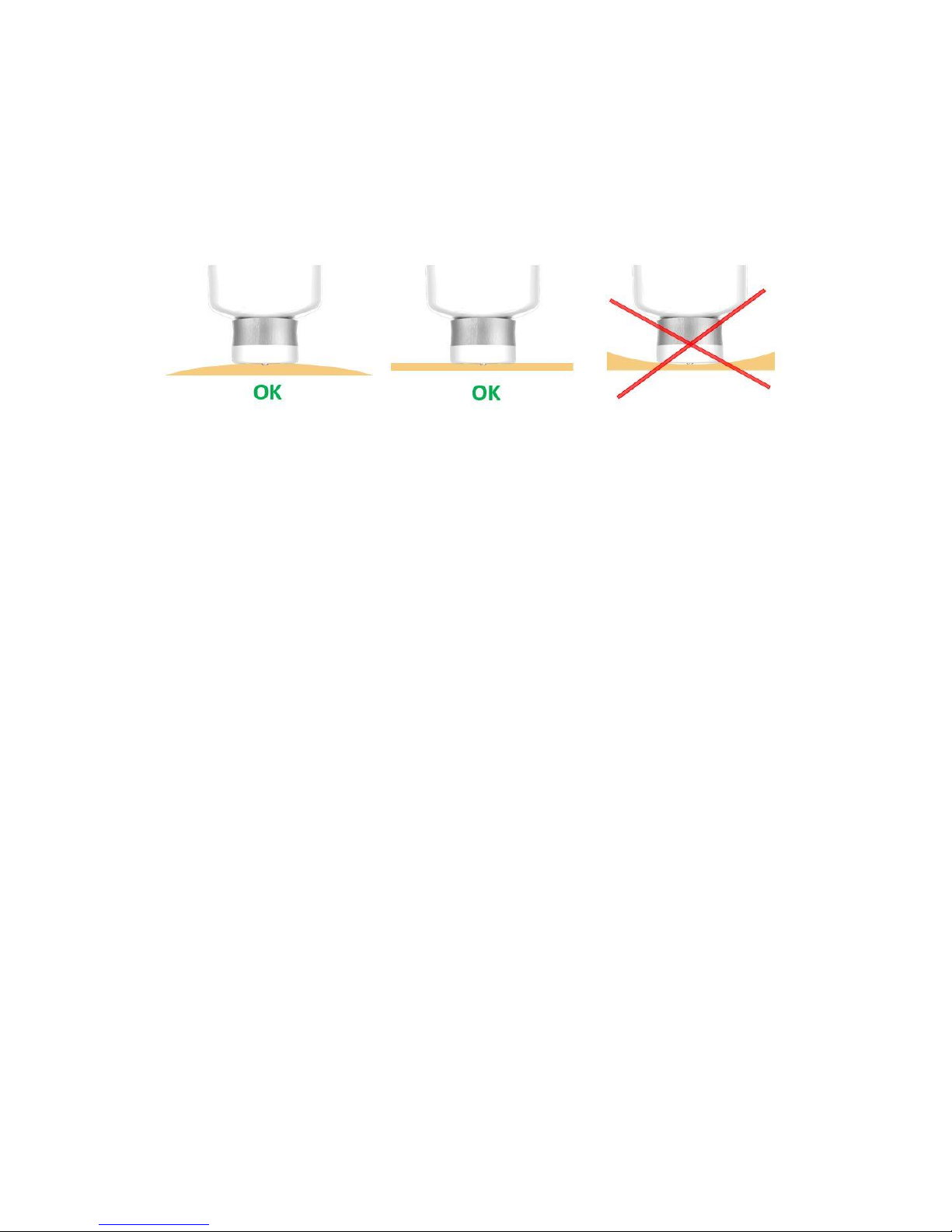
o Make sure the probe touches the skin perpendicularly and the
measurement site is either flat or convex, not concave.
MAINTENANCE, CLEANING AND DISINFECTING
The ElastiMeter should be located and stored in a clean, dry place at room
temperature, away from extremes of draft and vibration. Handle the device
gently. Thumping and shaking may damage the force sensors.
Clean the cover with a mild detergent solution. The measurement probe can be
carefully cleaned with soft paper tissue moistened with ethanol. Set the
moistened soft paper on the table and wipe the measurement probe slightly to
the paper. Use only soft paper tissue with no lint. The probe head must be
completely dry before use. Never place the device or the probe in contact with
water or any other liquid.
Batteries
A set of two 1.5 V AA alkaline batteries lasts for several hundreds of
measurements. If the device is not used for several months it is recommended
to remove the batteries.
The batteries are tested automatically and a “Low battery” warning appears on
the display when the battery voltage is low. Change the batteries when the
remaining charge in the battery indicator turns red. If the message “Replace
batteries” appears when the ElastiMeter is turned on, measurements cannot be
done before the batteries are changed.
Page 11

10
Changing the batteries:
1. Unscrew the bottom cover of the device and remove it carefully
without pulling the wires.
2. Remove empty batteries carefully.
3. Insert new batteries to match the (+) and (-) signs in the battery case.
Incorrect insertion of batteries may damage the device.
Do not use rechargeable batteries.
4. Replace and screw the bottom cover in place.
Do not touch the circuit board with any object.
CALIBRATION
Delfin ElastiMeter is recommended to be calibrated every other year. The
calibration certificate is valid for two (2) years. The instrument is advised to be
sent to the manufacturer or authorized distributor for detailed calibration when
the calibration is expired. The due month and year are displayed when the
ElastiMeter is turned on.
Page 12

ElastiMeter User Manual version 1.6
15.8.2018
11
TECHNICAL DATA
System components
o ElastiMeter measuring unit with integrated probe
o Batteries (installed)
o User manual (USB flash drive + printed)
o Carrying case
Accessories
o DMC data collection software (USB flash drive)
o Wireless receiver unit
Power supply
o 2 x 1.5 V AA alkaline battery (IEC: type LR6)
o Power consumption: 360 mW – 495 mW (Wireless mode off – on)
ElastiMeter measuring unit
o Dimensions: 189 x 45 x 35 mm
o Weight with batteries: 153 g
o Protection class IP52
o Measurement completion time (ISE): 0.5 seconds
o Measurement repeat cycle (ISE) 10 measurements per minute typically
o Measured parameter: Instant Skin Elasticity (ISE)
o Measuring SI unit: N/m (Newton per meter)
o Operating range: 10 – 160 N/m
o Force sensor accuracy: ±3 %
o Coefficient variation (SD/mean) measured on normal skin
typically < 10 %
Integrated probe
o Indenter length: 0.6 mm
o Indenter diameter: 2.5 mm
o Indenter type: stainless steel (AISI 316L) with rounded tip
o Base plate diameter: 23 mm
o Base plate material: PTFE
o Maximum force applied to either the base plate or the indenter: 10 N*
Page 13

12
Recommended operating conditions
o Temperature operating range +15°C to +35°C
o Relative humidity operating range 5 % to 80%
o Usage environment: Laboratory and office environment
Recommended storage conditions
o Storage at temperature +5°C to +35°C
o Storage at relative humidity 5 % to 80%
Warranty
o Limited two year warranty (see Appendix C)
Bluetooth module certifications
o Contains FCC ID: QOQBLE113
o Contains IC: 5123A-BGTBLE113
o MIC: 007-AB0103
o KCC: KCC-CRM-BGT-BLE113
o CE
EC Certificate Directive 93/42/EEC, medical devices
0537
Notes
* Exposure to higher forces may cause permanent damage to the product
instrumentation.
Page 14

ElastiMeter User Manual version 1.6
15.8.2018
13
APPENDIX A
APPENDIX A: DISPLAY MESSAGES
DISPLAY MESSAGES
Message
Explanation
WAIT
Initial stabilization in process
READY
Instrument is ready to measure
MEASURE sample 2/5
Instrument is ready to measure
POWER OFF
Instrument turns off
NO PC
No PC connection detected
USER ERROR
The applied force or measurement speed is not
correct, or the probe is left on the skin for too long
LO FORCE
Applied contact force too low
HI FORCE
Applied contact force too high
OK FORCE
Applied contact force correct
LO SPEED
Skin contact too slow
HI SPEED
Skin contact too quick or indenter not
perpendicularly placed on the skin
OK SPEED
Measurement speed correct
OFF SKIN
Probe left on the skin for too long
TOO LONG CONTACT
Probe had been left on the skin for too long
Low battery
Battery voltage low, change batteries
Replace batteries
Battery voltage too low to operate, change batteries
immediately
Page 15

Page 16

ElastiMeter User Manual version 1.6
15.8.2018
15
APPENDIX B
APPENDIX B: TROUBLESHOOTING
TROUBLESHOOTING
Problem
Before requesting repair check the following
No text on display
Is the ElastiMeter turned ON?
Display remains black after
pressing the operation
button
Battery voltage too low. Change the batteries.
ISE readings do not seem
reasonable
Make sure the message READY is displayed
before the skin contact.
Make sure the measuring surface (base plate) is
fully and evenly in contact with the skin.
Make sure your hand is supported during the
measurement and the base plate touches the
skin perpendicularly.
Make sure the tested person is relaxed and
there’s no muscle tension under the measured
area.
Dry the skin if it feels wet.
It is difficult to perform a
successful measurement
Practice measuring to find the correct contact
force and speed when the probe is touching the
skin. This is guided on the display, if the
measurement has not been successful (see
section Operating instructions in this manual).
Page 17

Page 18

ElastiMeter User Manual version 1.6
15.8.2018
17
APPENDIX C
APPENDIX C: GUARANTEE
GUARANTEE
The ElastiMeter comes with a two (2) year guarantee from the date of purchase
from Delfin Technologies Ltd or an authorized distributor. During the
guarantee period a faulty device will be repaired or replaced free of charge by
Delfin Technologies Ltd. The guarantee covers raw materials and
manufacturing faults. Batteries are excluded from this guarantee.
In order to obtain service under this guarantee, customer must notify Delfin
Technologies of the defect before the expiration of the guarantee period and
make suitable arrangements for the performance of service. Customer shall be
responsible for packaging and shipping the defective product to a location
designated by Delfin Technologies, transportation charges prepaid, and with a
copy of customer proof of purchase.
This guarantee shall not apply to any defect, failure or damage caused by
improper use or inadequate maintenance and care. Delfin Technologies shall
not be obligated to furnish service under this guarantee 1) to repair damage
resulting from attempts by personnel other than Delfin Technologies
representatives to repair or service the product; 2) to repair any damage or
malfunction caused by the use of non-Delfin Technologies supplies; 3) to
service a product that has been modified or integrated with other products when
the effect of such modification or integration increases the time or difficulty of
servicing the product.
NOTHING IN THIS GUARANTEE SHALL BE CONSTRUED AS A GUARANTEE FOR
MERCHANTABILITY OR FITNESS FOR ANY SPECIFIC USE OR PURPOSE, AND
THIS GUARANTEE IS LIEU OF ALL OTHER GUARANTEES, EXPRESS OR
IMPLIED. DELFIN TECHNOLOGIES SHALL NOT BE HELD LIABLE UNDER THE
TERMS OF THIS GUARANTEE FOR ANY SPECIAL, INDIRECT, INCIDENTIAL OR
CONSEQUENTIAL DAMAGES CLAIMED IN CONNECTION WITH THE
ELASTIMETER’S PERFORMANCE OR AVAILABILITY.
Delfin Technologies Ltd
P.O. Box 1199 (Microkatu 1)
70211 Kuopio, FINLAND
Page 19

Delfin Technologies Ltd.
[email protected]
www.delfintech.com
 Loading...