

Page 1
INSTRUCTIONS
THINGS TO CONSIDER BEFORE INSTALLATION
• Place the camera in the most strategic place where it can be seen by every visitor. Having the camera in
the open for people to see can help to deter criminals
• We recommend that the mount is secured using the included screws, hardware and drilling template
for all installations
INSTALLING BATTERIES
1. Open the battery compartment located on the bottom
of the camera (A).
2. Insert 3 AA batteries (not included) ensuring the
polarities (+ and -) are correctly lined up with the
markings inside the battery compartment.
3. Replace the battery cover.
Bottom of camera
1
2
1. Wall Mounting Holes:
Can easily be mounted on virtually any surface
2. Battery Compartment:
Uses 3 AA batteries (not included)
Note: Before mounting the imitation camera, you should rst install the batteries
and following the instructions below.
INSTALLATION
MOUNTING THE IMITATION CAMERA
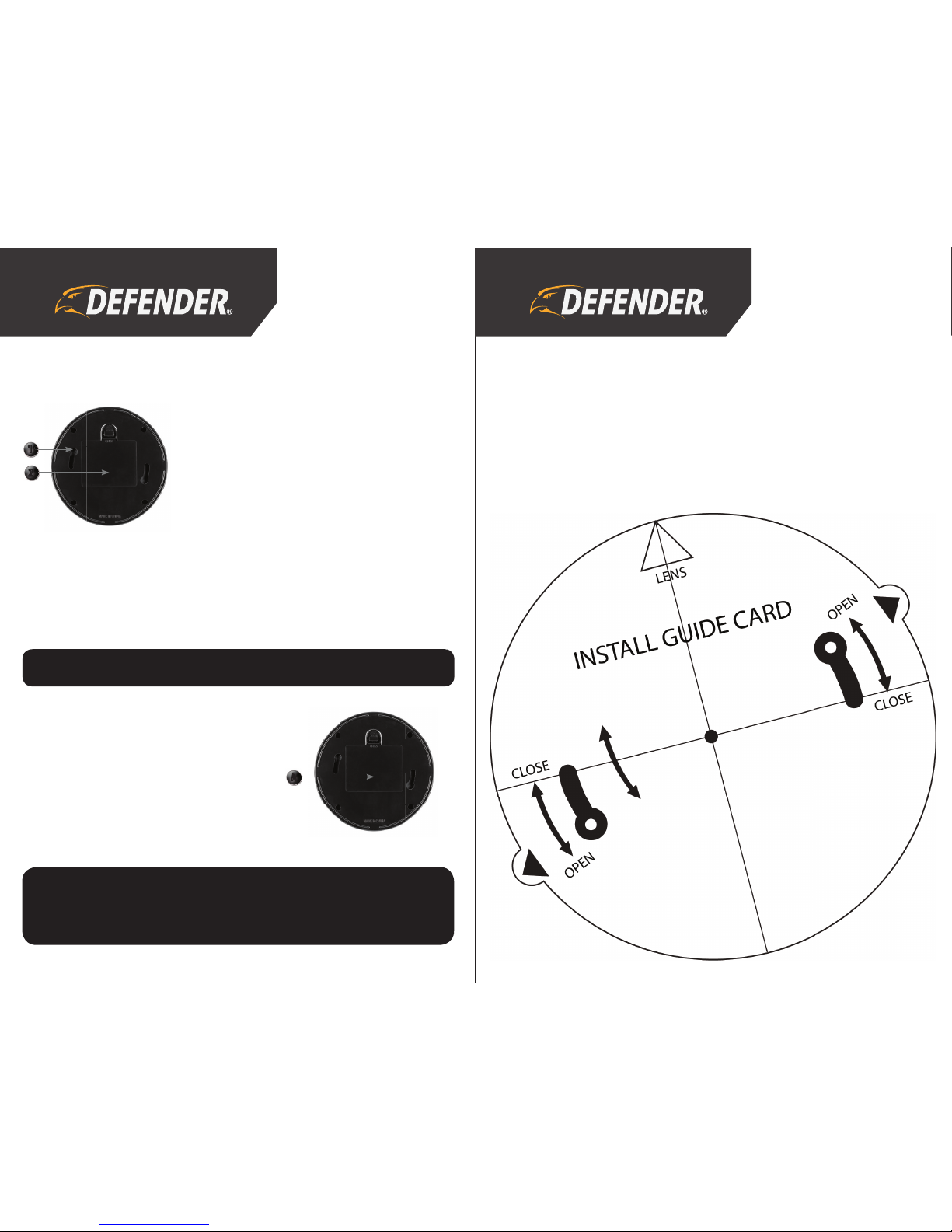
1. Using the Drilling Template below, mark the location where you want to mount the imitation camera.
2. Drill the necessary holes in the marked spots and insert the provided wall anchors into the holes. Tap
the anchors gently with a hammer until the anchor is ush with the wall.
3. Insert a screw into the wall anchor and tighten until the screw sticks out only about ½ inch.
4. Locate the wall mounting holes on the bottom of the camera and slide the holes over the screws on the
wall. Twist the imitation camera counterclockwise to secure it into place.
NOTE: Imitation cameras are commonly used in noticeable areas to deter thieves and vandals away
from a person’s property. The presence of a camera (functioning or not) may cause the intruders
to abandon their plans and move on to another location. We always recommend using imitation
cameras in conjunction with a functioning surveillance system for increased security.
A
Page 2

DISCLAIMER
This product does not function, and therefore record, like a real security camera. It is instead meant to deter
criminal activity. In order to avoid creating a false sense of security, imitation cameras should not be used in
public environments such as businesses and schools, unless the occupants are made aware of their existence.
DEFENDER® is not responsible or liable in any way for any damage, vandalism, theft or any other action that
may occur while a DEFENDER® product is in use by the purchaser. DEFENDER® does not endorse any DEFENDER®
products for illegal activities. We reserve the right to change models, conguration or specications without
notice or liability. Product may not be exactly as shown.
PRODUCT WARRANTY INFORMATION
Please visit our website at www.defender-usa.com
for information about your product’s warranty
We take quality very seriously. This is why all of our products come with a one year warranty from the original purchase date against
defects in workmanship and materials. If you have warranty or support issues please contact us using any of the following methods:
Support: www.defender-usa.com/support DEFENDER® USA DEFENDER® CANADA
Website: www.defender-usa.com 60 Industrial Parkway #Z64 4080 Montrose Road
Cheektowaga, NY Niagara Falls, ON
USA 14227 Canada L2H 1J9
Warranty Terms
1. Defender products are guaranteed for a period of one year from the date of purchase against defects in workmanship and
materials. This warranty is limited to the repair, replacement or refund of the purchase price at Defender’s option.
2. This warranty becomes void if the product shows evidence of having been misused, mishandled or tampered with contrary to
the applicable instruction manual.
3. Routine cleaning, normal cosmetic and mechanical wear and tear are not covered under the terms of this warranty.
4. The warranty expressly provided for herein is the sole warranty provided in connection with the product itself and no other
warranty, expressed or implied is provided. Defender assumes no responsibilities for any other claims not specically
mentioned in this warranty.
5. This warranty does not cover shipping costs, insurance, or any other incidental charges.
6. You MUST call Defender before sending any product back for repair. You will be sent a Return Authorization form with return
instructions. When returning the product for warranty service, please pack it carefully in the original box with all supplied
accessories, and enclose your original receipt or copy, and a brief explanation of the problem (include RA #).
7. This warranty is valid only in Canada and the continental U.S.
8. This warranty cannot be re-issued.
 Loading...