

Page 1
//////
RAGER-WPA-3.1 INSTRUCTIONS
4025 NW 36th St., Oklahoma City, OK 73112 • (405) 239-2800
DDAUDIO.COM
Page 2

//////
RAGER-WPA-3.1 INSTRUCTIONS
Thank you for purchasing a DD AUDIO® RAGER. All of our products are proudly
developed at our headquarters in Oklahoma City, USA where day in and day out
we dedicate ourselves to the mission of providing our customers with products that
meet or exceed our stringent standards of reliability and performance. All of our
products are painstakingly designed to provide years of listening pleasure.
We hope you enjoy using this DD AUDIO product, and if you have any questions
regarding setup or installation after reading this manual, please contact the DD
AUDIO technical support team.
SPECIFICATIONS
Watts RMS: ........................................................................................................................ 120
Watts Peak: ....................................................................................................................... 240
VCD (In): .............................................................................................................................. 1.5
Tweeter VCD (In): ................................................................................................................. 1
Frequency Response (Hz): .......................................................................................60 - 20k
Fs (Hz): ................................................................................................................................. 60
dBSPL: .................................................................................................................................. 97
Dimensions (Inches): ........................................................................................13 x 10 x 12
Dimensions (mm) .................................................................................330.2 x 254 x 304.8
Shipping Weight (Lbs): ...................................................................................................... 18
Shipping Weight (KG): ........................................................................................................ 8
Instructional Video RAGER-WPA-3.1:
https://youtu.be/A9PtGzMn89M
DD AUDIO / RAGER WPA-3.1 / P. 2
RAGER-WPA-3.1
Instructional
video
Page 3
//////
//
1
2
RAGER-WPA-3.1 INSTRUCTIONS
3
4
5
6
7
9
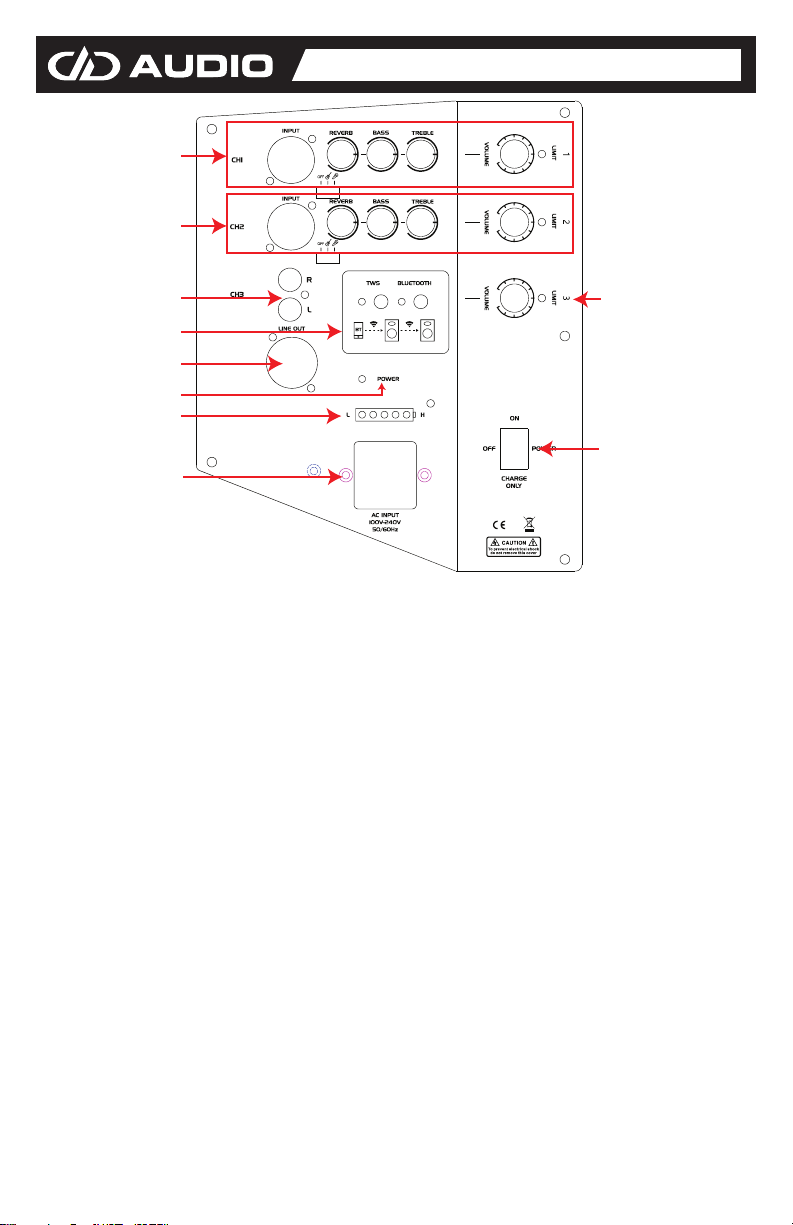
1 & 2: Channel 1 and 2:
INPUT: XLR or 1/4" (balanced signal) channel LINE IN.
REVERB: Use it to set the REVERB.
BASS: Use it to set the BASS.
TREBLE: Use it to set the TREBLE
VOLUME: Use it to set the VOLUME LEVEL.
LIMIT: Clipping Indicator Light. If light is blinking turn it down.
OFF/MIC/Guitar: Use it to switch between MIC and Guitar.
3. Channel 3: RCA input: Use it to input RCA connector.
4. Wireless Connectivity Section:
TWS: Pairing Switch
Bluetooth: Wireless Connectivity Switch
5. LINE OUT: XLR (balanced signal) channel LINE OUT.
6. POWER: Power indicator light.
7. Battery Indicator Light: When lit the device is ON.
8. Volume: Control Wireless and Ch 3 volume level.
LIMIT: Clipping Indicator Light. If light is blinking turn it down.
9. Power Supply Input Connector: Used to connect to Power cord.
10. Power Supply Switch: Turn OFF/ON or set to Charge mode.
8
10
DD AUDIO / RAGER WPA-3.1 / P. 3
Page 4
Continue Cutting The Bags
//////
RAGER-WPA-3.1 INSTRUCTIONS
CONNECT WIRELESSLY
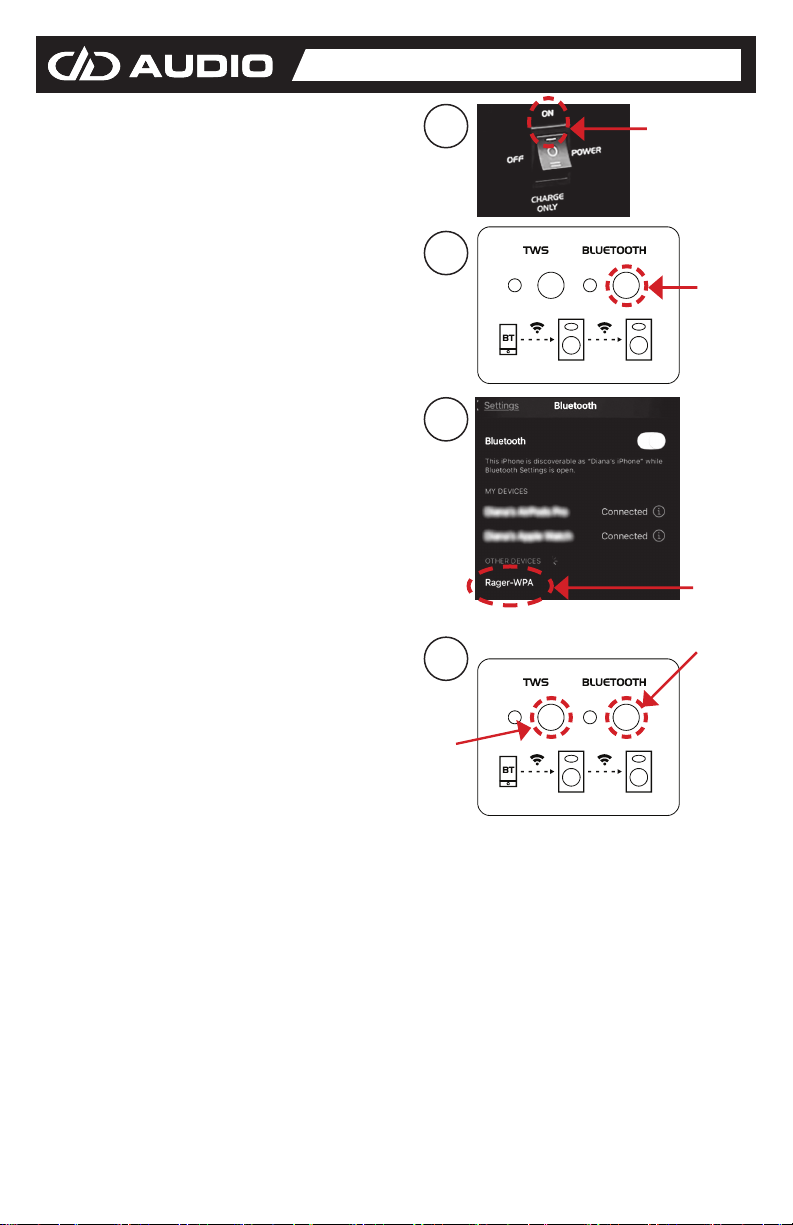
1. To connect wirelessly, turn on the
speaker. At this time go to the wireless
settings on your phone as well.
2. Press bluetooth button on the speaker
once and the blue light will start blinking.
3. Look on your phone's wireless settings
and wait for the RAGER-WPA to appear,
once it appears, select the Ranger-WPA
on your phone to connect to it. Once
connected he blue light will now be
constant.
4. To sync two RAGERS wirelessly,
power on both speakers, press the
bluetooth button on both, followed by
the TWS button on both. Wait for them
to sync. Once synced, each speaker will
announce which side is the left channel
and which side is the right channel
(ensure volume is turned up).
5. Once the same two speakers have been
paired, the next time you want to pair
them, make sure both speakers are
on and all you need to do this time is
push the bluetooth button once on both
speakers to sync. Once synced, each
speaker will announce which side is the
left channel and which side is the right
channel (ensure volume is turned up).
1
2
3
1st
4
2nd
DD AUDIO / RAGER WPA-3.1 / P. 4
 Loading...