

Page 1
Quick Reference Guide
W W W. D A V ID C L A R K. CO M
Page 2
T H A N K Y O U . . .
Thank you for purchasing the DC PRO-X2
Congratulations on your purchase of the
most technologically advanced electronic
noise-cancelling headset available. As with
all of our products, DC PRO-X2 Series
Electronic Noise Cancelling Headsets are
backed by extraordinary customer service
and support.
David Clark Company assumes full
responsibility for the quality and performance
of our products. We are committed to a
policy of service whereby we will respond
in a prompt and positive manner to any
question or issue regarding one of our
products.
David Clark Company products have set
the standards of performance and excellence for pilots throughout the world. Your
new DC PRO-X2 continues this legacy. We
have earned a reputation for excellence; we
intend to keep it by continuing to deserve
your confidence.
2
WWW.DAVIDCLARK.COM
Richard M. Urella, President
Page 3
H Y B R I D E N C T E C H N O L O G Y
Hybrid Electronic Noise-Cancellation Technology
HYB RI D
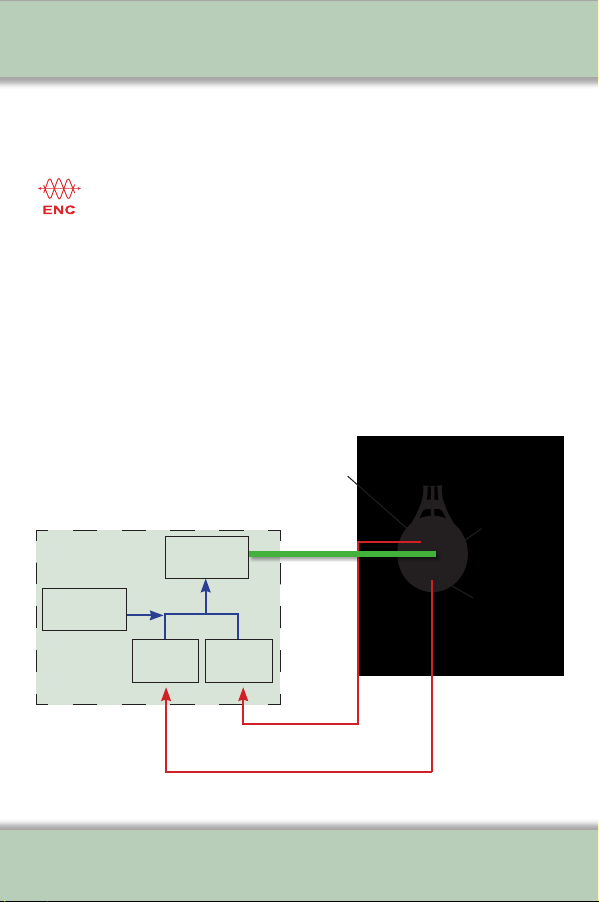
Your DC PRO-X2 headset features leading-edge Hybrid
Electronic Noise-Cancelling Technology (ENC) with feed-
forward and feed-back technology for superior active noise
reduction. Feed-forward noise cancelling is accomplished through
an exterior microphone in the ear dome that is isolated from the
speaker. The exterior microphone acquires the noise before it gets
to the ear. Feed-back noise cancelling is performed by the internal
microphone placed near the speaker. The signals are then inver ted
to produce a reverse, ‘anti-noise’ signal. This hybrid technology
results in unsurpassed active noise reduction performance.
External
Microphone
Cancellation Processor
Bluetooth &
Audio DSP
Amplifier
Inversion
Circuit
Inversion
Circuit
External Noise Signal
Internal Noise Signal
Anti-Noise
Signal
WWW.DAVIDCLARK.COM
Internal
Speaker
Internal
Microphone
3
Page 4
H E A D S E T
F E A T U R E S
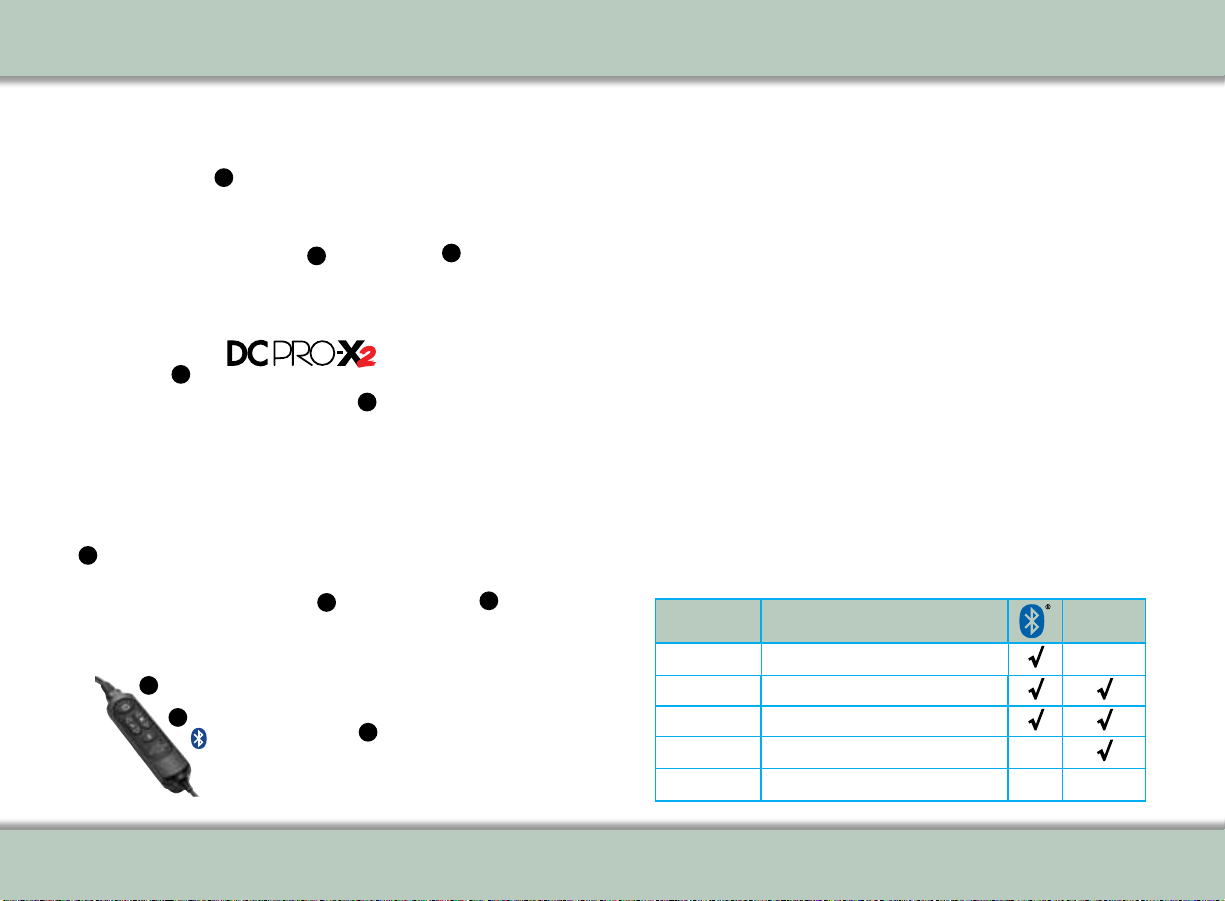
DC PRO-X2 Features
Approved
FAA TSO-C139a
Patent Pending
6
7
Control
Module
2
4
10
Bluetooth
DC PRO-X2 Features
Technologically Advanced. Intelligently Designed.
1. Ultra lightweight, yet rugged alloy headband and suspension
2. Fully adjustable suspension assembly for personalized comfort
®
3
1
3. Outlast
4. Swivel hinge stirrups disperse clamping pressure for secure yet comfortable fit
5. Plush, ‘rest on ear’, Dura-Stitched leatherette ear seals reduce heat build up and
6. Hybrid ENC technology for best-in-class active noise attenuation
7. Digital Signal Processing (DSP) Technology provides high-fidelity audio for supe-
5
8. M-5B Electret Microphone with enhanced noise cancelling
9. Full flex boom for precise microphone placement
10. Bluetooth
11. Collapsible design for compact storage in David Clark headset bag
DC PRO-X2 MODELS
98
®
11
technology, heat-absorbing head pad with breathable, vented design
enhance comfort
rior communications and music listening
®
wireless technology (on selected models) provides seamless
integration for connecting to cell phones, MP3, tablets or other personal
electronic devices
Model Part
Number
43105G-01
43105G-02
43105G-04
43105G-07
43105G-10
Description
ENC Headset-Mic., Dual Plug, BT
ENC Headset-Mic, 6-Pin Panel Mount, BT
ENC Headset-Mic., 5-Pin XLR, BT
ENC Headset-Mic, 5-Pin XLR
ENC Headset-Mic, Dual Plug
Aircraft
Powered
√
√ √
√ √
√
4
WWW.DAVIDCLARK.COM
WWW.DAVIDCLARK.COM
5
Page 5

C O N T R O L M O D U L E F E A T U R E S
Control Module - Quick Reference Guide
Power On/Off
Volume
Controls
Bluetooth
The Control Module is powered by two
(2) ‘AA’ batteries for up to 50 hours of
continuous use.
Mono/Stereo
Switch
Auto Shutoff
Switch
Control Module - Quick Reference Guide
Power
Press and hold for 2 seconds to turn
unit on or off:
• Solid Yellow: Initializing
• Flashing Green: On
• Flashing Red: On, Low Batteries
Power (LED 'Dark' Mode)
• First, press and hold Bluetooth®
button, then press and hold the
Power button
• Power and Bluetooth
®
LED will turn
ON yellow
• Release the Power ON button
• Continue to hold Bluetooth
®
button
until yellow Power ON LED turns
OFF
• Release Bluetooth
®
button
• Control Module is now in 'Dark'
mode (no ashing Power LED).
Note that 'Low Batteries' red flashing LED
will still function in 'Dark' mode.
Volume Up/Down
• Adjust listen level volume up
or down
•Left/right adjustments are
independent
• Only usable when power is ON;
Levels default to max when unit
is OFF
Mono/Stereo
• Set per type of intercom/audio
panel (factory default is “Mono”)
Enhanced Auto Shutoff
The factory default Auto Shutoff
position is “OFF” (See page 8, "Control
Module Operation" for Enhanced Auto
Shutoff details).
Bluetooth® Wireless Technology
Press and hold for 2 seconds to turn on
Bluetooth
®
Wireless Technology:
•Flashing Purple: Initializing/Mute
Disabled
•Flashing Green: On, Not Connected
•Flashing Yellow: Pairing Mode
•Flashing Blue: Paired and
Connected/Mute Enabled
To Pair:
•Turn Bluetooth
Technology on (flashing green)
•Press Bluetooth
Technology button to enter
pairing mode (flashing yellow)
•Search for devices from your
phone/device
•Select DC PRO-X2 and initiate
pairing on your device
•If prompted for PIN code,
enter 0 0 0 0
NOTE: Bluetooth wireless technology
is not available on Model Part Numbers
43105G-07 and 43105G-10
®
Wireless
®
Wireless
6
WWW.DAVIDCLARK.COM
WWW.DAVIDCLARK.COM
7
Page 6

C O N T R O L M O D U L E
Control Module Operation
1. Fail Safe - if batteries are dead or the unit is turned off, microphone
and earphones will function when connected to aircraft intercom.
2. Enhanced Auto Shutoff
DC PRO-X2 Series headsets are shipped with the Enhanced Auto Shutoff feature set
to the 'OFF' position. Enhanced Auto Shutoff can be enabled/disabled via a small
switch located under the batteries (see Quick Start diagram page 6).
When Enhanced Auto Shutoff is set to 'OFF' (factory default), ANR headset power is
manually controlled using the Power Button. When Enhanced Auto Shutoff is set to
'ON', at turn-on of the headset using the Power Button, the headset will function
as follows:
A. If the headset is connected to the aircraft audio panel, the headset will
automatically turn off after 5 minutes under the following conditions:
• aircraft audio panel is turned off,
• headset is disconnected from the aircraft panel, or
• an active cell phone conversation is concluded.
B. If the headset is not connected to the aircraft audio panel, headset power is
controlled by the Power Button, allowing continuous use for cell phone
conversation or streaming audio.
5. Cell Phone Interface
• Use of the Bluetooth® wireless technology cell phone feature while plugged into
aircraft intercom is not recommended and may violate
applicable regulations
• All intercom parties hear cell phone outbound audio but cell phone
recipient’s voice is heard only by the headset connected/paired to
the cell phone
• Sidetone is always present
• Briey pressing the Bluetooth® wireless technology button will
answer or terminate a call (if supported by the cell phone)
• Cell phone receive audio is not muted when receiving a transmission
from ATC or intercom
8
WWW.DAVIDCLARK.COM
Page 7

C O N T R O L M O D U L E
Control Module Operation (cont.)
6. Music Listening
The Bluetooth® wireless technology feature allows you to listen to your
favorite music when paired with cell phones, MP3, tablets, or other
compatible devices. When listening to music briefly pressing the Bluetooth
button will enable/disable muting:
• Flashing blue (default): When receiving transmission from ATC or
intercom, music will mute to prioritize communication. Once transmission
is completed, music audio will gradually return to the previously set
volume level. A falling two-tone chime is heard when entering this mode.
• Flashing purple: Music will not mute when transmission is received from
ATC or intercom. A rising two-tone chime is heard when entering
this mode.
Each time the DC PRO-X2 is powered 'ON', this setting will revert to the
default (muting) mode.
For DC PRO-X2 Aircraft-Powered Models Only
• Power is provided by the aircraft when using the 6-pin Redel®
connector, or 5-pin XLR connector (11-30 VDC). Please note: Not all
aircraft with XLR-5 connector provide power at pin 5. The batteries
provided with the headset are only required when no power is available at
pin 5, or when the headset is disconnected from the aircraft panel.
• When powered by aircraft, power LED will be solid green.
• If external power is lost, headset will revert to battery power.
• Headset will automatically turn on when external power is applied, without
using the Power Button on the control module.
WWW.DAVIDCLARK.COM
9
Page 8

F I T T I N G
Proper Fitting
The advanced suspension system of the DC PRO-X2 Series is
designed for a simple and comfortable fit. Proper fit is necessary for
maximum effectiveness. The headset should be worn so that the head
pad lightly touches the top of the head. Adjust the sliding assembly
on each side as necessary (see Fig. 1), keeping slide positions
equal on either side, until the center of the ear phone aperture
within the ear seal is directly aligned with the ear canal.
The ultra-soft memory foam of the ear seal will conform to the
contours of the ear to provide an adequate seal. While in the presence
of noise, turn on the ANR circuitry and then adjust headset and ear
seal position for lowest noise heard, allowing optimum performance
of the Hybrid ENC technology for communications and music listening.
To adjust microphone placement, adjust boom up/down and in/out by
rotating and flexing the boom as necessary. Ideal microphone placement is 1/8” from the lips, as this will provide maximum intelligibility
and ambient noise rejection.
Fig. 1
10
WWW.DAVIDCLARK.COM
Page 9

A I R C R A F T - P O W E R E D M O D E L S
(Aircraft Powered/6-Pin)
The DC PRO-X2 Aircraft Powered Model
(P/N 43105G-02) provides a 6-pin
®
Redel
connector that is compatible with
aircraft that feature a 6-pin receptacle on
the aircraft panel.
(Aircraft Powered/5-Pin XLR)
The DC PRO-X2 Aircraft-Powered Models
(P/N 43105G-04, P/N 43105G-07)
These models receive power directly
from the aircraft, when power is provided
at pin 5 of the XLR connector.
(Note: Not all aircraft with XLR-5
connectors provide power at pin 5.
The batteries provided with the headset
are only required when no power is
available at pin 5, or when the headset is
disconnected from the aircraft panel.)
WWW.DAVIDCLARK.COM
11
Page 10

A C C E S S O R I E S
Replaceable Parts Removal/Installation
M-5B Microphone (P/N 09168P-85)
•To remove microphone: Gently pull off foam cover. Grasp
microphone firmly and pull straight out.
•To install microphone: Align keyway on microphone with keyway on
boom. “TALK” should be inward towards the user’s face. Push until
microphone snaps into place.
Microphone Foam Cover (P/N 40062G-02)
•Slide foam cover over top of microphone and secure with
‘O’ ring (included).
Leatherette Ear Seals, Pair (P/N 15976P-03)
•To remove: Gently pull off.
•To install : Stretch earseal over lip of dome until completely seated
on dome.
Outlast® Technology Head Pad (P/N 15977P-04)
•To remove: Gently pull off.
•To install : Align head pad with headband assembly and push
all around the perimeter to engage hook-and-loop fasteners.
Control Module Mounting Clip (P/N 41068G-03)
•Place Control Module into mounting clip and snap in place.
•Use clip to attach Control Module to apparel or any convenient
location within the aircraft.
Customer Service and Support
David Clark Company aviation headsets are covered by a 5-year warranty. We make
every effort to prevent problems and the need for repairs. In the unlikely event that
you experience a problem, David Clark Company qualified representatives are available to answer your questions and provide the best customer service in the industry.
Many repairs are covered under warranty. Contact Customer Service:
Tel. 800-298-6235 • 508-751-5800 (outside the USA)
Visit our website at www.davidclark.com
WWW.DAVIDCLARK.COM
12
Page 11

W W W. D A V ID C L A R K. CO M
C O M P L I A N C E
DC PRO-X2 SERIES - Environmental Test Summary
13
WWW.DAVIDCLARK.COM
Page 12

C O M P L I A N C E
W W W. D A V ID C L A R K. CO M
FCC Compliance Statement
This device complies with part 15 of the FCC Rules. Operation is subject to the following two conditions:
- This device may not cause harmful interference, and
- This device must accept any interference received, including inter ference that may cause undesired operation.
Changes and modifications not expressly approved by David Clark Company, Inc. can void your authority to operate this
equipment under Federal Communications Commission rules.
This equipment has been tested and found to comply with the limits for a Class B digital device, pursuant to part 15 of the
FCC Rules. These limits are designed to provide reasonable protection against harmful interference in a residential installation.
This equipment generates, uses and can radiate radio frequency energy and, if not installed and used in accordance with the
instructions, may cause harmful interference to radio communications. However, there is no guarantee that interference will
not occur in a particular installation. If this equipment does cause harmful inter ference to radio or television reception, which
can be determined by turning the equipment off and on, the user is encouraged to try to correct the inter ference by one or
more of the following measures:
- Reorient or relocate the receiving antenna.
- Increase the separation between the equipment and receiver.
- Connect the equipment into an outlet on a circuit different from that to which the receiver is connected.
- Consult the dealer or an experienced radio/TV technician for help.
This device complies with Industry Canada license-exempt RSS standard(s). Operation is subject to the following
two conditions:
1. This device may not cause harmful interference, and
2. This device must accept any interference received, including interference that may cause undesired operation of the device.
Important Safety Information
• Make sure portable devices do not inter fere with the aircraft's navigation and communication systems. Reference
FAA AC 91.21-1D or later revision for installation approval.
• It is the pilot's responsibility to ensure that portable devices do not inter fere with the aircraft's navigation and
communication systems, as well as to deter mine if the portable device is suitable for use with the headset.
• Do NOT attempt to repair this headset. Contact David Clark Company for specic care, return and shipping instructions
(see page 12 for contact information).
FAA Technical Standard Order
The David Clark Company, DC PRO-X2 family of headsets, PN 43105G-( ) are approved to TSO and ETSO C139a and are
marked to indicate this approval. This family of headsets has been designed to perform and withstand exposure to the
environmental conditions summarized on page 13.
This article meets the minimum per formance and quality control standards required by the technical standard order (TSO).
Installation of this article requires separate approval. Reference FAA AC 91.21-1D, or later version, for installation guidance.
This article may contain the non-TSO function of Bluetooth
compliance.
The conditions and tests required for TSO approval of this article are minimum per formance standards. Those installing this
article either on or within a specific type or class of aircraft must deter mine that the aircraft installation conditions are within
the TSO standards which include any accepted integrated non-TSO functions. TSO articles and any accepted integrated
non-TSO function(s) must have separate approval for installation in an aircraft. The article may be installed only according to
14 CFR part 43 or the applicable airwor thiness requirements (see table on page 13).
French version of RSS-Gen, Sec. 7.1.3
Le présent appareil est conforme aux CNR d’Industrie Canada applicables aux appareils radio exempts de licence.
L’exploitation est autorisée aux deux conditions suivantes: (1) l’appareil ne doit pas produire de brouillage, et (2) l’utilisateur
de l’appareil doit accepter tout brouillage radioélectrique subi, même si le brouillage est susceptible d’en compromettre
le fonctionnement.
FAA TSO-C139a Approved
Patent Pending
© 2019 David Clark Company Incorporated
Green headset domes are a David Clark
Company Trademark.
w w w . d a v i d c l a r k . c o m
®
. Bluetooth® does not interfere with this article's TSO-C139a
An Employee Owned
American Company
19604P-70 (6/19)
 Loading...