

Page 1
Quick Start Guide
X-NUCLEO-OUT10A1
Industrial digital output expansion board based on IPS161HF for
STM32 Nucleo
Page 2
Quick Start Guide Contents
2
X-NUCLEO-OUT10A1: Industrial digital output expansion board
Hardware and Software overview
Setup & Demo Examples
Documents & Related Resources
STM32 Open Development Environment: Overview
Page 3
Industrial digital output expansion board
Hardware Overview
3
X-NUCLEO-OUT10A1 Hardware
Description
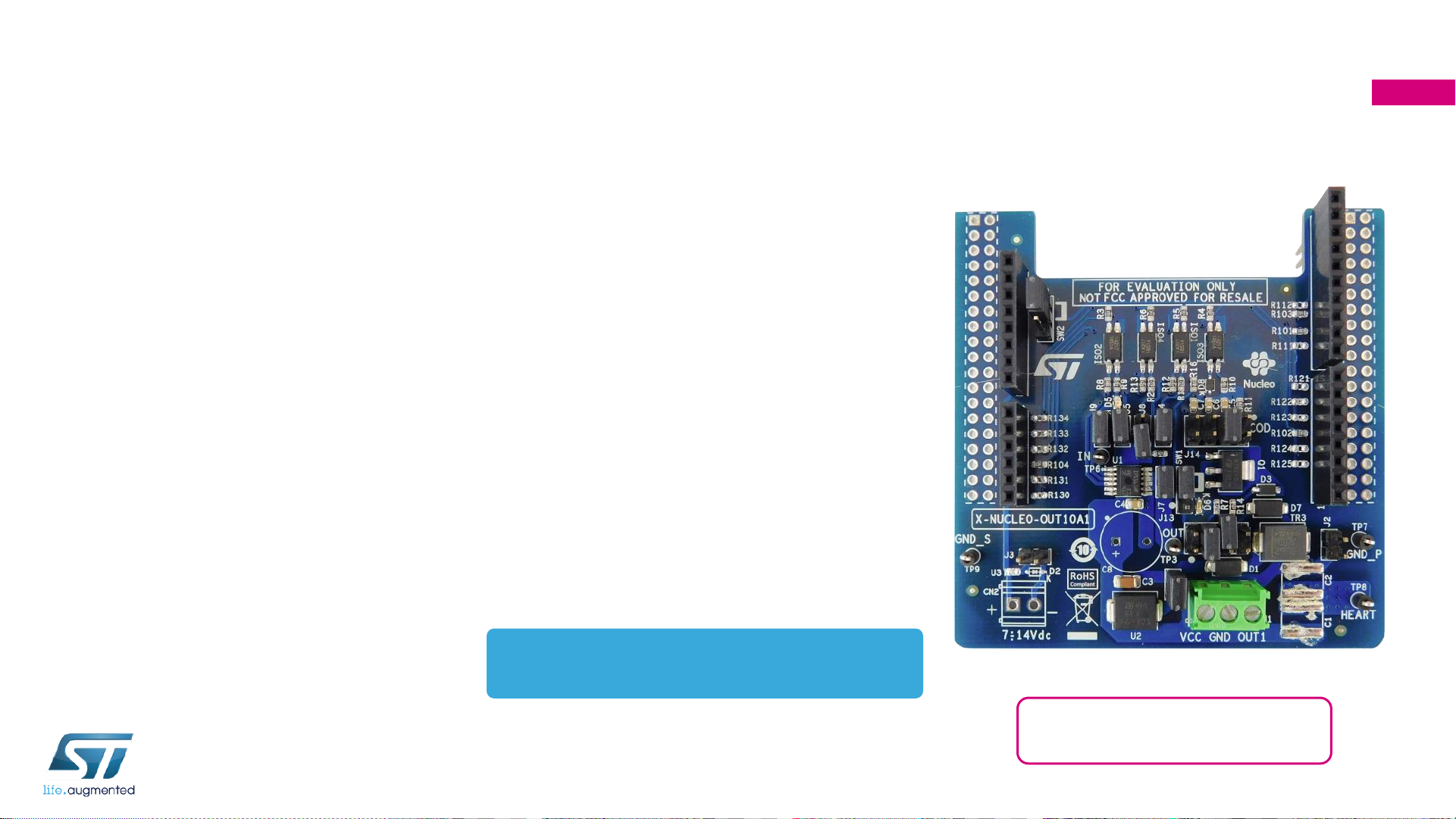
• The X-NUCLEO-OUT10A1 is an evaluation board basedon
the IPS161HF 60V/0.5A single channel high side switch
with embedded diagnostic (Open Load, Over-Temperature,
Over-Load) and protection against overheating and
overheating.
• The X-NUCLEO-OUT10A1 interfaces with the
microcontroller on the STM32 Nucleo via 3 kV optocouplers
driven by GPIO pins and Arduino™ UNO R3.
• The expansion board should be connected to either a
NUCLEO-F401RE or NUCLEO-G431RB development
board, and can also be stacked with another X-NUCLEOOUT10A1 or X-NUCLEO-OUT08A1.
• Two X-NUCLEO-OUT10A1 expansion boards allows you to
evaluate a dual channel digital output module with 0.5 A
capability each, or a 0.5 A single channel safety digital
output module. In the second scenario, the first shield
output is connected to the supply of the second one.
Dedicated on-board hardware can be enabled or disabled
to activate fast discharge of high capacitive loads, output
voltage sensing and additional surge pulse output line
protection.
• The X-NUCLEO-OUT10A1 connected to the X-NUCLEO-
OUT08A1 allows you to evaluate a dual channel digital
output module with output current capability of 0.5 A and 2
A, respectively.
Key Products on board
IPS161HF:
0.5A Single High Side Smart Power Solid State Relay
Latest info available at www.st.com
X-NUCLEO-OUT10A1
Features
• Based on the IPS161HF
• Normal operating Voltage range12to 33 V
• Extended voltage operating range (J1 open) up to 60 V
• Supply rail reverse polarity protection
• Output load capability up to 0.7A
• Output propagation delay at start-up < 60us.
• Compliance with IEC61000-4-2, IEC61000-4-3, IEC61000-4-5
• Output ON/OFF Status Green LED
• Fault Diagnostic Red LED
• Configurable Cut-off intervention time
• 3 kV galvanic isolation barrier between logic and process sides
• Equipped with Arduino™ UNO R3 connectors
• Wide application development potential in STM32 Nucleo
development environment
• Ready for Safety Digital Output Architecture
• CE certified
• RoHS and China RoHS compliant
Page 4
Industrial digital output expansion board
Software Overview
4
X-CUBE-OUT8 Software Description
• The X-CUBE-OUT8 expansion software package for
STM32Cube runs on the STM32 and includes a driver
for the IPS161HF.
• The software provides an affordable and easy-to-use
solution for the development of single and dual channel
digital output modules, letting you easily evaluate the
IPS161HF communication and industrial load driving
features.
• The expansion is built on STM32Cube software
technology to ease portability across different STM32
microcontrollers.
• The software comes with a sample implementation of the
driver running on the X-NUCLEO-OUT10A1 expansion
board connected to a NUCLEO-F401RE or NUCLEOG431RB development board.
• You can also perform evaluation of single channel digital
output module in P-P by connecting two X-NUCLEOOUT10A1 with the Output channel of the first connected
to the supply rail of the second.
Key features
• Complete software to build applications
for the IPS161HF single channel highside smart power solid state-relay
• GPIOs, PWMs and IRQs configuration
• Fault interrupt handling
• Sample implementation available on the
X-NUCLEO-OUT10A1 expansion board
when connected to a NUCLEO-F401RE
or NUCLEO-G431RB development
board
• Easy portability across different MCU
families, thanks to STM32Cube
• Free, user-friendly license terms
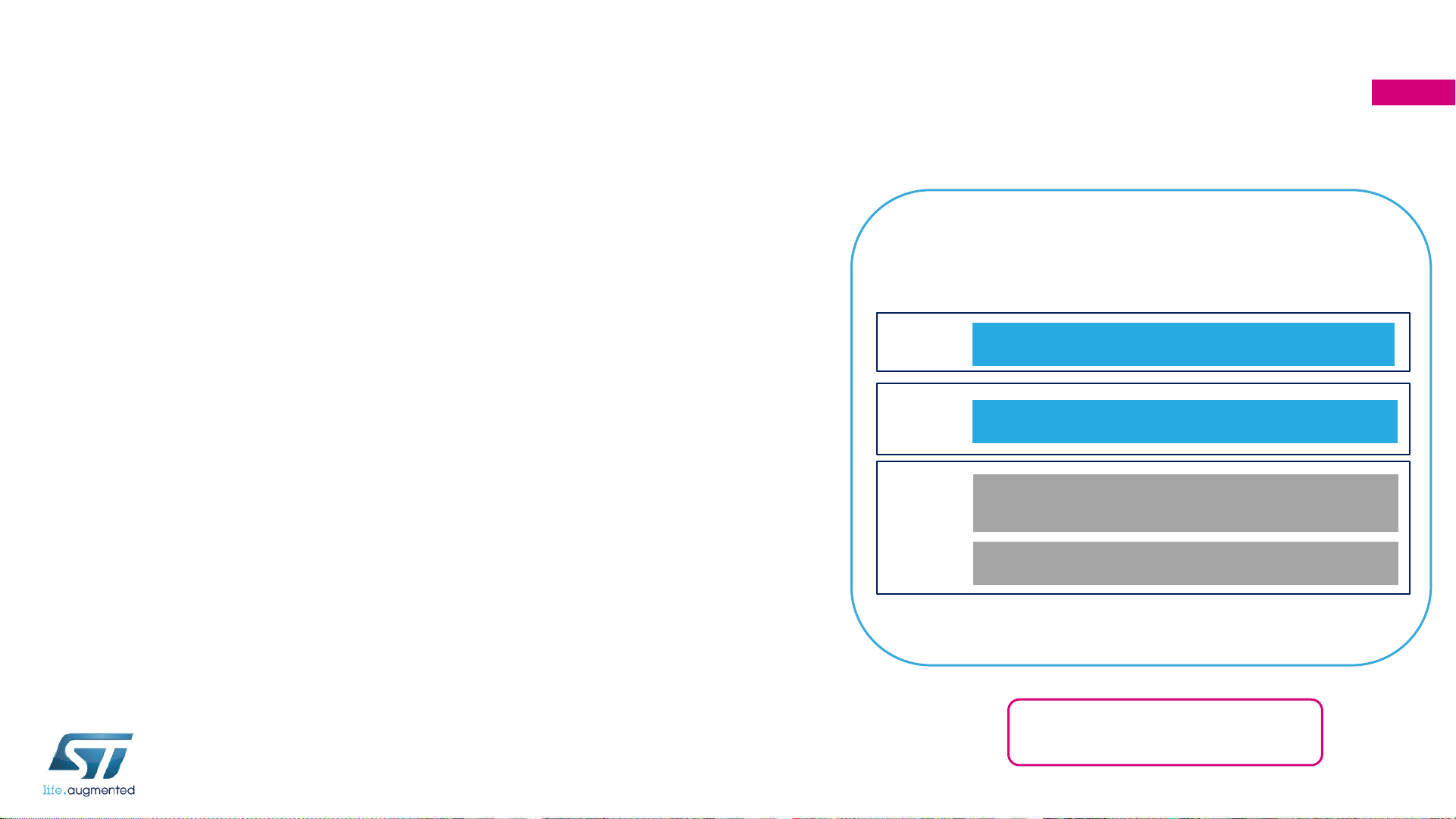
Hardware
Application
STM32Cube Hardware Abstraction Layer (HAL)
Hardware
Abstraction
STM32 Nucleo expansion boards
X-NUCLEO-OUT08A1, X-NUCLEO-OUT10A1
STM32 Nucleo development boards
NUCLEO-F401RE/G431RB
Smart Driving Example
Overall Software Architecture
Latest info available at www.st.com
X-CUBE-OUT8
Page 5

Quick Start Guide Contents
5
X-NUCLEO-OUT10A1: Industrial digital output expansion board
Hardware and Software overview
Setup & Demo Examples
Documents & Related Resources
STM32 Open Development Environment: Overview
Page 6

Setup & Demo Examples
HW prerequisites (1/2)
6
USB type A to
Mini-B cable
X-NUCLEO-OUT08A1 plugged on to a
compatible STM32 Nucleo board
• 1x STM32 Nucleo Industrial digital output expansion
board
(X-NUCLEO-OUT10A1)
• 1x STM32 Nucleo development board
(NUCLEO-F401RE or NUCLEO-G431RB)
• 1x USB type A to Mini-B cable (for NUCLEO-F401RE) or
1x USB type A to Micro-B cable (for NUCLEO-FG431RB)
• 1x Laptop/PC running Microsoft Windows™ 7 or above
• 1x external power supply at 24 V
X-NUCLEO-OUT08A1
NUCLEO-F401RE
USB type A to
Micro-B cable
NUCLEO-G431RB
Page 7

Setup & Demo Examples
HW prerequisites 2/2
7
The STM32F401RE can be supplied:
1. (DEFAULT) by USB cable of the STM32 Nucleo development board
a) CLOSE JP5 to U5V position on the STM32 Nucleo development board
2. By external supply of the X-NUCLEO-OUT10A1
b) Connect the external supply (from 7 to 12V) to CN2 of X-NUCLEO-OUT10A1
c) CLOSE JP5 to E5V position on the STM32 Nucleo development board
USB
JP5
The STM32G431RBT6U can be supplied:
1. (DEFAULT) by USB cable of the STM32 Nucleo development board
a) CLOSE JP5 to 5V_STLK position on the STM32 Nucleo development board
2. By external supply of the X-NUCLEO-OUT08A1
b) Connect the external supply (from 7 to 12V) to CN2 of X-NUCLEO-OUT08A1
c) CLOSE JP5 to 5V_VIN position on the STM32 Nucleo development board
USB
JP5
Page 8

Setup & Demo Examples
SW prerequisites
8
Execution of the example code
• X-CUBE-OUT8:
• The package contains the source code example (Keil,
IAR, STM32CubeIDE) based on NUCLEO-F401RE
and NUCLEO-G431RB
• Also, you can find the binary files of the example (one
for each of the supported Nucleo boards).
Evaluation by Graphical User Interface
• STSW-IFAPGUI
• Common GUI for IPS products.
• STSW-OUT8F4
• Demonstration binary file for NUCLEO-F401RE enabling
the GUI
• STSW-OUT8G4
• Demonstration binary file for NUCLEO-G431RB enabling
the GUI
Page 9

Quick start-up procedure
(see HW and SW prerequisites)
9
Execution of the example code
• Download the X-CUBE-OUT8 (.zip file) into a folder of your
Laptop/PC
• Connect the NUCLEO board and the X-NUCLEO-OUT10A1 by
Arduino connectors.
• Connect the USB cable between Laptop/PC and Nucleo board
• Select the example binary file according to your Nucleo board
(F401 or G431) and flash it (by your IDE, or by ST-Link Utility
or by STM32 Cube Programmer).
• Connect by CN1 the X-NUCLEO-OUT10A1 to a 24V power
supply and turn it on.
• Click on the blue button of the Nucleo board to switch between
the different pre-loaded driving modes of the output.
Evaluation by Graphical User Interface
• Download and install the latest version of the STSW-IFAPGUI
• Download the STSW-OUT8F4 or STSW-OUT8G4 according to
your Nucleo board (F401 or G431).
• Connect the NUCLEO board and the X-NUCLEO-OUT10A1 by
Arduino connectors.
• Connect the USB cable between Laptop/PC and Nucleo board
• Flash the demonstration binary file to your Nucleo board (F401
or G431) by your IDE, or by ST-Link Utility or by STM32 Cube
Programmer.
• Connect by CN1 the X-NUCLEO-OUT10A1 to a 24V power
supply and turn it on.
• Launch the STSW-IFAPGUI. The self recognition phase
checks the firmware running on the Nucleo board and then the
GUI starts
• Set your preferred duty cycle and PWM for the output driving
and check it on the application board.
Page 10

X-CUBE-OUT8
Start coding in just a few minutes with X-CUBE-OUT8
10
Download & unpack
Go to www.st.com/x-nucleo
www.st.com
1
X-CUBE-OUT8
Select
2
3
Generic Nucleo Docs
4
5
Open project example
Download and install (ST-
LINK/V2-1 USB driver, STM32
Cube Programmer)
X-NUCLEO-OUT10A1
IPS16xHF drivers
Application example
6
Modify and build application
Page 11

Documents & Related Resources
11
X-NUCLEO-OUT10A1:
• DB4176: Industrial digital output expansion board based on IPS161HF for STM32 Nucleo – Data Brief
• UM2716: Getting started with X-NUCLEO-OUT10A1 industrial digital output expansion board for STM32Nucleo – User Manual
• Gerber files, BOM, Schematic
X-CUBE-OUT8:
• DB4178: Industrial Digital Output software expansion for STM32Cube – Data Brief
• UM2707: Getting started with the X-CUBE-OUT8 industrial digital output software expansion for STM32Cube – User Manual
• Software set-up file
STSW-OUT8F4:
• DB4179: Demonstration firmware for NUCLEO-F401RE enabling STSW-IFAPGUI on X-NUCLEO-OUT08A1 and X-NUCLEO-OUT10A1
expansion boards– Data Brief
STSW-OUT8G4:
• DB4180: Demonstration firmware for NUCLEO-G431RB enabling STSW-IFAPGUI on X-NUCLEO-OUT08A1 and X-NUCLEO-OUT10A1
expansion boards– Data Brief
STSW-IFAPGUI:
• DB3775: Graphical user interface for the industrial IPS evaluation boards based on STM32 Nucleo – Data Brief
• UM2509: STSW-IFAPGUI, common graphical user interface for the expansion boards of Intelligent Power Switches – User Manual
All documents are available in the DESIGN tab of the related products webpage
Consult www.st.com for the complete list
Page 12

Quick Start Guide Contents
12
Setup & Demo Examples
Documents & Related Resources
STM32 Open Development Environment: Overview
X-NUCLEO-OUT10A1: Industrial digital output expansion board
Hardware and Software overview
Page 13

STM32 Open Development Environment
Fast, affordable Prototyping and Development
13
• The STM32 Open Development Environment (ODE) consists of a set of stackable boards
and a modular open SW environment designed around the STM32 microcontroller family.
Function Packs
(FP)
STM32Cube
development software
STM32 Nucleo
expansion boards
(X-NUCLEO)
STM32 Nucleo
development boards
STM32Cube
expansion software
(X-CUBE)
 Loading...