

Page 1
Quick Start Guide
X-LINUX-NFC5
Linux® driver for the ST25R3911B high performance
NFC frontend
Version: 1.0
Date: Oct.30, 2020
Page 2
Quick Start Guide Contents
1
X-LINUX-NFC5: Linux® driver for the ST25R3911B high performance
NFC frontend overview
2
Setup & Demo Example
Documents & Related Resources
3
STM32 MPU OpenSTLinux Software Expansion Package Overview
2
Page 3
Software Description
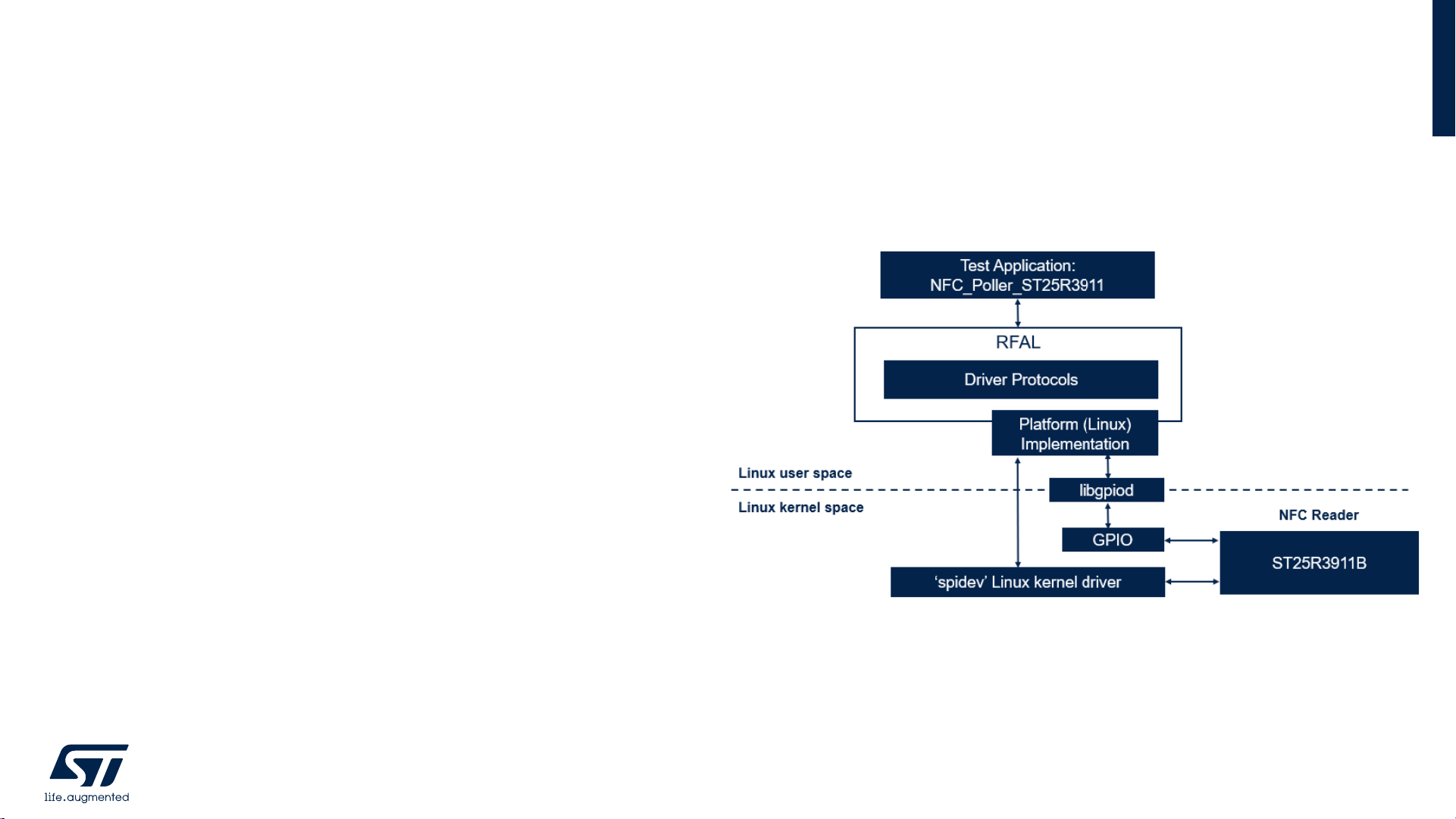
• X-LINUX-NFC5 is a software expansion package
developed to demonstrate RFAL (Radio Frequency
Abstraction Layer) library for NFC based applications on
STM32MP157C-DK2 using ST25R3911B NFC device
• UID and NFC tag type is displayed on screen when the
tag is paced in range of X-NUCLEO-NFC05A1 board
antenna.
• Demo application detect NFC Tag types such as NFC-A,
NFC-B, NFC-V and other types supported by RFALlibrary
• The package is easy to port across different Linux based
platforms with compatible hardware interface.
X-LINUX-NFC5
Software Overview
3
Page 4
Hardware Description
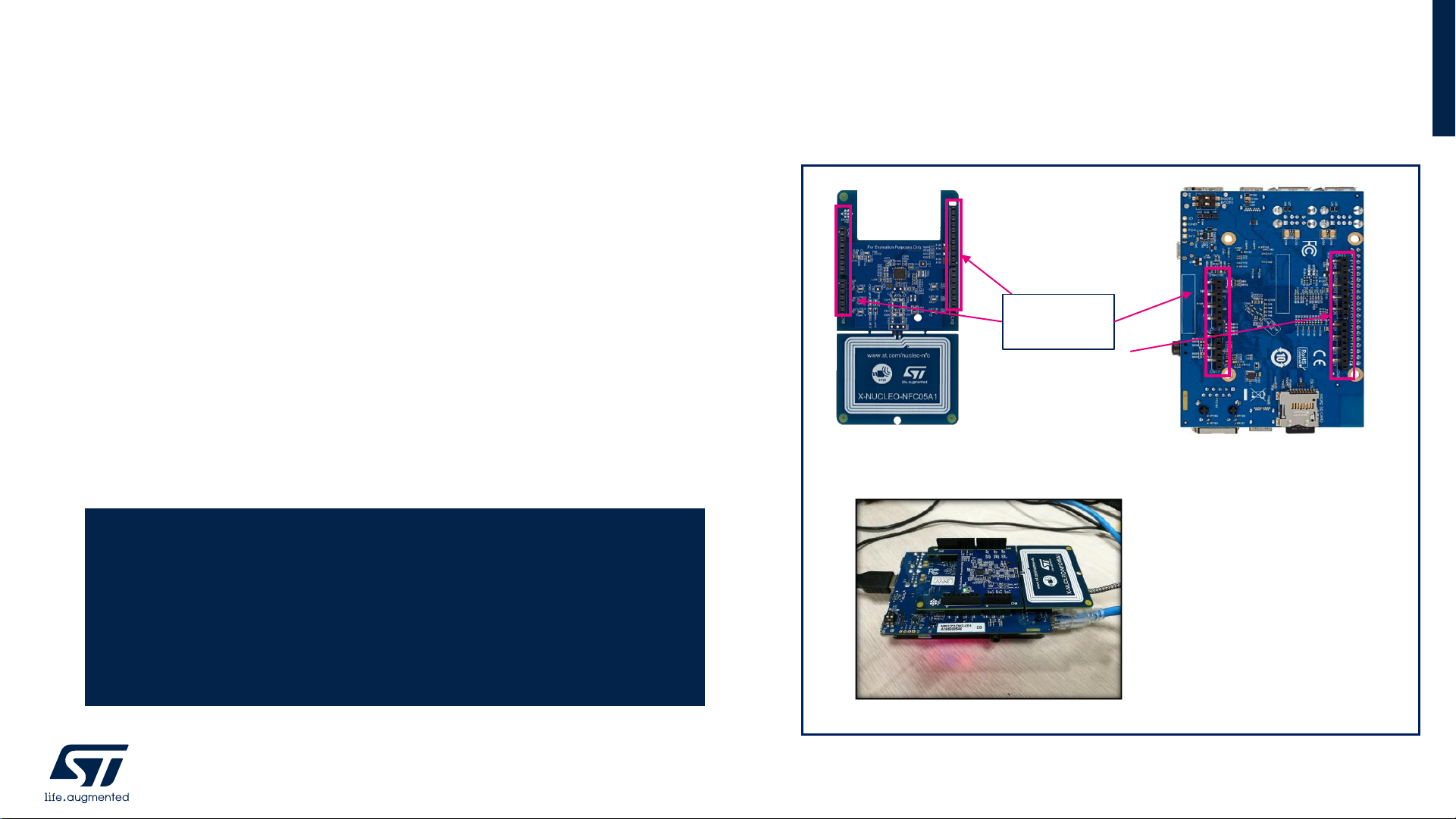
• X-NUCLEO-NFC05A1 is an NFC card reader expansion
board based on ST25R3911B for STM32MP1, STM32 and
STM8 based platforms
• STM32MP157C-DK2 Discovery kit leverages the
capabilities of STM32MP1 series microprocessors to allow
users easily develop applications using STM32 MPU
OpenSTLinux distribution software
X-LINUX-NFC5
Hardware Overview
4
X-NUCLEO-NFC05A1
board plugged over
STM32MP157C-DK2
View of connectors
on the board
Arduino
connectors
STM32MP157C-DK2
X-NUCLEO-NFC05A1
Key Products on board
STM32MP157C
Microprocessor
ST25R3911B
High performance HF reader / NFC initiator
Page 5

Quick Start Guide Contents
1
X-LINUX-NFC5: Linux® driver for the ST25R3911B high performance
NFC frontends overview
2
Setup & Demo Example
Documents & Related Resources
3
STM32 MPU OpenSTLinux Software Expansion Package : Overview
5
Page 6
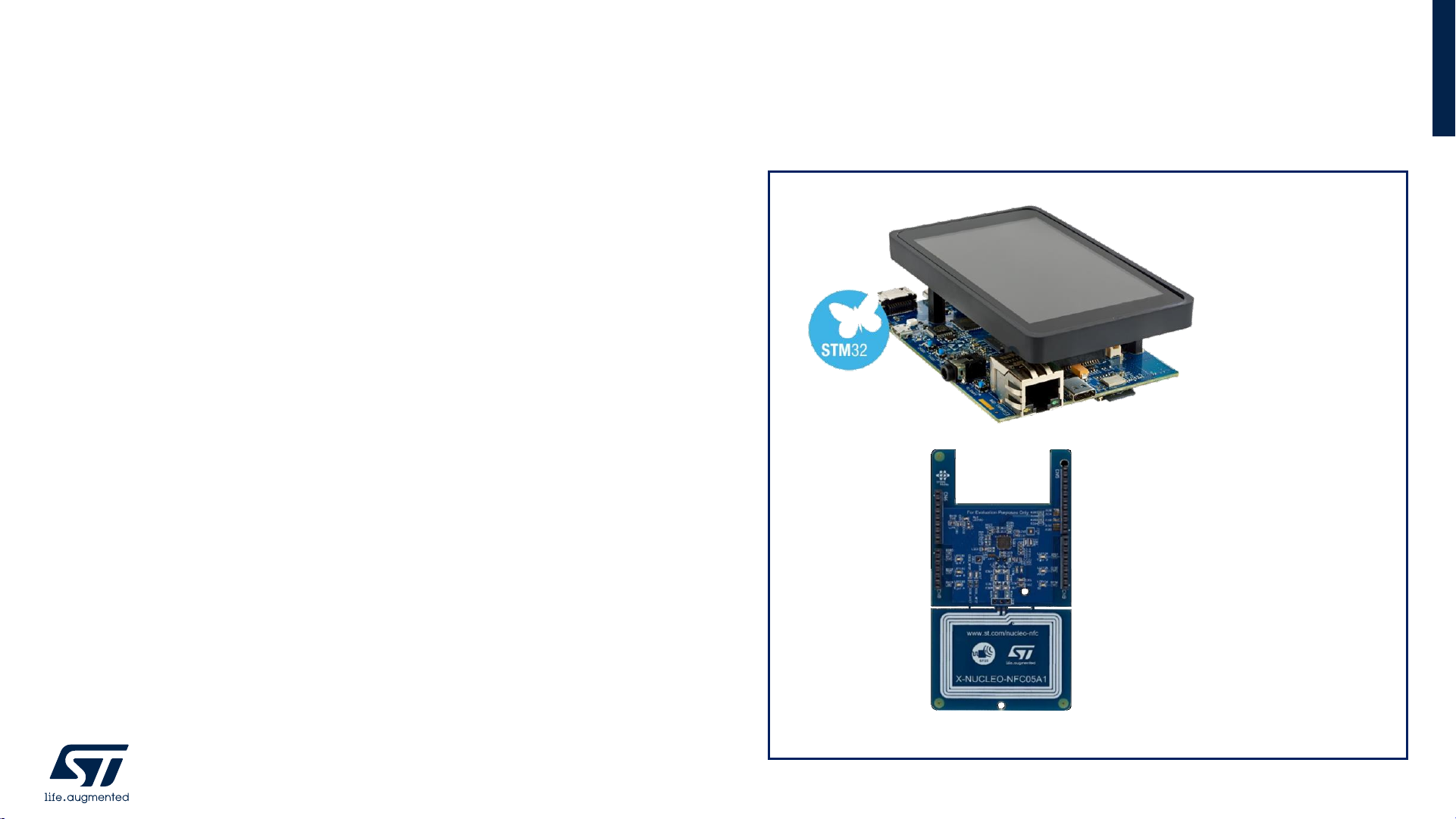
Hardware requirements
• 1x STM32MP157C-DK2 board (Discovery Kit)
• 1x X-NUCLEO-NFC05A1 (expansion board for
ST25R3911B)
• 1x Linux - Laptop/PC (Ubuntu 16.04 LTS or higher)
• 1x USB Type Ato micro USB cable
• 1x USB PD compliant 5V 3A power supply
• 1x cable with USB-Type C to connect STM32MP1 with PC
• micro SD card ( minimum 4GB )
Setup & Demo Example
Hardware Pre-requisites
6
STM32MP157C-DK2
(Discovery Kit)
X-NUCLEO-NFC05A1
Page 7

Software requirements
• Boot the Discovery Kit with Starter Package. Please refer
to instructions at wiki page Getting Started with
STM32MP157C-DK2 baord
• Download the X-LINUX-NFC5 software package from
www.st.com (Link)
• Follow instructions on wiki page to copy the pre-built
binaries and device tree blob to correct locations (or build
using Developer Package and source code of application),
restart the Discovery Kit and run Demo application.
Wiki page link : X-NUCLEO NFC05A1 expansion board
• Remote terminal applications such as Tera-Term or
Minicom can be used to access the board or transfer files.
Setup & Demo Example
Software Pre-requisites
7
Snapshot of running application on Discovery Kit
Page 8

• Boot the STM32MP157C-DK2 board (Discovery Kit) with Starter Package. Please refer to instructions at this wiki page link.
• Download the X-LINUX-NFC5 software package from the www.st.com (Link)
• Connect to Discovery Kit via USB-VCOM port using any appropriate tool [Baud 115200]. To find the COM port number,
check device manager for enumeration similar to below snapshot. Refer slide #10 to know steps for transferring file from
development machine to Discovery Kit using Tera-Term.
• Transfer the below files to respective locations on board using Tera-Term (or any alternate method) –
Setup (1/3)
Installation Steps
8
Downloaded File
Location in DK2 Board
STM32MP157C
-DK2_DeviceTree/Binaries/stm32mp157c-dk2.dtb
/boot/
NFCPollerApplication
/Binaries
/
usr/local/
Page 9

• Open terminal on Discovery Kit and run below commands, so that platform configuration is updated as per new device tree
blob –
• After reboot, connect to the Discovery Kit again and open terminal. Execute below commands to RUN the application –
Setup (2/3)
Run The Application
9
Board $> cd /usr/local/
Board $> export LD_LIBRARY_PATH=/usr/local/:$LD_LIBRARY_PATH
Board $> chmod +x nfc_poller_st25r3911
Board $> ./nfc_poller_st25r3911
Board $> /sbin/depmod –a
Board $> sync
Board $> reboot
Page 10

• Connect the Discovery Kit to the Internet / Intranet via LAN or Wi-Fi and use ssh commands for accessing the board or scp
command for transferring files. Any alternate method can be used for file transfer / access. For example, below steps need
to be executed on TERA-TERM :
• Connect the Discovery Kit to your PC via USB type-A to type-micro B cable.
• Check the Virtual COM port number visible in the device manager. For example, in below snapshot, the COM port
number is 14.
• Open Tera-Term on your PC and select the COM port (as found in step 3 above). The baud rate should be 115200 baud.
The virtual terminal (remote access) will appear.
• To transfer a file from host PC to Discovery Kit, click on File menu on top left corner of the Tera-Tem window and go to
File>>Transfer>>ZMODEM>>Send. Select the desired file for sending it to the /usr location of Discovery Kit. Below
snapshots -
Setup (3/3)
Transfer files from PC to Discovery Kit
10
Page 11

• All documents are available on the www.st.com
• User Manual
• Data Brief
• Quick Start Guide
• Source code
• Wiki page on https://wiki.st.com/stm32mpu/wiki/X-NUCLEO_NFC05A1_expansion_board
Documents & Related Resources
11
Page 12

Quick Start Guide Contents
1
X-LINUX-NFC5: Linux® driver for the ST25R3911B high performance
NFC frontends overview
2
Setup & Demo Example
Documents & Related Resources
3
STM32 MPU OpenSTLinux Software Expansion Package : Overview
12
Page 13

STM32 MPU OpenSTLinux Software Expansion Package:
all that you need
13
The building blocks Your need Our answer
Bluetooth LE, Sub-GHz radio
NFC, Wi-Fi, GNSS
Energy management & battery
General-purpose microcontrollers
Secure microcontrollers
Stepper motor driver
DC & BLDC motor driver
Industrial input / output
Audio amplifier
Touch controller
Operation Amplifier
Accelerometer, gyroscope
Inertial modules, magnetometer
Pressure, temperature, humidity
Proximity, microphone
Move / Actuate
Connect
Power
Sense
Process
COLLECT
TRANSMIT
ACCESS
CREATE
POWER
PROCESS
Software
Translate
Page 14

• X-LINUX Software Expansion Package is developed on A7 core of STM32MP1 for stand alone
applications and applications using X-NUCLEO boards
• X-NUCLEO expansion board can be plugged on Arduino connector or Raspberry Pi HAT board can
be plugged on the 40-pin connector available on the STM32MP157C-DK2 board
X-LINUX Software Expansion Package
14
Page 15

STM32MPU Embedded Software
• More complex
• Multiple piece of software to deliver
• STM32CubeMP1 is part of it
15
Application
Frameworks
Linux Kernel
OP-TEE
U-Boot
TF-A
Cortex-A and Cortex-M cores
X-LINUX-
NFC5
OpenSTLinux
Expansion Package
Page 16

STM32MPU Embedded Software
16
Boot chain
Cortex-A7
Non-Secure
LINUX
Cortex
M4
Cortex-A7
Secure
OP-TEE
STM32MPU Embedded Software
OpenSTLinux
Application frameworks
OpenSTLinux BSP
U-BootTF-AOP-TEE
Linux
kernel
OP-TEE Linux
Kernel space
User space
STM32Cube
MPU Package
Trusted
Applications
X-LINUX-NFC5
Software
Expansion
Package
Applications
Platform
configuration
ST
Community
Applications
Legend
Page 17

Software packages presentation
17
• Starter Package
• Used to quickly and easily start with any STM32MP
microprocessor device. The Starter package is
generated from the Distribution Package.
• Developer Package
• Used to add your own developments on top of the
STM32MPU Embedded Software distribution, or to
replace the Starter package pre-built binaries. The
Developer Package is generated from the Distribution
Package.
• Distribution Package
• Used to create your own Linux®distribution, your own
Starter package and your own Developer Package.
Page 18

More info:
https://wiki.st.com/stm32mpu
Page 19

For more information on ST products and solutions, visit www.st.com
© STMicroelectronics - All rights reserved.
ST logo is a trademark or a registered trademark of STMicroelectronics International NV or its affiliates in the EU and/or other countries.
For additional information about ST trademarks, please refer to www.st.com/trademarks.
All other product or service names are the property of their respective owners.
Thank You
 Loading...