

Page 1
Evaluation Board User Guide
UG-322
10199-001
One Technology Way • P.O. Box 9106 • Norwood, MA 02062-9106, U.S.A. • Tel: 781.329.4700 • Fax: 781.461.3113 • www.analog.com
Evaluation Board for the AD5110 Digital Potentiometer
FEATURES
Full-featured evaluation board for the AD5110
Several test circuits
Various ac/dc input signals
PC control via a separately purchased system demonstration
platform (SDP)
PC control software
Resistor tolerance error stored in EEMEM
PACKAGE CONTENTS
EVAL-AD511xSDZ evaluation board
CD that includes
Self-installing software that allows users to control the
board and exercise all functions of the device
Electronic version of the AD5110 data sheet
Electronic version of the UG-322 user guide
GENERAL DESCRIPTION
This user guide describes the evaluation board for evaluating the
AD5110—a single-channel, 128-position, nonvolatile memory
digital potentiometer.
The AD5110 supports single-supply 2.3 V to 5.5 V operation,
making the device suited for battery-powered applications and
many other applications, offering guaranteed low resistor
tolerance errors of ±8% and high bandwidth while allowing
up to ±6 mA current density in the A, B, and W pins.
The logic voltage levels operate from single 1.8 V to 5.5 V
supplies.
The versatile I
of the wiper register and EEPROM content which contain the
resistor tolerance, providing an end-to-end tolerance accuracy
of 0.1%.
The EVA L -AD5110SDZ can operate in single-supply mode and
incorporates an internal power supply from the USB.
Complete specifications for the AD5110 part can be found in
the AD5110 data sheet, which is available from Analog Devices,
Inc., and should be consulted in conjunction with this user
guide when using the evaluation board.
2
C-compatible digital interface allows readback
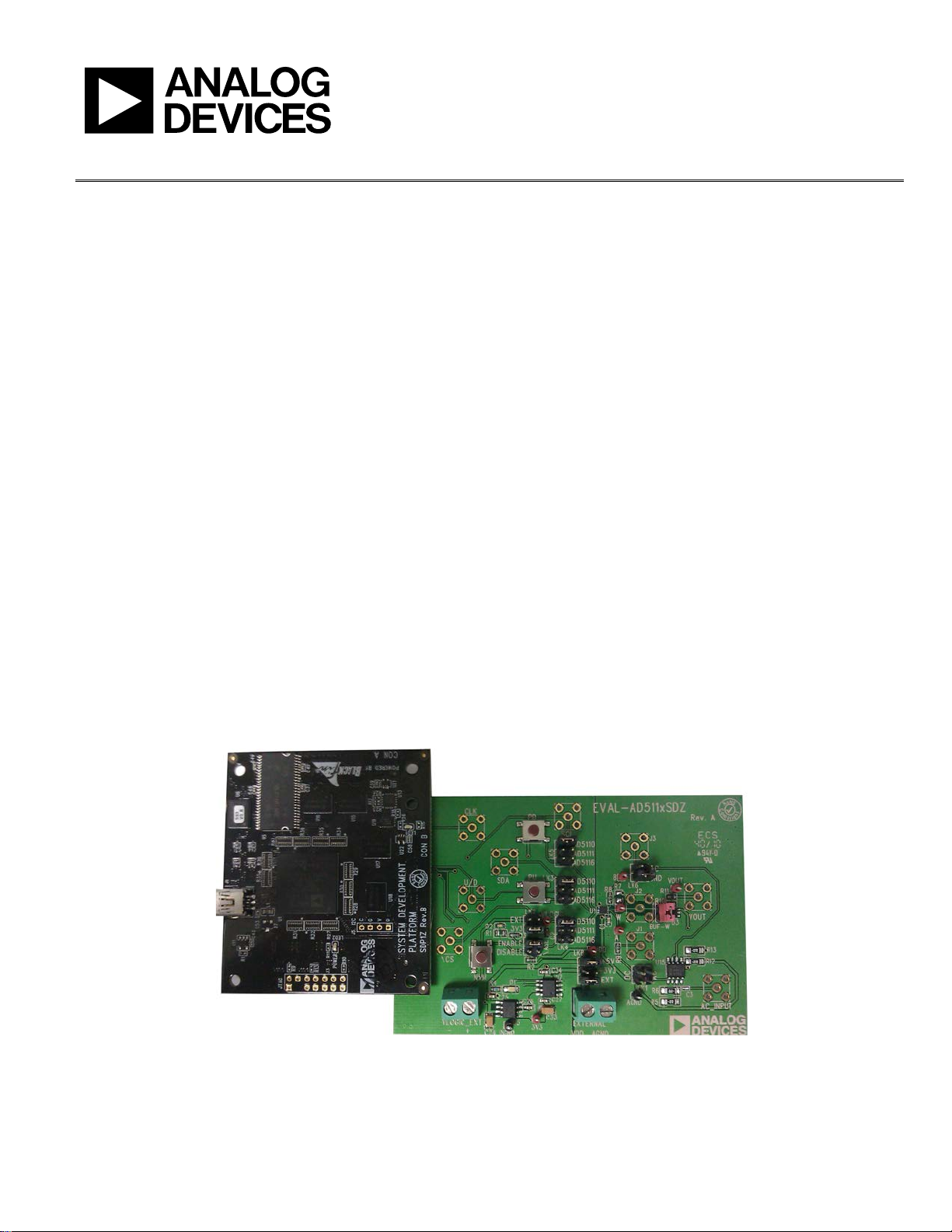
DIGITAL PICTURE OF EVALUATION BOARD WITH SYSTEM DEMONSTRATION PLATFORM
PLEASE SEE THE LAST PAGE FOR AN IMPORTANT
WARNING AND LEGAL TERMS AND CONDITIONS.
Figure 1.
Rev. 0 | Page 1 of 12
Page 2

UG-322 Evaluation Board User Guide
TABLE OF CONTENTS
Features .............................................................................................. 1
Package Contents .............................................................................. 1
General Description ......................................................................... 1
Digital Picture of Evaluation Board with System
Demonstration Platform.................................................................. 1
Revision History ............................................................................... 2
Evaluation Board Hardware ............................................................ 3
Power Supplies .............................................................................. 3
Link Options ................................................................................. 3
REVISION HISTORY
11/11—Revision 0: Initial Version
Test Circuits ...................................................................................4
Evaluation Board Software ...............................................................5
Installing the Software ..................................................................5
Running the Software ...................................................................5
Software Operation .......................................................................6
Evaluation Board Schematics and Artwork ...................................7
Ordering Information .................................................................... 11
Bill of Materials ........................................................................... 11
Rev. 0 | Page 2 of 12
Page 3

Evaluation Board User Guide UG-322
EVALUATION BOARD HARDWARE
POWER SUPPLIES
The E VA L-AD5110SDZ supports using single power supplies.
The evaluation board can be powered either from the SDP
port or externally by the EXTERNAL-1 and EXTERNAL-2
connectors, as described in Ta ble 2.
The digital logic levels can be powered either from the SDP
port or externally by the VLOGIC_EXT-1 and VLOGIC_EXT-2
connectors, as described in Tabl e 2.
All supplies are decoupled to ground using 10 µF tantalum and
0.1 µF ceramic capacitors.
Table 2. Maximum and Minimum Voltages of the Connectors
Connector Number Label Voltage
EXTERNAL-1 VDD Analog positive power supply, VDD.
If connected to the SDP, VDD is 3.3 V to 5.5 V.
If controlled externally, VDD is 2.3 V to 5.5 V.
EXTERNAL-2 AGND Analog ground, AGND.
VLOGIC_EXT-1 VLOGIC_EXT + Logic positive power supply, V
If connected to the SDP board, V
If controlled externally, V
VLOGIC_EXT-2 VLOGIC_EXT − Logic ground, DGND.
LINK OPTIONS
Several link and switch options are incorporated in the evaluation board and should be set up before using the board. Tabl e 1
describes the positions of the links to control the evaluation board
by a PC, via the SDP board, using the E VA L-AD5110SDZ. The
functions of these link and switch options are described in
detail in Tabl e 3.
Table 1. Link Options Setup for SDP Control (Default)
Link No. Option
LK2 3V3
LK8 +5V
.
LOGIC
is 3.3 V.
LOGI C
is 1.8 V to VDD.
LOGIC
Table 3. Link Functions
Link Number Power Supply Option
LK2 V
3V3 (from SDP).
EXT (external supply from the VLOGIC_EXT connector).
LK8 VDD This link selects one of the following as the positive power supply:
+5V (from SDP).
+3V3 (from SDP).
EXT1 (external supply from the EXTERNAL connector).
1
If the part is powered using the external connector without connecting the SDP board, +5V jumper must be connected as well.
This link selects one of the following as the logic power supply:
LOGIC
Rev. 0 | Page 3 of 12
Page 4
UG-322 Evaluation Board User Guide
VOUT
V
DD
AC
DC
GND
A
B
W
BUF-W
+
–
W
AC
V
DD
2
V
DD
2
B
A
750Ω
12Ω
R9
R8
10199-002
256
)(
RDAC
VVV
B
A
OUT
×−=
B
A
AC
AC
GND
A
B
W
BUF-W
AC_INPUT
W
VOUT
+
–
V
DD
2
V
DD
2
HPF
f
C
= 200Hz
12Ω
750Ω
R8
R9
R7
10199-003
×≈
128
log20)dB(
RDAC
nAttenuatio
TEST CIRCUITS
The E VA L-AD5110SDZ incorporates several test circuits to
evaluate the AD5110 performance.
DAC
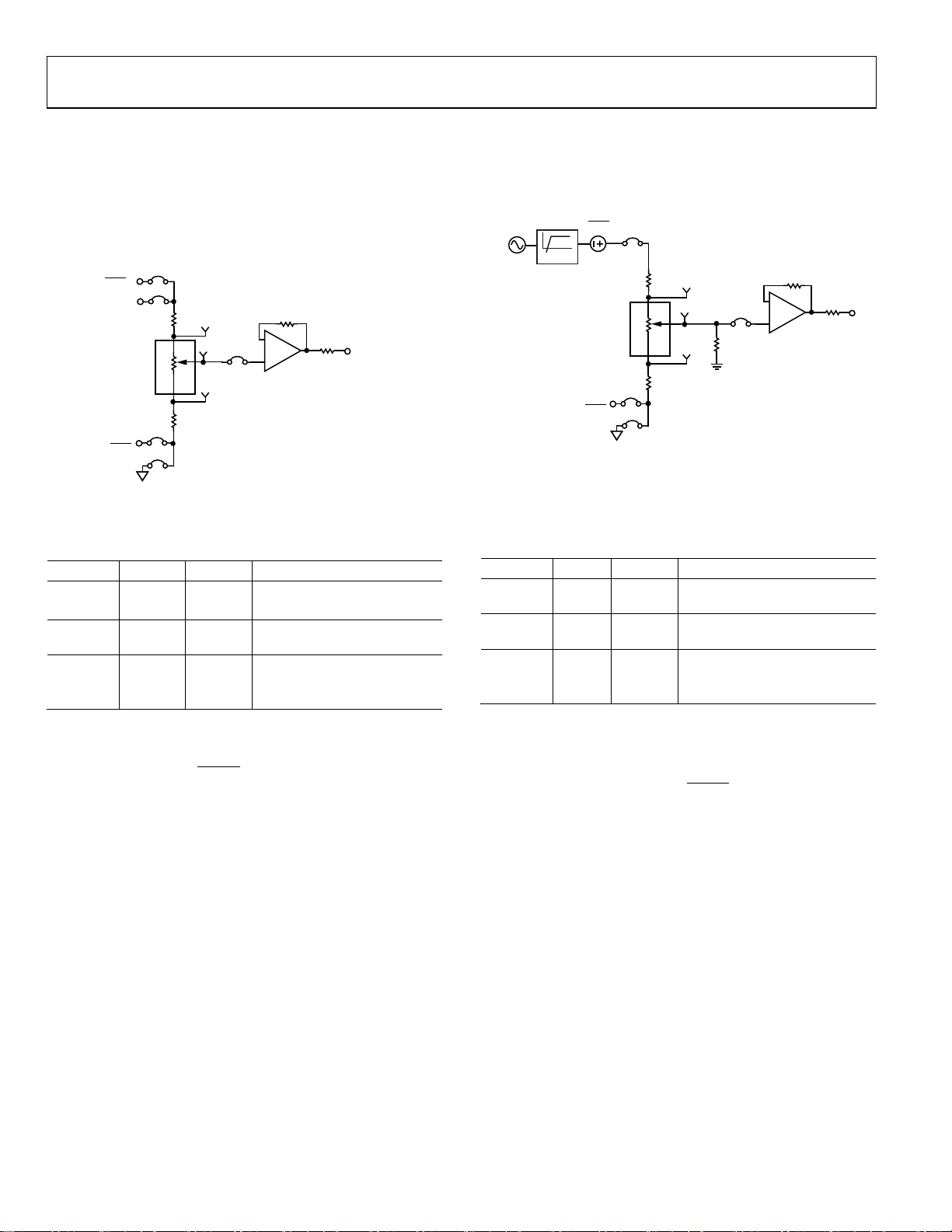
The AD5110 can be operated as a digital-to-analog converter
(DAC), as shown in Figure 2.
AC Signal Attenuation
The AD5110 can be used to attenuate an ac signal, which must
be provided externally using the AC_INPUT connector, as
shown in Figure 3.
Figure 2. DAC
Tabl e 4 shows the options available for the voltage references.
Table 4. DAC Voltage References
Termi nal Link Options Description
A LK1 AC Connects Terminal A to VDD/2
DC Connects Terminal A to VDD
W BUF-W Connects Terminal W to an
output buffer
B LK6 AC Connects Terminal B to VDD/2
GND Connects Terminal B to
analog ground
The output voltage is defined in Equation 1.
(1)
where:
RDAC is the code loaded in the RDAC register.
V
is the voltage applied to Terminal A (LK1 link).
A
V
is the voltage applied to Terminal B (LK6 link).
B
However, by using the R8 and R9 external resistors, the user can
reduce the voltage of the voltage references. In this case, use the
A and B test points to measure the voltage applied to the A and
B terminals and recalculate V
and VB in Equation 1.
A
Figure 3. AC Signal Attenuator
Depending on the voltage supply rails and the dc offset voltage
of the ac signal, various configurations can be used as described
in Tabl e 5.
Table 5. AC Signal Attenuation Link Options
Termi nal Link Options Description
A LK1 AC Remove dc voltage and biased
the signal to V
/2
DD
W BUF-W Connects Terminal W to an
output buffer
B LK6 AC1 Connects Terminal B to VDD/2
GND Connects Terminal B to analog
ground
1
Recommended to ensure optimal total harmonic distortion (THD) performance.
The signal attenuation is defined in Equation 2.
(2)
where:
RDAC is the code loaded in the RDAC register.
In addition, R7 can be used to achieve an exponential attenuation. To do so, adjust the R7 resistor until a desirable transfer
function is found, typically around 1.6 kΩ for a 10 kΩ
potentiometer.
Rev. 0 | Page 4 of 12
Page 5

Evaluation Board User Guide UG-322
10199-004
10199-005
EVALUATION BOARD SOFTWARE
INSTALLING THE SOFTWARE
The E VA L-AD5110SDZ evaluation kit includes evaluation
board software provided on a CD. The software is compatible
with Windows® XP, Windows Vista, and Windows 7 (both 32
and 64 bits).
Install the software before connecting the SDP board to the USB
port of the PC to ensure that the SDP board is recognized when
it is connected to the PC.
1. Start the Windows operating system and insert the CD.
2. The installation software opens automatically. If it does
not, run the setup.exe file from the CD.
3. After the installation is completed, power up the evaluation
board as described in the Power Supplies section.
4. Pl u g t h e EVA L-AD511xSDZ into the SDP board and the SDP
board into the PC using the USB cable included in the box.
5. When the software detects the evaluation board, follow the
instructions that appear to finalize the installation.
To uninstall the program, click Start > Control Panel > Add or
Remove Programs > AD5110 Eval Board.
RUNNING THE SOFTWARE
To run the evaluation board software, use the following steps:
1. Click Start > All Programs > Analog Devices > AD5110
> AD5110 Eval Board.
2. If the SDP board is not connected to the USB port when
the software is launched, a connectivity error is displayed
(see Figure 4). Connect the evaluation board to the USB
port of the PC, wait a few seconds, click Rescan, and follow
the instructions.
Figure 4. Pop-Up Window Error
The main window of the EVA L -AD5110SDZ evaluation
software then opens, as shown in Figure 5.
Figure 5. EVAL-AD5110SDZ Evaluation Board Software Main Window
Rev. 0 | Page 5 of 12
Page 6

UG-322 Evaluation Board User Guide
OPERATING THE SOFTWARE
The main window of the EVA L -AD5110SDZ software is divided
into the following sections: QUICK COMMANDS, MANUAL
DATA , RDAC, and MEMORY. The features of the main
window are as follows:
• The QUICK COMMANDS section allows you to send
quick commands directly to the AD5110.
• The RDAC section can be used to update the RDAC
registers by typing a value into a text box and clicking
WRITE. When WRITE is clicked or a quick command
is executed, a write-read operation is performed and the
values displayed in this section are updated with the actual
RDAC register values.
• The MANUAL DATA can be used to send a customized
2
I
C data word by manually switching the scroll bars from 0
to 1 or from 1 to 0, as desired, and then clicking SEND
DATA . The scroll bars are updated upon each write
tr ans fer.
• The MEMORY section displays the data stored in the
memory block. The data can be updated manually by
clicking UPDATE.
• Clicking EXIT closes the program but does not reset the part.
Rev. 0 | Page 6 of 12
Page 7

Evaluation Board User Guide UG-322
EVALUATION BOARD SCHEMATICS AND ARTWORK
Figure 6. Schematic of the AD5110 Circuitry
Rev. 0 | Page 7 of 12
10199-006
Page 8

UG-322 Evaluation Board User Guide
10199-007
Figure 7. Schematic of SDP Connector
Rev. 0 | Page 8 of 12
Page 9

Evaluation Board User Guide UG-322
10199-008
10199-009
Figure 8. Component Placement Drawing
Figure 9. Component Side PCB Drawing
Rev. 0 | Page 9 of 12
Page 10

UG-322 Evaluation Board User Guide
10199-010
Figure 10. Solder Side PCB Drawing
Rev. 0 | Page 10 of 12
Page 11

Evaluation Board User Guide UG-322
2
DGND, AGND
Test point, PCB, black, PK100
FEC 873-1128
1
U7
24LC64 serial EEPROM
FEC 9758070
ORDERING INFORMATION
BILL OF MATERIALS
Table 6.
Qty Reference Designator Description Supplier1/Part Number
1 C3 100 nF, 0402 capacitor FEC 1414580
2 C1,C2 0.1 µF, 0603 capacitor FEC 138-2224
4 C25, C26, C27, C34 0.1 µF, 0603 capacitor FEC 301-9482
2 C24, C33 10 µF, 1206 capacitor FEC 197-130
1 D1 Green LED FEC 579-0852
2 VLOGIC_EXT, EXTERNAL 2-pin connector FEC 151789
1 J4 Receptacle, 0.6 mm, 120 way Digi-Key H1219-ND
8
LK1, LK2, LK3, LK4, LK5, LK6, LK8,
1 BUF-W Header, 1-row, 2-way, and jumper socket, black FEC 102-2247 and FEC 150-411
1 R11 12 Ω, 0603, 1% resistor FEC 9330534
1 R10 750 Ω, 0603, 1% resistor FEC 9331506
1 R4 1 kΩ, 0603, 0.01% resistor FEC 9330380
4 R5, R6, R12, R13 2.7 kΩ, 1206, 1% resistor FEC 9337288
2 R8, R9 0 Ω, 0603 resistor FEC 9331662
7 3V3, A, B, VDD, VLOGIC, VOUT, W Test point, PCB, red, PK100 FEC 873-1144
1 U1 AD5110 Analog Devices AD5110
1 U3 ADA4860 Analog Devices ADA4860
1 U5 ADP3303 Analog Devices ADP3303
Header, 2-row, 36 + 36 way, and jumper socket, black FEC 148-535 and FEC 150-411
ASE
1 U15 AD8652 Analog Devices AD8652
1
FEC refers to Farnell Electronic Component Distributors.
Rev. 0 | Page 11 of 12
Page 12

UG-322 Evaluation Board User Guide
and conditions of the Agreement, ADI hereby grants to Customer a free, limited, personal,
neer chips on the Evaluation Board. Customer shall inform ADI of any
LAW. This Agreement shall be governed by and construed in accordance with the substantive laws of the Commonwealth of
NOTES
I2C refers to a communications protocol originally developed by Philips Semiconductors (now NXP Semiconductors).
ESD Caution
ESD (electrostatic discharge) sensitive device. Charged devices and circuit boards can discharge without detection. Although this product features patented or proprietary protection
circuitry, damage may occur on devices subjected to high e nergy ESD. Therefore, proper ESD precaution s should be taken to avoid per formance degradation or loss of functionality.
Legal Terms and Conditions
By using the evaluation board discussed herein (together with any tools, components documentation or support materials, the “Evaluation Board”), you are agreeing to be bound by the terms a nd conditions
set for th below (“Agreement”) unless you have purchased the Evaluation Board, in which case the Analog Devices Standard Terms and Conditions of Sale shall govern. Do not use the Evaluation Board until you
have read and agreed to the Agreement . Your use of the Ev aluation Board shall signify your acceptance of the Agreement. This Agreement is made by and between you (“Customer ”) and Analog Devices, Inc.
(“ADI”), with its principal place of business at One Technology Way, Norwood, MA 02062, USA. Subject to the terms
temporary, non-exclusive, non-sublicensable, non-transferable license to use the Evaluation Board FOR EVALUATION PURPOSES ONLY. Customer understands and agrees that the Evaluation Board is provided
for the sole and exclusive purpose referenced above, and agrees not to use the Evaluation Board for any other purpose. Furthermore, the license granted is expressly made sub ject to the following additional
limitations: Customer shall not (i) rent, lease, display, sell, transfer, assign, sublicense, or distribute the Evaluation Board; and (ii) permit any Third Party to access the Evaluation Board. As used herein, the term
“Third Party” includes any entity other than ADI, Customer, their employees, affiliates and in-house consultants. The Evaluation Board is NOT sold to Customer; all rights not expressly granted herein, including
ownership of t he Evaluation Board, are res erved by ADI. CONFIDENTIA LITY. This Agreement and t he Evaluation Board shall all be considered the confidential and proprietary information of ADI. Customer may
not disclose or transfer any portion of the Evaluation Board to any other party for any reason. Upon discontinuation of use of the Evaluation Board or termination of this Agreement, Customer agrees to
promptly return the Evaluation Board to ADI. ADDITIONAL RESTRICTIONS. Customer may not disassemble, decompile or reverse engi
occurred damages or any modifications or alterations it makes to the Evaluation Board, including but not limited to soldering or any other activity that affects the material content of the Evaluation Board.
Modifications to the Evaluation Board must comply with applicable law, including but not limited to the RoHS Directive. TERMINATION. ADI may terminate this Agreement at any time upon giving written notice
to Customer. Customer agrees to return to ADI the Evaluation Board at that time. LIMITATION OF LIABILITY. THE EVALUATION BOARD PROVIDED HEREUNDER IS PROVIDED “AS IS” AND ADI MAKES NO
WARRANTIES OR REPRES ENTATIONS OF ANY KIND WITH RESPEC T TO IT. ADI SPECIFICAL LY DISCLAIMS ANY REPRES ENTATIONS, ENDORSEMENTS, GUARANTEES, OR WARRANTIES, EXPRESS OR IMPLIED, RELATED
TO THE EVALUATION BOARD INCLUDING, BUT NOT LIMITED TO, THE IMPLIED WARRANTY OF MERCHANTABILITY, TITLE, FITNESS FOR A PARTICULAR PURPOSE OR NONINFRINGEMENT OF INTELLECTUAL
PROPERTY RIGHTS. IN NO EVENT WILL ADI AND ITS LICENSORS BE LIABLE FOR ANY INCIDENTAL, SPECIAL, INDIRECT, OR CONSEQUENTIAL DAMAGES RESULTING FROM CUSTOMER’S POSSESSION OR USE OF
THE EVALUATION BOARD, INCLUD ING BUT NOT LIMITED TO LOST PROFITS, DE LAY COSTS, LABOR COSTS OR LOSS OF GOODWI LL. ADI’S TOTAL LIABILIT Y FROM ANY AND A LL CAUSES SHALL BE LIMITED TO THE
AMOUNT OF ONE HUNDRED US DOLLARS ($100.00). EXPORT. Customer agrees that it will not directly or indirectly export the Evaluation Board to another country, and that it will comply with all applicable
United States federal laws and regulations relating to exports. GOVERNING
Massachusetts (excluding conflict of law rules). Any legal action regarding this Agreement will b e heard in the state or federal courts having jurisdiction in Suffolk County, Massachusetts, and Customer hereby
submits to the personal jurisdiction and venue of such courts. The United Nations Convention on Contracts for the International Sale of Goods shall not apply to this Agreement and is expre ssly disclaimed.
©2011 Analog Devices, Inc. All rights reserved. Trademarks and
registered trademarks are the property of their respective owners.
UG10199-0-11/11(0)
Rev. 0 | Page 12 of 12
 Loading...