

Page 1
Evaluation Board User Guide
UG-103
08889-001
One Technology Way • P. O. Box 9106 • Norwood, MA 02062-9106, U.S.A. • Tel: 781.329.4700 • Fax: 781.461.3113 • www.analog.com
Evaluation Board for ADF4360-6 Integrated PLL and VCO Frequency Synthesizer
FEATURES
Self-contained board for generating RF frequencies
Flexibility for reference input, PFD frequency, and loop
bandwidth
Accompanying software allows complete control of
synthesizer functions from a PC
USB/battery-operated 9 V supplies
Typical phase noise performance of −141 dBc/Hz at 3 MHz offset
Typical spurious performance of −65 dBc at 200 kHz offset
(1.2 GHz output)
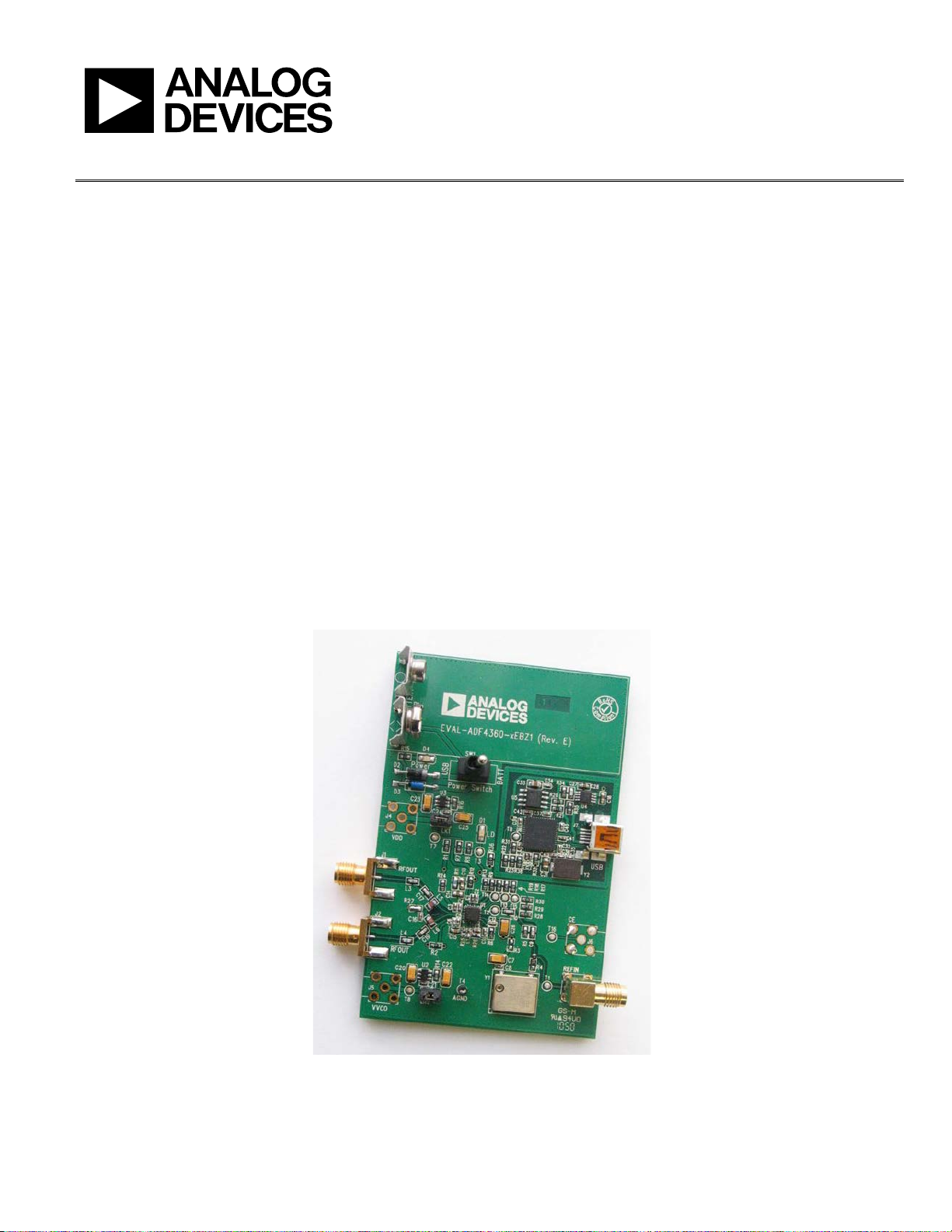
EVALUATION BOARD PHOTOGRAPH
GENERAL DESCRIPTION
The ADF4360-6EBZ1 evaluation board is designed to allow the
user to evaluate the performance of the ADF4360-6 frequency
synthesizer consisting of an integrated PLL and VCO (see Figure 1).
It contains the ADF4360-6BCPZ, a USB connector, and SMA
connectors for the RF outputs. Unpopulated SMA footprints are
available for the power supplies, the chip enable (CE), and the
external reference input. The evaluation board also contains the
loop filter to complete the PLL. It can be modified as necessary for
the PLL requirements of the user. A USB cable is included with
the board to allow software programmability from a PC.
The package also contains a CD with Windows® software to allow
quick, user-friendly programming of the synthesizer. The CD
contains additional PLL data sheets, technical notes, articles, and
ADIsimPLL™ V3.4 (Analog Devices, Inc., PLL simulation
software). More information is available at www.analog.com/pll.
PLEASE SEE THE LAST PAGE FOR AN IMPORTANT
WARNING AND LEGAL TERMS AND CONDITIONS.
Figure 1.
Rev. A | Page 1 of 12
Page 2

UG-103 Evaluation Board User Guide
TABLE OF CONTENTS
Features .............................................................................................. 1
General Description ......................................................................... 1
Evaluation Board Photograph ......................................................... 1
Revision History ............................................................................... 2
Evaluation Board Hardware ............................................................ 3
RF Output Stages .......................................................................... 3
Evaluation Board Software Quick Start Procedures .................... 4
REVISION HISTORY
12/11—Rev. 0 to Rev. A
Changes to Features Section, General Description Section,
and Figure 1 ....................................................................................... 1
Changes to Evaluation Board Hardware Section ......................... 3
Added Evaluation Board Software Quick Start Procedures
Section ................................................................................................ 4
Changes to Using the Evaluation Board Software Section.......... 6
Changes to Evaluation Board Schematics Section ....................... 8
Changes to Bill of Materials Section ............................................ 11
7/10—Revision 0: Initial Version
Windows XP OS ............................................................................4
Windows Vista OS and Windows 7 (32-Bit) OS ...........................5
Windows 7 64-Bit OS ...................................................................5
Using the Evaluation Board Software .............................................6
Evaluation Board Schematics...........................................................8
Ordering Information .................................................................... 11
Bill of Materials ........................................................................... 11
Rev. A | Page 2 of 12
Page 3
Evaluation Board User Guide UG-103
08889-002
EVALUATION BOARD HARDWARE
The evaluation board comes with a cable to connect it to the
USB port of a PC. The silkscreen and cable diagram for the
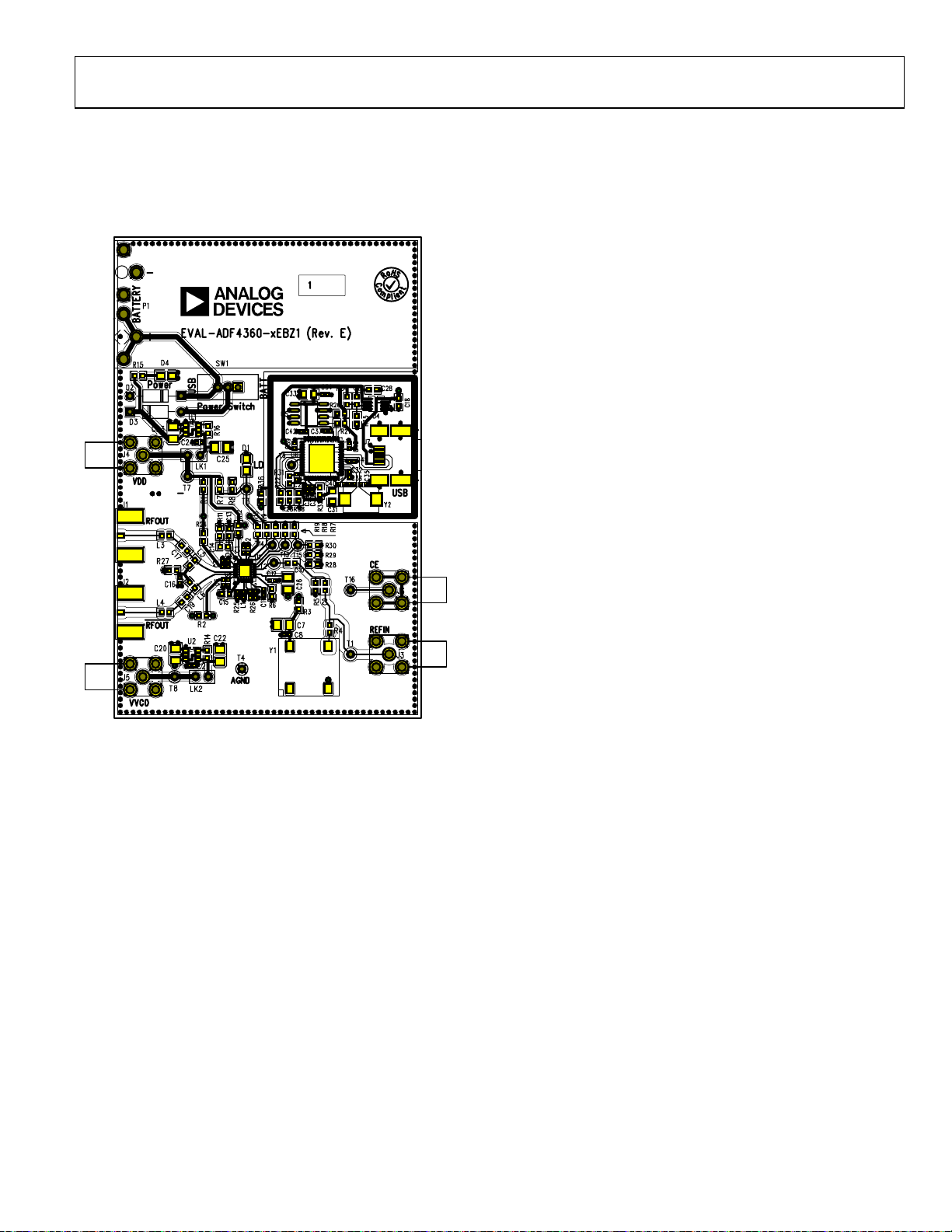
evaluation board are shown in Figure 2. The board schematics
are shown in Figure 9 through Figure 11.
Users may provide their own power supplies using the J4 and J5
connectors, as shown in Figure 2. Hardware power-down using
the CE pin can be controlled by inserting an SMA connector
into J6 and removing R12.
The on-board filter is a third-order, passive, low-pass filter. The
filter contains three capacitors (C13, C14, and C15) plus two
resistors (R10 and R11). The footprint for R10 is located on the
underside of the board. The design parameters for the loop
filter are for a center frequency of 1200 MHz, a PFD frequency
of 200 kHz, and a low-pass filter bandwidth of 10 kHz. To design a
filter for different frequency setups, use the ADIsimPLL simulation
software.
RF OUTPUT STAGES
The output stage of the board contains a tuned load for the
particular frequency of operation. The particular network inserted
in the board is optimized for 1200 MHz operation. This consists
of a 7.5 nH shunt inductor, a 10 pF series capacitor, and a 7.5 nH
series inductor. If in doubt, use a 50 Ω resistor instead of the
shunt inductor, a 100 pF bypass capacitor, and a series 0 Ω
resistor. It is important that the same components be placed
on the RF
that both outputs be terminated with 50 Ω loads. Otherwise,
the output power is not optimum, and in some cases, the part
may malfunction.
A and RF
OUT
B lines. In addition, it is essential
OUT
Figure 2. Evaluation Board Silkscreen—Top View
The board is powered from a single 9 V battery, or from the
USB supply, by changing the position of Switch SW1. All
components necessary for LO generation are catered for on-board.
A 10 MHz TCXO from Fox Electronics provides the necessary
reference input. Otherwise, an external reference signal can be
connected via J3. The TCXO can be disabled by removing the
R3 and R4 resistors. The PLL comprises the ADF4360-6BCPZ
and a passive loop filter. The VCO output from RF
OUT
A is
available through the standard SMA Connector J1 and the
complementary RF
B VCO output is available from J2.
OUT
Rev. A | Page 3 of 12
Page 4
UG-103 Evaluation Board User Guide
08889-003
08889-004
EVALUATION BOARD SOFTWARE QUICK START PROCEDURES
It is vital to install the software before connecting the board
to the PC. The control software and USB drivers for EVA L-
ADF4360-6EBZ1 accompany the EVAL-ADF4360-6EBZ1
on a CD. To install the software, use the following steps:
1. Open ADF4360_setup.msi.
2. The install wizard guides you through the installation
process. The software is installed in a default directory called
C:/Program Files/Analog Devices/ADF4360.
The software requires Microsoft’s .NET Framework Version 3.5
or later to be installed on your machine. The installer automatically downloads the framework from the Microsoft website if you
do not have this installed. If you do not have an Internet connection or have a slow connection on the PC, you can install the
.NET Framework directly from the CD. Do this by double-clicking
dotnetfx.exe. Once installed, run ADF4360_Setup.msi again.
WINDOWS XP OS
After you have installed the software, install the USB drivers.
To do so, use the following steps:
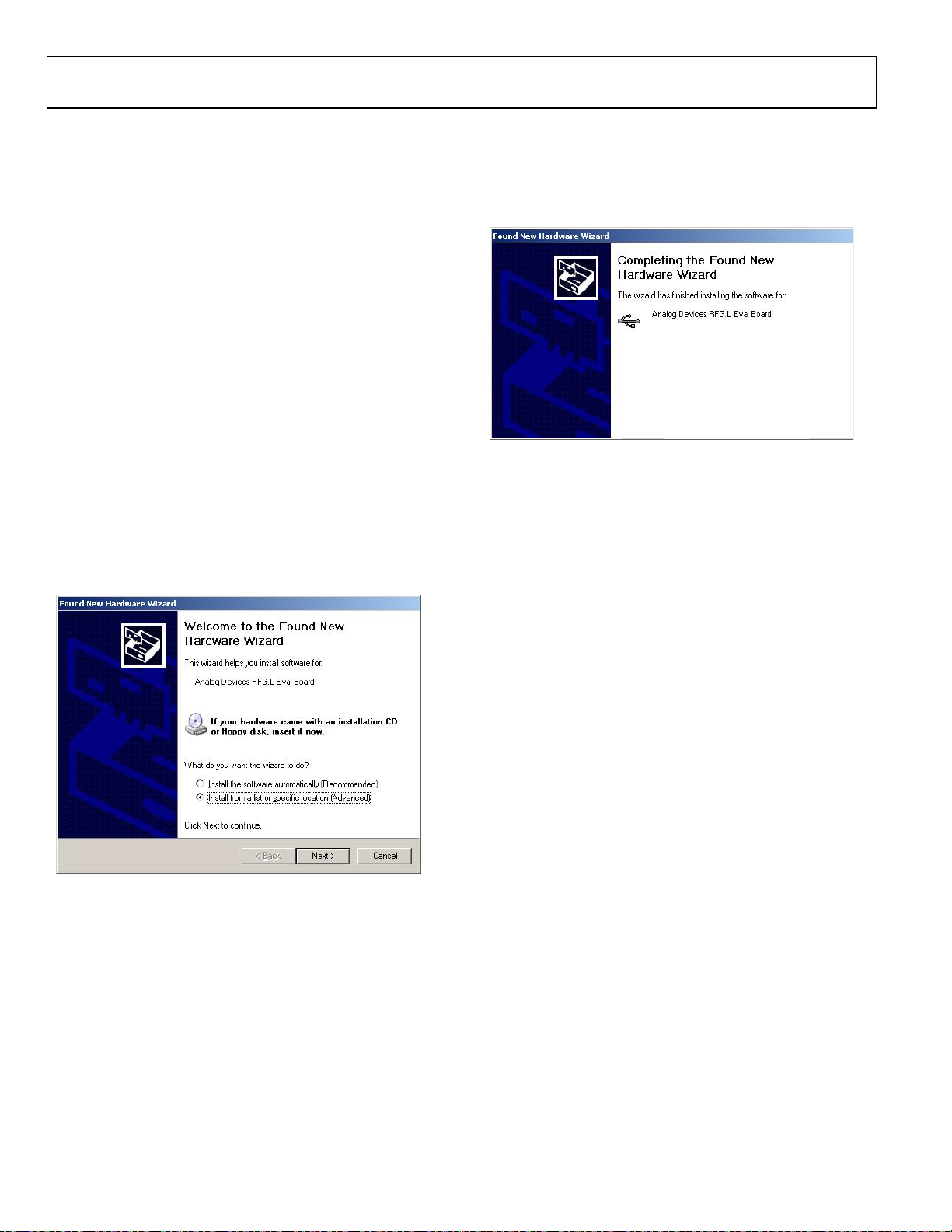
1. Plug a USB cable into the USB connector on the evaluation
board. The Found New Hardware box opens. See Figure 3.
2. Choose Install from a list or specified location (Advanced).
3. Click Continue Anyway when asked about Windows Logo
testing.
If the installation is successful, the message in Figure 4 appears.
Figure 4. Successful Installation
Figure 3. New Hardware Wizard
Rev. A | Page 4 of 12
Page 5

Evaluation Board User Guide UG-103
08889-005
08889-006
08889-007
WINDOWS VISTA OS AND WINDOWS 7 (32-BIT) OS
For Windows Vista or Windows 7 (32-bit), if the device drivers
do not install automatically, you will have to manually install
the drivers. To do so, use the following steps:
1. Find the new unknown device (the evaluation board)
in Device Manager and double-click it to open the
properties. The device should be Unknown device,
under Other devices (see Figure 5).
3. On the Update Driver Software dialog box, choose
Browse my computer for driver software.
4. Browse to C:\Program Files\Analog Devices\ADF4360.
5. Click OK or Next.
6. If prompted by Windows security, choose Install this
driver software anyway.
7. If the installation is successful, the message in Figure 7
appears.
Figure 5. Device Manager
2. Click Update Driver in the properties window (see
Figure 6).
Figure 7. Successful Installation
WINDOWS 7 64-BIT OS
Windows 7 64-bit uses a different driver than 32-bit systems. To
install this driver:
1. Disconnect the USB evaluation board.
2. Open ADF4360_setup.msi.
3. The install wizard guides you through the installation
process. The software is installed in a default directory
called C:/Program Files/Analog Devices/ADF4360.
4. Connect your USB evaluation board. The driver should be
found automatically.
Note that installing this driver package disables older versions
of Analog Devices PLL software; therefore, only install if needed.
Figure 6. Unknown Device Properties
Rev. A | Page 5 of 12
Page 6

UG-103 Evaluation Board User Guide
USING THE EVALUATION BOARD SOFTWARE
The control software for the EVAL-ADF4360-xEBZ1 accompanies the EVAL-ADF4360-xEBZ1 on a CD. To install the
software, see the Evaluation Board Software Quick Start
Procedures section.
To run the software, click the ADF4360.exe file on the desktop
or in the Start menu.
The main interface window appears (see Figure 8). Confirm
that Analog Devices RFG.L Eval Board connected is displayed
at the top of the window. Otherwise, the software has no connection to the evaluation board.
The evaluation board can be connected and disconnected while
the software is running. Note that when connecting the board,
it takes about 5 seconds for the status label to change.
Under the File menu, the current settings can be saved to, and
loaded from, a text file.
Use the REF IN Frequency text box to set the correct reference
frequency and the reference frequency divider. The reference
TCXO on the evaluation board runs at 10 MHz.
The Settings section controls the charge pump current setting,
the output power setting, and the multiplexer output setting.
Use the Frequency Settings section to control the output
frequency. The user can input the desired output frequency
to the RF Output Frequency text box (in megahertz).
In the Registers tab, the user can manually input the desired
value to be written to the registers.
In the Sweep and hop tab, the user can make the device sweep
a range of frequencies, or hop between two set frequencies.
In the Latches to write section, at the bottom of the window,
the values to be written to each register are displayed. If the
background on the text box is green, then the value displayed is
different to the value actually on the device. Click Wr it e x Latch
to write that value to the device.
The F2, F3, and F4 keys switch between the three tabs. F12
increases the output frequency by one channel spacing and
writes it to the device. F11 decreases the output frequency by
one channel spacing.
Rev. A | Page 6 of 12
Page 7

Evaluation Board User Guide UG-103
08889-008
Figure 8. Software Front Panel Display
Rev. A | Page 7 of 12
Page 8

UG-103 Evaluation Board User Guide
08889-009
EVALUATION BOARD SCHEMATICS
Figure 9. EVAL-ADF4360-6EBZ1 Schematic
Rev. A | Page 8 of 12
Page 9

Evaluation Board User Guide UG-103
08889-010
Figure 10. EVAL-ADF4360-6EBZ1 Schematic (Continued)
Rev. A | Page 9 of 12
Page 10

UG-103 Evaluation Board User Guide
08889-011
Figure 11. EVAL-ADF4360-6EBZ1 Schematic (Continued)
Rev. A | Page 10 of 12
Page 11

Evaluation Board User Guide UG-103
ORDERING INFORMATION
BILL OF MATERIALS
Table 1.
Reference Designator Part Description Manufacturer/Part No.
C1, C3, C5, C29, C30, C32,
C37, C38, C39, C40, C41,
C42, C43
C2, C4, C6, C8 Capacitor, 0402, 10 pF, 50 V Kemet C0402C100J5GACTU
C7 Capacitor, Case A, 22 µF, 6.3 V AVX TAJA226K006R
C9, C10, C27 Capacitor, 0603, 1 nF, 50 V AVX 06035A102JAT2A
C11, C12, C21, C24 Capacitor, 0402, 10 nF, 16 V Yageo (Phycomp) CC0402ZRY5V7BB103
C13 Capacitor, loop filter, 0603, 820 pF, 50 V Phycomp 2238 861 15821
C14 Capacitor, loop filter, 0603, 10 nF, 50 V AVX 08055C103KAT2A
C15 Capacitor, loop filter, 0603, 270 pF, 50 V Phycomp 2238 861 15271
C16 Multilayer ceramic capacitor, 50 V, X7R, 1 nF, ±10%, 0402 Murata GRM155R71H102KA01D
C17, C19 Capacitor, 0603, 10 pF, 50 V AVX 06035A100JAT2A
C18, C28 Capacitor, 0603, 1 µF, 25 V Taiyo Yuden TMK107BJ105KA-T
C20, C23 Capacitor, Case A, 1 µF, 16 V AVX TAJA105K016R
C22, C25 Capacitor, Case A, 4.7 µF, 10 V AVX TPSA475K010R1400
C26 Capacitor, Case A, 10 µF, 6.3 V Kemet T491A106M016AT
C31, C33 Capacitor, 0805, 10 µF, 6.3 V Murata GRM21BR71A106KE51L
C34 Capacitor, 0402, 22 pF, 50 V NPO Kemet C0402C220J5GACTU
C35, C36 Capacitor, 0402, 12 pF, 50 V Kemet C0402C120J5GACTU
D1 LED, SMD red Avago HSMS-C170
D2 Diode, 1 A, 50 V Multicomp 1N4001
D3 Schottky diode, 20 V Micro Commercial Components, Inc., SD103C-TP
D4 LED, SMD red Avago HSMS-C170
J1, J2 Jack SMA end launch tab Johnson Components 142-0701-851
J3 to J6 Jack SMA end launch tab Not inserted
J7 USB mini-B Molex 56579-0576
L1, L2 Ceramic chip inductor, 0402 Not inserted
L3, L4, L5, L6 Ceramic chip inductor, 7.5 nH, 5%, 0603 Coilcraft 0603CS-7N5X_LU
LK1, LK2 Header, 1-row, 2-way and jumper socket black Harwin Plc M20-9990245 and
P1 Battery clip, PCB mounting Keystone Electronics Corp. 593+594
R1 to R4, R13, R22 to R24,
R27, R36, R38
R5 Resistor, 0603, 51 Ω Multicomp MC 0.063W 0603 1% 51R
R6, R15 Resistor, 0603, 4.7 kΩ Multicomp MC 0.063W 0603 1% 4K7
R7, R8, R12, R28, R29, R30 Resistor, 0603, 10 kΩ Multicomp MC 0.063W 0603 1% 10K
R9 Resistor, 0603, 100 Ω Multicomp MC 0.063W 0603 1% 100R
R10 Resistor, loop filter, 0805, 8.2 kΩ Multicomp MC 0.1W 0805 1% 8K2
R11 Resistor, loop filter, 0805, 4.3 kΩ Multicomp MC 0.1W 0805 1% 4K3
R14, R16 Resistor, 0603, 330 kΩ Multicomp MC 0.063W 0603 1% 330K
R17 to R19 Resistor, 0603, 330 Ω Multicomp MC 0.063W 0603 1% 330R
R20, R21 Resistor, 0603, 2.2 kΩ Multicomp MC 0.063W 0603 1% 2K2
R25, R26 Resistor, 0603, 470 Ω Multicomp MC 0.063W 0603 1% 470R
R31, R32 Resistor, 0603, 100 kΩ Multicomp MC 0.063W 0603 1% 100K
R34 Resistor, 0603, 140 kΩ Multicomp MC 0.063W 0603 1% 140K
R35 Resistor, 0603, 78.7 kΩ Multicomp MC 0.063W 0603 1% 78K7
SW1 Switch, PCB SPDT APEM TL36P0050
T1 to T8, T13 to T16 Terminal, PCB, red, PK100 Vero Technologies, Ltd. 20-313137
Capacitor, 0402, 0.1 µF, 16 V Kemet C0402C104K4RAC
Harwin Plc M7567-05
Resistor, 0603, 0 Ω Multicomp MC 0.063W 0603 0R
Rev. A | Page 11 of 12
Page 12

UG-103 Evaluation Board User Guide
SORS BE LIABLE FOR ANY INCIDENTAL, SPECIAL, INDIRECT, OR CONSEQUENTIAL DAMAGES RESULTING FROM CUSTOMER’S POSSESSION OR USE OF
in accordance with the substantive laws of the Commonwealth of
Reference Designator Part Description Manufacturer/Part No.
T9 to T12 Test point Not inserted
U1 Integrated integer-N synthesizer Analog Devices, ADF4360-6BCPZ
U2 High accuracy low dropout linear 5 V regulator Analog Devices, ADP3300ARTZ-3
U3 High accuracy low dropout linear 3 V regulator Analog Devices, ADP3300ARTZ-3
U4 ADP3334 Adjustable LDO regulator Analog Devices, ADP3334ARMZ
U5 IC Serial EEPROM 8-SOIC Microchip 24LC64-ISN
U6 USB Microcontroller Cypress CY7C68013A-56LFXC
Y1 10 MHz TCXO (FOX801) Fox Electronics FOX801-BELF
ESD Caution
ESD (electrostatic discharge) sensitive device. Charged devices and circuit boards can discharge without detection. Although this product features patented or proprietary protection
circuitry, damage may occur on devices subjected to high e nergy ESD. Therefore, proper ESD precaution s should be taken to avoid performance degradation or loss of functionality.
Legal Terms and Conditions
By using the evaluation board discussed herein (together with any tools, components documentation or support materials, the “Evaluation Board”), you are agreeing to be bound by the terms a nd conditions
set forth below (“Agreement”) unless you have purchased the Evaluation Board, in which case the Analog Devices Standard Terms and Conditions of Sale shall govern. Do not use the Evaluation Board until you
have read and agreed to the Agreement. Your use of the Evaluation Board shall signify your acceptance of the Agreement. This Agreement is made by and between you (“Customer”) and Analog Devices, Inc.
(“ADI”), with its principal place of business at One Technology Way, Norwood, MA 02062, USA. Subject to the terms and conditions of the Agreement, ADI hereby grants to Customer a free, limited, perso nal,
temporary, non-exclusive, non-sublicensable, non-transferable license to use the Evaluation Board FOR EVALUATION PURPOSES ON LY. Customer understands and agrees that the Evaluation Board is provided
for the sole and exclusive purpose referenced above, and agrees not to use the Evaluation Board for any other purpose. Further more, the license granted is expressly made subject to the following additional
limitations: Customer shall not (i) rent, lease, display, sell, transfer, assign, sublicense, or distribute the Evaluation Board; and (ii) permit any Third Party to access the Evaluation Board. As used herein, the term
“Third Party” includes any entity other than ADI, Customer, their employees, affiliates and in-house consultants. The Evaluation Board is NOT sold to Customer; all rights not expressly granted herein, including
ownership of t he Evaluation Board, are res erved by ADI. CONFIDENTIA LITY. This Agreement and the Evaluation Board shall all be considered the confi denti al and proprietary informa tion of ADI. Customer may
not disclose or transfer any portion of the Evaluation Board to any other party for any reason. Upon discontinuation of use of the Evaluation Board or termination of this Agreement, Customer agrees to
promptly return the Evaluation Board to ADI. ADDITIONAL RESTRICTIONS. Customer may not disassemble, decompile or reverse engineer chips on the Evaluation Board. Customer shall inform ADI of any
occurred damages or any modifications or alterations it makes to the Evaluation Board, including but not limited to soldering or any other activity that affects the material content of the Evaluation Board.
Modifications to the Evaluation Board must comply with applicable law, including but not limited to the RoHS Directive. TERMINATION. ADI may terminate this Agreement at any time upon giving written notice
to Customer. Customer agrees to return to ADI the Evaluation Board at that time. LIMITATION OF LIABILITY. THE EVALUATION BOARD PROVIDED HEREUNDER IS PROVIDED “AS IS” AND ADI MAKES NO
WARRANTIES OR REPRES ENTATIONS OF ANY KIND WITH RESPECT TO IT. ADI SPECIFICAL LY DISC LAIMS ANY REPRESENTATIONS, ENDORSEMENTS, GUA RANTEES, OR WARRANT IES, EXPRESS OR IMPLIED, RELATED
TO THE EVALUATION BOARD INCLUDING, BUT NOT LIMITED TO, THE IMPLIED WARRANTY OF MERCHANTABILITY, TITLE, FITNESS FOR A PARTICULAR PURPOSE OR NONINFRINGEMENT OF INTELLECTUAL
PROPERTY RIGHTS. IN NO EVENT WILL ADI AND ITS LICEN
THE EVALUAT ION BOARD, INCLUDING BUT NOT LIMI TED TO LOST PROFITS, DE LAY COSTS, LABOR COSTS OR LOSS OF GOODWI LL. ADI’S TOTAL LIA BILITY FROM ANY AND ALL CAUSES SHALL BE LIMITED TO THE
AMOUNT OF ONE HUNDRED US DOLLARS ($100.00). EXPORT. Customer agrees that it will not directly or indirectly export the Evaluation Board to another country, and that it will comply with all applicable
United States federal laws and regulations relating to exports. GOVERNING LAW. This Agreement shall be governed by and construed
Massachusetts (excluding conflict of law rules). Any legal action regarding this Agreement will be heard in t he state or federal courts having jurisdiction in Suffolk County, Massachusetts, and Customer hereby
submits to the personal jurisdiction and venue of such courts. The United Nations Convention on Contracts for the Internation al Sale of Goods shall not apply to this Agreement and is expressly disclai med.
©2010–2011 Analog Devices, Inc. All rights reserved. Trademarks and
registered trademarks are the property of their respective owners.
UG08889-0-12/11(A)
Rev. A | Page 12 of 12
 Loading...