

Page 1
Quick Start Guide
STM32Cube AWS Cloud function pack for STWIN
and Discovery kit IoT node evaluation kits
(FP-CLD-AWS1)
Version 3.0 (March 3, 2021)
Page 2

Agenda
1
Hardware and Software overview
3
Documents & Related Resources
2
2
Setup & Demo Examples
Page 3

1- Hardware and Software overview
Page 4
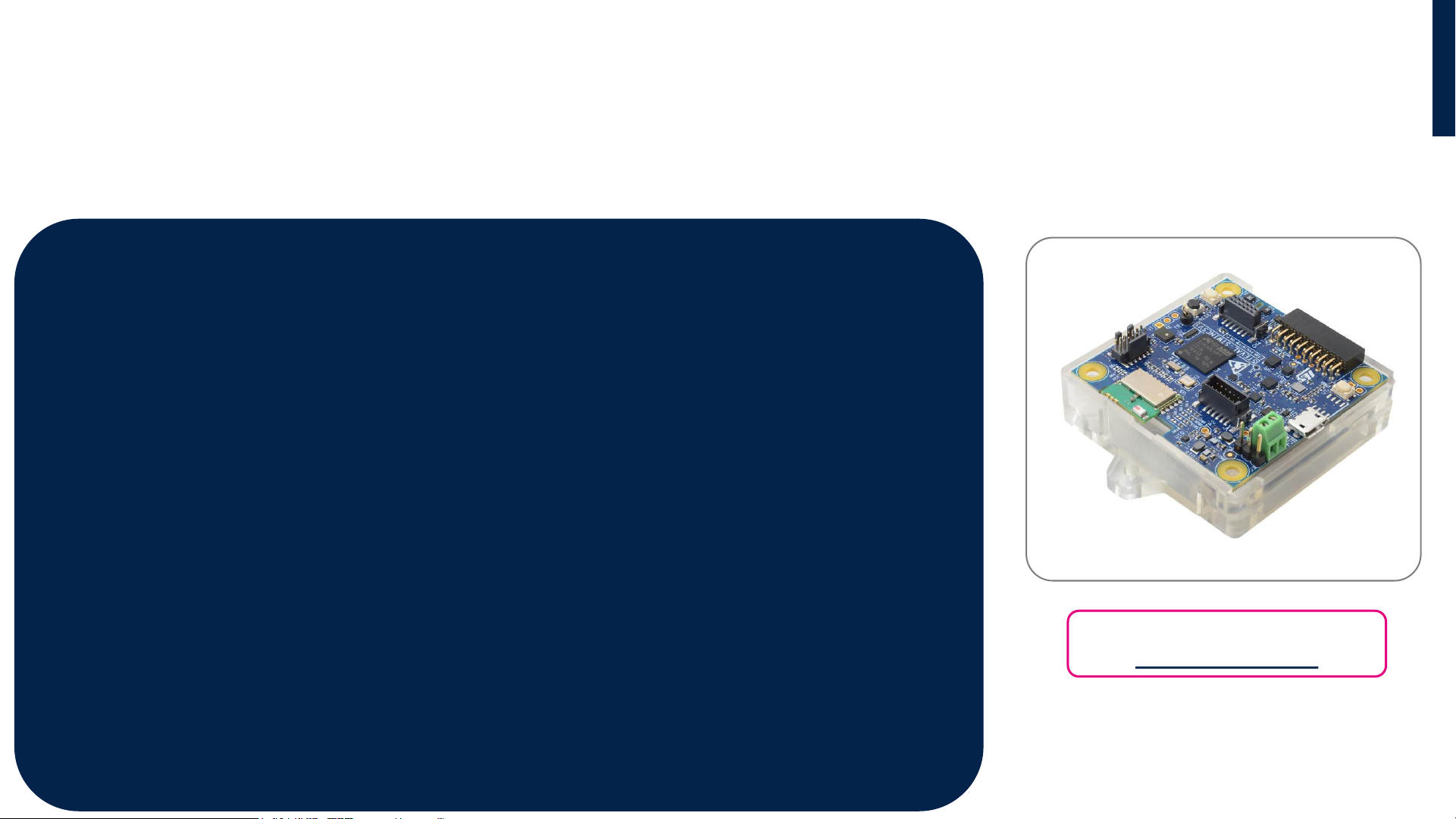
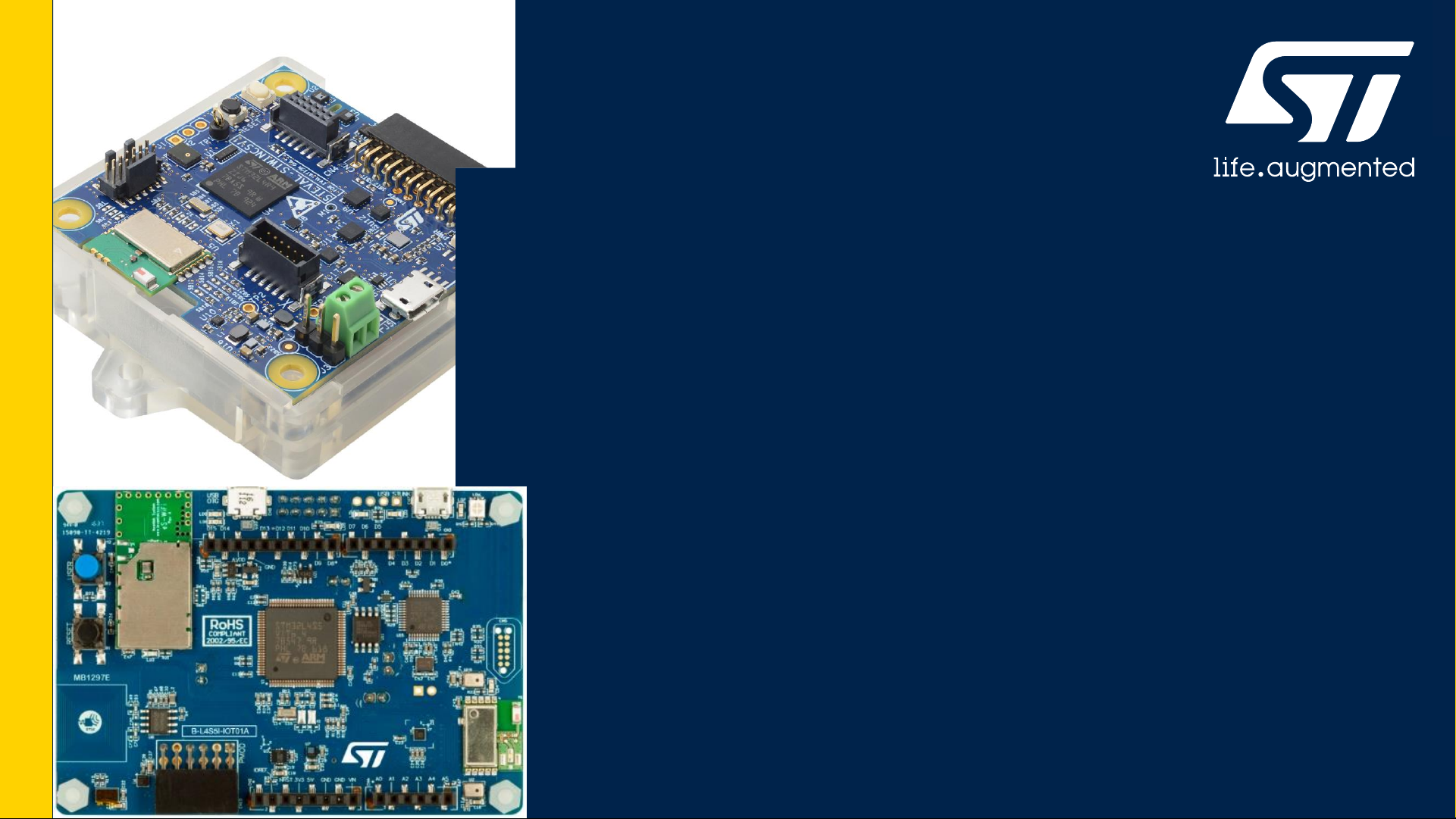
STWIN development kit - STEVAL-STWINKT1B
Hardware Overview
STWIN - SensorTile Wireless Industrial Node
The STWIN (STEVAL-STWINKT1 or STEVAL-STWINKT1B) is a development kit and reference design that simplifies
prototyping and testing of advanced industrial IoT applications such as condition monitoring and predictive
maintenance. The kit supports BLE wireless connectivity through an on-board module and Wi-Fi connectivity through
a special plugin expansion board (STEVAL-STWINWFV1).
Key Features
•Multi-sensing wireless platform implementing vibration monitoring and ultrasound detection
•Updated version of STEVAL-STWINKT1, now including STSAFE-A110 populated, BlueNRG-M2S module and
IMP23ABSU MEMS microphone
•Built around STWIN core system board with processing, sensing, connectivity and expansion capabilities
•Ultra-low-power ARM Cortex-M4 MCU at 120 MHz with FPU, 2048 kbytes Flash memory (STM32L4R9)
•Micro SD Card slot for standalone data logging applications
•On-board Bluetooth®low energy v5.0 wireless technology and Wi-Fi (with STEVAL-STWINWFV1 expansion board), and
wired RS485 and USB OTG connectivity
•Option to implement Authentication and Brand protection secure solution with STSAFE-A110
•Wide range of industrial IoT sensors:
• ultra-wide bandwidth (up to 6 kHz), low-noise, 3-axis digital vibration sensor (IIS3DWB)
• 3D accelerometer + 3D Gyro iNEMO inertial measurement unit (ISM330DHCX) with machine learning core
• ultra-low-power high performance MEMS motion sensor (IIS2DH)
• ultra-low-power 3-axis magnetometer (IIS2MDC)
• digital absolute pressure sensor (LPS22HH)
• relative humidity and temperature sensor (HTS221)
• low-voltage digital local temperature sensor (STTS751)
• industrial grade digital MEMS microphone (IMP34DT05)
• analog MEMS microphone with frequency response up to 80 kHz (IMP23ABSU)
•Modular architecture, expandable via on-board connectors:
• STMOD+ and 40-pin flex general purpose expansions
• 12-pin male plug for connectivity expansions
• 12-pin female plug for sensing expansions
•Other kit components: Li-Po battery 480 mAh, STLINK-V3MINI debugger with programming cable, Plastic box
Latest info available at
www.st.com/stwin
Page 5
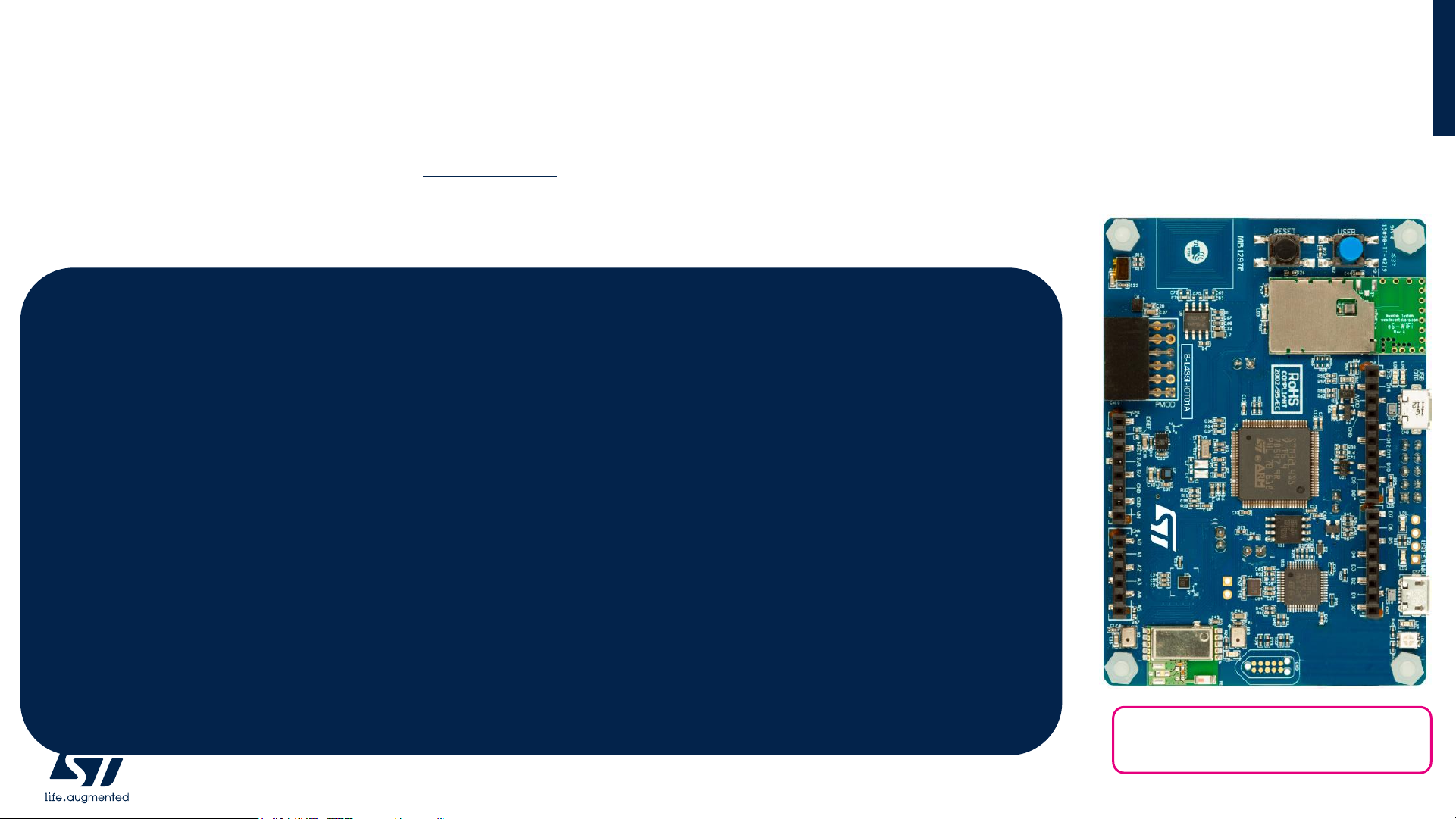
STM32L4 Discovery Board for IoT node (B-L4S5I-IOT01A)
The STM32L4+ Discovery kit for the IoT node (B-L4S5I-IOT01A) allows users to develop applications with direct connection to
cloud servers. The STM32L4+ Discovery kit enables a wide diversity of applications by exploiting low-power multilink
communication (BLE, Sub- GHz), multiway sensing (detection, environmental awareness) and ARM® Cortex®-M4 core-based
STM32L4 Series features. Arduino™ Uno V3 and PMOD connectivity provide unlimited expansion capabilities with a large
choice of specialized add-on boards.
STM32L4 Discovery Board for IoT node (B-L4S5I-IOT01A)
Hardware Overview
5
Key Product on board
• Ultra-low-power STM32L4 Series MCUs based on ARM® Cortex® -M4+ core with 2 Mbytes of Flash memory and 640 Kbytes of
SRAM, in LQFP100 package
• Bluetooth® V4.1 module (SPBTLE-RF)
• Sub-GHz (868 or 915 MHz) low-power-programmable RF module (SPSGRF-868 or SPSGRF-915)
• Wi-Fi® module Inventek ISM43362-M3G-L44 (802.11 b/g/n compliant)
• Dynamic NFC tag based on M24SR with its printed NFC antenna
• 2 digital omnidirectional microphones (MP34DT01)
• Capacitive digital sensor for relative humidity and temperature (HTS221)
• High-performance 3-axis magnetometer (LIS3MDL), 3D accelerometer and 3D gyroscope (LSM6DSL), 260-1260 hPa absolute
digital output barometer (LPS22HB), Time-of-Flight and gesture-detection sensor (VL53L0X)
• USB OTG FS with Micro-AB connector
• Expansion connectors: Arduino™ Uno V3, PMOD
• Flexible power-supply options: ST LINK USB VBUS or external sources
• On-board ST-LINK/V2-1 debugger/programmer with USB re-enumeration capability: mass storage, virtual COM port and debug
port
Latest info available at
www.st.com/B-L4S5I-IOT01A
Page 6
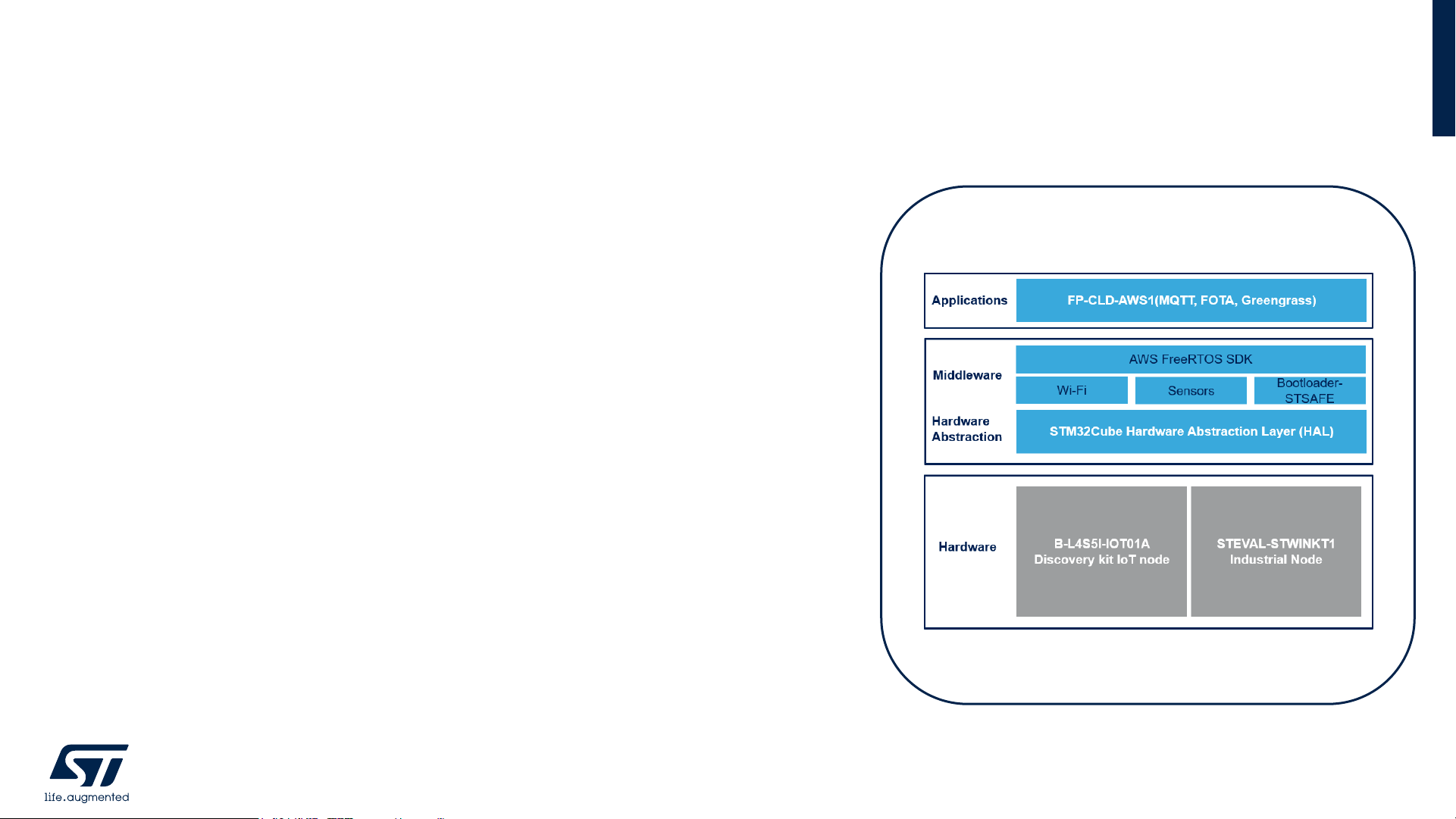
FP-CLD-AWS1
Software Overview
6
Software Description
The FP-CLD-AWS1 is an STM32Cube Function Pack. Thanks to this package you
can directly connect your IoT sensor node to Amazon AWS IoT, transmit sensors
data and receive command from Cloud applications.
Key features
• Three Key AWS Demo Application: MQTT, OTA and Greengrass Device
Discovery.
• A Web Dashboard running on Amazon AWS services for Sensor data Telemetry
Application.
• Integrated X-CUBE-SBSFU and the STSAFE-A110 to implement a Secure Boot
and a Secure Firmware Update solution.
• Middleware libraries featuring the Amazon AWS FreeRTOS software
development kit, Wi-Fi, and transport-level security (mbedTLS)
• Complete firmware to safely connect an IoT node with sensors to Amazon AWS
IoT using Wi-Fi communication technology
• Ready-to-use binaries to connect the IoT node to the web dashboard
• Sample implementations available for STM32L4+ Discovery Kit for IoT node (B-
L4S5I-IOT01A), and for STEVAL-STWINKT1B Industrial node.
• Easy portability across different MCU families, thanks to STM32Cube
• Based on STM32Cube software development environment for STM32
microcontrollers
• Free, user-friendly license terms
Overall Software Architecture
Page 7

2- Setup & Demo Examples:
STEVAL-STWINKT1B & B-L4S5I-IOT01A
Page 8
8
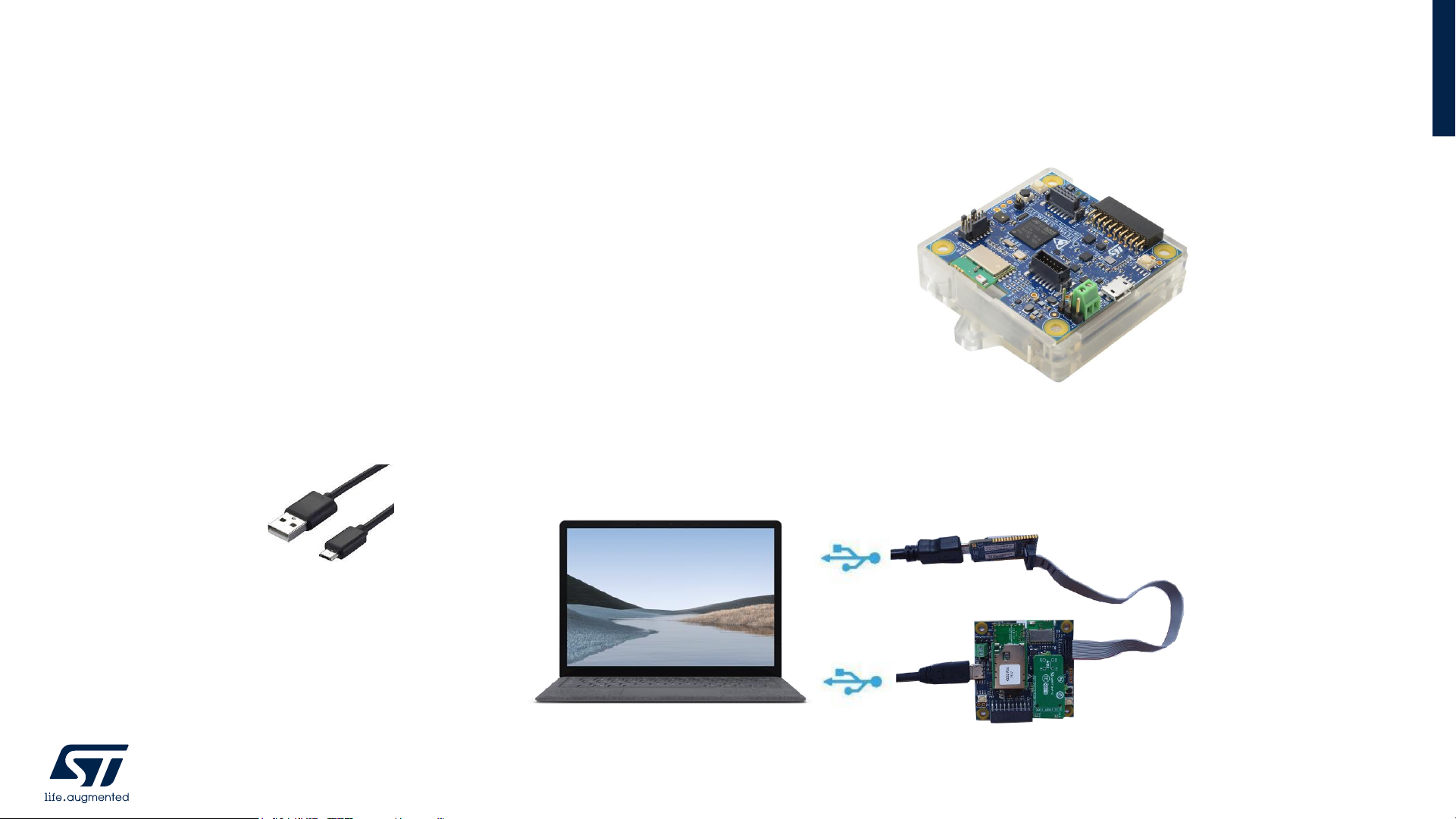
• 1x STEVAL-STWINKT1B development board
• Laptop/PC with Windows 7, 8 or 10
• 2x microUSB cables
• Wi-Fi Router or access to a Wi-Fi network
STEVAL-STWINKT1B
MicroUSB Cable
HW prerequisites for STEVAL-STWINKT1B
Page 9
9
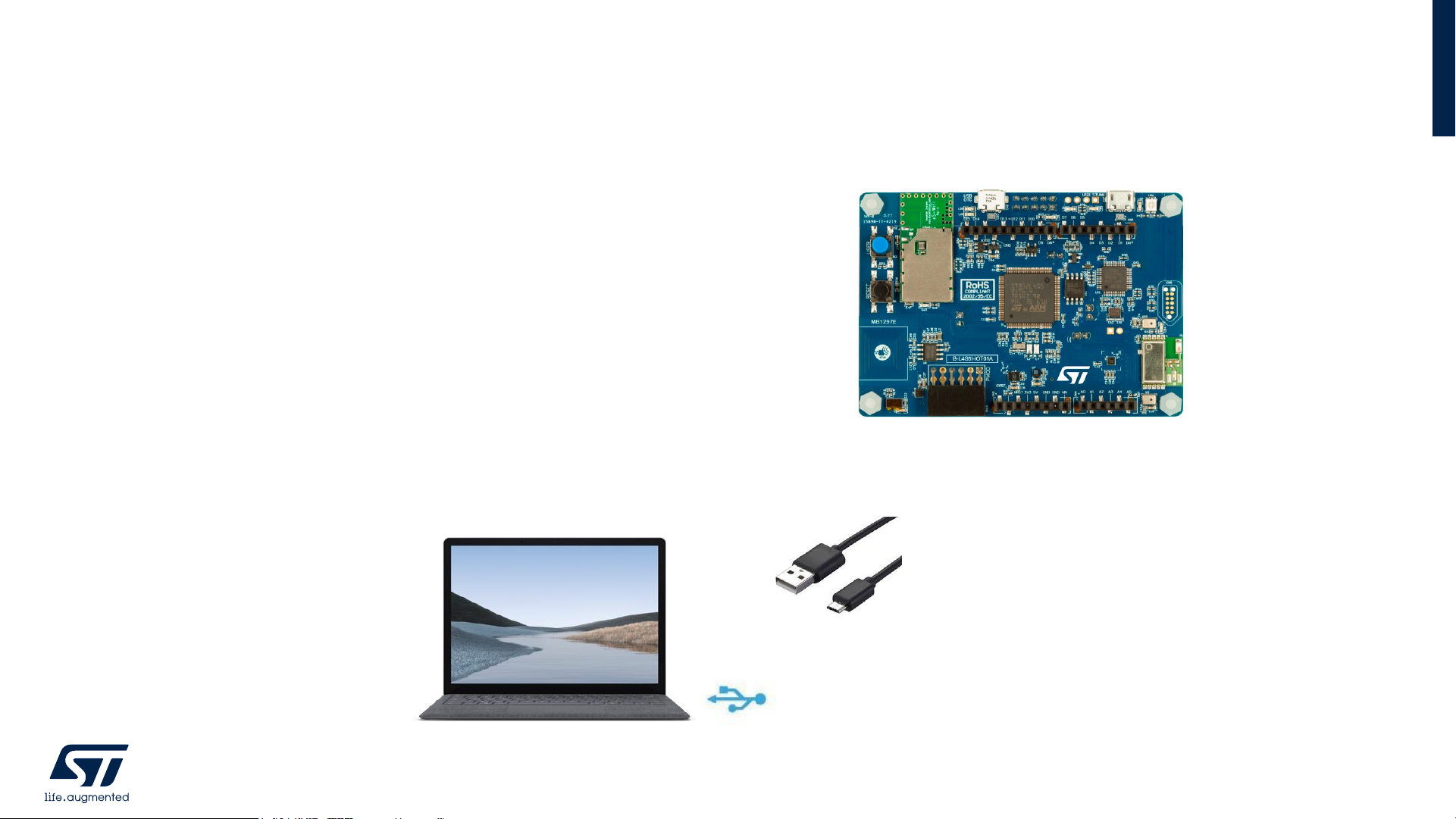
• 1x B-L4S5I-IOT01A development board
• Laptop/PC with Windows 7, 8 or 10
• 1x microUSB cables
• Wi-Fi Router or access to a Wi-Fi network
B-L4S5I-IOT01A
MicroUSB Cable
HW prerequisites for B-L4S5I-IOT01A
Page 10

10
• STM32CubeProgrammer Software
• Download and install STM32CubeProgrammer
• FP-CLD-AWS1
• Download FP-CLD-AWS1 package from www.st.com, copy the .zip file content into a folder on your PC. The package
contains binaries and source code with project files (IAR, STM32CubeIDE) based on B-L4S5I-IOT01A and STEVALSTWINKT1B
• Serial line monitor, e.g. TeraTerm (https://ttssh2.osdn.jp/)
• Chrome web browser (https://www.google.com/chrome/ ); tested with Chrome version v83.0.4103.61.
Software and other prerequisites
Page 11

2.1- Provision the Device STEVAL-STWINKT1B
Page 12
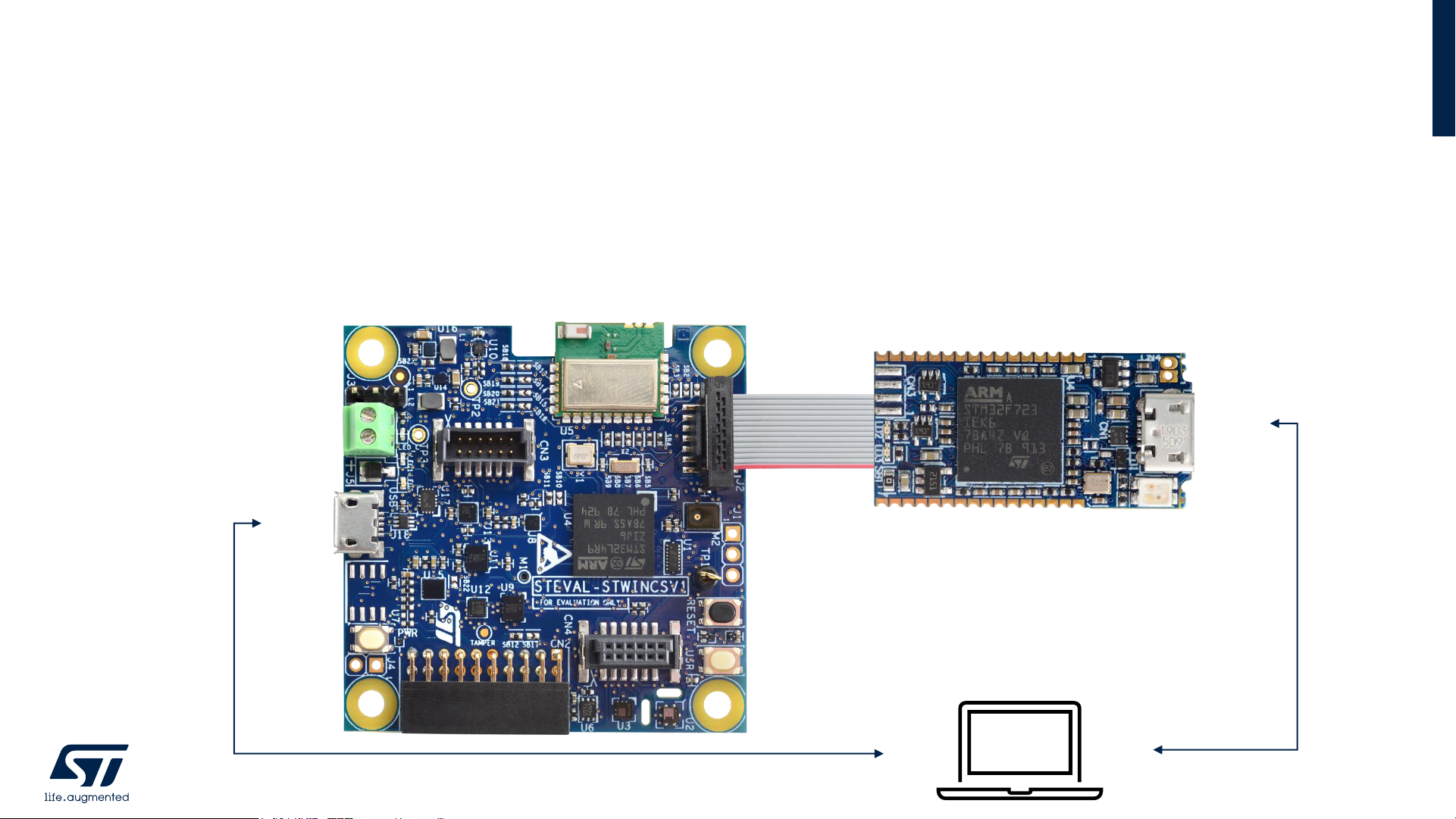
• Connect STEVAL-STWINKT1B USB micro port to PC using USB micro cable
• Connect STEVAL-STWINKT1B J2 Connector (14 pin) to STLINK-V3MINI debug
port and debugger USB to laptop USB.
Connect STEVAL-STWINKT1B To PC
12
USB
USB
STLINK-V3MINI
STEVAL-STWINKT1B
USB
USB
Page 13

• Provisioning binary is provided in the folder:
• Projects\STEVAL-
STWINKT1\Applications\BootLoader_STSAFE\STSAFE_Provisioning\Binary\Provisioning.bin
• Program the FW to the board.
• Use STM32CubeProgrammer to flash the Binary
• Paste the binary to STLINK USB Drive (STLINK_V3S) visible in Windows Explorer to flash the device
Flash the Provisioning FW
13
Page 14

• Reset the board pressing Black Button and Run the FW.
• Open Tera Term, select Serial, select the USB Serial Device and click OK.
• Caution: Do NOT select STMicroelectronics STLink Virtual COM Port
• Configure New-line (Rx:AUTO/Tx:CR+LF) and enable local echo in Terminal
configuration (Setup → Terminal in TeraTerm).
Run FW and Connect a Terminal to STWIN
14
Page 15

• Press user button (white) to start provisioning
• Get the Provisioning complete message on Screen
Complete the Provisioning
15
Page 16

2.2- Provision the Device B-L4S5I-IOT01A
Page 17

• Connect the board (B-L4S5I-IOT01A) to your laptop using USB micro cable
Connect B-L4S5I-IOT01A To PC
Page 18
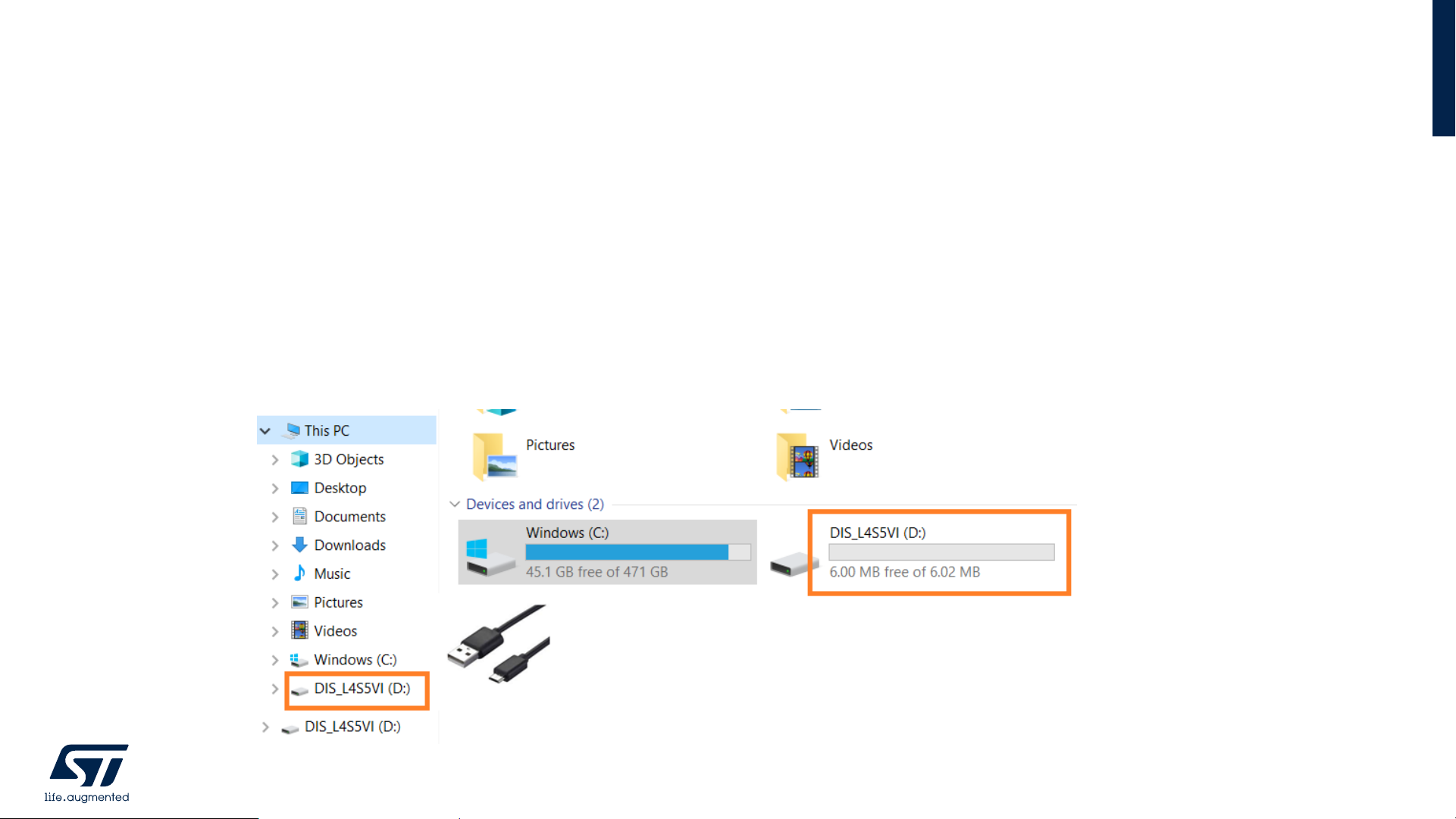
• Provisioning binary is provided in the folder:
• Projects\B-L4S5I-IOT01A\Applications\BootLoader_STSAFE\STSAFE_Provisioning\Binary\Provisioning.bin
• Program the FW to the board.
• Use STM32CubeProgrammer to flash the Binary
• Paste the binary to STLINK USB Drive (DIS_L4S5VI) visible in Windows Explorer to flash the device
Flash the Provisioning FW
18
Page 19

• Open Tera Term, select Serial, select STMicroelectronics STLink Virtual COM Port
• Configure New-line (Rx:AUTO/Tx:CR+LF) and enable local echo in Terminal
configuration (Setup → Terminal in TeraTerm).
• Reset the board pressing Black Button and Run the FW.
Connect a Terminal to B-L4S5I-IOT01A and Run FW
19
Page 20

• Get the Provisioning complete message on Screen
Complete the Provisioning
20
Page 21

2.3- Register the Device to ST Dashboard
Page 22

• Keep the board (USB and Debug) connected to your PC and Tera Term open
• AWS Application Binary is provided in the folder:
• Projects\STEVAL-STWINKT1\Applications\Cloud\aws_demos\EWARM\PostBuild\SBSFU_STWINv1_aws_demos.bin
• Program the FW to the board.
• Use STM32CubeProgrammer to flash the Binary
• Paste the binary to STLINK USB Drive (STLINK_V3S) visible in Windows Explorer to flash the device
Run AWS application on Device: STEVAL-STWINKT1B
22
Page 23

• Keep the board (USB) connected to your PC and Tera Term open
• AWS Application Binary is provided in the folder:
• Projects\B-L4S5I-IOT01A\Applications\Cloud\aws_demos\EWARM\PostBuild\SBSFU_B-L4S5I-IOT01_aws_demos.bin
• Program the FW to the board.
• Use STM32CubeProgrammer to flash the Binary
• Paste the binary to STLINK USB Drive (DIS_L4S5VI) visible in Windows Explorer to flash the device
Run AWS application on Device: B-L4S5I-IOT01A
23
Page 24

Copy Device Cert from the terminal
24
Page 25

Signup and Signin to https://dsh-assetracking.st.com
25
Page 26

• Go to Devices in Left Panel, then on
Right Panel click on “+” sign to enter
data for new device.
Enroll new device in Dashboard by clicking + sign
26
Page 27

• Enroll the new device in Dashboard
with
• a descriptive name to your device as
Custom name
• A string as Device ID
• Select Technology: Wi-Fi.
• Select Multi-Account device registration and
Paste the Device Certificate copied from
Terminal into Certificate PEM string edit box.
• Finally Click submit to create the thing in
Dashboard
Enter New Device Parameters
27
Page 28

After the board is registered, a new icon appears in device list
Device Enroll Success
28
Page 29

Enter newly generated Device ID into terminal
29
Page 30

Configure Wi-Fi parameters
30
Page 31

• Device Configuration is complete.
• Device will connect to network and
publish data.
• Go to ST’s Dashboard to see the
published data
Demonstration Application Starts
31
Page 32

2.4- Stream Device data to ST Dashboard
Page 33

Return to ST Dashboard to see Sensors Data
33
Page 34

• Go to “Telemetry”
• Select data sending Device from Select Devices
• Select a Sensor from Select Measure
• Select Realtime from Select Window Time
• Click the Play button to see the data on Window
Select a Device to see Sensors Data
34
Page 35

Accelerometer Data
35
Page 36

Temperature Data
36
Page 37

3- Documents & Related Resources
Page 38

38
Visit www.st.com for the complete list
FP-SNS-AWS1:
• DB3232: STM32Cube function pack for IoT node with Wi-Fi and sensors, connected to ST Dashboard on Cloud – databrief
• UM2186: Getting started with STM32Cube function pack for IoT node with Wi-Fi and sensors, connected to ST Dashboard
on Cloud – user manual
DSH-ASSETRACKING:
• DB4207: CloudAmazon-based web application for asset tracking 2.0 – databrief
X-CUBE-AWS:
• UM2178: Getting started with X-CUBE-AWS STM32Cube Expansion Package for Amazon Web Services® IoT – user
manual
X-CUBE-SBSFU:
• UM2262: Getting started with the X-CUBE-SBSFU STM32Cube Expansion Package – user manual
Documents & Related Resources
Page 39

39
Visit www.st.com for the complete list
STEVAL-STWINKT1B:
• Gerber files, BOM, Schematic
• DB4345: STWIN SensorTile Wireless Industrial Node development kit and reference design for industrial IoT applications –
databrief
STEVAL-STWINWFV1:
• Gerber files, BOM, Schematic
• DB3971: Wi-Fi expansion for the SensorTile Wireless Industrial Node (STWIN) kit – databrief
B-L4S5I-IOT01A:
• Gerber files, BOM, Schematic
• DB4184: Discovery kit for IoT node, multi-channel communication with STM32L4+ Series 1.0 – databrief
• UM2622: Discovery kit for IoT node, multi-channel communication with STM32L4+ Series 1.0 – user manual
Documents & Related Resources
Page 40

4- STM32 Open Development
Environment: Overview
Page 41

STM32 Open Development Environment
Fast, affordable Prototyping and Development
41
• The STM32 Open Development Environment (STM32 ODE) is an open, flexible, easy, and affordable way
to develop innovative devices and applications based on the STM32 32-bit microcontroller family combined
with other state-of-the-art ST components connected via expansion boards. It enables fast prototyping with
leading-edge components that can quickly be transformed into final designs
For further information, please visit www.st.com/stm32ode
Function Packs
(FP)
STM32Cube
development software
STM32 Nucleo
expansion boards
(X-NUCLEO)
STM32 Nucleo
development boards
STM32Cube
expansion software
(X-CUBE)
Page 42

© STMicroelectronics - All rights reserved.
The STMicroelectronics corporate logo is a registered trademark of the STMicroelectronics
group of companies. All other names are the property of their respective owners.
Thank you
 Loading...