

Page 1

RF430F5978 EVM Kit
User’s Guide
Page 2

2 / 22
11 – November 2013
Page 3

Contents
3 / 22
11 – November 2013
Table of Contents Page
1
About This User Guide .................................................................................................................................. 6
2 RF430F5978 Demo Kit Overview .................................................................................................................. 6
3 Introduction .................................................................................................................................................... 6
4 Installation ...................................................................................................................................................... 7
4.1 Demo Software Installation EM430F5978 Demo Kit (Attached e2e.ti.com USB Memory Stick) ................ 7
4.2 Hardware Installation of LF-Microreader ..................................................................................................... 7
4.3 Virtual COM Port Driver Installation of LF-Microreader .............................................................................. 7
4.4 UHF Access Point COM Port Driver .........................................................................................................10
5 Start the software .........................................................................................................................................11
6 Using the software .......................................................................................................................................13
7 Schematic .....................................................................................................................................................14
7.1 RF430F5978EVM .....................................................................................................................................14
7.2 APA434R01 ..............................................................................................................................................15
7.3 MRD2EVM ................................................................................................................................................16
8 Revision History ...........................................................................................................................................17
9 IMPORTANT NOTICE ...................................................................................................................................18
Page 4

Contents
4 / 22
11 – November 2013
Summary of Figures Page
No table of figures entries found.
Page 5

Page 6
RF430F5978 EVM Kit – User Guide
6 / 22
11 – November 2013
1 About This User Guide
This manual describes the modules and peripherals of the MCU-RF AES family of devices. Each description
presents the module or peripheral in a general sense. Not all features and functions of all modules or
peripherals may be present on all devices. In addition, modules or peripherals may differ in their exact
implementation between device families, or may not be fully implemented on an individual device or device
family.
Pin functions, internal signal connections, and operational parameters differ from device to device. The user
should consult the device-specific data sheet for these details.
The LF communication scheme is described in a dedicated LF user guide.
2 RF430F5978 Demo Kit Overview
Install the Demo software and drivers for LF reader and UHF Access Point
3 Introduction
The RF430F5978 EVM Software can be used to execute the main features of RF430F5978 device.
Resonant trimming, transponder communication (LF Passive Mode) and passive entry (LF Wake Up Mode)
communication can be executed. The EVM Software synchronizes its own settings with the device
configuration as far as possible to achieve valid data communication and response analyzing. Some
devices only offer partial functionality (e.g. smaller memory or trimming only). This is not considered in the
demo software and needs to be managed by the user.
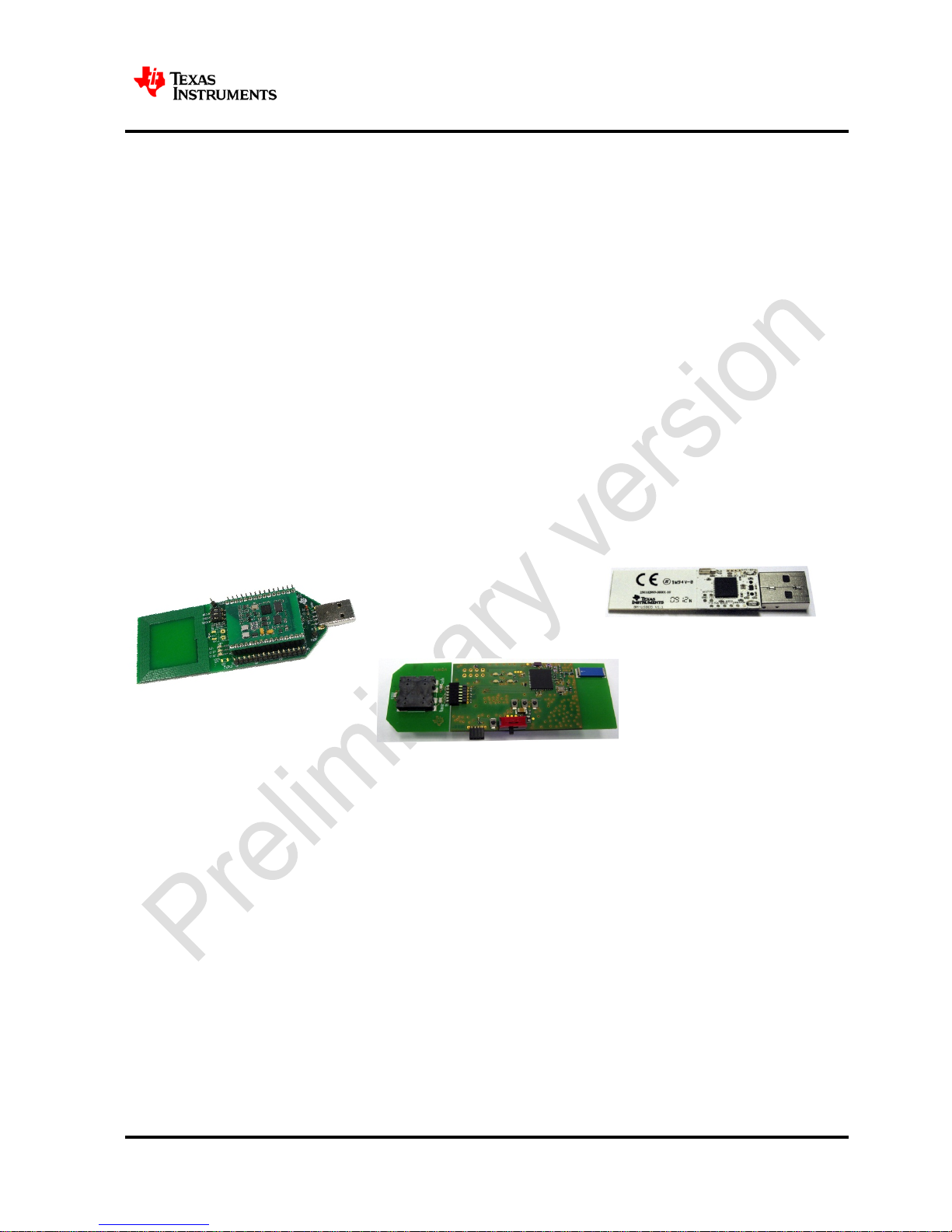
Two COM-Ports or USB-Ports are required to communicate with the demo hardware.
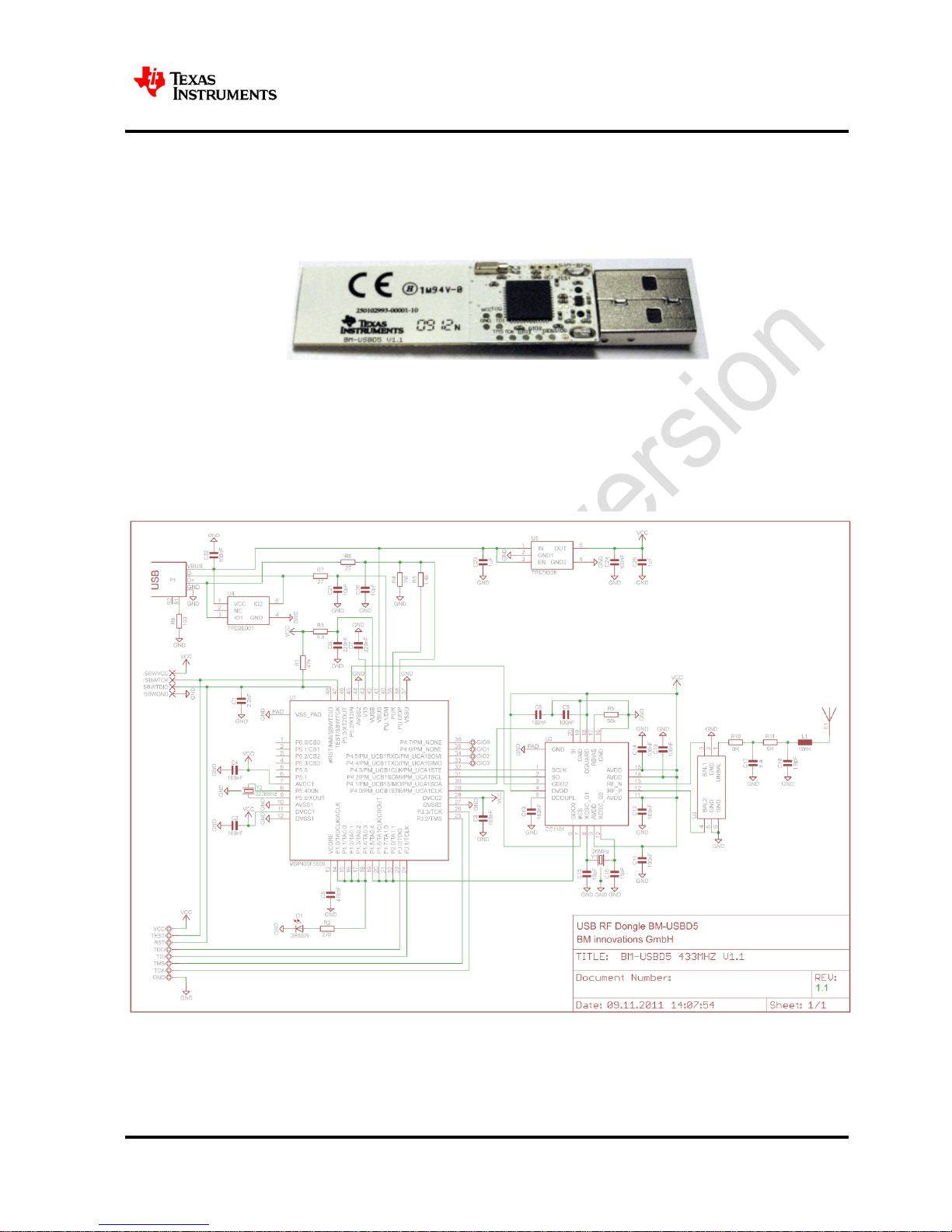
AP434R01
UHF(434MHz) Access Point
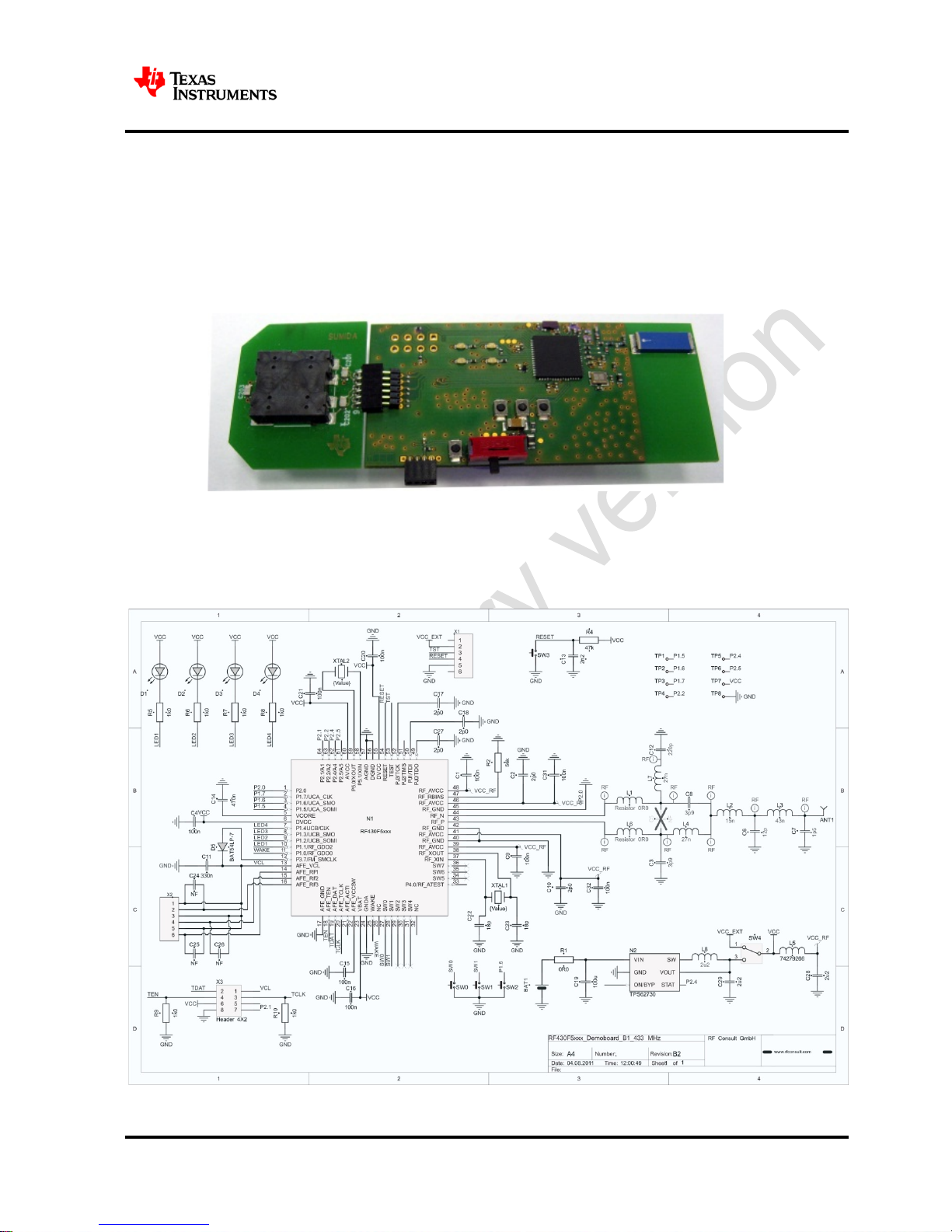
RF430F5978EVM
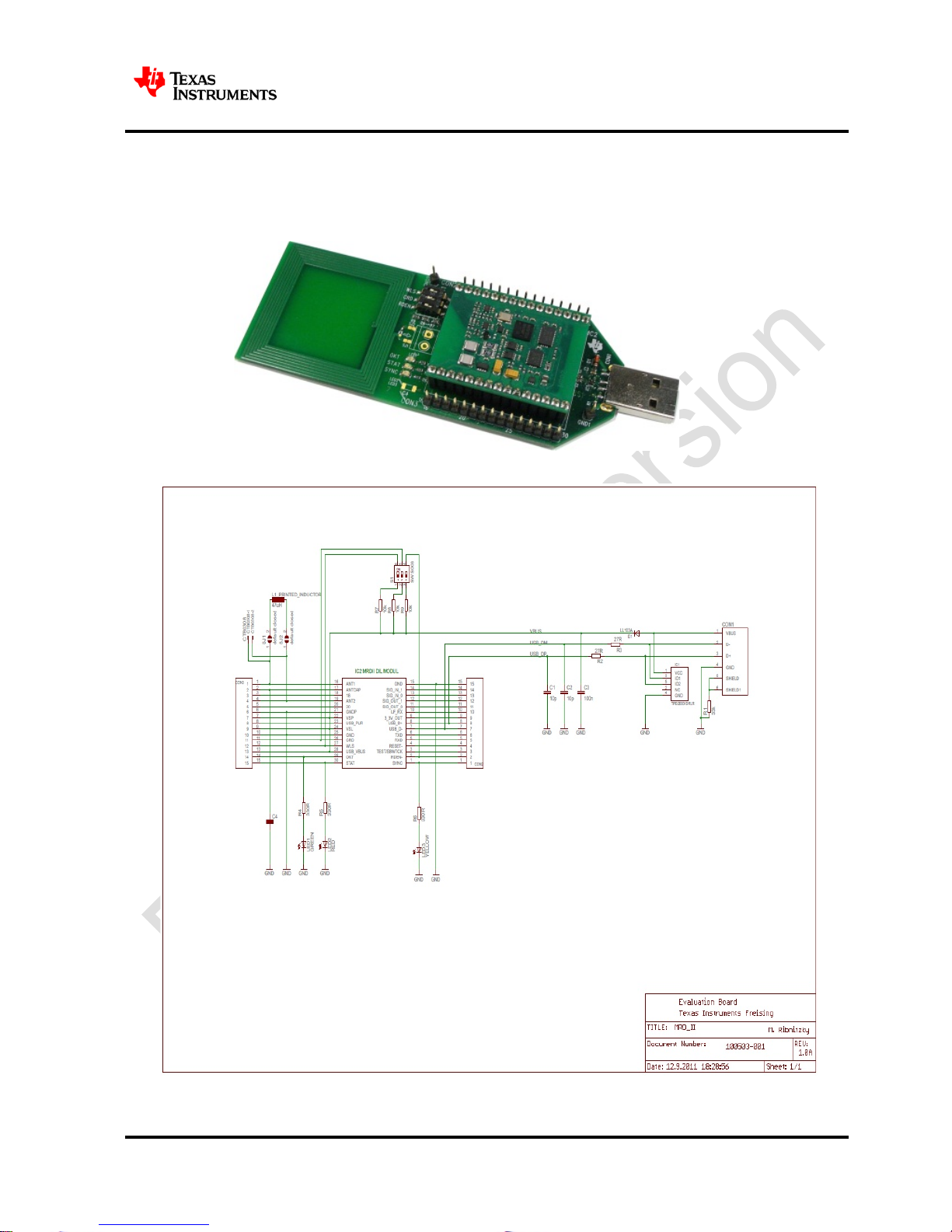
MRD2EVM
134.2 kHz LF-Microreader II
Page 7
RF430F5978 EVM Kit – User Guide
7 / 22
11 – November 2013
4 Installation
4.1 Demo Software Installation EM430F5978 Demo Kit (Attached e2e.ti.com USB Memory Stick)
Double-Click the installer file to install the software package and drivers. After installation the default
location for the demo software is
C:\Program Files\RF430F 5 978 EV M Sof twar e
4.2 Hardware Installation of LF-Microreader
1. Connect the LF-Microreader to the PC.
2. For first using the LF-Microreader please insta ll the ‘Microreader II Virtual COM Port’ driver.
4.3 Virtual COM Port Driver Installatio n o f L F-Microreader
The Windows new device driver will request a new device driver to be installed. Normally the
driver should be detected automatically. If the driver is not detected it can be found at the default
location: C:\ Program Files\RF430F5978 EVM Software\Driver
Driver Installation
1. Download the driver from the link specified in 3.Download the software.
2. Proceed according to the type of Operating system.
3. Windows 7 or Later
a. Remove the Microreader EVM board if it is already connected to USB Port
b. Right Click on the Driver file and click on option INSTALL.
c. Click on Button YES if it ask authentication from User Account Control.
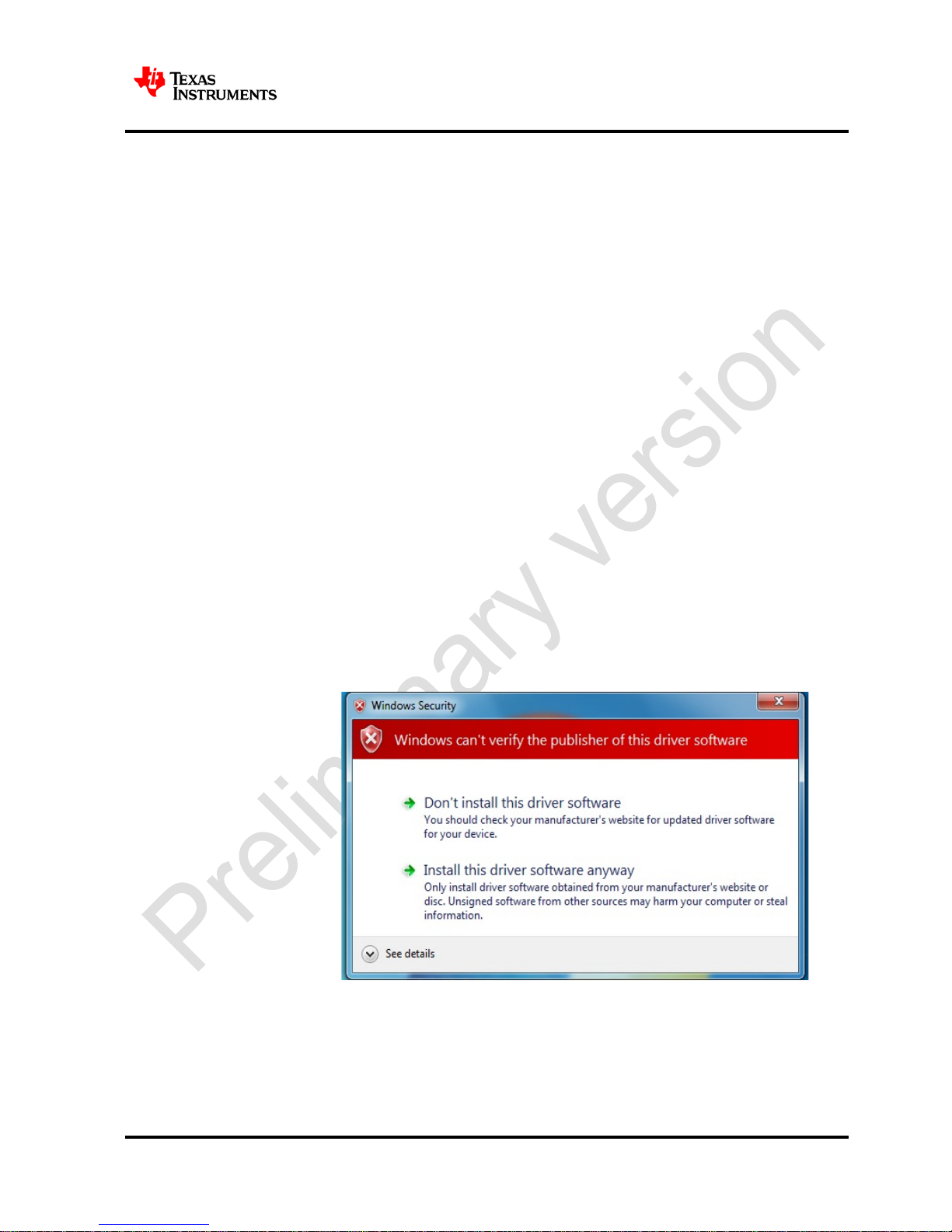
d. Click on Install the Driver Software anyway, if it asks for authentication.
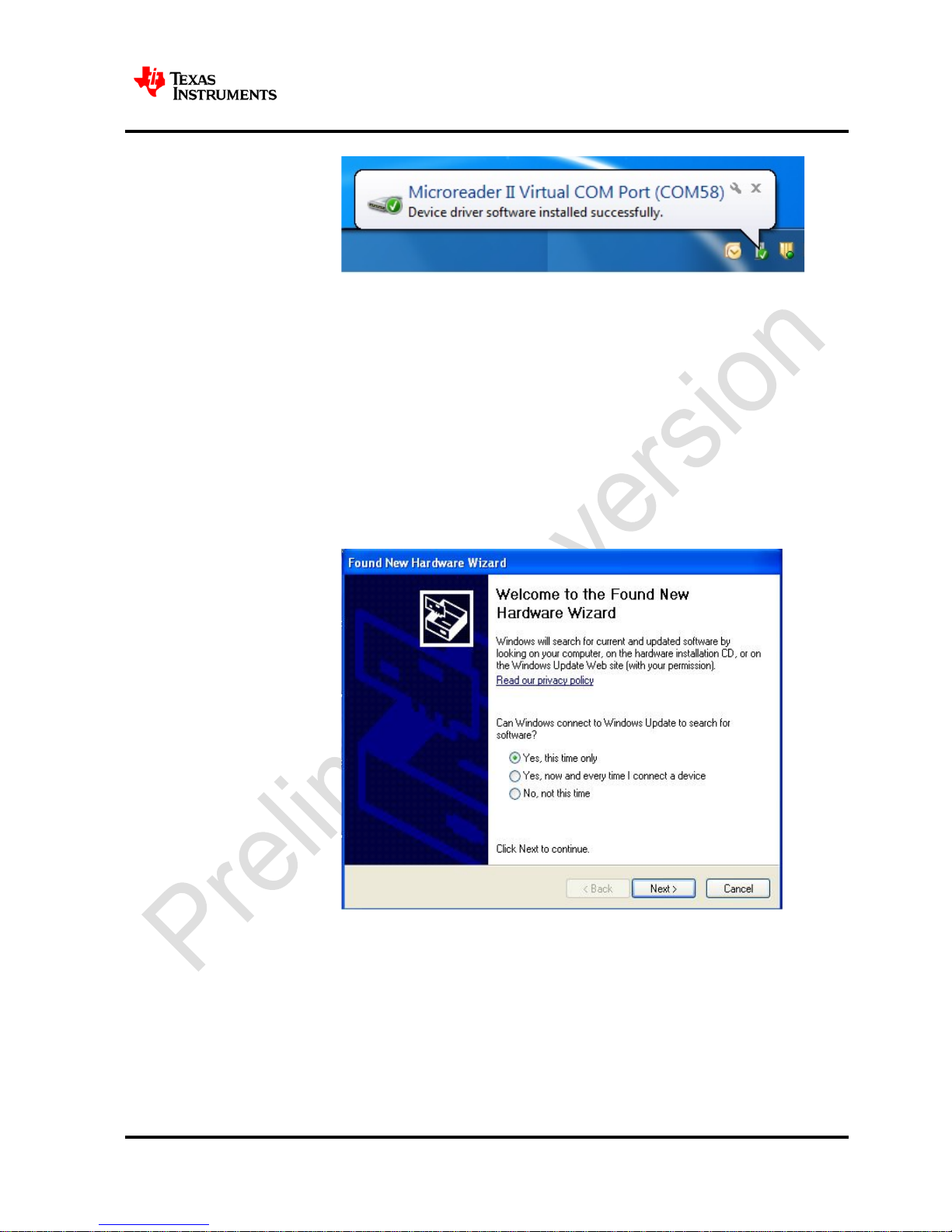
e. Now connect the reader and you can see the below message in the right
corner.
Page 8
RF430F5978 EVM Kit – User Guide
8 / 22
11 – November 2013
f. The USB driver is now installed on your PC. The system is ready for use.
4. Windows XP
a. Connect the Microreader EVM to USB port. The following dialog will appear.
Select the option “Yes, this time only” and then click on “Next”.
Page 9
RF430F5978 EVM Kit – User Guide
9 / 22
11 – November 2013
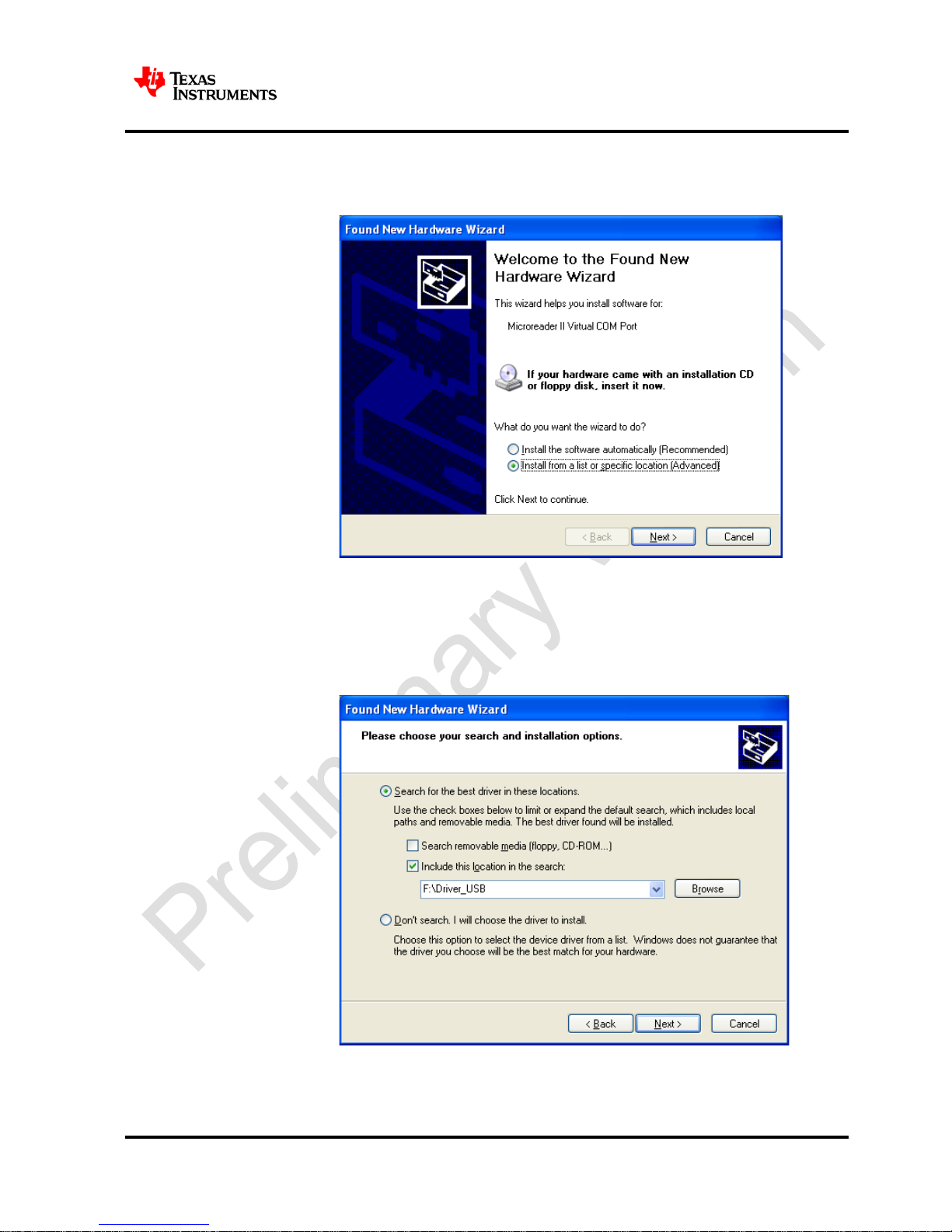
b. Select the option “Install from a list or Specific location” and then click on
“Next”.
c. Click on Browse and Select the location of the downloaded driver file on the
PC and then select “Next”
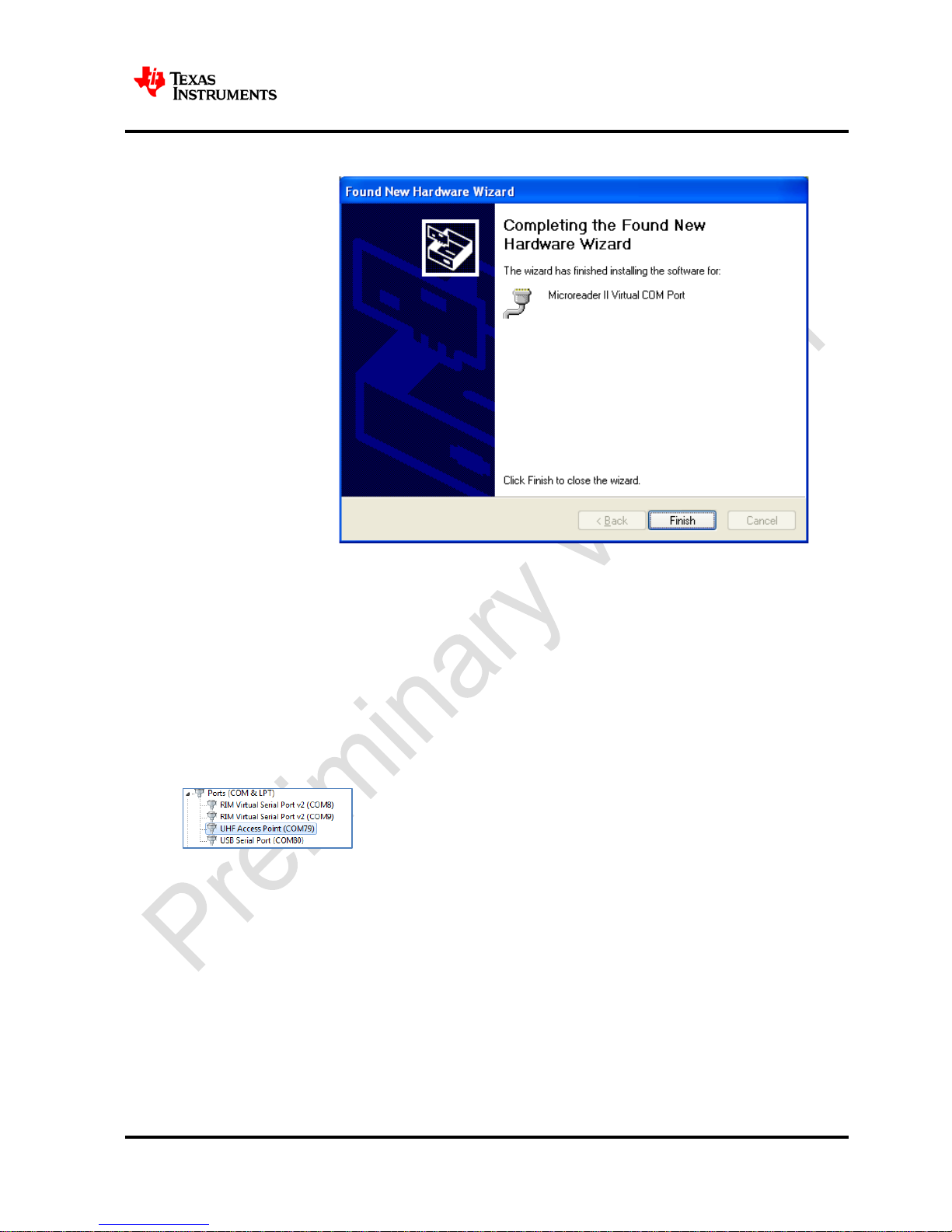
d. If it asks for any authentication then click on continue anyway. After
successful Installation the following window should be seen. Click on Finish.
Page 10
RF430F5978 EVM Kit – User Guide
10 / 22
11 – November 2013
e. The USB driver is now installed on your PC. The system is ready to use.
4.4 UHF Access Point COM Port Driver
Connect RF Access Point to a USB port on the PC. The Windows new device driver will request a new
device driver to be installed. Normally the driver should be detected automatically. If the driver is not
detected it can be found at the default location:
C:\ Program Files\RF430F 5 978 EV M Sof twar e \Drivers
After installation a new COM port will be installed on the PC. To see the COM port number, open the
Windows Control panel – System- Hardware – Device Manager and check the COM port number
under Ports (COM & LPT)
Page 11
RF430F5978 EVM Kit – User Guide
11 / 22
11 – November 2013
5 Start the software
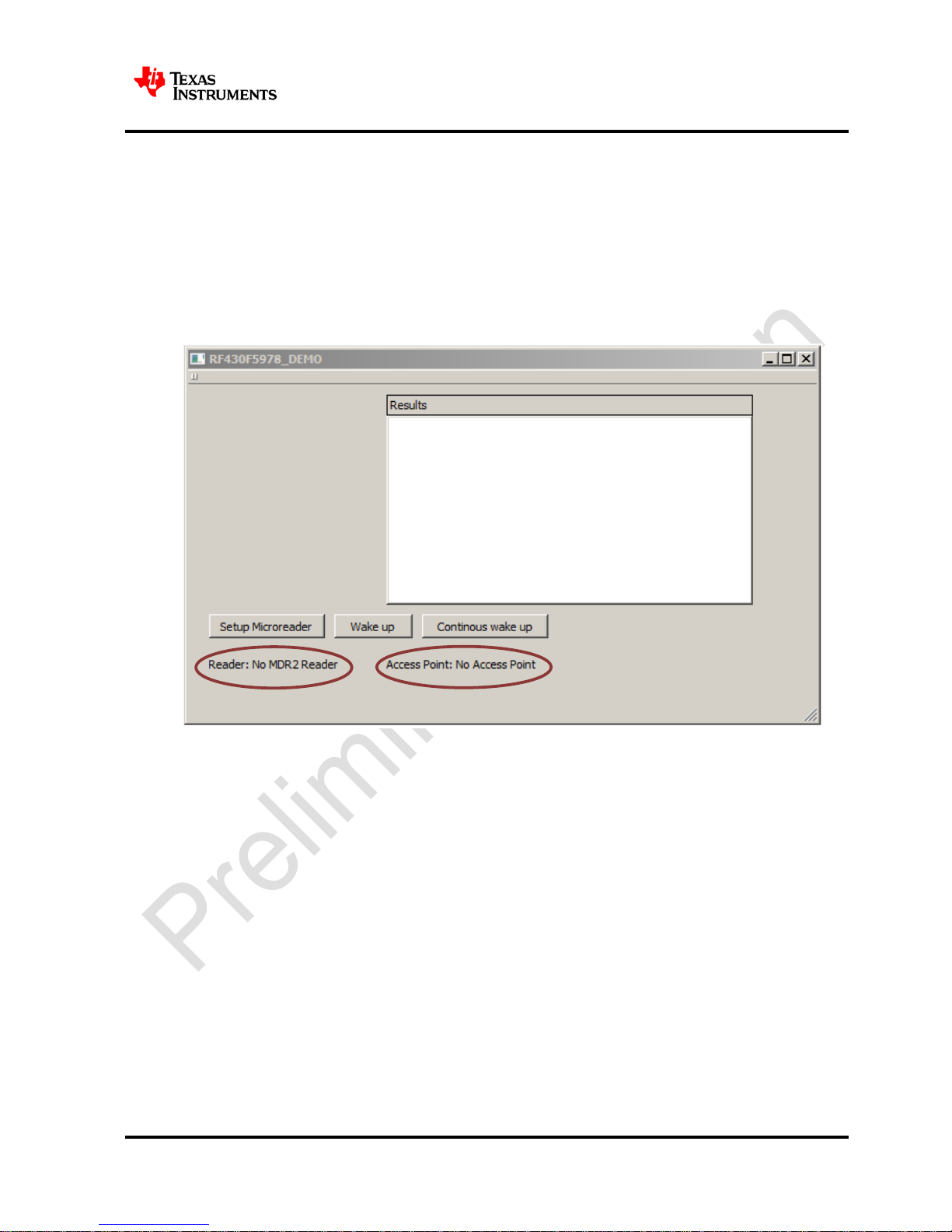
To run the software open Start – All Programs – RF430F5978 EVM Software – RF430F5978 E VM
Software
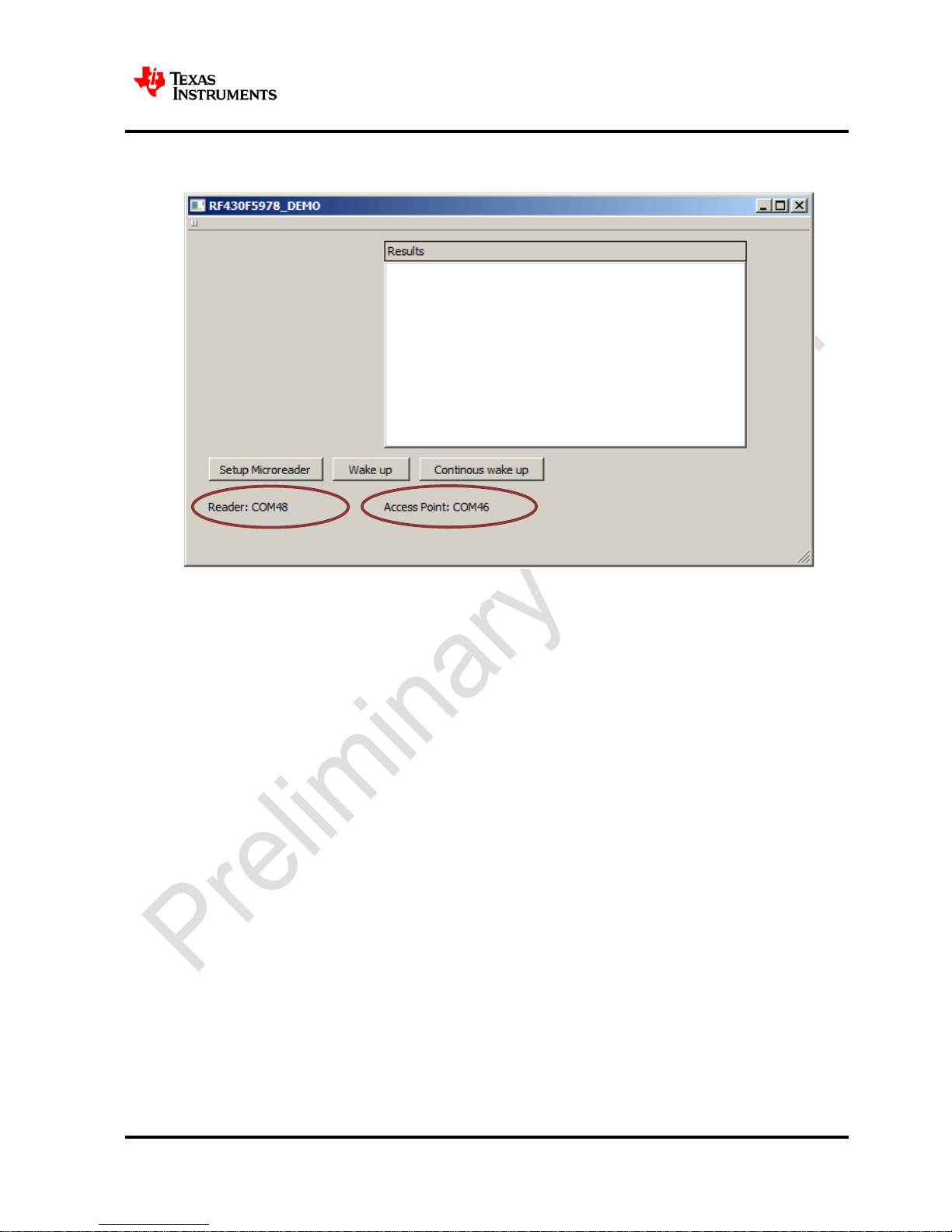
LF reader and UHF Access Point will be automatically detected.
1. Start GUI ‘RF430F5978_Demo’
2. Check is Microreader & USB Access point available
3. Is MDR2 & USB Access point not available please check the connection and try again
Page 12
RF430F5978 EVM Kit – User Guide
12 / 22
11 – November 2013
4. Is both available press Setup_MDR2
Page 13
RF430F5978 EVM Kit – User Guide
13 / 22
11 – November 2013
6 Using the software
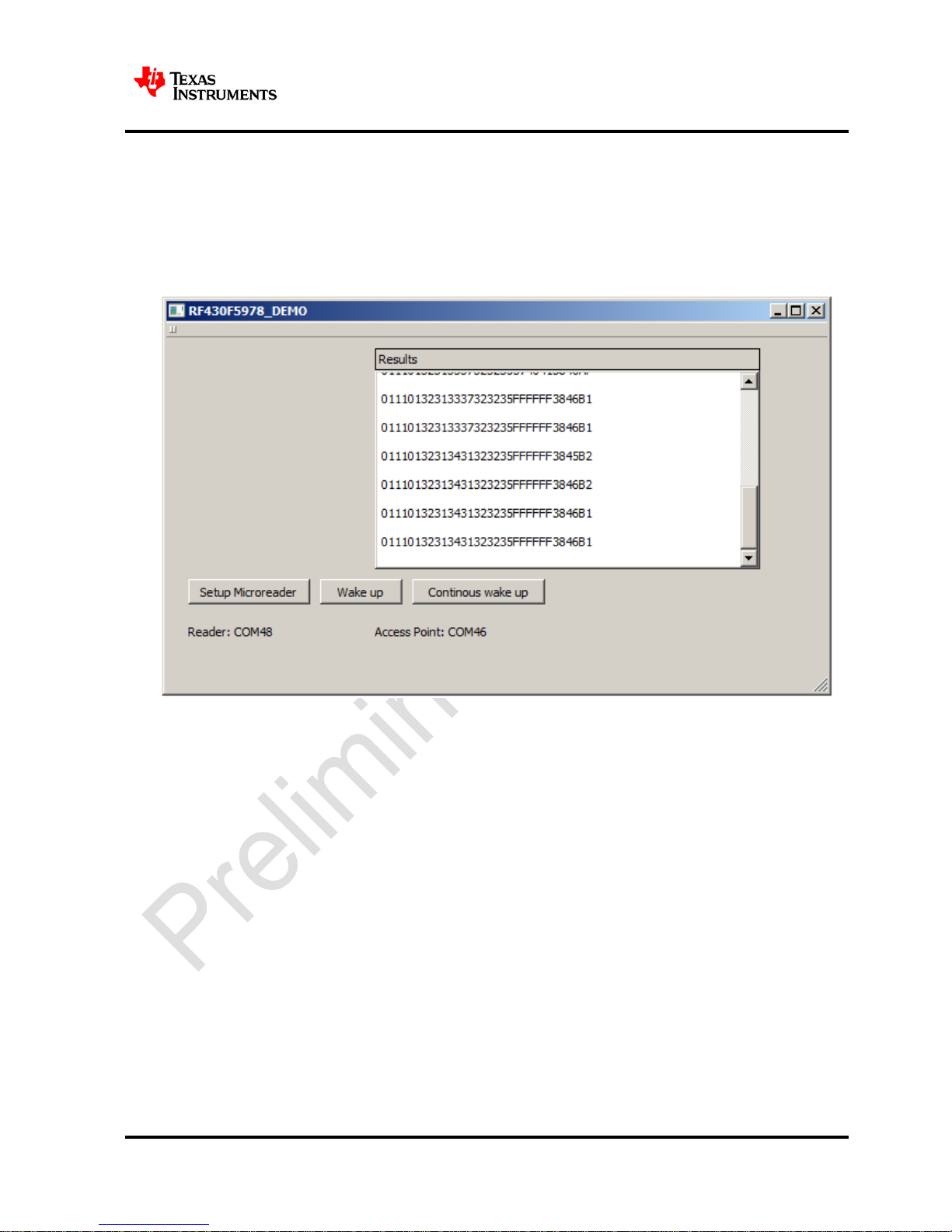
• Press Wake up button for start wakeup sequence once
•
Press Continuous wake up for wake up every 2 s
•
When you press Continuous wake up again the continuous stopped
Page 14
RF430F5978 EVM Kit – User Guide
14 / 22
11 – November 2013
7 Schematic
7.1 RF430F5978EVM
Page 15
RF430F5978 EVM Kit – User Guide
15 / 22
11 – November 2013
7.2 APA434R01
Page 16
RF430F5978 EVM Kit – User Guide
16 / 22
11 – November 2013
7.3 MRD2EVM
Page 17
RF430F5978 EVM Kit – User Guide
17 / 22
11 – November 2013
8 Revision History
NOTE: Page numbers for previous revisions may differ from page numbers in the current version.
Rev.
Version
SCN
Description of Change
Date
By
0 0 -
Initial release
08/05/2013
C. Kuch
Page 18
RF430F5978 EVM Kit – User Guide
18 / 22
11 – November 2013
9 IMPORTANT NOTICE
EVALUATION BOARD/KIT/MODULE (EVM) ADDITIONAL TERMS
Texas Instruments (TI) provides the enclosed Evaluation Board/Kit/Module (EVM) under the following conditions:
The user assumes all responsibility and liability for proper and safe handling of the goods. Further, the user indemnifies TI from all claims
arising from the handling or use of the goods.
Should this evaluation board/kit not meet the specifications indicated in the User’s Guide, the board/ kit may be returned within 30 days
from the date of delivery for a full refund.
THE FO REGOING LIMIT ED W ARRAN TY IS T HE EX CLUSIV E W ARRANT Y
MADE BY SELLER TO BUYER AND IS IN L I EU O F A LL O THER WARRANT IES, EXPRESSED, I MP LI ED , O R
STATUTORY, INCLUDING ANY WARRANTY OF MERCHANTABILITY OR FITNESS FOR ANY
PARTICULAR PU RPOSE. EXCE PT TO THE EX TENT OF THE IND EMNITY SET FORTH ABOVE, N EITHER
PARTY SHALL BE LIABLE TO THE OTHER FOR ANY INDIRECT, SPECIAL, INCIDENTAL, OR
CONSEQUENTIAL DAMAGES.
Please read the User's Guide and, specifically, the Warnings and Restrictions notic e in the User's Guide prior to handling t he product. This
notice contains important safety information about temperatures and voltages. For additional information on TI's environmental and/or
safety programs, please visit www.ti.com/esh
or contact TI.
No license is granted under any patent right or other intellectual property right of TI covering or relati ng to any machine, process, or
combination in which such TI products or servi ces might be or are used. TI currently deals with a variet y of customers for products, and
therefore our arrangement with the user is not exclusive. TI assumes no liability for applic ations assistance, customer product design,
software performance, or infringement of patents or services described herein.
REGULATORY COMPLIANCE INFORMATION
As noted in the EVM User’s Guide and/or EVM itself, this EVM and/or accompanying hardware m ay or may not be subject to the Federal
Communications Commission (FCC) and Industry Canada (IC) rules.
For EVMs not subject to the above rules, this evaluation board/kit/module is intended for use for ENGINEERING DEVELOPMENT,
DEMONSTRATION OR EVALUATION PURPOSES ONLY and is not considered by TI to be a finished end product fit for general
consumer use. It generates, uses, and can radiate radio f requency energy and has not been tested for compliance with the limits of
computing devices pursuant to part 15 of FCC or ICES-003 rules, which are designed to provide reasonable protection against radio
frequency interference. Operation of the equipment may cause interference with radio c ommunications, in which case the user at his own
expense will be required to take whatever measures may be required to correct this interference.
General Statement for EVMs including a radio
User Power/Frequency Use Obligations: This radio is i ntended for development/professional use only in legally allocated frequency and
power limits. Any use of radio frequencies and/or power availability of this EVM and its development application(s) must comply with local
laws governing radio spectrum allocation and power limits for this evaluation module. It is the user’s sole responsibil ity t o only operate this
radio in legally acceptable frequency space and within legally m andated power limitat ions. Any exceptions to this is strict ly prohibited and
unauthorized by Texas Instruments unless user has obtained appropriate experimental/development licenses from local regulatory
authorities, which is responsibility of user including its acceptable authorization.
For EVMs annotated as FCC – FEDERAL COMMU NICATIONS COMMISSION Part 15 Com pliant
Caution
This device complies with part 15 of t he FCC Rules. Operation is subject to the following two conditions: (1) This device may not cause
harmful interference, and (2) this device must accept any interference received, including interference that may cause undesired operation.
Changes or modifications not expressly approved by the party responsible for compliance coul d void the user's authority to operate the
equipment.
FCC Interference Statement for Class A EVM devices
This equipment has been tested and found to com ply with the limits for a Class A di gital device, pursuant to part 15 of the F CC Rules.
These limits are designed to provide reasonable protection against harmful i nterference when the equipment is operated in a commercial
environment. This equipment generates, uses, and can radiate radio frequency energy and, if not installed and used in accordance with the
Page 19

RF430F5978 EVM Kit – User Guide
19 / 22
11 – November 2013
instruction manual, may cause harmful interference t o radio communications. Operation of this equipment in a residential area is l ikely to
cause harmful interference in which case the user will be required to correct the interference at his own expense.
FCC Interference Statement for Class B EVM devices
This equipment has been tested and found to com ply with the limits for a Class B di gital device, pursuant to part 15 of the F CC Rules.
These limits are designed to provide reasonable protection against harmful interference in a residential installation. This equipment
generates, uses and can radiate radio frequency energy and, if not instal led and used in accordance with the instructions, may cause
harmful interference to radio communications. However, t here is no guarantee that interference will n ot occur in a parti cular installation. If
this equipment does cause harmful interf erence t o radio or tel evision rec epti on, which c an be determ ined by turning the equipm ent off and
on, the user is encouraged to try to correct the interference by one or more of the following measures:
• Reorient or relocate t he receiving antenna.
• Increas e the separati on between the equipment and receiver.
• Connect the equipment into an outlet on a circuit different f rom that to which the receiver is connected.
• Consult the dealer or an experienced radio/TV t echnician for help.
For EVMs annotated as IC – INDUSTRY CANADA Compliant
This Class A or B digital apparatus complies with Canadian ICES-003.
Changes or modifications not expressly approved by the party responsible for compliance could void the user’s authority to operate the
equipment.
Concerning EVMs including radio tra nsmi tters
This device complies with Industry Canada licence-exempt RSS standard(s). Operation is subject to the following two conditions: (1) this
device may not cause interference, and (2) this device must accept any interference, includi ng interference that may cause undesired
operation of the device.
Concerning EVMs including detachable antennas
Under Industry Canada regulations, this radio transmitter may only operate using an antenna of a type and maximum (or lesser) gain
approved for the transmitter by Industry Canada. To reduce potential radio i nt erference to other users, the antenna type and its gain should
be so chosen that the equivalent isotropically radiated power (e.i.r.p.) is not more than that necessary for successful communication.
This radio transmitter has been approved by Industry Canada to operate with the antenna types listed in the user guide with the m aximum
permissible gain and required antenna impedance for each antenna type indi cated. Antenna types not included in this list, hav ing a gain
greater than the maximum gain indicated for that type, are strictly prohibited for use with this device.
~
Cet appareil numérique de la classe A ou B est conforme à la norme NMB-003 du Canada.
Les changements ou les modifications pas expressément approuvés par la partie responsable de la conformité ont pu vider l’autorité de
l'utilisateur pour actionner l'équipement.
Concernant les EVMs avec appareils radio
Le présent appareil est conforme aux CNR d'Industrie Canada applicables aux appareils radio e xempts de licence. L'exploitation est
autorisée aux deux conditions suivantes : (1) l'appareil ne doit pas produire de brouillage, et (2) l'utilisateur de l'appareil doit accepter tout
brouillage radioélectrique subi, même si le brouillage est susceptible d'en compromettre le fonctionnement.
Concernant les EVMs avec antennes détachables
Conformément à la réglementation d'Industrie Canada, le présent émett eur radio peut f onctionner avec une ant enne d'un type et d'un gain
maximal (ou inférieur) approuvé pour l'émetteur par Industrie Canada. Dans le but de réduire l es risques de brouillage radioélectrique à
l'intention des autres utilisateurs, il faut choisir l e type d'antenne et son gain de sorte que la puissance isotrope rayonnée équivalente
(p.i.r.e.) ne dépasse pas l'intensité nécessaire à l'établissement d'une communication satisfaisante.
Le présent émetteur radio a été approuvé par Industrie Canada pour f onctionner avec les types d'antenne énumérés dans le manuel
d’usage et ayant un gain admissible maximal et l'impédance requise pour chaque type d'antenne. Les types d'antenne non inclus dans
cette liste, ou dont le gain est supérieur au gain maximal indiqué, sont strictement interdits pour l'exploitation de l'émetteur.
Page 20
RF430F5978 EVM Kit – User Guide
20 / 22
11 – November 2013
【
Important Notice for Users of this Pr oduc t in Japan】
This development kit is NOT certified as Confirming to Technical Regulations of Radio Law of Japan!
If you use this product in Japan, you are required by Radio Law of Japan to follow the instructions below with respect to this product:
1. Use this product in a shielded room or any other test facility as defined in the notification #173 issued by Ministry of Internal Affairs and
Communications on March 28, 2006, based on Sub-section 1.1 of Article 6 of the Ministry’s Rule for Enforcement of Radio Law of Japan,
2. Use this product only after you obtained the license of Test Radio Station as provided in Radio Law of Japan with respect t o this
product, or
3. Use of this product only after you obtained the Technical Regulations Conformity Certi fication as provided in Radio Law of Japan with
respect to this product. Also, please do not transfer this product, unless you give the same notice above to the transferee. Please not e
that if you could not follow the instructions above, you will be subject to penalties of Radio Law of Japan.
Texas Instruments Japan Limited
(address) 24-1, Nishi-Shinjuku 6 chome, Shinjukku-ku, Tokyo, Japan
http://www.tij.co.jp
【ご使用にあたっての注意】
本開発キットは技術基準適合証明を受けておりません。
本製品のご使用に際しては、電波法遵守のため、以下のいずれかの措置を取っていただく必要がありますので
ご注意ください。
(1)電波法施行規則第6条第1項第1号に基づく平成18年3月28日総務省告示第173号で定められた電
波暗室等の試験設備でご使用いただく。
(2)実験局の免許を取得後ご使用いただく。
(3)技術基準適合証明を取得後ご使用いただく。
なお、本製品は、上記の「ご使用にあたっての注意」を譲渡先、移転先に通知しない限り、譲渡、移転でき
ないものとします。
上記を遵守頂けない場合は、電波法の罰則が適用される可能性があることをご留意ください。
日本テキサス・インスツルメンツ株式会社
東京都新宿区西新宿6丁目24番1号
西新宿三井ビル
http://www.tij.co.jp
EVALUATION BOARD/KIT/MODULE (EVM)
WARNINGS, RESTRICTIONS AND DISCLAIMERS
For Feasibility Evaluation Only, in Laboratory/Development Environments. Unless otherwise indicated, this EVM is not a finished
electrical equipment and not intended for consumer use. It is intended solely for use for preliminary feasibility evaluation in
laboratory/development environments by technically qualif ied electronics experts who are familiar with the dangers and application risks
associated with handling electrical mechanical components, syst ems and subsystems. It should not be used as all or part of a finis hed end
product.
Your Sole Responsibility and Risk. You acknowledge, represent and agree that:
1. You have unique knowledge c oncerning Federal, St ate and local regul atory requirement s (including but not limited t o Food and Drug
Administration regulations, if applicabl e) which relate to your products and which relat e to your use (and/or that of your employees,
affiliates, contractors or designees) of the EVM for evaluation, testing and other purposes.
2. You have full and exclusive res ponsibi l ity t o assure the safety and compliance of your products with all such laws and other applicable
regulatory requirements, and also to assure the s afety of any activities to be conducted by you and/or your employees, affiliates,
contractors or designees, using the EVM. Furt her, you are responsible to assure that any int erfaces (electronic and/or mechanical)
between the EVM and any human body are designed with sui table isolation and means to safely limit acc essible leakage currents to
minimize the risk of electrical shock hazard.
Page 21

RF430F5978 EVM Kit – User Guide
21 / 22
11 – November 2013
3. You will employ reasonabl e safeguards to ensure that your use of the EVM will not result in any property damage, injury or death,
even if the EVM should fail to perform as described or expected.
4. You will take care of proper disposal and recycling of the EVM’s electronic components and packing materials
Certain Instructions. It is important to operat e this EVM within TI’s recommended specifications and environmental considerations per the
user guidelines. Exceeding the specified EVM ratings (including but not limited to input and output voltage, current, power, and
environmental ranges) may cause property dam age, personal injury or death. If there are questions concerning these ratings please
contact a TI field representative prior to connecting i nterface electronics including input power and intended loads. Any loads applied
outside of the specified output range may res ult in unintended and/or inaccurate operation and/or possible permanent damage to the EVM
and/or interface electronics. Please consult the EVM User's Guide prior to connecting any load to the EVM output. If there is uncertainty as
to the load specification, please contact a TI field representative. During normal operation, some circuit components may have case
temperatures greater than 60 C as long as the input and output are maintained at a normal ambient operating temperature. These
components include but are not limited to linear regulators, switching transistors, pass transistors, and current sense resistors which can be
identified using the EVM schemati c located in the EVM User's Guide. When placing measurement probes near these devic es during
normal operation, please be aware that t hese devic es may be very warm t o the t ouch. As with all el ect ronic evaluat ion t ools, only qual ifi ed
personnel knowledgeable in electronic measurement and diagnostics normally found in development environments should use these EVMs
Agreement to Defend, Indemnify and Hold Harmless. You agree to defend, indemnify and hold TI, its licensors and their representatives
harmless from and against any and all claims , damages, losses, expenses, cost s and liabilities (collect ively, "Claims") arising out of or in
connection with any use of the EVM that i s not in ac cordance with t he terms of the agreement. This obligation s hall apply whether Clai ms
arise under law of tort or contract or any other legal theory, and even if the EVM fails to perform as described or expected.
Safety-Critical or Life-Critical Applications. If you intend to evaluate the components f or possible use in safety critical applic ations (such
as life support) where a failure of the TI product would reasonably be expected to cause severe personal injury or death, such as devices
which are classified as FDA Class I II or similar classific ation, then you must specif ically notify TI of such int ent and enter into a separat e
Assurance and Indemnity Agreement.
IMPORTANT NOTICE
Texas Instruments Incorporated and its subsidiaries (TI) reserve the right to make corrections, modifications, enhanc ements,
improvements, and other changes to its products and services at any time and to discontinue any product or service without notice.
Customers should obtain the latest relevant information before placing orders and should verify that such informati on is current and
complete. All products are sold subject to TI’s terms and conditions of sale supplied at the time of order acknowledgment.
TI warrants performance of its hardware products to the specifications applicable at the time of sale in accordance with TI’s standard
warranty. Testing and other quality control techniques are used to the extent TI deems necessary to support this warranty. Except where
mandated by government requirements, testing of all parameters of each product is not necessarily performed.
TI assumes no liability for applications assistance or customer product design. Customers are responsible for their products and
applications using TI components. To minimize the risks associated with customer products and applications, customers should provide
adequate design and operating safeguards. TI does not warrant or represent that any license, either express or implied, is granted under
any TI patent right, copyright, mask work right, or other TI intellectual property right relating to any combination, machine, or process in
which TI products or services are used. Information published by TI regarding third-part y produc ts or services does not constitute a license
from TI to use such products or services or a warranty or endorsement thereof. Use of such information may require a license from a third
party under the patents or other intellectual property of the third party, or a license from TI under the patents or other intellectual property of
TI.
Reproduction of TI information in TI data books or data sheets is permissible only if reproduction is without alteration and is accompa nied
by all associated warranties, conditions, limitations, and notices. Reproduction of this information with alteration is an unfair and deceptive
business practice. TI is not responsible or liable for such altered documentation. Information of third parties may be subject to additional
restrictions.
Resale of TI products or services with statements different from or beyond the parameters stated by TI for that product or service voids all
express and any implied warranties for the associated TI product or service and is an unfair and deceptive business practice. TI is not
responsible or liable for any such statements.
TI products are not authorized for use in safety-critical applications (such as life support) where a failure of the TI product would reasonably
be expected to cause severe personal injury or death, unless officers of the parties have executed an agreement specifically governing
such use. Buyers represent that they have all necessary expertise in the safety and regulatory ramifications of their applications, and
acknowledge and agree that they are solely responsible for all legal, regulatory and safety-related requirements concerning t hei r products
and any use of TI products in such safety-critical applications, notwithstanding any applications-related inform ation or support that may be
provided by TI. Further, Buyers must fully indemnify TI and its representatives against any damages arising out of the use of TI products in
such safety-critical applications.
TI products are neither designed nor intended for use in military/aerospace applications or environments unless the TI products are
specifically designated by TI as military-grade or "enhanced plastic." Only products designated by TI as military-grade meet military
specifications. Buyers acknowledge and agree that any such use of TI products which TI has not designated as military-grade is solely at
the Buyer's risk, and that they are solely responsible for compliance with all legal and regulatory requirements in connection with such use.
Page 22
RF430F5978 EVM Kit – User Guide
22 / 22
11 – November 2013
TI products are neither designed nor intended for use in automotive applications or environments unless the specific TI products are
designated by TI as compliant with ISO/TS 16949 requirements. Buyers acknowledge and agree that, if they use any non-designated
products in automotive applications, TI will not be responsible for any failure to meet such requirements.
Following are URLs where you can obtain information on other Texas Instruments products and application solutions:
Products Applications
Amplifiers amplifier.ti.com Audio www.ti.com/audio
Data Converters dataconverter.ti.com Automotive www.ti.com/automotive
DLP® Products www.dlp.com Broadband www.ti.com/broadband
DSP dsp.ti.com Digital Control www.ti.com/digitalcontrol
Clocks and Timers www.ti.com/clocks Medical www.ti.com/medical
Interface interface.ti.com Military www.ti.com/military
Logic logic.ti.com Optical Networking www.ti.com/opticalnetwork
Power Mgmt power.ti.com Security www.ti.com/security
Microcontrollers microcontroller.ti.com Telephony www.ti.com/telephony
MCU RF / RFID http://www.ti.com/rfid/ Video & Imaging www.ti.com/video
RF/IF and ZigBee® Solutions www.ti.com/lprf Wireless www.ti.com/wireless
Mailing Address: Texas Instruments, Post Office Box 655303, Dallas, Texas 75265
Copyright © 2011, Texas Instruments Incorporated
 Loading...