

Datasheet PCF2116GHZ, PCF2114AU-12, PCF2114CU-10, PCF2114CU-12, PCF2116AU-10 Datasheet (Philips)
...Page 1

INTEGRATED CIRCUITS
DATA SH EET
PCF2116 family
LCD controller/drivers
Product specification
Supersedes data of 1996 Oct 25
File under Integrated Circuits, IC12
1997 Apr 07
Page 2

Philips Semiconductors Product specification
LCD controller/drivers PCF2116 family
CONTENTS
1 FEATURES
2 APPLICATIONS
3 GENERAL DESCRIPTION
3.1 Packages
4 ORDERING INFORMATION
5 BLOCK DIAGRAM
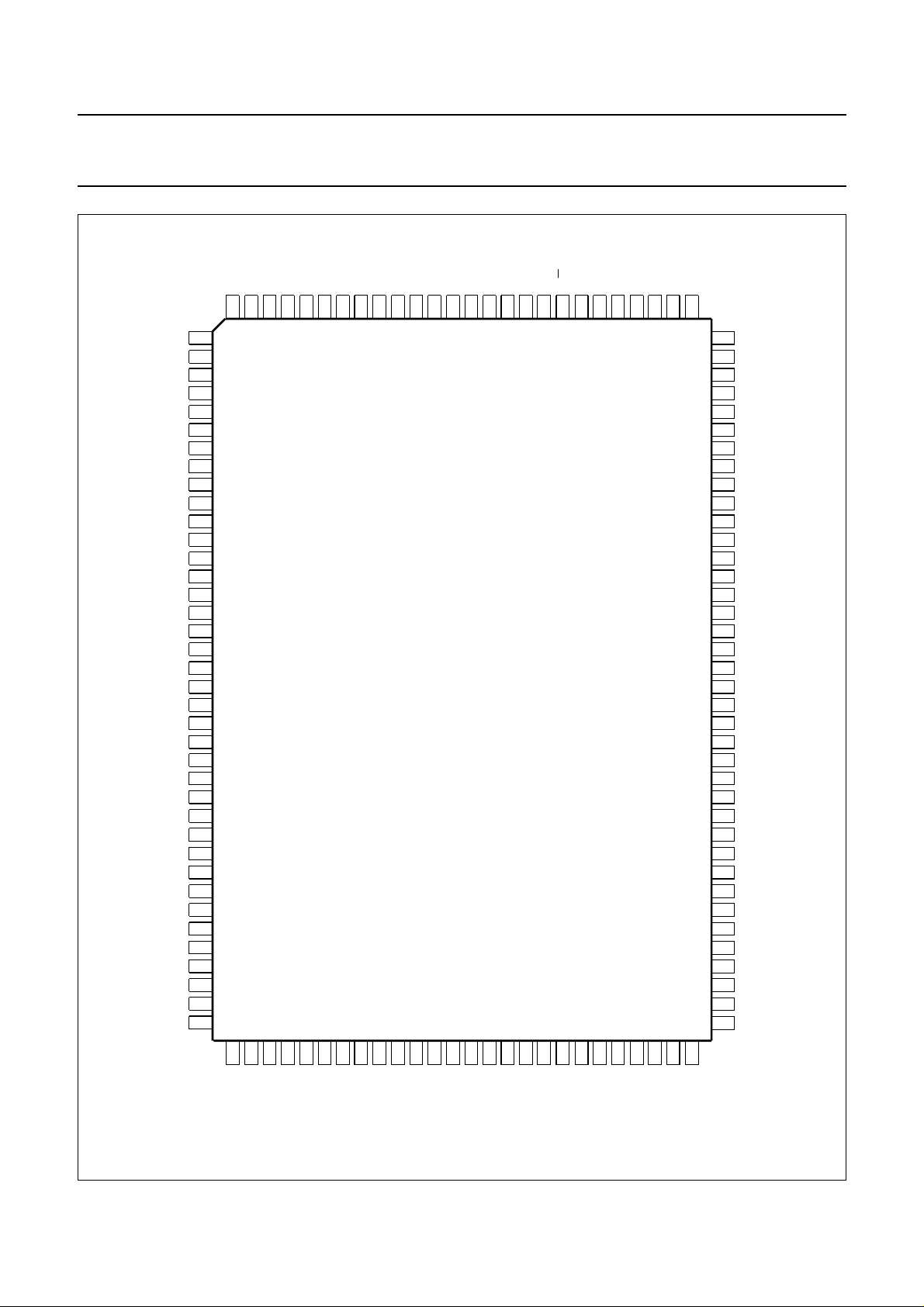
6 PINNING
7 PIN FUNCTIONS
7.1 RS: register select (parallel control)
7.2 R/W: read/write (parallel control)
7.3 E: data bus clock
7.4 DB0 to DB7: data bus
7.5 C1 to C60: column driver outputs
7.6 R1 to R32: row driver outputs
7.7 VLCD: LCD power supply
7.8 V0: VLCD control input
7.9 OSC: oscillator
7.10 SCL: serial clock line
7.11 SDA: serial data line
7.12 SA0: address pin
7.13 T1: test pad
8 FUNCTIONAL DESCRIPTION
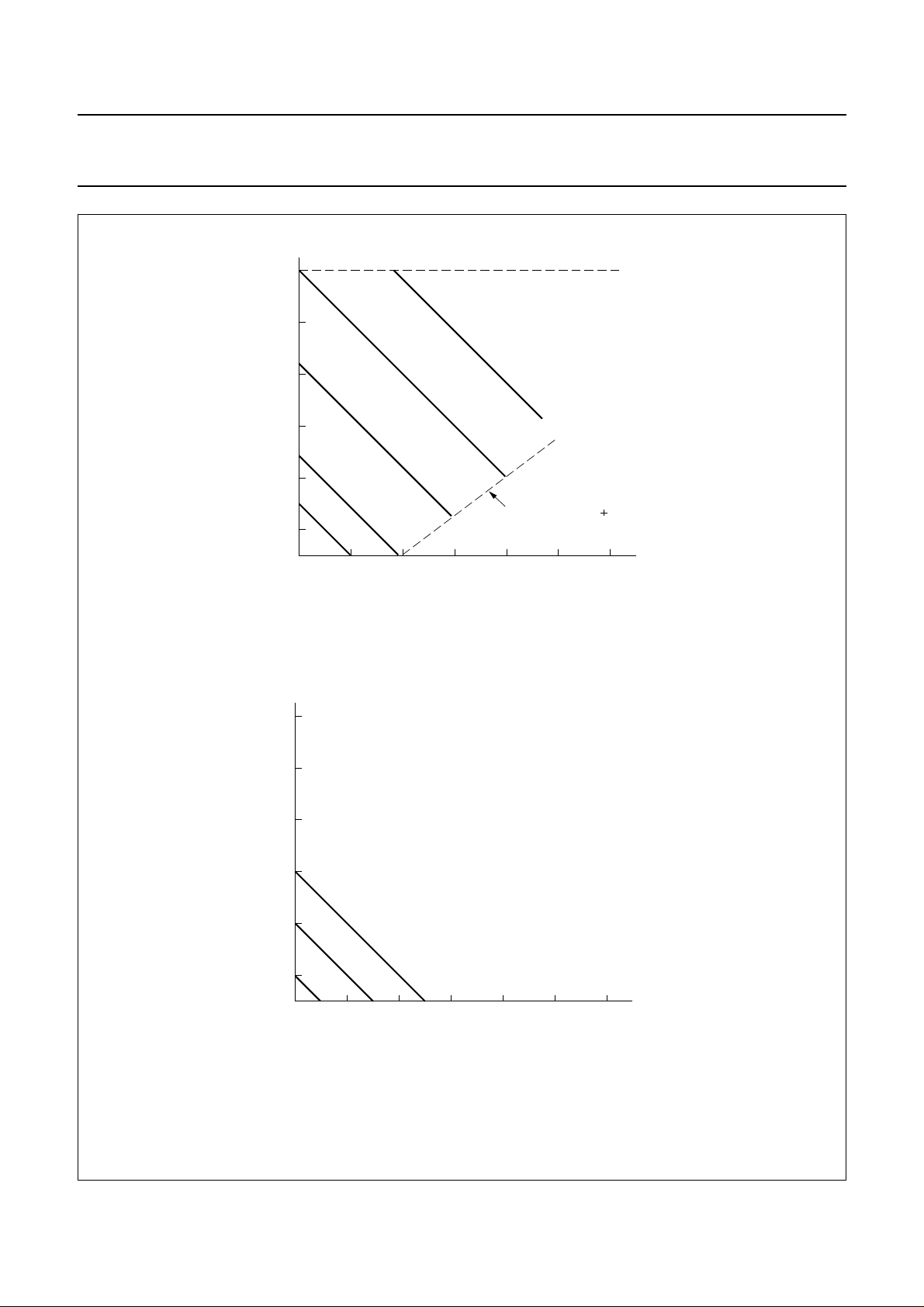
8.1 LCD supply voltage generator, PCF2114x and
PCF2116x
8.2 LCD supply voltage generator, PCF2116K
8.3 Character generator ROM (CGROM)
8.4 LCD bias voltage generator
8.5 Oscillator
8.6 External clock
8.7 Power-on reset
8.8 Registers
8.9 Busy Flag
8.10 Address Counter (AC)
8.11 Display data RAM (DDRAM)
8.12 Character generator ROM (CGROM)
8.13 Character generator RAM (CGRAM)
8.14 Cursor control circuit
8.15 Timing generator
8.16 LCD row and column drivers
8.17 Programming MUX 1 : 16 displays with the
PCF2114x
8.18 Programming MUX 1 : 32 displays with the
PCF2114x
8.19 Reset function
9 INSTRUCTIONS
9.1 Clear display
9.2 Return home
9.3 Entry mode set
9.4 Display on/off control
9.5 Cursor/display shift
9.6 Function set
9.7 Set CGRAM address
9.8 Set DDRAM address
9.9 Read busy flag and address
9.10 Write data to CGRAM or DDRAM
9.11 Read data from CGRAM or DDRAM
10 INTERFACE TO MICROCONTROLLER
(PARALLEL INTERFACE)
11 INTERFACE TO MICROCONTROLLER
(I2C-BUS INTERFACE)
11.1 Characteristics of the I2C-bus
11.2 Bit transfer
11.3 START and STOP conditions
11.4 System configuration
11.5 Acknowledge
11.6 I2C-bus protocol
12 LIMITING VALUES
13 HANDLING
14 DC CHARACTERISTICS
15 DC CHARACTERISTICS (PCF2116K)
16 AC CHARACTERISTICS
17 TIMING CHARACTERISTICS
18 APPLICATION INFORMATION
18.1 8-bit operation, 1-line display using internal
reset
18.2 4-bit operation, 1-line display using internal
reset
18.3 8-bit operation, 2-line display
18.4 I2C operation, 1-line display
18.5 Initializing by instruction
19 BONDING PAD LOCATIONS
20 PACKAGE OUTLINE
21 SOLDERING
22 DEFINITIONS
23 LIFE SUPPORT APPLICATIONS
24 PURCHASE OF PHILIPS I2C COMPONENTS
1997 Apr 07 2
Page 3

Philips Semiconductors Product specification
LCD controller/drivers PCF2116 family
1 FEATURES
• Single chip LCD controller/driver
• 1 or 2-line display of up to 24 characters per line, or
2 or 4 lines of up to 12 characters per line
• 5 × 7 character format plus cursor; 5 × 8 for kana
(Japanese syllabary) and user defined symbols
• On-chip:
– generation of LCD supply voltage (external supply
also possible)
– generation of intermediate LCD bias voltages
– oscillator requires no external components (external
clock also possible)
• Display data RAM: 80 characters
• Character generator ROM: 240 characters
• Character generator RAM: 16 characters
• 4 or 8-bit parallel bus or 2-wire I2C-bus interface
• CMOS/TTL compatible
• 32 row, 60 column outputs
• MUX rates 1 : 32 and 1 : 16
• Uses common 11 code instruction set
• Logic supply voltage range, VDD− VSS: 2.5 to 6 V
• Display supply voltage range, VDD− V
: 3.5 to 9 V
LCD
• Low power consumption
• I2C-bus address: 011101 SA0.
2 APPLICATIONS
• Telecom equipment
• Portable instruments
• Point-of-sale terminals.
3 GENERAL DESCRIPTION
The PCF2116 family of LCD controller/drivers consists of
the PCF2116x, the PCF2114x and the PCF2116K.
The term ‘PCF2116’ is used to refer to all devices for
common information. Specific information is given in
separate paragraphs.
The ‘x’ in ‘PCF2116x’ and ‘PCF2114x’ represents a
specific letter code for a character set in the character
generator ROM (CGROM). The different character sets
currently available are specified by the letters A, C, and G
(see Figs 8 to 10). Other character sets are available on
request.
The PCF2116 is a low-power CMOS LCD controller and
driver, designed to drive a split screen dot matrix LCD
display of 1 or 2 lines by 24 characters or 2 or 4 lines by
12 characters with 5 × 8 dot format. All necessary
functions for the display are provided in a single chip,
including on-chip generation of LCD bias voltages,
resulting in a minimum of external components and lower
system power consumption. The chip contains a character
generator and displays alphanumeric and kana
(Japanese) characters. The PCF2116 interfaces to most
microcontrollers via a 4 or 8-bit bus or via the 2-wire
2
I
C-bus. To allow partial VDD shutdown the ESD protection
system of the SCL and SDA pins does not use a diode
connected to VDD.
The PCF2116K differs from the other members of the
family in that:
• V
LCD/VOP
generation is different (see Section 8.1)
• It is available with character set C only (see Fig.9).
4 ORDERING INFORMATION
TYPE
NUMBER
(1)
NAME DESCRIPTION VERSION
PACKAGE
PCF2116xU/10 − chip on flexible film carrier −
PCF2114xU/10 − chip on flexible film carrier −
PCF2116xU/12 − chip with bumps on flexible film carrier −
PCF2114xU/12 − chip with bumps on flexible film carrier −
PCF2116xHZ LQFP128 plastic low profile quad flat package; 128 leads; body 14 × 20 × 1.4 mm SOT425-1
Note
1. The letter ‘x’ in the type number represents the letter of the required built-in character set: A, C or G.
1997 Apr 07 3
Page 4

Philips Semiconductors Product specification
LCD controller/drivers PCF2116 family
5 BLOCK DIAGRAM
andbook, full pagewidth
V
LCD
V
0
V
DD
V
SS
T1
GENERATOR
93, 95, 97
GENERATOR
92
104, 106
109, 112
111
BIAS
VOLTAGE
V
LCD
6
8
DATA
REGISTER (DR)
C1 to C60
68, 65 to 38
35 to 5
60
COLUMN DRIVERS
60
DATA LATCHES
60
SHIFT REGISTER
5 x 12-bit
5
CURSOR + DATA CONTROL
5
CHARACTER
GENERATOR
RAM
(CGRAM)
16
CHARACTERS
8
DISPLAY DATA RAM
(DDRAM) 80 CHARACTERS
BUSY
FLAG
CHARACTER
GENERATOR
ROM
(CGROM)
240
CHARACTERS
7
ADDRESS
COUNTER (AC)
7
INSTRUCTION
DECODER
8
INSTRUCTION
REGISTER (IR)
R1 to R32
84 to 77, 115 to 122
76 to 69, 123 to 128,
1 and 4
32
ROW DRIVERS
32
SHIFT REGISTER
32-BIT
PCF2116
OSCILLATOR
TIMING
GENERATOR
7
DISPLAY
ADDRESS
COUNTER
POWER - ON
RESET
102
OSC
78 8
105, 103,
4
98, 96
DB0 to DB3 DB4 to DB7 E
94, 91,
89, 87
4
108 110 113
R/W
Fig.1 Block diagram (pin numbers for LQFP128 package).
1997 Apr 07 4
I/O BUFFER
RS
SCL
88
SDA
90
107
MGA797 - 1
SA0
Page 5

Philips Semiconductors Product specification
LCD controller/drivers PCF2116 family
6 PINNING
SYMBOL LQFP128 FFC PAD TYPE DESCRIPTION
R31 1 27 O LCD row driver output
n.c. 2 and 3 −−not connected
R32 4 28 O LCD row driver output
C60 to C30 5 to 35 29 to 59 O LCD column driver outputs 60 to 30
n.c. 36 and 37 −−not connected
C29 to C2 38 to 65 60 to 87 O LCD column driver outputs 29to2
n.c. 66 and 67 −−not connected
C1 68 88 O LCD column driver output 1
R24 to R17 69 to 76 89 to 96 O LCD row driver outputs
R8 to R1 77 to 84 97 to 104 O LCD row driver outputs
n.c. 85 and 86 −−not connected
DB7 87 105 I/O 1 bit of 8-bit bidirectional data bus
SCL 88 106 I I
DB6 89 107 I/O 1 bit of 8-bit bidirectional data bus
SDA 90 108 I/O I
DB5 91 109 I/O 1 bit of 8-bit bidirectional data bus
V
V
0
LCD1
92 110 I control input for V
93 111 I/O LCD supply voltage input/output 1
DB4 94 112 I/O 1 bit of 8-bit bidirectional data bus
V
LCD2
95 113 I/O LCD supply voltage input/output 2
DB3 96 114 I/O 1 bit of 8-bit bidirectional data bus
V
LCD3
97 115 I/O LCD supply voltage input/output 3
DB2 98 116 I/O 1 bit of 8-bit bidirectional data bus
n.c. 99 to 101 −−not connected
OSC 102 1 I oscillator/external clock input
DB1 103 2 I/O 1 bit of 8-bit bidirectional data bus
V
DD2
104 3 P supply voltage 2
DB0 105 4 I/O 1 bit of 8-bit bidirectional data bus
V
DD1
106 5 P supply voltage 1
SA0 107 6 I I
E 108 7 I data bus clock input (parallel control)
V
SS1
R/
W 110 9 I read/write input (parallel control)
109 8 P ground (logic) 1
T1 111 10 I test pad (connect to V
V
SS2
112 11 P ground (logic) 2
RS 113 12 I register select input (parallel control)
n.c. 114 −−not connected
R9 to R16 115 to 122 13 to 20 O LCD row driver outputs
R25 to R30 123 to 128 21 to 26 O LCD row driver outputs
2
C-bus serial clock input
2
C-bus serial data input/output
LCD
2
C-bus address pin
)
SS
1997 Apr 07 5
Page 6
Philips Semiconductors Product specification
LCD controller/drivers PCF2116 family
handbook, full pagewidth
R31
n.c.
n.c.
R32
C60
C59
C58
C57
C56
C55
C54
C53
C52
C51
C50
C49
C48
C47
C46
C45
C44
C43
C42
C41
C40
C39
C38
C37
C36
C35
C34
C33
C32
C31
C30
n.c.
n.c.
C29
R30
R29
R28
R27
R26
R25
R16
R15
R14
R13
R12
R11
R10
R9
119
128
127
126
125
124
123
122
121
1
2
3
4
5
6
7
8
9
10
11
12
13
14
15
16
17
18
19
20
21
22
23
24
25
26
27
28
29
30
31
32
33
34
35
36
37
38
120
118
117
PCF2116
116
115
n.c.
114
RS
113
V
112
SS2
T1
111
R/W
110
V
SS1
109
E
108
SA0
107
DD1
V
DB0VDB1
106
105
104
103
102
101
100
99
98
97
96
95
94
93
92
91
90
89
88
87
86
85
84
83
82
81
80
79
78
77
76
75
74
73
72
71
70
69
68
67
66
65
OSC
n.c.
n.c.
n.c.
DB2
V
LCD3
DB3
V
LCD2
DB4
V
LCD1
V
0
DB5
SDA
DB6
SCL
DB7
n.c.
n.c.
R1
R2
R3
R4
R5
R6
R7
R8
R17
R18
R19
R20
R21
R22
R23
R24
C1
n.c.
n.c.
C2
DD2
48
394041424344454647
C28
C27
C26
C25
C24
C23
C22
C21
495051525354555657585960616263
C20
C19
C18
C17
Fig.2 Pin configuration (LQFP128).
1997 Apr 07 6
C16
C15
C14
C13
C12
C9C8C7C6C5C4C3
C11
C10
64
MBD451 - 1
Page 7

Philips Semiconductors Product specification
LCD controller/drivers PCF2116 family
7 PIN FUNCTIONS
7.1 RS: register select (parallel control)
RS selects the register to be accessed for read and write
when the device is controlled by the parallel interface.
RS = logic 0 selects the instruction register for write and
the Busy Flag and Address Counter for read. RS = logic 1
selects the data register for both read and write. There is
an internal pull-up on pin RS.
7.2 R/
W: read/write (parallel control)
R/W selects either the read (R/W = logic 1) or write
(R/W = logic 0) operation when control is by the parallel
interface. There is an internal pull-up on this pin.
7.3 E: data bus clock
The E pin is set HIGH to signal the start of a read or write
operation when the device is controlled by the parallel
interface. Data is clocked in or out of the chip on the
negative edge of the clock. Note that this pin must be tied
to logic 0 (V
) when I2C-bus control is used.
SS
7.4 DB0 to DB7: data bus
The bidirectional, 3-state data bus transfers data between
the system controller and the PCF2116. DB7 may be used
as the Busy Flag, signalling that internal operations are not
yet completed. In 4-bit operations the 4 higher order lines
DB4 to DB7 are used; DB0 to DB3 must be left open
circuit. There is an internal pull-up on each of the data
lines. Note that these pins must be left open circuit when
2
I
C-bus control is used.
7.5 C1 to C60: column driver outputs
These pins output the data for pairs of columns.
This arrangement permits optimized chip-on-glass (COG)
layout for 4-line by 12 characters.
7.6 R1 to R32: row driver outputs
These pins output the row select waveforms to the left and
right halves of the display.
7.7 V
: LCD power supply
LCD
Negative power supply for the liquid crystal display.
This may be generated on-chip or supplied externally.
7.8 V
The input level at this pin determines the generated V
0
: V
LCD
control input
LCD
output voltage.
7.9 OSC: oscillator
When the on-chip oscillator is used this pin must be
connected to V
. An external clock signal, if used, is input
DD
at this pin.
7.10 SCL: serial clock line
Input for the I
2
C-bus clock signal.
7.11 SDA: serial data line
Input/output for the I
2
C-bus data line.
7.12 SA0: address pin
The hardware sub-address line is used to program the
device sub-address for 2 different PCF2116s on the same
2
I
C-bus.
7.13 T1: test pad
Must be connected to V
. Not user accessible.
SS
8 FUNCTIONAL DESCRIPTION (see Fig.1)
8.1 LCD supply voltage generator, PCF2114x and
PCF2116x
The on-chip voltage generator is controlled by bit G of the
‘Function set’ instruction and V
.
0
V0 is a high-impedance input and draws no current from
the system power supply. Its range is between VSS and
VDD− 1 V. When V0 is connected to VDD the generator is
switched off and an external voltage must be supplied to
pin V
. This may be more negative than VSS.
LCD
When G = logic 1 the generator produces a negative
voltage at pin V
, controlled by the input voltage at
LCD
pin V0. The LCD operating voltage is given by the
relationship:
VOP= 1.8VDD− V
0
Where:
VOP=VDD− V
V
LCD=V0
When G = logic 0, the generated output voltage V
LCD
−(0.8VDD)
LCD
is
equal to V0 (between VSS and VDD). In this instance:
VOP=VDD− V
When V
LCD
decoupled to VDD with a suitable capacitor. VDD and V
0
is generated on-chip the V
pin should be
LCD
0
must be selected to limit the maximum value of VOPto 9 V.
Figure 3 shows the two generator control characteristics.
1997 Apr 07 7
Page 8

Philips Semiconductors Product specification
LCD controller/drivers PCF2116 family
8.2 LCD supply voltage generator, PCF2116K
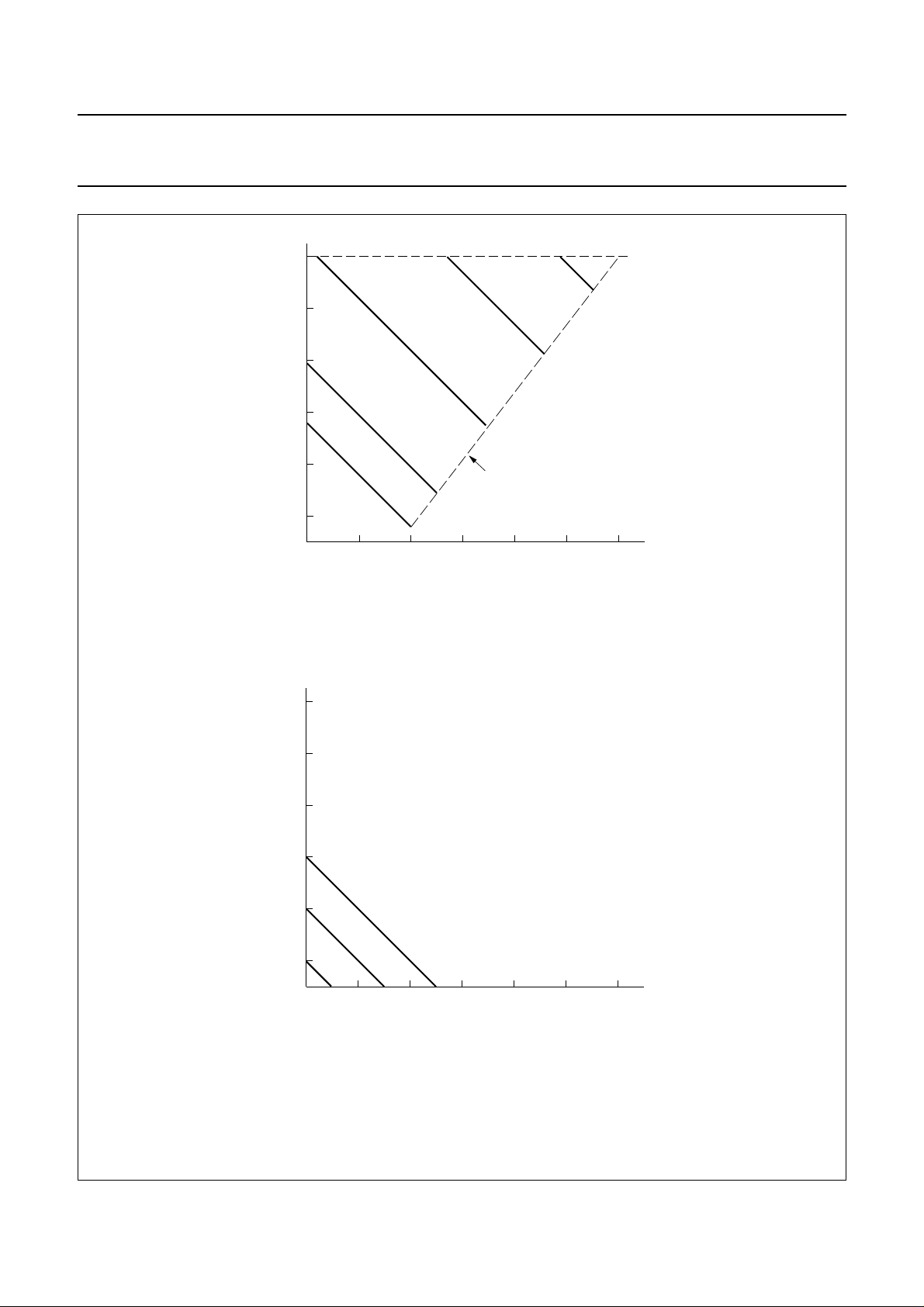
In the PCF2116K version, V0 is connected through an
on-chip resistor (R0) to V
. Resistor R0 has a nominal
LCD
value of 1 MΩ and draws a typical current of 4 µA from the
pin V0. A constant voltage (equal to 1.34VDD) is always
present across R0.
The voltage range of the PCF2116K is between VSS and
VDD− 0.5 V (see Fig.4). When V0 is connected to VDD the
generator is switched off and an external voltage must be
supplied to pin V
. This may be more negative than VSS.
LCD
When G = logic 1 the generator produces a negative
voltage at pin V
, controlled by the input voltage at
LCD
pin V0. The LCD operating voltage is given by the
relationship:
VOP= 2.34VDD− V
0
Where:
VOP=VDD− V
V
LCD=V0
When G = logic 0, the generated output voltage V
LCD
−(1.34VDD)
LCD
is
equal to V0 (between VSS and VDD). In this instance:
VOP=VDD− V
0
8.3 Character generator ROM (CGROM)
The standard character sets A, C and G are available for
the PCF2114x and PCF2116x. Standard character set C is
available for the PCF2116K.
8.4 LCD bias voltage generator
The intermediate bias voltages for the LCD display are
also generated on-chip. This removes the need for an
external resistive bias chain and significantly reduces the
system power consumption. The optimum levels depend
on the multiplex rate and are selected automatically when
the number of lines in the display is defined.
The optimum value of V
depends on the multiplex rate,
OP
the LCD threshold voltage (Vth) and the number of bias
levels and is given by the relationships in Table 1.Using a
5-level bias scheme for 1 : 16 MUX rate allows VOP<5V
for most LCD liquids. The effect on the display contrast is
negligible.
8.5 Oscillator
The on-chip oscillator provides the clock signal for the
display system. No external components are required.
Pin OSC must be connected to VDD.
8.6 External clock
If an external clock is to be used, it must be input at
pin OSC. The resulting display frame frequency is given by
f
frame
=1⁄
2304fosc
. A clock signal must always be present,
otherwise the LCD may be frozen in a DC state.
8.7 Power-on reset
The power-on reset block initializes the chip after
power-on or power failure.
8.8 Registers
The PCF2116 has two 8-bit registers, an Instruction
Register (IR) and a Data Register (DR). The Register
Select signal (RS) determines which register will be
accessed.
The instruction register stores instruction codes such as
‘Display clear’ and ‘Cursor shift’, and address information
for the Display Data RAM (DDRAM) and Character
Generator RAM (CGRAM). The instruction register can be
written to, but not read, by the system controller.
The data register temporarily stores data to be read from
the DDRAM and CGRAM. When reading, data from the
DDRAM or CGRAM corresponding to the address in the
Address Counter is written to the data register prior to
being read by the ‘Read data’ instruction.
8.9 Busy Flag
The Busy Flag indicates the free/busy status of the
PCF2116. Logic 1 indicates that the chip is busy and
further instructions will not be accepted. The Busy Flag is
output to pin DB7 when RS = logic 0 and R/
W = logic 1.
Instructions should only be written after checking that the
Busy Flag is logic 0 or waiting for the required number of
clock cycles.
Table 1 Optimum values for V
MUX RATE
OP
NUMBER OF BIAS
LEVELS
1 : 16 5 3.67 1.277
1 : 32 6 5.19 1.196
1997 Apr 07 8
VOP/V
th
DISCRIMINATION
Von/V
off
Page 9
Philips Semiconductors Product specification
LCD controller/drivers PCF2116 family
9
V
OP
8
7
V = 1.8 x V
OP(max) DD
6 = V
DD
G = 1
5
6
4
5
3
2.5
4
3.5
0123456
V = 0.8 x V 1
OP(min) DD
V
a. High-voltage mode VOP= 1.8VDD− V0.
9
V
OP
8
9 V
0
MGA798
7
6
5
4
4
3.5
0123456
6 = V
DD
5
b. Buffer mode VOP=VDD− V0.
Fig.3 VOP as a function of V0 control characteristics.
1997 Apr 07 9
G = 0
V
0
MGA799
Page 10
Philips Semiconductors Product specification
LCD controller/drivers PCF2116 family
9
V
OP
8
5
7
6
G = 1
4 = V
DD
6
5
4
3.5
0123456
2.5
3
V
OP(min)
= 1.34 × VDD + 0.5
V
0
a. High-voltage mode VOP= 2.34VDD− V0.
9
V
OP
8
9 V
MBH667
7
6
5
4
4
3.5
0123456
6 = V
DD
5
b. Buffer mode VOP=VDD− V0.
Fig.4 VOP as a function of V0 control characteristics (PCF2116K).
1997 Apr 07 10
G = 0
V
0
MGA799
Page 11

Philips Semiconductors Product specification
LCD controller/drivers PCF2116 family
8.10 Address Counter (AC)
The Address Counter assigns addresses to the DDRAM
and CGRAM for reading and writing and is set by the
instructions ‘Set CGRAM address’ and
‘Set DDRAM address’. After a read/write operation the
Address Counter is automatically incremented or
decremented by 1.The Address Counter contents are
output to the bus (DB0 to DB6) when RS = logic 0 and
R/W = logic 1.
8.11 Display data RAM (DDRAM)
The display data RAM stores up to 80 characters of
display data represented by 8-bit character codes.
RAM locations not used for storing display data can be
used as general purpose RAM. The basic
DDRAM-to-display mapping scheme is shown in Fig.5.
With no display shift the characters represented by the
codes in the first 12 or 24 RAM locations starting at
address 00 in line 1 are displayed. Subsequent lines
display data starting at addresses 20, 40, or 60 Hex.
Figs 6 and 7 show the DDRAM-to-display mapping
principle when the display is shifted.
The address range for a 1-line display is 00 to 4F; for a
2-line display from 00 to 27 (line 1) and 40 to 67 (line 2);
for a 4-line display from 00 to 13, 20 to 33, 40 to 53 and
60 to 73 for lines 1, 2, 3 and 4 respectively.
For 2 and 4-line displays the end address of one line and
the start address of the next line are not consecutive.
When the display is shifted each line wraps around
independently of the others (Figs 6 and 7).
When data is written into the DDRAM wrap-around occurs
from 4F to 00 in 1-line mode and from 27 to 40 and
67 to 00 in 2-line mode; from 13 to 20, 33 to 40, 53 to 60
and 73 to 00 in 4-line mode.
8.13 Character generator RAM (CGRAM)
Up to 16 user-defined characters may be stored in the
character generator RAM. The CGROM and CGRAM use
a common address space, of which the first column is
reserved for the CGRAM (see Fig.8). Figure 11 shows the
addressing principle for the CGRAM.
8.14 Cursor control circuit
The cursor control circuit generates the cursor (underline
and/or character blink as shown in Fig.12) at the DDRAM
address contained in the Address Counter. When the
Address Counter contains the CGRAM address the cursor
will be inhibited.
8.15 Timing generator
The timing generator produces the various signals
required to drive the internal circuitry. Internal chip
operation is not disturbed by operations on the data buses.
8.16 LCD row and column drivers
The PCF2116 contains 32 row and 60 column drivers,
which connect the appropriate LCD bias voltages in
sequence to the display, in accordance with the data to be
displayed. The bias voltages and the timing are selected
automatically when the number of lines in the display is
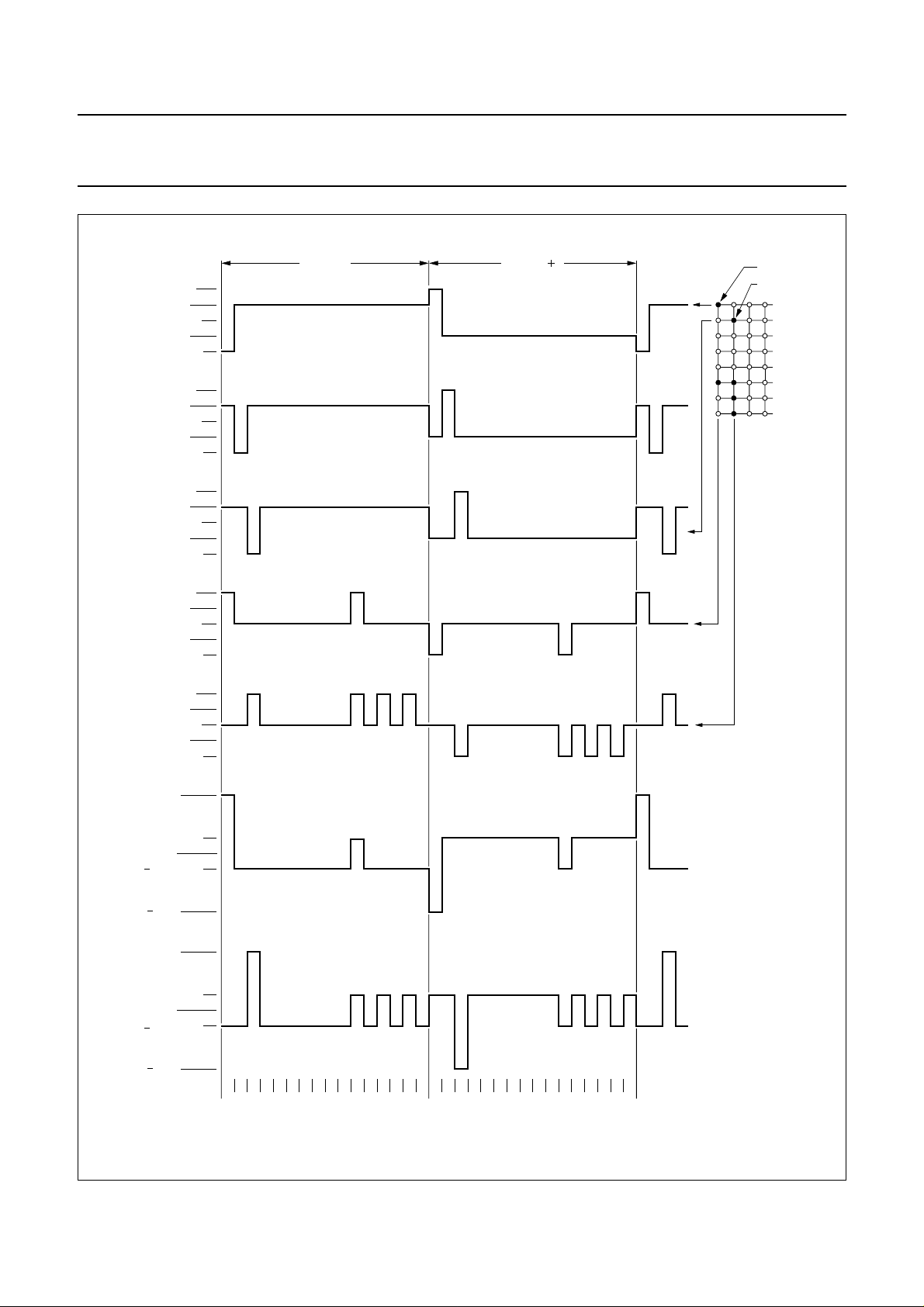
selected. Figures 13 and 14 show typical waveforms.
In 1-line mode (1 : 16) the row outputs are driven in pairs:
R1/R17, R2/R18 for example. This allows the output pairs
to be connected in parallel, providing greater drive
capability.
Unused outputs should be left unconnected.
8.12 Character generator ROM (CGROM)
The character generator ROM generates 240 character
patterns in 5 × 8 dot format from 8-bit character codes.
Figures 8 to 10 show the character sets currently
available.
1997 Apr 07 11
Page 12

Philips Semiconductors Product specification
LCD controller/drivers PCF2116 family
Display
handbook, 4 columns
Position
(decimal)
DDRAM
Address
(hex)
DDRAM
Address
(hex)
handbook, 4 columns
DDRAM
Address
(hex)
12345 222324
00 01 02 03 04 15 16 17 18 19 4C 4D 4E 4F
non-displayed DDRAM addresses
1-line display
non-displayed DDRAM address
00 01 02 03 04 15 16 17 18 19
2-line display
24 25 26 27
64 65 66 6740 41 42 43 44 55 56 57 58 59
MLA792
line 1
line 2
non-displayed DDRAM addresses
123456789101112
00 01 02 03 04 05 06 07 08 09 0A 0B 0C 0D 0E 0F 10 11 12 13
20 21 22 23 24 25 26 27 28 29 2A 2B 2C 2D 2E 2F 30 31 32 33
40 41 42 43 44 45 46 47 48 49 4A 4B 4C 4D 4E 4F 50 51 52 53
line 1
line 2
line 3
60 61 62 63 64 65 66 67 68 69 6A 6B 6C 6D 6E 6F 70 71 72 73
4 line display
Fig.5 DDRAM-to-display mapping; no shift.
1997 Apr 07 12
line 4
MLA793
Page 13
Philips Semiconductors Product specification
LCD controller/drivers PCF2116 family
Display
Position
(decimal)
DDRAM
Address
(hex)
DDRAM
Address
(hex)
1 2 3 4 5 22 23 24
4F 00 01 02 03 14 15 16
1-line display
27 00 01 02 03
67 40 41 42 43
2-line display
123456789101112
13 01 02 03 04 05 06 07 08 09 0A
00
20 21 22 23 24 25 26 27 28 29 2A33
DDRAM
Address
(hex)
40 41 42 43 44 45 46 47 48 49 4A53
14 15 16
54 55 56
MLA802
line 1
line 2
line 1
line 2
line 3
Display
Position
(decimal)
DDRAM
Address
(hex)
DDRAM
Address
(hex)
DDRAM
Address
(hex)
1 2 3 4 5 22 23 24
0501 02 03 04
16 17 18
1-line display
0501 02 03 04
41 42 43 44 45 56 57 58
2-line display
16 17 18
MLA815
123456789101112
01 02 03 04 05 06 07 08 09 0A 0B 0C
21 22 23 24 25 26 27 28 29 2A 2B 2C
41 42 43 44 45 46 47 48 49 4A 4B 4C
line 1
line 2
line 1
line 2
line 3
60 61 62 63 64 65 66 67 68 69 6A73
4-line display
MLA803
line 4
Fig.6 DDRAM-to-display mappi7ng; right shift.
1997 Apr 07 13
61 62 63 64 65 66 67 68 69 6A 6B 6C
4-line display
line 4
MLA816
Fig.7 DDRAM-to-display mapping; left shift.
Page 14

Philips Semiconductors Product specification
LCD controller/drivers PCF2116 family
handbook, full pagewidth
lower
6 bits
xxxx 0000
xxxx 0001
xxxx 0010
xxxx 0011
xxxx 0100
xxxx 0101
xxxx 0110
xxxx 0111
upper
4 bits
0000 0001 0010 0011 0100 0101 0110 0111 1000 1001 1010 1011 1100 1101 1110 1111
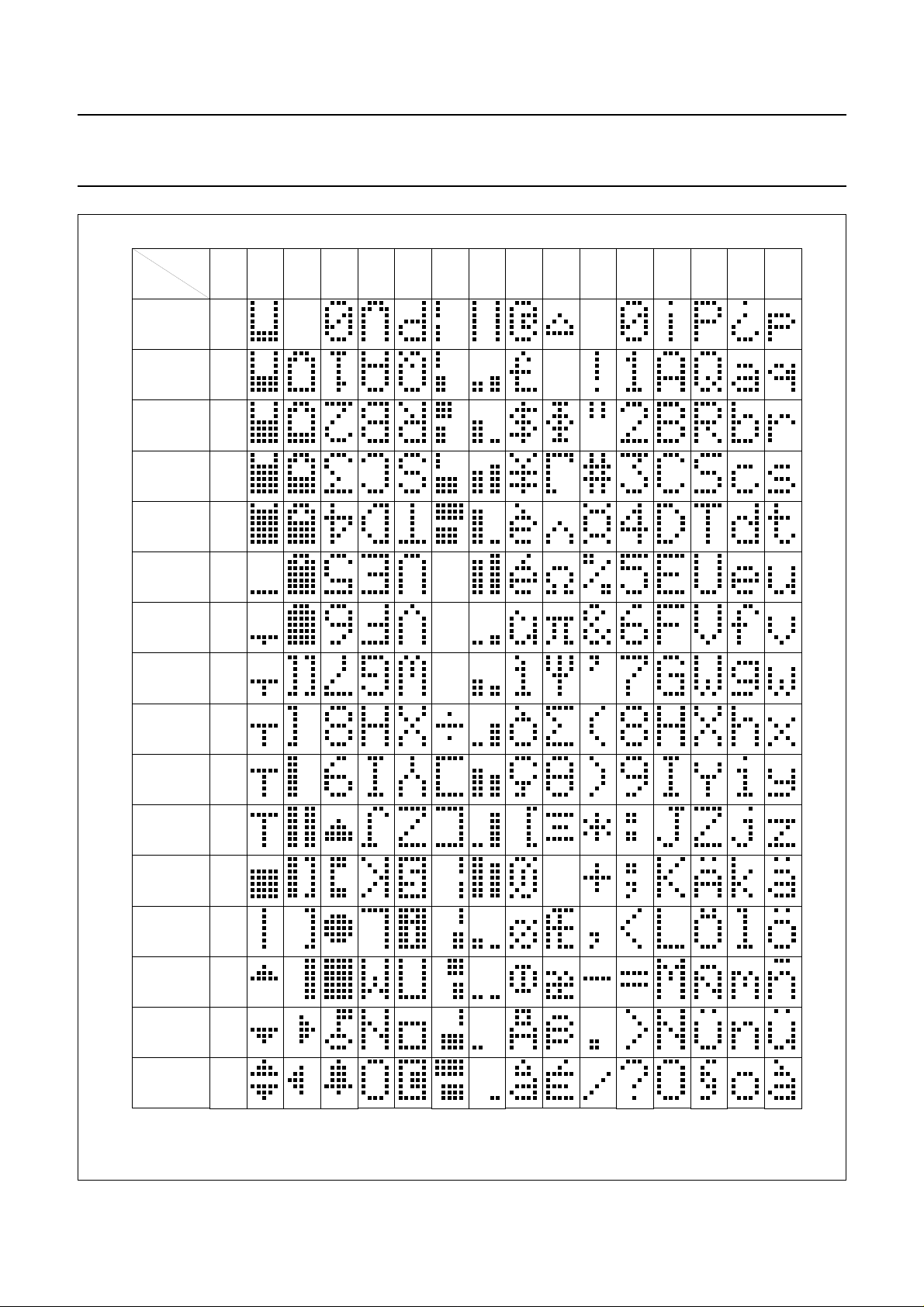
1
2
3
4
5
6
7
8
xxxx 1000
xxxx 1001
xxxx 1010
xxxx 1011
xxxx 1100
xxxx 1101
xxxx 1110
xxxx 1111 16
9
10
11
12
13
14
15
MLB245 - 1
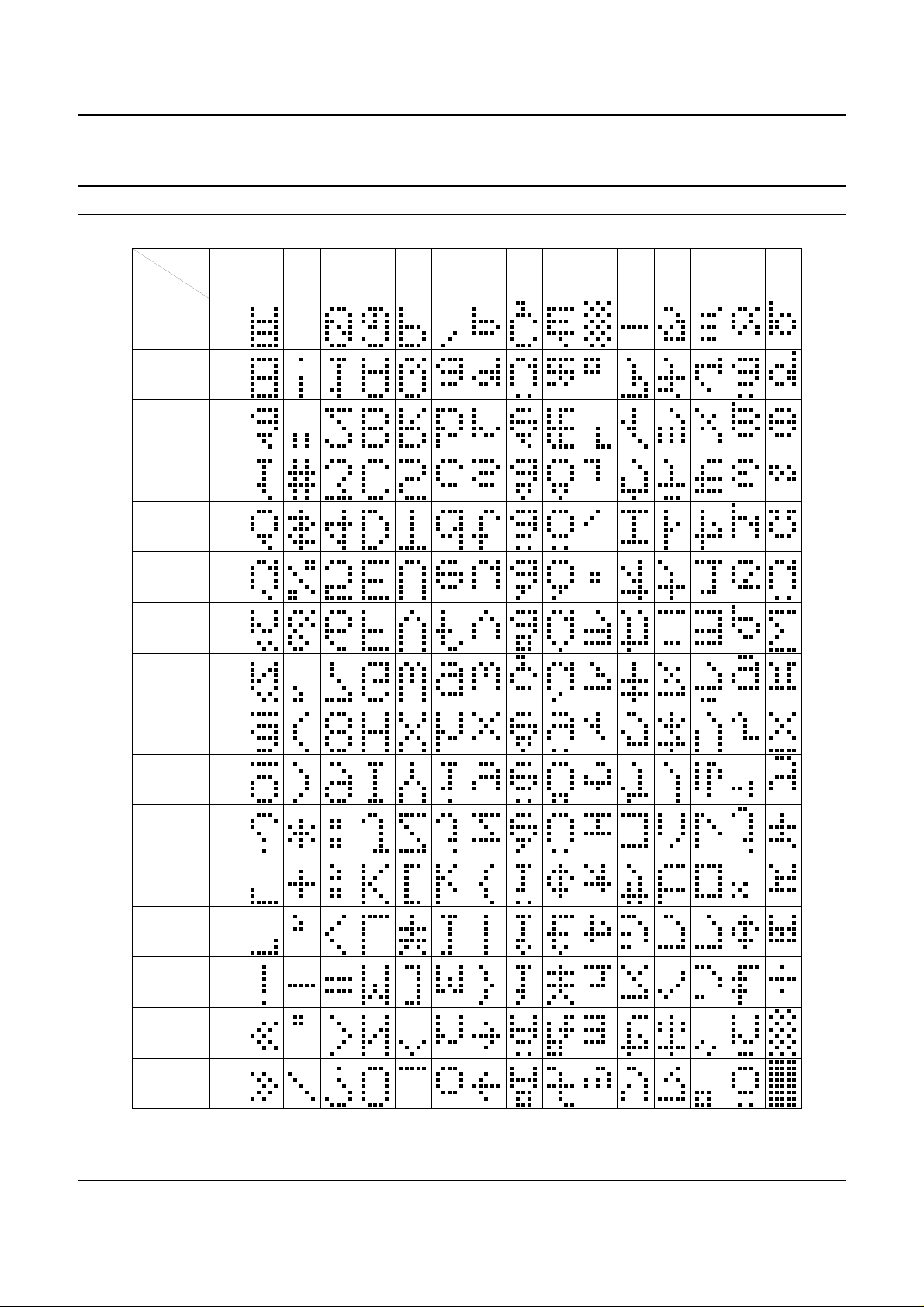
Fig.8 Character set ‘A’ in CGROM: PCF2116A; PCF2114A.
1997 Apr 07 14
Page 15
Philips Semiconductors Product specification
LCD controller/drivers PCF2116 family
handbook, full pagewidth
lower
4 bits
xxxx 0000
xxxx 0001
xxxx 0010
xxxx 0011
xxxx 0100
xxxx 0101
xxxx 0110
xxxx 0111
upper
4 bits
0000 0001 0010 0011 0100 0101 0110 0111 1000 1001 1010 1011 1100 1101 1110 1111
CG
RAM 1
2
3
4
5
6
7
8
xxxx 1000
xxxx 1001
xxxx 1010
xxxx 1011
xxxx 1100
xxxx 1101
xxxx 1110
xxxx 1111 16
9
10
11
12
13
14
15
MLB895
Fig.9 Character set ‘C’ in CGROM: PCF2116C; PCF2114C.
1997 Apr 07 15
Page 16
Philips Semiconductors Product specification
LCD controller/drivers PCF2116 family
handbook, full pagewidth
lower
6 bits
xxxx 0000
xxxx 0001
xxxx 0010
xxxx 0011
xxxx 0100
xxxx 0101
xxxx 0110
xxxx 0111
upper
4 bits
0000 0001 0010 0011 0100 0101 0110 0111 1000 1001 1010 1011 1100 1101 1110 1111
CG
RAM 1
2
3
4
5
6
7
8
xxxx 1000
xxxx 1001
xxxx 1010
xxxx 1011
xxxx 1100
xxxx 1101
xxxx 1110
xxxx 1111 16
9
10
11
12
13
14
15
MLB896
Fig.10 Character set ‘G’ in CGROM: PCF2116G; PCF2114G.
1997 Apr 07 16
Page 17

Philips Semiconductors Product specification
LCD controller/drivers PCF2116 family
handbook, full pagewidth
76543210 6543210 43210
00000000 0000000 0
00000001 0001
00000010
00001111
00001111
00001111
00001111
character codes
(DDRAM data)
higher
order
bits
lower
order
bits
CGRAM
address
higher
order
bits
010 0000
1
1
1
1
1
1
1
1
1
111
1
1
lower
order
bits
001 000
010 000
011 0
100 0 00
101 00 0
110 000
111 00000
000 000
001 0 0 0
010
100
101 00 00
110 00 00
111 00000
001
1
100
1
101
1
110
1
1
higher
order
bits
character patterns
(CGRAM data)
lower
order
bits
00 00011
MGA800 - 1
character
pattern
example 1
cursor
position
character
pattern
example 2
Character code bits 0to 3 correspond to CGRAM address bits 3 to 6.
CGRAM address bits 0 to 2 designate character pattern line position. The 8th line is the cursor position and display is performed by logical OR with
the cursor. Data in the 8th line will appear in the cursor position.
Character pattern column positions correspond to CGRAM data bits 0 to 4, as shown in Fig.11 (bit 4 being at the left end).
As shown in Figs 8 and 11, CGRAM character patterns are selected when character code bits 4 to 7 are all logic 0. CGRAM data = logic 1
corresponds to selection for display.
Only bits 0 to 5 of the CGRAM address are set by the ‘Set CGRAM address’ instruction. Bit 6 can be set using the ‘Set DDRAM address’ instruction
or by using the auto-increment feature during CGRAM write. All bits 0 to 6 can be read using the ‘Read busy flag and address’ instruction.
Fig.11 Relationship between CGRAM addresses and data and display patterns.
1997 Apr 07 17
Page 18
Philips Semiconductors Product specification
LCD controller/drivers PCF2116 family
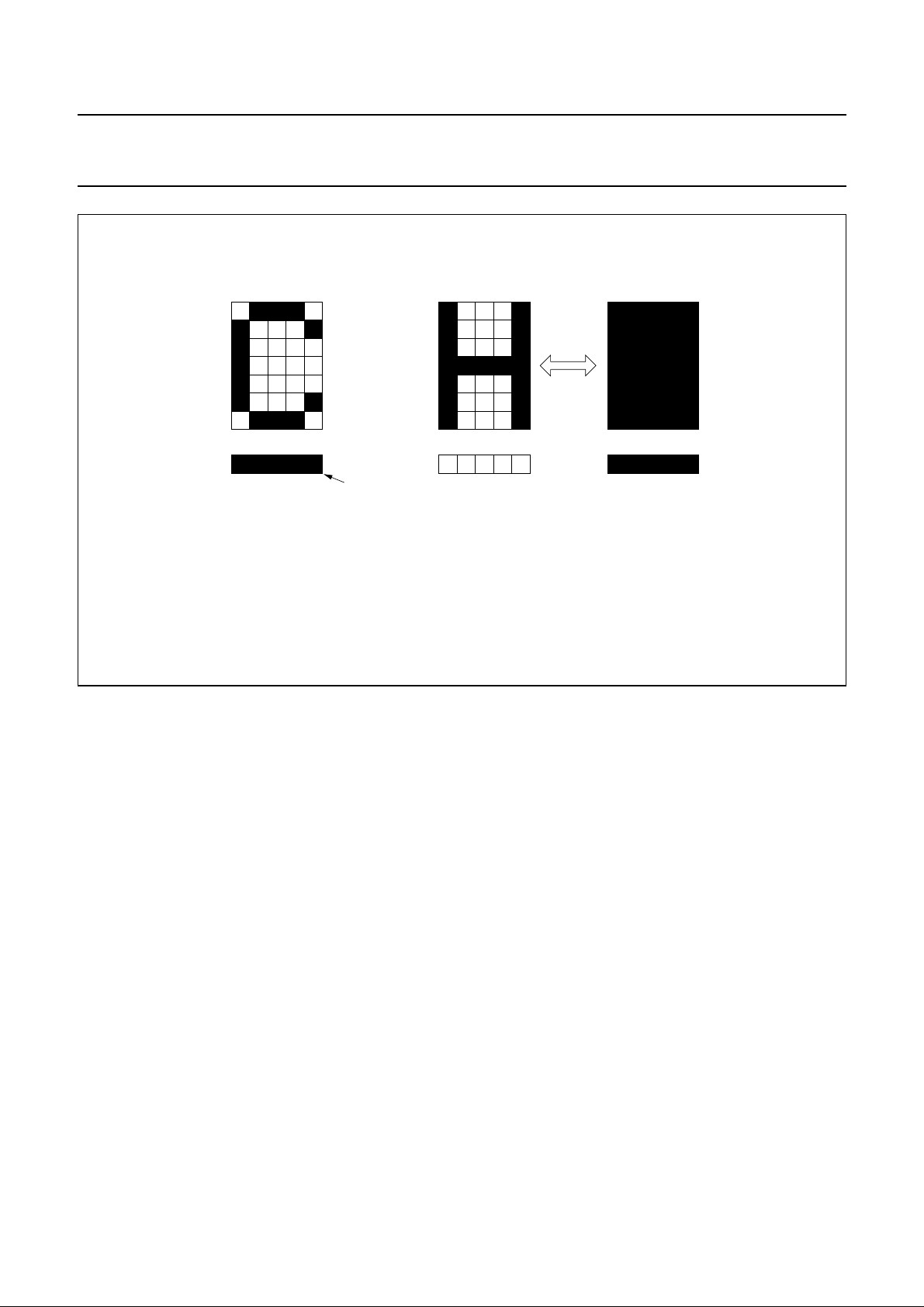
cursor
5 x 7 dot character font alternating display
cursor display example blink display example
Fig.12 Cursor and blink display examples.
MGA801
1997 Apr 07 18
Page 19
Philips Semiconductors Product specification
LCD controller/drivers PCF2116 family
handbook, full pagewidth
V
DD
V
2
ROW 1
ROW 9
ROW 2
COL 1
COL 2
V /V
34
V
5
V
LCD
V
DD
V
2
V /V
34
V
5
V
LCD
V
DD
V
2
V /V
34
V
5
V
LCD
V
DD
V
2
V /V
34
V
5
V
LCD
V
DD
V
2
V /V
3
V
5
V
LCD
frame n 1frame n
4
state 1 (ON)
state 2 (ON)
1-line display
(1:16)
V
OP
0.25 V
OP
0 V
state 1
0.25 V
OP
V
OP
V
OP
0.25 V
0 V
0.25 V
V
OP
OP
OP
123 16123 16
state 2
Fig.13 Typical LCD waveforms; 1-line mode.
1997 Apr 07 19
MGA802 - 1
Page 20

Philips Semiconductors Product specification
LCD controller/drivers PCF2116 family
handbook, full pagewidth
ROW 1
ROW 9
ROW 2
COL 1
V
V
V
V
V
V
V
V
V
V
V
V
V
V
V
V
V
V
V
V
V
V
V
V
DD
2
3
4
5
LCD
DD
2
3
4
5
LCD
DD
2
3
4
5
LCD
DD
2
3
4
5
LCD
frame n
frame n 1
state 1 (ON)
state 2 (ON)
2-line display
(1:32)
COL 2
state 1
state 2
V
OP
0.15 V
0 V
0.15 V
V
OP
V
OP
0.15 V
0 V
0.15 V
V
OP
V
V
V
V
V
V
DD
2
3
4
5
LCD
OP
OP
OP
OP
123 3212 3 32
Fig.14 Typical LCD waveforms; 2-line mode.
MGA803 - 1
1997 Apr 07 20
Page 21

Philips Semiconductors Product specification
LCD controller/drivers PCF2116 family
8.17 Programming MUX 1 : 16 displays with the
PCF2114x
The PCF2114x can be used in:
• 1-line mode to drive a 2-line display
• 2 × 12 characters with MUX rate 1 : 16, resulting in
better contrast. The internal data flow of the chip is
optimized for this purpose.
andbook, full pagewidth
display position
DDRAM address
display position
DDRAM address
1
00
13
0C
23
01 02
14 15
0D 0E
Fig.15 DDRAM-to-display mapping; no shift (PCF2114x).
4
03
16
0F
With the ‘Function set’ instruction M and N are set to 0, 0.
Figures 15 to 17 show DDRAM addresses of the display
characters. The second row of each table corresponds to
either the right half of a 1-line display or to the second line
of a 2-line display. Wrap around of data during display shift
or when writing data is non-standard.
5
04
17
10
67
05 06
18 19
11 12
8
07
20
13
9
08
21
14
10 11
09 0A
22 23
15 16
12
0B
24
17
MLB899
andbook, full pagewidth
andbook, full pagewidth
display position
DDRAM address
display position
DDRAM address
Fig.16 DDRAM-to-display mapping; right shift (PCF2114x).
display position
DDRAM address
display position
DDRAM address
1
4F
13
0B
1
01
13
0D
23
00 01
14 15
0C 0D
23
02 03
14 15
0E 0F
4
02
16
0E
4
04
16
10
5
03
17
0F
5
05
17
11
67
04 05
18 19
10 11
67
06 07
18 19
12 13
8
06
20
12
8
08
20
14
9
07
21
13
9
09
21
15
10 11
08 09
22 23
14 15
10 11
0A 0B
22 23
16 17
12
0A
24
16
MLB900
12
0C
24
18
MLB901
Fig.17 DDRAM-to-display mapping; left shift (PCF2114x).
1997 Apr 07 21
Page 22

Philips Semiconductors Product specification
LCD controller/drivers PCF2116 family
8.18 Programming MUX 1 : 32 displays with the
PCF2114x
To drive a 2-line by 24 characters MUX 1 : 32 display, use
instruction ‘Function set’ M, N to 0, 1. Note that the right
half of the display needs mirrored column connection
compared to a display driven by a PCF2116x.
To drive a 4-line by 12 characters MUX 1 : 32 display the
PCF2116x operating instructions apply. There is no
functional difference between the PCF2114x and the
PCF2116x in this mode. For such an application
set M, N to 1, 1 with the ‘Function set’ instruction.
8.19 Reset function
The PCF2116 automatically initializes (resets) when
power is turned on. After reset the chip has the following
state.
Table 2 State after reset
STEP DESCRIPTION
1 display clear
2 function set DL = 1 8-bit interface
M, N = 0 1-line display
G = 0 voltage
generator;
V
LCD=V0
3 display on/off
control
D = 0 display off
C = 0 cursor off
B = 0 blink off
4 entry mode set I/D = 1 +1 (increment)
S = 0 no shift
5 Default address pointer to DDRAM. The Busy
Flag (BF) indicates the busy state (BF = logic 1)
until initialization ends. The busy state lasts
2 ms. The chip may also be initialized by
software. See Figs 28 and 29.
2
6I
C-bus interface reset
9 INSTRUCTIONS
Only two PCF2116 registers, the Instruction Register (IR)
and the Data Register (DR) can be directly controlled by
the microcontroller. Before internal operation, control
information is stored temporarily in these registers to allow
interface to various types of microcontrollers which
operate at different speeds or to allow interface to
peripheral control ICs.
The PCF2116 operation is controlled by the instructions
shown in Table 3 together with their execution time.
Details are explained in subsequent sections.
Instructions are of 4 categories, those that:
1. Designate PCF2116 functions such as display format,
data length, etc.
2. Set internal RAM addresses
3. Perform data transfer with internal RAM
4. Others.
In normal use, category 3 instructions are used most
frequently. However, automatic incrementing by 1 (or
decrementing by 1) of internal RAM addresses after each
data write lessens the microcontroller program load. The
display shift in particular can be performed concurrently
with display data write, enabling the designer to develop
systems in minimum time with maximum programming
efficiency.
During internal operation, no instruction other than
‘Read busy flag and address’ will be executed.
Because the Busy Flag is set to logic 1 while an instruction
is being executed, check to make sure it is on logic 0
before sending the next instruction or wait for the
maximum instruction execution time, as given in Table 3.
An instruction sent while the Busy Flag is HIGH will not be
executed.
1997 Apr 07 22
Page 23

1997 Apr 07 23
Table 3 Instructions (note 1)
INSTRUCTION RS R/
W DB7 DB6 DB5 DB4 DB3 DB2 DB1 DB0 DESCRIPTION
NOP 0000000000No operation. 0
Clear display 0000000001Clears entire display and sets DDRAM
address 0 in Address Counter.
Return Home 0000000010Sets DDRAM address 0 in Address Counter.
Also returns shifted display to original position.
DDRAM contents remain unchanged.
Entry mode set 00000001I/DSSets cursor move direction and specifies shift
of display. These operations are performed
during data write and read.
Display control 0000001DCBSets entire display on/off (D), cursor on/off (C)
and blink of cursor position character (B).
Cursor/display
shift
000001S/CR/L00Moves cursor and shifts display without
changing DDRAM contents.
Function set 00001DLNMG0Sets interface data length (DL), number of
display lines (N, M) and voltage generator
control (G).
Set CGRAM
0001 A
CG
Sets CGRAM address. 3
address
Set DDRAM
001 A
DD
Sets DDRAM address. 3
address
Read busy flag
and address
0 1 BF A
C
Reads Busy Flag (BF) indicating internal
operation is being performed and reads
Address Counter contents.
Read data 1 1 read data Reads data from CGRAM or DDRAM. 3
Write data 1 0 write data Writes data to CGRAM or DDRAM. 3
REQUIRED
CLOCK
CYCLES
(2)
165
3
3
3
3
3
0
Philips Semiconductors Product specification
LCD controller/drivers PCF2116 family
Notes
1. In the I2C-bus mode the DL bit is don't care. 8-bit mode is assumed.
In the I2C-bus mode a control byte is required when RS or R/W is changed; control byte: Co, RS, R/W, 0, 0, 0, 0, 0; command byte: DB7 to DB0.
1
2. Example: f
= 150 kHz, = 6.67 µs; 3 cycles = 20 µs, 165 cycles = 1.1 ms.
osc
=
T
---------
cy
f
osc
Page 24

Philips Semiconductors Product specification
LCD controller/drivers PCF2116 family
Table 4 Command bit identities
BIT 0 1
I/D decrement increment
S display freeze display shift
D display off display on
C cursor off cursor on
B character at cursor position does not blink character at cursor position blinks
S/C cursor move display shift
R/L left shift right shift
DL 4 bits 8 bits
G voltage generator: V
LCD=V0
voltage generator; V
LCD=V0
N, (M = 0)
PCF2116x 1 line × 24 characters; MUX 1 : 16 2 lines × 24 characters; MUX 1 : 32
PCF2114x 2 line × 12 characters; MUX 1 : 16 2 lines × 24 characters; MUX 1 : 32
N, (M = 1) reserved 4 lines × 12 characters; MUX 1 : 32
BF end of internal operation internal operation in progress
Co last control byte, only data bytes to follow next two bytes are a data byte and another
control byte
−0.8V
DD
RS
R/W
E
DB7
DB6
DB5
DB4
IR7 IR3 BF AC3 DR7 DR3
IR6 IR2 AC6 AC2 DR6 DR2
IR5 IR1 AC5 AC1 DR5 DR1
IR4 IR0 AC4 AC0 DR4 DR0
instruction
write
busy flag and
address counter read
data register
read
Fig.18 4-bit transfer example.
MGA804
1997 Apr 07 24
Page 25

Philips Semiconductors Product specification
LCD controller/drivers PCF2116 family
RS
R/W
E
internal
DB7
IR7, IR3: instruction 7thbit, 3rdbit.
AC3: Address Counter 3rdbit.
RS
R/W
E
internal operation
IR7 IR3 AC3 D7 D3
instruction
write
busy
busy flag
AC3
check
not
busy
busy flag
check
instruction
write
Fig.19 An example of 4-bit data transfer timing sequence.
MGA805
internal
DB7
data busy busy
instruction
write
internal operation
busy flag
check
Fig.20 Example of Busy Flag check timing sequence.
1997 Apr 07 25
busy flag
check
not
busy
busy flag
check
data
instruction
write
MGA806
Page 26

Philips Semiconductors Product specification
LCD controller/drivers PCF2116 family
9.1 Clear display
‘Clear display’ writes space code 20 (hexadecimal) into all
DDRAM addresses (The character pattern for character
code 20 must be blank pattern). Sets the DDRAM Address
Counter to logic 0. Returns display to its original position if
it was shifted. Thus, the display disappears and the cursor
or blink position goes to the left edge of the display
(the first line if 2 or 4 lines are displayed). Sets entry mode
I/D = logic 1 (increment mode). S of entry mode does not
change.
The instruction ‘Clear display’ requires extra execution
time. This may be allowed for by checking the busy-flag
(BF) or by waiting until 2 ms has elapsed. The latter must
be applied where no read-back options are foreseen, as in
some chip-on-glass (COG) applications.
9.2 Return home
‘Return home’ sets the DDRAM Address Counter to
logic 0. Returns display to its original position if it was
shifted. DDRAM contents do not change. The cursor or
blink position goes to the left of the display (the first line if 2
or 4 lines are displayed). I/D and S of entry mode do not
change.
9.3 Entry mode set
9.3.1 I/D
When I/D = logic 1 (0) the DDRAM or CGRAM address
increments (decrements) by 1 when data is written into or
read from the DDRAM or CGRAM. The cursor or blink
position moves to the right when incremented and to the
left when decremented. The cursor and blink are inhibited
when the CGRAM is accessed.
9.3.2 S
When S = logic 1, the entire display shifts either to the right
(I/D = logic 0) or to the left (I/D = logic 1) during a DDRAM
write. Thus it looks as if the cursor stands still and the
display moves. The display does not shift when reading
from the DDRAM, or when writing into or reading out of the
CGRAM. When S = logic 0 the display does not shift.
9.4.2 C
The cursor is displayed when C = logic 1 and inhibited
when C = logic 0. Even if the cursor disappears, the
display functions I/D, etc. remain in operation during
display data write. The cursor is displayed using 5 dots in
the 8thline (see Fig.12).
9.4.3 B
The character indicated by the cursor blinks when
B = logic 1. The blink is displayed by switching between
display characters and all dots on with a period of
1 second when f
frequencies the blink period is equal to 150 kHz/f
= 150 kHz (see Fig.12). At other clock
osc
osc
.
The cursor and the blink can be set to display
simultaneously.
9.5 Cursor/display shift
‘Cursor/display shift’ moves the cursor position or the
display to the right or left without writing or reading display
data. This function is used to correct a character or move
the cursor through the display. In 2 or 4-line displays, the
cursor moves to the next line when it passes the last
position (40 or 20 decimal) of the line. When the displayed
data is shifted repeatedly all lines shift at the same time;
displayed characters do not shift into the next line.
The Address Counter (AC) content does not change if the
only action performed is shift display, but increments or
decrements with the cursor shift.
9.6 Function set
9.6.1 DL (
PARALLEL MODE ONLY)
Defines interface data width when the parallel data
interface is used.
Data is sent or received in bytes (bits DB7 to DB0) when
DL = logic 1, or in two 4-bit nibbles (DB7 to DB4) when
DL = logic 0. When 4-bit width is selected, data is
transmitted in two cycles using the parallel bus
(1)
.
When using the I2C-bus interface the DL should not
previously have been set to 0 using the parallel interface.
9.4 Display on/off control
9.4.1 D
The display is on when D = logic 1 and off when
D = logic 0. Display data in the DDRAM are not affected
and can be displayed immediately by setting D to logic 1.
1997 Apr 07 26
9.6.2 N, M
Sets number of display lines.
(1) In a 4-bit application DB3 to DB0 are left open (internal
pull-ups). Hence in the first ‘Function set’ instruction after
power-on, G and H are set to 1. A second ‘Function set’ must
then be sent (2 nibbles) to set G and H to their required
values.
Page 27

Philips Semiconductors Product specification
LCD controller/drivers PCF2116 family
9.6.3 G
Controls the V
voltage generator characteristic.
LCD
9.7 Set CGRAM address
‘Set CGRAM address’ sets bit 0 to 5 of the CGRAM
address (A
in Table 3) into the Address Counter
CG
(binary A[5] to A[0]). Data can then be written to or read
from the CGRAM.
Only bits 0 to 5 of the CGRAM address are set by the
‘Set CGRAM address’ instruction. Bit 6 can be set using
the ‘Set DDRAM address’ instruction or by using the
auto-increment feature during CGRAM write. All bits 0 to 6
can be read using the ‘Read busy flag and address’
instruction.
9.8 Set DDRAM address
‘Set DDRAM address’ sets the DDRAM address (A
DD
in
Table 3) into the Address Counter (binary A[6] to A[0]).
Data can then be written to or read from the DDRAM.
Hexadecimal address ranges.
ADDRESS FUNCTION
00 to 4F 1-line by 24; 2114x/2116x
00 to 0B and 0C to 4F 2-line by 12; 2114x
00 to 27 and 40 to 67 2-line by 24; 2114x/2116x
00 to 13, 20 to 33, 40 to 53
4-line by 12; 21 14x/2116x
and 60 to 73
9.9 Read busy flag and address
‘Read busy flag and address’ reads the Busy Flag (BF).
BF = logic 1 indicates that an internal operation is in
progress. The next instruction will not be executed until
BF = logic 0, so BF should be checked before sending
another instruction.
At the same time, the value of the Address Counter (A
in
C
Table 3) expressed in binary A[6] to A[0] is read out. The
Address Counter is used by both CGRAM and DDRAM,
and its value is determined by the previous instruction.
9.10 Write data to CGRAM or DDRAM
Writes binary 8-bit data D[7] to D[0] to the CGRAM or the
DDRAM.
Whether the CGRAM or DDRAM is to be written into is
determined by the previous specification of CGRAM or
DDRAM address setting.
After writing, the address automatically increments or
decrements by 1, in accordance with the entry mode.
Only bits D[4] to D[0] of CGRAM data are valid, bits
D[7] to D[5] are ‘don’t care’.
9.11 Read data from CGRAM or DDRAM
Reads binary 8-bit data D[7] to D[0] from the CGRAM or
DDRAM.
The most recent ‘Set address’ instruction determines
whether the CGRAM or DDRAM is to be read.
The ‘Read data’ instruction gates the content of the data
register (DR) to the bus while E = HIGH. After E goes LOW
again, internal operation increments (or decrements) the
AC and stores RAM data corresponding to the new AC into
the DR.
Remark: the only three instructions that update the data
register (DR) are:
• ‘Set CGRAM address’
• ‘Set DDRAM address’
• ‘Read data’ from CGRAM or DDRAM.
Other instructions (e.g. ‘Write data’, ‘Cursor/Display shift’,
‘Clear display’, ‘Return home’) will not modify the data
register content.
10 INTERFACE TO MICROCONTROLLER
(PARALLEL INTERFACE)
The PCF2116 can send data in either two 4-bit operations
or one 8-bit operation and can thus interface to 4-bit or
8-bit microcontrollers.
In 8-bit mode data is transferred as 8-bit bytes using the
8 data lines DB0 to DB7. Three further control lines E, RS,
and R/
W are required.
In 4-bit mode data is transferred in two cycles of 4-bits
each. The higher order bits (corresponding to DB4 to DB7
in 8-bit mode) are sent in the first cycle and the lower order
bits (DB0 to DB3 in 8-bit mode) in the second.
Data transfer is complete after two 4-bit data transfers.
It should be noted that two cycles are also required for the
Busy Flag check. 4-bit operation is selected by instruction.
See Figs 18, 19 and 20 for examples of bus protocol.
In 4-bit mode pins DB3 to DB0 must be left open-circuit.
They are pulled up to VDD internally.
1997 Apr 07 27
Page 28

Philips Semiconductors Product specification
LCD controller/drivers PCF2116 family
11 INTERFACE TO MICROCONTROLLER
2
C-BUS INTERFACE)
(I
2
11.1 Characteristics of the I
C-bus
The I2C-bus is for bidirectional, two-line communication
between different ICs or modules. The two lines are a
serial data line (SDA) and a serial clock line (SCL).
Both lines must be connected to a positive supply via a
pull-up resistor. Data transfer may be initiated only when
the bus is not busy.
11.2 Bit transfer
One data bit is transferred during each clock pulse.
The data on the SDA line must remain stable during the
HIGH period of the clock pulse as changes in the data line
at this time will be interpreted as a control signal.
11.3 START and STOP conditions
Both data and clock lines remain HIGH when the bus is not
busy. A HIGH-to-LOW transition of the data line, while the
clock is HIGH is defined as the START condition (S).
A LOW-to-HIGH transition of the data line while the clock
is HIGH is defined as the STOP condition (P).
11.4 System configuration
A device generating a message is a ‘transmitter’, a device
receiving a message is the ‘receiver’. The device that
controls the message is the ‘master’ and the devices which
are controlled by the master are the ‘slaves’.
11.5 Acknowledge
The number of data bytes transferred between the START
and STOP conditions from transmitter to receiver is
unlimited. Each byte of eight bits is followed by an
acknowledge bit. The acknowledge bit is a HIGH level
signal put on the bus by the transmitter during which time
the master generates an extra acknowledge related clock
pulse. A slave receiver which is addressed must generate
an acknowledge after the reception of each byte. Also a
master receiver must generate an acknowledge after the
reception of each byte that has been clocked out of the
slave transmitter. The device that acknowledges must
pull-down the SDA line during the acknowledge clock
pulse, so that the SDA line is stable LOW during the HIGH
period of the acknowledge related clock pulse (set-up and
hold times must be taken into consideration). A master
receiver must signal an end of data to the transmitter by
not generating an acknowledge on the last byte that has
been clocked out of the slave. In this event the transmitter
must leave the data line HIGH to enable the master to
generate a STOP condition.
11.6 I
2
C-bus protocol
Before any data is transmitted on the I2C-bus, the device
which should respond is addressed first. The addressing is
always carried out with the first byte transmitted after the
start procedure. The I2C-bus configuration for the different
PCF2116 READ and WRITE cycles is shown in
Figs 25 to 27.
1997 Apr 07 28
Page 29

Philips Semiconductors Product specification
LCD controller/drivers PCF2116 family
SDA
SCL
SDA
data line
stable;
data valid
change
of data
allowed
Fig.21 Bit transfer.
MBC621
SDA
SCL
S
START condition
Fig.22 Definition of START and STOP conditions.
1997 Apr 07 29
P
STOP condition
SCL
MBC622
Page 30

Philips Semiconductors Product specification
LCD controller/drivers PCF2116 family
MASTER
TRANSMITTER/
RECEIVER
SDA
SCL
DATA OUTPUT
BY TRANSMITTER
SLAVE
RECEIVER
SLAVE
TRANSMITTER/
RECEIVER
TRANSMITTER
Fig.23 System configuration.
MASTER
MASTER
TRANSMITTER/
RECEIVER
MGA807
DATA OUTPUT
BY RECEIVER
SCL FROM
MASTER
S
START
CONDITION
Fig.24 Acknowledgement on the I2C-bus.
1997 Apr 07 30
not acknowledge
acknowledge
MBC602
9821
clock pulse for
acknowledgement
Page 31

Philips Semiconductors Product specification
LCD controller/drivers PCF2116 family
P
update
data pointer
n 0 bytes1 byte
ll pagewidth
from PCF2116
acknowledgement
S
CONTROL BYTE A
0
CONTROL BYTE A DATA A DATA A
1
0
A
011101 0A
S
Co
2n 0 bytes
Co
R/W
slave address
MBH668
0
S
A
011101 0
R/W
PCF2116
slave address
Fig.25 Master transmits to slave receiver; WRITE mode.
1997 Apr 07 31
Page 32

1997 Apr 07 32
acknowledgement
from PCF2116
Philips Semiconductors Product specification
LCD controller/drivers PCF2116 family
011101
S
slave address
S
A
0
0A
R/W
CONTROL BYTE
1
Co
SLAVE
S
ADDRESS
A
acknowledgement
from PCF2116
S
A
1A DATA A 1
0
R/W
DATA
n bytes last byte
1 1 CONTROL
0
A
Co
DATA
update
data pointer
A
2 bytes2n 0 bytes
no acknowledgement
from master
DATA
P
MGA809 - 1
(1)
A
(1) Last data byte is a dummy byte (may be omitted).
Fig.26 Master reads after setting word address; write word address, set RS/RW; READ data.
handbook, full pagewidth
Page 33

Philips Semiconductors Product specification
LCD controller/drivers PCF2116 family
andbook, full pagewidth
Fig.27 Master reads slave immediately after first byte; READ mode (RS previously defined).
S
SLAVE
ADDRESS
acknowledgement
from PCF2116
S
A
1A DATA A 1
0
R/W
n bytes
acknowledgement
from master
DATA
last byte
update
data pointer
no acknowledgement
from master
P
MGA810 - 1
1997 Apr 07 33
Page 34

Philips Semiconductors Product specification
LCD controller/drivers PCF2116 family
SU;STO
t
(P)
STOP
CONDITION
(A)
ACKNOWLEDGE
MGA811 - 1
.
IH
and V
IL
LSB
R/W
BIT 0
(A6)
BIT 6
(A7)
MSB
BIT 7
(S)
START
CONDITION
r
t
LOW
t
BUF
t
f
t
HD;STA
t
SCL
t/f
HIGH
t
handbook, full pagewidth
C-bus timing diagram; rise and fall times refer to V
2
Fig.28 I
PROTOCOL
SDA
1997 Apr 07 34
SCL
Page 35

Philips Semiconductors Product specification
LCD controller/drivers PCF2116 family
12 LIMITING VALUES
In accordance with the Absolute Maximum Rating System (IEC 134).
SYMBOL PARAMETER MIN. MAX. UNIT
V
V
V
V
I
I
I
O
I
DD
P
P
T
DD
LCD
I
O
, ISS, I
tot
O
stg
supply voltage −0.5 +8.0 V
LCD supply voltage VDD− 11 V
DD
input voltage OSC, V0, RS, R/W, E and DB0 to DB7 VSS− 0.5 VDD+ 0.5 V
output voltage R1 to R32, C1 to C60 and V
LCD
V
− 0.5 VDD+ 0.5 V
LCD
DC input current −10 +10 mA
DC output current −10 +10 mA
LCDVDD
, VSS or V
current −50 +50 mA
LCD
total power dissipation − 400 mW
power dissipation per output − 100 mW
storage temperature −65 +150 °C
V
13 HANDLING
Inputs and outputs are protected against electrostatic discharge in normal handling. However, to be totally safe, it is
desirable to take normal precautions appropriate to handling MOS devices (see
“Handling MOS Devices”
).
1997 Apr 07 35
Page 36

Philips Semiconductors Product specification
LCD controller/drivers PCF2116 family
14 DC CHARACTERISTICS
= 2.5 to 6 V; VSS=0V; V
V
DD
LCD=VDD
SYMBOL PARAMETER CONDITIONS MIN. TYP. MAX. UNIT
Supplies
V
V
I
DD
I
DD1
I
DD2
I
DD3
I
DD
I
DD4
I
DD5
I
DD6
I
LCD
V
DD
LCD
POR
supply voltage 2.5 − 6.0 V
LCD supply voltage VDD− 9 − VDD− 3.5 V
supply current external V
supply current 1 − 200 500 µA
supply current 2 VDD=5V; VOP=9V;
supply current 3 VDD=3V; VOP=5V;
supply current internal V
supply current 4 − 700 1100 µA
supply current 5 VDD=5V; VOP=9V;
supply current 6 VDD=3V; VOP=5V;
V
input current notes 1 and 7 − 50 100 µA
LCD
power-on reset voltage level note 3 − 1.3 1.8 V
Logic
V
IL1
LOW level input voltage E, RS,
R/W, DB0 to DB7 and SA0
V
IH1
HIGH level input voltage E, RS,
R/W, DB0 to DB7 and SA0
V
IL(osc)
V
IH(osc)
V
IL(V0)
V
IH(V0)
I
pu
I
OL(DB)
LOW level input voltage OSC V
HIGH level input voltage OSC VDD− 0.1 − V
LOW level input voltage V
HIGH level input voltage V
pull-up current at DB0 to DB7 VI=V
LOW level output current
DB0 to DB7
I
OH(DB)
HIGH level output current
DB0 to DB7
I
L1
leakage current OSC, V0, E, RS,
R/W, DB0 to DB7 and SA0
− 3.5 to VDD− 9 V; T
LCD
LCD
0
0
note 1
f
= 150 kHz;
osc
T
amb
f
= 150 kHz;
osc
T
amb
notes 1, 2 and 8
f
= 150 kHz;
osc
T
amb
f
= 150 kHz;
osc
T
amb
VOL= 0.4 V; VDD= 5 V 1.6 −− mA
VOH=4V; VDD=5V −1.0 −− mA
VI=VDD or V
= −40 °C to +85 °C; unless otherwise specified.
amb
− 200 300 µA
=25°C
− 150 200 µA
=25°C
− 600 900 µA
=25°C
− 500 800 µA
=25°C
V
SS
0.7V
SS
V
SS
DD
− 0.3V
− V
− VDD− 1.5 V
− VDD− 0.5 V
VDD− 0.05 − V
SS
SS
0.04 0.15 1.00 µA
−1 − +1 µA
DD
DD
DD
DD
V
V
V
V
1997 Apr 07 36
Page 37

Philips Semiconductors Product specification
LCD controller/drivers PCF2116 family
SYMBOL PARAMETER CONDITIONS MIN. TYP. MAX. UNIT
2
I
C-bus
SDA, SCL
V
IL2
V
IH2
I
L2
C
i
I
OL(SDA)
LCD outputs
R
ROW
R
COL
V
tol1
V
tol2
LOW level input voltage note 4 V
HIGH level input voltage note 4 0.7V
leakage current VI=VDD or V
SS
SS
DD
−1 − +1 µA
input capacitance note 5 −−7pF
LOW level output current (SDA) VOL= 0.4 V; VDD=5V 3 −− mA
row output resistance R1 to R32 note 6 − 1.5 3 kΩ
column output resistance C1 to C60 note 6 − 36 kΩ
bias voltage tolerance R1 to R32
note 7 −±20 ±130 mV
and C1 to C60
LCD supply voltage (V
LCD
)
note 2 −±40 ±300 mV
tolerance
− 0.3V
− V
DD
DD
V
V
Notes
1. LCD outputs are open-circuit; inputs at VDD or VSS; V0=VDD; bus inactive; internal or external clock with duty cycle
50% (I
2. LCD outputs are open-circuit; LCD supply voltage generator is on; load current at V
3. Resets all logic when VDD<V
DD1
only).
POR
=20µA.
LCD
.
4. When the voltages are above or below the supply voltages VDD or VSS, an input current may flow; this current must
not exceed ±0.5 mA.
5. Tested on sample basis.
6. Resistance of output terminals (R1 to R32 and C1 to C60) with load current = 150 µA; VOP=VDD− V
outputs measured one at a time; (external V
7. LCD outputs open-circuit; external V
LCD
.
LCD
).
LCD
=9V;
8. Maximum value occurs at 85 °C.
15 DC CHARACTERISTICS (PCF2116K)
= 2.5 to 6 V; VSS=0V; V
V
DD
LCD=VDD
− 3.5 to VDD− 9 V; T
= −40 °C to +85 °C; unless otherwise specified.
amb
SYMBOL PARAMETER CONDITIONS MIN. TYP. MAX. UNIT
V
V
V
DD
LCD
0
supply voltage 2.5 − 6.0 V
LCD supply voltage VDD− 9 − VDD− 3.5 V
voltage generator control input
V
SS
− VDD− 0.5 V
voltage
R
0
voltage generator control input
T
=25°C; note 1 700 1000 1300 kΩ
amb
resistance
Note
has a temperature coefficient of resistance of +0.6%/K.
1. R
0
1997 Apr 07 37
Page 38

Philips Semiconductors Product specification
LCD controller/drivers PCF2116 family
16 AC CHARACTERISTICS
= 2.5 to 6.0 V; VSS=0V; V
V
DD
LCD=VDD
SYMBOL PARAMETER MIN. TYP. MAX. UNIT
f
f
FR
osc
LCD frame frequency (internal clock); note 1 40 65 100 Hz
external clock frequency 90 150 225 kHz
Bus timing characteristics: Parallel Interface; notes 1 and 2
W
RITE OPERATION (WRITING DATA FROM MICROCONTROLLER TO PCF2116)
T
cy
PW
t
ASU
t
AH
t
DSW
t
HD
EH
enable cycle time 500 −−ns
enable pulse width 220 −−ns
address set-up time 50 −−ns
address hold time 25 −−ns
data set-up time 60 −−ns
data hold time 25 −−ns
READ OPERATION (READING DATA FROM PCF2116 TO MICROCONTROLLER)
T
cy
PW
EH
t
ASU
t
AH
t
DHD
t
HD
Timing characteristics: I
f
SCL
t
SW
t
BUF
t
SU;STA
t
HD;STA
t
LOW
t
HIGH
t
r
t
f
t
SU;DAT
t
HD;DAT
t
SU;STO
enable cycle time 500 −−ns
enable pulse width 220 −−ns
address set-up time 50 −−ns
address hold time 25 −−ns
data delay time −−150 ns
data hold time 20 − 100 ns
2
C-bus interface; note 2
SCL clock frequency −−100 kHz
tolerable spike width on bus −−100 ns
bus free time 4.7 −−µs
set-up time for a repeated START condition 4.7 −−µs
START condition hold time 4 −−µs
SCL LOW time 4.7 −−µs
SCL HIGH time 4 −−µs
SCL and SDA rise time −−1µs
SCL and SDA fall time −−0.3 µs
data set-up time 250 −−ns
data hold time 0 −−ns
set-up time for STOP condition 4 −−µs
− 3.5VtoVDD− 9 V; T
= −40 °C to +85 °C; unless otherwise specified.
amb
Notes
1. V
DD
=5V.
2. All timing values are valid within the operating supply voltage and ambient temperature range and are referenced to
VIL and VIH with an input voltage swing of VSSto VDD.
1997 Apr 07 38
Page 39

Philips Semiconductors Product specification
LCD controller/drivers PCF2116 family
17 TIMING CHARACTERISTICS
ook, full pagewidth
RS
R/W
DB0 to DB7
V
IH1
V
IL1
t
AS
V
IL1
PW
EH
V
E
IH1
V
IL1
V
V
V
t
DSW
IH1
IL1
IH1
V
IL1
Valid Data
V
IH1
V
IL1
t
AH
V
IL1
t
AH
V
IL1
t
H
V
IH1
V
IL1
T
cy
MLA798 - 1
Fig.29 Parallel bus write operation sequence; writing data from microcontroller to PCF2116.
book, full pagewidth
RS
R/W
E
DB0 to DB7
V
IH1
V
IL1
t
AS
V
IH1
PW
EH
V
IL1
V
IH1
t
DDR
V
V
V
IH1
OH1
OL1
Fig.30 Parallel bus read operation sequence; reading data from PCF2116 to microcontroller.
1997 Apr 07 39
V
IH1
V
IL1
t
AH
V
IH1
t
AH
V
IL1
t
DHR
V
OH1
V
OL1
T
cy
V
IL1
MLA799 - 1
Page 40

Philips Semiconductors Product specification
LCD controller/drivers PCF2116 family
18 APPLICATION INFORMATION
handbook, 4 columns
Fig.31 Direct connection to 8-bit microcontroller; 8-bit bus.
handbook, 4 columns
P80CL51
P10 to P17
P80CL51
P14 to P17
P20
P21
P22
P10
P11
P12
RS
R/W
R1 to R32
E
PCF2116
8
4
C1 to C60
DB0 to DB7
RS
R/W
R1 to R32
E
PCF2116
C1 to C60
DB4 to DB7
MGA812 - 1
32
to
LCD
60
32
to
LCD
60
Fig.32 Direct connection to 8-bit microcontroller; 4-bit bus.
handbook, full pagewidth
V
LCD
100 nF
V
DD
100
nF
V
SS
V
DD
OSC
100
kΩ
DB0 to DB7 E RS R/W
PCF2116
V
O
V
SS
R7 to R16
R25 to R32
R1 to R8
R17 to R24
C1 to C60
Fig.33 Typical application using parallel interface.
1997 Apr 07 40
MGA813 - 1
16
2 x 24 CHARACTER
16
LCD DISPLAY
(SPLIT SCREEN)
60
MGA816 - 1
60
Page 41

Philips Semiconductors Product specification
LCD controller/drivers PCF2116 family
ndbook, full pagewidth
VDDV
DD
V
LCD
100 nF
V
DD
100
nF
V
SS
100 nF
V
DD
100
nF
V
SS
100
kΩ
100
kΩ
V
DD
OSC
V
O
V
SS
V
V
DD
OSC
V
O
V
SS
PCF2116
LCD
PCF2114
SA0
V
SA0
V
SS
R1 to R16
R17 to R24
16
C1 to C60
DD
R1 to R16
16
C1 to C60
16
2 x 24 CHARACTER
LCD DISPLAY
(SPLIT SCREEN)
60
2 x 12 CHARACTER
LCD DISPLAY
MGA817 - 1
60
60
SCL SDA
MASTER TRANSMITTER
PCF84C81
Fig.34 Application using I2C-bus interface.
1997 Apr 07 41
Page 42

Philips Semiconductors Product specification
LCD controller/drivers PCF2116 family
18.1 8-bit operation, 1-line display using internal
reset
Table 6 shows an example of a 1-line display in 8-bit
operation. The PCF2116 functions must be set by the
‘Function set’ instruction prior to display. Since the display
data RAM can store data for 80 characters, the RAM can
be used for advertising displays when combined with
display shift operation. Since the display shift operation
changes display position only and DDRAM contents
remain unchanged, display data entered first can be
displayed when the Return Home operation is performed.
18.2 4-bit operation, 1-line display using internal
reset
The program must set functions prior to 4-bit operation.
Table 5 shows an example. When power is turned on, 8-bit
operation is automatically selected and the PCF2116
attempts to perform the first write as an 8-bit operation.
Since nothing is connected to DB0 to DB3, a rewrite is
then required. However, since one operation is completed
in two accesses of 4-bit operation, a rewrite is required to
set the functions (see Table 5 step 3).
Thus, DB4 to DB7 of the function set are written twice.
18.3 8-bit operation, 2-line display
For a 2-line display, the cursor automatically moves from
the first to the second line after the 40th digit of the first line
has been written. Thus, if there are only 8 characters in the
first line, the DDRAM address must be set after the eighth
character is completed (see Table 7). Note that both lines
of the display are always shifted together; data does not
shift from one line to the other.
2
18.4 I
C operation, 1-line display
A control byte is required with most instructions
(see Table 8).
18.5 Initializing by instruction
If the power supply conditions for correctly operating the
internal reset circuit are not met, the PCF2116 must be
initialized by instruction. Tables 9 and 10 show how this
may be performed for 8-bit and 4-bit operation.
Table 5 4-bit operation, 1-line display example; using internal reset
STEP INSTRUCTION DISPLAY OPERATION
1 power supply on (PCF2116 is initialized by
Initialized. No display appears.
the internal reset circuit)
2 function set
RS R/
000010
W DB7 DB6 DB5 DB4 Sets to 4-bit operation. In this instance operation
is handled as 8-bits by initialization and only this
instruction completes with one write.
3 function set
000010 Sets to 4-bit operation, selects 1-line display and
000000
V
LCD=V0
. 4-bit operation starts from this point
and resetting is needed.
4 display on/off control
000000_ Turns on display and cursor. Entire display is
001110
blank after initialization.
5 entry mode set
000000_ Sets mode to increment the address by 1 and to
000110
shift the cursor to the right at the time of write to
the DD/CGRAM. Display is not shifted.
6 write data to CGRAM/DDRAM
100101P_ Writes ‘P’. The DDRAM has already been
100000
selected by initialization at power-on. The cursor
is incremented by 1 and shifted to the right.
1997 Apr 07 42
Page 43

1997 Apr 07 43
Table 6 8-bit operation, 1-line display example; using internal reset (character set ‘A’)
STEP INSTRUCTION DISPLAY OPERATION
1 power supply on (PCF2116 is initialized by the internal reset
function)
2 function set
RS R/
3 display mode on/off control
4 entry mode set
5 write data to CGRAM/DDRAM
6 write data to CGRAM/DDRAM
7 |
W DB7 DB6 DB5 DB4 DB3 DB2 DB1 DB0 Sets to 8-bit operation, selects 1-line display and
0000110000
0000001110_ Turns on display and cursor. Entire display is blank after
0000000110_ Sets mode to increment the address by1 and to shift the
1001010000P_ Writes ‘P’. The DDRAM has already been selected by
1001001000PH_ Writes ‘H’.
Initialized. No display appears.
V
LCD=V0
initialization.
cursor to the right at the time of the write to the
DD/CGRAM. Display is not shifted.
initialization at power-on. The cursor is incremented by 1
and shifted to the right.
.
Philips Semiconductors Product specification
LCD controller/drivers PCF2116 family
8 write data to CGRAM/DDRAM
1001010011PHILIPS_ Writes ‘S’.
9 entry mode set
0000000111PHILIPS_ Sets mode for display shift at the time of write.
10 write data to CGRAM/DDRAM
1000100000PHILIPS_ Writes space.
11 write data to CGRAM/DDRAM
1001001101PHILIPS M_ Writes ‘M’.
|
|
Page 44

1997 Apr 07 44
STEP INSTRUCTION DISPLAY OPERATION
12 |
|
|
13 write data to CGRAM/DDRAM
1001001111MICROKO Writes ‘O’.
14 cursor or display shift
0000010000MICROK
15 cursor or display shift
0000010000MICROKO Shifts only the cursor position to the left.
16 write data to CGRAM/DDRAM
1001000011ICROCO Writes ‘C’ correction. The display moves to the left.
17 cursor or display shift
0000011100MICROC
Z18 cursor or display shift
0000010100MICROCO_ Shifts only the cursor to the right.
19 write data to CGRAM/DDRAM
1001001101ICROCOM_ Writes ‘M’.
20 |
O Shifts only the cursor position to the left.
O Shifts the display and cursor to the right.
Philips Semiconductors Product specification
LCD controller/drivers PCF2116 family
21 Return Home
0000000010
|
|
PHILIPS M Returns both display and cursor to the original position
(address 0).
Page 45

1997 Apr 07 45
Table 7 8-bit operation, 2-line display example; using internal reset
STEP INSTRUCTION DISPLAY OPERATION
1 power supply on (PCF2116 is initialized by the internal reset
function)
2 function set Sets to 8-bit operation, selects 2-line display and voltage
Philips Semiconductors Product specification
LCD controller/drivers PCF2116 family
Initialized. No display appears.
generator off.
RS R/
3 display on/off control
4 entry mode set
5 Write data to CGRAM/DDRAM
w
6 |
7 write data to CGRAM/DDRAM
8 set DDRAM address
9 write data to CGRAM/ DDRAM
W DB7 DB6 DB5 DB4 DB3 DB2 DB1 DB0
0000111000
_
0000001110
_
0000000110
P_
1001010000
|
|
PHILIPS_
1001010011
PHILIPS
0011000000_
PHILIPS
Turns on display and cursor. Entire display is blank after
initialization.
Sets mode to increment the address by 1 and to shift the
cursor to the right at the time of write to the CG/DDRAM.
Display is not shifted.
Writes ‘P’. The DDRAM has already been selected by
initialization at power-on. The cursor is incremented by 1
and shifted to the right.
Writes ‘S’.
Sets DDRAM address to position the cursor at the head of
the 2nd line.
Writes ‘M’.
1001001101M_
10 |
|
|
Page 46

1997 Apr 07 46
STEP INSTRUCTION DISPLAY OPERATION
11 write data to CGRAM/ DDRAM
PHILIPS
1001001111MICROCO_
12 write data to CGRAM/ DDRAM
PHILIPS
0000000111MICROCO_
13 write data to CGRAM/ DDRAM
PHILIPS
1001001101ICROCOM_
14 |
|
|
15 return Home
PHILIPS
0000000010MICROCOM
Writes ‘O’.
Sets mode for display shift at the time of write.
Writes ‘M’. Display is shifted to the left. The first and
second lines shift together.
Returns both display and cursor to the original position
(address 0).
Philips Semiconductors Product specification
LCD controller/drivers PCF2116 family
Page 47

1997 Apr 07 47
Table 8 Example of I2C operation; 1-line display (using internal reset, assuming SA0 = VSS; note 1)
2
STEP I
2
1I
C START Initialized. No display appears.
C BYTE DISPLAY OPERATION
2 slave address for write
SA6 SA5 SA4 SA3 SA2 SA1 SA0 R/W Ack During the acknowledge cycle SDA will be pulled-down by the
011101001
PCF2116.
3 send a control byte for function set
Co RS R/
W Ack Control byte sets RS and R/W for following data bytes.
000XXXXX1
4 function set
DB7 DB6 DB5 DB4 DB3 DB2 DB1 DB0 Ack Selects 1-line display and V
001X00001
acknowledge cycle starts execution of instruction.
5 display on/off control
DB7 DB6 DB5 DB4 DB3 DB2 DB1 DB0 Ack Turns on display and cursor. Entire display shows character
000011101
_
Hex 20 (blank in ASCII-like character sets).
6 entry mode set
DB7 DB6 DB5 DB4 DB3 DB2 DB1 DB0 Ack Sets mode to increment the address by 1 and to shift the cursor
000001101
2
7I
C START
_
to the right at the time of write to the DDRAM or CGRAM.
Display is not shifted.
For writing data to DDRAM, RS must be set to 1. Therefore a
_
control byte is needed.
8 slave address for write
SA6 SA5 SA4 SA3 SA2 SA1 SA0 R/
011101001
W Ack
_
9 send a control byte for write data
Co RS R/
010XXXXX1
W Ack
_
10 write data to DDRAM
DB7 DB6 DB5 DB4 DB3 DB2 DB1 DB0 Ack Writes ‘P’. The DDRAM has been selected at power-up.
010100001P_
The cursor is incremented by 1 and shifted to the right.
LCD=V0
Philips Semiconductors Product specification
LCD controller/drivers PCF2116 family
; SCL pulse during
Page 48

1997 Apr 07 48
STEP I2C BYTE DISPLAY OPERATION
11 write data to DDRAM
DB7 DB6 DB5 DB4 DB3 DB2 DB1 DB0 Ack Writes ‘H’.
010010001
12 to 15 |
16 write data to DDRAM
DB7 DB6 DB5 DB4 DB3 DB2 DB1 DB0 Ack Writes ‘S’.
010100111
17 (optional I
2
C stop) I2C start + slave address for write
(as step 8) PHILIPS_
18 control byte
Co RS R/W Ack
100XXXXX1
19 Return Home
DB7 DB6 DB5 DB4 DB3 DB2 DB1 DB0 Ack Sets DDRAM address 0 in Address Counter. (also returns
000000101
20 control byte for read
Co RS R/
W Ack DDRAM content will be read from following instructions.
011XXXXX1
2
21 I
C START PHILIPS
22 slave address for read
SA6 SA5 SA4 SA3 SA2 SA1 SA0 R/
W Ack During the acknowledge cycle the content of the DR is loaded
011101011P
23 read data: 8 × SCL + master acknowledge; note 2
DB7 DB6 DB5 DB4 DB3 DB2 DB1 DB0 Ack 8 × SCL; content loaded into interface during previous
XXXXXXXX0PH
PH_
PHILIPS_
PHILIPS_
PHILIPS
PHILIPS
HILIPS
ILIPS
|
|
|
shifted display to original position. DDRAM contents
unchanged). This instruction does not update the Data Register
The R/W has to be set to 1 while still in I2C-write mode.
into the internal I2C interface to be shifted out. In the previous
instruction neither a ‘Set address’ nor a ‘Read data’ has been
performed. Therefore the content of the DR was unknown.
acknowledge cycle is shifted out over SDA. MSB is DB7. During
master acknowledge content of DDRAM address 01 is loaded
into the I
2
C interface.
Philips Semiconductors Product specification
LCD controller/drivers PCF2116 family
Page 49

1997 Apr 07 49
STEP I2C BYTE DISPLAY OPERATION
24 read data: 8 × SCL + master acknowledge; note 2
DB7 DB6 DB5 DB4 DB3 DB2 DB1 DB0 Ack 8 × SCL; code of letter ‘H’ is read first. During master
010010000PHILIPS
25 read data: 8 × SCL + no master acknowledge; note 2
DB7 DB6 DB5 DB4 DB3 DB2 DB1 DB0 Ack No master acknowledge; After the content of the I
010010011PHI
26 I2C STOP PHILIPS
Notes
1. X = don’t care.
2. SDA is left at high-impedance by the microcontroller during the READ acknowledge.
LIPS
acknowledge code of ‘I’ is loaded into the I2C interface.
2
C interface
register is shifted out no internal action is performed. No new
data is loaded to the interface register, Data Register (DR) is not
updated, Address Counter (AC) is not incremented and cursor is
not shifted.
Philips Semiconductors Product specification
LCD controller/drivers PCF2116 family
Page 50

1997 Apr 07 50
Table 9 Initialization by instruction, 8-bit interface (note 1)
STEP DESCRIPTION
power-on or unknown state
|
wait 2 ms after V
RS R/
wait 2 ms
RS R/
wait more than 40 µs
RS R/
RS R/
Initialization ends
W DB7 DB6 DB5 DB4 DB3 DB2 DB1 DB0 BF cannot be checked before this instruction.
0 0 0 0 1 1 X X X X Function set (interface is 8-bits long).
W DB7 DB6 DB5 DB4 DB3 DB2 DB1 DB0 BF cannot be checked before this instruction.
0 0 0 0 1 1 X X X X Function set (interface is 8-bits long).
W DB7 DB6 DB5 DB4 DB3 DB2 DB1 DB0 BF cannot be checked before this instruction.
0 0 0 0 1 1 X X X X Function set (interface is 8-bits long).
W DB7 DB6 DB5 DB4 DB3 DB2 DB1 DB0 Function set (interface is 8-bits long). Specify the number of display lines and
000011NMG0
0 0 0 0 0 0 1 0 0 0 Display off.
0 0 0 0 0 0 0 0 0 1 Clear display.
0 0 0 0 0 0 0 1 I/D S Entry mode set.
rises above V
DD
POR
|
|
|
|
|
|
|
|
Philips Semiconductors Product specification
LCD controller/drivers PCF2116 family
BF can be checked after the following instructions. When BF is not checked,
the waiting time between instructions is the specified instruction time (see
Table 3).
voltage generator characteristic.
Note
1. X = don’t care.
Page 51

1997 Apr 07 51
Table 10 Initialization by instruction, 4-bit interface. Not applicable for I2C-bus operation
STEP DESCRIPTION
power-on or unknown state
|
wait 2 ms after V
RS R/
000011Function set (interface is 8-bits long).
wait 2 ms
RS R/
000011Function set (interface is 8-bits long).
wait 40 µs
RS R/
000011Function set (interface is 8-bits long).
RS R/
000010Interface is 8-bits long.
000010Function set (interface is 4-bits long).
0 0 N M G 0 Specify number of display lines and voltage generator characteristic.
000000
001000Display off.
000000
000001
000000
0 0 0 1 I/D S
Initialization ends
W DB7 DB6 DB5 DB4 BF cannot be checked before this instruction.
W DB7 DB6 DB5 DB4 BF cannot be checked before this instruction.
W DB7 DB6 DB5 DB4 BF cannot be checked before this instruction.
W DB7 DB6 DB5 DB4 Function set (set interface to 4-bits long).
rises above V
DD
|
|
|
|
|
| BF can be checked after the following instructions. When BF is not checked, the waiting time
|
POR
between instructions is the specified instruction time. (See Table 3).
Clear display.
Entry mode set.
Philips Semiconductors Product specification
LCD controller/drivers PCF2116 family
Page 52

Philips Semiconductors Product specification
LCD controller/drivers PCF2116 family
handbook, full pagewidth
DISPLAY LAYOUT: COLUMNS
C1 15 31 4545 3115 1
1 316191120
C16 3046 60 60 46 30 16
DISPLAY LAYOUT: ROWS
R8 to R1
2 x 24 character display
R9 to R16
R32 to R25R17 to R24
Fig.35 Example of 2 × 24 display layout (PCF2116x).
PCF2116 column
output numbers
LCD column
numbers
PCF2116 column
output numbers
MGA814 - 1
1997 Apr 07 52
Page 53

Philips Semiconductors Product specification
LCD controller/drivers PCF2116 family
handbook, full pagewidth
DISPLAY LAYOUT: COLUMNS
C1 15 46 60
13160
DOT MATRIX LCD
C16 45
DISPLAY LAYOUT: ROWS
R8 to R1 R9 to R16
PCF2116 column
output numbers
LCD column
numbers
PCF2116 column
output numbers
Fig.36 Example of 4 × 12 display layout (PCF2114x/PCF2116x).
1997 Apr 07 53
R32 to R25R17 to R24
MGA815 - 2
Page 54

Philips Semiconductors Product specification
LCD controller/drivers PCF2116 family
ok, full pagewidth
display glass
dot matrix
COLUMN LAYOUT
1 . . . . . . . . . . . . . . . . . . . . . . . . . . . . . . . . . . . . 60 1 . . . . . . . . . . . . . . . . . . . . . . . . . . . . . . . . . . . . 60
ROW LAYOUT
1 to 8 16 to 9
1 line by 24 characters display
Fig.37 Display example (PCF2114x); 1-line by 24 characters.
MLB897
1997 Apr 07 54
Page 55

Philips Semiconductors Product specification
LCD controller/drivers PCF2116 family
ook, full pagewidth
display glass
dot matrix
COLUMN LAYOUT
1 . . . . . . . . . . . . . . . . . . . . . . . . . . . . . . . . . . . . 60
ROW LAYOUT
1 to 8
16 to 9
MLB898
2 lines by 12 characters display
Fig.38 Display example (PCF2114x); 2-lines by 12 characters.
1997 Apr 07 55
Page 56

Philips Semiconductors Product specification
LCD controller/drivers PCF2116 family
handbook, full pagewidth
R1
R8
PCF2116
R17
R24
CHIP-ON-GLASS
4 LINE BY
12 CHARACTER
C1
2116
R9 C60
SCL
SDA
V
SS
V
DD
V
V
0
LCD
Fig.39 Chip on glass application.
R9
R16
R25
R32
MGA818 - 1
1997 Apr 07 56
Page 57

Philips Semiconductors Product specification
LCD controller/drivers PCF2116 family
19 BONDING PAD LOCATIONS
handbook, full pagewidth
C1
R24
R23
R22
R21
R20
R19
R18
R17
R8
R7
R6
R5
R4
R3
R2
R1
≈ 6.99
mm
DB7
SCL
DB6
SDA
DB5
V
V
LCD1
DB4
V
LCD2
DB3
V
LCD3
DB2
0
C2C3C4C5C6
C7C8C9
C10
C11
C12
C13
C14
y
C15
0
0
PCF2114
PCF2116
C16
C17
C18
C19
C20
C21
C22
C23
C24
C25
C26
C27
C28
C29
C30
C31
C32
C33
C34
C35
C36
C37
C38
C39
C40
C41
C42
C43
C44
C45
x
C46
C47
C48
C49
C50
C51
C52
C53
C54
C55
C56
C57
C58
C59
C60
R32
OSC
DB1
V
DD2
DB0
V
DD1
SA0
E
V
SS1
R/W
T1
RS
SS2
V
≈ 5.64 mm
Chip dimensions: approximately 5.64 × 6.99 mm.
Pad area: 0.0121 mm2.
Bonding pad dimensions: 110 × 110 µm.
Fig.40 Bonding pad locations.
1997 Apr 07 57
R9
R11
R13
R14
R10
R12
R15
R16
R25
R26
R27
R28
R29
R30
R31
MLB969
Page 58

Philips Semiconductors Product specification
LCD controller/drivers PCF2116 family
Table 11 Bonding pad locations (dimensions in µm)
All x/y coordinates are referenced to centre of chip,
see Fig.40.
SYMBOL PAD x y
OSC 1 −2445 −3300
DB1 2 −2211 −3300
V
DD2
3 −2034 −3300
DB0 4 −1806 −3300
V
DD1
5 −1627 −3300
SA0 6 −1437 −3300
E7−1245 −3300
V
SS1
R/
W9−867 −3300
8 −1056 −3300
T1 10 −672 −3300
V
SS2
11 −486 −3300
RS 12 −297 −3300
R9 13 77 −3300
R10 14 247 −3300
R11 15 417 −3300
R12 16 587 −3300
R13 17 757 −3300
R14 18 927 −3300
R15 19 1097 −3300
R16 20 1267 −3300
R25 21 1436 −3300
R26 22 1606 −3300
R27 23 1776 −3300
R28 24 1946 −3300
R29 25 2116 −3300
R30 26 2286 −3300
R31 27 2456 −3300
R32 28 2626 −3013
C60 29 2626 −2760
C59 30 2626 −2590
C58 31 2626 −2420
C57 32 2626 −2250
C56 33 2626 −2080
C55 34 2626 −1910
C54 35 2626 −1740
C53 36 2626 −1570
C52 37 2626 −1400
C51 38 2626 −1230
SYMBOL PAD x y
C50 39 2626 −1060
C49 40 2626 −890
C48 41 2626 −720
C47 42 2626 −550
C46 43 2626 −380
C45 44 2626 582
C44 45 2626 752
C43 46 2626 922
C42 47 2626 1092
C41 48 2626 1262
C40 49 2626 1432
C39 50 2626 1602
C38 51 2626 1772
C37 52 2626 1942
C36 53 2626 2112
C35 54 2626 2282
C34 55 2626 2452
C33 56 2626 2622
C32 57 2626 2792
C31 58 2626 2962
C30 59 2626 3132
C29 60 2339 3302
C28 61 2169 3302
C27 62 1999 3302
C26 63 1829 3302
C25 64 1659 3302
C24 65 1489 3302
C23 66 1319 3302
C22 67 1149 3302
C21 68 979 3302
C20 69 809 3302
C19 70 639 3302
C18 71 469 3302
C17 72 299 3302
C16 73 129 3302
C15 74 −245 3302
C14 75 −415 3302
C13 76 −585 3302
1997 Apr 07 58
Page 59

Philips Semiconductors Product specification
LCD controller/drivers PCF2116 family
SYMBOL PAD x y
C12 77 −755 3302
C11 78 −925 3302
C10 79 −1095 3302
C9 80 −1265 3302
C8 81 −1435 3302
C7 82 −1605 3302
C6 83 −1775 3302
C5 84 −1945 3302
C4 85 −2115 3302
C3 86 −2285 3302
C2 87 −2455 3302
C1 88 −2625 3015
R24 89 −2625 2846
R23 90 −2625 2676
R22 91 −2625 2506
R21 92 −2625 2336
R20 93 −2625 2166
R19 94 −2625 1996
R18 95 −2625 1826
R17 96 −2625 1656
R8 97 −2625 1487
R7 98 −2625 1317
R6 99 −2625 1147
R5 100 −2625 977
R4 101 −2625 807
R3 102 −2625 637
R2 103 −2625 467
R1 104 −2625 297
DB7 105 −2625 −290
SCL 106 −2625 −479
DB6 107 −2625 −716
SDA 108 −2625 −976
DB5 109 −2625 −1202
V
0
V
LCD1
DB4 112 −2625 −1808
V
LCD2
DB3 114 −2625 −2213
V
LCD3
DB2 116 −2625 −2621
110 −2625 −1388
111 −2625 −1580
113 −2625 −1985
115 −2625 −2390
1997 Apr 07 59
Page 60

Philips Semiconductors Product specification
LCD controller/drivers PCF2116 family
20 PACKAGE OUTLINE
LQFP128: plastic low profile quad flat package; 128 leads; body 14 x 20 x 1.4 mm
c
103
128
y
102
pin 1 index
1
X
A
65
64
Z
E
e
H
E
w M
b
p
39
38
A
A
E
SOT425-1
Q
2
A
1
detail X
(A )
3
L
p
L
θ
w M
b
e
DIMENSIONS (mm are the original dimensions)
mm
OUTLINE
VERSION
SOT425-1
A
max.
1.6
0.15
0.05
1.45
1.35
UNIT A1A2A3bpcE
Note
1. Plastic or metal protrusions of 0.25 mm maximum per side are not included.
p
D
H
D
(1) (1)(1)
D
0.27
0.20
0.25
0.17
IEC JEDEC EIAJ
0.09
20.1
19.9
REFERENCES
Z
D
0 5 10 mm
(1)
eH
H
14.1
13.9
0.5
22.15
21.85
1997 Apr 07 60
D
v M
A
B
v M
B
scale
LLpQZywv θ
E
16.15
15.85
0.75
0.45
0.70
0.58
0.120.2 0.11.0
EUROPEAN
PROJECTION
Z
D
0.81
0.81
0.59
0.59
ISSUE DATE
96-04-02
E
o
7
o
0
Page 61

Philips Semiconductors Product specification
LCD controller/drivers PCF2116 family
21 SOLDERING
21.1 Introduction
There is no soldering method that is ideal for all IC
packages. Wave soldering is often preferred when
through-hole and surface mounted components are mixed
on one printed-circuit board. However, wave soldering is
not always suitable for surface mounted ICs, or for
printed-circuits with high population densities. In these
situations reflow soldering is often used.
This text gives a very brief insight to a complex technology.
A more in-depth account of soldering ICs can be found in
“IC Package Databook”
our
21.2 Reflow soldering
Reflow soldering techniques are suitable for all LQFP
packages.
Reflow soldering requires solder paste (a suspension of
fine solder particles, flux and binding agent) to be applied
to the printed-circuit board by screen printing, stencilling or
pressure-syringe dispensing before package placement.
Several techniques exist for reflowing; for example,
thermal conduction by heated belt. Dwell times vary
between 50 and 300 seconds depending on heating
method. Typical reflow temperatures range from
215 to 250 °C.
Preheating is necessary to dry the paste and evaporate
the binding agent. Preheating duration: 45 minutes at
45 °C.
21.3 Wave soldering
Wave soldering is not recommended for LQFP packages.
This is because of the likelihood of solder bridging due to
closely-spaced leads and the possibility of incomplete
solder penetration in multi-lead devices.
(order code 9398 652 90011).
If wave soldering cannot be avoided, the following
conditions must be observed:
• A double-wave (a turbulent wave with high upward
pressure followed by a smooth laminar wave)
soldering technique should be used.
• The footprint must be at an angle of 45° to the board
direction and must incorporate solder thieves
downstream and at the side corners.
Even with these conditions, do not consider wave
soldering LQFP packages LQFP48 (SOT313-2),
LQFP64 (SOT314-2) or LQFP80 (SOT315-1).
During placement and before soldering, the package must
be fixed with a droplet of adhesive. The adhesive can be
applied by screen printing, pin transfer or syringe
dispensing. The package can be soldered after the
adhesive is cured.
Maximum permissible solder temperature is 260 °C, and
maximum duration of package immersion in solder is
10 seconds, if cooled to less than 150 °C within
6 seconds. Typical dwell time is 4 seconds at 250 °C.
A mildly-activated flux will eliminate the need for removal
of corrosive residues in most applications.
21.4 Repairing soldered joints
Fix the component by first soldering two diagonallyopposite end leads. Use only a low voltage soldering iron
(less than 24 V) applied to the flat part of the lead. Contact
time must be limited to 10 seconds at up to 300 °C. When
using a dedicated tool, all other leads can be soldered in
one operation within 2 to 5 seconds between
270 and 320 °C.
1997 Apr 07 61
Page 62

Philips Semiconductors Product specification
LCD controller/drivers PCF2116 family
22 DEFINITIONS
Data sheet status
Objective specification This data sheet contains target or goal specifications for product development.
Preliminary specification This data sheet contains preliminary data; supplementary data may be published later.
Product specification This data sheet contains final product specifications.
Limiting values
Limiting values given are in accordance with the Absolute Maximum Rating System (IEC 134). Stress above one or
more of the limiting values may cause permanent damage to the device. These are stress ratings only and operation
of the device at these or at any other conditions above those given in the Characteristics sections of the specification
is not implied. Exposure to limiting values for extended periods may affect device reliability.
Application information
Where application information is given, it is advisory and does not form part of the specification.
23 LIFE SUPPORT APPLICATIONS
These products are not designed for use in life support appliances, devices, or systems where malfunction of these
products can reasonably be expected to result in personal injury. Philips customers using or selling these products for
use in such applications do so at their own risk and agree to fully indemnify Philips for any damages resulting from such
improper use or sale.
2
24 PURCHASE OF PHILIPS I
Purchase of Philips I
components in the I2C system provided the system conforms to the I2C specification defined by
Philips. This specification can be ordered using the code 9398 393 40011.
C COMPONENTS
2
C components conveys a license under the Philips’ I2C patent to use the
1997 Apr 07 62
Page 63

Philips Semiconductors Product specification
LCD controller/drivers PCF2116 family
NOTES
1997 Apr 07 63
Page 64

Philips Semiconductors – a worldwide company
Argentina: see South America
Australia: 34 Waterloo Road, NORTH RYDE, NSW 2113,
Tel. +61 2 9805 4455, Fax. +61 2 9805 4466
Austria: Computerstr. 6, A-1101 WIEN, P.O. Box 213,
Tel. +43 1 60 101, Fax. +43 1 60 101 1210
Belarus: Hotel Minsk Business Center, Bld. 3, r. 1211, Volodarski Str. 6,
220050 MINSK, Tel. +375 172 200 733, Fax. +375 172 200773
Belgium: see The Netherlands
Brazil: see South America
Bulgaria: Philips Bulgaria Ltd., Energoproject, 15th floor,
51 James Bourchier Blvd., 1407 SOFIA,
Tel. +359 2 689 211, Fax. +359 2689 102
Canada: PHILIPS SEMICONDUCTORS/COMPONENTS,
Tel. +1 800 234 7381
China/Hong Kong: 501 Hong Kong Industrial Technology Centre,
72 Tat Chee Avenue, Kowloon Tong, HONG KONG,
Tel. +852 2319 7888, Fax. +8522319 7700
Colombia: see South America
Czech Republic: see Austria
Denmark: Prags Boulevard 80, PB 1919, DK-2300 COPENHAGEN S,
Tel. +45 32 88 2636, Fax. +45 31 57 0044
Finland: Sinikalliontie 3, FIN-02630 ESPOO,
Tel. +358 9 615800, Fax. +358 9 61580920
France: 4 Rue du Port-aux-Vins, BP317, 92156 SURESNES Cedex,
Tel. +33 1 40 99 6161, Fax. +33 1 4099 6427
Germany: Hammerbrookstraße 69, D-20097 HAMBURG,
Tel. +49 40 23 53 60, Fax. +4940 23536 300
Greece: No. 15, 25th March Street, GR 17778 TAVROS/ATHENS,
Tel. +30 1 4894 339/239, Fax. +30 14814 240
Hungary: see Austria
India: Philips INDIA Ltd, Shivsagar Estate, A Block, Dr. Annie Besant Rd.
Worli, MUMBAI 400 018, Tel. +91 22 4938 541, Fax. +91 224938 722
Indonesia: see Singapore
Ireland: Newstead, Clonskeagh, DUBLIN 14,
Tel. +353 1 7640 000, Fax.+353 1 7640 200
Israel: RAPAC Electronics, 7 Kehilat Saloniki St, PO Box 18053,
TEL AVIV 61180, Tel. +972 3 645 0444, Fax.+972 3649 1007
Italy: PHILIPS SEMICONDUCTORS, Piazza IV Novembre 3,
20124 MILANO, Tel. +39 2 6752 2531, Fax. +39 2 6752 2557
Japan: Philips Bldg 13-37, Kohnan 2-chome, Minato-ku, TOKYO 108,
Tel. +81 3 3740 5130, Fax. +81 3 3740 5077
Korea: Philips House, 260-199 Itaewon-dong, Yongsan-ku, SEOUL,
Tel. +82 2 709 1412, Fax. +82 2 709 1415
Malaysia: No. 76 Jalan Universiti, 46200 PETALING JAYA, SELANGOR,
Tel. +60 3 750 5214, Fax. +60 3 7574880
Mexico: 5900 Gateway East, Suite 200, EL PASO, TEXAS 79905,
Tel. +9-5 800 2347381
Middle East: see Italy
Netherlands: Postbus 90050, 5600 PB EINDHOVEN, Bldg. VB,
Tel. +31 40 27 82785, Fax. +31 40 27 88399
New Zealand: 2 Wagener Place, C.P.O. Box 1041, AUCKLAND,
Tel. +64 9 849 4160, Fax. +64 9 849 7811
Norway: Box 1, Manglerud 0612, OSLO,
Tel. +47 22 74 8000, Fax. +47 22 74 8341
Philippines: Philips Semiconductors Philippines Inc.,
106 Valero St. Salcedo Village, P.O. Box 2108 MCC,MAKATI,
Metro MANILA, Tel. +63 2 816 6380, Fax. +632 8173474
Poland: Ul. Lukiska 10, PL 04-123 WARSZAWA,
Tel. +48 22 612 2831, Fax.+48 22612 2327
Portugal: see Spain
Romania: see Italy
Russia: Philips Russia, Ul. Usatcheva 35A, 119048 MOSCOW,
Tel. +7 095 755 6918, Fax.+7 095755 6919
Singapore: Lorong 1, Toa Payoh, SINGAPORE 1231,
Tel. +65 350 2538, Fax. +65251 6500
Slovakia: see Austria
Slovenia: see Italy
South Africa: S.A. PHILIPS Pty Ltd., 195-215 Main Road Martindale,
2092 JOHANNESBURG, P.O. Box 7430 Johannesburg 2000,
Tel. +27 11 470 5911, Fax.+27 11470 5494
South America: Rua do Rocio 220, 5th floor, Suite 51,
04552-903 São Paulo, SÃO PAULO - SP, Brazil,
Tel. +55 11 821 2333, Fax.+55 11829 1849
Spain: Balmes 22, 08007 BARCELONA,
Tel. +34 3 301 6312, Fax. +34 3 301 4107
Sweden: Kottbygatan 7, Akalla, S-16485 STOCKHOLM,
Tel. +46 8 632 2000, Fax. +46 8 632 2745
Switzerland: Allmendstrasse 140, CH-8027 ZÜRICH,
Tel. +41 1 488 2686, Fax. +41 1 481 7730
Taiwan: Philips Semiconductors, 6F, No. 96, Chien Kuo N. Rd., Sec. 1,
TAIPEI, Taiwan Tel. +886 2 2134 2865, Fax. +886 2 2134 2874
Thailand: PHILIPS ELECTRONICS (THAILAND) Ltd.,
209/2 Sanpavuth-Bangna Road Prakanong, BANGKOK 10260,
Tel. +66 2 745 4090, Fax. +66 2 398 0793
Turkey: Talatpasa Cad. No. 5, 80640 GÜLTEPE/ISTANBUL,
Tel. +90 212 279 2770, Fax. +90 212 282 6707
Ukraine: PHILIPS UKRAINE, 4 Patrice Lumumba str., Building B, Floor 7,
252042 KIEV, Tel. +380 44 264 2776, Fax. +38044 268 0461
United Kingdom: Philips Semiconductors Ltd., 276 Bath Road, Hayes,
MIDDLESEX UB3 5BX, Tel. +44 181 730 5000, Fax.+44 181754 8421
United States: 811 East Arques Avenue, SUNNYVALE, CA 94088-3409,
Tel. +1 800 234 7381
Uruguay: see South America
Vietnam: see Singapore
Yugoslavia: PHILIPS, Trg N. Pasica 5/v, 11000 BEOGRAD,
Tel. +381 11 625 344, Fax.+38111 635777
For all other countries apply to: Philips Semiconductors, Marketing & Sales Communications,
Building BE-p, P.O. Box 218, 5600 MD EINDHOVEN, The Netherlands, Fax. +31 40 27 24825
© Philips Electronics N.V. 1997 SCA54
All rights are reserved. Reproduction in whole or in part is prohibited without the prior written consent of the copyright owner.
The information presented in this document does not form part of any quotation or contract, is believed to be accurate and reliable and may be changed
without notice. No liability will be accepted by the publisher for any consequence of its use. Publication thereof does not convey nor imply any license
under patent- or other industrial or intellectual property rights.
Internet: http://www.semiconductors.philips.com
Printed in The Netherlands 417067/1200/04/pp64 Date of release: 1997 Apr 07 Document order number: 9397 750 01754
 Loading...