

Page 1

Sherbourn
Te c h n o l o gi e s , I n c .
Model 2/100A
Owner’s Manual
ture reference about safety and operating matters.
5. Adhere to all warnings and follow all operating
instructions.
6. Warning: To reduce the risk of fire or electrical shock, do not expose this equipment to rain
or moisture.
7. Caution: T o prevent electrical shock do not use
this (polarized) plug with an extension cord, receptacle or other outlet unless the blades can be
fully inserted to prevent blade exposure.
Attention: Pour pevenir les chocs electriques pas
utiliser cette fuche polarisee avec un
prolongateur, une prise de courant ou un autre
sortie de courant, sauf si les lames peuvent etre
inserees afond ans en laisser aucune partie a
decouvert.
Thank you so much for your decision to purchase one of our superb Sherbourn amplifiers. W e
take enormous pride in the design and build quality of all of our products and we are confident that
our product will provide you with many years of
enjoyable and trouble-free service. Should you
have any need to call upon our services please feel
free to contact us at the address shown at the end
of this booklet or of course you can contact the
dealership from which you purchased the product.
Full details of the warranty coverage provided
by Sherbourn T echnologies can be found at the end
of this booklet.
Safety Instructions
1. Important Safety Instructions! Please read
all the safety and operating instructions shown
in this manual before operating this equipment.
2. The lightening flash within an equilateral tri-
angle shown above is intended to alert you to the
presence of uninsulated ‘dangerous voltage’ within
the product’s enclosure that may be of sufficient
magnitude to constitute an electric shock to persons.
3. The exclamation point within an equilateral triangle shown above is intended to alert you to the
presence of important operating and maintenance
(servicing) instructions in the literature accompanying this appliance.
4. Please retain this manual in a safe place for fu-
8. For added protection for this product during a
lightening storm or when it is left unattended and
unused for long periods of time it is recommended
that you unplug the unit from the wall outlet. This
will prevent damage to the product due to lightening or power line surges.
9. Do not use attachments not recommended in this
owner’s manual as they may cause hazards.
Caution For Installation
1. Do please locate the equipment for proper ventilation. For example, the product should never
be allowed to operate while positioned on a bed,
rug, sofa or any such surface where proper ventilation is not possible. Nor should the unit be placed
in a built-in installation such as a cabinet or armoire,
etc. in such a way as to impede the air flow. Always ensure adequate ventilation openings - please
see later comments regarding such an installation.
2. Locate the product away from heat sources such
as stoves, heat registers, radiators or other appliances including other amplifiers that produce heat.
3. Please mount the equipment in a wall or cabinet
only as described in this owner’s manual.
4. Do not use the equipment near water; for example near a bathtub, washbowl, kitchen sink, a
swimming pool or in a wet basement etc.
5. Do not place the product on an unstable cart,
stand tripod, bracket or table. The equipment is
heavy and should it fall it could cause serious injury to a person and/or serious damage to the equipment.
1
Page 2

Connections and Care of the
Configured as an “Interrupter”
Product
Connections
1. Connect this equipment only to the type of AC
power source as marked on the unit.
2. Always route AC power cords so that they are
not likely to be walked on, or tripped over, or where
they may be pinched by items placed on or against
them. Always pay particular attention to cords at
plugs and/or convenience receptacles and at the
point where they exit from the product.
3. Do not defeat the inherent design features of the
polarized plug. Non polarized line cord adapters
will defeat the safety provided by the polarized AC
plug. If the plug should fail to fit please contact
your electrician to replace your obsolete outlet. Do
not defeat the safety purpose of the grounding- type
plug. If you use this product in a country which
only has two slotted receptacles in the house, you
must use a three-pin adapter plug to earth ground
the “E” (earth pin) of the power cord connected to
this product.
4. Do not overload wall outlets, extension or integral convenience receptacles as this could result in
a risk of fire or shock.
Care of the Product
1. Clean the product by dusting with a dry cloth.
2. Do not permit objects of any kind to be pushed
and/or fall into the product through the enclosure
openings
This feature is best described with an example.
Assume that you have bought a new TV set or computer and you want to integrate it with your existing stereo system so as to allow the TV or computer sound to come out of your existing
speakers...well the the 2/100A is designed to do
just that!
T o install the 2/100A with your existing system,
disconnect the speaker cables from your left and
right speakers and reconnect them... red to “+”,
black to “-”, right to ‘R’ channel and left to ‘L’
channel to the connector marked “From Ext. Amp”
on the panel of 2/100A. Now connect your TV or
computer ‘Line Output’ to the ‘Line Input’ of the
2/100A. If your TV does not have a ‘Line Output’
use the T/V’s ‘Speaker Output’ and connect it to
the terminal marked ‘Speaker Level Input’ on the
panel of the 2/100A.
Y ou will then need to prepare two ‘New’ sets of
speaker cables. Connect one end of the cable to
either set of the speaker output terminals which
are marked ‘To Speakers A’ or ‘To Speakers B’.
Finally , connect the other end of the cables to your
speakers taking care to connect them correctly.
Connect the power cord to the 2/100A and turn on
the power switch and you are ready to play. Now,
when the TV or computer is turned on the audio or
video signal that is fed to the 2/100A will automatically switch off the speakers from the existing
power amplifier and allow the 2/100A to power
them instead. Conversely, when you switch off
the TV/ or computer the 2/100A will lose its signal
and will enter a ‘Standby’ or ‘Sleep’ mode and automatically reconnect the speakers to your existing amplifier. You can see, therefore, that the 2/
100A is in fact functioning as an INTERRUPTER
in your system.
General Description
The Model 2/100A has been designed to work
as both an ‘Interrupter’ in an existing system and
as regular power amplifier to drive up to two pairs
of 8 ohm speakers or one pair of 4 ohm speakers.
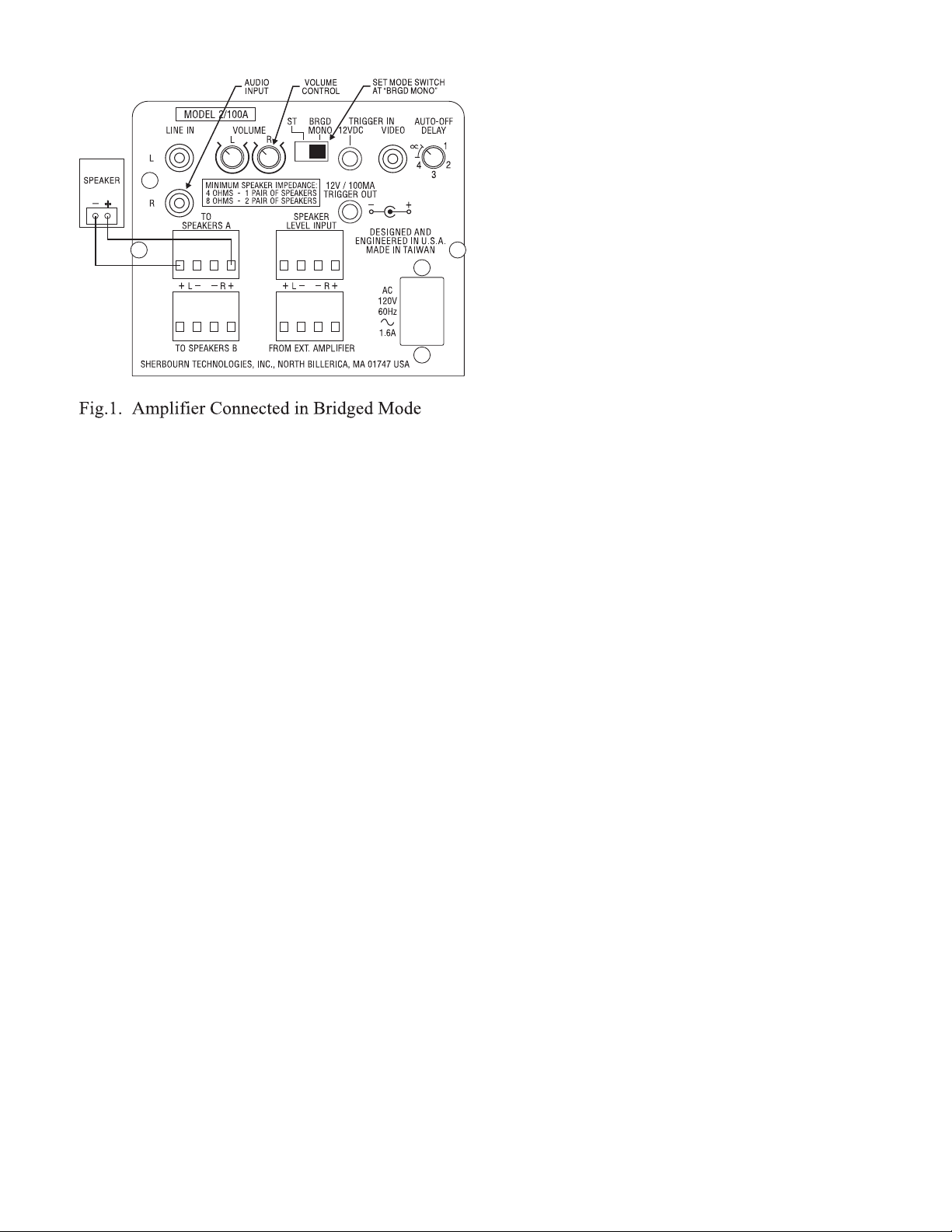
The amplifier can be configured in a ‘bridged/
mono’ mode by simply changing the ‘slide’ switch.
The 2/100A features auto-turn-on and turn-of f functions which can be activated by an audio or video
signal or by a +12VDC trigger. Turn-off time is
adjustable and the function can be defeated should
there be a desire to do so.
Configured as a Regular Stereo
Amplifier
Volume Control
Two separate control knobs are provided for left
and right volume control. When functioning under
bridge-mono mode, only the right volume control
is used for volume adjustment.
Stereo / Bridged Mode
A switch allows you to set 2/100A in either stereo
(ST) or Bridge (BRGD) mode function. Under
bridged mode, both L and R inputs are summed
2
Page 3
signal for its predetermined time it will automatically go into its standby mode. This feature can be
‘defeated’ by turning the knob to between positions
#`4 and # 5. Under this setting the 2/100A can
only be turned off from the Power Switch and it
will not enter into either its ‘Standby’ or ‘wake-up’
mode.
It is important to note that the 2/100A is designed
to work with a maximum of two pairs of 8 ohm
speakers or one pair of 4 ohm speakers. Please
consult your dealer about the impedance of any
speakers that you intend to use with your 2/100A
because the warranty will be invalidated if the 2/
100A is used outside of the parameters outlined
in this paragraph.
Five Year Limited Warranty
together and fed to both amplifiers. Please note that
the volume setting can only be controlled by the
‘R’ channel volume control.
12VDC Trigger In and Out
The Trigger output is 12V at a maximum of 100mA.
This can be used to drive a relay operated AC outlet or other 12V triggered devices. The 12V volt
trigger input is used to activate the amplifier independently from the auto turn on sensing circuit, in
which case the delay, video and audio sensing are
bypassed.
Music and Video Trigger
Apart from the 12V Trigger you can also use the
Audio and V ideo signal (fed through the ‘Line In’
connectors or the ‘Speaker Level Input’ connectors) to ‘W ake-up’ your 2/100A from its ‘S tandby’
mode. By receiving any one of these three signals
the 2/100A will ‘Wake-up’ automatically and the
LED will immediately turn to full brightness. When
the 2/100A is being ‘T riggered’ by a music or video
source you will notice that once the music stops
playing OR whenever the 2/100A has received no
music signal for its ‘Pre-set’ period (see note below) it will enter its ‘Standby’ mode..meaning that
the amplifier is effectively ‘Put to sleep’ to conserve power and the LED will dim to half brightness. The ‘V ideo’ trigger is paralleled with the ‘Music’ trigger so they both have the same level of priority.
Auto Time Off
The 2/100A can be ‘Pre-set’ for automatic time off
for any period between 30 seconds to ten minutes
by setting the control between ‘1’ and ‘4’. Thereafter, if the amplifier has received no music or video
Subject to the terms and conditions stated below, Sherbourn Technologies, Inc. (Sherbourn)
warrants to the original owner that this Product shall
be free from defects in workmanship or materials
for a term of five (5) years from its date of purchase from an Authorized Sherbourn Dealer . Transfer of this product by its original owner (the
‘Owner’) will automatically terminate this Warranty regardless of when occurring.
In the event of any defect covered by this warranty , Sherbourn shall provide all parts, materials,
and labor necessary to restore the Product to its
original specifications, and shall return the Product to its owner at Sherbourn’s expense. In the alternative, Sherbourn may at its sole option either
replace the Product without charge, or if its replacement is not commercially practicable or repair or
replacement cannot be accomplished within a reasonable time, Sherbourn may refund the purchase
price of the Product, subject where appropriate to
reasonable depreciation for actual use in accordance with applicable laws, in full satisfaction of
its warranty obligations.
Sherbourn’s sole obligation under this warranty
shall be to repair or replace the product, or at its
option refund the purchase price, as provided for
hereinabove. Sherbourn does not warrant
against, nor shall it be liable for, any of the following: removal or installation charges, shipping
expenses to its authorized service facility, loss of
use, property damage of any kind, or other incidental or consequential damage or losses of any
kind.
Note: Some states do not allow exclusion or limi-
3
Page 4

tation of consequential damages, so the foregoing
exclusions may not apply to you.
This warranty does not cover any of the following: (a) cabinetry, trim, or other appearance items
(except where they are defective at the time of original sale and the Product is delivered for repair
within the first thirty days (30) thereafter): (b) failures arising from accident, catastrophe, misuse,
neglect, or failure to properly connect and operate
the product in accordance with the accompanying
instruction: (c) failures arising from improper installation of the Product or incompatibility of other
components in the system of which the Product is
a part: (d) failures of any kind in products (i) which
have been purchased from other than Authorized
Sherbourn dealers, or (ii) which evidence any tampering, alteration, or attempted servicing by anyone other than Sherbourn or an Authorized
Sherbourn Service Facility; and Sherbourn shall
have no liability or obligation of any kind with respect to any of the foregoing losses types of failures.
T o obtain service under this W arranty , the Owner
must first obtain form Sherbourn a Return Authorization Number, and must then, at the owner’s expense (i) arrange for any necessary de-installation
of the Product, and (ii) deliver or ship the Product,
properly packaged and clearly identified with the
Return Authorization Number, prepaid, and insured, to Sherbourn at the address shown below,
or to an Authorized Sherbourn Service Facility. In
addition, the Owner must provide evidence that the
Product is at the time of delivery within the scope
of this Warranty, by either having completed and
submitted to Sherbourn on a timely basis a Warranty Registration Card or by including the ORIGINAL dated sales receipt with the Product when
submitted for repair.
9:00 a.m. and 5:00 p.m. Eastern Time Monday
through Friday at 978-663-7385 (Fax 978-663-
7389) or write to the Service Department,
Sherbourn Technologies, Inc., 19-3A Sterling
Road, North Billerica, MA 01862.
This warranty gives you specific legal rights,
and you may also have other rights which vary from
state to state.
If this product has been purchased outside of
the United States of America you should contact
your local dealer or distributor to determine the
warranty coverage provided in your country .
Thank you for taking the time to read this
manual...now sit back, relax and enjoy your
Sherbourn 2/100A amplifier which has been designed and manufactured with care and attention to give you many years of trouble free ser vice.
Safeguard your original sales receipt, as it may
be required to validate Warranty coverage
The owner is solely responsible for payment of
all expenses for removing the Product from its installation, delivering it to Sherbourn or an Authorized Sherbourn Service Facility, and reinstalling
it following repair, as well as for any repairs made
to Products which are subject to the exclusions
noted above.
In order to learn the name and address of the
nearest Authorized Sherbourn Service Facility , obtain a Return Authorization Number and shipping
instructions, or obtain answers to any other questions you may have concerning this Warranty, you
may telephone Sherbourn between the hours of
Sherbourn T echnologies, Inc.
19-3A Sterling Road,
North Billerica, MA 01862
Tel 978-663-7385
Fax 978-663-7389
4
 Loading...