

Page 1
www.joy-it.net
Pascalstr. 8 47506 Neukirchen-Vluyn
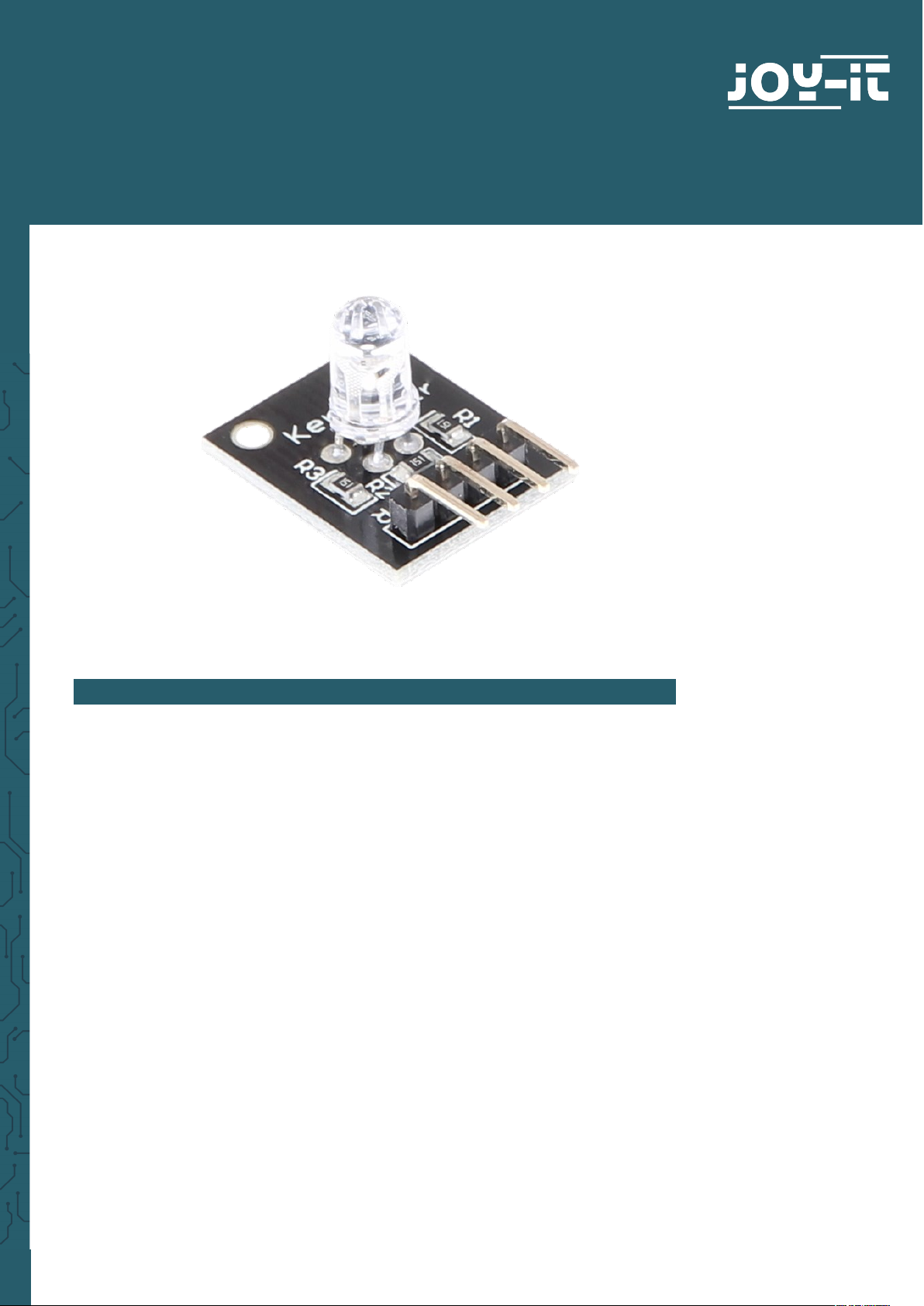
KY-016
RGB LED module
1. GENERAL INFORMATION
Dear customer,
thank you very much for choosing our product. In following, we will
introduce you to what to observe while starting up and using this
product.
Should you encounter any unexpected problems during use, please do
not hesitate to contact us.
Page 2
www.joy-it.net
Pascalstr. 8 47506 Neukirchen-Vluyn
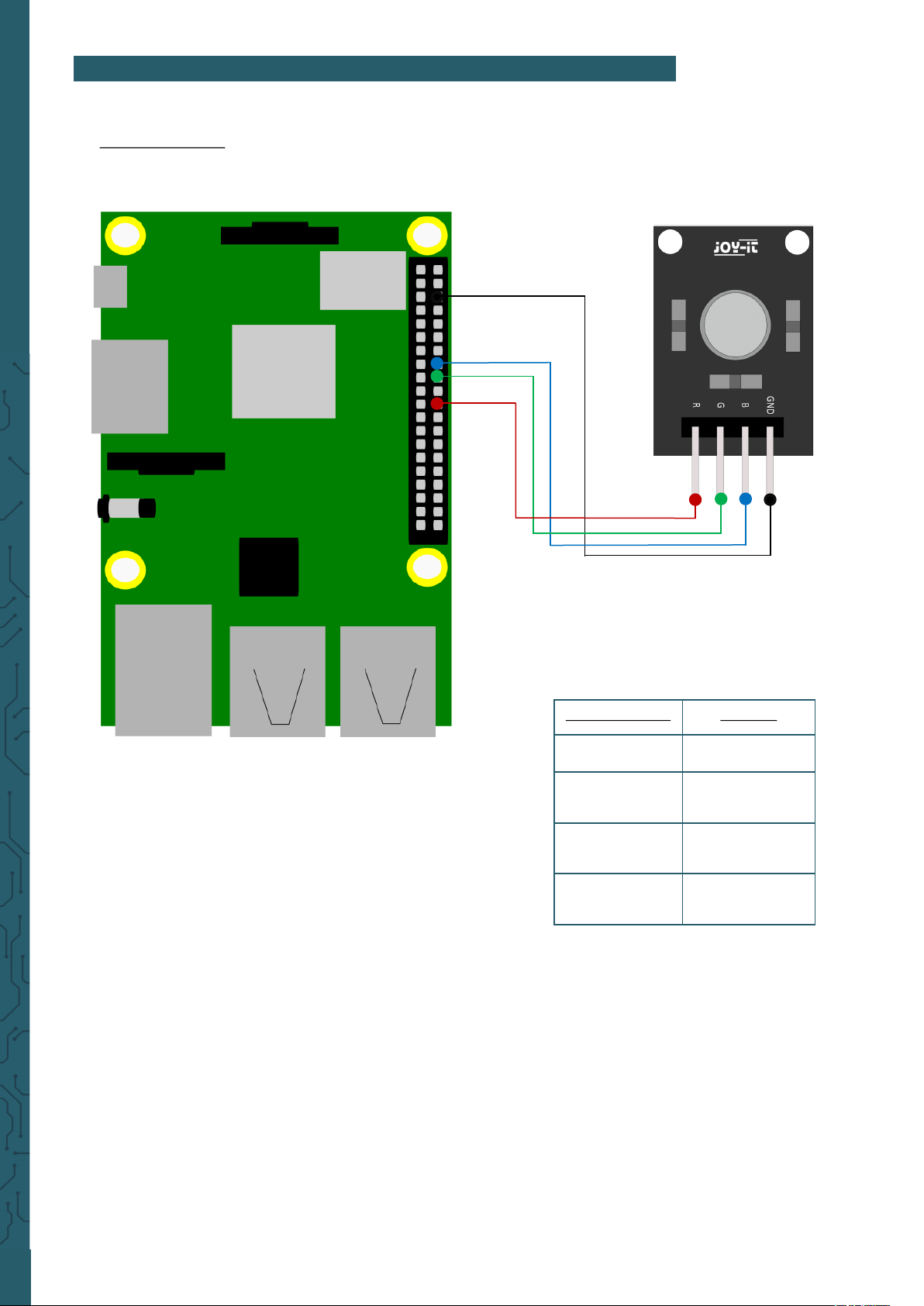
2. USAGE WITH THE RASPBERRY PI
1. Connection
Raspberry Pi KY-016
Pin 6 (GND) GND
GPIO 23
(Pin 16)
LED Blue
GPIO 24
(Pin 18)
LED Green
GPIO 25
(Pin 22)
LED Red
Page 3

www.joy-it.net
Pascalstr. 8 47506 Neukirchen-Vluyn
2. Code example
We provide you with two sample codes to test your RGB LED. One code
which sets the LED to a color and then holds it each for 3 seconds (led.py)
and one code which sets the LED to a pulsating mode in dierent colors
(pwm.py).
The following example code is the one named led.py. First, you create a
file with the following command and copy the following code inside of it.
# Required modules are imported and set up
import RPi.GPIO as GPIO
import time
GPIO.setmode(GPIO.BCM)
# Here you declare the output pin to which the LEDs are connected.
LED_ROT = 25
LED_GRUEN = 24
LED_BLAU = 23
GPIO.setup(LED_ROT, GPIO.OUT, initial= GPIO.LOW)
GPIO.setup(LED_GRUEN, GPIO.OUT, initial= GPIO.LOW)
GPIO.setup(LED_BLAU, GPIO.OUT, initial= GPIO.LOW)
print ("LED-Test [druecken Sie STRG+C, um den Test zu beenden]")
# Main program loop
try:
while True:
print("LED ROT 3 Sekunden an")
GPIO.output(LED_ROT,GPIO.HIGH) #LED red is switched on
GPIO.output(LED_GRUEN,GPIO.LOW) #LED green stays off
GPIO.output(LED_BLAU,GPIO.LOW) #LED blue stays off
time.sleep(3) # Lights up for 3 seconds
print("LED GRUEN 3 Sekunden an")
GPIO.output(LED_ROT,GPIO.LOW) #LED red stays off
GPIO.output(LED_GRUEN,GPIO.HIGH) #LED green is switched on
GPIO.output(LED_BLAU,GPIO.LOW) #LED blue stays off
time.sleep(3) # Lights up for 3 seconds
print("LED BLAU 3 Sekunden an")
GPIO.output(LED_ROT,GPIO.LOW) #LED red stays off
GPIO.output(LED_GRUEN,GPIO.LOW) #LED green stays off
GPIO.output(LED_BLAU,GPIO.HIGH) #LED blue is switched on
time.sleep(3) # Lights up for 3 seconds
# Clean up after the program has ended
except KeyboardInterrupt:
GPIO.cleanup()
sudo nano led.py
With the following command you can now run the program:
sudo python3 led.py
Page 4

www.joy-it.net
Pascalstr. 8 47506 Neukirchen-Vluyn
The second sample code is pwm.py. With the following command you can
create a file in which you can copy the following code.
# Required modules are imported and set up
import random, time
import RPi.GPIO as GPIO
GPIO.setmode(GPIO.BCM)
# Here you declare the output pin to which the LEDs are connected.
LED_Rot = 25
LED_Gruen = 24
LED_Blau = 23
# Set pins to output mode
GPIO.setup(LED_Rot, GPIO.OUT)
GPIO.setup(LED_Gruen, GPIO.OUT)
GPIO.setup(LED_Blau, GPIO.OUT)
Freq = 100 #Hz
# The respective colors are initialized.
ROT = GPIO.PWM(LED_Rot, Freq)
GRUEN = GPIO.PWM(LED_Gruen, Freq)
BLAU = GPIO.PWM(LED_Blau, Freq)
ROT.start(0)
GRUEN.start(0)
BLAU.start(0)
# This function generates the actual color
# Using the respective color variable the color intensity can be changed
# After the color has been set, the time is defined using "time.sleep",
# how long the color in question should be displayed
def LED_Farbe(Rot, Gruen,Blau, pause):
ROT.ChangeDutyCycle(Rot)
GRUEN.ChangeDutyCycle(Gruen)
BLAU.ChangeDutyCycle(Blau)
time.sleep(pause)
ROT.ChangeDutyCycle(0)
GRUEN.ChangeDutyCycle(0)
print ("LED-Test [druecken Sie STRG+C, um den Test zu beenden]")
sudo nano pwm.py
Page 5
www.joy-it.net
Pascalstr. 8 47506 Neukirchen-Vluyn
# Main program loop:
# This has the task of creating a variable for each color
# and by with a For loop the color intensity of each color
# To go from 0-100
# By mixing the different brightness levels of the respective colors
# ethis creates a gradient
try:
while True:
for x in range(0,2):
for y in range(0,2):
for z in range(0,2):
print (x,y,z)
for i in range(0,101):
LED_Farbe((x*i),(y*i),(z*i),.02)
# Clean up after the program has ended
except KeyboardInterrupt:
GPIO.cleanup()
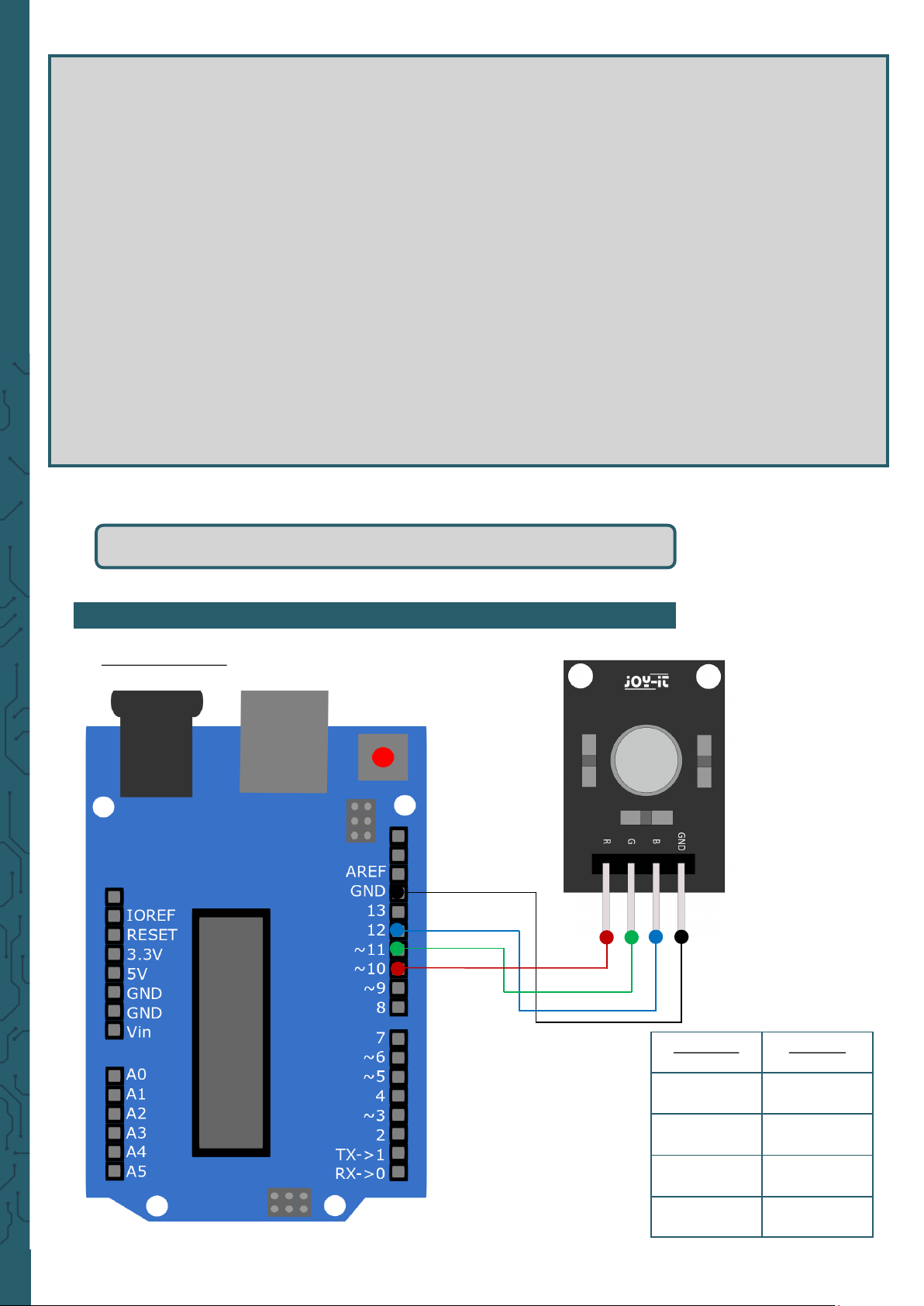
3. USAGE WITH THE ARDUINO
1. Connection
sudo python3 pwm.py
With the following command you can now run the program:
Arduino KY-016
GND GND
Pin 12 LED Blue
Pin 11 LED Green
Pin 10 LED Red
Page 6

www.joy-it.net
Pascalstr. 8 47506 Neukirchen-Vluyn
2. Code example
We provide you with two sample codes to test your RGB LED. To use
them, make sure that port and board are selected correctly in your
Arduino IDE.
The first code makes the RGB LED light up in red, green and blue 3
seconds each. To do this, copy the following code into your Arduino IDE.
int Led_Rot = 10;
int Led_Gruen = 11;
int Led_Blau = 12;
void setup ()
{
// Initialization of the output pins for the LEDs
pinMode (Led_Rot, OUTPUT);
pinMode (Led_Gruen, OUTPUT);
pinMode (Led_Blau, OUTPUT);
}
void loop () //Main program loop
{
digitalWrite (Led_Rot, HIGH); // LED red is switched on
digitalWrite (Led_Gruen, LOW); // LED green stays off
digitalWrite (Led_Blau, LOW); // LED blue stays off
delay (3000); // Waiting mode for 3 seconds
digitalWrite (Led_Rot, LOW); // LED red stays off
digitalWrite (Led_Gruen, HIGH); // LED green is switched on
digitalWrite (Led_Blau, LOW); // LED blue stays off
delay (3000);
// Wait mode for another three seconds in which the LEDs are then switched
digitalWrite (Led_Rot, LOW); // LED red stays off
digitalWrite (Led_Gruen, LOW); // LED green stays off
digitalWrite (Led_Blau, HIGH); // LED blue is switched on
delay (3000);
// Wait mode for another three seconds in which the LEDs are then switched
}
Page 7

www.joy-it.net
Pascalstr. 8 47506 Neukirchen-Vluyn
int Led_Rot = 10;
int Led_Gruen = 11;
int Led_Blau = 12;
int val;
void setup () {
// Initialization of the output pins for the LEDs
pinMode (Led_Rot, OUTPUT);
pinMode (Led_Gruen, OUTPUT);
pinMode (Led_Blau, OUTPUT);
}
void loop () {
// Within a For-loop the three LEDs are given different PWM values
// This creates a colour gradient in which the mixing of different
// Brightness levels of the two integrated LEDs so that different colours are created
for (val = 255; val> 0; val--)
{
analogWrite (Led_Blau, val);
analogWrite (Led_Gruen, 255-val);
analogWrite (Led_Rot, 128-val);
delay (1);
}
// In the second For loop, the gradient is passed backwards
for (val = 0; val <255; val++)
{
analogWrite (Led_Blau, val);
analogWrite (Led_Gruen, 255-val);
analogWrite (Led_Rot, 128-val);
delay (1);
}
}
You can execute both codes by clicking on the "Upload" button.
The second example code lets the RGB LED pulsate in dierent colors and
creates a gradient. Here, you copy again the following code into your
Arduino IDE.
Page 8

www.joy-it.net
Pascalstr. 8 47506 Neukirchen-Vluyn
PR
4. FURTHER INFORMATION
Our Information and Take-back Obligations according to the
Electrical and Electronic Equipment Act (ElektroG)
Symbol on Electrial and Electronic Products:
This crossed-out bin means that electrical and electronic products
do not belong into the household waste. You must hand over your old
appliance to a registration place. Before you can hand over the old
appliance, you must remove used batteries and replacement batteries
which are not enclosed by the device.
Return Options:
As the end user, you can hand over your old appliance (which has
essentially the same functions as the new one bought with us) free of
charge for disposal with the purchase of a new device.
Small devices, which do not have outer dimensions bigger than 25 cm
can be handed in for disposal independently of the purchase of a new
product in normal household quantities.
1. Possibility of return at our company location during our opening
hours
Simac Electronics Handel GmbH, Pascalstr. 8, D-47506 Neukirchen-Vluyn
2. Possibility of return nearby
We will send you a parcel stamp with which you can send us your old
appliance free of charge. For this possibility, please contact us via e-mail
at [email protected] or via telephone, then please dial 02845 93 60 -23
Information about Package:
Please package your old appliance safe for transport. Should you not
have suitable packaging material or you do not want to use your own
material, you can contact us and we will send you an appropriate
package.
5. SUPPORT
If any questions remained open or problems may arise aer your
purchase,we are available by e-mail, telephone and ticket support
system to answer these.
E-Mail: [email protected]
Ticket-system: http://support.joy-it.net
Telephone: +49 (0)2845 98469 – 66 (10 - 17 o'clock)
For further information visit our website:
www.joy-it.net
Published: 06.05.2020
www.joy-it.net
SIMAC Electronics GmbH
Pascalstr. 8, 47506 Neukirchen-Vluyn
 Loading...