

Page 1
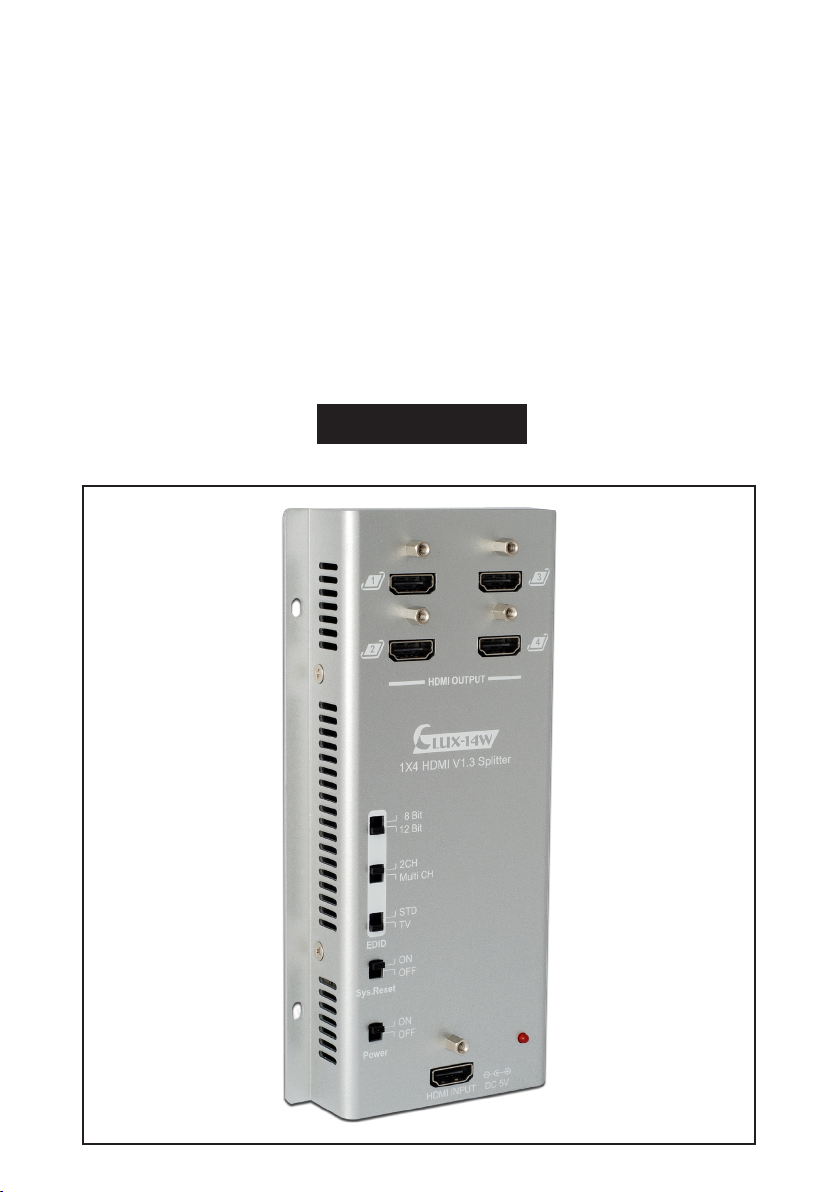
CLUX-14W
1 by 4 HDMI 1.3 Splitter
Operation Manual
CLUX-14W
Page 2

Disclaimers
The information in this manual has been carefully checked and
is believed to be accurate. Cypress Technology assumes no
responsibility for any infringements of patents or other rights of third
parties which may result from its use.
Cypress Technology assumes no responsibility for any inaccuracies
that may be contained in this document. Cypress also makes
no commitment to update or to keep current the information
contained in this document.
Cypress Technology reserves the right to make improvements to this
document and/or product at any time and without notice.
Copyright Notice
No part of this document may be reproduced, transmitted,
transcribed, stored in a retrieval system, or any of its part translated
into any language or computer file, in any form or by any means
- electronic, mechanical, magnetic, optical, chemical, manual,
or otherwise - without express written permission and consent from
Cypress Technology.
© Copyright 2009 by Cypress Technology.
All Rights Reserved.
Version 1.0 October 2009
Trademark Acknowledgments
All products or service names mentioned in this document may be
trademarks of the companies with which they are associated.
Page 3

Safety Precautions
Please read all instructions before attempting to unpack or install or
operate this equipment, and before connecting the power supply.
Please keep the following in mind as you unpack and install this
equipment:
Always follow basic safety precautions to reduce the risk of
fire, electrical shock and injury to persons.
To prevent fire or shock hazard, do not expose the unit to rain,
moisture or install this product near water.
Never spill liquid of any kind on or into this product.
Never push an object of any kind into this product through
module openings or empty slots, as you may damage parts.
Do not attach the power supply cabling to building surfaces.
Do not allow anything to rest on the power cabling or allow it to
be abused by persons walking on it.
To protect the equipment from overheating, do not block the
slots and openings in the module housing that provide
ventilation.
Revision History
Version No Date Summary of Change
V1
20091001
Preliminary Release
Page 4

Table of Contents
1. Introduction..................................................................................1
2. Applications................................................................................. 1
3. PackageContents......................................................................1
4. SystemRequirements..................................................................1
5. Features........................................................................................ 2
6. Specifications..............................................................................3
7. OperationControlsandFunctions............................................ 4
7.1 Front Panel ....................................................................... 4
7.2 Bottom Panel .................................................................... 5
8. ConnectionandInstallation....................................................... 5
Page 5

1. Introduction
The HDMI v1.3 Splitter is an advanced solution for HDMI signal distribution. This
device supports deep color (10 & 12-bit) video with new lossless compressed
(Dolby TrueHD, Dolby Digital Plus and DTS-HD Master Audio) digital audio,
with a high bandwidth up to 225MHz (6,75Gbps). Besides just splitting and
distributing, this device also amplifies and equalizes your signal to provide
high performance I/O of audio and video. With great features like EDID, CEC
and system reset this device will fully support your HDMI splitting needs.
2. Applications
• Simultaneous multi channel display
• Show room display
• Educational demo
• Installation usage
3. Package contents
• 1 by 4 HDMI 1.3 Splitter
• Power supply adaptor
• Operational Manual
4. System Requirements
Input source devices with HDMI cable and output displays with HDMI cables.
1
Page 6

5. Features
• HDMI v1.3, HDCP1.1 and DVI1.0 compliant .
• Supports Deep Color video up to 12bit, 1080p(24/60Hz).
• One HDMI source can simultaneously connect with four HDMI displays.
• HDCP keysets allow each output to work independently when connecting
to an HDMI display.
• Splits an HDMI source on up to four outputs without any signal loss.
• Supports DVI source and display by using an HDMI to/from DVI adaptor
cable.
• Supports LPCM 7.1CH, Dolby TrueHD, Dolby Digital Plus and DTS-HD Master
• Audio transmission (32-192kHz Fs sample rate).
• Supports a wide range of PC and HDTV resolutions from VGA to WUXGA
and 480i to1080p.
• HDMI cable distance testing showed that with 1080p/8bit resolution, the
input distance is 15 meters. If 1080p/12bit, the input distance is10 meters.
• HDMI cable distance testing showed that with 1080p/8bit resolution, the
output distance can be up to 10 meters. If 1080p/12bit, the output
distance can be up to 10 meters.
• EDID function. This unit is designed to detect the first HDMI/DVI output
display’s EDID and record it in the unit. If the first detected output is empty
it will pass on to the next output until the first HDMI/DVI display has been
detected. When users re-plug the power, the system will automatically
recover the EDID.
• Supports xvYCC and CEC bypass.
• Switch Reset button on to restore the system every 8-10mins.
• Buttons for EDID settings allow for fast recognition between the source and
display.
2
Page 7

6. Specications
Frequency bandwidth 2.25Gbps (single link)
Input port 1 x HDMI Female port
Output ports 4 x HDMI Female ports (single link)
ESD Protection Human body model: ± 10kV (air-gap discharge)
6kV (contact discharge)
±
PCB stack - up 4-layer board impedance control - differential 100 ohm
- sigle 50 ohm
Input TMDS signal 1.2 Volts (peak-to-peak)
Input DDC signal 5 Volts (peak-to-peak, TTL)
HDMI output resolution 480i~1080p, 1080p24, VGA~WUXGA
Power Supply 5VDC/2.6A (US/EU standards, CE/FCC/UL certified)
Dimensions (mm) 93 (W) x 187 (D) x 30 (H)
Weight (g) 240
Chassis Material Aluminum
Silkscreen Color Silver
Operating Temperature 0°C ~ 40°C / 32°F ~ 104°F
Storage Temperature -20°C~60°C / -4°F ~ 140°F
Relative Humidity 20% ~90% RH (non-condensing)
Power Consumption 5.5W (max)
3
Page 8

7. Operation Controls and Functions
HDMI OUTPUT 1~4:
7.1 Front Panel
1
2
HDMI OUTPUT
LUX-14W
1X4 HDMI V1.3 Splitter
8 Bit
12 Bit
2CH
Multi CH
STD
TV
EDID
ON
OFF
Sys.Reset
ON
OFF
Power
HDMI INPUT DC 5V
⑤
3
4
①
Connect your LCD TV or HD monitor with
HDMI cables.
EDID selection:
②
STD/TV
select both deep color and audio
①
channel functions, if switching to TV the
unit first reads the TV’s EDID and will then
send an image from the connected
source.
Note:
to switch deep color to 8-bit in order to
operate displays at long distances.
2CH/MultiCH
Multi audio channels. This option is only
available when EDID is in STD mode.
Note:
②
display must also support this function,
otherwise the TV/display will have no
audio output, unless the HDMI output is
connected to AVR and then to the TV/
③
display.
8/12 bit
④
This is only available when EDID is in STD
mode.
Note:
and 12-bit displays, in order to ensure
all outputs will display properly it is
suggested to switch to 8bit display.
On the other hand, when all outputs are
within the same bit range of 8 or 12 bits
then it is advised to switch all outputs
to the same bit ratio. The splitter will not
function properly if the display bit ratios
are different.
Sys. Reset: System reset function.
③
It is suggested to always have this
function switched off except when
doing a system reset. By switching this
on the system will reset each TV to HDMI
1 within 8~10 minutes (TV must support
CEC), switching this OFF means CEC
bypass.
Note:
works when the display has a built in
CEC function.
Power & LED: Power switch on/off, the
④
red LED will switch on when power is on.
HDMI INPUT: Connect your source
⑤
device with HDMI cables.
4
– By switching to STD you can
When in STD mode it is suggested
– Supports 2 channel or
When Multi CH is selected the TV/
– Supports 8 or 12 bit deep color.
When HDMI output has both 8-bit
The system reset function only
Page 9
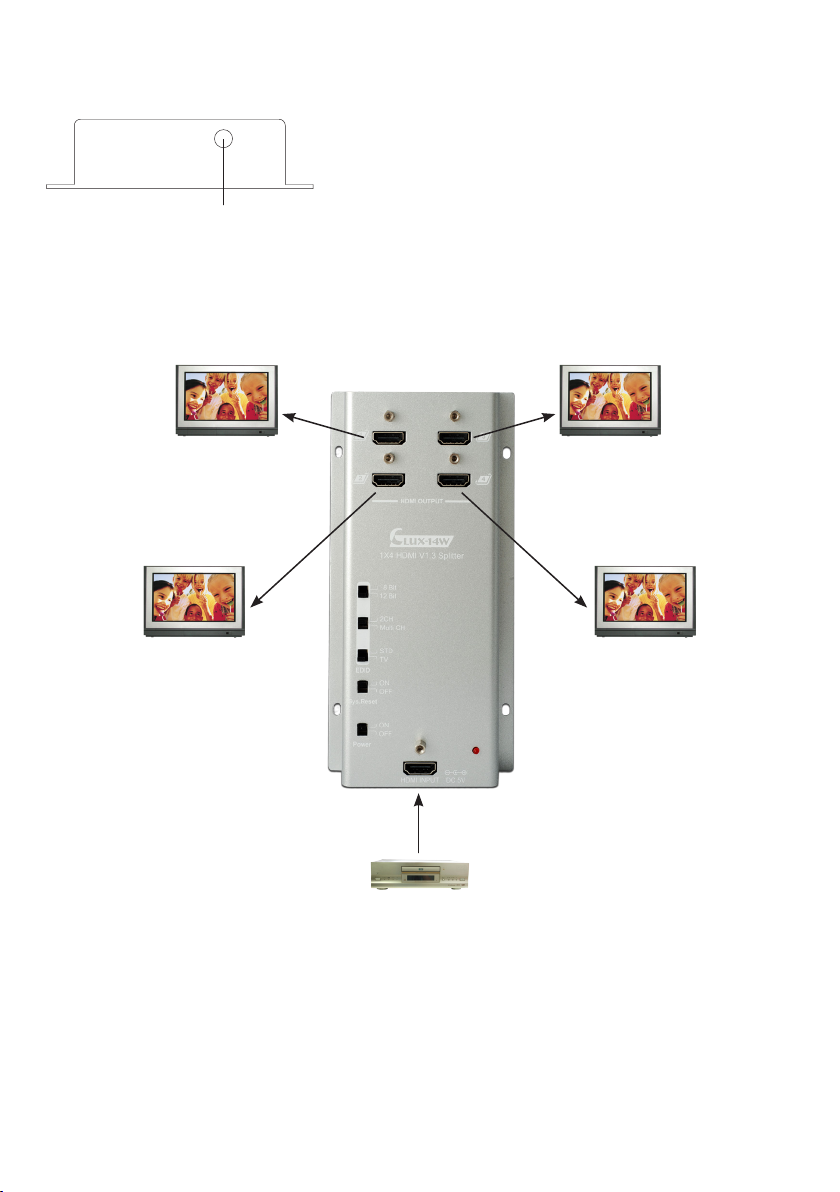
7.2 Bottom Panel
①
the unit and connect the adaptor to an
AC outlet. A red LED will turn on when the
Power is on.
①
8. Connection and Installation
DC 5V: Plug the 5VDC power supply into
LCD TVLCD TV
DVD / Blue Ray
5
LCD TVLCD TV
Page 10

Acronyms
Acronym Complete Term
CEC Consumer Electronics Control
DVI Digital Visual Interface
EDID Extended Display Identification Data
HDCP High-bandwith Digital Content Protection
HDMI High-Definition Multimedia Interface
Multi CH Multiple Channel
STD Standard
A
Page 11

Page 12

CYPRESSTECHNOLOGYCO.,LTD.
Home page: http://www.cypress.com.tw
20090814 MPM-CLUX14W
 Loading...