

Page 1

现货库存、技术资料、百科信息、热点资讯,精彩尽在鼎好!
Multiformat SDTV Video Decoder with Fast
FEATURES
Multiformat video decoder supports NTSC-(J, M, 4.43),
PAL-(B/D/G/H/I/M/N), SECAM
Integrates four 54 MHz, Noise Shaped Video®, 12-bit ADCs
SCART fast blank support
Clocked from a single 28.63636 MHz crystal
Line-locked clock-compatible (LLC)
Adaptive digital line length tracking (ADLLT™), signal
processing, and enhanced FIFO management give mini
TBC functionality
5-line adaptive comb filters
Proprietary architecture for locking to weak, noisy, and
unstable video sources such as VCRs and tuners
Subcarrier frequency lock and status information output
Integrated AGC with adaptive peak white mode
Macrovision® copy protection detection
CTI (chroma transient improvement)
DNR (digital noise reduction)
Multiple programmable analog input formats
CVBS (composite video)
S-Video (Y/C)
YPrPb component (VESA, MII, SMPTE, and Betacam)
12 analog video input channels
Integrated anti-aliasing filters
Programmable Interrupt request output pin
Automatic NTSC/PAL/SECAM identification
GENERAL DESCRIPTION
The ADV7188 integrated video decoder automatically detects
and converts a standard analog baseband television signal that
is compatible with worldwide standards NTSC, PAL, and
SECAM, into 4:2:2 component video data-compatible with 20-,
16-, 10-, and 8-bit CCIR601/CCIR656.
The advanced and highly flexible digital output interface enables
performance video decoding and conversion in line-locked
clock-based systems. This makes the device ideally suited for a
broad range of applications with diverse analog video characteristics, including tape-based sources, broadcast sources,
security/surveillance cameras, and professional systems.
The 12-bit accurate ADC provides professional quality video
performance and is unmatched. This allows true 10-bit
resolution in the 10-bit output mode.
The 12 analog input channels accept standard composite,
S-Video, and YPrPb video signals in an extensive number of
combinations.
Rev. 0
Information furnished by Analog Devices is believed to be accurate and reliable.
However, no responsibility is assumed by Analog Devices for its use, nor for any
infringements of patents or other rights of third parties that may result from its use.
Specifications subject to change without notice. No license is granted by implication
or otherwise under any patent or patent rights of Analog Devices. Trademarks and
registered trademarks are the property of their respective owners.
Switch Overlay Support
ADV7188
Digital output formats (8-bit, 10-bit, 16-bit, or 20-bit)
ITU-R BT.656 YCrCb 4:2:2 output + HS, VS, and FIELD
0.5 V to 1.6 V analog signal input range
Differential gain: 0.4% typ
Differential phase: 0.4° typ
Programmable video controls
Peak white/hue/brightness/saturation/contrast
Integrated on-chip video timing generator
Free-run mode (generates stable video output with no I/P)
VBI decode support for close captioning (including XDS),
WSS, CGMS, Gemstar® 1×/2×, teletext, VITC, VPS
Power-down mode
2-wire serial MPU interface (I
3.3 V analog, 1.8 V digital core; 3.3 V IO supply
Industrial temperature grade: –40°C to +85°C
80-lead LQFP Pb-free package
APPLICATIONS
High end DVD recorders
Video projectors
HDD-based PVRs/DVDRs
LCD TVs
Set-top boxes
Professional video products
AVR receiver
AGC and clamp restore circuitry allow an input video signal
peak-to-peak range of 0.5 V to 1.6 V. Alternatively, these can be
bypassed for manual settings.
The fixed 54 MHz clocking of the ADCs and datapath for all
modes allows very precise, accurate sampling and digital
filtering. The line-locked clock output allows the output data
rate, timing signals, and output clock signals to be synchronous,
asynchronous, or line locked even with ±5% line length variation.
The output control signals allow glueless interface connections
in almost any application. The ADV7188 modes are set up over
a 2-wire, serial, bidirectional port (I
SCART and overlay functionality are enabled by the ADV7188’s
ability to simultaneously process CVBS and standard definition
RGB signals. Signal mixing is controlled by the fast blank pin.
The ADV7188 is fabricated in a 3.3 V CMOS process. Its
monolithic CMOS construction ensures greater functionality
with lower power dissipation. It is packaged in a small 80-lead
LQFP Pb-free package.
One Technology Way, P.O. Box 9106, Norwood, MA 02062-9106, U.S.A.
Tel: 781.329.4700 www.analog.com
Fax: 781.461.3113 © 2005 Analog Devices, Inc. All rights reserved.
2
C®-compatible)
2
C-compatible).
Page 2

ADV7188
TABLE OF CONTENTS
Introduction ...................................................................................... 4
VBI Data Recovery..................................................................... 23
Analog Front End......................................................................... 4
Standard Definition Processor (SDP)........................................ 4
Electrical Characteristics ............................................................. 5
Video Specifications..................................................................... 6
Timing Specifications .................................................................. 7
Analog Specifications................................................................... 7
Thermal Specifications ................................................................ 8
Timing Diagrams.......................................................................... 8
Absolute Maximum Ratings............................................................ 9
Package Thermal Performance................................................... 9
ESD Caution.................................................................................. 9
Pin Configuration and Function Descriptions........................... 10
Analog Front End........................................................................... 12
Analog Input Muxing ................................................................ 12
Manual Input Muxing................................................................ 14
General Setup.............................................................................. 23
Color Controls............................................................................ 25
Clamp Operation........................................................................ 27
Luma Filter.................................................................................. 28
Chroma Filter.............................................................................. 31
Gain Operation........................................................................... 32
Chroma Transient Improvement (CTI) .................................. 35
Digital Noise Reduction (DNR), and Luma Peaking Filter.. 36
Comb Filters................................................................................ 37
AV Code Insertion and Controls ............................................. 39
Synchronization Output Signals............................................... 41
Sync Processing .......................................................................... 48
VBI Data Decode ....................................................................... 49
2
I
C Readback Registers.............................................................. 58
Pixel Port Configuration ............................................................... 72
XTAL Clock Input Pin Functionality.......................................15
28.63636 MHz Crystal Operation............................................ 15
Antialiasing Filters .....................................................................15
SCART and Fast Blanking......................................................... 15
Fast Blank Control...................................................................... 16
Readback of FB Pin Status......................................................... 18
Global Control Registers ............................................................... 19
Power-Save Modes...................................................................... 19
Reset Control .............................................................................. 19
Global Pin Control..................................................................... 19
Global Status Registers................................................................... 21
Standard Definition Processor (SDP).......................................... 22
SD Luma Path ............................................................................. 22
SD Chroma Path......................................................................... 22
Sync Processing........................................................................... 23
MPU Port Description................................................................... 73
Register Accesses........................................................................ 74
Register Programming............................................................... 74
2
I
C Sequencer.............................................................................. 74
2
I
C Register Maps........................................................................... 75
User Map ..................................................................................... 75
User Sub Map.............................................................................. 91
2
I
C Programming Examples........................................................ 100
Mode 1 CVBS Input................................................................. 100
Mode 2 S-Video Input .............................................................101
Mode 3 525i/625i YPrPb Input .............................................. 102
Mode 4 SCART—S-Video or CVBS autodetect................... 103
Mode 5 SCART Fast Blank—CVBS & RGB .........................104
Mode 6 SCART RGB Input (Static Fast Blank)—CVBS and
RGB ............................................................................................
105
PCB Layout Recommendations.................................................. 106
Rev. 0 | Page 2 of 112
Page 3

ADV7188
Analog Interface Inputs........................................................... 106
XTAL And Load Capacitor Values Selection ........................107
Power Supply Decoupling....................................................... 106
PLL ............................................................................................. 106
Digital Outputs (Both Data and Clocks) .............................. 106
Digital Inputs............................................................................ 107
REVISION HISTORY
7/05—Revision 0: Initial Version
Typical Circuit Connection .........................................................108
Outline Dimensions......................................................................109
Ordering Guide.........................................................................109
Rev. 0 | Page 3 of 112
Page 4
ADV7188
INTRODUCTION
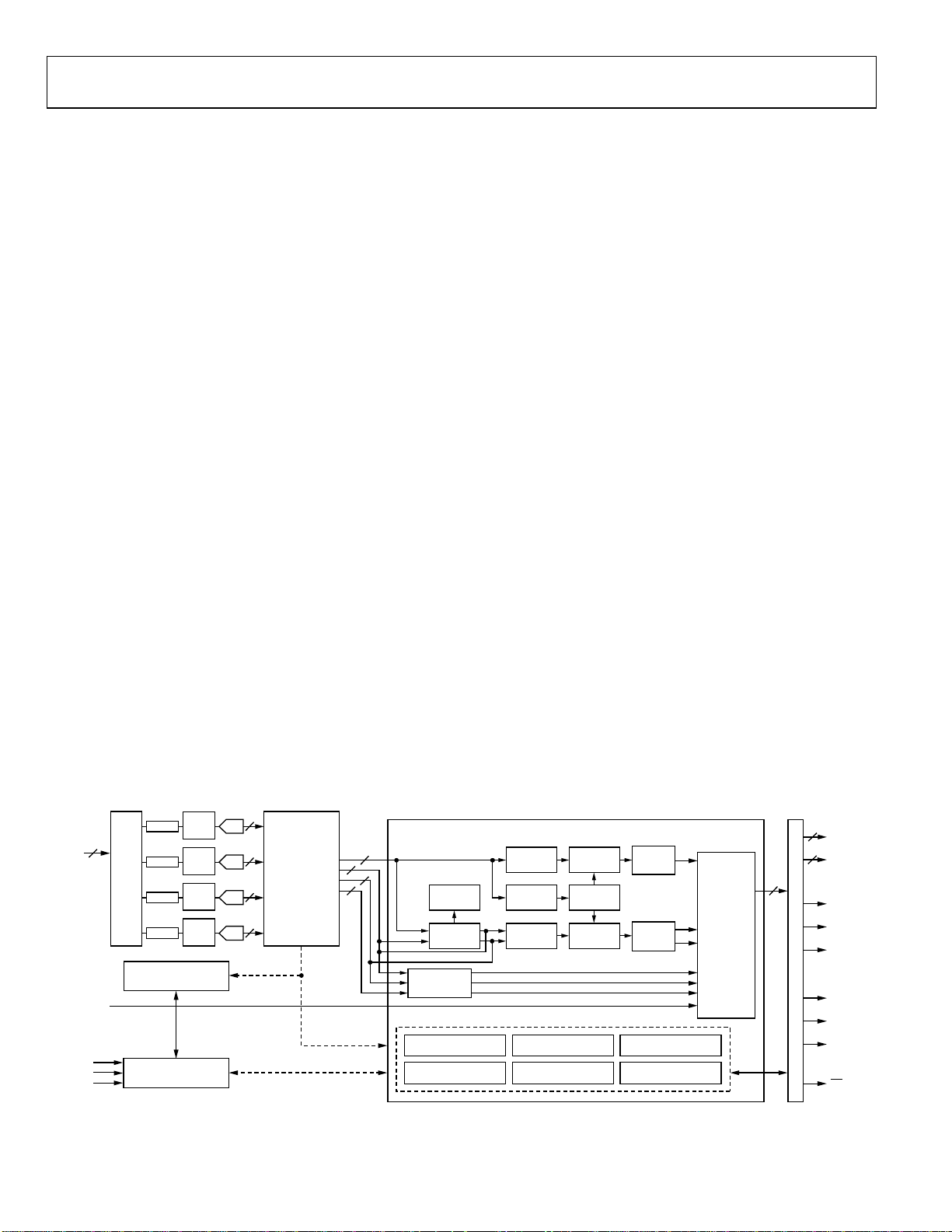
The ADV7188 is a high quality, single chip, multiformat video
decoder that automatically detects and converts PAL, NTSC,
and SECAM standards in the form of composite, S-Video, and
component video into a digital ITU-R BT.656 format.
The advanced and highly flexible digital output interface enables
performance video decoding and conversion in line-locked
clock-based systems. This makes the device ideally suited for a
broad range of applications with diverse analog video
characteristics, including tape-based sources, broadcast sources,
security and surveillance cameras, and professional systems.
ANALOG FRONT END
The ADV7188 analog front end includes four 12-bit noise
shaped video ADCs that digitize the analog video signal before
applying it to the standard definition processor. The analog
front end uses differential channels to each ADC to ensure high
performance in mixed-signal applications.
The front end also includes a 12-channel input mux that enables
multiple video signals to be applied to the ADV7188. Current
and voltage clamps are positioned in front of each ADC to
ensure that the video signal remains within the range of the
converter. Fine clamping of the video signals is performed
downstream by digital fine clamping within the ADV7188. The
ADCs are configured to run in 4× oversampling mode.
The ADV7188 has optional anti-aliasing filters on each of the
four input channels. The filters are designed for SD video with
approximately 6 MHz bandwidth.
SCART and overlay functionality are enabled by the ADV7188’s
ability to simultaneously process CVBS and Standard Definition
RGB signals. Signal mixing is controlled by the Fast Blank pin.
STANDARD DEFINITION PROCESSOR (SDP)
The ADV7188 is capable of decoding a large selection of
baseband video signals in composite, S-Video, and component
formats. The video standards supported include PAL
B/D/I / G /H, PAL 6 0 , PAL M, PA L N, PAL Nc, N T SC M/ J, NTSC
4.43, and SECAM B/D/G/K/L. The ADV7188 can automatically
detect the video standard and process it accordingly.
The ADV7188 has a 5-line, superadaptive, 2D comb filter that
gives superior chrominance and luminance separation when
decoding a composite video signal. This highly adaptive filter
automatically adjusts its processing mode according to video
standard and signal quality without user intervention. Video
user controls such as brightness, contrast, saturation, and hue
are also available within the ADV7188.
The ADV7188 implements a patented adaptive digital line
length tracking (ADLLT) algorithm to track varying video line
lengths from sources such as a VCR. ADLLT enables the
ADV7188 to track and decode poor quality video sources such
as VCRs, noisy sources from tuner outputs, VCD players, and
camcorders. The ADV7188 contains a chroma transient
improvement (CTI) processor that sharpens the edge rate of
chroma transitions, resulting in sharper vertical transitions.
The ADV7188 can process a variety of VBI data services, such
as closed captioning (CC), wide screen signaling (WSS), copy
generation management system (CGMS), Gemstar 1×/2×,
extended data service (XDS) and teletext. The ADV7188 is fully
Macrovision certified; detection circuitry enables Type I, II, and
III protection levels to be identified and reported to the user.
The decoder is also fully robust to all Macrovision signal inputs.
12
AIN1–
AIN12
CVBS
S-VIDEO
YPrPb
RGB + CVBS
SCLK
SDA
ALSB
CLAMP
INPUT
CLAMP
MUX
CLAMP
CLAMP
SYNC PROCESSING AND
CLOCK GENERATION
FB
SERIAL INTERFACE
CONTROL AND VBI DATA
ANTI
ALIAS
FILTER
ANTI
ALIAS
FILTER
ANTI
ALIAS
FILTER
ANTI
ALIAS
FILTER
12
A/D
12
A/D
12
A/D
12
A/D
SYNC AND
CLK CONTROL
ADV7188
DATA
PREPROCESSOR
DECIMATION AND
DOWNSAMPLING
FILTERS
CONTROL
AND DATA
FUNCTIONAL BLOCK DIAGRAM
STANDARD DEFINITION PROCESSOR
12
12
12
12
CVBS/Y
F
SC
RECOVERY
CVBS
CHROMA
C
Cr
Cb
R
G
B
DEMOD
COLORSPACE
CONVERSION
VBI DATA RECOVERY
MACROVISION
DETECTION
Figure 1.
Rev. 0 | Page 4 of 112
LUMA
FILTER
SYNC
EXTRACT
CHROMA
FILTER
GLOBAL CONTROL
STANDARD
AUTODETECTION
LUMA
RESAMPLE
RESAMPLE
CONTROL
CHROMA
RESAMPLE
Y
Cr
Cb
LUMA
Y
2D COMB
(5H MAX)
Cr
CHROMA
2D COMB
Cb
(4H MAX)
SYNTHESIZED
LLC CONTROL
FREE RUN
OUTPUT CONTROL
FAST BLANK
OVERLAY
CONTROL
10
PIXEL
DATA
10
P19-P10
P9-P0
20
HS
VS
FIELD
LLC1
OUTPUT FORMATTER
LLC2
SFL
INT
05478-001
Page 5

ADV7188
ELECTRICAL CHARACTERISTICS
At A
= 3.15 V to 3.45 V, D
VDD
Operating temperature range, unless otherwise noted.
Table 1.
Parameter Symbol Test Conditions Min Typ Max Unit
STATIC PERFORMANCE
1, 2, 3
Resolution (Each ADC) N 12 Bits
Integral Nonlinearity INL BSL at 54 MHz –1.5/+2.5 ±8 LSB
Differential Nonlinearity DNL BSL at 54 MHz –0.7/+0.7 –0.99/+2.5 LSB
DIGITAL INPUTS
Input High Voltage4 V
Input Low Voltage5 V
Input Current IIN Pins listed in Note 6 –50 +50 μA
All other pins7 –10 +10 μA
Input Capacitance9 C
DIGITAL OUTPUTS
Output High Voltage8 V
Output Low Voltage8 V
High Impedance Leakage Current I
Output Capacitance9 C
POWER REQUIREMENTS9
Digital Core Power Supply D
Digital I/O Power Supply D
PLL Power Supply P
Analog Power Supply A
Digital Core Supply Current I
Digital I/O Supply Current I
PLL Supply Current I
Analog Supply Current I
SCART RGB FB input11 269 mA
Power-Down Current I
Power-Up Time t
1
All ADC linearity tests performed at input range of full scale – 12.5%, and at zero scale +12.5%.
2
Max INL and DNL specificationss obtained with part configured for component video input.
3
Temperature range T
4
To obtain specified V
5
To obtain specified V
6
Pins: 36, 64, 79.
7
Excluding all “TEST” pins (TEST0 to TEST8)
8
V
and VOL levels obtained using default drive strength value (0xD5) in register subaddress 0xF4.
OH
9
Guaranteed by characterization.
10
ADC0 powered on only.
11
All four ADCs powered on.
to T
MIN
MAX
level on Pin 29, register 0x13 (write only) must be programmed with value 0x04. If Register 0x13 is programmed with value 0x00, then V
IH
level on Pin 29, register 0x13 (write only) must be programmed with value 0x04. If Register 0x13 is programmed with value 0x00, then V
IL
= 1.65 V to 2.0 V, D
VDD
= 3.0 V to 3.6 V, P
VDDIO
= 1.71 V to 1.89 V, nominal input range 1.6 V.
VDD
2 V
IH
0.8 V
IL
10 pF
IN
I
OH
I
OL
10 μA
LEAK
20 pF
OUT
1.65 1.8 2.0 V
VDD
3.0 3.3 3.6 V
VDDIO
1.71 1.8 1.89 V
VDD
3.15 3.3 3.45 V
VDD
105 mA
DVDD
4 mA
DVDDIO
11 mA
PVDD
CVBS input10 99 mA
AVDD
0.65 mA
PWRDN
20 ms
PWRUP
, –40°C to +85°C. The min/max specifications are guaranteed over this range.
= 0.4 mA 2.4 V
SOURCE
= 3.2 mA 0.4 V
SINK
on Pin 29 = 1.2 V.
IH
on Pin 29 = 0.4 V.
IL
Rev. 0 | Page 5 of 112
Page 6

ADV7188
VIDEO SPECIFICATIONS
At A
= 3.15 V to 3.45 V, D
VDD
otherwise noted).
Table 2.
Parameter
1,2
Symbol Test Conditions Min Typ Max Unit
NONLINEAR SPECIFICATIONS
Differential Phase DP CVBS I/P, modulate 5-step 0.4 0.6 degree
Differential Gain DG CVBS I/P, modulate 5-step 0.4 0.6 %
Luma Nonlinearity LNL CVBS I/P, 5-step 0.4 0.7 %
NOISE SPECIFICATIONS
SNR Unweighted Luma ramp 61 63 dB
Luma flat field 63 65 dB
Analog Front End Crosstalk 60 dB
LOCK TIME SPECIFICATIONS
Horizontal Lock Range –5 +5 %
Vertical Lock Range 40 70 Hz
Fsc Subcarrier Lock Range ±1.3 Hz
Color Lock In Time 60 Lines
Sync Depth Range3 20 200 %
Color Burst Range 5 200 %
Vertical Lock Time 2 Fields
Autodetection Switch Speed 100 Lines
CHROMA SPECIFICATIONS
Hue Accuracy HUE 1 degree
Color Saturation Accuracy CL_AC 1 %
Color AGC Range 5 400 %
Chroma Amplitude Error 0.4 %
Chroma Phase Error 0.3 degree
Chroma Luma Intermodulation 0.1 %
LUMA SPECIFICATIONS
Luma Brightness Accuracy CVBS, 1 V I/P 1 %
Luma Contrast Accuracy CVBS, 1 V I/P 1 %
1
Temperature range T
2
Guaranteed by characterization.
3
Nominal sync depth is 300 mV at 100% sync depth range.
to T
MIN
MAX
= 1.65 V to 2.0 V, D
VDD
, –40°C to +85°C. The min/max specifications are guaranteed over this range.
= 3.0 V to 3.6 V, P
VDDIO
= 1.71 V to 1.89 V (operating temperature range, unless
VDD
Rev. 0 | Page 6 of 112
Page 7

ADV7188
TIMING SPECIFICATIONS
At A
= 3.15 V to 3.45 V, D
VDD
otherwise noted).
Table 3.
Parameter
1,2
Symbol Test Conditions Min Typ Max Unit
SYSTEM CLOCK AND CRYSTAL
Nominal Frequency 28.63636 MHz
Frequency Stability ±50 ppm
I2C PORT3
SCLK Frequency 400 kHz
SCLK Min Pulse Width High t1 0.6 μs
SCLK Min Pulse Width Low t2 1.3 μs
Hold Time (Start Condition) t3 0.6 μs
Setup Time (Start Condition) t4 0.6 μs
SDA Setup Time t5 100 ns
SCLK and SDA Rise Time t6 300 ns
SCLK and SDA Fall Time t7 300 ns
Setup Time for Stop Condition t8 0.6 μs
RESET FEATURE
Reset Pulse Width 5 ms
CLOCK OUTPUTS
LLC1 Mark Space Ratio t9:t10 45:55 55:45 % Duty Cycle
LLC1 Rising to LLC2 Rising t11 1 ns
LLC1 Rising to LLC2 Falling t12 1 ns
DATA AND CONTROL OUTPUTS
Data Output Transitional Time4 t13
Data Output Transitional Time4 t14
Propagation Delay to Hi Z t15 6 ns
Max Output Enable Access Time t16 7 ns
Min Output Enable Access Time t17 4 ns
1
Temperature range T
2
Guaranteed by characterization.
3
TTL input values are 0 to 3 volts, with rise/fall times ≤3 ns, measured between the 10% and 90% points.
4
SDP timing figures obtained using default drive strength value (0xD5) in register subaddress 0xF4.
to T
MIN
MAX
ANALOG SPECIFICATIONS
At A
= 3.15 V to 3.45 V, D
VDD
otherwise noted). Recommended analog input video signal range: 0.5 V to 1.6 V, typically 1 V p-p.
Table 4.
Parameter
CLAMP CIRCUITRY
External Clamp Capacitor 0.1 μF
Input Impedance3 Clamps switched off 10 MΩ
Input impedance of Pin 40 (FB) 20 kΩ
Large Clamp Source Current 0.75 mA
Large Clamp Sink Current 0.75 mA
Fine Clamp Source Current 60 μA
Fine Clamp Sink Current 60 μA
1
Temperature range T
2
Guaranteed by characterization.
3
Except Pin 40 (FB).
1,2
Symbol Test Condition Min Typ Max Unit
to T
MIN
MAX
= 1.65 V to 2.0 V, D
VDD
= 3.0 V to 3.6 V, P
VDDIO
= 1.71 V to 1.89 V (operating temperature range, unless
VDD
Negative clock edge to start of valid data
= t
(t
ACCESS
10
– t13)
End of valid data to negative clock edge
= t9 + t14)
(t
HOLD
, –40°C to +85°C. The min/max specifications are guaranteed over this range.
= 1.65 V to 2.0 V, D
VDD
, –40°C to +85°C. The min/max specifications are guaranteed over this range.
= 3.0 V to 3.6 V, P
VDDIO
= 1.71 V to 1.89 V (operating temperature range, unless
VDD
3.6 ns
2.4 ns
Rev. 0 | Page 7 of 112
Page 8
ADV7188
THERMAL SPECIFICATIONS
Table 5.
Parameter Symbol Test Conditions Min Typ Max Unit
Junction-to-Case Thermal Resistance θJC 4-layer PCB with solid ground plane 7.6 °C/W
Junction-to-Ambient Thermal Resistance (Still Air) θJA 4-layer PCB with solid ground plane 38.1 °C/W
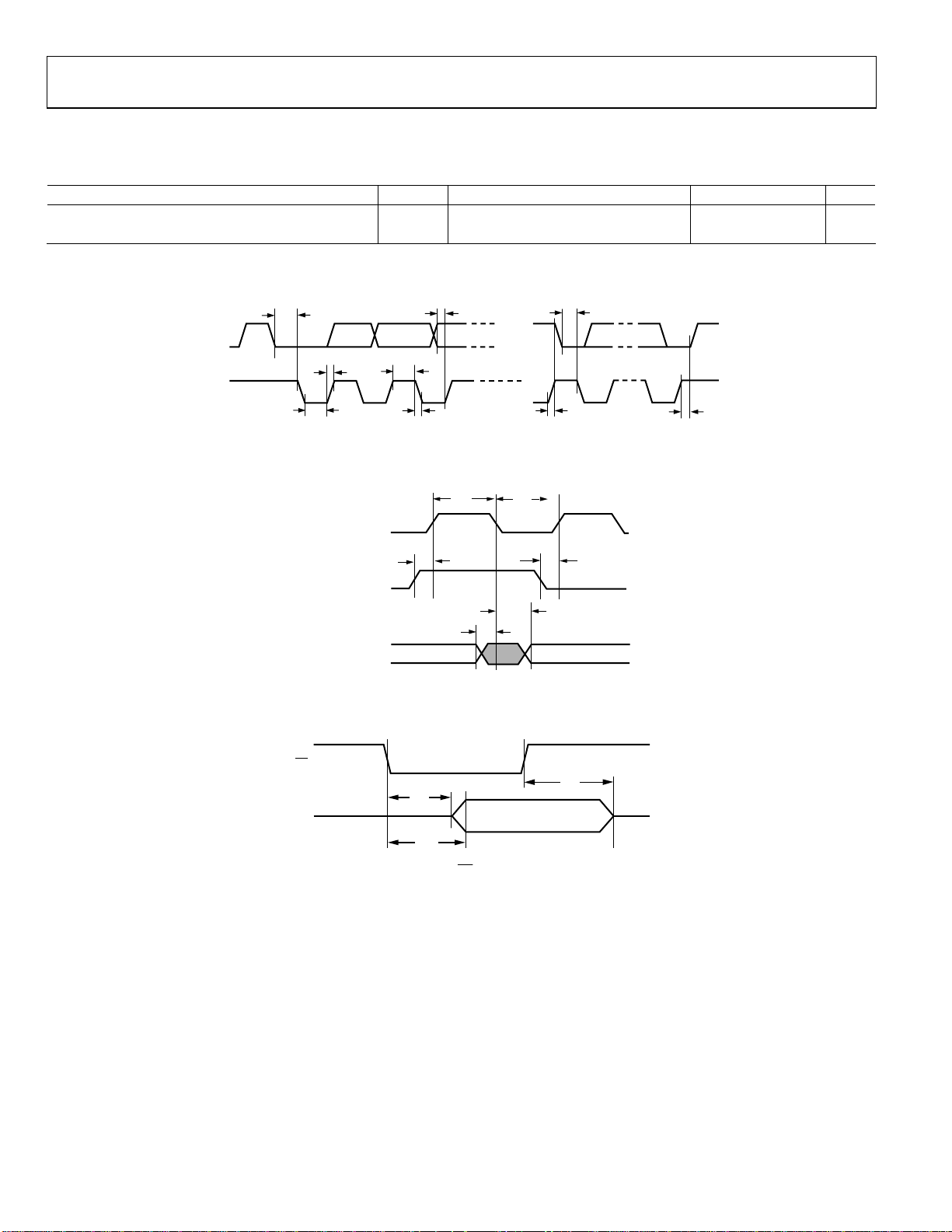
TIMING DIAGRAMS
t
t
7
5
t
1
Figure 2. I
2
C Timing
SDA
SCLK
t
3
t
6
t
2
t
3
t
4
t
8
05478-002
OUTPUT LLC 1
OUTPUT LLC 2
OUTPUTS P0–P19, VS,
HS, FIELD,
SFL
t
9
t
11
t
10
t
12
t
13
t
14
05478-003
Figure 3. Pixel Port and Control Output Timing
OE
t
15
05478-004
P0–P19, HS,
VS, FIELD,
SFL
t
17
t
16
Figure 4.
OE
Timing
Rev. 0 | Page 8 of 112
Page 9

ADV7188
ABSOLUTE MAXIMUM RATINGS
Table 6.
Parameter Rating
A
to AGND 4 V
VDD
D
to DGND 2.2 V
VDD
P
to AGND 2.2 V
VDD
D
to DGND 4 V
VDDIO
D
to AVDD –0.3 V to +0.3 V
VDDIO
P
to D
VDD
D
VDDIO
D
VDDIO
A
VDD
A
VDD
Digital Inputs Voltage to DGND –0.3V to D
Digital Output Voltage to DGND –0.3V to D
Analog Inputs to AGND AGND – 0.3 V to A
Maximum Junction Temperature
(T
–0.3 V to +0.3 V
VDD
to P
–0.3V to +2 V
VDD
to D
–0.3V to +2 V
VDD
to P
–0.3V to +2 V
VDD
to D
–0.3V to +2 V
VDD
max)
J
125°C
VDDIO
VDDIO
+ 0.3 V
+ 0.3 V
VDD
+ 0.3 V
Storage Temperature Range –65°C to +150°C
Infrared Reflow Soldering (20 sec) 260°C
Stresses above those listed under Absolute Maximum Ratings
may cause permanent damage to the device. This is a stress
rating only; functional operation of the device at these or any
other conditions above those indicated in the operational
section of this specification is not implied. Exposure to absolute
maximum rating conditions for extended periods may affect
device reliability.
PACKAGE THERMAL PERFORMANCE
To reduce power consumption the user is advised to turn off
any unused ADCs when using the part.
The junction temperature must always stay below the
maximum junction temperature (T
following equation shows how to calculate the junction
temperature:
T
= T
J
+ (θJA × W
A Max
Max
)
where:
T
= 85°C.
A Max
θ
= 30°C/W.
JA
W
Max
(P
= ((A
VDD
× I
VDD
PVDD
× I
)).
AV D D
) + ( D
max) of 125°C. The
J
× I
DVDD
) + (D
VDD
VDDIO
× I
DVDDIO
) +
ESD CAUTION
ESD (electrostatic discharge) sensitive device. Electrostatic charges as high as 4000 V readily accumulate on
the human body and test equipment and can discharge without detection. Although this product features
proprietary ESD protection circuitry, permanent damage may occur on devices subjected to high energy
electrostatic discharges. Therefore, proper ESD precautions are recommended to avoid performance
degradation or loss of functionality.
Rev. 0 | Page 9 of 112
Page 10
ADV7188
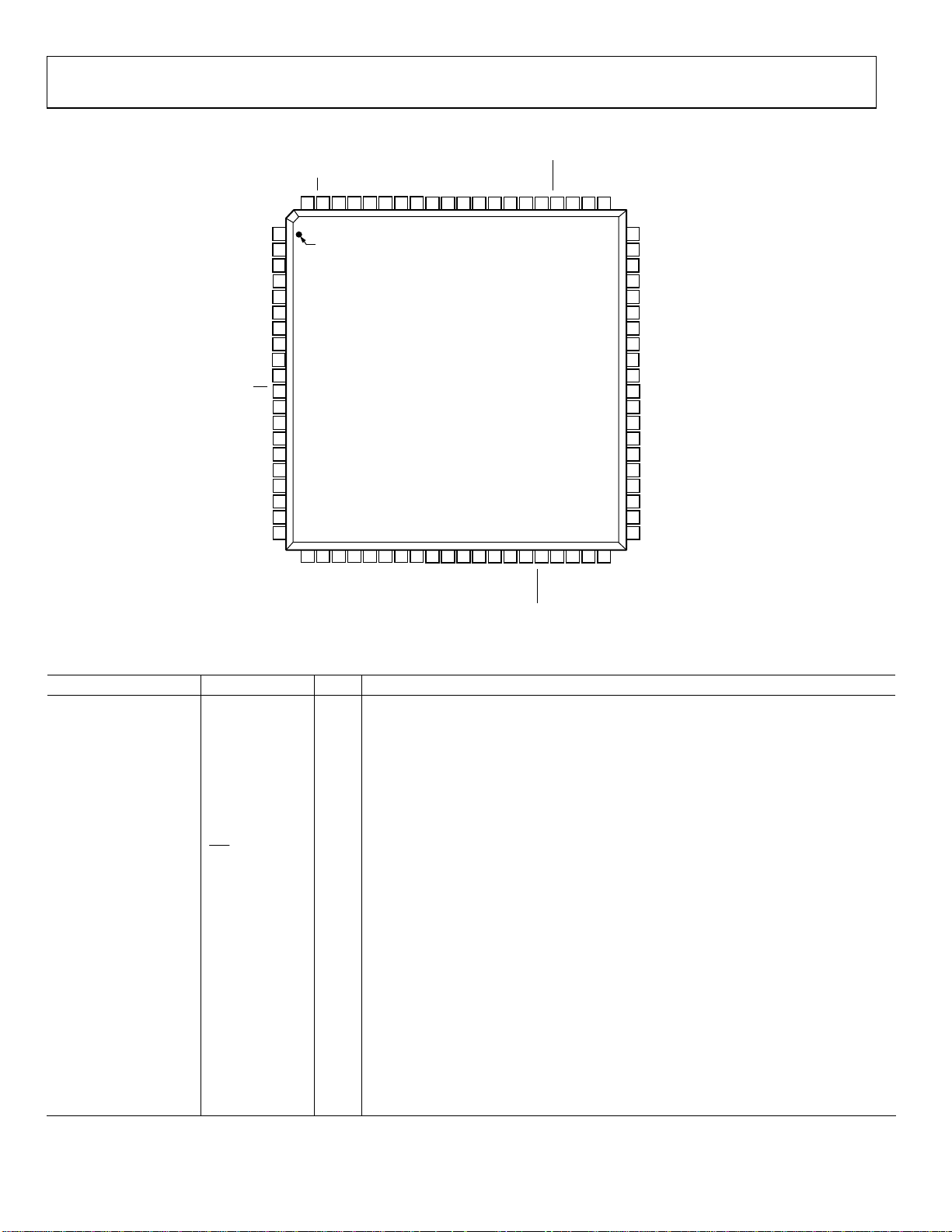
PIN CONFIGURATION AND FUNCTION DESCRIPTIONS
FIELD79OE78TEST177TEST676P1675P1774P1873P1972DVDD71DGND70TEST069TEST468SCLK67SDA66ALSB65TEST764RESET63TEST562AIN661AIN12
80
VS
HS
DGND
DVDDIO
P15
P14
P13
P12
DGND
DVDD
INT
SFL
TEST2
DGND
DVDDIO
TEST8
P11
P10
1
PIN 1
2
3
4
5
6
7
8
9
10
11
12
13
14
15
16
17
18
19
P9
20
P8
21P722P623P524P425
TEST3
26
LLC227LLC1
ADV7188
TOP VIEW
(Not to Scale)
28
29
30
XTAL
XTAL1
31
32P333P234P135P036
DVDD
DGND
PWRDN
37
38
ELPF
PVDD
39
40
AGND
60
AIN5
59
AIN11
58
AIN4
57
AIN10
56
AGND
55
CAPC2
54
CAPC1
53
AGND
52
CML
51
REFOUT
50
AVDD
49
CAPY2
48
CAPY1
47
AGND
46
AIN3
45
AIN9
44
AIN2
43
AIN8
42
AIN1
41
AIN7
FB
Figure 5. 80-Lead LQFP Pin Configuration
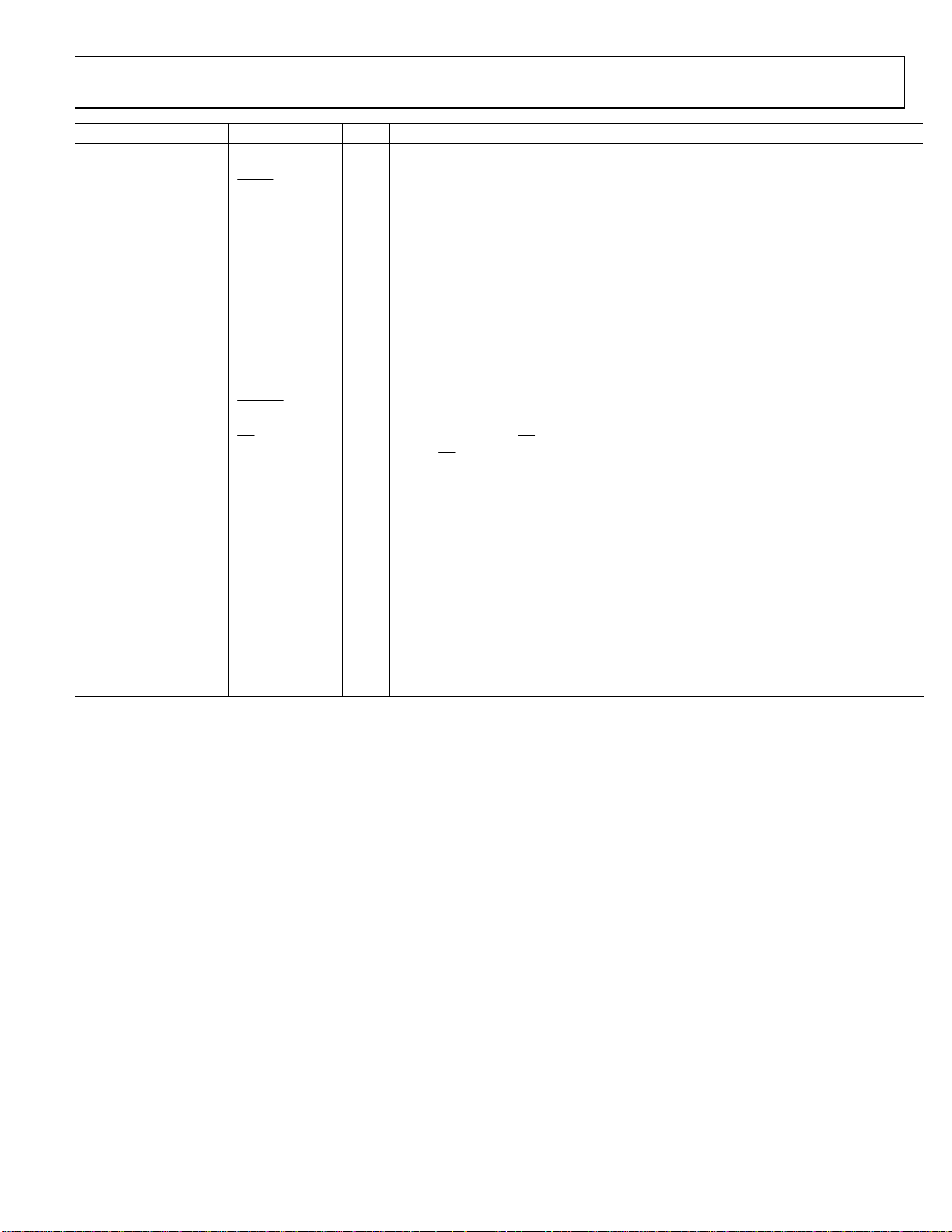
Table 7. Pin Function Descriptions
Pin No. Mnemonic Type Function
3, 9, 14, 31, 71 DGND G Digital Ground.
39, 47, 53, 56 AGND G Analog Ground.
4, 15 DVDDIO P Digital I/O Supply Voltage (3.3 V).
10, 30, 72 DVDD P Digital Core Supply Voltage (1.8 V).
50 AVDD P Analog Supply Voltage (3.3 V).
38 PVDD P PLL Supply Voltage (1.8 V).
42, 44, 46, 58, 60, 62,
AIN1 to AIN12 I Analog Video Input Channels.
41, 43, 45, 57, 59, 61
11
INT
O
Interrupt Request Output. Interrupt occurs when certain signals are detected on the
input video. See the User Sub Map register details in
40 FB I
Fast Blank. FB is a fast switch overlay input that switches between CVBS and RGB analog
signals.
70, 78, 13, 25, 69, 63 TEST0 to TEST5 Leave these pins unconnected.
77, 65 TEST6 to TEST7 Tie to AGND
16 TEST8 Tie to DVDDIO
35, 34, 33, 32, 24, 23,
P0 to P19 O Video Pixel Output Port.
22, 21, 20, 19, 18, 17, 8,
7, 6, 5, 76, 75, 74, 73
2 HS O Horizontal Synchronization Output Signal.
1 VS O Vertical Synchronization Output Signal.
80 FIELD O Field Synchronization Output Signal.
67 SDA I/O I2C Port Serial Data Input/Output Pin.
68 SCLK I I2C Port Serial Clock Input (Max Clock Rate of 400 kHz).
05478-005
Table 103.
Rev. 0 | Page 10 of 112
Page 11
ADV7188
Pin No. Mnemonic Type Function
66 ALSB I
64
27 LLC1 O
26 LLC2 O
29 XTAL I
28 XTAL1 O
36
79
37 ELPF I
12 SFL O
51 REFOUT O
52 CML O
48, 49 CAPY1, CAPY2 I
54. 55 CAPC1, CAPC2 I
RESET
PWRDN
OE
I
I
I
This pin selects the I
write as 0x40; set to Logic 1 sets the address to 0x42.
System Reset Input, Active Low. A minimum low reset pulse width of 5 ms is required to
reset the ADV7188 circuitry.
Line-Locked Clock 1. This is a line-locked output clock for the pixel data output by the
ADV7188. Nominally 27 MHz, but varies up or down according to video line length.
Line-Locked Clock 2. This is a divide-by-2 version of the LLC1 output clock for the pixel
data output by the ADV7188. Nominally 13.5 MHz, but varies up or down according to
video line length.
This is the input pin for the 28.63636 MHz crystal, or can be overdriven by an external 3.3
V, 28.63636 MHz clock oscillator source. In crystal mode, the crystal must be a
fundamental crystal.
This pin should be connected to the 28.63636 MHz crystal or left as a no connect if an
external 3.3 V, 28.63636 MHz clock oscillator source is used to clock the ADV7188. In
crystal mode, the crystal must be a fundamental crystal.
Logic 0 on this pin places the ADV7188 in a power-down mode. Refer to the I2C Register
Maps section for more options on power-down modes for the ADV7188.
When set to Logic 0, OE enables the pixel output bus, P19 to P0 of the ADV7188. Logic 1
on the OE pin places P19 to P0, HS, VS, and SFL/SYNC_OUT into a high impedance state.
The recommended external loop filter must be connected to this ELPF pin, as shown in
Figure 50.
Subcarrier Frequency Lock. This pin contains a serial output stream that can be used to
lock the subcarrier frequency when this decoder is connected to any Analog Devices, Inc.
digital video encoder.
Internal Voltage Reference Output. Refer to
network for this pin.
The CML pin is a common-mode level for the internal ADC’s. Refer to
recommended capacitor network for this pin.
ADC’s Capacitor Network. Refer to
this pin.
ADC’s Capacitor Network. Refer to
this pin.
2
C address for the ADV7188. ALSB set to Logic 0 sets the address for a
Figure 50 for a recommended capacitor
Figure 50 for a
Figure 50 for a recommended capacitor network for
Figure 50 for a recommended capacitor network for
Rev. 0 | Page 11 of 112
Page 12
ADV7188
ANALOG FRONT END
ANALOG INPUT MUXING
AIN1
AIN7
AIN2
AIN8
AIN3
AIN9
AIN4
RGB_IP_SEL
INSEL[3:0]
AIN10
AIN5
AIN11
AIN6
AIN12
ADC_SW_MAN_EN
AIN1
AIN7
AIN2
AIN8
AIN3
AIN9
AIN4
AIN10
AIN5
AIN11
AIN6
AIN12
1
0
PRIM_MODE[3:0]
SDM_SEL[1:0]
ADC0_SW[3:0]
ADC0
INTERNAL
MAPPING
FUNCTIONS
Figure 6. Internal Pin Connections
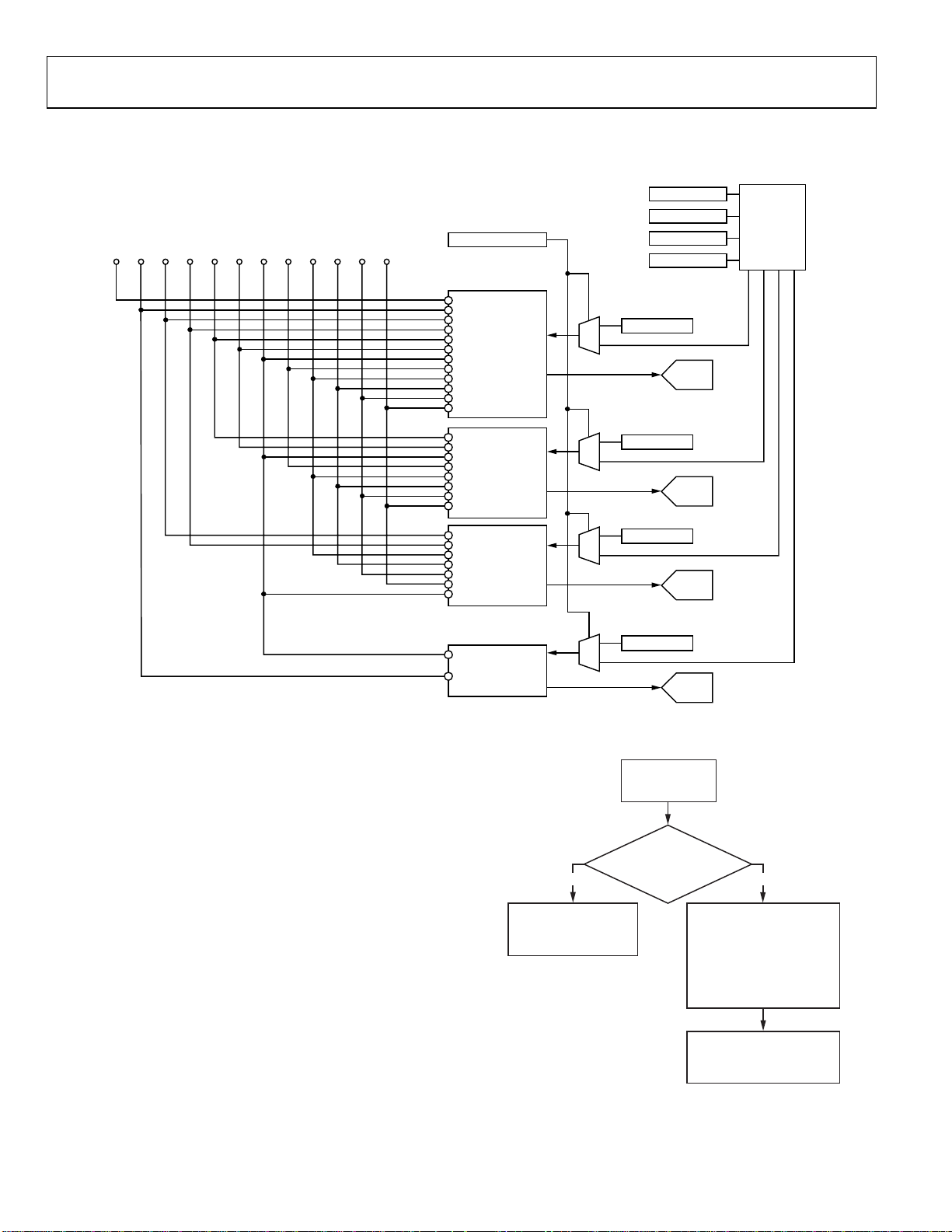
The ADV7188 has an integrated analog muxing section that
allows connecting more than one source of video signal to the
decoder.
Figure 6 outlines the overall structure of the input
muxing provided in ADV7188.
As can be seen in
Figure 6, the analog input muxes can be
controlled in two ways:
• By functional registers (INSEL). Using INSEL[3:0]
simplifies the setup of the muxes, and minimizes crosstalk
between channels by pre-assigning the input channels. This
is referred to as ADI recommended input muxing.
• By an I
2
C manual override (ADC_SW_MAN_EN,
ADC0_SW, ADC1_SW, ADC2_SW, and ADC3_SW). This
is provided for applications with special requirements, such
as number/combinations of signals, which would not be
served by the pre-assigned input connections. This is
referred to as manual input muxing.
Refer to
Figure 7 for an overview of the two methods of
controlling input muxing.
AIN3
AIN9
AIN4
AIN10
AIN5
AIN11
AIN6
AIN12
AIN2
AIN8
AIN5
AIN11
AIN6
AIN12
AIN4
AIN4
AIN7
1
0
1
0
1
0
YES
SET INSEL[3:0] AND
SDM_SEL[1:0]
FOR REQUIRED MUXING
CONFIGURATION
Figure 7. Input Muxing Overview
ADC1_SW[3:0]
ADC1
ADC2_SW[3:0]
ADC2
ADC3_SW[3:0]
ADC3
CONNECTING
ANALOG SIGNALS
TO ADV7188
ADI RECOMMENDED
INPUT MUXING;
SEE TABLES 8 AND 9
TO DECODE VIDEO FORMAT:
SCART (CVBS/RGB): 1111
S-VIDEO/CVBS AUTODETECT
USE MANUAL INPUT MUXING
(ADC_SW_MAN_EN, ADC0_SW,
05478-006
NO
SET INSEL[3:0] TO
CONFIGURE ADV7188
CVBS: 0000
YC: 0110
YPrPb: 1001
SET SDM_SEL[1:0] FOR
ADC1_SW, ADC2_SW,
ADC3_SW)
05478-007
Rev. 0 | Page 12 of 112
Page 13

ADV7188
ADI Recommended Input Muxing
A maximum of 12 CVBS inputs can be connected and decoded
by the ADV7188. As seen in
Figure 5, this means the sources
must be connected to adjacent pins on the IC. This calls for a
careful design of the PCB layout, for example, ground shielding
between all signals routed through tracks that are physically
close together.
SDM_SEL[1:0], S-Video and CVBS Autodetect Mode Select,
Address 0x69 [1:0]
The SDM_SEL bits decide on input routing and whether
INSEL[3:0] is used to govern I/P routing decisions.
The CVBS/YC autodetection feature is enabled using
SDM_SEL = 11.
Table 8: SDM_SEL[1:0]
SDM_SEL[1:0] Mode Analogue Video Inputs
00 As per INSEL[3:0] As per INSEL[3:0]
01 CVBS AIN11
10 YC
Y = AIN10
C = AIN12
11 YC/CVBS auto
CVBS = AIN11
Y = AIN11
C = AIN12
Table 9. Input Channel Switching Using INSEL[3:0]
Description
INSEL[3:0]
0000(default) CVBS1 = AIN1
0001 CVBS2 = AIN2
0010 CVBS3 = AIN3
0011 CVBS4 = AIN4
Analog Input Pins Video Format
SCART (CVBS and R, G, B )
SCART (CVBS and R, G, B )
SCART (CVBS and R, G, B )
B = AIN4 or AIN7
R = AIN5 or AIN8
G = AIN6 or AIN9
B = AIN4 or AIN7
R = AIN5 or AIN8
G = AIN6 or AIN9
B = AIN4 or AIN7
R = AIN5 or AIN8
G = AIN6 or AIN9
1
1
1
1
1
1
1
1
1
SCART (CVBS and R, G, B )
B = AIN7
R = AIN8
G = AIN9
0100 CVBS1 = AIN1
SCART (CVBS and R, G, B )
B = AIN4
R = AIN5
G = AIN6
0101 CVBS1 = AIN1
SCART (CVBS and R, G, B )
B = AIN4
R = AIN5
G = AIN6
0110 Y1 = AIN1
YC
C1 = AIN4
0111 Y2 = AIN2
YC
C2 = AIN5
INSEL[3:0] Input Selection, Address 0x00 [3:0]
The INSEL bits allow the user to select an input channel and the
input format. Depending on the PCB connections, only a subset
of the INSEL modes are valid. The INSEL[3:0] not only switches
the analog input muxing, it also configures ADV7188 to process
CVBS (Comp), S-Video (Y/C), or component (YPbPr) format.
ADI-recommended input muxing is designed to minimize
crosstalk between signal channels and to obtain the highest
level of signal integrity.
Table 10 summarizes how the PCB
layout should connect analog video signals to the ADV7188.
It is strongly recommended to connect any unused analog input
pins to AGND to act as a shield.
Connect inputs AIN7 to AIN11 to AGND when only six input
channels are used. This improves the quality of the sampling
due to better isolation between the channels.
AIN12 is not under the control of INSEL[3:0]. It can be routed
to ADC0/ADC1/ADC2 only by manual muxing. See
Tabl e 11
for details.
INSEL[3:0]
Analog Input Pins Video Format
1000 Y3 = AIN3
Description
YC
C3 = AIN6
1001 Y1 = AIN1
YPrPb
PB1 = AIN4
PR1 = AIN5
1010 Y2 = AIN2
YPrPb
PB2 = AIN3
PR2 = AIN6
1011 CVBS7 = AIN7
SCART (CVBS and R, G, B )
B = AIN7
R = AIN8
G = AIN9
1100 CVBS8 = AIN8
SCART (CVBS and R, G, B )
B = AIN7
R = AIN8
G = Ain9
1101 CVBS9 = AIN9
SCART (CVBS and R, G, B )
B = AIN7
R = AIN8
G = Ain9
1110 CVBS10 = AIN10
B = AIN4 or AIN7
R = Ain5 or Ain8
G = Ain6 or Ain9
1111 CVBS11 = AIN11
B = AIN4 or AIN7
R = AIN5 or AIN81
1
Selectable via RGB_IP_SEL.
G = AIN6 or AIN9
1
1
SCART (CVBS and R, G, B )
1
SCART (CVBS and R, G, B )
1
1
Rev. 0 | Page 13 of 112
Page 14

ADV7188
Table 10. Input Channel Assignments
Input Channel Pin ADI-Recommended Input Muxing Control INSEL[3:0]
AIN7 41 CVBS7 SCART1-B
AIN1 42 CVBS1 YC1-Y YPrPb1-Y SCART2-CVBS
AIN8 43 CVBS8 SCART1-R
AIN2 44 CVBS2 YC2-Y YPrPb2-Y
AIN9 45 CVBS9 SCART1-G
AIN3 46 CVBS3 YC3-Y YPrPb2-Pb
AIN10 57 CVBS10
AIN4 58 CVBS4 YC1-C YPrPb1-Pb SCART2-B
AIN11 59 CVBS11 SCART1-CVBS
AIN5 60 CVBS5 YC2-C YPrPb1-Pr SCART2-R
AIN12 61 Not Available
AIN6 62 CVBS6 YC3-C YPrPb2-Pr SCART2-G
Table 11. Manual Mux Settings for All ADCs (SETADC_SW_MAN_EN = 1)
ADC0
ADC0_sw[3:0]
0000 No Connection 0000 No Connection 0000 No Connection 0000 No Connection
0001 AIN1 0001 No Connection 0001 No Connection 0001 No Connection
0010 AIN2 0010 No Connection 0010 AIN2 0010 No Connection
0011 AIN3 0011 AIN3 0011 No Connection 0011 No Connection
0100 AIN4 0100 AIN4 0100 No Connection 0100 AIN4
0101 AIN5 0101 AIN5 0101 AIN5 0101 No Connection
0110 AIN6 0110 AIN6 0110 AIN6 0110 No Connection
0111 No Connection 0111 No Connection 0111 No Connection 0111 No Connection
1000 No Connection 1000 No Connection 1000 No Connection 1000 No Connection
1001 AIN7 1001 No Connection 1001 No Connection 1001 AIN7
1010 AIN8 1010 No Connection 1010 AIN8 1010 No Connection
1011 AIN9 1011 AIN9 1011 No Connection 1011 No Connection
1100 AIN10 1100 AIN10 1100 No Connection 1100 No Connection
1101 AIN11 1101 AIN11 1101 AIN11 1101 No Connection
1110 AIN12 1110 AIN12 1110 AIN12 1110 No Connection
1111 No Connection 1111 No Connection 1111 No Connection 1111 No Connection
Connected To
ADC1_sw[3:0]
RGB_IP_SEL, Address 0xF1 [0]
For SCART input, R, G and B signals can be input on either
AIN4, AIN5, and AIN6 or on AIN7, AIN8, and AIN9.
0 (default)—B is input on AIN4, R is input on AIN 5, and G is
input on AIN6.
1—B is input on AIN7, R is input on AIN 8, and G is input on
AIN9.
MANUAL INPUT MUXING
By accessing a set of manual override muxing registers, the
analog input muxes of the ADV7188 can be controlled directly.
This is referred to as manual input muxing. Manual input
muxing overrides other input muxing control bits, for example,
INSEL and SDM_SEL.
Manual muxing is activated by setting the ADC_SW_MAN_EN
bit. It affects only the analog switches in front of the ADCs. This
ADC1
Connected To
ADC2_sw[3:0]
ADC2
Connected To
ADC3_sw[3:0]
ADC3
Connected To
means if the settings of INSEL and the manual input muxing
registers (ADC0/ADC1/ADC2/ADC3_SW) contradict each
other, the ADC0/ADC1/ADC2/ADC3_SW settings apply and
INSEL/SDM_SEL is ignored.
Manual input muxing controls only the analog input muxes.
INSEL[3:0] still has to be set so the follow-on blocks process the
video data in the correct format. This means INSEL must still
be used to tell the ADV7188 whether the input signal is of
component, YC, or CVBS format.
Restrictions in the channel routing are imposed by the analog
signal routing inside the IC; every input pin cannot be routed to
each ADC. Refer to
Figure 6 for an overview on the routing
capabilities inside the chip. The four mux sections can be
controlled by the reserved control signal buses ADC0_SW[3:0],
ADC1_SW[3:0}, ADC2_SW[3:0}, and ADC3_SW[3:0].
Table 11 explains the control words used.
Rev. 0 | Page 14 of 112
Page 15
ADV7188
SETADC_SW_MAN_EN, Manual Input Muxing Enable,
Address C4 [7]
ADC0_sw[3:0], ADC0 Mux Configuration, Address 0xC3 [3:0]
ADC1_sw[3:0], ADC1 Mux Configuration, Address 0xC3 [7:4]
ADC2_sw[3:0], ADC2 Mux Configuration, Address 0xC4 [3:0]
ADC3_sw[3:0], ADC3 Mux Configuration, Address 0xF3 [7:4]
See
Table 11.
XTAL CLOCK INPUT PIN FUNCTIONALITY
XTAL_TTL_SEL, Address 0x13 [2]
The XTAL pad is normally part of the crystal oscillator circuit,
powered from a 1.8 V supply. For optimal clock generation, the
slice level of the input buffer of this circuit is at approximately
half the supply voltage. This makes it incompatible with TLL
level signals.
0 (default)—A crystal is used to generate the ADV7188’s clock.
1—An external TTL level clock is supplied. A different input
buffer can be selected, which slices at TTL-compatible levels.
This inhibits operation of the crystal oscillator and, therefore,
can only be used when a clock signal is applied.
28.63636 MHZ CRYSTAL OPERATION
EN28XTAL, Address 0x1D [6]
The ADV7188 can operate on two different base crystal
frequencies. Selecting one over the other can be desirable in
systems in which board crosstalk between different components
leads to undesirable interference between video signals. It is
recommended by ADI to use an XTAL of frequency 28.63636 MHz
to clock the ADV7188. The programming examples at the end
of this datasheet presume 28.63636 MHz crystal is used.
0 (default)—XTAL frequency is 27 MHz.
1—XTAL frequency is 28.63636 MHz.
AA_FILT_EN[2], Address 0xF3 [2]
0 (default)—The filter on channel 2 is disabled
1—The filter on channel 2 is enabled
AA_FILT_EN[3], Address 0xF3 [3]
0 (default)—The filter on channel 3 is disabled
1—The filter on channel 3 is enabled
RESPONSE OF AA FILTER WITH CALIBRATED CAPACITORS
0
–2
–4
–6
–8
–10
–12
–14
–16
–18
–20
–22
–24
–26
–28
–30
–32
–34
ATTENUATION (dB)
–36
–38
–40
–42
–44
–46
–48
–50
–52
1M 1G
Figure 8. Frequency Response of Internal ADV7188 Antialiasing Filters
10M 100M
FREQUENCY (Hz)
05478-008
SCART AND FAST BLANKING
The ADV7188 can support simultaneous processing of CVBS
and RGB standard definition signals to enable SCART
compatibility and overlay functionality.
This function is available when INSEL[3:0] is set appropriately
Table 9). Timing extraction is always performed by the
(see
ADV7188 on the CVBS signal. However, a combination of the
CVBS and RGB inputs can be mixed and output under control
2
of I
C registers and the fast blank (FB) pin.
Four basic modes are supported:
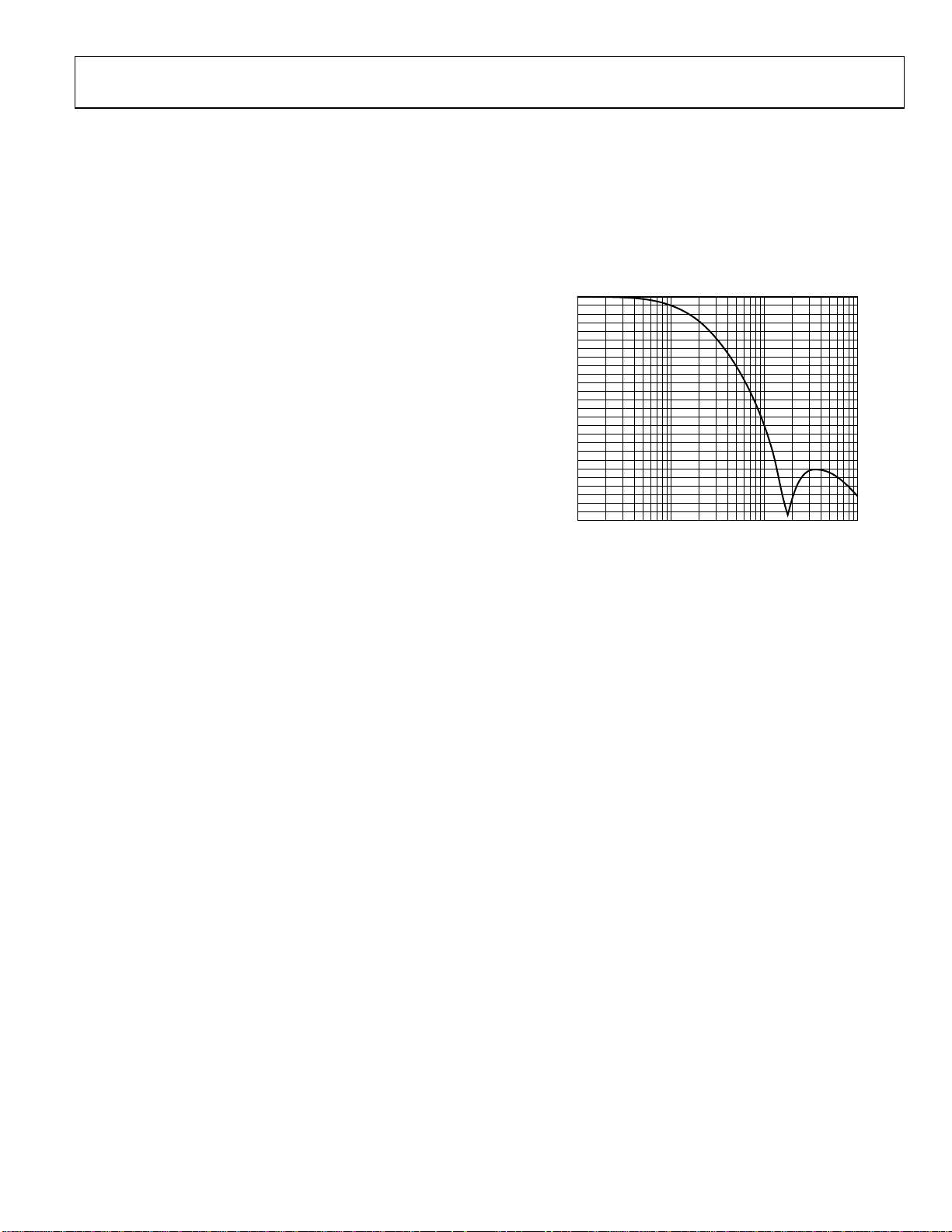
ANTIALIASING FILTERS
The ADV7188 has optional antialiasing filters on each of the
four input channels. The filters are designed for SD video with
approximately 6 MHz bandwidth.
A plot of the filter response is shown in
can be individually enabled via I
2
C under the control of
AA_FILT_EN[3:0].
AA_FILT_EN[0], Address 0xF3 [0]
0 (default)—The filter on channel 0 is disabled
1—The filter on channel 0 is enabled
AA_FILT_EN[1], Address 0xF3 [1]
0 (default)—The filter on channel 1 is disabled
1—The filter on channel 1 is enabled
Figure 8. The filters
Rev. 0 | Page 15 of 112
Static Switch Mode
The FB pin is not used. The timing is extracted from the CVBS
signal, and either the CVBS content or RGB content can be
output under the control of CVBS_RGB_SEL. This mode allows
the selection of a full-screen picture from either source. Overlay
is not possible in static switch mode.
Fixed Alpha Blending
The FB pin is not used. The timing is extracted from the CVBS
signal, and an alpha blended combination of the video from the
CVBS and RGB sources is output. This alpha blending is
applied to the full screen. The alpha blend factor is selected with
2
C signal MAN_ALPHA[6:0]. Overlay is not possible in
the I
fixed alpha blending mode.
Page 16
ADV7188
Dynamic Switching (Fast Mux)
Source selection is under the control of the fast blank (FB) pin.
This enables dynamic multiplexing between the CVBS and RGB
sources. With default settings, when Logic 1 is applied to the
FB pin, the RGB source is selected; when Logic 0 is applied to
the FB pin, the CVBS source is selected. This mode is suitable
for the overlay of subtitles, teletext, or other material. Typically,
the CVBS source carries the main picture and the RGB source
has the overlay data.
Dynamic Switching with Edge-Enhancement
This provides the same functionality as the dynamic switching
mode, but with ADI proprietary edge-enhancement algorithms
that improve the visual appearance of transitions for signals
from a wide variety of sources.
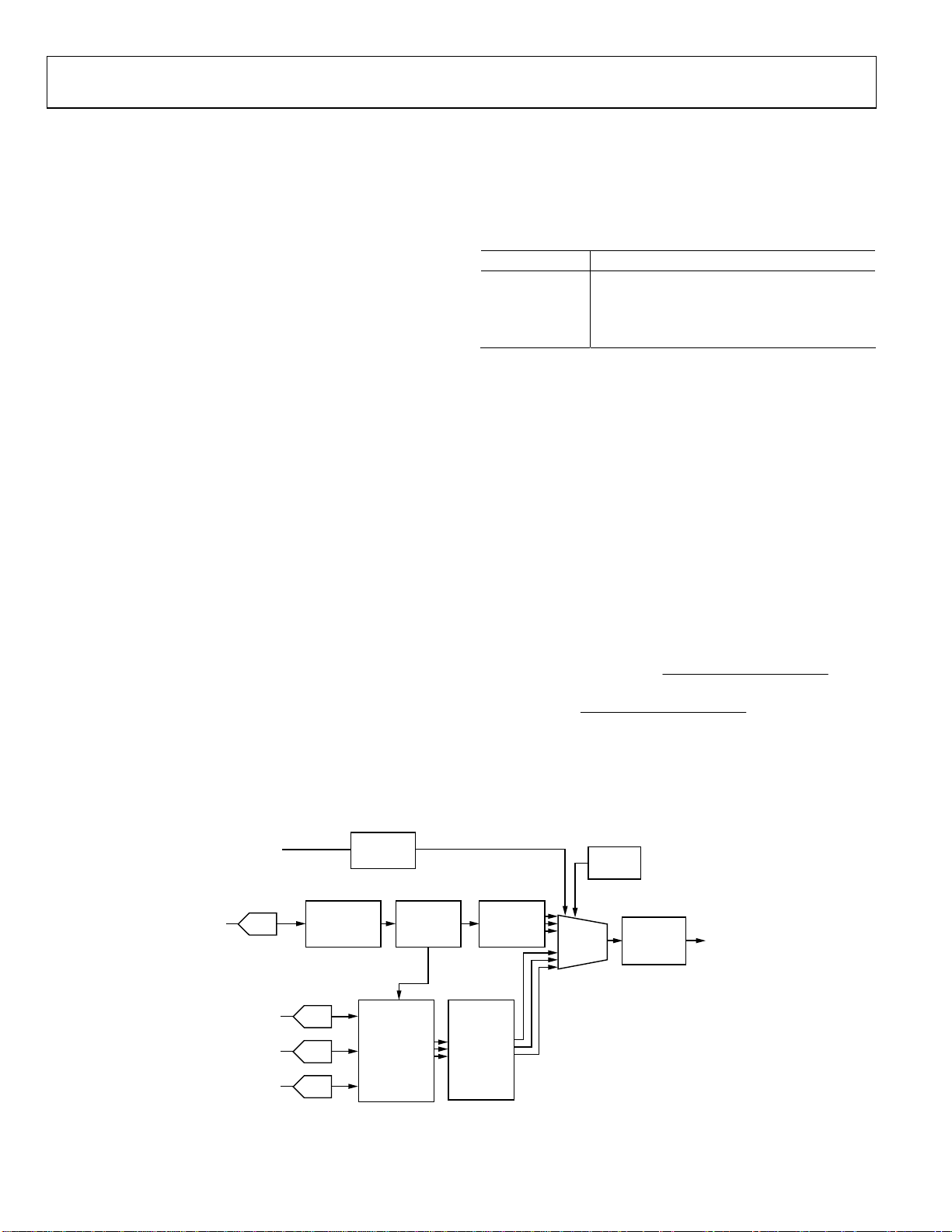
System Diagram
A block diagram of the ADV7188 fast blanking configuration is
shown in
The CVBS signal is processed by the ADV7188 and converted
to YPrPb. The RGB signals are processed by a color space
converter (CSC) and samples are converted to YPrPb. Both sets
of YPrPb signals are input to the sub-pixel blender, which can
be configured to operate in any of the four modes outlined
above.
The fast blank position resolver determines the time position
of the FB to a very high accuracy (<1 ns); this position information is then used by the sub-pixel blender in dynamic
switching modes. This enables the ADV7188 to implement high
performance multiplexing between the CVBS and RGB sources,
even when the RGB data source is completely asynchronous to
the sampling crystal reference.
An anti-aliasing filter is required on all four data channels (R,
G, B, and CVBS). The order of this filter is reduced as all of the
signals are sampled at 54 MHz.
Figure 9.
FAST BLANK
(FB PIN)
FAST BLANK
POSITION
RESOLVER
The switched or blended data is output from the ADV7188 in
the standard output formats (see
Table 98).
FAST BLANK CONTROL
FB_MODE[1:0], Address 0xED [1:0]
FB_MODE controls which of the fast blank modes is selected.
Table 12: FB_MODE[1:0] function
FB_MODE[1:0] Description
00 (default) Static Switch Mode.
01 Fixed Alpha Blending.
10 Dynamic Switching (Fast Mux).
11 Dynamic Switching with Edge Enhancement.
Static Mux Selection Control
CVBS_RGB_SEL, Address 0xED [2]
CVBS_RGB_SEL controls whether the video from the CVBS or
the RGB source is selected for output from the ADV7188.
0 (default)—Data from the CVBS source is selected for output.
1—Data from the RGB source is selected for output.
Alpha Blend Coefficient
MAN_ALPHA_VAL[6:0], Address 0xEE [6:0]
When FB_MODE[1:0] = 01 and fixed alpha blending is
selected, MAN_ALPHA_VAL[6:0] determines the proportion
in which the video from the CVBS source and the RGB source
are blended. Equation 1 shows how these bits affect the video
output.
VALALPHAMAN
64
]0:6[__
Video
RGB
⎛
−×=
VideoVideo
CVBSout
×+
1
⎜
⎝
VALALPHAMAN
64
The maximum valid value for MAN_ALPHA_VAL[6:0] is
1000000 such that the alpha blender coefficients remain
between 0 and 1. The default value for MAN_ALPHA_VAL[6:0]
is 0000000.
2
C
I
CONTROL
]0:6[__
⎞
⎟
⎠
(1)
CVBS
ADC0
CONDITIONING
CLAMPING AND
R
ADC1
G
ADC2
B
ADC3
SIGNAL
DECIMATION
TIMING
EXTRACTION
SIGNAL
CONDITIONING
CLAMPING AND
DECIMATION
Figure 9. Fast Blank Block Diagram
Rev. 0 | Page 16 of 112
VIDEO
PROCESSING
RGB
≥
YPrPb
CONVERSION
YPrPb
SUBPIXEL
BLENDER
OUTPUT
FORMATTER
05478-009
Page 17
ADV7188
T
Fast Blank Edge Shaping
FB_EDGE_SHAPE[2:0], Address 0xEF [2:0]
To improve the picture transition for high speed fast blank
switching, an edge shape mode is available on the ADV7188.
Depending on the format of the RGB inputs, it may be
advantageous to apply this scheme to different degrees. The
levels are selected via the FB_EDGE_SHAPE[2:0] bits. Users are
advised to try each of the settings and select the setting that is
most visually pleasing in their system.
Table 13. FB_EDGE_SHAPE[2:0] Function
FB_EDGE_SHAPE[2:0] Description
000 No Edge Shaping.
001 Level 1 Edge Shaping.
010 (default) Level 2 Edge Shaping.
011 Level 3 Edge Shaping.
100 Level 4 Edge Shaping.
101 to 111 Not Valid.
Contrast Reduction
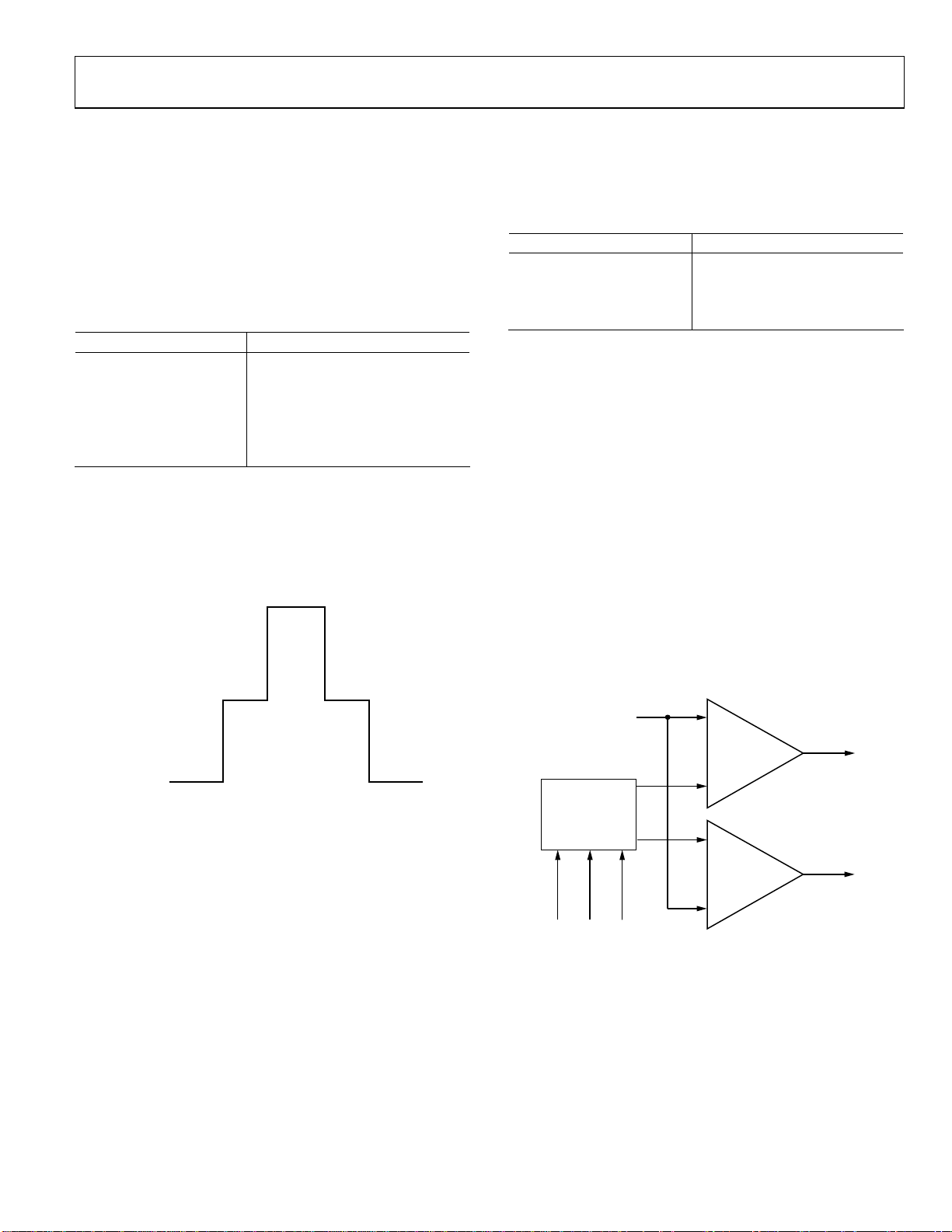
For overlay applications, text can be more readable if the
contrast of the video directly behind the text is reduced. To
enable the definition of a window of reduced contrast behind
inserted text, the signal applied to the FB pin can be interpreted
as a tri-level signal, as shown in
RGB SOURCE
100%
Figure 10.
Contrast Mode
CNTR_MODE[1:0], Address 0xF1 [3:2]
The contrast level in the selected contrast reduction box is
selected using the CNTR_MODE[1:0] bits.
Table 14. CNTR_MODE[1:0] Function
CNTR_MODE[1:0] Description
00 (default) 25%.
01 50%.
10 75%.
11 100%.
Fast Blank and Contrast Reduction Programmable
Thresholds
FB_LEVEL[1:0], Address 0xF1 [5:4]
Controls the reference level for the fast blank comparator.
CNTR_LEVEL[1:0], Address 0xF1 [7:6]
Controls the reference level for the contrast reduction
comparator.
The internal fast blank and contrast reduction signals are
resolved from the tri-level FB signal using two comparators, as
shown in
Figure 11. To facilitate compliance with different
input level standards, the reference level to these comparators is
programmable under the control of FB_LEVEL[1:0] and
CNTR_LEVEL[1:0]. The resulting thresholds are given in
Table 15.
CVBS SOURCE
50% CONTRAS
SANDCASTLE
CVBS SOURCE
100%
Figure 10. Fast Blank Signal Representation with
Contrast Reduction Enabled
05478-010
Contrast Reduction Enable
CNTR_ENABLE, Address 0xEF [3]
This register enables the contrast reduction feature and changes
the meaning of the signal applied to the FB pin.
0 (default)—The contrast reduction feature is disabled and the
fast blank signal is interpreted as a bi-level signal.
1—The contrast reduction feature is enabled and the fast blank
signal is interpreted as a tri-level signal.
FB PIN
PROGRAMMABLE
THRESHOLDS
CNTR ENABLE
CNTR_LEVEL<1:0>
FB_LEVEL<1:0>
Figure 11. Fast Blank and Contrast Reduction Programmable Threshold
+
FAST BLANK
COMPARATOR
–
–
CONTRAST
REDUCTION
COMPARATOR
+
FAST BLANK
C
05478-011
Rev. 0 | Page 17 of 112
Page 18

ADV7188
Table 15. Fast Blank and Contrast Reduction Programmable Threshold I2C Controls
CNTR_ENABLE FB_LEVEL[1:0] CNTR_LEVEL[1:0] Fast Blanking Threshold Contrast Reduction Threshold
0 00 (default) XX 1.4 V n/a
0 01 XX 1.6 V n/a
0 10 XX 1.8 V n/a
0 11 XX 2.0 V n/a
1 00 (default) 00 1.6 V 0.4 V
1 01 01 1.8 V 0.6 V
1 10 10 2.0 V 0.8 V
1 11 11 2.2 V 2.0 V
Table 16. FB_STATUS Functions
FB_STATUS [3:0] Bit Name Description
0 FB_STATUS.0
1 FB_STATUS.1
2 FB_STATUS.2
3 FB_STATUS.3
FB_rise. A high value indicates there has been a rising edge on FB since the last I
read. Value is cleared by current I
FB_fall. A high value indicates there has been a falling edge on FB since the last I2C
read. Value is cleared by current I
FB_stat. Value of FB input pin at time of read.
FB_high. A high value indicates there has been a rising edge on FB since the last I2C
read. Value is cleared by current I
FB_INV, Address 0xED [3] (write only)
The interpretation of the polarity of the signal applied to the FB
pin can be changed using FB_INV.
0 (default)—The fast blank pin is active high.
1—The fast blank pin is active low.
READBACK OF FB PIN STATUS
FB_STATUS[3:0], Address 0xED [7:4]
FB_STATUS[3:0] is a readback value that provides the system
information on the status of the FB pins as shown in
FB Timing
FB_SP_ADJUST[3:0], Address 0xEF [7:4]
The critical information extracted from the FB signal is the time
at which it switches relative to the input video. Due to small
timing inequalities either on the IC or on the PCB, it may be
necessary to adjust the result by fractions of one clock cycle.
This is controlled by FB_SP_ADJUST[3:0].
Each LSB of FB_SP_ADJUST[3:0] corresponds to 1/8 of an ADC
clock cycle. Increasing the value is equivalent to adding delay to
the FB signal. The reset value is chosen to give equalized channels
when the ADV7188 internal anti-aliasing filters are enabled and
there is no unintentional delay on the PCB.
The default value of FB_SP_ADJUST[3:0] is 0100.
Table 16.
2
C read – self-clearing bit.
2
C read – self-clearing bit.
2
C read – self-clearing bit.
Alignment of FB Signal
FB_DELAY[3:0], Address 0xF0 [3:0]
In the event of misalignment between the FB input signal and
the other input signals (CVBS, RGB) or unequalized delays in
their processing, it is possible to alter the delay of the FB signal
in 28.63636 MHz clock cycles. (For a finer granularity delay of
the FB signal, refer to
FB_SP_ADJUST[3:0], Address 0xEF [7:4]
above.)
The default value of FB_DELAY[3:0] is 0100.
Color Space Converter Manual Adjust
FB_CSC_MAN, Address 0xEE [7]
As shown in
Figure 9, the data from the CVBS source and the
RGB source are both converted to YPbPr before being combined.
For the RGB source, the color space converter (CSC) must be
used to perform this conversion. When SCART support is
enabled, the parameters for the CSC are automatically
configured correctly for this operation.
If the user wishes to use a different conversion matrix, this
autoconfiguration can be disabled and the CSC can be manually
programmed. For details on this manual configuration, please
contact ADI.
0 (default)—The CSC is configured automatically for the RGB
to YPrPb conversion.
1—The CSC can be configured manually (not recommended).
2
C
Rev. 0 | Page 18 of 112
Page 19

ADV7188
GLOBAL CONTROL REGISTERS
Register control bits listed in this section affect the whole chip.
POWER-SAVE MODES
Power-Down
PDBP, Address 0x0F [2]
The digital core of the ADV7188 can be shut down by using a
pin (
PWRDN
controls which of the two has the higher priority. The default is
to give the pin (
the ADV7188 powered down by default.
) and the PWRDN bit. The PDBP register
PWRDN
) priority. This allows the user to have
PWRDN_ADC_3, Address 0x3A [0]
0 (default)—The ADC is in normal operation.
1—ADC3 is powered down.
FB_PWRDN, Address 0x0F [1]
To achieve very low power-down current, it is necessary to
prevent activity on toggling input pins from reaching circuitry
that could consume current. FB_PWRDN gates signals from the
FB input pin.
0 (default)—The digital core power is controlled by the
PWRDN
pin (the bit is disregarded).
1—The bit has priority (the pin is disregarded).
PWRDN, Address 0x0F [5]
Setting the PWRDN bit switches the ADV7188 into a chip-wide
power-down mode. The power-down stops the clock from
entering the digital section of the chip, thereby freezing its
2
operation. No I
C bits are lost during power-down. The
PWRDN bit also affects the analog blocks and switches them
into low current modes. The I
2
C interface itself is unaffected,
and remains operational in power-down mode.
The ADV7188 leaves the power-down state if the PWRDN bit is
set to 0 (via I
2
C), or if the overall part is reset using the
RESET
pin. Note that PDBP must be set to 1 for the PWRDN bit to
power down the ADV7188.
0 (default)—The chip is operational.
1—The ADV7188 is in chip-wide power-down.
ADC Power-Down Control
The ADV7188 contains four 12-bit ADCs (ADC 0, ADC 1,
ADC 2 and ADC 3). If required, it is possible to power down
each ADC individually.
• In CVBS mode, ADC1 and ADC2 should be powered
down to save on power consumption.
• In S-Video mode, ADC2 should be powered down to save
on power consumption.
PWRDN_ADC_0, Address 0x3A [3]
0 (default)—The ADC is in normal operation.
1—ADC0 is powered down.
PWRDN_ADC_1, Address 0x3A [2]
0 (default)—The ADC is in normal operation.
1—ADC1 is powered down.
PWRDN_ADC_2, Address 0x3A [1]
0 (default)—The ADC is in normal operation.
1—ADC2 is powered down.
0 (default)—The FB input is in normal operation.
1—The FB input is in power-save mode.
RESET CONTROL
RES Chip Reset, Address 0x0F [7]
Setting this bit, equivalent to controlling the
ADV7188, issues a full chip reset. All I
2
C registers are reset to
RESET
pin on the
their default values, making these bits self-clearing. Some
register bits do not have a reset value specified. They keep their
last written value. Those bits are marked as having a reset value
of x in the register tables. After the reset sequence, the part
immediately starts to acquire the incoming video signal.
Executing a software reset takes approximately 2 ms. However,
it is recommended to wait 5 ms before performing any more I
2
writes.
2
C master controller receives a no acknowledge condition
The I
on the ninth clock cycle when chip reset is implemented. See
MPU Port Description section for a full description.
the
0 (default)—Operation is normal.
1—The reset sequence starts.
GLOBAL PIN CONTROL
Three-State Output Drivers
TOD, Address 0x03 [6]
This bit allows the user to three-state the output drivers of the
ADV7188. Upon setting the TOD bit, the P19 to P0, HS, VS,
FIELD, and SFL pins are three-stated. The ADV7188 also
supports three-stating via a dedicated pin,
drivers are three-stated if the TOD bit or the
The timing pins (HS/VS/FIELD) can be forced active via the
TIM_OE bit. For more information on three-state control, refer
to the
Three-State LLC Drivers and the Timing Signals Output
Enable sections. Individual drive strength controls are provided
by the DR_STR_XX bits.
0 (default)—The output drivers are enabled.
1—The output drivers are three-stated.
. The output
OE
pin is set high.
OE
C
Rev. 0 | Page 19 of 112
Page 20

ADV7188
Three-State LLC Drivers
TRI_LLC, Address 0x1D [7]
This bit allows the output drivers for the LLC1 and LLC2 pins
of the ADV7188 to be three-stated. For more information on
three-state control, refer to the
the
Timing Signals Output Enable sections. Individual drive
strength controls are provided via the DR_STR_XX bits.
0 (default)—The LLC pin drivers work according to the
DR_STR_C[1:0] setting (pin enabled).
1—The LLC pin drivers are three-stated.
Timing Signals Output Enable
TIM_OE, Address 0x04 [3]
The TIM_OE bit should be regarded as an addition to the TOD
bit. Setting it high forces the output drivers for HS, VS, and
FIELD into the active (that is, driving) state even if the TOD bit
is set. If set to low, the HS, VS, and FIELD pins are three-stated
dependent on the TOD bit. This functionality is useful if the
decoder is to be used as a timing generator only. This may be
the case if only the timing signals are to be extracted from an
incoming signal, or if the part is in free-run mode where, for
example, a separate chip can output a company logo. For more
information on three-state control, refer to the
Output Drivers and the
Individual drive strength controls are provided via the
DR_STR_XX bits.
0 (default)—HS, VS, and FIELD are three-stated according to
the TOD bit.
1—HS, VS, and FIELD are forced active all the time.
Drive Strength Selection (Data)
DR_STR[1:0], Address 0xF4 [5:4]
For EMC and crosstalk reasons, it may be desirable to
strengthen or weaken the drive strength of the output drivers.
The DR_STR[1:0] bits affect the P[19:0] output drivers.
For more information on three-state control, refer to the
Strength Selection (Clock) and the
(Sync) sections.
Table 17. DR_STR_C Function
DR_STR_C[1:0] Description
01 (default) Medium low drive strength (2×).
10 Medium high drive strength (3×).
11 High drive strength (4×).
Three-State Output Drivers and
Three-State
Three-State LLC Drivers sections.
Drive
Drive Strength Selection
Drive Strength Selection (Clock)
DR_STR_C[1:0] Address 0xF4 [3:2]
The DR_STR_C[1:0] bits can be used to select the strength of
the clock signal output driver (LLC pin). For more information,
refer to the
Strength Selection (Data) sections.
Table 18. DR_STR_C Function
DR_STR_C[1:0] Description
01 (default) Medium low drive strength (2×).
10 Medium high drive strength (3×).
11 High drive strength (4×).
Drive Strength Selection (Sync) and the Drive
Drive Strength Selection (Sync)
DR_STR_S[1:0], Address 0xF4 [1:0]
The DR_STR_S[1:0] bits allow the user to select the strength of
the synchronization signals with which HS, VS, and F are driven.
For more information, refer to the
(Clock) and the
Table 19. DR_STR_S Function
DR_STR_S[1:0] Description
01 (default) Medium low drive strength (2×).
10 Medium high drive strength (3×).
11 High drive strength (4×).
Drive Strength Selection (Data) sections.
Drive Strength Selection
Enable Subcarrier Frequency Lock Pin
EN_SFL_PIN, Address 0x04 [1]
The EN_SFL_PIN bit enables the output of subcarrier lock
information (also known as GenLock) from the ADV7188 core
to an encoder in a decoder-encoder back-to-back arrangement.
0 (default)—The subcarrier frequency lock output is disabled.
1—The subcarrier frequency lock information is presented on
the SFL pin.
Polarity LLC Pin
PCLK, Address 0x37 [0]
The polarity of the clock that leaves the ADV7188 via the LLC1
and LLC2 pins can be inverted using the PCLK bit. Changing
the polarity of the LLC clock output may be necessary to meet
the setup-and-hold time expectations of follow-on chips. This
bit also inverts the polarity of the LLC2 clock.
0—The LLC output polarity is inverted.
1 (default)—The LLC output polarity is normal (as per the
timing diagrams).
Rev. 0 | Page 20 of 112
Page 21

ADV7188
GLOBAL STATUS REGISTERS
Three registers provide summary information about the video
decoder. The STATUS_1, STATUS_2, and STATUS_3 registers
contain status bits that report operational information to the user.
STATUS_1[7:0] Address 0x10 [7:0]
This read only register provides information about the internal
status of the ADV7188. See
0x51 [2:0] and
COL[2:0] Count Out of Lock, Address 0x51 [5:3]
CIL[2:0] Count Into Lock, Address
for information on the timing.
Depending on the setting of the FSCLE bit, the STATUS_1[0]
and STATUS_1[1] bits are based solely on horizontal timing
information or on the horizontal timing and lock status of the
color subcarrier. See the
FSCLE Fsc Lock Enable, Address 0x51
[7] section.
STATUS_2[7:0], Address 0x12 [7:0]
See
Table 22.
Table 21. STATUS_1 Function
STATUS 1 [7:0] Bit Name Description
0 IN_LOCK In lock (right now).
1 LOST_LOCK Lost lock (since last read of this register).
2 FSC_LOCK Fsc locked (right now).
3 FOLLOW_PW AGC follows peak white algorithm.
4 AD_RESULT.0 Result of autodetection.
5 AD_RESULT.1 Result of autodetection.
6 AD_RESULT.2 Result of autodetection.
7 COL_KILL Color kill active.
STATUS_3[7:0], Address 0x13 [7:0]
Table 23.
See
AD_RESULT[2:0] Autodetection Result Address 0x10 [6:4]
These bits report back on the findings from the autodetection
block. For more information on enabling the autodetection
block, see the
configuring it, see the
General Setup section. For information on
Autodetection of SD Modes section.
Table 20. AD_RESULT Function
AD_RESULT[2:0] Description
000 NTSM-MJ
001 NTSC-443
010 PAL-M
011 PAL-60
100 PAL-BGHID
101 SECAM
110 PAL-Combination N
111 SECAM 525
Table 22. STATUS_2 Function
STATUS 2 [7:0] Bit Name Description
0 MVCS DET Detected Macrovision color striping.
1 MVCS T3 Macrovision color striping protection. Conforms to Type 3 if high, and to Type 2 if low.
2 MV_PS DET Detected Macrovision pseudo Sync pulses.
3 MV_AGC DET Detected Macrovision AGC pulses.
4 LL_NSTD Line length is nonstandard.
5 FSC_NSTD Fsc frequency is nonstandard.
6 Reserved
7 Reserved
Table 23. STATUS_3 Function
STATUS 3 [7:0] Bit Name Description
0 INST_HLOCK Horizontal lock indicator (instantaneous).
1 GEMD Gemstar detect.
2 SD_OP_50HZ Flags whether 50 Hz or 60 Hz is present at output.
3 CVBS Indicates if a CVBS signal is detected in ‘YC/CVBS autodetection’ configuration
4 FREE_RUN_ACT
5 STD_FLD_LEN Field length is correct for currently selected video standard.
6 INTERLACED Interlaced video detected (field sequence found).
7 PAL_SW_LOCK Reliable sequence of swinging bursts detected.
Indicates if the ADV7188 is in free run mode. Outputs a blue screen by default. See the
DEF_VAL_AUTO_EN Default Value Automatic Enable, Address 0x0C [1] bit for details about
disabling this function.
Rev. 0 | Page 21 of 112
Page 22
ADV7188
STANDARD DEFINITION PROCESSOR (SDP)
STANDARD DEFINITION PROCESSOR
DIGITIZED CVBS
DIGITIZED Y (YC)
DIGITIZED CVBS
DIGITIZED C (YC)
MACROVISION
DETECTION
LUMA
DIGITAL
FINE
CLAMP
CHROMA
DIGITAL
FINE
CLAMP
RECOVERY
CHROMA
DEMOD
F
SC
RECOVERY
VBI DATA
FILTER
EXTRACT
CHROMA
FILTER
AUTODETECTION
LUMA
SYNC
STANDARD
Figure 12. Block Diagram of the Standard Definition Processor
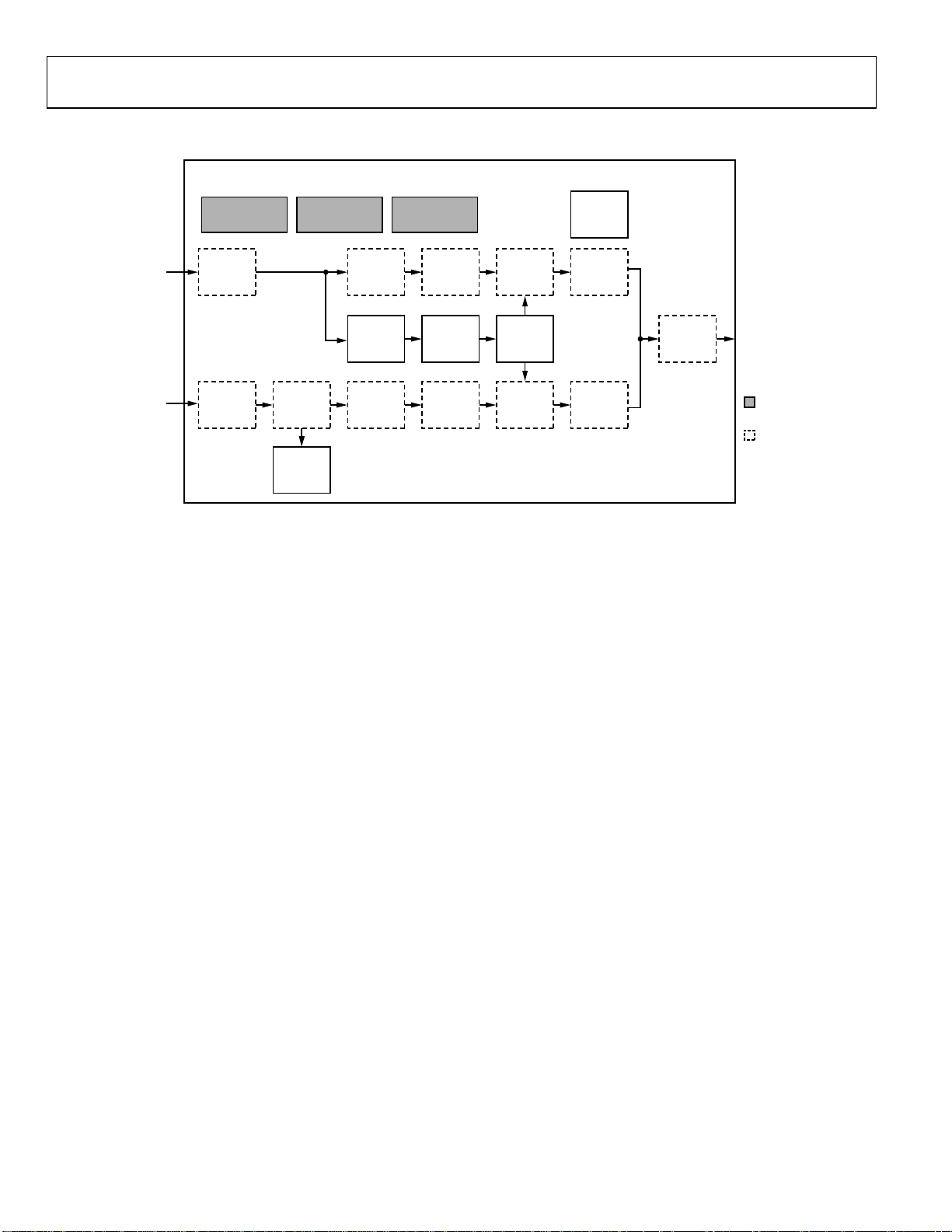
A block diagram of the ADV7188’s standard definition
processor (SDP) is shown in
Figure 12.
The SDP block can handle standard definition video in CVBS,
YC, and YPrPb formats. It can be divided into a luminance and
a chrominance path. If the input video is of a composite type
(CVBS), both processing paths are fed with the CVBS input.
SD LUMA PATH
The input signal is processed by the following blocks:
Digital Fine Clamp. This block uses a high precision algorithm
to clamp the video signal.
Luma Filter Block. This block contains a luma decimation filter
(YAA) with a fixed response, and some shaping filters (YSH)
that have selectable responses.
Luma Gain Control. The automatic gain control (AGC) can
operate on a variety of different modes, including gain based on
the depth of the horizontal sync pulse, peak white mode, and
fixed manual gain.
Luma Resample. To correct for line-length errors and dynamic
line-length changes, the data is digitally resampled.
Luma 2D Comb. The two-dimensional comb filter provides YC
separation.
AV Code Insertion. At this point, the decoded luma (Y) signal
is merged with the retrieved chroma values. AV codes (as per
ITU-R. BT-656) can be inserted.
GAIN
CONTROL
LINE
LENGTH
PREDICTOR
GAIN
CONTROL
SLLC
CONTROL
LUMA
RESAMPLE
RESAMPLE
CONTROL
CHROMA
RESAMPLE
LUMA
2D COMB
CHROMA
2D COMB
AV
CODE
INSERTION
VIDEO DATA
OUTPUT
MEASUREMENT
BLOCK (= >1
VIDEO DATA
PROCESSING
BLOCK
2
C)
05478-012
SD CHROMA PATH
The input signal is processed by the following blocks:
Digital Fine Clamp. This block uses a high precision algorithm
to clamp the video signal.
Chroma Demodulation. This block uses a color subcarrier (Fsc)
recovery unit to regenerate the color subcarrier for any
modulated chroma scheme. The demodulation block then
performs an AM demodulation for PAL and NTSC and an FM
demodulation for SECAM.
Chroma Filter Block. This block contains a chroma decimation
filter (CAA) with a fixed response, and some shaping filters
(CSH) that have selectable responses.
Gain Control. Automatic gain control (AGC) can operate on
several different modes, including gain based on the color
subcarrier’s amplitude, gain based on the depth of the
horizontal sync pulse on the luma channel, or fixed manual
gain.
Chroma Resample. The chroma data is digitally resampled to
keep it perfectly aligned with the luma data. The resampling is
done to correct for static and dynamic line-length errors of the
incoming video signal.
Chroma 2D Comb. The two-dimensional, 5-line, superadaptive
comb filter provides high quality YC separation in case the
input signal is CVBS.
AV Code Insertion. At this point, the demodulated chroma (Cr
and Cb) signal is merged with the retrieved luma values. AV
codes (as per ITU-R. BT-656) can be inserted.
Rev. 0 | Page 22 of 112
Page 23

ADV7188
SYNC PROCESSING
The ADV7188 extracts syncs embedded in the video data
stream. There is currently no support for external HS/VS
inputs. The sync extraction has been optimized to support
imperfect video sources such as videocassette recorders with
head switches. The actual algorithm used employs a coarse
detection based on a threshold crossing, followed by a more
detailed detection using an adaptive interpolation algorithm.
The raw sync information is sent to a line-length measurement
and prediction block. The output of this block is then used to
drive the digital resampling section to ensure that the ADV7188
outputs 720 active pixels per line.
The sync processing on the ADV7188 also includes the following
specialized postprocessing blocks that filter and condition the raw
sync information retrieved from the digitized analog video.
• VSYNC Processor. This block provides extra filtering of the
detected VSYNCs to give improved vertical lock.
• HSYNC Processor. The HSYNC processor is designed to
filter incoming HSYNCs that have been corrupted by
noise, providing much improved performance for video
signals with stable time base but poor SNR.
VBI DATA RECOVERY
The ADV7188 can retrieve the following information from the
input video:
• Wide-screen signaling (WSS)
• Copy generation management system (CGMS)
• Closed caption (CC)
• Macrovision protection presence
• Gemstar-compatible data slicing
• Te l et e x t
The ADV7188 is also capable of automatically detecting the
incoming video standard with respect to
• Color subcarrier frequency
• Field rate
• Line rate
The ADV7188 can configure itself to support PAL(B/G/H/I/D/M/N), PAL-combination N, NTSC-M, NTSC-J,
SECAM 50 Hz/60 Hz, NTSC-4.43, and PAL-60.
GENERAL SETUP
Video Standard Selection
The VID_SEL[3:0] register allows the user to force the digital
core into a specific video standard. Under normal circumstances,
this should not be necessary. The VID_SEL[3:0] bits default to
an autodetection mode that supports PAL, NTSC, SECAM, and
variants thereof. The following section describes the autodetection system.
Autodetection of SD Modes
In order to guide the autodetect system, individual enable bits
are provided for each of the supported video standards. Setting
the relevant bit to 0 inhibits the standard from being automatically
detected. Instead, the system picks the closest of the remaining
enabled standards. The results of the autodetection can be read
back via the status registers. See the
section for more information.
VID_SEL[3:0] Address 0x00 [7:4]
Table 24. VID_SEL Function
VID_SEL[3:0] Description
0000 (default)
0001
0010
0011
0100 NTSC-J (1)
0101 NTSC-M (1)
0110 PAL-60
0111 NTSC-4.43 (1)
1000 PAL-BGHID.
1001 PAL-N (= PAL BGHID (with pedestal))
1010 PAL-M (without pedestal)
1011 PAL-M
1100 PAL-combination N
1101 PAL-combination N (with pedestal)
1110 SECAM
1111 SECAM (with pedestal)
Autodetect (PAL-BGHID) <–> NTSC-J
(without pedestal), SECAM
Autodetect (PAL-BGHID) <–> NTSC-M
(with pedestal), SECAM
Autodetect (PAL N) (pedestal) <–> NTSC-J
(no pedestal), SECAM
Autodetect (PAL N) (with pedestal) <–> NTSC-M
(with pedestal), SECAM
AD_SEC525_EN Enable Autodetection of SECAM 525
Line Video, Address 0x07 [7]
0 (default)—Disables the autodetection of a 525-line system
with a SECAM style, FM-modulated color component.
1—Enables autodetection.
AD_SECAM_EN Enable Autodetection of SECAM,
Address 0x07 [6]
0—Disables the autodetection of SECAM.
1 (default)—Enables autodetection.
Global Status Registers
Rev. 0 | Page 23 of 112
Page 24

ADV7188
AD_N443_EN Enable Autodetection of NTSC 443,
Address 0x07 [5]
0—Disables the autodetection of NTSC style systems with a
4.43 MHz color subcarrier.
1 (default)—Enables autodetection.
AD_P60_EN Enable Autodetection of PAL-60,
Address 0x07 [4]
0—Disables the autodetection of PAL systems with a 60 Hz
field rate.
1 (default)—Enables autodetection.
Second, there was a design change in Analog Devices encoders
from ADV717x to ADV719x. The older versions used the SFL
(GenLock Telegram) bit directly, while the later ones invert the
bit prior to using it. The reason for this is that the inversion
compensated for the 1-line delay of an SFL (GenLock Telegram)
transmission.
As a result, ADV717x encoders need the PAL switch bit in the
SFL (GenLock Telegram) to be 1 for NTSC to work. Also, the
ADV7190/ADV7191/ADV7194 encoders need the PAL switch
bit in the SFL to be 0 to work in NTSC. If the state of the PAL
switch bit is wrong, a 180°phase shift occurs.
AD_PALN_EN Enable Autodetection of PAL-N,
Address 0x07 [3]
0—Disables the autodetection of the PAL -N standard.
1 (default)—Enables autodetection.
AD_PALM_EN Enable Autodetection of PAL-M,
Address 0x07 [2]
0—Disables the autodetection of PAL-M.
1 (default)—Enables autodetection.
AD_NTSC_EN Enable Autodetection of NTSC,
Address 0x07 [1]
0—Disables the autodetection of standard NTSC.
1 (default)—Enables autodetection.
AD_PAL_EN Enable Autodetection of PAL,
Address 0x07 [0]
0—Disables the autodetection of standard PAL.
1 (default)—Enables autodetection.
Subcarrier Frequency Lock Inversion
The SFL_INV bit controls the behavior of the PAL switch bit in
the SFL (GenLock Telegram) data stream. It was implemented
to solve some compatibility issues with video encoders. It solves
two problems.
First, the PAL switch bit is only meaningful in PAL. Some
encoders (including Analog Devices encoders) also look at the
state of this bit in NTSC.
SELECT THE RAW LOCK SIGNAL
SRLS
TIME_WIN
FREE_RUN
LOCK
F
SC
1
0
0
COUNTER OUT OF LOCK
1
In a decoder/encoder back-to-back system in which SFL is used,
this bit must be set up properly for the specific encoder used.
SFL_INV Address 0x41 [6]
0 (default)—Makes the part SFL-compatible with ADV7190/
ADV7191/ADV7194 and ADV73xx encoders.
1—Makes the part SFL-compatible with ADV717x encoders.
Lock-Related Controls
Lock information is presented to the user through Bits [1:0] of
the Status 1 register. See the
section.
available to influence the way the lock status information is
generated.
SRLS Select Raw Lock Signal, Address 0x51 [6]
Using the SRLS bit, the user can choose between two sources for
determining the lock status (per Bits [1:0] in the Status 1
register).
The time_win signal is based on a line-to-line evaluation of the
horizontal synchronization pulse of the incoming video. It reacts
quite quickly.
The free_run signal evaluates the properties of the incoming
video over several fields, and takes vertical synchronization
information into account.
0 (default)—Selects the free_run signal.
1—Selects the time_win signal.
FILTER THE RAW LOCK SIGNAL
CIL[2:0], COL[2:0]
COUNTER INTO LOCK
STATUS_1[7:0] Address 0x10 [7:0]
Figure 13 outlines the signal flow and the controls
STATUS 1 [0]
MEMORY
STATUS 1 [1]
TAKE F
LOCK INTO ACCOUNT
SC
FSCLE
Figure 13. Lock-Related Signal Path
Rev. 0 | Page 24 of 112
05478-013
Page 25

ADV7188
FSCLE Fsc Lock Enable, Address 0x51 [7]
The FSCLE bit allows the user to choose whether the status of the
color subcarrier loop is taken into account when the overall lock
status is determined and presented via Bits [1:0] in STATUS_1.
This bit must be set to 0 when operating in YPrPb component
mode to generate a reliable HLOCK status bit.
0 (default)—Makes the overall lock status dependent on the
horizontal sync lock.
1—Makes the overall lock status dependent on the horizontal
sync lock and Fsc lock.
VS_Coast[1:0], Address 0xF9 [3:2]
These bits are used to set VS free-run (coast) frequency.
Table 25. VS_COAST[1:0] function
VS_COAST [1:0] Description
00 (default)
01 Forces 50 Hz coast Mode
10 Forces 60 Hz coast Mode
11 Reserved
Auto coast Mode – follows VS
frequency from last video input
Table 27. COL Function
COL[2:0] Description
000 1
001 2
010 5
011 10
100 (default) 100
101 500
110 1000
111 100000
ST_NOISE_VLD, HS Tip Noise Measurement Valid, Address
0xDE [3] (read only)
0—The ST_NOISE[10:0] measurement is not valid
1 (default)—The ST_NOISE[10:0] measurement is valid.
ST_NOISE[10:0] HS Tip Noise Measurement, Address 0xDE
[2:0], 0xDF [7:0]
The ST_NOISE[10:0] measures, over four fields, a readback
value of the average of the noise in the HSYNC tip.
ST_NOISE_VLD must be 1 for this measurement to be valid.
CIL[2:0] Count Into Lock, Address 0x51 [2:0]
CIL[2:0] determines the number of consecutive lines for which
the into-lock condition must be true before the system switches
into the locked state, and reports this via STATUS_1[1:0]. It
counts the value in lines of video.
Table 26. CIL Function
CIL[2:0] Description
000 1
001 2
010 5
011 10
100 (default) 100
101 500
110 1000
111 100000
COL[2:0] Count Out of Lock, Address 0x51 [5:3]
COL[2:0] determines the number of consecutive lines for which
the out-of-lock condition must be true before the system switches
into unlocked state, and reports this via STATUS_0[1:0]. It
counts the value in lines of video.
1 bit of ST_NOISE[10:0] = 1 ADC code.
1 bit of ST_NOISE[10:0] = 1.6 V/4096 = 390.625 μV.
COLOR CONTROLS
These registers allow the user to control the picture appearance,
including control of the active data in the event of video being
lost. These controls are independent of any other controls. For
instance, brightness control is independent of picture clamping,
although both controls affect the signal’s dc level.
CON[7:0] Contrast Adjust, Address 0x08 [7:0]
This register allows the user to adjust the contrast of the picture.
Table 28. CON Function
CON[7:0] Description
0x80 (default) Gain on luma channel = 1
0x00 Gain on luma channel = 0
0xFF Gain on luma channel = 2
SD_SAT_Cb[7:0] SD Saturation Cb Channel, Address 0xE3 [7:0]
This register allows the user to control the gain of the Cb channel
only. The user can adjust the saturation of the picture.
Table 29. SD_SAT_Cb Function
SD_SAT_Cb[7:0] Description
0x80 (default) Gain on Cb channel = 1
0x00 Gain on Cb channel = 0
0xFF Gain on Cb channel = 2
Rev. 0 | Page 25 of 112
Page 26

ADV7188
SD_SAT_Cr[7:0] SD Saturation Cr Channel, Address 0xE4 [7:0]
This register allows the user to control the gain of the Cr
channel only. The user can adjust the saturation of the picture.
Table 30. SD_SAT_Cr Function
SD_SAT_Cr[7:0] Description
0x80 (default) Gain on Cr channel = 1
0x00 Gain on Cr channel = 0
0xFF Gain on Cr channel = 2
SD_OFF_Cb[7:0] SD Offset Cb Channel, Address 0xE1 [7:0]
This register allows the user to select an offset for data on the
Cb channel only and adjust the hue of the picture. There is a
functional overlap with the HUE[7:0] register.
Table 31. SD_OFF_Cb Function
SD_OFF_Cb[7:0] Description
0x80 (default) 0 offset applied to the Cb channel.
0x00 −568 mV offset applied to the Cb channel.
0xFF +568 mV offset applied to the Cb channel.
SD_OFF_Cr [7:0] SD Offset Cr Channel, Address 0xE2 [7:0]
This register allows the user to select an offset for data on the Cr
channel only and adjust the hue of the picture. There is a functional overlap with the HUE[7:0] register.
Table 32. SD_OFF_Cr Function
SD_OFF_Cr[7:0] Description
0x80 (default) 0 offset applied to the Cr channel.
0x00 −568 mV offset applied to the Cr channel.
0xFF +568 mV offset applied to the Cr channel.
BRI[7:0] Brightness Adjust, Address 0x0A [7:0]
This register controls the brightness of the video signal. It
allows the user to adjust the brightness of the picture.
Table 33. BRI Function
BRI[7:0] Description
0x00 (default) Offset of the luma channel = 0mV
0x7F Offset of the luma channel = +204mV
0x80 Offset of the luma channel = −204mV
HUE[7:0] Hue Adjust, Address 0x0B [7:0]
This register contains the value for the color hue adjustment. It
allows the user to adjust the hue of the picture.
HUE[7:0] has a range of ±90°, with 0x00 equivalent to an
adjustment of 0°. The resolution of HUE[7:0] is 1 bit = 0.7°.
Table 34. HUE Function
HUE[7:0] Description
0x00 (default) Phase of the chroma signal = 0°.
0x7F Phase of the chroma signal = +90°.
0x80 Phase of the chroma signal = −90°.
DEF_Y[5:0] Default Value Y, Address 0x0C [7:2]
If the ADV7188 loses lock on the incoming video signal or if
there is no input signal, the DEF_Y[5:0] bits allow the user to
specify a default luma value to be output. The register is used
under the following conditions:
• If DEF_VAL_AUTO_EN bit is set to high and the
ADV7188 loses lock to the input video signal. This is the
intended mode of operation (automatic mode).
• The DEF_VAL_EN bit is set, regardless of the lock status of
the video decoder. This is a forced mode that may be useful
during configuration.
The DEF_Y[5:0] values define the 6 MSBs of the output video.
The remaining LSBs are padded with 0s. For example, in 10-bit
mode, the output is Y[9:0] = {DEF_Y[5:0], 0, 0, 0, 0}.
The value for Y is set by the DEF_Y[5:0] bits. A value of 0x0D
produces a blue color in conjunction with the DEF_C[7:0]
default setting.
Register 0x0C has a default value of 0x36.
DEF_C[7:0] Default Value C, Address 0x0D [7:0]
The DEF_C[7:0] register complements the DEF_Y[5:0] value.
It defines the 4 MSBs of Cr and Cb values to be output if
• The DEF_VAL_AUTO_EN bit is set to high and the
ADV7188 can’t lock to the input video (automatic mode).
• DEF_VAL_EN bit is set to high (forced output).
The data that is finally output from the ADV7188 for the
chroma side is Cr[7:0] = {DEF_C[7:4], 0, 0, 0, 0}, Cb[7:0] =
{DEF_C[3:0], 0, 0, 0, 0}.
In full 10-bit output mode, two extra LSBs of value 00 are
appended.
The values for Cr and Cb are set by the DEF_C[7:0] bits. A
value of 0x7C produces a blue color in conjunction with the
DEF_Y[5:0] default setting.
The hue adjustment value is fed into the AM color demodulation
block. Therefore, it only applies to video signals that contain
chroma information in the form of an AM modulated carrier
(CVBS or Y/C in PAL or NTSC). It does not affect SECAM and
does not work on component video inputs (YPrPb).
Rev. 0 | Page 26 of 112
Page 27

ADV7188
DEF_VAL_EN Default Value Enable, Address 0x0C [0]
This bit forces the use of the default values for Y, Cr, and Cb.
Refer to the descriptions for DEF_Y and DEF_C for additional
information. In this mode, the decoder also outputs a stable
27 MHz clock, HS, and VS.
0 (default)—Outputs a colored screen determined by userprogrammable Y, Cr, and Cb values when the decoder freeruns. Free-run mode is turned on and off by the
DEF_VAL_AUTO_EN bit.
1—Forces a colored screen output determined by userprogrammable Y, Cr, and Cb values. This overrides picture
data even if the decoder is locked.
DEF_VAL_AUTO_EN Default Value Automatic Enable,
Address 0x0C [1]
This bit enables the automatic use of the default values for Y, Cr,
and Cb when the ADV7188 cannot lock to the video signal.
0—Disables free-run mode. If the decoder is unlocked, it
outputs noise.
1 (default)—Enables free-run mode. A colored screen set by the
user-programmable Y, Cr, and Cb values is displayed when the
decoder loses lock.
CLAMP OPERATION
The input video is ac-coupled into the ADV7188 through a
0.1 μF capacitor. It is recommended that the range of the input
video signal is 0.5 V to 1.6 V (typically 1 V
exceeds this range, it cannot be processed correctly in the
decoder. Since the input signal is ac-coupled into the decoder,
its dc value needs to be restored. This process is referred to as
clamping the video. This section explains the general process of
clamping on the ADV7188 and shows the different ways in
which a user can configure its behavior.
The ADV7188 uses a combination of current sources and a
digital processing block for clamping, as shown in
The analog processing channel shown is replicated three times
inside the IC. While only one single-channel (and only one
ADC) is needed for a CVBS signal, two independent channels
are needed for YC (S-VHS) type signals, and three independent
channels are needed to allow component signals (YPrPb) to be
processed.
The clamping can be divided into two sections
• Clamping before the ADC (analog domain): current
sources.
p-p). If the signal
Figure 14.
The ADCs can digitize an input signal only if it resides within
their 1.6 V input voltage range. An input signal with a dc level
that is too large or too small is clipped at the top or bottom of
the ADC range.
The primary task of the analog clamping circuits is to ensure
that the video signal stays within the valid ADC input window
so that the analog-to-digital conversion can take place. It is not
necessary to clamp the input signal with a very high accuracy in
the analog domain as long as the video signal fits the ADC range.
After digitization, the digital fine clamp block corrects for any
remaining variations in dc level. Since the dc level of an input
video signal refers directly to the brightness of the picture
transmitted, it is important to perform a fine clamp with high
accuracy; otherwise, brightness variations may occur. Furthermore, dynamic changes in the dc level almost certainly lead to
visually objectionable artifacts, and must therefore be prohibited.
The clamping scheme must be able to acquire a newly
connected video signal with a completely unknown dc level,
and it must maintain the dc level during normal operation.
To quickly acquire an unknown video signal, the large current
clamps may be activated. It is assumed that the amplitude of the
video signal at this point is of a nominal value. Control of the
coarse and fine current clamp parameters is automatically
performed by the decoder.
Standard definition video signals may have excessive noise on
them. In particular, CVBS signals transmitted by terrestrial
broadcast and demodulated using a tuner usually show very
large levels of noise (>100 mV). A voltage clamp would be
unsuitable for this type of video signal. Instead, the ADV7188
uses a set of four current sources that can cause coarse
(>0.5 mA) and fine (<0.1 mA) currents to flow into and away
from the high impedance node that carries the video signal (see
Figure 14).
The following sections describe the I
2
C signals that can be used to
influence the behavior of the clamping block on the ADV7188.
CCLEN Current Clamp Enable, Address 0x14 [4]
The current clamp enable bit allows the user to switch off the
current sources in the analog front end altogether. This may be
useful if the incoming analog video signal is clamped externally.
0—The current sources are switched off.
1 (default)—The current sources are enabled.
• Clamping after the ADC (digital domain): digital
processing block.
Rev. 0 | Page 27 of 112
Page 28
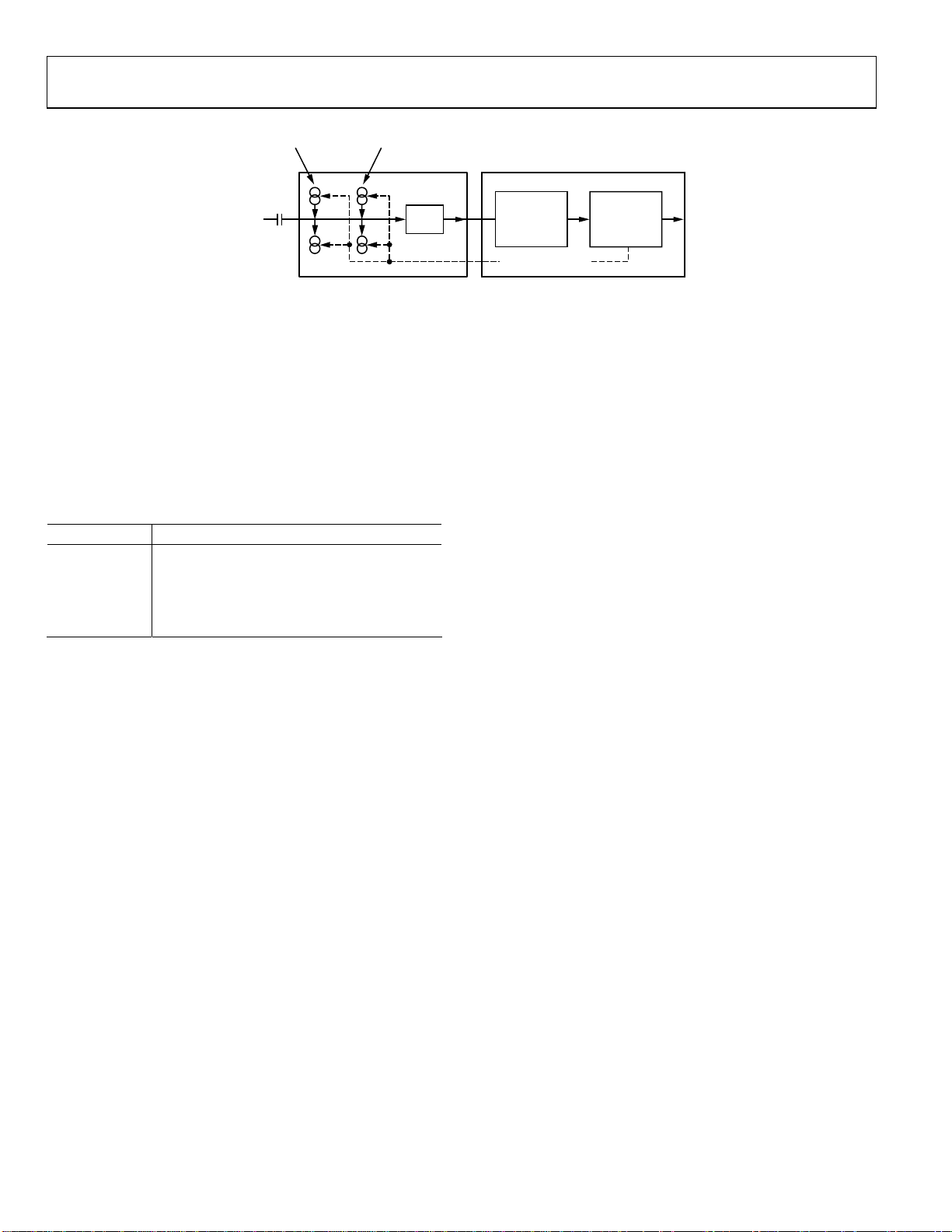
ADV7188
A
G
FINE
CURRENT
SOURCES
COARSE
CURRENT
SOURCES
NALO
VIDEO
INPUT
ADC
Figure 14. Clamping Overview
DCT[1:0] Digital Clamp Timing, Address 0x15 [6:5]
The clamp timing register determines the time constant of the
digital fine clamp circuitry. It is important to realize that the
digital fine clamp reacts very quickly since it is supposed to
immediately correct any residual dc level error for the active
line. The time constant of the digital fine clamp must be much
quicker than the one from the analog blocks.
By default, the time constant of the digital fine clamp is adjusted
dynamically to suit the currently connected input signal.
Table 35. DCT Function
DCT[1:0] Description
00 Slow (TC = 1 sec).
01 Medium (TC = 0.5 sec).
10 (default) Fast (TC = 0.1 sec).
11
Determined by the ADV7188, depending on
the I/P video parameters.
DCFE Digital Clamp Freeze Enable, Address 0x15 [4]
This register bit allows the user to freeze the digital clamp loop
at any time. It is intended for users who would like to do their
own clamping. Users should disable the current sources for
analog clamping via the appropriate register bits, wait until the
digital clamp loop settles, and then freeze it via the DCFE bit.
0 (default)—The digital clamp is operational.
1—The digital clamp loop is frozen.
LUMA FILTER
Data from the digital fine clamp block is processed by three sets
of filters. The data format at this point is CVBS for CVBS input
or luma only for Y/C and YPrPb input formats.
• Luma antialias filter (YAA). The ADV7188 receives video
at a rate of 27 MHz. (For 4× oversampled video, the ADCs
sample at 54 MHz, and the first decimation is performed
inside the DPP filters. Therefore, the data rate into the
ADV7188 is always 27 MHz.) The ITU-R BT.601 recommends
a sampling frequency of 13.5 MHz. The luma antialias
filter decimates the oversampled video using a high quality,
linear phase, low-pass filter that preserves the luma signal
while at the same time attenuating out-of-band components.
The luma antialias filter has a fixed response.
DATA
PRE-
PROCESSOR
(DPP)
CLAMP CONTROL
SDP
WITH DIGITAL
FINE CLAMP
05478-014
• Luma shaping filters (YSH). The shaping filter block is a
programmable low-pass filter with a wide variety of responses. It can be used to selectively reduce the luma video
signal bandwidth (needed prior to scaling, for example).
For some video sources that contain high frequency noise,
reducing the bandwidth of the luma signal improves visual
picture quality. A follow-on video compression stage may
work more efficiently if the video is low-pass filtered.
The ADV7188 has two responses for the shaping filter: one
that is used for good quality CVBS, component, and S-VHS
type sources, and a second for nonstandard CVBS signals.
The YSH filter responses also include a set of notches for
PAL and NTSC. However, it is recommended to use the
comb filters for YC separation.
• Digital resampling filter. This block is used to allow dynamic
resampling of the video signal to alter parameters such as
the time base of a line of video. Fundamentally, the resampler
is a set of low-pass filters. The actual response is chosen by
the system with no requirement for user intervention.
Figure 16 through Figure 19 show the overall response of all
filters together. Unless otherwise noted, the filters are set into a
typical wideband mode.
Y-Shaping Filter
For input signals in CVBS format, the luma shaping filters play
an essential role in removing the chroma component from a
composite signal. YC separation must aim for best possible
crosstalk reduction while still retaining as much bandwidth
(especially on the luma component) as possible. High quality
YC separation can be achieved by using the internal comb filters
of the ADV7188. Comb filtering, however, relies on the
frequency relationship of the luma component (multiples of the
video line rate) and the color subcarrier (Fsc). For good quality
CVBS signals, this relationship is known; the comb filter
algorithms can be used to separate out luma and chroma with
high accuracy.
Rev. 0 | Page 28 of 112
Page 29

ADV7188
For nonstandard video signals, the frequency relationship may
be disturbed and the comb filters may not be able to remove all
crosstalk artifacts in an optimum fashion without the assistance
of the shaping filter block.
An automatic mode is provided. Here, the ADV7188 evaluates
the quality of the incoming video signal and selects the filter
responses in accordance with the signal quality and video
standard. YFSM, WYSFMOVR, and WYSFM allow the user to
manually override the automatic decisions in part or in full.
The luma shaping filter has three control registers
• YSFM[4:0] allows the user to manually select a shaping
filter mode (applied to all video signals) or to enable an
automatic selection (dependent on video quality and video
standard).
• WYSFMOVR allows the user to manually override the
WYSFM decision.
• WYSFM[4:0] allows the user to select a different shaping
filter mode for good quality CVBS, component (YPrPb),
and S-VHS (YC) input signals.
In automatic mode, the system preserves the maximum possible
bandwidth for good CVBS sources (since they can successfully
be combed) and for luma components of YPrPb and YC
sources, since they need not be combed. For poor quality signals,
the system selects from a set of proprietary shaping filter
responses that complements comb filter operation in order to
reduce visual artifacts. The decisions of the control logic are
shown in
Figure 15.
YSFM[4:0] Y Shaping Filter Mode, Address 0x17 [4:0]
The Y-shaping filter mode bits allow the user to select from a
wide range of low-pass and notch filters. When switched in
automatic mode, the filter is selected based on other register
selections, such as detected video standard, and properties
extracted from the incoming video itself, such as quality and time
base stability. The automatic selection always picks the widest
possible bandwidth for the video input encountered.
• If the YSFM settings specify a filter (that is, YSFM is set to
values other than 00000 or 00001), the chosen filter is
applied to all video, regardless of its quality.
• In automatic selection mode, the notch filters are used
only for bad quality video signals. For all other video signals,
wideband filters are used; see
Table 36.
WYSFMOVR Wideband Y Shaping Filter Override,
Address 0x18,[7]
Setting the WYSFMOVR bit enables the use of the WYSFM[4:0]
settings for good quality video signals. For more information,
refer to the general discussion of the luma shaping filters in the
Y-Shaping Filter section and the flowchart shown in Figure 15.
0—The shaping filter for good quality video signals is selected
automatically.
1 (default)—Enables manual override via WYSFM[4:0].
Table 36. YSFM Function
YSFM[4:0] Description
00000
00001
(default)
00010 SVHS 1
00011 SVHS 2
00100 SVHS 3
00101 SVHS 4
00110 SVHS 5
00111 SVHS 6
01000 SVHS 7
01001 SVHS 8
01010 SVHS 9
01011 SVHS 10
01100 SVHS 11
01101 SVHS 12
01110 SVHS 13
01111 SVHS 14
10000 SVHS 15
10001 SVHS 16
10010 SVHS 17
10011 SVHS 18 (CCIR 601)
10100 PAL NN 1
10101 PAL NN 2
10110 PAL NN 3
10111 PAL WN 1
11000 PAL WN 2
11001 NTSC NN 1
11010 NTSC NN 2
11011 NTSC NN 3
11100 NTSC WN 1
11101 NTSC WN 2
11110 NTSC WN 3
11111 Reserved
Automatic selection including a wide notch
response (PAL/NTSC/SECAM)
Automatic selection including a narrow notch
response (PAL/NTSC/SECAM)
Rev. 0 | Page 29 of 112
Page 30
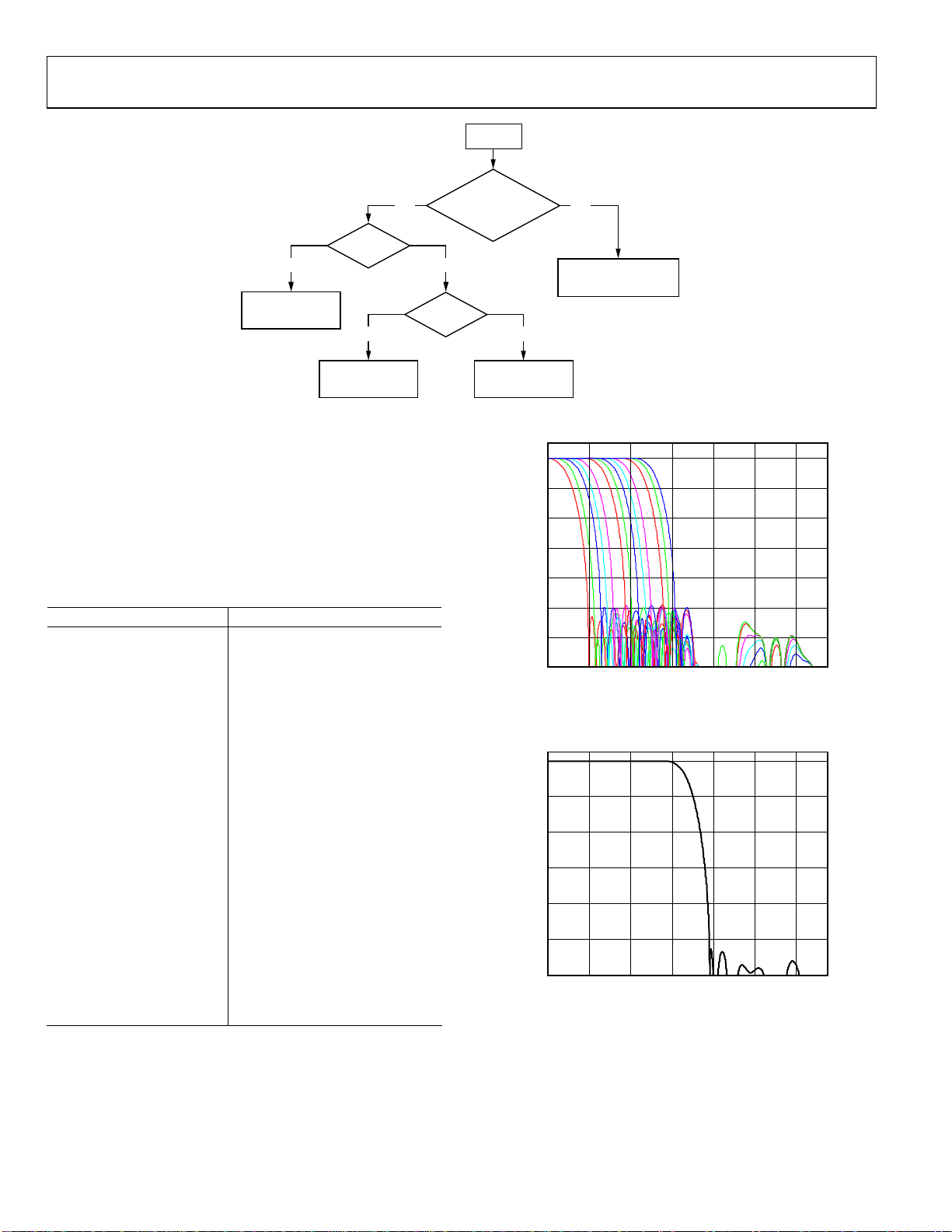
ADV7188
SET YSFM
YES NO
VIDEO
BAD GOOD
AUTO SELECT LUMA
SHAPING FILTER TO
COMPLEMENT COMB
QUALITY
1 0
SELECT WIDEBAND
FILTER AS PER
WYSFM[4:0]
Figure 15. YSFM and WYSFM Control Flowchart
WYSFM[4:0] Wide Band Y Shaping Filter Mode,
Address 0x18 [4:0]
The WYSFM[4:0] bits allow the user to manually select a shaping
filter for good quality video signals, for example, CVBS with
stable time base, luma component of YPrPb, and luma
component of YC. The WYSFM bits are only active if the
WYSFMOVR bit is set to 1. See the general discussion of the
shaping filter settings in the
Y-Shaping Filter section.
Table 37. WYSFM Function
WYSFM[4:0] Description
00000 Do not use
00001 Do not use
00010 SVHS 1
00011 SVHS 2
00100 SVHS 3
00101 SVHS 4
00110 SVHS 5
00111 SVHS 6
01000 SVHS 7
01001 SVHS 8
01010 SVHS 9
01011 SVHS 10
01100 SVHS 11
01101 SVHS 12
01110 SVHS 13
01111 SVHS 14
10000 SVHS 15
10001 SVHS 16
10010 SVHS 17
10011 (default) SVHS 18 (CCIR 601)
10100–11111 Do not use
The filter plots in
S-VHS 18 (widest) shaping filter settings.
Figure 16 show the S-VHS 1 (narrowest) to
Figure 18 shows the
PAL notch filter responses. The NTSC-compatible notches are
shown in
Figure 19.
YSFM IN AUTO MODE?
00000 OR 00001
WYSFMOVR
SELECT AUTOMATIC
USE YSFM SELECTED
FILTER REGARDLESS FOR
GOOD AND BAD VIDEO
WIDEBAND FILTER
0
–10
–20
–30
–40
AMPLITUDE (dB)
–50
–60
–70
010864212
COMBINED Y ANTIALIAS, S-VHS LOW-PASS FILTERS,
05478-015
Y RESAMPLE
FREQUENCY (MHz)
Figure 16. Y S-VHS Combined Responses
COMBINED Y ANTIALIAS, CCIR MODE SHAPING FILTER,
0
–20
–40
–60
AMPLITUDE (dB)
–80
–100
–120
010864212
Y RESAMPLE
FREQUENCY (MHz)
Figure 17. Y S-VHS 18 Extra Wideband Filter (CCIR 601-Compliant)
05478-016
05478-017
Rev. 0 | Page 30 of 112
Page 31

ADV7188
0
–10
COMBINED Y ANTIALIAS, PAL NOTCH FILTERS,
Y RESAMPLE
CHROMA FILTER
Data from the digital fine clamp block is processed by three sets
of filters. The data format at this point is CVBS for CVBS
inputs, chroma only for Y/C, or Cr/Cb interleaved for YPrPb
–20
–30
–40
AMPLITUDE (dB)
–50
–60
–70
010864212
FREQUENCY (MHz)
05478-018
Figure 18. Y PAL Notch Filter Responses
COMBINED Y ANTIALIAS, NTSC NOTCH FILTERS,
0
Y RESAMPLE
input formats.
• Chroma Antialias Filter (CAA). The ADV7188 over-
samples the CVBS by a factor of 2 and the Chroma/CrCb
by a factor of 4. A decimating filter (CAA) is used to
preserve the active video band and to remove any out-ofband components. The CAA filter has a fixed response.
• Chroma Shaping Filters (CSH). The shaping filter block
(CSH) can be programmed to perform a variety of lowpass responses. It can be used to selectively reduce the
bandwidth of the chroma signal for scaling or compression.
• Digital Resampling Filter. This block is used to allow
dynamic resampling of the video signal to alter parameters
such as the time base of a line of video. Fundamentally, the
–10
–20
–30
–40
AMPLITUDE (dB)
–50
–60
–70
010864212
FREQUENCY (MHz)
05478-019
Figure 19. Y NTSC Notch Filter Responses
resampler is a set of low-pass filters. The actual response is
chosen by the system without user intervention.
The plots in
Figure 20 show the overall response of all filters
together, from SH1 (narrowest) to SH5 (widest) in addition to
the wideband mode (in red).
COMBINED C ANTIALIAS, C SHAPING FILTER,
0
–10
–20
–30
C RESAMPLER
Rev. 0 | Page 31 of 112
–40
ATTENUATION (dB)
–50
–60
0543216
FREQUENCY (MHz)
05478-020
Figure 20. Chroma Shaping Filter Responses
Page 32

ADV7188
CSFM[2:0] C-Shaping Filter Mode, Address 0x17 [7]
The C-shaping filter mode bits allow the user to select from a
range of low-pass filters for the chrominance signal.
Table 38. CSFM Function
CSFM[2:0] Description
000 (default) 1.5 MHz bandwidth filter
001 2.17 MHz bandwidth filter
010 SH1
011 SH2
100 SH3
101 SH4
110 SH5
111 Wideband mode
GAIN OPERATION
The gain control within the ADV7188 is done on a purely
digital basis. The input ADCs support a 12-bit range, mapped
into a 1.6 V analog voltage range. Gain correction takes place
after the digitization in the form of a digital multiplier.
Advantages of this architecture over the commonly used PGA
(programmable gain amplifier) before the ADCs include that
the gain is now completely independent of supply, temperature,
and process variations.
As shown in
as long as it fits into the ADC window.
Figure 21, the ADV7188 can decode a video signal
MAXIMUM
VOLTAGE
ANALOG VOLTAGE
RANGE SUPPORTED BY ADC (1.6V RANGE FOR ADV7188)
The two components to this are the amplitude of the input signal
and the dc level on which it resides. The dc level is set by the
clamping circuitry (see the
Clamp Operation section).
If the amplitude of the analog video signal is too high, clipping
may occur resulting in visual artifacts. The analog input range
of the ADC, together with the clamp level, determines the
maximum supported amplitude of the video signal.
The minimum supported amplitude of the input video is
determined by the ADV7188’s ability to retrieve horizontal and
vertical timing and to lock to the color burst, if present.
There are separate gain control units for luma and chroma data.
Both can operate independently of each other. The chroma unit,
however, can also take its gain value from the luma path.
The possible AGC modes are summarized in
Table 39.
It is possible to freeze the automatic gain control loops. This
causes the loops to stop updating and the AGC-determined
gain at the time of the freeze to stay active until the loop is
either unfrozen or the gain mode of operation is changed.
The currently active gain from any of the modes can be read
back. Refer to the description of the dual-function manual gain
registers, LG[11:0] Luma Gain and CG[11:0] Chroma Gain, in
Luma Gain and the Chroma Gain sections.
the
SDP
(GAIN SELECTION ONLY)
GAIN
CONTROL
MINIMUM
VOLTAGE
CLAMP
LEVEL
DATA
ADC
Figure 21. Gain Control Overview
PRE-
PROCESSOR
(DPP)
Table 39. AGC Modes
Input Video Type Luma Gain Chroma Gain
Any Manual gain luma. Manual gain chroma.
CVBS
Dependent on color burst amplitude. Dependent on horizontal sync depth.
Taken from luma path.
Peak white.
Dependent on color burst amplitude.
Taken from luma path.
Y/C
Dependent on color burst amplitude. Dependent on horizontal sync depth.
Taken from luma path.
Peak white.
Dependent on color burst amplitude.
Taken from luma path.
YPrPb Dependent on horizontal sync depth. Taken from luma path.
Rev. 0 | Page 32 of 112
05478-021
Page 33

ADV7188
≤
<
≤
<
Luma Gain
LAGC[2:0] Luma Automatic Gain Control, Address 0x2C [6:4]
The luma automatic gain control mode bits select the mode of
operation for the gain control in the luma path.
There are ADI internal parameters to customize the peak white
gain control. Contact ADI for more information.
Table 40. LAGC Function
LAGC[2:0] Description
000 Manual fixed gain (use LMG[11:0])
001
010
(default)
011 Reserved
100 Reserved
101 Reserved
110 Reserved
111 Freeze gain
AGC (blank level to sync tip); peak white algorithm
OFF
AGC (blank level to sync tip); peak white algorithm
ON
LAGT[1:0] Luma Automatic Gain Timing, Address 0x2F [7:6]
The luma automatic gain timing register allows the user to
influence the tracking speed of the luminance automatic gain
control. Note that this register only has an effect if the
LAGC[2:0] register is set to 001, 010, 011, or 100 (automatic
gain control modes).
If peak white AGC is enabled and active (see the
STATUS_1[7:0]
Address 0x10 [7:0] section), the actual gain update speed is
dictated by the peak white AGC loop and, as a result, the LAGT
settings have no effect. As soon as the part leaves peak white
AGC, LAGT becomes relevant again.
The update speed for the peak white algorithm can be
customized by the use of internal parameters. Contact ADI for
more information.
Table 41. LAGT Function
LAGT[1:0] Description
00 Slow (TC = 2 sec)
01 Medium (TC = 1 sec)
10 Fast (TC = 0.2 sec)
11 (default) Adaptive
LG[11:0] Luma Gain, Address 0x2F [3:0]; Address 0x30 [7:0];
LMG[11:0] Luma Manual Gain, Address 0x2F [3:0];
Address 0x30 [7:0]
Luma gain [11:0] is a dual-function register. If written to, a
desired manual luma gain can be programmed. This gain
becomes active if the LAGC[2:0] mode is switched to manual
fixed gain. Equation 2 and Equation 3 show how to calculate a
desired gain for NTSC and PAL standards, respectively.
NTSC Luma_Gain =
LMG
1128
4095]0:11[1024
(2)
63.39078.0
K=
PAL Luma_Gain =
LMG
1222
If read back, this register returns the current gain
4095]0:11[1024
351.3838.0
K=
(3)
value.
Depending on the setting in the LAGC[2:0] bits, this is one of
the following values:
Luma manual gain value (LAGC[2:0] set to luma manual
•
gain mode)
Luma automatic gain value (LAGC[2:0] set to any of the
•
automatic modes)
Table 42. LG/LMG Function
LG[11:0]/LMG[11:0] Read/Write Description
LMG[11:0] = X Write
LG[11:0] Read Actually used gain
Manual gain for luma
path
For example, to program the ADV7188 into manual fixed gain
mode with a desired gain of 0.89 for the NTSC standard:
1.
Use Equation 2 to convert the gain:
0.95 × 1128 = 1071.6
2.
Truncate to integer value:
1071.6 = 1071
3.
Convert to hexadecimal:
1071d = 0x42F
4.
Split into two registers and program:
Luma Gain Control 1 [3:0] = 0x4
Luma Gain Control 2 [7:0] = 0x2F
Enable manual fixed gain mode:
5.
Set LAGC[2:0] to 000
BETACAM Enable Betacam Levels, Address 0x01 [5]
If YPrPb data is routed through the ADV7188, the automatic
gain control modes can target different video input levels, as
outlined in
Table 45. Note that the BETACAM bit is valid only if
the input mode is YPrPb (component). The BETACAM bit sets
the target value for AGC operation. A review of the following
sections is useful.
•
INSEL[3:0] Input Selection, Address 0x00 [3:0] to find how
component video (YPrPb) can be routed through the
ADV7188.
•
Video Standard Selection to select the various standards,
for example, with and without pedestal.
The automatic gain control (AGC) algorithms adjust the levels
based on the setting of the BETACAM bit.
Rev. 0 | Page 33 of 112
Page 34

ADV7188
(
<
Table 43. BETACAM Function
BETACAM Description
0 (default) Assuming YPrPb is selected as input format.
Selecting PAL with pedestal selects MII.
Selecting PAL without pedestal selects SMPTE.
Selecting NTSC with pedestal selects MII.
Selecting NTSC without pedestal selects SMPTE.
1 Assuming YPrPb is selected as input format.
Selecting PAL with pedestal selects BETACAM.
Selecting NTSC with pedestal selects BETACAM.
PW_UPD Peak White Update, Address 0x2B [0]
The peak white and average video algorithms determine the
gain based on measurements taken from the active video. The
PW_UPD bit determines the rate of gain change. LAGC[2:0]
must be set to the appropriate mode to enable the peak white or
average video mode in the first place.
Selecting PAL without pedestal selects BETACAM
variant.
Selecting NTSC without pedestal selects BETACAM
variant.
For more information, refer to the
LAGC[2:0] Luma Automatic
Gain Control, Address 0x2C [6:4] section.
0—Updates the gain once per video line.
1 (default)—Updates the gain once per field.
Chroma Gain
CAGC[1:0] Chroma Automatic Gain Control,
Address 0x2C [1:0]
These two bits select the basic mode of operation for automatic
gain control in the chroma path.
Table 44. CAGC Function
CAGC[1:0] Description
00 Manual fixed gain (use CMG[11:0]).
01 Use luma gain for chroma.
10 (default) Automatic gain (based on color burst).
11 Freeze chroma gain.
Table 45. Betacam Levels
Name Betacam (mV) Betacam Variant (mV) SMPTE (mV) MII (mV)
Y Range 0 to 714 (incl. 7.5% pedestal) 0 to 714 0 to 700 0 to 700 (incl. 7.5% pedestal)
Pr and Pb Range –467 to +467 –505 to +505 –350 to +350 –324 to +324
Sync Depth 286 286 300 300
CAGT[1:0] Chroma Automatic Gain Timing,
Address 0x2D [7:6]
This register allows the user to influence the tracking speed of
the chroma automatic gain control. It has an effect only if the
CAGC[1:0] register is set to 10 (automatic gain).
Table 46. CAGT Function
CAGT[1:0] Description
00 Slow (TC = 2 sec)
01 Medium (TC = 1 sec)
10 Fast (TC = 0.2 sec)
11 (default) Adaptive
CG[11:0] Chroma Gain, Address 0x2D [3:0]; Address 0x2E
[7:0]; CMG[11:0] Chroma Manual Gain, Address 0x2D [3:0];
Address 0x2E [7:0]
CG[11:0] is a dual-function register. If written to, a desired
manual chroma gain can be programmed. This gain becomes
active if the CAGC[1:0] mode is switched to manual fixed gain.
Refer to Equation 4 for calculating a desired gain. If read back,
the register returns the current gain value. Depending on the
setting in the CAGC[1:0] bits, this is either
Chroma automatic gain value (CAGC[1:0] set to any of the
•
automatic modes)
Table 47. CG/CMG Function
CG[11:0]/CMG[11:0] Read/Write Description
CMG[11:0] Write
CG[11:0] Read Currently active gain.
Manual gain for chroma
path.
_ =
GainChroma
CG
=
1024
(4)
4...0
)
40950
≤
For example, freezing the automatic gain loop and reading back
the CG[11:0] register results in a value of 0x47A.
1.
Convert the readback value to decimal:
0x47A = 1146d
2.
Apply Equation 4 to convert the readback value:
1146/1024 = 1.12
CKE Color Kill Enable, Address 0x2B [6]
This bit allows the optional color kill function to be switched on
or off. For QAM-based video standards (PAL and NTSC) and
FM-based systems (SECAM), the threshold for the color kill
Chroma manual gain value (CAGC[1:0] set to chroma
•
decision is selectable via the CKILLTHR[2:0] bits.
manual gain mode)
Rev. 0 | Page 34 of 112
Page 35

ADV7188
If color kill is enabled, and if the color carrier of the incoming
video signal is less than the threshold for 128 consecutive video
lines, color processing is switched off (black and white output).
To switch the color processing back on, another 128 consecutive
lines with a color burst greater than the threshold are required.
Due to the higher bandwidth, the signal transition of the luma
component is usually much sharper than that of the chroma
component. The color edge is not sharp but blurred, in the
worst case over several pixels.
The color kill option works only for input signals with a modulated chroma part. For component input (YPrPb), there is no
color kill.
0—Disables color kill.
1 (default)—Enables color kill.
CKILLTHR[2:0] Color Kill Threshold, Address 0x3D [6:4]
The CKILLTHR[2:0] bits allow the user to select a threshold for
the color kill function. The threshold applies only to QAMbased (NTSC and PAL) or FM-modulated (SECAM) video
standards.
To enable the color kill function, the CKE bit must be set. For
settings 000, 001, 010, and 011, chroma demodulation inside
the ADV7188 may not work satisfactorily for poor input video
signals.
Table 48. CKILLTHR Function
Description
CKILLTHR[2:0] SECAM NTSC, PAL
000 No color kill Kill at < 0.5%
001 Kill at < 5% Kill at < 1.5%
010 Kill at < 7% Kill at < 2.5%
011 Kill at < 8% Kill at < 4.0%
100 (default) Kill at < 9.5% Kill at < 8.5%
101 Kill at < 15% Kill at < 16.0%
110 Kill at < 32% Kill at < 32.0%.
111
Reserved for ADI internal use only; do not
select
CHROMA TRANSIENT IMPROVEMENT (CTI)
The signal bandwidth allocated for chroma is typically much
smaller than that of luminance. In the past, this was a valid way
to fit a color video signal into a given overall bandwidth because
the human eye is less sensitive to chrominance than to
luminance.
The uneven bandwidth, however, may lead to visual artifacts in
sharp color transitions. At the border of two bars of color, both
components (luma and chroma) change at the same time (see
Figure 22).
LUMA SIGNAL WITH A
LUMA
SIGNAL
DEMODULATED
CHROMA
SIGNAL
Figure 22. CTI Luma/Chroma Transition
TRANSITION, ACCOMPANIED
BY A CHROMA TRANSITION
ORIGINAL, "SLOW" CHROMA
TRANSITION PRIOR TO CTI
SHARPENED CHROMA
TRANSITION AT THE
OUTPUT OF CTI
The CTI block examines the input video data. It detects
transitions of chroma, and can be programmed to steepen the
chroma edges in an attempt to artificially restore lost color
bandwidth. However, it operates only on edges above a certain
threshold to ensure that noise is not emphasized. Care has also
been taken to avoid edge ringing and undesirable saturation
and hue distortion.
Chroma transient improvements are needed primarily for
signals that experienced severe chroma bandwidth limitations.
For those types of signals, it is strongly recommended to enable
the CTI block via CTI_EN.
CTI_EN Chroma Transient Improvement Enable,
Address 0x4D [0]
0—Disables the CTI block.
1 (default)—Enables the CTI block.
CTI_AB_EN Chroma Transient Improvement
Alpha Blend Enable, Address 0x4D [1]
This bit enables an alpha-blend function, which mixes the
transient improved chroma with the original signal. The
sharpness of the alpha blending can be configured via the
CTI_AB[1:0] bits. For the alpha blender to be active, the CTI
block must be enabled via the CTI_EN bit.
0—Disables the CTI alpha blender.
1 (default)—Enables the CTI alpha blender.
CTI_AB[1:0] Chroma Transient Improvement Alpha Blend,
Address 0x4D [3:2]
This controls the behavior of alpha-blend circuitry that mixes
the sharpened chroma signal with the original one. It thereby
controls the visual impact of CTI on the output data.
05478-022
For CTI_AB[1:0] to become active, the CTI block must be
enabled via the CTI_EN bit, and the alpha blender must be
switched on via CTI_AB_EN.
Rev. 0 | Page 35 of 112
Page 36

ADV7188
T
Sharp blending maximizes the effect of CTI on the picture, but
may also increase the visual impact of small amplitude, high
frequency chroma noise.
Table 49. CTI_AB Function
CTI_AB[1:0] Description
00
01 Sharp mixing
10 Smooth mixing
11 (default) Smoothest alpha blend function
CTI_C_TH[7:0] CTI Chroma Threshold, Address 0x4E [7:0]
The CTI_C_TH[7:0] value is an unsigned, 8-bit number specifying how big the amplitude step in a chroma transition has to
be in order to be steepened by the CTI block. Programming a
small value into this register causes even smaller edges to be
steepened by the CTI block. Making CTI_C_TH[7:0] a large
value causes the block to improve large transitions only.
The default value for CTI_C_TH[7:0] is 0x08, indicating the
threshold for the chroma edges prior to CTI.
Sharpest mixing between sharpened and original
chroma signal
Programming a small value causes only small transients to be
seen as noise and to be removed.
The recommended DNR_TH[7:0] setting for A/V inputs is
0x04, and the recommended DNR_TH[7:0] setting for tuner
inputs is 0x0A.
The default value for DNR_TH[7:0] is 0x08, indicating the
threshold for maximum luma edges to be interpreted as noise.
PEAKING_GAIN[7:0], Luma Peaking Gain, Address 0xFB [7:0]
This filter can be manually enabled. The user can boost or
attenuate the mid region of the Y spectrum around 3 MHz. The
peaking filter can visually improve the picture by showing more
definition on the picture details that contain frequency
components around 3 MHz. The default value (0x40) in this
register passes through the luma data unaltered (0 dB response).
A lower value attenuates the signal and a higher value amplifies
it. A plot of the filter responses is shown in
15
10
PEAKING GAIN USING BP FILTER
Figure 24.
DIGITAL NOISE REDUCTION (DNR), AND LUMA
PEAKING FILTER
DNR is based on the assumption that high frequency signals
with low amplitude are probably noise and therefore that their
removal improves picture quality. There are two DNR blocks in
the ADV7188: the DNR1 block before the luma peaking filter
and the DNR2 block after the luma peaking filter, as shown in
Figure 23.
LUMA
SIGNAL
DNR1
Figure 23. DNR and Peaking Block Diagram
LUMA PEAKING
FILTER
DNR2
DNR_EN Digital Noise Reduction Enable, Address 0x4D [5]
0—Bypasses DNR (disables it).
1 (default)—Enables DNR on the luma data.
DNR_TH[7:0] DNR Noise Threshold, Address 0x50 [7:0]
The DNR1 block is positioned before the luma peaking block.
The DNR_TH[7:0] value is an unsigned 8-bit number that
determines the maximum edge that is still interpreted as noise
and, therefore, blanked from the luma data. Programming a
large value into DNR_TH[7:0] causes the DNR block to
interpret even large transients as noise and removes them. As a
result, the effect on the video data is more visible.
05478-023
LUMA
OUTPU
5
0
–5
–10
FILTER RESPONSE (dB)
–15
–20
123456
07
Figure 24. Peaking Filter Responses
FREQUENCY (MHz)
05478-024
DNR_TH2[7:0] DNR Noise Threshold 2, Address 0xFC [7:0]
The DNR2 block is positioned after the luma peaking block, so
it affects the amplified luma signal. It operates in the same way
as the DNR1 block but has an independent threshold control,
DNR_TH2[7:0]. This value is an unsigned 8-bit number, that
determines the maximum edge that is still interpreted as noise
and, therefore, blanked from the luma data. Programming a
large value into DNR_TH2[7:0] causes the DNR block to
interpret even large transients as noise and remove them. As a
result, the effect on the video data is more visible. Programming
a small value causes only small transients to be seen as noise
and removed.
Rev. 0 | Page 36 of 112
Page 37

ADV7188
COMB FILTERS
The comb filters of the ADV7188 have been greatly improved to
automatically handle video of all types, standards, and levels of
quality. The NTSC and PAL configuration registers allow the
user to customize comb filter operation, depending on which
video standard is detected (by autodetection) or selected (by
manual programming). In addition to the bits listed in this
section, there are some other ADI internal controls; contact
ADI for more information.
NTSC Comb Filter Settings
Used for NTSC-M/J CVBS inputs.
NSFSEL[1:0] Split Filter Selection NTSC, Address 0x19 [3:2]
NSFSEL[1:0] selects how much of the overall signal bandwidth
is fed to the combs. A narrow bandwidth split filter gives better
performance on diagonal lines, but leaves more dot crawl in the
final output image. The opposite is true for a wide bandwidth
split filter.
Table 50. NSFSEL Function
NSFSEL[1:0] Description
00 (default) Narrow
01 Medium
10 Medium
11 Wide
Table 52. CCMN Function
CCMN[2:0] Description Configuration
000 (default) Adaptive comb mode
100 Disable chroma comb
101 Fixed chroma comb (top lines of line memory)
110 Fixed chroma comb (all lines of line memory)
111 Fixed chroma comb (bottom lines of line memory)
Table 53.YCMN Function
YCMN[2:0] Description Configuration
000 (default) Adaptive comb mode Adaptive 3-line (3 taps) luma comb
100 Disable luma comb Use low-pass/notch filter; see the Y-Shaping Filter section
101 Fixed luma comb (top lines of line memory) Fixed 2-line (2 taps) luma comb
110 Fixed luma comb (all lines of line memory) Fixed 3-line (3 taps) luma comb
111 Fixed luma comb (bottom lines of line memory) Fixed 2-line (2 taps) luma comb
CTAPSN[1:0] Chroma Comb Taps NTSC, Address 0x38 [7:6]
Table 51. CTAPSN Function
CTAPSN[1:0] Description
00 Do not use
01
10 (default)
11
NTSC chroma comb adapts 3 lines (3 taps) to
2 lines (2 taps)
NTSC chroma comb adapts 5 lines (5 taps) to
3 lines (3 taps)
NTSC chroma comb adapts 5 lines (5 taps) to
4 lines (4 taps)
CCMN[2:0] Chroma Comb Mode NTSC, Address 0x38 [5:3]
See Table 52.
YCMN[2:0] Luma Comb Mode NTSC, Address 0x38 [2:0]
See Table 53.
Adaptive 3-line chroma comb for CTAPSN = 01
Adaptive 4-line chroma comb for CTAPSN = 10
Adaptive 5-line chroma comb for CTAPSN = 11
Fixed 2-line chroma comb for CTAPSN = 01
Fixed 3-line chroma comb for CTAPSN = 10
Fixed 4-line chroma comb for CTAPSN = 11
Fixed 3-line chroma comb for CTAPSN = 01
Fixed 4-line chroma comb for CTAPSN = 10
Fixed 5-line chroma comb for CTAPSN = 11
Fixed 2-line chroma comb for CTAPSN = 01
Fixed 3-line chroma comb for CTAPSN = 10
Fixed 4-line chroma comb for CTAPSN = 11
Rev. 0 | Page 37 of 112
Page 38

ADV7188
PAL Comb Filter Settings
Use d f or PAL-B/ G / H/I/D, PAL- M , PAL-Combi n a t ional N ,
PAL-60 and NTSC-443 CVBS inputs.
PSFSEL[1:0] Split Filter Selection PAL, Address 0x19 [1:0]
PFSEL[1:0] selects how much of the overall signal bandwidth is
fed to the combs. A wide bandwidth split filter eliminates dot
crawl, but shows imperfections on diagonal lines. The opposite
is true for a narrow bandwidth split filter.
Table 54. PSFSEL Function
PSFSEL[1:0] Description
00 Narrow
01 (default) Medium
10 Wide
11 Widest
CTAPSP[1:0] Chroma Comb Taps PAL, Address 0x39 [7:6]
Table 55. CTAPSP Function
CTAPSP[1:0] Description
00 Do not use.
01
10
11 (default)
CCMP[2:0] Chroma Comb Mode PAL, Address 0x39 [5:3]
See Table 56.
YCMP[2:0] Luma Comb Mode PAL, Address 0x39 [2:0]
See Table 57.
Vertical Blank Control
Each vertical blank control register has the same meaning for
the following bits:
00—Early by 1 line.
10—Delay by 1 line.
11—Delay by 2 lines.
PAL chroma comb adapts 5 lines (3 taps) to
3 lines (2 taps); cancels cross luma only.
PAL chroma comb adapts 5 lines (5 taps) to
3 lines (3 taps); cancels cross luma and hue error
less well.
PAL chroma comb adapts 5 lines (5 taps) to
4 lines (4 taps); cancels cross luma and hue error
well.
NVBIELCM[1:0] NTSC VBI Even Field Luma Comb Mode,
Address 0xEB [5:4]
These bits control the first combed line after VBI on NTSC
even field (luma comb).
01 (default)—SMPTE170 compliant, blank lines 1 to 20, 264 to
282, comb half lines.
PVBIOLCM[1:0] PAL VBI Odd Field Luma Comb Mode,
Address 0xEB [3:2]
These bits control the first combed line after VBI on PAL odd
field (luma comb).
01 (default)—BT470 compliant, blank lines 624 to 22, 311 to
335, comb half lines.
PVBIELCM[1:0] PAL VBI Even Field Luma Comb Mode,
Address 0xEB [1:0]
These bits control the first combed line after VBI on PAL even
field (luma comb).
01 (default)—BT470 compliant, blank lines 624 to 22, 311 to
335, comb half lines.
NVBIOCCM[1:0] NTSC VBI Odd Field Chroma Comb
Mode, Address 0xEC [7:6]
These bits control the first combed line after VBI on NTSC odd
field (chroma comb).
01 (default)—SMPTE170 compliant, no color on lines 1 to 20,
264 to 282, chroma present on half lines.
NVBIECCM[1:0] NTSC VBI Even Field Chroma Comb
Mode, Address 0xEC [5:4]
These bits control the first combed line after VBI on NTSC
even field (chroma comb).
01 (default)—SMPTE170 compliant, no color on lines 1 to 20,
264 to 282, chroma present on half lines.
PVBIOCCM[1:0] PAL VBI Odd Field Chroma Comb Mode,
Address 0xEC [3:2]
These bits control the first combed line after VBI on PAL odd
field (chroma comb).
01 (default) is described under each register.
NVBIOLCM[1:0] NTSC VBI Odd Field Luma Comb Mode,
Address 0xEB [7:6]
These bits control the first combed line after VBI on NTSC odd
field (luma comb).
01 (default)—SMPTE170 compliant, blank lines 1 to 20, 264 to
282, comb half lines.
Rev. 0 | Page 38 of 112
01 (default)—BT470 compliant, no color on lines 624 to 22, 311
to 335, chroma present on half lines.
PVBIECCM[1:0] PAL VBI Even Field Chroma Comb Mode,
Address 0xEC [1:0]
These bits control the first combed line after VBI on PAL even
field (chroma comb).
01 (default)—BT470 compliant, no color on lines 624 to 22, 311
to 335, chroma present on half lines.
Page 39

ADV7188
Table 56. CCMP Function
CCMP[2:0] Description Configuration
000 (default) Adaptive comb mode.
100 Disable chroma comb.
101 Fixed chroma comb (top lines of line memory).
110 Fixed chroma comb (all lines of line memory).
111 Fixed chroma comb (bottom lines of line memory).
Table 57. YCMP Function
YCMP[2:0] Description Configuration
0xx (default) Adaptive comb mode. Adaptive 5 lines (3 taps) luma comb.
100 Disable luma comb. Use low-pass/notch filter; see the Y-Shaping Filter section.
101 Fixed luma comb (top lines of line memory). Fixed 3 lines (2 taps) luma comb.
110 Fixed luma comb (all lines of line memory). Fixed 5 lines (3 taps) luma comb.
111 Fixed luma comb (bottom lines of line memory). Fixed 3 lines (2 taps) luma comb.
AV CODE INSERTION AND CONTROLS
This section describes the I2C-based controls that affect
Insertion of AV codes into the data stream.
•
•
Data blanking during the vertical blank interval (VBI).
The range of data values permitted in the output data
•
stream.
The relative delay of luma vs. chroma signals.
•
Note that some of the decoded VBI data is being inserted
during the horizontal blanking interval. See the Gemstar Data
Recovery section for more information.
BT656-4 ITU Standard BT-R.656-4 Enable, Address 0x04 [7]
The ITU has changed the position for toggling the V bit within
the SAV EAV codes for NTSC between revisions 3 and 4. The
BT656-4 standard bit allows the user to select an output mode
that is compliant with either the previous or the new standard.
For more information, review the standard at http://www.itu.int.
Note that the standard change affects NTSC only and has no
bearing on PAL.
0 (default)—The BT656-3 specification is used. The V bit goes
low at EAV of Lines 10 and 273.
1—The BT656-4 specification is used. The V bit goes low at
EAV of Lines 20 and 283.
Adaptive 3-line chroma comb for CTAPSP = 01.
Adaptive 4-line chroma comb for CTAPSP = 10.
Adaptive 5-line chroma comb for CTAPSP = 11.
Fixed 2-line chroma comb for CTAPSP = 01.
Fixed 3-line chroma comb for CTAPSP = 10.
Fixed 4-line chroma comb for CTAPSP = 11.
Fixed 3-line chroma comb for CTAPSP = 01.
Fixed 4-line chroma comb for CTAPSP = 10.
Fixed 5-line chroma comb for CTAPSP = 11.
Fixed 2-line chroma comb for CTAPSP = 01.
Fixed 3-line chroma comb for CTAPSP = 10.
Fixed 4-line chroma comb for CTAPSP = 11.
SD_DUP_AV Duplicate AV Codes, Address 0x03 [0]
Depending on the output interface width, it may be necessary to
duplicate the AV codes from the luma path into the chroma path.
In an 8-/10-bit-wide output interface (Cb/Y/Cr/Y interleaved
data), the AV codes are defined as FF/00/00/AV, with AV being
the transmitted word that contains information about H/V/F.
In this output interface mode, the following assignment takes
place: Cb = FF, Y = 00, Cr = 00, and Y = AV.
In a 16-/20-bit output interface where Y and Cr/Cb are delivered
via separate data buses, the AV code is over the whole 16/20
bits. The SD_DUP_AV bit allows the user to replicate the AV
codes on both buses, so the full AV sequence can be found on
the Y bus and on the Cr/Cb bus. See
Figure 25.
0 (default)—The AV codes are in single fashion (to suit 8/10 bit
interleaved data output).
1—The AV codes are duplicated (for 16-/20-bit interfaces).
VBI_EN Vertical Blanking Interval Data Enable,
Address 0x03 [7]
The VBI enable bit allows data such as intercast and closed
caption data to be passed through the luma channel of the
decoder with a minimal amount of filtering. All data for Line 1
to Line 21 is passed through and available at the output port.
The ADV7188 does not blank the luma data, and automatically
switches all filters along the luma data path into their widest
bandwidth. For active video, the filter settings for YSH and YPK
are restored.
Rev. 0 | Page 39 of 112
Page 40

ADV7188
S
Refer to the BL_C_VBI Blank Chroma during VBI, Address
0x04 [2] section for information on the chroma path.
0 (default)—All video lines are filtered/scaled.
1—Only the active video region is filtered/scaled.
BL_C_VBI Blank Chroma during VBI, Address 0x04 [2]
When BL_C_VBI is set high, the Cr and Cb values of all VBI
lines are blanked.
SD_DUP_AV = 1 SD_DUP_AV = 0
Y DATA BUS 00 AV YFF 00 00 AV Y
FFCr/Cb DATA BU
RANGE Range Selection, Address 0x04 [0]
AV codes (as per ITU-R BT-656, formerly known as CCIR-656)
consist of a fixed header made up of 0xFF and 0x00 values.
These two values are reserved and therefore not to be used for
active video. Additionally, the ITU specifies that the nominal
range for video should be restricted to values between 16 and
235 for luma and 16 to 240 for chroma.
The RANGE bit allows the user to limit the range of values
output by the ADV7188 to the recommended value range. In
any case, it ensures that the reserved values of 255d (0xFF) and
00d (0x00) are not presented on the output pins unless they are
part of an AV code header.
Table 58. RANGE Function
RANGE Description
0 16 ≤ Y ≤ 235 16 ≤ C ≤ 240
1 (default) 1 ≤ Y ≤ 254 1 ≤ C ≤ 254
AUTO_PDC_EN Automatic Programmed Delay Control,
Address 0x27 [6]
Enabling the AUTO_PDC_EN function activates a function
within the ADV7188 that automatically programs LTA[1:0] and
CTA[2:0] to have the chroma and luma data match delays for all
modes of operation.
0—The ADV7188 uses the LTA[1:0] and CTA[2:0] values for
delaying luma and chroma samples. Refer to the
Timing Adjust, Address 0x27 [1:0] and the
Timing Adjust, Address 0x27 [5:3] sections.
1 (default)—The ADV7188 automatically programs the LTA
and CTA values to have luma and chroma aligned at the output.
Manual registers LTA[1:0] and CTA[2:0] are not used.
00 00 AV Cb FF 00 Cb
AV CODE SECTION AV CODE SECTION
Figure 25. AV Code Duplication Control
LTA[1:0] Luma
CTA[2:0] Chroma
This is done so any data that may arrive during VBI is not
decoded as color and output through Cr and Cb. As a result, it
is possible to send VBI lines into the decoder, then output them
through an encoder again, undistorted. Without this blanking,
any wrongly decoded color is encoded by the video encoder;
therefore, the VBI lines are distorted.
0—Decodes and outputs color during VBI.
1 (default)—Blanks Cr and Cb values during VBI.
8-/10-BIT INTERFACE16-/20-BIT INTERFACE16-/20-BIT INTERFACE
Cb/Y/Cr/Y
INTERLEAVED
FF 00 00 AV Cb
AV CODE SECTION
LTA[1:0] Luma Timing Adjust, Address 0x27 [1:0]
This register allows the user to specify a timing difference
between chroma and luma samples.
Note that there is a certain functionality overlap with the
CTA[2:0] register. For manual programming, use the following
defaults:
•
CVBS input LTA[1:0] = 00
•
YC input LTA[1:0] = 01
YPrPb input LTA[1:0] =01
•
Table 59. LTA Function
LTA[1:0] Description
00 (default) No delay.
01 Luma 1 clk (37 ns) delayed.
10 Luma 2 clk (74 ns) early.
11 Luma 1 clk (37 ns) early.
CTA[2:0] Chroma Timing Adjust, Address 0x27 [5:3]
This register allows the user to specify a timing difference
between chroma and luma samples. This may be used to
compensate for external filter group delay differences in the
luma vs. chroma path, and to allow a different number of
pipeline delays while processing the video downstream. Review
this functionality together with the LTA[1:0] register.
05478-025
Rev. 0 | Page 40 of 112
Page 41

ADV7188
The chroma can be delayed/advanced only in chroma pixel
steps. One chroma pixel step is equal to two luma pixels. The
programmable delay occurs after demodulation, where one can
no longer delay by luma pixel steps.
For manual programming, use the following defaults:
•
CVBS input CTA[2:0] = 011
•
YC input CTA[2:0] = 101
•
YPrPb input CTA[2:0] =110
Table 60. CTA Function
CTA[2:0] Description
000 Not used.
001 Chroma + 2 chroma pixel (early).
010 Chroma + 1 chroma pixel (early).
011 (default) No delay.
100 Chroma – 1 chroma pixel (late).
101 Chroma – 2 chroma pixel (late).
110 Chroma – 3 chroma pixel (late).
111 Not used.
SYNCHRONIZATION OUTPUT SIGNALS
HS Configuration
The following controls allow the user to configure the behavior
of the HS output pin only:
•
Beginning of HS signal via HSB[10:0]
End of HS signal via HSE[10:0]
•
•
Polarity of HS using PHS
The HS begin and HS end registers allow the user to freely
position the HS output (pin) within the video line. The values
in HSB[10:0] and HSE[10:0] are measured in pixel units from
the falling edge of HS. Using both values, the user can program
both the position and length of the HS output signal.
HSB[10:0] HS Begin, Address 0x34 [6:4], Address 0x35 [7:0]
The position of this edge is controlled by placing a binary
number into HSB[10:0]. The number applied offsets the edge
with respect to an internal counter that is reset to 0 immediately
after EAV code FF, 00, 00, XY (see
to 00000000010, which is 2 LLC1 clock cycles from count[0].
The default value of HSB[10:0] is 0x002, indicating that the HS
pulse starts two pixels after the falling edge of HS.
Figure 26). HSB[10:0] is set
.
Table 61. HS Timing Parameters (see Figure 26)
Characteristic
Standard
HS Begin Adjust
(HSB[10:0]) (default)
HS End Adjust
(HSE[10:0]) (default)
HS to Active Video
(LLC1 Clock Cycles)
Figure 26) (default)
(C in
Active Video
Samples/Line
(D in)
Total LLC1
Clock Cycles
(E in)
NTSC 00000000010 00000000000 272 720Y + 720C = 1440 1716
NTSC Square
00000000010 00000000000 276 640Y + 640C = 1280 1560
Pixel
PAL 00000000010 00000000000 284 720Y + 720C = 1440 1728
LLC1
PIXEL
BUS
Cr Y FF 00 00 XY 80 10 80 10 80 10 FF 00 00 XY Cb Y Cr Y Cb Y Cr
ACTIVE
VIDEO
HS
HSB[10:0]HSE[10:0]
D
E
4 LLC1
C
Figure 26. HS Timing
SAV ACTIVE VIDEOH BLANKEAV
E
D
HSE[10:0] HS End, Address 0x34 [2:0], Address 0x36 [7:0]
The position of this edge is controlled by placing a binary
number into HSE[10:0]. The number applied offsets the edge
with respect to an internal counter that is reset to 0 immediately
after EAV code FF, 00, 00, XY (see
00000000000, which is 0 LLC1 clock cycles from count[0].
The default value of HSE[10:0] is 000, indicating that the HS
pulse ends 0 pixels after falling edge of HS.
Figure 26). HSE is set to
05478-026
Rev. 0 | Page 41 of 112
Page 42

ADV7188
For example
To shift the HS toward active video by 20 LLC1s, add 20
1.
LLC1s to both HSB and HSE, that is HSB[10:0] =
[00000010110], HSE[10:0] = [00000010100]
2.
To shift the HS away from active video by 20 LLC1s, add 1696
LLC1s to both HSB and HSE (for NTSC), that is, HSB[10:0] =
[11010100010], HSE[10:0] = [11010100000]. 1696 is derived
from the NTSC total number of pixels = 1716.
To move 20 LLC1s away from active video is equal to subtracting
20 from 1716 and adding the result in binary to both HSB[10:0]
and HSE[10:0].
PHS Polarity HS, Address 0x37 [7]
The polarity of the HS pin can be inverted using the PHS bit.
0 (default)—HS is active high.
NEWAVMODE New AV Mode, Address 0x31 [4]
0—EAV/SAV codes are generated to suit ADI encoders. No
adjustments are possible.
1 (default)—Enables the manual position of the VSYNC, Field,
and AV codes using Register 0x34 to Register 0x37 and Register
0xE5 to Register 0xEA. Default register settings are CCIR656
compliant; see
recommended manual user settings, see
for NTSC; see
HVSTIM Horizontal VS Timing, Address 0x31 [3]
The HVSTIM bit allows the user to select where the VS signal is
being asserted within a line of video. Some interface circuitry
may require VS to go low while HS is low.
0 (default)—The start of the line is relative to HSE.
1—The start of the line is relative to HSB.
Figure 27 for NTSC and Figure 32 for PAL. For
Table 62 and Figure 28
Table 63 and Figure 33 for PAL.
1—HS is active low.
VS and FIELD Configuration
The following controls allow the user to configure the behavior
of the VS and FIELD output pins, and to generate embedded AV
codes:
ADV encoder-compatible signals via NEWAVMODE
•
•
PVS, PF
HVSTIM
•
•
VSBHO, VSBHE
VSEHO, VSEHE
•
•
For NTSC control:
o NVBEGDELO, NVBEGDELE, NVBEGSIGN,
NVBEG[4:0]
o NVENDDELO, NVENDDELE, NVENDSIGN,
NVEND[4:0]
o NFTOGDELO, NFTOGDELE, NFTOGSIGN,
NFTOG[4:0]
For PAL control:
•
o PVBEGDELO, PVBEGDELE, PVBEGSIGN, PVBEG[4:0]
o PVENDDELO, PVENDDELE, PVENDSIGN,
PVEND[4:0]
o PFTOGDELO, PFTOGDELE, PFTOGSIGN, PFTOG[4:0]
VSBHO VS Begin Horizontal Position Odd, Address 0x32 [7]
This bit selects the position within a line at which the VS pin
(not the bit in the AV code) becomes active. Some follow-on
chips require the VS pin to change state only when HS is
high/low.
0 (default)—The VS pin goes high at the middle of a line of
video (odd field).
1—The VS pin changes state at the start of a line (odd field).
VSBHE VS Begin Horizontal Position Even, Address 0x32 [6]
This bit selects the position within a line at which the VS pin
(not the bit in the AV code) becomes active. Some follow-on
chips require the VS pin to change state only when HS is
high/low.
0—The VS pin goes high at the middle of a line of video (even
field).
1 (default)—The VS pin changes state at the start of a line (even
field).
VSEHO VS End Horizontal Position Odd, Address 0x33 [7]
This bit selects the position within a line at which the VS pin
(not the bit in the AV code) becomes inactive. Some follow-on
chips require the VS pin to change state only when HS is
high/low.
0—The VS pin goes low (inactive) at the middle of a line of
video (odd field).
1 (default)—The VS pin changes state at the start of a line (odd
field).
Rev. 0 | Page 42 of 112
Page 43

ADV7188
VSEHE VS End Horizontal Position Even, Address 0x33 [6]
This bit selects the position within a line at which the VS pin
(not the bit in the AV code) becomes inactive. Some follow-on
chips require the VS pin to change state only when HS is
high/low.
0 (default)—The VS pin goes low (inactive) at the middle of a
line of video (even field).
1—The VS pin changes state at the start of a line (even field).
Table 62. Recommended User Settings for NTSC (See Figure 28)
Register Register Name Write
0x31 VSYNC Field Control 1 0x1A
0x32 VSYNC Field Control 2 0x81
0x33 VSYNC Field Control 3 0x84
0x34 HSYNC Position 1 0x00
0x35 HSYNC Position 2 0x00
0x36 HSYNC Position 3 0x7D
0x37 POLARITY 0xA1
0xE5 NTSV_V_BIT_BEG 0x41
0xE6 NTSC_V_BIT_END 0x84
0xE7 NTSC_F_BIT_TOG 0x06
PVS Polarity VS, Address 0x37 [5]
The polarity of the VS pin can be inverted using the PVS bit.
0 (default)—VS is active high.
1—VS is active low.
PF Polarity FIELD, Address 0x37 [3]
The polarity of the FIELD pin can be inverted using the PF bit.
0 (default)—FIELD is active high.
1—FIELD is active low.
OUTPUT
VIDEO
OUTPUT
VIDEO
H
V
F
H
V
F
525 1 2 3 4 5 6 7 8 9 10 11 12 13 19 20 21 22
NVBEG[4:0] = 0x5
262 263 264 265 266 267 268 269 270 271 272 273 274 275 276 283 284 285
NVBEG[4:0] = 0x5 NVEND[4:0] = 0x4
*APPLIES IF NEMAVMODE = 0:
MUST BE MANUALLY SHIFTED IF NEWAVMODE = 1.
FIELD 1
NVEND[4:0] = 0x4
NFTOG[4:0] = 0x3
FIELD 2
NFTOG[4:0] = 0x3
Figure 27. NTSC Default (BT.656). The Polarity of H, V, and F is Embedded in the Data.
*BT.656-4
REG 0x04, BIT 7 = 1
*BT.656-4
REG 0x04, BIT 7 = 1
05478-027
Rev. 0 | Page 43 of 112
Page 44

ADV7188
OUTPUT
VIDEO
OUTPUT
OUTPUT
FIELD
OUTPUT
OUTPUT
VIDEO
OUTPUT
OUTPUT
FIELD
OUTPUT
FIELD 1
525 1 2 3 4 5 6 7 8 9 10 11 12 13 14 15 21 22
HS
VS
NVBEG[4:0] =0x0 NVEND[4:0] = 0x3
NFTOG[4:0] = 0x5
FIELD 2
262 263 264 265 266 267 268 269 270 271 272 273 274 275 276 277 284 285
HS
VS
NVBEG[4:0] = 0x0 NVEND[4:0] = 0x3
Figure 28. NTSC Typical VSYNC/Field Positions Using Register Writes in
NFTOG[4:0] = 0x5
Table 62
05478-028
NOT VALID FOR USER
PROGRAMMING
ADVANCE BEGIN OF
VSYNC BY NVBEG[4:0]
NVBEGDELO
1 0
ADDITIONAL
DELAY BY
1 LINE
VSBHO
1 0
ADVANCE BY
0.5 LINE
NVBEGSIGN
ODD FIELD?
01
DELAY BEGIN OF
VSYNC BY NVBEG[4:0]
NOYES
NVBEGDELE
10
ADDITIONAL
DELAY BY
1 LINE
VSBHE
10
ADVANCE BY
0.5 LINE
NVBEGDELO NTSC VSYNC Begin Delay on Odd Field,
Address 0xE5 [7]
0 (default)—No delay.
1—Delays VSYNC going high on an odd field by a line relative
to NVBEG.
NVBEGDELE NTSC VSYNC Begin Delay on Even Field,
Address 0xE5 [6]
0 (default)—No delay.
1—Delays VSYNC going high on an even field by a line relative
to NVBEG.
NVBEGSIGN NTSC VSYNC Begin Sign, Address 0xE5 [5]
0—Delays the start of VSYNC. Set for user manual
programming.
1 (default)—Advances the start of VSYNC. Not recommended
for user programming.
NVBEG[4:0] NTSC VSYNC Begin, Address 0xE5 [4:0]
The default value of NVBEG is 00101, indicating the NTSC
VSYNC begin position. For all NTSC/PAL VSYNC timing
controls, both the V bit in the AV code and the VSYNC on the
VS pin are modified.
VSYNC BEGIN
Figure 29. NTSC VSYNC Begin
05478-029
Rev. 0 | Page 44 of 112
Page 45

ADV7188
NFTOGDELO NTSC Field Toggle Delay on Odd Field,
Address 0xE7 [7]
0 (default)—No delay.
1—Delays the field toggle/transition on an odd field by a line
relative to NFTOG.
NFTOGDELE NTSC Field Toggle Delay on Even Field,
Address 0xE7 [6]
0—No delay.
1 (default)—Delays the field toggle/transition on an even field
by a line relative to NFTOG.
ADVANCE END OF
VSYNC BY NVEND[4:0]
NOT VALID FOR USER
PROGRAMMING
NVENDDELO
1 0
NVENDSIGN
ODD FIELD?
01
DELAY END OF VSYNC
BY NVEND[4:0]
NOYES
NVENDDELE
10
ADDITIONAL
DELAY BY
1 LINE
VSEHO
1 0
ADVANCE BY
0.5 LINE
VSYNC END
ADDITIONAL
DELAY BY
1 LINE
VSEHE
10
ADVANCE BY
0.5 LINE
05478-030
Figure 30. NTSC VSYNC End
NVENDDELO NTSC VSYNC End Delay on Odd Field,
Address 0xE6 [7]
0 (default)—No delay.
1—Delays VSYNC from going low on an odd field by a line
relative to NVEND.
NVENDDELE NTSC VSYNC End Delay on Even Field,
Address 0xE6 [6]
0 (default)—No delay.
1—Delays VSYNC from going low on an even field by a line
relative to NVEND.
NVENDSIGN NTSC VSYNC End Sign, Address 0xE6 [5]
0 (default)—Delays the end of VSYNC. Set for user manual
programming.
1—Advances the end of VSYNC. Not recommended for user
programming.
NVEND[4:0] NTSC VSYNC End, Address 0xE6 [4:0]
The default value of NVEND is 00100, indicating the NTSC
VSYNC end position.
For all NTSC/PAL VSYNC timing controls, both the V bit in
the AV code and the VSYNC on the VS pin are modified.
ADVANCE TOGGLE OF
FIELD BY NFTOG[4:0]
NOT VALID FOR USER
PROGRAMMING
NFTOGDELO
ADDITIONAL
DELAY BY
1 LINE
1 0
NFTOGSIGN
ODD FIELD?
FIELD
TOGGLE
01
DELAY TOGGLE OF
FIELD BY NFTOG[4:0]
NOYES
NFTOGDELE
10
ADDITIONAL
DELAY BY
1 LINE
05478-031
Figure 31. NTSC FIELD Toggle
NFTOGSIGN NTSC Field Toggle Sign, Address 0xE7 [5]
0—Delays the field transition. Set for user manual
programming.
1 (default)—Advances the field transition. Not recommended
for user programming.
NFTOG[4:0] NTSC Field Toggle, Address 0xE7 [4:0]
The default value of NFTOG is 00011, indicating the NTSC
Field toggle position.
For all NTSC/PAL field timing controls, both the F bit in the
AV code and the field signal on the FIELD/DE pin are
modified.
PVBEGDELO PAL VSYNC Begin Delay on Odd Field,
Address 0xE8 [7]
0 (default)—No delay.
1—Delays VSYNC going high on an odd field by a line relative
to PVBEG.
Rev. 0 | Page 45 of 112
Page 46

ADV7188
PVBEGDELE PAL VSYNC Begin Delay on Even Field,
Address 0xE8 [6]
0 (default)—No delay.
1 (default)—Delays VSYNC going high on an even field by a
line relative to PVBEG.
PVBEGSIGN PAL VSYNC Begin Sign, Address 0xE8 [5]
0—Delays the beginning of VSYNC. Set for user manual
programming.
1 (default)—Advances the beginning of VSYNC. Not
recommended for user programming.
Table 63. Recommended User Settings for PAL (see Figure 33)
Register Register Name Write
0x31 VSYNC Field Control 1 0x1A
0x32 VSYNC Field Control 2 0x81
0x33 VSYNC Field Control 3 0x84
0x34 HSYNC Position 1 0x00
0x35 HSYNC Position 2 0x00
0x36 HSYNC Position 3 0x7D
0x37 Polarity 0xA1
0xE8 PAL_V_Bit_Beg 0x41
0xE9 PAL_V_Bit_End 0x84
0xEA PAL_F_Bit_Tog 0x06
PVBEG[4:0] PAL VSYNC Begin, Address 0xE8 [4:0]
The default value of PVBEG is 00101, indicating the PAL
VSYNC begin position.
For all NTSC/PAL VSYNC timing controls, both the V bit in
the AV code and the VSYNC on the VS pin are modified.
OUTPUT
VIDEO
OUTPUT
VIDEO
FIELD 1
622 623 624 625 1 2 3 4 5 6 7 8 9 10 22 23 24
H
V
PVBEG[4:0] = 0x5 PVEND[4:0] = 0x4
F
PFTOG[4:0] = 0x3
FIELD 2
310 311 312 313 314 315 316 317 318 319 320 321 322 335 336 337
H
V
PVBEG[4:0] = 0x5 PVEND[4:0] = 0x4
F
PFTOG[4:0] = 0x3
Figure 32. PAL Default (BT.656). The Polarity of H, V, and F is Embedded in the Data.
05478-032
Rev. 0 | Page 46 of 112
Page 47

ADV7188
OUTPUT
VIDEO
HS
OUTPUT
VS
OUTPUT
FIELD
OUTPUT
OUTPUT
VIDEO
HS
OUTPUT
VS
OUTPUT
FIELD
OUTPUT
622 623 624
310 311 312
ADVANCE BEGIN OF
VSYNC BY PVBEG[4:0]
FIELD 1
12345 678 91011 2324
625
PVBEG[4:0] = 0x1 PVEND[4:0] = 0x4
FIELD 2
314 315 316 317 318 319 320 321 322 323 336 337
313
PVBEG[4:0] = 0x1 PVEND[4:0] = 0x4
Figure 33. PAL Typical VSYNC/Field Positions Using Register Writes in
PVENDDELO PAL VSYNC End Delay on Odd Field,
Address 0xE9 [7]
PVBEGSIGN
01
DELAY BEGIN OF
VSYNC BY PVBEG[4:0]
0 (default)—No delay.
1—Delays VSYNC going low on an odd field by a line relative to
PVEND.
PFTOG[4:0] = 0x6
PFTOG[4:0] = 0x6
Tab le 63
05478-033
NOT VALID FOR USER
PROGRAMMING
PVBEGDELO
ADDITIONAL
DELAY BY
1 LINE
VSBHO
ADVANCE BY
0.5 LINE
ODD FIELD?
1 0
1 0
VSYNC BEGIN
Figure 34. PAL VSYNC Begin
NOYES
PVBEGDELE
10
ADDITIONAL
DELAY BY
1 LINE
VSBHE
10
ADVANCE BY
0.5 LINE
05478-034
PVENDDELE PAL VSYNC End Delay on Even Field,
Address 0xE9 [6]
0 (default)—No delay.
1—Delays VSYNC going low on an even field by a line relative
to PVEND.
PVENDSIGN PAL VSYNC End Sign, Address 0xE9 [5]
0 (default)—Delays the end of VSYNC. Set for user manual
programming.
1—Advances the end of VSYNC. Not recommended for user
programming.
Rev. 0 | Page 47 of 112
Page 48

ADV7188
VSYNC BY PVEND[4:0]
NOT VALID FOR USER
PROGRAMMING
ADVANCE END OF
PVENDSIGN
ODD FIELD?
01
DELAY END OF VSYNC
BY PVEND[4:0]
NOYES
PFTOGSIGN PAL Field Toggle Sign, Address 0xEA [5]
0—Delays the field transition. Set for user manual
programming.
1 (default)—Advances the field transition. Not recommended
for user programming.
PFTOG PAL Field Toggle, Address 0xEA [4:0]
The default value of PFTOG is 00011, indicating the PAL field
toggle position.
PVENDDELO
1 0
ADDITIONAL
DELAY BY
1 LINE
VSEHO
1 0
ADVANCE BY
0.5 LINE
VSYNC END
PVENDDELE
10
ADDITIONAL
DELAY BY
1 LINE
VSEHE
10
ADVANCE BY
0.5 LINE
05478-035
Figure 35. PAL VSYNC End
PVEND[4:0] PAL VSYNC End, Address 0xE9 [4:0]
The default value of PVEND is 10100, indicating the PAL
VSYNC end position.
For all NTSC/PAL VSYNC timing controls, both the V bit in
the AV code and the VSYNC on the VS pin are modified.
PFTOGDELO PAL Field Toggle Delay on Odd Field, Address
0xEA [7]
0 (default)—No delay.
1—Delays the F toggle/transition on an odd field by a line
relative to PFTOG.
PFTOGDELE PAL Field Toggle Delay on Even Field, Address
0xEA [6]
0 (default)—No delay.
1 (default)—Delays the F toggle/transition on an even field by a
line relative to PFTOG.
For all NTSC/PAL field timing controls, the F bit in the AV
code and the field signal on the FIELD/DE pin are modified.
ADVANCE TOGGLE OF
FIELD BY PTOG[4:0]
NOT VALID FOR USER
PROGRAMMING
PFTOGDELO
ADDITIONAL
DELAY BY
1 LINE
PFTOGSIGN
ODD FIELD?
1 0
FIELD
TOGGLE
Figure 36. PAL F Toggle
01
DELAY TOGGLE OF
FIELD BY PFTOG[4:0]
NOYES
PFTOGDELE
10
ADDITIONAL
DELAY BY
1 LINE
05478-036
SYNC PROCESSING
The ADV7188 has two additional sync processing blocks that
postprocess the raw synchronization information extracted
from the digitized input video. If desired, the blocks can be
disabled via the following two I
ENHSPLL Enable HSYNC Processor, Address 0x01 [6]
The HSYNC processor is designed to filter incoming HSYNCs
that have been corrupted by noise, providing improved performance for video signals with stable time bases but poor SNR.
0—Disables the HSYNC processor.
1 (default)—Enables the HSYNC processor.
2
C bits.
Rev. 0 | Page 48 of 112
Page 49

ADV7188
ENVSPROC Enable VSYNC Processor, Address 0x01 [3]
This block provides extra filtering of the detected VSYNCs to
give improved vertical lock.
0—Disables the VSYNC processor.
1 (default)—Enables the VSYNC processor.
VBI DATA DECODE
There are two VBI data slicers on the ADV7188. The first is
called is called the VBI data processor (VDP) and the second is
called VBI System 2.
The VDP can slice both low bandwidth standards and high
bandwidth standards such as Teletext. VBI System 2 can slice
low data-rate VBI standards only.
The VDP is capable of slicing multiple VBI data standards on
SD video. It decodes the VBI data on the incoming CVBS/YC
or YUV data. The decoded results are available as ancillary data
in output 656 data stream. For low data rate VBI standards like
CC/WSS/CGMS, the user can read the decoded data bytes from
2
I
C registers. The VBI data standards that can be decoded by
the VDP are
PA L
Teletext System A or C or D ITU-BT-653
Teletext System B / WST ITU-BT-653
VPS (Video Programming System) ETSI EN 300 231 V 1.3.1
VITC (Vertical Interval Time Codes)
WSS (Wide Screen Signaling)
CCAP (Closed Captioning)
NTSC
Teletext System B and D ITU-BT-653
Teletext System C/NABTS ITU-BT-653 / EIA-516
VITC (Vertical Interval Time Codes)
CGMS (Copy Generation Management
System)
GEMSTAR
CCAP (Closed Captioning) EIA-608
BT.1119-1/
ETSI.EN.300294
EIA-J CPR-1204 / IEC
61880
The VBI data standard that the VDP decodes on a particular
line of incoming video has been set by default as described in
Table 64. This can be overridden manually and any VBI data
can be decoded on any line. The details of manual programming are described in
Table 65 and Table 66.
VDP Default Configuration
The VDP can decode different VBI data standards on a line-toline basis. The various standards supported by default on
different lines of VBI are explained in
Table 64.
VDP Manual Configuration
MAN_LINE_PGM Enable Manual Line Programming of VBI
Standards, Address 0x64 [7] User Sub Map
The user can configure the VDP to decode different standards on
a line-to-line basis through manual line programming. For this,
the user has to set the MAN_LINE_PGM bit. The user needs to
write into all the line programming registers VBI_DATA_Px_Ny
(Register 0x64 to Register 0x77, User Sub Map).
0
(default)—The VDP decodes default standards on lines as
shown in
Table 64.
1—The VBI standards to be decoded are manually programmed.
VBI_DATA_Px_Ny [3:0] VBI Standard to be Decoded on
Line x for PAL, Line y for NTSC, Address 0x64-0x77, User
Sub Map
These are related 4-bit clusters contained from Register 0x64 to
Register 0x77 in the User Sub Map. The 4-bit, line
programming registers, named VBI_DATA_Px_Ny, identifies
the VBI data standard that would be decoded on line number X
in PAL or on line number Y in NTSC mode. The different types
of VBI standards decoded by VBI_DATA_Px_Ny are shown in
Table 65. Note that the interpretation of its value depends on
whether the ADV7188 is in PAL or NTSC mode.
Rev. 0 | Page 49 of 112
Page 50

ADV7188
Table 64. Default Standards on Lines for PAL and NTSC
PAL – 625/50 NTSC – 525/60
Default VBI
Line No.
6 WST 318 VPS 23 Gemstar-1x – –
7 WST 319 WST 24 Gemstar-1x 286 Gemstar-1x
8 WST 320 WST 25 Gemstar-1x 287 Gemstar-1x
9 WST 321 WST – – 288 Gemstar-1x
10 WST 322 WST – – – –
11 WST 323 WST – – – –
12 WST 324 WST 10 NABTS 272 NABTS
13 WST 325 WST 11 NABTS 273 NABTS
14 WST 326 WST 12 NABTS 274 NABTS
15 WST 327 WST 13 NABTS 275 NABTS
16 VPS 328 WST 14 VITC 276 NABTS
17 – 329 VPS 15 NABTS 277 VITC
18 – 330 – 16 VITC 278 NABTS
19 VITC 331 – 17 NABTS 279 VITC
20 WST 332 VITC 18 NABTS 280 NABTS
21 WST 333 WST 19 NABTS 281 NABTS
22 CCAP 334 WST 20 CGMS 282 NABTS
23 WSS 335 CCAP 21 CCAP 283 CGMS
24 + Full
ODD Field
337 + Full
DATA Decoded
WST 336 WST 22 + Full
Line No.
EVEN Field
Table 65. VBI Data Standards – Manual Configuration
VBI_DATA_Px_Ny 625/50 – PAL 525/60 – NTSC
0000 Disable VDP Disable VDP
0001 Teletext system identified by VDP_TTXT_TYPE Teletext system identified by VDP_TTXT_TYPE
0010 VPS – ETSI EN 300 231 V 1.3.1 Reserved
0011 VITC VITC
0100 WSS BT.1119-1/ETSI.EN.300294 CGMS EIA-J CPR-1204/IEC 61880
0101 Reserved Gemstar_1X
0110 Reserved Gemstar_2X
0111 CCAP CCAP EIA-608
1000 – 1111 Reserved Reserved
Table 66.VBI Data Standards to be Decoded on Line Px (PAL) or Line Ny (NTSC)
Address
Signal Name Register Location Dec Hex
VBI_DATA_P6_N23 VDP_LINE_00F[7:4] 101 0x65
VBI_DATA_P7_N24 VDP_LINE_010[7:4] 102 0x66
VBI_DATA_P8_N25 VDP_LINE_011[7:4] 103 0x67
VBI_DATA_P9 VDP_LINE_012[7:4] 104 0x68
VBI_DATA_P10 VDP_LINE_013[7:4] 105 0x69
VBI_DATA_P11 VDP_LINE_014[7:4] 106 0x6A
VBI_DATA_P12_N10 VDP_LINE_015[7:4] 107 0x6B
VBI_DATA_P13_N11 VDP_LINE_016[7:4] 108 0x6C
VBI_DATA_P14_N12 VDP_LINE_017[7:4] 109 0x6D
VBI_DATA_P15_N13 VDP_LINE_018[7:4] 110 0x6E
VBI_DATA_P16_N14 VDP_LINE_019[7:4] 111 0x6F
VBI_DATA_P17_N15 VDP_LINE_01A[7:4] 112 0x70
Default VBI
DATA Decoded
WST 285 + Full
Line No.
ODD Field
Default VBI
DATA Decoded
NABTS 284 CCAP
Line No.
EVEN Field
Default VBI
DATA Decoded
NABTS
Rev. 0 | Page 50 of 112
Page 51

ADV7188
Address
Signal Name Register Location Dec Hex
VBI_DATA_P18_N16 VDP_LINE_01B[7:4] 113 0x71
VBI_DATA_P19_N17 VDP_LINE_01C[7:4] 114 0x72
VBI_DATA_P20_N18 VDP_LINE_01D[7:4] 115 0x73
VBI_DATA_P21_N19 VDP_LINE_01E[7:4] 116 0x74
VBI_DATA_P22_N20 VDP_LINE_01F[7:4] 117 0x75
VBI_DATA_P23_N21 VDP_LINE_020[7:4] 118 0x76
VBI_DATA_P24_N22 VDP_LINE_021[7:4] 119 0x77
VBI_DATA_P318 VDP_LINE_00E[3:0] 100 0x64
VBI_DATA_P319_N286 VDP_LINE_00F[3:0] 101 0x65
VBI_DATA_P320_N287 VDP_LINE_010[3:0] 102 0x66
VBI_DATA_P321_N288 VDP_LINE_011[3:0] 103 0x67
VBI_DATA_P322 VDP_LINE_012[3:0] 104 0x68
VBI_DATA_P323 VDP_LINE_013[3:0] 105 0x69
VBI_DATA_P324_N272 VDP_LINE_014[3:0] 106 0x6A
VBI_DATA_P325_N273 VDP_LINE_015[3:0] 107 0x6B
VBI_DATA_P326_N274 VDP_LINE_016[3:0] 108 0x6C
VBI_DATA_P327_N275 VDP_LINE_017[3:0] 109 0x6D
VBI_DATA_P328_N276 VDP_LINE_018[3:0] 110 0x6E
VBI_DATA_P329_N277 VDP_LINE_019[3:0] 111 0x6F
VBI_DATA_P330_N278 VDP_LINE_01A[3:0] 112 0x70
VBI_DATA_P331_N279 VDP_LINE_01B[3:0] 113 0x71
VBI_DATA_P332_N280 VDP_LINE_01C[3:0] 114 0x72
VBI_DATA_P333_N281 VDP_LINE_01D[3:0] 115 0x73
VBI_DATA_P334_N282 VDP_LINE_01E[3:0] 116 0x74
VBI_DATA_P335_N283 VDP_LINE_01F[3:0] 117 0x75
VBI_DATA_P336_N284 VDP_LINE_020[3:0] 118 0x76
VBI_DATA_P337_N285 VDP_LINE_021[3:0] 119 0x77
Note:
Full field detection
(lines other than VBI lines) of any
standard can also be enabled by writing into registers
VBI_DATA_P24_N22[3:0] and VBI_DATA_P337_N285[3:0].
So, if VBI_DATA_P24_N22[3:0] is programmed with any
Teletext standard, then teletext is decoded off the whole of the
ODD field. The corresponding register for the EVEN field is
VBI_DATA_P337_N285[3:0].
Teletext System Identification: VDP assumes that if teletext is
present in a video channel, all the teletext lines complies with a
single standard system. Thus, the line programming using
VBI_DATA_Px_Ny registers identifies whether the data in line
is teletext; the actual standard is identified by the
VDP_TTXT_TYPE_MAN bit. To program the
VDP_TTXT_TYPE_MAN bit, the
VDP_TTXT_TYPE_MAN_ENABLE bit must be set to 1.
VDP_TTXT_TYPE_MAN_ENABLE Enable Manual
Selection of Teletext Type, Address 0x60 [2], User Sub Map
0 (default)—Manual programming of the teletext type is
disabled.
1—Manual programming of the teletext type is enabled.
VDP_TTXT_TYPE_MAN [1:0] Specify the Teletext Type,
Address 0x60 [1:0], User Sub Map
These bits specify the teletext type to be decoded. These bits are
functional only if VDP_TTXT_TYPE_MAN_ENABLE is set to 1.
Table 67. VDP_TTXT_TYPE_MAN Function
VDP_TTXT_
TYPE_MAN [1:0] Description
625/50 (PAL ) 525/60 (NTSC).
00 (default)
01
10
11
Teletext-ITUBT.653- 625/50-A
Teletext-ITUBT.653- 625/50-B
(WST)
Teletext-ITUBT.653- 625/50-C
Teletext-ITUBT.653- 625/50-.
Reserved
Teletext-ITU-BT.653525/60-B
Teletext-ITU-BT.653525/60-C or EIA516
(NABTS)
Teletext-ITU-BT.653525/60-D
Rev. 0 | Page 51 of 112
Page 52

ADV7188
VDP Ancillary Data Output
Reading the data back via I2C may not be feasible for VBI data
standards with high data rates (for example, teletext). An
alternative is to place the sliced data in a packet in the line
blanking of the digital output CCIR656 stream. This is available
for all standards sliced by the VDP module.
When data has been sliced on a given line, the corresponding
ancillary data packet is placed immediately after the next EAV
code that occurs at the output (that is, data sliced from multiple
lines are not buffered up and then emitted in a burst). Note that
the line number on which the packet is placed differs from the
line number on which the data was sliced due to the vertical
delay through the comb filters.
The user can enable or disable the insertion of VDP decoded
results into the 656 ancillary streams by using the
ADF_ENABLE bit.
ADF_ENABLE Enable Ancillary Data Output Through 656
Stream, Address 0x62 [7], User Sub Map
0 (default)—Disables insertion of VBI decoded data into
ancillary 656 stream.
1—Enables insertion of VBI decoded data into ancillary 656
stream.
The user may select the data identification word (DID) and the
secondary data identification word (SDID) through programming
the ADF_DID[4:0] and ADF_SDID[5:0] bits respectively as
explained below.
ADF_DID[4:0] User Specified Data ID Word in Ancillary
Data, Address 0x62 [4:0], User Sub Map
This bit selects the data ID word to be inserted in the ancillary
data stream with the data decoded by the VDP.
The default value of ADF_DID [4:0]is 10101.
ADF_SDID[5:0] User Specified Secondary Data ID Word in
Ancillary Data, Address 0x63 [5:0], User Sub Map
These bits select the secondary data ID word to be inserted in
the ancillary data stream with the data decoded by the VDP.
The default value of ADF_SDID [5:0]is 101010.
DUPLICATE_ADF Enable Duplication/Spreading of
Ancillary Data over Y and C Buses, Address 0x 63 [7], User
Sub Map
This bit determines whether the ancillary data is duplicated
over both Y and C buses or if the data packets are spread
between the two channels.
0
(default)—The ancillary data packet is spread across the Y and
C data streams.
1—The ancillary data packet is duplicated on the Y and C data
streams.
ADF_MODE [1:0] Determine the Ancillary Data Output
Mode, Address 0x62 [6:5], User Sub Map
These bits determine if the ancillary data output mode is in byte
mode or nibble mode.
ADF_MODE
[1:0] Description
00 (default) Nibble mode.
01 Byte mode, no code restrictions.
10
11 Reserved.
The ancillary data packet sequence is explained in
Table 69. The nibble output mode is the default mode of output
from the ancillary stream when ancillary stream output is
enabled. This format is in compliance with ITU-R BT.1364.
Some definitions of the abbreviations used in
Table 69 are shown below:
EP. Even parity for bits B8 to B2. This means that the parity
•
bit EP is set so that an even number of 1s are in bits in B8
to B2, including the parity bit, D8.
•
CS. Checksum word. The CS word is used to increase
confidence of the integrity of the ancillary data packet
from the DID, SDID, and DC through user data-words
(UDWs). It consists of 10 bits: a 9-bit calculated value and
B9 as the inverse of B8. The checksum value B8 to B0 is
equal to the 9 LSBs of the sum of the 9 LSBs of the DID,
SDID, and DC and all UDWs in the packet. Prior to the
start of the checksum count cycle all checksum and carry
bits are pre-set to zero. Any carry resulting from the
checksum count cycle is ignored.
EP
. The MSB B9 is the inverse EP. This ensures that
•
restricted codes 0x00 and 0xFF do not occur.
Line_number [9:0]. The line number of the line that
•
immediately precedes the ancillary data packet. The line
number is as per the numbering system in ITU-R BT.470.
The line number runs from 1 to 625 in a 625 line system
and from 1 to 263 in a 525 line system. Note the line
number on which the packet is output differs from the line
number on which the VBI data was sliced due to the
vertical delay through the comb filters.
Data Count. The data count specifies the number of
•
UDWs in the ancillary stream for the standard. The total
number of user data-words = 4 × Data Count. Padding
words may be introduced to make the total number of
UDWs divisible by four.
Byte mode but 0x00 and 0xFF prevented (0x00
replaced by 0x01, 0xFF replaced by 0xFE)
Table 68 and
Table 68 and
Rev. 0 | Page 52 of 112
Page 53

ADV7188
Table 68. Ancillary Data in Nibble Output Format
Byte B9 B8 B7 B6 B5 B4 B3 B2 B1 B0 Description
0 0 0 0 0 0 0 0 0 0 0
1 1 1 1 1 1 1 1 1 1 1
2 1 1 1 1 1 1 1 1 1 1
3
4
5
6
7
8
9
10
11
12
13
14
. . . . . . . . . . .
. . . . . . . . . . .
. . . . . . . . . . .
n-3 1 0 0 0 0 0 0 0 0 0
n-2 1 0 0 0 0 0 0 0 0 0
n-1
EP
EP
EP
EP
EP
EP
EP
EP
EP
EP
EP
EP
B8
EP 0 I2C_DID6_2[4:0] 0 0
EP I2C_SDID7_2[5:0] 0 0
EP 0 DC[4:0] 0 0 Data count
EP padding[1:0] VBI_DATA_STD[3:0] 0 0 ID0 (user data-word 1)
EP 0 Line_number[9:5] 0 0 ID1 (user data-word 2)
EP Even_Field Line_number[4:0] 0 0 ID2 (user data-word 3)
EP 0 0 0 0 VDP_TTXT_TYPE[1:0] 0 0 ID3 (user data-word 4)
EP 0 0 VBI_WORD_1[7:4] 0 0 User data-word 5
EP 0 0 VBI_WORD_1[3:0] 0 0 User data-word 6
EP 0 0 VBI_WORD_2[7:4] 0 0 User data-word 7
EP 0 0 VBI_WORD_2[3:0] 0 0 User data-word 8
EP 0 0 VBI_WORD_3[7:4] 0 0 User data-word 9
Checksum 0 0 CS (checksum word)
Ancillary data preamble
DID (data identification
word)
SDID (secondary data
identification word)
[Pad 0x200, These
padding words may or
may not be present
depending on ancillary
data type] User dataword XX
Rev. 0 | Page 53 of 112
Page 54

ADV7188
Table 69. Ancillary Data in Byte Output Format1
Byte B9 B8 B7 B6 B5 B4 B3 B2 B1 B0 Description
0 0 0 0 0 0 0 0 0 0 0
1 1 1 1 1 1 1 1 1 1 1
2 1 1 1 1 1 1 1 1 1 1
3
4
5
6
7
8
9
10 VBI_WORD_1[7:0] 0 0 User data-word 5
11 VBI_WORD_2[7:0] 0 0 User data-word 6
12 VBI_WORD_3[7:0] 0 0 User data-word 7
13 VBI_WORD_4[7:0] 0 0 User data-word 8
14 VBI_WORD_5[7:0] 0 0 User data-word 9
. . . . . . . . . . .
. . . . . . . . . . .
. . . . . . . . . . .
n-3 1 0 0 0 0 0 0 0 0 0
n-2 1 0 0 0 0 0 0 0 0 0
n-1
1
This mode does not fully comply with ITU-R BT.1364.
EP
EP
EP
EP
EP
EP
EP
B8
EP 0 I2C_DID6_2[4:0] 0 0 DID
EP I2C_SDID7_2[5:0] 0 0 SDID
EP 0 DC[4:0] 0 0 Data count
EP padding[1:0] VBI_DATA_STD[3:0] 0 0 ID0 (user data-word 1)
EP 0 Line_number[9:5] 0 0 ID1 (user data-word 2)
EP Even_Field Line_number[4:0] 0 0 ID2 (user data-word 3)
EP 0 0 0 0 VDP_TTXT_TYPE[1:0] 0 0 ID3 (user data-word 4)
Checksum 0 0
Ancillary data preamble
[Pad 0x200. These
padding words may or
may not be present
depending on ancillary
data type. User dataword XX
Structure of VBI Words in Ancillary Data Stream
Each VBI data standard has been split into a clock-run-in
(CRI), a framing code (FC) and a number of data bytes (n). The
data packet in the ancillary stream includes only the FC and
data bytes. The VBI_WORD_X in the ancillary data stream has
the following format.
Table 70. Structure of VBI Data-Words in Ancillary Stream
Ancillary data byte
number
VBI_WORD_1 FC0 Framing code [23:16].
VBI_WORD_2 FC1 Framing Code [15:8].
VBI_WORD_3 FC2 Framing Code [7:0].
VBI_WORD_4 DB1 1st data byte.
… … …
VBI_WORD_N+3 DBn Last (nth) data byte.
Byte
Type Byte Description
VDP Framing Code
The length of the actual framing code depends on the VBI data
standard. For uniformity, the length of the framing code
reported in the ancillary data stream is always 24 bits. For
standards with a lesser framing code length, the extra LSB bits
are set to 0. The valid length of the framing code can be
decoded from the VBI_DATA_STD bit available in ID0
(UDW 1).
The framing code is always reported in the inversetransmission order.
Table 71 shows the framing code and its
valid length for VBI data standards supported by VDP.
Example:
For teletext (B-WST) the framing code byte is 11100100 (0xE4),
bits shown in the order of transmission. Thus, VBI_WORD_1 =
0x27, VBI_WORD_2 = 0x00 and VBI_WORD_3 = 0x00.
Translating them into UDWs in the ancillary data stream, for
the nibble mode:
UDW5 [5:2] = 0010
UDW6 [5:2] = 0111
UDW7 [5:2] = 0000 (undefined bits made zeros)
UDW8 [5:2] = 0000 (undefined bits made zeros)
UDW9 [5:2] = 0000 (undefined bits made zeros)
UDW10 [5:2] = 0000 (undefined bits made zeros)
and for the byte mode:
UDW5 [9:2] = 0010_0111
UDW6 [9:2] = 0000_0000 (undefined bits made zeros)
UDW7 [9:2] = 0000_0000 (undefined bits made zeros)
Rev. 0 | Page 54 of 112
Page 55

ADV7188
Data Bytes
The VBI_WORD_4 to VBI_WORD_N+3 contains the datawords that were decoded by the VDP in the transmission order.
The position of bits in bytes is in the inverse transmission order.
For example, closed caption has two user data bytes as shown in
Table 76. The data bytes in the ancillary data stream would be as
follows:
Table 71. Framing Code Sequence for Different VBI Standards
Error Free Framing Code bits
VBI Standard Length in Bits
(In Order of Transmission )
TTXT_SYSTEM_A (PAL) 8 11100111 11100111
TTXT_SYSTEM_B (PAL) 8 11100100 00100111
TTXT_SYSTEM_B (NTSC) 8 11100100 00100111
TTXT_SYSTEM_C (PAL and NTSC) 8 11100111 11100111
TTXT_SYSTEM_D (PAL and NTSC) 8 11100101 10100111
VPS (PAL) 16 10001010100011001 1001100101010001
VITC (NTSC and PAL) 1 0 0
WSS (PAL) 24 000111100011110000011111 111110000011110001111000
GEMSTAR_1X (NTSC) 3 001 100
GEMSTAR_2X (NTSC) 11 1001_1011_101 101_1101_1001
CCAP (NTSC and PAL) 3 001 100
CGMS (NTSC) 1 0 0
Table 72. Total User Data Words for Different VBI Standards1
VBI Standard ADF Mode
TTXT_SYSTEM_A (PAL)
TTXT_SYSTEM_B (PAL)
TTXT_SYSTEM_B (NTSC)
TTXT_SYSTEM_C (PAL and NTSC)
TTXT_SYSTEM_D (PAL and NTSC)
VPS (PAL)
VITC (NTSC and PAL)
WSS (PAL)
GEMSTAR_1X (NTSC)
GEMSTAR_2X (NTSC)
CCAP (NTSC and PAL)
CGMS (NTSC)
1
The first four UDWs are always the ID.
00 (Nibble Mode) 6 74 0 84
01,10 (Byte Mode) 3 37 0 44
00 (Nibble Mode) 6 84 2 96
01,10 (Byte Mode) 3 42 3 52
00 (Nibble Mode) 6 68 2 80
01,10 (Byte Mode) 3 34 3 44
00 (Nibble Mode) 6 66 0 76
01,10 (Byte Mode) 3 33 2 42
00 (Nibble Mode) 6 68 2 80
01,10 (Byte Mode) 3 34 3 44
00 (Nibble Mode) 6 26 0 36
01,10 (Byte Mode) 3 13 0 20
00 (Nibble Mode) 6 18 0 28
01,10 (Byte Mode) 3 9 0 16
00 (Nibble Mode) 6 4 2 16
01,10 (Byte Mode) 3 2 3 12
00 (Nibble Mode) 6 4 2 16
01,10 (Byte Mode) 3 2 3 12
00 (Nibble Mode) 6 8 2 20
01,10 (Byte Mode) 3 4 1 12
00 (Nibble Mode) 6 4 2 16
01,10 (Byte Mode) 3 2 3 12
00 (Nibble Mode) 6 6 0 16
01,10 (Byte Mode) 3 3 + 3 2 12
VBI_WORD_4 = BYTE1 [7:0]
VBI_WORD_5 = BYTE2 [7:0]
The number of VBI_WORDS for each VBI data standard and
the total number of UDWs in the ancillary data stream is shown
in
Table 72.
Error Free Framing Code Reported by
VDP (In Reverse Order of Transmission )
Framing_code
UDWs
VBIData
Words
Number of
Padding Words Total UDWs
Rev. 0 | Page 55 of 112
Page 56

ADV7188
I2C Interface
Dedicated I2C readback registers are available for CCAP, CGMS,
WSS, Gemstar, VPS, PDC/UTC and VITC. Since Teletext is a high
data rate standard, data extraction is supported only through the
ancillary data packet. The details of these registers and their
access procedure are described below.
User Interface for I2C Readback Registers
The VDP decodes all enabled VBI data standards in real time.
Since the I
when the registers are being accessed they may be updated with
data from the next line. In order to avoid this, VDP has a selfclearing CLEAR bit and an AVAILABLE status bit accompanying
all the I
The user has to clear the I
to the CLEAR bit. This resets the state of the AVAILABLE bit to
low and indicates that the data in the associated readback
registers is not valid. After the VDP decodes the next line of the
corresponding VBI data, the decoded data is placed in the I
readback register and the AVAILABLE bit is set to HIGH to
indicate that valid data is now available.
2
C access speed is much lower than the decoded rate,
2
C readback registers.
2
C readback register by writing a high
2
C
VDP—Content-Based Data Update
For certain standards like WSS, CGMS, Gemstar, PDC, UTC,
and VPS the information content in the signal transmitted
remains the same over numerous lines and the user may want to
be notified only when there is a change in the information
content or loss of the information content. The user needs to
enable content-based updating for the required standard
through the GS_VPS_PDC_UTC_CB_CHANGE and
WSS_CGMS_CB_CHANGE bits. Thus the AVAILABLE bit
shows the availability of that standard only when its content has
changed.
Content-based updating also applies to loss of data at the lines
where some data was present before. Thus, for standards like
VPS, Gemstar, CGMS, and WSS, if no data arrives in the next
four lines programmed, then the corresponding AVAILABLE
bit in the VDP_STATUS register is set high and the content in
2
C registers for that standard is set to zero. The user has to
the I
write high to the corresponding CLEAR bit so that when a valid
line is decoded after some time, the decoded results are
2
available into the I
C registers, with the AVAILABLE status bit
set high.
Though the VDP decodes this VBI data in subsequent lines if
present, the decoded data is not updated to the readback
registers until the CLEAR bit is set high again. However, this
data is available through the 656 ancillary data packets.
The CLEAR and AVAILABLE bits are in the VDP_CLEAR
(0x78, User Sub Map, write only) and VDP_STATUS (0x78,
User Sub Map, read only) registers.
Example I2C Readback Procedure
The following tasks have to be performed to read one packet
(line) of PDC data from the decoder.
Write 10 to I2C_GS_VPS_PDC_UTC[1:0] (0x9C, User Sub
•
Map) to specify that PDC data has to be updated to I2C
registers.
•
Write high to the GS_PDC_VPS_UTC_CLEAR bit (0x78,
User Sub Map) to enable I
•
Poll the GS_PDC_VPS_UTC_AVL bit (0x78, User Sub
2
C register updating.
Map) going high to check the availability of the PDC
packets.
•
Read the data bytes from the PDC I
2
C registers. To read
another line or packet of data the above steps have to be
repeated.
To read a packet of CC, CGMS, or WSS data, steps 1 through 3
only are required since they have dedicated registers.
If content-based updating is enabled, the AVAILABLE bit is set
high (assuming the CLEAR bit was written) in the following
cases:
•
The data contents change.
Data was being decoded and four lines with no data have
•
been detected.
No data was being decoded and new data is now being
•
decoded.
GS_VPS_PDC_UTC_CB_CHANGE Enable Content-Based
Updating for Gemstar/VPS/PDC/UTC, Address 0x9C [5],
User Sub Map
0—Disables content-based updating.
1 (default)—Enables content-based updating.
WSS_CGMS_CB_CHANGE Enable Content-Based Updating
for WSS/CGMS, Address 0x9C [4], User Sub Map
0—Disables content-based updating.
1 (default)—Enables content-based updating.
VDP—Interrupt-Based Reading of VDP I2C registers
Some VDP status bits are also linked to the interrupt request
controller so that the user does not have to poll the AVAILABLE
status bit. The user can configure the video decoder to trigger an
interrupt request on the INTRQ pin in response to the valid
data available in I
2
C registers. This function is available for the
following data types:
Rev. 0 | Page 56 of 112
Page 57

ADV7188
CGMS or WSS: The user can select between triggering an
interrupt request each time sliced data is available or triggering
an interrupt request only when the sliced data has changed.
Selection is made via the WSS_CGMS_CB_CHANGE bit.
Gemstar, PDC, VPS, or UTC: The user can select between
triggering an interrupt request each time sliced data is available
or triggering an interrupt request only when the sliced data has
changed. Selection is made via the GS_VPS_PDC_UTC_
CB_CHANGE bit.
2
The sequence for the interrupt-based reading of the VDP I
C
data registers is the following for the CCAP standard.
1.
User unmasks CCAP interrupt mask bit (0x50 Bit 0, User
Sub Map = 1). CCAP data occurs on the incoming video.
VDP slices CCAP data and places it in the VDP readback
registers.
The VDP CCAP available bit goes high and the VDP
2.
module signals to the interrupt controller to stimulate an
interrupt request (for CCAP in this case).
The user reads the interrupt status bits (User Sub Map) and
3.
sees that new CCAP data is available (0x4E Bit 0, User Sub
Map = 1).
The user writes 1 to the CCAP interrupt clear bit (0x4F Bit
4.
0, User Sub Map = 1) in the Interrupt I
2
C space (this is a
self-clearing bit). This clears the interrupt on the INTRQ
2
pin but does NOT have an effect in the VDP I
The user reads the CCAP data from the VDP I
5.
The user writes to a bit, CC_CLEAR in the VDP_STATUS
6.
C area.
2
C area.
[0] register (0x78 Bit 0 User Sub Map = 1), to signify the
CCAP data has been read (=> the VDP CCAP can be
updated at the next occurrence of CCAP).
Back to step 2.
7.
Interrupt Mask Register Details
The following bits set the interrupt mask on the signal from the
VDP VBI data slicer.
VDP_CCAPD_MSKB Address 0x50 [0], User Sub Map
0 (default)—Disables interrupt on VDP_CCAPD_Q signal.
1—Enables interrupt on VDP_CCAPD_Q signal.
VDP_CGMS_WSS_CHNGD_MSKB Address 0x50 [2], User
Sub Map
0 (default)—Disables interrupt on
VDP_CGMS_WSS_CHNGD_Q signal.
1—Enables interrupt on VDP_CGMS_WSS_CHNGD_Q
signal.
VDP_GS_VPS_PDC_UTC_CHNG_MSKB Address 0x50 [4],
User Sub Map
0 (default)—Disables interrupt on
VDP_GS_VPS_PDC_UTC_CHNG_Q signal.
1—Enables interrupt on VDP_GS_VPS_PDC_UTC_CHNG_Q
signal.
VDP_VITC_MSKB Address 0x50 [6], User Sub Map
0 (default)—Disables interrupt on VDP_VITC_Q signal.
1—Enables interrupt on VDP_VITC_Q signal.
Interrupt Status Register Details
The following read-only bits contain data detection information
from the VDP module from the time the status bit has been last
cleared or unmasked.
VDP_CCAPD_Q Address 0x4E [0], User Sub Map
0 (default)—CCAP data has not been detected.
1—CCAP data has been detected.
VDP_CGMS_WSS_CHNGD_Q Address 0x4E [2], User Sub
Map
0 (default)—CGMS or WSS data has not been detected.
1—CGM or WSS data has been detected.
VDP_GS_VPS_PDC_UTC_CHNG_Q Address 0x4E [4], User
Sub Map
0 (default)—Gemstar, PDC, UTC, or VPS data has not been
detected.
1—Gemstar, PDC, UTC, or VPS data has been detected.
VDP_VITC_Q Address 0x4E [6], User Sub Map, read only
0 (default)—VITC data has not been detected.
1—VITC data has been detected.
Interrupt Status Clear Register Details
It is not necessary to write 0 to these write-only bits as they
automatically reset when they are set (self-clearing).
VDP_CCAPD_CLR Address 0x4F [0], User Sub Map
1—Clears VDP_CCAP_Q bit.
VDP_CGMS_WSS_CHNGD_CLR Address 0x4F [2], User
Sub Map
1—Clears VDP_CGMS_WSS_CHNGD_Q bit.
VDP_GS_VPS_PDC_UTC_CHNG_CLR Address 0x4F [4],
User Sub Map
1—Clears VDP_GS_VPS_PDC_UTC_CHNG_Q bit.
VDP_VITC_CLR Address 0x4F [6], User Sub Map
1—Clears VDP_VITC_Q bit.
Rev. 0 | Page 57 of 112
Page 58

ADV7188
I2C READBACK REGISTERS
TELETEXT
Because teletext is a high data rate standard, the decoded bytes
are available only as ancillary data. However, a TTX_AVL bit
has been provided in I
VDP has detected teletext. Note that the TTXT_AVL bit is a
plain status bit and does not use the protocol identified in the
I2C Interface section.
TTXT_AVL Teletext Detected Status bit, Address 0x78 [7],
User Sub Map, Read Only
0—Teletext was not detected.
1—Teletext was detected.
WST Packet Decoding
For WST ONLY, the VDP decodes the Magazine and Row
address of WST teletext packets and further decodes the
packet’s 8x4 hamming coded words. This feature can be
disabled using WST_PKT_ DECOD_ DISABLE
register 0x60, User Sub Map). The feature is valid for WST only.
Table 74. WST Packet Description
Packet Byte Description
Header Packet
(X/00)
Text Packets
(X/01 to X/25)
8/30 (Format 1) packet
Desig Code = 0000 or 0001
UTC
8/30 (Format 2) packet
Desig Code = 0010 or 0011
PDC
X/26, X/27, X/28, X/29, X/30, X/311
1
For X/26, X/28 and M/29, further decoding needs 24x18 hamming decoding. Not supported at present.
2
C so that the user can check whether the
bit (Bit 3,
1Pst Byte Mag No. – Dehammed Byte 4.
2Pnd Byte Row No. – Dehammed Byte 5.
3rd Byte Page No. – Dehammed Byte 6.
4th Byte Page No. – Dehammed Byte 7.
5th to 10th Byte Control Bytes – Dehammed Byte 8 to Byte 13.
th
11
to 42nd Byte Raw data bytes.
1st Byte Mag No. – Dehammed Byte 4.
2nd Byte Row No. – Dehammed Byte 5.
rd
3
to 42nd Byte Raw data bytes.
1st Byte Mag No. – Dehammed Byte 4.
2nd Byte Row No. – Dehammed Byte 5.
3rd Byte Desig Code. – Dehammed Byte 6.
4th Byte to 10th Byte Dehammed Initial teletext Page Byte 7 to Byte 12.
11th to 23rd Byte UTC bytes – Dehammed Bytes 13 to Byte 25.
th
24
to 42nd Byte Raw status bytes.
1st Byte Mag No. – Dehammed Byte 4.
2nd Byte Row No. – Dehammed Byte 5.
3rd Byte Desig Code. – Dehammed Byte 6.
4th Byte to 10th Byte Dehammed Initial teletext Page Byte 7 to Byte 12.
11th to 23rd Byte PDC bytes – Dehammed Byte 13 to Byte 25.
th
24
to 42nd Byte Raw status bytes.
1st Byte Mag No. – Dehammed Byte 4.
2nd Byte Row No. – Dehammed Byte 5.
3rd Byte Desig Code. – Dehammed Byte 6.
th
4
to 42nd Byte Raw data bytes.
WST_PKT_DECOD_DISABLE Disable Hamming Decoding
of Bytes in WST, Address 0x60 [3], User Sub Map
0—Enables hamming decoding of WST packets
1 (default)—Disables hamming decoding of WST packets.
For hamming coded bytes, the dehammed nibbles are output
along with some error information from the hamming decoder
as follows.
Input Hamming Coded byte: {D3, P3, D2, P2, D1, P1, D0,
•
P0} (bits in decoded order)
•
Output Dehammed byte: {E1, E0, 0, 0, D3’, D2’, D1’, D0’}
(Di’ – corrected bits, Ei error info).
Table 73. Explanation of Error Bits in the Dehammed
Output Byte
Output Data Bits
E[1:0] Error Information
in Nibble
00 No errors detected OK
01 Error in P4 OK
10 Double error BAD
11 Single error found and corrected OK
The different WST packets that are decoded are described in
Table 74.
Rev. 0 | Page 58 of 112
Page 59

ADV7188
CGMS and WSS
The CGMS and WSS data packets convey the same type of
information for different video standards. WSS is for PAL and
CGMS is for NTSC and hence the CGMS and WSS readback
registers are shared. WSS is bi-phase coded; the VDP does a biphase decoding to produce the 14 raw WSS bits in the
2
CGMS/WSS readback I
C registers and sets the
CGMS_WSS_AVL bit.
CCAP
Two bytes of decoded closed caption data are available in the
2
C registers. The field information of the decoded CCAP data
I
can be obtained from the CC_EVEN_FIELD bit (register 0x78).
CC_CLEAR Closed Caption Clear, Address 0x78 [0] User
Sub Map, Write Only, Self-Clearing
1—Re-initializes the CCAP readback registers.
CGMS_WSS_CLEAR, CGMS/WSS Clear, Address 0x78 [2],
User Sub Map, Write Only, Self -Clearing
1—Re-initializes the CGMS/WSS readback registers.
CGMS_WSS_AVL CGMS/WSS Available Bit, Address 0x78
[2], User Sub Map, Read Only
0—CGMS/WSS was not detected.
1—CGMS/WSS was detected.
CGMS_WSS_DATA_0[3:0], Address 0x7D [3:0]
CGMS_WSS_DATA_1[7:0], Address 0x7E [7:0]
CGMS_WSS_DATA_2[7:0], Address 0x7F [7:0]
User Sub Map, read only. These bits hold the decoded CGMS or
WSS data.
Refer to
Figure 37 and Figure 38 for the I2C to WSS and CGMS
bit mapping.
VDP_CGMS_WSS_DATA_2
RUN-IN
SEQUENCE
START
0 1 2 3 4 5 6 7 0 1 2 3 4 5
CODE
CC_AVL Closed Caption Available, Address 0x78 [0], User
Sub Map, Read Only
0—Closed captioning was not detected.
1—Closed captioning was detected.
CC_EVEN_FIELD Address 0x78 [1], User Sub Map, Read
Only
Identifies the field from which the CCAP data was decoded.
0—Closed captioning detected on an ODD field.
1—Closed captioning was detected on an EVEN field.
VDP_CCAP_DATA_0 Address 0x79 [7:0], User Sub Map,
Read Only
Decoded Byte 1 of CCAP data.
VDP_CCAP_DATA_1 Address 0x7A [7:0], User Sub Map,
Read Only
Decoded Byte 2 of CCAP data.
VDP_CGMS_WSS_
DATA_1[5:0]
ACTIVE
VIDEO
+100 IRE
+70 IRE
0 IRE
–40 IRE
11.0μs
11.2μs
2.235μs
38.4μs
42.5μs
Figure 37. WSS Waveform
VDP_CGMS_WSS_DATA_2REF
012 3 4 5 6 7 0 1 2 3 4 5 6 7 0 1 2 3
±
20ns
Figure 38. CGMS Waveform
Rev. 0 | Page 59 of 112
VDP_CGMS_WSS_DATA_1
49.1μs±0.5μs
CRC SEQUENCE
VDP_CGMS_WSS_
DATA_0[3:0]
05478-037
05478-038
Page 60

ADV7188
Table 75. CGMS Readback Registers1
Signal Name Register Location Address (User Sub Map)
CGMS_WSS_DATA_0[3:0] VDP_CGMS_WSS_DATA_0 [3:0] 125d 0x7D
CGMS_WSS_DATA_1[7:0] VDP_CGMS_WSS_DATA_1 [7:0] 126d 0x7E
CGMS_WSS_DATA_2[7:0] VDP_CGMS_WSS_DATA_2 [7:0] 127d 0x7F
1
The register is a readback register; default value does not apply.
7 CYCLES
0
1
2 3 4 5 6 7 0 1 2 3 4 5 67
S
T
A
R
T
P
A
R
I
T
Y
P
A
R
I
T
Y
50 IRE
10.5±0.25μs 12.91μs
OF 0.5035MHz
(CLOCK RUN-IN)
40 IRE
REFERENCE COLOR BURST
(9 CYCLES)
10.003μs
= 3.579545MHz
SC
27.382μs
FREQUENCY = F
AMPLITUDE = 40 IRE
Figure 39.CCAP Waveform and Decoded Data Correlation
Table 76: CCAP Readback Registers1
Signal Name Register Location Address (User Sub Map)
CCAP_BYTE_1[7:0] VDP_CCAP_DATA_0[7:0] 121d 0x79
1
The register is a readback register; default value does not apply.
CCAP_BYTE_2[7:0] VDP_CCAP_DATA_1[7:0] 122d 0x7A
BIT0, BIT1 BIT88, BIT89
Figure 40. VITC Waveform and Decoded Data Correlation
VITC
VITC has a sync sequence of 10 in between each data byte. The
VDP strips these syncs from the data stream to give out only the
data bytes. The VITC results are available in VDP_VITC_DATA_0
to VDP_VITC_DATA_8 registers (Register 0x92 to Register
0x9A, User Sub Map).
TO
VITC WAVEFORM
VITC_CLEAR VITC Clear, Address 0x78 [6], User Sub Map,
Write Only, Self-Clearing
1—Re-initializes the VITC readback registers.
VITC_AVL VITC Available, Address 0x78 [6], User Sub Map
0—VITC data was not detected.
VDP_CCAP_DATA_0
33.764μs
VDP_CCAP_DATA_1
05478-039
05478-040
The VITC has a CRC byte at the end; the in-between syncs are
also used in this CRC calculation. Since the in-between syncs
are not given out, the CRC is also calculated internally. The
calculated CRC is also available for the user in VITC_CALC_CRC
register (Resister 0x9B, User Sub Map). Once the VDP completes
decoding the VITC line, the VITC_DATA and VITC_CALC_CRC
registers are updated and VITC_AVL bit is set.
Rev. 0 | Page 60 of 112
1—VITC data was detected.
VITC Readback Registers
See Figure 40 for the I2C to VITC bit mapping.
Page 61

ADV7188
Table 77. VITC Readback Registers1
Signal Name Register Location Address (User Sub Map)
VITC_DATA_0[7:0] VDP_VITC_DATA_0[7:0] (VITC bits [9:2] 146 0x92
VITC_DATA_1[7:0] VDP_VITC_DATA_1[7:0] (VITC bits [19:12] 147 0x93
VITC_DATA_2[7:0] VDP_VITC_DATA_2[7:0] (VITC bits [29:22] 148 0x94
VITC_DATA_3[7:0] VDP_VITC_DATA_3[7:0] (VITC bits [39:32] 149 0x95
VITC_DATA_4[7:0] VDP_VITC_DATA_4[7:0] (VITC bits [49:42] 150 0x96
VITC_DATA_5[7:0] VDP_VITC_DATA_5[7:0] (VITC bits [59:52] 151 0x97
VITC_DATA_6[7:0] VDP_VITC_DATA_6[7:0] (VITC bits [69:62] 152 0x98
VITC_DATA_7[7:0] VDP_VITC_DATA_7[7:0] (VITC bits [79:72] 153 0x99
VITC_DATA_8[7:0] VDP_VITC_DATA_8[7:0] (VITC bits [89:82] 154 0x9A
VITC_CALC_CRC[7:0] VDP_VITC_CALC_CRC[7:0] 155 0x9B
1
The register is a readback register; default value does not apply.
VPS/PDC/UTC/GEMSTAR
The readback registers for VPS, PDC and UTC have been
shared. Gemstar is a high data rate standard and so is available
only through the ancillary stream; however, for evaluation
2
purposes, any one line of Gemstar is available through I
C
registers sharing the same register space as PDC, UTC and VPS.
Thus only one standard out of VPS, PDC, UTC and Gemstar
can be read through the I
To identify the data that should be made available in the I
2
C at a time.
2
C
registers, the user has to program I2C_GS_VPS_PDC_UTC[1:0]
(register address 0x9C, User Sub Map).
I2C_GS_VPS_PDC_UTC (VDP) [1:0] Address 0x9C [6:5],
User Sub Map
Specifies which standard result to be available for I2C readback.
Table 78. I2C_GS_VPS_PDC_UTC[1:0] Function
I2C_GS_VPS_PDC_UTC
Description
[1:0]
00 (default) Gemstar 1x/2x.
01 VPS.
10 PDC.
11 UTC.
GS_PDC_VPS_UTC_CLEAR GS/PDC/VPS/UTC Clear,
Address 0x78 [4], User Sub Map, Write Only, Self-Clearing
1—Re-initializes the GS/PDC/VPS/UTC data readback
registers.
GS_PDC_VPS_UTC_AVL GS/PDC/VPS/UTC Available,
Address 0x78 [4], User Sub Map, Read Only
0—One of GS, PDC, VPS or UTC data was not detected.
1—One of GS, PDC, VPS, or UTC data was detected.
VDP_GS_VPS_PDC_UTC Readback Registers
See Table 79.
VPS
The VPS data bits are bi-phase decoded by the VDP. The
decoded data is available in both the ancillary stream and in the
2
I
C readback registers. VPS decoded data is available in the
VDP_GS_VPS_PDC_UTC_0 to VDP_VPS_PDC_UTC_12
registers (addresses 0x84 – 0x90, User Sub Map). The GS_VPS_
PDC_UTC_AVL bit is set if the user had programmed
I2C_GS_VPS_PDC_UTC to 01, as explained in
Table 78.
GEMSTAR
The Gemstar decoded data is made available in the ancillary
stream and any one line of Gemstar is also available in I
2
C
registers for evaluation purposes. To obtain Gemstar results in
2
C registers, the user has to program I2C_GS_VPS_
I
PDC_UTC to 00, as explained in
Table 78.
VDP supports auto detection of Gemstar standard between
Gemstar 1× or Gemstar 2× and decodes accordingly. For this
auto detection mode to work the user has to set
AUTO_DETECT_GS_TYPE I
2
C bit (register 0x61 User Sub
Map) and program the decoder to decode Gemstar 2× on the
required lines through line programming. The type of Gemstar
decoded can be determined by observing the bit
GS_DATA_TYPE bit (Register 0x78, User Sub Map).
AUTO_DETECT_GS_TYPE, Address 0x61 [4], User Sub Map
0 (default)—Disables autodetection of Gemstar type.
1—Enables autodetection.
GS_DATA_TYPE, Address 0x78 [5], User Sub Map, Read Only
Identifies the decoded Gemstar data type.
0—Gemstar 1× mode is detected. Read 2 data bytes from 0x84.
1—Gemstar 2× mode is detected. Read 4 data bytes from 0x84.
2
The Gemstar data that is available in the I
C register could be
from any line of the input video on which Gemstar was
decoded. To read the Gemstar data on a particular video line,
the user should use the Manual Configuration as described in
Table 65 and Table 66 and enable Gemstar decoding on the
required line only.
Rev. 0 | Page 61 of 112
Page 62

ADV7188
Table 79. GS /VPS/PDC/UTC Readback Registers1
Address (User Sub Map)
Signal Name Register Location Dec Hex
GS_VPS_PDC_UTC_BYTE_0[7:0] VDP_GS_VPS_PDC_UTC_0[7:0] 132d 0x84
GS_VPS_PDC_UTC_BYTE_1[7:0] VDP_GS_VPS_PDC_UTC_1[7::0] 133d 0x85
GS_VPS_PDC_UTC_BYTE_2[7:0] VDP_GS_VPS_PDC_UTC_2[7:0] 134d 0x86
GS_VPS_PDC_UTC_BYTE_3[7:0] VDP_GS_VPS_PDC_UTC_3[7:0] 135d 0x87
VPS_PDC_UTC_BYTE_4[7:0] VDP_VPS_PDC_UTC_4[7:0] 136d 0x88
VPS_PDC_UTC_BYTE_5[7:0] VDP_VPS_PDC_UTC_5[7:0] 137d 0x89
VPS_PDC_UTC_BYTE_6[7:0] VDP_VPS_PDC_UTC_6[7:0] 138d 0x8A
VPS_PDC_UTC_BYTE_7[7:0] VDP_VPS_PDC_UTC_7[7:0] 139d 0x8B
VPS_PDC_UTC_BYTE_8[7:0] VDP_VPS_PDC_UTC_8[7:0] 140d 0x8C
VPS_PDC_UTC_BYTE_9[7:0] VDP_VPS_PDC_UTC_9[7:0] 141d 0x8D
VPS_PDC_UTC_BYTE_10[7:0] VDP_VPS_PDC_UTC_10[7:0] 142d 0x8E
VPS_PDC_UTC_BYTE_11[7:0] VDP_VPS_PDC_UTC_11[7:0] 143d 0x8F
VPS_PDC_UTC_BYTE_12[7:0] VDP_VPS_PDC_UTC_12[7:0] 144d 0x90
1
The register is a readback register; default value does not apply.
PDC/UTC
PDC and UTC are data transmitted through teletext packet
8/30 format 2 (magazine 8, row 30, design_code 2 or 3), and
packet 8/30 format 1 (magazine 8, row 30, design_code 0 or 1).
2
Hence, if PDC or UTC data is to be read through I
C, the
corresponding teletext standard (WST or PAL System B) should
be decoded by VDP. The whole teletext decoded packet is
output on the ancillary data stream. The user can look for the
magazine number, row number and design_code and qualify
the data as PDC, UTC or none of these.
If PDC/UTC packets have been identified, Byte 0 to Byte 12 are
updated to the GS_VPS_PDC_UTC_0 to VPS_PDC_UTC_12
registers, and the GS_VPS_PDC_UTC_AVL bit set. The full
packet data is also available in the ancillary data format.
Note that the data available in the I
2
C register depends on the
status of the WST_PKT_DECODE_DISABLE bit (Bit 3,
subaddress 0x60, User Sub Map).
VBI SYSTEM 2
The user has an option of using a different VBI data slicer called
VBI System 2. This data slicer is used to decode Gemstar and
Closed Caption VBI signals only.
The block is configured via I
•
GDECEL[15:0] allows data recovery on selected video lines
on even fields to be enabled and disabled.
GDECOL[15:0] enables the data recovery on selected lines
•
for odd fields.
GDECAD configures the way in which data is embedded
•
in the video data stream.
The recovered data is not available through I
into the horizontal blanking period of an ITU-R. BT656compatible data stream. The data format is intended to comply
with the recommendation by the International
Telecommunications Union, ITU-R BT.1364. For more
information, see the ITU website at www.itu.ch. See
GDE_SEL_OLD_ADF, Address 0x4C [3], User Map
The ADV7188 has a new ancillary data output block that can be
used by the VDP data slicer and the VBI System 2 data slicer.
The new ancillary data formatter is used by setting
GDE_SEL_OLD_ADF = 0 (this is the default setting). If this bit
is set low, refer to
Table 68 and Table 69 for information about
how the data is packaged in the ancillary data stream.
2
C in the following ways:
2
C, but is inserted
Figure 41.
Using this system, the Gemstar data is only available in the
ancillary data stream. A special mode enables one line of data to
be read back via I
2
C. For details on how to get I2C readback
when using the VBI System 2 data slicer, see the ADI
applications note on ADV7188 VBI processing.
Gemstar Data Recovery
The Gemstar-compatible data recovery block (GSCD) supports
1× and 2× data transmissions. In addition, it can serve as a
closed caption decoder. Gemstar-compatible data transmissions
can occur only in NTSC. Closed caption data can be decoded in
both PAL and NTSC.
Rev. 0 | Page 62 of 112
To use the old ancillary data formatter (to be backward
compatible with the ADV7189B), set GDE_SEL_OLD_ADF = 1.
The ancillary data format in this section refers to the
ADV7189B-compatible ancillary data formatter.
0(default)—Enables new ancillary data system (for use with
VDP and VBI System 2)
1—Enables old ancillary data system (for use with VBI System 2
only; ADV7189B-compatible).
Page 63

ADV7188
Data identification word (DID). The value for the DID
The format of the data packet depends on the following criteria:
Transmission is 1× or 2×.
•
•
Data is output in 8-bit or 4-bit format (see the description
of the GDECAD Gemstar Decode Ancillary Data Format,
Address 0x4C [0] bit).
•
Data is closed caption (CCAP) or Gemstar-compatible.
Data packets are output if the corresponding enable bit is set
(see the GDECEL[15:0] and GDECOL[15:0] descriptions), and
if the decoder detects the presence of data. This means that for
video lines where no data has been decoded, no data packet is
output even if the corresponding line enable bit is set.
Each data packet starts immediately after the EAV code of the
preceding line.
Figure 41 and Table 80 show the overall
structure of the data packet.
Entries within the packet are as follows:
•
Fixed preamble sequence of 0x00, 0xFF, 0xFF.
DATA IDENTIFICATION
SECONDARY DATA IDENTIFICATION
•
marking a Gemstar or CCAP data packet is 0x140 (10-bit
value).
•
Secondary data identification word (SDID), which contains
information about the video line from which data was
retrieved, whether the Gemstar transmission was of 1× or
2× format, and whether it was retrieved from an even or
odd field.
•
Data count byte, giving the number of user data-words that
follow.
User data se ction.
•
•
Optional padding to ensure that the length of the user
data-word section of a packet is a multiple of four bytes
(requirement as set in ITU-R BT.1364).
Checksum byte.
•
Table 80 lists the values within a generic data packet that is
output by the ADV7188 in 10-bit format.
00 FF FF DID SDID
PREAMBLE FOR ANCILLARY DATA
Figure 41. Gemstar and CCAP Embedded Data Packet (Generic)
DATA
COUNT
USER DATA
USER DATA (4 OR 8 WORDS)
OPTIONAL PADDING
BYTES
CHECK
SUM
05478-045
Table 80. Generic Data Output Packet
Byte D[9] D[8] D[7] D[6] D[5] D[4] D[3] D[2] D[1] D[0] Description
0 0 0 0 0 0 0 0 0 0 0 Fixed preamble
1 1 1 1 1 1 1 1 1 1 1 Fixed preamble
2 1 1 1 1 1 1 1 1 1 1 Fixed preamble
3 0 1 0 1 0 0 0 0 0 0 DID
4
5
6
7
8
9
10
11
12
13
14
EP
EP
EP
EP
EP
EP
EP
EP
EP
EP
CS[8]
EP EF 2X
line[3:0]
0 0 SDID
EP 0 0 0 0 DC[1] DC[0] 0 0 Data count (DC)
EP 0 0
EP 0 0
EP 0 0
EP 0 0
EP 0 0
EP 0 0
EP 0 0
EP 0 0
CS[8] CS[7] CS[6] CS[5] CS[4] CS[3] CS[2] 0 0 Checksum
word1[7:4]
word1[3:0]
word2[7:4]
word2[3:0]
word3[7:4]
word3[3:0]
word4[7:4]
word4[3:0]
0 0
User data-words
0 0 User data-words
0 0 User data-words
0 0 User data-words
0 0 User data-words
0 0 User data-words
0 0 User data-words
0 0 User data-words
Rev. 0 | Page 63 of 112
Page 64

ADV7188
Table 81. Data Byte Allocation
Raw Information Bytes
2×
Retrieved from the Video Line GDECAD
1 4 0 8 0 10
1 4 1 4 0 01
0 2 0 4 0 01
0 2 1 4 2 01
Gemstar Bit Names
• DID. The data identification value is 0x140 (10-bit value).
Care has been taken that in 8-bit systems, the two LSBs do
not carry vital information.
•
EP and
EP
. The EP bit is set to ensure even parity on the
data-word D[8:0]. Even parity means there is always an
even number of 1s within the D[8:0] bit arrangement. This
EP
includes the EP bit.
and is output on D[9]. The
describes the logic inverse of EP
EP
is output to ensure that the
reserved codes of 00 and FF cannot happen.
EF. Even field identifier. EF = 1 indicates that the data was
•
recovered from a video line on an even field.
•
2×. This bit indicates whether the data sliced was in
Gemstar 1× or 2× format. A high indicates 2× format.
•
line[3:0]. This entry provides a code that is unique for each
of the possible 16 source lines of video from which
Gemstar data may have been retrieved. Refer to
Table 91.
and
•
DC[1:0]. Data count value. The number of UDWs in the
Table 90
packet divided by 4. The number of UDWs in any packet
must be an integral number of 4. Padding is required at the
end, if necessary, as set in ITU-R BT.1364. See
The 2× bit determines whether the raw information
•
Table 81.
retrieved from the video line was 2 or 4 bytes. The state of
the GDECAD bit affects whether the bytes are transmitted
straight (that is, two bytes transmitted as two bytes) or
whether they are split into nibbles (that is, two bytes
transmitted as four half bytes). Padding bytes are then
added where necessary.
User Data-Words
(Including Padding) Padding Bytes DC[1:0]
•
CS[8:2]. The checksum is provided to determine the
integrity of the ancillary data packet. It is calculated by
summing up D[8:2] of DID, SDID, the data count byte, and
all UDWs, and ignoring any overflow during the
summation. Since all data bytes that are used to calculate
the checksum have their 2 LSBs set to 0, the CS[1:0] bits
are also always 0.
CS[8]
describes the logic inversion of CS[8]. The value
CS[8]
is included in the checksum entry of the data packet
to ensure that the reserved values of 0x00 and 0xFF do not
occur.
Table 82 to Table 87 outline the possible data
packages.
Gemstar 2× Format, Half-Byte Output Mode
Half-byte output mode is selected by setting CDECAD = 0;
full-byte output mode is selected by setting CDECAD = 1. See
the
GDECAD Gemstar Decode Ancillary Data Format,
Address 0x4C [0] section.
Gemstar 1× Format
Half-byte output mode is selected by setting CDECAD = 0,
full-byte output mode is selected by setting CDECAD = 1. See
the
GDECAD Gemstar Decode Ancillary Data Format,
Address 0x4C [0] section.
Rev. 0 | Page 64 of 112
Page 65

ADV7188
Table 82. Gemstar 2× Data, Half-Byte Mode
Byte D[9] D[8] D[7] D[6] D[5] D[4] D[3] D[2] D[1] D[0] Description
0 0 0 0 0 0 0 0 0 0 0 Fixed preamble
1 1 1 1 1 1 1 1 1 1 1 Fixed preamble
2 1 1 1 1 1 1 1 1 1 1 Fixed preamble
3 0 1 0 1 0 0 0 0 0 0 DID
4
5
6
7
8
9
10
11
12
13
14
EP
EP
EP
EP
EP
EP
EP
EP
EP
EP
CS[8]
Table 83. Gemstar 2× Data, Full-Byte Mode
Byte D[9] D[8] D[7] D[6] D[5] D[4] D[3] D[2] D[1] D[0] Description
0 0 0 0 0 0 0 0 0 0 0 Fixed preamble
1 1 1 1 1 1 1 1 1 1 1 Fixed preamble
2 1 1 1 1 1 1 1 1 1 1 Fixed preamble
3 0 1 0 1 0 0 0 0 0 0 DID
4
5
6 Gemstar word1[7:0] 0 0 User data-words
7 Gemstar word2[7:0] 0 0 User data-words
8 Gemstar word3[7:0] 0 0 User data-words
9 Gemstar word4[7:0] 0 0 User data-words
10
EP
EP
CS[8]
Table 84. Gemstar 1× Data, Half-Byte Mode
Byte D[9] D[8] D[7] D[6] D[5] D[4] D[3] D[2] D[1] D[0] Description
0 0 0 0 0 0 0 0 0 0 0 Fixed preamble
1 1 1 1 1 1 1 1 1 1 1 Fixed preamble
2 1 1 1 1 1 1 1 1 1 1 Fixed preamble
3 0 1 0 1 0 0 0 0 0 0 DID
4
5
6
7
8
9
10
EP
EP
EP
EP
EP
EP
CS[8]
EP EF
EP 0 0 0 0
EP 0 0
EP 0 0
EP 0 0
EP 0 0
EP 0 0
EP 0 0
EP 0 0
EP 0 0
CS[8] CS[7] CS[6] CS[5] CS[4] CS[3] CS[2] CS[1] CS[0] Checksum
EP EF
EP 0 0 0 0
CS[8] CS[7] CS[6] CS[5] CS[4] CS[3] CS[2] CS[1] CS[0] Checksum
EP EF
EP 0 0 0 0
EP 0 0
EP 0 0
EP 0 0
EP 0 0
CS[8] CS[7] CS[6] CS[5] CS[4] CS[3] CS[2] CS[1] CS[0] Checksum
1
1
0
line[3:0]
1 0
Gemstar word1[7:4]
Gemstar word1[3:0]
Gemstar word2[7:4]
Gemstar word2[3:0]
Gemstar word3[7:4]
Gemstar word3[3:0]
Gemstar word4[7:4]
Gemstar word4[3:0]
line[3:0]
0 1
line[3:0]
0 1
Gemstar word1[7:4]
Gemstar word1[3:0]
Gemstar word2[7:4]
Gemstar word2[3:0]
0 0 SDID
0 0 Data count
0 0
0 0 User data-words
0 0 User data-words
0 0 User data-words
0 0 User data-words
0 0 User data-words
0 0 User data-words
0 0 User data-words
0 0 SDID
0 0 Data count
0 0 SDID
0 0 Data count
0 0
0 0 User data-words
0 0 User data-words
0 0 User data-words
User data-words
User data-words
Rev. 0 | Page 65 of 112
Page 66

ADV7188
Table 85. Gemstar 1× Data, Full-Byte Mode
Byte D[9] D[8] D[7] D[6] D[5] D[4] D[3] D[2] D[1] D[0] Description
0 0 0 0 0 0 0 0 0 0 0 Fixed preamble
1 1 1 1 1 1 1 1 1 1 1 Fixed preamble
2 1 1 1 1 1 1 1 1 1 1 Fixed preamble
3 0 1 0 1 0 0 0 0 0 0 DID
4
5
EP
EP
6 Gemstar word1[7:0] 0 0 User data-words
7 Gemstar word2[7:0] 0 0 User data-words
8 1 0 0 0 0 0 0 0 0 0 UDW padding 0x200
9 1 0 0 0 0 0 0 0 0 0 UDW padding 0x200
10
CS[8]
Table 86. NTSC CCAP Data, Half-Byte Mode
Byte D[9] D[8] D[7] D[6] D[5] D[4] D[3] D[2] D[1] D[0] Description
0 0 0 0 0 0 0 0 0 0 0 Fixed preamble
1 1 1 1 1 1 1 1 1 1 1 Fixed preamble
2 1 1 1 1 1 1 1 1 1 1 Fixed preamble
3 0 1 0 1 0 0 0 0 0 0 DID
4
5
6
7
8
9
10
EP
EP
EP
EP
EP
EP
CS[8]
Table 87. NTSC CCAP Data, Full-Byte Mode
Byte D[9] D[8] D[7] D[6] D[5] D[4] D[3] D[2] D[1] D[0] Description
0 0 0 0 0 0 0 0 0 0 0 Fixed preamble
1 1 1 1 1 1 1 1 1 1 1 Fixed preamble
2 1 1 1 1 1 1 1 1 1 1 Fixed preamble
3 0 1 0 1 0 0 0 0 0 0 DID
4
5
EP
EP
6 CCAP word1[7:0] 0 0 User data-words
7 CCAP word2[7:0] 0 0 User data-words
8 1 0 0 0 0 0 0 0 0 0 UDW padding 0x200
9 1 0 0 0 0 0 0 0 0 0 UDW padding 0x200
10
CS[8]
EP EF
EP 0 0 0 0
CS[8] CS[7] CS[6] CS[5] CS[4] CS[3] CS[2] CS[1] CS[0] Checksum
EP EF
EP 0 0 0 0
EP 0 0
EP 0 0
EP 0 0
EP 0 0
CS[8] CS[7] CS[6] CS[5] CS[4] CS[3] CS[2] CS[1] CS[0] Checksum
EP EF
EP 0 0 0 0
CS[8] CS[7] CS[6] CS[5] CS[4] CS[3] CS[2] CS[1] CS[0] Checksum
0
line[3:0]
0 1
0 1 0 1 1
0 1
CCAP word1[7:4]
CCAP word1[3:0]
CCAP word2[7:4]
CCAP word2[3:0]
0 1 0 1 1
0 1
0 0 SDID
0 0 Data count
0 0 SDID
0 0 Data count
0 0
User data-words
0 0 User data-words
0 0 User data-words
0 0 User data-words
0 0 SDID
0 0 Data count
Rev. 0 | Page 66 of 112
Page 67

ADV7188
Table 88. PAL CCAP Data, Half-Byte Mode
Byte D[9] D[8] D[7] D[6] D[5] D[4] D[3] D[2] D[1] D[0] Description
0 0 0 0 0 0 0 0 0 0 0 Fixed preamble
1 1 1 1 1 1 1 1 1 1 1 Fixed preamble
2 1 1 1 1 1 1 1 1 1 1 Fixed preamble
3 0 1 0 1 0 0 0 0 0 0 DID
4
5
6
7
8
9
10
EP
EP
EP
EP
EP
EP
CS[8]
Table 89. PAL CCAP Data, Full-Byte Mode
Byte D[9] D[8] D[7] D[6] D[5] D[4] D[3] D[2] D[1] D[0] Description
0 0 0 0 0 0 0 0 0 0 0 Fixed preamble
1 1 1 1 1 1 1 1 1 1 1 Fixed preamble
2 1 1 1 1 1 1 1 1 1 1 Fixed preamble
3 0 1 0 1 0 0 0 0 0 0 DID
4
5
6 CCAP word1[7:0] 0 0 User data-words
7 CCAP word2[7:0] 0 0 User data-words
8 1 0 0 0 0 0 0 0 0 0 UDW padding 200h
9 1 0 0 0 0 0 0 0 0 0 UDW padding 200h
10
EP
EP
CS[8]
NTSC CCAP Data
Half-byte output mode is selected by setting CDECAD = 0, the
full-byte mode is enabled by CDECAD = 1. See the
Gemstar Decode Ancillary Data Format, Address 0x4C [0]
section. The data packet formats are shown in
Table 87. Only closed caption data can be embedded in the
output data stream.
NTSC closed caption data is sliced on Line 21d on even and
odd fields. The corresponding enable bit has to be set high. See
the
GDECEL[15:0] Gemstar Decoding Even Lines,
Address 0x48 [7:0]; Address 0x49 [7:0] and the
Gemstar Decoding Odd Lines, Address 0x4A [7:0]; Address
0x4B [7:0] sections.
PAL C CAP Da t a
Half-byte output mode is selected by setting CDECAD = 0,
full-byte output mode is selected by setting CDECAD = 1. See
the
GDECAD Gemstar Decode Ancillary Data Format,
Address 0x4C [0] section.
the data packet.
PAL closed caption data is sliced from Line 22 and Line 335.
The corresponding enable bits have to be set.
EP EF
EP 0 0 0 0
EP 0 0
EP 0 0
EP 0 0
EP 0 0
CS[8] CS[7] CS[6] CS[5] CS[4] CS[3] CS[2] CS[1] CS[0] Checksum
EP EF
EP 0 0 0 0
CS[8] CS[7] CS[6] CS[5] CS[4] CS[3] CS[2] CS[1] CS[0] Checksum
0 1 0 1 0
0 1
CCAP word1[7:4]
CCAP word1[3:0]
CCAP word2[7:4]
CCAP word2[3:0]
0 1 0 1 0
0 1
0 0 SDID
0 0 Data count
0 0
0 0 User data-words
0 0 User data-words
0 0 User data-words
0 0 SDID
0 0 Data Count
Only closed caption data can be embedded in the output data
GDECEL[15:0] Gemstar Decoding Even Lines,
GDECAD
stream. See the
Address 0x48 [7:0]; Address 0x49 [7:0] and the
Gemstar Decoding Odd Lines, Address 0x4A [7:0]; Address
Table 86 and
0x4B [7:0] sections.
GDECEL[15:0] Gemstar Decoding Even Lines,
Address 0x48 [7:0]; Address 0x49 [7:0]
The 16 bits of the GDECEL[15:0] are interpreted as a collection
of 16 individual line decode enable signals. Each bit refers to a
line of video in an even field. Setting the bit enables the decoder
GDECOL[15:0]
block trying to find Gemstar or closed caption-compatible data
on that particular line. Setting the bit to 0 prevents the decoder
from trying to retrieve data. See
Table 90 and Table 91.
To retrieve closed caption data services on NTSC (Line 284),
GDECEL[11] must be set.
To retrieve closed caption data services on PAL (Line 335),
GDECEL[14] must be set.
Table 88 and Table 89 list the bytes of
The default value of GDECEL[15:0] is 0x0000. This setting
instructs the decoder not to attempt to decode Gemstar or
CCAP data from any line in the even field. The User should
only enable Gemstar slicing on lines where VBI data is expected.
User data-words
GDECOL[15:0]
Rev. 0 | Page 67 of 112
Page 68

ADV7188
Table 90. NTSC Line Enable Bits and Corresponding Line
Numbering
Line Number
Line[3:0]
0 10 GDECOL[0] Gemstar
1 11 GDECOL[1] Gemstar
2 12 GDECOL[2] Gemstar
3 13 GDECOL[3] Gemstar
4 14 GDECOL[4] Gemstar
5 15 GDECOL[5] Gemstar
6 16 GDECOL[6] Gemstar
7 17 GDECOL[7] Gemstar
8 18 GDECOL[8] Gemstar
9 19 GDECOL[9] Gemstar
10 20 GDECOL[10] Gemstar
11 21 GDECOL[11]
12 22 GDECOL[12] Gemstar
13 23 GDECOL[13] Gemstar
14 24 GDECOL[14] Gemstar
15 25 GDECOL[15] Gemstar
0 273 (10) GDECEL[0] Gemstar
1 274 (11) GDECEL[1] Gemstar
2 275 (12) GDECEL[2] Gemstar
3 276 (13) GDECEL[3] Gemstar
4 277 (14) GDECEL[4] Gemstar
5 278 (15) GDECEL[5] Gemstar
6 279 (16) GDECEL[6] Gemstar
7 280 (17) GDECEL[7] Gemstar
8 281 (18) GDECEL[8] Gemstar
9 282 (19) GDECEL[9] Gemstar
10 283 (20) GDECEL[10] Gemstar
11 284 (21) GDECEL[11]
12 285 (22) GDECEL[12] Gemstar
13 286 (23) GDECEL[13] Gemstar
14 287 (24) GDECEL[14] Gemstar
15 288 (25) GDECEL[15] Gemstar
(ITU-R BT.470) Enable Bit Comment
Gemstar or
closed caption
Gemstar or
closed caption
GDECOL[15:0] Gemstar Decoding Odd Lines, Address 0x4A
[7:0]; Address 0x4B [7:0]
The 16 bits of the GDECOL[15:0] form a collection of 16
individual line decode enable signals. See
Table 90 and Tab le 9 1.
To retrieve closed caption data services on NTSC (Line 21),
GDECOL[11] must be set.
To retrieve closed caption data services on PAL (Line 22),
GDECOL[14] must be set.
The default value of GDEC0L[15:0] is 0x0000. This setting
instructs the decoder not to attempt to decode Gemstar or
CCAP data from any line in the odd field. The user should only
enable Gemstar slicing on lines where VBI data is expected.
GDECAD Gemstar Decode Ancillary Data Format,
Address 0x4C [0]
The decoded data from Gemstar-compatible transmissions or
closed caption transmission is inserted into the horizontal
blanking period of the respective line of video. A potential
problem can arise if the retrieved data bytes have the value 0x00
or 0xFF. In an ITU-R BT.656-compatible data stream, those
values are reserved and used only to form a fixed preamble.
The GDECAD bit allows the data to be inserted into the
horizontal blanking period in two ways:
•
Insert all data straight into the data stream, even the reserved
values of 0x00 and 0xFF, if they occur. This may violate the
output data format specification ITU-R BT.1364.
•
Split all data into nibbles and insert the half-bytes over
double the number of cycles in a 4-bit format.
0 (default)—The data is split into half-bytes and inserted.
1—The data is output straight in 8-bit format.
Rev. 0 | Page 68 of 112
Page 69

ADV7188
Table 91. PAL Line Enable Bits and
Corresponding Line Numbering
Line Number
Line[3:0]
12 8 GDECOL[0] Not valid
13 9 GDECOL[1] Not valid
14 10 GDECOL[2] Not valid
15 11 GDECOL[3] Not valid
0 12 GDECOL[4] Not valid
1 13 GDECOL[5] Not valid
2 14 GDECOL[6] Not valid
3 15 GDECOL[7] Not valid
4 16 GDECOL[8] Not valid
5 17 GDECOL[9] Not valid
6 18 GDECOL[10] Not valid
7 19 GDECOL[11] Not valid
8 20 GDECOL[12] Not valid
9 21 GDECOL[13] Not valid
10 22 GDECOL[14] Closed caption
11 23 GDECOL[15] Not valid
12 321 (8) GDECEL[0] Not valid
13 322 (9) GDECEL[1] Not valid
14 323 (10) GDECEL[2] Not valid
15 324 (11) GDECEL[3] Not valid
0 325 (12) GDECEL[4] Not valid
1 326 (13) GDECEL[5] Not valid
2 327 (14) GDECEL[6] Not valid
3 328 (15) GDECEL[7] Not valid
4 329 (16) GDECEL[8] Not valid
5 330 (17) GDECEL[9] Not valid
6 331 (18) GDECEL[10] Not valid
7 332 (19) GDECEL[11] Not valid
8 333 (20) GDECEL[12] Not valid
9 334 (21) GDECEL[13] Not valid
10 335 (22) GDECEL[14] Closed caption
11 336 (23) GDECEL[15] Not valid
(ITU-R BT.470) Enable Bit Comment
Letterbox Detection
Incoming video signals may conform to different aspect ratios
(16:9 wide screen or 4:3 standard). For certain transmissions in
the wide screen format, a digital sequence (WSS) is transmitted
with the video signal. If a WSS sequence is provided, the aspect
ratio of the video can be derived from the digitally decoded bits
WSS contains.
In the absence of a WSS sequence, letterbox detection may be
used to find wide screen signals. The detection algorithm
examines the active video content of lines at the start and end of
a field. If black lines are detected, this may indicate that the
currently shown picture is in wide screen format.
The active video content (luminance magnitude) over a line of
video is summed together. At the end of a line, this accumulated
value is compared with a threshold and a decision is made as to
whether or not a particular line is black. The threshold value
needed may depend on the type of input signal; some control is
provided via LB_TH[4:0].
Detection at the Start of a Field
The ADV7188 expects a section of at least six consecutive black
lines of video at the top of a field. Once those lines are detected,
register LB_LCT[7:0] reports back the number of black lines
that were actually found. By default, the ADV7188 starts
looking for those black lines in sync with the beginning of
active video, for example, straight after the last VBI video line.
LB_SL[3:0] allows the user to set the start of letterbox detection
from the beginning of a frame on a line-by-line basis. The
detection window closes in the middle of the field.
Detection at the End of a Field
The ADV7188 expects at least six continuous lines of black
video at the bottom of a field before reporting the number of
lines actually found via the LB_LCB[7:0] value. The activity
window for letterbox detection (end of field) starts in the middle
of an active field. Its end is programmable via LB_EL[3:0].
Detection at the Midrange
Some transmissions of wide screen video include subtitles
within the lower black box. If the ADV7188 finds at least two
black lines followed by some more nonblack video, for example,
the subtitle, followed by the remainder of the bottom black
block, it reports a midcount via LB_LCM[7:0]. If no subtitles are
found, LB_LCM[7:0] reports the same number as LB_LCB[7:0].
There is a 2-field delay in the reporting of any line count
parameters.
There is no letterbox detected bit. Read the LB_LCT[7:0] and
LB_LCB[7:0] register values to conclude whether or not the
letterbox-type video is present in software.
LB_LCT[7:0] Letterbox Line Count Top, Address 0x9B [7:0];
LB_LCM[7:0] Letterbox Line Count Mid, Address 0x9C [7:0];
LB_LCB[7:0] Letterbox Line Count Bottom, Address 0x9D [7:0]
Table 92. LB_LCx Access Information1
Signal Name Address
LB_LCT[7:0] 0x9B
LB_LCM[7:0] 0x9C
LB_LCB[7:0] 0x9D
1
This register is a readback register; default value does not apply.
Rev. 0 | Page 69 of 112
Page 70

ADV7188
LB_TH[4:0] Letterbox Threshold Control, Address 0xDC [4:0]
Table 93. LB_TH Function
LB_TH[4:0] Description
01100
Default threshold for detection of black lines.
(default)
01101 to
10000
00000 to
01011
Increase threshold (need larger active video
content before identifying nonblack lines).
Decrease threshold (even small noise levels can
cause the detection of nonblack lines).
LB_SL [3:0] Letterbox Start Line, Address 0xDD [7:4]
The LB_SL[3:0] bits are set at 0100 by default. For an NTSC
signal this window is from Line 23 to Line 286.
By changing the bits to 0101, the detection window starts on
Line 24 and ends on Line 287.
LB_EL[3:0] Letterbox End Line, Address 0xDD [3:0]
The LB_EL[3:0] bits are set at 1101 by default. This means that
letterbox detection window ends with the last active video line.
For an NTSC signal, this window is from Line 262 to Line 525.
By changing the bits to 1100, the detection window starts on
Line 261 and ends on Line 254.
IF Compensation Filter
IFFILTSEL[2:0] IF Filter Select Address 0xF8 [2:0]
The IFFILTSEL[2:0] register allows the user to compensate for
SAW filter characteristics on a composite input as would be
observed on tuner outputs.
Figure 42 and Figure 43 show IF
filter compensation for NTSC and PAL.
The options for this feature are as follows:
•
Bypass mode (default)
NTSC—consists of three filter characteristics
•
•
PAL—consists of three filter characteristics
6
4
2
0
–2
–4
AMPLITUDE (dB)
–6
–8
–10
–12
2.0 4.03.53.02.5 5.04.5
Figure 42. NTSC IF Compensation Filter Responses
FREQUENCY (MHz)
05478-046
6
4
2
0
–2
AMPLITUDE (dB)
–4
–6
–8
3.0 5.04.54.03.5 6.05.5
FREQUENCY (MHz)
Figure 43. PAL IF Compensation Filter Responses
05478-047
See Table 101 for programming details.
I2C Interrupt System
The ADV7188 has a comprehensive interrupt register set. This
map is located in the User Sub Map. See
the interrupt register map.
Figure 46. describes how to access
Table 103 for details of
this map.
Interrupt Request Output Operation
When an interrupt event occurs, the interrupt pin
INTRQ
goes low with a programmable duration given by
INTRQ_DUR_SEL[1:0]
INTRQ_DURSEL[1:0], Interrupt Duration Select
Address 0x40 [7:6] (User Sub Map)
Table 94. INTRQ_DUR_SEL
INTRQ_DURSEL[1:0] Description
00 (default) 3 XTAL periods.
01 15 XTAL periods.
10 63 XTAL periods.
11 Active until cleared.
When the active-until-cleared interrupt duration is selected,
and the event that caused the interrupt is no longer in force, the
interrupt persists until it is masked or cleared.
For example, if the ADV7188 loses lock, an interrupt is generated
and the
locked state,
INTRQ
pin goes low. If the ADV7188 returns to the
INTRQ
continues to drive low until the SD_LOCK
bit is either masked or cleared.
Interrupt Drive Level
The ADV7188 resets with open drain enabled and all interrupts
masked off. Therefore
INTRQ
is in a high impedance state after
reset. 01 or 10 has to be written to INTRQ_OP_SEL[1:0] for a
logic level to be driven out from the
INTRQ
pin.
Rev. 0 | Page 70 of 112
Page 71

ADV7188
It is also possible to write to a register in the ADV7188 that
manually asserts the
INTRQ
pin. This bit is MPU_STIM_INTRQ.
INTRQ_OP_SEL[1:0], Interrupt Duration Select
Address 0x40 [1:0] (User Sub Map)
Table 95. INTRQ_OP_SEL
INTRQ_OP_SEL[1:0] Description
00 (default) Open drain.
01 Drive low when active.
10 Drive high when active.
11 Reserved.
Multiple Interrupt Events
If interrupt event 1 occurs and then interrupt event 2 occurs
before the system controller has cleared or masked interrupt
event 1, the ADV7188 does not generate a second interrupt
signal. The system controller should check all unmasked
interrupt status bits since more than one may be active.
Macrovision Interrupt Selection Bits
The user can select between pseudo sync pulse and color stripe
detection as follows:
MV_INTRQ_SEL[1:0], Macrovision Interrupt Selection Bits
Address 0x40 [5:4] (User Sub Map)
Table 96. MV_INTRQ_SEL
MV_INTRQ_SEL
[1:0] Description
00 Reserved.
01 (default) Pseudo sync only.
10 Color stripe only.
11 Either pseudo sync or color stripe.
Additional information relating to the interrupt system is
detailed in
Table 103.
.
Rev. 0 | Page 71 of 112
Page 72

ADV7188
PIXEL PORT CONFIGURATION
The ADV7188 has a very flexible pixel port that can be configured in a variety of formats to accommodate downstream ICs.
Table 97 and Table 98 summarize the various functions that the
ADV7188 pins can have in different modes of operation.
The ordering of components, for example, Cr vs. Cb, CHA/B/C,
can be changed. Refer to the
0x27 [7] section.
Cr/Cb components.
OF_SEL[3:0] Output Format Selection, Address 0x03 [5:2]
The modes in which the ADV7188 pixel port can be configured
are under the control of OF_SEL[3:0]. See
The default LLC frequency output on the LLC1 pin is approximately 27 MHz. For modes that operate with a nominal data
rate of 13.5 MHz (0001, 0010), the clock frequency on the LLC1
pin stays at the higher rate of 27 MHz. For information on
outputting the nominal 13.5 MHz clock on the LLC1 pin, see
LLC_PAD_SEL[2:0] LLC1 Output Selection, Address 0x8F
the
[6:4] section.
Table 97. P19–P0 Output/Input Pin Mapping
Processor, Format, and Mode
Video Out, 8-Bit, 4:2:2 YCrCb[7:0]OUT
Video Out, 10-Bit, 4:2:2 YCrCb[9:0]OUT
Video Out, 16-Bit, 4:2:2 Y[7:0]OUT CrCb[7:0] OUT
Video Out, 20-Bit, 4:2:2 Y[9:0]OUT CrCb[9:0] OUT
Table 98. Standard Definition Pixel Port Modes
Pixel Port Pins P[19:0]
OF_SEL[3:0] Format P[19:12] P[11:10] P[9:2] P[1:0]
0000 10-Bit at LLC1 4:2:2 YCrCb[9:2] YCrCb[1:0] Three-State Three-State
0001 20-Bit at LLC2 4:2:2 Y[9:2] Y[1:0] CrCb[9:2] CrCb[1:0]
0010 16-Bit at LLC2 4:2:2 Y[7:0] Three-State CrCb[7:0] Three-State
0011 (default) 8-Bit at LLC1 4:2:2 YCrCb[7:0] Three-State Three-State Three-State
0110-1111 Reserved Reserved. Do not use.
Table 97 indicates the default positions for the
P[19:10] P9[9:0]
SWPC Swap Pixel Cr/Cb, Address
Table 98 for details.
19 18 17 16 15 14 13 12 11 10 9 8 7 6 5 4 3 2 1 0
SWPC Swap Pixel Cr/Cb, Address 0x27 [7]
0 (default)—No swapping is allowed.
1—The Cr and Cb values can be swapped.
LLC_PAD_SEL[2:0] LLC1 Output Selection, Address 0x8F [6:4]
The following I2C write allows the user to select between LLC1
(nominally at 27 MHz) and LLC2 (nominally at 13.5 MHz).
The LLC2 signal is useful for LLC2-compatible wide bus (16-/20bit) output modes. See the
Address 0x03 [5:2] section for additional information. The LLC2
signal and data on the data bus are synchronized. By default, the
rising edge of LLC1/LLC2 is aligned with the Y data; the falling
edge occurs when the data bus holds C data. The polarity of the
clock, and therefore the Y/C assignments to the clock edges, can be
altered by using the Polarity LLC pin.
000 (default)—The output is nominally 27 MHz LLC on the
LLC1 pin.
101—The output is nominally 13.5 MHz LLC on the LLC1 pin.
Data Port Pins P[19:0]
OF_SEL[3:0] Output Format Selection,
Rev. 0 | Page 72 of 112
Page 73

ADV7188
S
S
MPU PORT DESCRIPTION
The ADV7188 supports a 2-wire (I2C-compatible) serial interface. Two inputs, serial data (SDA) and serial clock (SCLK),
carry information between the ADV7188 and the system I
2
C
master controller. Each slave device is recognized by a unique
2
address. The ADV7188’s I
C port allows the user to set up and
configure the decoder and to read back captured VBI data. The
ADV7188 has four possible slave addresses for both read and
write operations, depending on the logic level on the ALSB pin.
These four unique addresses are shown in
Table 99. The
ADV7188’s ALSB pin controls Bit 1 of the slave address. By
altering the ALSB, it is possible to control two ADV7188s in an
application without having a conflict with the same slave
address. The LSB (Bit 0) sets either a read or write operation.
Logic 1 corresponds to a read operation; Logic 0 corresponds to
a write operation.
Table 99. I2C Address
ALSB R/W Slave Address
0 0 0x40
0 1 0x41
1 0 0x42
1 1 0x43
To control the device on the bus, a specific protocol must be
followed. First, the master initiates a data transfer by
establishing a start condition, which is defined by a high-to-low
transition on SDA while SCLK remains high. This indicates that
an address/data stream follows. All peripherals respond to the
start condition and shift the next eight bits (7-bit address +
R/W bit). The bits are transferred from MSB down to LSB. The
peripheral that recognizes the transmitted address responds by
pulling the data line low during the ninth clock pulse; this is
known as an acknowledge bit. All other devices withdraw from
the bus at this point and maintain an idle condition. The idle
condition is where the device monitors the SDA and SCLK
lines, waiting for the start condition and the correct transmitted
address.
The R/W bit determines the direction of the data. Logic 0 on
the LSB of the first byte means the master writes information to
the peripheral. Logic 1 on the LSB of the first byte means the
master reads information from the peripheral.
The ADV7188 acts as a standard slave device on the bus. The
data on the SDA pin is eight bits long, supporting the 7-bit
addresses plus the R/W bit. The ADV7188 has 249 subaddresses
to enable access to the internal registers. It therefore interprets
the first byte as the device address and the second byte as the
starting subaddress. The subaddresses auto-increment, allowing
data to be written to or read from the starting subaddress. A
data transfer is always terminated by a stop condition. The user
can also access any unique subaddress register on a one-by-one
basis without updating all the registers.
Stop and start conditions can be detected at any stage during the
data transfer. If these conditions are asserted out of sequence with
normal read and write operations, they cause an immediate
jump to the idle condition. During a given SCLK high period,
the user should issue only one start condition, one stop condition,
or a single stop condition followed by a single start condition. If
an invalid subaddress is issued by the user, the ADV7188 does
not issue an acknowledge and returns to the idle condition.
If in autoincrement mode the highest subaddress is exceeded,
the following action is taken:
1.
In read mode, the highest subaddress register contents
continue to be output until the master device issues a no
acknowledge. This indicates the end of a read. In a no
acknowledge condition, the SDA line is not pulled low on
the ninth pulse.
In write mode, the data for the invalid byte is not loaded
2.
into any subaddress register, a no acknowledge is issued by
the ADV7188, and the part returns to the idle condition.
SDATA
SCLOCK
WRITE
EQUENCE
READ
EQUENCE
SLAVE ADDR A(S) SUB ADDR A(S) DATA A(S)
S
SLAVE ADDR SLAVE ADDRA(S) SUB ADDR A(S) S A(S) DATA A(M)
S
S = START BIT
P = STOP BIT
S P
1–7 1–789 89 1–789
START ADDR ACK ACK DATA ACK STOPSUBADDRESS
A(S) = ACKNOWLEDGE BY SLAVE
A(M) = ACKNOWLEDGE BY MASTER
R/W
Figure 44. Bus Data Transfer
Figure 45. Read and Write Sequence
Rev. 0 | Page 73 of 112
LSB = 1LSB = 0
A(S) = NO-ACKNOWLEDGE BY SLAVE
A(M) = NO-ACKNOWLEDGE BY MASTER
DATA A(S) P
05478-049
DATA A(M) P
05478-050
Page 74

ADV7188
REGISTER ACCESSES
The MPU can write to or read from most of the ADV7188’s
registers, excepting the registers that are read only or write only.
The subaddress register determines which register the next read
or write operation accesses. All communications with the part
through the bus start with an access to the subaddress register.
A read/write operation is then performed from/to the target
address, which then increments to the next address until a stop
command on the bus is performed.
REGISTER PROGRAMMING
The I2C Register Maps section describes each register in terms
of its configuration. After the part has been accessed over the
bus and a read/write operation is selected, the subaddress is set
up. The subaddress register determines to/from which register
the operation takes place.
various operations under the control of the subaddress register.
As can be seen in
Figure 46, the registers in the ADV7188 are
arranged into two maps: the User Map (enabled by default) and
the User Sub Map. The User Sub Map has controls for the
interrupt and VDP functionality on the ADV7188 and the User
Map controls everything else.
The User Map and the User Sub Map consist of a common
space from address 0x00 to 0x3F. Depending on how Bit 5 in
register 0x0E (SUB_USR_EN) is set, the register map then splits
in two sections.
SUB_USR_EN, Address 0x0E [5]
This bit splits the register map at register 0x40.
0 (default)—The register map does not split and the User Map
is enabled.
1—The register map splits and the User Sub Map is enabled.
Table 102 and Table 103 list the
USER MAP
COMMON I2C SPACE
ADDRESS 0x00 ≥ 0x3F
ADDRESS 0x0E BIT 5 = 0b
2
C SPACE
I
ADDRESS 0x40 ≥ 0xFF
NORMAL REGISTER SPACE
Figure 46. Register Access —User Map and User Sub Map
USER SUB MAP
ADDRESS 0x0E BIT 5 = 1b
2
C SPACE
I
ADDRESS 0x40 ≥ 0x9C
INTERRUPT AND VDP REGISTER SPACE
I2C SEQUENCER
An I2C sequencer is used when a parameter exceeds eight bits,
and is therefore distributed over two or more I
example, HSB [11:0].
When such a parameter is changed using two or more I
operations, the parameter may hold an invalid value for the
time between the first and last I
2
C being completed. In other
words, the top bits of the parameter may already hold the new
value while the remaining bits of the parameter still hold the
previous value.
To avoid this problem, the I
2
C sequencer holds the already
updated bits of the parameter in local memory; all bits of the
parameter are updated together once the last register write
operation has completed.
The correct operation of the I
2
C sequencer relies on the
following:
All I
•
2
C registers for the parameter in question must be
written to in order of ascending addresses. For example, for
HSB[10:0], write to Address 0x34 first, followed by 0x35.
2
C registers, for
2
C write
05478-048
No other I
•
2
C taking place between the two (or more) I2C
writes for the sequence. For example, for HSB[10:0], write
to Address 0x34 first immediately followed by 0x35.
Rev. 0 | Page 74 of 112
Page 75

ADV7188
I2C REGISTER MAPS
USER MAP
The collective name for the registers in Table 100 below is the User Map.
Table 100. User Map Register Details
Address Reset
Dec Hex Register Name RW 7 6 5 4 3 2 1 0 Value (Hex)
0 00 Input Control RW VID_SEL.3 VID_SEL.2 VID_SEL.1 VID_SEL.0 INSEL.3 INSEL.2 INSEL.1 INSEL.0 00000000 00
1 01 Video Selection RW ENHSPLL BETACAM ENVSPROC 11001000 C8
3 03 Output Control RW VBI_EN TOD OF_SEL.3 OF_SEL.2 OF_SEL.1 OF_SEL.0 SD_DUP_AV 00001100 0C
Extended Output
Control
4 04
7 07 Autodetect Enable RW AD_SEC525_EN AD_SECAM_EN AD_N443_EN AD_P60_EN AD_PALN_EN AD_PALM_EN AD_NTSC_EN AD_PAL_EN 01111111 7F
8 08 Contrast RW CON.7 CON.6 CON.5 CON.4 CON.3 CON.2 CON.1 CON.0 10000000 80
10 0A Brightness RW BRI.7 BRI.6 BRI.5 BRI.4 BRI.3 BRI.2 BRI.1 BRI.0 00000000 00
11 0B Hue RW HUE.7 HUE.6 HUE.5 HUE.4 HUE.3 HUE.2 HUE.1 HUE.0 00000000 00
12 0C Default Value Y RW DEF_Y.5 DEF_Y.4 DEF_Y.3 DEF_Y.2 DEF_Y.1 DEF_Y.0
13 0D Default Value C RW DEF_C.7 DEF_C.6 DEF_C.5 DEF_C.4 DEF_C.3 DEF_C.2 DEF_C.1 DEF_C.0 01111100 7C
14 0E ADI Control SUB_USR_EN 00000000 00
15 0F Power Management RW RES PWRDN PDBP FB_PWRDN 00000000 00
16 10 Status 1 R COL_KILL AD_RESULT.2 AD_RESULT.1 AD_RESULT.0 FOLLOW_PW FSC_LOCK LOST_LOCK IN_LOCK --- --18 12 Status 2 R FSC NSTD LL NSTD MV AGC DET MV PS DET MVCS T3 MVCS DET --- --19 13 Status 3 R PAL_SW_LOCK INTERLACE STD FLD LEN FREE_RUN_ACT CVBS SD_OP_50Hz GEMD INST_HLOCK --- ---
Analogue Control
19 13
Internal W XTAL_TTL_SEL 00000000 00
Analogue Clamp
20 14
Control RW CCLEN 00010010 12
Digital Clamp
21 15
Control 1 RW DCT.1 DCT.0 0000xxxx 00
Shaping Filter
Control
23 17
Shaping Filter
24 18
Control 2 RW WYSFMOVR WYSFM.4 WYSFM.3 WYSFM.2 WYSFM.1 WYSFM.0 10010011 93
25 19 Comb Filter Control RW NSFSEL.1 NSFSEL.0 PSFSEL.1 PSFSEL.0 11110001 F1
29 1D ADI Control 2 RW TRI_LLC EN28XTAL 00000xxx 00
39 27 Pixel Delay Control RW SWPC AUTO_PDC_EN CTA.2 CTA.1 CTA.0 LTA.1 LTA.0 01011000 58
43 2B Misc Gain Control RW CKE PW_UPD 11100001 E1
44 2C AGC Mode Control RW LAGC.2 LAGC.1 LAGC.0 CAGC.1 CAGC.0 10101110 AE
Chroma Gain Control
1
45 2D
Chroma Gain Control
46 2E
2 W CMG.7 CMG.6 CMG.5 CMG.4 CMG.3 CMG.2 CMG.1 CMG.0 00000000 00
47 2F Luma Gain Control 1 W LAGT.1 LGAT.0 LMG.11 LMG.10 LMG.9 LMG.8 1111xxxx F0
48 30 Luma Gain Control 2 W LMG.7 LMG.6 LMG.5 LMG.4 LMG.3 LMG.2 LMG.1 LMG.0 xxxxxxxx 00
VSYNC Field Control
49 31
1 RW NEWAVMODE HVSTIM 00010010 12
VSYNC Field Control
2
50 32
VSYNC Field Control
51 33
3 RW VSEHO VSEHE 10000100 84
HSYNC Position
52 34
Control 1 RW HSB.10 HSB.9 HSB.8 HSE.10 HSE.9 HSE.8 00000000 00
HSYNC Position
53 35
Control 2 RW HSB.7 HSB.6 HSB.5 HSB.4 HSB.3 HSB.2 HSB.1 HSB.0 00000010 02
HSYNC Position
54 36
Control 3 RW HSE.7 HSE.6 HSE.5 HSE.4 HSE.3 HSE.2 HSE.1 HSE.0 00000000 00
55 37 Polarity RW PHS PVS PF PCLK 00000001 01
56 38 NTSC Comb Control RW CTAPSN.1 CTAPSN.0 CCMN.2 CCMN.1 CCMN.0 YCMN.2 YCMN.1 YCMN.0 10000000 80
57 39 PAL Comb Control RW CTAPSP.1 CTAPSP.0 CCMP.2 CCMP.1 CCMP.0 YCMP.2 YCMP.1 YCMP.0 11000000 C0
58 3A ADC Control RW PDN_ADC0 PDN_ADC1 PDN_ADC2 PDN_ADC3 00010001 11
Manual Window
61 3D
Control RW CKILLTHR.2 CKILLTHR.1 CKILLTHR.0 01000011 43
65 41 Resample Control RW SFL_INV 00000001 01
72 48 Gemstar Ctrl 1 RW GDECEL.15 GDECEL.14 GDECEL.13 GDECEL.12 GDECEL.11 GDECEL.10 GDECEL.9 GDECEL.8 00000000 00
RW BT656-4 TIM_OE BL_C_VBI EN_SFL_PIN RANGE 01xx0101 45
DEF_VAL_AUTO
_EN
RW CSFM.2 CSFM.1 CSFM.0 YSFM.4 YSFM.3 YSFM.2 YSFM.1 YSFM.0 00000001 01
W CAGT.1 CAGT.0 CMG.11 CMG.10 CMG.9 CMG.8 11110100 F4
RW VSBHO VSBHE 01000001 41
DEF_VAL_EN 00110110 36
Rev. 0 | Page 75 of 112
Page 76

ADV7188
Address Reset
Dec Hex Register Name RW 7 6 5 4 3 2 1 0 Value (Hex)
73 49 Gemstar Ctrl 2 RW GDECEL.7 GDECEL.6 GDECEL.5 GDECEL.4 GDECEL.3 GDECEL.2 GDECEL.1 GDECEL.0 00000000 00
74 4A Gemstar Ctrl 3 RW GDECOL.15 GDECOL.14 GDECOL.13 GDECOL.12 GDECOL.11 GDECOL.10 GDECOL.9 GDECOL.8 00000000 00
75 4B Gemstar Ctrl 4 RW GDECOL.7 GDECOL.6 GDECOL.5 GDECOL.4 GDECOL.3 GDECOL.2 GDECOL.1 GDECOL.0 00000000 00
76 4C Gemstar Ctrl 5 RW GDECAD xxxx0000 00
77 4D CTI DNR Ctrl 1 RW DNR_EN CTI_AB.1 CTI_AB.0 CTI_AB_EN CTI_EN 11101111 EF
78 4E CTI DNR Ctrl 2 RW CTI_C_TH.7 CTI_C_TH.6 CTI_C_TH.5 CTI_C_TH.4 CTI_C_TH.3 CTI_C_TH.2 CTI_C_TH.1 CTI_C_TH.0 00001000 08
80 50 CTI DNR Ctrl 4 RW DNR_TH.7 DNR_TH.6 DNR_TH.5 DNR_TH.4 DNR_TH.3 DNR_TH.2 DNR_TH.1 DNR_TH.0 00001000 08
81 51 Lock Count RW FSCLE SRLS COL.2 COL.1 COL.0 CIL.2 CIL.1 CIL.0 00100100 24
Free Run Line
Length 1
143 8F
153 99 CCAP 1 R CCAP1.7 CCAP1.6 CCAP1.5 CCAP1.4 CCAP1.3 CCAP1.2 CCAP1.1 CCAP1.0 --- --154 9A CCAP 2 R CCAP2.7 CCAP2.6 CCAP2.5 CCAP2.4 CCAP2.3 CCAP2.2 CCAP2.1 CCAP2.0 --- --155 9B Letterbox 1 R LB_LCT.7 LB_LCT.6 LB_LCT.5 LB_LCT.4 LB_LCT.3 LB_LCT.2 LB_LCT.1 LB_LCT.0 --- --156 9C Letterbox 2 R LB_LCM.7 LB_LCM.6 LB_LCM.5 LB_LCM.4 LB_LCM.3 LB_LCM.2 LB_LCM.1 LB_LCM.0 --- --157 9D Letterbox 3 R LB_LCB.7 LB_LCB.6 LB_LCB.5 LB_LCB.4 LB_LCB.3 LB_LCB.2 LB_LCB.1 LB_LCB.0 --- --195 C3 ADC Switch 1 RW ADC1_SW.3 ADC1_SW.2 ADC1_SW.1 ADC1_SW.0 ADC0_SW.3 ADC0_SW.2 ADC0_SW.1 ADC0_SW.0 xxxxxxxx 00
196 C4 ADC Switch 2 RW ADC_SW_MAN ADC2_SW.3 ADC2_SW.2 ADC2_SW.1 ADC2_SW.0 0xxxxxxx 00
220 DC Letterbox Control 1 RW LB_TH.4 LB_TH.3 LB_TH.2 LB_TH.1 LB_TH.0 10101100 AC
221 DD Letterbox Control 2 RW LB_SL.3 LB_SL.2 LB_SL.1 LB_SL.0 LB_EL.3 LB_EL.2 LB_EL.1 LB_EL.0 01001100 4C
222 DE ST Noise Readback 1 R ST_NOISE_VLD ST_NOISE.10 ST_NOISE.9 ST_NOISE.8 --- --223 DF ST Noise Readback 2 R ST_NOISE.7 ST_NOISE.6 ST_NOISE.5 ST_NOISE.4 ST_NOISE.3 ST_NOISE.2 ST_NOISE.1 ST_NOISE.0 --- --225 E1 SD Offset Cb RW SD_OFF_CB.7 SD_OFF_CB.6 SD_OFF_CB.5 SD_OFF_CB.4 SD_OFF_CB.3 SD_OFF_CB.2 SD_OFF_CB.1 SD_OFF_CB.0 10000000 80
226 E2 SD Offset Cr RW SD_OFF_CR .7 SD_OFF_CR.6 SD_OFF_CR.5 SD_OFF_CR.4 SD_OFF_CR.3 SD_OFF_CR.2 SD_OFF_CR.1 SD_OFF_CR.0 10000000 80
227 E3 SD Saturation CB RW SD_SAT_CB.7 SD_SAT_CB.6 SD_SAT_CB.5 SD_SAT_CB.4 SD_SAT_CB.3 SD_SAT_CB.2 SD_SAT_CB.1 SD_SAT_CB.0 10000000 80
228 E4 SD Saturation Cr RW SD_SAT_CR.7 SD_SAT_CR.6 SD_SAT_CR.5 SD_SAT_CR.4 SD_SAT_CR.3 SD_SAT_CR.2 SD_SAT_CR.1 SD_SAT_CR.0 10000000 80
229 E5 NTSC V bit begin RW NVBEGDELO NVBEGDELE NVBEGSIGN NVBEG.4 NVBEG.3 NVBEG.2 NVBEG.1 NVBEG.0 00100101 25
230 E6 NTSC V bit end RW NVENDDELO NVENDDELE NVENDSIGN NVEND.4 NVEND.3 NVEND.2 NVEND.1 NVEND.0 00000100 04
231 E7 NTSC F bit toggle RW NFTOGDELO NFTOGDELE NFTOGSIGN NFTOG.4 NFTOG.3 NFTOG.2 NFTOG.1 NFTOG.0 01100011 63
232 E8 PAL V bit begin RW PVBEGDELO PVBEGDELE PVBEGSIGN PVBEG.4 PVBEG.3 PVBEG.2 PVBEG.1 PVBEG.0 01100101 65
233 E9 PAL V bit end RW PVENDDELO PVENDDELE PVENDSIGN PVEND.4 PVEND.3 PVEND.2 PVEND.1 PVEND.0 00010100 14
234 EA PAL F bit toggle RW PFTOGDELO PFTOGDELE PFTOGSIGN PFTOG.4 PFTOG.3 PFTOG.2 PFTOG.1 PFTOG.0 01100011 63
235 EB Vblank Control 1 RW NVBIOLCM.1 NVBIOLCM.0 NVBIELCM.1 NVBIELCM.0 PVBIOLCM.1 PVBIOLCM.0 PVBIELCM.1 PVBIELCM.0 01010101 55
236 EC Vblank Control 2 RW NVBIOCCM.1 NVBIOCCM.0 NVBIECCM.1 NVBIECCM.0 PVBIOCCM.1 PVBIOCCM.0 PVBIECCM.1 PVBIECCM.0 01010101 55
237 ED FB_STATUS R FB_STATUS.3 FB_STATUS.2 FB_STATUS.1 FB_STATUS.0 --- --237 ED FB_CONTROL1 W FB_INV CVBS_RGB_SEL FB_MODE.1 FB_MODE.0 00010000 10
238 EE FB_CONTROL 2 RW FB_CSC_MAN
239 EF FB_CONTROL 3 RW
240 F0 FB_CONTROL 4 RW FB_DELAY.3 FB_DELAY.2 FB_DELAY.1 FB_DELAY.0 01000100 44
241 F1 FB_CONTROL 5 RW CNTR_LEVEL.1 CNTR_LEVEL.0 FB_LEVEL.1 FB_LEVEL.0 CNTR_MODE.1 CNTR_MODE.0 RGB_IP_SEL 00001100 0C
243 F3 AFE_CONTROL 1 RW ADC3_SW.3 ADC3_SW.2 ADC3_SW.1 ADC3_SW.0 AA_FILT_EN.3 AA_FILT_EN.2 AA_FILT_EN.1 AA_FILT_EN.0 00000000 00
244 F4 Drive Strength RW DR_STR DR_STR.0 DR_STR_C DR_STR_C.0 DR_STR_S DR_STR_S.0 xx010101 15
248 F8 IF Comp Control RW IFFILTSEL.2 IFFILTSEL.1 IFFILTSEL.0 00000000 00
249 F9 VS Mode Control RW
251 FB Peaking Control RW
252 FC Coring Threshold 2 RW DNR_TH_2.7 DNR_TH_2.6 DNR_TH_2.5 DNR_TH_2.4 DNR_TH_2.3 DNR_TH_2.2 DNR_TH_2.1 DNR_TH_2.0 00000100 04
W
FB_SP_
ADJUST.3
PEAKING_
GAIN.7
LLC_PAD_
SEL_MAN
MAN_ALPHA_
VAL.6
FB_SP_
ADJUST.2
PEAKING_
GAIN.6
LLC_PAD_
SEL.1
MAN_ALPHA_
VAL.5
FB_SP_
ADJUST.1
PEAKING_
GAIN.5
LLC_PAD_
SEL.0
MAN_ALPHA_
VAL.4
FB_SP_
ADJUST.0
PEAKING_
GAIN.4
00000000 00
MAN_ALPHA_
VAL.3
CNTR_
ENABLE
VS_COAST_
MODE.1
PEAKING_
GAIN.3
MAN_ALPHA_
VAL.2
FB_EDGE_
SHAPE.2
VS_COAST_
MODE.0
PEAKING_
GAIN.2
MAN_ALPHA_
VAL.1
FB_EDGE_
SHAPE.1
EXTEND_VS_
MIN_FREQ
PEAKING_
GAIN.1
MAN_ALPHA_
VAL.0
FB_EDGE_
SHAPE.0 01001010 4A
EXTEND_VS_
MAX_FREQ 00000000 00
PEAKING_
GAIN.0 01000000 40
00000000 00
Rev. 0 | Page 76 of 112
Page 77

ADV7188
Table 101 provides a detailed description of the registers located in the User Map.
Table 101. User Map Detailed Description
Bit
Address Register Bit Description 76543210Comments Notes
0x00 Input Control
1011CVBS in on AIN7, SCART: G on
1100CVBS in on AIN8, SCART: G on
1101CVBS in on AIN9, SCART: G on
1110CVBS in on AIN10, SCART: G on
0 0 0 0 Auto-detect PAL (BGHID), NTSC
0001 Auto-detect PAL (BGHID), NTSC
0010 Auto-detect PAL (N), NTSC (M)
0011 Auto-detect PAL (N), NTSC (M)
0100 NTSC(J)
0x01 Video Selection
INSEL [3:0]. The INSEL bits allow the user to
select an input channel and the input format.
VID_SEL [3:0]. The VID_SEL bits allow the user
to select the input video standard.
Reserved. 0 0 0 Set to default
Reserved. 0 Set to default
Reserved.
0 0 0 0 CVBS in on AIN1, SCART: G on
0001CVBS in on AIN2, SCART: G on
0010CVBS in on AIN3, SCART: G on
0011CVBS in on AIN4, SCART: G on
0100CVBS in on AIN5, SCART: G on
0101CVBS in on AIN6, SCART: G on
0110Y on AIN1, C on AIN4
0111Y on AIN2, C on AIN5
1000Y on AIN3, C on AIN6
1001Y on AIN1, Pb on AIN4, Pr on AIN5
1 0 1 0 Y on AIN2, Pb on AIN3, Pr on AIN6
1111CVBS in on AIN11, SCART: G on
0101 NTSC(M)
0110 PAL 60
0111 NTSC 4.43
1000 PAL BGHID
1001 PAL N (BGHID without pedestal)
1010 PAL M (without pedestal)
1011 PAL M
1100 PAL combination N
1101 PAL combination N
1110 SECAM (with pedestal)
1111 SECAM (with pedestal)
0 Disable VSYNC processor ENVSPROC
0 Standard video input BETACAM
1 Betacam input enable
0 Disable HSYNC processor ENHSPLL
1 Set to default
1 Enable VSYNC processor
1 Enable HSYNC processor
AIN6/AIN9, B on AIN4/AIN7, R on
AIN5/AIN8
AIN6/AIN9, B on AIN4/AIN7, R on
AIN5/AIN8
AIN6/AIN9, B on AIN4/AIN7, R on
AIN5/AIN8
AIN9, B on AIN7, R on AIN8
AIN9, B on AIN7, R on AIN8
AIN9, B on AIN7, R on AIN8
AIN6, B on AIN4, R on AIN5
AIN6, B on AIN4, R on AIN5
AIN6, B on AIN4, R on AIN5
AIN6 / AIN9, B on AIN4 / AIN7, R on
AIN5 / AIN8
AIN6 / AIN9, B on AIN4 / AIN7, R on
AIN5 / AIN8
(without pedestal), SECAM
(M) (with pedestal), SECAM
(without pedestal), SECAM
(with pedestal), SECAM
Composite and SCART RGB (RGB
analog input options selectable via
RGB_IP_SEL)
S-Video
YpbPr
Composite & SCART RGB (RGB analog
input options selectable via
RGB_IP_SEL)
Rev. 0 | Page 77 of 112
Page 78

ADV7188
Bit
Address Register Bit Description 76543210Comments Notes
0x03 Output Control
0x04 Extended Output
0x07 AutodetectEnable
0x08 Contrast Register CON[7:0]. Contrast adjust. This is the user
0x09 Reserved Reserved. 1 0 0 0 0 0 0 0
0x0A Brightness Register BRI[7:0]. This register controls the brightness
Control
SD_DUP_AV. Duplicates the AV code s from
the luma into the chroma path.
Reserved. 0 Set as default
OF_SEL [3:0]. Allows the user to choose from
a set of output formats.
allows the user to three-state the output
drivers: P[19:0], HS, VS, FIELD, and SFL.
VBI_EN. Allows VBI data (Lines 1 to 21) to be
passed through with only a minimum
amount of filtering performed.
output values. Can be BT656 compliant, or
can fill the whole accessible number range.
enables data in the VBI region to be passed
through the decoder undistorted.
Reserved. xx
Reserved. 1
BT656-4. Allows the user to select
an output mode-compatible with
ITU- R BT656-3/4.
AD_SEC525_EN. SECAM 525 autodetect
enable.
control for contrast adjustment.
of the video signal.
0 AV codes to suit 8-bit interleaved
1AV codes duplicated (for 16-bit
0000 Reserved
0001 Reserved
0010 16-bit @ LLC1 4:2:2
0 0 1 1 8-bit @ LLC1 4:2:2 ITU-R BT.656
0100 Not used
0101 Not used
0110 Not used
0111 Not used
1000 Not used
1001 Not used
1010 Not used
1011 Not used
1100 Not used
1101 Not used
1110 Not used
1111 Not used
0 Output pins enabled TOD. Three-state output drivers. This bit
1 Drivers three-stated
0 All lines filtered and scaled
1 Only active video region filtered
0 16 < Y < 235, 16 < C < 240 ITU-R BT.656 RANGE. Allows the user to select the range of
0 SFL output is disabled EN_SFL_PIN
1 SFL information output on the SFL
0 Decode and output color BL_C_VBI. Blank chroma during VBI. If set,
0 HS, VS, F three-stated TIM_OE. Timing signals output enable.
1 HS, VS, F forced active
0 BT656-3-complatible
1 BT656-4-compatible
0Disable AD_PAL_EN. PAL B/G/I/H autodetect enable.
0 Disable AD_NTSC_EN. NTSC autodetect enable.
0 Disable AD_PALM_EN. PAL M autodetect enable.
0 Disable AD_PALN_EN. PAL N autodetect enable.
0 Disable AD_P60_EN. PAL 60 autodetect enable.
0 Disable AD_N443_EN. NTSC443 autodetect enable.
0 Disable AD_SECAM_EN. SECAM autodetect enable.
0 Disable
1 Enable
1 0 0 0 0 0 0 0 Luma gain = 1 0x00 Gain = 0;
0 0 0 0 0 0 0 0 0x00 = 0mV
1 Enable
1 Enable
1 Enable
1 Enable
data output
interfaces)
1 1 < Y < 254, 1 < C < 254 Extended range
pin
1 Blank Cr and Cb
1 Enable
1 Enable
1 Enable
See also TIM_OE and TRI_LLC
SFL output enables connecting
encoder and decoder directly
During VBI
Controlled by TOD
0x80 Gain = 1;
0xFF Gain = 2
0x7F = +204mV
Rev. 0 | Page 78 of 112
Page 79

ADV7188
Bit
Address Register Bit Description 76543210Comments Notes
0x0B Hue Register HUE[7:0]. This register contains the value for
0x0C Default Value Y
0x0E ADI Control
0x0F Power Management
0x10 Status Register 1
0x11 IDENT (Read Only) IDENT[7:0] Provides identification on the
0x12 Status Register 2
0x13 Status Register 3
(Read Only)
(Read Only)
(Read only)
the color hue adjustment.
DEF_Y[5:0]. Default value Y. This register
holds the Y default value.
default values are defined in this register.
Reserved. 0 0 0 0 0Set as default
User Sub Map
Reserved.
Reserved. 0 Set to default
between PWRDN bit or pin.
Reserved. 0 0 Set to default
full power-down mode.
Reserved. 0 Set to default
RES. Chip Reset loads all I
values.
IN_LOCK x In lock (right now) = 1
LOST_LOCK x Lost lock (since last read) = 1
FSC_LOCK x Fsc lock (right now) = 1
FOLLOW_PW x Peak white AGC mode active = 1
AD_RESULT[2:0]. Autodetection result
reports the standard of the Input video.
COL_KILL x Color kill is active = 1 Color kill
revision of the part.
MVCS DET x MV color striping detected 1 = Detected
MVCS T3 x MV color striping type 0 = Type 2; 1 = Type 3
MV_PS DET x MV pseudo Sync detected 1 = Detected
MV_AGC DET x MV AGC pulses detected 1 = Detected
LL_NSTD x Nonstandard line length 1 = Detected
FSC_NSTD x Fsc frequency nonstandard 1 = Detected
Reserved. xx
INST_HLOCK x 1 = horizontal lock achieved Unfiltered
GEMD x 1 = Gemstar data detected When GEMD bit goes HIGH, it will
SD_OP_50HZ x SD field rate detect 0 = SD 60 Hz detected;
CVBS x Result of CVBS/YC autodetection 0 = Y/C; 1 = CVBS
FREE_RUN_ACT x 1 = Free-run mode active Blue screen output
STD FLD_LEN x 1 = Field length standard Correct field length found
INTERLACED x 1 = Interlaced video detected Field sequence found
2
C bits with default
0 0 0 0 0 0 0 0 Hue range = –90° to +90°
0 Free-run mode dependent on
1Force free-run mode on and
0 Disable free-run mode DEF_VAL_AUTO_EN. Default value.
0 0 1 1 0 1
0 1 1 1 1 1 0 00x0D Default Value C DEF_C[7:0]. Default value C. The Cr and Cb
0 Access User Map SUB_USR_EN. Enables the user to access the
1 Access User Sub Map
0 0 Set as default
0 FB input operational FB_PWRDN
1 FB input in power save mode
0 Chip power-down controlled by
1 Bit has priority (pin disregarded)
0 System functional PWRDN. Power-down places the decoder in a
1 Powered down See PDBP, 0x0F Bit 2
0 Normal operation
1 Start reset sequence Executing reset takes approx. 2 ms.
000 NTSM-MJ
0 0 1 NTSC-443
010 PAL-M
011 PAL-60
100 PAL-BGHID
101 SECAM
110 PAL combination N
1 1 1 SECAM 525
xxxx x x x x
DEF_VAL_AUTO_EN
output blue screen
1 Enable automatic free-run mode
(blue screen)
Y[7:0] = {DEF_Y[5:0],0, 0} Default Y value output in free-run
Cr[7:0] = DEF_C[7:4],0, 0, 0, 0}
Cb[7:0] = DEF_C[3:0], 0, 0, 0, 0}
pin
0x80 = -204mV
DEF_VAL_EN. Default value enable.
When lock is lost, free-run mode can
be enabled to output stable timing,
clock, and a set color.
mode.
Default Cb/Cr value output in free-run
mode. Default values give blue screen
output.
See Figure 46
PDBP. Power-down bit priority selects
Self-clearing.
Provides information about the
internal status of the decoder.
Detected standard
remain HIGH until end of active video
lines in that field.
1 = SD 50 Hz detected
Rev. 0 | Page 79 of 112
Page 80

ADV7188
Bit
Address Register Bit Description 76543210Comments Notes
PAL_SW_LOCK x 1 = Swinging burst detected Reliable swinging burst sequence
0x13 Analogue Control
0x14 Analog Clamp
0x15 Digital Clamp
0x17 Shaping Filter
11110NTSC WN3
0x17 Shaping Filter 0 0 0 Auto selection 15 MHz
Control (cont.) 001 Auto selection 2.17 MHz
010 SH1
0x18 Shaping Filter
Internal (Write Only)
Control
Control 1
Control
Control 2
Reserved. 0 0
XTAL_TTL_SEL
Reserved.
Reserved. 0 0 1 0 Set to default
to switch off the current sources in the
analog front.
Reserved.
Reserved. 0 x x x x Set to default
DCT[1:0]. Digital clamp timing determines
the time constant of the digital fine clamp
circuitry.
Reserved.
YSFM[4:0]. Selects Y-shaping filter mode
when in CVBS only mode.
Allows the user to select a wide range of lowpass and notch filters.
If either auto mode is selected, the decoder
selects the optimum Y filter depending on
the CVBS video source quality (good vs. bad).
CSFM[2:0].
C-shaping filter mode allows the selection
from a range of low-pass chrominance filters.
If either auto mode is selected, the decoder
selects the optimum C filter depending on
the CVBS video source quality (good vs. bad).
Non-auto settings force a C filter for all
standards and quality of CVBS video.
WYSFM[4:0]. Wideband Y-shaping filter
mode allows the user to select which Yshaping filter is used for the Y component of
Y/C, YPbPr, B/W input signals; it is also used
when a good quality input CVBS sign al is
detected. For all other inputs, the Y-shaping
0 Crystal used to derive
1 External TTL level clock supplied
0 0 0 0 0
0 Current sources switched off CCLEN. Current clamp enable allows the user
1 Current sources enabled
0 0 0 Set to default
0 0 Slow (TC = 1 sec)
01 Medium (TC = 0.5 sec)
10 Fast (TC = 0.1 sec)
11 TC dependent on video
0 Set to default
00000Auto wide notch for poor quality
0 0 0 0 1 Auto narrow notch for poor
00010SVHS 1
00011SVHS 2
00100SVHS 3
00101SVHS 4
00110SVHS 5
00111SVHS 6
01000SVHS 7
01001SVHS 8
01010SVHS 9
01011SVHS 10
01100SVHS 11
01101SVHS 12
01110SVHS 13
01111SVHS 14
10000SVHS 15
10001SVHS 16
10010SVHS 17
10011SVHS 18 (CCIR601)
10100PAL NN1
10101PAL NN2
10110PAL NN3
10111PAL WN 1
11000PAL WN 2
11001NTSC NN1
11010NTSC NN2
11011NTSC NN3
11100NTSC WN1
11101NTSC WN2
11111Reserved
011 SH2
100 SH3
101 SH4
110 SH5
111 Wideband mode
00000Reserved. Do not use.
00001Reserved. Do not use.
00010SVHS 1
00011SVHS 2
00100SVHS 3
28.63636 MHz clock
sources or wide-band filter with
Comb for good quality input
quality sources or wideband filter
with comb for good quality input
Decoder selects optimum Y-shaping
filter depending on CVBS quality.
If one of these modes is selected, the
decoder does not change filter modes.
Depending on video quality, a fixed
filter response (the one selected) is
used for good and bad quality video.
Automatically selects a C filter based
on video standard and quality.
Selects a C filter for all video standards
and for good and bad video.
Rev. 0 | Page 80 of 112
Page 81

ADV7188
Bit
Address Register Bit Description 76543210Comments Notes
0x19 Comb Filter Control
0x1D ADI Control 2
0x27 Pixel Delay Control
0x2B Misc Gain Control
filter chosen is controlled by YSFM[4:0].
Reserved. 0 0 Set to default
WYSFN filter.
PSFSEL[1:0]. Controls the signal bandwidth
that is fed to the comb filters (PAL).
NSFSEL[1:0]. Controls the signal bandwidth
that is fed to the comb filters (NTSC).
Reserved.
Reserved. 0 0 0 x x x Set to default
TRI_LLC
LTA[1:0]. Luma timing adjust allows the user
to specify a timing difference between
chroma and luma samples.
Reserved. 0 Set to Zero
CTA[2:0]. Chroma timing adjust allows a
specified timing difference between the
luma and chroma samples.
AUTO_PDC_EN. Automatically programs the
LTA/CTA values to align luma and chroma at
the output for all modes of operation.
SWPC. Allows the Cr and Cb samples to be
swapped.
rate of gain.
Reserved. 1 0 0 0 0 Set to default
function to be switched on and off.
Reserved.
0010 1SVHS 4
00110SVHS 5
00111SVHS 6
01000SVHS 7
01001SVHS 8
01010SVHS 9
01011SVHS 10
01100SVHS 11
01101SVHS 12
01110SVHS 13
01111SVHS 14
10000SVHS 15
10001SVHS 16
10010SVHS 17
1 0 0 1 1 SVHS 18 (CCIR 601)
10100Reserved. Do not use.
~~~~~Reserved. Do not use.
11111Reserved. Do not use.
0 Auto selection of best filter WYSFMOVR. Enables the use of automatic
1 Manual select filter using
00Narrow
0 1Medium
10Wide
11Widest
0 0 Narrow
01 Medium
10 Medium
11 Wide
1 1 1 1 Set as default
0 Use 27 MHz crystal EN28XTAL
1 Use 28.63636 MHz crystal
0 LLC pin active
1 LLC pin three-stated
0 0 No Delay
1 0 Luma 1 clk (37 nS) delayed
1 0 Luma 2 clk (74 nS) early
1 1 Luma 1 clk (37 nS) early
0 0 0 Not valid setting
0 0 1 Chroma + 2 pixels (early)
0 1 0 Chroma + 1 pixel (early)
0 1 1 No delay
1 0 0 Chroma − 1 pixel (late)
1 0 1 Chroma − 2 pixels (late)
1 1 0 Chroma − 3 pixels (late)
1 1 1 Not valid setting
0 Use values in LTA[1:0] and
1 LTA and CTA values determined
0 No Swapping
1 Swap the Cr and Cb O/P samples
0Update once per video line PW_UPD. Peak white update determines the
0 Color kill disabled CKE. Color kill enable allows the color kill
1 Color kill enabled
1 Set to default
WYSFM[4:0]
CTA[2:0] for delaying
luma/chroma
automatically
1 Update once per field
CVBS mode LTA[1:0] = 00b
S-Video mode LTA[1:0]= 01b
YPrPb mode LTA[1:0] = 01b
CVBS mode CTA[2:0] = 011b
S-Video mode CTA[2:0] = 101b
YPrPb mode CTA[2:0] = 110b
Peak white must be enabled. See
LAGC[2:0]
For SECAM color kill, threshold is set at
8%. See CKILLTHR[2:0]
Rev. 0 | Page 81 of 112
Page 82

ADV7188
Bit
Address Register Bit Description 76543210Comments Notes
0x2C AGC Mode Control
0x2D Chroma Gain
0x2E Chroma Gain
0x2F Luma Gain Control 1
0x30 Luma Gain Control 2 LMG[7:0]. Luma manual gain can be used to
0x31 VS and FIELD
0x32 VSYNC Field Control
0x33 VSYNC Field Control
Control 1
Control 2
Control 1
2
3
CAGC[1:0]. Chroma automatic gain control
selects the basic mode of operation for the
AGC in the chroma path.
Reserved. 1 1 Set to 1
LAGC[2:0]. Luma automatic gain control
selects the mode of operation for the gain
control in the luma path.
Reserved.
CMG[11:8]. Chroma manual gain can be used
to program a desired manual chroma gain.
Reading back from this register in AGC mode
gives the current gain.
Reserved. 1 1 Set to 1
CAGT[1:0]. Chroma automatic gain timing
allows adjustment of the chroma AGC
tracking speed.
CMG[7:0]. Chroma manual gain lower 8 bits.
See CMG[11:8] for description.
LMG[11:8]. Luma manual gain can be used to
program a desired manual chroma gain, or to
read back the actual gain value used.
Reserved. 1 1 Set to 1
LAGT[1:0]. Luma automatic gain timing
allows adjustment of the luma AGC tracking
speed.
program a desired manual chroma gain or
read back the actual used gain value.
Reserved. 0 1 0 Set to default
the VS signal is asserted.
Reserved.
VSBHE
VSBHO
Reserved. 0 0 0 1 0 0 Set to default
VSEHE
VSEHO
0 0 Manual fixed gain Use CMG[11:0]
0 1 Use luma gain for chroma
1 0 Automatic gain Based on color burst
1 1 Freeze chroma gain
0 0 0 Manual fixed gain Use LMG[11:0]
0 0 1 AGC Peak white algorithm off Blank level to sync tip
0 1 0 AGC Peak white algorithm on Blank level to sync tip
011 Reserved
100 Reserved
101 Reserved
110 Reserved
1 1 1 Freeze gain
1 Set to 1
00 Slow (TC = 2 s)
01 Medium (TC = 1 s)
10 Fast (TC = 0.2 s)
1 1 Adaptive
0 0 0 0 0 0 0 0 CMG[11:0] = 750d; gain is 1 in
x x x x LAGC[1:0] settings decide in which
00 Slow (TC = 2 s)
01 Medium (TC = 1 s)
10 Fast (TC = 0.2 s)
1 1 Adaptive
x x x x x x x x LMG[11:0] = 1128 dec; gain is 1 in
0 Start of line relative to HSE HSE = HSYNC end HVSTIM. Selects where within a line of video
1 Start of line relative to HSB HSB = HSYNC begin
0 EAV/SAV codes generated to suit
0 0 0 Set to default
Reserved.
0 VS goes high in the middle of the
0 VS goes high in the middle of the
1 VS changes state at the start of the
0 VS goes low in the middle of the
1 VS changes st ate at the start of the
0 VS goes low in the middle of the
1 VS changes state at the start of the
0 1 0 0 CAGC[1:0] settings decide in which
NTSC
CMG[11:0] = 741d; gain is 1 in PAL
mode LMG[11:0] operates
NTSC LMG[11:0] = 1222d; gain is 1
in PAL
ADI encoders
1 Manual VS/Field position
0 0 0 0 0 1 Set to default
1 VS ch anges state at the start of the
controlled by Registers 0x32, 0x33,
and 0xE5–0xEA
line (even field)
line (even field)
line (odd field)
line (odd field)
line (even field)
line (even field)
line (odd field)
line odd field
mode CMG[11:0] operates
Has an effect only if CAGC[1:0] is set to
auto gain (10)
Min value is 0d (G = –60 dB)
Max value is 3750 (G = 5)
Only has an effect if LAGC[1:0] is set to
auto gain (001, 010, 011,or 100)
Min value NTSC 1024 (G = 0.90) PAL (G
= 0.84)
Max value NTSC 4095 (G = 3.63),
PAL = 4095 (G = 3.35)
NEWAVMODE. Sets the EAV/SAV mode.
NEWAVMODE bit must be set high.
NEWAVMODE bit must be set high.
Rev. 0 | Page 82 of 112
Page 83

ADV7188
Bit
Address Register Bit Description 76543210Comments Notes
0x34 HS Position Control
0x35 HS Position Control 2 HSB[7:0]. See above, using HSB[10:0] and
0x36 HS Position Control 3 HSE[7:0]. See above. 0 0 0 0 0 0 0 0
1
HSE[10:8]. HS end allows the positioning of
the HS output within the video line.
Reserved. 0 Set to 0
HSB[10:8]. HS begin allows the positioning of
the HS output within the video line.
Reserved.
HSE[10:0], the user can program the position
and length of HS output signal.
0 0 0 HS output ends HSE[10:0] pixels
0 0 0 HS output starts HSB[10:0] pixels
0 Set to 0
0 0 0 0 0 0 1 0
after the falling edge of HSYNC
after the falling edge of HSYNC
Using HSB and HSE the user can
program the position and length of
the output HSYNC
0x37 Polarity
0x38 NTSC Comb Control
0x39 PAL Comb Control
0Invert polarity PCLK. Sets the polarity of LLC1.
Reserved. 0 0 Set to 0
0 Active high PF. Sets the FIELD polarity.
1 Active low
Reserved. 0 Set to 0
Reserved. 0 Set to 0
PHS. Sets HS Polarity.
YCMN[2:0]. Luma Comb Mode, NTSC.
CCMN[2:0]. Chroma Comb Mode, NTSC.
CTAPSN[1:0]. Chroma Comb Taps, NTSC.
YCMP[2:0]. Luma Comb mode, PAL.
CCMP[2:0]. Chroma Comb mode, PAL.
CTAPSP[1:0]. Chroma comb taps, PAL.
0 Active high PVS. Sets the VS Polarity.
1 Active low
0 Active high
1 Active low
0 0 0 Adaptive 3-line, 3-tap luma
100Use low-pass notch
101Fixed luma comb (2-line) Top lines of memory
110Fixed luma comb (3-Line) All lines of memory
111Fixed luma comb (2-line) Bottom lines of memory
0 0 0 3-line adaptive for CTAPSN = 01
100 Disable chroma comb
1 0 1 Fixed 2-line for CTAPSN = 01
1 1 0 Fixed 3-line for CTAPSN = 01
1 1 1 Fixed 2-line for CTAPSN = 01
00 Not used
01 Adapts 3 lines – 2 lines
1 0 Adapts 5 lines – 3 lines
11 Adapts 5 lines – 4 lines
0 0 0 Adaptive 5-line, 3-tap luma comb
100Use low-pass notch
110Fixed luma comb Top lines of memory
110Fixed luma comb (5-line) All lines of memory
111Fixed luma comb (3-line) Bottom lines of memory
0 0 0 3-line adaptive for CTAPSP = 01
100 Disable chroma comb
1 0 1 Fixed 2-line for CTAPSP = 01
1 1 0 Fixed 3-line for CTAPSP = 01
1 1 1 Fixed 2-line for CTAPSP = 01
00 Not used
01 Adapts 5-lines – 2 lines (2 taps)
1 Normal polarity as per the timing
diagrams
4-line adaptive for CTAPSN = 10
5-line adaptive for CTAPSN = 11
Fixed 3-line for CTAPSN = 10
Fixed 4-line for CTAPSN = 11
Fixed 4-line for CTAPSN = 10
Fixed 5-line for CTAPSN = 11
Fixed 3-line for CTAPSN = 10
Fixed 4-line for CTAPSN = 11
4-line adaptive for CTAPSP = 10
5-line adaptive for CTAPSP = 11
Fixed 3-line for CTAPSP = 10
Fixed 4-line for CTAPSP = 11
Fixed 4-line for CTAPSP = 10
Fixed 5-line for CTAPSP = 11
Fixed 3-line for CTAPSP = 10
Fixed 4-line for CTAPSP = 11
Top lines of memory
All lines of memory
Bottom lines of memory
Top lines of memory
All lines of memory
Bottom lines of memory
Rev. 0 | Page 83 of 112
Page 84

ADV7188
Bit
Address Register Bit Description 76543210Comments Notes
10 Adapts 5 lines – 3 lines (3 taps)
1 1 Adapts 5 lines – 4 lines (4 taps)
0x3A ADC Control
0x3D Manual Window
0x41 Resample Control
0x48 Gemstar Control 1 GDECEL[15:8]. See the Comments column. 0 0 0 0 0 0 0 0
0x49 Gemstar Control 2 GDECEL[7:0]. See above. 0 0 0 0 0 0 0 0
0x4A Gemstar Control 3 GDECOL[15:8]. See the Comments column. 0 0 0 0 0 0 0 0
0x4B Gemstar Control 4 GDECOL[7:0]. See above. 0 0 0 0 0 0 0 0
0x4C Gemstar Control 5
0x4D CTI DNR Control 1
0x4E CTI DNR Control 2 CTI_CTH[7:0]. Specifies how big the
0x50 CTI DNR Control 4 DNR_TH[7:0]. Specifies the maximum edge
0x51 Lock Count CIL[2:0]. Count-into-lock determines the
Control
ADC3.
ADC2.
ADC1.
ADC0.
Reserved.
Reserved. 0 0 1 1 Set to default
CKILLTHR[2:0].
Reserved.
Reserved. 0 0 0 0 0 1 Set to default
SFL_INV. Controls the behavior of the PAL
switch bit.
Reserved.
decoded Gemstar data is inserted into the
horizontal blanking period.
Reserved.
transient improved chroma with the original
signal.
CTI_AB[1:0]. Controls the behavior of the
alpha-blend circuitry.
Reserved. 0 Set to default
Reserved.
amplitude step must be to be steepened by
the CTI block.
that is interpreted as noise and is therefore
blanked.
number of lines the system must remain in
lock before showing a locked status.
0ADC3 normal operation PWRDN_ADC_3. Enables power-down of
0 ADC2 normal operation PWRDN_ADC_2. Enables power-down of
1 Power down ADC2
0 ADC1 normal operation PWRDN_ADC_1. Enables power-down of
1 Power down ADC1
0 ADC0 normal operation PWRDN_ADC_0. Enables power-down of
1 Power down ADC0
0 0 0 1 Set as default
000 Kill at 0.5%
001 Kill at 1.5%
010 Kill at 2.5%
011 Kill at 4%
1 0 0 Kill at 8.5%
101 Kill at 16%
110 Kill at 32%
111 Reserved
0 Set to default
0 SFL compatible with
1 SFL compatible with
0 Set to default
0 Split data into half byte To avoid 00/FF code. GDECAD. Controls the manner in which
1Output in straight 8-bit format
x x x x 0 0 0 Undefined
0Disable CTI CTI_EN. CTI enable
0 Disable CTI alpha blender CTI_AB_EN. Enables the mixing of the
00 Sharpest mixing
01 Sharp mixing
10 Smooth
0 Bypass the DNR block DNR_EN. Enable or bypass the DNR block.
1 Enable the DNR block
1 1 Set to default
0 0 0 0 1 0 0 0 Set to 0x04 for A/V in put; set to
0 0 0 0 1 0 0 0
0001 line of video
0012 lines of video
0105 lines of video
0 1 1 10 lines of video
1Power down ADC3
ADV7190/ADV7191/ ADV7194
encoders
ADV717x/ADV7173x encoders
GDECEL[15:0]. 16 individual
enable bits that select the lines of
video (even field Lines 10–25) that
the decoder checks for Gemstarcompatible data.
GDECOL[15:0]. 16 individual
enable bits that select the lines of
video (odd field Lines 10–25) that
the decoder checks for Gemstarcompatible data.
1 Enable CTI
1 Enable CTI alpha blender
1 1 Smoothest
0x0A for tuner input
CKE = 1 enables the color kill function
and must be enabled for
CKILLTHR[2:0] to take effect.
LSB = Line 10; MSB = Line 25
Default = Do not check for Gemstar-
compatible data on any lines [10–25]
in even fields
LSB = Line 10; MSB = Line 25
Default = Do not check for Gemstar-
compatible data on any lines [10–25]
in odd fields
Rev. 0 | Page 84 of 112
Page 85

ADV7188
Bit
Address Register Bit Description 76543210Comments Notes
1 0 0 100 lines of video
1 0 1 500 lines of video
1 1 0 1000 lines of video
1 1 1 100000 lines of video
COL[2:0]. Count-out-of-lock determines the
number of lines the system must remain outof-lock before showing a lost-locked status.
determination of the lock status.
FSCLE. Fsc lock enable.
SDM_SEL[1:0]
Reserved.
0x8F Free Run Line
0x99 CCAP1 (Read Only) CCAP1[7:0]. Closed caption data register. xxxx x x x x CCAP1[7] contains parity bit for
0x9A CCAP2 (Read Only) CCAP2[7:0]. Closed caption data register. xxxx x x x x CCAP2[7] contains parity bit for
0x9B Letterbox 1 (Read
0x9C Letterbox 2 (Read
0x9D Letterbox 3 (Read
0xC3 ADC SWITCH 1 ADC0_SW[3:0]. Manual muxing cont rol for
0xC3 ADC SWITCH 1 ADC1_SW[3:0]. Manual muxing control for 0000 No connection SETADC_SW_MAN_EN = 1
Length 1
Only)
Only)
Only)
Reserved. 0 0 0 0 Set to default
of clock for LLC1 pin.
Reserved.
LB_LCT[7:0]. Letterbox data register. xxxx x x x x Reports the number of black lines
LB_LCM[7:0]. Letterbox data register. xxxx x x x x Reports the number of black lines
LB_LCB[7:0]. Letterbox data register. xxxx x x x x Reports the number of black lines
ADC0.
0 0 0 1 line of video
0 0 1 2 lines of video
0 1 0 5 lines of video
0 1 1 10 lines of video
1 0 0 100 lines of video
1 0 1 500 lines of video
1 1 0 1000 lines of video
1 1 1 100000 lines of video
0 Over field with vertical info SRLS. Select raw lock signal. Selects the
1 Line-to-line evaluation
0 Lock status set only by horizontal
1 Lock status set by horizontal lock
0 0 INSEL selects Analog I/P Muxing
01CVBS – AIN11
1 0 S-Video – Y on AIN10 and C on
1 1 CVBS/S-Video autodetect
0 0 0 0 0 x
0 0 0 LLC1 (nominal 27 MHz) selected
1 0 1 LLC2 (nominally 13.5 MHz)
0 Set to default
0000No connection
0001AIN1
0010AIN2
0011AIN3
0100AIN4
0101AIN5
0110AIN6
0111No connection
1000No connection
1001AIN7
1010AIN8
1011AIN9
1100AIN10
1101AIN11
1110AIN12
1111No connection
lock
and subcarrier lock.
AIN12
CVBS on AIN11
Y on AIN11
C on AIN12
out on LLC1 pin
selected out on LLC1 pin
byte 0
byte 0
detected at the top of active
video.
detected in the bottom half of
active video if subtitles are
detected.
detected at the bottom of active
video.
0x69 Config 1
LLC_PAD_SEL [2:0]. Enables manual selection
For 16-bit 4:2:2 out, OF_SEL[3:0] =
0010
Only for use with VBI System 2
Only for use with VBI System 2
This feature examines the active video
at the start and at the end of each
field. It enables format detection even
if the video is not accompanied by a
CGMS or WSS sequence.
SETADC_SW_MAN_EN = 1
Rev. 0 | Page 85 of 112
Page 86

ADV7188
Bit
Address Register Bit Description 76543210Comments Notes
0xC4 ADC SWITCH 2
0xDC Letterbox Control 1
0xDD Letterbox Control 2
0xDE ST Noise Readback 1
0xDF ST Noise Readback 2
0xE1 SD Offset Cb SD_OFF_CB [7:0]. Adjusts the hue by
0xE2 SD Offset Cr SD_OFF_CR [7:0]. Adjusts the hue by
0xE3 SD Saturation Cb SD_SAT_CB [7:0]. Adjusts the saturation of
0xE4 SD Saturation Cr SD_SAT_CR [7:0]. Adjusts the saturation of
(cont.) ADC1.
ADC2_SW[3:0]. Manual muxing control for
ADC2.
Reserved. xxx
ADC_SW_MAN_EN. Enables manual setting
of the input signal muxing.
LB_TH [4:0]. Sets the threshold value that
determines if a line is black.
Reserved.
LB_EL[3:0]. Programs the end line of the
activity window for LB detection (end of
field).
LB_SL[3:0]. Programs the start line of the
activity window for LB detection (start of
field).
(Read Only)
(Read Only)
ST_NOISE[10:0] Sync Tip noise Measurement
ST_NOISE[10:8] x x x
ST_NOISE_VLD x 1 = ST_NOISE[10:0] measurement is
Reserved. xxxx
ST_NOISE[7:0] See ST_NOISE[10:0] above xxxx x x x x
selecting the offset for the Cb channel.
selecting the offset for the Cr channel.
the picture by affecting gain on the Cb
channel.
the picture by affecting gain on the Cr
channel.
NVBEG[4:0]. How many lines after l
rollover to set V high.
NVBEGSIGN 0 Set to low when manual
COUNT
0001 No connection
0010 No connection
0011 AIN3
0100 AIN4
0101 AIN5
0110 AIN6
0111 No connection
1000 No connection
1001 No connection
1010 No connection
1011 AIN9
1100 AIN10
1101 AIN11
1110 AIN12
1111 No connection
0000No connection
0001No connection
0010AIN2
0011No connection
0100No connection
0101AIN5
0110AIN6
0111No connection
1000No connection
1001No connection
1010AIN8
1011No connection
1100No connection
1101AIN11
1110AIN12
1111No connection
0 Disable
1 Enable
0 1 1 0 0 Default threshold for the
1 0 1 Set as default
1 1 0 0 LB detection ends with the last
0 1 0 0 Letterbox detection aligned with
1 0 0 0 0 0 0 0
1 0 0 0 0 0 0 0
1 0 0 0 0 0 0 0 Chroma gain = 0 dB
1 0 0 0 0 0 0 0 Chroma gain = 0 dB
0 0 1 0 1 NTSC default (BT.656) 0xE5 NTSC V Bit Begin
detection of black lines.
line of active video on a field,
1100b: 262/525.
the start of active video,
0100b: 23/286 NTSC.
valid
0 = ST_NOISE[10:0] measurement is
invalid
SETADC_SW_MAN_EN = 1
Rev. 0 | Page 86 of 112
Page 87

ADV7188
Bit
Address Register Bit Description 76543210Comments Notes
1 Not suitable for user
0 No delay NVBEGDELE. Delay V bit going high by one
1 Additional delay by 1 line
0 No delay NVBEGDELO. Delay V bit going high by one
1 Additional delay by 1 line
0 0 1 0 0 NTSC default (BT.656)
0 Set to low when manual
0xE6 NTSC V Bit End
line relative to NVBEG (even field).
line relative to NVBEG (odd field).
NVEND[4:0]. How many lines after l
rollover to set V low.
NVENDSIGN
COUNT
1 Not suitable for user
0 No delay NVENDDELE. Delay V bit going low by one
1 Additional delay by 1 line
0 No delay
1 Additional delay by 1 line
0 0 0 1 1NTSC default
0 Set to low when manual
1 Not suitable for user
0 No delay NFTOGDELE. Delay F transition by one line
1 Additional delay by 1 line
0 No delay
1 Additional delay by 1 line
0 0 1 0 1 PAL default (BT.656)
0 Set to low when manual
1 Not suitable for user
0 No delay PVBEGDELE. Delay V bit going high by one
1 Additional delay by 1 line
0 No delay
1 Additional delay by 1 line
1 0 1 0 0 PAL default (BT.656)
0 Set to low when manual
0xE7 NTSC F Bit Toggle
0xE8 PAL V Bit Begin
0xE9 PAL V Bit End
line relative to NVEND (even field).
NVENDDELO. Delay V bit going low by one
line relative to NVEND (odd field).
NFTOG[4:0]. How many lines after l
rollover to toggle F signal.
COUNT
NFTOGSIGN
relative to NFTOG (even field).
NFTOGDELO. Delay F transition by one line
relative to NFTOG (odd field).
PVBEG[4:0]. How many lines after l
rollover to set V high.
COUNT
PVBEGSIGN
line relative to PVBEG (even field).
PVBEGDELO. Delay V bit going high by one
line relative to PVBEG (odd field).
PVEND[4:0]. How many lines after l
rollover to set V low.
COUNT
PVENDSIGN
1 Not suitable for user
0 No delay PVENDDELE. Delay V bit going low by one
1 Additional delay by 1 line
0 No delay
1 Additional delay by 1 line
0 0 0 1 1 PAL default (BT.656)
0 Set to low when manual
1 Not suitable for user
0 No delay PFTOGDELE. Delay F transition by one line
1 Additional delay by 1 line
0 No delay
1 Additional delay by 1 line
0 0 VBI ends 1 line earlier (line 335)
0 1 ITU-R BT.470 compliant (Line 336)
0xEA PAL F Bit Toggle
0xEB V Blank Control 1
line relative to PVEND (even field).
PVENDDELO. Delay V bit going low by one
line relative to PVEND (odd field).
PFTOG[4:0]. How many lines after l
rollover to toggle F signal.
COUNT
PFTOGSIGN
relative to PFTOG (even field).
PFTOGDELO. Delay F transition by one line
relative to PFTOG (odd field).
PVBIELCM[1:0]. PAL VBI even field line
control.
1 0 VBI ends 1 line later (line 337)
1 1 VBI ends 2 lines later (line 338)
PVBIOLCM[1:0]. PAL VBI odd field line control.
0 0 VBI ends 1 line earlier (line 22)
0 1 ITU-R BT.470 compliant (Line 23)
1 0 VBI ends 1 line later (line 24)
1 1 VBI ends 2 lines later (line 25)
programming
programming
programming
programming
programming
programming
programming
programming
programming
programming
programming
programming
Controls position of first active (comb
filtered) line after VBI on even field in
PAL
Controls position of first active (comb
filtered) line after VBI on odd field in
PAL
Rev. 0 | Page 87 of 112
Page 88

ADV7188
Bit
Address Register Bit Description 76543210Comments Notes
0xEC V Blank Control 2
0xED FB_STATUS (Read
0xED FB_CONTROL 1,
Only)
(Write Only)
0xEE FB_CONTROL 2
0xEF FB_CONTROL 3
NVBIELCM[1:0]. NTSC VBI even field line
control.
0 0 VBI ends 1 line earlier (line 282)
0 1 ITU-R BT.470 compliant (Line 283)
1 0 VBI ends 1 line later (line 284)
1 1 VBI ends 2 lines later (line 285)
PVBIOLCM[1:0]. NTSC VBI odd field line
control.
0 0 VBI ends 1 line earlier (line 20)
0 1 ITU-R BT.470 compliant (Line 21)
1 0 VBI ends 1 line later (line 22)
1 1 VBI ends 2 lines later (line 23)
PVBIECCM[1:0]. PAL VBI even field color
control.
0 0 Color output beginning line 335
0 1 ITU-R BT.470 compliant color
output beginning Line 336
1 0 Color output beginning line 337
1 1 Color output beginning line 338
PVBIOCCM[1:0]. PAL VBI odd field color
control.
0 0 Color output beginning line 22
0 1 ITU-R BT.470 compliant color
output beginning Line 23
1 0 Color output beginning line 24
1 1 Color output beginning line 25
NVBIECCM[1:0]. NTSC VBI even field color
control.
00 Color output beginning line 282
0 1 ITU-R BT.470 compliant color
output beginning Line 283
1 0 VBI ends 1 line later (line 284)
11 Color output beginning line 285
NVBIOCCM[1:0]. NTSC VBI odd field color
control.
00 Color output beginning line 20
0 1 ITU-R BT.470 compliant color
output beginning Line 21
10 Color output beginning line 22
11 Color output beginning line 23
Reserved. x x x x
FB_STATUS[3:0]. Provides information about
the status of the FB pin.
FB_STATUS[0]
FB_STATUS[1] x FB_FALL, 1 = there has been a
FB_STATUS[2] x FB_STAT, Instantaneous val ue of
FB_STATUS[3] x FB_HIGH, Indicates that the FB
FB_MODE[1:0]. Selects FB mode
x FB_RISE, 1 = there has been a
0 0 Static switch mode – full RGB or
0 1 Fixed alpha blending, See
rising edge on FB pin since last I
read
falling edge on FB pin since last I
read
FB signal at time of I
signal has gone high since the last
2
I
C read
2
C read
full CVBS data
MAN_ALPHA_VAL[6:0]
1 0 Dynamic switching (fast mux)
1 1 Dynamic switching with edge
enhancement
0 CVBS source
1 RGB source
0 FB pin active high
1 FB pin active low
0 0 0 1
MAN_ALPHA_VAL[6:0]. Determines in what
proportion the video from the CVBS source
and the RGB source are blended.
FB_CSC_MAN
FB_EDGE_SHAPE[2:0]
0 0 0 0 0 0 0
0 Automatic configuration of the
1 Enable manual programming of
CSC for SCART support
CSC
000
001
0 1 0
011
100
CNTR_ENABLE 0 Contrast reduction mode disabled
Controls position of first active (comb
filtered) line after VBI on even field in
NTSC
Controls position of first active (comb
filtered) line after VBI on odd field in
NTSC
Controls the position of first line that
outputs color after VBI on even field in
PAL
Controls the position of first line that
outputs color after VBI on odd field in
PAL
Controls the position of first line that
outputs color after VBI on even field in
NTSC
Controls the position of first line that
outputs color after VBI on odd field in
NTSC
Self-clearing bit
2
C
Self-clearing bit
2
C
Self-clearing bit
Selects either CVBS or RGB to be O/P
CSC is used to convert RGB portion of
SCART signal to YCrCb
Improves picture transition for high
speed fast blank switching
Rev. 0 | Page 88 of 112
Page 89

ADV7188
Bit
Address Register Bit Description 76543210Comments Notes
1 Contrast reduction mode enabled
FB_SP_ADJUST 0 1 0 0 Adjusts FB timing in reference to
FB_DELAY[3:0] 0 1 0 0 Delay on FB signal in 28.63636
0 1 0 0
0 SD RGB input for FB on AIN7, AIN8
1SD RGB input for FB on AIN4, AIN5
00 25%
01 50%
10 75%
0 0 CNTR_ENABLE = 0, FB threshold =
0 1 CNTR_ENABLE = 0, FB threshold =
1 0 CNTR_ENABLE = 0, FB threshold =
1 1 CNTR_ENABLE = 0, FB threshold =
0 0 0.4 V contrast reduction threshold
0 1 0.6 V contrast reduction threshold
1 0 0.8 V contrast reduction threshold
11 Not used
0 Disables the internal anti-aliasing
1 Enables the internal anti-aliasing
0 Disables the internal anti-aliasing
1 Enables the internal anti-aliasing
0 Disables the internal anti-aliasing
1 Enables the internal anti-aliasing
0 Disables the internal anti-aliasing
1 Enables the internal anti-aliasing
0 0 0 0 No connection
0001 No connection
0010 No connection
0011 No connection
0100 AIN4
0101 No connection
0110 No connection
0111 No connection
1000 No connection
1001 AIN7
1010 No connection
1011 No connection
1 1 100%
0xF1 FB_CONTROL 5
0xF3 AFE_CONTROL 1
Reserved.
RGB_IP_SEL
Reserved. 0 Set to Zero
CNTR_MODE[1:0]. Allows adjustment of
contrast level in the contrast reduction box.
FB_LEVEL[1:0]. Controls reference level for
fast blank comparator.
CNTR_LEVEL[1:0]. Controls reference level for
contrast reduction comparator.
ADC3_SW[3:0]
– FB signal interpreted as Bi-level
signal
– FB signal interpreted as Tri-level
signal
the sampling clock
MHz clock cycles
and AIN9
and AIN6
1.4 V
CNTR_ENABLE – 1, FB threshold =
1.6 V
1.6 V
CNTR_ENABLE – 1, FB threshold =
1.8 V
1.8 V
CNTR_ENABLE – 1, FB threshold =
2 V
2 V
CNTR_ENABLE – 1, FB threshold =
Not Used
filter on Channel 0
filter on Channel 0
filter on Channel 1
filter on Channel 1
filter on Channel 2
filter on Channel 2
filter on Channel 3
filter on Channel 3
Each LSB corresponds to 1/8 of a clock
cycle
0xF0 FB_CONTROL 4
CNTR_ENABLE = 1
AA_FILT_EN[0]
AA_FILT_EN[1]
AA_FILT_EN[2]
AA_FILT_EN[3]
Rev. 0 | Page 89 of 112
Page 90

ADV7188
Bit
Address Register Bit Description 76543210Comments Notes
1100 No connection
1101 No connection
1110 No connection
1111 No connection
0xF4 Drive Strength
0xF8 IF Comp Control
0xF9 VS Mode Control
0xFB Peaking Control PEAKING_GAIN[7:0]
0xFC Coring Threshold 2 DNR_TH2[7:0]
DR_STR_S[1:0]. Selects the drive strength for
the sync output signals.
DR_STR_C[1:0]. Selects the drive strength for
the clock output signal.
DR_STR[1:0]. Selects the drive strength for
the data output signals. Can be increased or
decreased for EMC or crosstalk reasons.
Reserved. xx No delay
IFFILTSEL[2:0] IF filter selection for PAL and
NTSC
Reserved.
VS_COAST_MODE[1:0]
Reserved.
0 0 Reserved
0 1 Medium-low drive strength (2x)
1 0 Medium-high drive strength (3x)
11High drive strength (4x)
00 Reserved
0 1 Medium-low drive strength (2x)
1 0 Medium-high drive strength (3x)
11 High drive strength (4x)
00 Reserved
0 1 Medium-low drive strength (2x)
10 Medium-high drive strength (3x)
11 High drive strength (4x)
0 0 0 Bypass mode 0dB
001−3 dB +2 dB
010−6 dB +3.5 dB
011−10 dB +5 dB
100Reserved
101−2 dB +2 dB
110−5 dB +3 dB
111−7 dB +5 dB
0 0 0 0 0
0 Limit maximum VSYNC frequency
1Limit maximum VSYNC frequency
0 Limit minimum VSYNC frequency
1 Limit minimum VSYNC frequency
0 0 Auto coast mode
01 50 Hz coast mode
10 60 Hz coast mode
11 Reserved
0 0 0 0
0 1 0 0 0 0 0 0 Increases/decreases the gain for
0 0 0 0 0 1 0 0 Specifies the max. edge that is
2 MHz 5 MHz
3 MHz 6 MHz
to 66.25 Hz (475 lines/frame)
to 70.09 Hz (449 lines/frame)
to 42.75 Hz (731 lines/frame)
to 39.51 Hz (791 lines/frame)
high frequency portions of the
video signal
interpreted as noise and therefore
blanked
NTSC Filters
PAL Filters
EXTEND_VS_MAX_FREQ
EXTEND_VS_MIN_FREQ
This value sets up the output coast
frequency.
Rev. 0 | Page 90 of 112
Page 91

ADV7188
USER SUB MAP
The collective name for the subaddress registers in Table 102 is User Sub Map. To access the User Sub Map, SUB_USR_EN in Register
Address 0x0E (User Map) must be programmed to 1.
Table 102. User Sub Map Register Details
Address Reset
Dec Hex Register Name RW 7 6 5 4 3 2 1 0 Value (Hex)
Interrupt
64 40
Configuration 0 R W
66 42 Interrupt Status 1 R MV_PS_CS_Q
67 43 Interrupt Clear 1 W MV_PS_CS_CLR
68 44 Interrupt Mask 1 RW MV_PS_CS_MSKB
69 45 Raw Status 2 R
70 46 Interrupt Status 2 R
71 47 Interrupt Clear 2 W
72 48 Interrupt Mask 2 RW
73 49 Raw Status 3 R SCM_LOCK SD_H_LOCK SD_V_LOCK SD_OP_50Hz --- ---
74 4A Interrupt Status 3 R
75 4B Interrupt Clear 3 W
76 4C Interrupt Mask 3 RW
78 4E Interrupt Status 4 R VDP_VITC_Q
79 4F Interrupt Clear 4 W VDP_VITC_CLR
80 50 Interrupt Mask 4 RW VDP_VITC_MSKB
96 60 VDP_Config_1 RW
97 61 VDP_Config_2 RW
VDP_ADF_
98 62
Config_1 RW ADF_ENABLE ADF_MODE.1 ADF_MODE.0 ADF_DID.4 ADF_DID.3 ADF_DID.2 ADF_DID.1 ADF_DID.0 00010101 15
VDP_ADF_
99 63
Config_2 RW DUPLICATE ADF ADF_SDID.5 ADF_SDID.4 ADF_SDID.3 ADF_SDID.2 ADF_SDID.1 ADF_SDID.0 0x101010 2A
100 64 VDP_LINE_00E RW MAN_LINE_PG M
101 65 VDP_LINE_00F RW
102 66 VDP_LINE_010 RW
103 67 VDP_LINE_011 RW
104 68 VDP_LINE_012 RW
105 69 VDP_LINE_013 RW
106 6A VDP_LINE_014 RW
107 6B VDP_LINE_015 RW
108 6C VDP_LINE_016 RW
109 6D VDP_LINE_017 RW
110 6E VDP_LINE_018 RW
111 6F VDP_LINE_019 RW
112 70 VDP_LINE_01A RW
113 71 VDP_LINE_01B RW
114 72 VDP_LINE_01C RW
INTRQ_DUR_
SEL.1
MPU_STIM_I
NTRQ EVEN_FIELD CCAPD --- ---
MPU_STIM_I
NTRQ_Q
MPU_STIM_
INTRQ_CLR
MPU_STIM_
INTRQ_MSKB
VBI_DATA_
P6_N23.3
VBI_DATA_
P7_N24.3
VBI_DATA_
P8_N25.3
VBI_DATA_
P9.3
VBI_DATA_
P10.3 VBI_DATA_P10.2 VBI_DATA_P10.1 VBI_DATA_P10.0 VBI_DATA_P323.3 VBI_DATA_P323.2
VBI_DATA_
P11.3 VBI_DATA_P11.2 VBI_DATA_P11.1 VBI_DATA_P11.0
VBI_DATA_
P12_N10.3
VBI_DATA_
P13_N11.3
VBI_DATA_
P14_N12.3
VBI_DATA_
P15_N13.3
VBI_DATA_
P16_N14.3
VBI_DATA_
P17_N15.3
VBI_DATA_
P18_N16.3
VBI_DATA_
P19_N17.3
INTRQ_DUR_
SEL.0
VBI_DATA_P6_
N23.2
VBI_DATA_P7_
N24.2
VBI_DATA_P8_
N25.2
VBI_DATA_P9.2 VBI_DATA_P9.1 VBI_DATA_P9.0
VBI_DATA_P12_
N10.2
VBI_DATA_P13_
N11.2
VBI_DATA_P14_
N12.2
VBI_DATA_P15_
N13.2
VBI_DATA_P16_
N14.2
VBI_DATA_P17_
N15.2
VBI_DATA_P18_
N16.2
VBI_DATA_P19_
N17.2
MV_INTRQ_
SEL.1
SD_FR_
HNG_Q SD_UNLOCK_Q SD_LOCK_Q --- ---
SD_FR_
CHNG_CLR SD_UNLOCK_CLR SD_LOCK_CLR x0000000 00
SD_FR_CHNG_
MSKB
PAL_SW_LK_
CHNG_Q
PAL_SW_LK_
CHNG_CLR
PAL_SW_LK_
CHNG_MSKB
VBI_DATA_P6_
N23.1
VBI_DATA_P7_
N24.1
VBI_DATA_P8_
N25.1
VBI_DATA_P12_
N10.1
VBI_DATA_P13_
N11.1
VBI_DATA_P14_
N12.1
VBI_DATA_P15_
N13.1
VBI_DATA_P16_
N14.1
VBI_DATA_P17_
N15.1
VBI_DATA_P18_
N16.1
VBI_DATA_P19_
N17.1
MV_INTRQ_
SEL.0
SD_FIELD_
CHNGD_Q
SD_FIELD_
CHNGD_CLR
SD_FIELD_
CHNGD_MSKB GEMD_MSKB CCAPD_MSKB 0xx00000 00
SCM_LOCK_
CHNG_Q SD_AD_CHNG_Q
SCM_LOCK_C
HNG_CLR
SCM_LOCK_
CHNG_MSKB
VDP_GS_VPS_
PDC_UTC_
CHNG_Q
VDP_GS_VPS_
PDC_UTC_
CHNG_CLR
VDP_GS_VPS_
PDC_UTC_
CHNG_MSKB
AUTO_DETECT_
GS_TYPE 0001xx00 10
VBI_DATA_P6_
N23.0
VBI_DATA_P7_
N24.0
VBI_DATA_P8_
N25.0
VBI_DATA_P12_
N10.0
VBI_DATA_P13_
N11.0
VBI_DATA_P14_
N12.0
VBI_DATA_P15_
N13.0
VBI_DATA_P16_
N14.0
VBI_DATA_P17_
N15.0
VBI_DATA_P18_
N16.0
VBI_DATA_P19_
N17.0
MPU_STIM_I
NTRQ INTRQ_OP_SEL.1 INTRQ_OP_SEL.0 0001x000 10
SD_UNLOCK_
MSKB SD_LOCK_MSKB x0000000 00
GEMD_Q CCAPD_Q --- ---
GEMD_CLR CCAPD_CLR 0xx00000 00
SD_AD_CHNG_
CLR
SD_AD_CHNG_
MSKB
WST_PKT_
DECOD_
DISABLE
VBI_DATA_
P318.3
VBI_DATA_P319_
N286.3
VBI_DATA_P320_
N287.3
VBI_DATA_P321_
N288.3
VBI_DATA_
P322.3
VBI_DATA_P324_
N272.3
VBI_DATA_P325_
N273.3
VBI_DATA_P326_
N274.3
VBI_DATA_P327_
N275.3
VBI_DATA_P328_
N276.3
VBI_DATA_P329_
N277.3
VBI_DATA_P330_
N278.3
VBI_DATA_P331_
N279.3
VBI_DATA_P332_
N280.3
SD_H_LOCK_
CHNG_Q
SD_H_LOCK_
CHNG_CLR
SD_H_LOCK_
CHNG_MSKB
VDP_
CGMS_WSS_
CHNGD_Q
VDP_CGMS_WSS_
CHNGD_CLR
VDP_CGMS_WSS_
CHNGD_MSKB
VDP_TTXT_TYPE_
MAN_ENABLE
VBI_DATA_
P318.2
VBI_DATA_P319_
N286.2
VBI_DATA_P320_
N287.2
VBI_DATA_P321_
N288.2
VBI_DATA_P322.2
VBI_DATA_P324_
N272.2
VBI_DATA_P325_
N273.2
VBI_DATA_P326_
N274.2
VBI_DATA_P327_
N275.2
VBI_DATA_P328_
N276.2
VBI_DATA_P329_
N277.2
VBI_DATA_P330_
N278.2
VBI_DATA_P331_
N279.2
VBI_DATA_P332_
N280.2
SD_V_LOCK_
CHNG_Q SD_OP_CHNG_Q --- ---
SD_V_LOCK_
CHNG_CLR
SD_V_LOCK_
CHNG_MSKB
VDP_CCAPD_Q --- ---
VDP_CCAPD_CLR 00x0x0x0 00
VDP_TTXT_TYPE_
MAN.1
VBI_DATA_
P318.1
VBI_DATA_P319_
N286.1
VBI_DATA_P320_
N287.1
VBI_DATA_P321_
N288.1
VBI_DATA_
P322.1
VBI_DATA_
P323.1 VBI_DATA_P323.0 00000000 00
VBI_DATA_P324_
N272.1
VBI_DATA_P325_
N273.1
VBI_DATA_P326_
N274.1
VBI_DATA_P327_
N275.1
VBI_DATA_P328_
N276.1
VBI_DATA_P329_
N277.1
VBI_DATA_P330_
N278.1
VBI_DATA_P331_
N279.1
VBI_DATA_P332_
N280.1
SD_OP_
CHNG_CLR xx000000 00
SD_OP_
CHNG_MSKB xx000000 00
VDP_CCAPD_
MSKB
VDP_TTXT_
TYPE_MAN.0
VBI_DATA_
P318.0 0xxx0000 00
VBI_DATA_P319_
N286.0 00000000 00
VBI_DATA_P320_
N287.0 00000000 00
VBI_DATA_P321_
N288.0
VBI_DATA_P322.0 00000000 00
VBI_DATA_P324_
N272.0 00000000 00
VBI_DATA_P325_
N273.0 00000000 00
VBI_DATA_P326_
N274.0 00000000 00
VBI_DATA_P327_
N275.0 00000000 00
VBI_DATA_P328_
N276.0
VBI_DATA_P329_
N277.0
VBI_DATA_P330_
N278.0 00000000 00
VBI_DATA_P331_
N279.0
VBI_DATA_
P332_N280.0 00000000 00
00x0x0x0 00
10001000 88
00000000 00
00000000 00
00000000 00
00000000 00
Rev. 0 | Page 91 of 112
Page 92

ADV7188
Address Reset
Dec Hex Register Name RW 7 6 5 4 3 2 1 0 Value (Hex)
115 73 VDP_LINE_01D RW
116 74 VDP_LINE_01E RW
117 75 VDP_LINE_01F RW
118 76 VDP_LINE_020 RW
119 77 VDP_LINE_021 RW
VDP_STATUS_
120 78
CLEAR W VITC_CLEAR
120 78 VDP_STATUS R TTXT_AVL VITC_AVL GS_DATA_TYPE
VDP_CCAP_
DATA_0
121 79
VDP_CCAP_
122 7A
DATA_1 R CCAP_BYTE_2.7 CCAP_BYTE_2.6 CCAP_BYTE_2.5 CCAP_BYTE_2.4 CCAP_BYTE_2.3 CCAP_BYTE_2.2 CCAP_BYTE_2.1
CGMS_WSS_
125 7D
DATA_0 R zero zero zero zero CGMS_CRC.5 CGMS_CRC.4 CGMS_CRC.3
CGMS_WSS_
126 7E
DATA_1 R CGMS_CRC.1 CGMS_CRC.0 CGMS_WSS.13 CGMS_WSS.12 CGMS_WSS.11 CGMS_WSS.10 CGMS_WSS.9
CGMS_WSS_
127 7F
DATA_2 R CGMS_WSS.7 CGMS_WSS.6 CGMS_WSS.5 CGMS_WSS.4 CGMS_WSS.3 CGMS_WSS.2 CGMS_WSS.1
VDP_GS_VPS_
132 84
PDC_UTC_0 R
VDP_GS_VPS_
133 85
PDC_UTC_1 R
VDP_GS_VPS_
PDC_UTC_2
134 86
VDP_GS_VPS_
135 87
PDC_UTC_3 R
VDP_VPS_PDC_
136 88
UTC_4 R
VDP_VPS_PDC_
137 89
UTC_5 R
VDP_VPS_PDC_
138 8A
UTC_6 R
VDP_VPS_PDC_
139 8B
UTC_7 R
VDP_VPS_PDC_
140 8C
UTC_8 R
VDP_VPS_PDC_
UTC_9
141 8D
VDP_VPS_PDC_
UTC_10
142 8E
VDP_VPS_PDC_
143 8F
UTC_11 R
VDP_VPS_PDC_
144 90
UTC_12 R
VDP_VITC_
146 92
DATA_0 R VITC_DATA_1.7 VITC_DATA_1.6 VITC_DATA_1.5 VITC_DATA_1.4 VITC_DATA_1.3 VITC_DATA_1.2 VITC_DATA_1.1 VITC_DATA_1.0 --- ---
VDP_VITC_
147 93
DATA_1 R VITC_DATA_2.7 VITC_DATA_2.6 VITC_DATA_2.5 VITC_DATA_2.4 VITC_DATA_2.3 VITC_DATA_2.2 VITC_DATA_2.1 VITC_DATA_2.0 --- ---
VDP_VITC_
148 94
DATA_2 R VITC_DATA_3.7 VITC_DATA_3.6 VITC_DATA_3.5 VITC_DATA_3.4 VITC_DATA_3.3 VITC_DATA_3.2 VITC_DATA_3.1 VITC_DATA_3.0 --- ---
VDP_VITC_
DATA_3
149 95
VDP_VITC_
DATA_4
150 96
VDP_VITC_
151 97
DATA_5 R VITC_DATA_6.7 VITC_DATA_6.6 VITC_DATA_6.5 VITC_DATA_6.4 VITC_DATA_6.3 VITC_DATA_6.2 VITC_DATA_6.1 VITC_DATA_6.0 --- ---
VDP_VITC_
152 98
DATA_6 R VITC_DATA_7.7 VITC_DATA_7.6 VITC_DATA_7.5 VITC_DATA_7.4 VITC_DATA_7.3 VITC_DATA_7.2 VITC_DATA_7.1 VITC_DATA_7.0 --- ---
VDP_VITC_
153 99
DATA_7 R VITC_DATA_8.7 VITC_DATA_8.6 VITC_DATA_8.5 VITC_DATA_8.4 VITC_DATA_8.3 VITC_DATA_8.2 VITC_DATA_8.1 VITC_DATA_8.0 --- ---
VDP_VITC_
154 9A
DATA_8 R VITC_DATA_9.7 VITC_DATA_9.6 VITC_DATA_9.5 VITC_DATA_9.4 VITC_DATA_9.3 VITC_DATA_9.2 VITC_DATA_9.1 VITC_DATA_9.0 --- ---
VDP_VITC_
155 9B
CALC_CRC R VITC_CRC.7 VITC_CRC.6 VITC_CRC.5 VITC_CRC.4 VITC_CRC.3 VITC_CRC.2 VITC_CRC.1 VITC_CRC.0 --- ---
VDP_
OUTPUT_SEL
156 9C
VBI_DATA_
P20_N18.3
VBI_DATA_
P21_N19.3
VBI_DATA_
P22_N20.3
VBI_DATA_
P23_N21.3
VBI_DATA_
P24_N22.3
R CCAP_BYTE_1.7 CCAP_BYTE_1.6 CCAP_BYTE_1.5 CCAP_BYTE_1.4 CCAP_BYTE_1.3 CCAP_BYTE_1.2 CCAP_BYTE_1.1
GS_VPS_PDC_
UTC_BYTE_0.7
GS_VPS_PDC_
UTC_BYTE_1.7
GS_VPS_PDC_
UTC_BYTE_2.7
R
GS_VPS_PDC_
UTC_BYTE_3.7
VPS_PDC_UTC_
BYTE_4.7
VPS_PDC_UTC_
BYTE_5.7
VPS_PDC_UTC_
BYTE_6.7
VPS_PDC_UTC_
BYTE_7.7
VPS_PDC_UTC_
BYTE_8.7
VPS_PDC_UTC_
BYTE_9.7
R
VPS_PDC_UTC_
BYTE_10.7
R
VPS_PDC_UTC_
BYTE_11.7
VPS_PDC_UTC_
BYTE_12.7
R VITC_DATA_4.7 VITC_DATA_4.6 VITC_DATA_4.5 VITC_DATA_4.4 VITC_DATA_4.3 VITC_DATA_4.2 VITC_DATA_4.1 VITC_DATA_4.0 --- ---
R VITC_DATA_5.7 VITC_DATA_5.6 VITC_DATA_5.5 VITC_DATA_5.4 VITC_DATA_5.3 VITC_DATA_5.2 VITC_DATA_5.1 VITC_DATA_5.0 --- ---
I2C_GS_VPS_
PDC_UTC.1
RW
VBI_DATA_P20_
N18.2
VBI_DATA_P21_
N19.2
VBI_DATA_P22_
N20.2
VBI_DATA_P23_
N21.2
VBI_DATA_P24_
N22.2
GS_VPS_PDC_
UTC_BYTE_0.6
GS_VPS_PDC_
UTC_BYTE_1.6
GS_VPS_PDC_
UTC_BYTE_2.6
GS_VPS_PDC_
UTC_BYTE_3.6
VPS_PDC_UTC_
BYTE_4.6
VPS_PDC_UTC_
BYTE_5.6
VPS_PDC_UTC_
BYTE_6.6
VPS_PDC_UTC_
BYTE_7.6
VPS_PDC_UTC_
BYTE_8.6
VPS_PDC_UTC_
BYTE_9.6
VPS_PDC_UTC_
BYTE_10.6
VPS_PDC_UTC_
BYTE_11.6
VPS_PDC_UTC_
BYTE_12.6
I2C_GS_VPS_
PDC_UTC.0
VBI_DATA_P20_
N18.1
VBI_DATA_P21_
N19.1
VBI_DATA_P22_
N20.1
VBI_DATA_P23_
N21.1
VBI_DATA_P24_
N22.1
GS_VPS_PDC_
UTC_BYTE_0.5
GS_VPS_PDC_
UTC_BYTE_1.5
GS_VPS_PDC_
UTC_BYTE_2.5
GS_VPS_PDC_
UTC_BYTE_3.5
VPS_PDC_UTC_
BYTE_4.5
VPS_PDC_UTC_
BYTE_5.5
VPS_PDC_UTC_
BYTE_6.5
VPS_PDC_UTC_
BYTE_7.5
VPS_PDC_UTC_
BYTE_8.5
VPS_PDC_UTC_
BYTE_9.5
VPS_PDC_UTC_
BYTE_10.5
VPS_PDC_UTC_
BYTE_11.5
VPS_PDC_UTC_
BYTE_12.5
GS_VPS_PDC_
UTC_CB_
CHANGE
VBI_DATA_P20_
N18.0
VBI_DATA_P21_
N19.0
VBI_DATA_P22_
N20.0
VBI_DATA_P23_
N21.0
VBI_DATA_P24_
N22.0
GS_PDC_VPS_
UTC_CLEAR
GS_PDC_VPS_
UTC_AVL
GS_VPS_PDC_
UTC_BYTE_0.4
GS_VPS_PDC_
UTC_BYTE_1.4
GS_VPS_PDC_
UTC_BYTE_2.4
GS_VPS_PDC_
UTC_BYTE_3.4
VPS_PDC_UTC_
BYTE_4.4
VPS_PDC_UTC_
BYTE_5.4
VPS_PDC_UTC_
BYTE_6.4
VPS_PDC_UTC_
BYTE_7.4
VPS_PDC_UTC_
BYTE_8.4
VPS_PDC_UTC_
BYTE_9.4
VPS_PDC_UTC_
BYTE_10.4
VPS_PDC_UTC_
BYTE_11.4
VPS_PDC_UTC_
BYTE_12.4
WSS_CGMS_
CB_CHANGE
VBI_DATA_P333_
N281.3
VBI_DATA_P334_
N282.3
VBI_DATA_P335_
N283.3
VBI_DATA_P336_
N284.3
VBI_DATA_P337_
N285.3
CGMS_WSS_AVL CC_ EVEN_FIELD CC_AVL --- ---
GS_VPS_PDC_
UTC_BYTE_0.3
GS_VPS_PDC_
UTC_BYTE_1.3
GS_VPS_PDC_
UTC_BYTE_2.3
GS_VPS_PDC_
UTC_BYTE_3.3
VPS_PDC_UTC_
BYTE_4.3
VPS_PDC_UTC_
BYTE_5.3
VPS_PDC_UTC_
BYTE_6.3
VPS_PDC_UTC_
BYTE_7.3
VPS_PDC_UTC_
BYTE_8.3
VPS_PDC_UTC_
BYTE_9.3
VPS_PDC_UTC_
BYTE_10.3
VPS_PDC_UTC_
BYTE_11.3
VPS_PDC_UTC_
BYTE_12.3
00110000 30
VBI_DATA_P333_
N281.2
VBI_DATA_P334_
N282.2
VBI_DATA_P335_
N283.2
VBI_DATA_P336_
N284.2
VBI_DATA_P337_
N285.2
CGMS_WSS_
CLEAR CC_CLEAR 00000000 00
GS_VPS_PDC_
UTC_BYTE_0.2
GS_VPS_PDC_
UTC_BYTE_1.2
GS_VPS_PDC_
UTC_BYTE_2.2
GS_VPS_PDC_
UTC_BYTE_3.2
VPS_PDC_UTC_
BYTE_4.2
VPS_PDC_UTC_
BYTE_5.2
VPS_PDC_UTC_
BYTE_6.2
VPS_PDC_UTC_
BYTE_7.2
VPS_PDC_UTC_
BYTE_8.2
VPS_PDC_UTC_
BYTE_9.2
VPS_PDC_UTC_
BYTE_10.2
VPS_PDC_UTC_
BYTE_11.2
VPS_PDC_UTC_
BYTE_12.2
VBI_DATA_P333_
N281.1
VBI_DATA_P334_
N282.1
VBI_DATA_P335_
N283.1
VBI_DATA_P336_
N284.1
VBI_DATA_P337_
N285.1
GS_VPS_PDC_
UTC_BYTE_0.1
GS_VPS_PDC_
UTC_BYTE_1.1
GS_VPS_PDC_
UTC_BYTE_2.1
GS_VPS_PDC_
UTC_BYTE_3.1
VPS_PDC_UTC_
BYTE_4.1
VPS_PDC_UTC_
BYTE_5.1
VPS_PDC_UTC_
BYTE_6.1
VPS_PDC_UTC_
BYTE_7.1
VPS_PDC_UTC_
BYTE_8.1
VPS_PDC_UTC_
BYTE_9.1
VPS_PDC_UTC_
BYTE_10.1
VPS_PDC_UTC_
BYTE_11.1
VPS_PDC_UTC_
BYTE_12.1
VBI_DATA_
P333_N281.0
VBI_DATA_
P334_N282.0 00000000 00
VBI_DATA_
P335_N283.0 00000000 00
VBI_DATA_
P336_N284.0 00000000 00
VBI_DATA_
P337_N285.0 00000000 00
CCAP_
BYTE_1.0
CCAP_
BYTE_2.0 --- ---
CGMS_
CRC.2 --- ---
CGMS_
WSS.8 --- ---
CGMS_
WSS.0 --- ---
GS_VPS_PDC_
UTC_BYTE_0.0 --- ---
GS_VPS_PDC_
UTC_BYTE_1.0 --- ---
GS_VPS_PDC_
UTC_BYTE_2.0
GS_VPS_PDC_
UTC_BYTE_3.0 --- ---
VPS_PDC_
UTC_BYTE_4.0 --- ---
VPS_PDC_
UTC_BYTE_5.0 --- ---
VPS_PDC_
UTC_BYTE_6.0 --- ---
VPS_PDC_
UTC_BYTE_7.0 --- ---
VPS_PDC_
UTC_BYTE_8.0 --- ---
VPS_PDC_
UTC_BYTE_9.0
VPS_PDC_
UTC_BYTE_10.0
VPS_PDC_
UTC_BYTE_11.0 --- ---
VPS_PDC_
UTC_BYTE_12.0 --- ---
00000000 00
--- ---
--- ---
--- ---
--- ---
Rev. 0 | Page 92 of 112
Page 93

ADV7188
Table 103 provides a detailed description of the registers located in the User Sub Map.
Table 103. User Sub Map Detailed Description
User Sub Map Bit
Address Register Bit Description 7 6 5 4 3 2 1 0 Comments Notes
0x40 Interrupt Configuration 1
0x42 Interrupt Status 1
(Read Only)
0x43 Interrupt Clear 1
(Write Only)
0x44 Interrupt Mask 1
(Read/Write)
0x45 Raw Status 2 (Read Only) CCAPD 0 No CCAPD data detected These bits are status bits only.
INTRQ_OP_SEL[1:0]. Interrupt Drive Level
Select
Set Mode
Reserved x Not used
MV_INTRQ_SEL[1:0]. Macrovision
Interrupt Select
INTRQ_DUR_SEL[1:0]. Interrupt duration
Select
Reserved x
Reserved x
Reserved x
Reserved x
Reserved 0 Not used
Reserved 0 Not used
Reserved 0 Not used
Reserved
Reserved 0 Not used
Reserved 0 Not used
Reserved 0 Not used
Reserved
0 0 Open drain
01Drive low when active
10Drive high when active
11Reserved
0 Manual interrupt mode disabled MPU_STIM_INTRQ[1:0]. Manual Interrupt
1 Manual interrupt mode enabled
00 Reserved
0 1 Pseudo sync only
1 0 Color stripe only
1 1 Pseudo sync or color stripe
0 0 3 XTAL periods
01 15 XTAL periods
10 63 XTAL periods
1 1 Active until cleared
0No change SD_LOCK_Q
1 SD input has caused the decoder to
0 No change SD_UNLOCK_Q
1 SD input has caused the decoder to
0 No Change SD_FR_CHNG_Q
1 Denotes a change in the free-run
0 No Change MV_PS_CS_Q
1 Pseudo sync/color striping detected.
0 Do not clear SD_LOCK_CLR
1 Clears SD_LOCK_Q bit
0 Do not clear SD_UNLOCK_CLR
1 Clears SD_UNLOCK_Q bit
0 Do not clear SD_FR_CHNG_CLR
1 Clears SD_FR_CHNG_Q bit
0 Do not clear MV_PS_CS_CLR
1 Clears MV_PS_CS_Q bit
x Not used
0 Masks SD_LOCK_Q bit SD_LOCK_MSKB
1Unmasks SD_LOCK_Q bit
0 Masks SD_UNLOCK_Q bit SD_UNLOCK_MSKB
1 Unmasks SD_UNLOCK_Q bit
0 Masks SD_FR_CHNG_Q bit SD_FR_CHNG_MSKB
1 Unmasks SD_FR_CHNG_Q bit
0 Masks MV_PS_CS_Q bit MV_PS_CS_MSKB
1 Unmasks MV_PS_CS_Q bit
x Not used
go from an unlocked state to a
locked state
go from a locked state to an
unlocked state
status
See Reg 0x40 MV_INTRQ_SEL[1:0]
for selection
These bits can be cleared or
masked in Registers 0x43 and
0x44, respectively.
Rev. 0 | Page 93 of 112
Page 94

ADV7188
User Sub Map Bit
Address Register Bit Description 7 6 5 4 3 2 1 0 Comments Notes
1CCAPD data detected
Reserved xxx
0 Current SD Field is Odd Numbered EVEN_FIELD
1 Current SD Field is Even Numbered
Reserved xx
0 MPU_STIM_INT = 0 MPU_STIM_INTRQ
1 MPU_STIM_INT = 1
0x46 Interrupt Status 2
(Read Only)
0x47 Interrupt Clear 2
(Write Only)
0x48 Interrupt Mask 2
(Read/Write)
0x49 Raw Status 3
(Read Only)
0x4A Interrupt Status 3
(Read Only)
CCAPD_Q
GEMD_Q
Reserved xx
SD_FIELD_CHNGD_Q
Reserved x Not used
Reserved x Not used
MPU_STIM_INTRQ_Q
Reserved 0 0
Reserved x Not used
Reserved x Not used
MPU_STIM_INTRQ_CLR
Reserved 0 0 Masks CGMS_CHNGD_Q bit
Reserved 0 Not used
Reserved 0 Not used
MPU_STIM_INTRQ_MSKB
output
SD_H_LOCK
Reserved x Not used
Reserved x Not used
Reserved x Not used
Reserved x Not used
SD_OP_CHNG_Q. SD 60/50 Hz frame rate
at output
0Closed captioning not detected in
1Closed captioning data detected in
0 Gemstar data not detected in the
1 Gemstar data detected in the input
0 SD signal has not changed Field
1 SD signal has changed Field from
0 Manual interrupt not Set
1 Manual interrupt Set
0 Do not clear CCAPD_CLR
1 Clears CCAPD_Q bit
0 Do not clear GEMD_CLR
1 Clears GEMD_Q bit
0 Do not Clear SD_FIELD_CHNGD_CLR
1 Clears SD_FIELD_CHNGD_Q bit
0 Do not clear
1 Clears MPU_STIM_INTRQ_Q bit
0 Masks CCAPD_Q bit CCAPD_MSKB
1Unmasks CCAPD_Q bit
0 Masks GEMD_Q bit GEMD_MSKB
1 Unmasks GEMD_Q bit
0 Masks SD_FIELD_CHNGD_Q bit SD_FIELD_CHNGD_MSKB
1 Unmasks SD_FIELD_CHNGD_Q bit
0 Masks MPU_STIM_INTRQ_Q bit
1 Unmasks MPU_STIM_INTRQ_Q bit
0SD 60 Hz signal output SD_OP_50Hz. SD 60/50Hz frame rate at
1SD 50 Hz signal output
0 SD vertical sync lock not established SD_V_LOCK
1 SD vertical sync lock established
0 SD horizontal sync lock not
1 SD horizontal sync lock established
0 SECAM lock not established SCM_LOCK
1 SECAM lock established
0 No Change in SD signal standard
1 A Change in SD signal standard is
the input video signal
the video input signal
input video signal
video signal
from ODD to Even or vice versa
ODD to Even or vice versa
established
detected at the output
detected at the output
They cannot be cleared or
masked. Register 0x46 is used
for this purpose.
These bits can be cleared or
masked by registers 0x47 and
0x48, respectively.
Note that interrupt in register
0x46 for the CCAP, Gemstar,
CGMS and WSS data is using
the Mode 1 data slicer.
Note that interrupt in register
0x46 for the CCAP, Gemstar,
CGMS and WSS data is using
the Mode 1 data slicer.
Note that interrupt in register
0x46 for the CCAP, Gemstar,
CGMS and WSS data is using
the Mode 1 data slicer.
These bits are status bits only.
They cannot be cleared or
masked. Register 0x4A is used
for this purpose.
These bits can be cleared and
masked by Registers 0x4B and
0x4C, respectively.
Rev. 0 | Page 94 of 112
Page 95

ADV7188
User Sub Map Bit
Address Register Bit Description 7 6 5 4 3 2 1 0 Comments Notes
0 No change in SD vertical sync lock
1 SD vertical sync lock status has
0 No change in SD horizontal sync
1 SD horizontal sync lock status has
x No change in AD_RESULT[2:0] bits in
AD_RESULT[2:0] bits in Status
0 No change in SECAM Lock status SCM_LOCK_CHNG_Q. SECAM Lock
1 SECAM lock status has changed
x No change in PAL swinging burst
PAL swinging burst lock status has
0 Do not clear SD_OP_CHNG_CLR
1Clears SD_OP_CHNG_Q bit
0 Do not clear SD_V_LOCK_CHNG_CLR
1 Clears SD_V_LOCK_CHNG_Q bit
0 Do not clear SD_H_LOCK_CHNG_CLR
1 Clears SD_H_LOCK_CHNG_Q bit
0 Do not clear SD_AD_CHNG_CLR
1 Clears SD_AD_CHNG_Q bit
0 Do not clear SCM_LOCK_CHNG_CLR
1 Clears SCM_LOCK_CHNG_Q bit
0 Do not clear PAL_SW_LK_CHNG_CLR
1 Clears PAL_SW_LK_CHNG_Q bit
x Not used
0 Masks SD_OP_CHNG_Q bit SD_OP_CHNG_MSKB
1Unmasks SD_OP_CHNG_Q bit
0 Masks SD_V_LOCK_CHNG_Q bit SD_V_LOCK_CHNG_ MSKB
1 Unmasks SD_V_LOCK_CHNG_Q bit
0 Masks SD_H_LOCK_CHNG_Q bit SD_H_LOCK_CHNG_ MSKB
1 Unmasks SD_H_LOCK_CHNG_Q bit
0 Masks SD_AD_CHNG_Q bit SD_AD_CHNG_ MSKB
1 Unmasks SD_AD_CHNG_Q bit
0 Masks SCM_LOCK_CHNG_Q bit SCM_LOCK_CHNG_ MSKB
1 Unmasks SCM_LOCK_CHNG_Q bit
0 Masks PAL_SW_LK_CHNG_Q bit PAL_SW_LK_CHNG_ MSKB
1 Unmasks PAL_SW_LK_CHNG_Q bit
x Not used
0Closed captioning not detected VDP_CCAPD_Q
1Closed captioning detected
0 CGMS/WSS data is not changed/not
1 CGMS/WSS data is
0 Gemstar/PDC/VPS/UTC data is not
1 Gemstar/PDC/VPS/UTC data is
0 VITC data is not available in the VDP
1 VITC data is available in the VDP
status
changed
lock status
changed
Status Register 1
Register 1 have changed
lock status
changed
available
changed/available
changed/available
changed/available
These bits can be cleared and
masked by Registers 0x4F and
0x50, respectively.
Note that interrupt in register
0x4E for the CCAP, Gemstar,
CGMS, WSS,VPS,PDC, UTC and
VITC data is using the VDP data
slicer.
0x4B Interrupt Clear 3
(Write Only)
0x4C Interrupt Mask 2
(Read/Write)
0x4E Interrupt Status 4
(Read Only)
SD_V_LOCK_CHNG_Q
SD_H_LOCK_CHNG_Q
SD_AD_CHNG_Q. SD autodetect changed
PAL_SW_LK_CHNG_Q
Reserved x Not used
Reserved x Not used
Reserved x Not used
Reserved
Reserved x Not used
Reserved
Reserved x
VDP_CGMS_WSS_CHNGD_Q. See 0x9C,
Bit 4of User Sub Map to determine
whether interrupt is issued for a change in
detected data or for when data is
detected regardless of content.
Reserved x
VDP_GS_VPS_PDC_UTC_CHNG_Q. See
0x9C, Bit 5of User Sub Map to determine
whether interrupt is issued for a change in
detected data or for when data is
detected regardless of content.
Reserved x
VDP_VITC_Q
Rev. 0 | Page 95 of 112
Page 96

ADV7188
User Sub Map Bit
Address Register Bit Description 7 6 5 4 3 2 1 0 Comments Notes
Reserved x
0x4F Interrupt Clear 4
(Write Only)
0x50 Interrupt Mask 4
0x60 VDP_Config_1
0x61 VDP_Config_2
0x62 VDP_ADF_Config_1
Reserved x
Reserved x
CHNG_CLR
Reserved x
Reserved x
Reserved x
Reserved x
VDP_GS_VPS_PDC_UTC_
CHNG_MSKB
Reserved x
Reserved x
VDP_TTXT_TYPE_MAN[1:0]
Reserved
Reserved x x 0 0
AUTO_DETECT_GS_TYPE
Reserved
ADF_DID[4:0] 1 0 1 0 1 User specified DID sent in the
ADF_MODE[1:0]
ADF_ENABLE
0Do not clear VDP_CCAPD_CLR
1 Clears VDP_CCAPD_Q
0 Do not clear VDP_CGMS_WSS_CHNGD_CLR
1 Clears VDP_CGMS_WSS_CHNGD_Q
0 Do not clear VDP_GS_VPS_PDC_UTC_
1 Clears
0 Do not clear VDP_VITC_CLR
1 Clears VDP_VITC_Q
0Masks VDP_CCAPD_Q VDP_CCAPD_MSKB
1Unmasks VDP_CCAP_D_Q
0 Masks VDP_CGMS_WSS_CHNGD_Q VDP_CGMS_WSS_CHNGD_MSKB
1 Unmasks
0 Masks
1 Unmasks
0 Masks VDP_VITC_Q VDP_VITC_MSKB
1 Unmasks VDP_VITC_Q
0 0 PAL: teletext-ITU-BT.653-625/50-A
0 1 PAL: teletext-ITU-BT.653-625/50-B
1 0 PAL: teletext-ITU-BT.653-625/50-C
1 1 PAL: teletext-ITU-BT.653-625/50-D
0 User programming of teletext type
1 User programming of teletext type
0 Enable hamming decoding of WST
1 0 0 0
0 Disable autodetection of Gemstar
0 0 0
0 0 Nibble mode
0 1 Byte mode, no code restrictions
1 0 Byte mode with 0x00 and 0xFF
11 Reserved
0 Disable insertion of VBI decoded
1 Disable hamming decoding of WST
1 Enable autodetection of Gemstar
VDP_GS_VPS_PDC_UTC_CHNG_Q
VDP_CGMS_WSS_CHNGD_Q
VDP_GS_VPS_PDC_UTC_CHNG_Q
VDP_GS_VPS_PDC_UTC_CHNG_Q
NTSC: Reserved
(WST)
NTSC: teletext-ITU-BT.653-525/60-B
NTSC: teletext-ITU-BT.653-525/60-C
OR EIA516 (NABTS)
NTSC: teletext-ITU-BT.653-525/60-D
disabled
enabled
packets
packets
type
type
ancillary data stream with VDP
decoded data
prevented
data into ancillary 656 stream
Note that interrupt in register
0x4E for the CCAP, Gemstar,
CGMS, WSS,VPS,PDC, UTC and
VITC data is using the VDP data
slicer.
Note that interrupt in register
0x4E for the CCAP, Gemstar,
CGMS, WSS,VPS,PDC, UTC and
VITC data is using the VDP data
slicer.
VDP_TTXT_TYPE_MAN_ENABLE
WST_PKT_DECOD_DISABLE
Rev. 0 | Page 96 of 112
Page 97

ADV7188
User Sub Map Bit
Address Register Bit Description 7 6 5 4 3 2 1 0 Comments Notes
1 Enable insertion of VBI decoded
0x63 VDP_ADF_Config_2
0x64 VDP_LINE_00E
0x65 VDP_LINE_00F
0x66 VDP_LINE_010
0x67 VDP_LINE_011
0x68 VDP_LINE_012
0x69 VDP_LINE_013
0x6A VDP_LINE_014
0x6B VDP_LINE_015
0x6C VDP_LINE_016
0x6D VDP_LINE_017
0x6E VDP_LINE_018
0x6F VDP_LINE_019
0x70 VDP_LINE_01A
0x71 VDP_LINE_01B VBI_DATA_P331_N279[3:0] 0 0 0 0 Sets VBI standard to be decoded
ADF_SDID[5:0] 1 0 1 0 1 0 User specified SDID sent in the
Reserved x
DUPLICATE_ADF
VBI_DATA_P318[3:0] 0 0 0 0 Sets VBI standard to be decoded
Reserved 0 0 0
MAN_LINE_PGM 0 Decode default standards on the
1 Manually program the VBI standard
VBI_DATA_P319_N286[3:0] 0 0 0 0 Sets VBI standard to be decoded
VBI_DATA_P6_N23[3:0]
VBI_DATA_P320_N287[3:0] 0 0 0 0 Sets VBI standard to be decoded
VBI_DATA_P7_N24[3:0]
VBI_DATA_P321_N288[3:0] 0 0 0 0 Sets VBI standard to be decoded
VBI_DATA_P8_N25[3:0]
VBI_DATA_P322[3:0] 0 0 0 0 Sets VBI standard to be decoded
VBI_DATA_P9[3:0]
VBI_DATA_P323[3:0] 0 0 0 0 Sets VBI standard to be decoded
VBI_DATA_P10[3:0]
VBI_DATA_P324_N272[3:0] 0 0 0 0 Sets VBI standard to be decoded
VBI_DATA_P11[3:0]
VBI_DATA_P325_N273[3:0] 0 0 0 0 Sets VBI standard to be decoded
VBI_DATA_P12_N10[3:0]
VBI_DATA_P326_N274[3:0] 0 0 0 0 Sets VBI standard to be decoded
VBI_DATA_P13_N11[3:0]
VBI_DATA_P327_N275[3:0] 0 0 0 0 Sets VBI standard to be decoded
VBI_DATA_P14_N12[3:0]
VBI_DATA_P328_N276[3:0] 0 0 0 0 Sets VBI standard to be decoded
VBI_DATA_P15_N13[3:0]
VBI_DATA_P329_N277[3:0] 0 0 0 0 Sets VBI standard to be decoded
VBI_DATA_P16_N14[3:0]
VBI_DATA_P330_N278[3:0] 0 0 0 0 Sets VBI standard to be decoded
VBI_DATA_P17_N15[3:0]
0 Ancillary data packet is spread
1 Ancillary data packet is duplicated
0 0 0 0 Sets VBI standard to be decoded
0 0 0 0 Sets VBI standard to be decoded
0 0 0 0 Sets VBI standard to be decoded
0 0 0 0 Sets VBI standard to be decoded
0 0 0 0 Sets VBI standard to be decoded
0 0 0 0 Sets VBI standard to be decoded
0 0 0 0 Sets VBI standard to be decoded
0 0 0 0 Sets VBI standard to be decoded
0 0 0 0 Sets VBI standard to be decoded
0 0 0 0 Sets VBI standard to be decoded
0 0 0 0 Sets VBI standard to be decoded
0 0 0 0 Sets VBI standard to be decoded
data into ancillary 656 stream
ancillary data stream with VDP
decoded data
across the Y and C data streams
on the Y and C data streams
from line 318 (PAL). NTSC – N/A
lines indicated in Table 64.
to be decoded on each line. See
Table 65.
from line 319 (PAL), 286 (NTSC)
from line 6 (PAL), 23 (NTSC)
from line 320 (PAL), 287 (NTSC)
from line 7 (PAL), 24 (NTSC)
from line 321 (PAL), 288 (NTSC)
from line 8 (PAL), 25 (NTSC)
from line 322 (PAL), NTSC – N/A
from line 9 (PAL), NTSC – N/A
from line 323 (PAL), NTSC –N/A
from line 10 (PAL), NTSC – N/A
from line 324 (PAL), 272 (NTSC)
from line 11 (PAL), NTSC – N/A
from line 325 (PAL), 273(NTSC)
from line 12 (PAL), 10 (NTSC)
from line 326 (PAL), 274 (NTSC)
from line 13 (PAL), 11 (NTSC)
from line 327 (PAL), 275 (NTSC)
from line 14 (PAL), 12 (NTSC)
from line 328 (PAL), 276 (NTSC)
from line 15 (PAL), 13 (NTSC)
from line 329 (PAL), 277 (NTSC)
from line 16 (PAL), 14 (NTSC)
from line 330 (PAL), 278 (NTSC)
from line 17 (PAL), 15 (NTSC)
from line 331 (PAL), 279 (NTSC)
If set to 1, all VBI_DATA_Px_Ny
bits must set as desired
MAN_LINE_PGM must be set
to 1 for these bits to be
effective
MAN_LINE_PGM must be set
to 1 for these bits to be
effective
MAN_LINE_PGM must be set
to 1 for these bits to be
effective
MAN_LINE_PGM must be set
to 1 for these bits to be
effective
MAN_LINE_PGM must be set
to 1 for these bits to be
effective
MAN_LINE_PGM must be set
to 1 for these bits to be
effective
MAN_LINE_PGM must be set
to 1 for these bits to be
effective
MAN_LINE_PGM must be set
to 1 for these bits to be
effective
MAN_LINE_PGM must be set
to 1 for these bits to be
effective
MAN_LINE_PGM must be set
to 1 for these bits to be
effective
MAN_LINE_PGM must be set
to 1 for these bits to be
effective
MAN_LINE_PGM must be set
to 1 for these bits to be
effective
MAN_LINE_PGM must be set
to 1 for these bits to be
Rev. 0 | Page 97 of 112
Page 98

ADV7188
User Sub Map Bit
Address Register Bit Description 7 6 5 4 3 2 1 0 Comments Notes
VBI_DATA_P18_N16[3:0] 0 0 0 0 Sets VBI standard to be decoded
0x72 VDP_LINE_01C
0x73 VDP_LINE_01D
0x74 VDP_LINE_01E
0x75 VDP_LINE_01F
0x76 VDP_LINE_020
0x77 VDP_LINE_021
0x78 VDP_STATUS (Read Only)
0x78 VDP_STATUS_CLEAR
(Write Only)
0x79 VDP_CCAP_DATA_0 (Read
Only)
0x7A VDP_CCAP_DATA_1 (Read
Only)
VBI_DATA_P332_N280[3:0] 0 0 0 0 Sets VBI standard to be decoded
VBI_DATA_P19_N17[3:0]
VBI_DATA_P333_N281[3:0] 0 0 0 0 Sets VBI standard to be decoded
VBI_DATA_P20_N18[3:0]
VBI_DATA_P334_N282[3:0] 0 0 0 0 Sets VBI standard to be decoded
VBI_DATA_P21_N19[3:0]
VBI_DATA_P335_N283[3:0] 0 0 0 0 Sets VBI standard to be decoded
VBI_DATA_P22_N20[3:0]
VBI_DATA_P336_N284[3:0] 0 0 0 0 Sets VBI standard to be decoded
VBI_DATA_P23_N21[3:0]
VBI_DATA_P337_N285[3:0] 0 0 0 0 Sets VBI standard to be decoded
VBI_DATA_P24_N22[3:0]
CC_EVEN_FIELD
Reserved 0
TTXT_AVL
CC_CLEAR
Reserved 0
CGMS_WSS_CLEAR
Reserved 0
GS_PDC_VPS_UTC_CLEAR
Reserved 0
Reserved
CCAP_BYTE_1[7:0] xxxxxxxx Decoded Byte 1 of CCAP
CCAP_BYTE_2[7:0] xxxxxxxx Decoded Byte 2 of CCAP
0 0 0 0 Sets VBI standard to be decoded
0 0 0 0 Sets VBI standard to be decoded
0 0 0 0 Sets VBI standard to be decoded
0 0 0 0 Sets VBI standard to be decoded
0 0 0 0 Sets VBI standard to be decoded
0 0 0 0 Sets VBI standard to be decoded
0Closed captioning not detected CC_AVL
1Closed captioning detected
0 Closed captioning decoded from
1 Closed captioning decoded from
0 CGMS/WSS not detected CGMS_WSS_AVL
1 CGMS/WSS detected
0 VPS not detected GS_PDC_VPS_UTC_AVL
1 VPS detected
0 Gemstar 1x detected GS_DATA_TYPE
1 Gemstar 2x detected
0 VITC not detected VITC_AVL
1 VITC detected
0 Teletext not detected
1 Teletext detected
0 Do not re-initialize the CCAP
1 Re-initializes the CCAP readback
0 Do not re-initialize the CGMS/WSS
1 Re-initializes the CGMS/WSS
0 Do not re-initialize the GS/PDC/VPS/
1 Refreshes the GS/PDC/VPS/UTC
0 Do not re-initialize the VITC registers VITC_CLEAR
1 Re-initializes the VITC readback
0
from line 18 (PAL), 16 (NTSC)
from line 332 (PAL), 280 (NTSC)
from line 19 (PAL), 17 (NTSC)
from line 333 (PAL), 281 (NTSC)
from line 20 (PAL), 18 (NTSC)
from line 334 (PAL), 282 (NTSC)
from line 21 (PAL), 19 (NTSC)
from line 335 (PAL), 283 (NTSC)
from line 22 (PAL), 20 (NTSC)
from line 336 (PAL), 284 (NTSC)
from line 23 (PAL), 21 (NTSC)
from line 337 (PAL), 285 (NTSC)
from line 24 (PAL), 22 (NTSC)
odd field
even field
registers
registers
registers
readback registers
UTC registers
readback registers
registers
effective
MAN_LINE_PGM must be set
to 1 for these bits to be
effective
MAN_LINE_PGM must be set
to 1 for these bits to be
effective
MAN_LINE_PGM must be set
to 1 for these bits to be
effective
MAN_LINE_PGM must be set
to 1 for these bits to be
effective
MAN_LINE_PGM must be set
to 1 for these bits to be
effective
MAN_LINE_PGM must be set
to 1 for these bits to be
effective
CC_CLEAR resets the CC_AVL
bit
CGMS_WSS_CLEAR resets the
CGMS_WSS_AVL bit
GS_PDC_VPS_UTC_CLEAR
resets the
GS_PDC_VPS_UTC_AVL bit
VITC_CLEAR resets the
VITC_AVL bit
This is a self-clearing bit
This is a self-clearing bit
This is a self-clearing bit
This is a self-clearing bit
Rev. 0 | Page 98 of 112
Page 99

ADV7188
User Sub Map Bit
Address Register Bit Description 7 6 5 4 3 2 1 0 Comments Notes
(Read Only)
(Read Only)
0x7F VDP_CGMS_WSS_DATA_2
(Read Only)
0x84 VDP_GS_VPS_PDC_UTC_0
(Read Only)
0x85 VDP_GS_VPS_PDC_UTC_1
(Read Only)
0x86 VDP_GS_VPS_PDC_UTC_2
(Read Only)
0x87 VDP_GS_VPS_PDC_UTC_3
(Read Only)
0x88 VDP_VPS_PDC_UTC_4
(Read Only)
0x89 VDP_VPS_PDC_UTC_5
(Read Only)
0x8A VDP_VPS_PDC_UTC_6
(Read Only)
0x8B VDP_VPS_PDC_UTC_7
(Read Only)
0x8C VDP_VPS_PDC_UTC_8
(Read Only)
0x8D VDP_VPS_PDC_UTC_9
(Read Only)
0x8E VDP_VPS_PDC_UTC_10
(Read Only)
0x8F VDP_VPS_PDC_UTC_11
(Read Only)
0x90 VDP_VPS_PDC_UTC_12
(Read Only)
0x92 VDP_VITC_DATA_0
(Read Only)
0x93 VDP_VITC_DATA_1
(Read Only)
0x94 VDP_VITC_DATA_2
(Read Only)
0x95 VDP_VITC_DATA_3
(Read Only)
0x96 VDP_VITC_DATA_4
(Read Only)
0x97 VDP_VITC_DATA_5
(Read Only)
0x98 VDP_VITC_DATA_6
(Read Only)
0x99 VDP_VITC_DATA_7
(Read Only)
0x9A VDP_VITC_DATA_8
(Read Only)
0x9B VDP_VITC_CALC_CRC
(Read Only)
0x9C VDP_OUTPUT_SEL
CGMS_CRC[5:2] x x x x Decoded CRC sequence for CGMS 0x7D VDP_CGMS_WSS_DATA_0
Reserved 0000
CGMS_WSS[13:8] x x x x x x Decoded CGMS/WSS data 0x7E VDP_CGMS_WSS_DATA_1
CGMS_CRC[1:0] x x Decoded CRC sequence for CGMS
CGMS_WSS[7:0] x x x x x x x x Decoded CGMS/WSS data
GS_VPS_PDC_UTC_BYTE_0[7:0] x x x x x x x x Decoded Gemstar/VPS/PDC/UTC
GS_VPS_PDC_UTC_BYTE_1[7:0] x x x x x x x x Decoded Gemstar/VPS/PDC/UTC
GS_VPS_PDC_UTC_BYTE_2[7:0] x x x x x x x x Decoded Gemstar/VPS/PDC/UTC
GS_VPS_PDC_UTC_BYTE_3[7:0] x x x x x x x x Decoded Gemstar/VPS/PDC/UTC
VPS_PDC_UTC_BYTE_4[7:0] x x x x x x x x Decoded VPS/PDC/UTC data
VPS_PDC_UTC_BYTE_5[7:0] x x x x x x x x Decoded VPS/PDC/UTC data
VPS_PDC_UTC_BYTE_6[7:0] x x x x x x x x Decoded VPS/PDC/UTC data
VPS_PDC_UTC_BYTE_7[7:0] x x x x x x x x Decoded VPS/PDC/UTC data
VPS_PDC_UTC_BYTE_8[7:0] x x x x x x x x Decoded VPS/PDC/UTC data
VPS_PDC_UTC_BYTE_9[7:0] x x x x x x x x Decoded VPS/PDC/UTC data
VPS_PDC_UTC_BYTE_10[7:0] x x x x x x x x Decoded VPS/PDC/UTC data
VPS_PDC_UTC_BYTE_11[7:0] x x x x x x x x Decoded VPS/PDC/UTC data
VPS_PDC_UTC_BYTE_12[7:0] x x x x x x x x Decoded VPS/PDC/UTC data
VITC_DATA_0[7:0] x x x x x x x x Decoded VITC data
VITC_DATA_1[7:0] x x x x x x x x Decoded VITC data
VITC_DATA_2[7:0] x x x x x x x x Decoded VITC data
VITC_DATA_3[7:0] x x x x x x x x Decoded VITC data
VITC_DATA_4[7:0] x x x x x x x x Decoded VITC data
VITC_DATA_5[7:0] x x x x x x x x Decoded VITC data
VITC_DATA_6[7:0] x x x x x x x x Decoded VITC data
VITC_DATA_7[7:0] x x x x x x x x Decoded VITC data
VITC_DATA_8[7:0] x x x x x x x x Decoded VITC data
VITC_CRC[7:0]
Reserved 0 0 0 0
WSS_CGMS_CB_CHANGE
GS_VPS_PDC_UTC_CB_CHANGE
I2C_GS_VPS_PDC_UTC[1:0]
xxxxxxxx Decoded VITC CRC data
0 Disable content-based updating of
1 Enable content-based updating of
0 Disable content-based updating of
1 Enable content-based updating of
0 0 Gemstar 1x/2x
01 VPS
10 PDC
11 UTC
data
data
data
data
CGMS and WSS data
CGMS and WSS data
Gemstar, VPS, PDC and UTC data
Gemstar, VPS, PDC and UTC data
The AVAILABLE bit shows the
availability of data only when
its content changes
Standard expected to be
decoded
Rev. 0 | Page 99 of 112
Page 100

ADV7188
I2C PROGRAMMING EXAMPLES
Note: These scripts are applicable to a system with the analog inputs arranged as shown in Figure 50. The input selection registers change
in accordance with how the PCB is laid out.
MODE 1 CVBS INPUT
Composite video on AIN10. All standards are supported through autodetect, 10-bit, 4:2:2, ITU-R BT.656 output on P19–P10.
Table 104. Mode 1 CVBS Input
Register Address Register Value Notes
0x00 0x0E CVBS on AIN 10.
0x03 0x00 10 bit enable.
0x17 0x41 Set CSFM to SH1.
0x19 0xFA Split filter control.
0x1D 0x47 Enable 28.63636 MHz crystal mode.
0x3A 0x17 Power down ADC1, ADC2 and ADC3.
0x3B 0x71 Recommended setting.
0x3D 0xA2 MWE enable manual window, color kill threshold to 2.
0x3E 0x6A BLM optimization.
0x3F 0xA0 BGB optimization.
0xF3 0x01 Enable antialias filter on ADC0.
0xF9 0x03 Set maximum v lock range.
0x0E 0x80 Recommended setting.
0x52 0x46 Recommended setting.
0x54 0x00 Recommended setting.
0x7F 0xFF Recommended setting.
0x81 0x30 Recommended setting.
0x90 0xC9 Recommended setting.
0x91 0x40 Recommended setting.
0x92 0x3C Recommended setting.
0x93 0xCA Recommended setting.
0x94 0xD5 Recommended setting.
0xB1 0xFF Recommended setting.
0xB6 0x08 Recommended setting.
0xC0 0x9A Recommended setting.
0xCF 0x50 Recommended setting.
0xD0 0x4E Recommended setting.
0xD1 0xB9 Recommended setting.
0xD6 0xDD Recommended setting.
0xD7 0xE2 Recommended setting.
0xE5 0x51 Recommended setting.
0x0E 0x00 Recommended setting.
Rev. 0 | Page 100 of 112
 Loading...