

Page 1
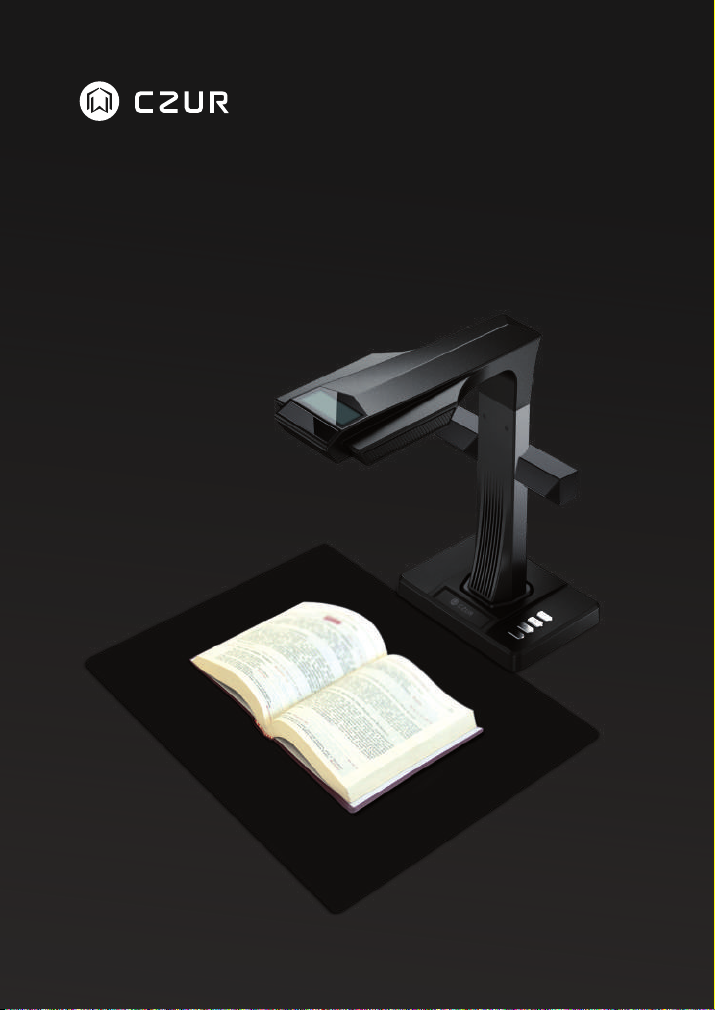
USER MANUAL(ET16 Plus)
Page 2

FCC STATEMENT
1. This device complies with Part 15 of the FCC Rules. Operation is subject to the following two conditions:
(1) This device may not cause harmful interference.
(2) This device must accept any interference received, including interference that may cause undesired
operation.
2. Changes or modifications not expressly approved by the party responsible for compliance could void
the user's authority to operate the equipment.
NOTE: This equipment has been tested and found to comply with the limits for a Class B digital device,
pursuant to Part 15 of the FCC Rules. These limits are designed to provide reasonable protection against
harmful interference in a residential installation.
This equipment generates uses and can radiate radio frequency energy and, if not installed and used in
accordance with the instructions, may cause harmful interference to radio communications. However,
there is no guarantee that interference will not occur in a particular installation. If this equipment does
cause harmful interference to radio or television reception, which can be determined by turning the
equipment off and on, the user is encouraged to try to correct the interference by one or more of the
following measures:
· Reorient or relocate the receiving antenna.
· Increase the separation between the equipment and receiver.
· Connect the equipment into an outlet on a circuit different from that to which the receiver is connected.
· Consult the dealer or an experienced radio/TV technician for help.
FCC Radiation Exposure Statement
This equipment complies with FCC radiation exposure limits set forth for an uncontrolled environment.
This equipment should be installed and operated with minimum distance 20cm between the radiator &
your body.
The symbol indicates DC voltage.
RECYCLING: This product bears the selective sorting symbol for Waste electrical and electronic
equipment ( WEEE ). This means that this product must be handled pursuant to European directive
2012/19/EU in order to be recycled or dismantled to minimize its impact on the environment.
Page 3

Contents
Chapter I Operation Guidelines
1.1 Scanning Preparation ...................................................................................2
1.2 When Open the Software .............................................................................2
1.3 When Scanning ............................................................................................3
1.3.1 Four Processing Methods ....................................................................3
1.3.2 Five Color Modes .................................................................................8
1.3.3 Other Functions ...................................................................................8
1.4 After Scan .....................................................................................................9
1.4.1 Export Function ...................................................................................9
1.4.2 Batch Function ....................................................................................9
1.4.3 Auxiliary Correction ............................................................................10
1.5 Visual Presenter ..........................................................................................11
Chapter II Introduction
2.1 Product Dimensions ....................................................................................11
2.2 Product Appearance ...................................................................................12
2.3 Product Specifications .................................................................................14
2.4 Packaging and Accessories ........................................................................14
Chapter III Terms of Service
3.1 After Sale Service and Guarantee ..............................................................15
3.2 Contact Information ....................................................................................16
Page 4
CZUR TECH CO., LTD.
Chapter I Operation Guidelines
1.1 Scanning Preparation
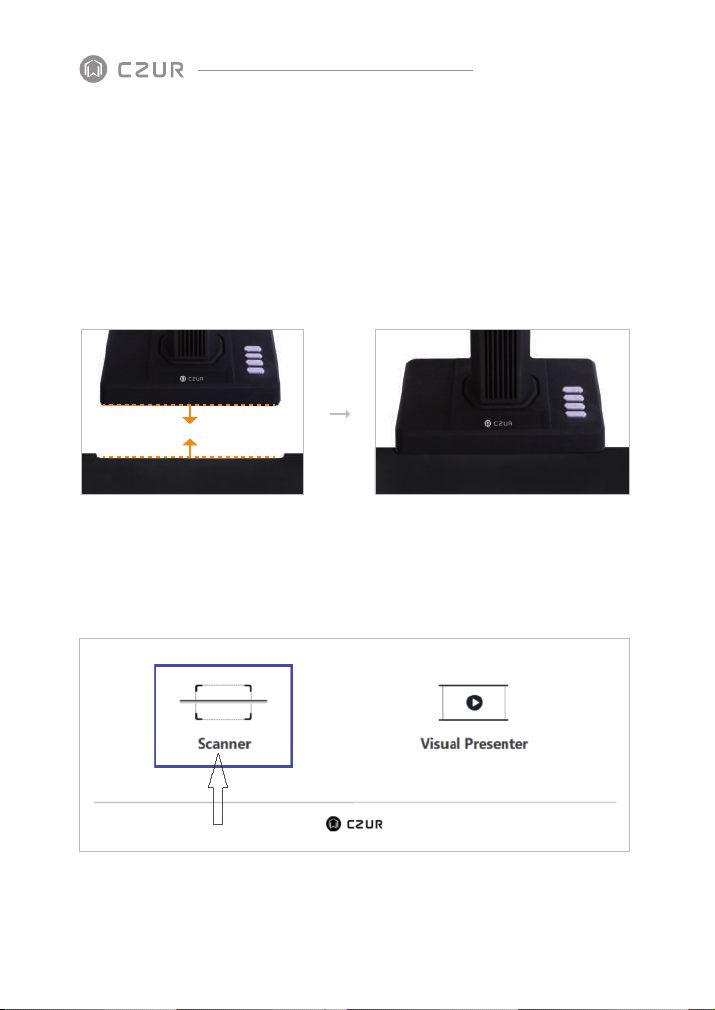
Set up the scanner, and make sure the black document pad is placed like the picture
below. Check the LCD and ensure the black document pad covers the entire screen
without showing its edges.
1.2 When Open the Software
Open page:
Scanner: to scan books/docs
Visual Presenter: to record videos while TFT screen can display
2
Page 5
CZUR TECH CO., LTD.
1.3 When Scanning:
1.3.1 Four Processing Methods
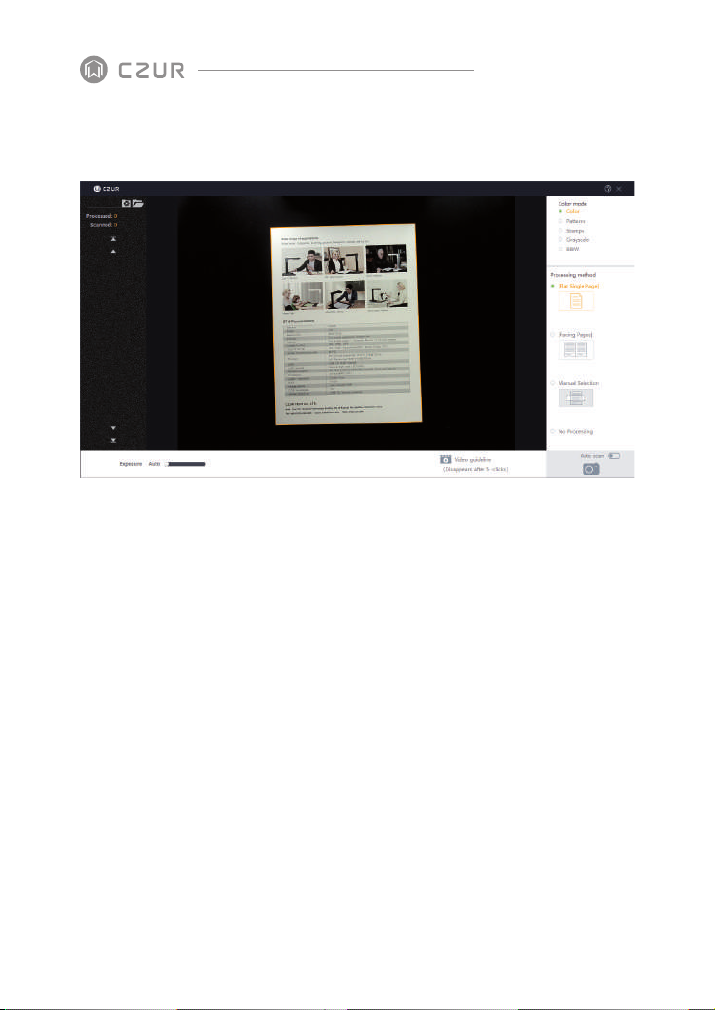
Flat Single Page: to scan unbounded non-curvature documents
1.
The area within the yellowish line is what the after-scan JPG looks like. The lines can
·
automatically adapt to the shape of the document.
The software can auto crop the unnecessary outside of the yellowish line.
·
The software can auto correct the book center even if the book is not placed
·
horizontally.
Note: the following incorrect operation might result in a less satisfying.
scanning result:
When the black document pad doesn’ t properly cover the full screen.
·
3
Page 6
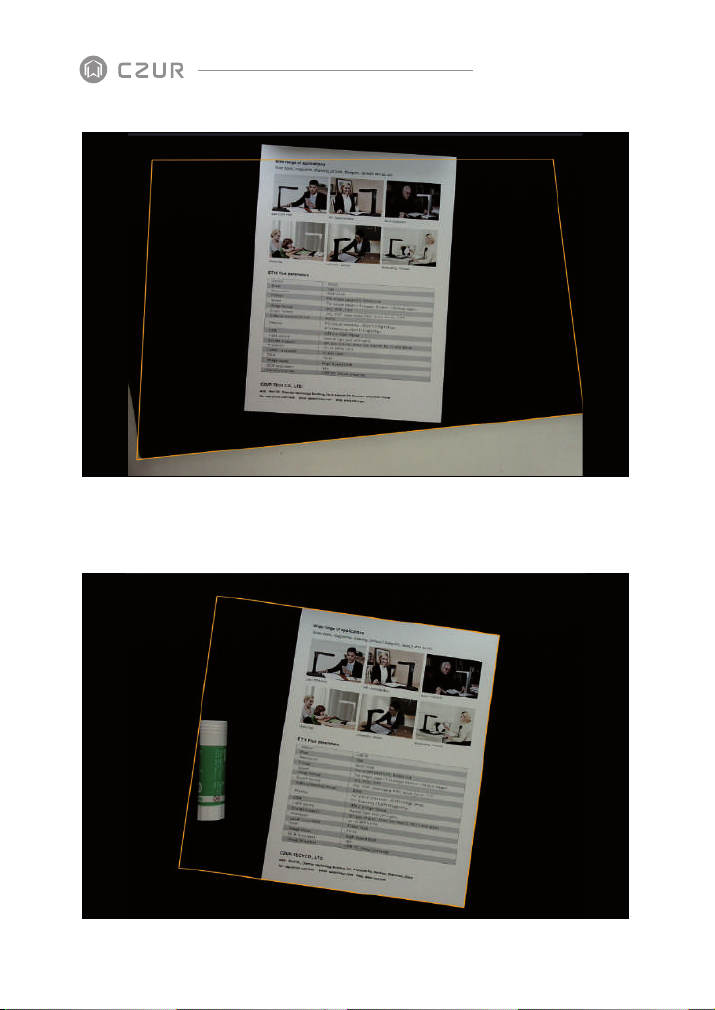
When the other irrelevant objects are on the black document pad.
·
CZUR TECH CO., LTD.
4
Page 7
CZUR TECH CO., LTD.
When the software is in flat single page mode, there is no auto curve-straightening
·
function applied.
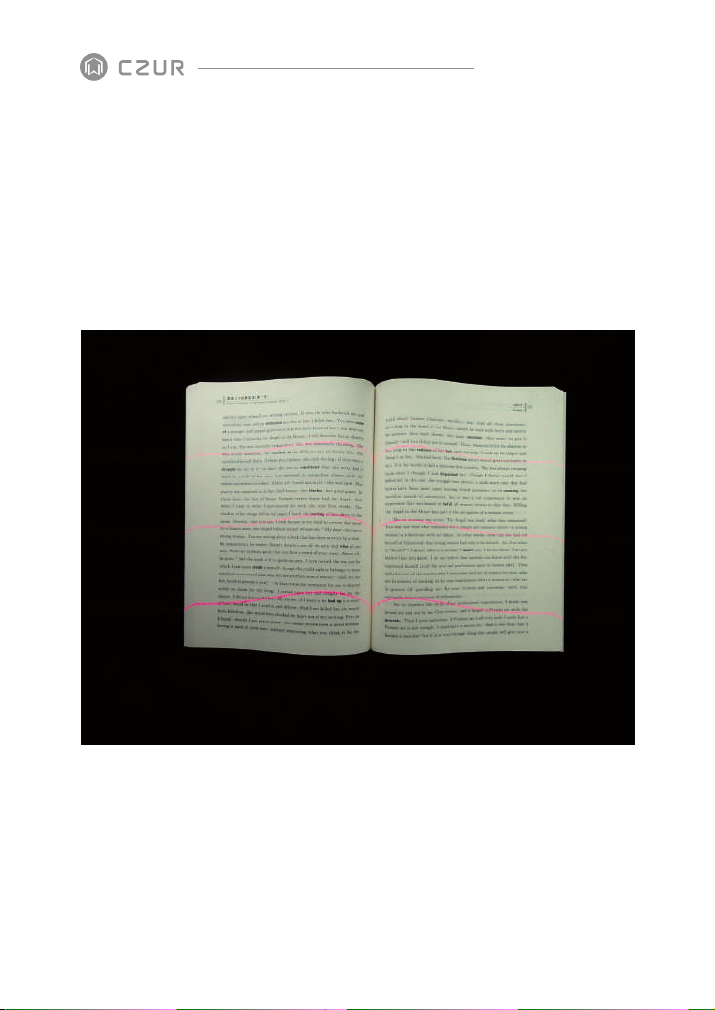
Facing Pages: to scan bounded books with curvature2.
Books must be placed under where the three red lasers are (see picture below). The
·
length of the book must be more than 12cm.
·
Can scan the next page when the three lasers line disappear or when you hear the
hint tone
Note: the following incorrect operation might result in a less satisfying scanning result:
Not using the black document pad.
5
Page 8
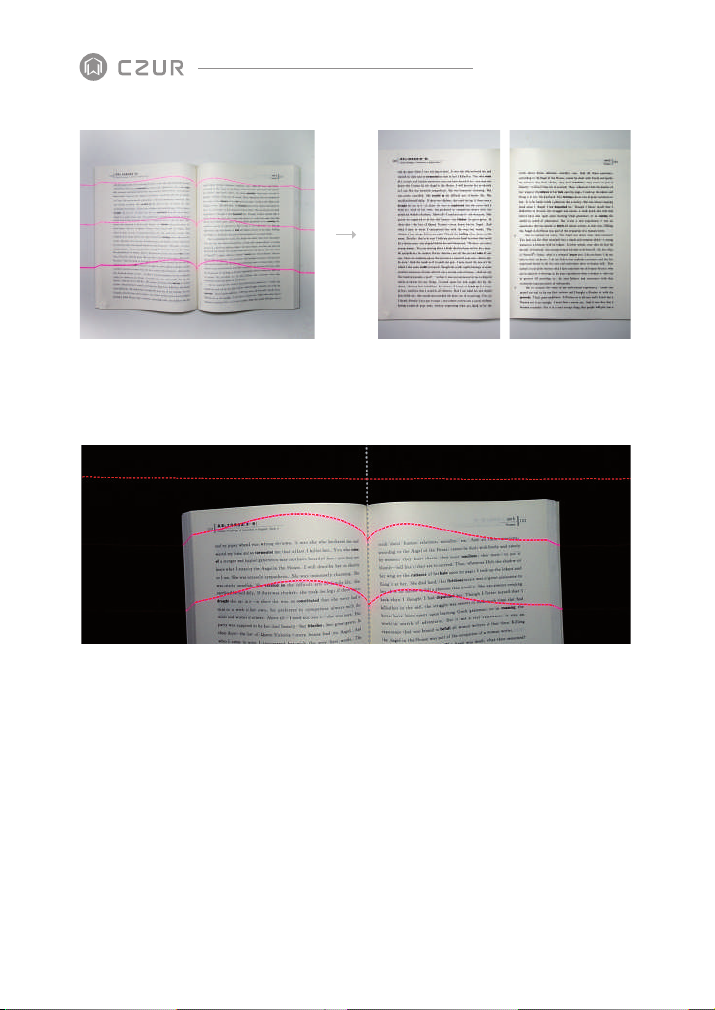
Not all the three lasers are on the books.
·
CZUR TECH CO., LTD.
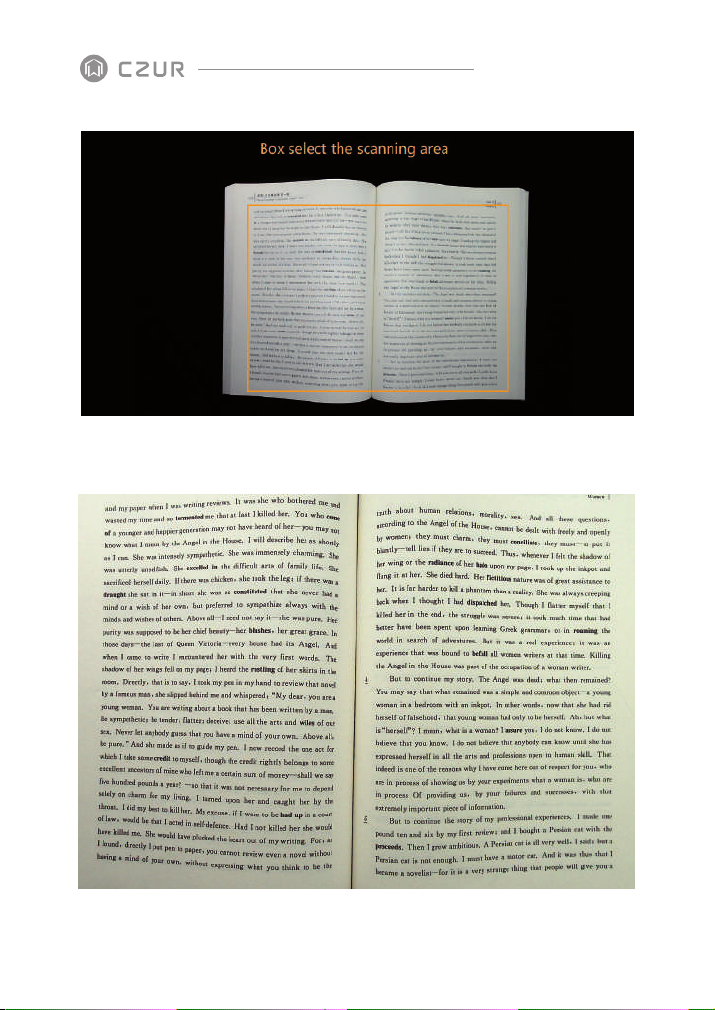
Manual Selection: to manually select the specific area which needs to be scanned. 3.
Note: there is no auto curve-straightening technology used here
6
Page 9
before
CZUR TECH CO., LTD.
after
7
Page 10
CZUR TECH CO., LTD.
No processing: to take a picture of the object and present the object as what it is.4.
1.3.2 Five Color Modes
Color: for docs with colors.
1.
Patterns: for ID card. It maintains the background pattern of ID card or passport.
2.
Stamps: for docs with stamps on. This color mode can maintain the color of the
3.
stamps (only in blue).
Grayscale: for engineering to draw. This mode can make the lines clearer.
4.
B&W: only in black and white. For books and docs with mainly words.
5.
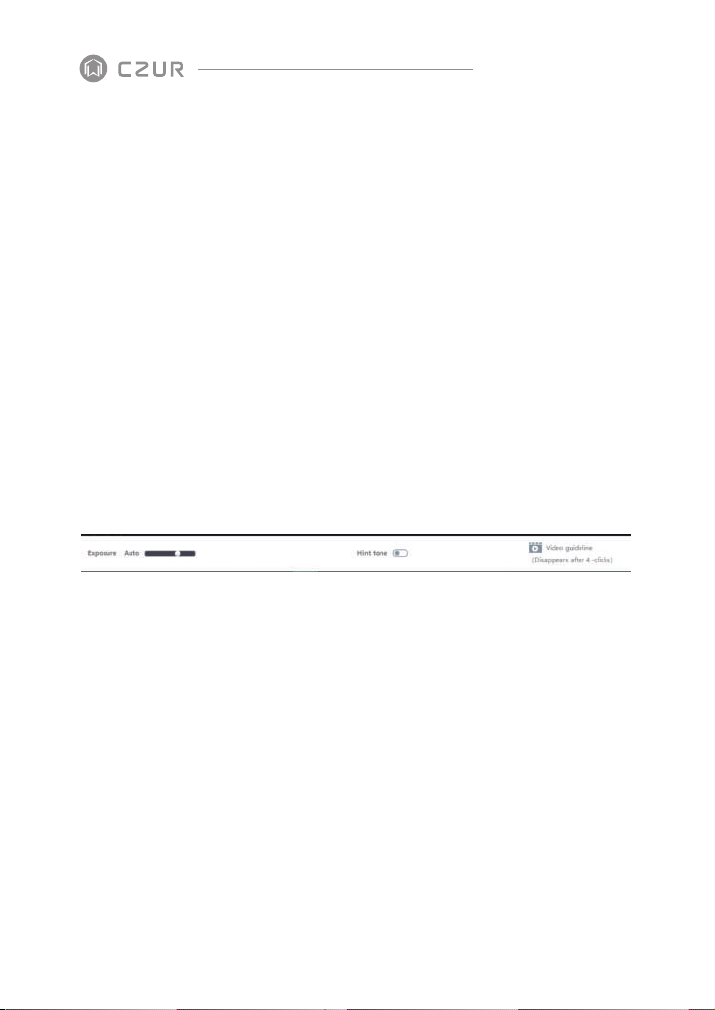
1.3.3 Other Functions:
Auto scan: when it is on, the algorithm will detect when pages are turned.
1.
Exposure: to adjust the camera exposure.
2.
Hint tone: Audible Bell
3.
8
Page 11
CZUR TECH CO., LTD.
1.4 After Scan
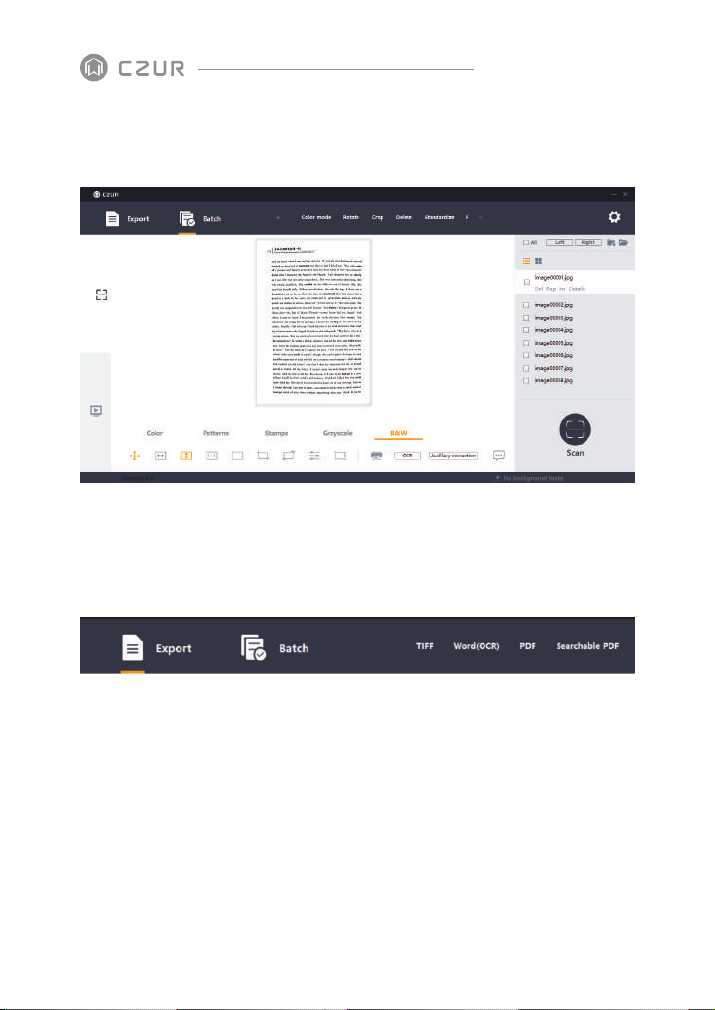
1.4.1 Export Function: to export selected/all images to TIFF,
WORD, PDF, Searchable PDF and Excel.
Note:
If converted to Word, the background color of the pages need to be white and clean
without special characters. Otherwise the OCR might not be able to recognize the words
properly.
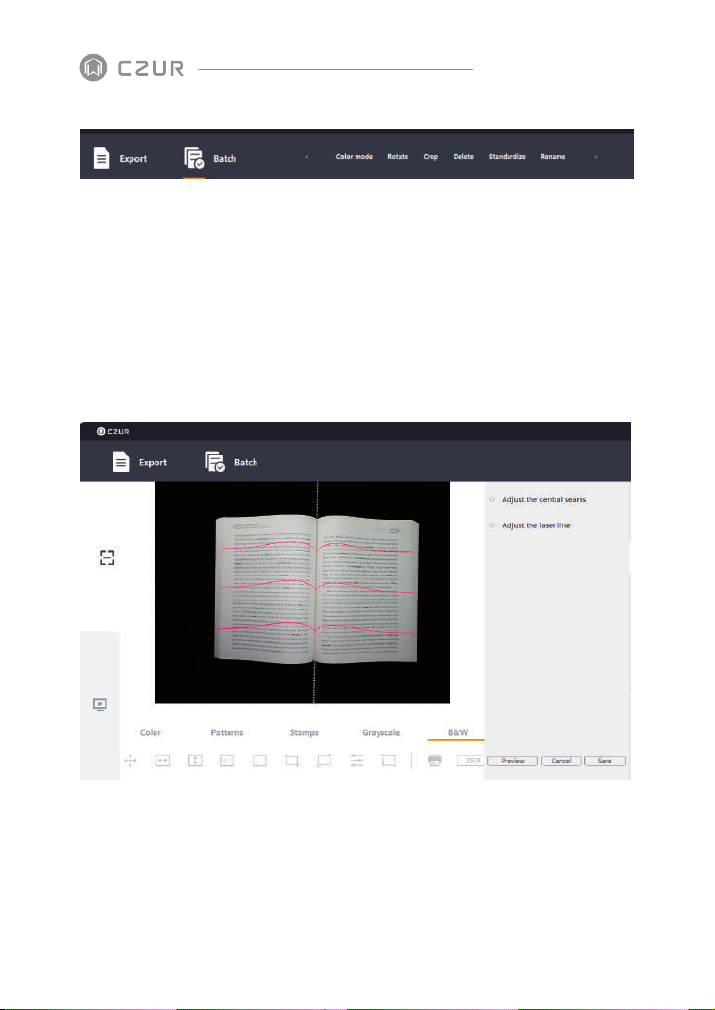
1.4.2 Batch Function: to edit images in batch.
9
Page 12
CZUR TECH CO., LTD.
Standardize: To change the size, DPI (from 72 to 350), color (background color) and
1.
alignment of the selected images.
2.
Quality: adjust the contrast, sharpness and thickness of the images.
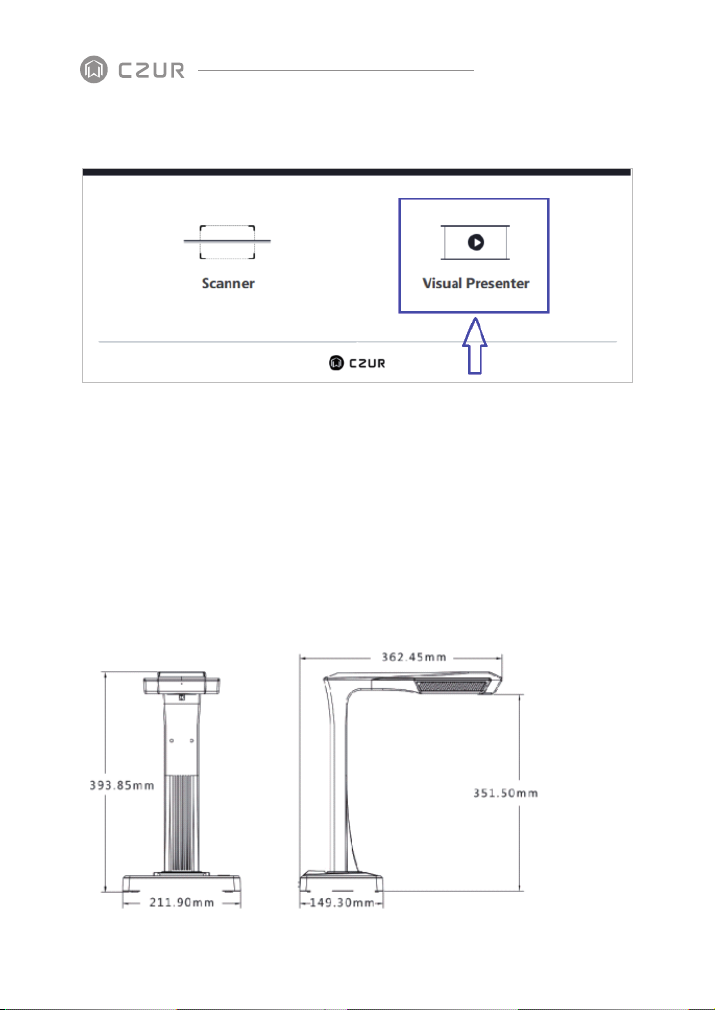
1.4.3 Auxiliary Correction: to show what the docs look like when
scanning with three laser lines.
Adjust the central seams: to edit a photo; Adjust the white line and the software crops
1.
the photo according to the new white line.
2.
Adjust the laser line: to edit a photo; Adjust the laser lines to the indicated laser lines
on the picture.
10
Page 13
CZUR TECH CO., LTD.
1.5 Visual Presenter
Please see the video:
https://www.youtube.com/watch?v=dE1jAfesPUU
https://www.youtube.com/watch?v=072h9INK2Ys (from 29mins to the end)
Chapter II Introduction
2.1 Product Dimensions
11
Page 14
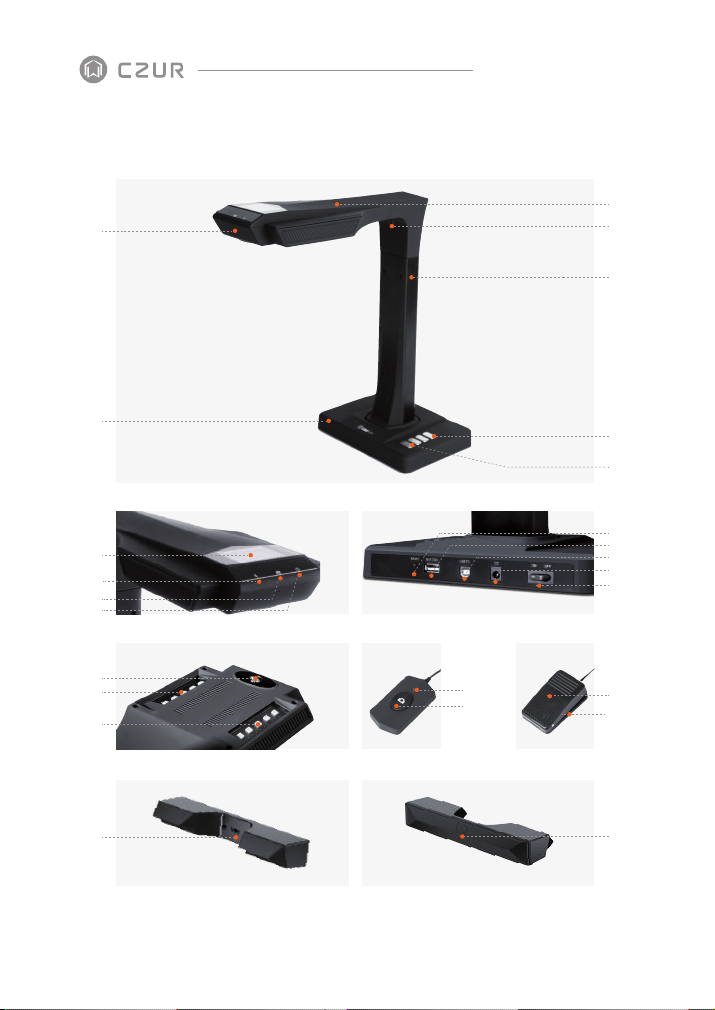
2.2 Product Appearance
1
CZUR TECH CO., LTD.
3
4
5
2
CZUR Scanner
8
9
10
11
12
13
14
24
LCD Connection Ports
20
21
Top Casing Hand Button Foot Pedal
Side Lights Touch ButtonSide Lights Port
6
7
19
18
17
16
15
22
23
25
12
Page 15

Microphone
1.
Base
2.
Top casing
3.
Laser light
4.
Vertical bar
5.
LED brightness(high/low)
6.
Scan(start next scan)
7.
LCD (see LCD Notes below)
8.
Video record indicator light
9.
Blinking green lights= Recording in progress.
Green light off = Video record has been stopped.
Scan indicator light
10.
Power indicator light (White)
11.
HD CMOS camera
12.
Bank of LED lights
13.
Bank of LED lights
14.
Power on/off switch
15.
DC 9V 2A,AC volt 100-240V 50/60Hz
16.
To USB cable for computer connection
17.
USB port for Foot Pedal or Hand Button
18.
Reset button (see Reset Button Notes below)
19.
Hand button light “Scan in progress”
20.
Hand button (to start next scan)
21.
Foot pedal cover
22.
Foot pedal base
23.
Side lights port
24.
Side lights touch button
25.
CZUR TECH CO., LTD.
LCD Notes
LCD= Liquid Crystal Display, a type of flat-panel display screen.
·
·
When connected to a PC, displays if uploading or not to the PC.
Reset Button Notes
Short Press = Retry Connection.
·
Long Press (hold for 6 seconds) = Reset.
·
13
Page 16
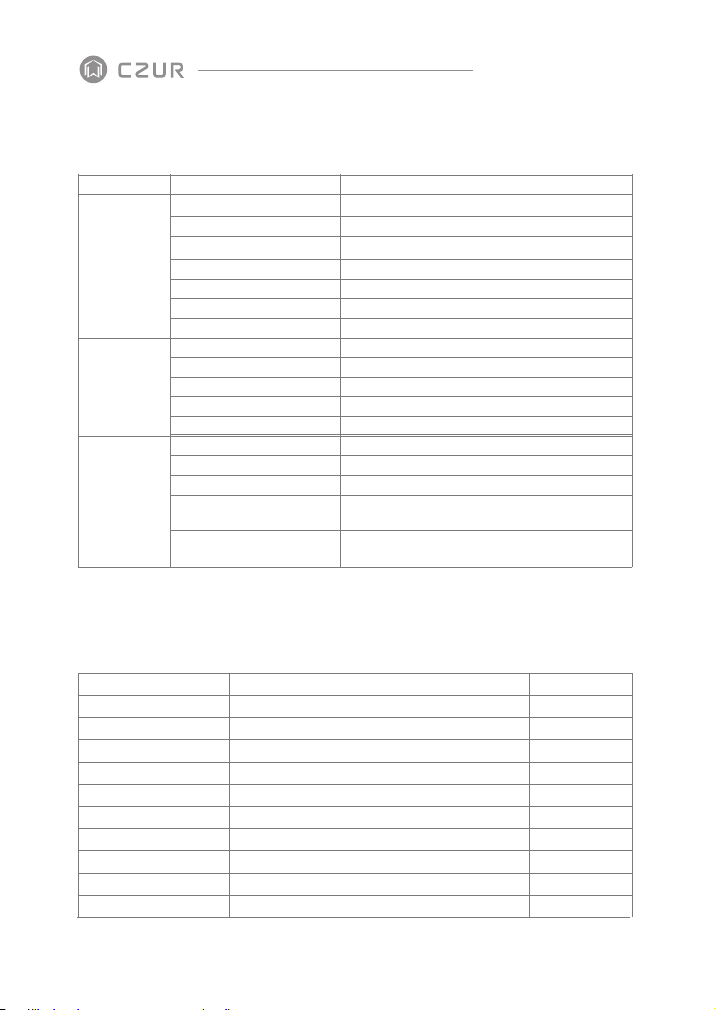
2.3 Product Specifications
CZUR TECH CO., LTD.
Type
Basic
characteristics
Configuration
parameters
Specific
functions
Model
Pixel
Resolution
Scanning speed
Format
Video format
Picture format
Export format
Processor
DDR
Laser rays
LCD
MIC
Smart scan
OCR
SDK
Software function
Operating systems supported
2.4 Packaging and Accessories
Item
Scanner
Side lights
Hand button
Foot pedal
USB cable
AC/DC power adapter
Black document pad
Specialized finger cots
CD-ROM
User manual
Input AC: 100-240V-50/60HZ 0.6A output DC: 9V/2A
CZUR smart scanner
Left hand; Right hand
Color printing, 126*178MM
ET16 Plus
16M
4608*3456
≈1.5S
≤A3
MJPG
PDF/TIFF/WORD/EXCEL/Searchable PDF
Flattening Curve, Finger removal, smart paging, Smart tilt
corrections and auto-cropping, auto-scan.
XP/Win7/Win8/Win10, 32bit/64bit;
Specification
Magnetic connector
USB interface, 1.2M
USB interface, 2.0M
USB interface, 1.5M
530*401*2.0MM
CD-R, D=120MM
JPG
32 MIPS CPU
1Gbit
3 laser rays
√
√
√
√
√
macOS 10.11 and above
Amount (pcs)
1
1
1
1
1
1
1
2
1
1
14
Page 17

CZUR TECH CO., LTD.
Chapter III Terms of Service
3.1 After Sale Service and Guarantee
All after sales policy of this product shall be subject to the laws and regulations of the
·
country of sales.
·
The scope of warranty covers the scanner device, the adapter, the hand button, and
the foot pedal. Consumables and external appearances are not covered by the
warranty.
·
When sending in the product for repairs, please contact us or our local agent.
·
We apologize for not issuing notices for subsequent upgrades or version updates of the
product. This Company reserves the right of final decision on the interpretation of the
above articles.
Warranty scope exception:
·
This product may only be used in areas where surrounding temperature is less than
o
40
C.
·
Failures or damages caused by incorrect installation or using the product in
environments that exceed the specified work conditions (for examples, in places that
are too hot or too humid).
·
Damages caused by using components not from this Company or when the user
attempts to replace components by himself / herself.
Damages caused by natural disasters, accidents, or human factors.
·
Damages caused by inappropriate storage (including damages caused by rats or liquid
·
infiltration) .
Failures or damages caused by unauthorized repairs, modifications, or abuse carried
·
out by the user.
15
Page 18

CZUR TECH CO., LTD.
Damages caused by repairs carried out by unauthorized repair centers.
·
Other errors and failures caused by software installation or software settings, or
·
problems and failures caused by computer viruses.
3.2 Contact Information
Get technical support and information by following ways.
CZUR TECH CO., LTD.
Website: http://www.czur.com/
E-mail: [email protected]
Skype: [email protected]
Room 1701, Oriental Science and Technology Building, No.16, Keyuan Road, Nanshan
District, Shenzhen, China.
Room 911, Building A, Chuangye Mansion, 32th Huoju Road, High-tech District, Dalian,
China.
16
Page 19

CZUR TECH CO., LTD.
Website: http://www.czur.com
E-mail: [email protected]
Skype: [email protected]
Room 1701, Oriental Science and Technology Building, No.16, Keyuan
Road, Nanshan District, Shenzhen, China.
 Loading...