

Page 1

INSTRUCTION MANUAL Ver 1. 0
Speed Dome Camera / SE Series
Page 2
Speed Dome Camera Instruction Manual
2/35
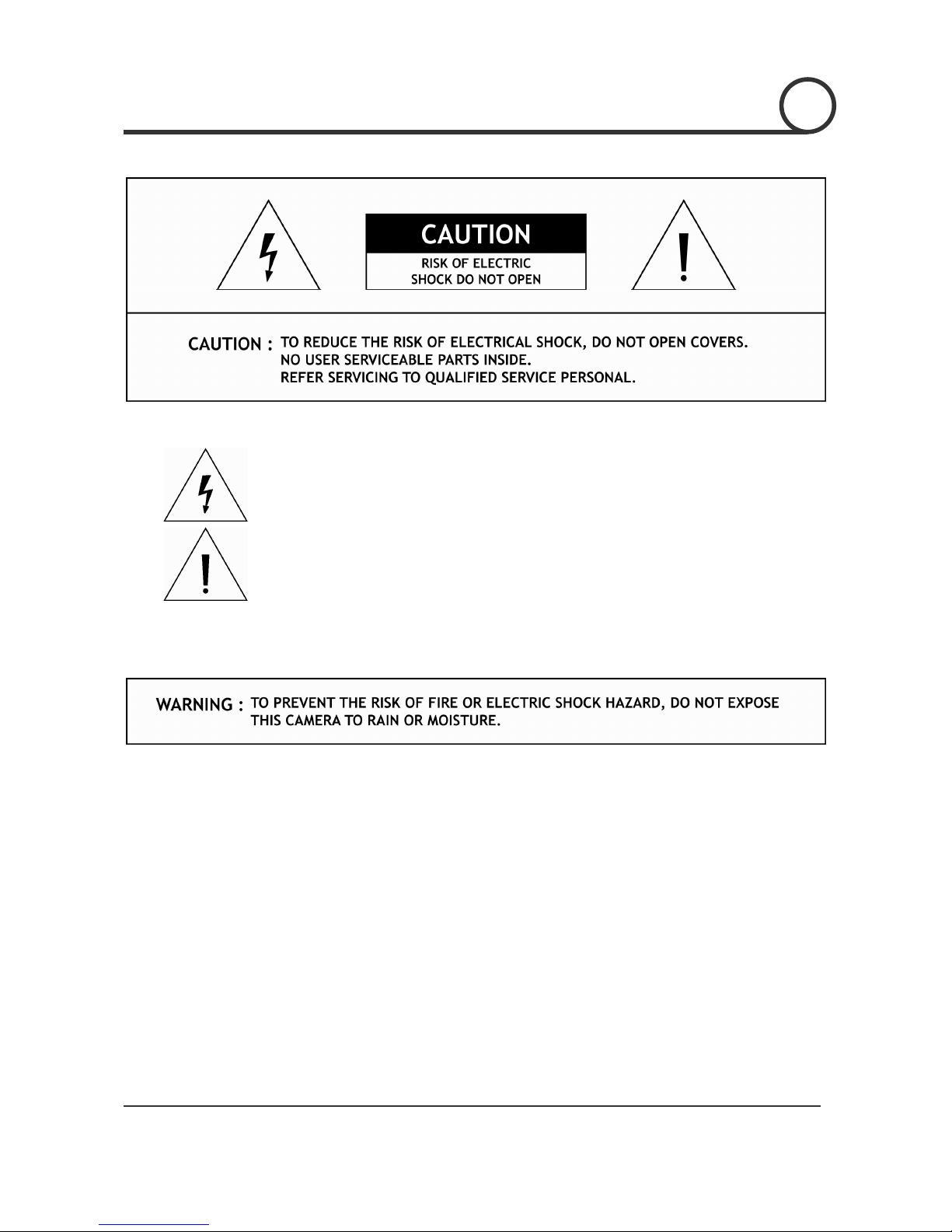
This lightning flash with arrowhead symbol is intended to alert the user to the
presence of uninsulated "dangerous voltage" within the product's enclosure that
may be of sufficient magnitude to constitute a risk of electric shock to persons.
This exclamation point symbol is intended to alert the user to the presence of
important operating and maintenance (servicing) instructions in the literature
accompanying the appliance.
Page 3

Speed Dome Camera Instruction Manual
3/35
Important Safeguard
1. Read Instructions
Read all of the safety and operating instructions before using the product.
2. Retain Instructions
Save these instructions for future reference.
3. Attachments / Accessaries
Do not use attachments or accessories unless recommended by the appliance manufacturer as they may
cause hazards, damage product and void warranty.
4. Water and Moisture
Do not use this product near water or moisture.
5. Installation
Do not place or mount this product in or on ana unstable or improperly supported location. Improperly
installed product may fall, causing serious injury to a child or adult, and damage to the product. Use only
with a mounting device recommended by the manufacturer, or sold with the product. To insure proper
mounting, follow the manufacturer's instructions and use only mounting accessories recommended by
manufacturer.
6. Power source
This product should be operated only from the type of power source indicated on the marking label.
Precautions
Operating
z Before using, make sure power supply and others are properly connected.
z While operating, if any abnormal condition or malfunction is observed, stop using the camera
immediately and then contact your local dealer.
Handling
z Do not disassemble or tamper with parts inside the camera.
z Do not drop or subject the camera to shock and vibration as this can damage camera.
z Care must be taken when you clean the clear dome cover. Especially, scratch and dust will ruin your
quality of camera.
Installation and Storage
z Do not install the camera in areas of extreme temperature, which exceed the allowable range.
z Avoid installing in humid or dusty places.
z Avoid installing in places where radiation is present.
z Avoid installing in places where there are strong magnetic fields and electric signals.
z Avoid installing in places where the camera would be subject to strong vibrations.
z Never expose the camera to rain and water.
NOTICENOTICENOTICENOTICENOTICENOTICENOTICENOTICENOTICENOTICENOTICENOTICENOTICENOTICENOTICENOTICENOTICE
Page 4
Speed Dome Camera Instruction Manual
4/35
○
1
Introduction
Features 5
Product & Accessories
6
Parts Name & Functions
7
○
2
Installation
Rear Bracket Disassembling / Assembling 8
DIP Switch Setup
9
Direct Installation on the Ceiling
12
Installation using In-Ceiling Mount Bracket
13
Installation using Ceiling Mount Bracket
15
Installation using Wall Mount Bracket 16
Cabling
17
○
3
Operation
Checking Before Operation 19
Start OSD Menu
20
Reserved Preset
20
Relay Output Control 20
Preset
21
Swing
21
Group 22
Other Motion Functions
23
OSD Display of Main Screen
24
○
4
How to use OSD Menu
General Rules of Menu Operation 25
Main Menu
25
Display Menu for Main Screen
25
Camera Module Setup
26
Motion Setup
26
Preset Setup
28
Swing Setup
30
Group Setup
31
○5 Specifications
SE-N(P)22CC 32
SE-N(P)22DC
33
Dimension 34
CONTENTS
Page 5
Speed Dome Camera Instruction Manual
5/35
Fe at u re s
Camera Specifications
z CCD Sensor : 1/4" Super HAD CCD
z Zoom Magnification : × 22 Optical Zoom, × 10 Digital Zoom (Max. × 220 Zoom in Total)
z Day & Night Function → SE-x22DC Model
Powerful Pan/Tilt Functions
z Max. 240°/sec high speed Pan/Tilt Motion
z Using Vector Drive Technology, Pan/Tilt motions are accomplished in a shortest path. As a result,
time to target view is reduced dramatically and the video on the monitor is very natural to watch.
z For jog operation using a controller, since ultra slow speed 0.1°/sec can be reached, it is very easy
to locate camera to desired target view.
Preset, Swing and Group Functions
z Max. 64 sets of position and zoom magnification are designated and stored as Preset. For each
Preset, additional information such as Dwell time (pause time in Group action when camera reaches
to a certain Preset position), Alarm action and area Label can be assigned independently to meet to
your requirements.
z 8 of Swing action can be stored. This enables to move camera repetitively between two preset
positions with designated speed.
z 8 set of Group action can be stored. This enables to move camera repetitively with combination of
Preset or Swing. A Group is composed of max. 20 entities of Preset or Swings.
PTZ Control
z With RS-485 communication, max. 255 of cameras can be controlled at the same time.
z Pelco-D or Pelco-P protocol can be selected as a control protocol in the current version of firmware.
OSD(On Screen Display) Menu
z OSD menu is provided to display the status of camera and to configure the functions interactively.
z The information such as Camera ID, Pan/Tilt angle, Alarm I/O, Preset info can be displayed on the
screen.
Alarm I/O Functions
z 2 alarm sensor Inputs and 2 alarm Output relays are available.
z To reject external electric noise and shock perfectly, alarm sensor Input is decoupled with photo
coupler and the relay is used for alarm output.
z The signal range of sensor input is from DC 5.0 to 12.0 volts to adopt various applications.
Meanwhile, the maximum load of relay contact is AC 250V, 5A or DC 28V, 5A.
z If an external sensor is activated, camera can be set to move to the corresponding Preset position.
Meanwhile, the output relay can be matched to some specific Preset positions to do counteractions
such as turning on the light or sound the alarm.
INTRODUCTION
1 1
Page 6
Speed Dome Camera Instruction Manual
6/35
Product & Accessories
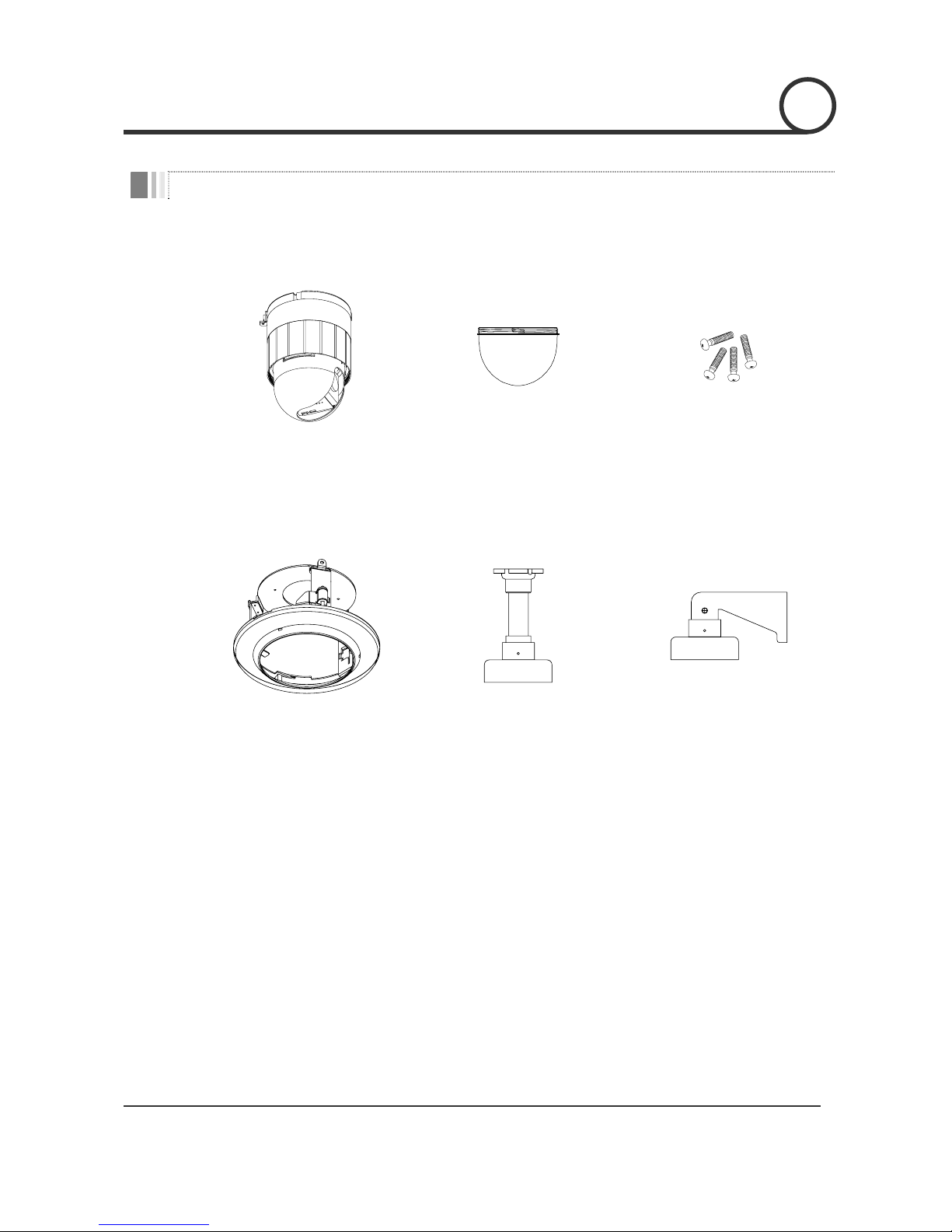
Product & Accessories
z Camera Body z Dome Cover z Screws
Options
z In-Ceiling Mount Bracket
(SBI-100)
z Ceiling Mount Bracket
(SBC-100)
z Wall mount bracket
(SBW-100)
INTRODUCTION
1
Page 7
Speed Dome Camera Instruction Manual
7/35
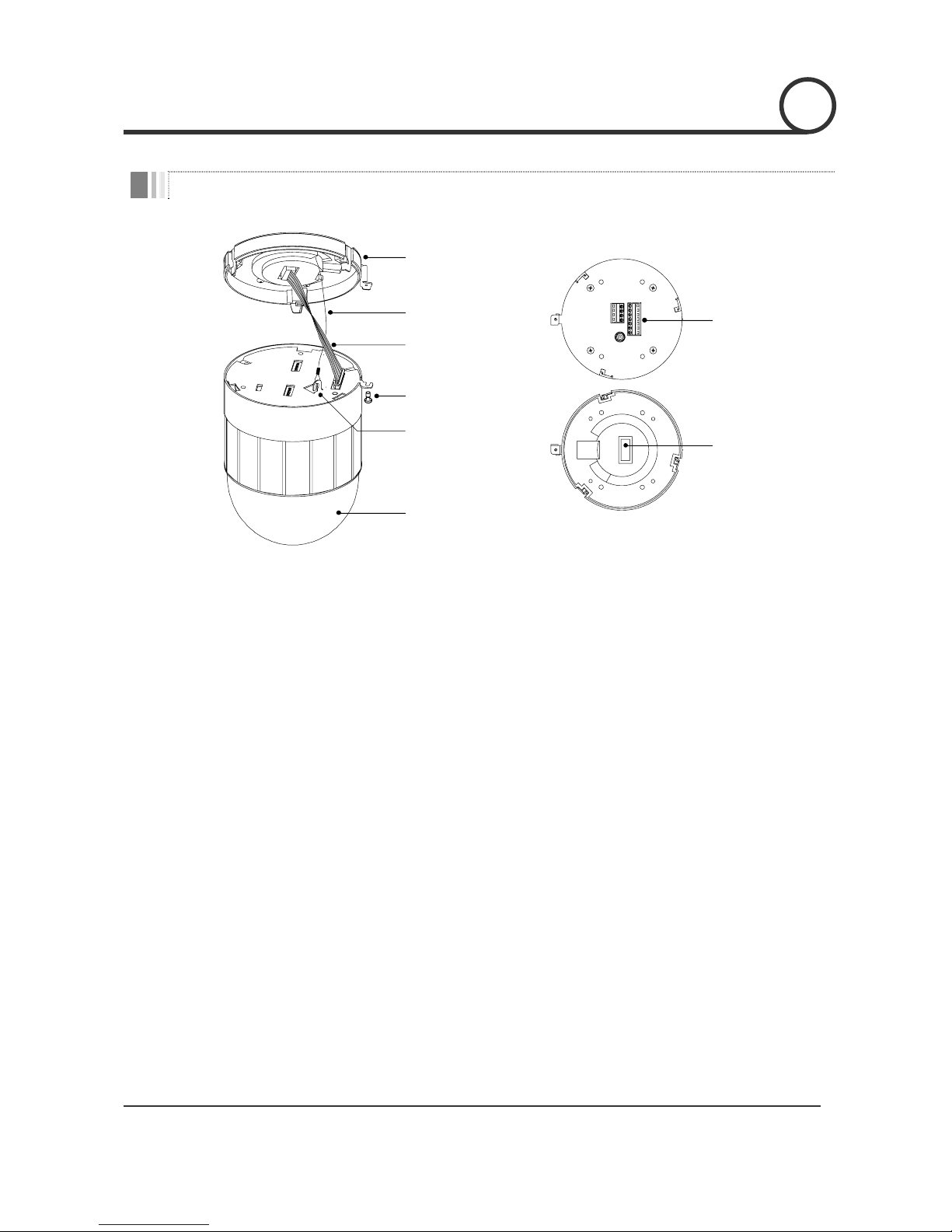
Parts Name & Functions
Rear Bracket
Lockup Screw
Dome Cover
Drop Prevention
Spring
Drop Prevention
Hook
Signal Cable
Fuse
Cabling
Terminal Block
z Main Body z Rear Bracket
z Dome Cover
Care must be taken when you clean the clear dome cover. Since
scratch, finger print and dust on the dome cover will ruin quality of
camera, do not remove the vinyl tape on cover before installation is
completed.
z Rear Bracket
This rear bracket is used to install the camera directly on the ceiling or
attach to the other brackets such as wall, ceiling, and outdoor mount.
After separating this bracket first and then attach this directly to ceiling
or to the other bracket. Camera must be assembled at the last stage.
z Drop Prevention Spring
Drop Prevention Hook
This part keeps the camera from dropping during installation and
maintenance. After install the Rear Bracket, please, hang the spring to
the drop prevention hook of main body as shown in picture for further
tasks.
z Signal Cable
Do not forget to connect this cable before you assemble Rear bracket
and Main body of camera.
z Lockup Screw
Tighten this screw to fix the camera into the bracket after you assemble
Rear bracket and Main body by turning the Main body.
z Fuse
If the fuse is burnt to protect your came from over-current damage, the
fuse have to be replace with new one. The fuse specification is 250V 2A.
However, we recommend consulting with supplier to remove the cause
of over-current.
z Cabling Terminal Block
During installation, Power, Video, Communication, Alarm I/O cables are
connected on to this cabling terminal block.
INTRODUCTION
1
Page 8
Speed Dome Camera Instruction Manual
8/35
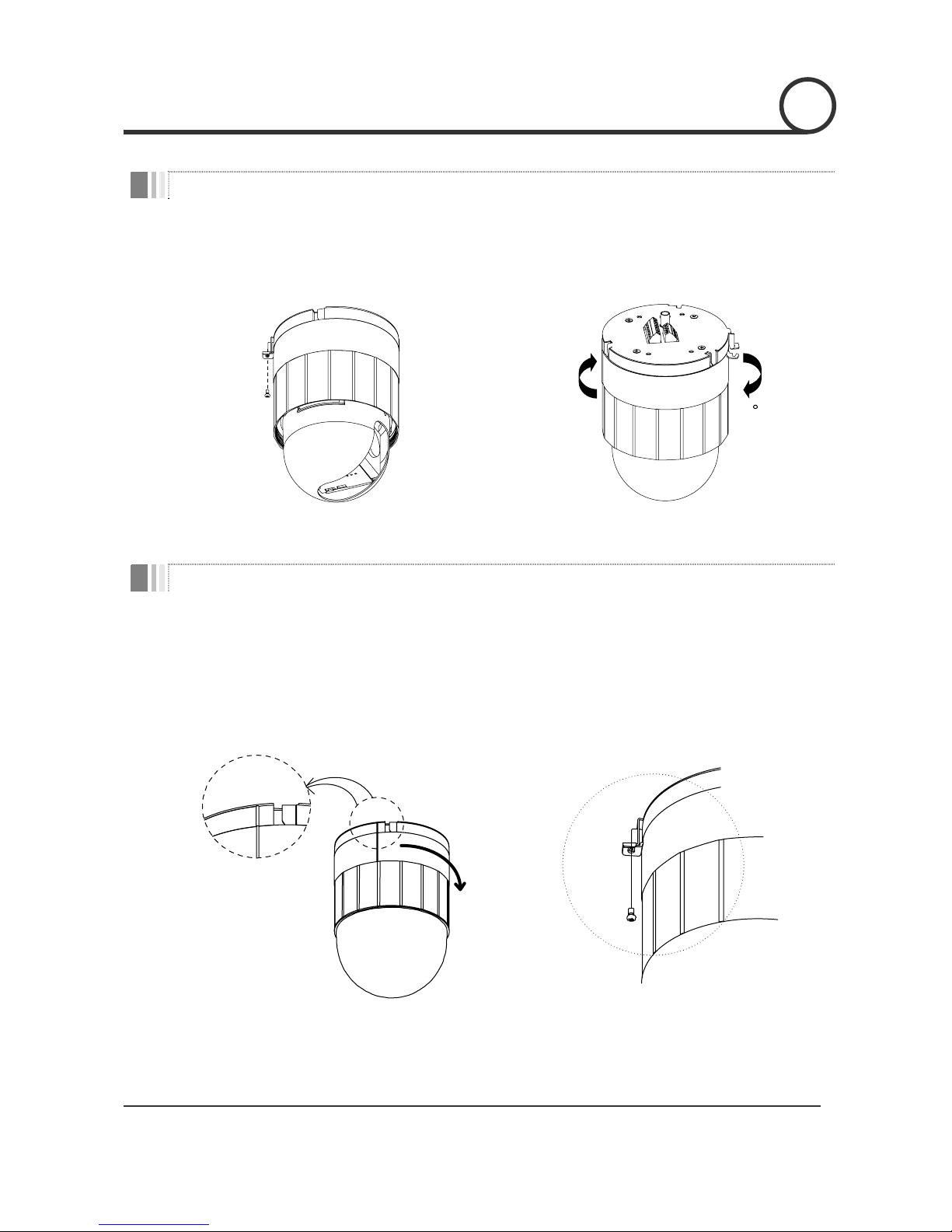
Rear Bracket Disassembling
① Remove the fixing screw as shown bellow. ② Dismantle the Rear bracket by turning main
body about 15°.
15
Rear Bracket Assembling
① After you locate the internal cable properly, place
the Rear Bracket on to Main body by considering
the matching line of both parts as show in picture
bellow. Then, slightly turn the Rear Bracket
clockwise to assemble.
② Tighten the fixing screw as shown bellow.
INSTALLATION
2
Page 9
Speed Dome Camera Instruction Manual
9/35
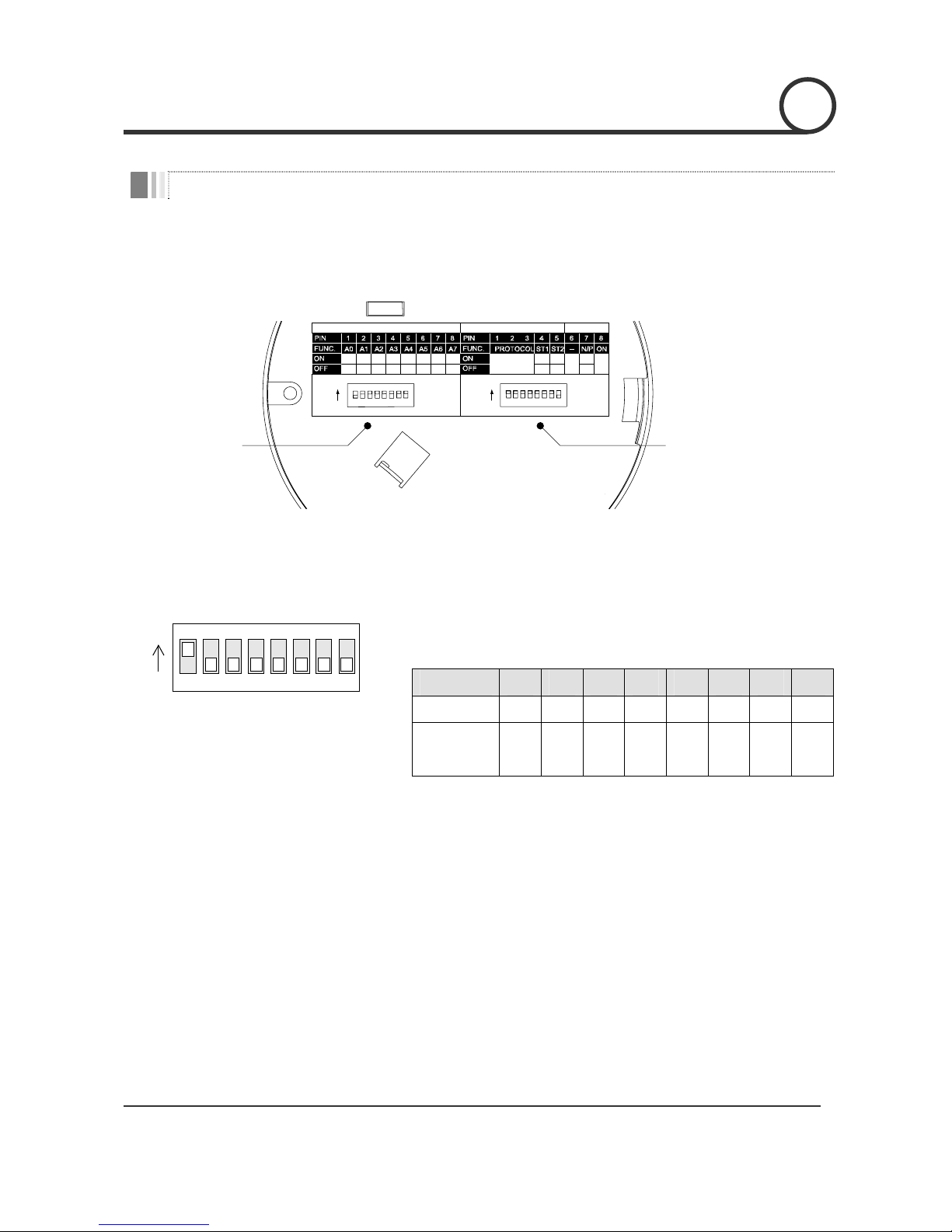
DIP Switch Setup
Before you install the camera, you should set the DIP switches to configure the camera ID, communication
protocol.
1 2 4 8 16 32 64 128
ON
N.C N.C PAL
N.O N.O
NTSC
Refer to
the Manual
0000 0000
ON
OPTIONS
ADDRESS (ID)
RESERVED
Communication Protocol
Sensor Type
Camera ID
Camera ID Setup
123456
ON
ON
78
z ID number of camera is set using binary number. The example is
shown bellow.
Pin 1 2 3 4 5 6 7 8
ID Value 1 2 4 8 16 32 64 128
ex) ID=5 on off on off off off off off
ex) ID=10 off on off on off off off off
z The range of ID is 1~255. Do not use 0 as camera ID. Factory default
of Camera ID is 1.
z If you want to control a certain camera, you must match the camera
ID with Cam ID setting of DVR or Controller. Don’t forget Camera ID.
2
INSTALLATION
Page 10

Speed Dome Camera Instruction Manual
10/35
Communication Protocol Setup
123456
ON
O
N
78
Sensor Type Setup
123456
ON
ON
78
z Select the appropriate Protocol with DIP switch combination.
Switch State
Pin 1 Pin 2 Pin 3
Protocol/Baud rate
OFF OFF OFF PELCO-D, 2400 bps
ON OFF OFF PELCO-D, 9600 bps
OFF ON OFF PELCO-P, 4800 bps
ON ON OFF PELCO-P, 9600 bps
Otherwise Reserved
z If you want to control using DVR or P/T controller, their protocol must
be identical to camera. Otherwise, you can not control the camera.
z If you changed camera protocol by changing DIP S/W, the change
will be effective after you reboot the camera.
z Factory default of protocol is ‘Pelco-D, 2400 bps.
z If you want to use Alarm Input, the types of sensor must be selected.
The sensor types are Normal Open and Normal.
~ Normal Open Output Voltage is high state when sensor is
activated.
~ Normal Close Output Voltage is high state when sensor is not
activated.
Pin No. Switch State Sensot Type
ON Sensor 1 : Normal Close Type
Pin4
OFF Sensor 1 : Normal Open Type
ON Sensor 2 : Normal Close Type
Pin5
OFF Sensor 2 : Normal Open Type
z If sensor type is not selected properly, the alarm can be activated
rever sely.
INSTALLATION
2 2
Page 11
Speed Dome Camera Instruction Manual
11/35
Reserved for Supplier
123456
ON
ON
78
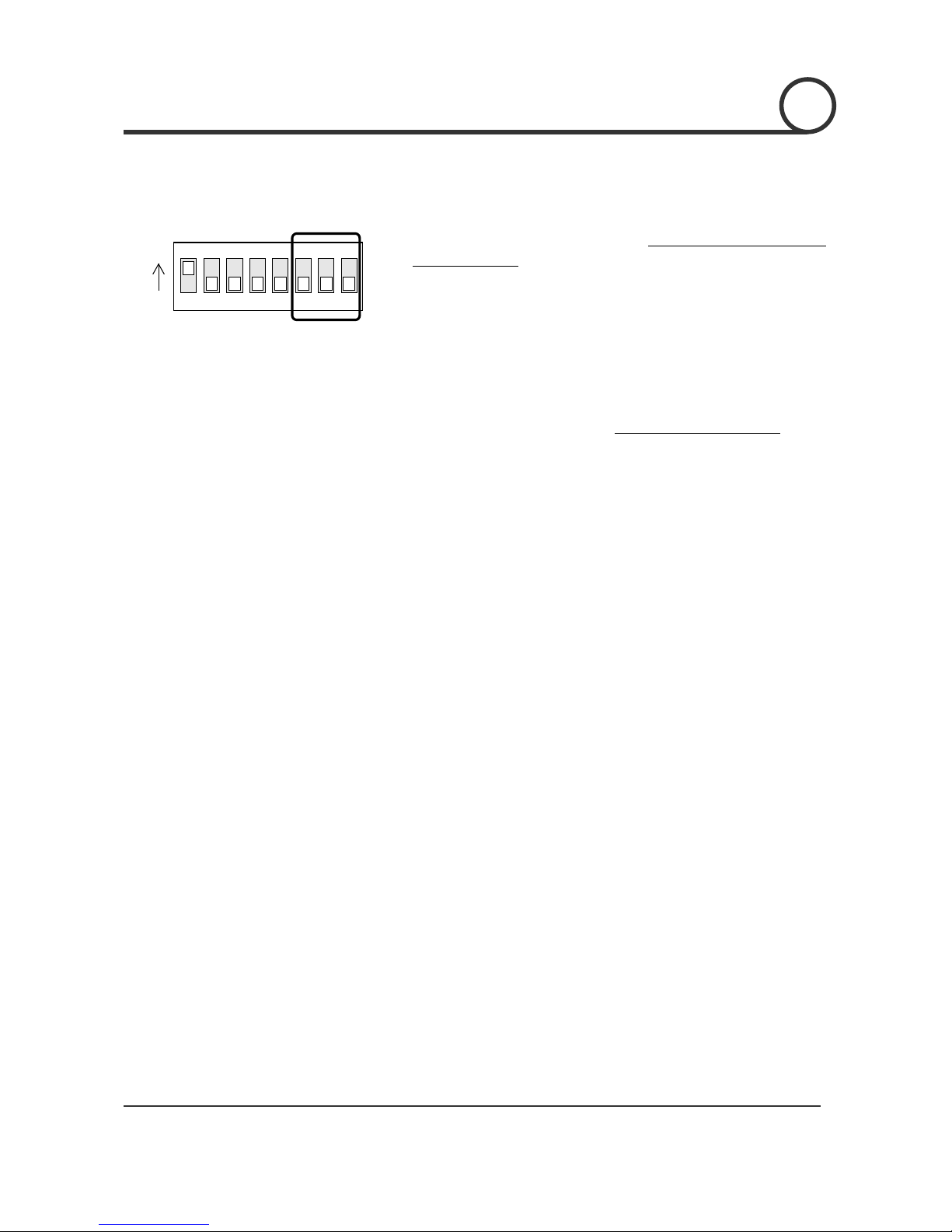
z Since Pin 6 ~ Pin 8 is only for supplier, DO NOT CHANGE THESE ITS
ORIGINAL STATE. If you change one of these, proper operation can
not be achieved.
~ Pin 6 Reserved for future upgrade.
~ Pin7 PAL / NTSC system selection of Camera.
~ Pin 8 Factory default is ON state. This pin is used for system
firmware upgrade. DO NOT CHANGE THIS PIN
.
INSTALLATION
2
Page 12

Speed Dome Camera Instruction Manual
12/35
Direct Installation on the Ceiling
① To pass cables to upside of ceiling, please, make
about 50~60mm hole on the ceiling panel.
② Attach the Rear Bracket to the Ceiling Plate.
③ After install the Rear Bracket, please, hang the
spring to the hook of the Main body. And plug the
connector cable properly.
④ After you locate the internal cable properly,
place the Rear Bracket on to Main body by
considering the matching lines of both parts as
show in picture bellow. Then, slightly turn the
Rear Bracket clock-wise to assemble.
⑤ Tighten the fixing screw as shown bellow.
INSTALLATION
2
Page 13

Speed Dome Camera Instruction Manual
13/35
Installation using In-Ceiling Mount Bracket (SBI-100)
① Cut the panel of Ceiling as shown bellow.
165
353-
1
2
0
1
2
0
Hole Dimension(mm)
② Assemble Rear bracket of camera to the In-
Ceiling Mount Bracket as shown bellow.
③ Place the In-Ceiling Mount Bracket into the hole of
Panel made in step ①.
④ Fasten 3 screws to fix the In-Ceiling Mount
Bracket. The 3 legs of bracket must be located
properly.
⑤ After Insert the camera from bottom, please, hang
the spring to the hook of the Main body. And plug
the connector cable properly.
⑥ After you locate the internal cable properly,
place Main body to the Rear Bracket by
considering the matching lines of both parts.
Then, slightly turn the camera clock-wise to
assemble.
INSTALLATION 2
Page 14

Speed Dome Camera Instruction Manual
14/35
⑦ To assemble Deco. Ring, please, place side cut of
Deco. Ring into contact with protrusion of in-ceiling
mount as shown in the figure. Then, turn the deco.
Ring clock-wise.
INSTALLATION
2
Page 15

Speed Dome Camera Instruction Manual
15/35
Installation using Ceiling Mount Bracket (SBC-100)
① To pass cables to upside of ceiling, please, make
about 50~60mm hole on the ceiling panel and
attach the Ceiling mount bracket on it.
② Assemble the Rear Bracket of camera on to
Ceiling mount bracket.
③ After install the Rear Bracket, please, hang the
spring to the hook of the Main body. And plug the
connector cable properly.
④ After you locate the internal cable properly,
place Main body to the Rear Bracket by
considering the matching lines of both parts.
Then, slightly turn the camera clock-wise to
assemble.
INSTALLATION
2
Page 16

Speed Dome Camera Instruction Manual
16/35
Installation using Wall Mount Bracket (SBW-100)
① After removing the back plate of wall mount
bracket, attach the back cover on to the wall.
After hang the wall mount bracket on to back plate,
tighten the screw in the bottom to fix. Make sure
cable is passed though properly.
② Assemble the Rear Bracket of camera on to wall
mount bracket.
③ After install the Rear Bracket, please, hang the
spring to the hook of the Main body. And plug the
connector cable properly.
④ After you locate the internal cable properly,
place Main body to the Rear Bracket by
considering the matching lines of both parts.
Then, slightly turn the camera clock-wise to
assemble.
2
INSTALLATION
Page 17

Speed Dome Camera Instruction Manual
17/35
Cabling
12V DC
Monitor
Keyboard Controller / DVR
RS-485
BNC
I/O
Power
IrDA
Sensor
Door
Switch
Light
Alarm
Buzzer
Sensor Output Devices
Power Connection
z Please, check the voltage and current capacity of power carefully. The rated electrical power to operate
this camera is DC 12V / 1A. The current must be 1A or higher.
z Be careful with polarity of power, the polarity is molded on the connector. If reverse polarity is applied,
the camera will be damaged seriously.
Video Connection
z Connect with BNC coaxial cable.
RS-485 Communication
z For PTZ control, connect this line to keyboard and DVR. To control multiple cameras at the same time,
RS-485 communication lines of them is connected in parallel as shown below.
RS-485
+
-
#1
+
-
#2
+
-
#n
+
-
K
eyboard Controller / DVR
INSTALLATION
2
Page 18

Speed Dome Camera Instruction Manual
18/35
Alarm I/O Connection
z Sensor Input
IN COM+
Internal
+5V~12V
IN 1-
IN 2-
Sensor 1 Output
+
+
-
-
+
-
Sensor 2 Output
Before connecting sensors, check driving voltage and output signal type of the sensor. Since output
signal types of the sensors are divided into Open Collector and Voltage Output type in general, the
cabling must be done properly after considering these typed. Also, the sensor type, i.e. “Normal Open”
or “Normal Close” in Dip switch in Rear bracket of camera must be set properly.
Signal Description
IN COM+ Connect (+) cable of electric power source for Sensors to this port as shown in the
circuit above.
IN1 -, IN2 - Connect output of sensors for each port as shown in the circuit above.
z Relay Output
OUT 1
AC or DC
OUT 2
AC or DC
Internal
LOAD
LOAD
Maximum allowable electrical load of relay is shown bellow table.
Drive Power DC Power AC 110V Power AC220V Power
Max. Load DC 28V, 5A AC110V, 10A AC250V, 5A
2
INSTALLATION
Page 19

Speed Dome Camera Instruction Manual
19/35
Check points before operation
z Before power is applied, please, check the cables carefully.
z The camera ID of the controller must be identical to that of the target camera. The camera ID can be checked
by reading DIP switch of the camera.
z If your controller supports multi-protocols, the protocol must be changed to match to that of the camera.
z If you changed camera protocol by changing DIP S/W, the change will be effective after you reboot the
camera.
z Since the operation method can be different for each controller available, refer to the manual for your
controller if camera can not be controlled properly. The operation of this manual is based on the standard
Pelco® Controller.
OPERATION
3
Page 20

Speed Dome Camera Instruction Manual
20/35
Starting OSD Menu
z Function Using the OSD menu, Preset, Swing, Group and Alarm I/O function can be configured
for each application.
z Start Menu After type the numeric key 95, press the Preset key to start OSD menu.
[95] + [Preset]
Reserved Preset
z Description Some Preset numbers are reserved to special functions.
z Function Preset 95 : Menu Select
Preset 71~78 : Swing Move
Preset 81~88 : Group Move
Preset 91~92 : Relay Output Control
Relay Ouput Control
z Function From keyboard or DVR, the relay output can be controlled by using Preset function. It is
noted that the output can be changed according to preset settings if you send the preset
command.
z To se t “ON” After typing (Relay Number + 90), press Preset key longer than 2 seconds.
[91~92] + [Preset] (longer than 2 sec.)
Ex) To set “ON” Relay 1: [91] + [Preset] (longer than 2 sec)
To set “ON” Relay 2: [92] + [Preset] (longer than 2 sec)
z To set “OFF”
After typing (Relay Number + 90), press Preset key.
[91~92] + [Preset]
Ex)
To set “OFF” Relay 1: [91] + [Preset]
To set “OFF” Relay 2: [92] + [Preset]
OPERATION
3
Page 21

Speed Dome Camera Instruction Manual
21/35
Preset
z Function Max. 64 positions can be stored as Preset position. Using Preset key together with
numeric keys in the controller, Preset can be stored or executed quickly. If you want to
change the factory default of Preset configuration (i.e. Labe1 of preset is blank, Dwell
time is 3 sec and Relay out is OFF.), those settings for each preset can be configured
using the OSD menu.
z Set Preset After you type 1 ~ 64 numeric key, press Preset key for longer than 2 seconds.
[1 ~ 64] + [Preset] (press longer than 2 seconds)
z Run Preset After you type 1 ~ 64 numeric key, press Preset key shortly.
[1 ~ 64] + [Preset] (press shortly)
z Delete Preset To delete Preset, use OSD menu.
Swing
z Function By using Swing function, we can make camera to move between 2 Preset positions
repeatedly. Swing speed can be selected from 3 steps i.e. FAST, NORMAL and SLOW. To
maintain observing capability regardless of zoom, the swing speed is automatically
adjusted to be proportional to zoom magnification. When zoom magnification is x1, the
nominal speed for FAST, NORMAL and SLOW mode is 60°/sec, 30°/sec and 15°/sec
respectively.
z Set Swing To set Swing, use OSD menu.
< Using controller with Pattern key >
After you type a numeric key Swing No. + 10 (i.e. 11~18), press Pattern key in
the controller.
[11~18] + [Pattern] Ex) If Swing number is 3, press 13 + Pattern
z Run Swing
< Using controller without Pattern key >
After type 70+Swing No. (i.e. 71~78), pre s s Preset key in the controller.
[71~78] + [Preset] Ex) If Swing number is 3, press 73 + Preset
z Delete Swing To delete Swing, use OSD menu.
OPERATION
3
Page 22

Speed Dome Camera Instruction Manual
22/35
Group
z Function The group function allows running sequence of Presets and/or Swings. Max 8 group can
be stored. Each group can have max 20 action entities which can be preset or swing.
The group can be created, modified and deleted using menu. Also, dwell time defined
in the preset menu is effective when group is running.
Preset 1 Preset 5 Swing 1
Max 20 Entities
Dwell Time
z Set Group Use OSD Menu to create a Group.
z Run Group < Using controller with Pattern key >
After you type a numeric key 20+Group No. (i.e. 21~28), press Pattern key in the
controller.
[21~28] + [Pattern] Ex) If group number is 5, press 25 + Patter n
< Using controller without Pattern key >
After type 80+Group No. (i.e. 81~88), press Preset key in the controller.
[81~88] + [Preset] Ex) If Swing number is 5, press 85 + Preset
z Delete Group Use OSD Menu to delete.
OPERATION
3
Page 23

Speed Dome Camera Instruction Manual
23/35
Other Functions
z Power Up Action This function enables to resume the last action executed before power down. Most of
actions such as Preset, Swing and Group are available for this function but Jog actions
are not available to resume.
z Park Action This function enables to locate the camera to specific position automatically if operator
doesn’t operate the controller for a while. The Park Time can be defined as a interval
from 1 min. to 4 hours.
z Origin Position Using this function, the Origin position can be defined by operator. The Pan angle
display will be changed if you change the origin position. It is noted that tilt angle is not
affected by this function. The factory default of origin is the canter of pan range i.e.
home position.
z Alarm I/O 2 Alarm Input and 2 Alarm output (Relay output) are used. If an external sensor is
activated, camera can be set to move to corresponding preset position. Also, the output
relay can be matched to some specific preset positions to do counteractions such as
turning on the light or sounding the alarm. It is noted that the latest alarm input is
effective if multiple sensors are activated.
OPERATION
3
Page 24

Speed Dome Camera Instruction Manual
24/35
OSD Display of Main Screen
LABEL12345 PRESET 1
I:1- O:-2
CAM 1 28/-42 x1
P/T/Z InformationCamera ID
Alarm Information
Action Title
P
reset Label
z P/T/Z Information Current Pan/Tilt angle in degree and zoom magnification.
z Camera ID Current Camera ID.
Followings are possible Action Titles and their meaning.
"SET PRESET ××" When Preset xx is stored
"PRESET ××" When camera reach to Preset xx
"UNDEFINED" When undefined Preset number is called to move
"SWG ×-PRESET ××" When Swing x is in action
z Action Title
"PARKING" When Park function is executed
z Preset Label The Label stored for specific Preset.
z Alarm Information This information shows current state of Alarm I/O. The character ‘O’ stands for Output
and ‘I’ means Input. If an I/O point is ON state it will show a number corresponding to
each point. If an I/O point is OFF state, '-' will be displayed.
Ex) Point 2 of inputs are ON and 1 of outputs are ON state. OSD will show as bellow.
I:-2 O:1-
OPERATION
3
Page 25

Speed Dome Camera Instruction Manual
25/35
General Rules of Key Operation for Menu
z The menu items surrounded with ( ) always has its sub menu.
z For all menu level, to go into sub menu, press Near key, to go up to upper menu, press Fa r key. If you learn
by heart a rule that Near key is always similar to Enter key and Fa r key is always Esc key, many other
functions of these keys will be easy to understand.
z To move from items to item in the menu, use joystick in the Up/Down or Left/Right.
z If you want to confirm a menu item, press Near.
z To change a value of an item, use Up/Down of the joystick in the controller.
z After you change a value, press Near key to save it or press Fa r key to cancel it.
Main Menu
SPEED DOME CAMERA
----------------------------- (SYSTEM INFORMATION)
(OSD DISPLAY SETUP)
(DOME SETUP)
(FACTORY RESET)
EXIT
Display Setup
DISPLAY SETUP
----------------------------- CAMERA ID ON
PTZ INFORMATION AUTO
ACTION TITLE AUTO
PRESET LABEL AUTO
ALARM I/O AUTO
BACK
EXIT
z System Information Display System Information.
z OSD Display Setup Enable/Disable of OSD display on Main
Screen.
z Dome Setup Configure Various Functions of this camera.
z Factory Reset Return to Factory default configuration.
This menu defines Enable/Disable of OSD display on Main Screen. If an
item is set to be AUTO, the item is displayed only when the value of it is
changed.
z Camera ID z Camera ID
z PTZ Information z PTZ Information
z Action Title z Action Title
z Preset Label z Preset Label
z Alarm Information z Alarm Information
HOW TO USE OSD MENU
4
Page 26

Speed Dome Camera Instruction Manual
26/35
CAMERA SETUP
CAMERA SETUP
----------------------------- COLOR ON
FOCUS MODE AUTO
BACKLIGHT OFF
WHITE BAL. AUTO
DIGITAL ZOOM ON
DAY/NIGHT AUTO
BACK
EXIT
Motion Setup
MOTION SETUP
----------------------------- PWR UP ACTION ON
JOG SPEED NORMAL
JOG DIRECTION INVERSE
(PARK ACTION)
(ORIGIN POSITION)
(ALARM DEFINE)
BACK
EXIT
Setup the general functions of zoom camera module.
z Color [ON/OFF]
z Focus Mode [AUTO/MANUAL]
z Backlight [ON/OFF]
z White Balance [AUTO/SPECIAL/INDOOR/OUTDOOR/
MANUAL/ PUSH AUTO]
z Digital Zoom [ON/OFF]
z Day / Night [AUTO/NIGHT/DAY]
♣
♣
Day & Night function is available for SE-x22DC model.
Setup the general functions of Pan/Tilt motions.
z Power Up Action [ON/OFF]
[FAST/NORMAL/SLOW]
The nominal jog speed is listed below when
zoom is x1. As zoom magnification is increased,
the speed will be decreased to maintain equal
controllability.
FAST 120°/sec
NORMAL 60°/sec
SLOW 30°/sec
z Jog Speed
z Jog Direction [INVERSE/NORMAL]
If you set this to ‘Inverse’, the view in the
screen is moving same direction with jog
tilting. If ‘Normal’ is selected, the view in
the screen is moving reversely.
z Park Action Activate Park function.
z Origin Position Redefine particular pan position to Origin.
z Alarm Define
Match the Alarm sensor input to one of current
Preset positions.
4
HOW TO USE OSD MENU
Page 27

Speed Dome Camera Instruction Manual
27/35
Park Action Setup
PARK ACTION
----------------------------- PARK ENABLE OFF
PARK TIME 00:10:00
PARK ACTION PRESET 1
BACK
EXIT
Origin Position Setup
ORIGIN POSITION SETUP
----------------------------- USER ORIGIN ON
(ORIGIN POSITION)
BACK
EXIT
Alarm Input Setup
ALARM DEFINE
----------------------------- ALARM 1 ACT PRESET 1
ALARM 2 ACT NOT USED
BACK
EXIT
4
HOW TO USE OSD MENU
This function enables to locate the camera to specific position
automatically if operator doesn’t operate the controller for a while. The
Park Time can be defined as an interval from 1 min. to 4 hours.
z Park Enable [ON/OFF]
z Park Time [1 min ~ 4 hours]
The time is displayed with "hh:mm:ss" format
and you can change this by 1 min unit.
z Park Action [Preset 1~64]
You can redefine particular pan position to Origin position.
z User Origin [ON/OFF]
z Origin Position If you choose this menu, you can move pan
position by joystick and redefine Origin.
Match the Alarm sensor input to one of Preset positions. If an external
sensor is activated, camera will move to corresponding preset position
when this item is predefined.
z Alarm × Action [NOT USED, PRESET 1~64]
Assign counteraction Preset position to each
Alarm input.
Page 28

Speed Dome Camera Instruction Manual
28/35
PRESET Setup
PRESET SETUP
----------------------------- PRESET NUMBER 1
DWELL TIME 00:00:03
(RELAY OUT) -2
(EDIT LABEL)
(PRESET SCENE)
(CLEAR PRESET)
BACK
EXIT
Relay Output Setup
EDIT RELAY OUT
----------------------------- PRESET NO. 1
RELAY OUT 1 OFF
RELAY OUT 2 OFF
BACK
EXIT
z Preset Number [1~64]
Select a preset number to create or modify. If the
current Preset number is predefined, camera will
move to stored position and zoom automatically
to check them.
z Dwell Time [1 sec ~ 4 min]
The time is displayed with "hh:mm:ss" format.
z Relay Out Define Relay output. If an Output point is ON
state it will show a number corresponding to
each point. Otherwise, '-' will be displayed.
z Edit Label Edit the Label for a specific Preset position. A
Label can be named with max 10 characters. This
label is automatically displayed on the upper left
corner of the screen whenever you move to the
corresponding preset position.
z Preset Scene Redefine current Preset scene position (i.e. PTZ).
z Clear Preset Delete current Preset data.
z Relay Out × [ON/OFF]
Toggle corresponding relay output state to
[ON/OFF].
4
HOW TO USE OSD MENU
Page 29

Speed Dome Camera Instruction Manual
29/35
Edit Preset Label
LABEL FOR PRESET 1
----------------------------- LABEL
1234567890 OK
ABCDEFGHIJ CANCEL
KLMNOPQRST
UVWXYZabcd
efghijklmn
opqrstuvwx
yz<>-/:.
Edit Preset Scene
SET PRESET 1
------------------------------
USE THE JOYSTICK OR KEY
TO POSITION THE CAMERA
PRESS NEAR TO SAVE
PRESS FAR TO CANCEL
0/-42 x1
○1 Using Joystick, move camera to desired position.
○
2
By pressing Near key, save current PTZ data.
○3 Press Far key to cancel.
① The blinked cursor of LABEL represents current position to be
selected from the set of characters bellow. If you choose a
character, the cursor will move to the right.
② Using Left/Right/Up /Down of joystick, move to an appropriate
character from the Character set. To choose that character, press
the Near key.
If you want to use blank, choose Space character (" "). If you want to
delete a character before, use back space character (" ←").
③ If you complete the Label editing, move cursor to "OK" and press
Near key to save completed label. To abort current change, move
cursor to "Cancel" and press Near key.
4
HOW TO USE OSD MENU
Current Cursor Positio
n
1234567890 OK
ABCDEFGHIJ CANCEL
KLMNOPQRST
UVWXYZabcd
efghijklmn
opqrstuvwx
yz<>-/:.
Back Space Char.Space Char.
Page 30

Speed Dome Camera Instruction Manual
30/35
Swing Setup
SWING SETUP
----------------------------- SWING NUMBER 1
1ST POS. PRESET 1
2ND POS. PRESET 2
SWING SPEED FAST
LOOP 3
(CLEAR SWING)
BACK
EXIT
z Swing Number [1~8]
Select Swing number to create or modify. If the
current Swing number is not defined, the text
"UNDEFINED" is displayed at the right side of 1st
Position and 2nd Position.
z 1st Position
2nd Position
[PRESET 1~64]
Define 2 Preset positions for Swing motion. If you
assign undefined Preset to one of these positions,
"UNDEFINED" will be displayed as shown bellow.
[FAST/NORMAL/SLOW]
Set the Swing speed level. Actually, the speed will
be varied as zoom ratio is changed. The bigger
zoom ratio, the slower swing speed. The nominal
swing speeds when zoom is x1 is as shown bellow.
FAST 60°/sec
NORMAL 30°/sec
SLOW 15°/sec
z Swing Speed
z Loop [1~3]
This number represents how many swing motion
will be repeated when swing is executed within a
Group. However, Swing motion will be repeated
forever if you execute Swing function.
z Clear Swing Delete current Swing data.
4
HOW TO USE OSD MENU
SWING SETUP
----------------------------- SWING NUMBER 1
UNDEFINED
1ST POS. PRESET 35
2ND POS. PRESET 2
Page 31

Speed Dome Camera Instruction Manual
31/35
Group Setup
GROUP SETUP
----------------------------- GROUP NUMBER 1
P01,P02,P03,P02,X00
X00,X00,X00,X00,X00
X00,X00,X00,X00,X00
X00,X00,X00,X00,X00
OK CANCEL
----------------------------- (CLEAR GROUP)
BACK
EXIT
Action Setup
GROUP NUMBER : 1
P01,P03,S01,x00,x00
x00,x00,x00,x00,x00
x00,x00,x00,x00,x00
x00,x00,x00,x00,x00
GROUP NUMBER : 1
P01,P03,S01,x00,x00
x00,x00,x00,x00,x00
x00,x00,x00,x00,x00
x00,x00,x00,x00,x00
Near Key
GROUP NUMBER : 1
P01,P03,S01,x00,x00
x00,x00,x00,x00,x00
x00,x00,x00,x00,x00
x00,x00,x00,x00,x00
Left/Right
Up/Down
Near Key
GROUP NUMBER : 1
P01,P03,S01,x00,x00
x00,x00,x00,x00,x00
x00,x00,x00,x00,x00
x00,x00,x00,x00,x00
Near/Far
Near/Far
Near Key
GROUP NUMBER : 1
P01,P03,S01,x00,x00
x00,x00,x00,x00,x00
x00,x00,x00,x00,x00
x00,x00,x00,x00,x00
GROUP NUMBER : 1
P02,P03,S01,x00,x00
x00,x00,x00,x00,x00
x00,x00,x00,x00,x00
x00,x00,x00,x00,x00
GROUP NUMBER : 1
S01,P03,S01,x00,x00
x00,x00,x00,x00,x00
x00,x00,x00,x00,x00
x00,x00,x00,x00,x00
Up/Down
Up/Down
Far
⑤ If modification is completed, move to "OK" position in the right of the map and press Near key to finish.
z Group Number [1~8]
z Action [x00, P1~P64, S1~S8]
x00 means no Action is selected. If you assign
Preset it will shows P1~P64. If you assign Swing,
S1~S8 will be displayed. If no action is defined, it
will be skipped when Group function is executed.
z Clear Group Delete all of 20 Action entities. All entities will
become x00 if you execute this.
HOW TO USE OSD MENU
4
① Using Up/Down key select a Group
Number to modify. Then press Near key.
② Using Joystick, move to an entity to be
modified. Then press Near key.
③ Using Up/Down key, select appropriate
Action (x or P or S). Then press Near
key. If you press Far key, the value
changed will be ignored and cursor will
be jump to upper level (i.e. ②).
④ Using Up/Down key, select a number
you want. Then press Near key. If you
press Far key, the number will be
ignored and cursor will be jump to
upper level (i.e. ②).
Page 32

Speed Dome Camera Instruction Manual
32/35
SE-N(P)22CC
Model SE-N22CC SE-P22CC Appearance
Video Signal NTSC PAL
CCD SONY 1/4'' Super HAD CCD
Max. Pixels 811(H)×508(V) 410K 795(H)×596(V) 470K
Effective Pixels 768(H)×494(V) 380K 752(H)×582(V) 440K
Horizontal Res. 480 TV Lines
S/N Ratio 48 dB
Zoom ×22 Optical Zoom, ×10 Digital Zoom
Focal length f=3.9~85.8mm
Min. illumination 1 Lux (30 IRE)
Focus Auto / Manual
Iris Auto
White Balance Auto / Manual / Indoor / Outdoor
Camera
Backlight On / Off
Range Pan 360°(Endless) / Tilt 90°
Preset : 240°/sec
Manual : 0.1 ~ 120°/sec (proportional to zoom)
Pan/Tilt Speed
Swing : ~ 60°/sec (proportional to zoom)
Preset 64 Preset with editable Labels
Swing 8 Swing
Group 8 Group (20 action entities per Group)
Pan/Tilt
Other Functions Auto Parking, Power Up Action etc
Communication RS-485 (Max. 255 unit.)
Protocol Pelco-D, Pelco-P selectable
Points: 2 inputs / 2 outputs
Input Voltage : DC 5V ~ 12V
Alarm I/O
Max. Load : DC 28V, 5A or AC 250V, 5A
OSD Menu / PTZ info.
Rated Power DC 12V / 1A
Dome : ∅130
Dimension
Housing : ∅135 × 206.5(H) mm
Wei g ht Approx. 1.5 Kg
General
Operating Temp. 0°C ~ 40°C
* Specifications of this product can be subjected to change without notice.
SPECIFICATIONS
5
z Main Body
z In-Ceiling Mount
z Ceiling Mount
z Wall Mount
Page 33

Speed Dome Camera Instruction Manual
33/35
SE-N(P)22DC
Model SE-N22DC SE-P22DC Appearance
Video Signal NTSC PAL
CCD SONY 1/4'' Super HAD CCD
Max. Pixels 811(H)×508(V) 410K 795(H)×596(V) 470K
Effective Pixels 768(H)×494(V) 380K 752(H)×582(V) 440K
Horizontal Res. 480 TV Lines
S/N Ratio 48 dB
Zoom ×22 Optical Zoom, ×10 Digital Zoom
Focal length f=3.9~85.8mm
Min. illumination 1 Lux (Day) / 0.001 Lux (Night)
Day & Night Auto / Day/ Night
Focus Auto / Manual
Iris Auto
White Balance Auto / Manual / Indoor / Outdoor
Camera
Backlight On / Off
Range Pan 360°(Endless) / Tilt 90°
Preset : 240°/sec
Manual : 0.1 ~ 120°/sec (proportional to zoom)
Pan/Tilt Speed
Swing : ~ 60°/sec (proportional to zoom)
Preset 64 Preset with editable Labels
Swing 8 Swing
Group 8 Group (20 action entities per Group)
Pan/Tilt
Other Functions Auto Parking, Power Up Action etc
Communication RS-485 (Max. 255 unit.)
Protocol Pelco-D, Pelco-P selectable
Points: 2 inputs / 2 outputs
Input Voltage : DC 5V ~ 12V
Alarm I/O
Max. Load : DC 28V, 5A or AC 250V, 5A
OSD Menu / PTZ info.
Rated Power DC 12V / 1A
Dome : 130∅
Dimension
Housing : 135∅ × 206.5(H) mm
Wei g ht Approx. 1.5 Kg
General
Operating Temp. 0°C ~ 40°C
* Specifications of this product can be subjected to change without notice.
SPECIFICATIONS
5
z Main Body
z In-Ceiling Mount
z Ceiling Mount
z Wall Mount
Page 34

Speed Dome Camera Instruction Manual
34/35
Dimension
z Main Body & Rear Bracket z In-Ceiling Mount Bracket (SBI-100)
130
135
121.585
23
41.7
54-
165
353-
1
2
0
1
2
0
Hole Dimension
z Ceiling Mount Bracket (SBC-100) z Wall Mount Bracket (SBW-100)
104
64-
8
6
1
2
235
200
56
23.5
43
68.5
24
47.5
93.5
R
1
0
Unit (mm)
SPECIFICATIONS
5
Page 35

Speed Dome Camera Instruction Manual
35/35
MEMO
 Loading...