

Page 1
SOLUTIONS
TM
A Roscoe Medical Company
CURRENT
QUICK REFERENCE GUIDE PAGE 1
The purpose of this guide is to assist you in correctly operating your US PRO 2000™ Portable
Ultrasound unit. This device should only be used under the continued supervision of a licensed
healthcare professional. This guide is not intended to replace or substitute the US PRO 2000™
Instruction Manual. PLEASE READ THE INSTRUCTION MANUAL COMPLETELY BEFORE USING
THIS DEVICE. Read, understand and practice the warnings, cautions and operating instructions.
Always follow the operating instructions prescribed by your healthcare provider.
EXPLANATION OF
ULTRASOUND
STIMULATOR EFFECT
7
3
1
2
6
Front Back
CONNECT UNIT
TO ADAPTER
USING COUPLING
4
5
8
m
US PRO 2000
™
PORTABLE
ULTRASOUND
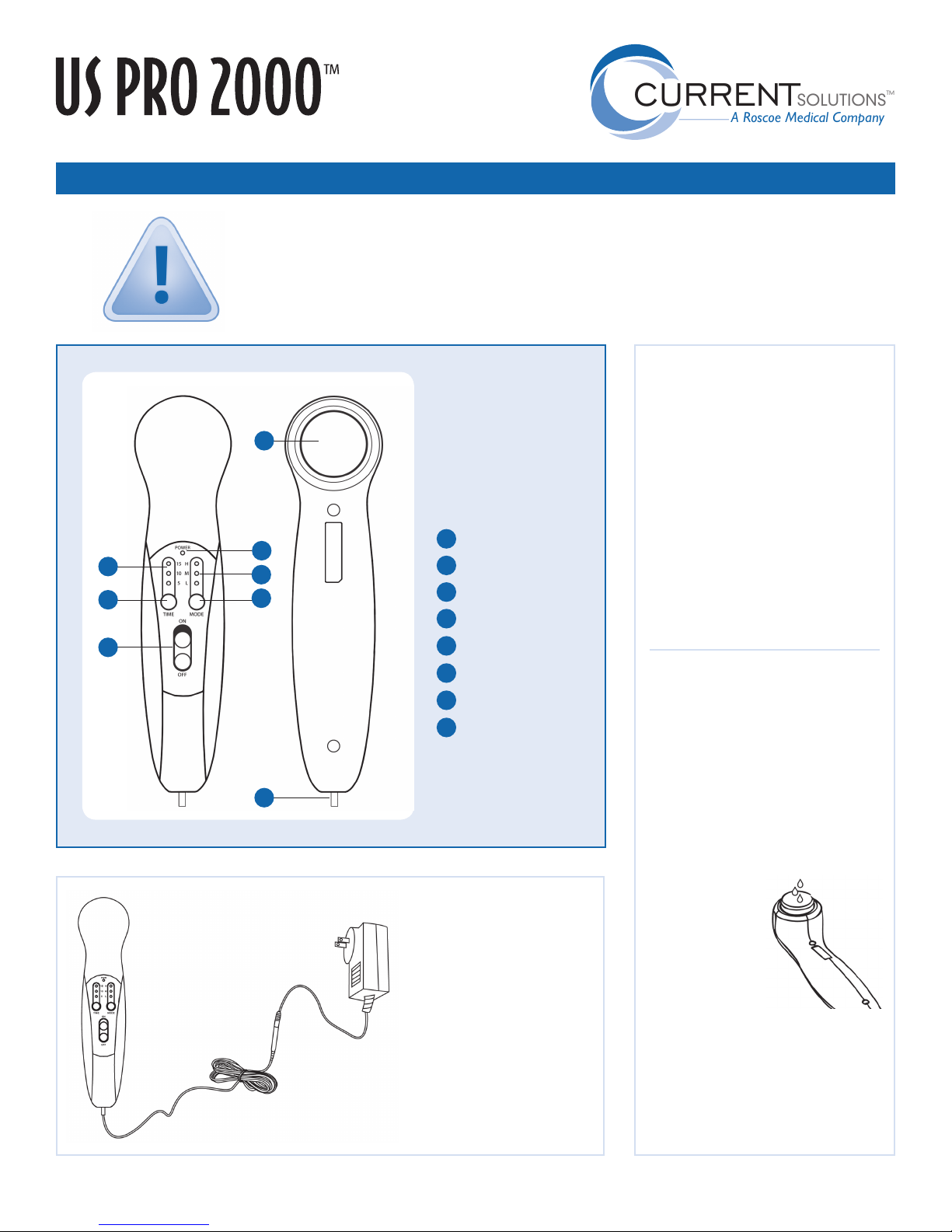
Time indicator light
1
2
Time button
3
Power indicator light
4
Intensity indicator light
5
Mode button
6
Power switch
7
Ultrasound head
8
AC/DC adapter connector
AC/DC POWER
ADAPTER
The US PRO 2000™ uses an
AC/DC adapter (included)
as its power source.
Batteries are not required.
Connect the adapter cord
to the ultrasound unit, then
connect the adapter plug
to a wall outlet.
The US PRO 2000™ Therapeutic
Ultrasound device generates pulsed
high frequency sound waves (1MHz)
that are transferred to specific areas
with a sound-headed probe. The
Pulsed Sound Waves travel deep into
the tissue generating vasodilation,
which helps increase the blood flow
to the treated area. Most patients
will feel nothing at all DURING
treatment, while some may feel a
very slight warmth.
FUNCTION TEST OF
ULTRASONIC ACTION
To assure your device is operating
properly, turn the device ON and
select any TIME setting. Resting the
unit horizontally, place a few drops
of water on the ultrasound head. In
the LOW setting, you will observe the
water drops vibrating at one million
vibrations per second. In the MEDIUM
setting, the water drops vibrate
more strongly
with atomization.
On HIGH, the
water vibrates
very strongly and
the atomization
phenomenon
is present. This
test lasts only a few seconds, as the
unit automatically turns off when
the ultrasound head is not in good
contact with the skin.
Consult the TROUBLE SHOOTING
section of the instruction manual if
device fails this function test.
For more information about your US PRO 2000™ unit, please visit us online at currentsolutionsnow.com or call 1-800-871-7858.
Page 2
SOLUTIONS
TM
A Roscoe Medical Company
CURRENT
QUICK REFERENCE GUIDE PAGE 2
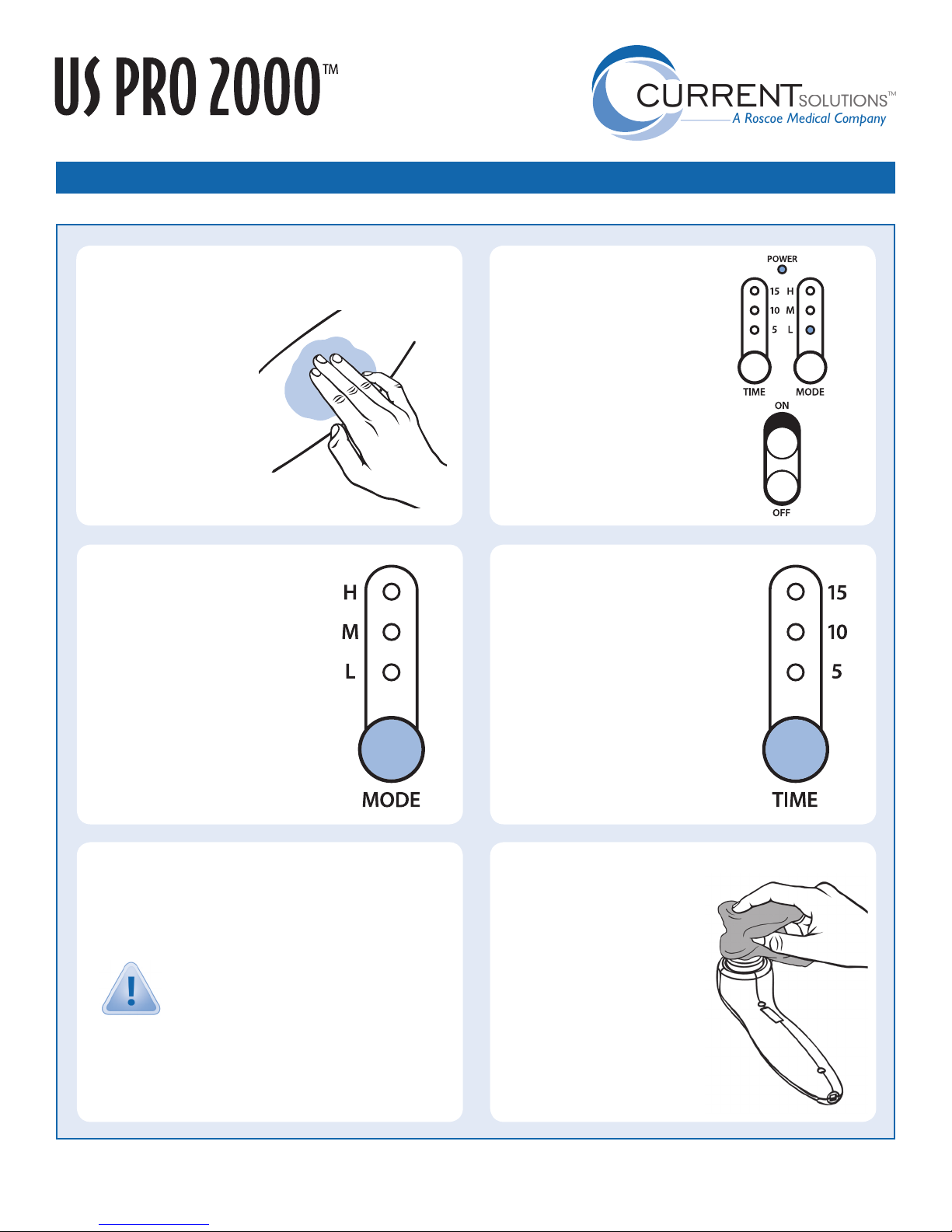
APPLY ULTRASOUND
1
TRANSMISSION GEL
Wash the area to be treated so
that it is free of oil and dirt.
Apply a generous amount of
ultrasound transmission gel
(included) to affected area.
The gel acts as a coupling
substance and ensures the
effectiveness of the treatment.
SELECT PRESCRIBED
3
TREATMENT LEVEL
Press the MODE button to advance to
and select the desired treatment intensity
level. There are three treatment levels:
L - LOW
M - MEDIUM
H - HIGH
If stimulation is or becomes uncomfortable,
reduce intensity and consult your
healthcare provider if problems persist.
TURN ULTRASOUND
2
UNIT ON
Slide the power switch upward to turn
the device on.
The power indicator light (at the very
top of the controls panel) and the “L”
indicator light will illuminate, indicating
that the device is in standby mode.
SELECT PRESCRIBED
4
TREATMENT TIME
Press the TIME button to advance to and
select the desired treatment time. There
are three treatment times :
5 Minutes 10 Minutes 15 Minutes
During working time, press the TIME button
to adjust the treatment time. When the
treatment time is set at 15 minutes, press
the TIME button again to turn off the device
and cease treatment.
h h
h
PLACE ULTRASOUND
5
HEAD ON TREATMENT AREA
Move the ultrasound head in a SLOW CIRCULAR MOTION over the
affected area.
For safety purposes, the device will only send ultrasound
energy when good contact has been made on your body.
The device will automatically stop when contact is
poor, indicated by a flashing light in the TIME panel.
Treatment is automatically restored when good contact is restored.
A temperature protection function automatically stops the device when
treating head exceeds 42° C /107° F. The time indicator light will flash
two times to alert you. Treatment resumes when temperature is below
40° C /104° F.
PROBLEMS WITH YOUR DEVICE?
TURN ULTRASOUND
6
UNIT OFF
After completing treatment, turn the
power switch to the OFF position and
unplug the unit from its power source.
Clean the ultrasound head / probe with
a wet towel or tissue. Do not immerse
the device in water.
Always store unit in its protective case
and keep at room temperature in a dry
location.
Please review your US PRO 2000™ Instruction Manual for troubleshooting tips.
 Loading...