

Page 1
SOLUTIONS
TM
A Roscoe Medical Company
CURRENT
QUICK REFERENCE GUIDE PAGE 1
The purpose of this guide is to assist you in correctly operating your TopTENS™ unit. Do not use this
device for undiagnosed pain symptoms until consulting a physician. This guide is not intended to
replace or substitute the TopTENS™ Instruction Manual. PLEASE READ THE INSTRUCTION MANUAL
COMPLETELY BEFORE USING THIS DEVICE. Read, understand and practice the contraindications,
warnings, cautions and operating instructions found on pages 1-9 of your instruction manual.
Always follow the operating instructions prescribed by your healthcare provider.
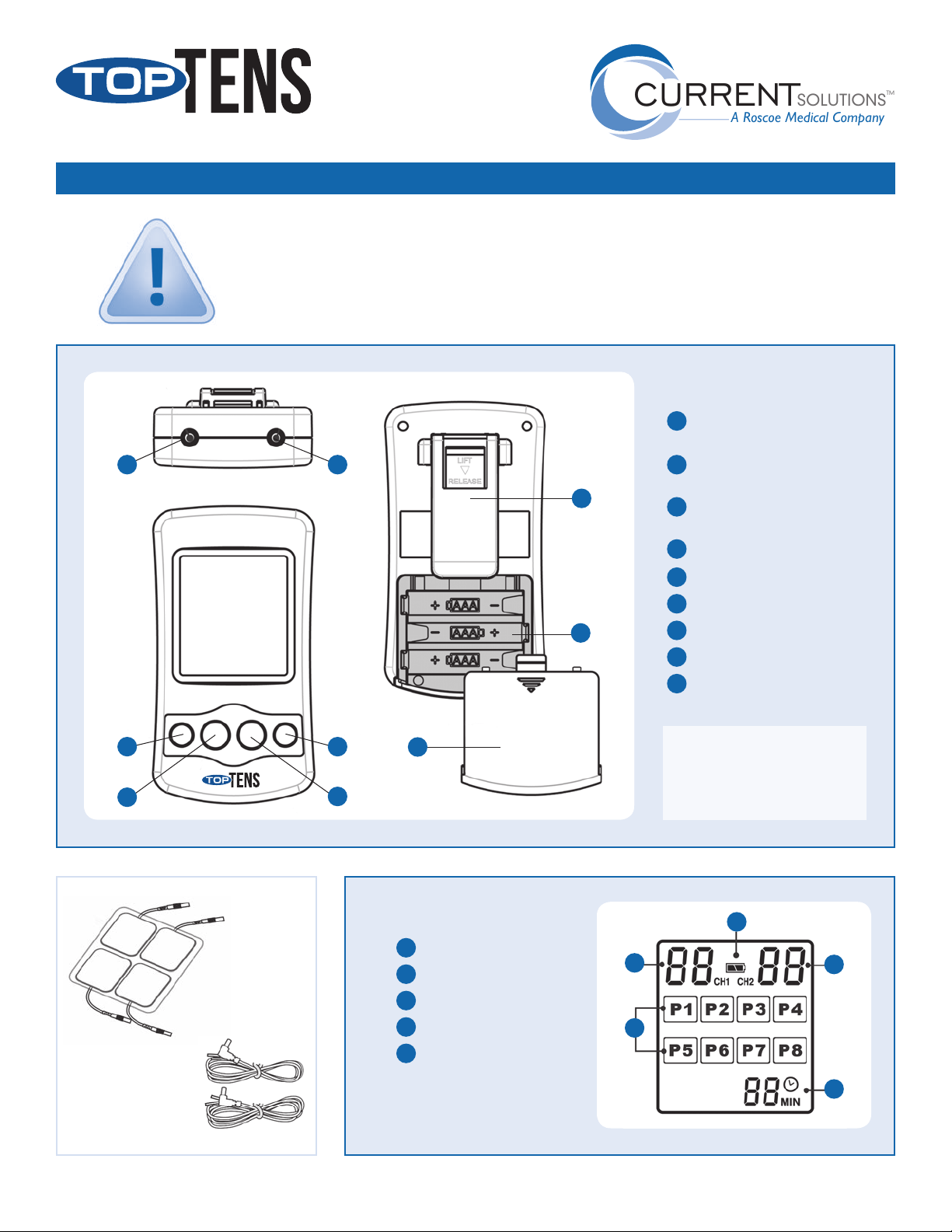
Top
5 6
Front
4
3
Back
7
8
1
2
9
TOP TENS™ UNIT
On / + button: Power on
1
adjust / increase setting key
O / - button: Power o
2
adjust / decrease setting key
3
Therapy mode selection button/
Time selection button
4
Mode: Mode selection button
5
Channel 1 output socket
6
Channel 2 output socket
7
Belt clip
8
Battery compartment
9
Battery cover
TOP TENS DT6030 replacement
parts:
WW6000 – white lead wires
E1P2020BC2 – electrodes
LEAD WIRES
ONE FOR EACH CHAN NEL)
LCD DISPLAY
Channel 1 intensity level
1
2
Channel 2 intensity level
ELECTRODES
(PACKAGE OF 4)
(2 INCLUDE D,
For more information about your TopTENS™ unit, visit us online at currentsolutionsnow.com or call 1-800-871-7858.
3
Low battery indicator
4
Program number
5
Timer
1
4
3
2
5
Page 2
SOLUTIONS
TM
A Roscoe Medical Company
CURRENT
QUICK REFERENCE GUIDE PAGE 2
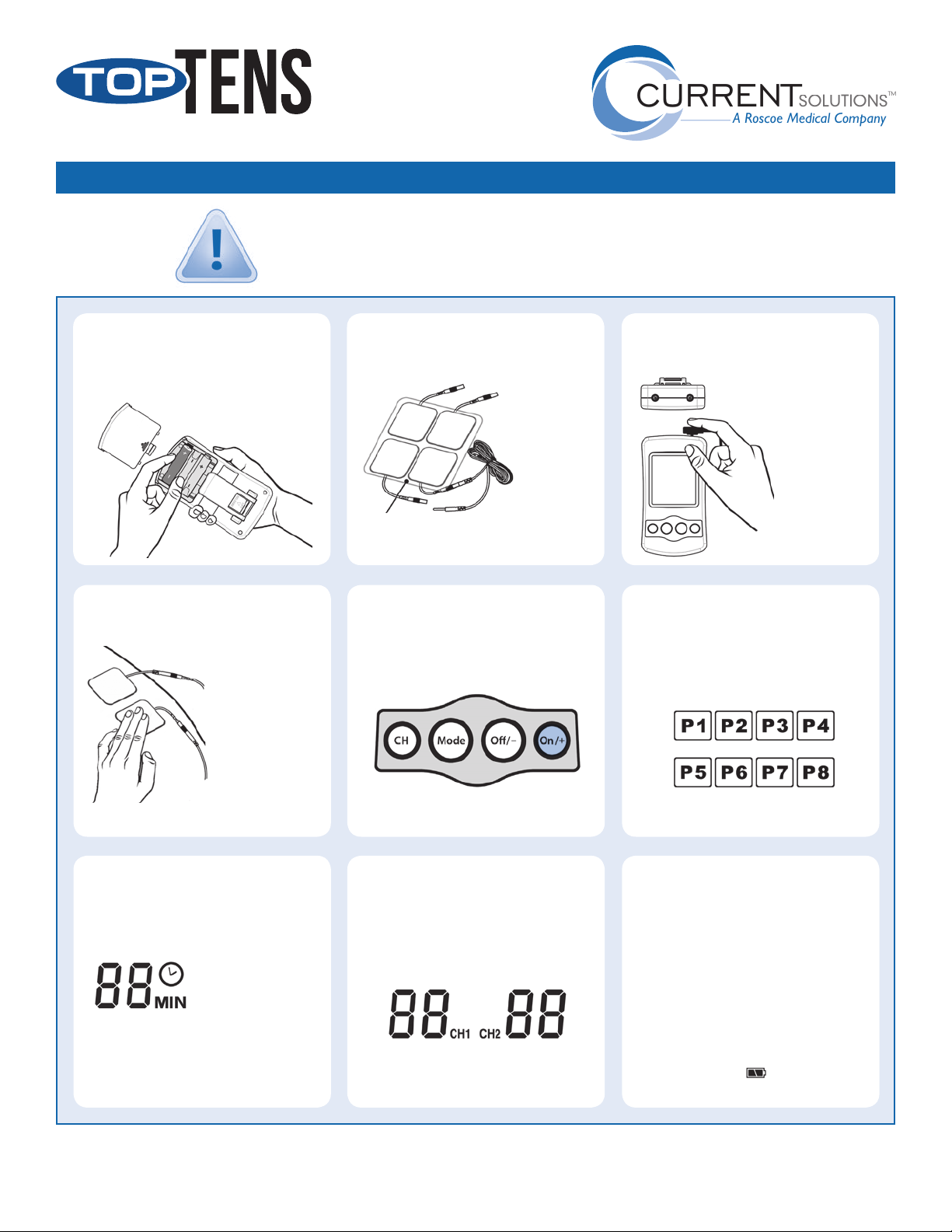
Steps 1 – 4 should be performed with the device turned OFF.
IMPORTANT!
|
Once the unit has been turned ON, do not remove electrodes
without rst turning OFF the device.
INSERT BATTERY
1
Press arrow and slide battery compartment
cover open. Insert the 3 AAA batteries,
matching the + and – ends to those in unit.
PLACE ELECTRODES
4
ON SKIN
See Electrode Placement Guide for more information.
Remove electrodes
from protective
backing. Keep
backing to properly
store electrodes after
use.
Before applying
electrodes, make
sure the skin at the
application site is
clean and dry.
CONNECT ELECTRODES
2
TO LEAD WIRES
Firmly insert
the end of
the lead wire
pin into the
electrode
connectors.
Make sure the connection is complete and
no bare metal of the pins is exposed.
TURN DEVICE ON
5
Check that electrodes are securely placed on
the skin before activating device. Press the On /+
button located on the far right of the control panel to
turn the device ON.
Do not remove or adjust electrodes until turning the
device o by pressing the O /– button for 3 seconds.
CONNECT LEAD WIRES
3
TO TOP OF DEVICE
TOP VIEW
This unit operates
with one or two
sets of electrodes.
When using one
set, plug lead wire
into Channel 1
on top of the unit.
Use Channel 2 to
operate a second
set of electrodes.
SELECT PROGRAM
6
Pressing the Mode button will activate the default
therapy mode setting, and will ash on the display.
Press the
On /+ to increase the therapy mode or
O /– to decrease.
Changing the program setting during a therapy
session will not aect the selected treatment time.
SELECT DESIRED
7
TREATMENT TIME
Press the Mode button
to select one of 12 preset
treatment times ranging
from 5-60 minutes or
continuous. Press the
On /+ to increase the
treatment time or
to decrease.
Changing the treatment time setting during a therapy
session will not aect the selected program.
O /–
PROBLEMS WITH YOUR DEVICE?
NEED REPLACEMENT PARTS?
Please contact your local dealer or the device center from where you purchased your unit.
SELECT THERAPY
8
INTENSITY LEVEL
Press the CH button to select the appropriate channel
and intensity level for each. The CH1 / CH2 will ash on
display. Press the
or
O /– to decrease to a comfortable level.
As a safety precaution, changing the therapy mode
setting during a therapy session cause the intensity
level to reset to O.
On /+ to increase the intensity level
SPECIAL FEATURES
The TopTENS™ unit will turn o automatically when
therapy time has elapsed. In continuous mode (C),
the device must be turned o manually by pressing
the O/- button.
If you alter the program mode during your therapy,
the treatment time will not restart unless you reset
the therapy time.
As a safety feature, the intensity level will change to
O when the Mode button is pressed during a session.
Low battery indicator signals when battery is
low. Replace battery when stimulation feels weaker.
Please see page 16 of your TopTENS™ Instruction Manual for troubleshooting tips.
 Loading...