

Page 1

User Guide
INFORMATION MAY CHANGE WITHOUT NOTICE.
4/8/16CH Triplex DVR
Digital Video Recorder
Page 2

2
4/8/16CH Triplex DVR
Digital Video Recorder
Table of Contents
CCaauuttiioonn ...................................................................................................................................................................................................................... 6
6
PPaacckkaaggee CCoonntteennttss .................................................................................................................................................................................. 6
6
IInnttrroodduuccttiioonn ........................................................................................................................................................................................................ 7
7
1. Product Overview ..................................................................................... 7
2. Product Outline ......................................................................................... 8
3. Front Panel ................................................................................................ 8
3.1. The slim model (4/8CH DVR) ........................................................... 8
3.2. The removable drive (CD-ROM/DVD-ROM) model (4/8CH DVR) ... 9
3.3. 16CH DVR ......................................................................................... 9
4. Rear Panel ................................................................................................11
5. IR Remote Controller ...............................................................................13
IInnssttaallllaattiioonn ........................................................................................................................................................................................................ 115
5
1. Install the disk drives ..............................................................................15
1.1. Install the removable disk drive on the front panel ......................15
1.2. Install the internal disk drives (IDE interface) for 4/8CH DVR ......15
1.3. Install the internal disk drives (SATA interface) for 4/8CH DVR ..17
1.4. Install the internal disk drives for 16CH DVR ................................19
2. USB connector on rear panel ..................................................................20
3. Camera connections ...............................................................................20
4. RS485/RS232 Selection ...........................................................................21
4.1. 4 CH Triplex DVR ............................................................................21
4.2. 8 CH Triplex DVR ............................................................................22
4.3. 16 CH Triplex DVR...........................................................................22
5. Video Format Selection ........................................................................... 23
5.1. 4 CH Triplex DVR ............................................................................23
5.2. 8 CH Triplex DVR ............................................................................23
5.3. 16 CH Triplex DVR...........................................................................23
6. Cablings ...................................................................................................24
6.1. 4 CH Triplex DVR ............................................................................24
6.2. 8 CH Triplex DVR ............................................................................24
6.3. 16 CH Triplex DVR...........................................................................24
7. Sensor Installation ...................................................................................25
7.1. 4 CH Triplex DVR ............................................................................25
7.2. 8 CH Triplex DVR ............................................................................25
7.3. 16 CH Triplex DVR...........................................................................25
8. Alarm Installation .....................................................................................26
Page 3

3
4/8/16CH Triplex DVR
Digital Video Recorder
8.1. 4 CH Triplex DVR ............................................................................26
8.2. 8 CH Triplex DVR ............................................................................26
8.3. 16 CH Triplex DVR...........................................................................26
SSttaarrtt uupp tthhee DDVVRR SSyysstteemm ........................................................................................................................................................ 227
7
1. Commands ...............................................................................................28
1.1. Operating Buttons...........................................................................28
1.2. Mouse Operating .............................................................................28
1.3. State Information ............................................................................29
1.4. Icons ................................................................................................29
2. Main Menu ................................................................................................31
3. Channel Setup .........................................................................................32
3.1. Channel Number .............................................................................32
3.2. Active Channel ................................................................................32
3.3. Record Channel ..............................................................................33
3.4. Hidden Channel ...............................................................................33
3.5. Channel Name .................................................................................33
3.6. Rotation Time ..................................................................................33
3.7. Color Adjustment ............................................................................33
4. Record Setup ...........................................................................................34
4.1. Auto Record ....................................................................................34
4.2. Video Quality ...................................................................................34
4.3. Record Resolution (only for 16CH DVR) .......................................34
4.4. Record Frame Rate .........................................................................34
4.5. Record Schedule .............................................................................35
5. Detector Setup .........................................................................................38
5.1. Channel Number .............................................................................39
5.2. Video Loss Alarm ............................................................................39
5.3. Motion Setup ...................................................................................39
5.4. Sensor Setup ...................................................................................41
6. System Setup ...........................................................................................42
6.1. Query Error Message ......................................................................42
6.2. View Setup .......................................................................................43
6.3. Date/Time Setup ..............................................................................44
6.4. Button Beep Setup ..........................................................................46
6.5. Input Device Setup ..........................................................................46
6.6. Auto Exit Menu ................................................................................46
7. Hardware Setup .......................................................................................47
7.1. Authentication Setup ......................................................................47
Page 4

4
4/8/16CH Triplex DVR
Digital Video Recorder
7.2. Hard Drive Setup .............................................................................48
7.3. Network Setup .................................................................................49
7.4. Screen Setup ...................................................................................52
7.5. Audio Setup .....................................................................................53
7.6. Keyboard/PTZ Setup .......................................................................54
7.7. Firmware Update .............................................................................55
7.8. Load Default Setting .......................................................................57
8. Language Selection .................................................................................58
9. Exit Main Menu ........................................................................................58
9.1. Exit & Save Changes ......................................................................58
9.2. Exit & Discard Changes ..................................................................58
PPllaayybbaacckk .............................................................................................................................................................................................................. 559
9
DDaattaa BBaacckkuupp bbyy UUSSBB ...................................................................................................................................................................... 661
1
1. Backup by USB ........................................................................................61
2. Backup by CDRW ....................................................................................62
EEvveenntt SSeeaarrcchh ................................................................................................................................................................................................ 663
3
PPTTZZ ................................................................................................................................................................................................................................ 664
4
PPCC CCoonnnneeccttiioonn tthhrroouugghh LLooccaall AArreeaa NNeettwwoorrkk ((nneettwwoorrkk hhuubb)) ...................................... 666
6
1. Search Router IP Address .......................................................................66
2. DDNS Service ...........................................................................................68
2.1. Registration of DDNS Service ........................................................68
2.2. Create Your DynDNS Account .......................................................68
2.3. Logged In and Host Service ...........................................................70
2.4. Router Setting .................................................................................72
2.5. DVR DDNS Setting ..........................................................................72
2.6. PC Client Setting .............................................................................72
PPCC CClliieenntt && PPCC VViieewweerr ................................................................................................................................................................ 773
3
1. DirectX ......................................................................................................73
2. PC Client/PC Viewer Program Installation .............................................74
3. Open Disk Operating in VISTA ................................................................74
4. PC Viewer Operating Guide ....................................................................75
4.1. PC Viewer Operating buttons & Operating mode .........................76
4.2. Playback ..........................................................................................77
4.3. Capture ............................................................................................79
5. PC Client Operating Guide ......................................................................79
5.1. Connect PC Client to DVR ..............................................................80
5.2. Status information ..........................................................................81
5.3. Control Icons ...................................................................................81
Page 5

5
4/8/16CH Triplex DVR
Digital Video Recorder
6. Name Server .............................................................................................83
7. PC Capturing ............................................................................................84
8. Playback ...................................................................................................86
RReemmoottee SSuurrvveeiillllaannccee tthhrroouugghh IIEE BBrroowwsseerr .................................................................................................. 887
7
33GG // SSeeccuuVViieewweerr ...................................................................................................................................................................................... 990
0
1. DVR Connect ............................................................................................91
2. Login Setup ..............................................................................................94
3. Language .................................................................................................94
4. Help ..........................................................................................................94
5. Exit ............................................................................................................95
Page 6

6
4/8/16CH Triplex DVR
Digital Video Recorder
CCaauuttiioonn
For your safety, unplugging the power before moving the DVR, installing, or
replacing any parts or hard drive.
Make sure all the power cable and wires are properly set up before using the
DVR.
To avoid a short circuit, don’t leave any unnecessary parts inside the DVR.
Please avoid dramatic changes of the environment, such as dust, temperature,
and humidity. Keep the DVR in a temperature ranging from 5℃~40℃.
Keep the DVR in a well-ventilated place and away from any heat-generating
objects.
Do not block the DVR’s fan and vent.
Do not expose this unit to the sun directly.
If you are not sure of the installation and setup, please consult the technicians.
Don’t fix it yourself if there’s any damage to this unit or the power supply,
Consult the technician or the distributor.
PPaacckkaaggee CCoonntteenntts
s
DVR Main unit x 1
Power Adapter x 1
AC Power Cord x 1
Manual x 1
Software CD x 1
USB Mouse X1
IR Remote Controller x 1
If there is any damage, shortage or inappropriate item in the package, please
contact with your local dealer.
Page 7
7
4/8/16CH Triplex DVR
Digital Video Recorder
IInnttrroodduuccttiioon
n
1. Product Overview
High quality pictures by digital recording with 4/8/16 video inputs (NTSC/PAL)
Provides one VGA and S-video/video-in*2 for video output and two audio inputs
Triplex operations : Recording / Playback / Remote Backup
Two compressive modes: MJPEG (recording) / MPEG4(networking)
Individual recording frame rate setting for each channel, from 1fps to real time
Individual recording mode by Continuous, Schedule, Sensor/Motion Trigger that
setting for each channel.
Search Mode and Playback searching by Time or Event.
One front accessible R/W DVD-ROM (or accommodated one removable hard
drive) and one internal 3.5” hard drives (optional – IDE to SATA bridge) for 4/8CH
DVR
One front accessible R/W DVD-ROM / two internal 3.5” hard drives with IDE or
SATA HDD interface or up to four internal 3.5” hard drives with SATA HDD
interface for 16CH DVR
Enhanced USB disk backup
One network connection with 10/100 Ethernet(RJ-45)
Network protocol by TCP/IP, Static IP, DHCP, PPPoE, DDNS(through
Router)
3GPP support (SecuViewer)
P/T/Z camera control by RS485
Multi-Language support and Authentication setup function.
PC Operating System: Windows XP/2000/Vista
Remote monitoring, recording and playback by client program and IE browser
Mouse / IR remote controller /Front panel keypad operation available
Power adapter: Input AC100~240V, 50/60Hz and output is ..
Model \ Output
4/8CH DVR
Slim model/ IDE HDD
+12VDC / 4Amp
Slim model/SATA HDD
+12VDC / 4Amp
w/removable drive & IDE HDD
+12VDC / 5.0Amp
w/removable drive & SATA HDD
+12VDC / 5.0Amp
Model \ Output
16CH DVR
w/one DVD-RW & two internal HDD
+12VDC / 6.6Amp
w/four internal HDD (SATA)
+12VDC / 8.5Amp
Page 8
8
4/8/16CH Triplex DVR
Digital Video Recorder
Dimension(Width x Height x Depth):
290x52x220mm (4/8CH DVR with one 3.5”HDD)
340x60x280mm (4/8CH DVR with Removable HDD+3.5”HDD)
430x80 x320mm (16CH DVR)
Display/Recording frame rate and resolution:
Models
4CH DVR
8CH DVR
16CH DVR
Display Frame Rate
120/100fps
240/200fps
480/400fps
Recording Frame Rate
60(NTSC)/50(PAL)fps
60(NTSC)/50(PAL)fps
120(NTSC)/100(PAL)fps
Display Resolution
640x448 (NTSC) / 640x544(PAL)
Recording Resolution
640x224(NTSC) / 640x272(PAL)
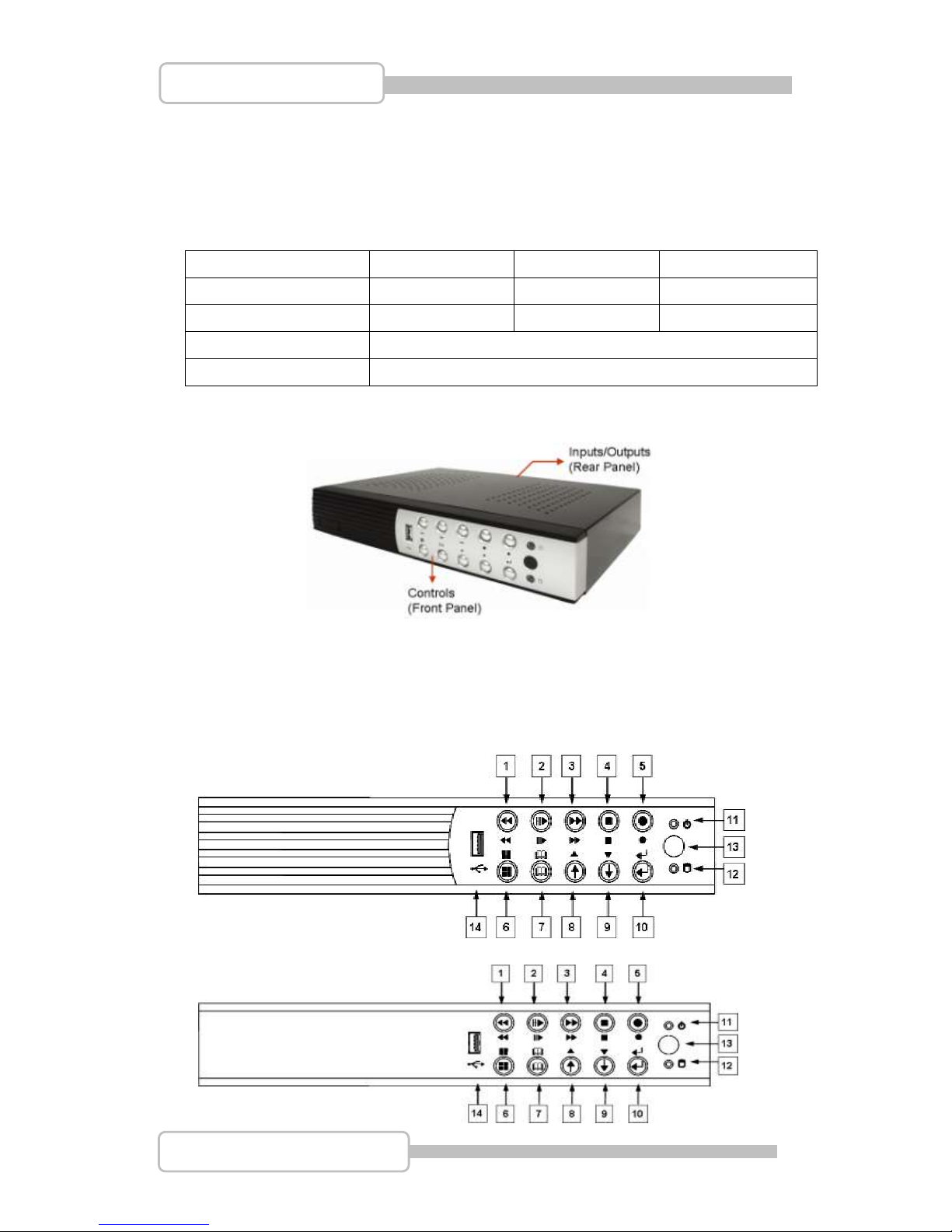
2. Product Outline
3. Front Panel
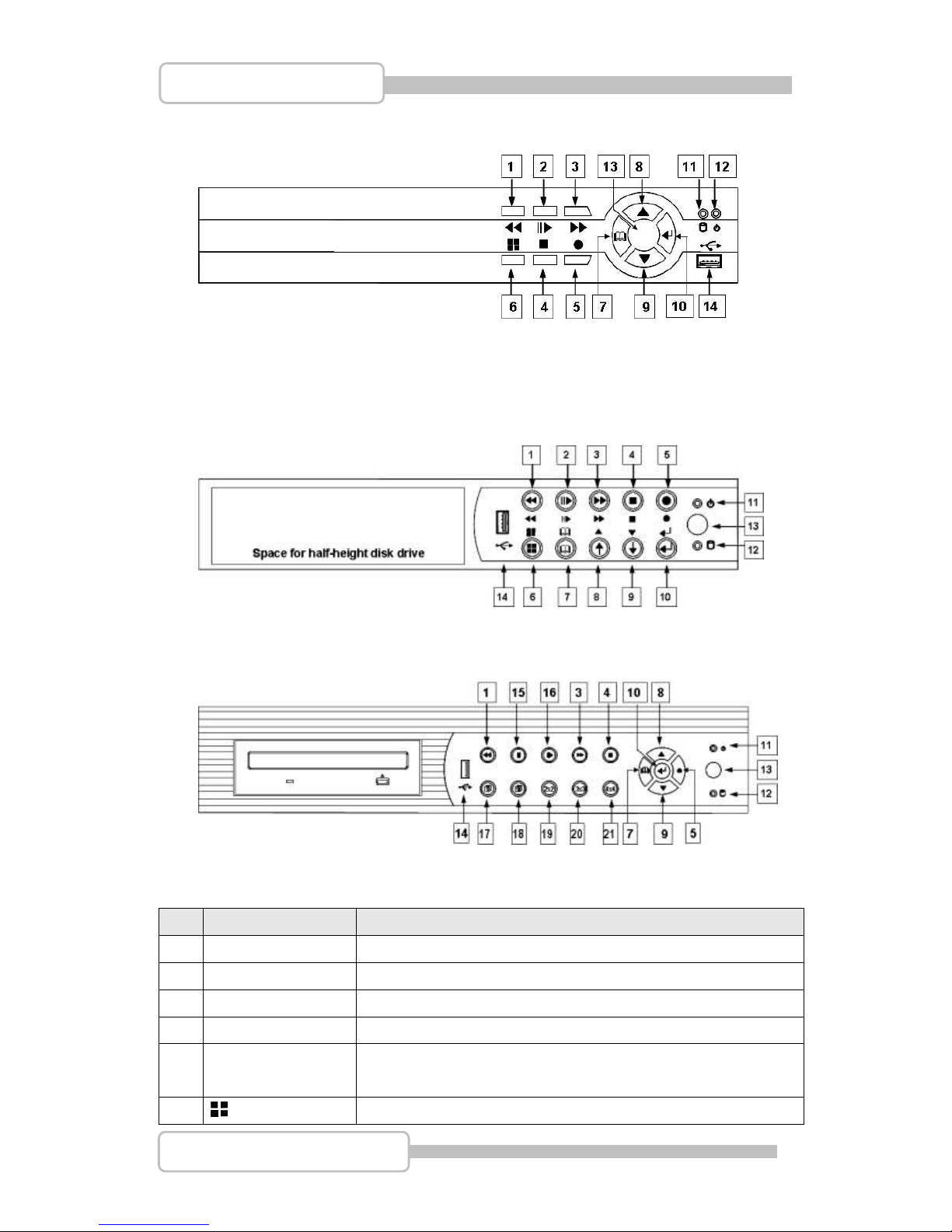
3.1. The slim model (4/8CH DVR)
-with one internal HDD
(Type I)
(Type II)
Page 9
9
4/8/16CH Triplex DVR
Digital Video Recorder
(Type III)
3.2. The removable drive (CD-ROM/DVD-ROM) model (4/8CH DVR)
-with one front-accessible disk drive (or CD-ROM/DVD-ROM) and one
internal HDD
3.3. 16CH DVR
Controls:
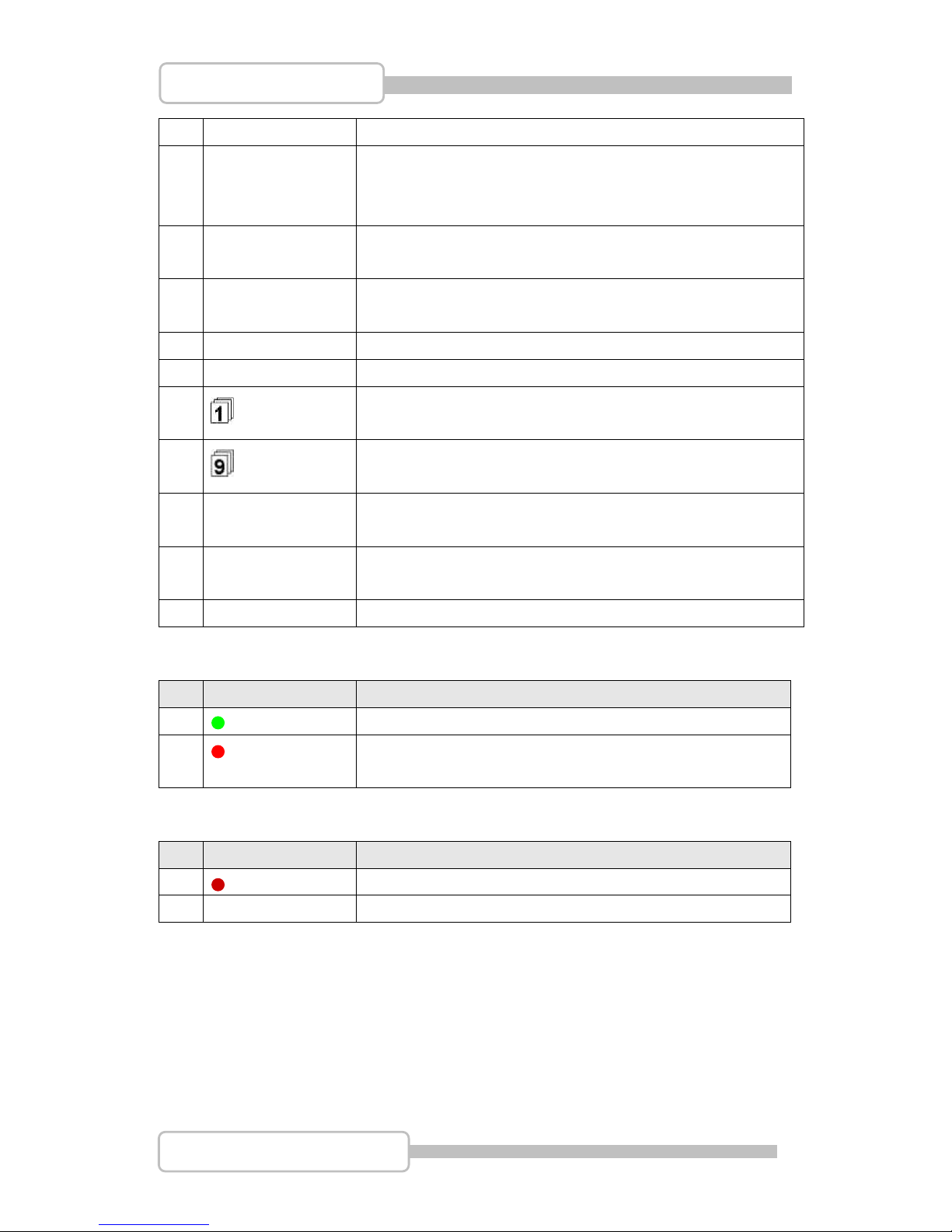
No.
Name
Function
1
REW
Backward search through a time-shifted or recorded video.
2
II/ PLAY/PAUSE
Start / Pause video playback or Enter Play menu
3
FF
Forward search through a time-shifted or recorded video.
4
STOP
Stop playback / backup or Enter PTZ control menu
5
● REC
Start or stop recording/backup.
6
MODE
Press to select 1/4(1/4/8 for 8ch) screen display.
Page 10
10
4/8/16CH Triplex DVR
Digital Video Recorder
7
MENU
Enter menu or back to previous menu list..
8
/ UP
Moves up through the list of menu. Also used to select menu
options or change the DVR configuration values.
Or Enter Event Search Menu.
9
/ DOWN
Moves down through the list of menu. Also used to select
menu options or change the DVR configuration values.
10
SELECT/ENTER
Use this button to change values on main menu or sub menu
setting.
15
II PAUSE
Pause video playback
16
II PLAY
Start video playback
17
Full Screen
Press to select full screen display (CH1~CH8)
18
Full Screen
Press to select full screen display (CH9~CH16)
19
2x2 4 Split View
Press to select 4 split view on screen display. With a
sequence of CH1~CH4,CH5~CH8,CH9~CH12, CH13~CH16
20
3x3 9 Split View
Press to select 9 split view on screen display. With a
sequence of CH1~CH8, CH9~CH16
21
4x4 16 Split View
Press to select 16 split view on screen display as CH1~CH16
Indicators:
No.
Name
Function
11
Power LED
The DVR unit is powered up and running. (Green color)
12
Hard disk
Actived LED
LED indicator flashes at hard disk is acting (Red color)
I/O:
No.
Name
Function
13
IR Receiver
IR Control receiver (Refer to IR Remote Controller)
14
USB
Connects PC for firmware upgrading/USB backup
Page 11
11
4/8/16CH Triplex DVR
Digital Video Recorder
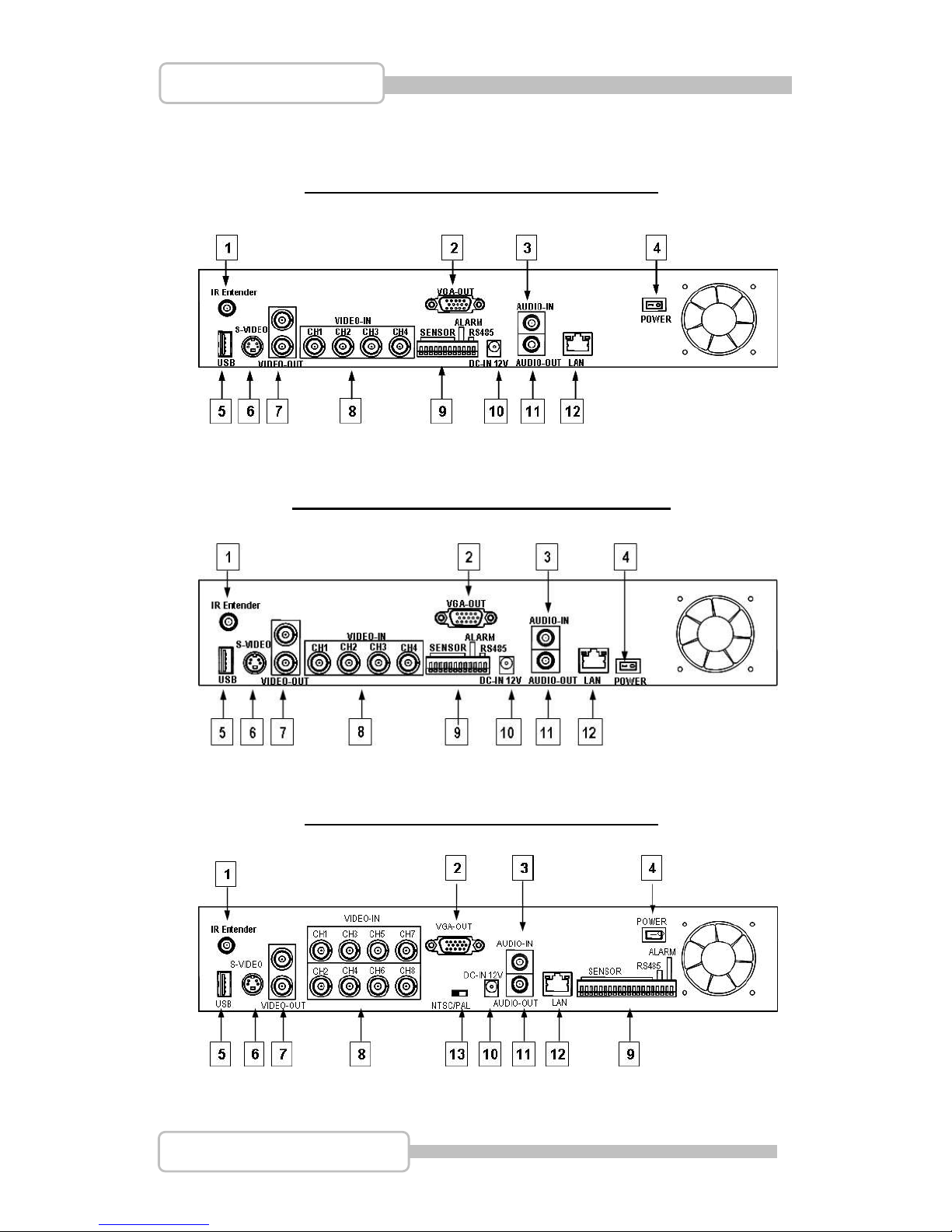
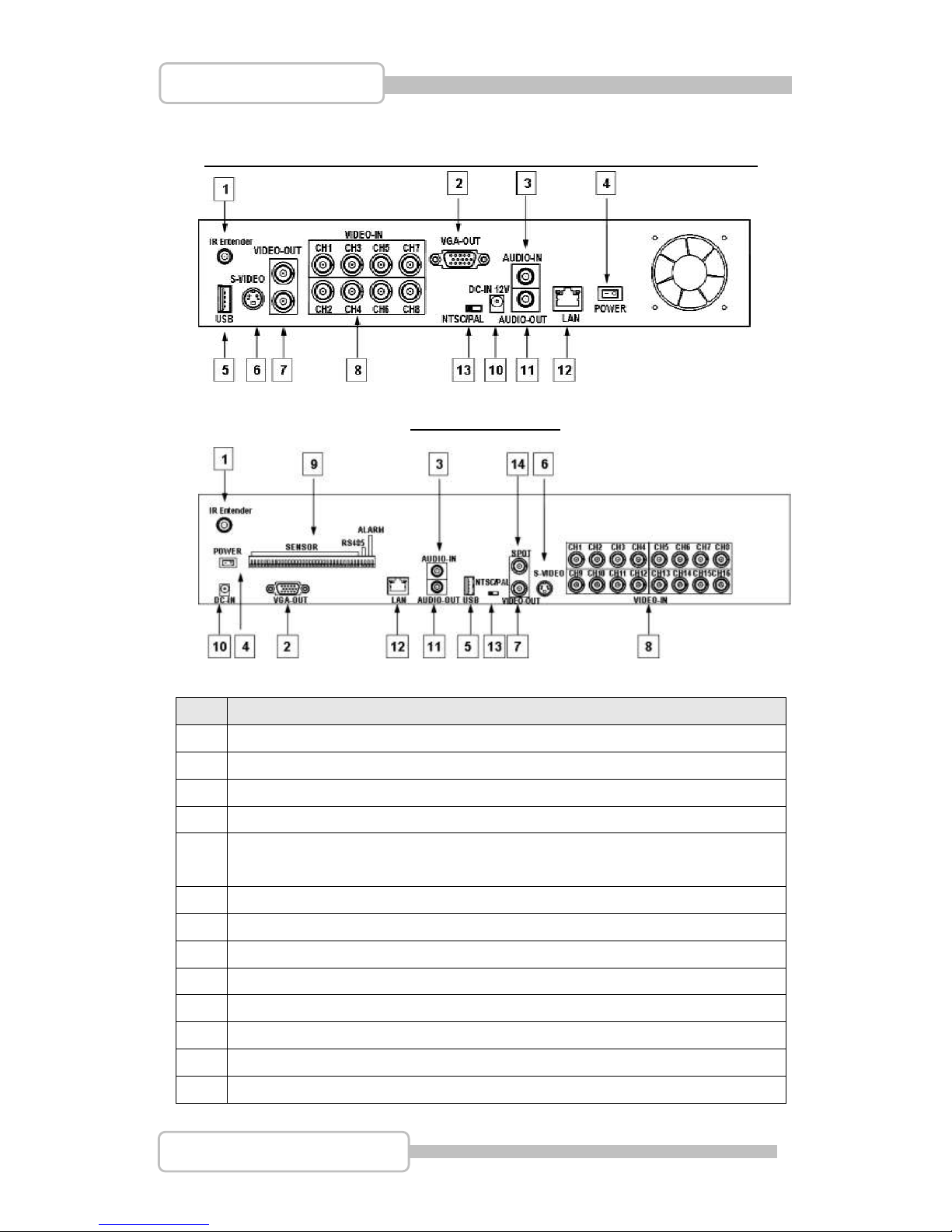
4. Rear Panel
4 CH Triplex DVR (with Removable Disk Drive)
4 CH Triplex DVR (without Removable Disk Drive)
8 CH Triplex DVR (with Removable Disk Drive)
Page 12
12
4/8/16CH Triplex DVR
Digital Video Recorder
8 CH Triplex DVR (without Removable Disk Drive, without Sensor/Alarm)
16 CH Triplex DVR
No.
Function
1
IR Extender connector (Optional)
2
VGA Display Connector (DB-9)
3
AUDIO-IN
4
POWER ON/OFF Switch
5
USB PORT (dedicated Only for Mouse Connection, must connect at the
beginning of Power On)
6
S-VIDEO
7
VIDEO OUT (Monitor)
8
VIDEO IN (BNC)
9
General Purpose I/O for SENSOR/ALARM/RS485
10
DC-IN (12V)
11
AUDIO-OUT
12
LAN (RJ45)
13
NTSC/PAL SELECTOR
Page 13
13
4/8/16CH Triplex DVR
Digital Video Recorder
14
SPOT MONITOR
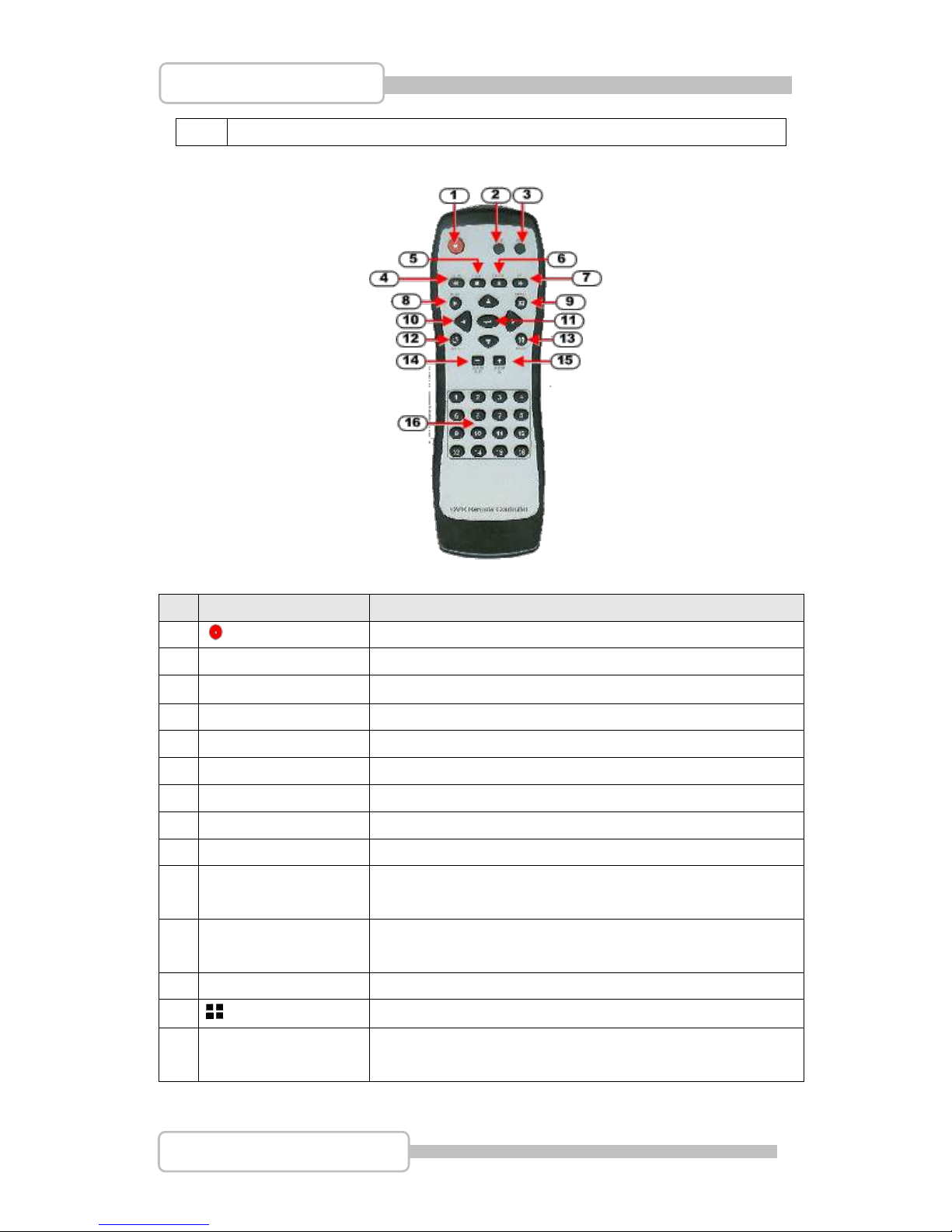
5. IR Remote Controller
DVR Mode
No
Button / Name
Function
1
REC
Start or stop recording / backup.
2
DVR
Switch to DVR mode
3
PTZ
Switch to PTZ mode
4
REW
Backward search through a time-shifted or recorded video.
5
STOP
Stop playback or backup.
6
II PAUSE
Pause recording or playback.
7
FF
Forward search through a time-shifted or recorded video.
8
► PLAY
Start video playback.
9
MENU
Enter menu or exit.
10
▲(UP)/ ▼(DOWN)/
(LEFT)/ ►(RIGHT)
Moves up/down/left/right through the list of menus. Or use
it to select / change the DVR configuration values.
11
(Enter/Select)
Use this button to change or confirm values on main menu
or sub menu setting.
12
AUTO
Press AUTO button to start screen auto sequence.
13
MODE
Back to 4/8 (for 4/8ch) screen display while screen is full..
14
- ZOOM OUT
N/A
Page 14
14
4/8/16CH Triplex DVR
Digital Video Recorder
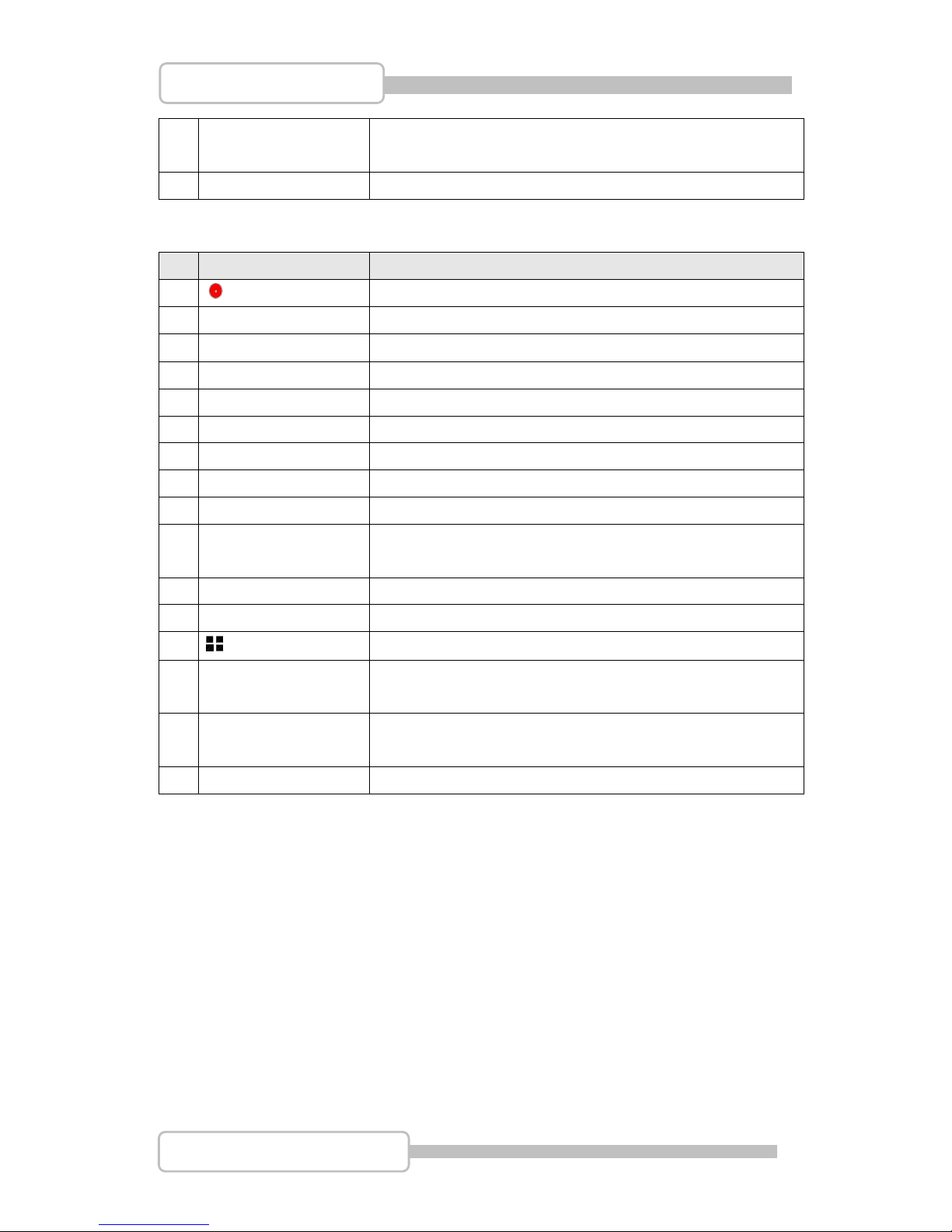
15
+ ZOOM IN
N/A
16
1,2,----16 (Channels)
Channels Selector (CH1~CH16 depends on each DVR)
PTZ Mode
No
Button / Name
Function
1
REC
N/A.
2
DVR
Switch to DVR mode
3
PTZ
Switch to PTZ mode
4
REW
Move Left.
5
STOP
N/A.
6
II PAUSE
N/A.
7
FF
Move Right
8
► PLAY
Line Scan
9
MENU
Exit menu or switch to DVR.
10
▲(UP)/ ▼(DOWN)/
(LEFT)/ ►(RIGHT)
Moves up/down/left/right through the list of menus.
11
(Enter/Select)
Enter function setting menu
12
AUTO
Auto Pan
13
MODE
Enter (PTZ) channel setting menu.
14
- ZOOM OUT
Zoom Out
15
+ ZOOM IN
Zoom In
16
1,2,----16 (Channels)
Channels Selector (CH1~CH16 depends on each DVR)
Remark: Auto Pan and Line Scan may switch the operating that depends on Camera’s
internal setting.
Page 15
15
4/8/16CH Triplex DVR
Digital Video Recorder
IInnssttaallllaattiioon
n
Be sure there is no power connection before starting installation!
1. Install the disk drives
There are two spaces for disk drives installation on the DVR: One front accessible R/W
CD-ROM/DVD-ROM (or removable HDD drive) and one internal 3.5” hard drives with
IDE (default) or SATA interface.
Set the HDD (installed with OS/DVR software) jumper into “Master” to make sure all
operating will be normal. The other HDD would be set to “Slave”.
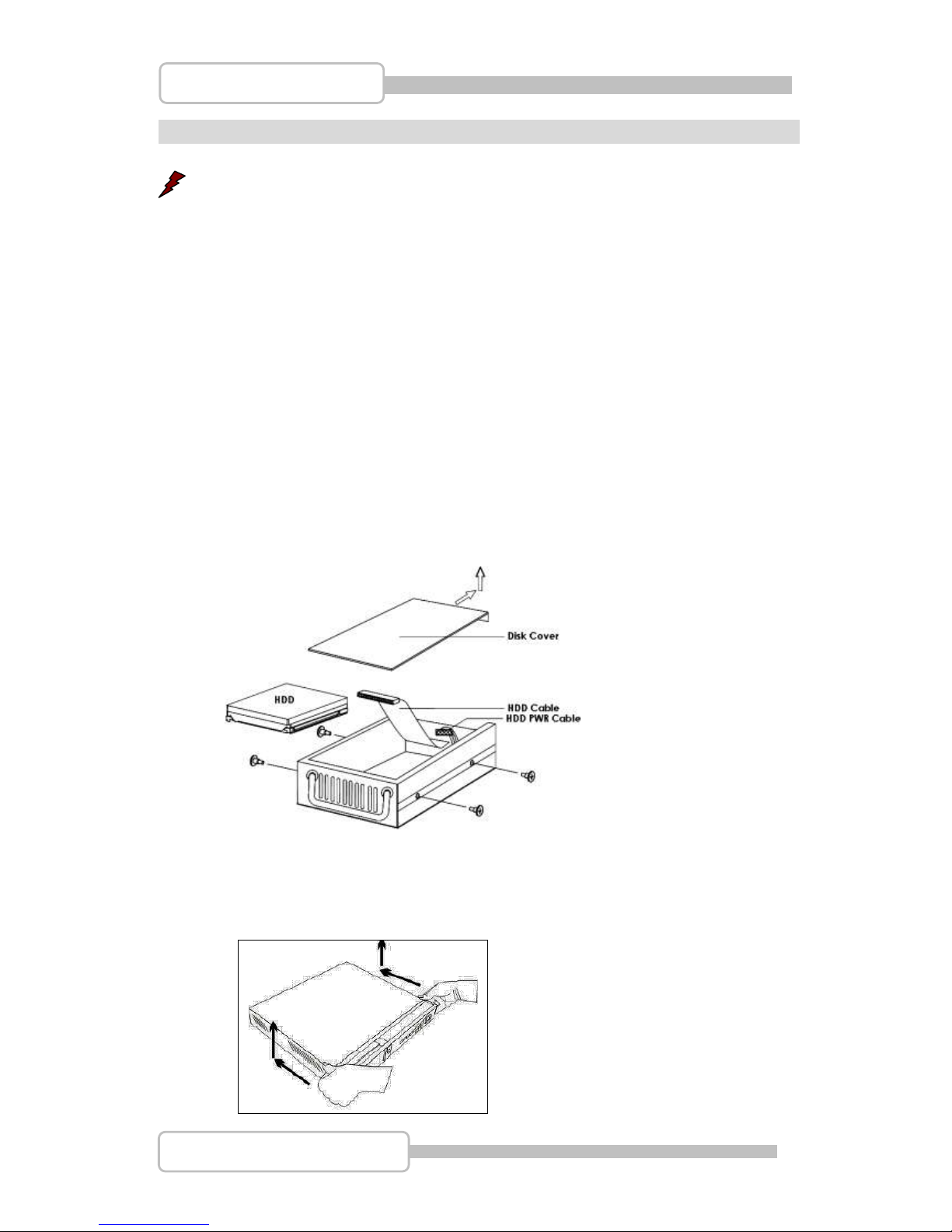
1.1. Install the removable disk drive on the front panel
Step1: Unlock the removable disk drive and slide out the HDD tray.
Step2: Remove the HDD tray’s cover. Put one HDD drive into the tray and
well-connect the cable to HDD drive on the rear side of the tray.
Setp3: Fix four screws on both sides, put the cover back and slide back the HDD
tray.
1.2. Install the internal disk drives (IDE interface) for 4/8CH DVR
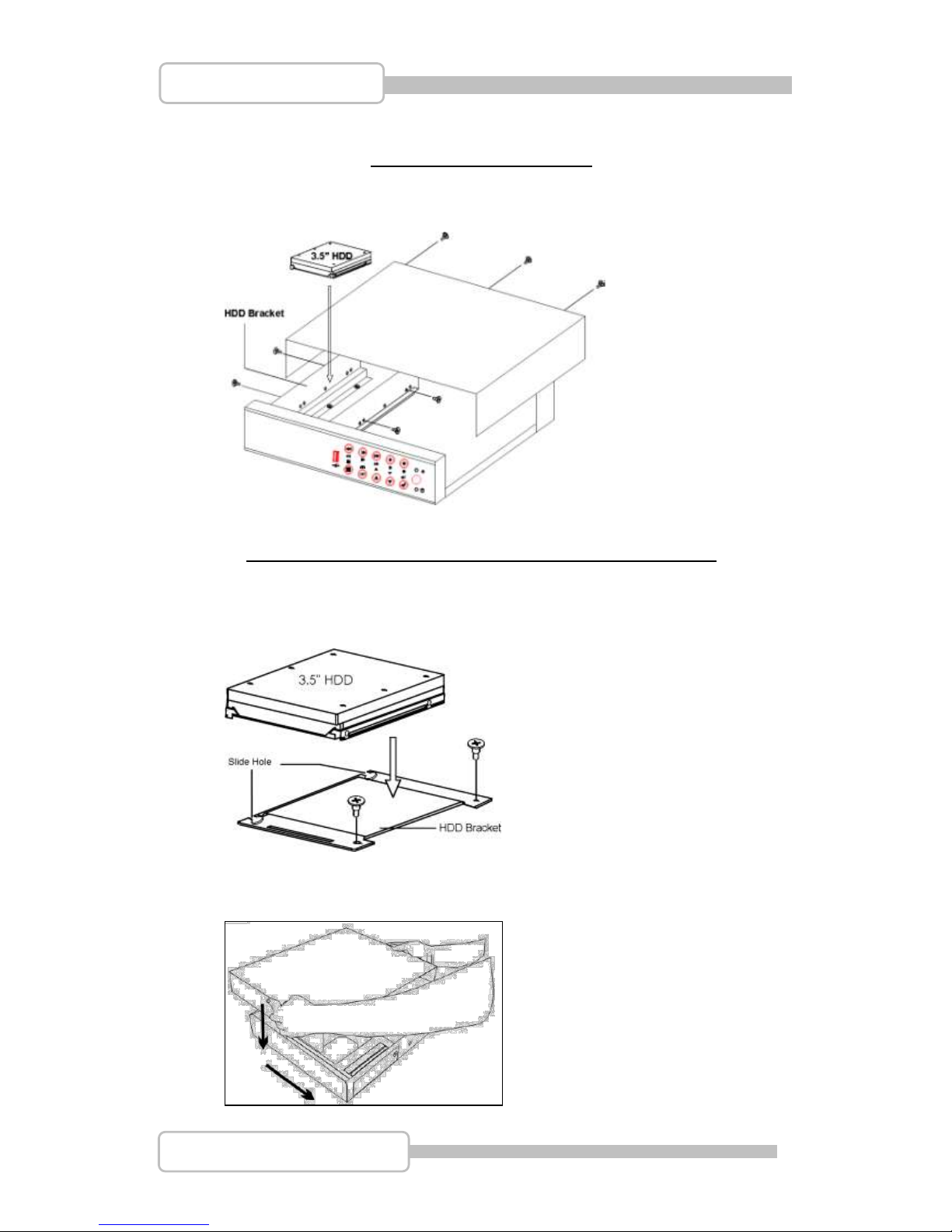
Step1: Unscrew three screws on DVR’s rear panel. Then slide backward the
chassis’s top cover and move it upward
Page 16
16
4/8/16CH Triplex DVR
Digital Video Recorder
Step2: Fix the hard drive
The Slim Model (4/8 CH DVR)
Put the HDD into the HDD bracket and fixed two screws on each side. Plug in the
HDD cable and power line for using.
The removable drive (CD-ROM/DVD-ROM) model (4/8CH DVR)
Unscrew two screws HDD bracket near to the front panel. Slide it forward to rear
side to take the HDD bracket and install 3.5” HDD drives on the top. Plug in the
HDD cable and power line for using
Then, Put the chassis’s cover back
Page 17
17
4/8/16CH Triplex DVR
Digital Video Recorder
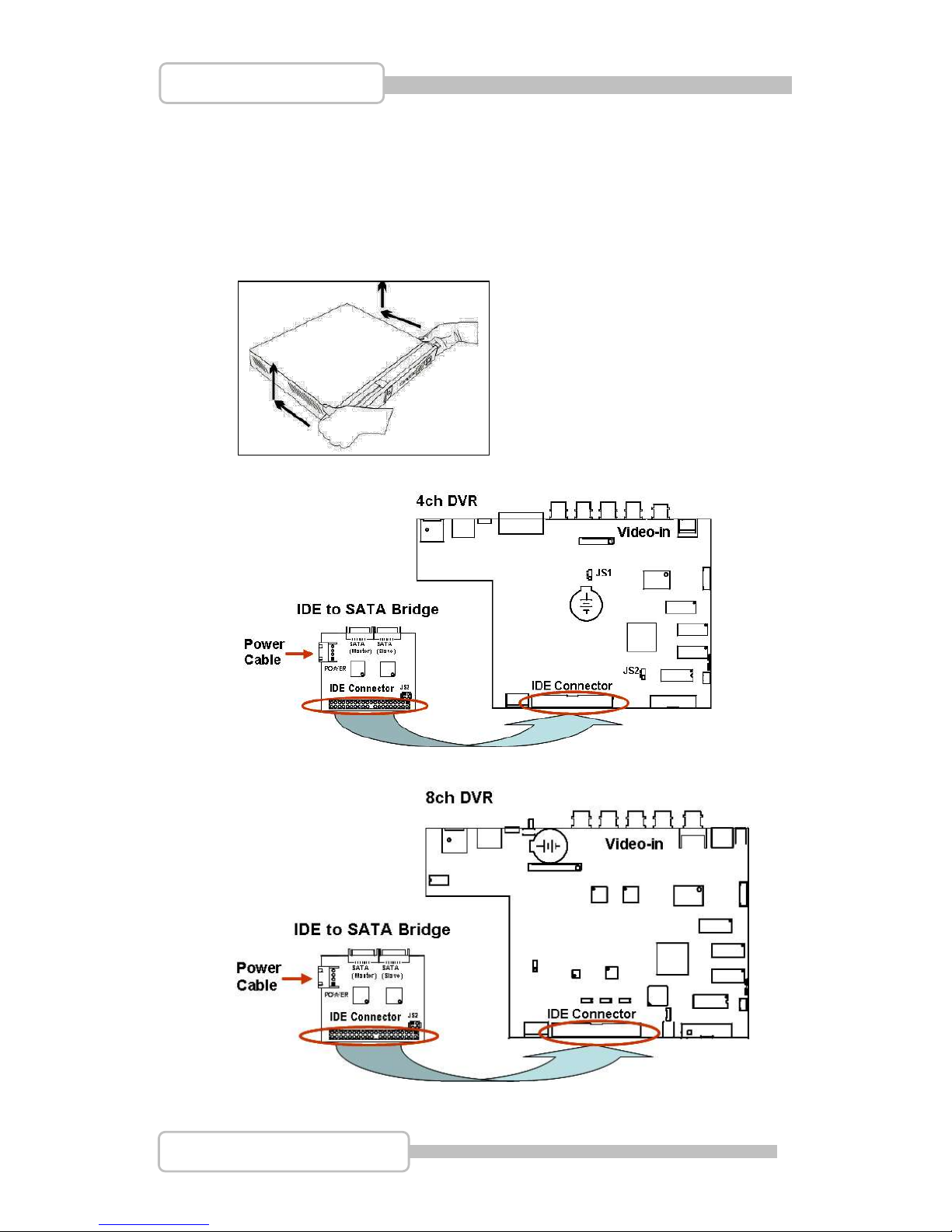
1.3. Install the internal disk drives (SATA interface) for 4/8CH DVR
It needs an IDE to SATA Bridge (Optional) to transfer IDE interface into SATA
before starting to install the hard disk,
Step 1: Place the IDE to SATA Bridge into DVR main unit.
Unscrew three screws on DVR’s rear panel. Then slide backward the chassis’s
top cover and move it upward.
Step 2: Place the IDE to SATA Bridge lodge in DVR main board as following:
Page 18
18
4/8/16CH Triplex DVR
Digital Video Recorder
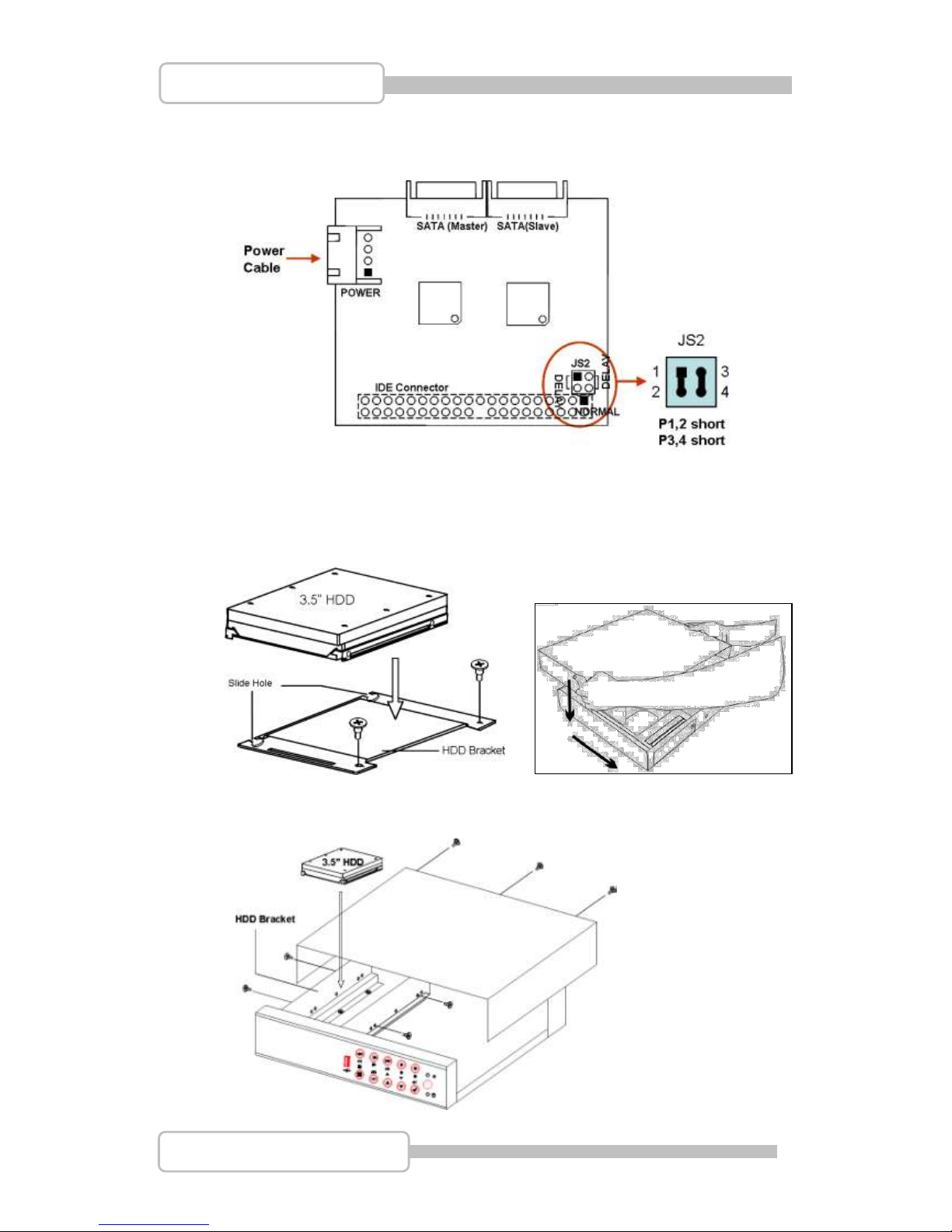
Step 3: Make sure the jumpers on IDE to SATA bridge (JS2) have been set to
P1,2-short and P3,4-short as following
Step 4: Unscrew two screws HDD bracket near to the front panel. Slide it forward
to rear side to take the HDD bracket and install 3.5” HDD drives on the top
Then, Put the chassis’s cover back
OR
Page 19
19
4/8/16CH Triplex DVR
Digital Video Recorder
1.4. Install the internal disk drives for 16CH DVR
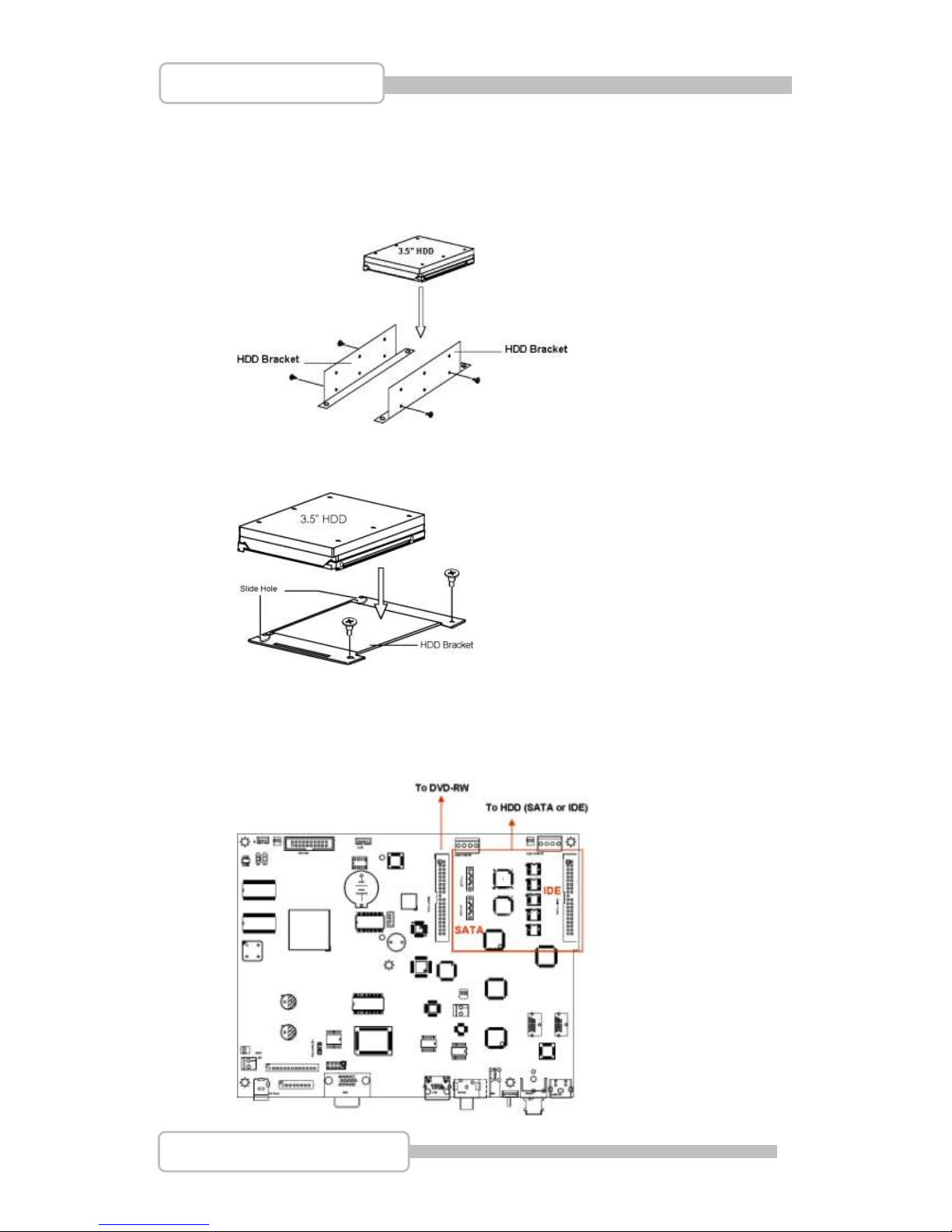
16CH DVR provides PATA (IDE) and SATA interface both. Put the HDD into
HDD bracket and fix it by screws. Then, install the whole HDD set into DVR.
<For two HDD installation>
<For one HDD installation>
There are two models for 16ch DVR: 1) Four internal 3.5” hard drives with SATA
interface. Or 2) One front accessible R/W DVD-ROM and one internal 3.5” hard
drives with PATA (IDE) or SATA interface as following figure.
Page 20
20
4/8/16CH Triplex DVR
Digital Video Recorder
2. USB connector on rear panel
USB connector on rear panel is dedicated for USB mouse using.
Do not connect to any other USB device except the mouse.
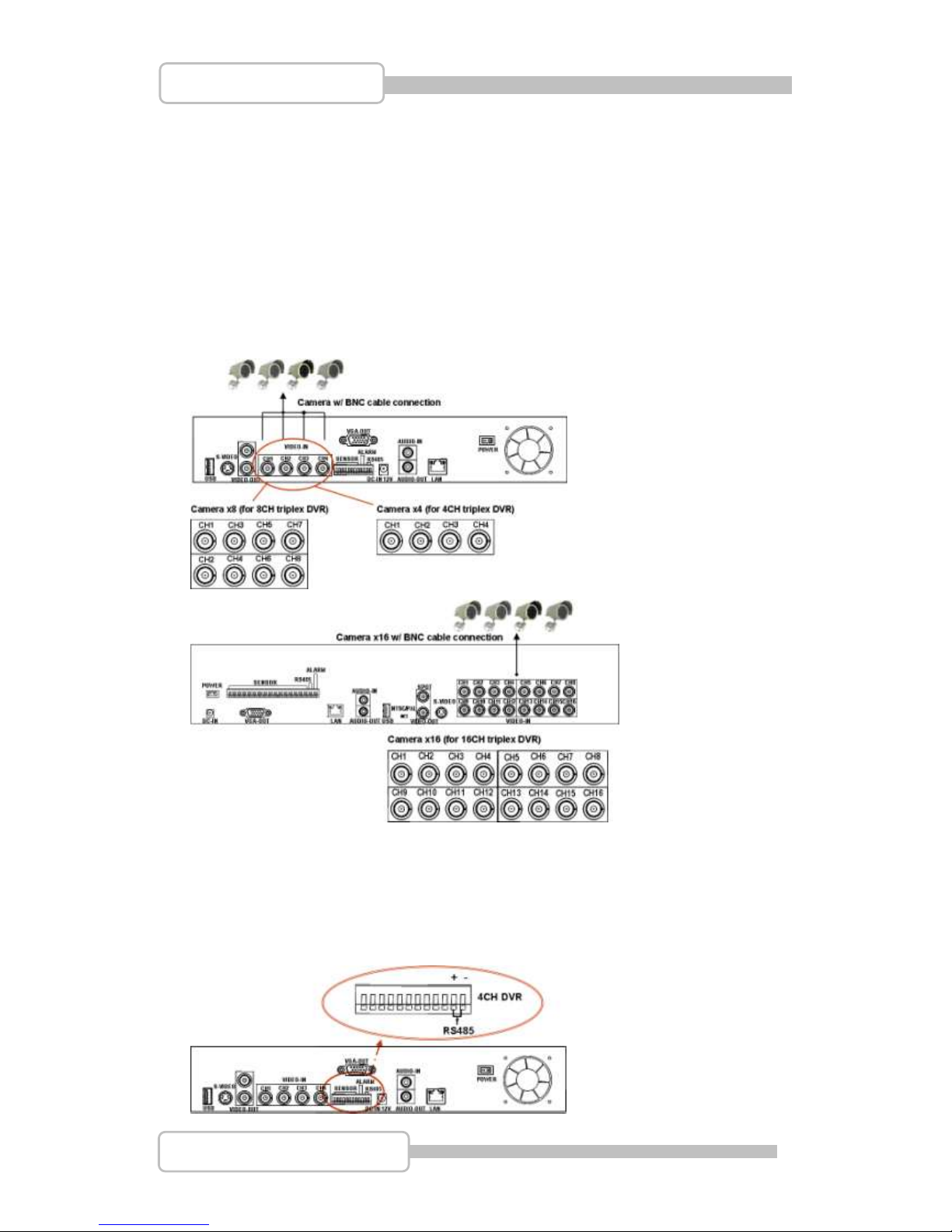
3. Camera connections
There are 4/8/16 channels for cameras’ connections named CH1, CH2, CH3 …. CH16.
Each camera has two wirings basically: BNC and Power.
Connect the BNC cable to DVR’s “VIDEO-IN” connector on rear panel for video signals
and connect the power cable to the camera’s power adapter.
The Dome camera has one more RS485 wiring for activity control. At first, please refer
to the next section for setting JS1 selection to RS485 (default is RS485).
Please refer to the following figure and connect to DVR’s “RS485 connectors” (Two
pines) on rear panel for controls signal.
Page 21
21
4/8/16CH Triplex DVR
Digital Video Recorder
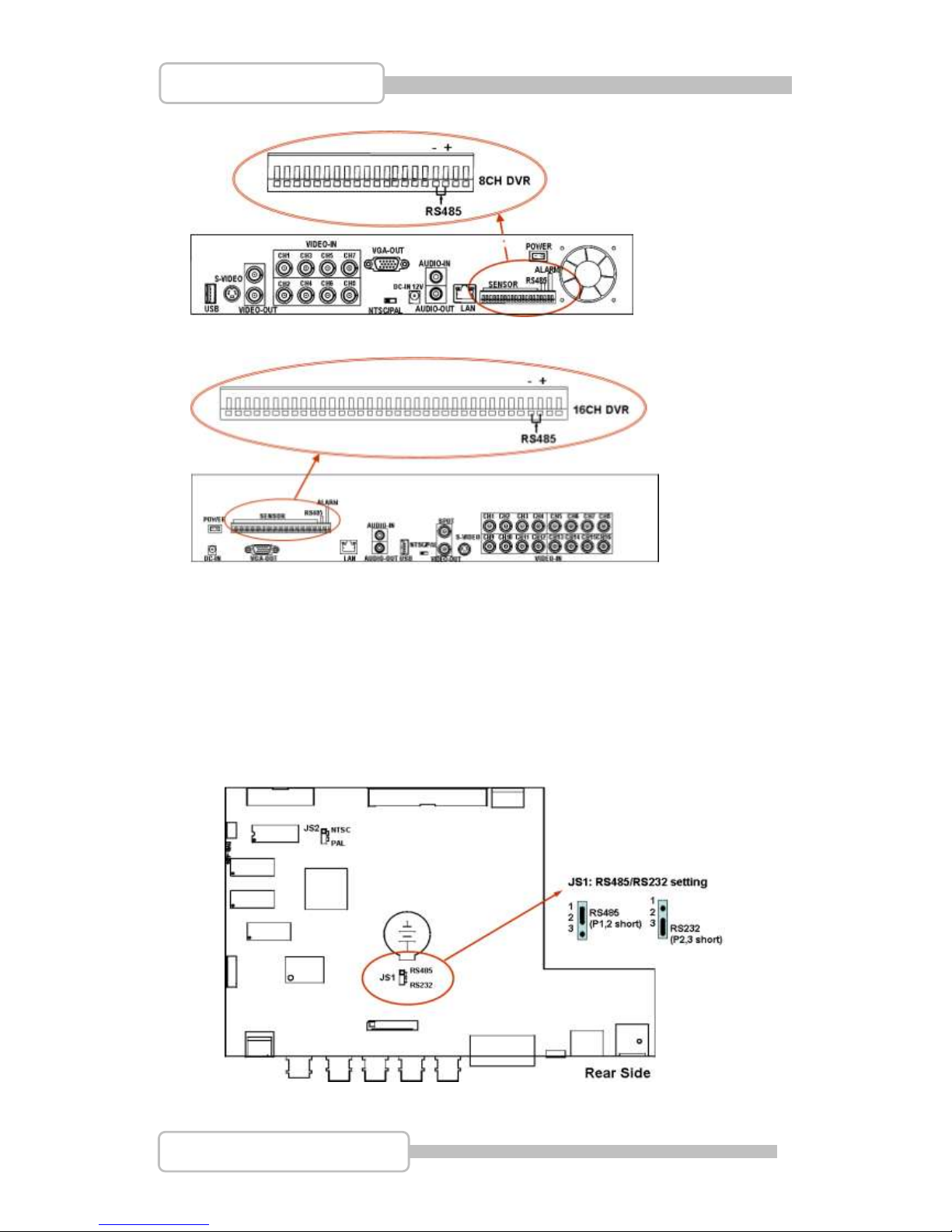
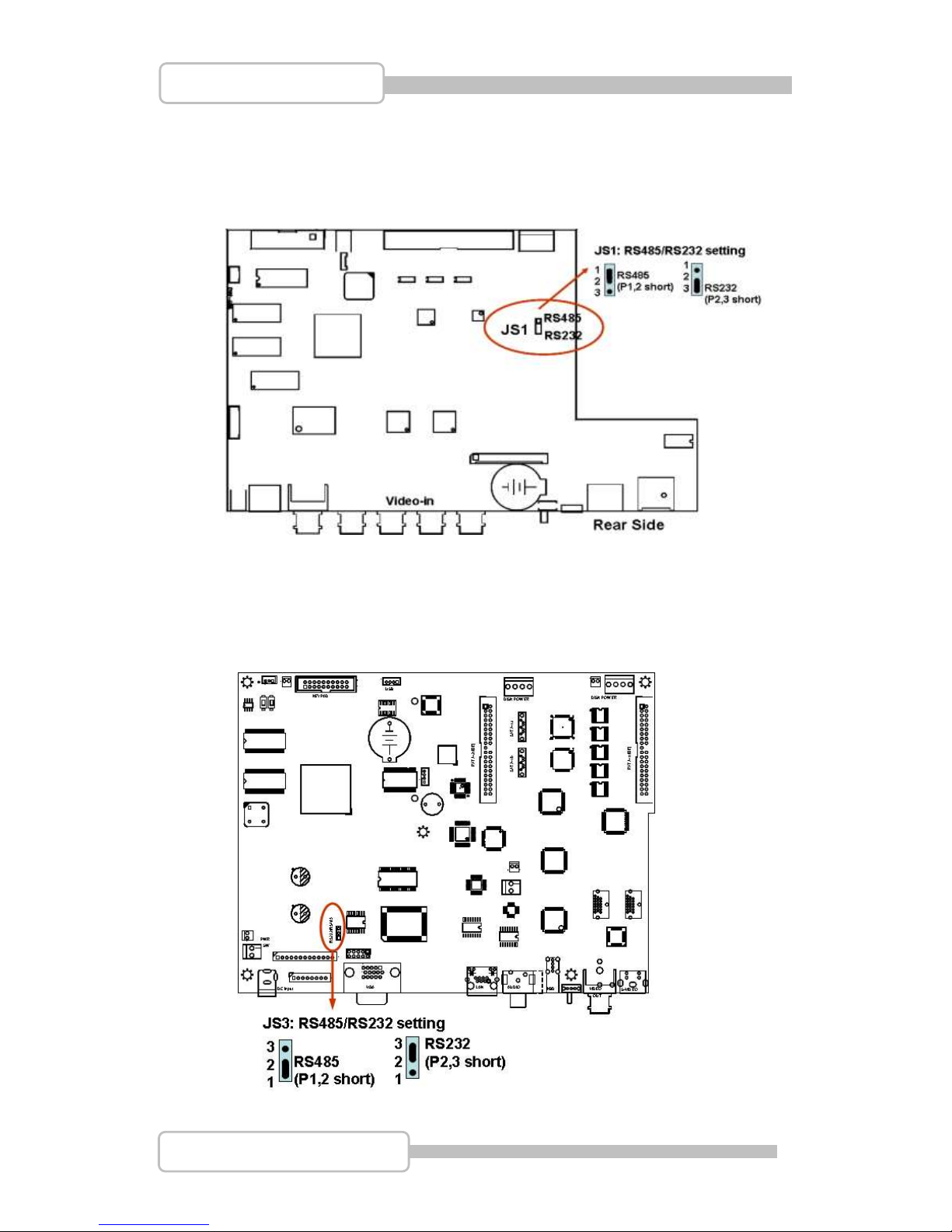
4. RS485/RS232 Selection
The DVR provide one com port. It can be selected to RS232 or RS485 by setting the
jumper on the main control board.
4.1. 4 CH Triplex DVR
Open the top cover as mentioned; there is a main control board with JS1: the
jumper setting to select RS485 or RS232 as following figure.
Page 22
22
4/8/16CH Triplex DVR
Digital Video Recorder
4.2. 8 CH Triplex DVR
Open the top cover as mentioned; there is a main control board with JS1: the
jumper setting to select RS485 or RS232 as following figure.
4.3. 16 CH Triplex DVR
Open the top cover as mentioned; there is a main control board with JS3: the
jumper setting to select RS485 or RS232 as following figure.
Page 23
23
4/8/16CH Triplex DVR
Digital Video Recorder
5. Video Format Selection
The DVR accepts two video formats: NTSC and PAL. It can be select by setting the
jumper on the main control board.
5.1. 4 CH Triplex DVR
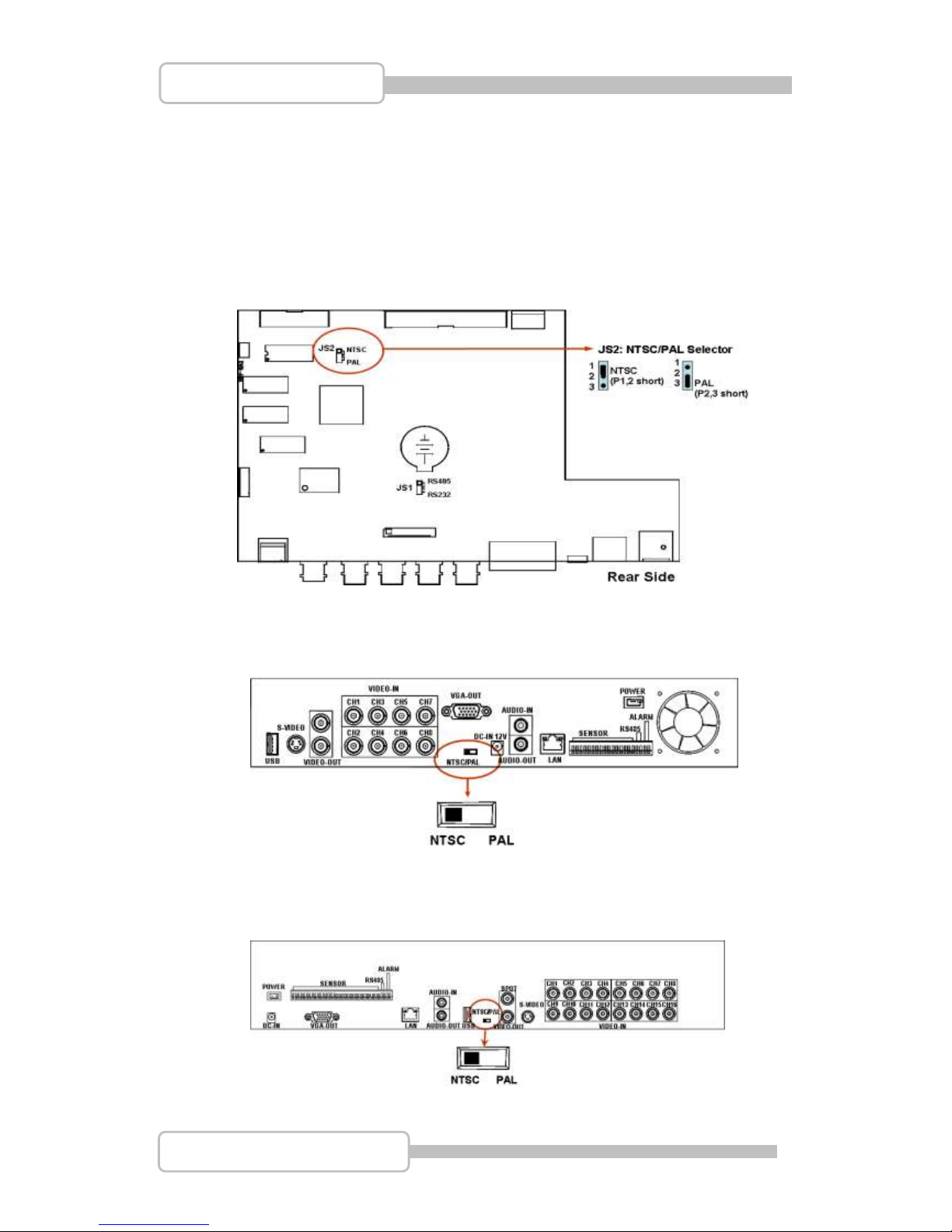
Open the top cover as mentioned; there is a main control board with JS2: the
jumper setting to select NTSC or PAL for video format as following figure.
5.2. 8 CH Triplex DVR
There is a Video format selector on the rear panel as following figure.
5.3. 16 CH Triplex DVR
There is a Video format selector on the rear panel as following figure.
Page 24
24
4/8/16CH Triplex DVR
Digital Video Recorder
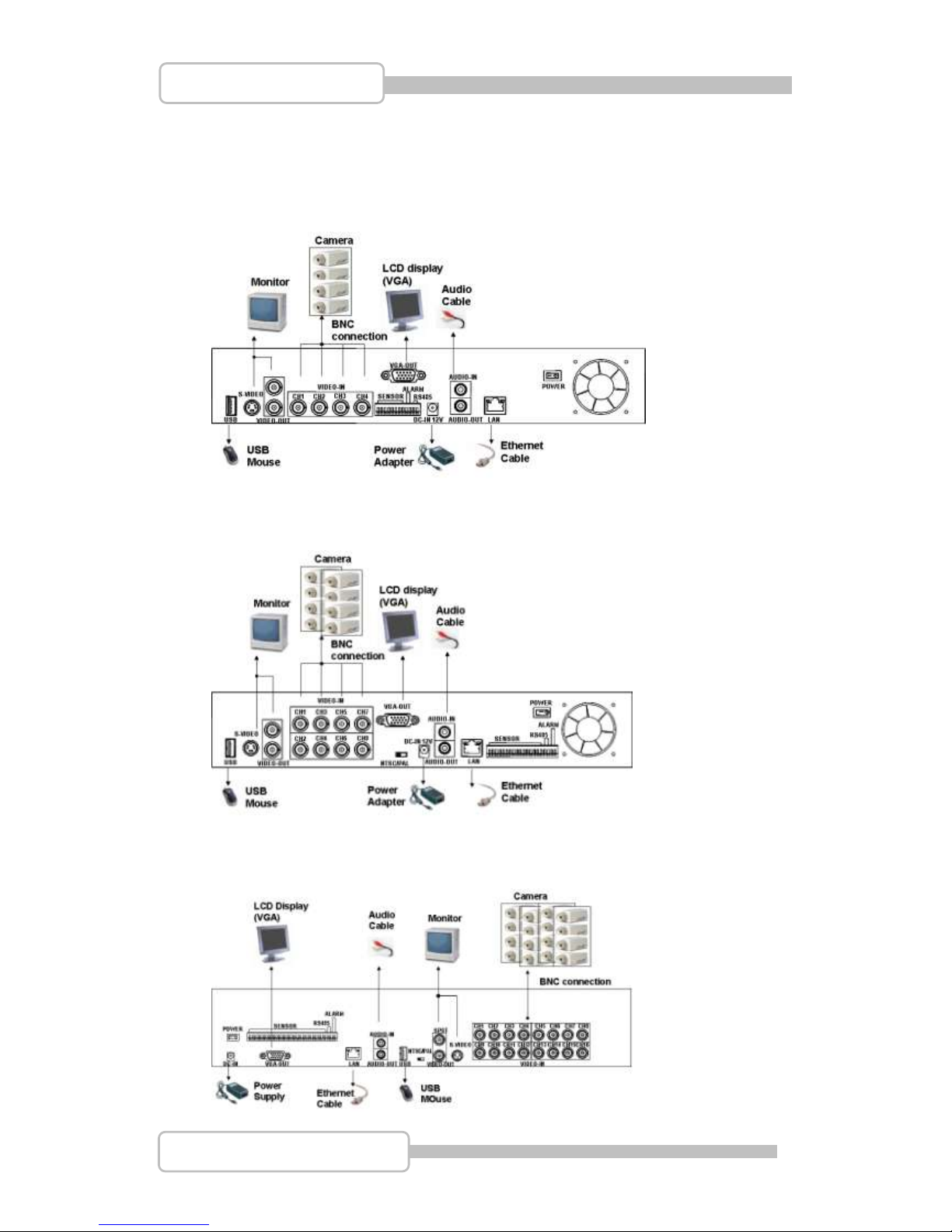
6. Cablings
Before starting to use, you have to connect all the peripherals like LCD display,
cameras … as following figure:
6.1. 4 CH Triplex DVR
6.2. 8 CH Triplex DVR
6.3. 16 CH Triplex DVR
Page 25
25
4/8/16CH Triplex DVR
Digital Video Recorder
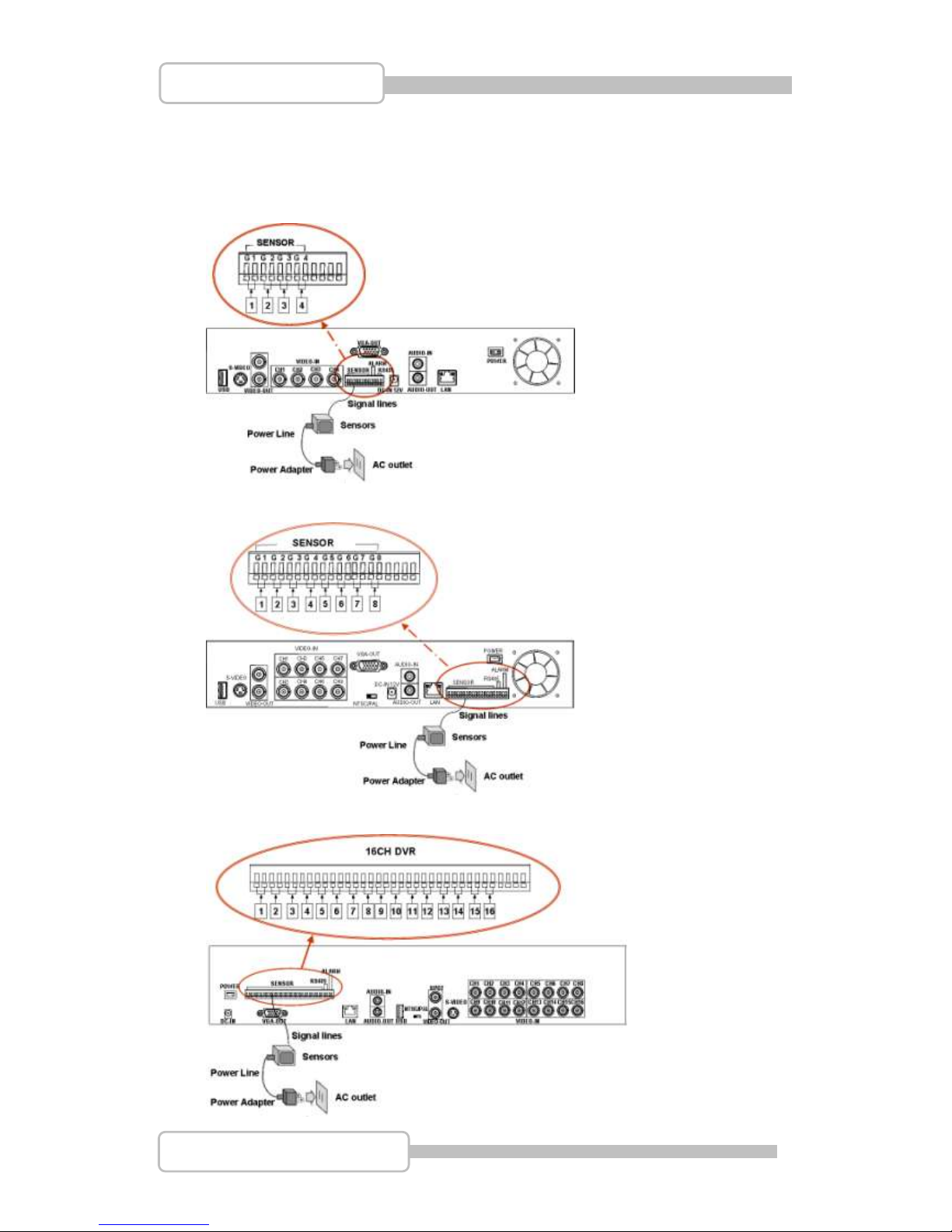
7. Sensor Installation
The DVR unit can be connected up to 4/8/16 sensor inputs as following figure.
Each sensor has two lines: signal and ground in order to sense the sensor’s status.
7.1. 4 CH Triplex DVR
7.2. 8 CH Triplex DVR
7.3. 16 CH Triplex DVR
Page 26
26
4/8/16CH Triplex DVR
Digital Video Recorder
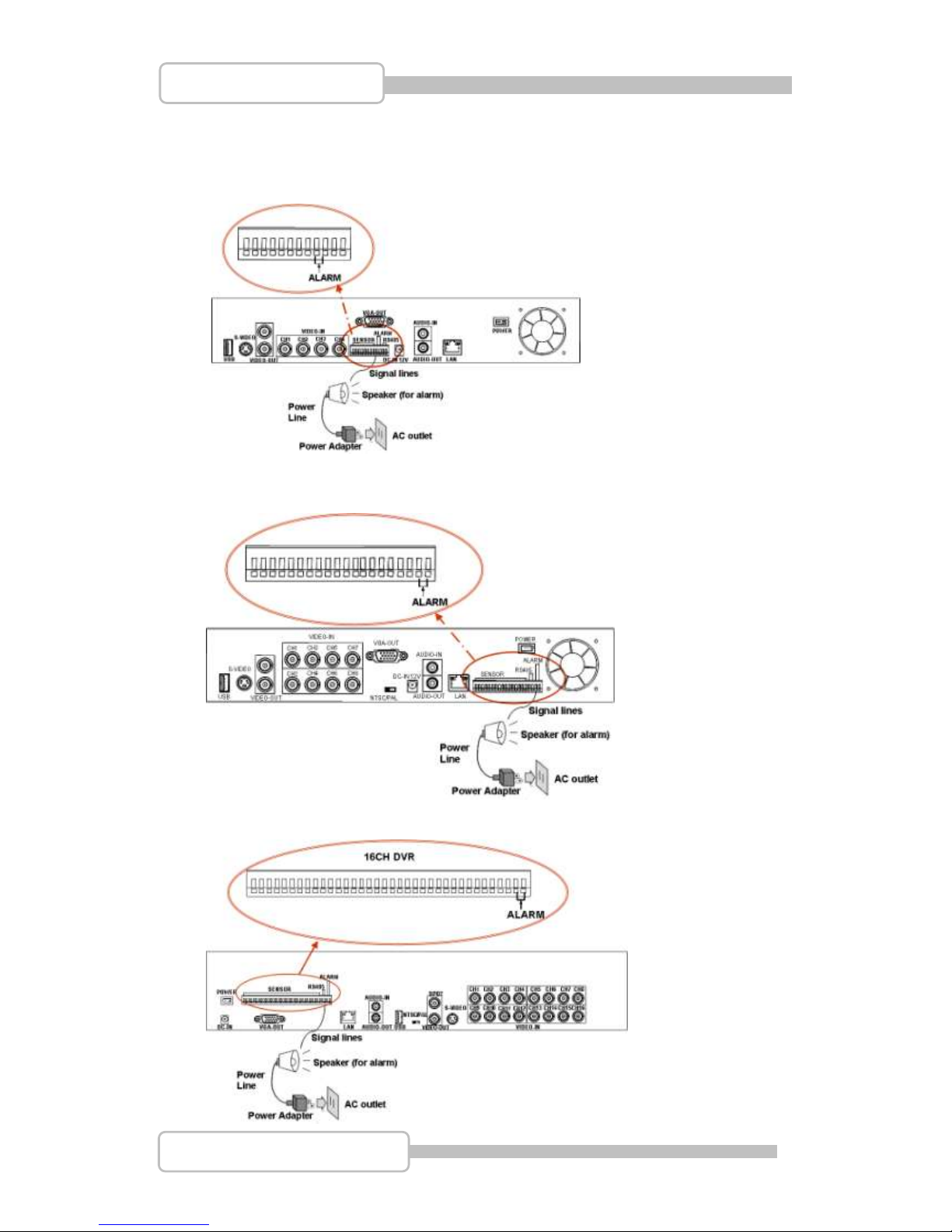
8. Alarm Installation
The DVR unit provides one alarm (speaker) signal. Please refer to following figure.
8.1. 4 CH Triplex DVR
8.2. 8 CH Triplex DVR
8.3. 16 CH Triplex DVR
Page 27
27
4/8/16CH Triplex DVR
Digital Video Recorder
SSttaarrtt uupp tthhee DDVVRR SSyysstteemm
After the unit is properly installed, the DVR unit is ready to record and play. Then apply
power by turn on the power switch.
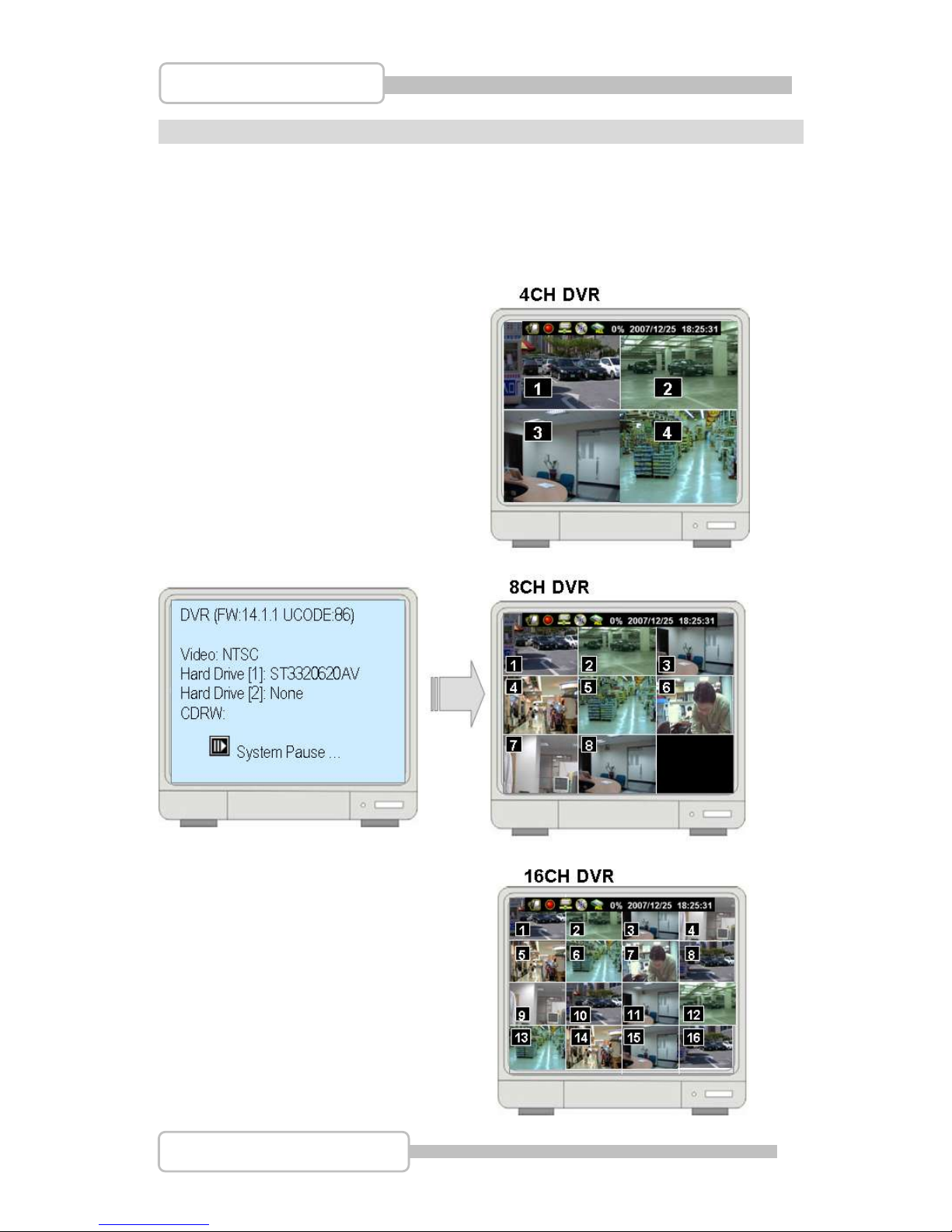
After the unit is powered on, the unit will check HDD for several seconds, and then the unit
will enter into real-time display mode shown as the following screen:
Page 28
28
4/8/16CH Triplex DVR
Digital Video Recorder
1. Commands
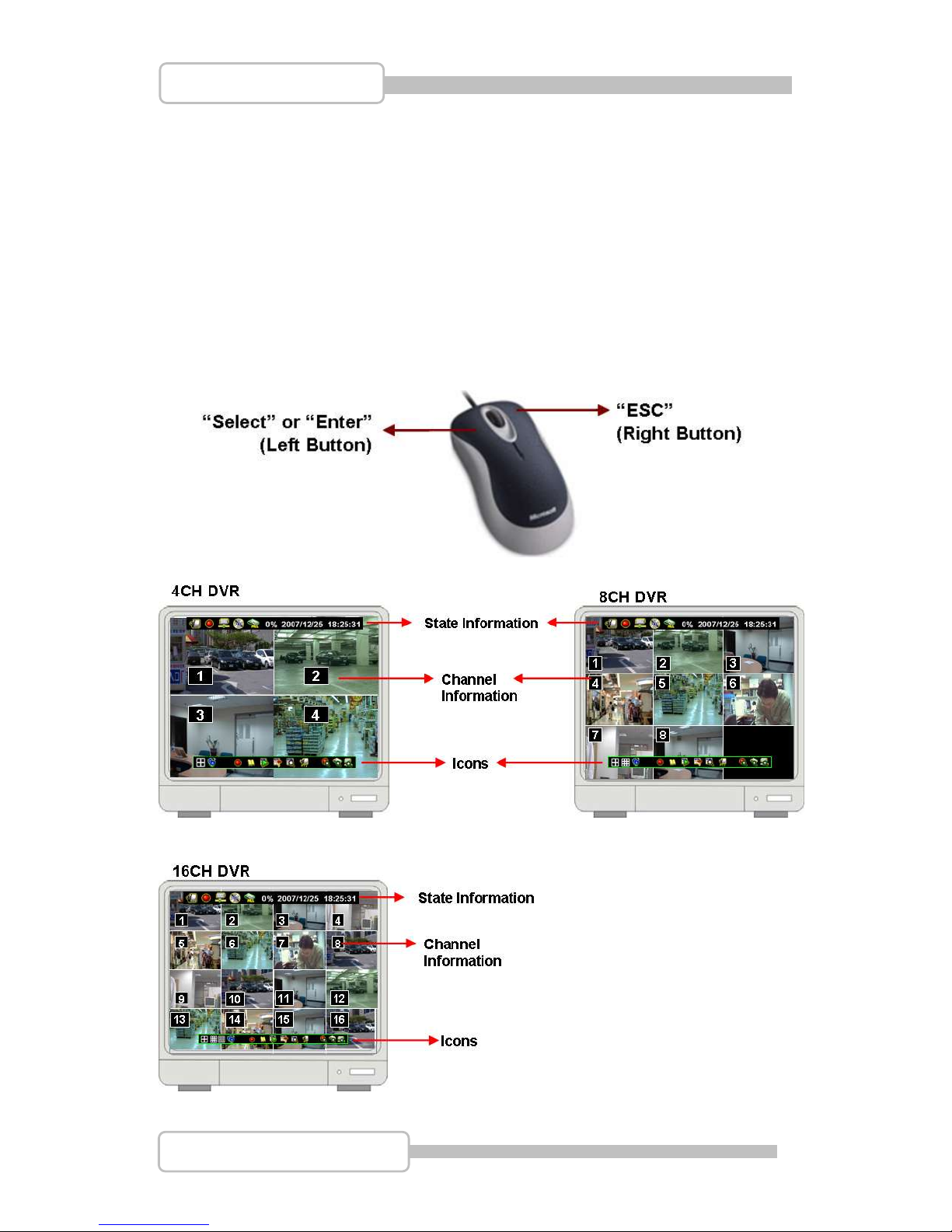
1.1. Operating Buttons
: Press it to enter the main menu or and exit the menu.
/ ( / ): Up / Down – To move up/down through the list of menu. Also used
to select menu options or change the DVR configuration values.
/(/): Left/Right – To move left/right through the list of menu.
: Select / Enter - To Enter menu list or select DVR configuration values
1.2. Mouse Operating
Page 29
29
4/8/16CH Triplex DVR
Digital Video Recorder
1.3. State Information
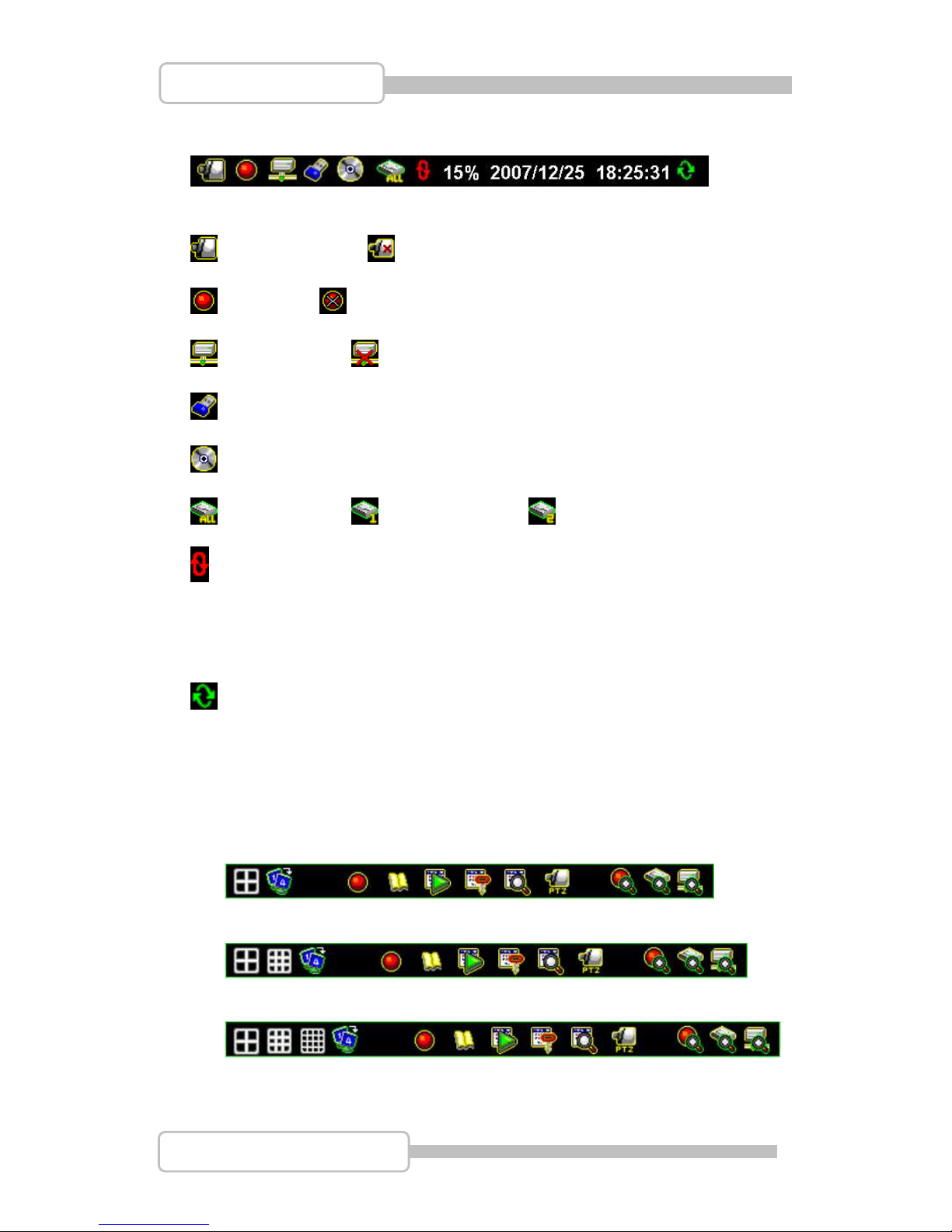
There are state informations on the upper of the screen to show the system status .
: Camera on line. : Camera signal loss
: Recoding : Stop Recording
: Network acting : Network no connection
: USB disk
: CD / CDRW
: HDD Status : 1st Hard drive : 2nd Hard drive
: Overwrite the hard drive when Hard drive is full.
XX%: Recording Capacity of Hard drive (show by %)
2007/12/25: Date
18:25:31: Time
: Channel Rotation
1.4. Icons
There is a control bar with several icons will display by press “” (Select) or move
the cursor down
(4ch DVR for example)
(8ch DVR for example)
(16ch DVR for example)
Page 30
30
4/8/16CH Triplex DVR
Digital Video Recorder
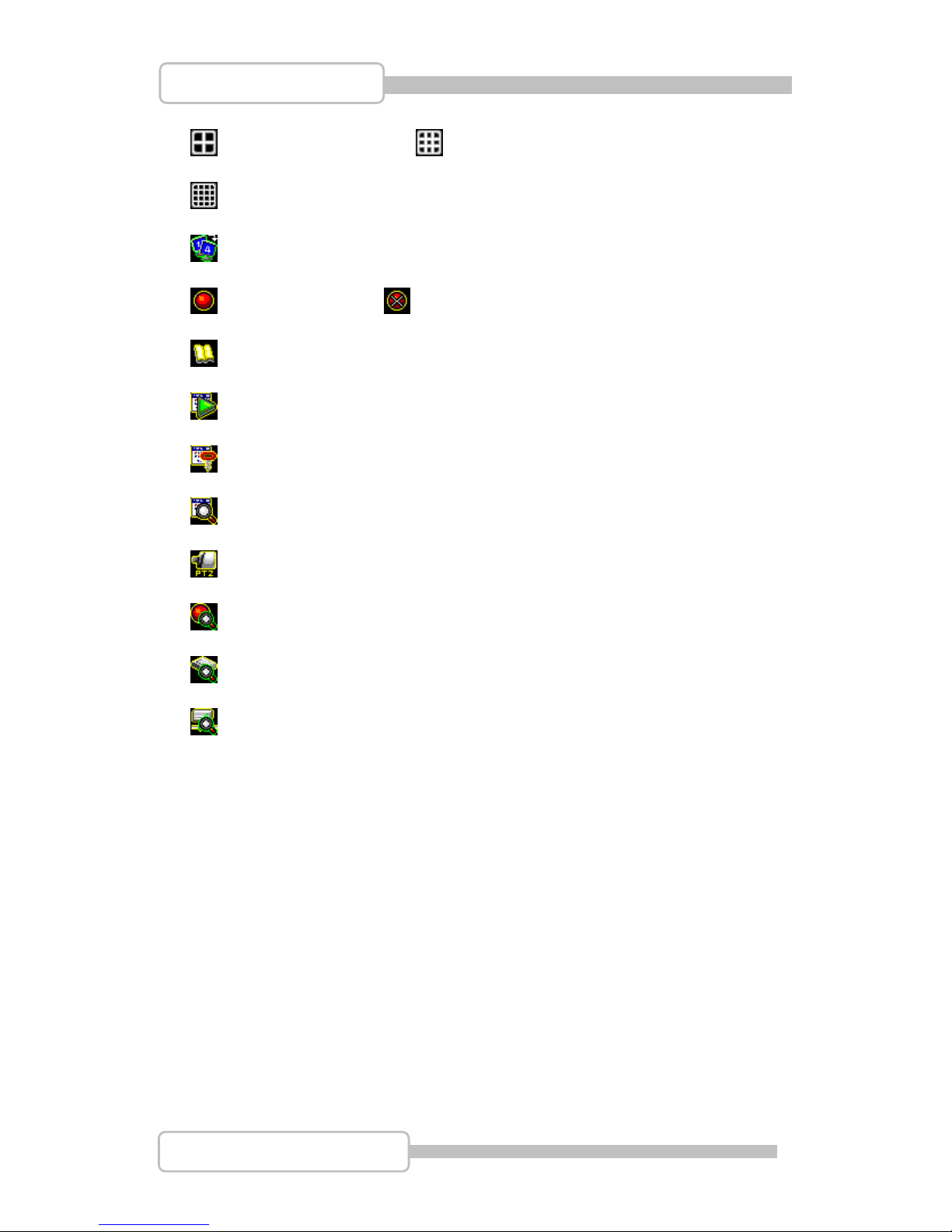
: : 4 Split View (4ch dvr) : : 9 Split View (8ch dvr)
: 16 Split View (16ch DVR)
: Auto channel rotation (from 1~4 /1~8 /1~16)
: Start recording : Stop recording
: Enter Main menu
: Play menu(Playback), To play the recorded data.
: Archive Menu, To save the configuration (Available Soon)
: Event search. To search the events
: Pan/Tile/Zoom Control. To control the P/T/Z camera
: Record Information
: Hard drive Information
: Network Information
Page 31
31
4/8/16CH Triplex DVR
Digital Video Recorder
2. Main Menu
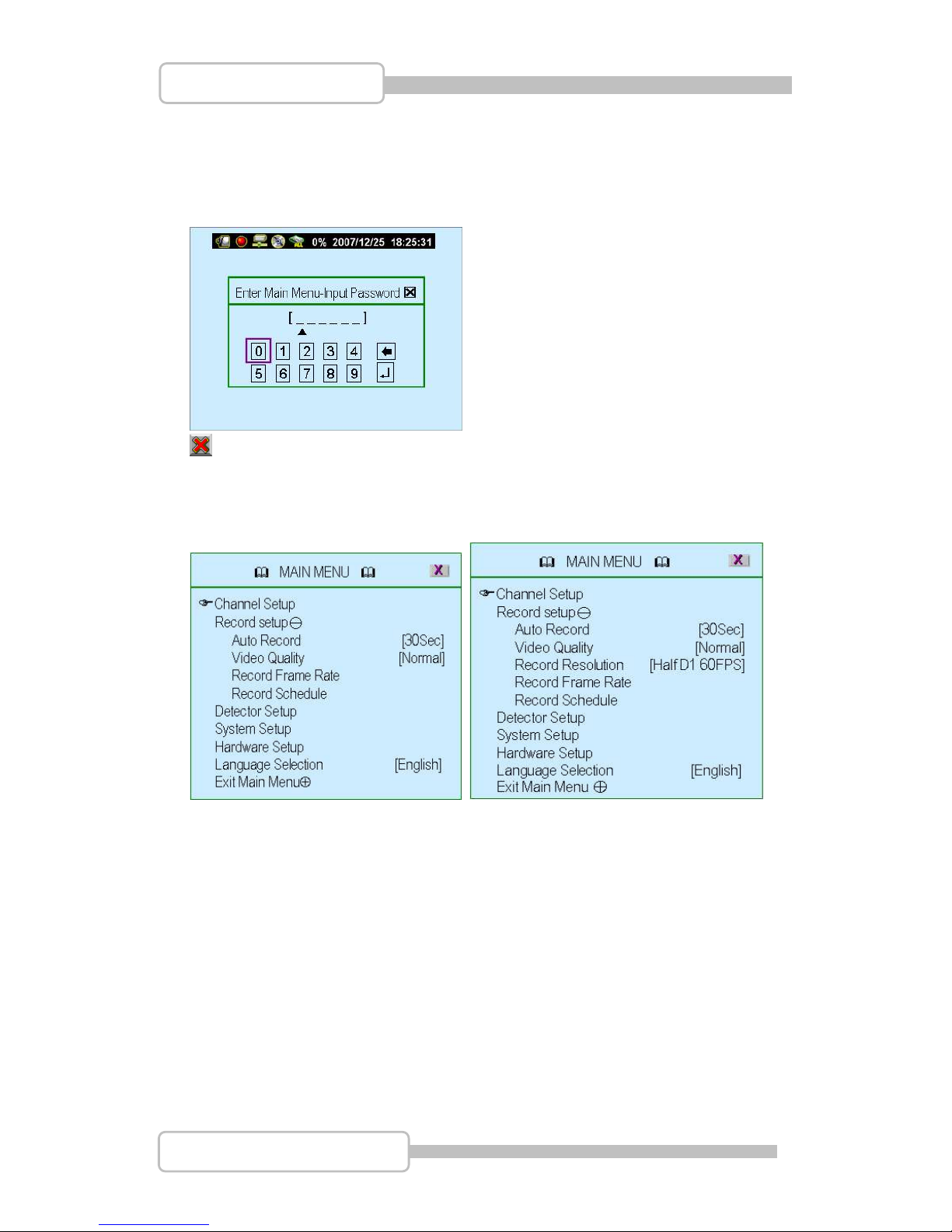
Press to enter the “main menu”, it will show the password input inquiry as following.
Please enter six numbers by controls on front panel (by using /{/) and ) or
the buttons (number 1~16) on IR remote. Default password is “123456”.,
ESC/Discard: To escape this menu by only using USB mouse
After enter the main menu password, it goes into the main menu for DVR setup
(4/8CH DVR) (16CH DVR)
Channel Setup: To select or specify the channel for display/record.
Record Setup: To setup recording status of the channel which has been selected
at “Channel Setup”.
Detector Setup: To select the channel would like to be detected. Also to setup all
the detection/sensor status.
System Setup: To setup the DVR system configuration including of date/time,
button beep, input device speed ....etc.
Hardware Setup: To update the firmware and to setup the input/output device
configuration such as disk drive, network, display and audio
Language Selection: To select the language for operating
Exit Main Menu: To exit the main menu
Page 32
32
4/8/16CH Triplex DVR
Digital Video Recorder
3. Channel Setup
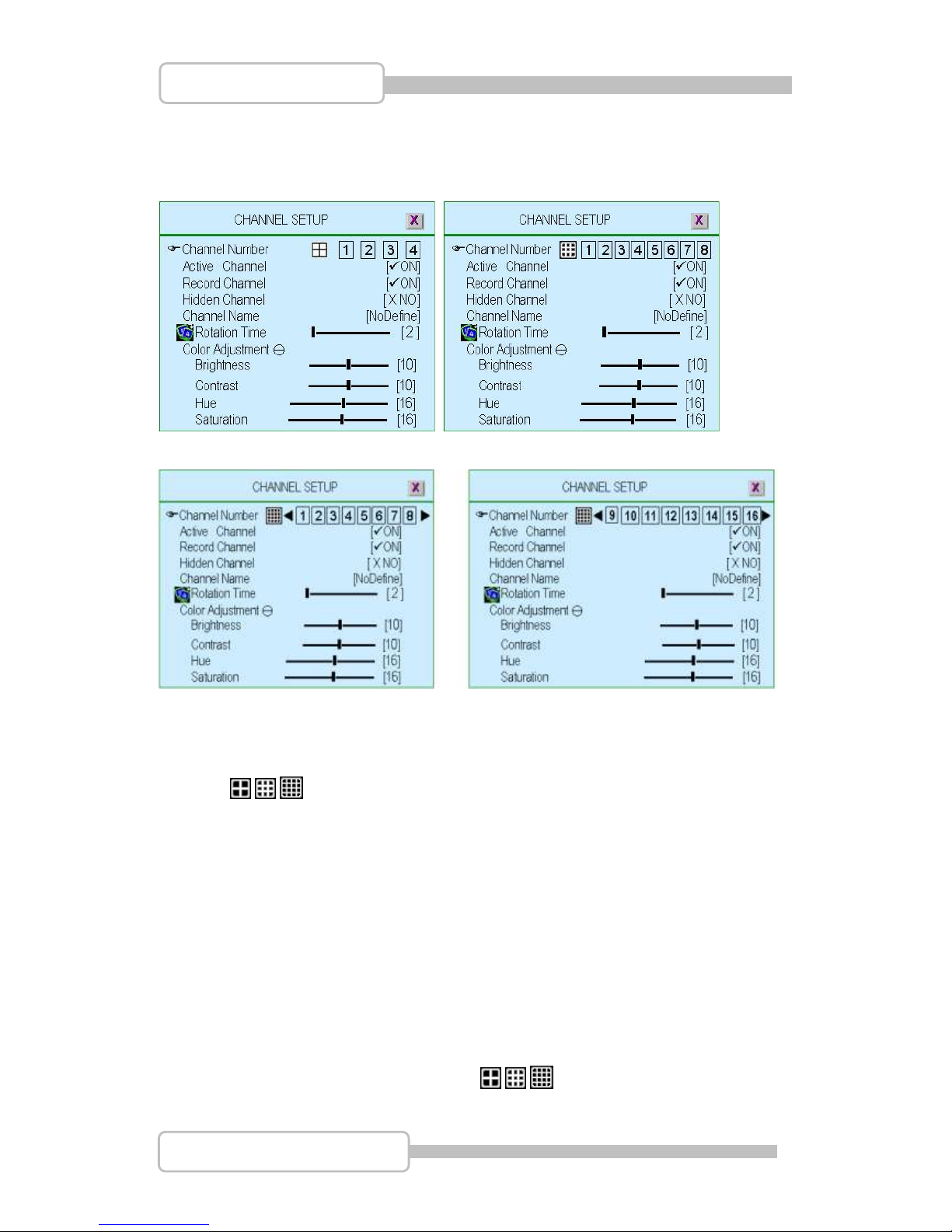
Press to enter the “Channel setup” as following.
(4CH DVR) (8CH DVR)
(16CH DVR)
3.1. Channel Number
To select or specify the channel for displaying/recording.
” / / ” (default) (Full screen mode): you can view / record all channels (4 or
8 or 16) on the screen of full-screen.
“1,2,3,4” or “1,2,3,4,5,6,7,8” or “9,10,11,12,13,14,15,16”: you can view / record
each channel (4 or 8) be selected on the screen.
3.2. Active Channel
To set the channel been selected at “Channel Number” to both display on screen
and record or not.
“ON” – Display on screen, Channel Number color turns to red
“OFF”- No display on screen. Channel Number color turns to white
It can be setup each channel separately by choosing the dedicated channel at
“Channel Number”. Or to choose ” / / ” for all channels
Page 33
33
4/8/16CH Triplex DVR
Digital Video Recorder
3.3. Record Channel
To set the channel been selected at “Channel Number” to be recorded or not.
“ON” – recording, “OFF”- No recording.
It can be setup each channel separately by choosing the dedicated channel at
“Channel Number”. Or to choose ” / / ” for all channels.
3.4. Hidden Channel
Set the channel been selected at “Channel Number” to display on screen or not.
But it does not matter with recording mode.
“ON” – Hidden the channel on screen you choose, Channel Number color turns
to grey. The recording function is acting.
“OFF”- Not hidden
It can be setup each channel separately by choosing the dedicated channel at
“Channel Number”. Or to choose ” / / ” for all channels
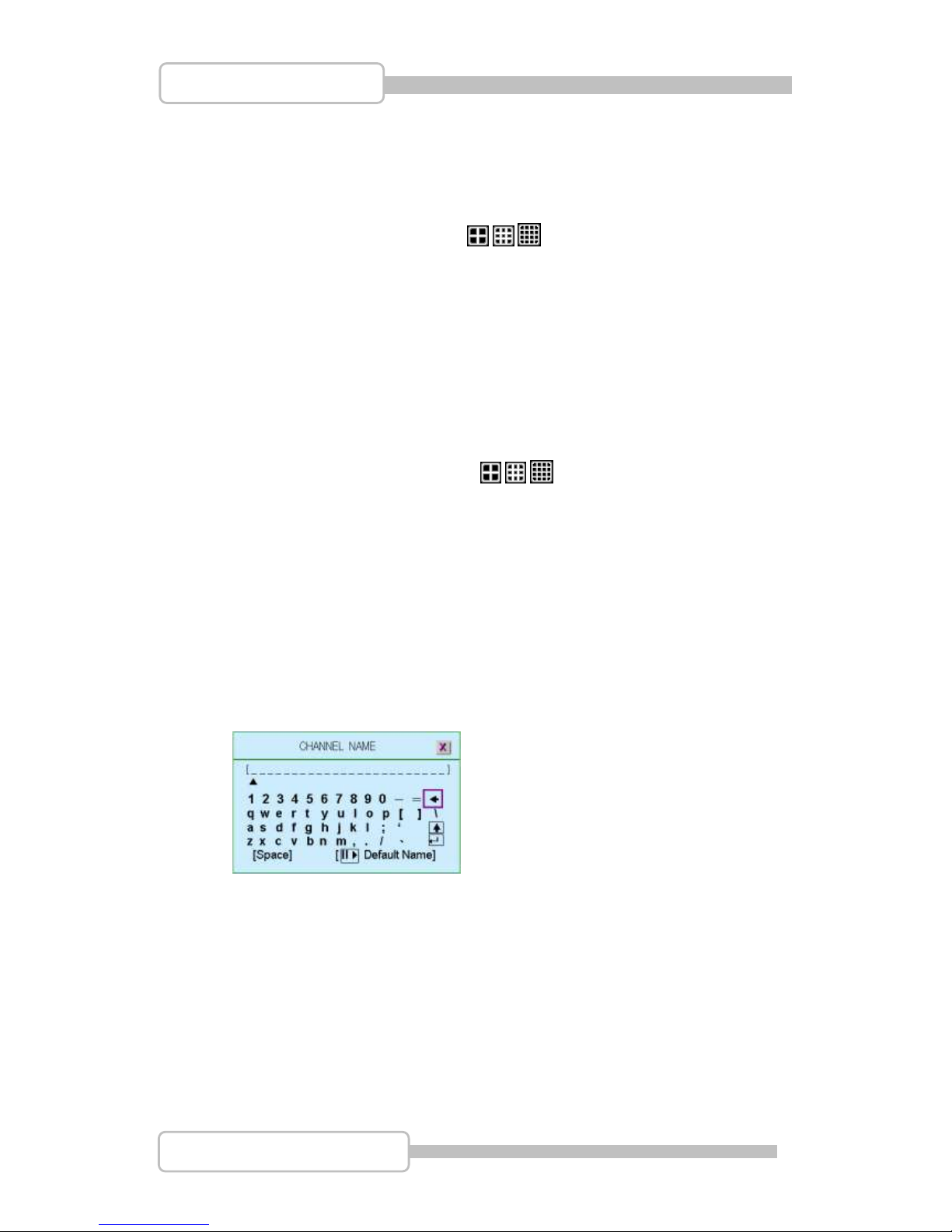
3.5. Channel Name
To specify the channel name with 24 characters (max.)
Press “” (Play) :There are several channel name: “Room”, Hall”, ” Door”, “Lift”,
“Area”, “Floor”, “Entry”, “Point” for use.
Or you can define the name by using keyboard, controls on front panel or buttons
on IR remote: / ( / ) – move up / move down, /(/): move left /
move right to the character would like to be selected and press ”” to select as
shown at following figure. The channel name will show on the top of each channel
3.6. Rotation Time
To setup how long to display each channel on full screen from 2~30sec.
3.7. Color Adjustment
Brightness: Press “” button to change (1~20). Default is 10
Contrast: Press “” button to change (1~20). Default is 10
Hue: Press “” button to change (1~32). Default is 16
Saturation: Press “” button to change (1~32). Default is 16
Page 34
34
4/8/16CH Triplex DVR
Digital Video Recorder
4. Record Setup
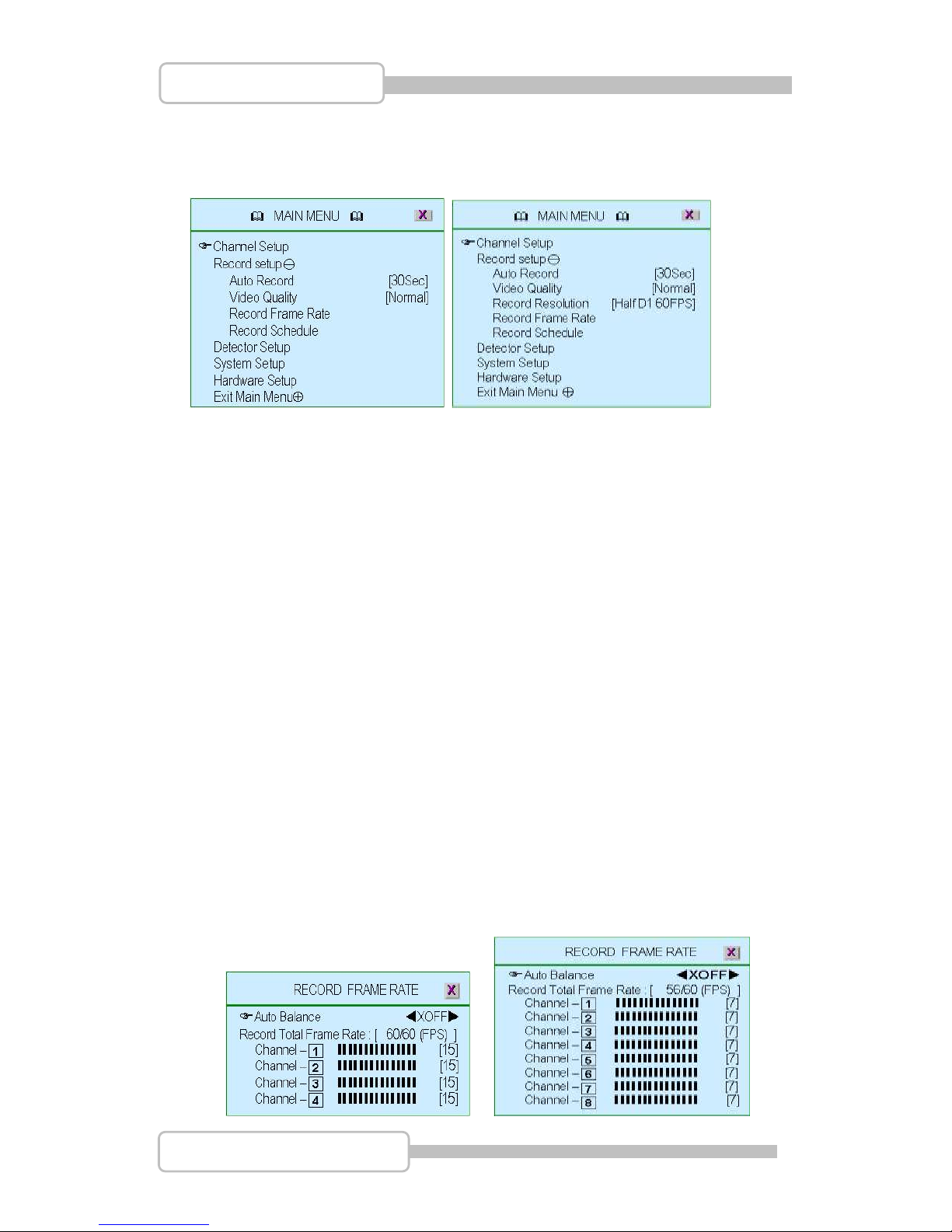
Press to enter the “Record setup” as following.
(4/8CH DVR) (16CH DVR)
4.1. Auto Record
To setup the recording time period by 0sec(OFF), 10sec, 20sec, 30sec, 40sec,
50sec or 60sec. Auto record will help you to re-start the recording automatically in
case of abnormal shut down.
4.2. Video Quality
There are three different image video quality settings: NORMAL, LOW, HIGH.
Default is NORMAL. Higher the video quality is the clearer images the unit plays.
But occupy larger recording size on HDD.
4.3. Record Resolution (only for 16CH DVR)
There are two record resolution for setting: Half D1 60FPS & CIF 120FPS
Default is Half D1 60FPS.
Half D1: 640 × 224 for NTSC systems and 640 × 272 for PAL systems
CIF: 320 x 224 for NTSC systems and 320 x 272 for PAL systems
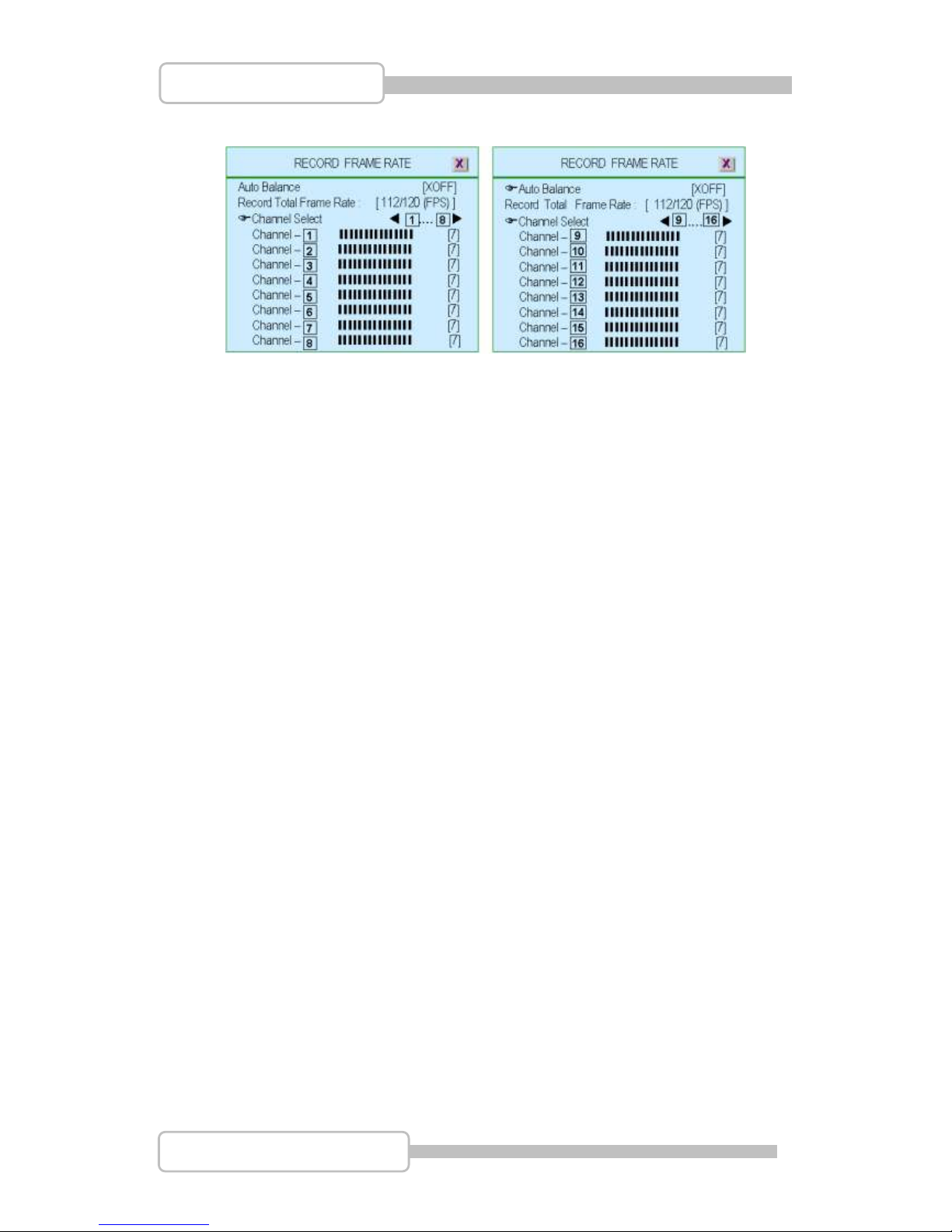
4.4. Record Frame Rate
Setup the recording frame rate for each channel.
(4CH DVR) (8CH DVR)
Page 35
35
4/8/16CH Triplex DVR
Digital Video Recorder
(16CH DVR)
4.4.1. Auto Balance
To setup all channel recording frame rate and keep each channel’s frame
rate in balance, Default is “OFF”.
When Trigger mode is ON, the active channel has been detected will occupy
all record frame rate if Auto Balance set as “ON”.
4.4.2. Record Total Frame Rate
To setup each channel’s recording frame rate in separately.
For 4ch DVR, Total frame rate is 60/60FPS (Frame Per Second), each
channel is 15fps in balance as default.
For 8ch DVR, Total frame rate is 56/60FPS (Frame Per Second), each
channel is 7fps in balance as default.
For 16ch DVR, Total frame rate is 112/120FPS (Frame Per Second), each
channel is 3fps in balance as default.
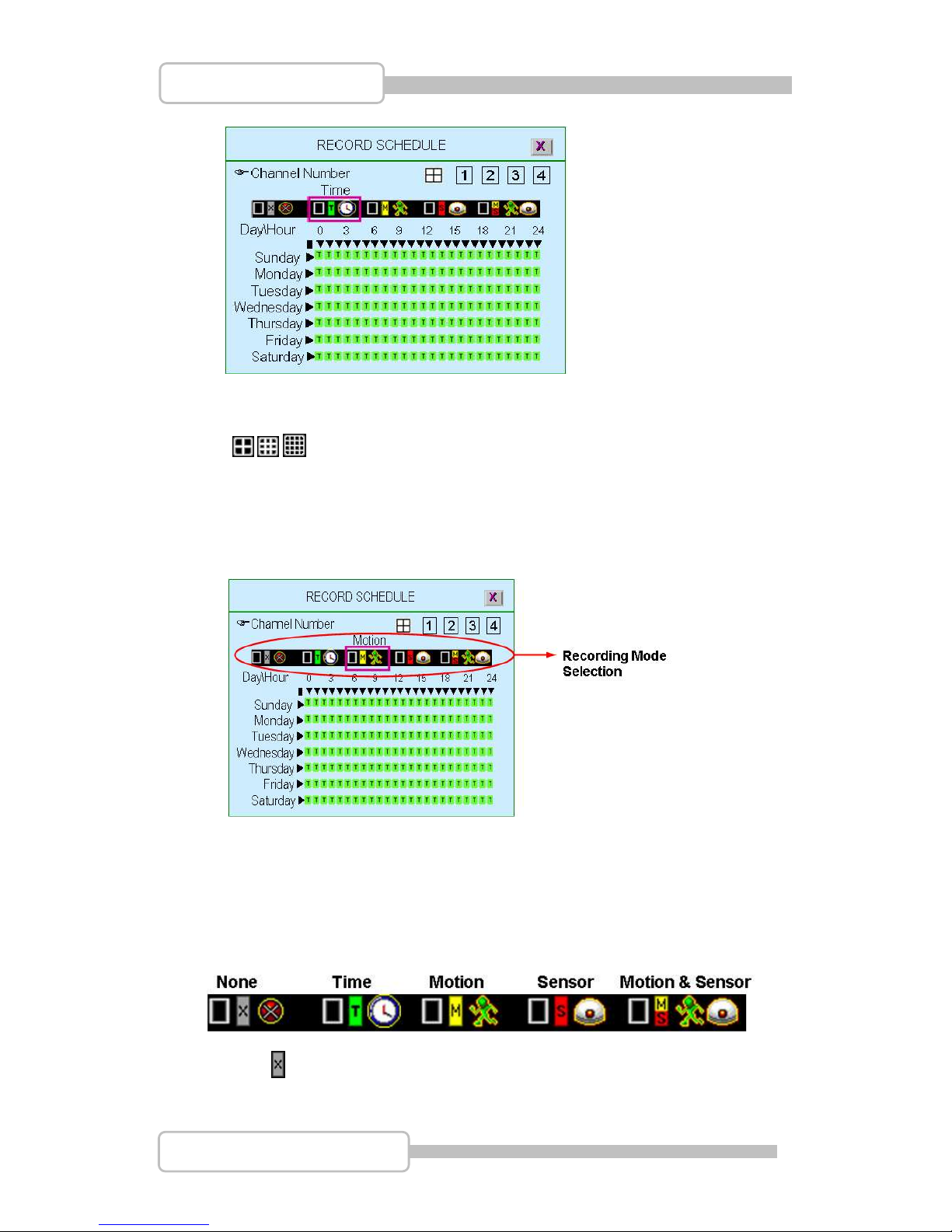
4.5. Record Schedule
To setup the recording schedule during one week from Sunday to Saturday
Each day is 24-hour.
Page 36
36
4/8/16CH Triplex DVR
Digital Video Recorder
Channel Number
To setup the channel recording schedule.
” / / ”: All channels will be set at the same recording schedule.
“1,2,3,4” or “1,2,3,4,5,6,7,8” or “9,10,11,12,13,14,15,16”: To setup each
channel recording schedule.
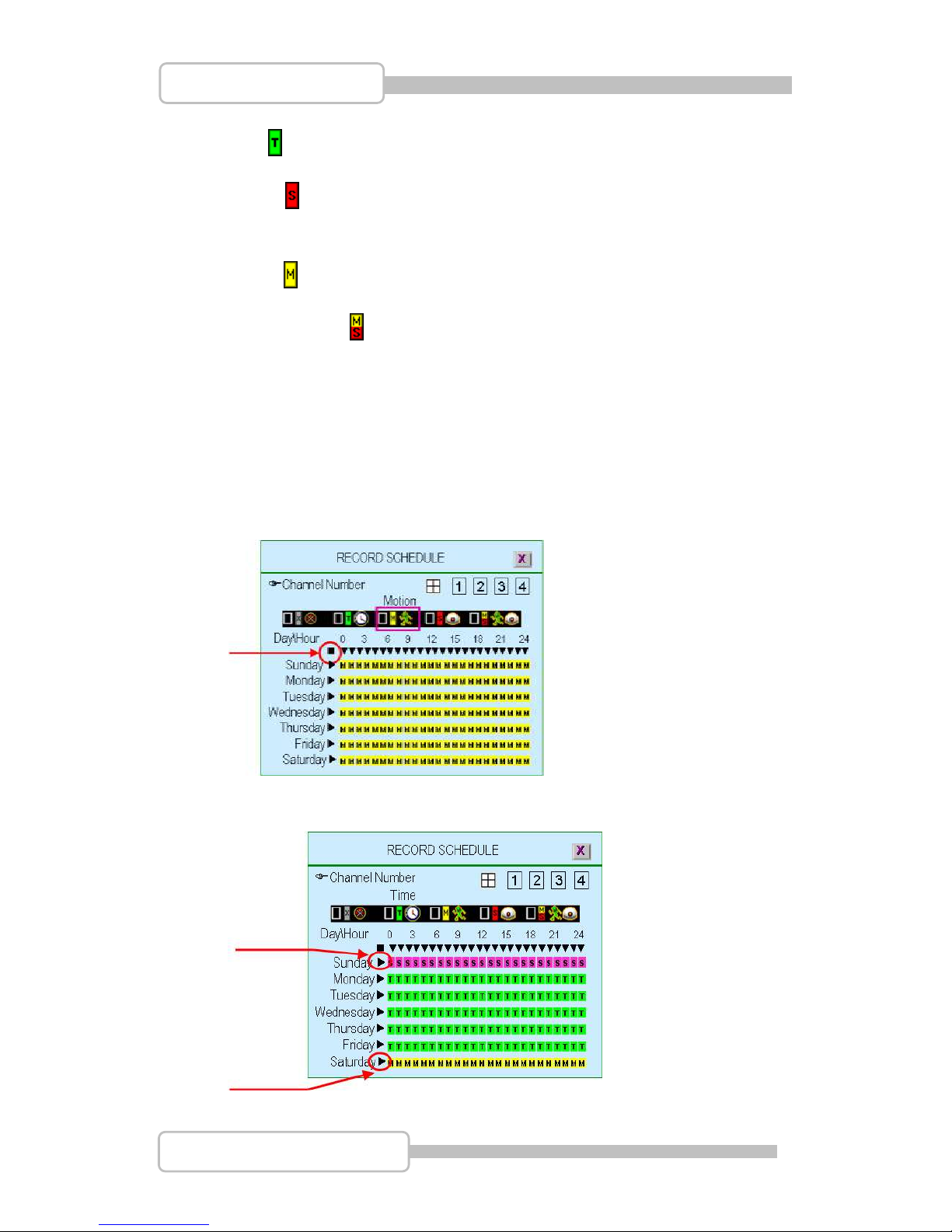
Recording Mode Select
There are five recording modes for selection: None, Time, Motion, Sensor and
Motion&Sensor.
“/(/)” : To move left or right,
“ ” :To select the mode.
None : Recording is off during this duration.
Page 37
37
4/8/16CH Triplex DVR
Digital Video Recorder
Time : Indicates to record by time schedule
Sensor : Indicates to record by sensor trigger. It means the unit starts recording
as the attached sensors being triggered during this period.
Motion : Indicates to record by motion detection.
Motion&Sensor : Indicates to record by both motion detection and sensor
trigger..
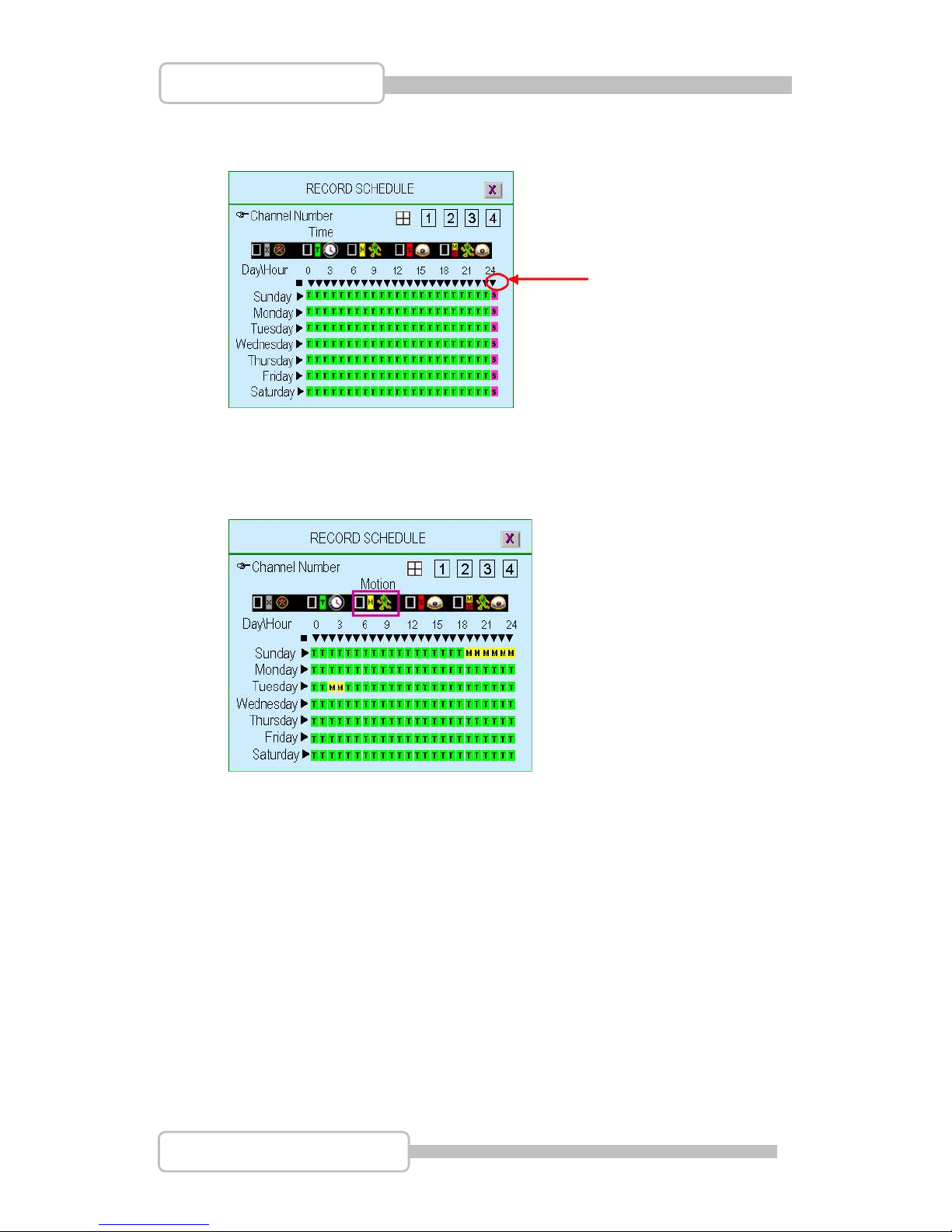
Recording Schedule
“/(/)” : To move left or right. “ ” :To select the mode.
“(/)”: To move up or down.
To set all 7-days /24hous at the same configuration by select “”
For example, choose “Motion” mode for all 7-days by move to “” and press”” ”:
To set one whole day at the same configuration by select “”
For example, Sunday is set to “Sensor” mode and Saturday to “Motion mode”
Page 38
38
4/8/16CH Triplex DVR
Digital Video Recorder
To set the specified time for each day at the same configuration by select “”
For example, the time frame 23:00-24:00 is set to “Sensor” mode for whole week.
To set any time (by hour) for each day, just move to the desired daytime and
select after setting the desired recording mode
For example, “Motion” mode at Sunday 19:00~24:00 and Tuesday 2:00~4:00 as
following
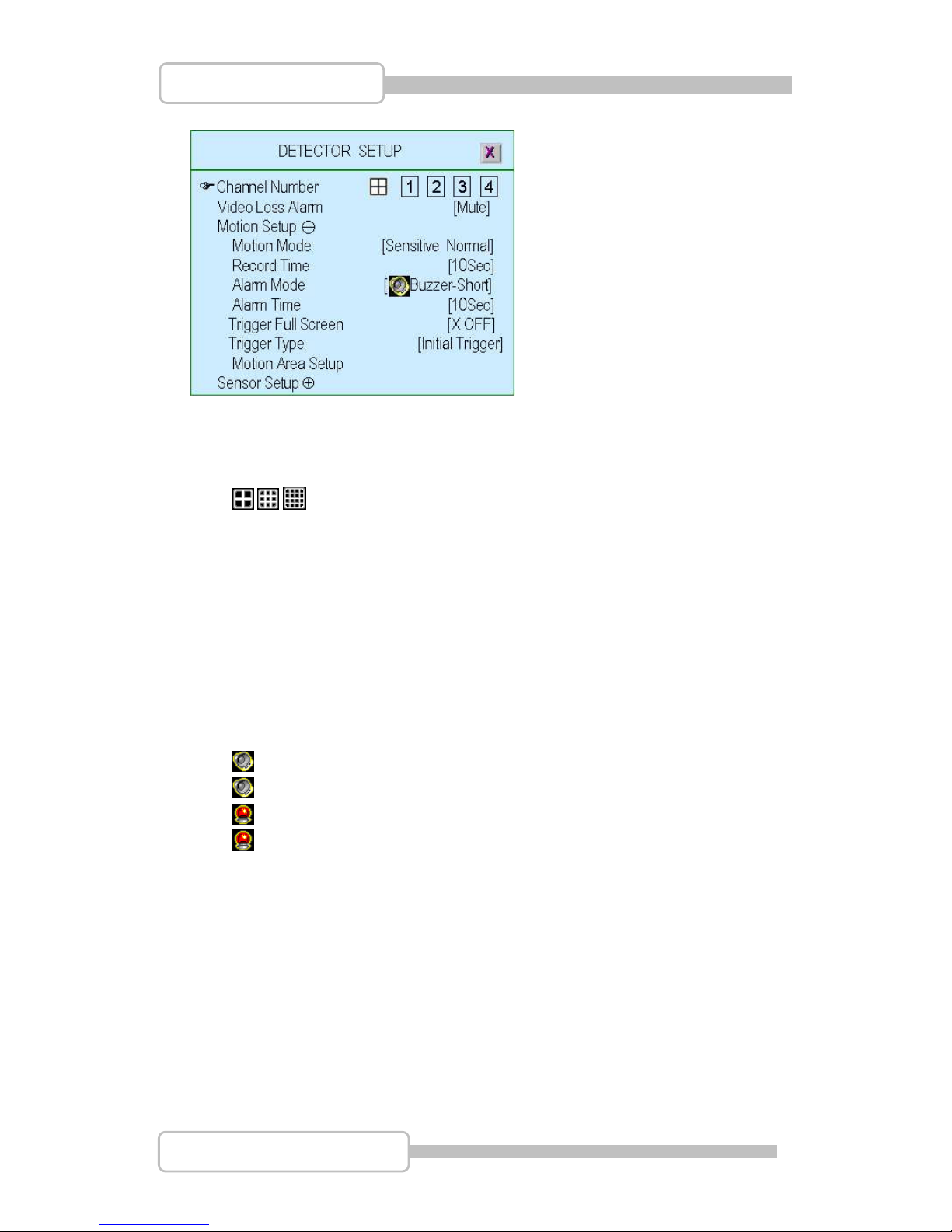
5. Detector Setup
This menu is to adjust the motion detection sensitivity of each channel
Page 39
39
4/8/16CH Triplex DVR
Digital Video Recorder
5.1. Channel Number
To select or specify the channel for detection.
” / / ” (default) (Full screen mode): you can detect all channels (4/8/16) on
the screen of full-screen
“1,2,3,4” or “1,2,3,4,5,6,7,8” or “9,10,11,12,13,14,15,16”: you can detect each
channel (4/8/16) be selected on the screen
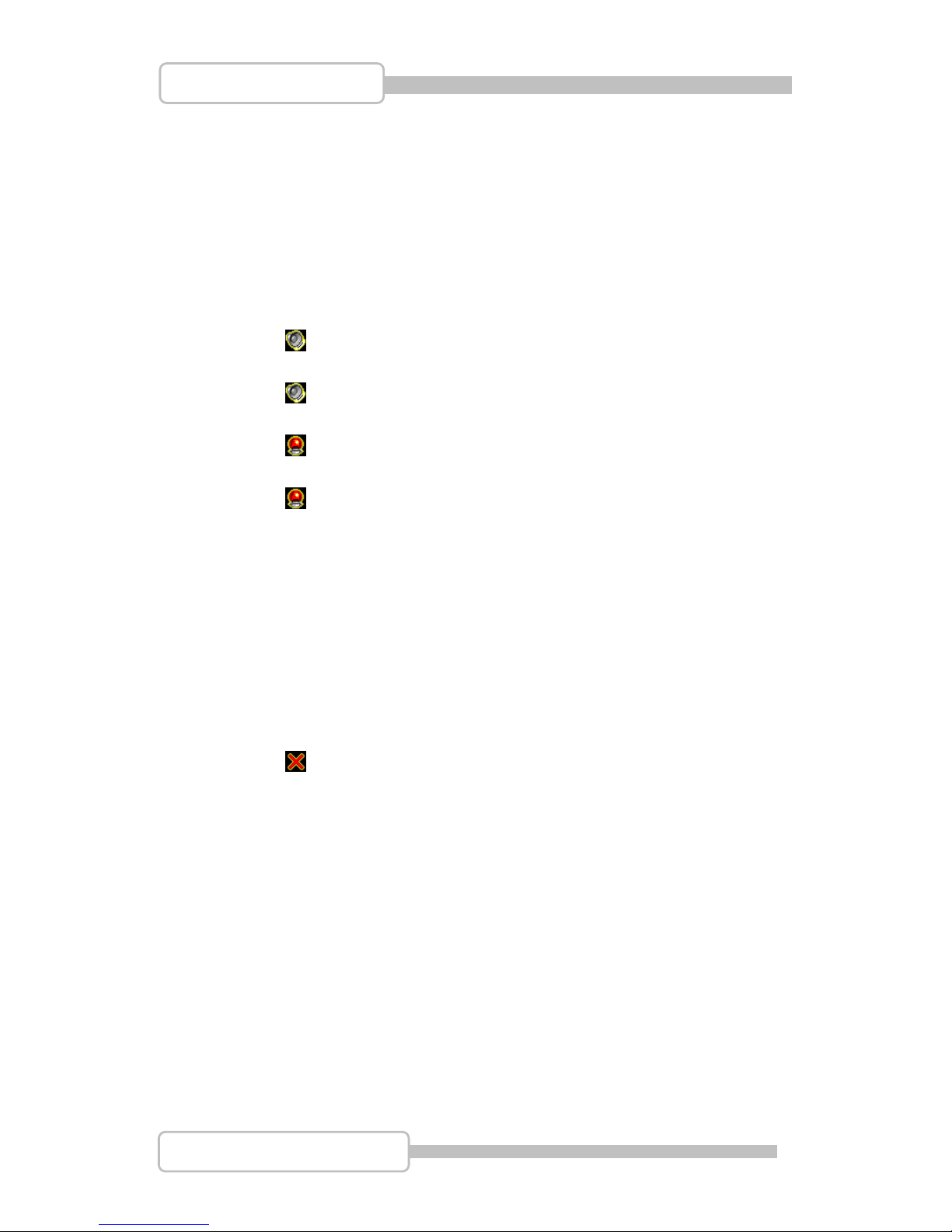
5.2. Video Loss Alarm
To select or specify the channel for detection.
“Mute”: No beep whatever video loss or not.
“ Buzzer-Short”: Beep shortly by buzzer on main board when video loss.
“ Buzzer-Long”: Beep long by buzzer on main board when video loss.
“ Alarm-Short”: Beep shortly by speaker of system when video loss.
“ Alarm-Long”: Beep long by speaker of system when video loss.
5.3. Motion Setup
5.3.1. Motion Mode
To select the motion sensitivity scale as “Sensitive OFF”, “Sensitive Low”,
“Sensitive Normal”, “Sensitive High” or “Sensitive Highest”.
“Sensitive OFF”: No sensitivity
“Sensitive Low”: Low sensitive level
“Sensitive Normal”: Normal sensitive level
“Sensitive High”: High sensitive level
Page 40
40
4/8/16CH Triplex DVR
Digital Video Recorder
“Sensitive Highest”: The highest sensitive level
5.3.2. Record Time
To set the motion’s record time as 5sec, 10sec, 15sec, 20sec, 25sec,
30sec, 45sec, 60sec, 90sec, 120sec, 150sec or 180sec
5.3.3. Alarm Mode
“Mute”: No beep whatever detecting.
“ Buzzer-Short”: Beep shortly by buzzer on main board when
detection is active
“ Buzzer-Long”: Beep long by buzzer on main board when detection
is active
“ Alarm-Short”: Beep shortly by speaker of system when detection is
active
“ Alarm-Long”: Beep long by speaker of system when detection is
active
5.3.4. Alarm Time
To Setup the time period of beep by “Nonstop”(no stop), 5sec, 10sec,
15sec, 20sec, 25sec, 30sec, 35sec, 40sec, 45sec, 50sec, 55sec or 60sec
5.3.5. Trigger Full Screen
To display the trigger channel on full screen when it act as 1sec, 2sec …
or 30sec.
“ OFF”: It will not display on full screen when the channel has been
triggered. Also, the trigger area will turn to “red-color”
5.3.6. Trigger Type
There are two trigger types: “Initial Trigger” and “Continuous Trigger” for
selection.
Initial Trigger: When channel has been triggered, it will display on full
screen as the setting time period. In that time period, this channel will
ignore any other trigger.
Continuous Trigger: When channel has been triggered, it will display on
full screen as the setting time period. In that time period, this channel is
still watching out. If another trigger act, the channel will display on full
screen and count all over again by the setting time period.
Page 41
41
4/8/16CH Triplex DVR
Digital Video Recorder
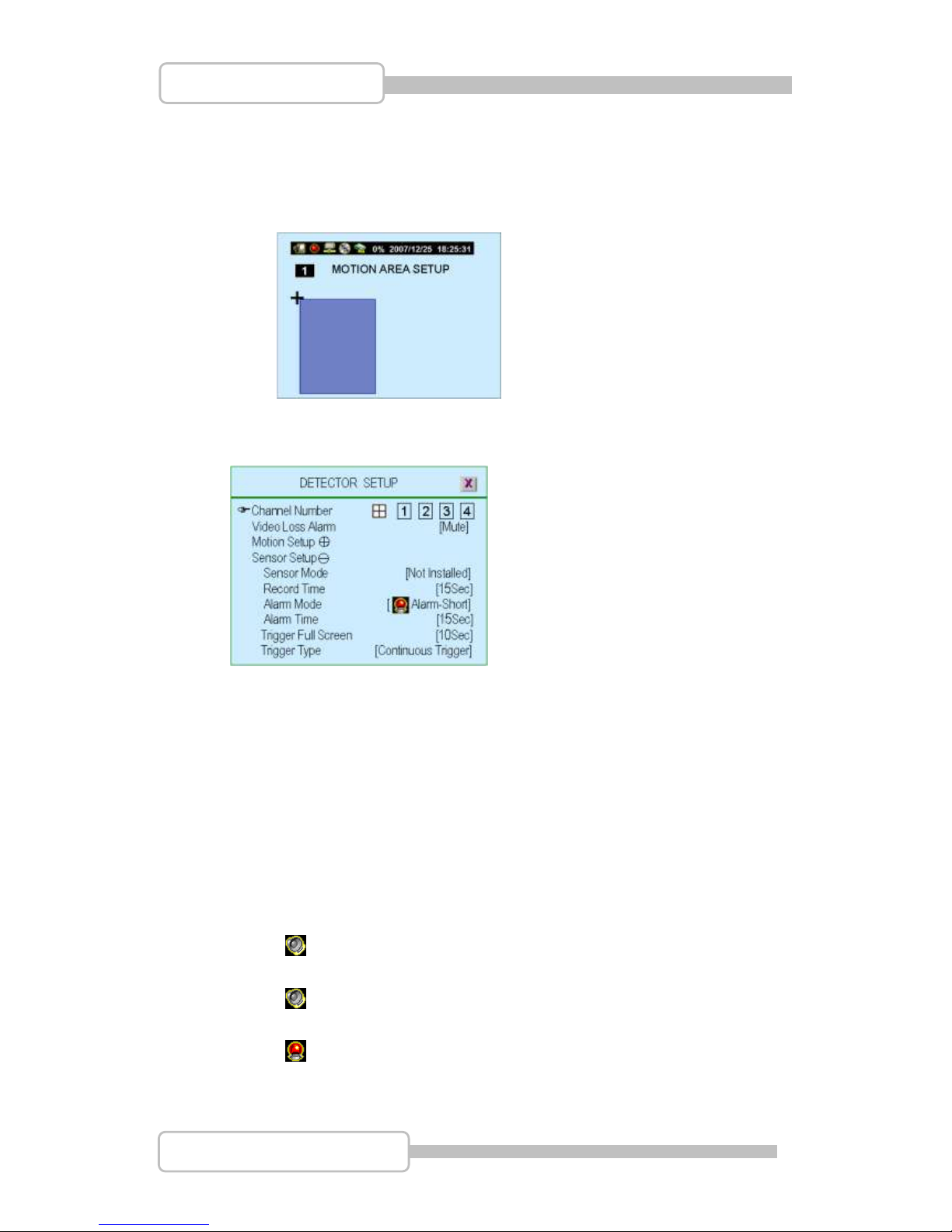
5.3.7. Motion Area Setup
Block one area on screen for each channel as motion detection area.
It can be done by mouse or by using (), (), (), () buttons
to move the area. After positioning, press “” and save it
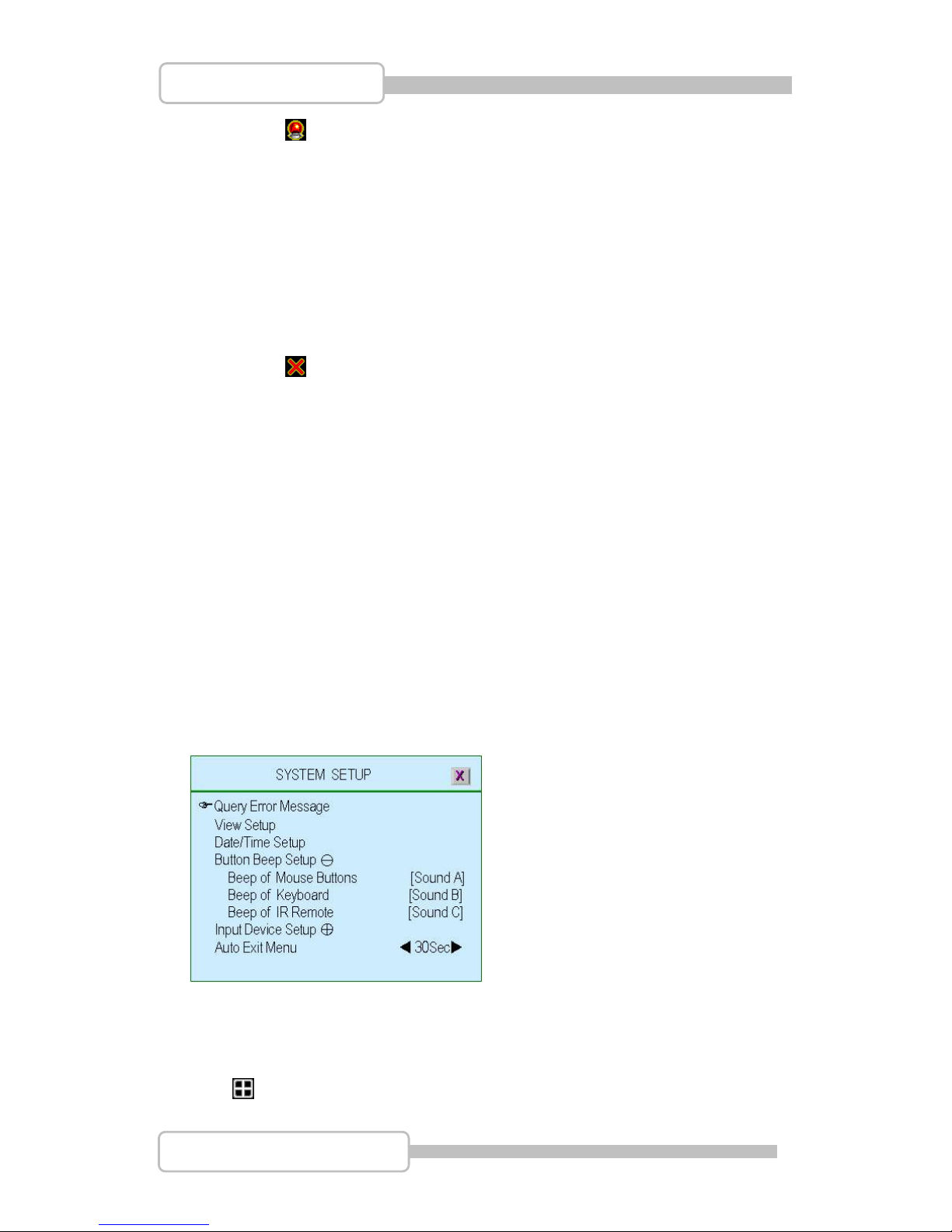
5.4. Sensor Setup
5.4.1. Sensor Mode
Set the sensor mode as “Not Installed”, “Normal-Open” or “Normal-Close”.
5.4.2. Record Time
To set the sensor’s record time as 5sec, 10sec, 15sec, 20sec, 25sec,
30sec, 45sec, 60sec, 90sec, 120sec, 150sec or 180sec.
5.4.3. Alarm Mode
To set the motion detector alarm mode.
“Mute”: No beep whatever detecting.
“ Buzzer-Short”: Beep shortly by buzzer on main board when
detection is active
“ Buzzer-Long”: Beep long by buzzer on main board when detection
is active
“ Alarm-Short”: Beep shortly by speaker of system when detection is
active
Page 42
42
4/8/16CH Triplex DVR
Digital Video Recorder
“ Alarm-Long”: Beep long by speaker of system when detection is
active
5.4.4. Alarm Time
To Setup the time period of beep by “Nonstop”(no stop), 5sec, 10sec,
15sec, 20sec, 25sec, 30sec, 35sec, 40sec, 45sec, 50sec, 55sec or 60sec
5.4.5. Trigger Full Screen
Display the trigger channel on full screen when it act as 1, 2sec … 30sec.
“ OFF”: It will not display on full screen when the channel has been
triggered.
5.4.6. Trigger Type
There are two trigger types: “Initial Trigger” and “Continuous Trigger” for
selection.
Initial Trigger: When channel has been triggered, it will display on full
screen as the setting time period. In that time period, this channel will
ignore any other trigger.
Continuous Trigger: When channel has been triggered, it will display on
full screen as the setting time period. In that time period, this channel is
still watching out. If another trigger act, the channel will display on full
screen and count all over again by the setting time period.
6. System Setup
To set up the Password, time, date and button beep…etc.
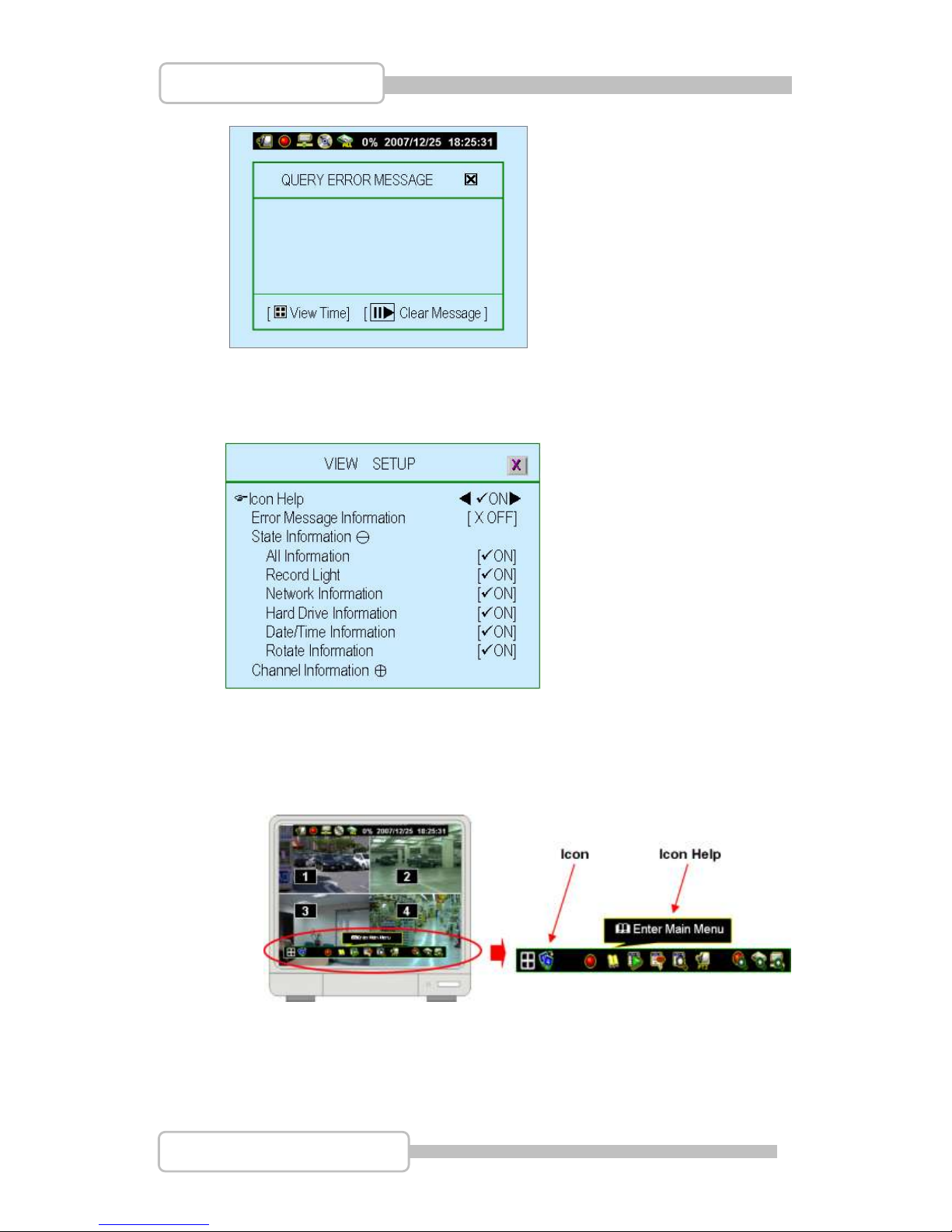
6.1. Query Error Message
The listing of DVR error message.
“ ”: Show error message with time. “” : Clear all error messages.
Page 43
43
4/8/16CH Triplex DVR
Digital Video Recorder
6.2. View Setup
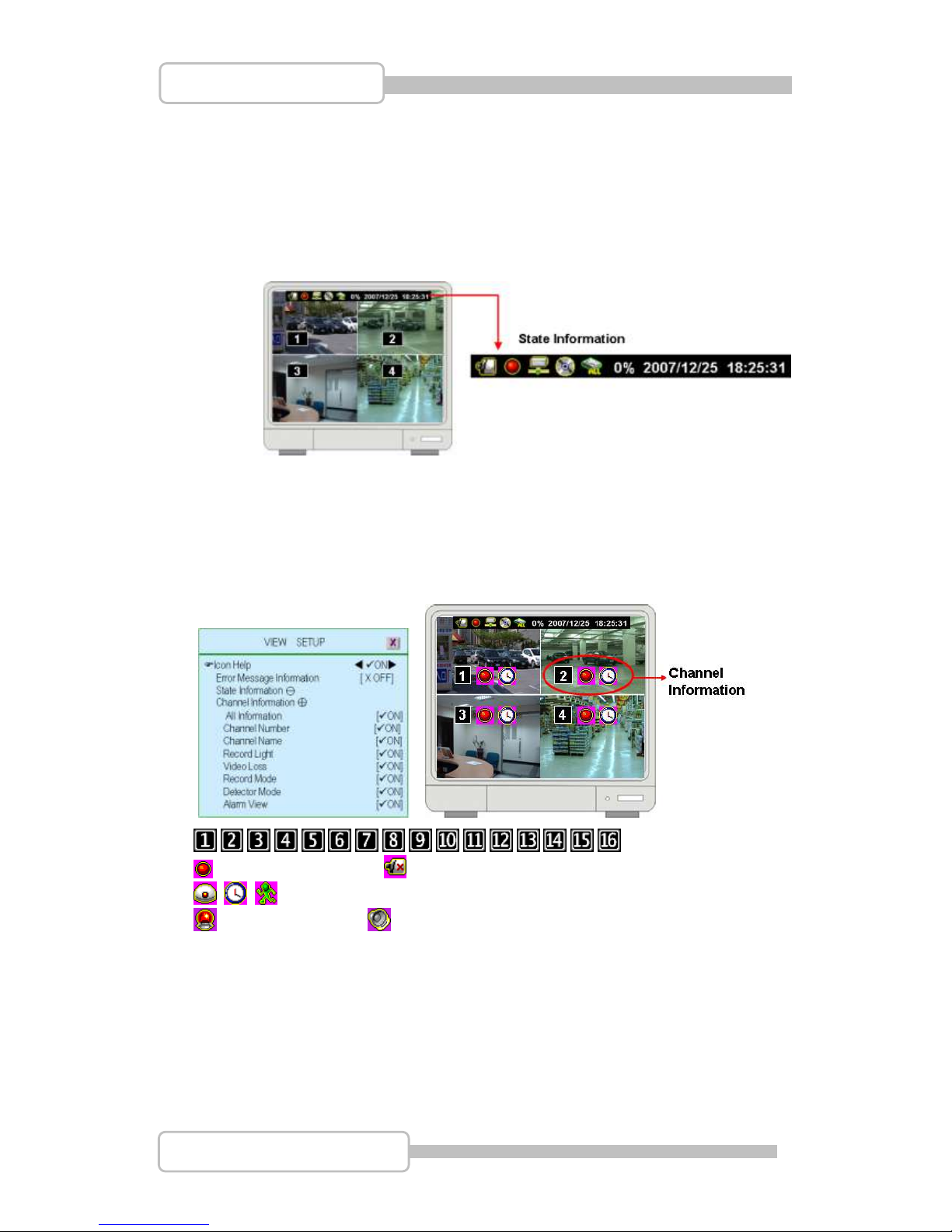
To setup the illustration and DVR information will be displayed or not.
6.2.1. Icon Help
“ON” - Icon help will be shown, “OFF” –Icon help will not be shown
Please refer to 1.5 Icons for more detail information
6.2.2. Error Message Information
“ON” - Save/display the error message
“XOFF” – Without save/Display the error message
Page 44
44
4/8/16CH Triplex DVR
Digital Video Recorder
6.2.3. State Information
System status information, it includes record light, network information,
hard drive information, date/time information and rotate information. All
information can be set separately to be seen or not.
Please refer to 1.4 State Information for more details.
6.2.4. Channel Information
Channel information includes channel number, channel name, record light,
video loss, record mode, detector mode and alarm view. All information
can be set separately to be seen or not.
. , , , , , , , , , , , , , , : Channel Number
: Recording status : Video Signal Status
: Detection mode and status (Flash if sensor has been triggered)
: Alarm Active : Buzzer active
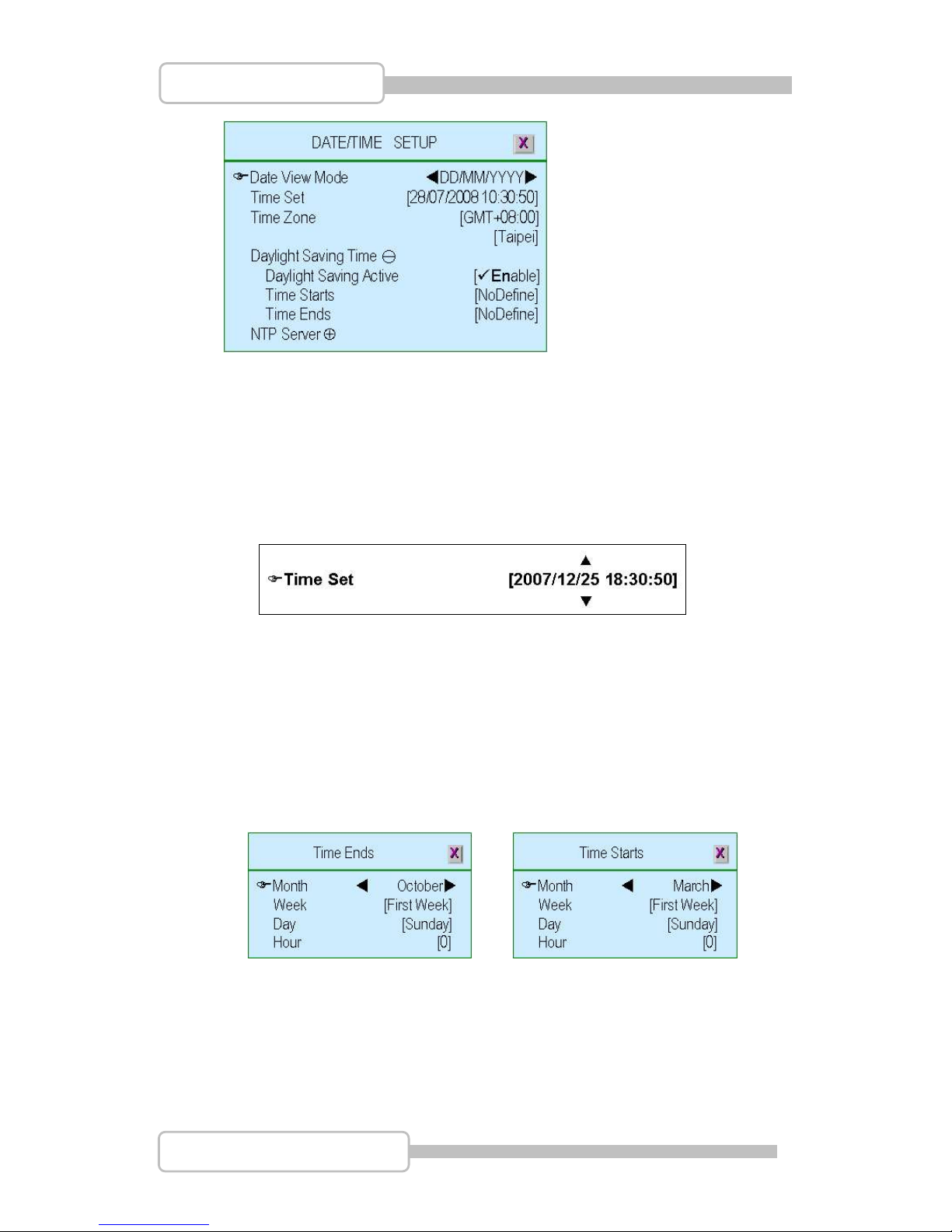
6.3. Date/Time Setup
To setup the date and time
Page 45
45
4/8/16CH Triplex DVR
Digital Video Recorder
6.3.1. Date View Mode
To display the date/time format on state information by DD/MM/YYYY,
MM/DD/YYYY or YYYY/MM/DD. (YYYY-Year, MM-Month, DD-Day)
6.3.2. Time Set
To setup the day / time.
/ ( / ): Up / Down – Change the number
/(/): Move left/right to the character that need to change
: Exit after confirmed setting
6.3.3. Time Zone
Set the time zone where you are located.
6.3.4. Daylight Saving Time
Set daylight saving time period by specify the Month, Week, Day and Hour
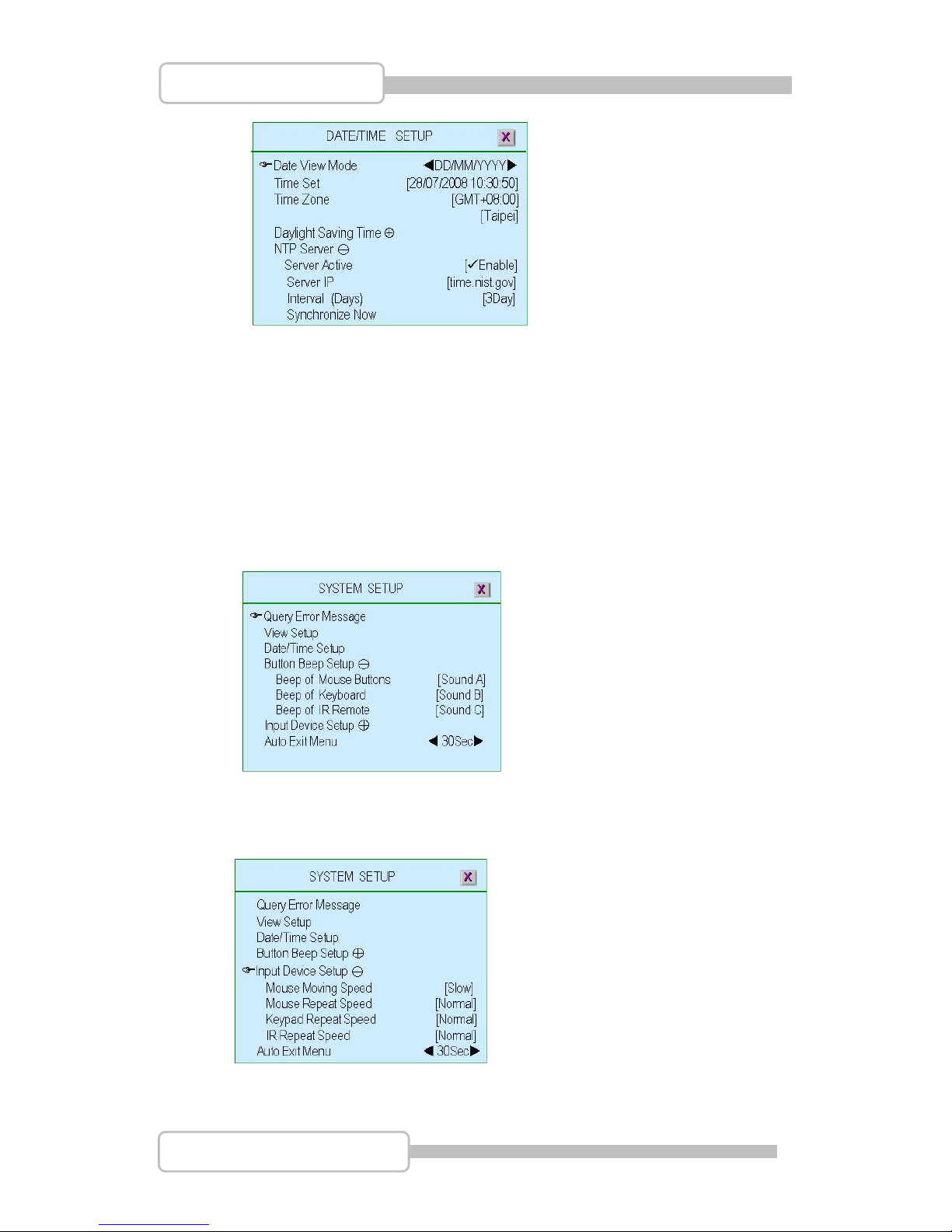
6.3.5. NTP Server
Synchronize DVR day/ time to NTP server through internet.
Page 46
46
4/8/16CH Triplex DVR
Digital Video Recorder
Server Active: “Enable”-To set this function available. ” X Disable”- Ignore
this function
Server IP: The IP address of NTP server
Interval (Days): Set how many days to synchronize
Synchronize Now: Select it to start Synchronizing the NTP server
6.4. Button Beep Setup
To setup the beep type when press the button of mouse, keypad or IR remote.
There are four modes: mute, sound A, sound B, sound C
6.5. Input Device Setup
To setup the speed of input device: mouse, mouse repeat, keypad and IR
remote as Slow, normal or fast
6.6. Auto Exit Menu
Page 47
47
4/8/16CH Triplex DVR
Digital Video Recorder
To setup the time period to exit menu automatically by choose “OFF” (not exit
unless pressing “”), 10sec, 20sec, 30sec, 40sec, 50sec or 60sec.
7. Hardware Setup
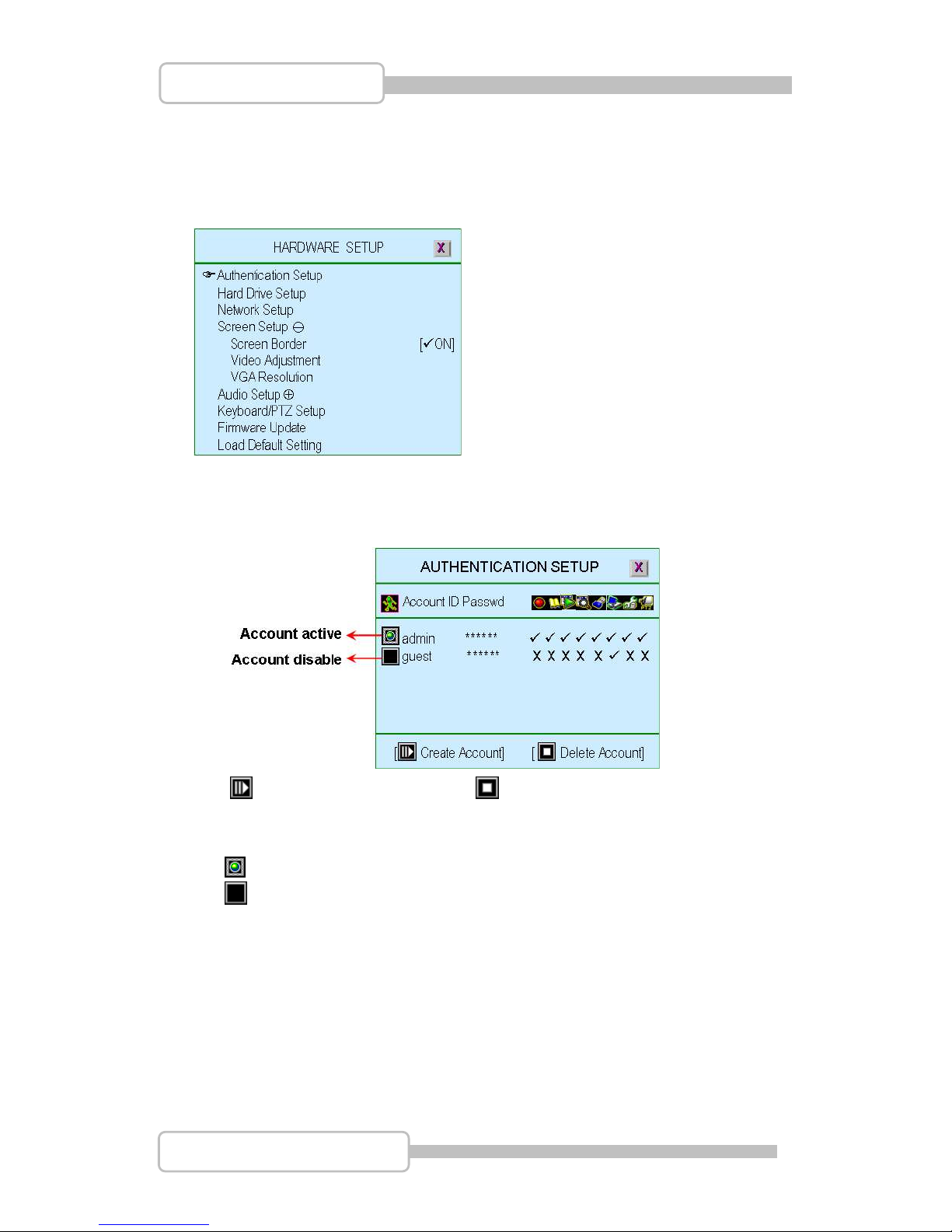
7.1. Authentication Setup
Specify the limits of authority of user and set its own password.
“ ”: To create a new account. “ ”: To delete account.
“ (), ()” Set account within certain limits by set it as “”as permitted or no
permitted as “X”
(Account Active): The account is active
(Account Disable): The account is not active
Account ID (account name): Enter characters as account ID
Passwd (Password): By entering six characters or numbers as password.
The password will replace by “******” when any user login from network.
Remark:
If all accounts are disabled or no account has been created, there is no
authority issue for the DVR system
If one function has been disable for all users. It means that function do not need
password for setting.
Page 48
48
4/8/16CH Triplex DVR
Digital Video Recorder
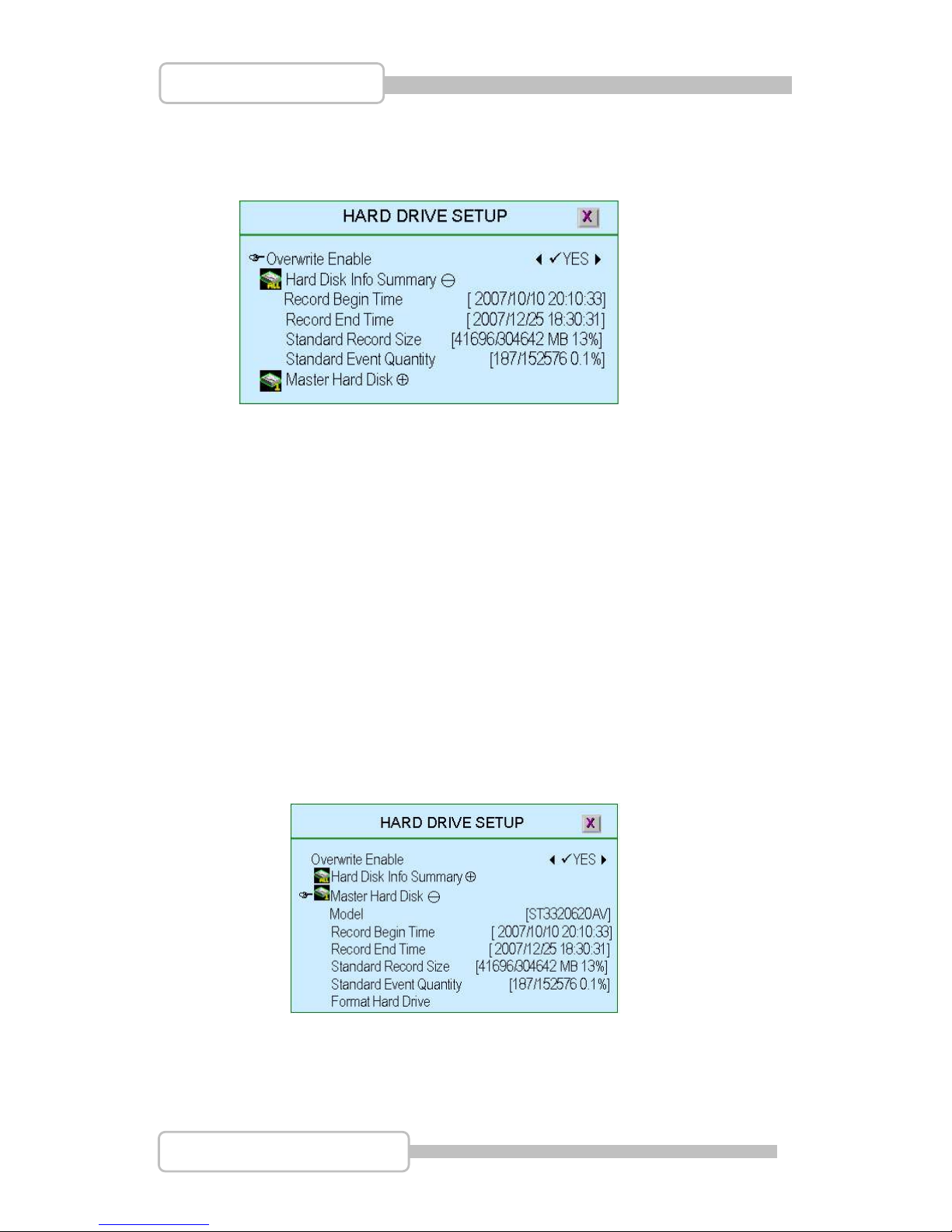
7.2. Hard Drive Setup
To set up the hard drive information and overwriting function
7.2.1. Overwrite enable
“YES”: Enable to overwrite hard drive when capacity is full
“X NO”: Not permit to overwrite hard drive when capacity is full.
7.2.2. Hard Disk Info Summary
All hard drive Information in summary
Record Begin Time: The starting day/time of hard drive recording
Record End Time: The latest day/time of hard drive recording
Standard Record Size: The recorded Capacity / Total hard drive
capacity by Mega-byte. Also show up the % of how much capacity has
been used.
Standard Event Quantity: The capacity has been record of event /
Total capacity for event.
7.2.3. Master Hard Disk
The Mater hard drive Information in summary
Model: Model of master hard drive.
Record Begin Time: The starting day/time of hard drive recording
Record End Time: The latest day/time of hard drive recording
Page 49
49
4/8/16CH Triplex DVR
Digital Video Recorder
Standard Record Size: The recorded Capacity / Total hard drive
capacity by Mega-byte. Also show up the % of how much capacity has
been used.
Standard Event Quantity: The quantity has been record of event /
Total quantity for event.
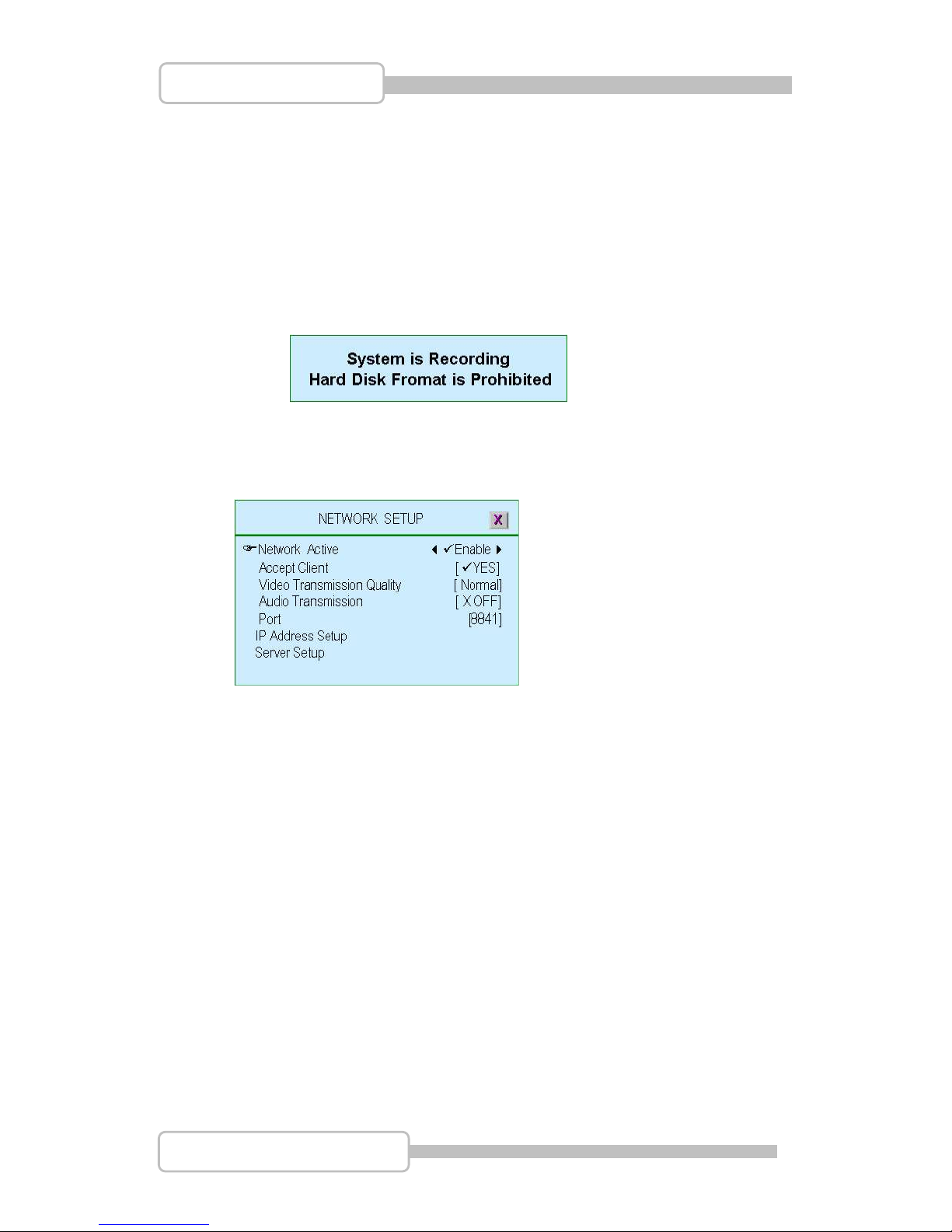
Format Hard Drive: To format the hard drive. If the system is running
at recording mode, it is not permitted to format the hard drive and show a
warning …
7.3. Network Setup
To set up Network configurations
7.3.1. Network Active
“ Enable”: Network is permitted to be used
“X Disable”: Network is not permitted to be used
7.3.2. Accept Client
“YES” to enable the network client function.
“X NO” means there is no network client available.
7.3.3. Video Transmission Quality
Setup the quality of Video Transmission as High, Normal or Low.
7.3.4. Audio Transmission
“ON”: Enable or “X OFF”: Disable audio transmission
7.3.5. Port
Assign a communication port (a series of number).
Page 50
50
4/8/16CH Triplex DVR
Digital Video Recorder
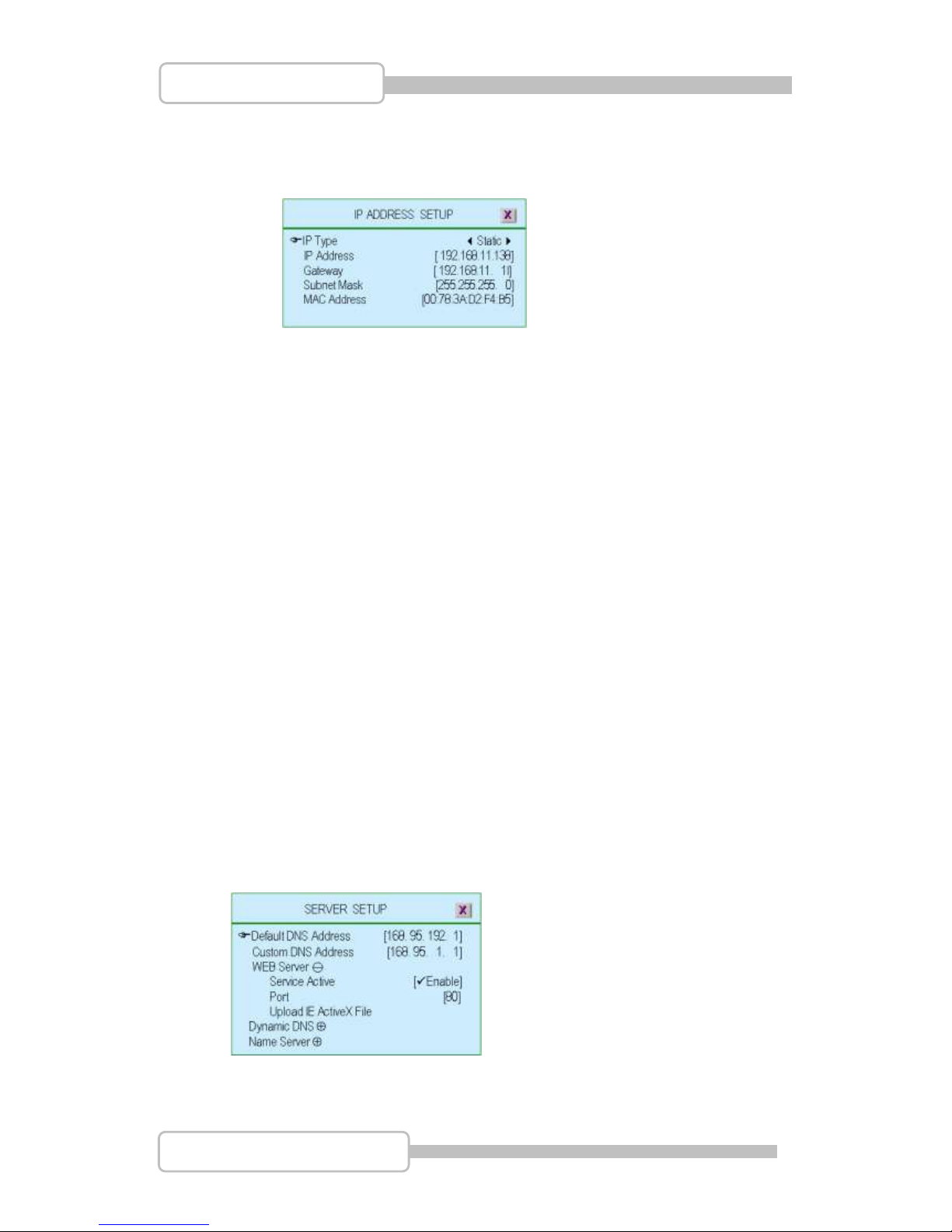
7.3.6. IP Address Setup
The IP address acts as a locator for one IP device to find another and
interact with it.
There are two kinds IP types: Static IP address and Dynamic IP address
(DHCP and PPPoE) for selection.
Static IP Address: When a computer uses the same IP address every
time it connects to the network, it is known as a Static IP address
Static IP addresses are manually assigned to a computer by an
administrator
DHCP: With dynamic IP addresses, where an IP address is
automatically assigned to a computer by a remote server which is acting
as a Dynamic Host Configuration Protocol (DHCP) server
PPPoE: Dialup and some broadband networks do not use DHCP, but
instead use the dynamic IP addressing capability of the Point-to-Point
Protocol over Ethernet.
GATEWAY: Gateway IP address, please check with your M.I.S staff or
administrator to enter the setting.
SUBNET MASK: Subnet mask is a range of logical addresses that is
assigned to an organization. Please check with your M.I.S staff or
administrator to enter the setting
MAC Address: It is a number that acts like a name for a particular
network adapter. It has been set at dedicated address even reset the DVR.
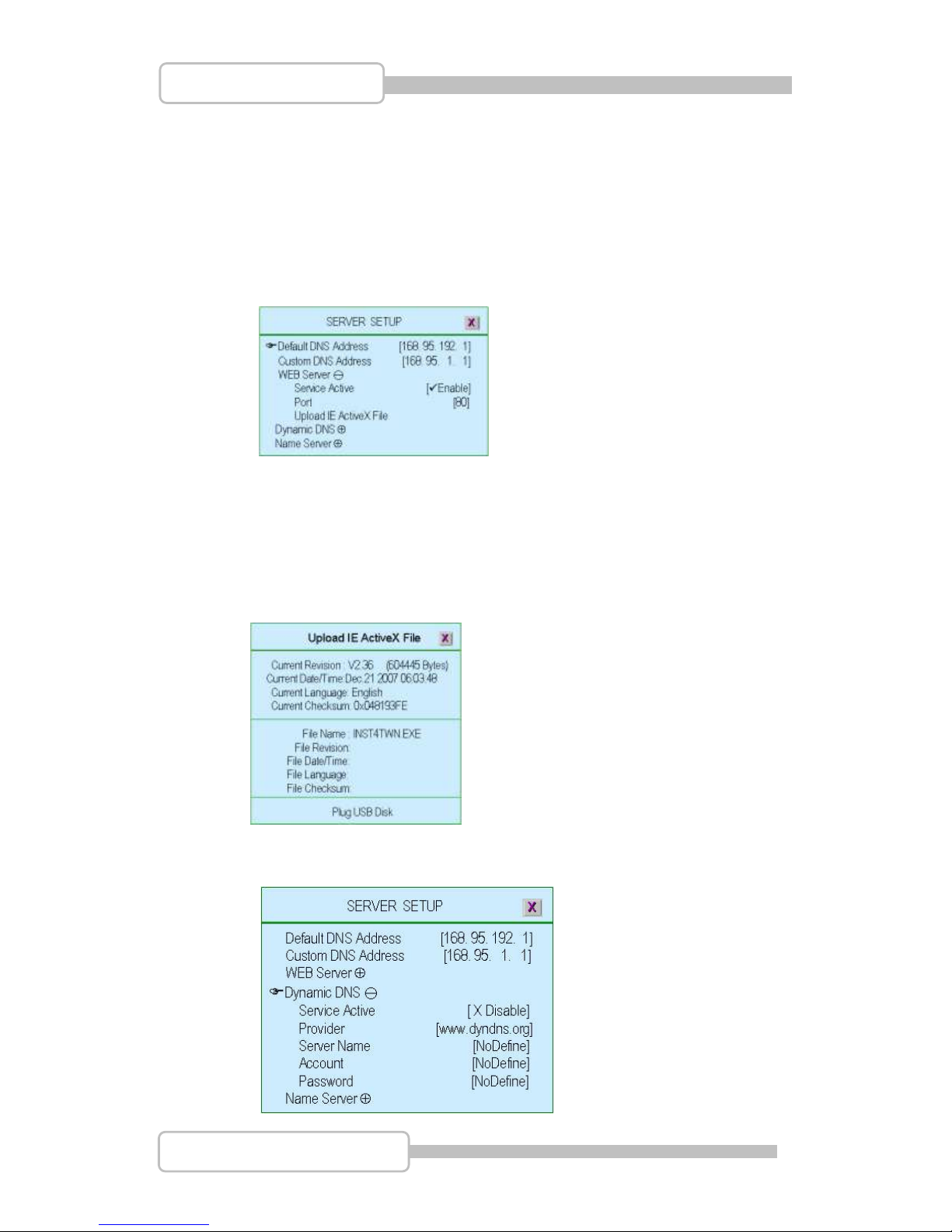
7.3.7. Server Setup
Page 51
51
4/8/16CH Triplex DVR
Digital Video Recorder
Default DNS Address: The Domain Name system (DNS) translate
hostnames to IP addresses (default setting). If there is no customer DNS
address setting or fail, DVR will go for Default DNS Address.
Custom DNS Address: The Domain Name system (DNS) translate
hostnames to IP addresses (customer setting).
WEB Server: DVR WEB Server response the requests from browsers, and
serve remote monitoring through IE Browser.
“Service Active”: Enable the Web Server service.
“Port”: Assign a port as the Web Server
“Upload IE ActiveX File”: Upload Active-X component to DVR for PC (IE
Browser) using.
To get Active-X component from CD as attached and save it into USB disk.
Then plug the USB disk into DVR for installation.
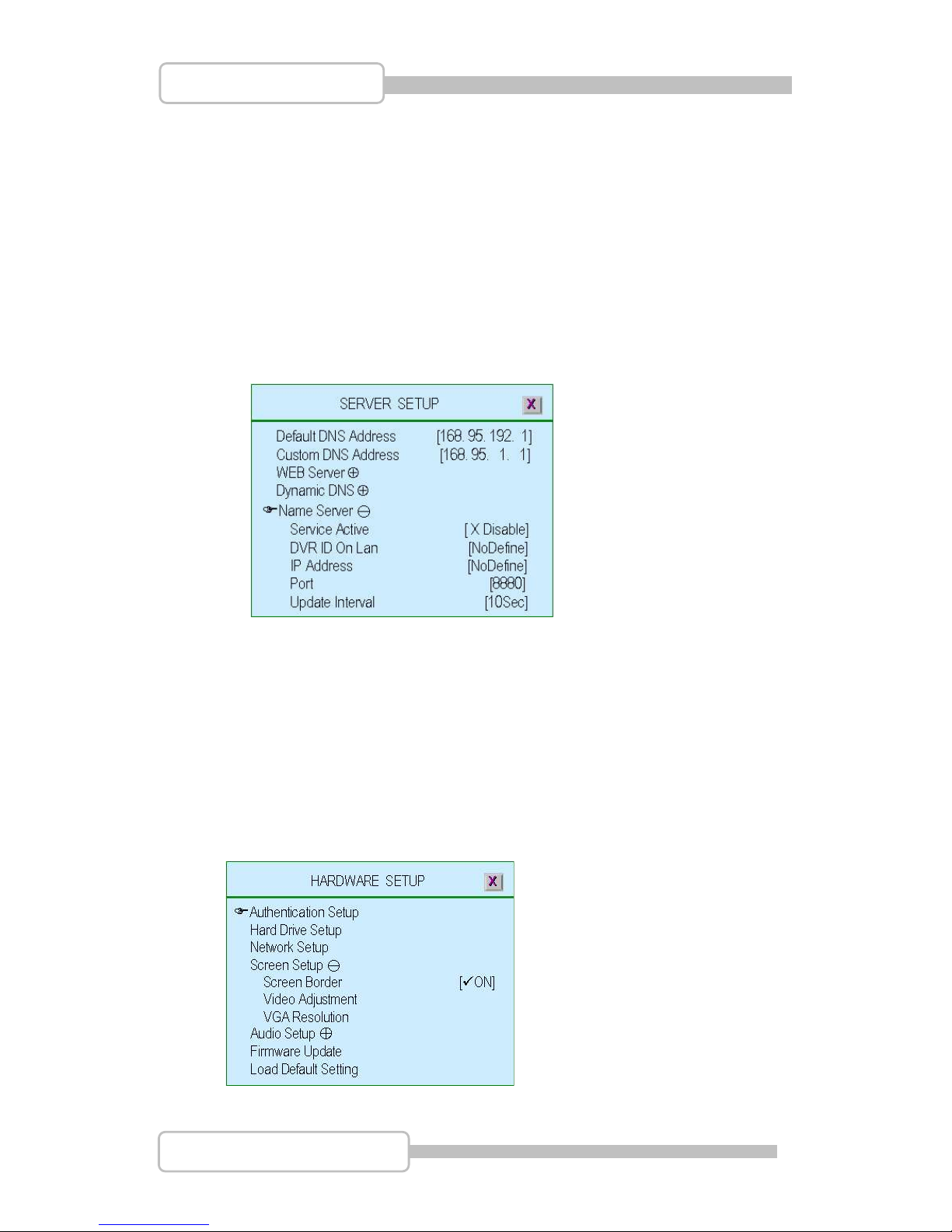
Dynamic DNS: Dynamic DNS is a system which allows the domain name
data held in a name server to be updated in real time.
Page 52
52
4/8/16CH Triplex DVR
Digital Video Recorder
“Service Active”: Enable the Dynamic DNS service.
“Provider”: The web site / IP Address of Dynamic DNS provider
“Server Name”: To define a name of Dynamic DNS
“Account”: The account name of Dynamic DNS
“Password”: Password for Dynamic DNS
Please refer to DDNS Service
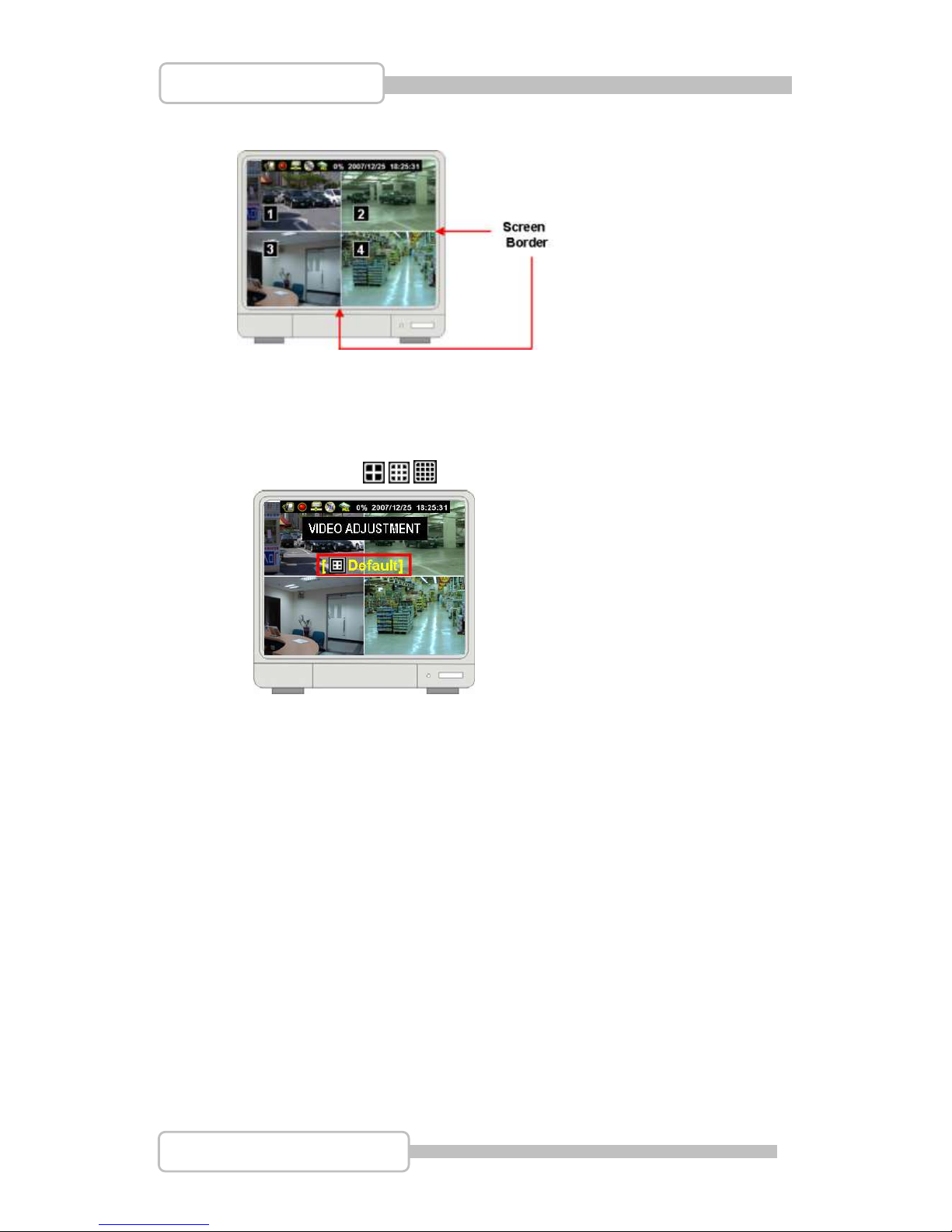
Name Server: Name Server implements a name-service protocol. It will
normally map a human-recognizable identifier (such as domain name) of a
host to its computer-recognizable identifier (such as IP address).
“Service Active”: Enable the Name Server
“DVR ID on LAN”: The DVR ID on LAN (define a name of DVR)
“IP Address”: IP address of Name Server (refer to Name Server information)
“Port”: The Port of DVR on LAN
“Update Interval”: Time period to update data.
7.4. Screen Setup
Page 53
53
4/8/16CH Triplex DVR
Digital Video Recorder
7.4.1. Screen Border
“ON” : To enable the border, “X OFF”: To disable the screen border.
7.4.2. Video Adjustment
Adjust the whole picture to right/left or up/down by press /(/)
or / ( / ). “ / / ” : Set it as default location
7.4.3. VGA Resolution
To choose the resolution of VGA as 640x480, 800x600, 1024x768 or
1280x1024.
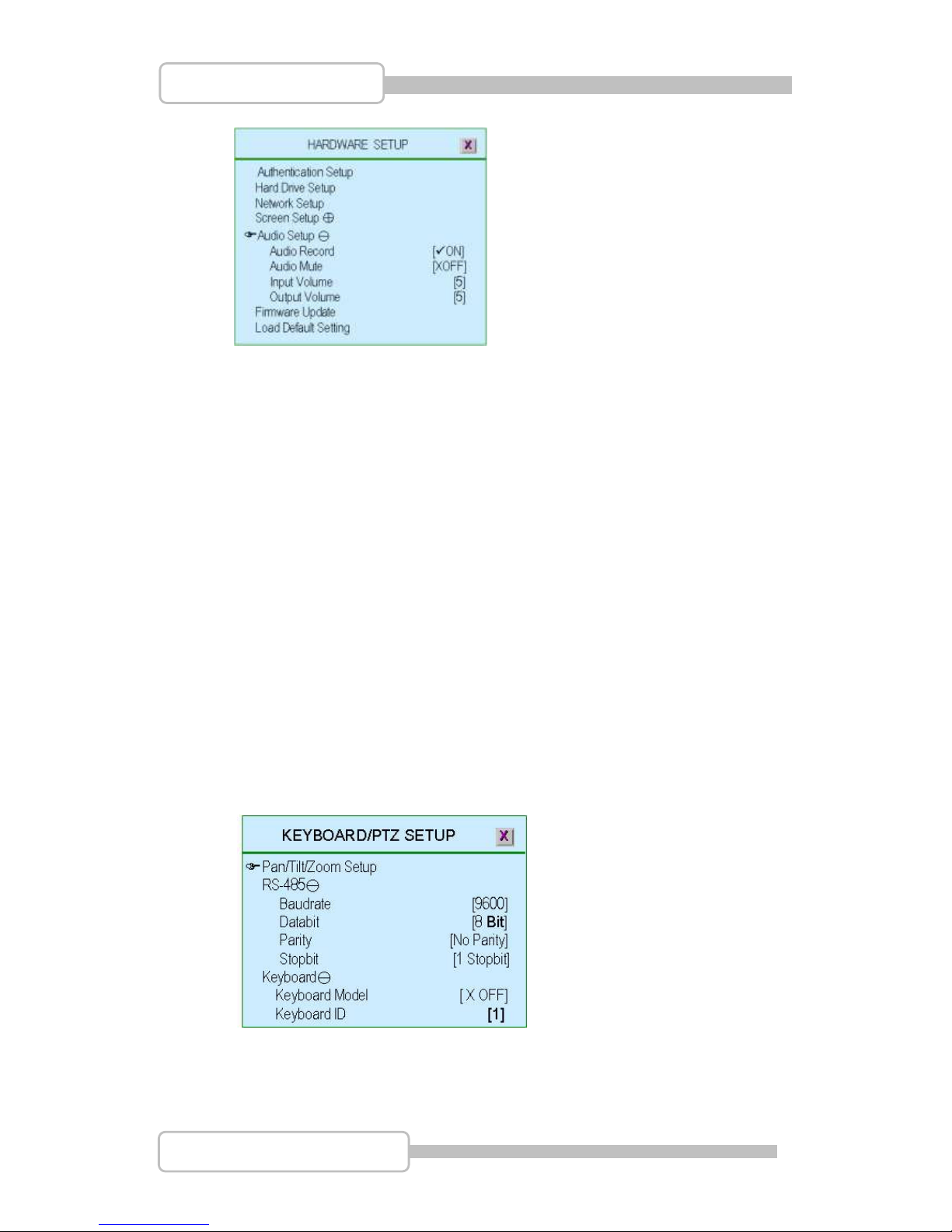
7.5. Audio Setup
To setup the audio status including of audio record, audio mute, input volume
and output volume.
Page 54
54
4/8/16CH Triplex DVR
Digital Video Recorder
7.5.1. Audio Record
“ON”: Enable audio recording. “X OFF”: Disable audio recording
7.5.2. Audio Mute
“ON”: Switch on the audio function
“X OFF”: Switch off the audio function
7.5.3. Input Volume
“X OFF”: Turn off the audio input volume
“1,2,3,4…….10”: Adjust audio input volume from small to aloud.
7.5.4. Output Volume
“X OFF”: Turn off the audio output volume
“1,2,3,4, …….10”: Adjust audio output volume from small to aloud.
7.6. Keyboard/PTZ Setup
To setup PTZ camera and control keyboard.
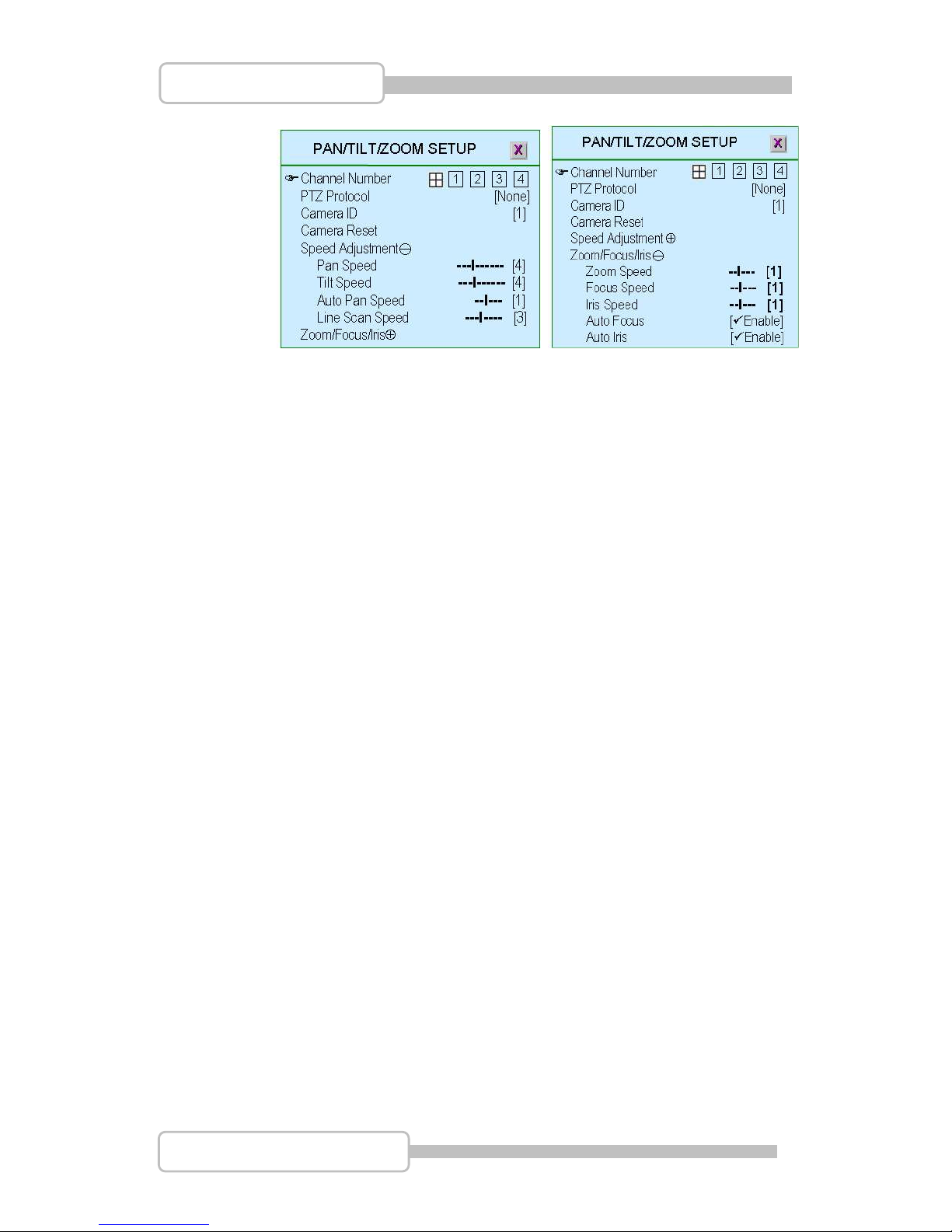
7.6.1. Pan/Tilt/Zoom Setup
Page 55
55
4/8/16CH Triplex DVR
Digital Video Recorder
“Channel Number”: Dedicated the PTZ camera channel
“PTZ Protocol”: Select PTZ camera’s protocol as Pelco P, Pelco D,
Teleview Pelco P, Teleview Pelco D, Merit LILIN (3B), Merit LILIN (7B),
HiSharp, Nicecam and Elitar.
“Camera ID”: Setup the ID of PTZ camera (meet camera’s local setting)
“Camera Reset”: To reset PTZ camera
“Speed Adjustment”: To adjust Pan/Tilt/Auto Pan/ Line Scan Speed.
“Zoom/Focus/Iris”: To adjust Zoom/Focus/Iris speed.
And Enable/Disable the Auto Focus/Auto Iris function.
7.6.2. RS-485
“Baudrate”: Select the baud rate of PTZ camera as 1200, 1800, 2400,
4800, 9600, 14400, 19200, 38400, 57600 or 115200.
“Databit”: Setup data bit as 8bit or 7bis.
“Parity”: Setup parity as No Parity, Even or Odd.
“Stopbit”: Setup stopbit as 1 or 2.
7.6.3. Keyboard
“Keyboard Model”: None for no keyboard connected or CK101/CK201
“Keyboard ID”: Setup the ID of Keyboard (Meet Keyboard’s local setting)
“Keyboard Protocol”(only for certain keyboard model): Select
keyboard’s protocol as Pelco P, Pelco D, HiSharp, Elitar, MIT, Merit LILIN,
Nicecam and Fine.
7.7. Firmware Update
Page 56
56
4/8/16CH Triplex DVR
Digital Video Recorder
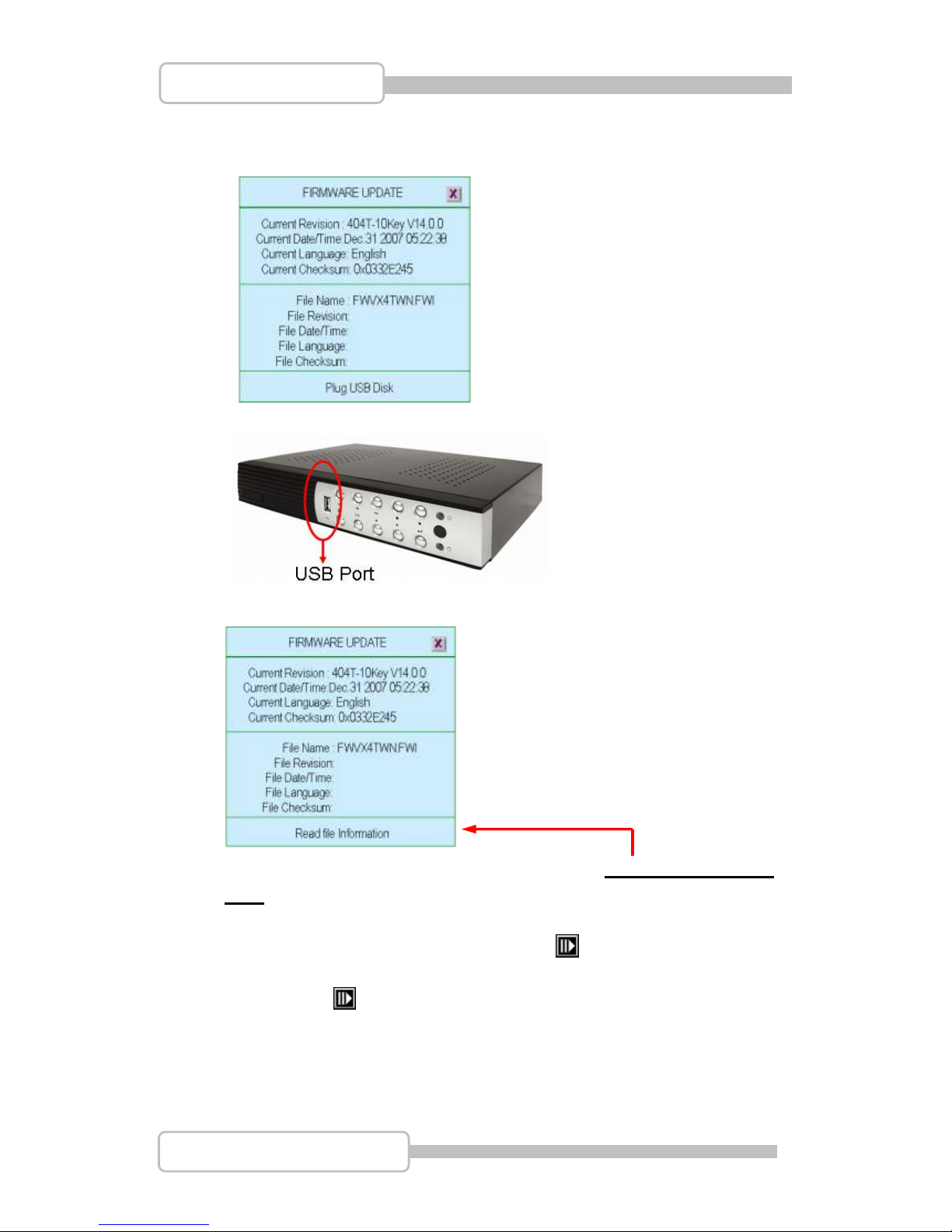
To update or upgrade the DVR firmware by USB disk..
Plug the USB disk into USB port on DVR front panel
Plug the USB disk into USB port on DVR front panel
After plug in USB disk, it shows” Read file Information” on the button line
If something mistake for USB disk or file, it will show: File not found or Disk
Error on the button line. Please check USB disk or file and plug in again.
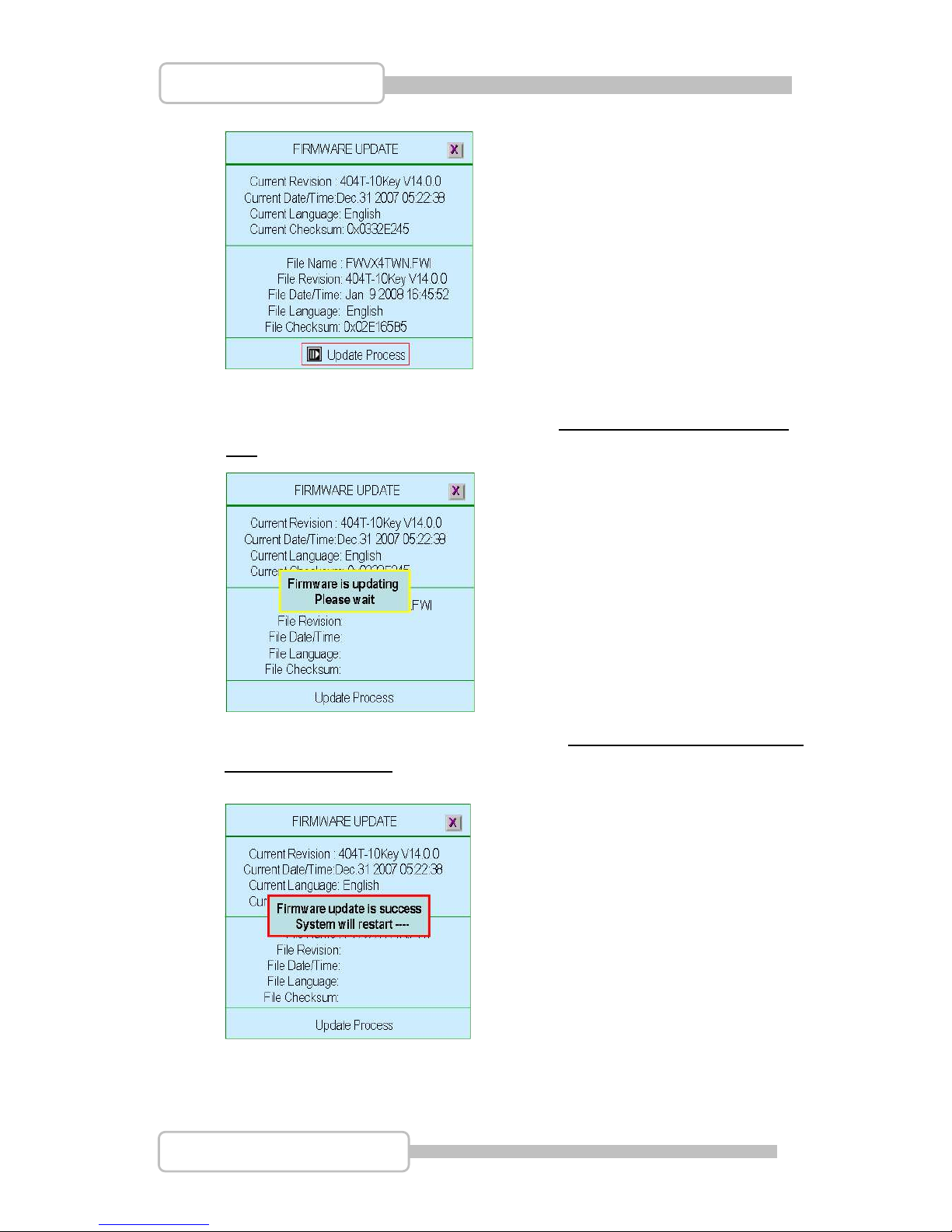
After complete the firmware reading, it shows “ Update Process” and blanking
on the button line as following. Also, the updated firmware information will be
listed. Press “ ” to start the procedure of firmware update
Page 57
57
4/8/16CH Triplex DVR
Digital Video Recorder
When DVR is updating the firmware, it shows “Firmware is updating, Please
wait” as following figure:
After firmware update is completed, it will show: Firmware update is success,
System will restart ----“ and restart DVR with the same configuration at previous
version firmware does.
7.8. Load Default Setting
To reset all the DVR configuration as default setting.
Page 58
58
4/8/16CH Triplex DVR
Digital Video Recorder
8. Language Selection
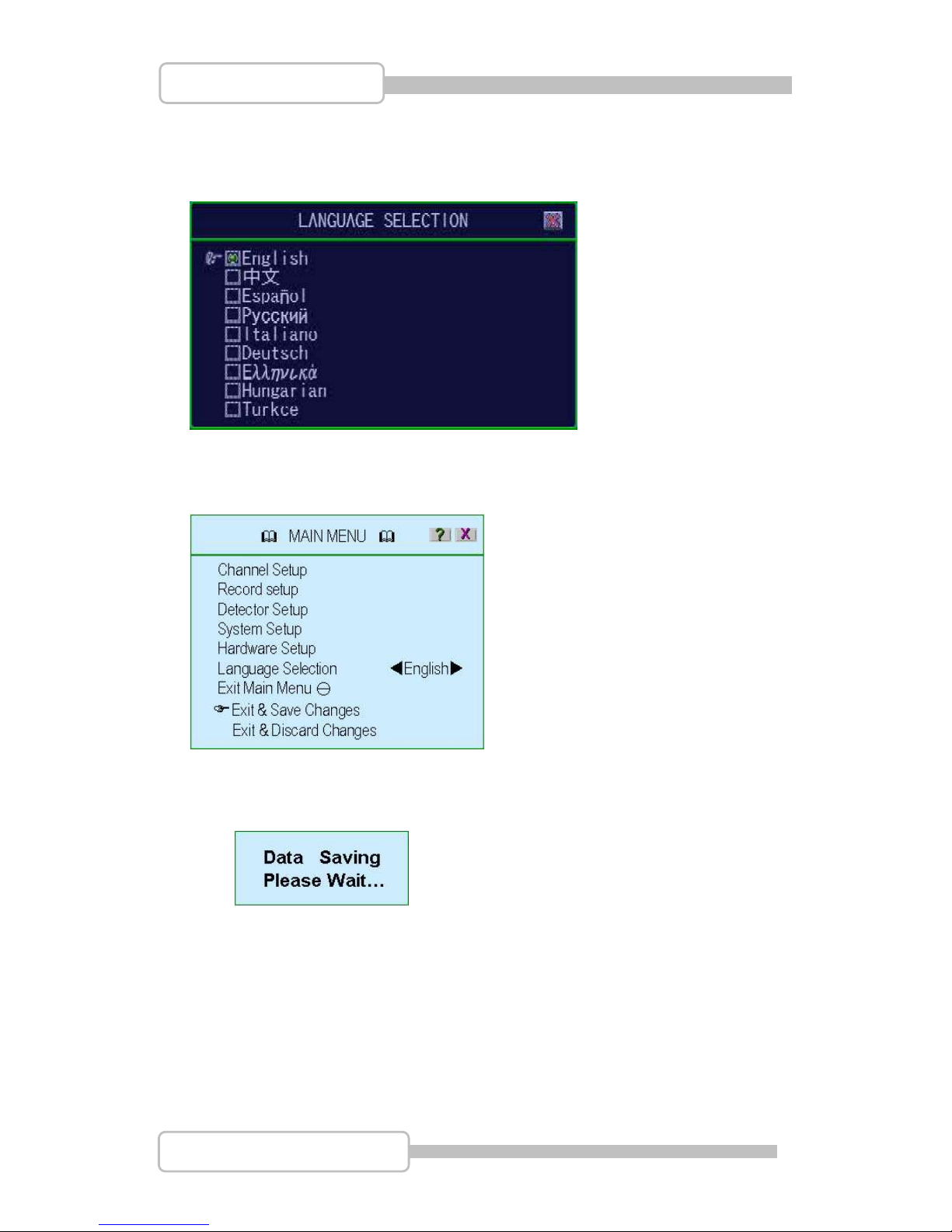
Multilingual supports with English, Traditional Chinese, Spanish, Russian, Italian,
German, Ukrainian, Hungarian and Turkish.
9. Exit Main Menu
To exit menu and save / discard the changes.
9.1. Exit & Save Changes
To Exit menu and save all configuration changes.
9.2. Exit & Discard Changes
To exit menu but without saving the configuration changes.
Page 59
59
4/8/16CH Triplex DVR
Digital Video Recorder
PPllaayybbaacck
k
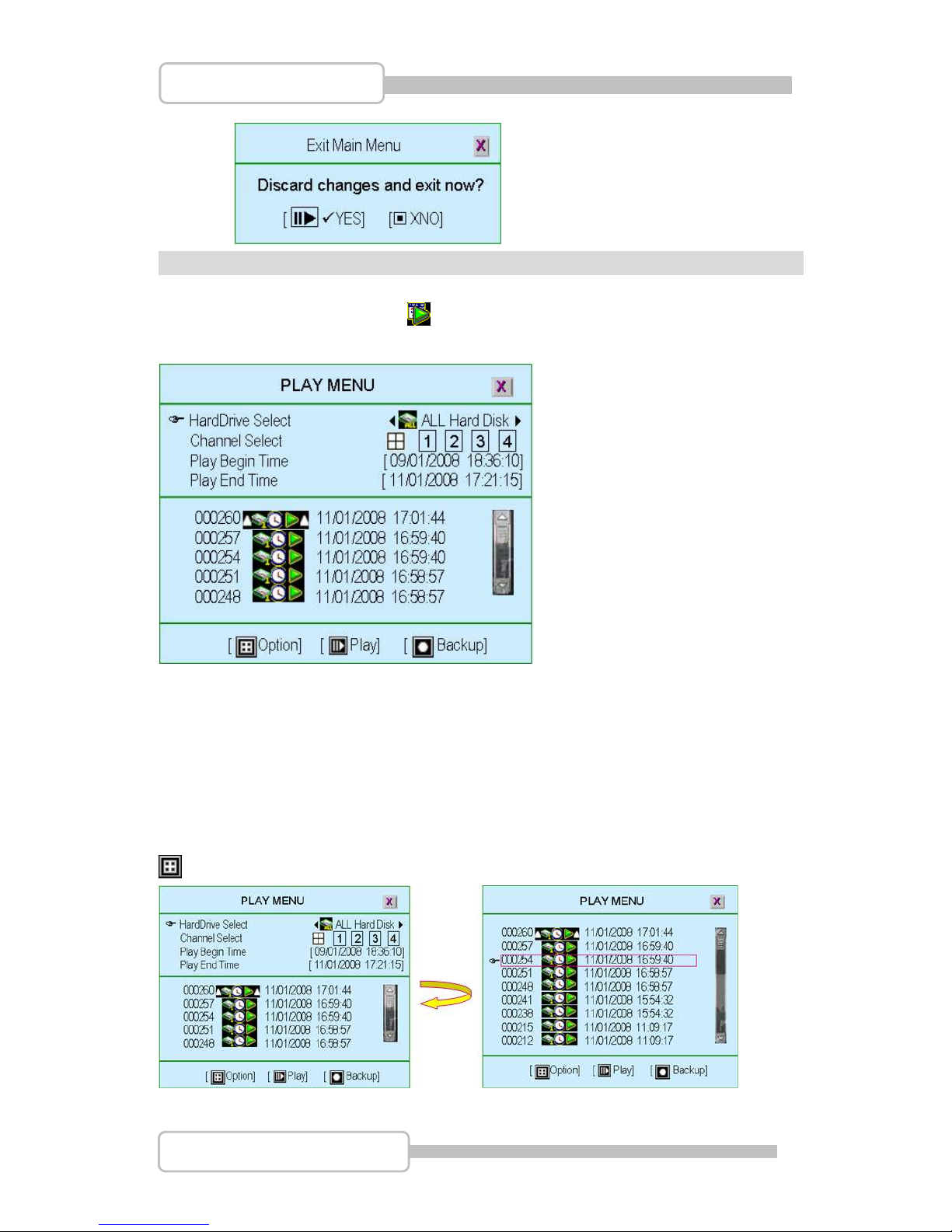
Press “” (or “II”) button or icon to enter Play menu
HardDrive Select: To select or specify which hard drive’s data will be playback.
Channel Select: To setup or specify which channel’s data will be playback
Play Begin Time: To specify the beginning time to playback
Play End Time: To specify the beginning time to playback.
The other area shows the recorded data for choosing to play.
Option: Window switching as following
Page 60
60
4/8/16CH Triplex DVR
Digital Video Recorder
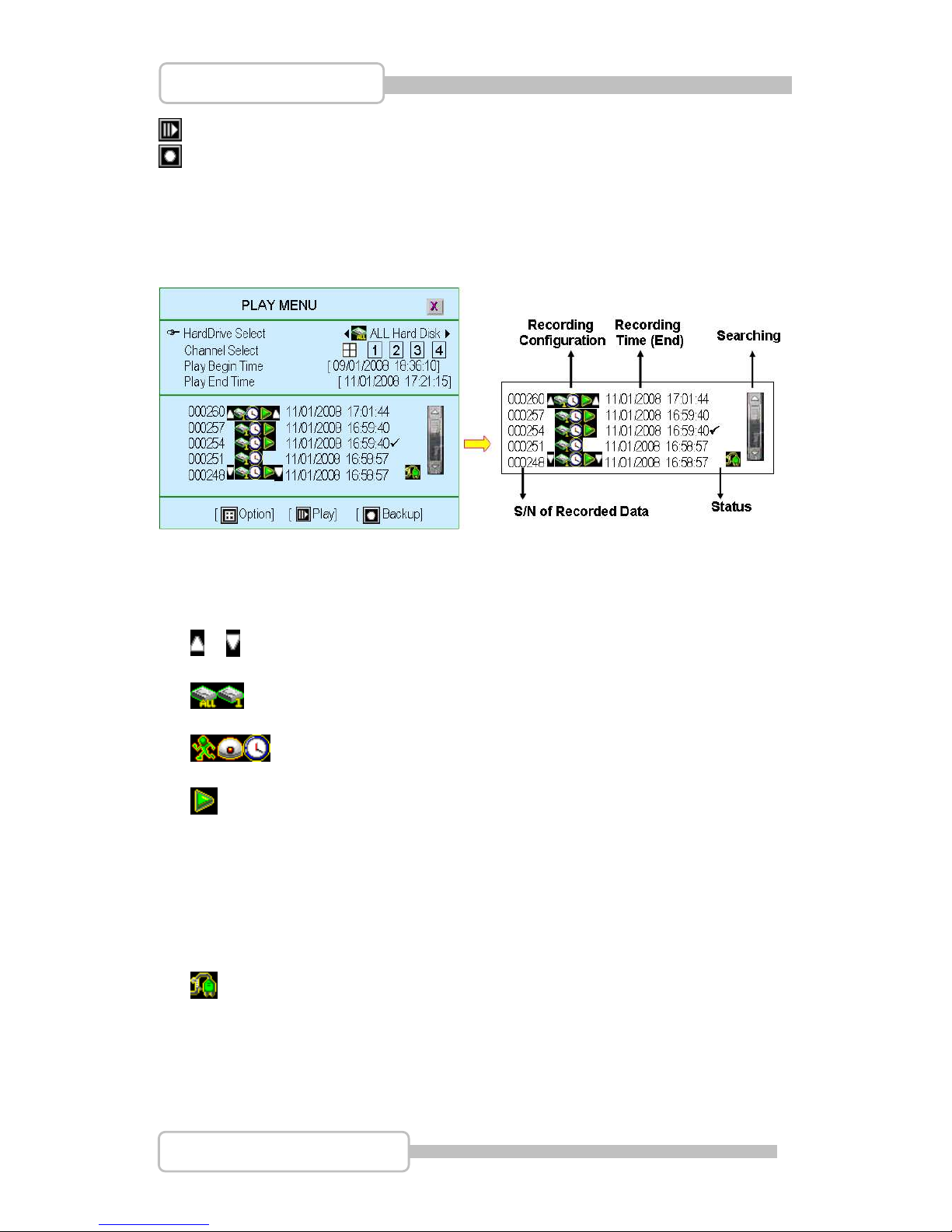
Play: Start to play the recorded data After the data has been played, it will show “”
Backup: To backup the recorded data. Please refer to “Backup” section
Commands and Recorded Data status:
S/N of Recorded Data: Series Number of recorded data provide by system
Recording Configuration
/ : The beginning / end of recorded data.
: The dedicated hard disk data
: The recording mode
: The data can be play.
If this icon does not show up, it means it is an event without video recording data.
Recording Time: The date/time of recorded data
Status
: The recorded video data has been played.
: Power-OFF event occur.
Searching: A bar to search recorded data by mouse for more convenient.
Page 61
61
4/8/16CH Triplex DVR
Digital Video Recorder
DDaattaa BBaacckkuupp bbyy UUSSBB
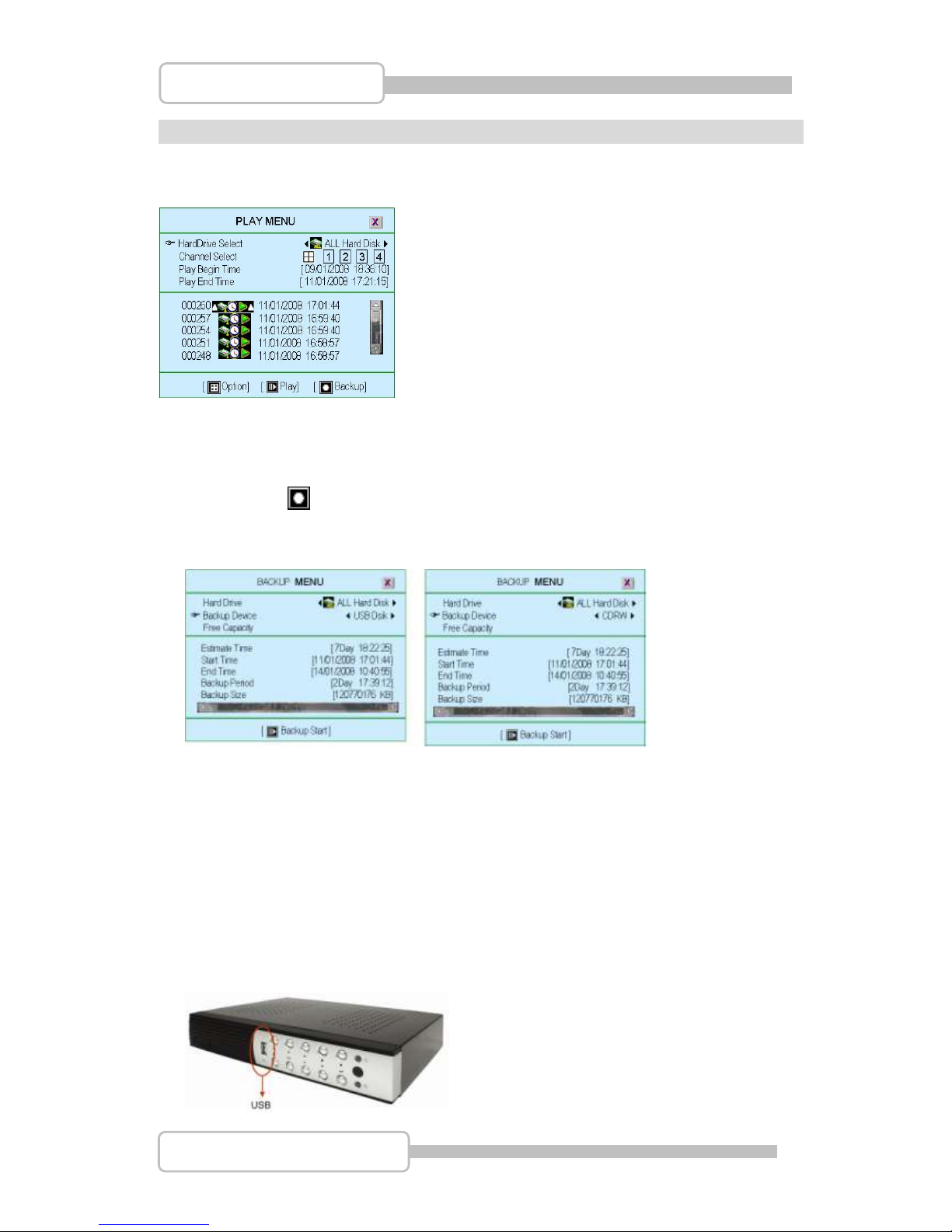
Press “” (or “II”) button to enter the Play menu.
HardDrive Select: To select or specify which hard drive’s data will be backup
Use “(/)” button and move to the dedicated recorded data that you want to
backup Press” ” to enter the “Backup Menu” as following.
It shows the backup menu with Disk information on the upper area and the recorded
data that you have selected at “Play Menu” at the lower area.
Hard Drive: It has been selected at “Play Menu” to specify which hard drive’s
data will be backup
Backup Device: System offers two backup device selections: CDRW and USB
disk. CDRW is executable only the DVR is equipped with CDRW.
Free Capacity: System will count the free size of CDRW/USB automatically
after inserting the backup device.
1. Backup by USB
The DVR support the data backup by USB memory stick on the front panel.
Page 62
62
4/8/16CH Triplex DVR
Digital Video Recorder
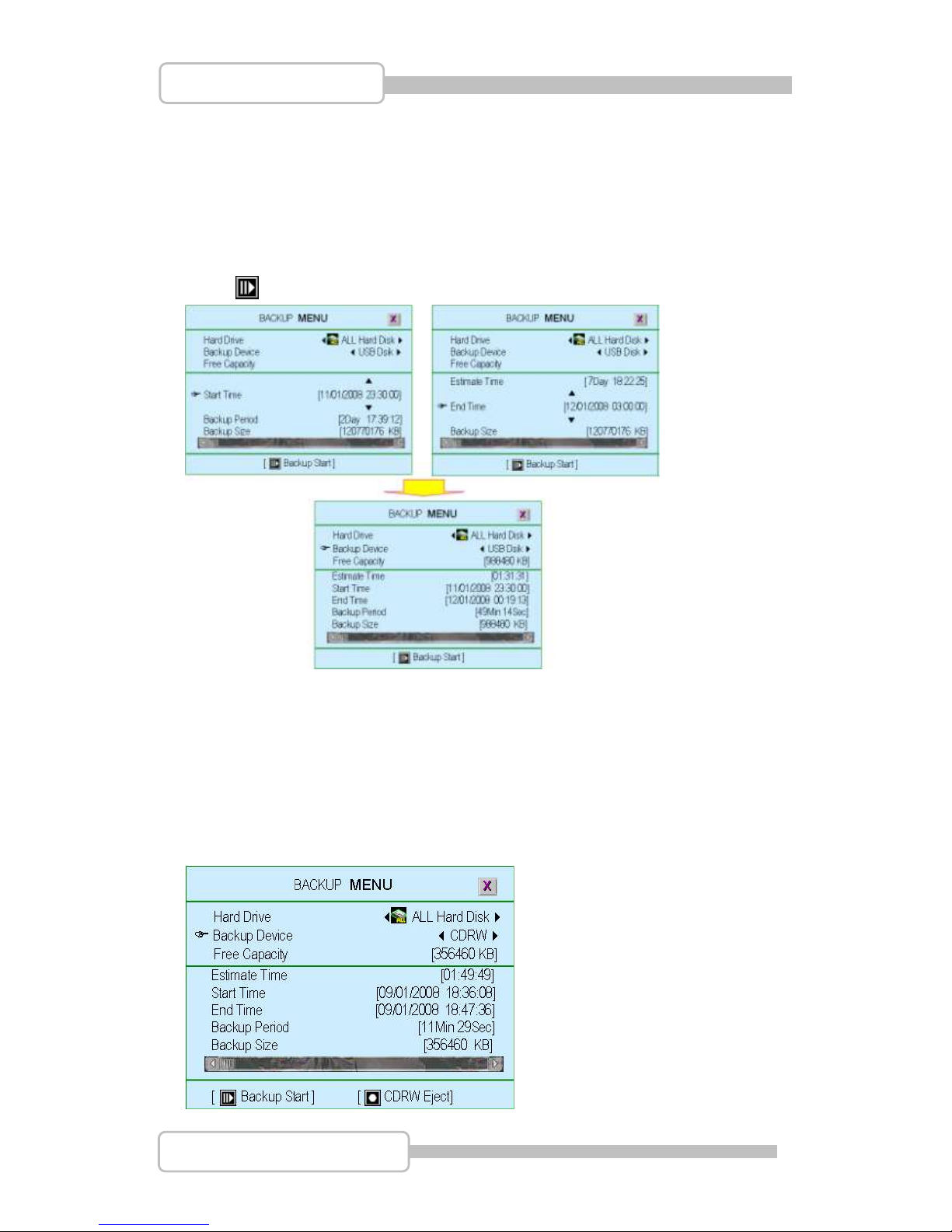
You can change the time period of recorded data for backup by setting the “Start Time”
and “End Time” and plug in the USB disk.
The “Free Capacity”, “Estimate Time”, ”Backup Period” and “Backup Size” will be
changed automatically.
Also, it will correct the “Start Time” and “End Time” as the time period which has video
recorded data.
Press “ ”, it start to backup data into USB disk.
2. Backup by CDRW
The DVR support the data backup by CDRW.
You can change the time period of recorded data for backup by setting the “Start Time”
and “End Time” and put the CD into CDRW.
All the time setting is the same as USB backup.
CDRW takes more time to backup than USB does.
Page 63
63
4/8/16CH Triplex DVR
Digital Video Recorder
EEvveenntt SSeeaarrcchh
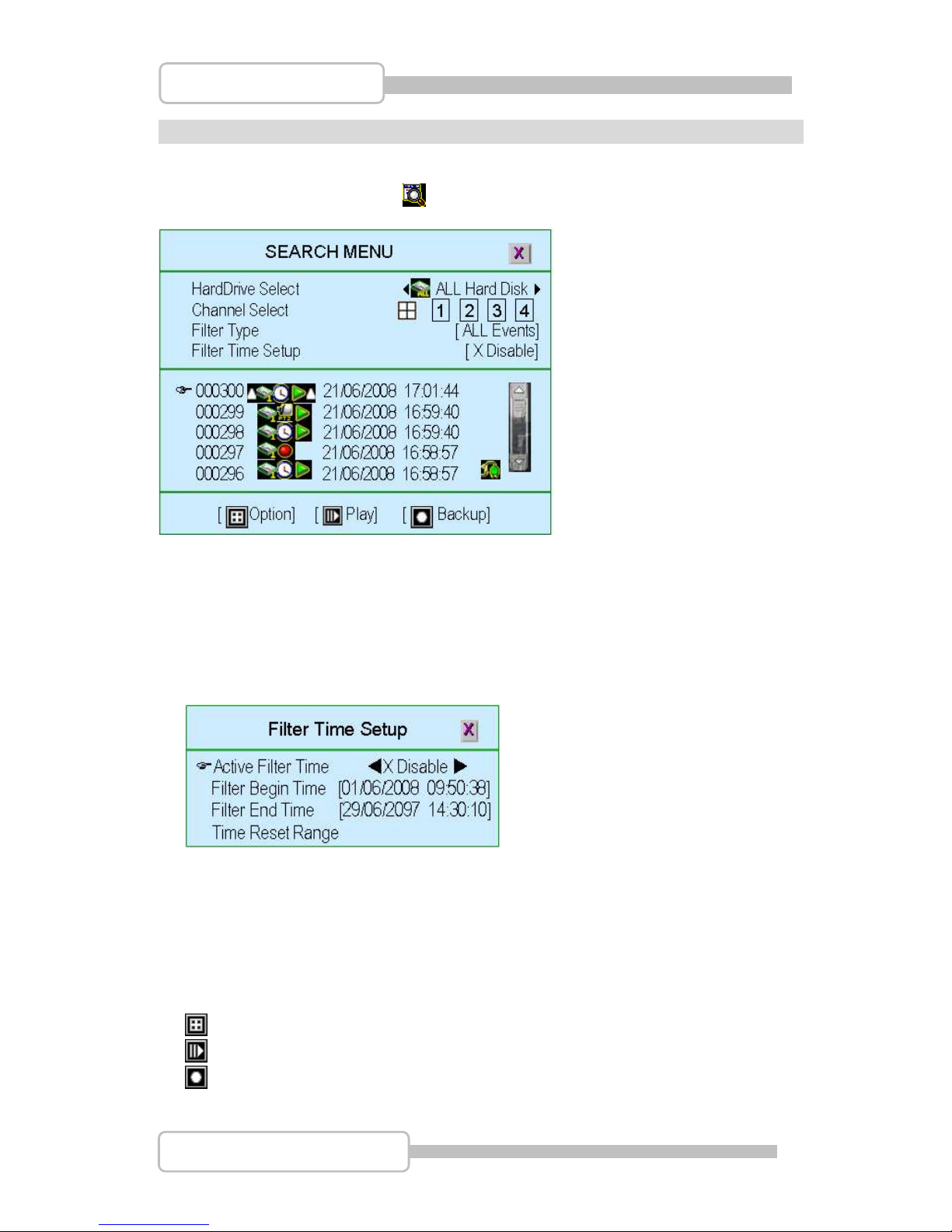
Press “” (or “”) button or icon to enter Event search menu
HardDrive Select: To select or specify which hard drive’s event will be search.
Channel Select: To setup or specify which channel’s event will be search.
Filter Type: To specify the filter type as All Events, General Events, Record Events,
Trigger Events, Hardware Events, Warning Events,
Filter Time Setup.
Active Filter Time: Enable/Disable Filter time of event
Filter Begin Time: To specify the beginning time of event filter
Filter End Time: To specify the beginning time of event filter
Time Reset Range: To reset the event search time period according to all effective
events as recorded. .
Option: Working window switching for setting/Event content display.
Play: Start to play the event which has been selected
Backup: Backup the event which has been selected
Page 64
64
4/8/16CH Triplex DVR
Digital Video Recorder
PPTTZZ
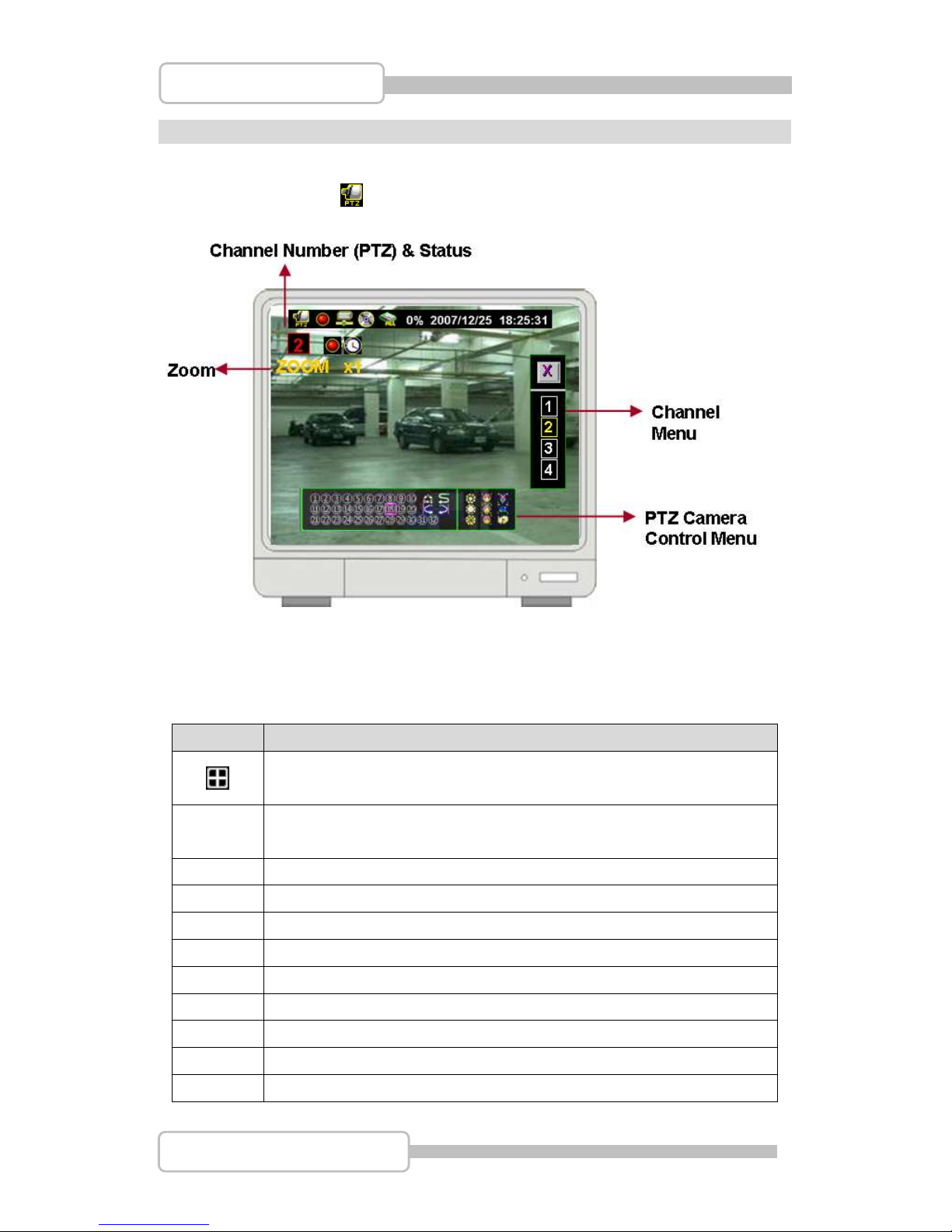
Press “” button or icon to enter Pan/Tile/Zoom Control menu
Zoom: This function depends on PTZ camera model, NOT every PTZ camera will show it.
Operating Icons:
Icon
Command
Enter PTZ channel menu shown on the right side of screen.
(if channel number in Yellow-color, it performs as PTZ camera)
Enter PTZ control menu shown at the bottom of screen.
Move Right
Move to Top Right
Move Top
Move to Top Left
Move Left
Move to Bottom Left
Move Bottom
Move Bottom Right
Turn Over
Page 65
65
4/8/16CH Triplex DVR
Digital Video Recorder
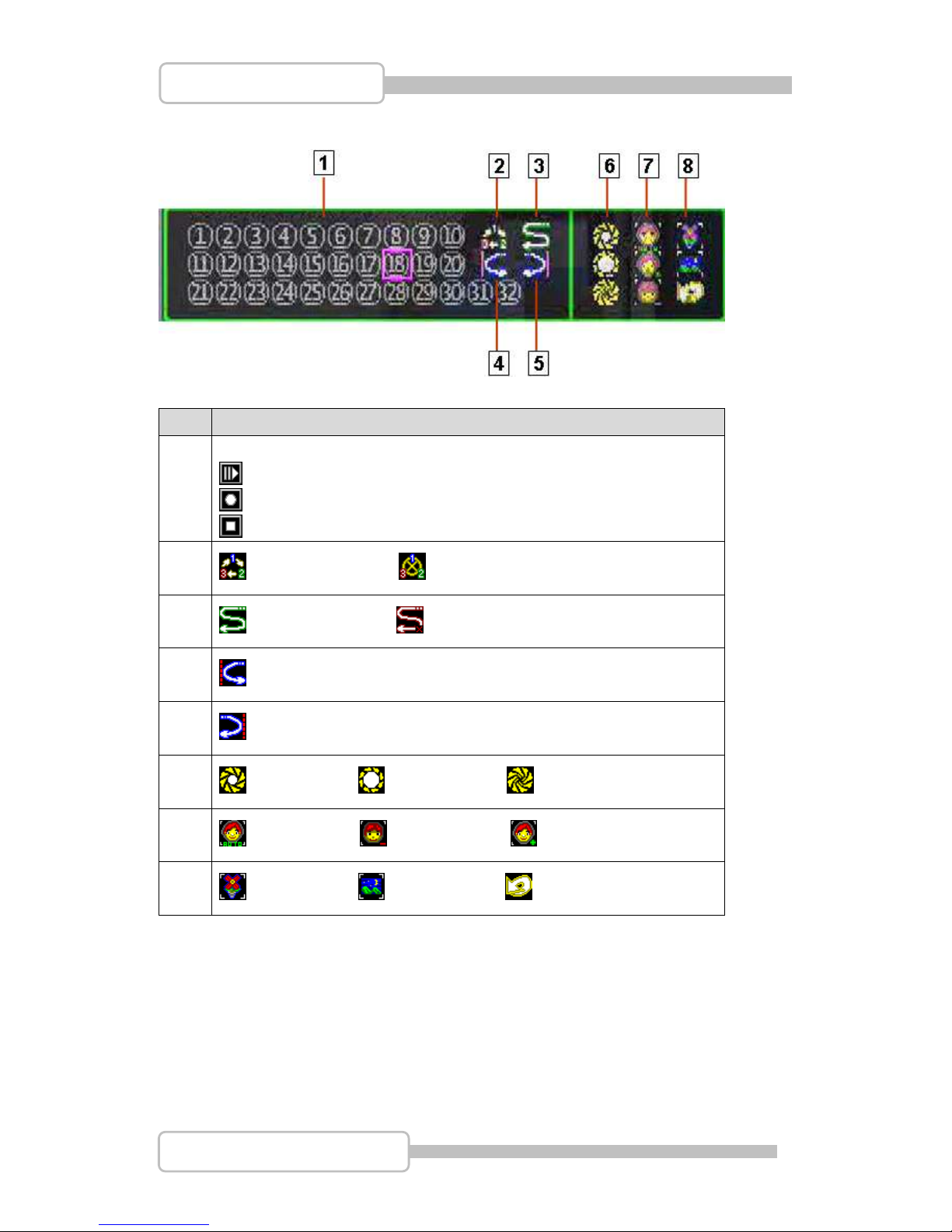
No.
Command
1
Preset (1 ~32)
(Mouse-Left Button): Call Preset
(Mouse-Right Button): Setup Preset Position
(Mouse-Right Button 2sec): Clear Preset Position
2
: Auto Pan Start : Auto Pan Stop
3
: Line Scan Start : Line Scan Stop
4
:Set Left Limit (Line Scan)
5
: Set Right Limit (Line Scan)
6
: Auto Iris, : Iris Open : Iris Close
7
: Auto Focus : Focus Near : Focus Far
8
: Zoom In, : Zoom Out : Goto Origin
Page 66
66
4/8/16CH Triplex DVR
Digital Video Recorder
PPCC CCoonnnneeccttiioonn tthhrroouugghh LLooccaall AArreeaa NNeettwwoorrkk ((nneettwwoorrkk hhuubb)
)
1. Search Router IP Address
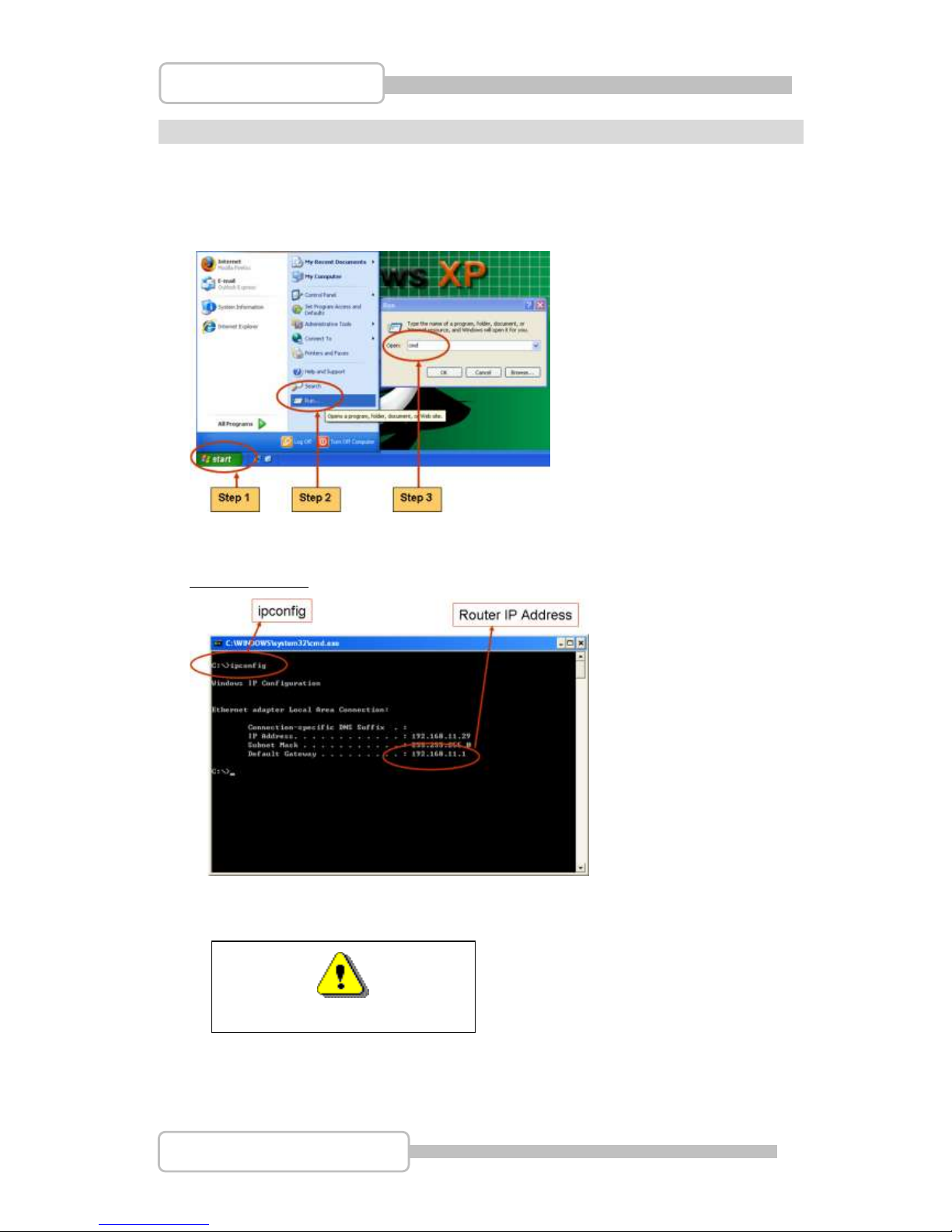
Please click “Start” and then “Run” option under Windows.
Please enter “CMD” and then “OK”
Please enter “ipconfig” on DOS prompt, and then record the Address Number of
Default Gateway as shown: It is the Router’s IP Address.
Find out your DVR IP address
Because this Router IP address is 192.168.11.1,
Please power off the DVR.
Page 67
67
4/8/16CH Triplex DVR
Digital Video Recorder
The network domain is 192.168.11.xxx,
Generally usable IP Address is between 192.168.11.2~192.168.11.253,
The suggested IP Address is from 192.168.11.160 to 192.168.11.199.
Please search IP Address that is not being used at present.
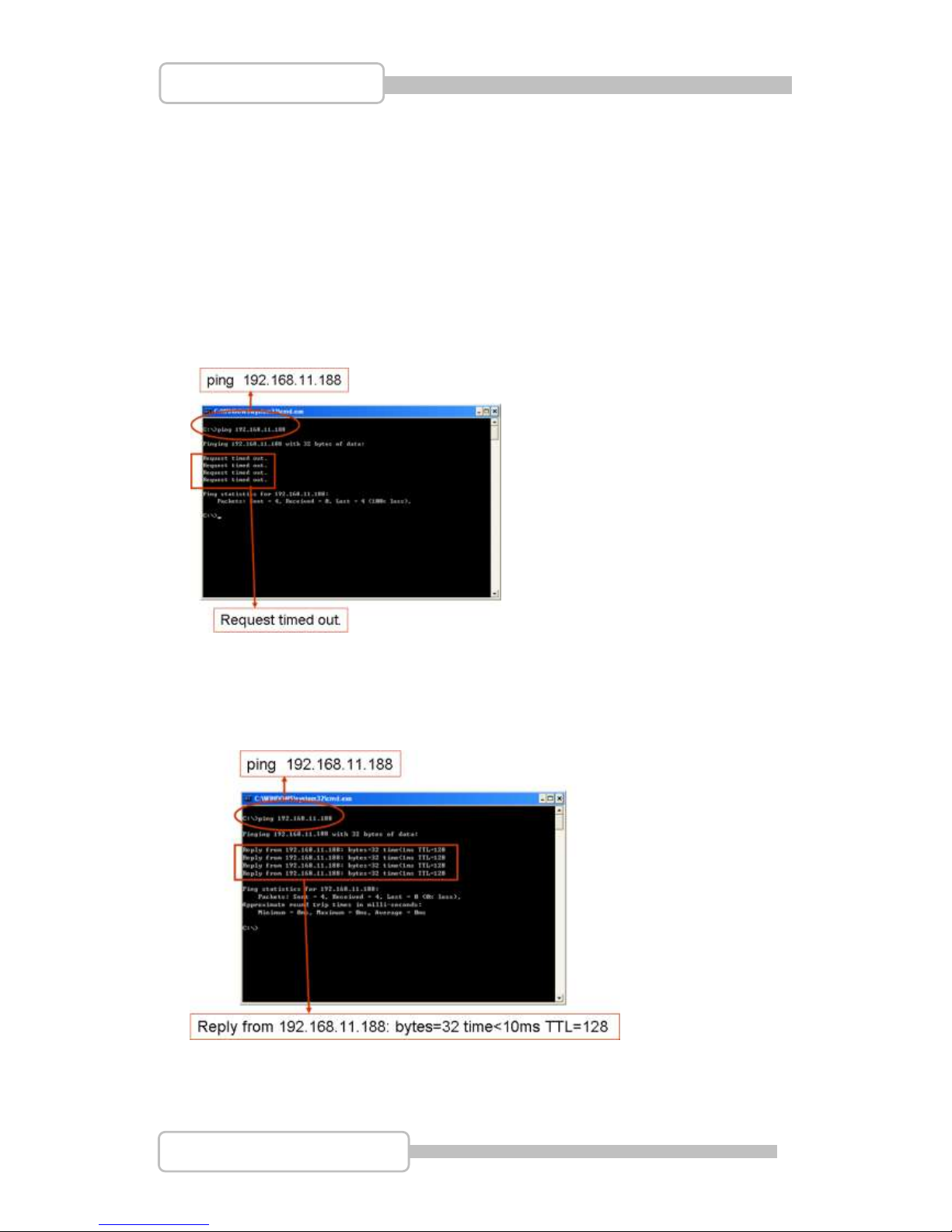
Please enter “ping 192.168.11.188” on DOS prompt (as following figure for reference)
If it appears “Request timed out” messages that means this IP address is not being
used at the moment and can be used for the DVR
If it appears “Reply from 192.168.11.188: bytes=32 time<10ms TTL=128” messages
as following that means this IP Address [192.168.11.188] has been used. Please try to
find out another IP Address that is not being used.
Then, go back to DVR menu: “Network Setup” to enter IP address.
IP ADDRESS: Enter the DVR’s address [192.168.011.188]
Page 68
68
4/8/16CH Triplex DVR
Digital Video Recorder
GATEWAY: Enter Router IP Address[192.168.011.001]
NET MASK: 255.255.255.0
PORT: Enter the DVR’s port number [14338 14337]
2. DDNS Service
For DVR only can set at static IP address and no support the dynamic IP. If you have
to use dynamic IP that it recommend serving as DDNS service.
DDNS is a service the maps internet domain names to IP address and works with
dynamic IP address (assigned by ISP server).
Remark: A router is needed as the interface between PC and DVR when DVR
is under internal network environment.
2.1. Registration of DDNS Service
There are three suggestions for DDNS:
www.no-ip.com, www.changeip.com and www.dyndns.com
The following will use DDNS website: http://www.dyndns.com as example.
Create Account at the first beginning after entering DynDNS (DDNS service)
website.
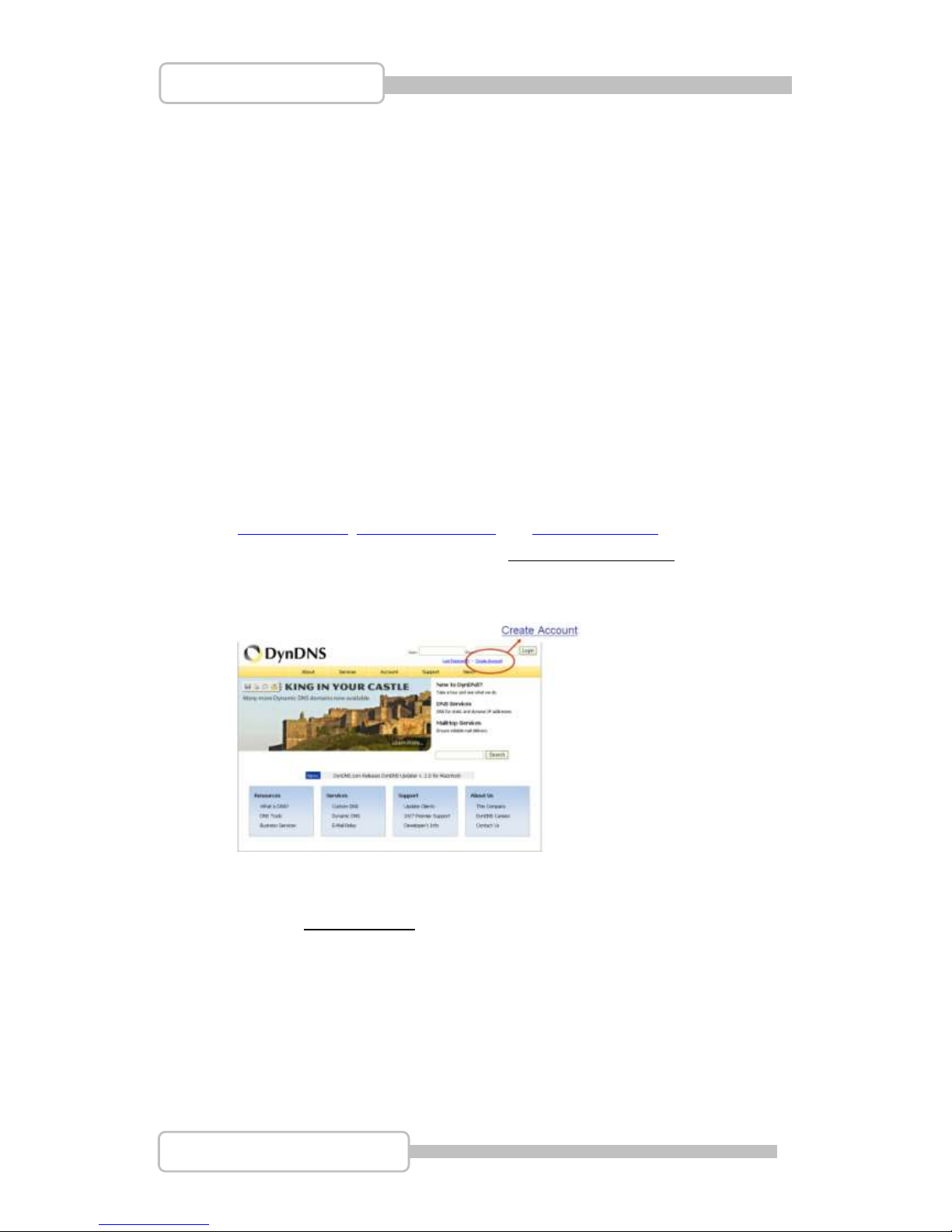
2.2. Create Your DynDNS Account
Click the Create Account, and then start to create your own DynDNS Account
and fill out all the blanks for account’s application as following:
Page 69
69
4/8/16CH Triplex DVR
Digital Video Recorder
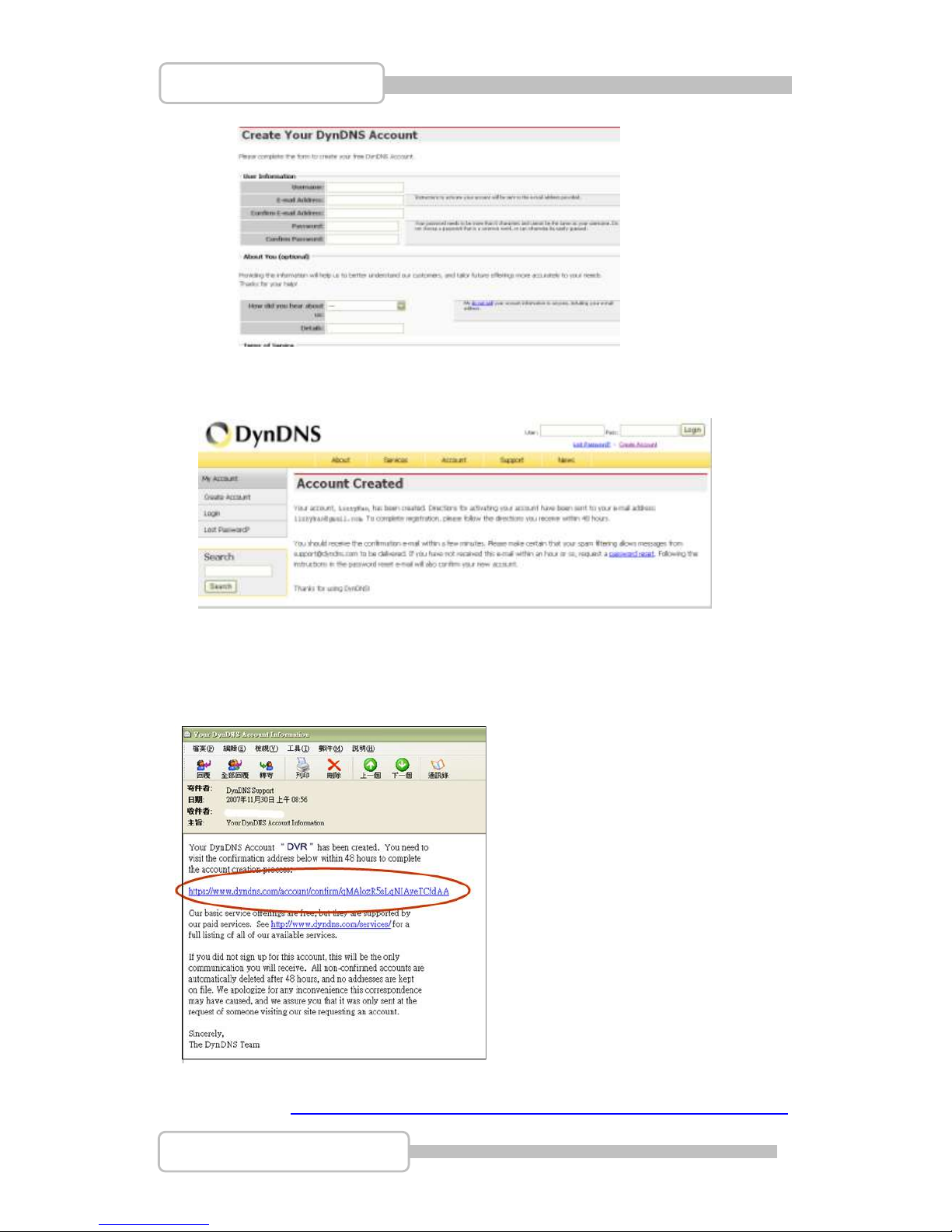
After you click "Create Account", it shows “Account Created”.
Also, DynDNS will create a new account for you and send you an e-mail to the
address you provided. It needs to confirm your account within 48 hours after receiving
the e-mail or it will automatically delete your account.
Just click the https://www.dyndns.com/account/confirm/qMAlozR5sLqNIAyeTCfdAA
Page 70
70
4/8/16CH Triplex DVR
Digital Video Recorder
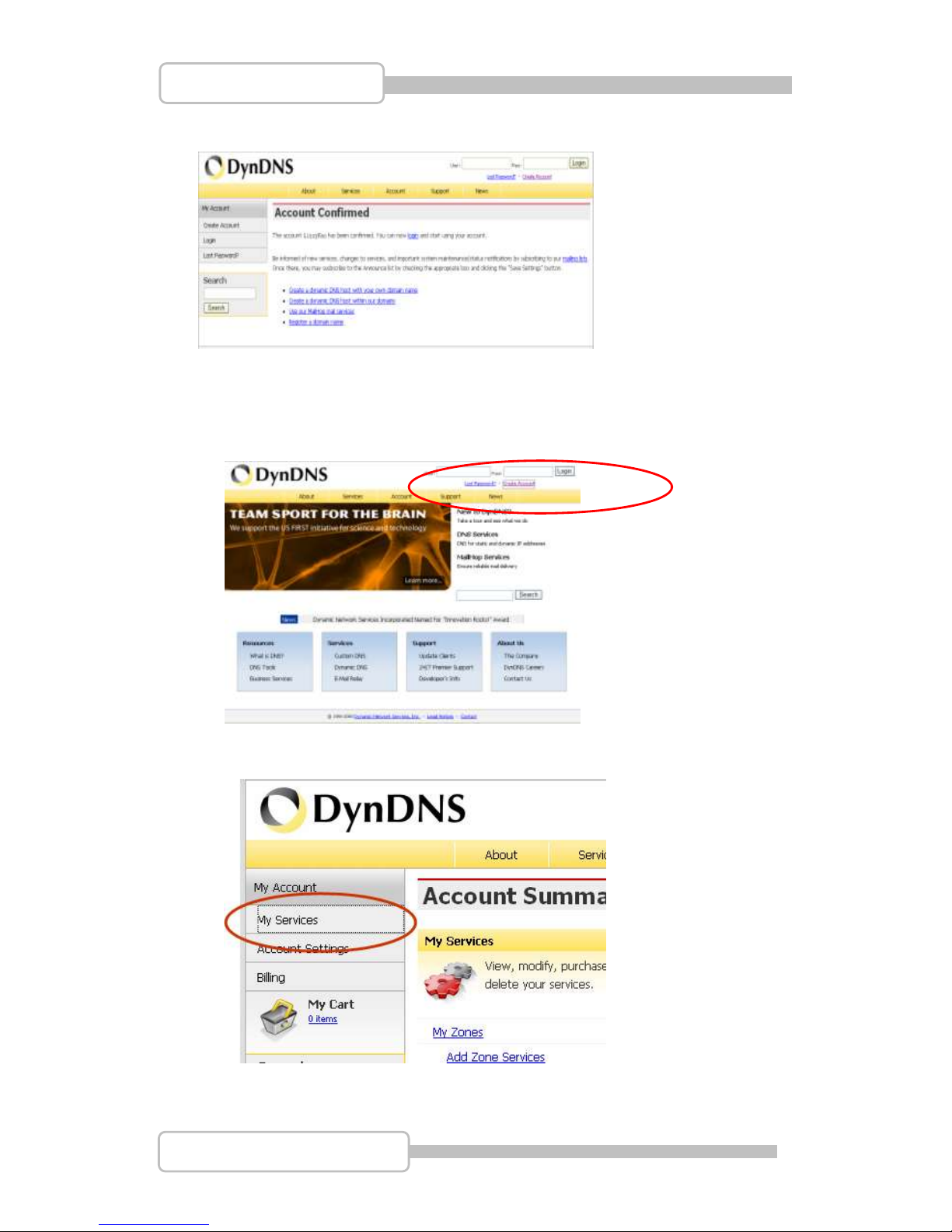
To confirm the account
2.3. Logged In and Host Service
Login by enter the Username and password.
Then, go to “My Service” to get a host name
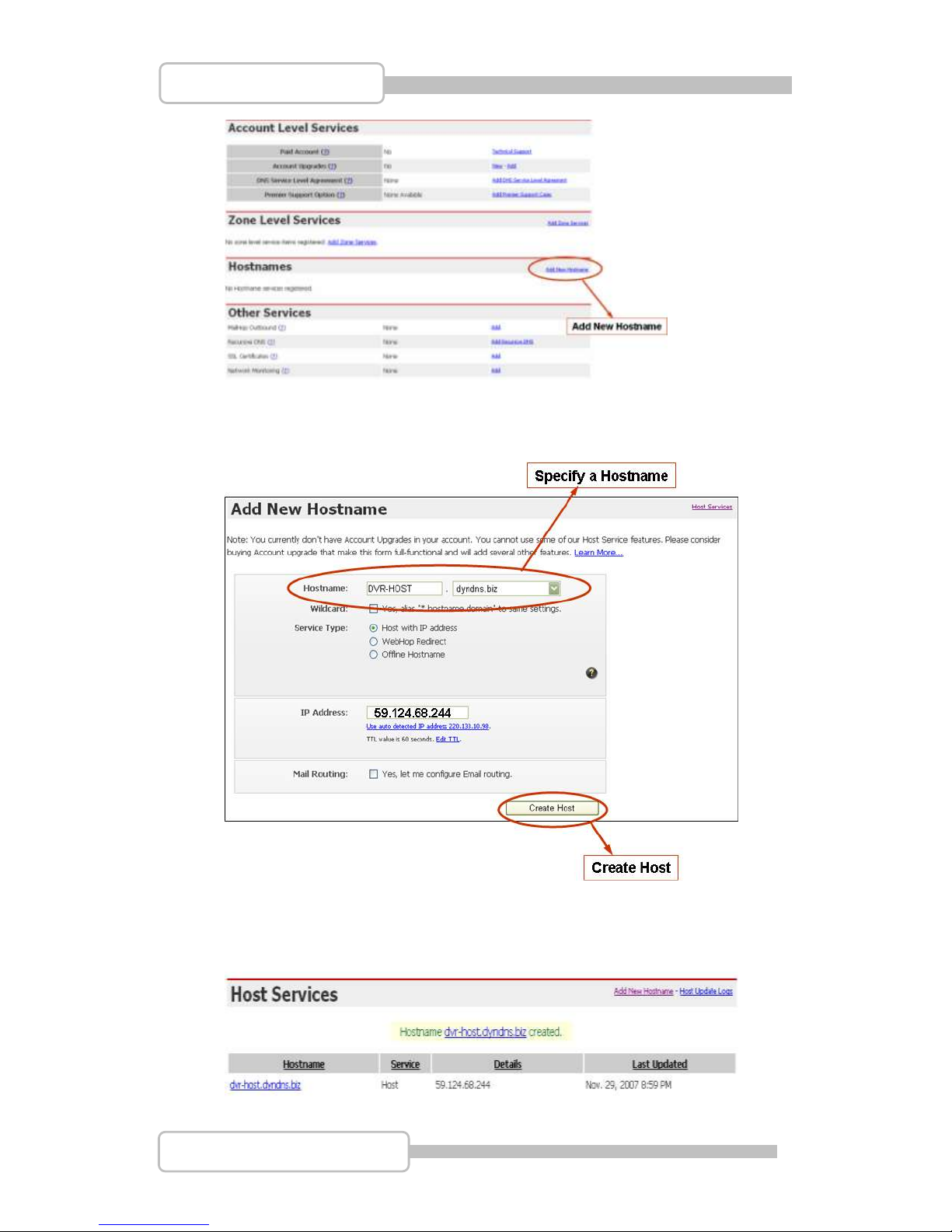
Double click “Add New Hostname” as following:
Page 71
71
4/8/16CH Triplex DVR
Digital Video Recorder
Specify the Hostname for DDNS IP which will be applied to the DVR’s DDNS
setting.
We take DVR-HOST.dyndns.biz as an example, and click “Create Host”
Now, the DDNS service is completed.
Well keep the User name, Password and Hostname
Page 72
72
4/8/16CH Triplex DVR
Digital Video Recorder
2.4. Router Setting
Most of the setting of router is identical, here is the suggestion:
Specify DDNS service provider: DnyDNS.org (dynamic)
Specify DDNS IP by DDNS account (user name / password )
Specify DVR IP as private IP setting
Specify one pair of connection port (control port / streaming port) , like”8841”
2.5. DVR DDNS Setting
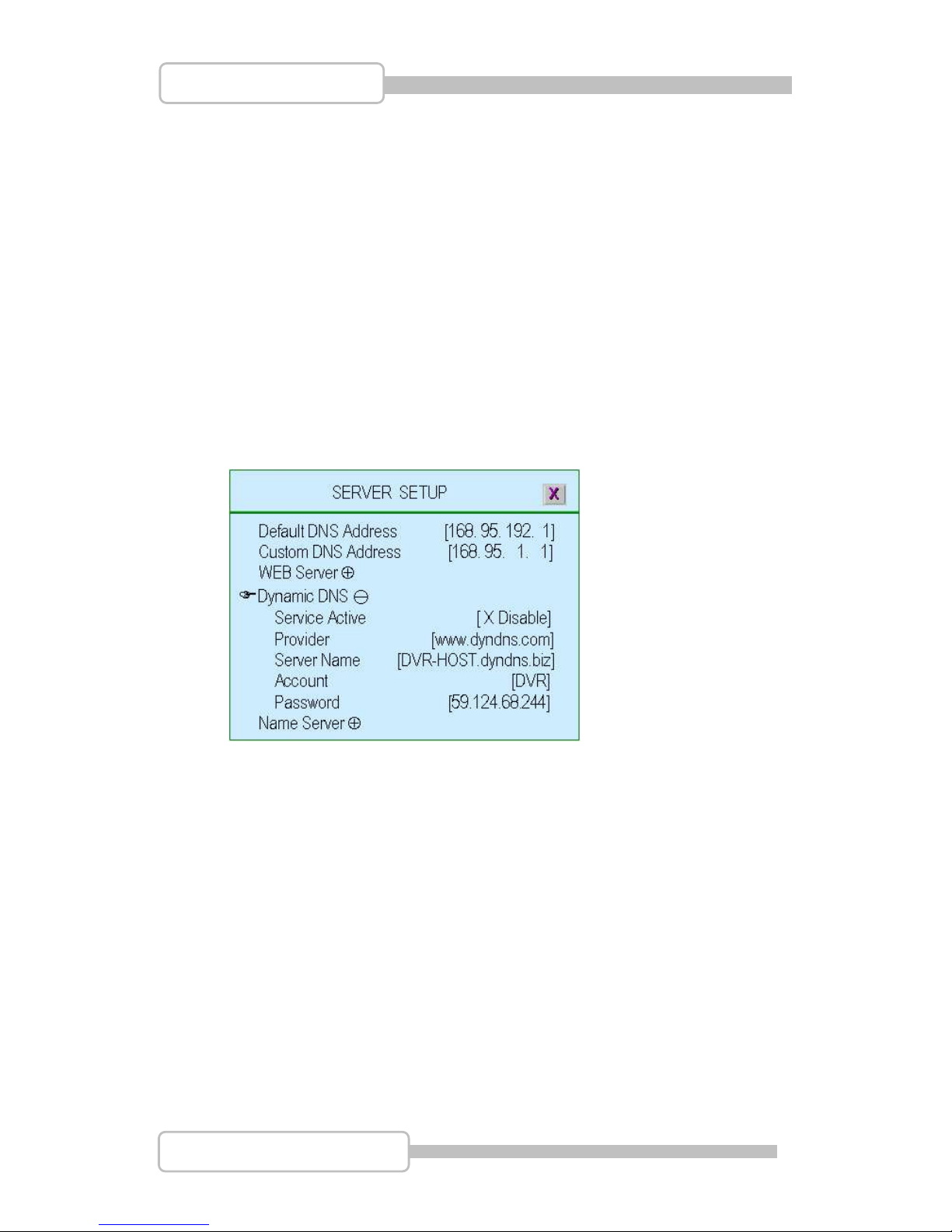
After complete the DDNS account application, go to DVR server setup menu and
input the DDNS information for network connection.
2.6. PC Client Setting
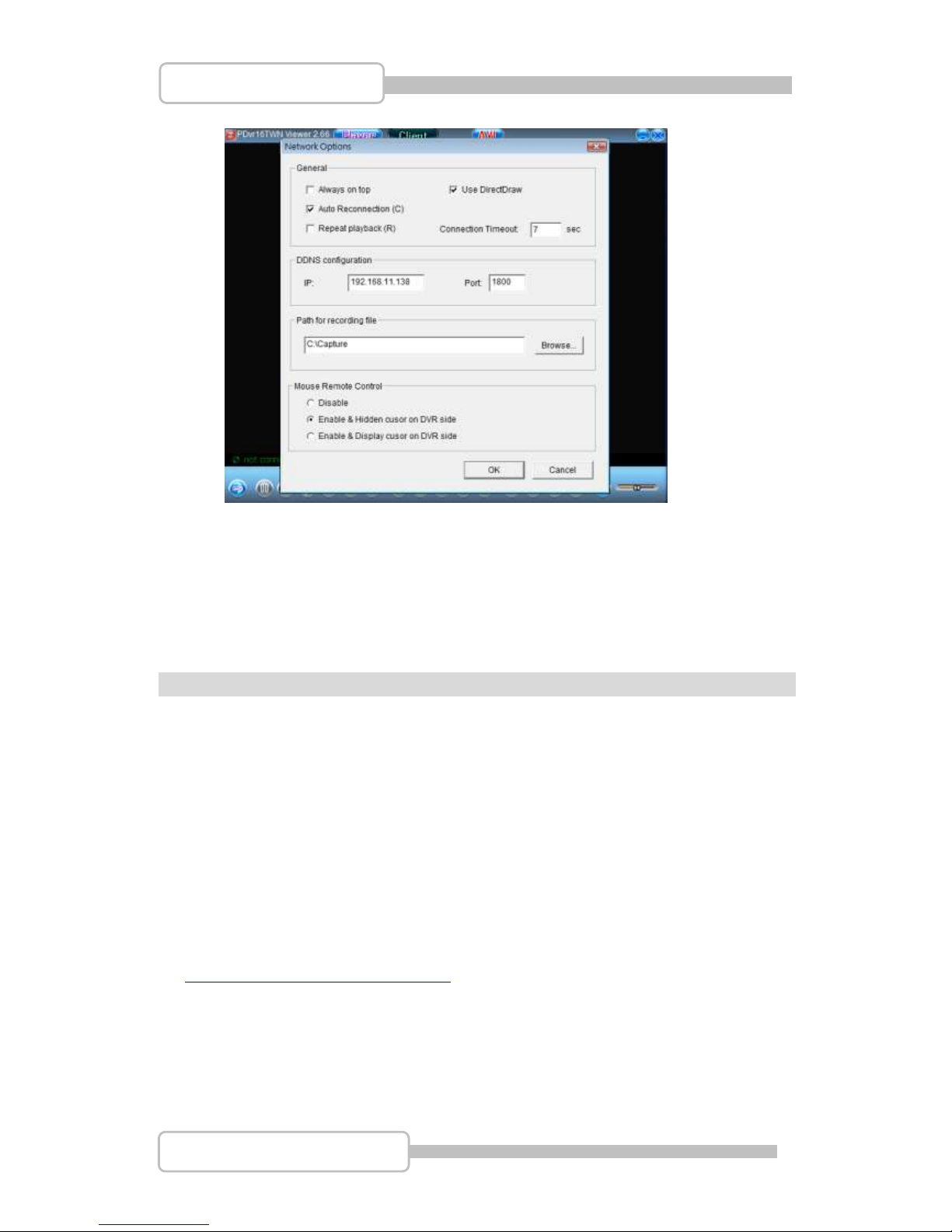
Enter the “Option” at PC Client to setup Network Options-DDNS configuration.
Page 73
73
4/8/16CH Triplex DVR
Digital Video Recorder
PPCC CClliieenntt && PPCC VViieewweerr
PC Client is applied for remote monitoring, recording, playback, backup and control of
4/8ch video and 1ch audio. Also, you can capture, convert the video from the unit into AVI
file or JPEG file, or play the stored video later on.
PC Viewer is developed for viewing recorded video, taking snapshot and converting video
to AVI format on PC which supports Windows2000/Windows XP/VISTA
1. DirectX
Before installing PC Client / PC viewer into your PC, please make sure DirectX 9.0 or
above has already existed. You can refer to Microsoft Download Center:
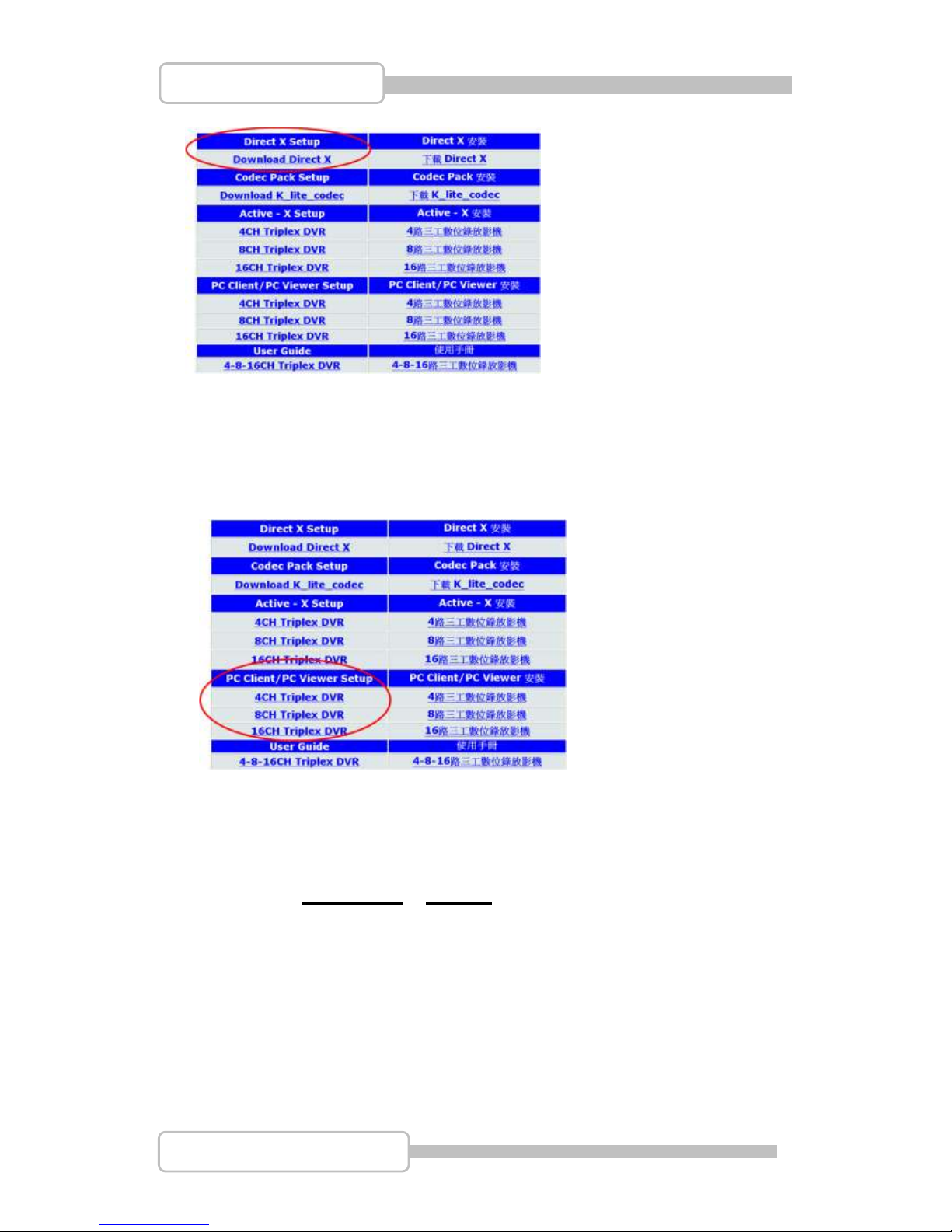
http://www.microsoft.com/downloads/ or Insert the CD that DVR to choose “Download
DirectX” as following to download the program and complete the installation.
Page 74
74
4/8/16CH Triplex DVR
Digital Video Recorder
2. PC Client/PC Viewer Program Installation
After DirectX has been installed, place the CD into PC to start the PC Viewer
installation. You will see a table list as following to choose 4/8/16CH DVR at “PC
Client/PC Viewer Setup” for installation.
3. Open Disk Operating in VISTA
It must setup PC Viewer / PC Client properties at VISTA operating system when you
want to open disk including of Hard drive and USB disk before start running.
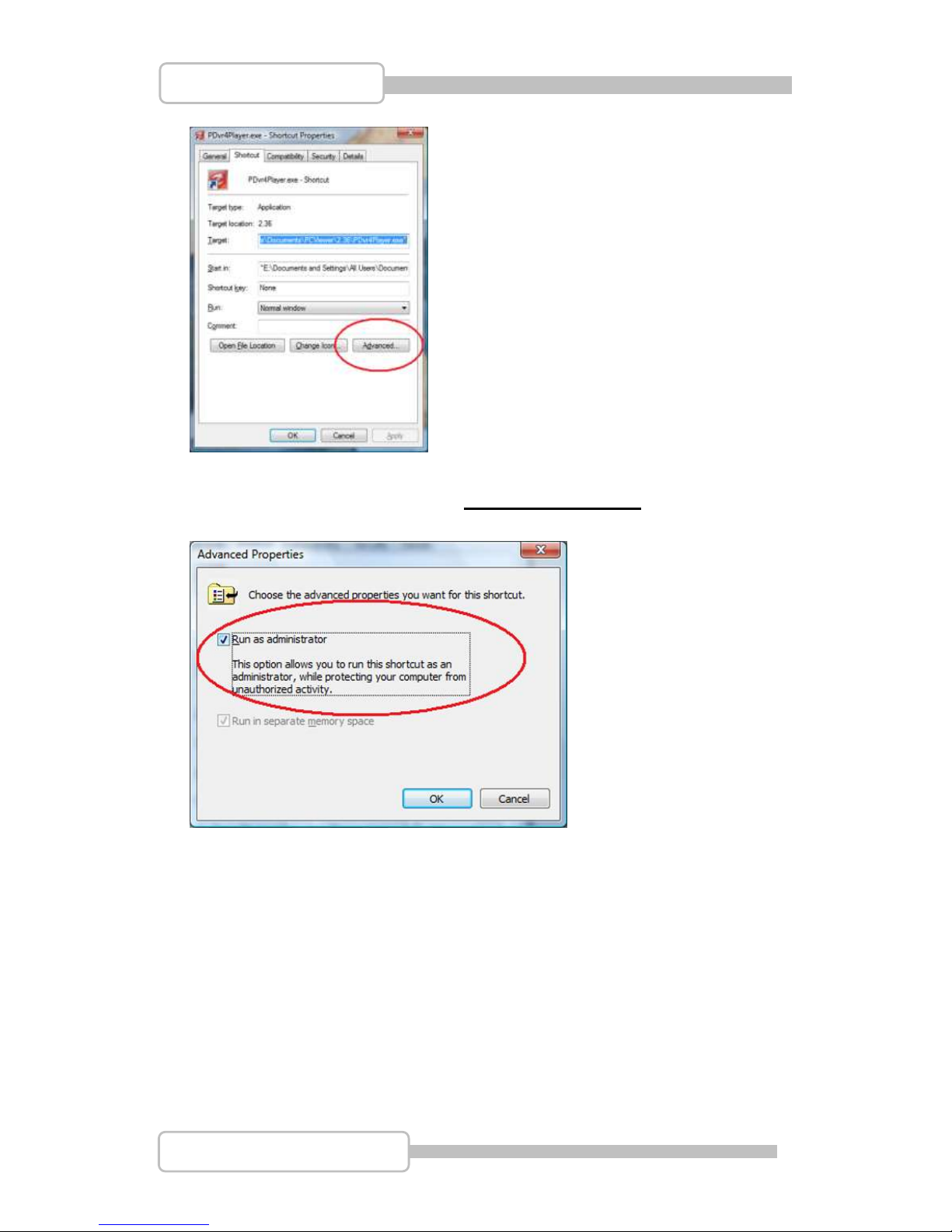
Step 1: Go to PC Viewer Properties setting……..
Choose “ Advanced” at Shortcut setting.
Page 75
75
4/8/16CH Triplex DVR
Digital Video Recorder
Step 2: At Advanced Properties, enable “Run as administrator”,
Then, press OK to complete PC Client properties setting.
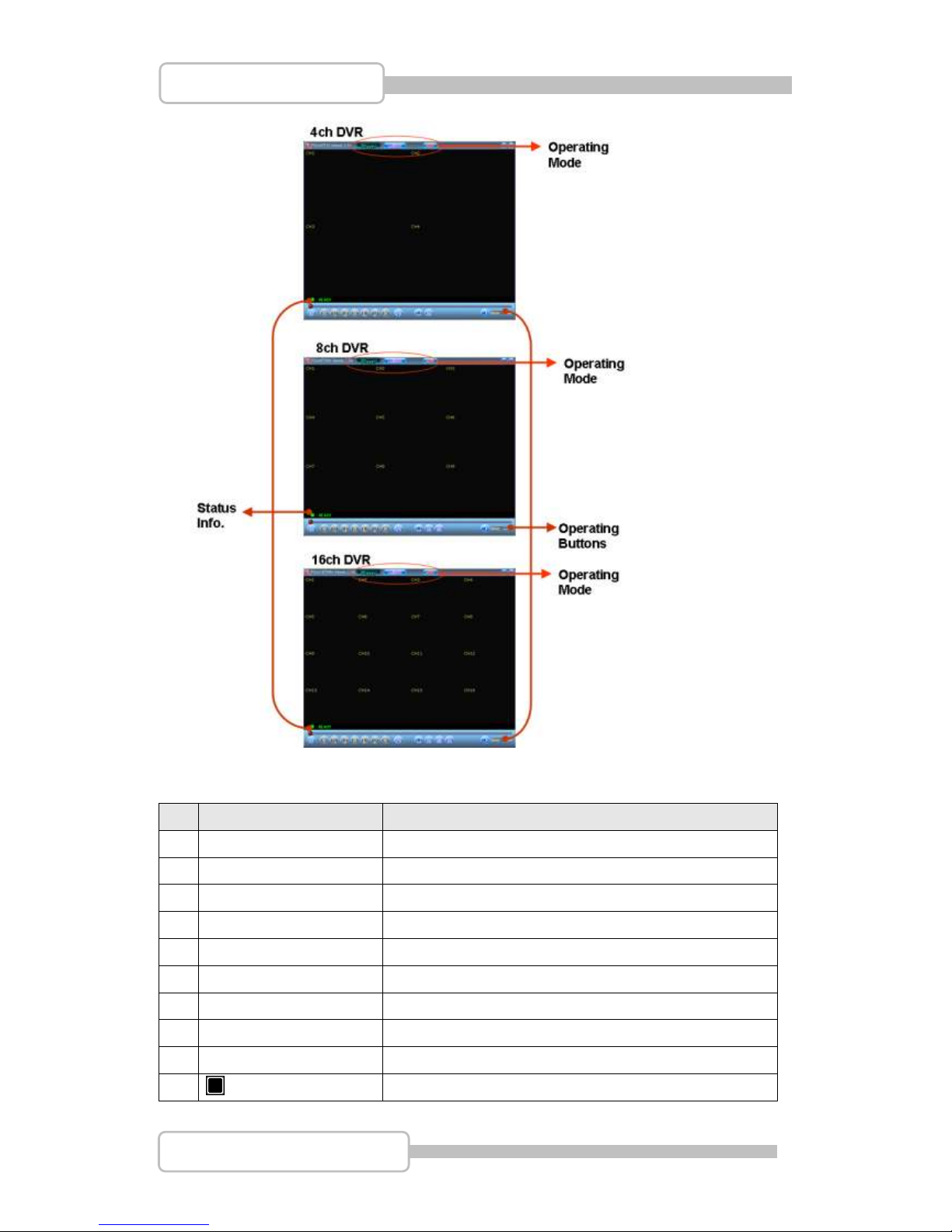
4. PC Viewer Operating Guide
By press “Player” to act the operating at PC Viewer operating environment.
Page 76
76
4/8/16CH Triplex DVR
Digital Video Recorder
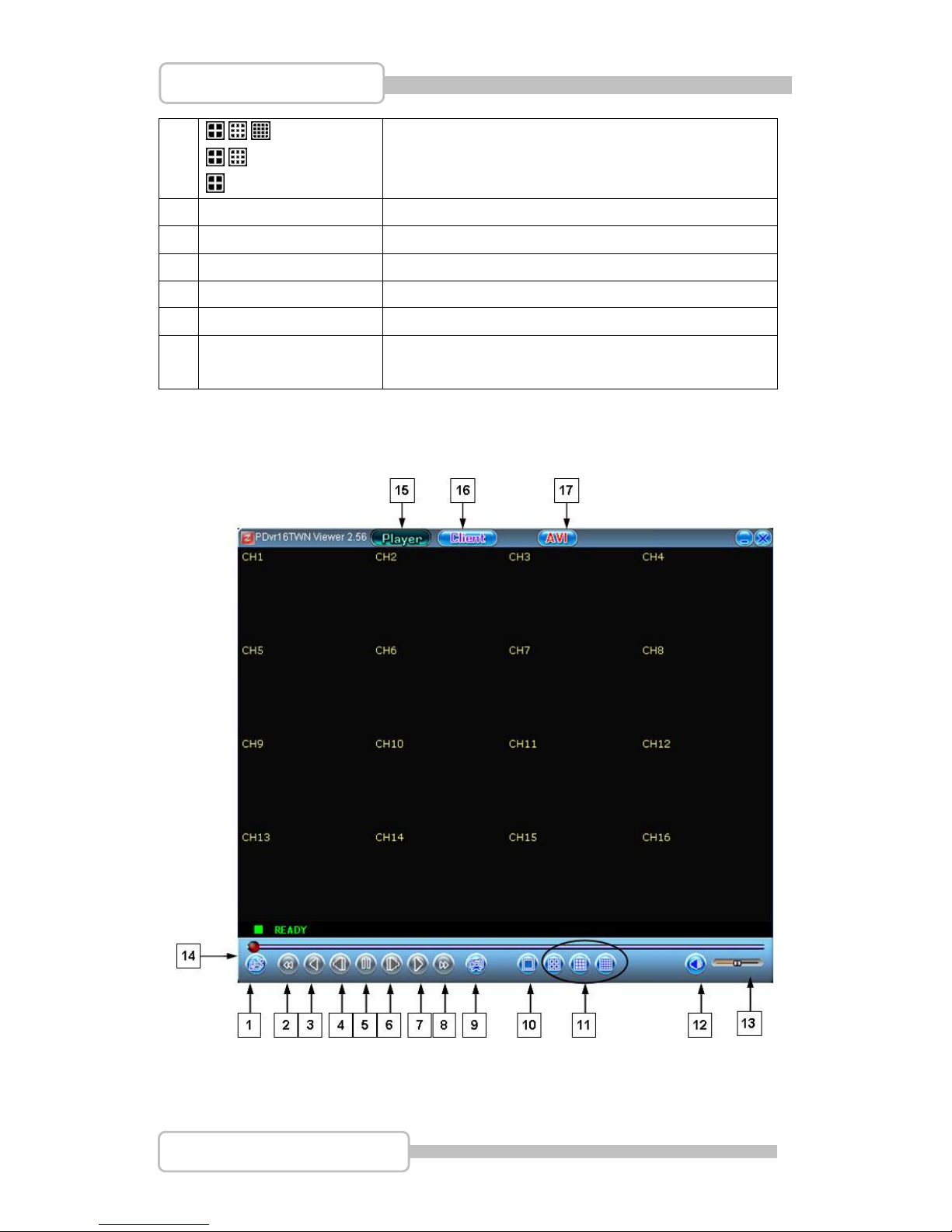
4.1. PC Viewer Operating buttons & Operating mode
No
Name
Function
1
Open
Open file. To retrieve the desired video data.
2
Fast Backward
Press to play backward faster.
3
Reverse
Press to playback backward
4
I Previous frame
Button for one single frame backward
5
I I Pause
Pause the video playback
6
I Next Frame
Button for advancing one single frame
7
Playback
Start video playback
8
Fast forward
Press to play the recorded stream faster.
9
Still capture
click to snapshot the data as BMP file
10
Mode (Full)
To display each channel on full-screen
Page 77
77
4/8/16CH Triplex DVR
Digital Video Recorder
11
/ / Mode (16ch)
/ Mode (8ch)
Mode (4ch)
To display 4/8/16channels on screen(16ch DVR)
To display 4/8channels on screen(8ch DVR)
To display 4channels on screen(4ch DVR)
12
Speaker
Set Speaker On / OFF.
13
Speaker Volume
To adjust the speaker’s volume
14
Video
Video Play.
15
Player
Press to act at PC Viewer environment
16
Client
Press to act at PC Client environment
17
AVI
Click to create a new file to save AVI file in PC and
start to convert the data into AVI file and save.
16ch DVR as an example:
4.2. Playback
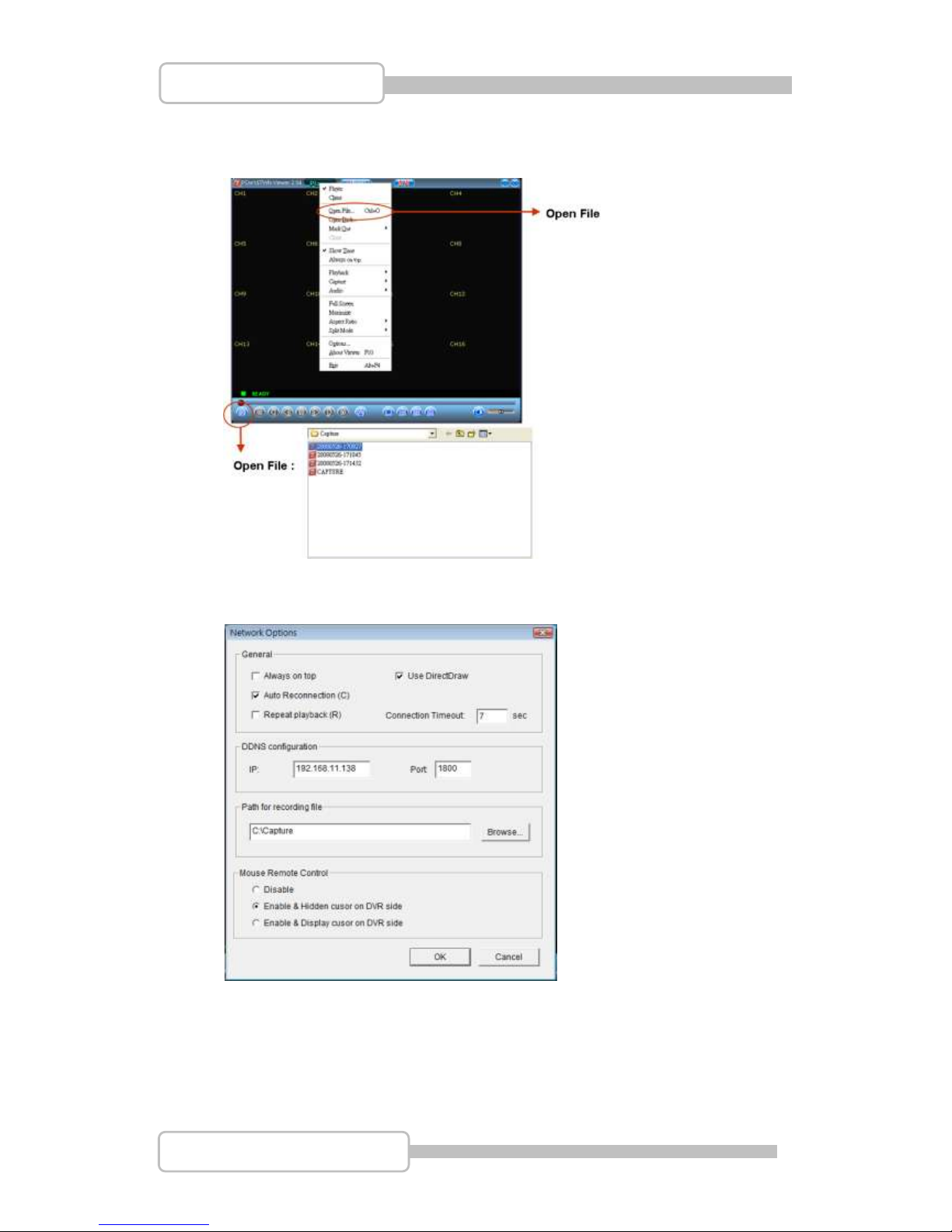
4.2.1. Open File
Page 78
78
4/8/16CH Triplex DVR
Digital Video Recorder
After local recording, you can simple to playback the recorded file by using “Open
File” function as following.
The default path of local recording is C:\Capture.
Or you can change the path under hierarchical menu: “Option”
Mouse Remote Control: To enable/discard the mouse operating on DVR when
you use mouse operation at Client site.
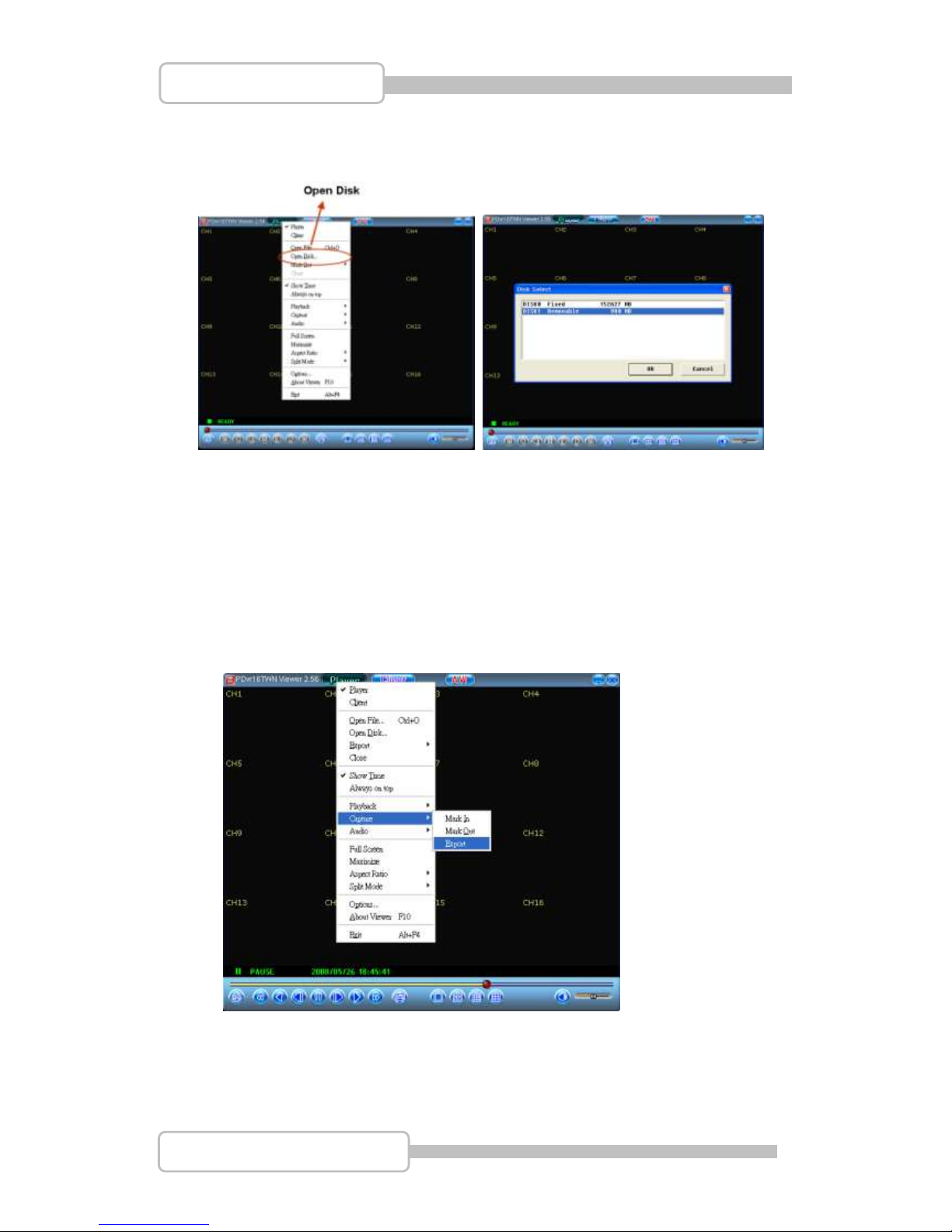
4.2.2. Open Disk
Plug the USB memory stick with data backup into PC.
Page 79
79
4/8/16CH Triplex DVR
Digital Video Recorder
Press the right button of mouse, and then choose “Open Disk” to select the USB
disk. Then, press “OK” to start playback the data in USB (Removable Disk)
4.3. Capture
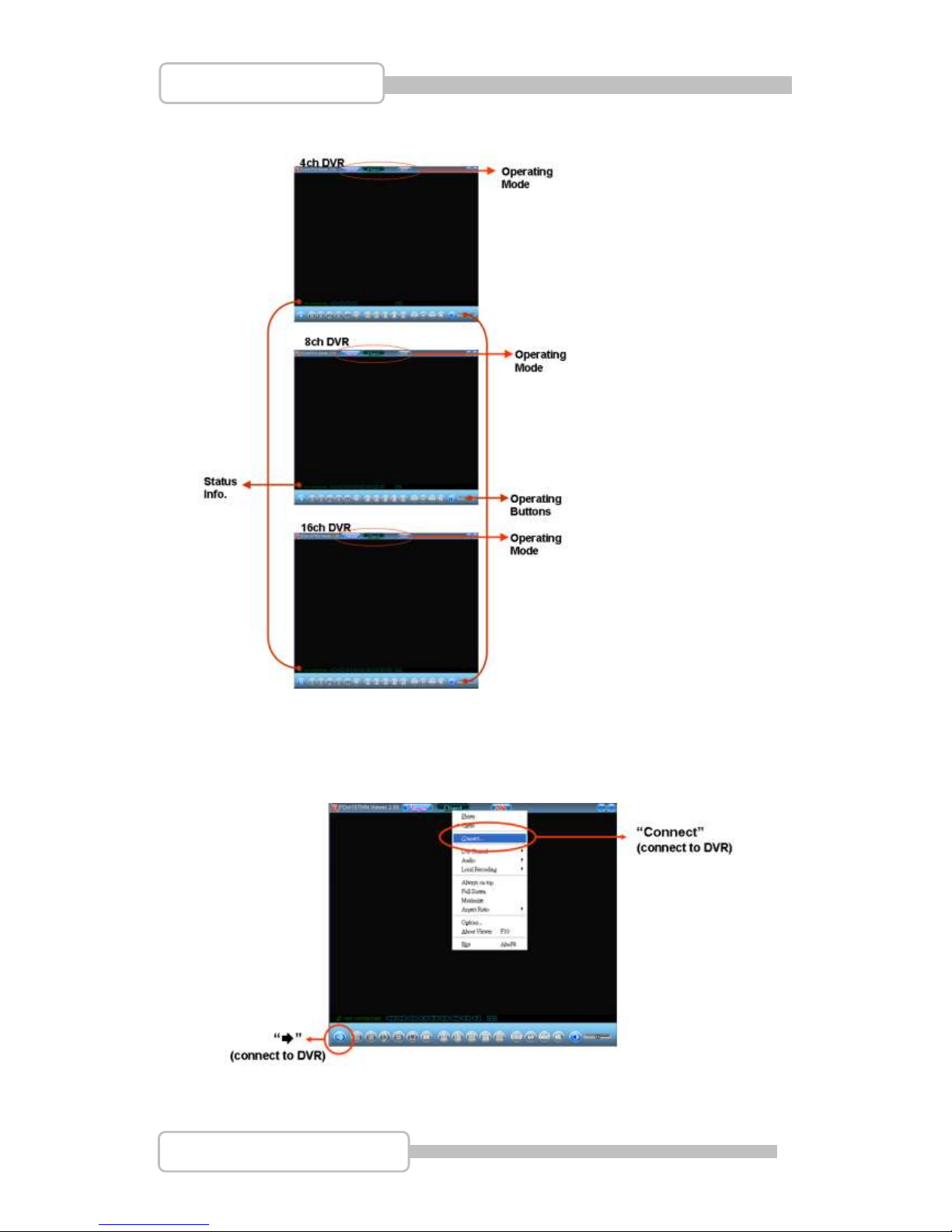
When you want to capture a period of recorded file, please use “Capture” function.
At first, choose the file by using “Open File”, and it will play automatically.
Press “I I Pause” before use “Capture”.
Use Mouse to choose the starting point, then press ”Mark In”
Use Mouse to choose the end point, then press ”Mark Out”
“Export”: to be a file as setting.
5. PC Client Operating Guide
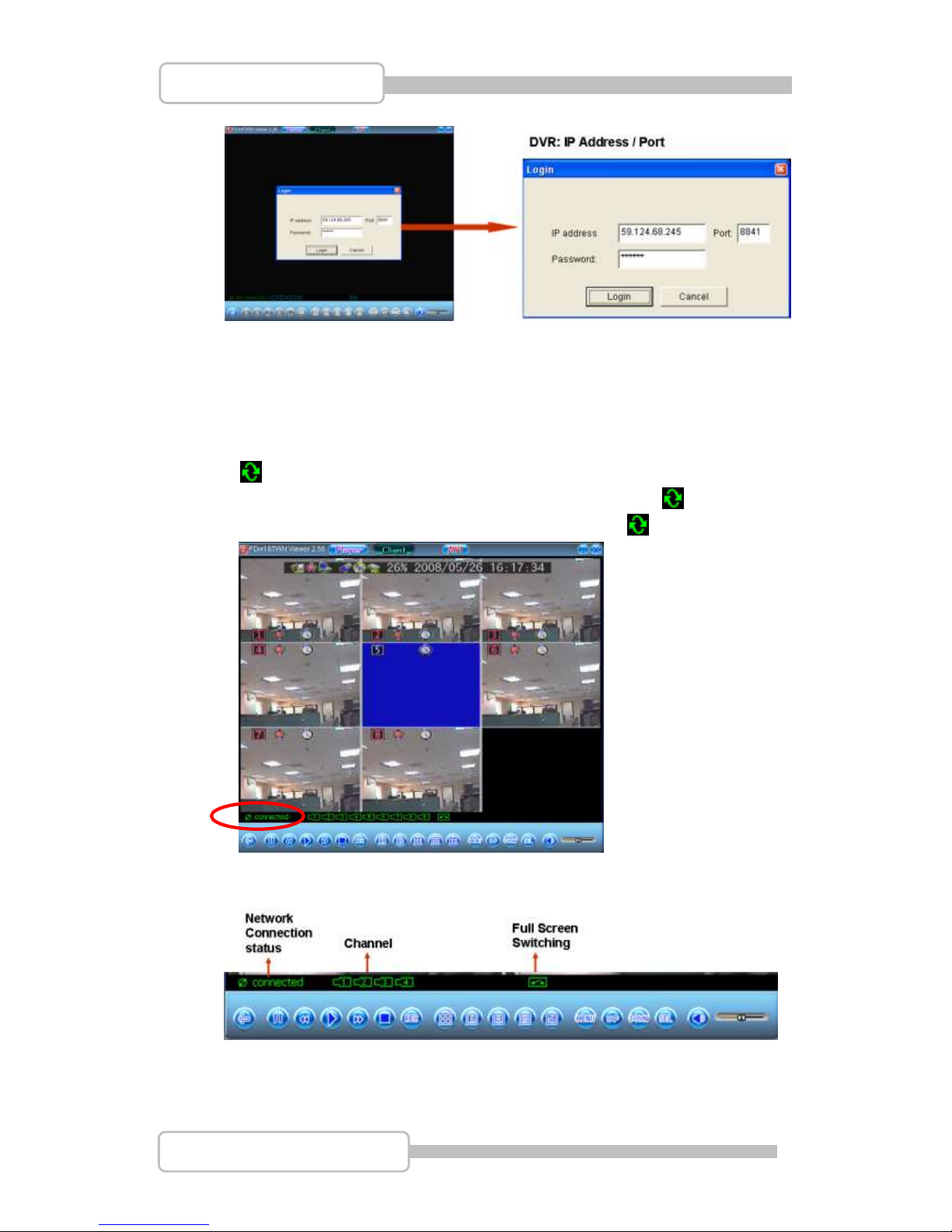
Press “Client” button on the top to switch PC Client mode for remote motoring.
Page 80
80
4/8/16CH Triplex DVR
Digital Video Recorder
The operating picture will change as following.
5.1. Connect PC Client to DVR
Press “Client” on the top and press left button of mouse, it shows a function table.
Or simply press the “” button on the control bar beneath.
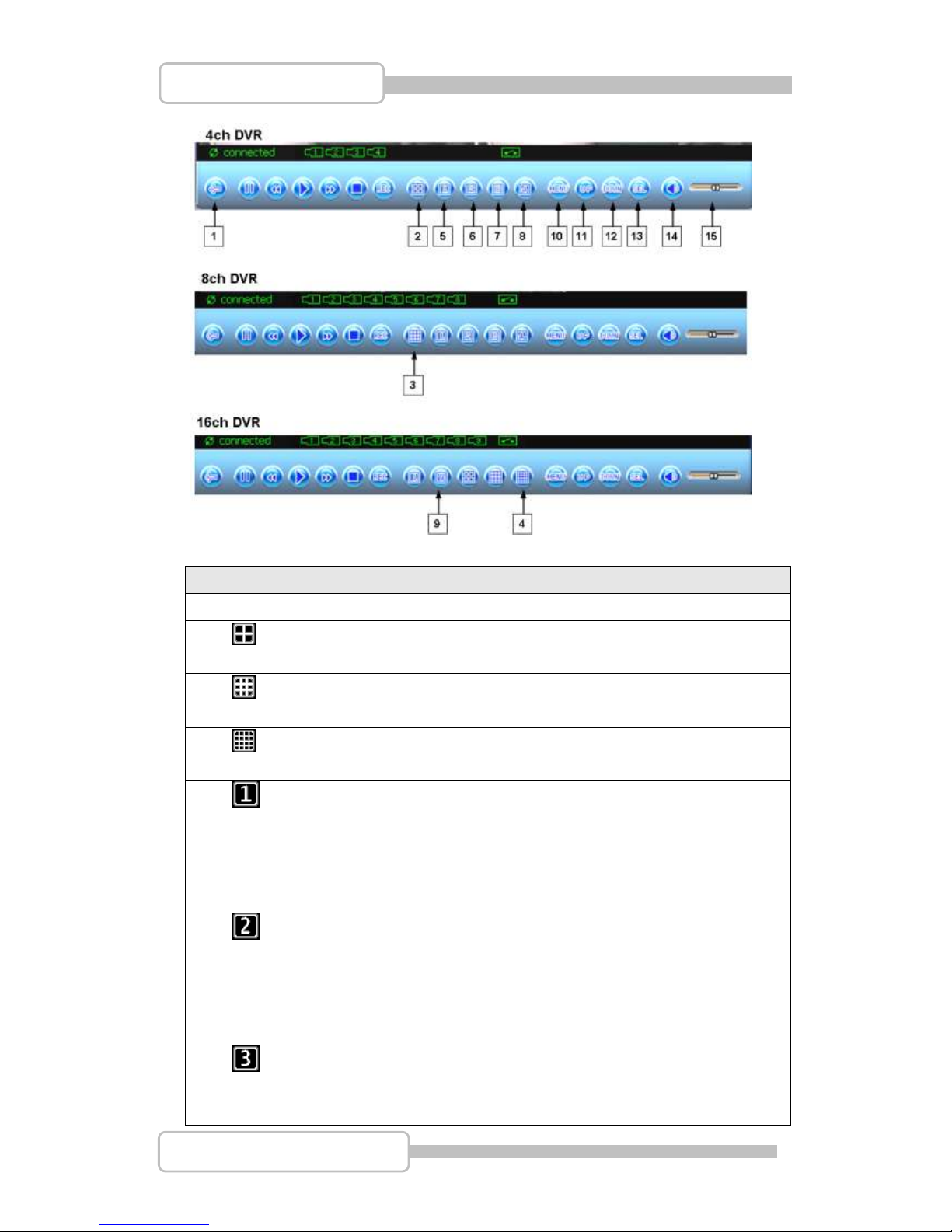
Select “Connect” by one click it will show a window “Login” to set the IP address
and port of DVR.
Page 81
81
4/8/16CH Triplex DVR
Digital Video Recorder
IP Address / Port: The DVR IP address/Port is the IP address of the remote DVR
that you can connect by static IP address or dynamic IP.
Password: The password is the same password that be used for formatting the
DVR Hard Drive. The default is “123456”.
Then press “Login” to start to connect to DVR
“ connecting” : the PC client is trying to connect to DVR. After completed
the PC and DVR connection, the control bar below will show ” connected” on
status bar. If connection fails or disconnected will show “ not connected”
5.2. Status information
5.3. Control Icons
After connected, DVR can be controlled on remote site by control icons.
Page 82
82
4/8/16CH Triplex DVR
Digital Video Recorder
No
Name
Function
1
/
Connect/Disconnect the network within PC and DVR
2
Channel Mode: To display 4 split screen
3
Channel Mode: To display 9 split screen
4
Channel Mode: To display 16 split screen
5 Channel 1display at full screen (4ch DVR)
To display Channel1, channel2….. channel4 by sequencing
on screen (8ch DVR)
To display Channel1, channel2….. channel8 by sequencing
on screen (16ch DVR)
6 Channel 2 display at full screen (4ch DVR)
To display Channe5, channel6….. channel8 by sequencing
on screen (8ch DVR)
To display Channel9, channel10….. channel16 by
sequencing on screen (16ch DVR)
7
Channel 3 display at full screen (4ch DVR)
4 split view the Channel1 ~ channel4 (8ch DVR)
4 split view (ch1~ch4 ch5~ch8 ch9~ch12
Page 83
83
4/8/16CH Triplex DVR
Digital Video Recorder
ch13~ch16) display at full screen (16ch DVR)
8 Channel 4 display at full screen (4ch DVR)
4 split view the Channel5 ~ channel8 (8ch DVR)
9 split view (ch1~ch8 / ch9~ch16) display at full screen for
16ch DVR
9 To display Channel9, channel10….. channel16 by
sequencing on screen (16ch DVR)
10
MENU
Enter menu or exit
11
UP
Moves up through the list of menus or enter Search Manu
12
DOWN
Moves down through the list of menus or starting auto
rotation
13
SELECT
Use this button to change or confirm values on main menu or
sub menu setting.
14
Mute On/Off
Set Speaker On / OFF.
15
Volume
To adjust the speaker’s volume
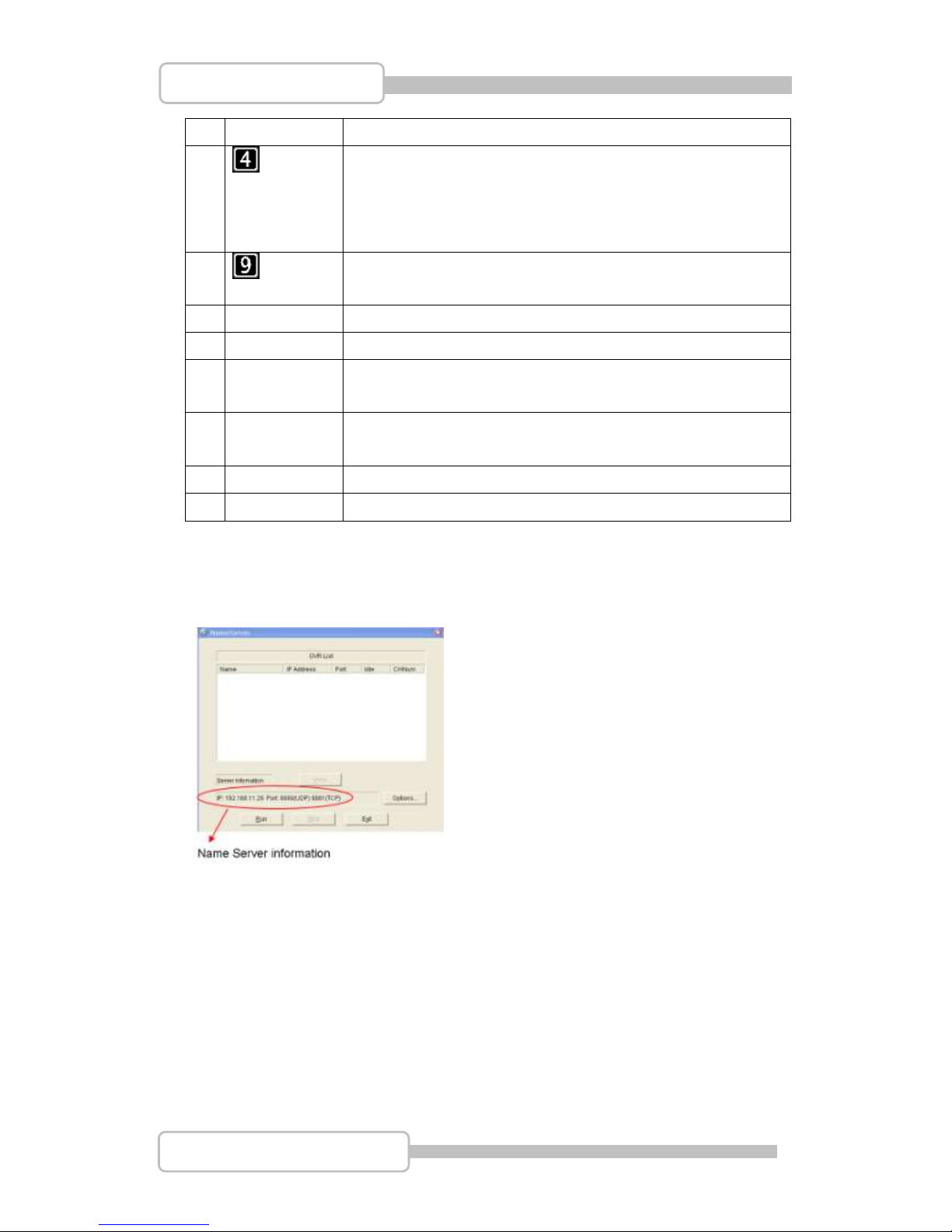
6. Name Server
Name Server will list DVR which has connected to server. Input the sever information
as shown at bottom into DVR name server setting
After completed all DVR Name sever setting, then press “Run” to execute “Name
Server”. It shows the DVR list as following.
Page 84
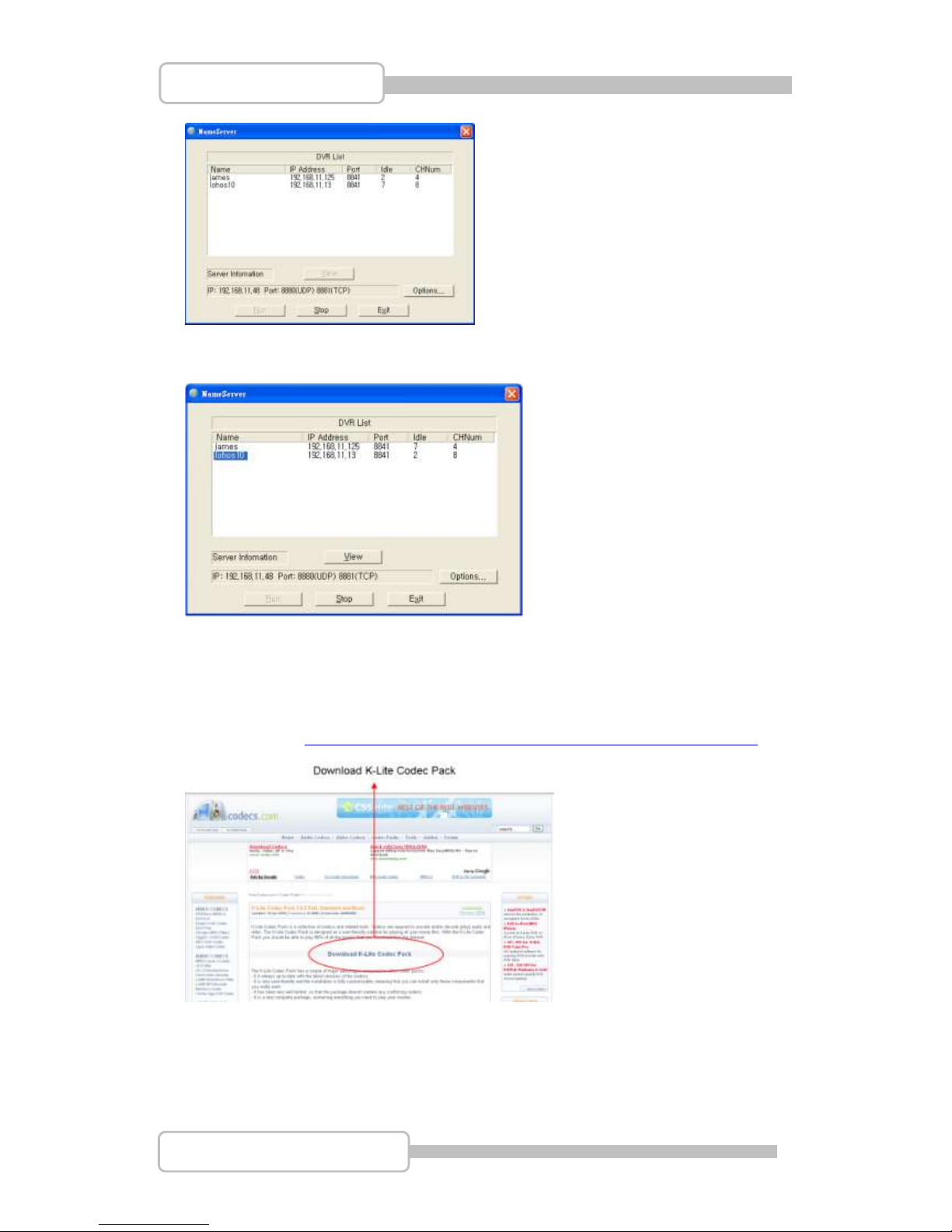
84
4/8/16CH Triplex DVR
Digital Video Recorder
It can be switched to PC Client mode for remote motoring just choose the idea DVR by
double click.
7. PC Capturing
Before use PC Capturing, please make sure K-Lite Codec Pack has already existed.
You can refer to http://www.free-codecs.com/download/K_Lite_Codec_Pack.htm
or Insert the CD that DVR to choose “Download K_lite_codec” as following to download
the program and complete the installation.
Page 85
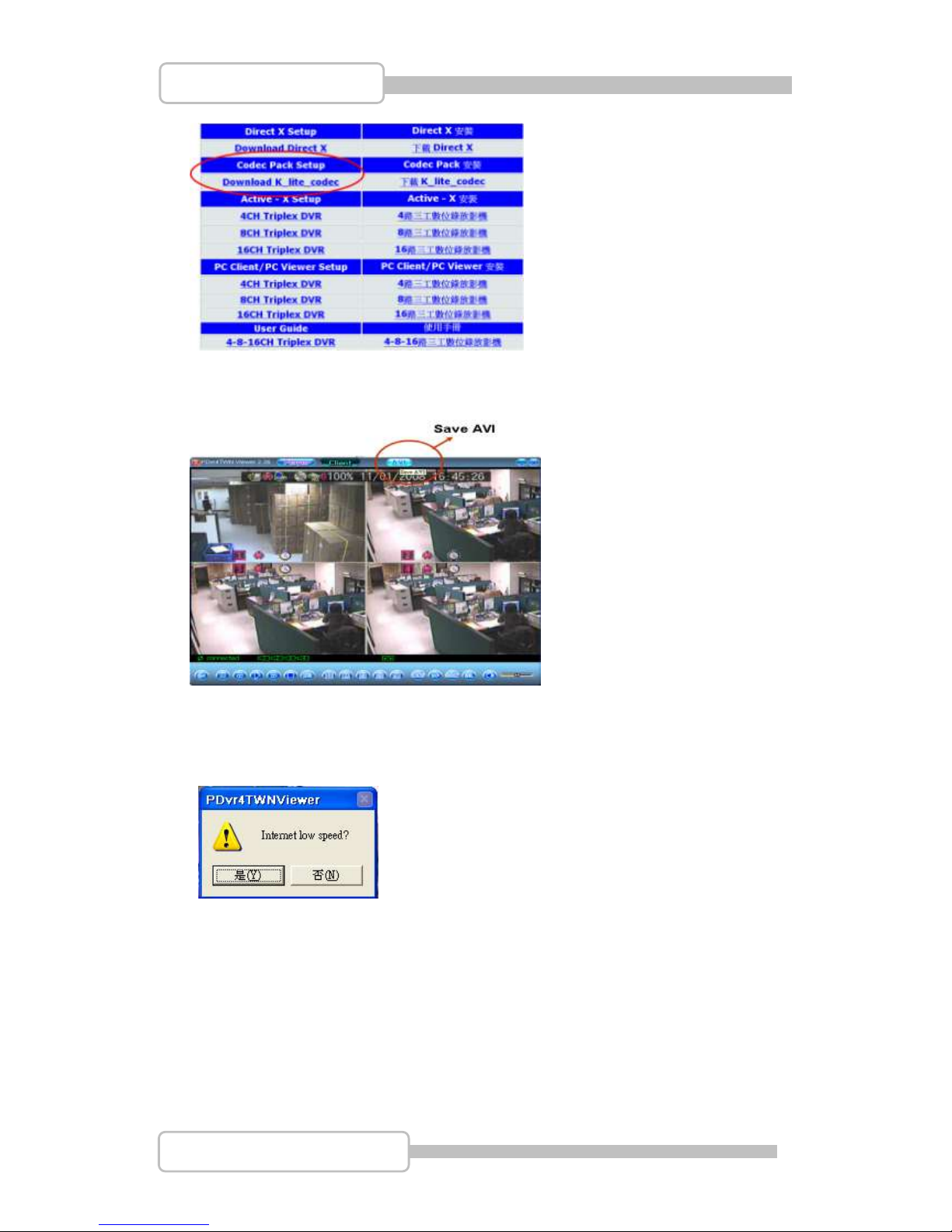
85
4/8/16CH Triplex DVR
Digital Video Recorder
Press “AVI” on the top to capture video that is synchronous with DVR and save as a file
on PC.
Before PC starting to capture video from DVR, it asks will it lower down the internet
speed.
Also, you can setup the directory for file saving.
Then, start to capture the video from DVR synchronously.
When the video capture processing, the icon “AVI” will change as following:
Page 86
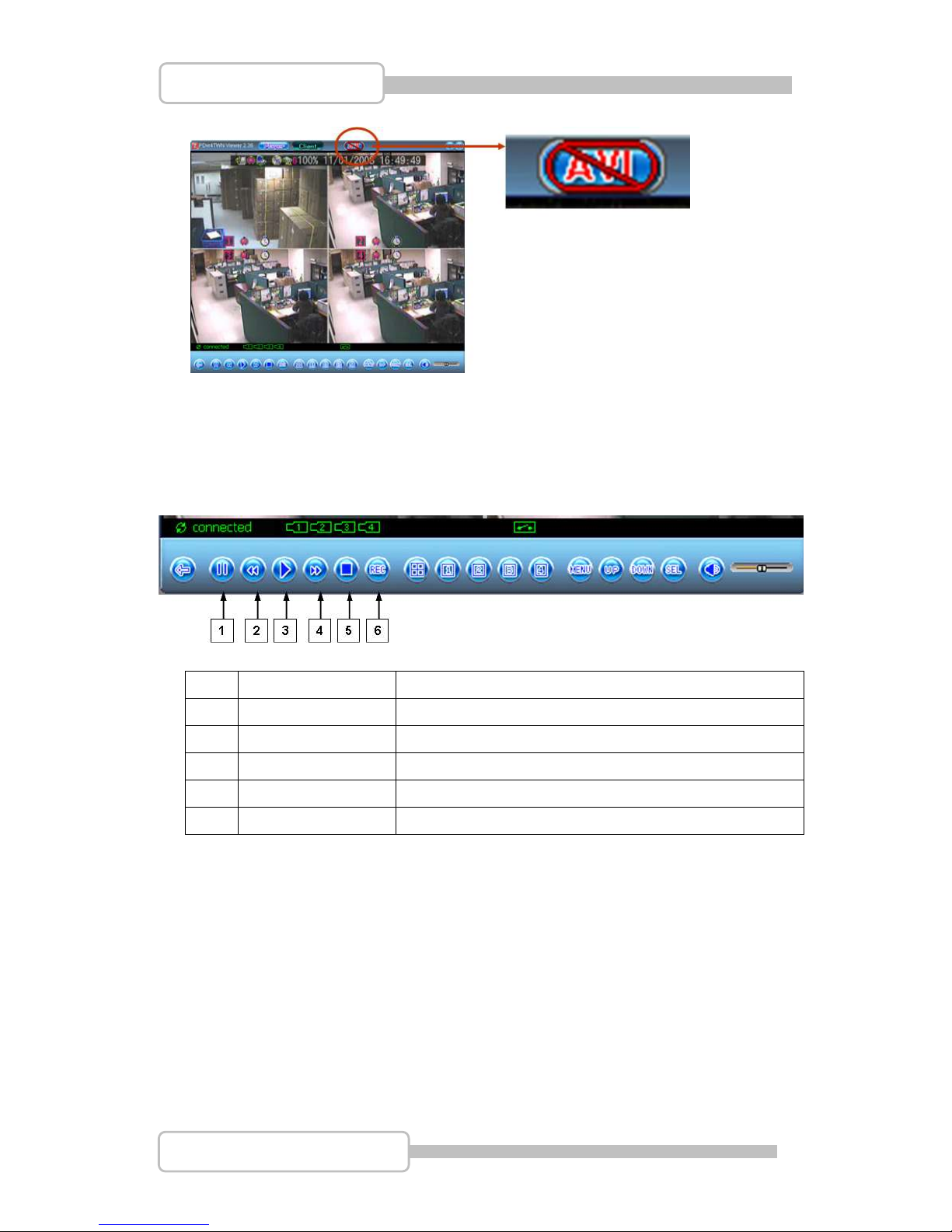
86
4/8/16CH Triplex DVR
Digital Video Recorder
Press “AVI” again for stop/completing the video capture and save file. And icon “AVI”
will back to normal.
8. Playback
To operate the Playback function by playback control buttons at the bottom of the
screen.
1
I I Pause
Pause the video playback
2
Fast Backward
Press to play backward faster.
3
Playback
Start video playback
4
Fast forward
Press to play the recorded stream faster.
5
Stop
Stop to playback or record
6
REC
Start to record/playback
Page 87
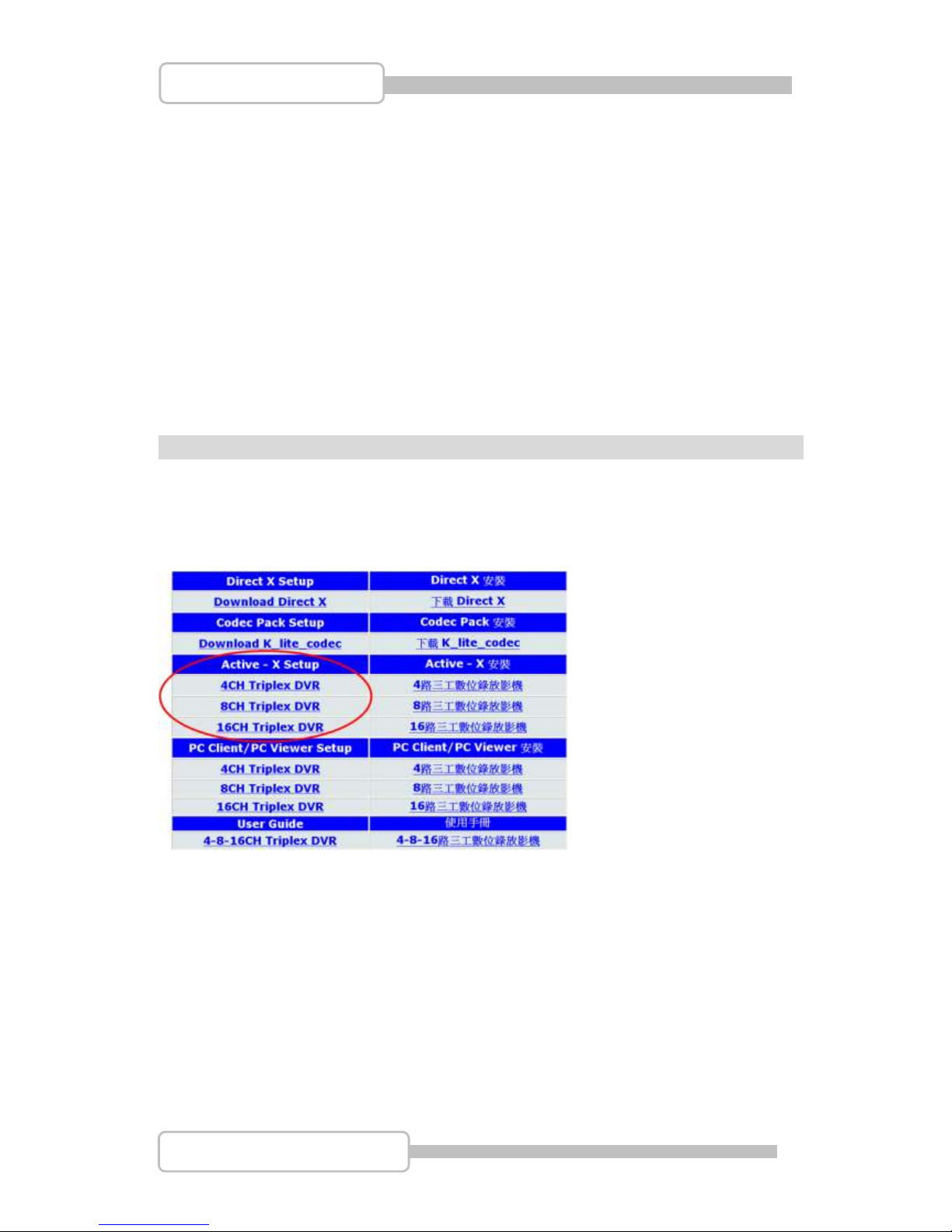
87
4/8/16CH Triplex DVR
Digital Video Recorder
RReemmoottee SSuurrvveeiillllaannccee tthhrroouugghh IIEE BBrroowwsseerr
You can remote control the DVR unit through IE Browser
Before starting to IE Browser, please make sure Active-X has already existed.
You can install Active-X from CD as attached.
Or start up IE Explorer with dedicated DVR IP address to URL, please refer to 7.3.6 IP
Address Setup. Then press “this file” to download the Active-X from DVR.
(Be sure the Active-X has already uploaded to DVR, if DVR do not include Active-X, it will
display an error message: “404 error file not found”).
About upload Active-X to DVR, please refer to 7.3.7 Server setup / Upload IE Active-X File
for more details.
Page 88
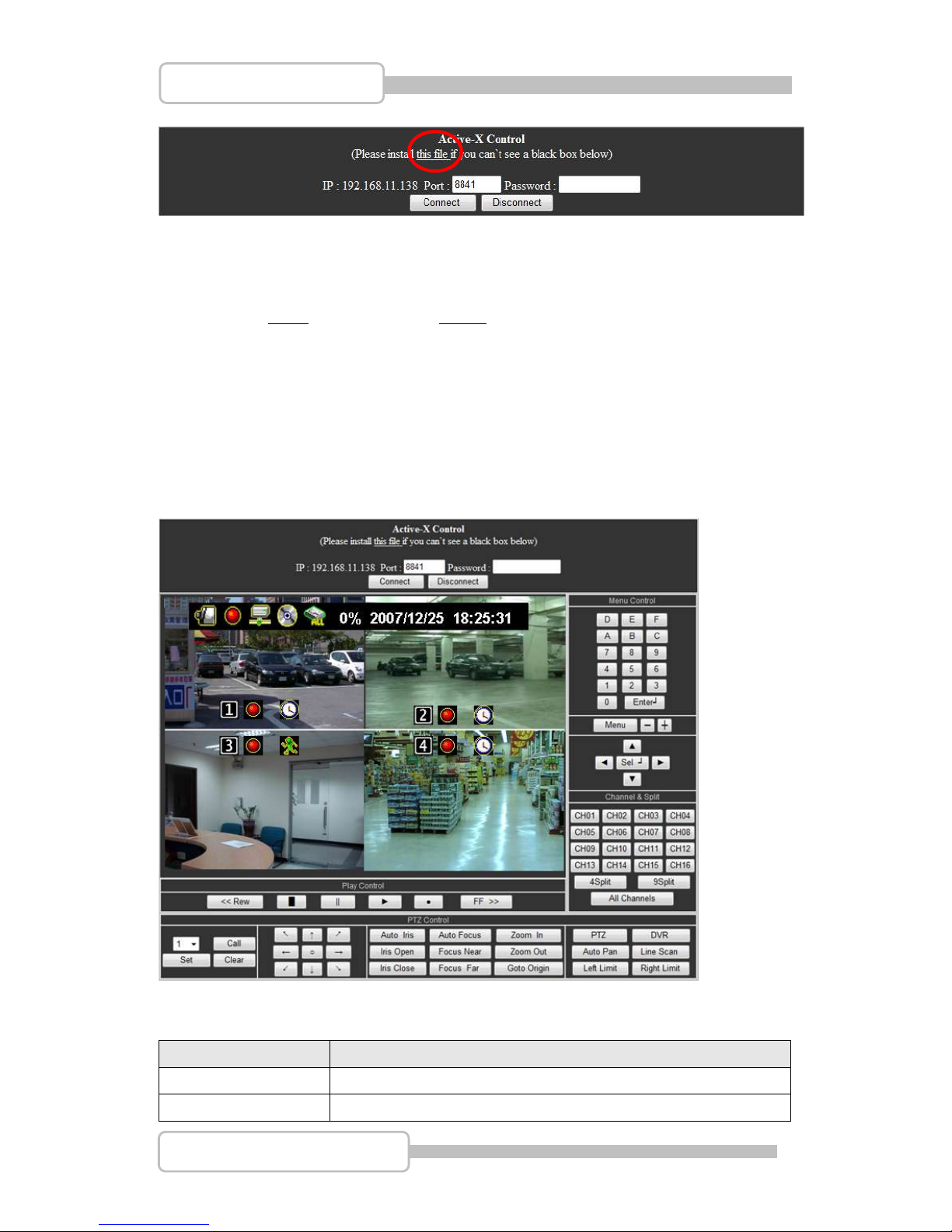
88
4/8/16CH Triplex DVR
Digital Video Recorder
The following is an example for setting:
DVR IP address: 192.168.11.138 <IE Explorer / Web site>
Enter the “Port: 8841”, and “Password: xxxxxx”
Then, click “Connect”
There are some error messages will be shown as operating notice.
All the operating can be done by mouse and buttons,
Menu Control
Name
Function
0,1,2,----9,A,B,…F
Numbers (0,1,2~9) and characters (A,B,…,F) for inputs
ENTER
Input Confirm / change values on main /sub menu setting.
Page 89
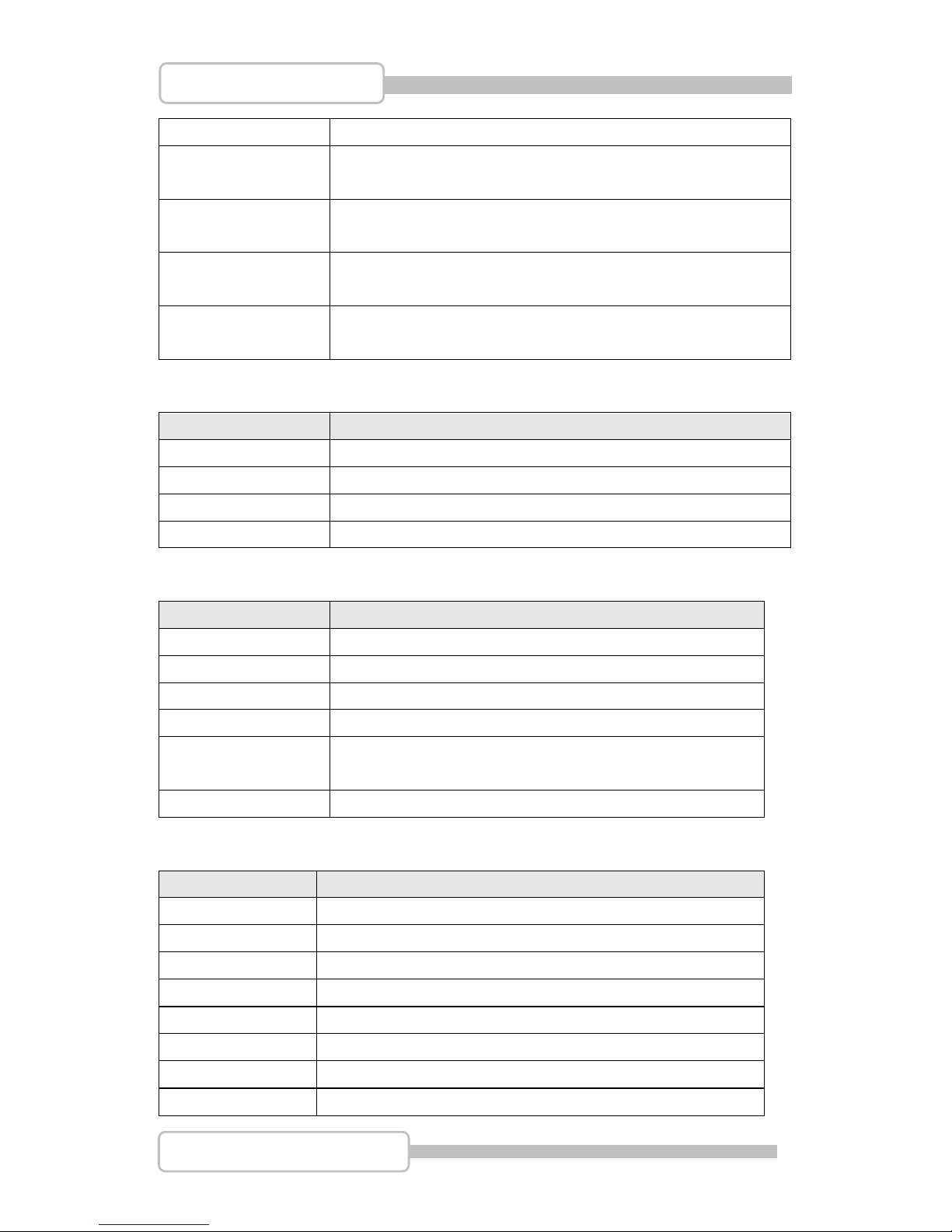
89
4/8/16CH Triplex DVR
Digital Video Recorder
MENU
Enter menu or exit.
+
Moves right / Channel change
-
Moves left / Channel change
▲(UP)/ ▼(DOWN)/
(LEFT)/ ►(RIGHT)
Moves up/down/left/right through the list of menus. Or use it to
select / change the DVR configuration values.
Select
Use this button to change or confirm values on main menu or
sub menu setting.
Channel & Split
Name
Function
CH01, CH02 ...CH16
Channel Number (Channel 1 ~ 16)
4 Split
4 split view on the screen
9 Split
9 split view on the screen
All Channels
Display all channel 4/8/16 on the screen
Play Control
Name
Function
<< REW
Backward search through a time-shifted or recorded video.
STOP
Stop playback or backup.
II PAUSE
Pause recording or playback.
► PLAY
Start video playback.
● REC
Start or stop recording/backup.
FF >>
Forward search through a time-shifted or recorded video.
PTZ Control
Name
Function
1,2,----32
Preset Position (1,2~32)
Call
Call Preset Position
Set
Set Preset Position
Clear
Clear Preset Position
/ /
Move to Top Left / Move Top / Move to Top Right
/ /
Move Left / Stop / Move Right
/ /
Move to Bottom Left / Move Bottom / Move Bottom Right
Auto Iris
Set as Auto Iris
Page 90
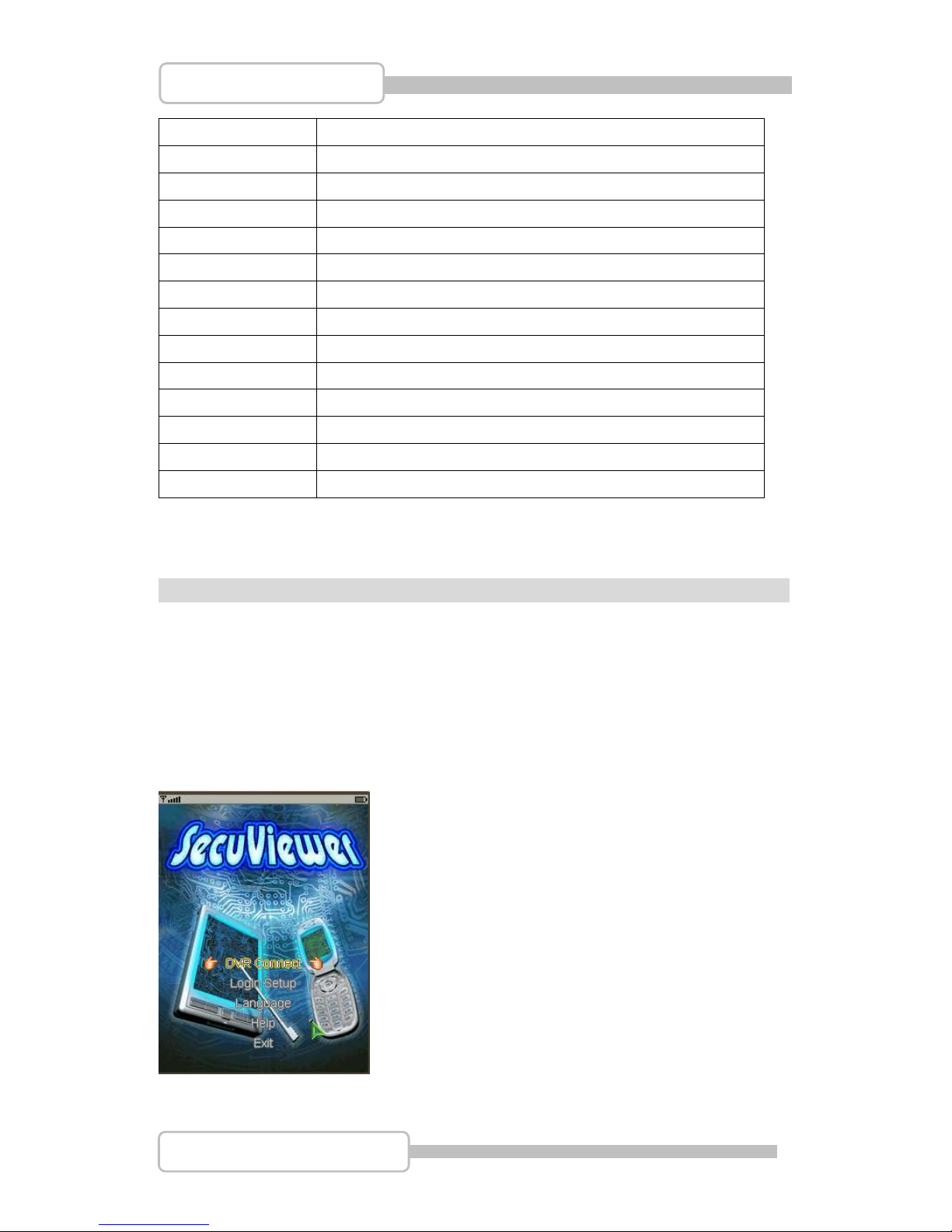
90
4/8/16CH Triplex DVR
Digital Video Recorder
Iris Open
Tap the button to make a selection.
Iris Close
Tap the button to cancel a selection.
Auto Focus
Set as Auto Focus
Focus Near
Tap the button to focus near.
Focus Far
Tap the button to focus far.
Zoom In
Tap the button to zoom near
Zoom Out
Tap the button to zoom far.
Goto Origin
Go to original position
PTZ
Switch to PTZ control mode
DVR
Switch to DVR control mode
Auto Pan
Start / Stop Auto Pan Mode
Line Scan
Start / Stop Line Scan Mode
Left Limit
Set Left Limit of Line Scan
Right Limit
Set Right Limit of Line Scan
33GG // SSeeccuuVViieewweerr
You can remote view the DVR unit through 3G application. Be sure that the following
conditions are done before starting:
Firmware of DVR must be V14.3.0 or above.
Install the application software “SecuViewer” on mobile phone. It supports Java MIDP
version 2.0 and above
After SecuViewer is well setup, it will show the picture on mobile phone as following….
Page 91
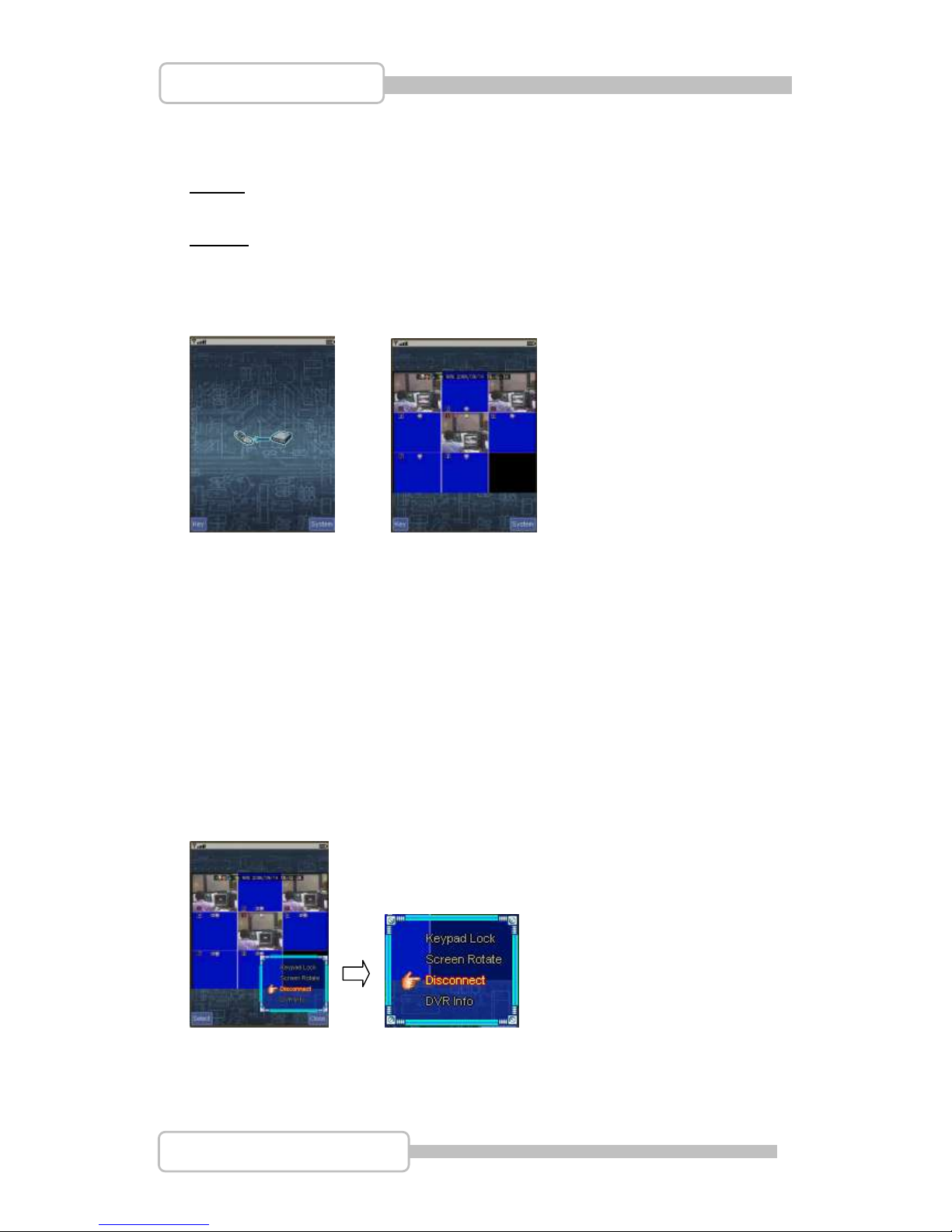
91
4/8/16CH Triplex DVR
Digital Video Recorder
1. DVR Connect
Press it to start connecting the DVR and mobile phone.
Note 1: Some models of mobile phone will show a warning “Allow application to send
to the Internet? “ Please enter “YES”.
Note 2: The connection fee depends on your ISP or system provider, please check it
before use.
After connected, it displays DVR operating screen for remote view / remote control.
Connecting Connected
Keypad Usage (on mobile phone):
↑,2 : Up ↓,8 : Down
←,4 : Left →,6 : Right
Enter,5: Confirm 0 : Cancel
『System』: Setup Keypad lock/unlock, Screen rotate, Disconnect and DVR info
Keypad Lock / Unlock the operating keys on mobile phone.
Page 92
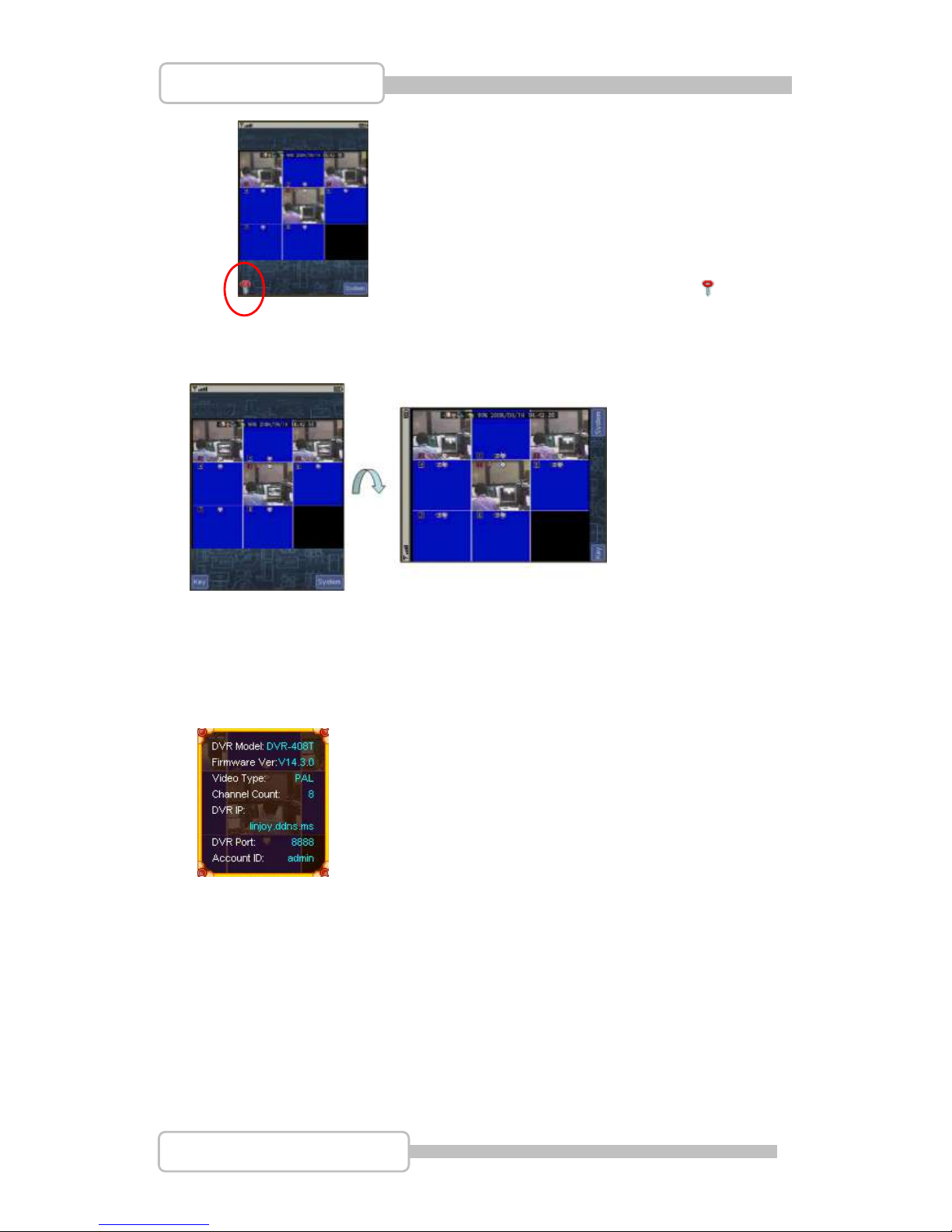
92
4/8/16CH Triplex DVR
Digital Video Recorder
When the keypad is locked, it shows the icon: .
Screen Rotate: Rotate the canvas 90deg clockwise for a larger viewing size. Or use
hotkey "#" to rotate screen
Disconnect: To disconnect the mobile phone and DVR.
DVR Info: DVR information includes DVR model, Firmware version, video type …..
『Key』- The mobile is operated by keypad, there are buttons for DVR remote control
Page 93
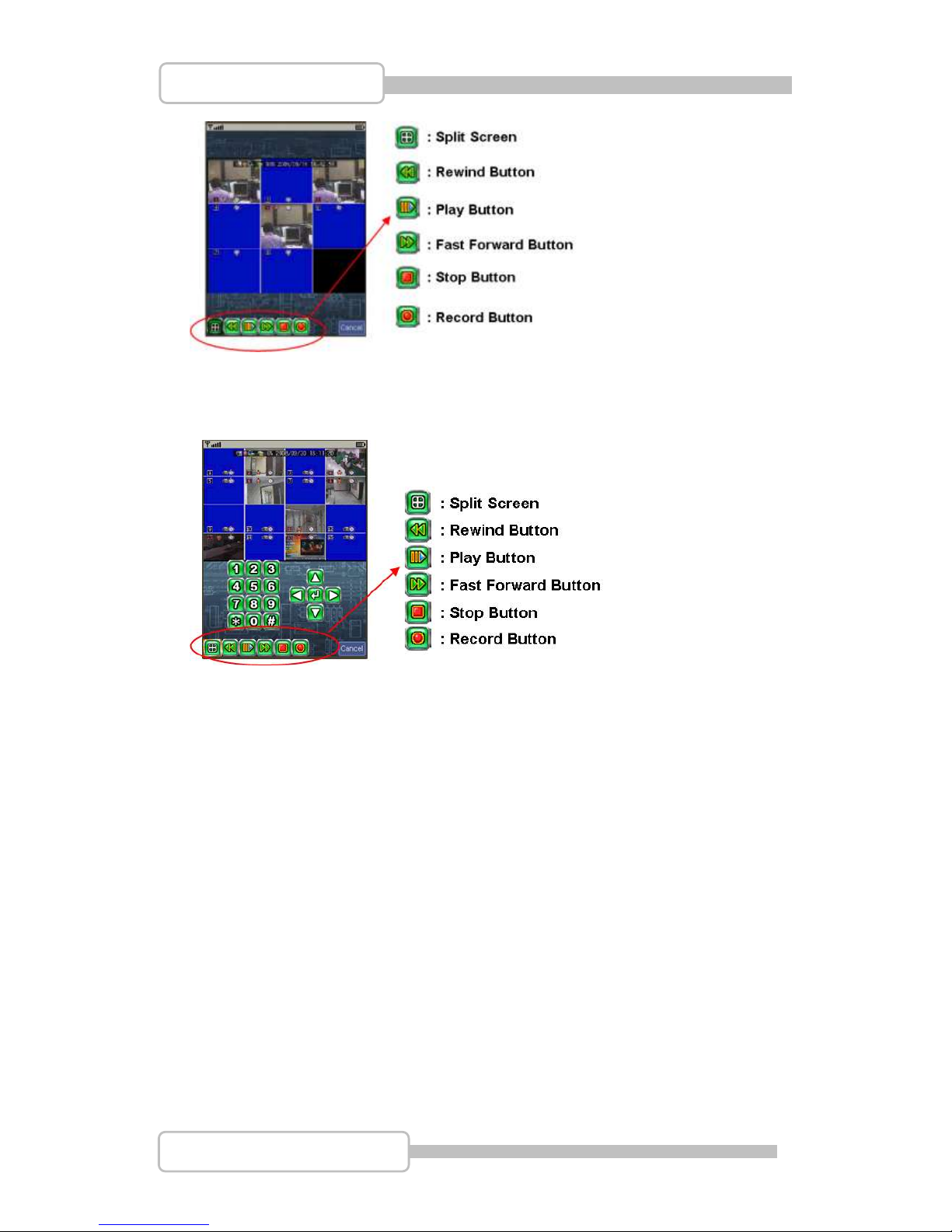
93
4/8/16CH Triplex DVR
Digital Video Recorder
『Key』- The mobile is operated by stylus, there are buttons for DVR remote control
Operating keys:
Number 0 - 9 : can be the number only or channel selection
『*』: Main menu
As connect to 4CH DVR :
1-4 => Switch Channel
0 => Quad Screen
As connect to 8CH DVR :
1-8 => Switch Channel
0 => 9-Split Screen
41 => 4-Split Screen 1
42 => 4-Split Screen 2
99 => 9-Split Screen
Page 94
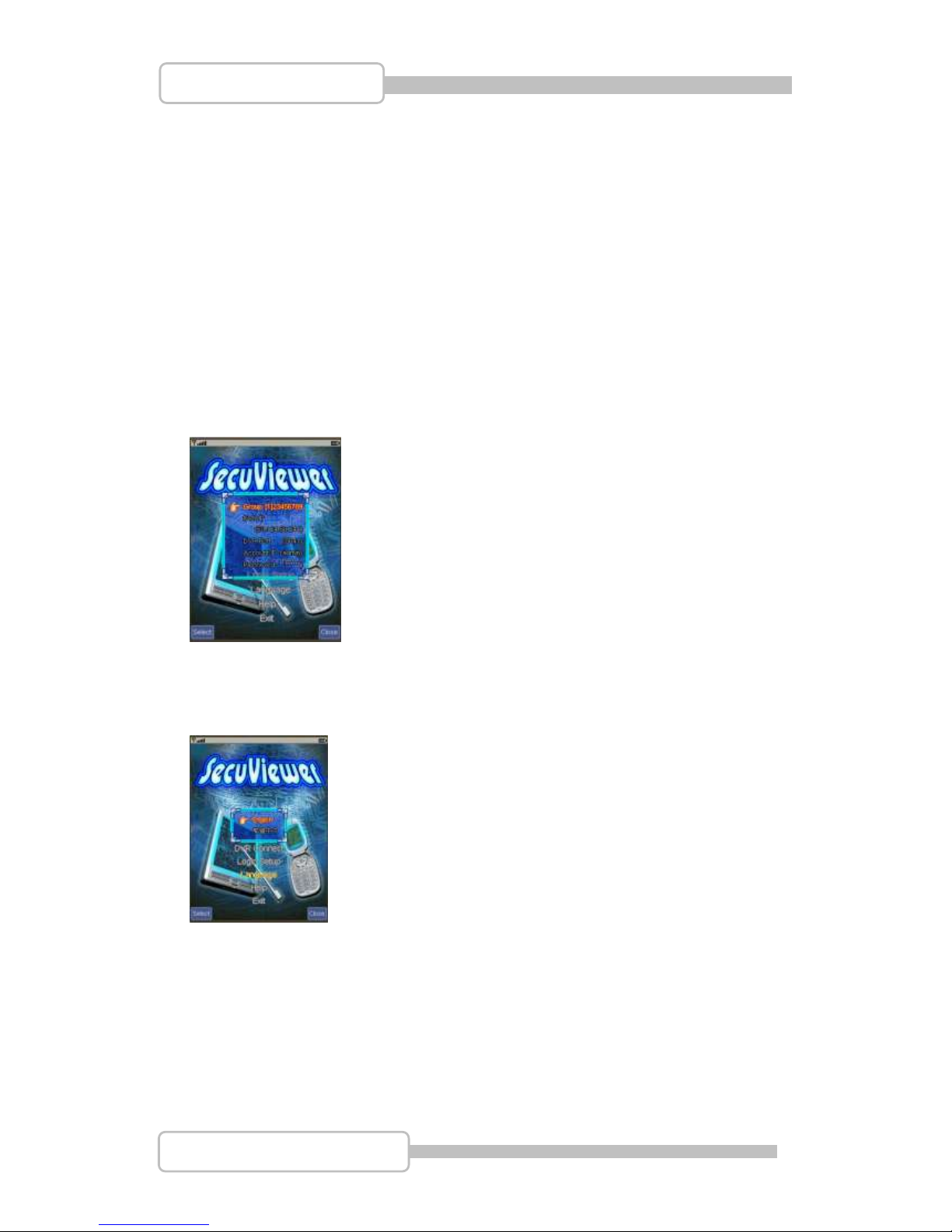
94
4/8/16CH Triplex DVR
Digital Video Recorder
As connect to 16CH DVR :
1-16 => Switch Channel
41 => 4-Split Screen 1
42 => 4-Split Screen 2
43 => 4-Split Screen 3
44 => 4-Split Screen 4
81 91 => 9-Split Screen 1
82 92 => 9-Split Screen 2
99 => 16-Split Screen
2. Login Setup
Login DVR, please refer to previous chapter: 7.3 Network setup.
3. Language
Select the idea language for use.
4. Help
Provide online help and descript how to operate SecuViewer.
Page 95
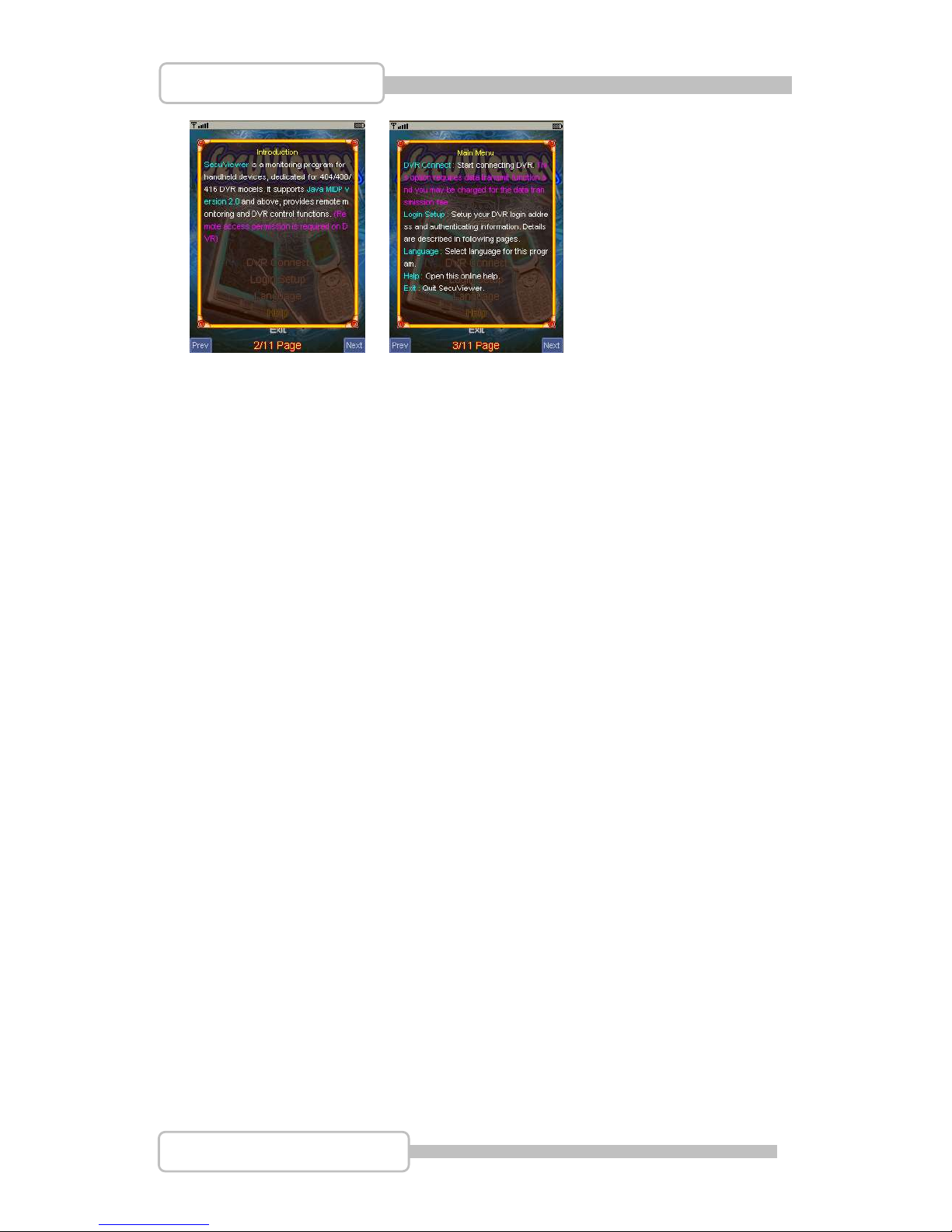
95
4/8/16CH Triplex DVR
Digital Video Recorder
5. Exit
Press it and exit SecuViewer operation.
 Loading...