

Page 1
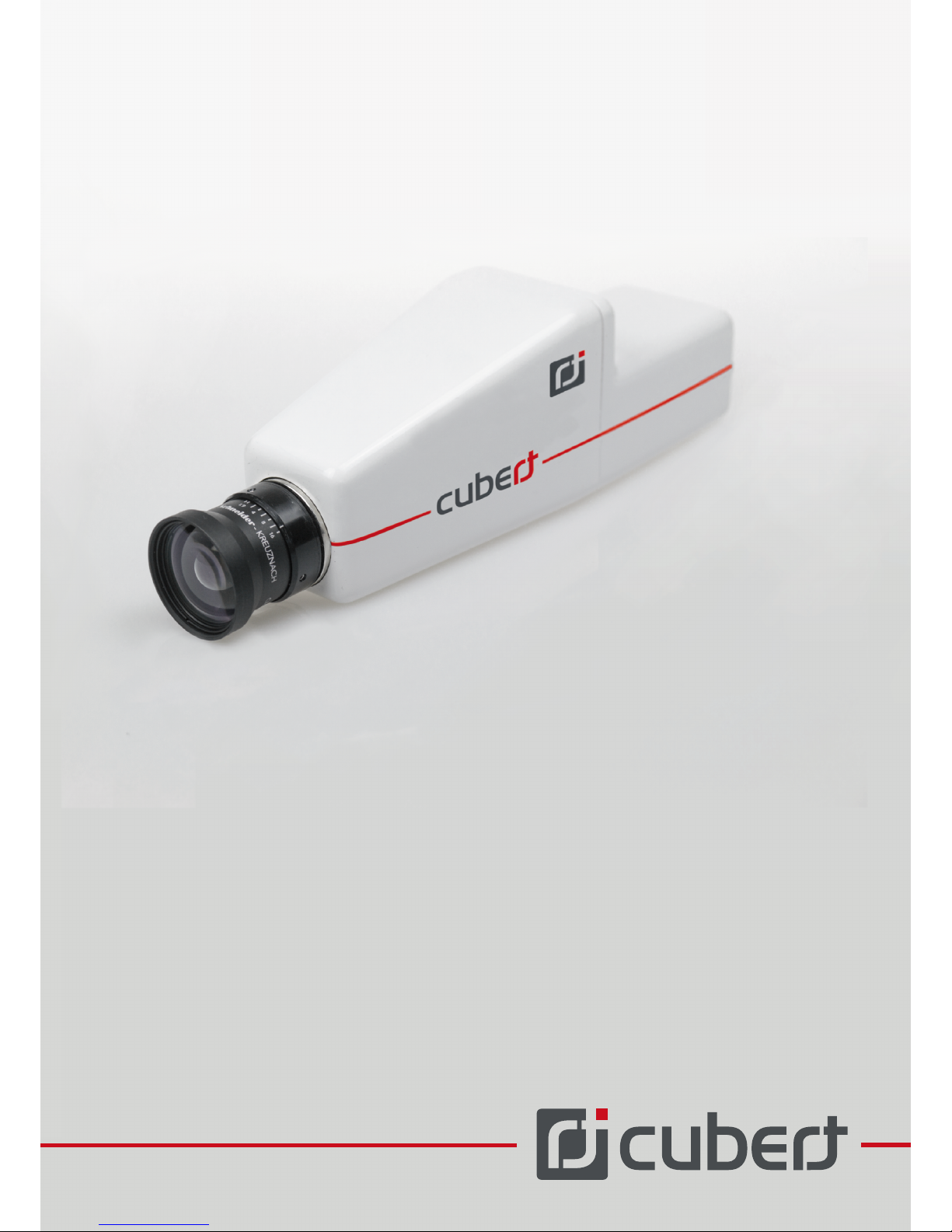
S185
HARDAWARE OPERATION
GUIDE
Page 2

HARDWARE AND OPERATION
Thank you for choosing this Cubert GmbH product!
Before bringing the camera system into service do read this hardware operation guide,
especially the safety notes, carefully.
Please keep this document at a safe location.
News and current information on this product can be found on our official webpage:
www.cubert-gmbh.de
Page 3

1 Safety notes
3
1.1 Power supply
1.2 Battery (optional)
1.3 Miscellaneous notes
4
2 Liability
5
3 Components check-list
6
4 Camera preparation and operation basics
4.1 Power supply
4.1.1 Mains operation
4.1.2 Battery operation
4.2 Data connection
4.2.1 Direct connection
4.2.2 Remote controlled (recommended)
4.3 Connecting the control cable (optional)
4.4 Mounting the camera
4.5 Mounting the tilted mirror (optional)
5 Operation scheme
9
6 Maintenance of the camera
7 Technical data sheet, camera
11
8 Camera dimension
12
9 Contact
13
Content
10
Page 4

8
12
Figure 4 Technical drawing, camera
Figure 3 Ports of the Cubert Mini-PC server
Figure 2 Network jack labels
Figure 1 M8 4-pins connector
-
Figures
Page 5
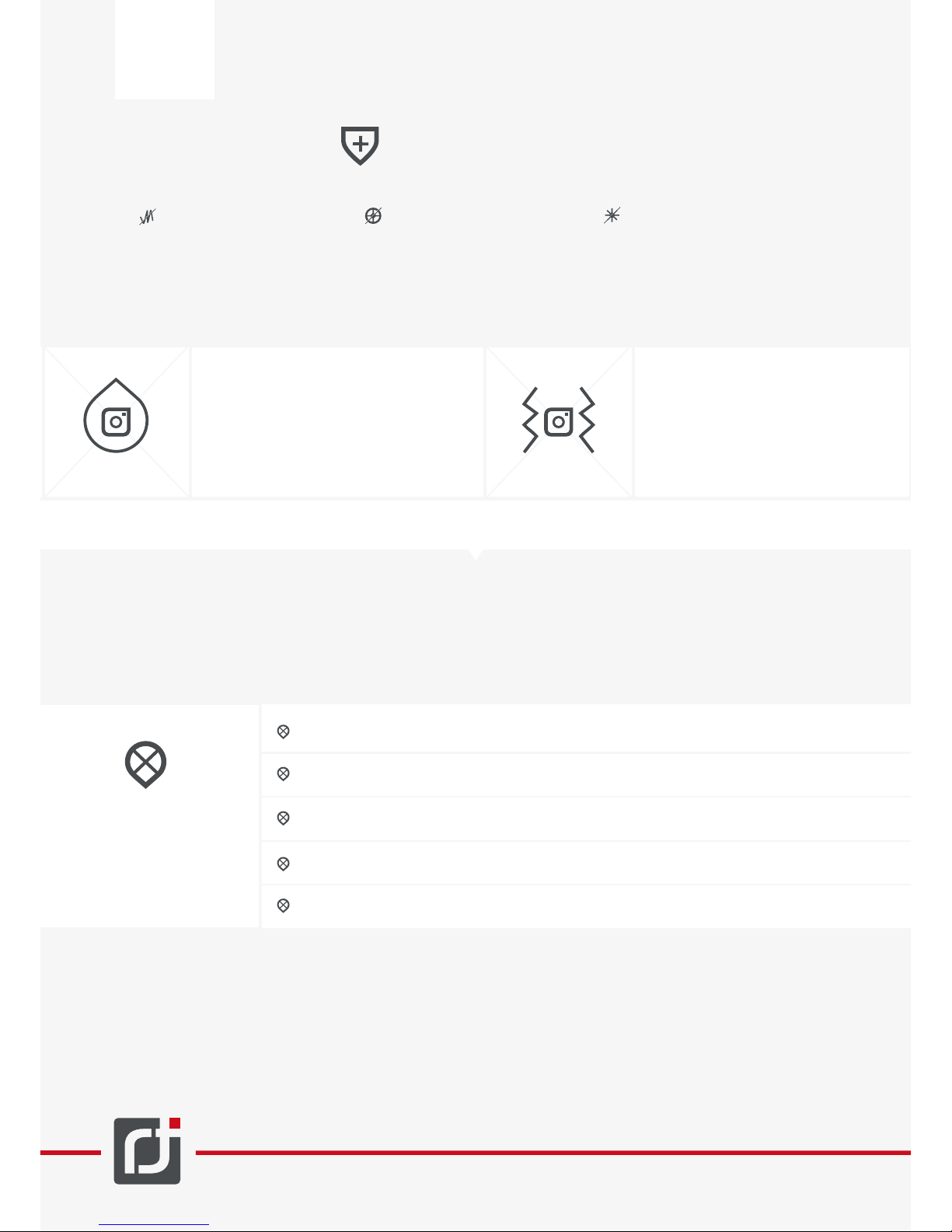
Avoid vibration or shocks on
the camera.This is a high-precision
Do not use the camera whilst
driving a vehicle, airplane or
other machine. Inappropriate
usage may cause anaccident.
Never point the camera into
the sun or any other very
bright light source. Camera
must not be subject to high
energy laser beams.
1 Safety notes
1
www.cubert-gmbh.de
Operating the camera after a (mechanical) shock or inappropriate treatment, there is a risk of fire and electric
shock.
The camera’s case provides a certain
protection against liquid entry or
intrusion of foreign particles. However,
if water, steam, other liquids or particles
intrude into the camera there is a risk
of fire and electric shock.
Furthermore, the guarantee will be void.
1. Separate the power supply of the camera.
3. Contact Cubert support immediately.
In such cases perform the following steps:
2. Separate the connections between camera and PC as well as camera and its power supply.
Do not, under any
circumstances,
operate or store the
camera at one of the
following locations:
Wet, humid or dusty location.
Kitchens or other locations with oily smoke.
In the vicinity of radiators, under direct sunlight or within a closed vehicle subject
to direct sunlight.
Locations with strong vibrations.
In the vicinity of air conditioning or other locations with extreme temperatures,
strong temperature changes or high humidity levels.
You must not, under any circumstances, connect devices or cables other than those ones shipped
with the camera to the camera. Solely utilize original accessories and original spare parts. Connecting
an inappropriate device or cable may risk fire or electric shop or may damage the camera as well the
device/cable. Cubert GmbH is not liable for any damages caused by operating the camera with any
PC other than the shipped one.
Do not disassemble or modify the camera, you risks electric shock, dermal burns or other injuries.
Page 6
Solely use the shipped power adaptor.
Solely use the power adaptor for power supply of the associated devices.
Do not modify the power adaptor.
Neither operate the power cable in the vicinity of ovens or radiators, nor subject it to direct heat.
Do not twist or pull the power cable. 6. Do disconnect the power cable from the plug socket with the
cable’s plug, never pull the cable itself.
Disconnect the power adaptor, if the camera is idle over a long period of term.
Do not place heavy objects on the power adaptor.
Do not touch the power adaptor with wet hands, there is the risk of electric shock.
2
www.cubert-gmbh.de
During operation the power adaptor may get hot. This is normal and does not pose an incident.
Upon inappropriate operation of the power adaptor it may tale damage. This causes risk of fire and
electric shock. Thus, when operating the power adaptor do comply with the following safety measures:
1.1 Power supply
1.2 Battery (optional)
Inobservance of the following safety measures may damage the battery, reduce its performance
or reduce its lifetime. Moreover, you might risk overheating, fire or explosions.
-
If the power adaptor or the power cable is damaged, contact the Cubert support.
Solely use the specified battery type for operation
Upon installing, ensure the correct orientation of the batteries regarding the poles.
If you encounter strange odors, development of heat, discoloring, deformation or alike upon
operation or storage of the battery, extract the battery from the camera immediately.
Do not store the camera with batteries installed. Store batteries and camera separately to avoid
battery leakage damages.
Under no circumstances operate or store batteries in the vicinity of open flames.
Do not subject batteries to heat or fire. Do not expose batteries to direct sun light or keep them in a
closed vehicle exposed to direct sunlight or on any other location with high temperatures.
Under no circumstances store batteries together with electrically conducting objects.
Do not disassemble, modify or solder batteries. Do not place batteries into a heating, high-pressure
device or similar devices.
Do not expose batteries to water.
Batteries contain liquid that can cause eye injuries. If this fluid gets into your eyes, wash your eyes
immediately with a large amount of water and get medical attention immediately.
If the battery liquid gets on your skin, wash skin immediately with water. Contact with the battery fluid
for some time might cause skin irritations.
Dispose of batteries properly and operate them with reasonable care.
Page 7
3
www.cubert-gmbh.de
1.3 Miscellaneous notes
The camera is an optical measurement device. Rapid changes in ambient conditions (temperature, air
humidity) might steam up optical elements in the camera system. These condensations may give rise
to malfunction.
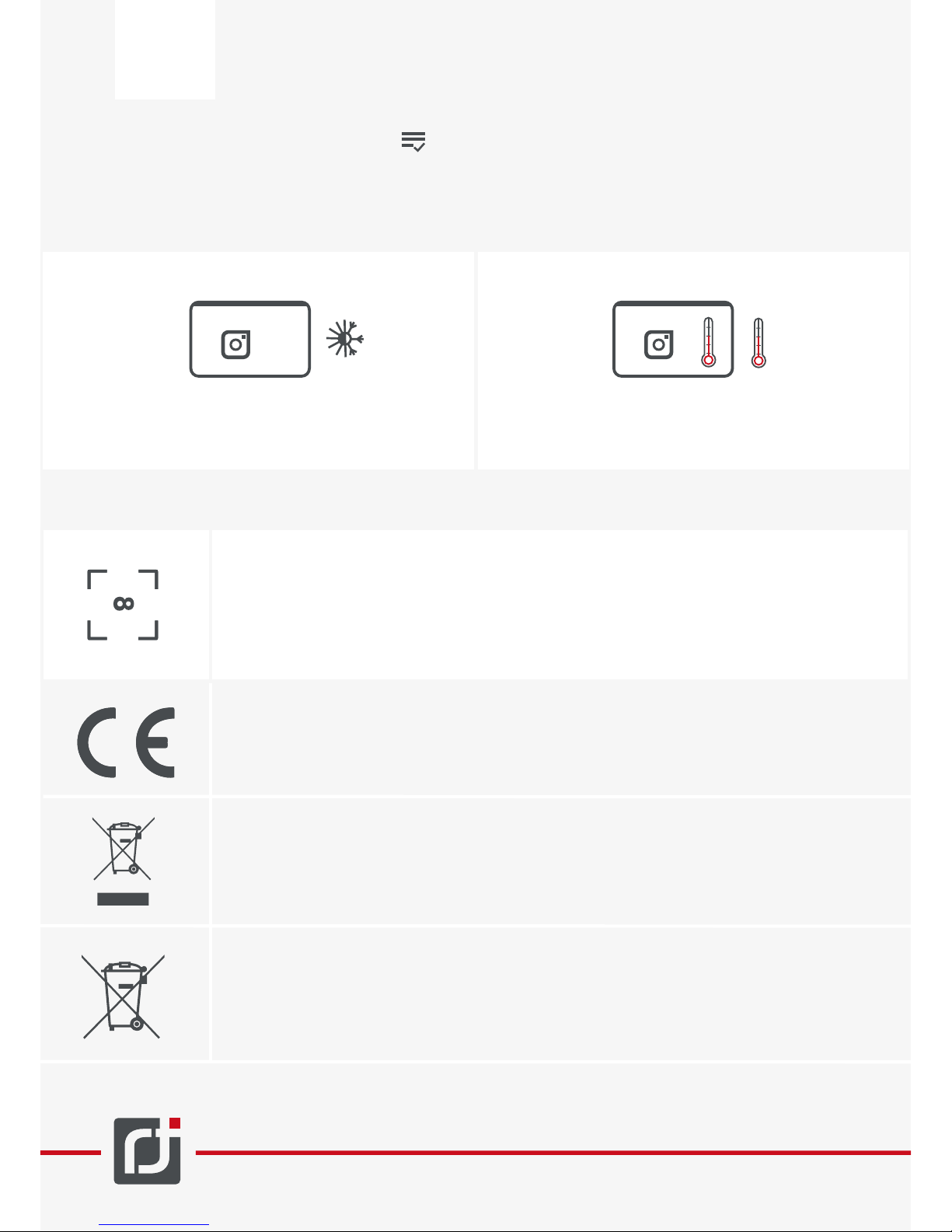
In order to avoid condensed water place camera into
a closed plastic container prior exposing to high ambient
condition changes.
Leave camera in plastic container until the air
temperature within the container reaches the
ambient temperature.
The camera might get hot during operation. This is normal and does not pose an incident.
By default, the focal point of the camera is set to infinity. Any change of the optics (focus,
aperture) might misalign the system. If you think you might have misaligned the optic
check your camera system.
If it does not provide satisfactory results, please contact Cubert support for re-calibration.
The “CE” sign confirms, that this product complies with European regulations for safety,
healthcare, environmental protection and operator’s protection. Cameras with “CE”
symbol are destined for the European market.
This symbol indicates the separate return and recycling of electric and electronic devices
in EU-countries. Please do not dispose device to household waste. Please inform yourself about the respective recycling regulations in your country when disposing of the
device.
This symbol indicates the separate return and recycling or batteries and rechargeable
batteries within EU. Please do not dispose of batteries or rechargeable batteries to the
household waste. Please inform yourself about the respective recycling regulations in
your country when disposing of the batteries or rechargeable batteries.
Page 8
4
www.cubert-gmbh.de
2 Liability
Self-disassembling or modifying the camera will void the guarantee immediately.
For technical examination, repair or maintenance please contact Cubert support.
Cubert GmbH is not liable for the quality of the picture or its content.
There is not legal entitlement for the reliability or accuracy of measurement results. Cubert GmbH
is not liable for any incident caused by wrong or inaccurate measurement results.
By using this product you entirely and legally agree to the following
You waive any present or future claim against Cubert GmbH or its representatives arising from the
operation of this product, the measurement results or the product components.
You waive any claim against Cubert GmbH or its representatives arising from present or future
damage, loss, breakdown, injury or other incidents that you or others might be subject to by using
this product.
Page 9

5
www.cubert-gmbh.de
3 Components check-list
When unpacking please check if the articles listed below are included. If anything might be missing or
damaged, please contact your vendor, or Cubert representative. The following components are necessary
Content:
1x S185 Firefly
1x hardware operation guide
1x software and installation guide
1x software CD
2x Ethernet patch cable
1x Y power cable
1x Power adaptor
1x Cubert Mini-PC server
1x Wireless-N900 Access Point
Extra equipment
Page 10

6
www.cubert-gmbh.de
4 Camera preparation and
operation basics
Prior to any camera use, you should check for any apparent damages. Furthermore, you should perform a
functional test.
The next section outlines the first steps for the operation of the camera. Please read this section carefully
and follow the instructions.
Upon damage or malfunction please contact Cubert support.
Power can be supplied either by the power adaptor or by battery. Please only use the recommended
components. If you used any other power supply, do meet the voltage and current requirements.
Furthermore, you should take safety measures against over-voltage. A 2.1x5.5x9.5 Pin power jack is used.
Please see chapter 7 (technical data sheet, camera).
4.1 Power supply
The S185 can be operated with the shipped power
adaptor. Plug the Y power cable into the camera and
the PC and connect it with the power adaptor. As soon
as the camera and the Cubert Mini-PC server are on
power, they will switch to operating mode and – with
a short delay of max. 2 minutes – can be used.
4.1.1 Mains operation
4.1.2 Battery operation
The S185 can also be operated on battery. For this
purpose, plug the Y power cable into the camera and
the PC and connect it with the battery. As soon as the
camera and the Cubert Mini-PC server are on power,
they will switch to operating mode and – with a short
delay of max. 2 minutes – can be used. Pay attention
to a sufficient battery charge level in order to avoid
outage during measurement.
4.2 Data connection
Cubert’s Hyper-Spectral camera can be operated in different modes. The different operation schemes are
summarized in the software and installation guide (chapter 2). In principle, the S185 can be operated with the
following two operation schemes:
4.2.1 Direct connection
For operation, directly connect your PC’s NICs to the
camera via Gigabit Ethernet patch cables (RJ45 jacks,
CAT5 or better). Your client PC will be used as Cubert
server and Cubert client. Please refer to chapter 2,
operation scheme 1 in the software and installation
guide.
For remote-controlled operation connect your camera
to the Cubert Mini-PC server with 2 Gigabit Ethernet
patch cables (RJ45 jacks, CAT5 or better). It is crucial,
that you connect the correct respective network ports
(chapter 5, operation scheme). The Cubert Mini-PC
server will automatically establish the connection to the
camera and run the server process C-link upon
power-up. It can be accessed by any other PC with
installed client software (recommended: Cube-Pilot) via
WiFi. Please refer to chapter 2, operation scheme 4 in
the software and installation guide.
4.2.2 Remote controlled (recommended)
Page 11
7
www.cubert-gmbh.de
4.3 Connecting the control cable (optional)
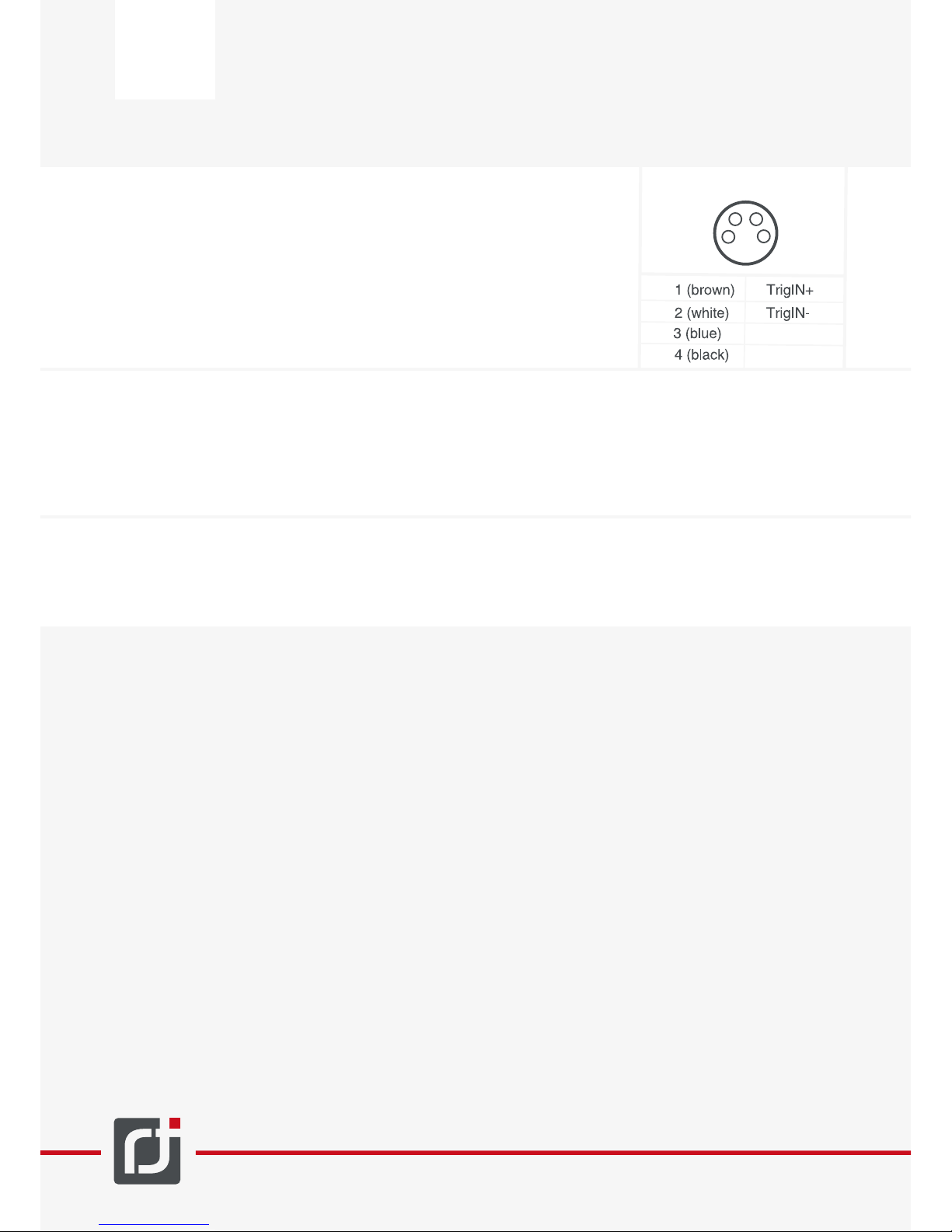
The 4-poled jack at the rear of the camera can be used to enable external
trigger capabilities of the camera. Please use an M8 4-pin connector.
The camera will trigger on an 11V-30V/6-10mA pulse. The pins of the
trigger port are used as follows:
4.4 Mounting the camera
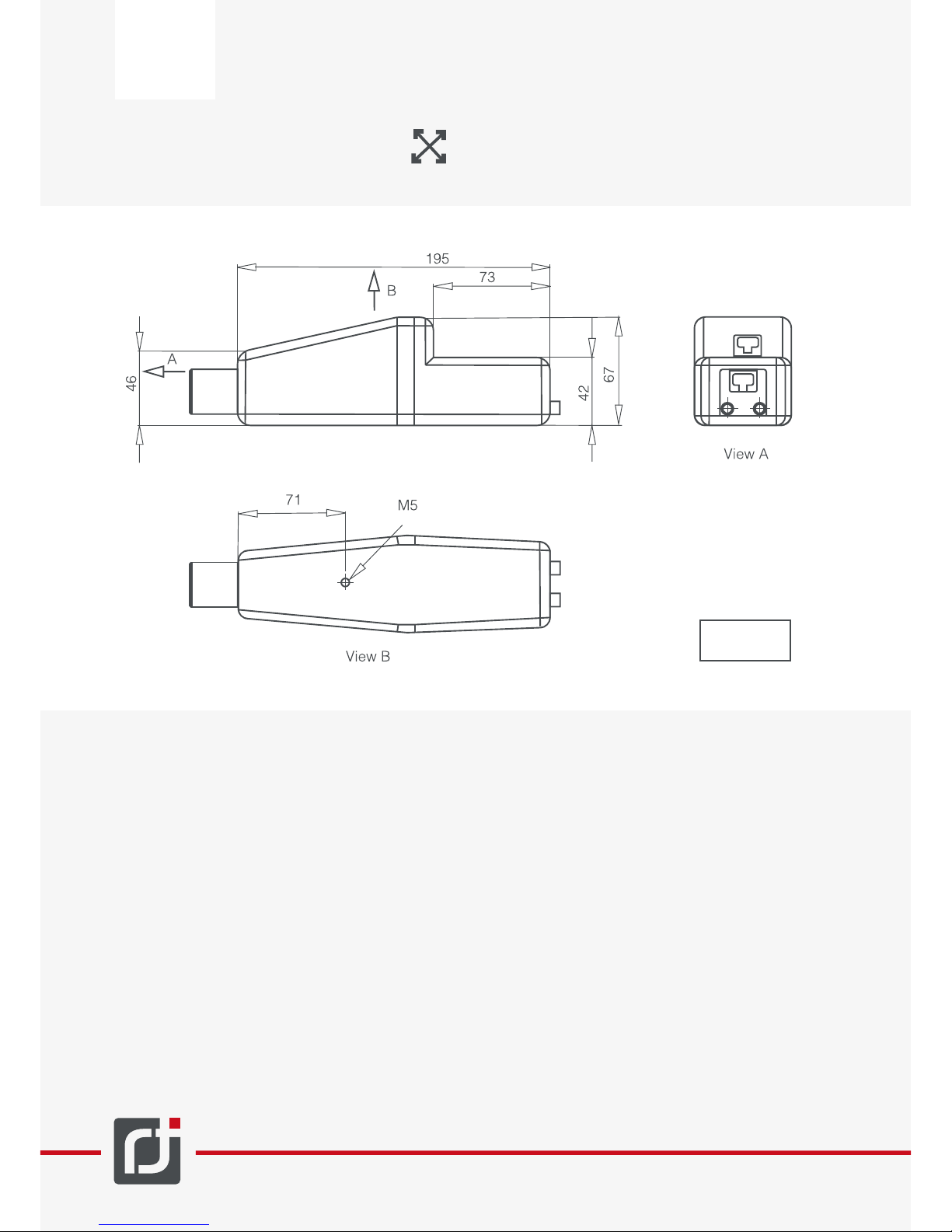
For mounting the camera it has a M5 screw socket at the lower planar surface. In order to avoid accidental
camera release, use a screw lock. Additionally, we recommend securing the camera by implementing a
back-up fixation to a UAV with a wire loop.
4.5 Mounting the tilted mirror (optional)
If your camera comes with the optional tilted mirror, you can attach it with four M2x4mm screws.
Figure 1 M8 4-pins connector
M8 4 pins
1
2
3
4
n.c.
n.c.
Page 12
RJ 45 NR.2
RJ 45 NR.1
Power / Ext Trig
Power
USB
Eth1
HDMI
Antenna
connectors
Eth2
8
www.cubert-gmbh.de
5 Operation scheme
For adequate usage of the camera and for all possible settings please also read the Software and installation guide. This section only contains details specific to the S185.
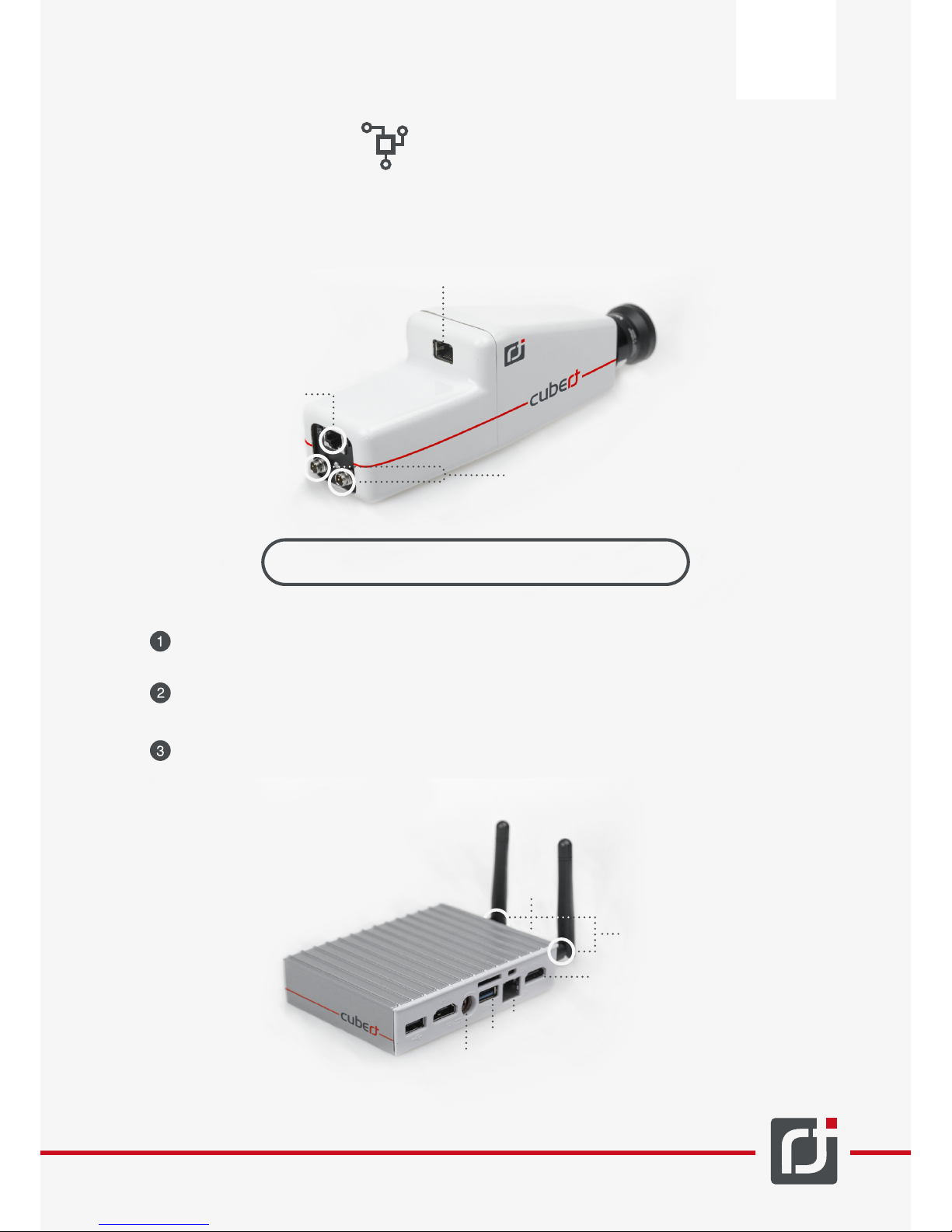
Plug in the first Ethernet cable into the lower network jack of the camera (JR 45 NR. 1) and into
the Eth1 port of the Cubert Mini-PC server.
Plug in the second Ethernet cable into the upper network jack of the camera (JR 45 NR. 2) and into
the Eth2 port of the Cubert Mini-PC server.
Connect the Y power cable with the Camera and the Cubert Mini-PC server: Connect the M8 3-pin
plug with the respective port of the camera. Connect the second plug into the power supply of the
Cubert Mini-PC server. The third plug is connect with the custom power supply (see chapter 4.1
“power supply”)
In order to connect the camera properly, follow these steps:
Figure 2. Network jack labels
Figure 3 Ports of the Cubert Mini-PC server
Page 13
9
www.cubert-gmbh.de
If every connector is connected correctly, the camera system will power-up. This process may take
up to 2 minutes. For control: During the power-on process, the yellow and orange light of the
camera will start blinking.
The camera system is now fully operational. In order to turn off the system, press deep the on/off
(“fitlet”)-button of the Cubert Mini-PC server. Disconnect the power supply afterwards.
OR
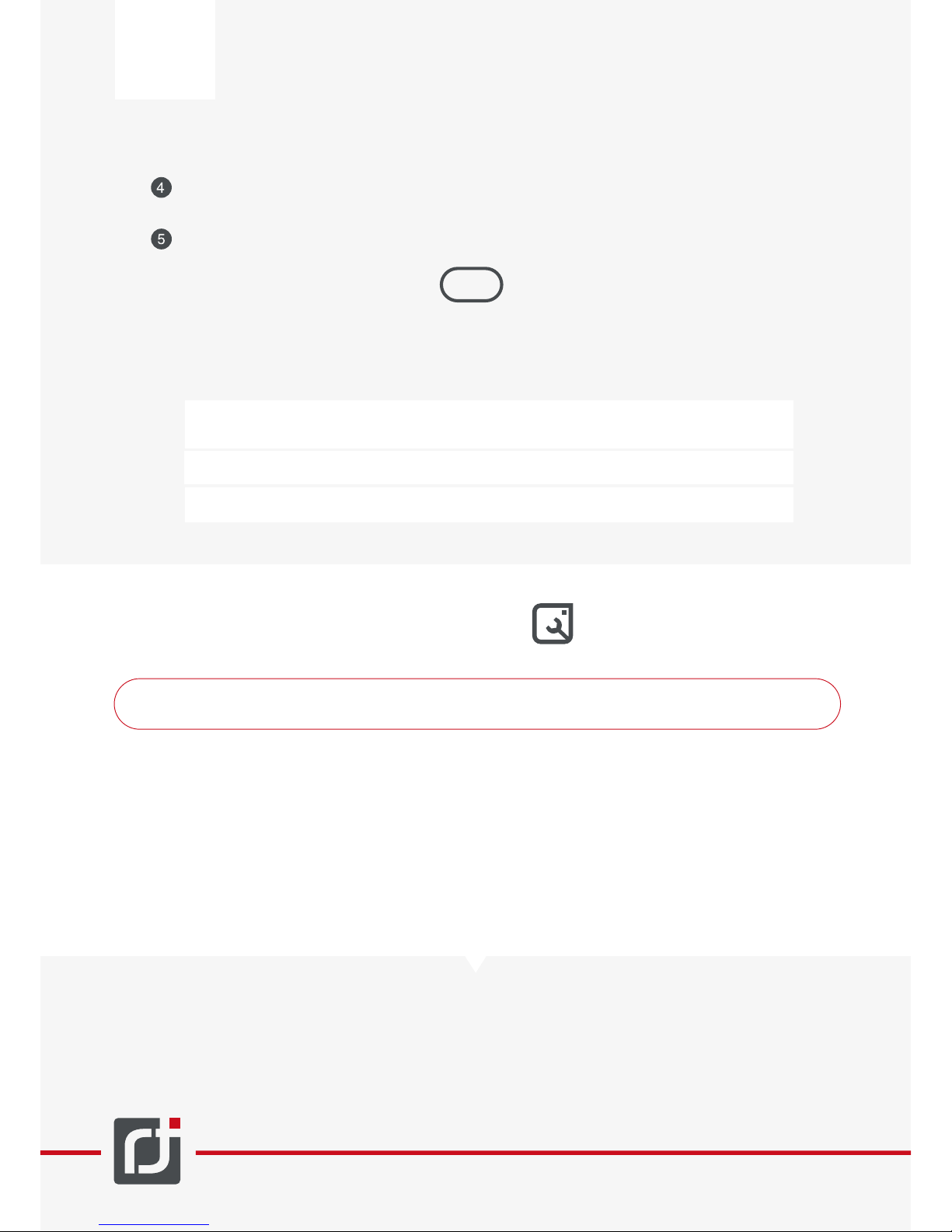
If not connecting to the Cubert Mini-PC server, but to a custom client PC, the respective NIC’s
TCP/IPv4 properties must be configured according to the following table. Upon using an USB/ExpressCard-NIC, use the Eth1 Port (192.168.100.100) for this device.
Netmask PC IP Camera IP
Ethernet
Ethernet 2
192.168.100.100
192.168.200.100
192.168.100.13
192.168.200.13
255.255.255.0
255.255.255.0
6 Maintenance of the camera
NEVER CHANGE APERTURE AND FOCUS ON THE CAMERA, IT WILL DESTROY THE CALIBRATION
Dabs, dust and other foreign particles may influence the image capturing process. Thus, you should
never touch the objective lens or the tilted mirror (if applicable).
For cleaning the front-lens, do not use non-certified optic cleaners, because on any damage on
coating will ruin the calibration. Do not press too firmly on the objective lens or the tilting mirror, as
they might be scratched and/or damaged which will result in malfunction of the system.
The camera case can be cleaned with a soft and dry cloth.
We recommend an annual service maintenance interval for re-calibration of the Hyper-Spectral
camera. Please contact Cubert support.
Page 14

7 Technical data sheet, camera
-
10
www.cubert-gmbh.de
Data quality
Wavelength range
Detector
Spectral resolution (FWHM@f=23mm)
Spectral sampling
Spectral sampling (physical)
Wavelength accuracy Δλ
@ 532nm / 808nm@f=23mm
Spatial resolution
SNR @ 25ms
Spectral Data
Sensor Data
Mechanical data:
Weight (without Lens)
Size (without Lens)
appr. 200 mm * 67 mm * 60 mm
Operating data:
Dust protection
Splash guard
Environmental conditions
Operating temperature
Storage temperature
Optical Data
450 nm-950 nm(1000nm)
Silicon Sony ICX285
8 nm (@532 nm)
4 nm (125 channels) (138)
1,05 nm/Pix@450 nm;
4,54 nm/Pix@650 nm;
8,13 nm/Pix@900 nm
±2,5nm / ±4,5nm
1000*1000 Pixel
58dB
2500 Spectras/Cube
IP 40
IP 40
Not condensing
0°C up to +40°C
-10°C up to +50°C
Focal length
Aperture (angle)
Electronic Data
e.g. 12 mm, 17 mm, 23 mm,
35 mm, 50 mm
e.g. 30°, 20°, 15°, 10°, 5°
Voltage
Power
DC 12 V
15 W
Type
Cooling system
Digitalization
Integration time
Measure frequency (UAV)
Measure frequency (Lab; i5@
3.40GHz; Realtek PCIe Dual GBE)
Silicon
Passive air-cooled
12 bit
0.1 ms up to 1000ms
3 Hz
12Hz
490 g
Page 15
-
www.cubert-gmbh.de
11
Figure 4. Technical drawing, camera
8 Camera dimension
Units in mm
Page 16

-
For any questions or upon any problems please contact us:
12
www.cubert-gmbh.de
9. Contact
Cubert GmbH
Albstr. 5
D – 89081 Ulm
www.cubert-gmbh.de
Tel: +49 731 206 420 42
Page 17
 Loading...