

Page 1
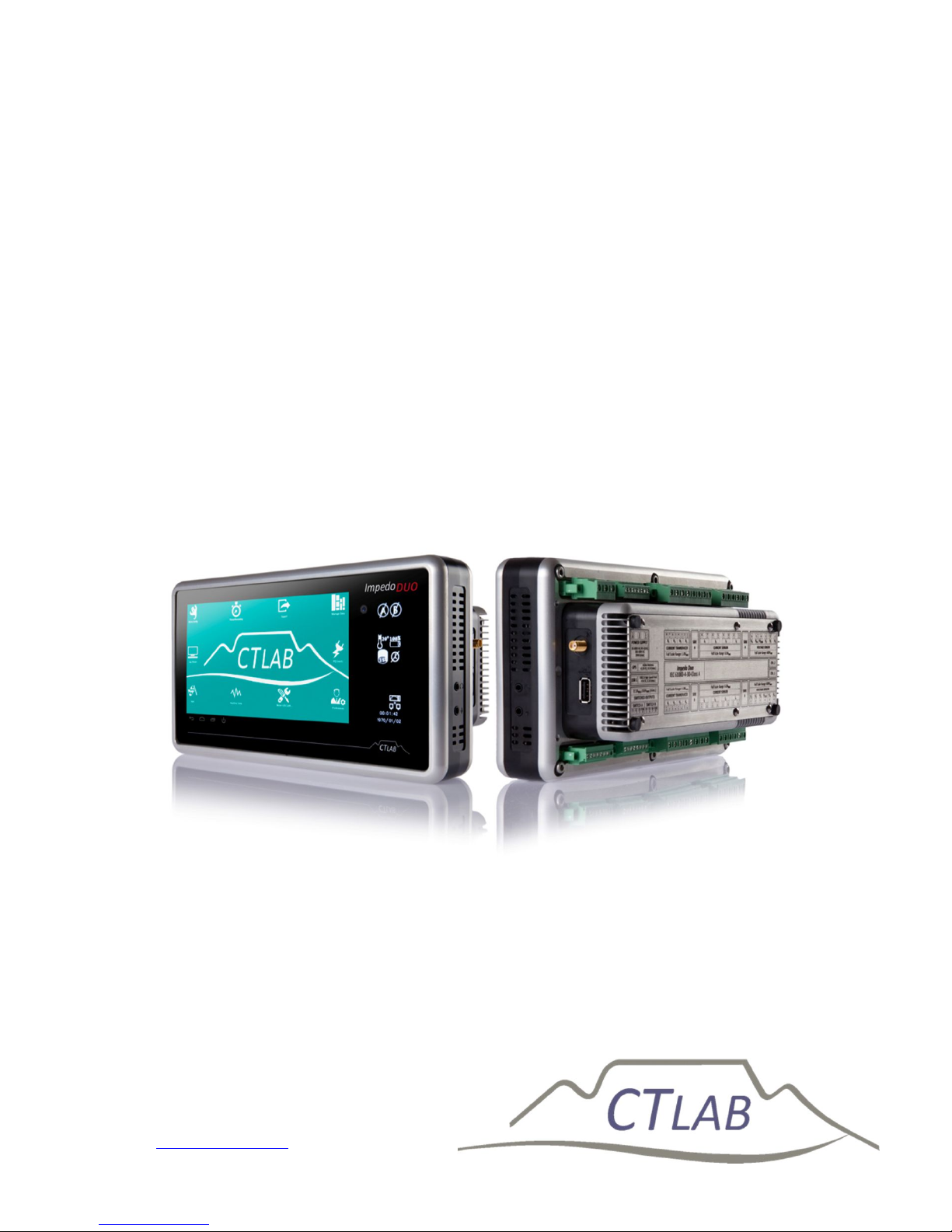
Impedo DUO
®
Power Quality Recorder
User Manual
Version 2.4
CT LAB
(Pty) Ltd
PO Box 897, Stellenbosch, 7599, South Africa
15 Termo Lane, Techno Park, Stellenbosch, 7600, South Africa
Tel: +27 21 880 9915
© CT LAB (2015)
Page 2

Impedo DUO User Guide
2
Table of Contents
1 Safety Instructions 7
1.1 Symbols......................................................................................................... 7
1.2 Safety Standards Compliance ................................................................. 7
1.3 General Safety Information ..................................................................... 8
1.4 Statements and Notices ............................................................................ 9
1.4.1 Statement of reliability .................................................................................. 9
1.4.2 Proprietary rights ............................................................................................ 9
1.4.3 Copyright ............................................................................................................ 9
1.4.4 Trademarks ....................................................................................................... 9
1.4.5 Validity and applicability of this document ............................................ 9
2 Introduction to the Impedo Duo 10
2.1 Impedo Duo Product Description ........................................................10
2.2 Receiving your Impedo Duo ..................................................................11
2.2.1 Receiving your shipment ............................................................................ 12
2.2.2 Unpacking the goods .................................................................................... 13
2.2.3 Return shipment ............................................................................................ 13
2.3 Instrument Overview ..............................................................................14
2.3.1 Key Features .................................................................................................... 14
2.3.2 Impedo DUO External Interfaces.............................................................. 16
2.3.3 Power sources ................................................................................................ 17
2.3.4 Communication .............................................................................................. 17
2.3.5 Osprey Pro (Enterprise Support) ............................................................. 18
2.3.6 Sampling Rate ................................................................................................. 18
2.3.7 The 1/6th Sense .............................................................................................. 18
Page 3

Impedo DUO User Guide
3
2.3.8 Event Recording ............................................................................................. 19
2.3.9 10/12-Cycle Block Recording.................................................................... 19
2.3.10 Variable time interval trends..................................................................... 20
2.3.11 Synchrophasors.............................................................................................. 20
2.3.12 Measured parameters .................................................................................. 21
2.3.13 Technical Specification ................................................................................ 24
2.4 Impedo Duo External Interfaces ..........................................................27
2.4.1 Physical Appearance .................................................................................... 27
2.4.2 Power Supply .................................................................................................. 29
2.4.3 Voltage Inputs ................................................................................................. 32
2.4.4 Current Sensor Inputs .................................................................................. 34
2.4.5 Current Transducer Inputs ........................................................................ 36
2.4.6 Relay Outputs.................................................................................................. 37
2.4.7 GPS ...................................................................................................................... 38
2.4.8 Ethernet Ports................................................................................................. 39
2.4.9 USB Peripheral Ports .................................................................................... 40
2.4.10 OLED Display .................................................................................................. 40
2.4.11 Multi-Touch Display ..................................................................................... 41
2.5 Firmware ....................................................................................................41
2.5.1 Upgrading ......................................................................................................... 41
3 Operating Instructions 42
3.1 Precautions when first using the device............................................42
3.2 Checking the Battery Level ....................................................................43
3.3 Powering up the Impedo Duo ...............................................................44
3.4 Impedo Duo Unlock Screen ...................................................................45
3.5 Shutting down ...........................................................................................46
3.6 Power Cycling with the Reset Switch ..................................................47
Page 4

Impedo DUO User Guide
4
4 OLED Information Display 48
4.1 Meter points ..............................................................................................48
4.2 Serial Number ...........................................................................................49
4.3 IP Address ..................................................................................................49
4.4 Firmware Version ....................................................................................49
4.5 Temperature .............................................................................................49
4.6 Battery Status............................................................................................49
4.7 On-Board Storage Usage ........................................................................50
4.8 Time source ...............................................................................................50
4.9 Connection to server ...............................................................................51
4.10 Ethernet connectivity .............................................................................51
4.11 Time of Day and Date ..............................................................................51
4.12 Device in error state ...............................................................................51
5 Embedded Operating Software (EOS) 52
5.1 EOS Subsystems ........................................................................................52
5.1.1 Meter Gateway................................................................................................ 52
5.1.2 Storer ................................................................................................................. 53
5.2 Communicating with the Impedo Duo ...............................................53
5.3 Data Recording .........................................................................................54
5.3.1 Meter points .................................................................................................... 54
5.3.2 Time ................................................................................................................... 55
5.4 How to navigate within EOS ..................................................................57
5.5 Application Selection Screen ................................................................58
5.6 Registration ...............................................................................................59
5.6.1 Account ............................................................................................................. 59
5.6.2 Standalone ....................................................................................................... 59
5.6.3 Osprey Pro (Enterprise) .............................................................................. 59
Page 5

Impedo DUO User Guide
5
5.7 Preferences ................................................................................................60
5.7.1 Ethernet ............................................................................................................ 61
5.7.2 Manage Instrument ....................................................................................... 63
5.7.3 Miscellaneous ................................................................................................. 64
5.7.4 Time Zone ........................................................................................................ 67
5.8 Meter Config ..............................................................................................68
5.8.1 Creating a New Meter Point ....................................................................... 68
5.8.2 Detaching a Meter Point .............................................................................. 73
5.8.3 Editing a Meter Point.................................................................................... 73
5.8.4 Attaching a Previously Created and Configured Meter Point ......... 74
5.8.5 Configuring a Meter Point........................................................................... 74
5.9 Realtime View ...........................................................................................78
5.9.1 Fundamentals ................................................................................................. 78
5.9.2 Power................................................................................................................. 79
5.9.3 Harmonics ........................................................................................................ 80
5.10 PQ Events....................................................................................................81
5.11 Log Viewer .................................................................................................82
5.12 Timed Recording ......................................................................................83
5.13 Export ..........................................................................................................84
5.14 Manage Data .............................................................................................86
6 Impedo Duo Installation 88
6.1 Mounting the Impedo Duo .....................................................................88
6.1.1 Panel Mounting Installation ....................................................................... 88
6.1.2 19” Rack Mounting Installation ................................................................ 90
6.1.3 Portable version ............................................................................................. 91
6.2 Connections ...............................................................................................92
6.2.1 AC Power .......................................................................................................... 92
Page 6

Impedo DUO User Guide
6
6.2.2 Power Over Ethernet (PoE) ....................................................................... 93
6.2.3 Instrument Activation .................................................................................. 93
6.2.4 Voltage connections ...................................................................................... 94
6.2.5 Current connections ..................................................................................... 99
6.2.6 Ethernet Based Communication ............................................................ 103
6.2.7 GPS ................................................................................................................... 103
6.2.8 3G / GPRS Modem ...................................................................................... 103
7 Maintenance 104
7.1 Battery ..................................................................................................... 104
7.2 Display ..................................................................................................... 104
7.3 Transport ................................................................................................ 104
7.4 Storage ..................................................................................................... 104
7.5 Warrantee and Repair ......................................................................... 105
7.5.1 Warrantee Statement ................................................................................ 105
7.5.2 Technical Support ...................................................................................... 106
7.5.3 Sales Assistance........................................................................................... 106
7.5.4 Repair and Calibration .............................................................................. 107
7.5.1 Disposal.......................................................................................................... 108
Appendices 109
8 Impedo DUO dimensions 109
8.1 Panel mounting plates ......................................................................... 110
8.2 19” installation plate ........................................................................... 110
9 Impedo DUO wiring diagram 111
10 Impedo DUO rating plate (Back plat) 112
11 Portable ImpedoDUO 113
12 Accessories and Options 114
Page 7
Impedo DUO User Guide
7
13 Glossary 118
14 Symbols and Abbreviations 119
1 Safety Instructions
This section provides information on safe handling, installation and commissioning
of the Impedo DUO. Before carrying out any work on the equipment the user should
be familiar with the contents of this document.
Reference should be made to the instrument’s wiring diagram and the ratings
before any installation can commence.
1.1 Symbols
1.
Notice Used to call attention to important information.
Caution
Used to indicate operating or maintenance procedures to
be respected in order to prevent damage or destruction
of equipment.
2.
Warning
Used to call attention to potential dangerous situations or
danger in general, that requires specific procedures to be
respected in order to prevent personal injury.
1.2 Safety Standards Compliance
The instrument complies with the IEC61010-1 safety standard:
Pollution: Degree 2
Over-voltage category: CAT III
Measurement category: CAT III
Page 8

Impedo DUO User Guide
8
The instrument complies with the IEC60529 protection standard:
Penetration of dust & water: Class I
IP Rating: IP52
Inadvertent contact
1.3 General Safety Information
Installation and maintenance of the instrument should only be performed by a
qualified and certified electrician/technician with appropriate training and
experience with high voltage and current devices.
The instrument must be installed in accordance with the approved national electrical
codes.
If the instrument is used in a manner not specified by the manufacturer, protection
from electric shock, fire, etc. provided by this equipment may be compromised.
When the instrument is in operation, dangerous voltages will be present in certain
parts of the equipment. Failure to observe warning notices, incorrect use, or
improper use may endanger personnel and the instrument and also cause personal
injury or physical damage. The standard safety precautions must be followed while
performing both the installation and service work.
The terminals exposed during installation, commissioning and maintenance may
present a hazardous voltage unless the equipment is electrically isolated. Failure to
properly isolate the instrument can create a risk of electric shock, injury or death.
Failure to earth the instrument will compromise the correct functioning of the
internal protection circuitry of the instrument.
The user must inspect the instrument and all accessories before use; attention must
be placed on inspecting:
Damage to instrument and accessories – do not use any damaged
equipment.
The rating of the input terminals – Do not apply input voltages above the
rating of the Instrument.
Do not expose the instrument to extreme moisture and or rain. Avoid use should the
instrument be exposed to moisture/rain.
The digital output of the instrument must not be used for primary protection
Page 9

Impedo DUO User Guide
9
functions. The digital outputs can however be used for secondary protection
functions.
Impedo DUO is intended for indoor installation and use only. If it is required for use
in an outdoor environment then it must be mounted in a specific cabinet or housing
which will enable it to meet the requirements of IEC 60529 with the classification of
degree of protection IP54 (dust and splashing water protected).
Do not use the instrument in situations where failure of the instrument can cause
injury or death, or cause sufficient energy to be released that can start a fire.
1.4 Statements and Notices
1.4.1 Statement of reliability
The information in this manual has been reviewed and is believed to be entirely
reliable, however, no responsibility is assumed for any inaccuracies. All material is for
informational purposes only and is subject to change without prior notice. Please see
www.ctlab.com for the latest copy of this document.
1.4.2 Proprietary rights
This publication contains information proprietary to CT Lab (Pty.) Ltd. By accepting
and using this manual, you agree that the information contained herein will be used
solely for the purpose of operating equipment of CT Lab (Pty.) Ltd.
1.4.3 Copyright
No part of this publication may be reproduced, transmitted, transcribed, stored in a
retrieval system, or translated into any language or computer language, in any form,
by any means, electronic, mechanical, magnetic, optical, chemical, manual, or
otherwise, without the prior written consent of CT Lab (Pty.) Ltd., 15 Termo Lane,
Techno Park, Stellenbosch
1.4.4 Trademarks
Impedo DUO, Vecto II, Osprey Lite, Osprey Pro, Xross-Trigger, Snapshot and 6thsense are registered trademarks of CT Lab (Pty.) Ltd.
1.4.5 Validity and applicability of this document
This document is applicable to Impedo DUO V1.7.8. It will only be partially applicable
to other firmware versions.
Page 10
Impedo DUO User Guide
10
2 Introduction to the Impedo Duo
This chapter provides a quick introduction to the Impedo Duo®. The latest version of
this document is shipped with the instrument but all new releases are available at
www.ctlab.com.
2.1 Impedo Duo Product Description
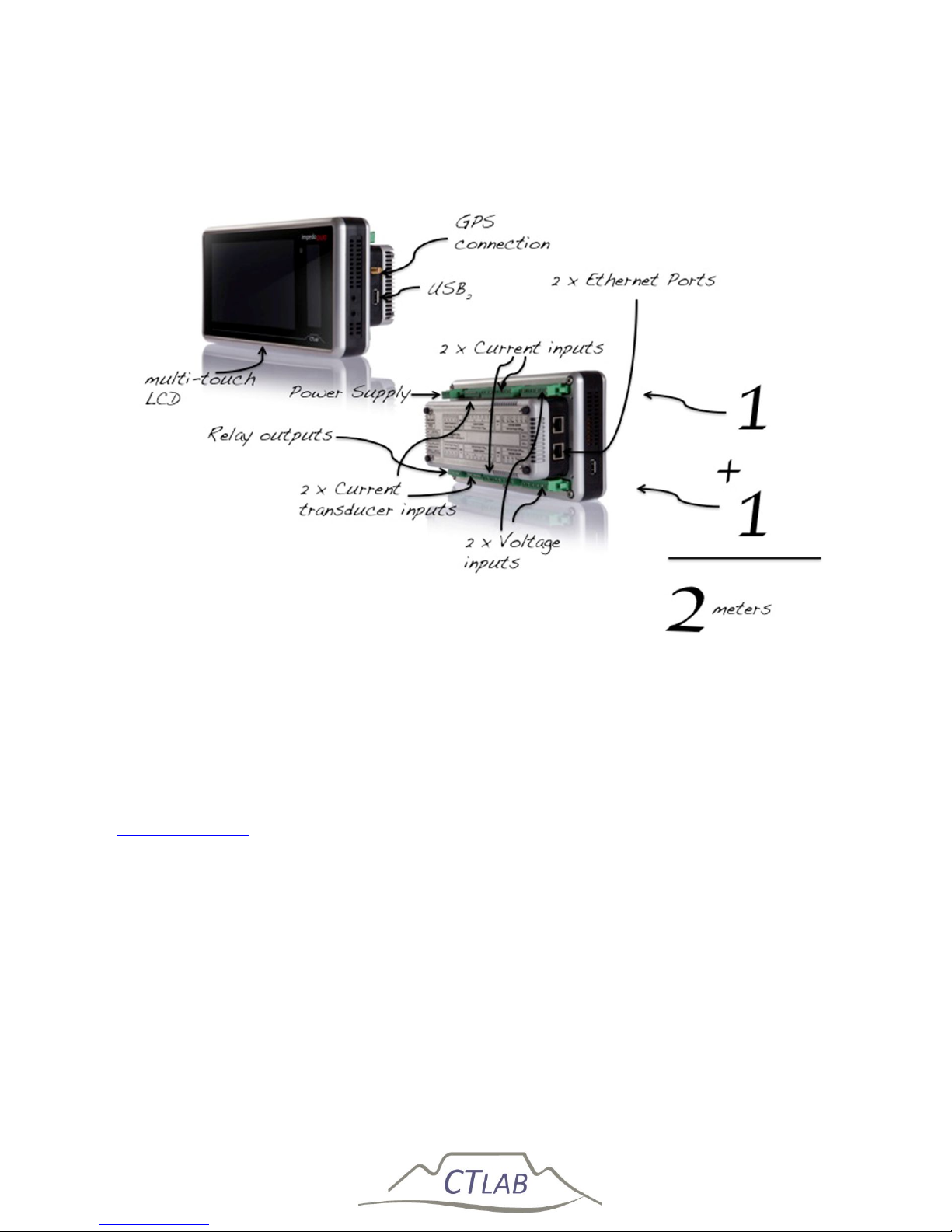
The Impedo Duo is a comprehensive dual feeder multi-function power monitor and
recorder with GPS locked time synchronisation. The instrument contains two
independent time synchronised meters – each with 4 x voltage and 4 x current
inputs. It has a rugged machined aluminium enclosure and features an on-board GPS,
high-resolution LED Display, multi-touch man-machine interface, 2 x Gigabyte
Ethernet ports and 2 x USB2.0 (HS) ports. All communication is secure and the
instrument is password protected.
Page 11
Impedo DUO User Guide
11
2.2 Receiving your Impedo Duo
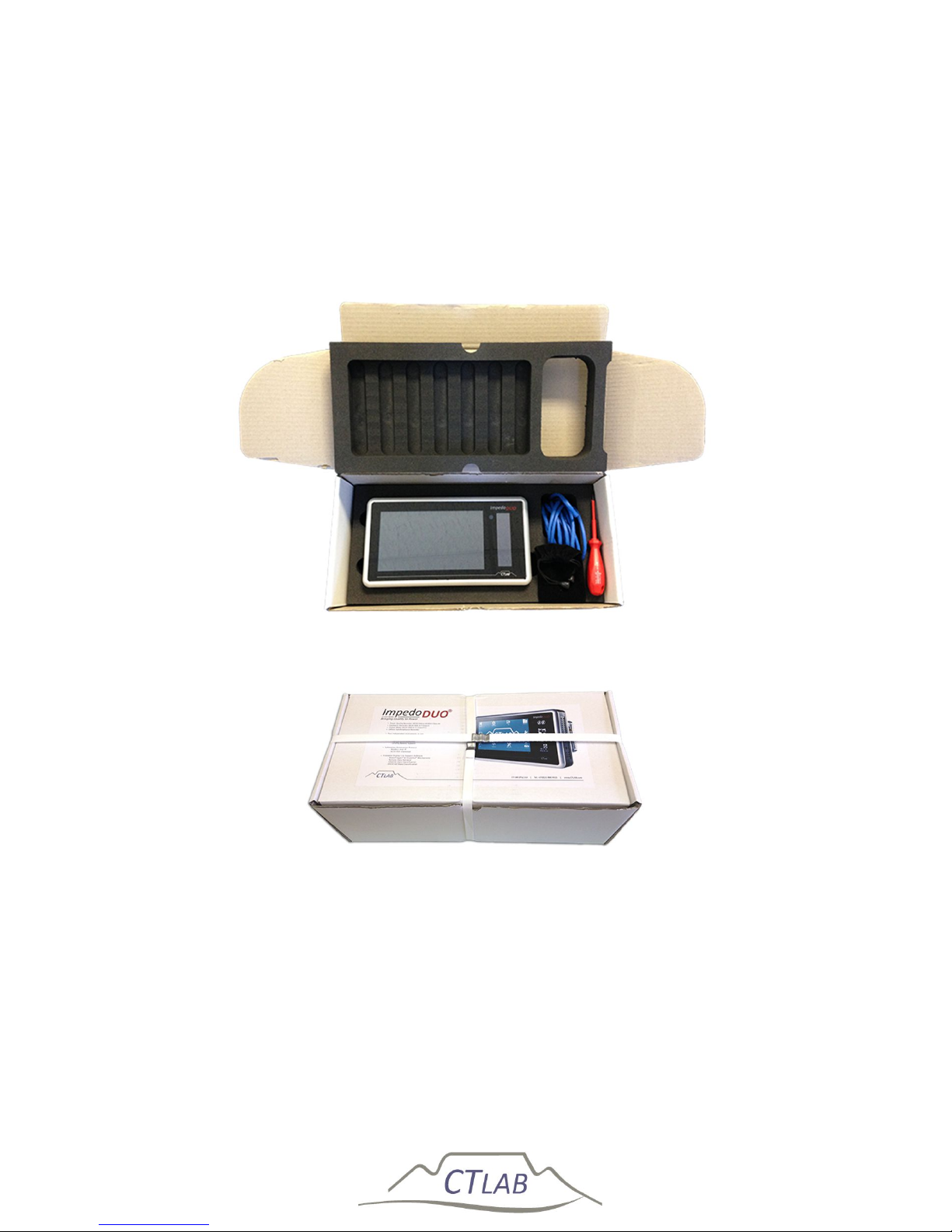
The Impedo DUO packaging is shown Figure 1 with the high-density foam cavity for
the Impedo DUO and the accessories supplied with the instrument. Figure 2 shows
the sealed ImpedoDUO box that is shipped.
Figure 1: Inside of the Impedo DUO box
Figure 2: Closed and strapped Impedo DUO box
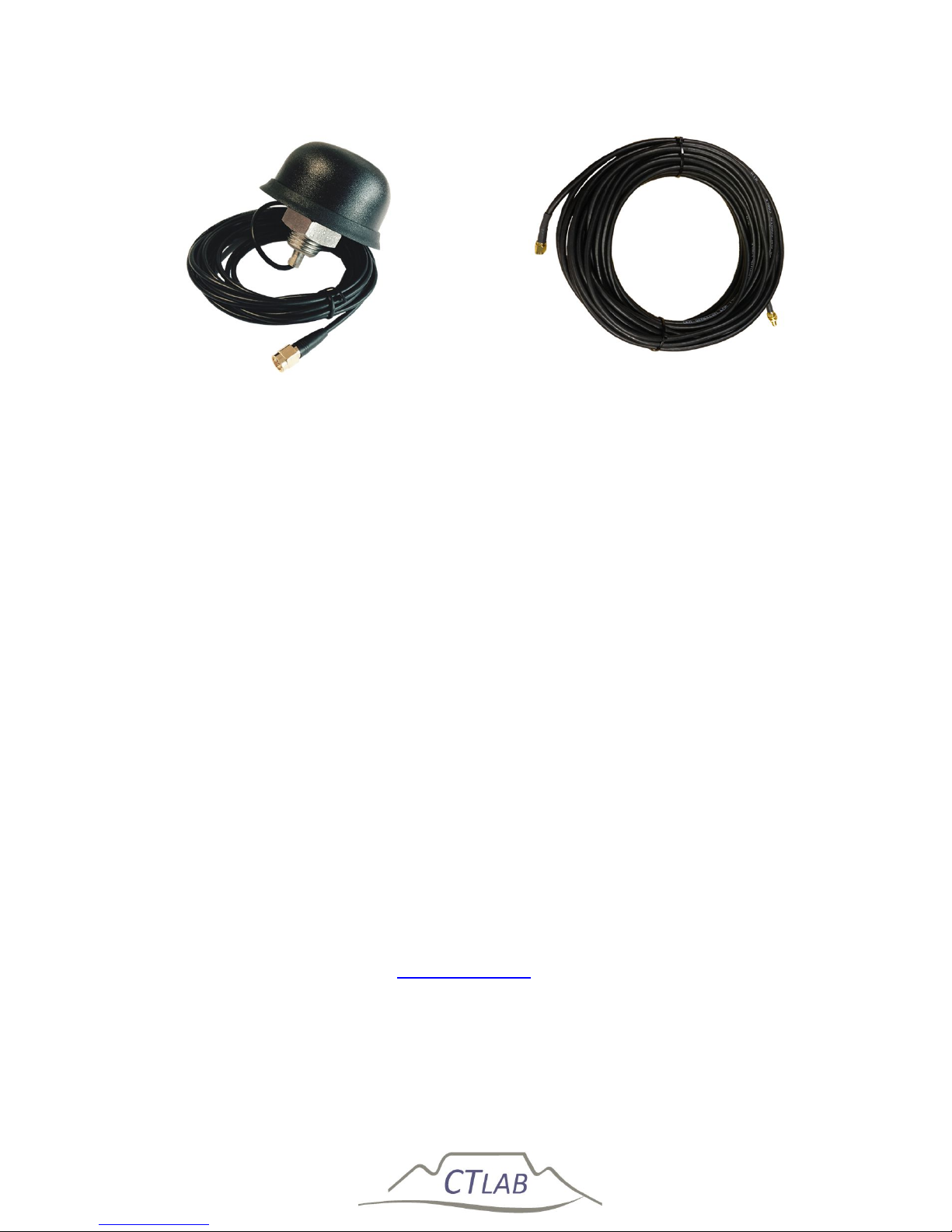
The Impedo DUO may be ordered with an optional GPS antenna with an extension
cable as shown in Figure 3. Please contact CT Lab for more information regarding a
GPS antenna-mounting bracket if required.
Page 12
Impedo DUO User Guide
12
Figure 3: Optional GPS antenna and extension cable
2.2.1 Receiving your shipment
Upon receiving your Impedo DUO shipment, check the following:
Outside
o Box is seal
o Box is not damaged
o Box has no water damage
Inside
o Impedo DUO in a plastic enclosure
o Impedo DUO has no water damage or damp in the plastic enclosure
o Impedo DUO screen is intact and has no cracks
o Ethernet cable, Flash drive and the screw driver is included in the
box
If the shipment is damaged or not in a working condition, please take pictures of the
damage and send the pictures to [email protected] as soon as possible. Please also
phone CT Lab on +27 (21) 880 9915 to handle the problem as soon as possible.
Page 13
Impedo DUO User Guide
13
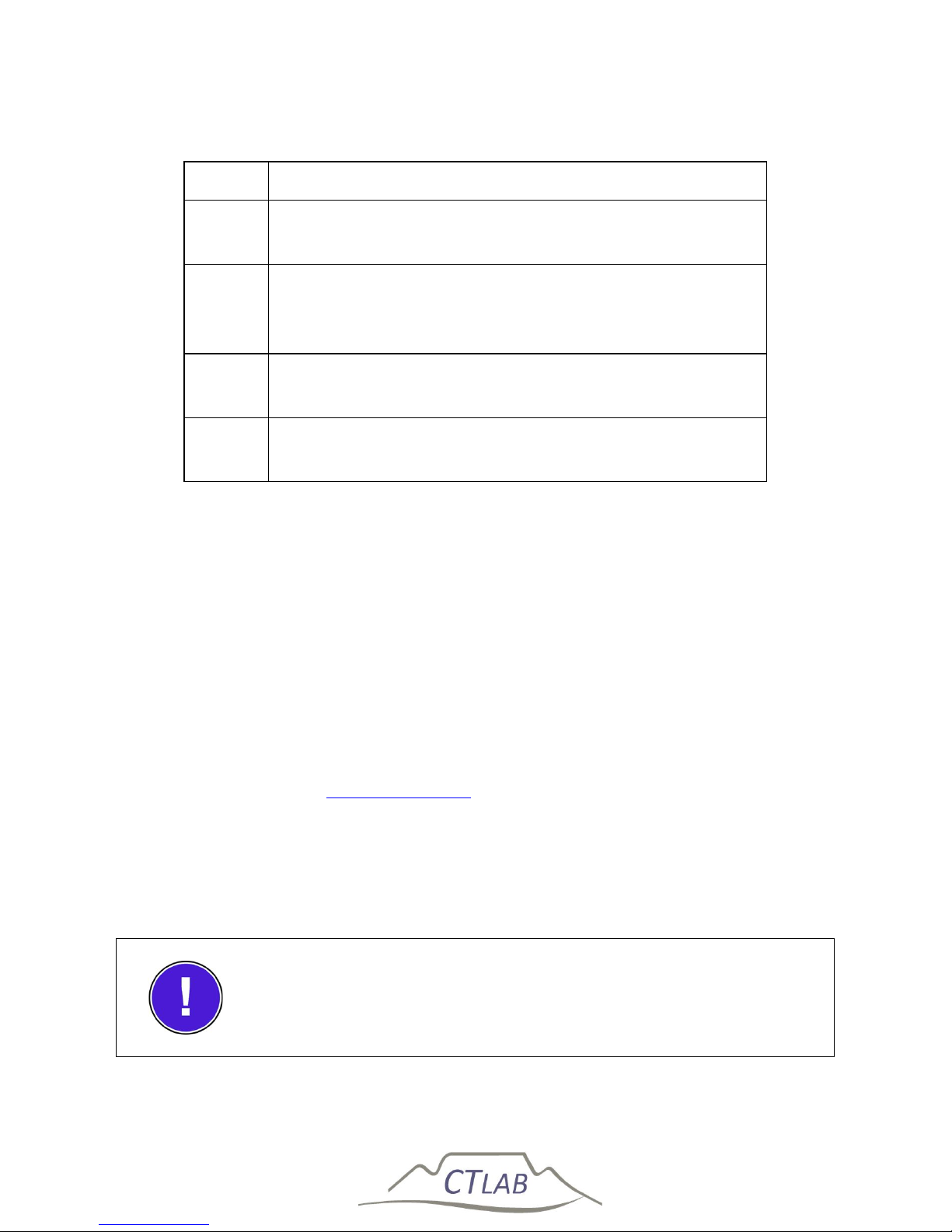
2.2.2 Unpacking the goods
Step
Action
1
Remove all literature inside the box on top of the high
-
density foam
2 Remove the
accessories in the accessories cavity
on the
right side of the box. Check that the standard
accessories (see Section 2.2.1) are included.
3 Carefully remove the lid of the high
-
density foam
enclosure
4 Remove the Impedo DUO from the cavity and inspect
for damage
2.2.3 Return shipment
Should the instrument be returned to CT Lab due to damage during
shipment or instrument failure, please follow these instructions:
1. Insert the instrument into a plastic bag to prevent water damage
during shipment transit; and
2. Protect the instrument properly and also put it inside a padded box
to prevent mechanical damage during transit.
3. Complete the fault report and sent it and the instrument to CT Lab.
and how it was shipped and how it can be tracked and with
a copy of the fault report.
If an instrument is returned to CT Lab due to damage during shipment
please take picture of the box and the instrument before returning the
instrument in the packaging supplied with the instrument.
The package and instrument remain the responsibility of the
client until delivered to CT Lab.
Page 14

Impedo DUO User Guide
14
2.3 Instrument Overview
2.3.1 Key Features
The Impedo DUO has two independent IEC 61000-4-30 Class A meters in one
instrument with both voltages and currents for two 3-phase feeders.
1. Voltage inputs x 2:
Class A performance over all of the input range inclusive of 63.5 V (if L-
N measurements are done in a 110 V line-line VT circuit)
6 terminals are used for 4 voltage input channels with maximum input
ratings of 600 V.
o The first 4 terminals connect 3 different phase voltages such as in a
3-phase system.
o Input channel 1-3 is referenced to a neutral (4th terminal)
connection. This 4th terminal acts as a reference channel and can be
any phase voltage if a 3-phase line-line voltage circuit is measured.
o If it is a 3-phase line-neutral voltage circuit, then the 4th terminal
will be connected to the neutral voltage.
o The 5th and 6th terminal is the 4th channel and a fully differential (2
terminal) input channel.
2. Current inputs x 2:
4 X 1/5 A CT inputs; and
4 X 1 V
rms
differential current transducer inputs
3. Digital Outputs two sets:
3 X Switched outputs with 1 common
4. Digitisation of input signals
500 kHz sampling of primary input signals.
50 kHz is digitally retained and subjected to the IEC 61000-4-30 Class A
signal processing requirements.
5. Power supply
PoE and/or a 90-300 V AC/DC power factor corrected power supply.
Page 15
Impedo DUO User Guide
15
20 minutes power failure ride-through via an internal LiFePO4 battery.
6. Data storage
4 GB on-board storage providing data storage of all IEC 61000-4-30
voltage and current values of 10-minute and/or variable trended data
up to the 64th harmonic component.
The ImpedoDUO utilise the first in first out principle on default but the
instrument can also be configured to stop when the memory is full. The
instrument can however record more than 6 years of 10 min trended
parameters (including the harmonics and inter-harmonics) and more
than 3 weeks of 3 sec data (harmonics and inter-harmonics).
The use of a SD card for data storage enhances the capability of
the instrument not to lose data, configuration or firmware if
without power for more than 1 year.
7. Time stamping
GPS time synchronization resulting in a time-stamping certainty better
than 100 ns.
NTP time synchronization as an option.
8. Communication
Communication is via Ethernet.
Modbus over Ethernet.
DNP3 over Ethernet.
IEC 61850 – optional.
9. Advanced triggering
User-configurable triggering between different instruments: the
patented Xross-Trigger feature (Described in the Osprey Lite user
manual)
10. Configuration of instrument
Multi-touch user-interface provides configuration and real-time
information display; or
Page 16
Impedo DUO User Guide
16
By means of an Ethernet connection to a local laptop with Osprey Lite
installed.
11. Data analysis and reporting
Osprey Lite is supplied free of charge and continuously updated.
Download from www.ctlab.com.
It generates both NRS 048 and EN 50160 PQ reports.
It allows basic and advanced analysis of PQ waveform events and
trends.
Data can be exported to in .csv and PQDIF format for additional analysis
in third party software packages.
Data downloading can be automated by configuration of the Impedo DUO with
Osprey Lite.
All measurable PQ parameters can be recordable
simultaneously.
2.3.2 Impedo DUO External Interfaces
2.3.2.1 Voltages
The two 3-phase voltage inputs to the Impedo DUO interfaces directly to 110 V VT
circuits or directly to mains connections, which has to be less than 600 V line-toneutral.
Voltage measurements are differential.
6 voltage input terminals are used for each meter.
Input channel 1-3 is referenced to a neutral (4th terminal) connection. This
4th terminal acts as a reference channel and can be connected to any phase
voltage or neutral point if a 3-phase line-line voltage circuit is measured.
If it is a 3-phase line-neutral voltage circuit, then the 4th terminal will be
connected to the neutral voltage.
The 5th and 6th terminal is the 4th differential channel.
Page 17

Impedo DUO User Guide
17
o It can be used to for example, to measure the difference between
neutral and earth.
2.3.2.2 Currents
Permanently installed 1 A or 5 A CT’s, or clamp-on CT’s interface directly to the
galvanically isolated current inputs.
The instrument calculates the “missing current” by assuming the sum of all currents
is zero. (Please refer to Section 2.4.4 for more info)
Alternatively, 1 V
RMS
voltage output current transducers can be used to measure
current.
Current to voltage transducers can interface directly to 4 low voltage differential
inputs. (Please refer to Section 2.4.5 for more info)
2.3.3 Power sources
The instrument is powered from a power factor corrected AC supply input (90–300 V
AC/DC).
It can also be powered from an IEEE 802.3-2008 compliant PoE Plus (< 12 W) source.
The internal LiFePO4 battery powers the instrument in the absence of power. This
battery guarantees 2,000 charge/discharge cycles. If cycled once per day, it translates
to at least a 5-year useful life.
Please refer to Section 2.4.2 for more detail.
2.3.4 Communication
Two (2) Gigabyte Ethernet ports facilitate local and networked external
communication. One port is used to interface with corporate networks (DHCP or
fixed IP support). The second Ethernet port is used to create a local network by
means of being a local DHCP server. Please refer to Section 0 for more detail.
The remote support software supports automatic service discovery protocols.
Laptops, when connected to the Impedo DUO, will receive an IP from the instrument.
The remote support software can automatically discover which instruments are
connected to the local network.
Please refer to the Osprey LiteTM user manual for more information.
Page 18

Impedo DUO User Guide
18
2.3.5 Osprey Pro (Enterprise Support)
When connected, each instrument automatically establishes a permanent secure
communication link to a corporate server (local or internet based). An instrument
management system (IMS) keeps track of each instrument’s location, configuration,
health (telemetry) and PQ data recorded.
Downloading of data is automated and recorded data can be accessed via the
Internet in graphical, tabled and report form as and when it becomes available. Raw
data can be analysed in Osprey ProTM or exported for further analysis in for example
Microsoft ExcelTM or MatlabTM.
Osprey ProTM simplify the analysis of waveform events such as dips and swells by the
time-aggregation of multiple waveform events to single network incidents.
Osprey ProTM classify and report on recorded data according to industry standards
such as NRS048, EN50160 and IEE1158. All communications are encrypted and each
instrument is password protected. More information can please contact CT LAB.
2.3.6 Sampling Rate
The instrument samples all analog input signals at a rate of 500 kHz (10 000 samples
per cycle) and then digitally down-sample the data to 50 kHz (1000 samples per
cycle). All IEC 610000-4-30 parameters are calculated based on this 50 kHz resolution
for both voltage and current.
Waveform and other events are triggered from the 500 kHz digitised waveforms.
These waveforms are locked to the fundamental frequency to prevent multiple zero
crosses.
Captured waveform data can be further subsampled to reduce stored data size. The
user can configure the waveform-sampling rate from 1 kHz to 50 kHz.
Please refer to the Osprey LiteTM user manual for more information on selecting the
down-sampling rate.
2.3.7 The 1/6th Sense
The Impedo DUO calculates a complete set of 1-cycle sliding RMS and fundamental
phasor parameters on each of the 3 voltage phases resulting in a resolution of 6
values per cycle per phase. The IEC 61000-4-30 Class A requirements are based on a
½ cycle sliding approach. This higher resolution data improves the detail of the event
profile and enable more accurate depth/duration calculations.
Page 19

Impedo DUO User Guide
19
Please refer to the Osprey LiteTM user manual for more information on 1/6th cycle
data.
2.3.8 Event Recording
Users can customise the recording of an event. The IEC 610000-4-30 definition of for
example a dip event, can be changed to improve the understanding of phenomena of
concern.
Upper and/or lower thresholds to define an event can be set by the user based on
waveform, 1/6th sense, 10/12-cycle block and aggregated parameters.
Single-phase and multiple-phase triggers can be defined.
When a threshold is exceeded, the Impedo DUO will retain pre- and post-diagnostic
information of the event.
Please refer to the Osprey LiteTM user manual for more information on event
recordings.
2.3.9 10/12-Cycle Block Recording
The Impedo DUO records all RMS and harmonic data from each 10/12-cycle block
(≈200ms block) for both voltage and current as prescribed by the Class A
performance requirements of the IEC 61000-4-30, edition 3.
These block values contain both amplitude and angle information of all voltage and
current harmonic components up to the 64th harmonic order.
Each block is time-stamped with a 1 s time resolution and within a 100 ns time
uncertainty1.
The user can average N x blocks to reduce the sampling rate for the number of blocks
up to 299 blocks2.
Please refer to the Osprey LiteTM user manual for more information on 10/12 cycle
block intervals and down sampling.
1
When GPS synchronized
2
Averaged block harmonic and unbalance phasors do not contain angle information.
Page 20

Impedo DUO User Guide
20
2.3.10 Variable time interval trends
10/12-Cycle block RMS and harmonic parameters are aggregated according to IEC
61000-4-30 requirements over a user-defined time interval (1 to 30 minutes).
Clock synchronised parameters are time-stamped with a 1 second time resolution.
2.3.11 Synchrophasors
The Impedo DUO is also a Phasor Measurement Recorder (PMU). Recording of 50 Hz
(or 60 Hz) synchrophasors can be activated in the configuration setup. Please refer to
the Osprey LiteTM user manual for more information.
Note that this can generate large amounts of data. Contact CT LAB for support if
interested in a PMU application.
Page 21
Impedo DUO User Guide
21
2.3.12 Measured parameters
MEASURED PARAMETERS
Waveforms
1/6
th
Cycle
10/12 - Cycle
block
10/12 - Cycle
Harmonics
10/12 - Cycle
Inter-Harmonics
Aggregated
Trends
Aggregated
Harmonics
Aggregated
Inter-Harm
VOLTAGE
Frequency (Hz)
✓ ✓
✓
Voltage (Volt)
✓ ✓ ✓ ✓ ✓ ✓ ✓ ✓
Voltage (% of Nominal)
✓ ✓ ✓ ✓ ✓ ✓ ✓
Voltage (% of Fundamental)
✓ ✓
✓ ✓
Voltage Phase Angle (Degrees)
✓ ✓ ✓
Voltage Unbalance (%)
✓ ✓ ✓
✓ ✓
V-Positive Amplitude (Volt)
✓
✓
V-Positive Angle (Degrees)
✓
V-Negative Amplitude (Volt)
✓
✓
V-Negative Angle (Degrees)
✓
V-Zero Amplitude (Volt)
✓
✓
V-Zero Angle (Degrees)
✓
Voltage Under-Deviation (%)
✓
✓
Voltage Over-Deviation (%)
✓
✓
Voltage THD (%)
✓
✓
Flicker (Pst)
✓
✓
Flicker (Plt)
✓
Page 22
Impedo DUO User Guide
22
MEASURED PARAMETERS
Waveforms
1/6
th
Cycle
10/12 - Cycle
block
10/12 - Cycle
Harmonics
10/12 - Cycle
Inter-Harmonics
Aggregated
Trends
Aggregated
Harmonics
Aggregated
Inter-Harm
CURRENT
Current (Ampere)
✓ ✓ ✓ ✓ ✓ ✓ ✓ ✓
Current (% of Fundamental)
✓
✓ ✓
✓ ✓
Current Phase Angle (Degrees)
✓ ✓ ✓
Current Unbalance (%)
✓ ✓ ✓
✓ ✓
I-Positive Amplitude (Ampere)
✓
✓
I-Positive Angle (Degrees)
✓
I-Negative Amplitude (Ampere)
✓
✓
I-Negative Angle (Degrees)
✓
I-Zero Amplitude (Ampere)
✓
✓
I-Zero Angle (Degrees)
✓
Current THD (%)
✓
✓
Crest Factor
✓ ✓
✓
K-Factor
✓
✓
Page 23
Impedo DUO User Guide
23
MEASURED PARAMETERS
Waveforms
1/6
th
Cycle
10/12 - Cycle
block
10/12 - Cycle
Harmonics
10/12 - Cycle
Inter-Harmonics
Aggregated
Trends
Aggregated
Harmonics
Aggregated
Inter-Harm
POWER
Active Power (Watt)
✓ ✓
✓
Reactive power (VAR)
✓ ✓ ✓ ✓ ✓ ✓ ✓ ✓
Apparent Power (VA)
✓ ✓ ✓ ✓ ✓ ✓ ✓
Power Angle (Degrees)
✓ ✓
✓ ✓
Power Factor
✓ ✓ ✓
POWER – IMPORT
✓ ✓ ✓
✓ ✓
Imported Active Power (Watt)
✓
✓
Imported Reactive Power (VAR)
✓
Imported Apparent Power (VA)
✓
✓
Imported Power Angle (Degrees)
✓
Imported Power Factor
✓
✓
POWER – EXPORT
✓
Exported Active Power (Watt)
✓
✓
Exported Reactive Power (VAR)
✓
✓
Exported Apparent Power (VA)
✓
✓
Exported Power Angle (Degrees)
✓
✓
Exported Power Factor
✓
Page 24
Impedo DUO User Guide
24
2.3.13 Technical Specification
VOLTAGE INPUTS
Number of channels 2 sets of 4 x differential inputs (3/4 Wire + 4th Diff)
Measurement input range 0 – 600 V
RMS
Voltage measurement Single Phase, 3-Phase (Star, Delta), DC
Input impedance/channel > 1 MΩ
CURRENT SENSOR INPUTS
Number of channels 2 sets of 4 x galvanically isolated inputs
Measurement input range 0 - 5.0 A
RMS
Maximum continuous current 6.0 A
RMS
3 sec over-current withstand 50 A
VA Burden @ 5A < 1 VA
Galvanic isolation 1,000 V
CURRENT TRANSDUCER INPUTS
Number of channels 2 sets of 4 differential inputs
Measurement input range 0 – 1.0 V
RMS
(±1.414V Peak)
Input impedance/channel > 1 MΩ
DIGITAL OUTPUTS
Page 25
Impedo DUO User Guide
25
Number of Channels 2 sets of 3 galvanically isolated digital outputs
Switch Rating 0,1 A
RMS
, 350V
RMS
(max)
ACCURACY & BANDWIDTH
Power frequency range DC, 50HZ (40-60Hz), 60Hz (50-70 Hz)
Harmonic bandwidth 1-64th (harmonic and inter-harmonic)
Measurement sampling rate 0.5 MHz (simultaneously sampled)
Waveform storage rate Adjustable from 1kHz to 50kHz
ADC Resolution 16-Bit
Overall accuracy class 0.1%
Fast Transient Capturing > 20 μs
COMMUNICATION
Ethernet 2 x Gigabit Ethernet – IEEE 802.3.2008 compliant
USB 2 x USB 2.0 – 480 Mbit (powered)
CLOCKS
On-Board GPS On-board 3V3 power for active external antennae
Overall Accuracy Class ± 20 μs from absolute time
On-Board RTC drift 1 ppm (32-seconds per annum)
MAN-MACHINE INTERFACES
LCD 7” – 800 x 480 – LED colour display
Page 26
Impedo DUO User Guide
26
Multi-Touch Projected capacitive (gesture recognition)
LED Display 256 x 64 – monochrome
POWER
Maximum Power Consumption < 30 VA
AC / DC supply voltage input
range
90-300 V
RMS ,
42-69 Hz (power factor corrected)
Power over Ethernet IEEE 802.3 compliant (35-60 VDC)
On-board battery LiFePO
4
(2,000 charge/discharge cycles)
PHYSICAL
Construction Aluminium, 220mm x 131mm x 85mm (L x W x H)
Mounting options 3U-19” Rack, Panel Mount, Portable Case
Electrical connections Pluggable screw type (screw lock-down)
Electrical isolation class 600V Class II
Operating temperature 0 ⁰C to 75 ⁰C
COMPLIANCE
PQ Measurement IEC 61000-4-30, Class A
Harmonics IEC 61000-4-7
Flicker IEC 61000-4-15
SCADA IEC 61850
Page 27
Impedo DUO User Guide
27
2.4 Impedo Duo External Interfaces
2.4.1 Physical Appearance
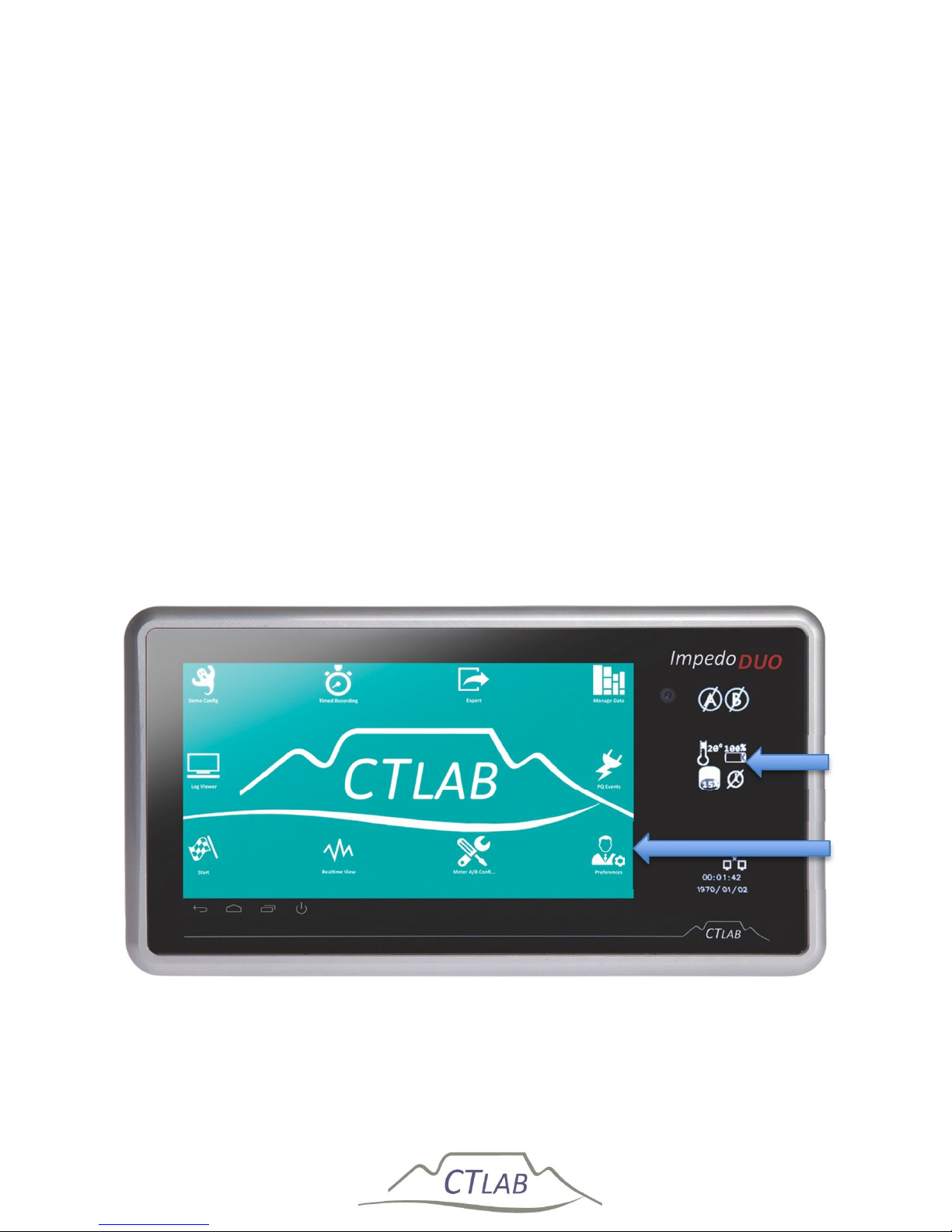
Figure 4 shows the front of the Impedo Duo. A multi-touch user interface; high
resolution LCD and OLED display icons are shown.
To access a function on the LCD display, simply tap the respective icon once. Android
is used for the on board user interface and the typical android conventions apply.
The embedded software functionality is described in Section 5.
The OLED display on the right side of the front panel provides the user with
operational and health information of the instrument. Detail on interpreting the
status icons is provided in Section 4.
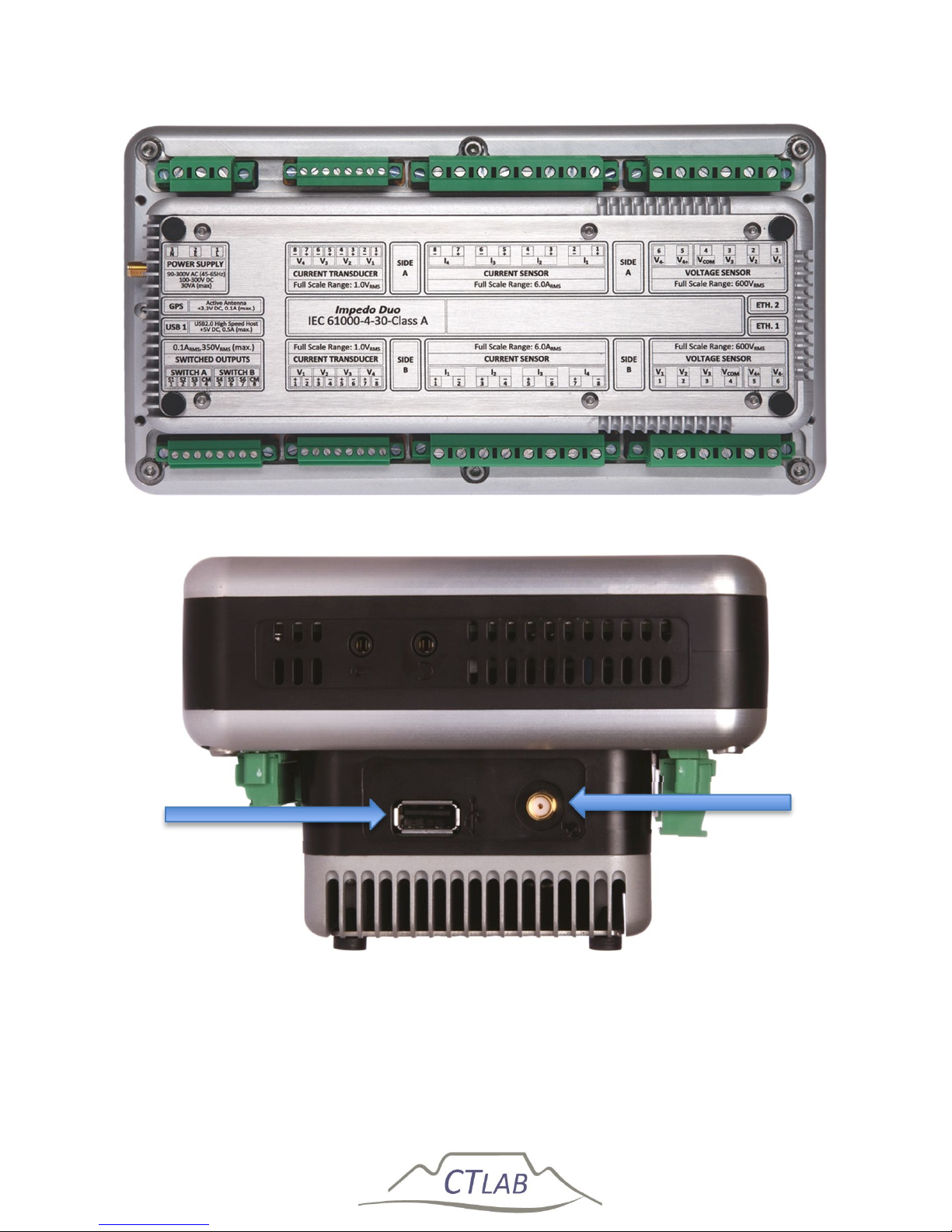
Figure 5 shows the back of the instrument. A name plate provides the name and
serial number of the instrument, as well as a detail layout of the external interfaces
of the instrument including the inputs ratings. A detail description of the external
intrafaces of the instrument is provided in Sections 2.4.2 to 2.4.11.
Figure 4: Front of instrument
OLED
LCD
Display
Page 28
Impedo DUO User Guide
28
Figure 5: Back of instrument
Figure 6: Right side of instrument
GPS
USB 1
Page 29
Impedo DUO User Guide
29
Figure 7: Left side of instrument
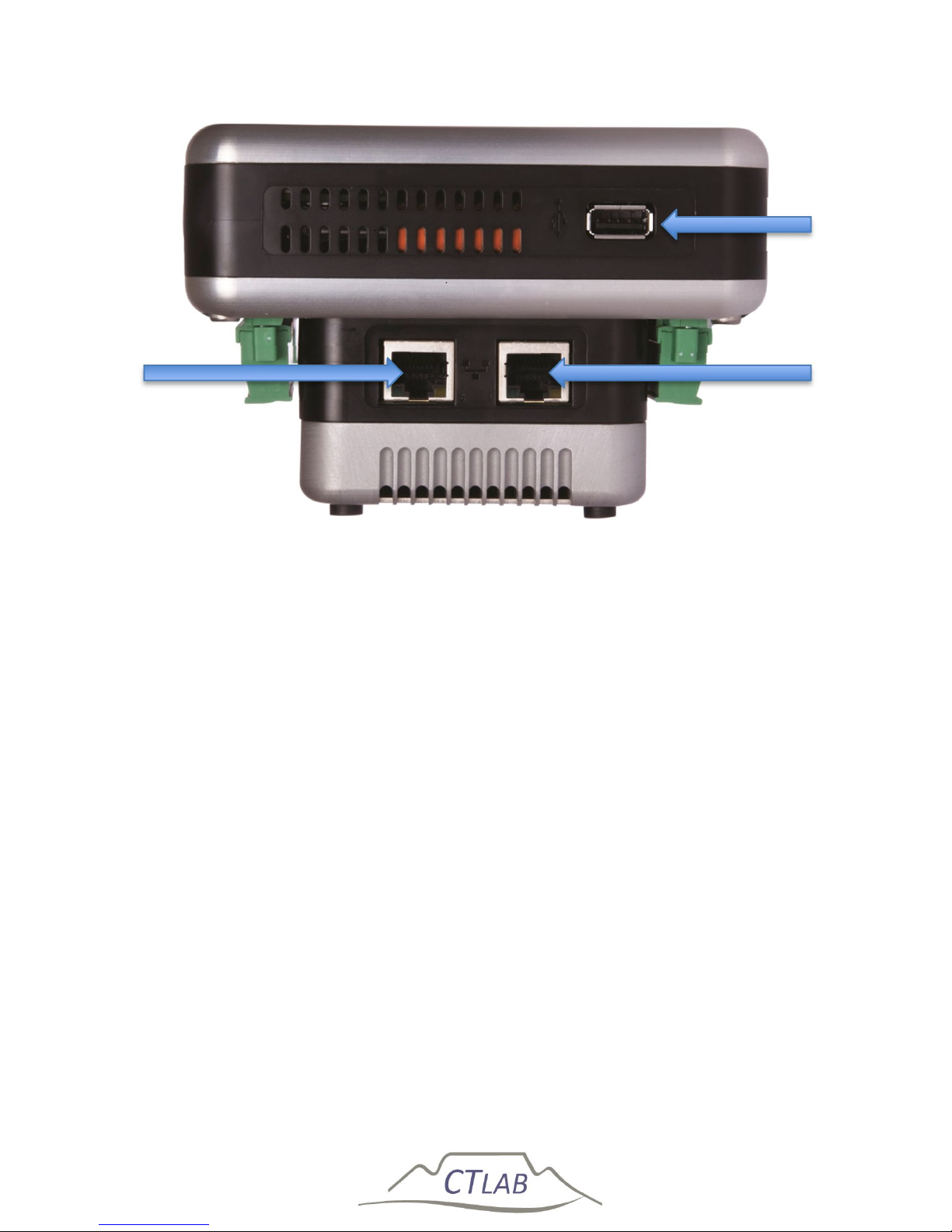
Figure 6 show the right side of the instrument with USB port 1 and the GPS antenna
connector. Figure 7 shows the left side of the instrument with USB port 2 and the
two Ethernet communication ports.
2.4.2 Power Supply
The Impedo Duo can be powered and charged via a power factor corrected universal
input mains supply or via IEEE 802.3-2008 compliant Power over Ethernet (PoE). A
built in LiFePO
4
battery will power the instrument for up to ±20min in the absence of
power. This battery has a design life expectancy of more than 2,000 charge/discharge
cycles.
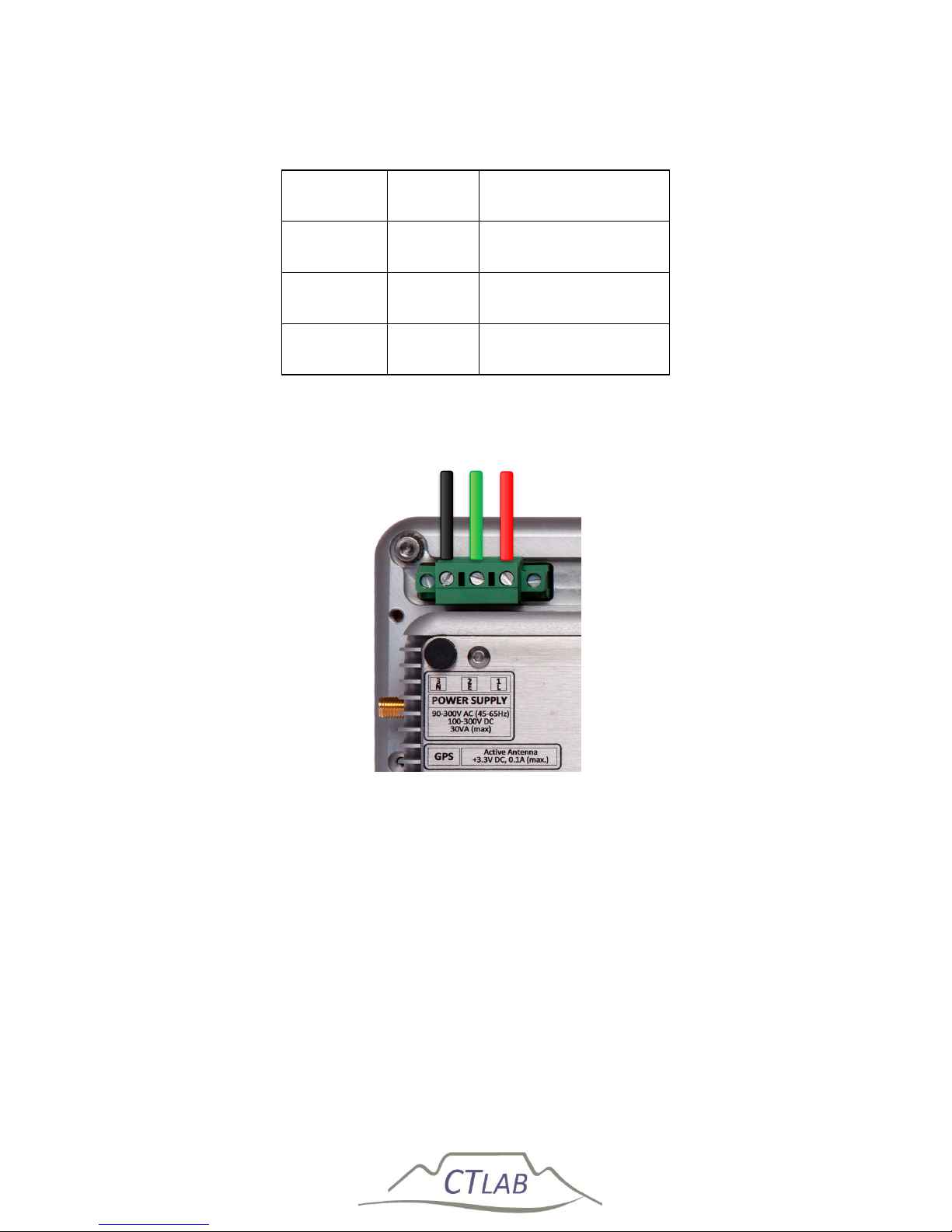
The Power Supply port contains 3 terminals on a removable lockable plug. Each
terminal can accommodate conductors with size up to 2.5mm2.
The supply voltage input range is from 90 V
RMS
to 300 V
RMS
AC or DC (42-69Hz for AC
sources). This enables the instrument to be powered from the 110 V VT terminals,
230 V auxiliary supply or the DC bus.
ETH 1
USB 2
ETH 2
Page 30
Impedo DUO User Guide
30
Table 1: Power supply connection
Terminal Legend Description
1. L Live Terminal
2. E Safety Earth
3. N Neutral Terminal
Figure 8: Impedo Duo power supply Connection
The supply current is power factor corrected and the maximum supply power to the
Impedo Duo is actively limited to 30 VA enabling Impedo Duo to be powered directly
from 110V 50/60Hz VT circuits.
An internal electronic fuse protects the Impedo DUO from over- and under-voltage
conditions. The Impedo DUO will automatically disconnect from mains if excessive
current is drawn from the universal AC/DC supply input port. When this protection
was activated, it needs a few minutes to cool, during which the Impedo DUO will not
restart even with valid mains voltage.
Neutral
Earth
Live
Page 31
Impedo DUO User Guide
31
During a power interruption/failure, the internal battery will power the instrument
for ± 20 minutes. When the battery charge drop below 50% of full capacity (0% on
the OLED display), the instrument will gracefully shut down to protect the battery.
When power is restored, the instrument will automatically restart within 60 seconds
if the battery status is above 30% (of full capacity) or first recharge until the battery
reach 30% and only then restart. During this period an icon on the OLED-display will
indicate a battery-warning symbol.
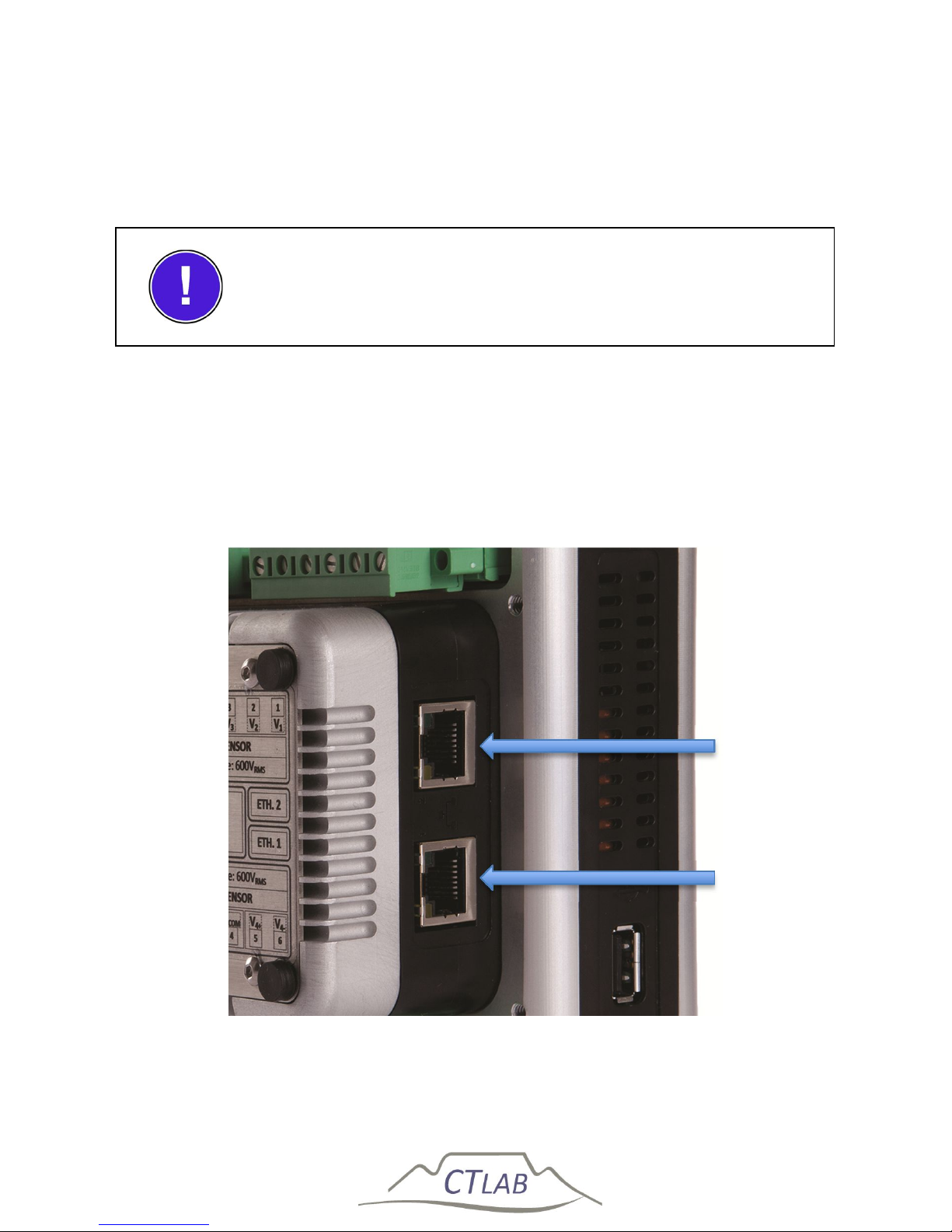
Figure 9: Ethernet ports
The Safety Earth terminal connects all exposed metal parts to
external earth.
Port 2
Port
1
Page 32
Impedo DUO User Guide
32
IEEE 802.3-2008 compliant Power over Ethernet (PoE) Plus is available on both
Ethernet ports at 30 to 60 V. The PoE capability enables the Impedo Duo to be
powered through the communication infrastructure. The Impedo Duo will therefore
be available at all times if the communication infrastructure stays active.
2.4.3 Voltage Inputs
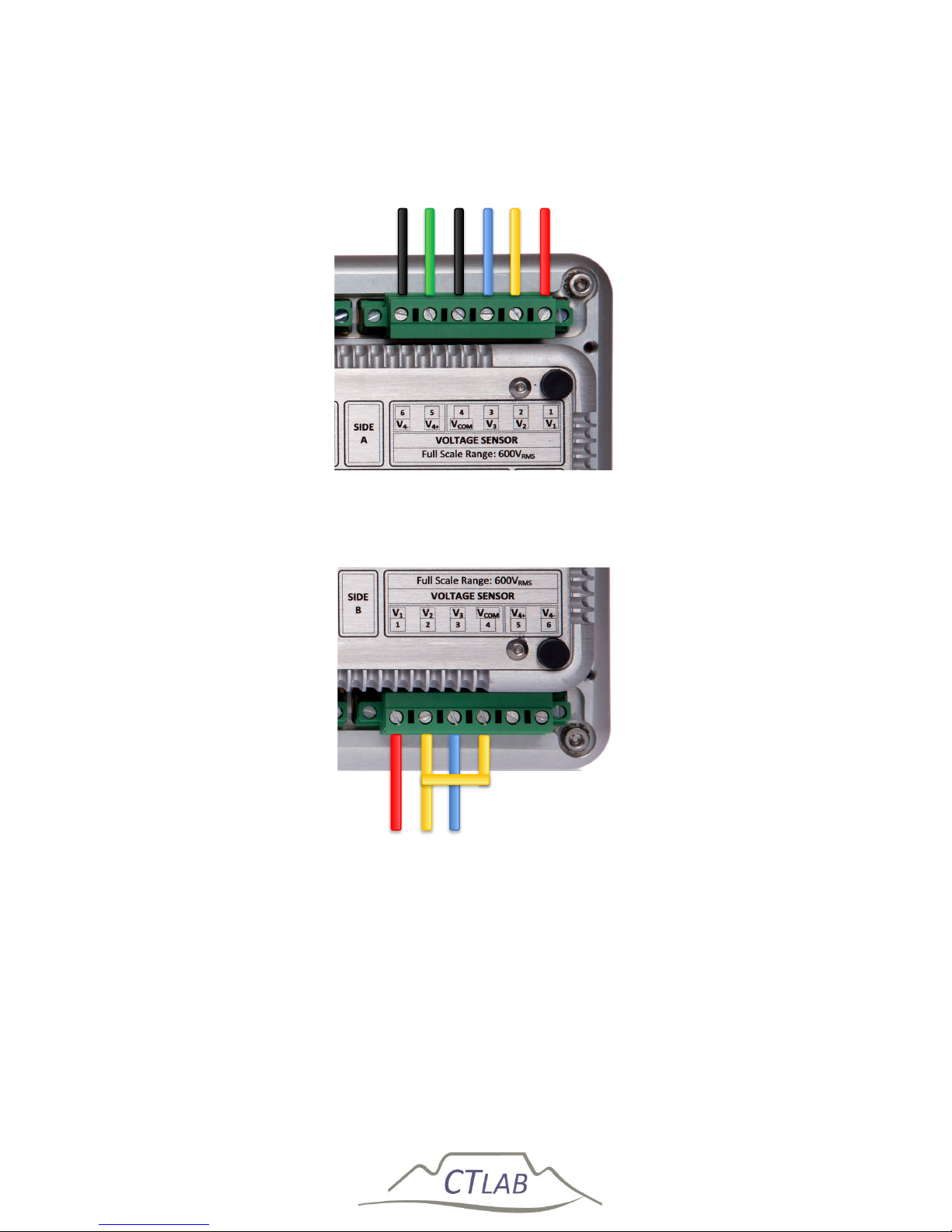
Each individual meter contains 4 resistive differential voltage inputs made up of 6
terminals as shown in Figure 10 and Figure 11.
The first 4 terminals are used for 3 voltage inputs. V1, V2 and V3 are Neutral (V
com
)
referenced (V1-N, V2-N, V3-N) in a four wire Star connection (Figure 10) and
referenced to any one of the three phases in a 3 wire Delta connection (Figure 11).
Terminal 5 and 6 are used for the 4th (V4+, V4-) voltage input. It is a full differential
measurement normally used for Neutral to Earth measurement.
The voltage inputs terminals can accommodate conductors with sizes up to 2.5 mm2.
Figure 10 shows the voltage connections for a 3-phase 4-wire star system. Power is
calculated per phase and arithmetically added to obtain the 3-phase powers.
Figure 11 shows the voltage connections for a 3-phase 3-wire delta connection.
Three-phase power is calculated by the 2-watt meter method.
If voltages are connected in star (4-wire) on the terminals the
user can select star (4-wire) or delta (3-wire) topology in the
software.
Page 33
Impedo DUO User Guide
33
Figure 10: Impedo Duo 4-wire star connection on meter A
Figure 11: Impedo Duo 3-wire delta connection on meter B
Phase 3 Phase 2
Phase 1
Phase 4 Ref
Phase 4 Neutral
Phase 3
Phase 2
Phase 1
Page 34
Impedo DUO User Guide
34
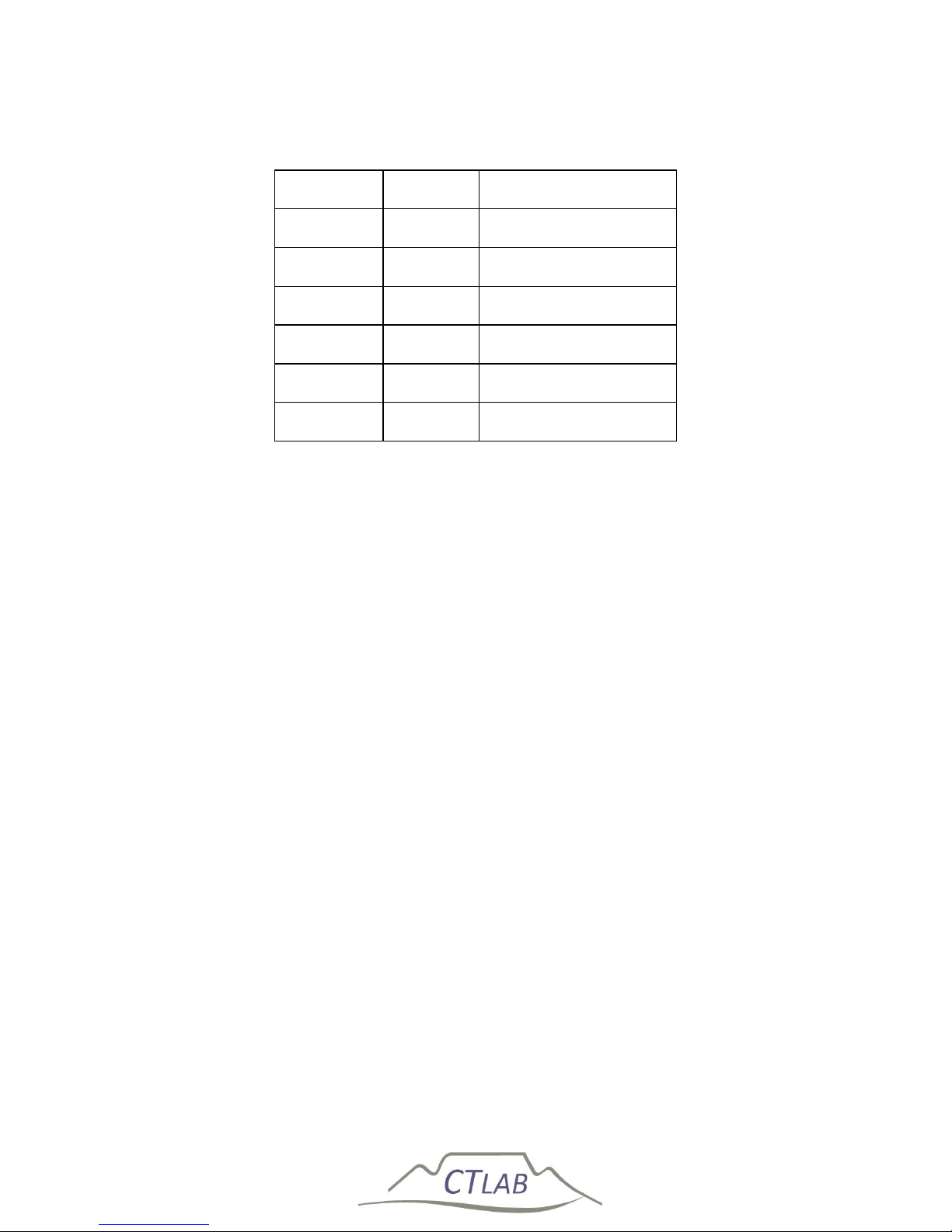
Table 2: Voltage connection layout
Terminal Legend Description
1. V1 Phase 1
2. V2 Phase 2
3. V3 Phase 3
4. V
com
Reference for V
1-3
5. V4+ Phase 4
6. V4- Reference for V4
A single 600 V
AC-RMS
voltage input range with 20 mV resolution simplifies installation
and ensures good accuracy for both the fundamental component and harmonics.
A high impedance input prevents the accidental shorting of VT inputs to system
ground and eliminates ground loops. Differential resistive inputs assure a safe, stable
analog input stage with minimum phase error, high bandwidth and zero temperature
drift.
2.4.4 Current Sensor Inputs
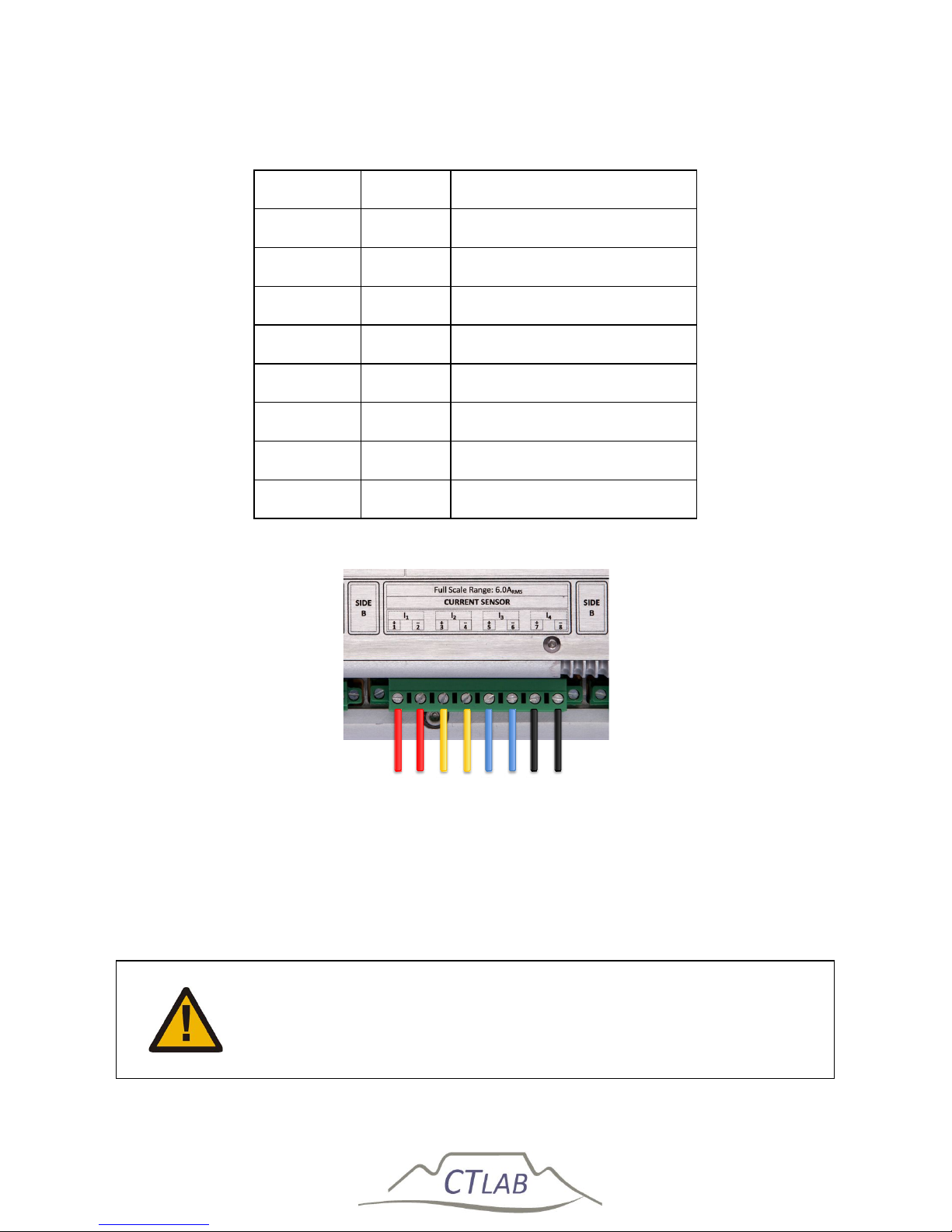
Each individual meter contains 4 galvanically isolated resistive current shunt inputs
with input impedance of 20 mΩ and a full-scale measurement range of 6 A
RMS
.
Resistive shunts provide excellent AC and DC response; zero offset drift and very low
temperature drift.
The 3-second over current withstand rating of each input is 50 A. The galvanic
isolation voltage between each channel and earth is 1 kV.
The current inputs are available on an 8-terminal lockable connector plug with screw
terminals for meter A and B as shown in Figure 12. Each terminal can accommodate
conductors with size up to 2.5mm2.
Page 35
Impedo DUO User Guide
35
Table 3: Current sensor connection layout
Terminal Legend Description
1. I
1+
Phase 1 Current Input
2. I
1-
Phase 1 Current Return
3. I
2+
Phase 2 Current Input
4. I
2-
Phase 2 Current Return
5. I
3+
Phase 3 Current Input
6. I
3-
Phase 3 Current Return
7. I
4+
Phase 4 Current Input
8. I
4-
Phase 4 Current Return
Figure 12: Current sensor connection
Do not disconnect the current terminals without bridging the CT
circuits. Only certified electrician is allowed to bridge the CT
circuit.
Phase 3
Phase 2
Phase 1
Phase 4 Return Phase 4
Phase 1 Return
Phase 2 Return
Phase 3 Return
Page 36
Impedo DUO User Guide
36
2.4.5 Current Transducer Inputs
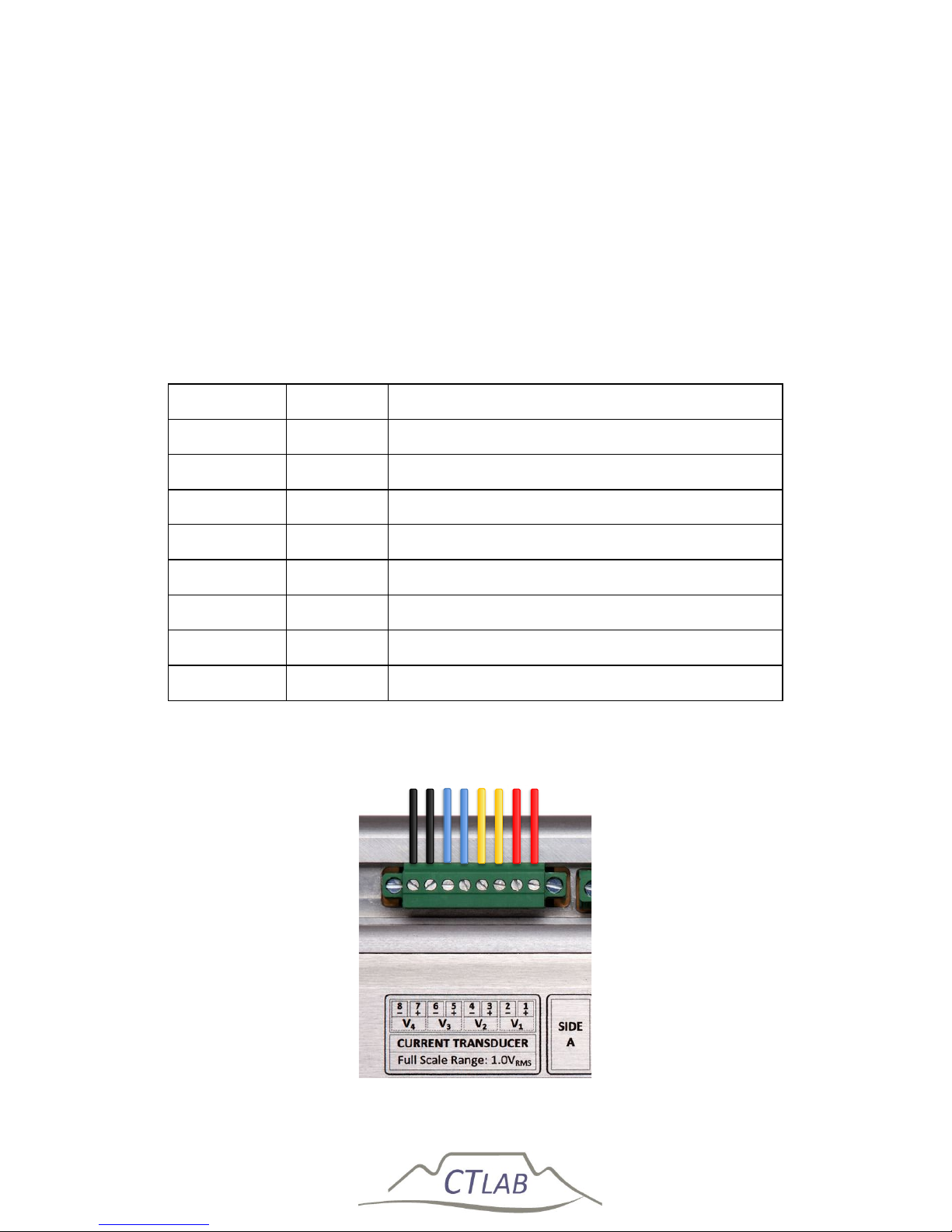
Each individual meter contains 4 voltage output current transducer inputs with a fullscale reading of 1.4 V
AC-RMS
per meter. These voltage inputs can be used to directly
interface with voltage output current sensors such as Hall-effect devices and
Rogowsky coils.
The current inputs are available on an 8-terminal lockable connector plug with screw
terminals. Each terminal can accommodate conductors with size up to 1.5mm2.
Table 4: Current transducer connection layout
Terminal Legend 1V Output Current Transducer Circuits
1. V
1+
Voltage 1
2. V
1-
Voltage 1 Reference
3. V
2+
Voltage 2
4. V
2-
Voltage 2 Reference
5. V
3+
Voltage 3
6. V
3-
Voltage 3 Reference
7. V
4+
Voltage 4
8. V
4-
Voltage 4 Reference
Figure 13: Current transducer connection
Phase 2 Ref
Phase 3 Ref
Phase 4 Ref
Phase 1
Phase 1 Ref
Phase 4
Phase 3
Phase 2
Page 37
Impedo DUO User Guide
37
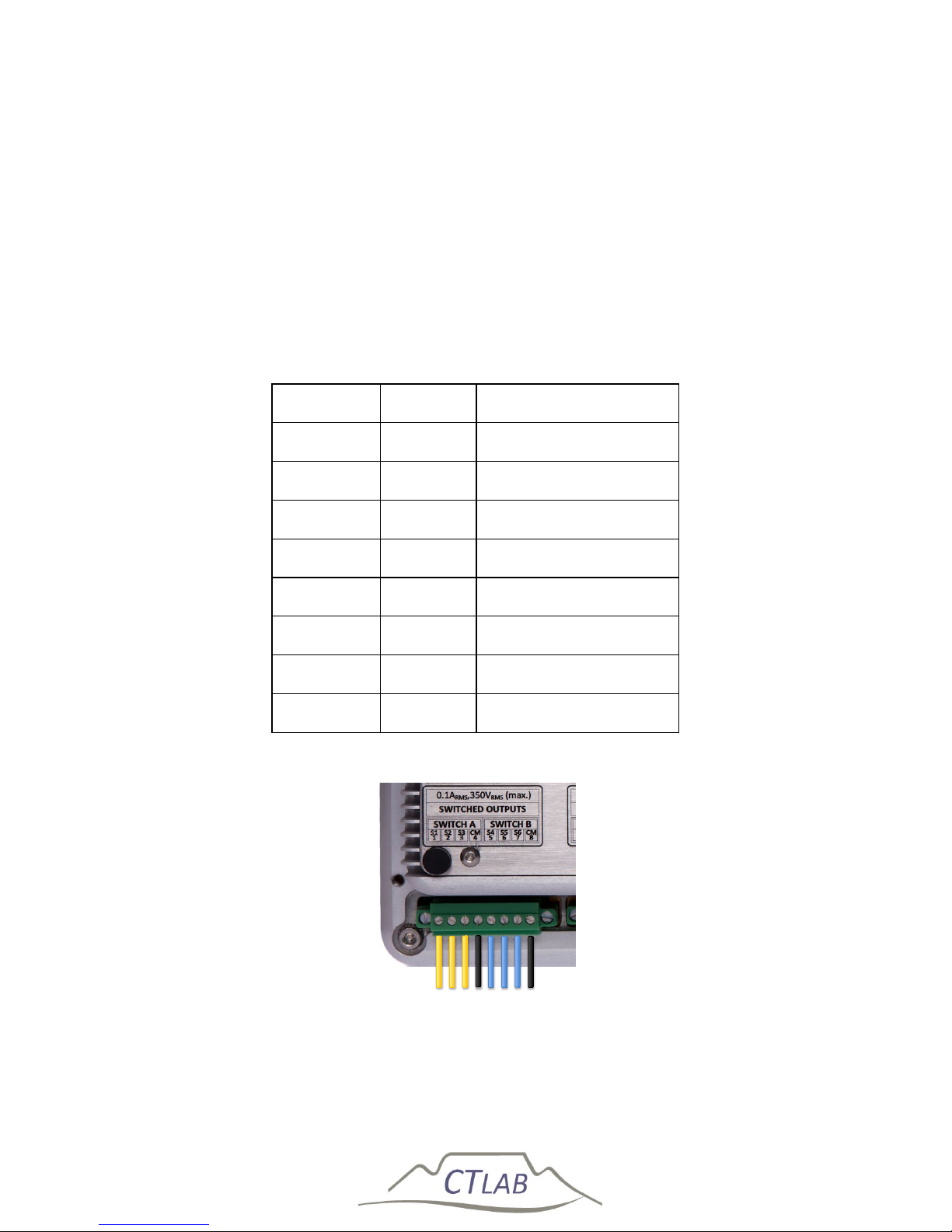
2.4.6 Relay Outputs
Six relay outputs (100 mA
RMS
, 350 V
RMS
) are used to provide pulsed outputs or to
control external processes. The outputs are arranged into 2 galvanically isolated
clusters (1 kV isolation); each containing 3 switched contacts with a common return
path.
The relay outputs are available on an 8-terminal lockable connector plug with screw
terminals. Each terminal can accommodate conductors with size up to 1.5mm2.
Table 5: Relay switch connection layout
Terminal Legend Description
1. S
1
Switch A1
2. S
2
Switch A2
3. S
3
Switch A3
4. C
m
Switch A Common
5. S
4
Switch B1
6. S
5
Switch B2
7. S
6
Switch B3
8. C
m
Switch B Common
Figure 14: Relay switch connection layout
Switch B Common
Switch B3
Switch B2
Switch B1
Switch A Common
Switch A3
Switch A2 Switch A1
Page 38
Impedo DUO User Guide
38
2.4.7 GPS
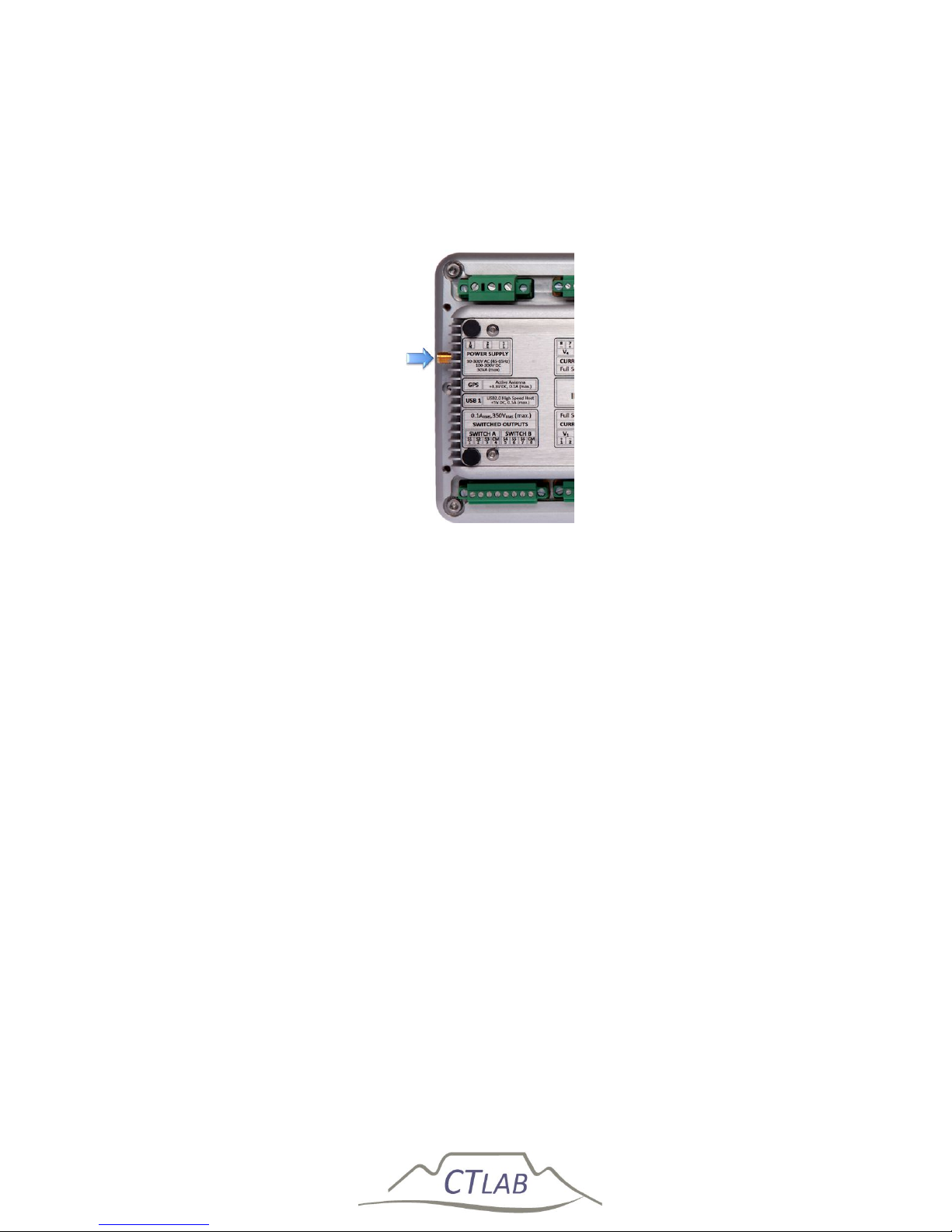
The female SMA port is used to interface an external powered (+3V3) GPS antenna to
the Impedo Duo. The built-in GPS is used to measure absolute time. The Impedo Duo
locks its internal clock to within 100ns from absolute time.
Figure 15: GPS connector
GPS antenna
connector
Page 39
Impedo DUO User Guide
39
2.4.8 Ethernet Ports
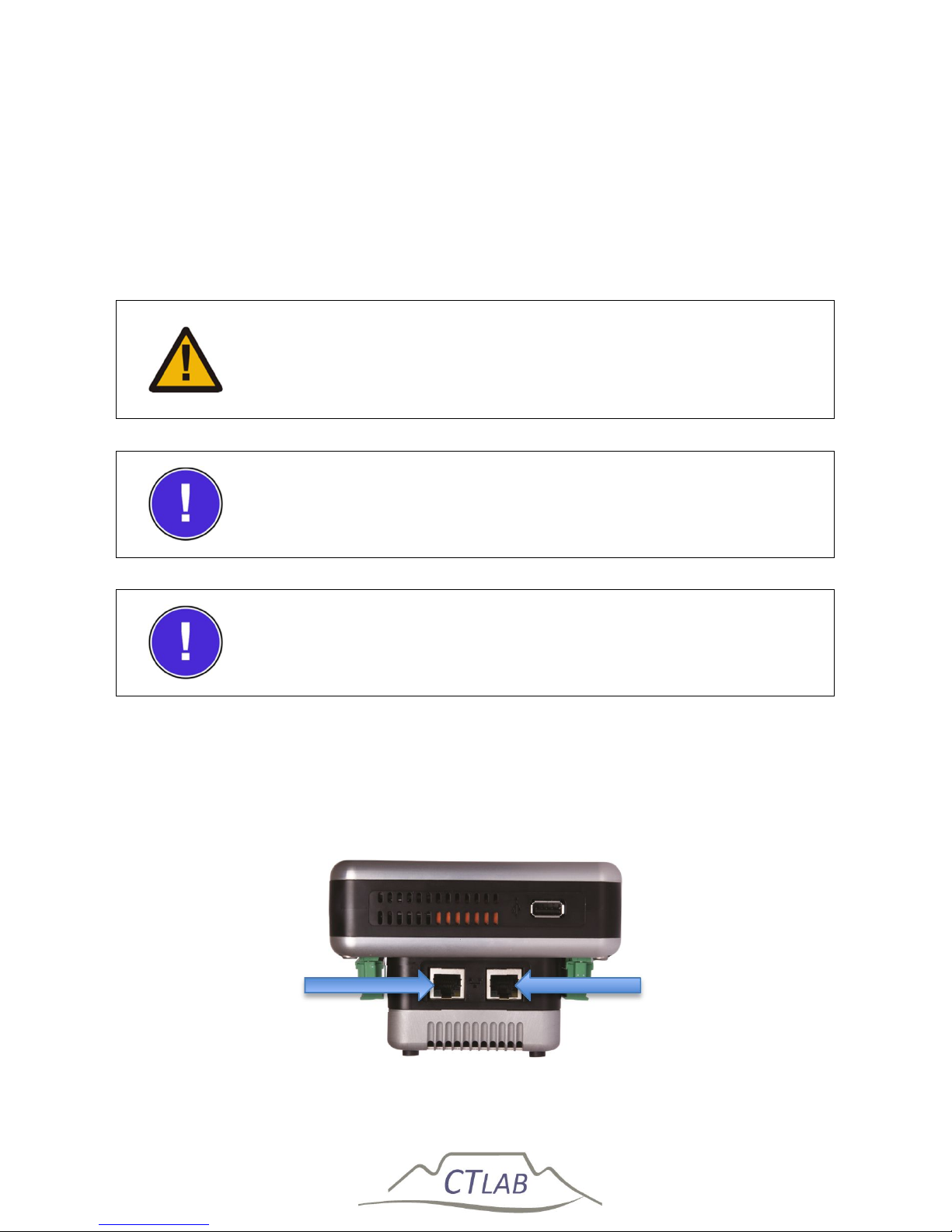
The instrument has two Gigabit Ethernet ports as shown in Figure 16. The IP address
of port 1 is fixed at 192.168.7.1. The instrument serves as a DHCP server for the
network connected to this port. The IP address of port 2 can be set using the GUI
(see Section 0) and is also used to interface to GPRS/3G routers for remote
communication.
Do not connect Ethernet port 1 to a network with an active
DHCP server, as this may cause the network to stop functioning
properly
The IP address of Ethernet port 1 is fixed at 192.168.7.1
The instrument serves as a DHCP server for equipment
connected to port 1
IEEE 802.3-2008 compliant Power over Ethernet (PoE) is available on both Ethernet
ports. The PoE capability enables the Impedo Duo to be powered through the
communication infrastructure. The Impedo Duo will therefore be available at all
times while the communication infrastructure stays on-line.
Figure 16: Ethernet ports
ETH 1
ETH 2
Page 40
Impedo DUO User Guide
40
2.4.9 USB Peripheral Ports
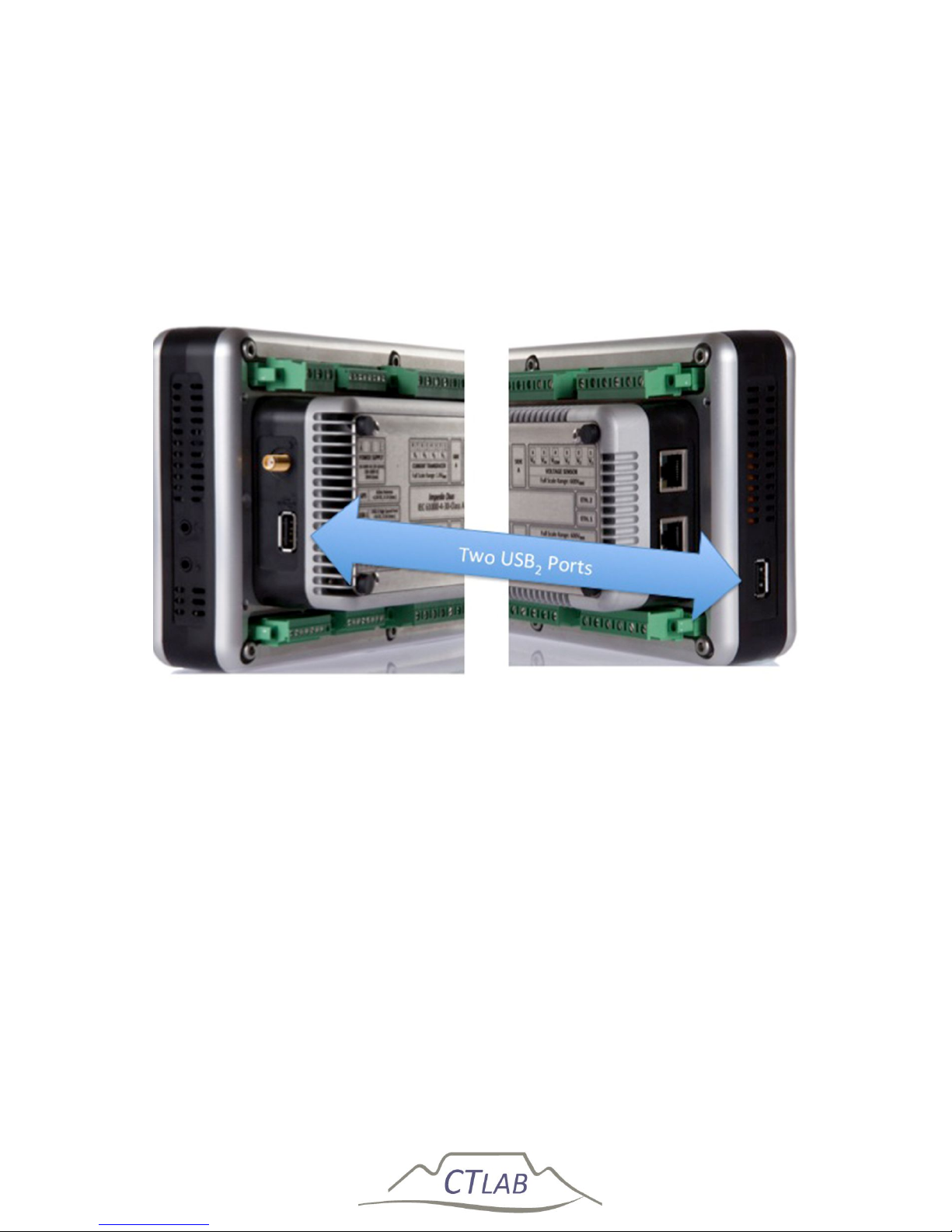
Two powered USB2.0 compliant (450 MBit) USB ports are used to interface to
external peripherals like: Memory sticks, WiFi Dongles, GPRS/3G/GSM modems,
RS485 serial ports, external I/O modules and etc. Each port can power peripherals
with a peak power of 2.5W. However – it is recommended not to exceed
simultaneous average power of 2.5W.
Figure 17: USB ports
2.4.10 OLED Display
The OLED display is used to display the start icon to start the instrument and
instrument status.
A multi-touch gesture (single finger slide from top to bottom) is used to switch on the
instrument see Section 0.
The detail of each icon on the OLED display is discussed in Section 4.
Page 41

Impedo DUO User Guide
41
2.4.11 Multi-Touch Display
A high-resolution full colour multi-touch enabled display is used to
Configure the instrument – preferences and PQ monitors
Provide an installation wizard with real-time voltage and current
information during installation
Provide real-time waveform, RMS phasor and harmonic feedback
The detail of each icon on the Multi-Touch display is discussed in Section 5.
2.5 Firmware
The Impedo DUO firmware revision is shown on the OLED and also in Osprey LiteTM
when connected to the instrument, please see Osprey LiteTM user manual for more
information.
2.5.1 Upgrading
The Impedo DUO support firmware upgrade via Osprey LiteTM, please see Osprey
LiteTM user manual for more information.
Page 42
Impedo DUO User Guide
42
3 Operating Instructions
3.1 Precautions when first using the device
Ensure that the Impedo DUO’s battery is charged and that mains power is connected
to the instrument power supply before switching the instrument ON using the reset
button (Figure 18).
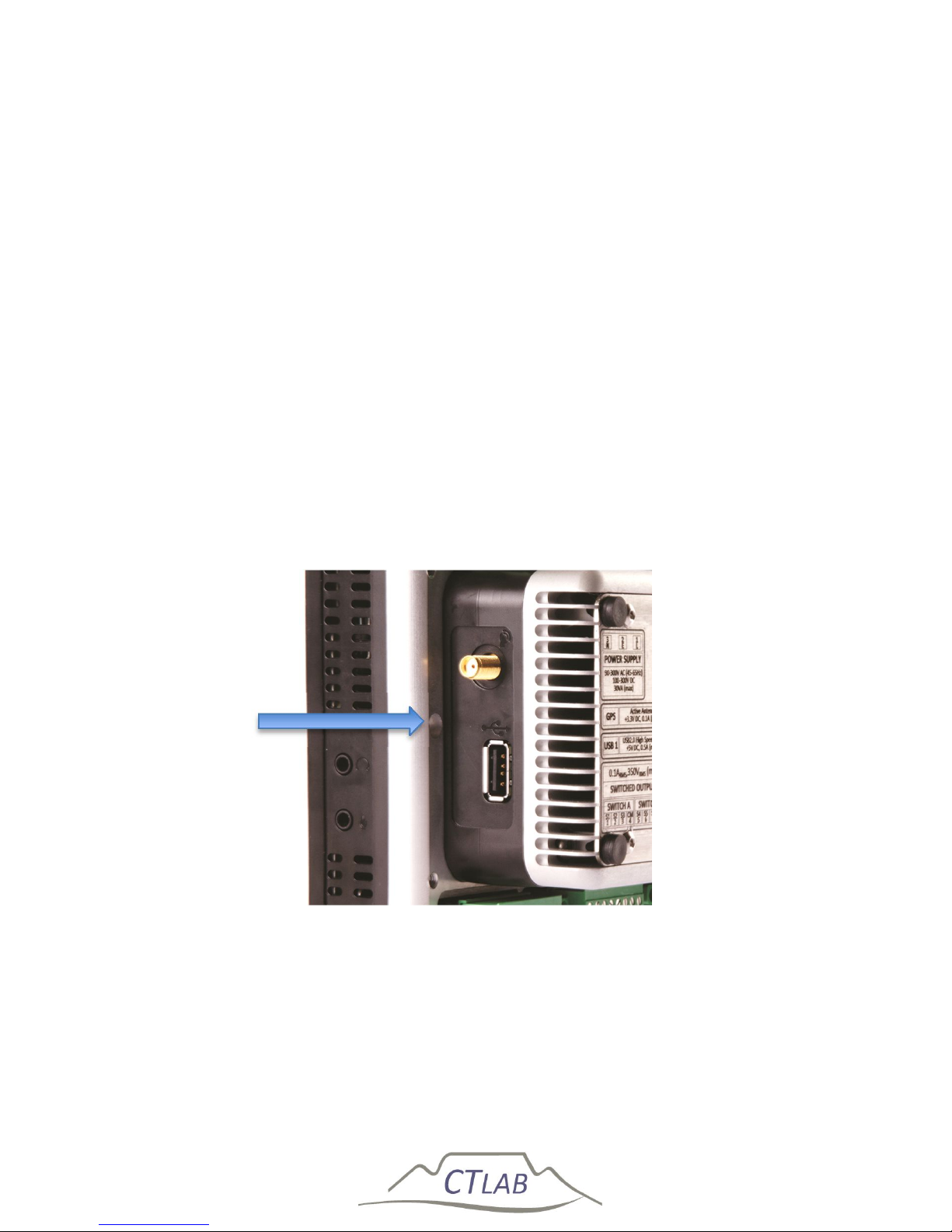
The instrument is shipped with the reset switch switched off to protect the battery
and increase the storage live of the Impedo DUO. The reset switch is reachable via a
small hole close to the GPS port on the right side of the instrument (see Figure 18). A
paperclip or similar device is required to toggle the switch. The instrument is ready to
use once the reset switch is activated. Note that the instrument battery must be
charged more than 30% of full capacity before the instrument will start. Be sure to
connect the instrument to mains power before switching the reset button, see
Section 0
Figure 18: Location of the reset switch
Reset Switch
Page 43
Impedo DUO User Guide
43
3.2 Checking the Battery Level
After switching the instrument ON with the reset button (Section 3.1), touch the LCD
screen to activate the multi-touch screen and OLED. If the OLED display does not
show a flashing power icon as shown in Section 0, the battery is discharged too far
and the instrument will not power up before sufficient battery charge level has been
obtained. When the instrument is connected to mains (see Section 6.2.1) and the
battery icon flash on the OLED the instrument battery level is below the operational
level. Wait until the battery disappears and the flashing power icon is visible on
touching the LCD screen.
The fast charge mode will require 2 hours to restore the battery to 100% state of
charge (instrument must be powered down). A maximum of 40 minutes charge time
is required to restore to the point where the instrument can be started. See Section
4.6 for a description of the battery status indicator that is visible once the instrument
is switched on.
The instrument will not power up until sufficiently charged (see
Section 4.6)
Page 44
Impedo DUO User Guide
44
3.3 Powering up the Impedo Duo
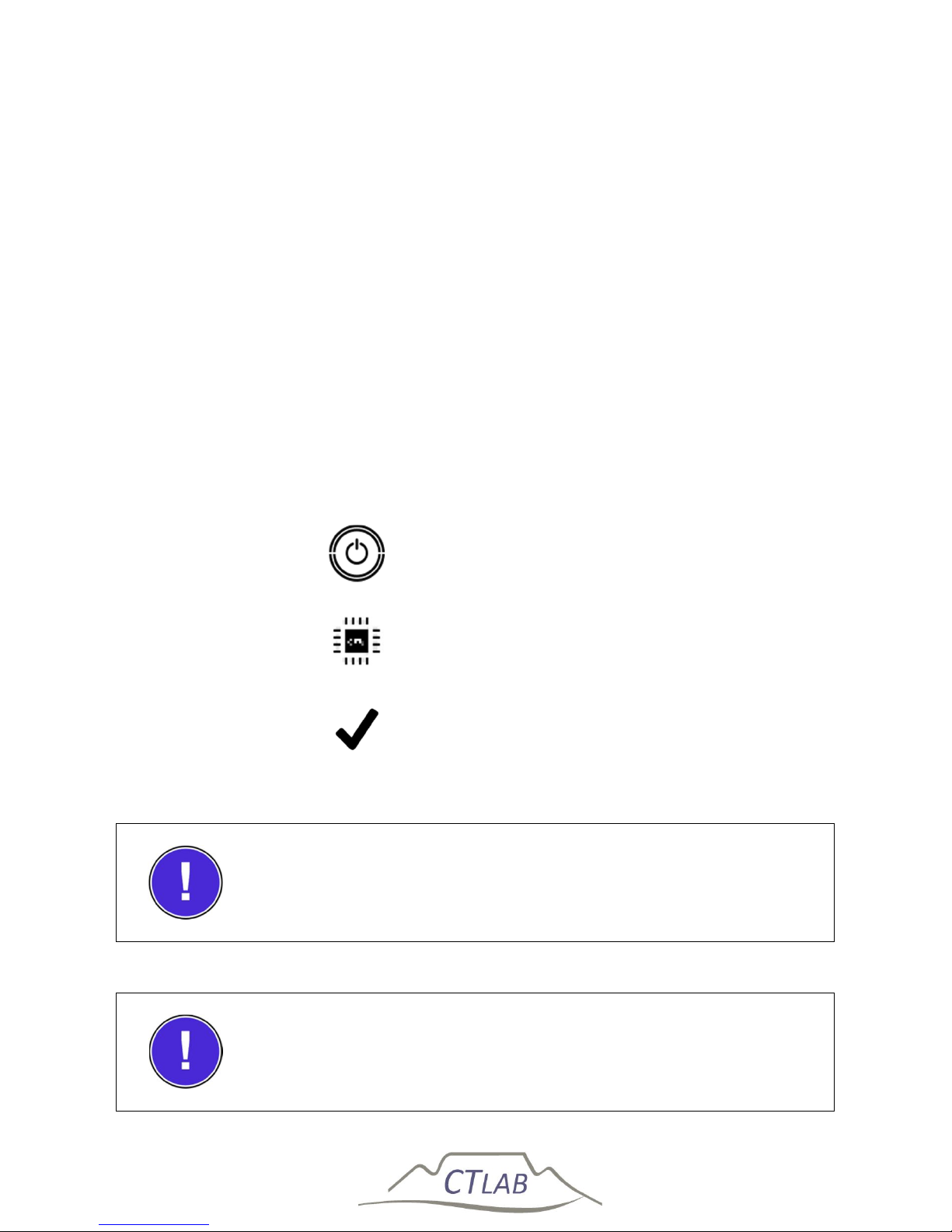
The Impedo Duo does not contain a physical power switch. A start gesture on the
OLED display is required to switch the instrument ON (single finger slide from top to
bottom).
On the first touch (anywhere on the glass panel), the Impedo Duo Power Distribution
Unit (PDU) will scan the battery status. If sufficient power is available, the PDU will
switch on the OLED to display a power switch icon. When touching the power switch
icon, the PDU will animate the gesture required to switch on the instrument.
A small processor icon followed by a check mark icon will display on the OLED after
recognition of a valid start gesture. The check mark symbol indicates successful
booting of the embedded operating system. Next, the main display will show a startup animation, which is then replaced by the final user interface once booting
completed. The OLED will show the running information status.
Power-switch icon
Booting operating system
Operating system booted
The instrument will not power up until sufficiently charged (see
Section 4.6)
External power is required if no response was received on the
OLED display
Page 45
Impedo DUO User Guide
45
3.4 Impedo Duo Unlock Screen
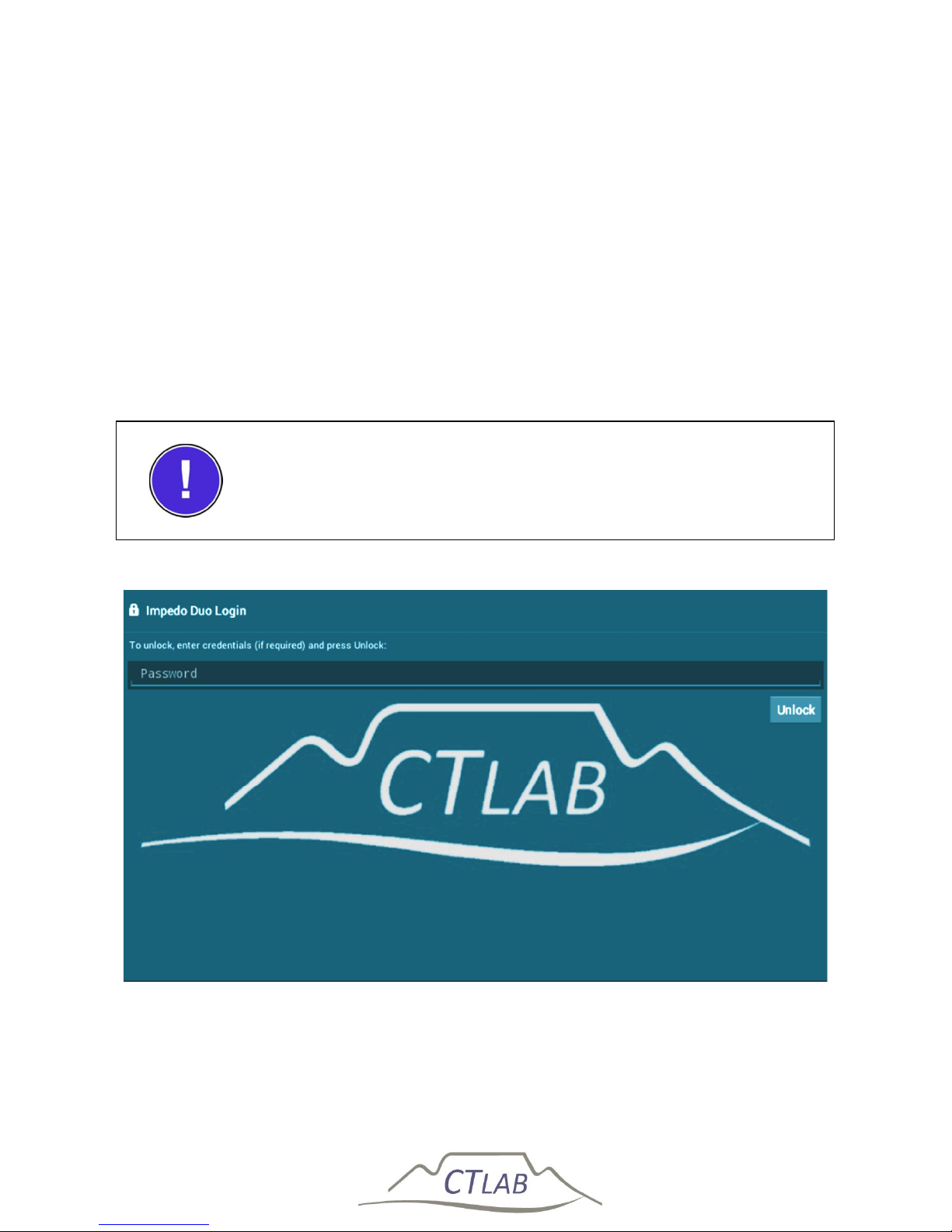
The Impedo Duo will switch the main display off, after ±20 seconds without input
from the user, to save power and to protect the instrument from unauthorised
access. Touching the glass panel will switch on main display with the unlock-screen
with an unlock button on the upper right corner of the screen as shown in Figure 19.
The unlock-screen is password protected, the user may choose to enable or disable
password protection. Touching the power off button (Section 3.5) will immediately
return the device to the unlock screen. Refer to Section 5.7.3.4 for detail on setting
passwords for the Impedo Duo.
Password protection is disabled by default
Figure 19: Impedo Duo unlock screen
Page 46
Impedo DUO User Guide
46
3.5 Shutting down
There is no physical power OFF button on the Impedo Duo. To power off the
instrument, first unlock the user interface (UI). If necessary, terminate the current
running application. Press and hold the power off button (see below) located on the
bottom of the display. A dialog will pop up to confirm the action. Select OK to power
off the device. The shutdown sequence may take up to 60 seconds.
Power off button
The shutdown sequence may take up to 60 seconds
If the power off button is released before the power off
confirmation dialog is displayed, the device will go to the unlock
screen
Page 47
Impedo DUO User Guide
47
3.6 Power Cycling with the Reset Switch
The Impedo Duo PDU stays powered even if the main processor is powered off. In
this mode the built-in RTC the PDU and the health sensors receive power. After being
fully charged, the Impedo Duo can be safely stored in this state for up to 3 months.
Power can be removed from the entire instrument by the reset switch. The reset
switch is reachable via a small hole close to the GPS port on the right side of the
instrument (see Section 3.1, Figure 19). A paperclip or similar device is required to
toggle the switch. The instrument is powered when the switch is in the depressed
state. Note that removing power from the instrument also removes power from the
RTC.
Upon start-up after a power cycle the RTC is in an unknown state and the instrument
must first be connected to a valid time source (GPS or NTP) to ensure it measures
correctly.
After power cycling the instrument with the reset switch, the
RTC is in an undefined state – the PQ recording system will
require a valid time source after power up before it can function
correctly
Page 48
Impedo DUO User Guide
48
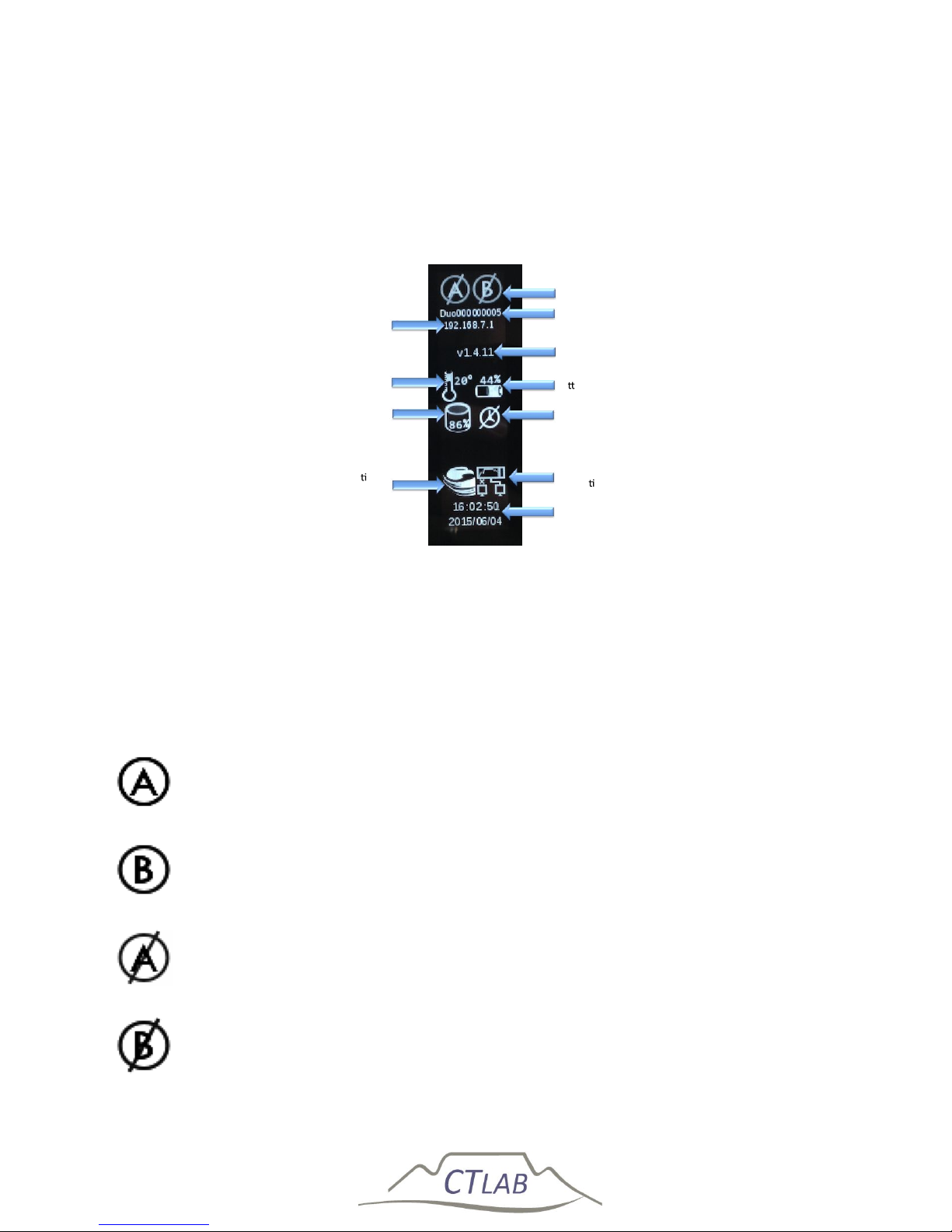
4 OLED Information Display
The OLED information display is located on the right side of the front panel, as
depicted in Figure 4. It is used to provide permanent visual feedback of the
instrument status as shown in Figure 20.
Figure 20: ImpedoDUO OLED display
4.1 Meter points
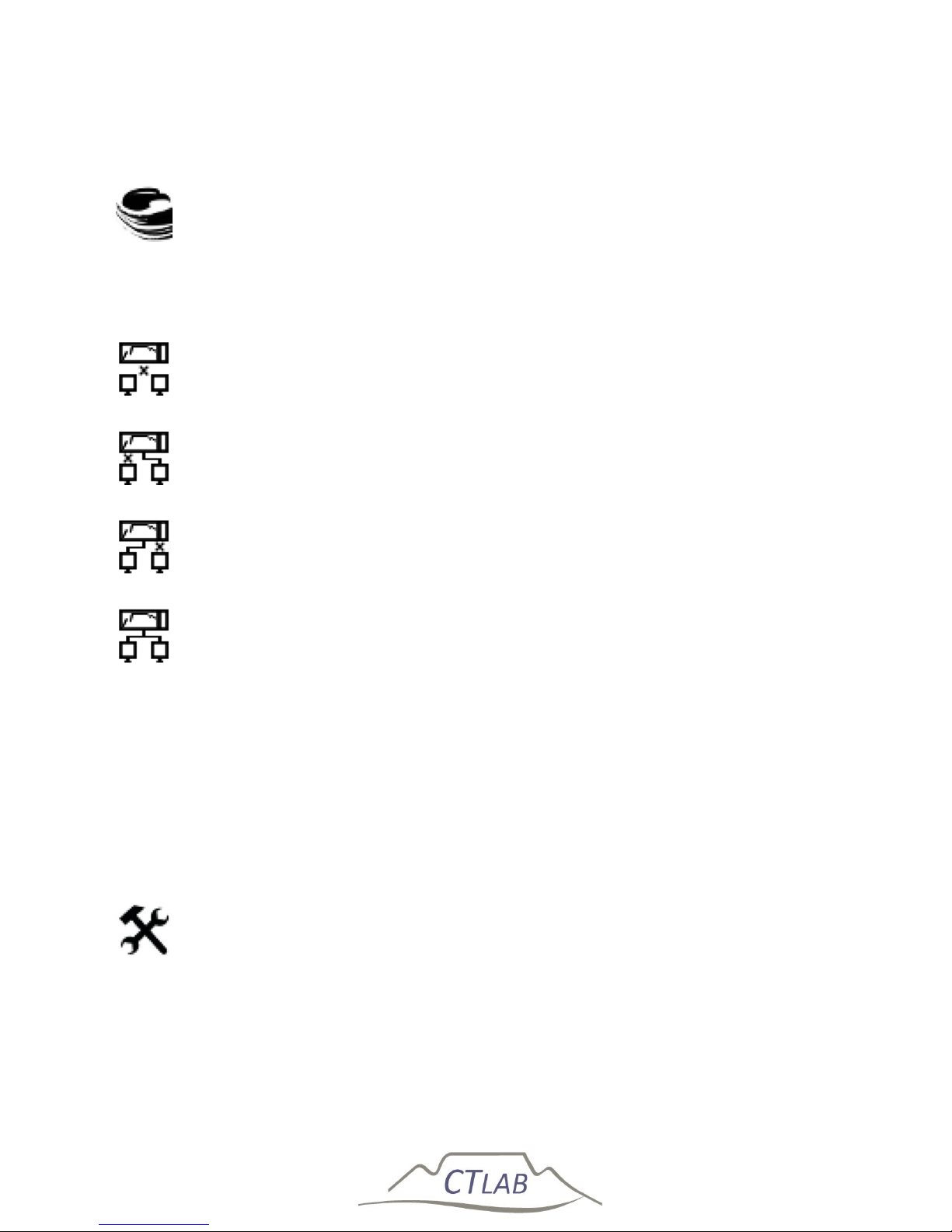
If no meter icon is displayed or is crossed out, the instrument is not recording. The
reason may be that the instrument does not have valid time, or that the recording
subsystem was disabled (see Section 5.1.2).
Meter side A is configured and recording
Meter side A is configured and recording
Meter side A is not configured and not recording
Meter side A is not configured and not recording
Time and Date
Ethernet
connec vity
Time source
Ba ery Status
Firmware
version
Serial Number
Meter points
IP address
Temperature
On-Board
Storage Usage
Connec on to
server
Page 49

Impedo DUO User Guide
49
4.2 Serial Number
The instrument serial number is displayed below the meter point icons as shown in
Figure 20. This number must match the serial number on the nameplate plate of the
instrument.
4.3 IP Address
If a live Ethernet cable is plugged into ETH 2, the IP address displayed on the OLED is
either the assigned static IP address or the IP address received via a DCHP server on
the network when configured to receive a DHCP IP address. If no cable is plugged
into ETH 2, the IP address is the fixed IP addressed as for ETH 1. Refer to Section 0 for
instructions on configuring ETH 2.
4.4 Firmware Version
The current firmware version is displayed below the IP address as shown in Figure 20.
4.5 Temperature
The temperature icon shows the internal temperature at which the device
is currently operating.
4.6 Battery Status
The Impedo Duo will automatically power-off when the battery is depleted with
absence of the primary power source. The battery status icon indicates the current
charge level as shown in Figure 20. The instrument will power-up automatically when
external power is applied. If the battery was depleted below a safe operating point,
but external power is available, the instrument will still power up, but indicate that
no surplice charge is available. Should external power fall away during this period,
the instrument will immediately power down.
If the battery was depleted below the point where the instrument can be powered
up, a battery icon will display when power is applied to the instrument and the OLED
is touched. If no external power is available, the battery icon will not be displayed.
The surplice battery charge available, and battery currently not charging
Page 50
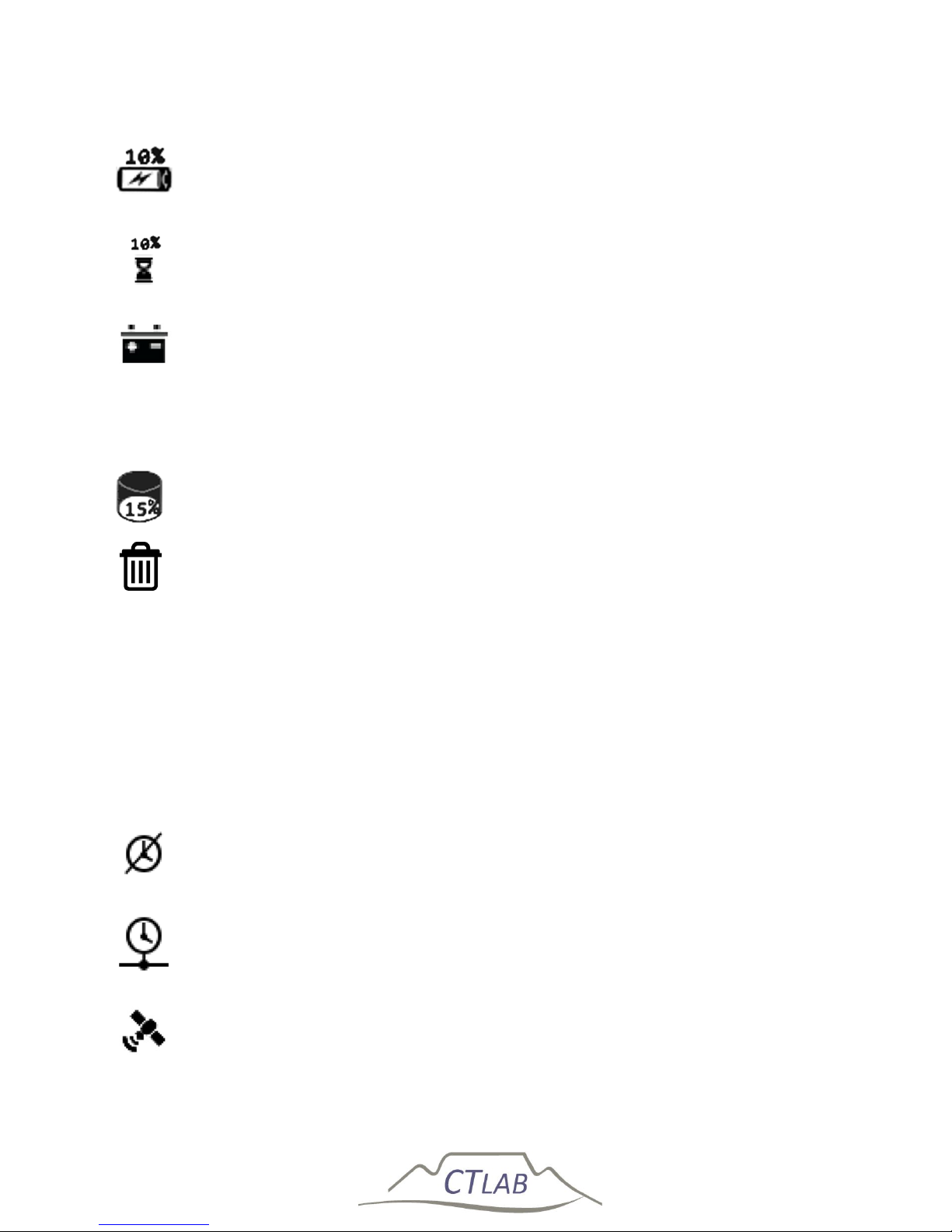
Impedo DUO User Guide
50
The surplice battery charge available, and battery currently charging
The charge time remaining until the system will have surplice charge
available and have ride through
The battery is too low to safely power-up the instrument
4.7 On-Board Storage Usage
The percentage of disc space used is displayed on the OLED as shown in
Figure 20.
If the instrument is currently deleting data, the disk usage will be replaced
by a trashcan. Once completed the disk usage icon will replace the trashcan
again.
4.8 Time source
The Impedo Duo has three sources of time. It can automatically determine which
source to use. The user can override the automatic selection and specify which time
source to use, see Section 5.7.3.3. The current selected time source is shown on the
OLED display (Figure 20) with one of three icons.
No synchronisation with a time source for example, GPS or NTP (the
internal RTC, with an accuracy of 10 ppm, can drift up to 0.86s per day)
NTP time synchronisation is available with a permanent internet
connection, enabling time accuracy of typically 20ms to the NTP time
source.
GPS time synchronisation is available with an active external GPS antenna
and enables time to be managed to within 100 ns accuracy.
Page 51
Impedo DUO User Guide
51
4.9 Connection to server
The instrument is connected to at least one Osprey server for example,
Osprey Lite or Osprey Pro.
4.10 Ethernet connectivity
No Ethernet connectivity
Only Ethernet port 1 is connected
Only Ethernet port 2 is connected
Both Ethernet port 1 and 2 are connected
4.11 Time of Day and Date
The time of day and date is displayed at the bottom of the OLED. The time is updated
every second. Should this not be the case, the Meter Gateway subsystem is not
executing as intended (see Section 5.1.1).
4.12 Device in error state
When the crossed spanner and hummer icon is displayed, the instrument is
in an error/unhealthy state. If no external action is performed within 5
minutes, it will attempt to restart the Embedded Operating System (EOS).
Page 52

Impedo DUO User Guide
52
5 Embedded Operating Software (EOS)
The Embedded Operating System (EOS) is based on a dual Linux/Android
configuration. Linux provides infrastructure for low-level functions, and Android
provides the Graphical User Interface (GUI). The Impedo Duo is supported by the
Osprey Lite and Osprey Pro software suites.
The latest version of Osprey Lite is available for download at www.ctlab.com. Please
refer to the document Osprey Lite User Guide for information on using Osprey Lite to
interact with the Impedo Duo.
For information about Osprey Pro, please contact CT LAB.
5.1 EOS Subsystems
5.1.1 Meter Gateway
All external communication is handled by Meter Gateway. It serves as the main
control subsystem of the Impedo Duo. As such, when Meter Gateway is not running
remote communication is not possible. The built-in watchdog will restart Meter
Gateway if it should become non-responsive. Restarting Meter Gateway has no
impact on PQ data capturing and recording.
Meter Gateway is responsible for updating the OLED display. If the time is updated
every second, Meter Gateway is running. It houses (amongst others) the following
components:
Space Reclaimer This component is part of Meter Gateway, and is responsible
for deleting data as the internal storage becomes full. See
Section 5.7.3.1 for details on configuring Space Reclaimer.
Health-Manager This component is part of Meter Gateway, and is responsible
for powering off the instrument when health parameters
exceed their limits (see Section 5.7.3.2 for details).
Time-Master This component is part of Meter Gateway, and is responsible
for managing time on the instrument. It determines when
time is valid, and selects the best source of time. Section 0
describes its configuration.
Modbus This component is part of Meter Gateway, and is responsible
for serving Modbus data.
Page 53
Impedo DUO User Guide
53
5.1.2 Storer
Storer is the PQ recording subsystem. If it is running the two meter point status icons
are shown at the top of the OLED status display (see Section 4.1). See the Osprey Lite
user manual for more information on the restart procedure of the Storer.
5.2 Communicating with the Impedo Duo
All communication with the Impedo Duo is IP based. To secure communication over
open networks, all traffic is encrypted. The encryption requires two passwords – the
fleet password and the instrument key.
The fleet password is a shared secret across all servers and instruments belonging to
the fleet. The fleet password must be entered on the Impedo Duo using Registration
(see Section 5.6).
The instrument key is unique to each instrument and comes preloaded on the
instrument. The key is also provided on the USB storage device shipped with the
instrument. In order to communicate with the instrument the instrument key must
be loaded into the server (see Osprey Lite User Guide for instructions on registering
an instrument with Osprey Lite).
The Impedo Duo communicates using several well-known ports. Ensure that ports
27030 – 27045 are not blocked by any firewall between the instrument and the
Osprey server. These ports must also be forwarded should any network address
translation occur between the instrument and the Osprey server.
Both the fleet password and the instrument key are required
before communication with the Impedo Duo is possible
The Impedo Duo communicate on ports 27030 – 27045
Page 54

Impedo DUO User Guide
54
5.3 Data Recording
5.3.1 Meter points
The meter point is used as the site ID and is linked to a specific metering circuit. The
meter point information includes:
Descriptive:
Instrument information
o Serial number
o Calibration date
o Calibration issued by
o Firmware
o Time source
o Configuration date
Site name
Description
Voltage level
Panel name
Substation
VT connection point
Contact person
Contact number
Voltage information:
Configuration: Star, Delta, Single phase or DC
Frequency
Declared voltage
VT ratio
Current information:
Current sensors / Current transducers
CT ratio
Derive a channel
Trend:
Selection of trend from 200ms block data up to 30min RMS data
PMU/synchrophasor data
Page 55
Impedo DUO User Guide
55
Monitors:
Selection of IEC61000-4-30 event monitors
Should the user require the full list of descriptive information as provided above,
please contact CT Lab to unlock the full list, as the instrument only present some of
the above information.
A meter point can be re-used when an instrument is re-installed for instance during
an investigation or if the instrument was moved for a period of time by attaching the
meter point during installation. A meter point is detached in Osprey Lite or on the
Impedo DUO in the configuration app to stop recordings or attached to proceed with
data recording for the specific meter point.
A meter point can only be created when the ImpedoDUO has a
valid time source.
5.3.2 Time
Data recorded with invalid timestamps are not useful. The Impedo Duo will attempt
to ensure that it only records data with valid timestamps. After a power cycle with
the reset switch (cf. Section 0) the RTC is in an undefined state. Typically, but not
necessarily so, it has a date of 1 January 1970.
The instrument detects invalid dates by marking dates, the following dates as invalid:
Prior to 2010
Prior to 1 day earlier than the time when the instrument was last shut down
with valid time
Later than 1 year that the time when the instrument was last shut down
with valid time
It is important to note that the instrument will not record any PQ data until it
received valid time at least once after powering up.
Page 56
Impedo DUO User Guide
56
This is only valid when a user resets the instrument, when the
instrument shuts down due to supply reliability the RTC will
continue for longer than 6 month without validating the time
from NTP or GPS.
The Impedo Duo’s built-in real-time clock (RTC) is accurate to 10 ppm, implying that
in the worst case it can drift up to 0.864s per day (or 6s per week, 5 min per 365
days), and support leap year. To prevent time from drifting the Impedo Duo can keep
its time synchronized to 100ns of absolute time using a GPS, or 20ms of server time
using NTP. Time synchronisation is also possible with Osprey Lite but to an accuracy
of 1ms from the PC used for the clock synchronization.
The instrument will perform a gradual time change (time creep) when its time and
that of the time source differs slightly. If the difference is overly large, the time will
be stepped, causing a time jump. A time jump will cause a discontinuity in the data
and a new data segment (cf. Section 5.6.3) will be created.
Time creep will not cause a discontinuity in the recorded data. However, frequency
measurements are not valid and will not be recorded or available via Realtime View
during time creep. Trend aggregation will take this into account and will only
aggregate frequency values that were valid.
When the time difference between the instrument and the selected time source is
negligible, the instrument is said to be time locked. Time-Master will keep the
instrument time locked as long as the time source is available.
During automatic time source selection, Time-Master will use the following sources
in order of preference when available: GPS, Network time, internal clock. TimeMaster will change from GPS to NTP time if no GPS signal was received for 30
minutes. If the NTP server time and GPS time differs sufficiently, a time jump will
occur. A time jump may also occur if the system switches from one NTP server to
another and the NTP servers had sufficiently different time. See Section 0 for a
description of Time-Master’s configuration.
Page 57
Impedo DUO User Guide
57
Frequency is not measured during time creep
Time jumps may cause data discontinuity
5.4 How to navigate within EOS
The Back button returns the user to the previous screen in an
application. When on the first screen of an application, it will return
you to the Duo home screen.
The Keyboard Hide button replaces the back button whenever the
keyboard is visible onscreen. Pressing it hides the keyboard.
The Home button returns you to the home screen immediately.
The Window List button brings up a list of applications currently
active. Touch an item in the list to navigate to that application.
Page 58
Impedo DUO User Guide
58
The Power button. Touching the power button will lock the
instrument and will display the unlock screen. Within a few seconds
after the unlock screen was displayed, the main display will be shut
down to save power.
To power down the entire instrument, the user must touch and hold
the power button. A ‘Power Off’ window will pop up to ask the user
to confirm powering the instrument down. Pressing the OK button
will power the instrument down.
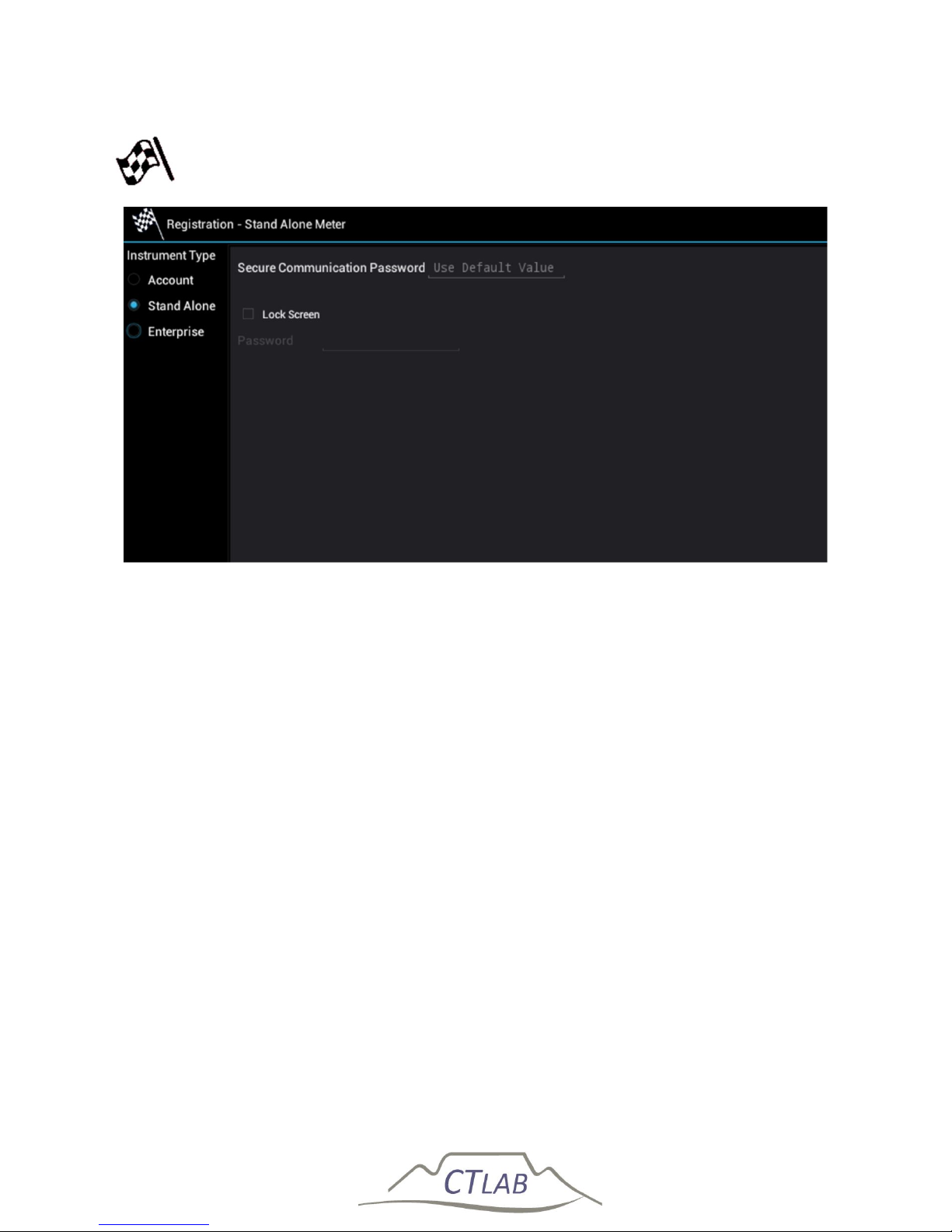
5.5 Application Selection Screen
The application selection screen is used to select the application to execute. The
different applications will be described in the remainder of the Chapter.
Figure 21: Application selection screen (also called launch screen)
Page 59
Impedo DUO User Guide
59
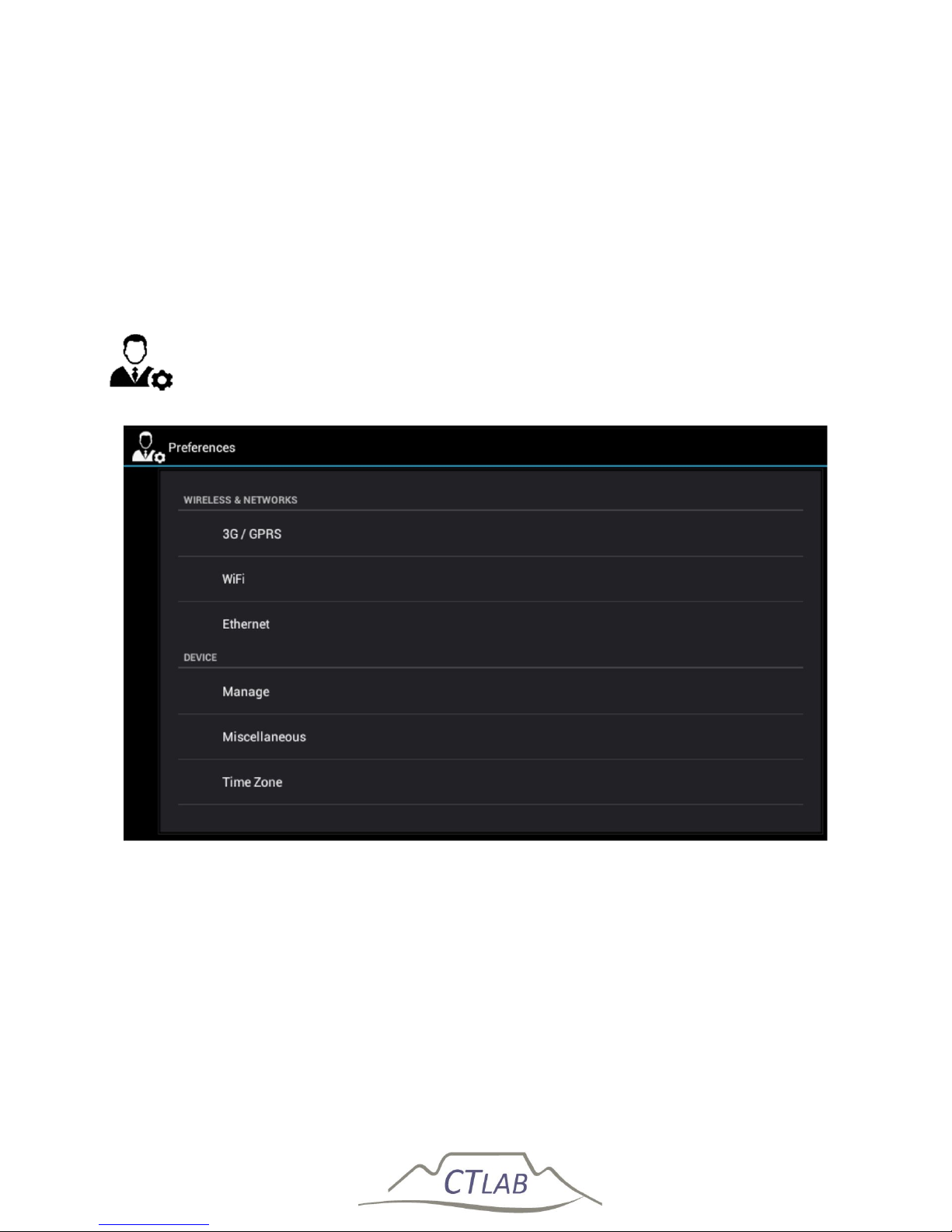
5.6 Registration
Figure 22: Registration is used to enrol the instrument as part of a fleet
5.6.1 Account
The instrument is part of a fleet that is registered with Osprey Pro. Enter the account
code and password to enrol the instrument.
5.6.2 Standalone
The instrument is not configured as part of an enterprise fleet – the instrument will
not attempt to establish communication with an enterprise server. The user can
enter the fleet password to enrol it in a standalone fleet.
The instrument’s UI can be secured against tampering by entering a lock screen
password. See Section 5.7.3.4 for more detail on password protection on the Impedo
Duo.
5.6.3 Osprey Pro (Enterprise)
The instrument is configured as part of an enterprise fleet managed by Osprey Pro.
Enter the IP address of the Osprey Pro server and the fleet password.
Page 60
Impedo DUO User Guide
60
In enterprise mode the instruments continuously attempts to establish
communication with the enterprise server until successful. Should communication be
lost, the instrument will try to re-establish it.
Osprey Pro supports multi-user accounts, each password protected. Osprey Lite does
not support multi-user accounts. In Enterprise mode, the lock screen requires user
authentication. If no connection with a server is established the instrument will only
be able to unlock using the override password (see Section 5.7.3.4.1 for details).
5.7 Preferences
Figure 23: Preferences is used to manage generic settings on the Impedo Duo
Page 61
Impedo DUO User Guide
61
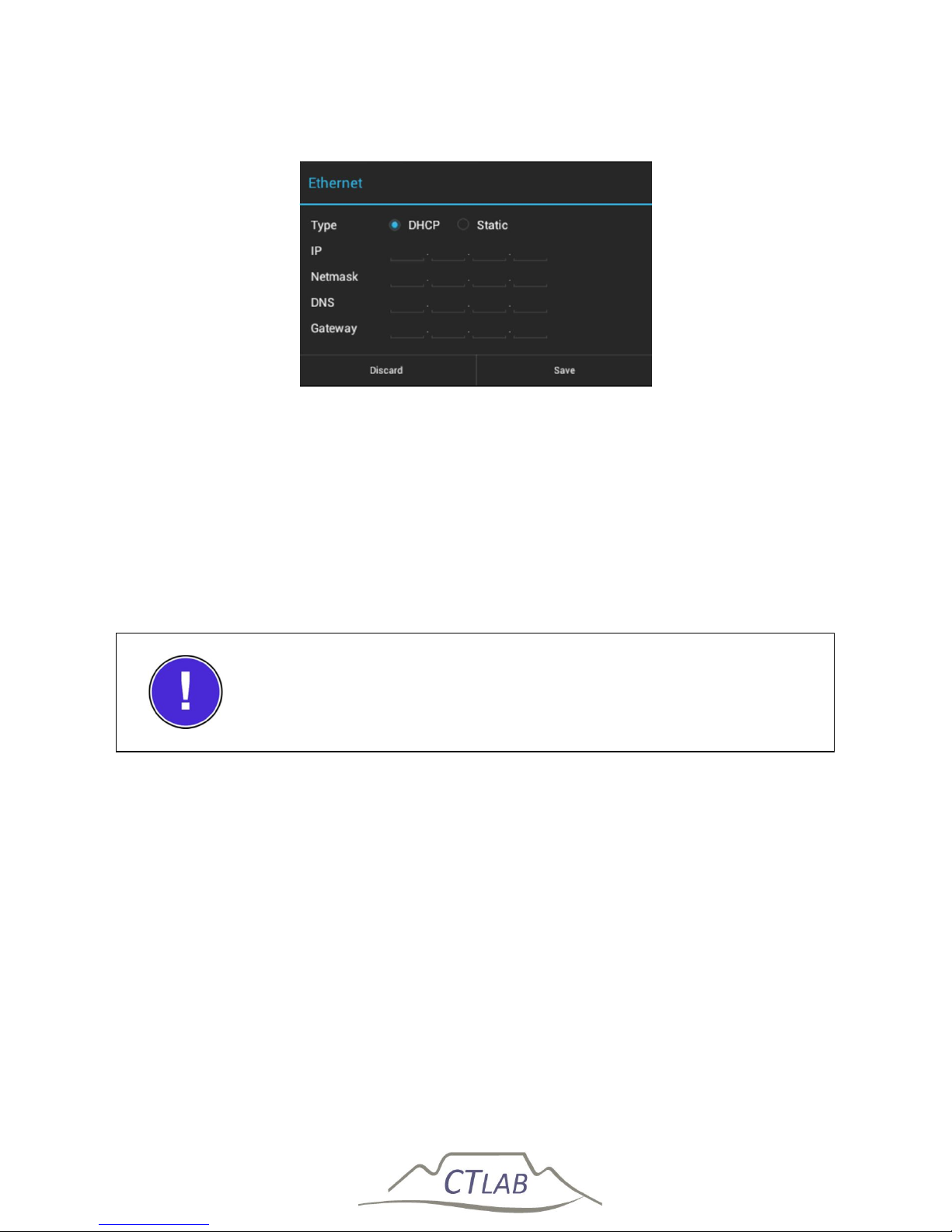
5.7.1 Ethernet
Figure 24: Ethernet configuration for port 2
5.7.1.1 Communicating via Ethernet on LAN
The port marked ETH. 2 is used to establish communication to an enterprise network
or to a laptop/PC running Osprey. The user has the ability to manually configure the
IP address of this port or to allow the address to be issued by a remote DHCP server.
This setting is provided by selecting Ethernet in Preferences (see Figure 24).
Only the IP address of ETH 2 can be configured
5.7.1.2 Communicating via Ethernet through a Router
Connect the Impedo Duo to the router through Ethernet Port 2. Configure the
Impedo Duo to have a fixed IP in the same IP range as the router. Ensure that the
gateway address of the Impedo Duo is set as the router’s local IP address. Example:
Router:
IP: 192.168.254.1 Netmask: 255.255.255.0
Impedo Duo:
IP: 192.168.254.2 Netmask: 255.255.255.0 Gateway: 192.168.254.1
On the router, port forwarding needs to be set up to forward ports 27030 - 27045 to
the Impedo Duo’s address.
Page 62
Impedo DUO User Guide
62
5.7.1.3 Communicating directly with a laptop or PC
The port marked ETH. 1 is used to create a local network. The Impedo Duo will issue
DHCP addresses on this port. This port is primarily used to establish communication
to a Laptop/PC that is not connected to an enterprise network. This means the
laptop/PC needs to be setup to receive its IP configuration through DHCP.
Clicking Discover on the Address Book page of the Osprey software connects the
instrument and the laptop without requiring any IP information.
The Impedo Duo serves as a DHCP server on ETH 1
Do not connect Ethernet port 1 to a network with an active
DHCP server, as this may cause the network to stop functioning
properly
The IP address of Ethernet port 1 is fixed at 192.168.7.1
Page 63
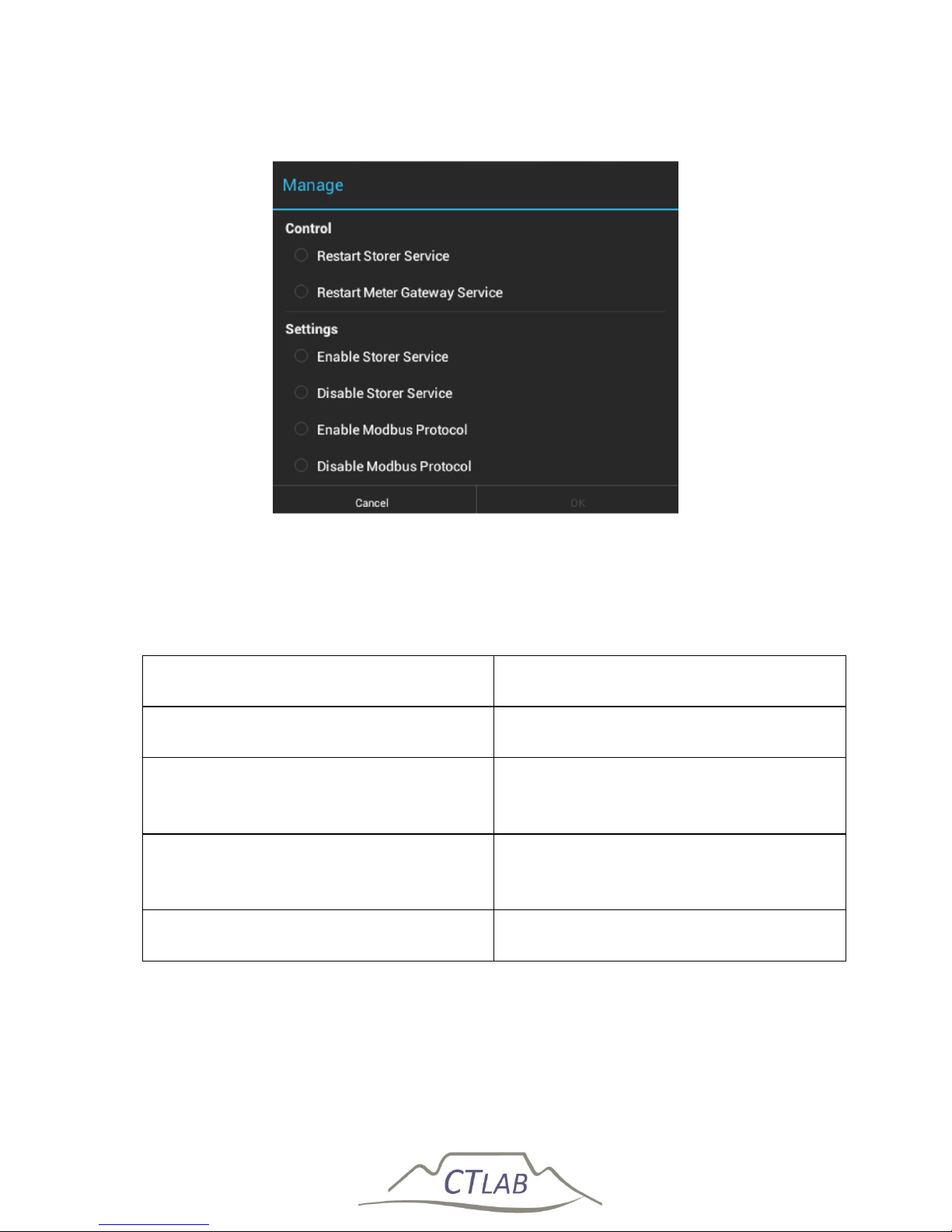
Impedo DUO User Guide
63
5.7.2 Manage Instrument
Figure 25: Manage Instrument is used to manage EOS subsystems
Table 6: Manage Instrument options
Description Clarification
Restart Storer Service Restart the PQ recording subsystem
Restart Meter Gateway Service Restart the instrument control
subsystem
Enable/Disable Storer Service Enable/Disable the PQ recording
subsystem
Enable/Disable Modbus Protocol Enable/Disable Modbus SCADA
Page 64
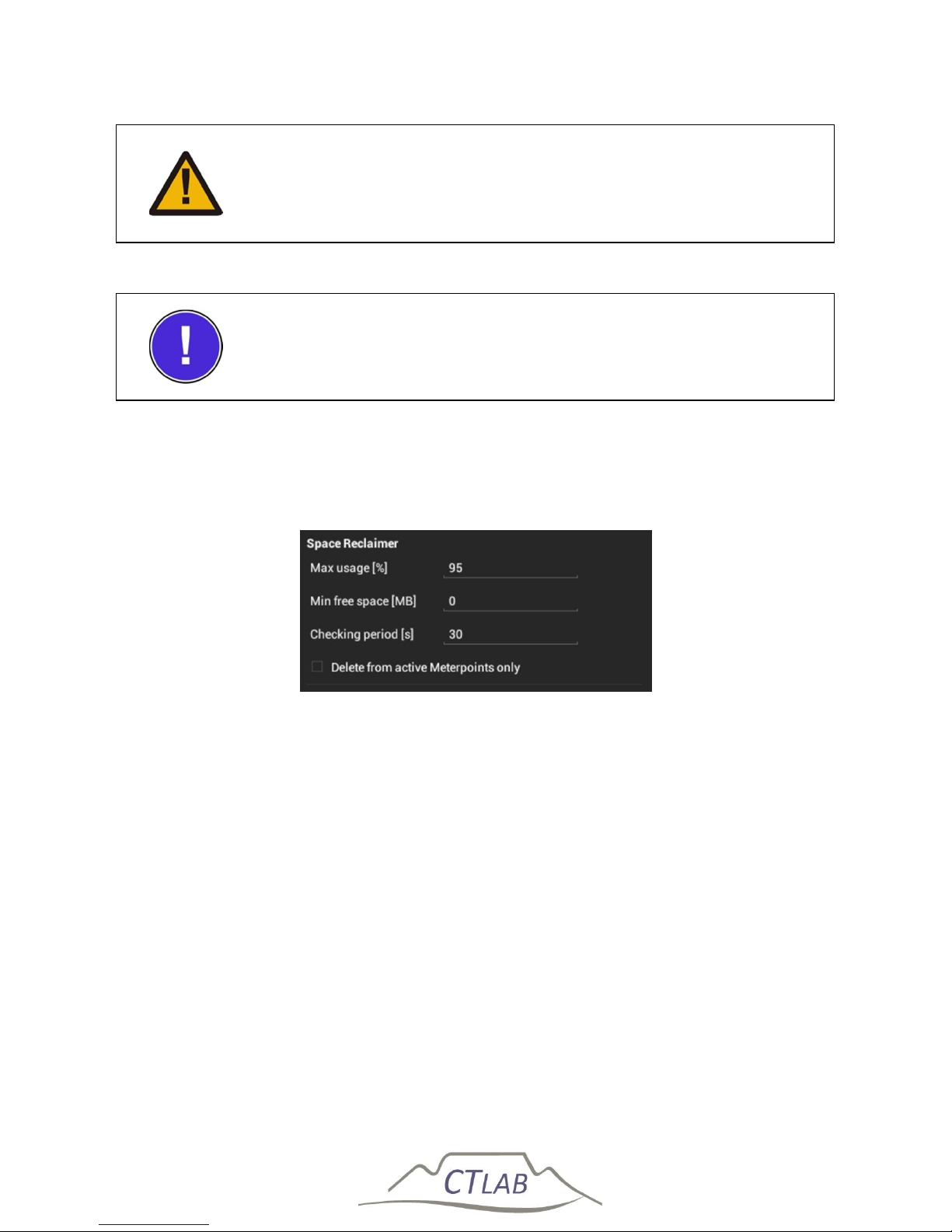
Impedo DUO User Guide
64
While the Storer service is disabled, no PQ data will be recorded
Disable Modbus if not required, as this subsystem requires more
power to operate and will drain the battery faster when no
external power is available
5.7.3 Miscellaneous
5.7.3.1 Space Reclaimer
Figure 26: Space Reclaimer configuration
Space Reclaimer deletes old data when the internal storage becomes full. It can be
configured to delete data (oldest first) when reaching a specified percentage of
storage usage, or when the remaining space available reaches a set size. If both the
percentage usage and minimum free space is set, the limit that is reached first will
apply.
If the maximum percentage usage is set to 100 and the minimum free space is set to
zero and the storage usage reaches 100% the system will detach the meter points
and stop recording.
The period between storage checks is configurable.
Page 65
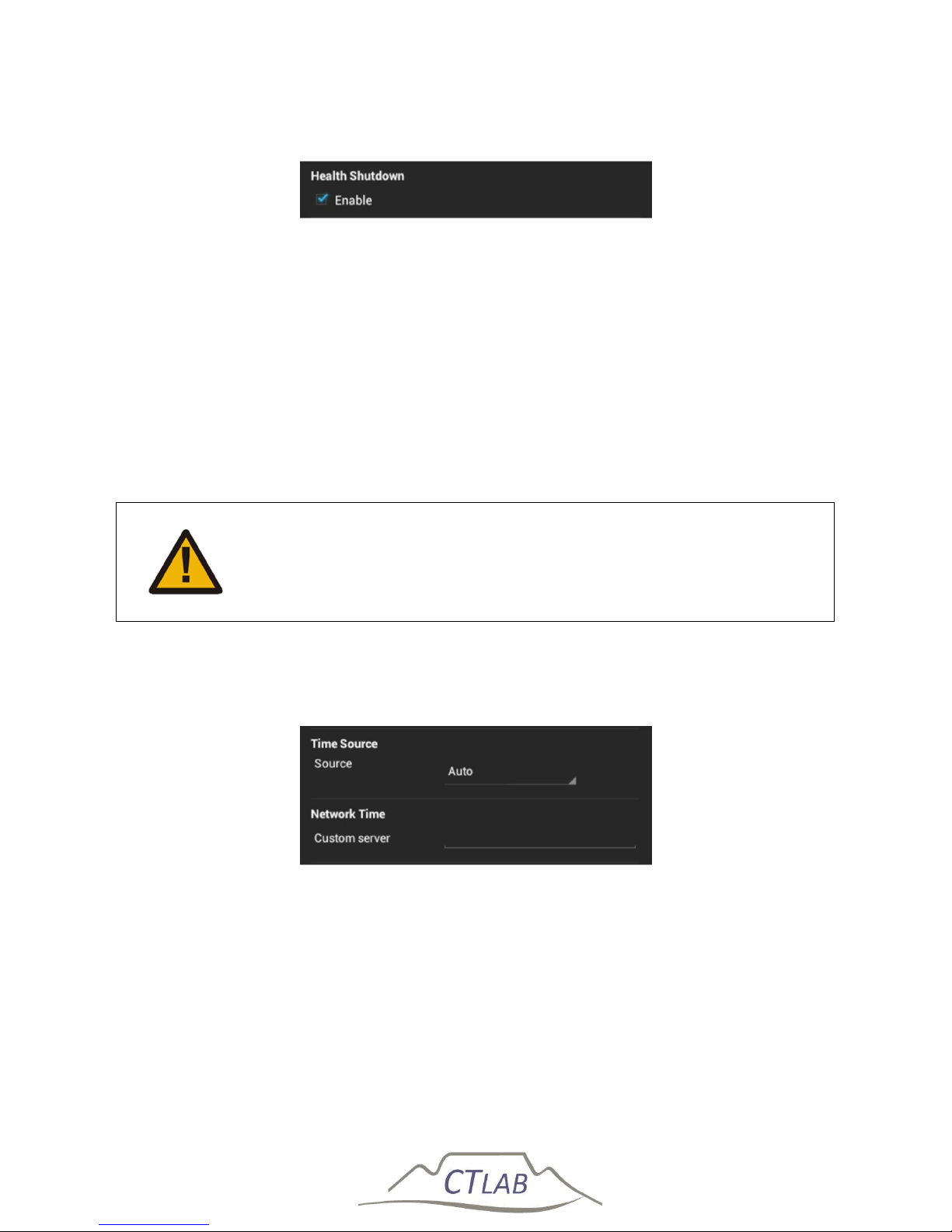
Impedo DUO User Guide
65
5.7.3.2 Health Shutdown
Figure 27: Health-Manager configuration
Health-Manager periodically checks the system health. The battery charge level and
system temperature is shown on the OLED display. Health-Manager will shut down
the instrument to protect it from damage if the system temperature drops below
0 ⁰C or rises above 75 ⁰C. Health-Manager will shut down the instrument to protect
the battery from damage if the battery charge level drops below 0 %. Uncheck the
Enable checkbox (see Figure 27) to instruct Health-Manager to disregard the system
health.
Disabling Health-Manager may cause permanent damage to the
instrument should a health-based shutdown be indicated
5.7.3.3 Time
Figure 28: Time-Master configuration
The Impedo Duo will not record any PQ data unless it has valid time. Time-Master
manages this aspect of the instrument. It automatically determines the best time
source. It will use the following sources in order of preference: GPS, Network time,
internal clock. Automatic time source selection can be disabled by setting the time
source explicitly to either GPS or NTP.
Page 66
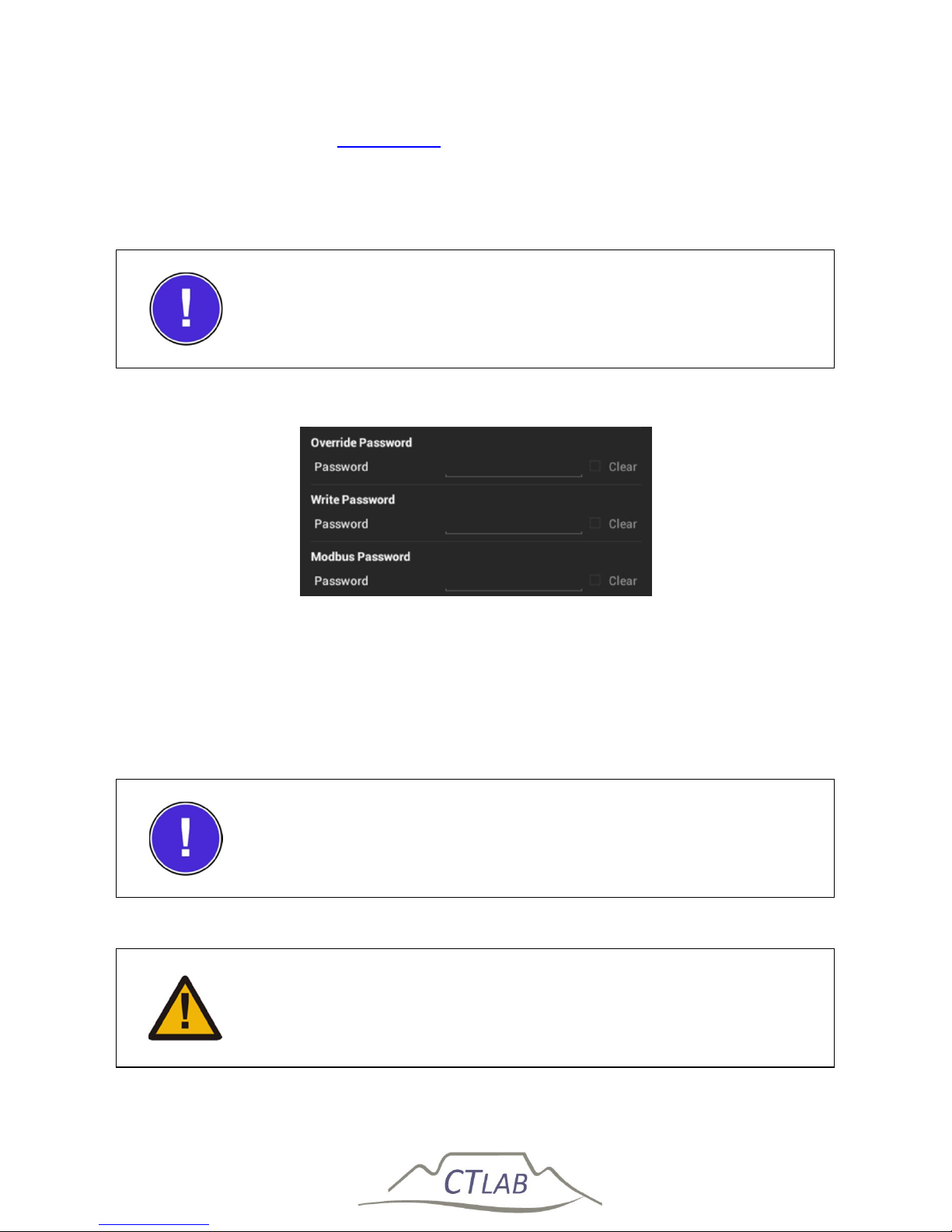
Impedo DUO User Guide
66
Time-Master will query pool.ntp.org to find the best NTP server close to the
instrument. If a specific NTP server is desired, the server IP address or DNS name can
be entered in the Custom server field (see Figure 28).
The Impedo Duo will not record any PQ data until it has valid
time
5.7.3.4 Security
Figure 29: Security configuration
5.7.3.4.1 Override Password
The override password is used to override a user login password (applicable when
the instrument was registered as part of an enterprise or Osprey Pro fleet). It can
also override the write password. By default it is set as CT Lab.
The default override password is CT Lab
Set the default override password to secure the device against
unauthorized physical access
Page 67
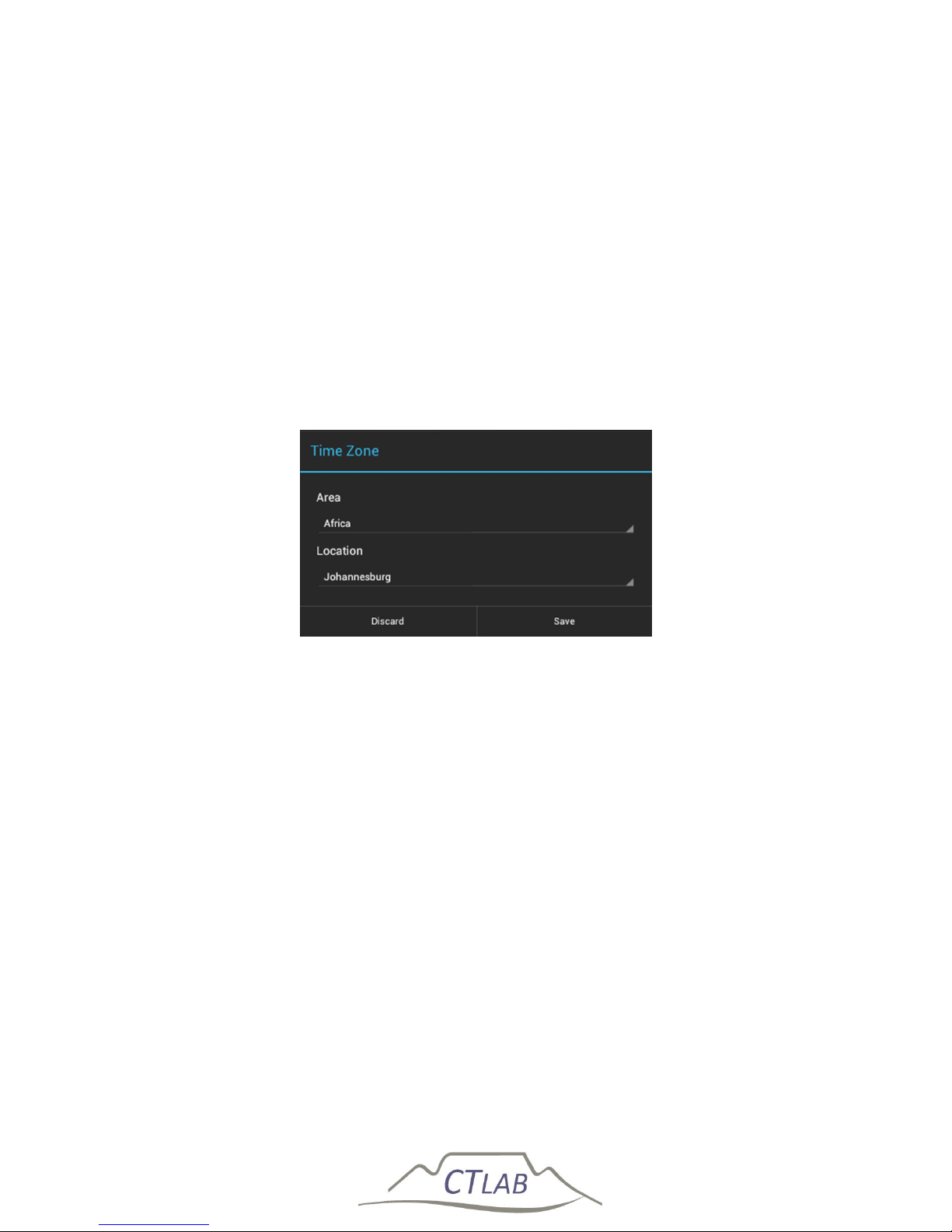
Impedo DUO User Guide
67
5.7.3.4.2 Write Password
If set, applications that perform state changing actions (Preferences, Registration,
Meter Config, Manage Data) will require this password before opening. This
password can be used when the instrument is in Standalone mode, and it is required
that data may be viewed, but no changes made to the instrument. By default it is
empty.
5.7.3.4.3 Modbus Password
The Modbus subsystem uses this password during authentication.
5.7.4 Time Zone
Figure 30: Time zone configuration
The time zone setting configures the time zone used to display time and dates on the
UI (e.g. on the date and time OLED status area). The time zone setting will not
influence the dates of captured data in any way.
To configure the time zone, first select the area of the time zone, and then the
location. Then select save. The OLED display should update to reflect the selected
time zone.
Page 68
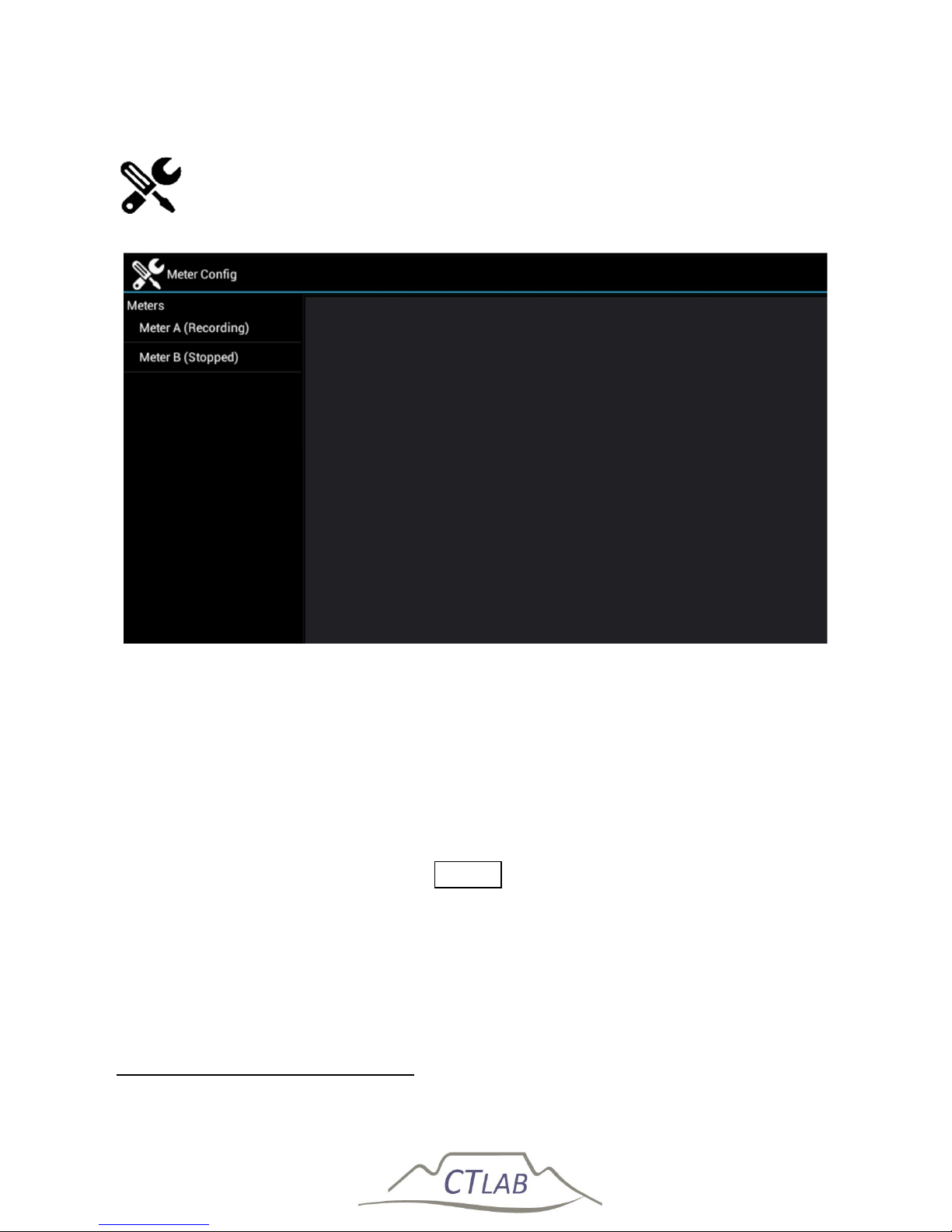
Impedo DUO User Guide
68
5.8 Meter Config
Figure 31: Meter Config is used to create and configure meter points
Meter Config allows the user to create and configure meter points. One can also
detach meter points, or reattach previously created meter points. The display is
divided into the navigation menu on the left and the detail view on the right.
5.8.1 Creating a New Meter Point
To create a meter point and attach it to a specific meter, select the relevant meter by
clicking on Meter A or Meter B3. Click Create on the bottom right.
3
The meter must be stopped before a meter point can be created for it.
Page 69
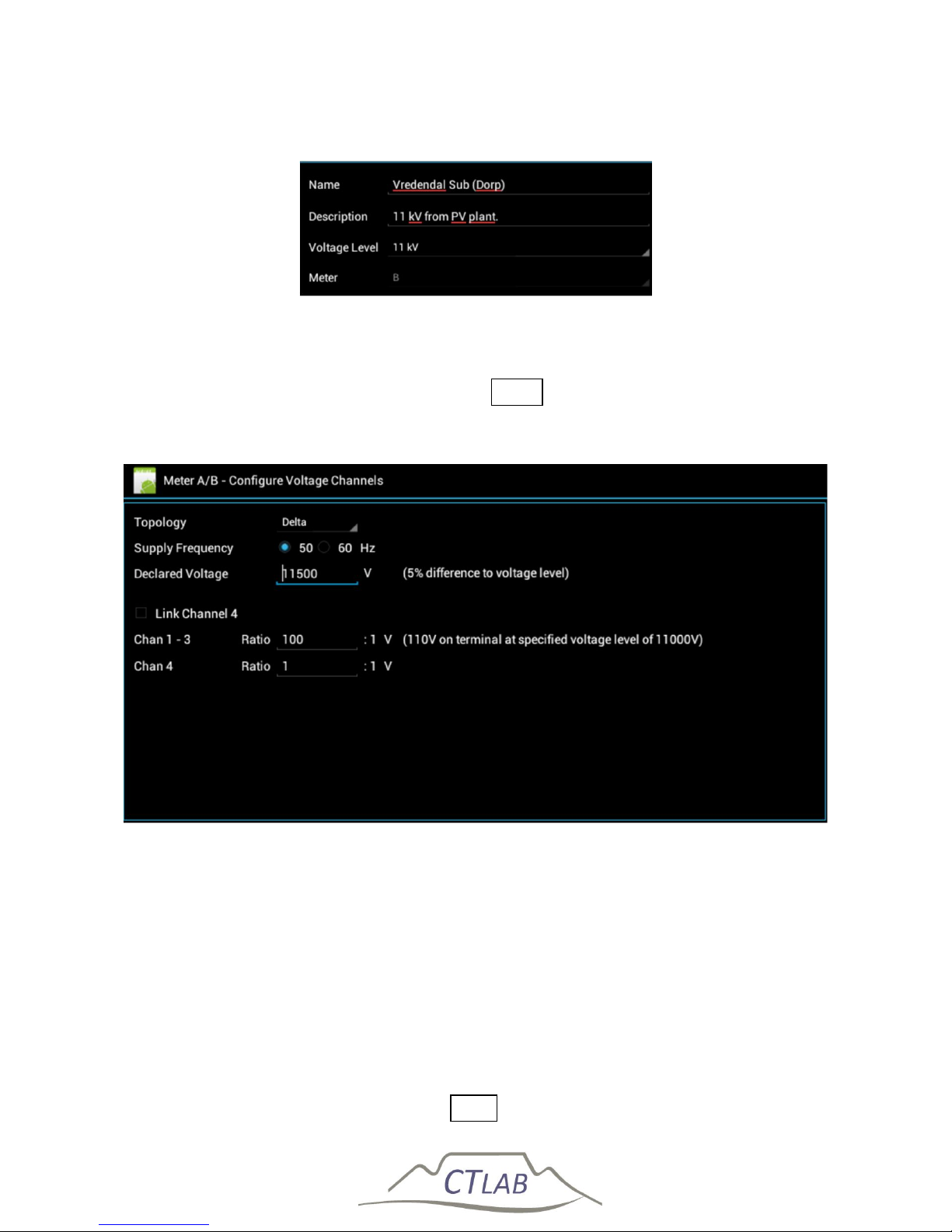
Impedo DUO User Guide
69
5.8.1.1 Meter Point Detail
Figure 32: Meter point creation – meter point detail
Enter the meter point name, description and the voltage level (nominal voltage)
under which the meter point operates. Click Next to continue.
5.8.1.2 Configure Voltage Channels
Figure 33: Meter point creation – voltage channel configuration
Select the installation topology, supply frequency and the declared voltage. Declared
Voltage can be different from the nominal voltage in that the utility can operate the
network at a higher level than designed. This ensure that the client at the furthest
end of the line still receive adequate voltage. The difference in percentage is
indicated next to the declared voltage.
Enter the VT ratios. If the 4th channel is used with a VT that has a different ratio than
the main VT, uncheck the Link Channel 4 checkbox to enter the different ratio for
channel 4. The voltage on the measuring terminal at the nominal primary voltage for
the specified VT ratio is displayed. Click Next to continue.
Page 70
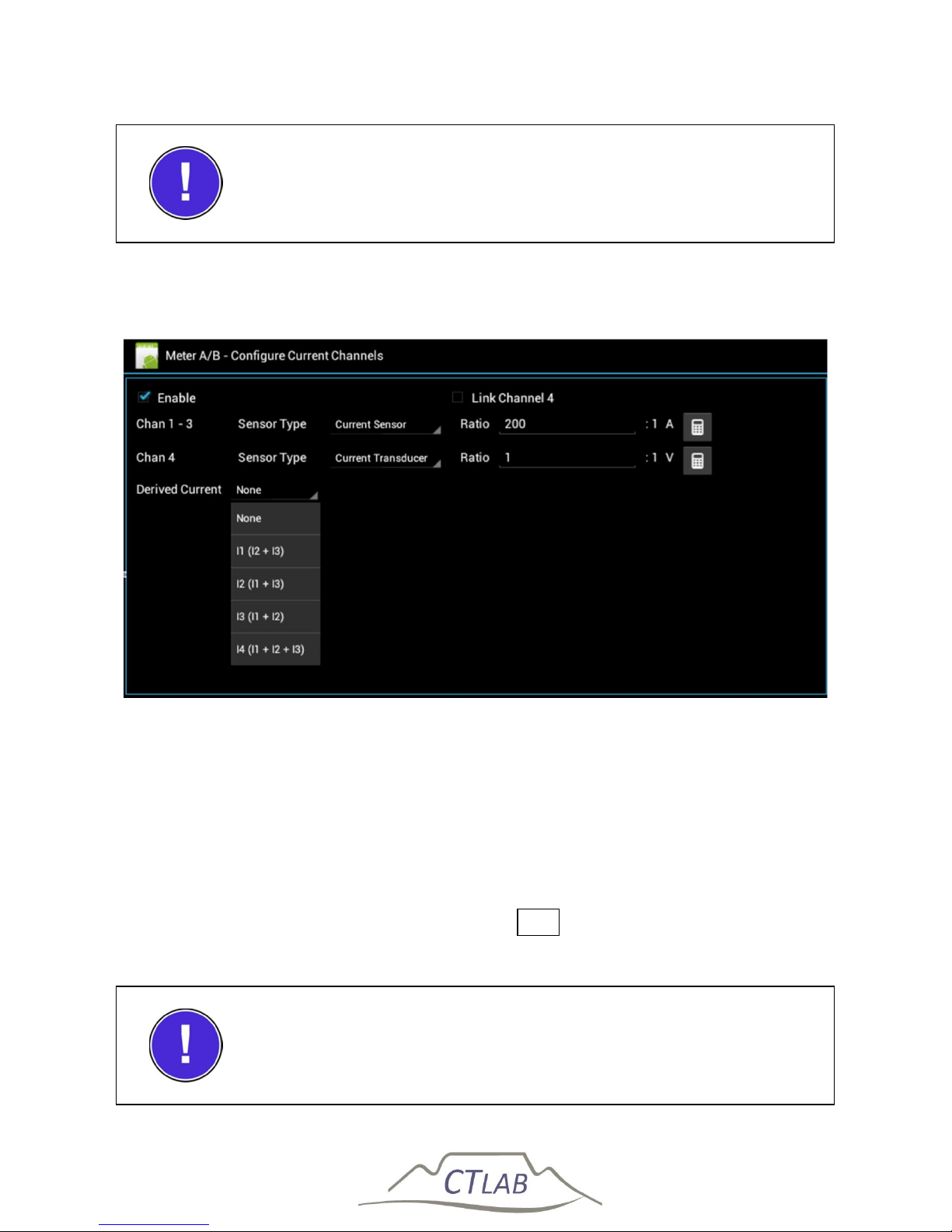
Impedo DUO User Guide
70
It is possible to change between Star (four-wire) and delta
(three-wire) topology if the neutral is connected to V
com
5.8.1.3 Configure Current Channels
Figure 34: Meter point creation – current channel configuration
Check the Enable checkbox to enable current data recording. Select the sensor type
used to measure the current. This should correspond with the physical connections
of the chosen sensor type to the instrument. Enter the CT ratio. If channel 4 uses a
transducer with a different ratio than the rest, uncheck the Link Channel 4 checkbox
to enter the different ratio for channel 4. The Impedo Duo allows the derivation of a
current channel by applying Kirchhoff's Current Law. If a channel is to be derived,
select the appropriate derivation method. Click Next to continue.
It is possible to use a different sensor type on channel 4 than
channels 1-3
Page 71
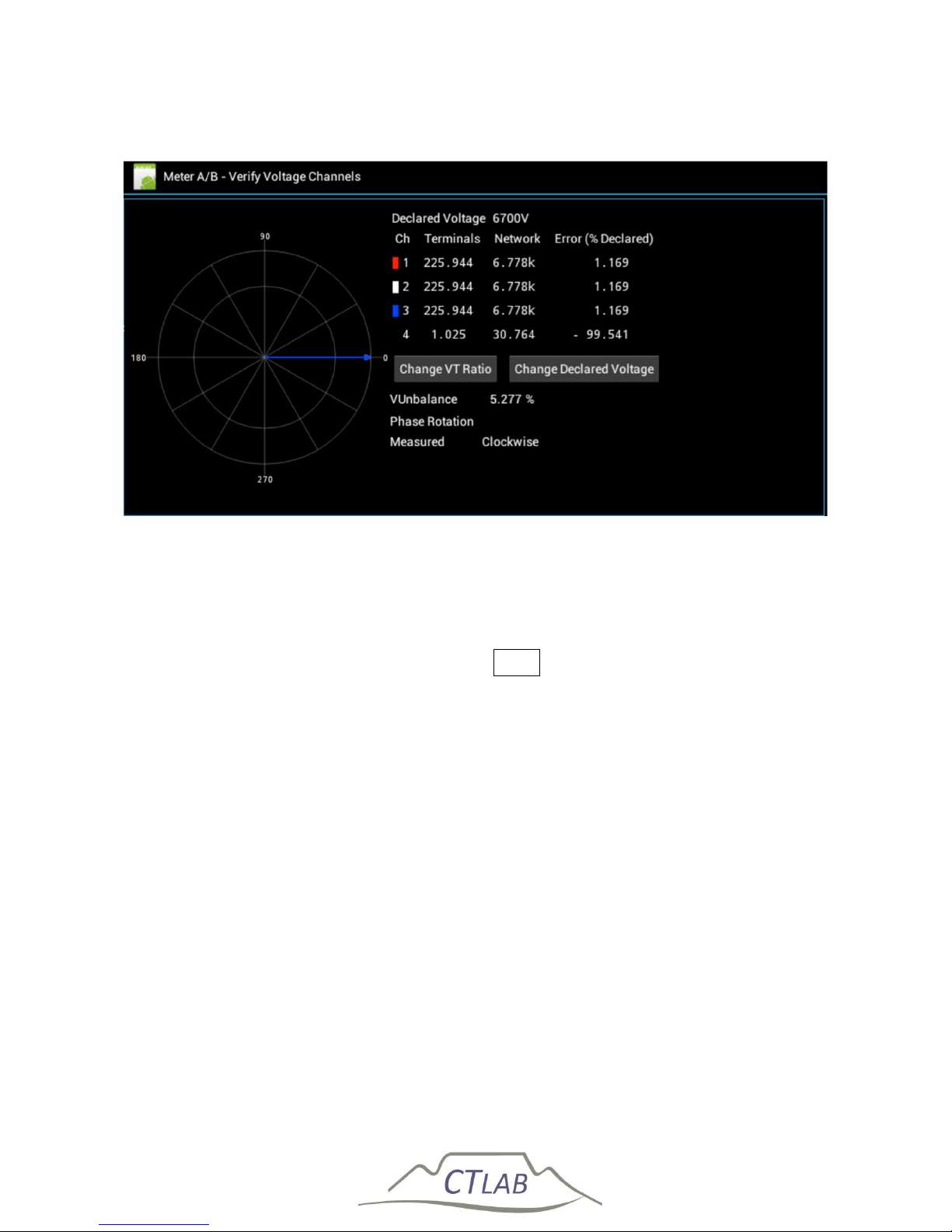
Impedo DUO User Guide
71
5.8.1.4 Verify Voltage Channels
Figure 35: Meter point creation – voltage channel verification
A verification screen for the voltage channels is now available. Verify the physical
connections by the phase rotation as displayed, the VT ratios and the declared
voltage. The VT ratio and declared voltage can be corrected from this screen. Once
the voltage channel setup is confirmed, click Next to continue.
Page 72
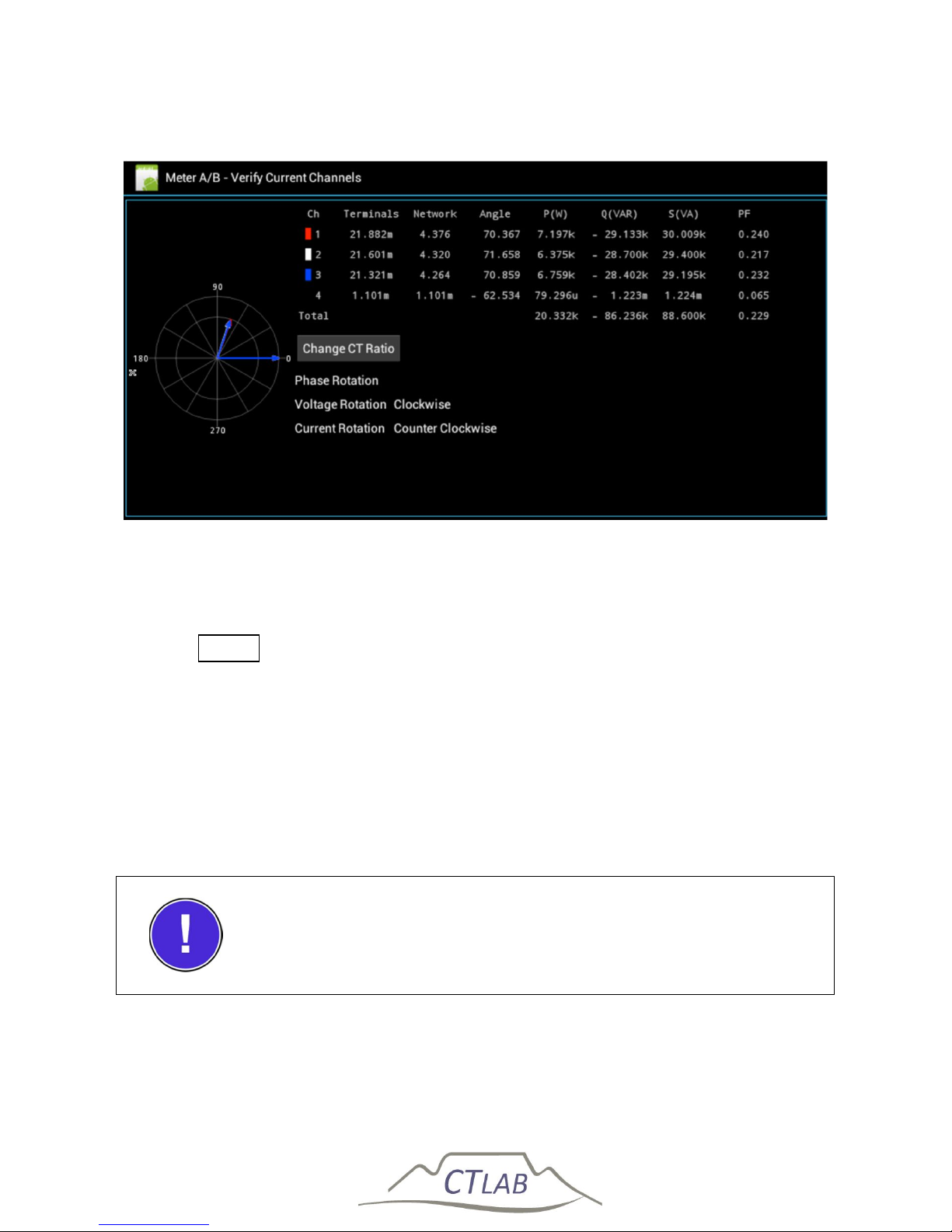
Impedo DUO User Guide
72
5.8.1.5 Verify Current Channels
Figure 36: Meter point creation – current channel verification
A verification screen for the current channels is now available. Verify the physical
connections from the phasor rotation as displayed. Correct the polarity of CT’s if
necessary. Ensure that the current readings are as expected and correct CT ratios if
not. Click Finish to complete the setup.
The newly created meter point is now attached to the specific meter selected. The
instrument will now record any configured data for the created meter point, note
that if no trends or monitors are selected no data will be recorded. Confirm that the
meter point is recording by checking the meter point status on the OLED display
(cf. Section 4.1). Select Meter A or Meter B text in the Meters list. This will fold open
the configuration menu.
To record data ensure that Trends and/or monitors are selected
and confirmed by selecting the “commit” bottom.
Page 73
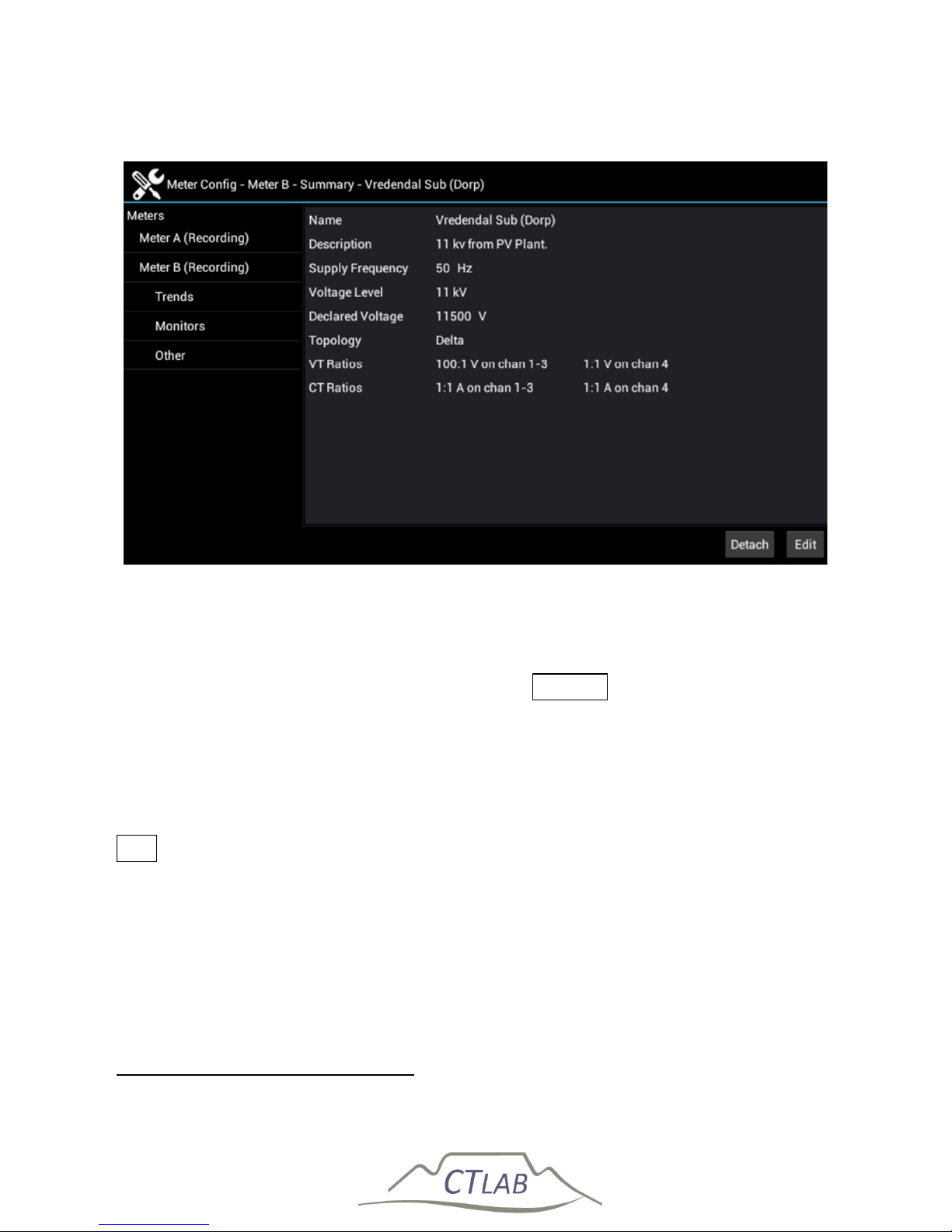
Impedo DUO User Guide
73
5.8.2 Detaching a Meter Point
Figure 37: Detaching and editing a meter point
When a meter should no longer record data, the meter point can be detached from
the meter. To detach a meter point, select the meter in the navigation menu4. This
will display detail about the meter point. Click Detach to detach the meter and
confirm the action. Confirm that the meter point was detached by checking the
meter point status on the OLED display (cf. Section 4.1).
5.8.3 Editing a Meter Point
To edit a meter point, select the recording meter point the navigation menu. Click
Edit , and follow the steps as for meter point creation in Section 5.8.1.
4
The meter’s current state must be “Recording”
Page 74
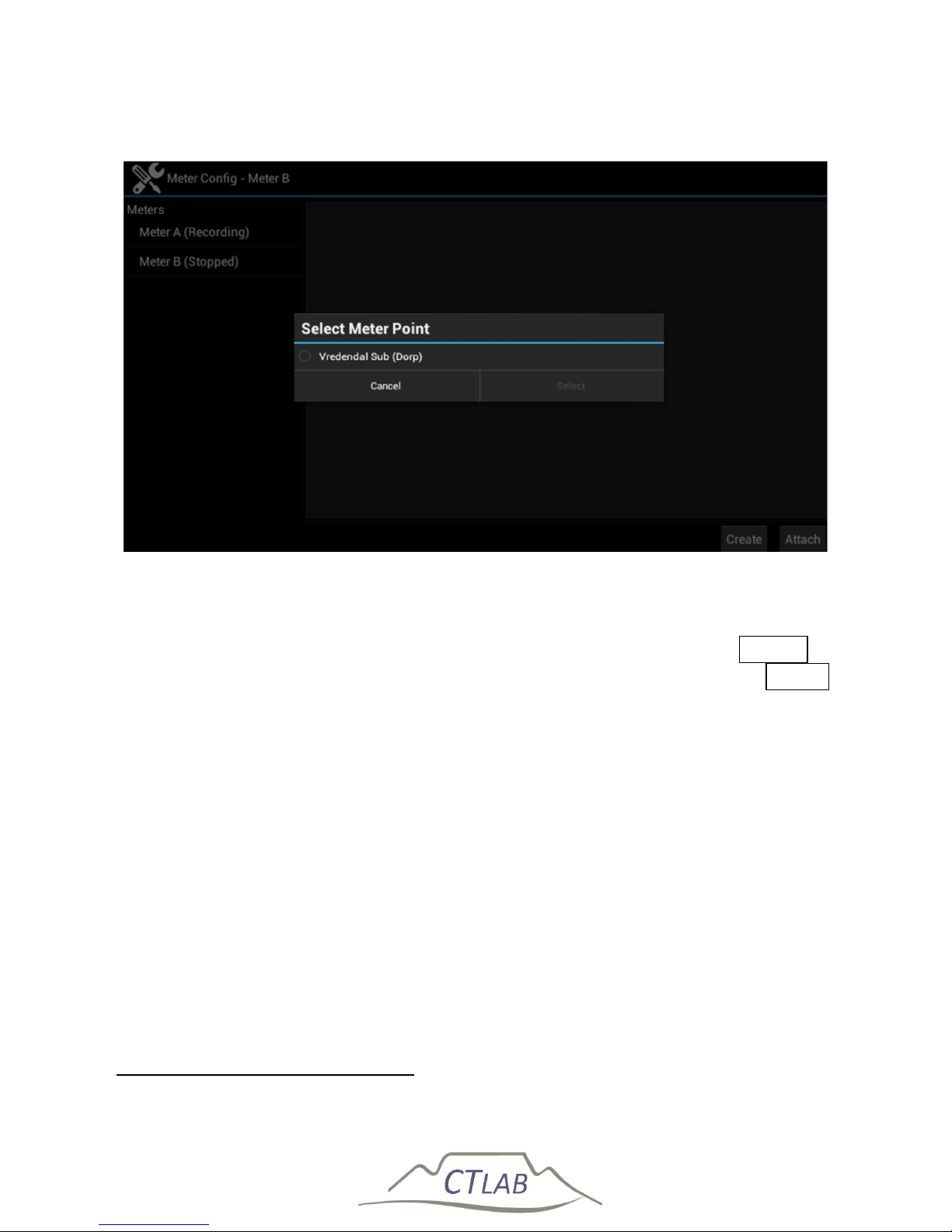
Impedo DUO User Guide
74
5.8.4 Attaching a Previously Created and Configured Meter Point
Figure 38: Attaching a previously created meter point
A meter point that was previously created and then detached can be reattached at a
later point. To reattach a meter point, select the desired meter5 and click Attach on
the bottom right hand of the screen. Select the desired meter point and click Select .
The meter point will now be attached to the meter. The last know configuration will
be applied including trend and monitor configuration.
5.8.5 Configuring a Meter Point
To configure a meter point, select meter to which it is attached.
5
The meter must be stopped before a meter point can be attached to it.
Page 75
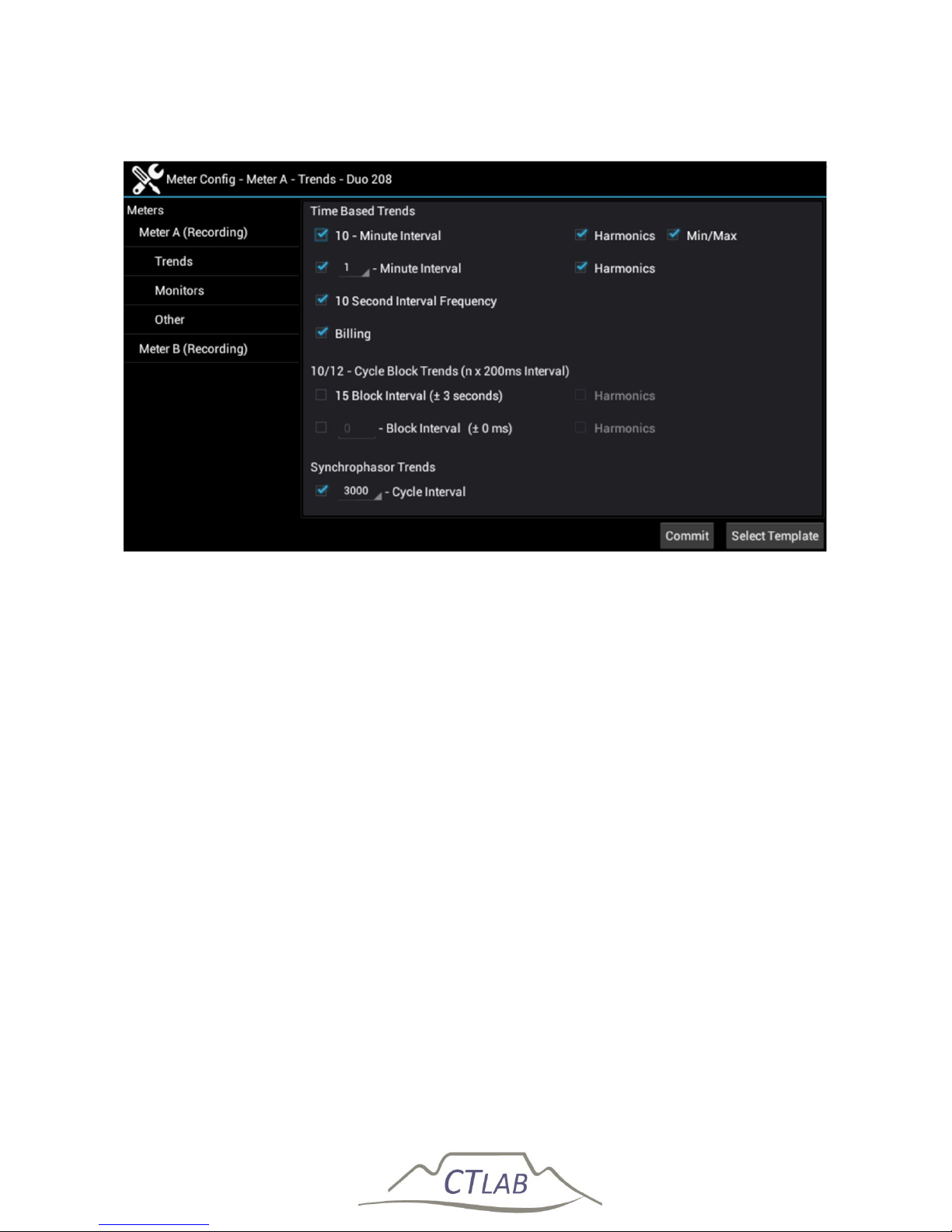
Impedo DUO User Guide
75
5.8.5.1 Trend configuration
Figure 39: Trend configuration
The different trended data to be recorded has to be activated. The Impedo Duo can
record all the IEC61000-4-30 prescribed trend periods. In addition to these, two
custom trend periods are available should the user need it. The Impedo Duo can also
record Synchrophasors. Refer to Osprey Lite User Guide for a description of each
trend type.
Page 76
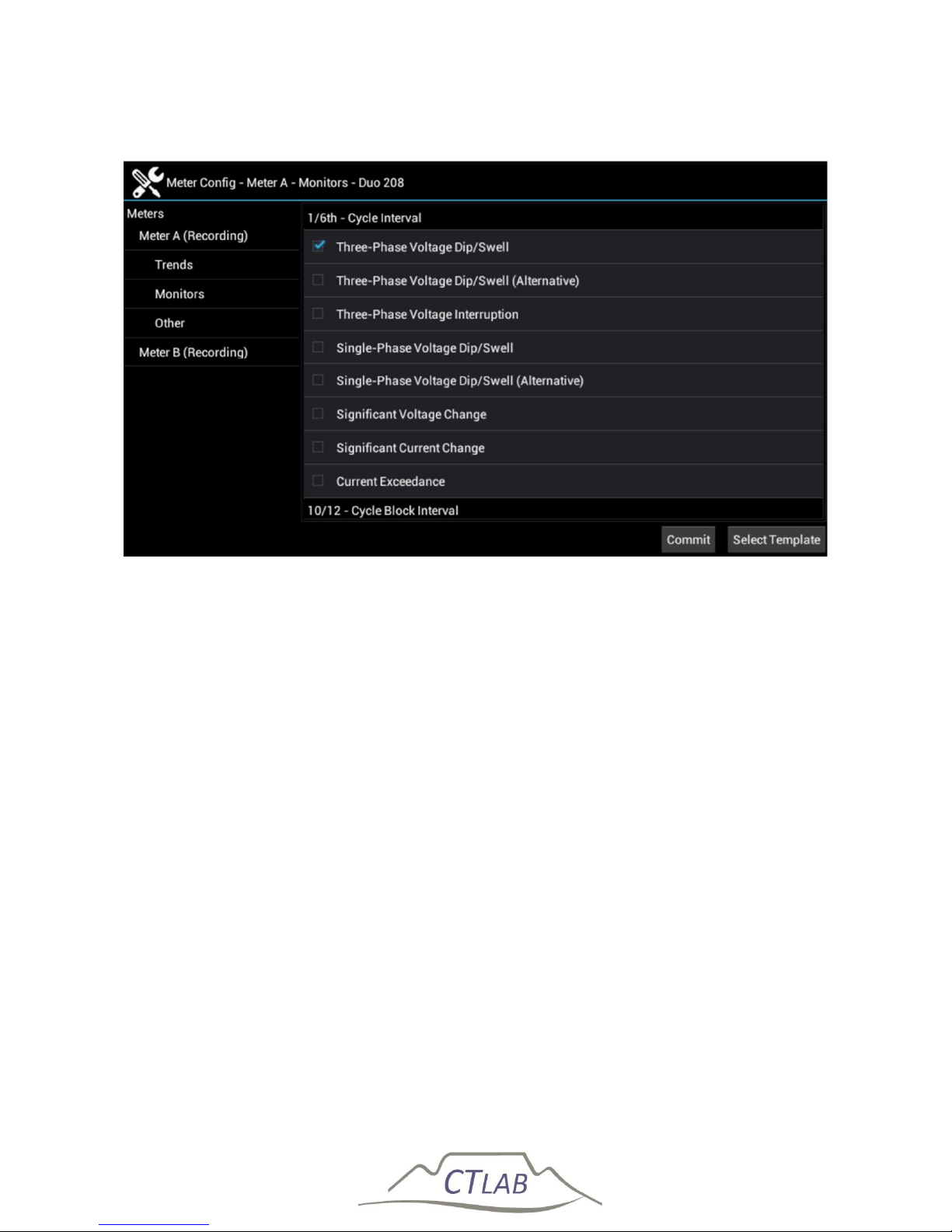
Impedo DUO User Guide
76
5.8.5.2 Monitors
Figure 40: Monitor configuration
Monitors are devices used to recognise network events and record diagnostic data
when such events occur. To configure monitors on the Impedo Duo, select the
appropriate meter and then select Monitors. When a desired monitor is checked, a
monitor-specific dialog is presented to configure the monitor. The list of monitors are
more than can fit on the display. Sliding one’s finger vertically up or down over the
list of monitors scrolls the list up or down, respectively. Refer to Osprey Lite User
Guide for a description of each event type and its configuration parameters.
5.8.5.3 Other
The Impedo Duo records waveforms as part of the diagnostic data captured by the
monitors or a timed recording. The default sampling rate (retained samples) is the
highest option of one samples every 20µs. To conserve storage space and/or
bandwidth costs, applying a subsample rate can reduce the sampling rate. This
setting will only affect the diagnostic waveform data stored, not any statistics
calculated for the event.
Page 77
Impedo DUO User Guide
77
5.8.5.4 Commit
Once all settings in all sections have been set – click Commit to apply the
configuration to the meter. An information box will pop up to inform the user that
the new configuration was committed.
Configuration is only applied after pressing Commit - an
information box will inform the user of a successful
configuration change
5.8.5.5 Predefined Templates
The Impedo Duo comes preloaded with specific measuring templates. To apply a
template, select the meter point, and then either Trends or Monitors. Click Select
Template and select the desired template. Press Apply to apply the template to
the configuration. To effect the configuration, press Commit . An information box
will pop up to inform the user that the new configuration was committed.
Page 78
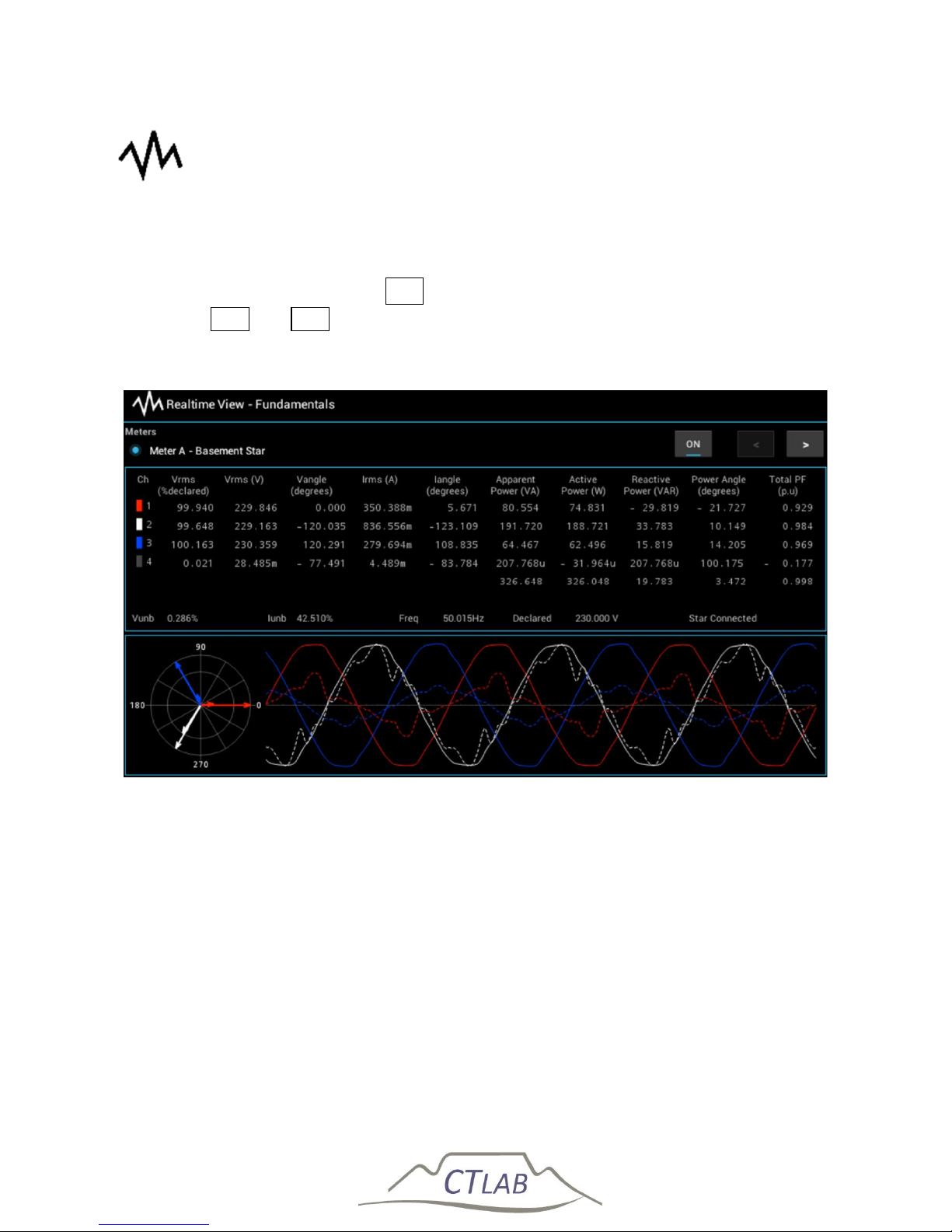
Impedo DUO User Guide
78
5.9 Realtime View
Realtime View provides a detail view of data captured in real-time. Each data update
comprises measurements taken over a 10/12 cycle (~200ms) period. Data capturing
is enabled/disabled by toggling On (see Figure 41). Navigate between the different
views with > and < . Only one meter’s data is displayed at a time.
5.9.1 Fundamentals
Figure 41: Realtime View - Fundamentals
This view provides a grid with readings of the fundamental phasors for voltage,
current and power. It also provides a phasor diagram, and the waveform of the first
three cycles in the 10/12 cycle block. While an event is in progress, the event type
will appear at the bottom of the grid (see Figure 42). The value in parenthesis
following the event type is the duration of the event so far.
Page 79
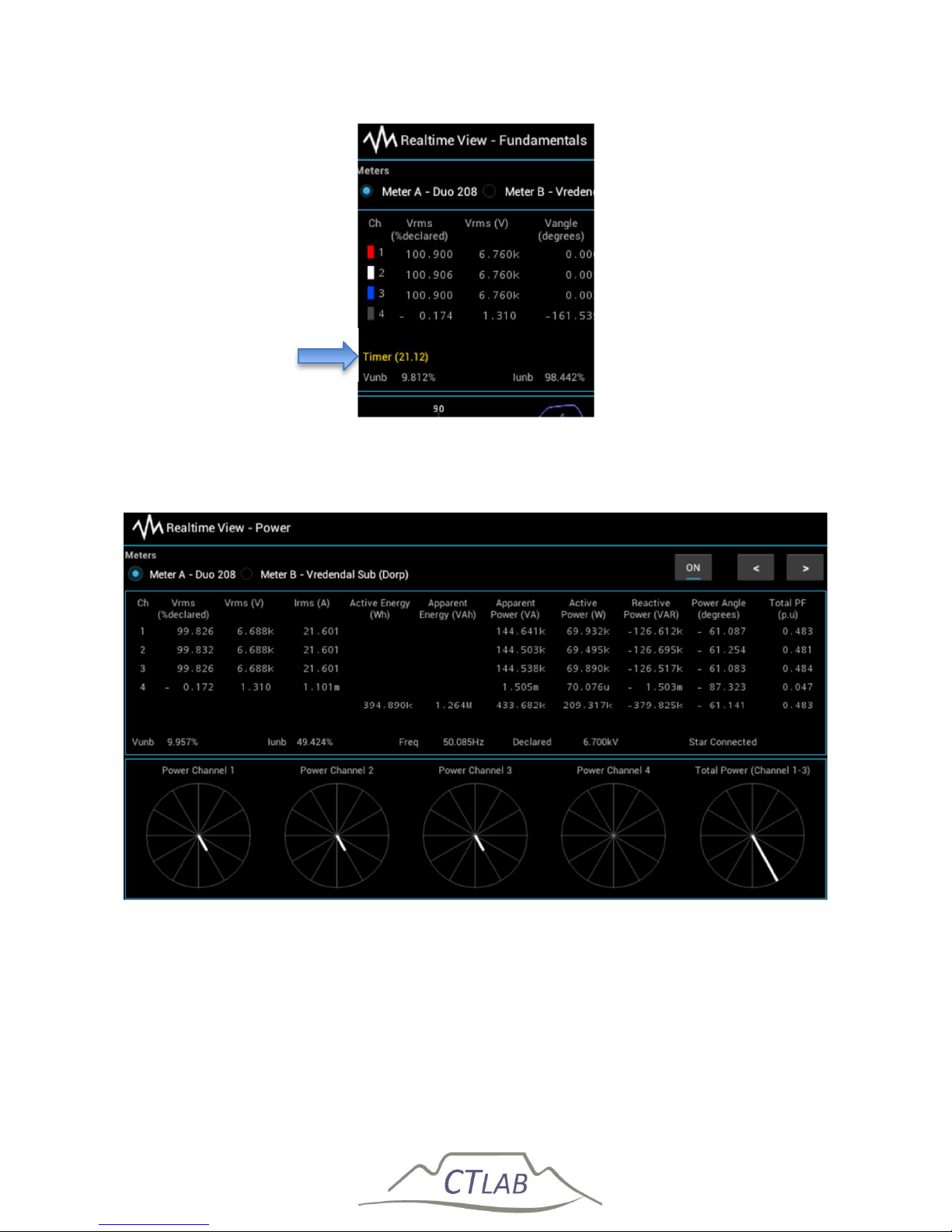
Impedo DUO User Guide
79
Figure 42: Realtime View - event in progress indicator
5.9.2 Power
Figure 43: Realtime View - Power
This view provides a grid with the RMS reading of the voltage, current, and power
fundamental phasors. Diagrams for power channels 1 to 4 and the total power
visualize the relative size and angle for each channel. The view also shows the
accumulated active and apparent energy.
Event in progress
Page 80
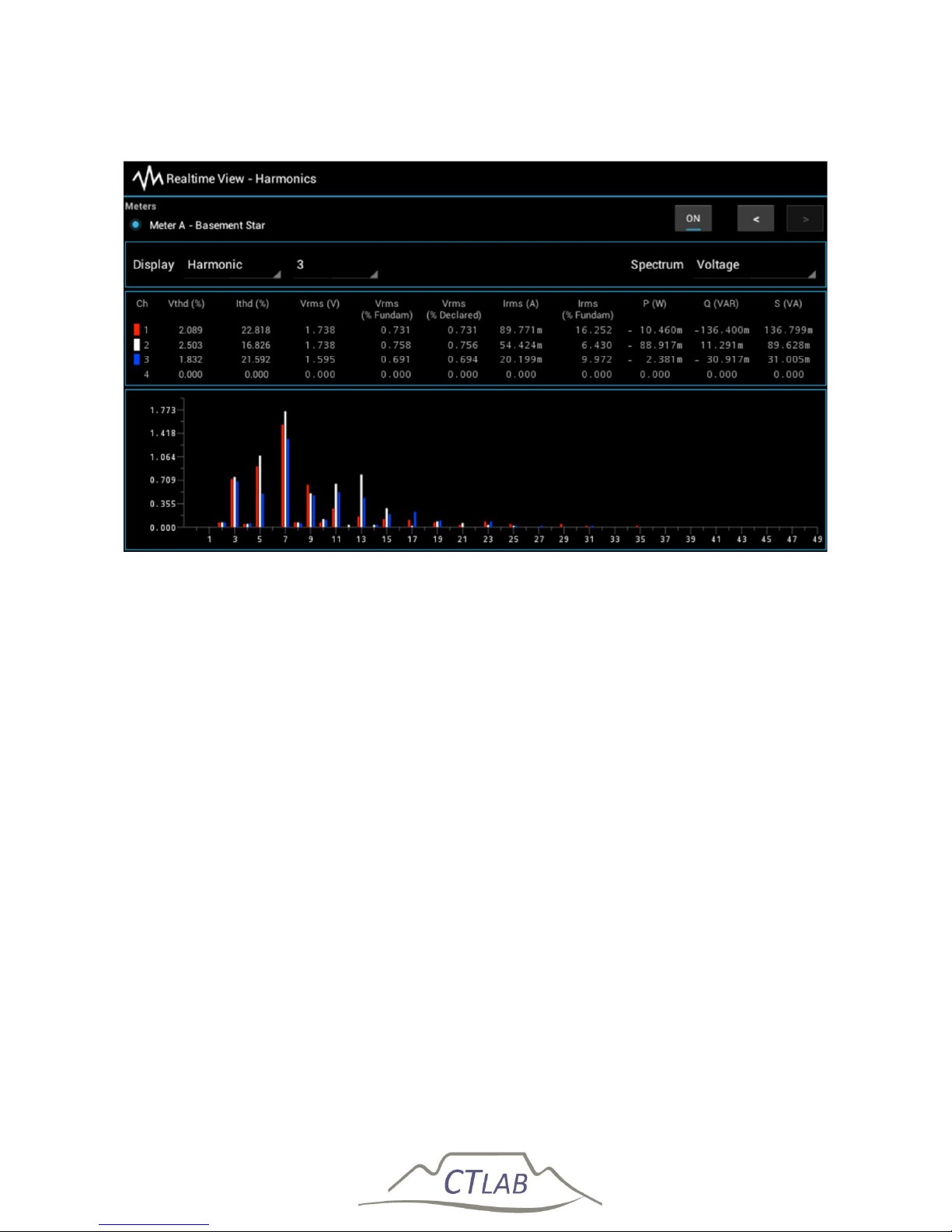
Impedo DUO User Guide
80
5.9.3 Harmonics
Figure 44: Realtime View - Harmonics
This view provides a grid with RMS information for a specific harmonic as well as THD
for voltage and current. Select the desired harmonic by pressing on the harmonic
number drop-down. Select between harmonic and inter-harmonic readings by
pressing on the Harmonic drop-down.
The spectrum up to the 49th harmonic for the selected spectrum parameter is
visualized at the bottom of the view. The user has a choice between voltage, current,
active power, reactive power, and apparent power spectrums.
Page 81
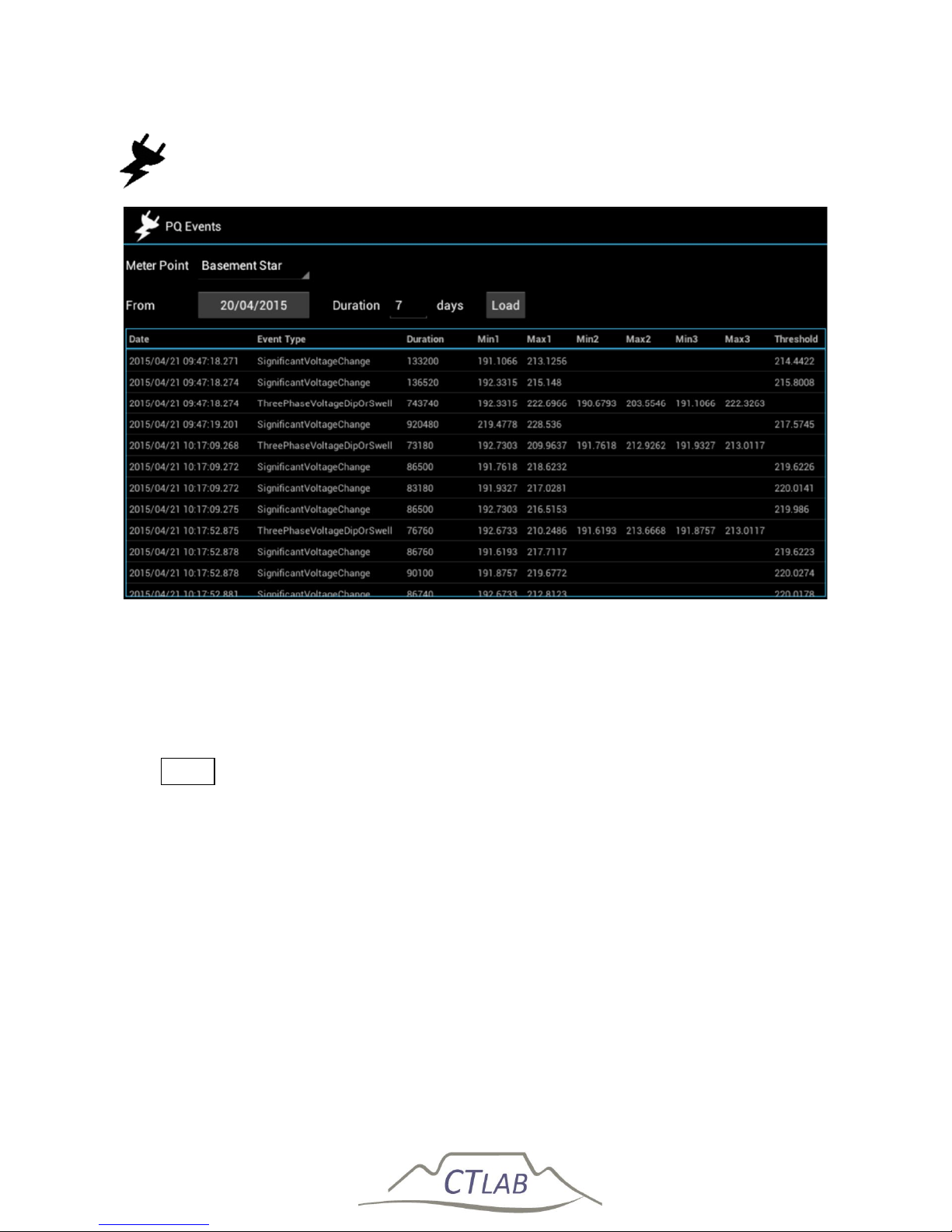
Impedo DUO User Guide
81
5.10 PQ Events
Figure 45: PQ Events provides a simple list of PQ events
PQ Events allows the user to browse a very simple list of events captured by the
instrument. These events are not classified to any specific standard. Classification is
done offline with the Osprey Software. Select the meter point for which the event list
must be shown. Select the date from which to query as well as the duration (in days).
Click Load to load the list of events. The list can be scrolled up and down by sliding
one’s finger vertically across the display.
Page 82
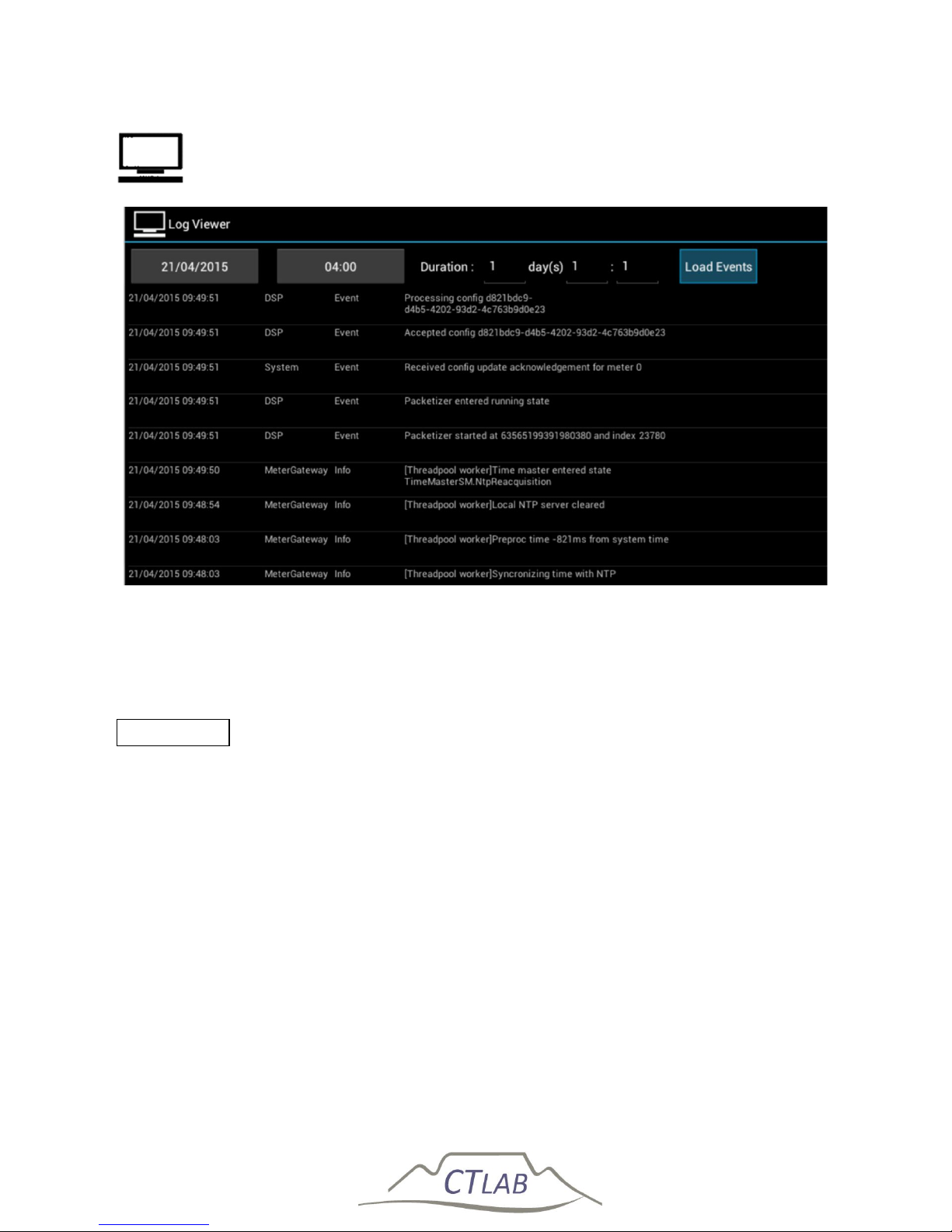
Impedo DUO User Guide
82
5.11 Log Viewer
Figure 46: Log Viewer provides a view on the system event log
Log Viewer is used to browse the system event log. This is a diagnostic log that
provides insight into the workings of the internal subsystems. Select the date and
time from which to query and then the duration in days, hours, and minutes. Click
Load Events to load the list of log events. The list can be scrolled up and down by
sliding one’s finger vertically across the display.
Page 83
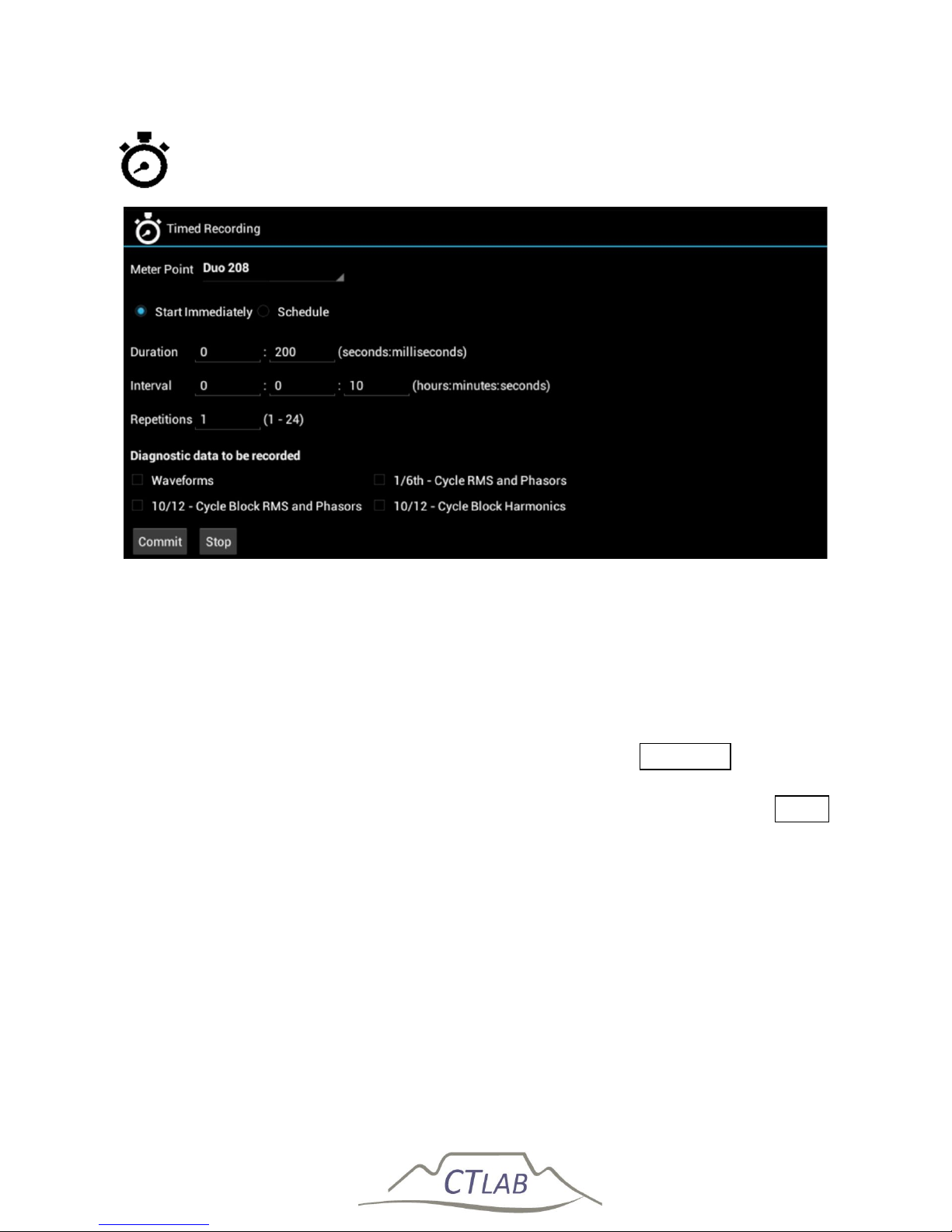
Impedo DUO User Guide
83
5.12 Timed Recording
Figure 47: Timed Recording application
Timed Recording provides a mechanism to record detail diagnostic data at a specified
time. Select the meter point for which the recording must be made. Choose between
starting to record immediately or starting at a scheduled time. Select the recording
duration (< 1 minute). Recordings can be repeated with a specified interval. The
interval must be at least as long as the recording duration. Finally, select the types of
data that must be captured by the recording and press Commit . While the
recording is in progress Realtime View will display the event type as “Timer”. A
scheduled recording or a recording in progress can be cancelled by pressing Stop .
Scheduling a new recording will overwrite a previously scheduled one.
Page 84
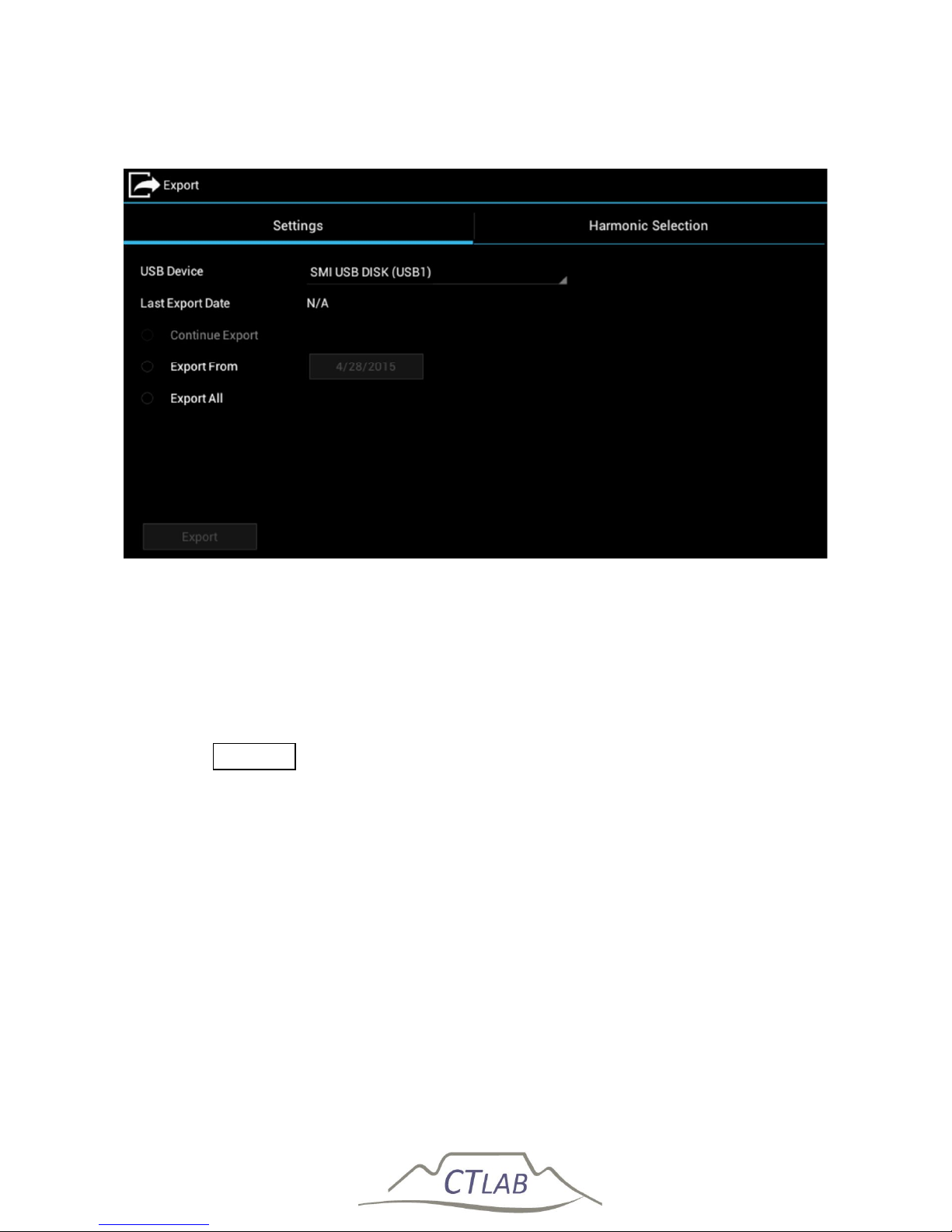
Impedo DUO User Guide
84
5.13 Export
Figure 48: Export allows the user to export data to a USB stick
Data captured on the Impedo Duo can be exported to a USB device using Export. Plug
a FAT32 formatted USB device into either USB port 1 or 2. Select the desired USB
device from the drop-down. If the device was used to export data before, the last
export date will be shown. If the device was not used before, the date will show as
N/A (not available). The user may choose to export all data, or export from a specific
date. Click Export to start the export process. A dialog will appear showing the
progress of the export. The export can be safely aborted, and the data exported up
to that point will be on the USB device. The user can select which harmonics to
export from the harmonic selection tab (see Figure 49). This selection is persisted to
the USB device and will be used when the device is plugged into the Impedo Duo on
a next occasion. Exporting data using this method is a slow process – exporting an
entire 100% filled storage chunk will take several hours.
Should the user wish to use a mass storage device, the instrument can be configured
to continually export data to the mass storage plugged at one of the USB ports. The
“Continue Export” option will only be available after exporting some data to the mass
storage.
Page 85
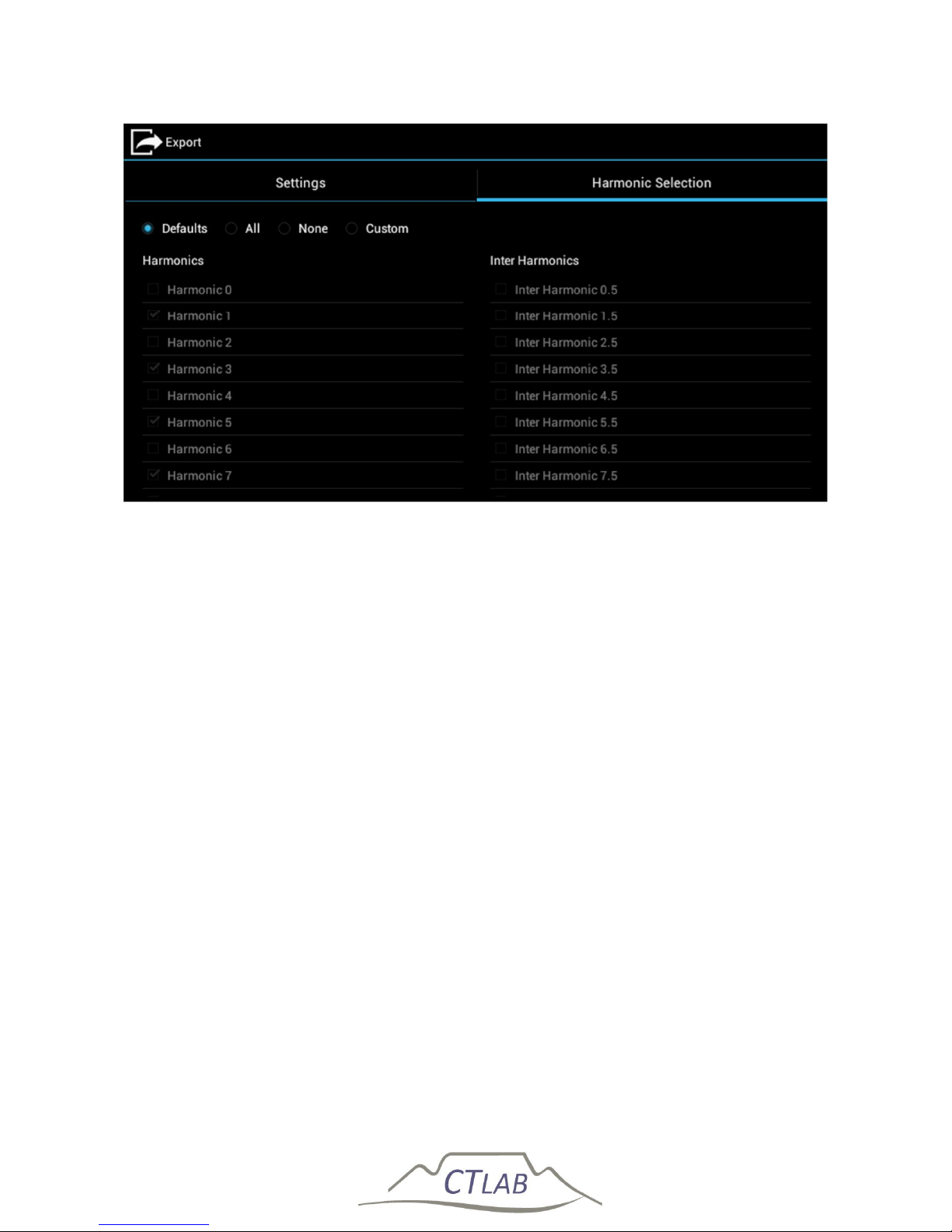
Impedo DUO User Guide
85
Figure 49: Export - harmonic selection
Page 86
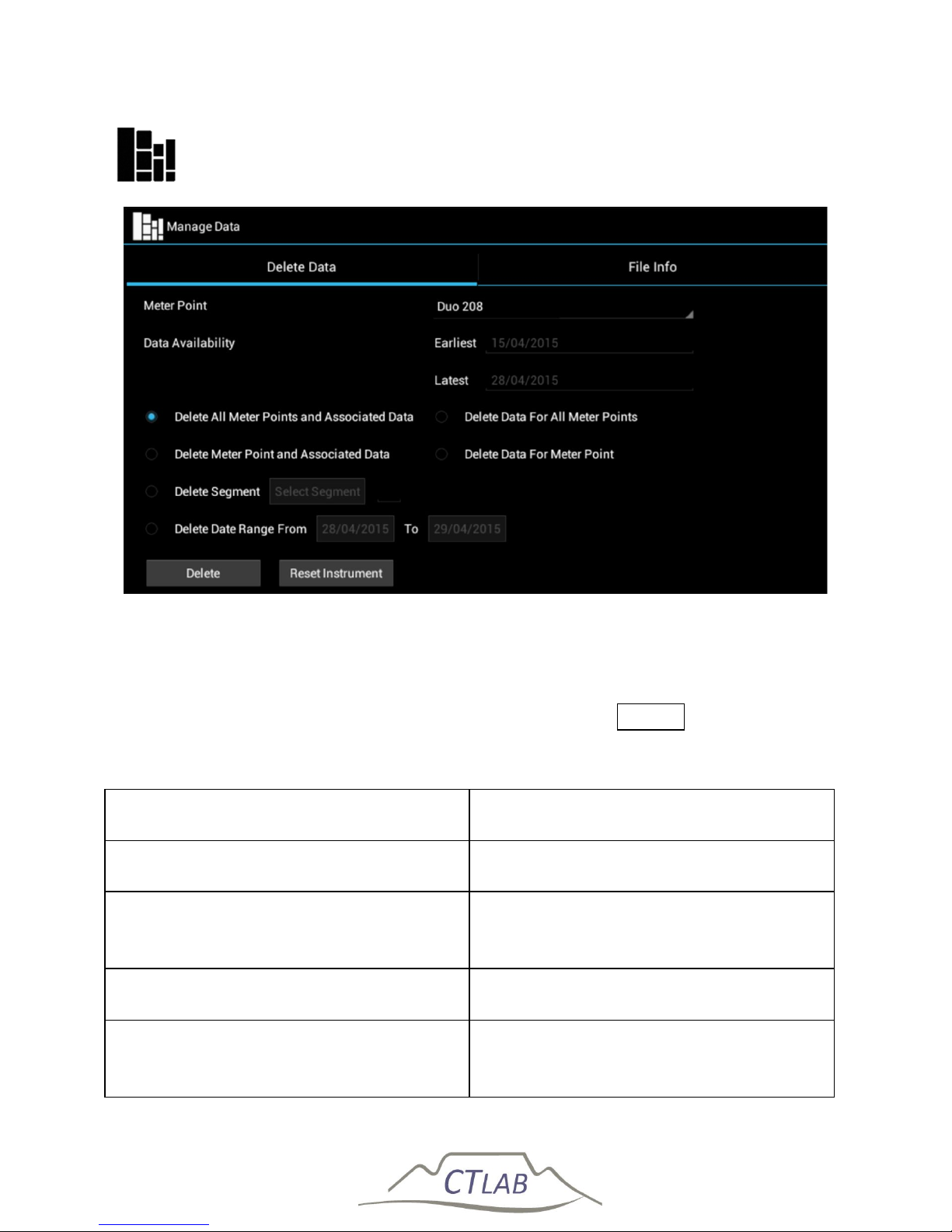
Impedo DUO User Guide
86
5.14 Manage Data
Figure 50: Manage Data provides manual data management options
The Impedo Duo manages its internal storage using Space Reclaimer (see Section
5.7.3.1). Manage Data provides the user with the manual data management options
as described in Table 6. Select the desired option and press Delete .
Table 7: Manage Data delete options
Description Clarification
Delete all meter points and associated
data
All meter
points, and their data
including configurations will be deleted
Delete meter point and associated data
The specified meter point, including its
data and configurations will be deleted.
Other meter points will not be deleted
Delete segment
Only the speci
fied data segment for the
specified meter point will be deleted
Delete data range
Only data within the specified date
range for the specified meter point will
be deleted
Page 87
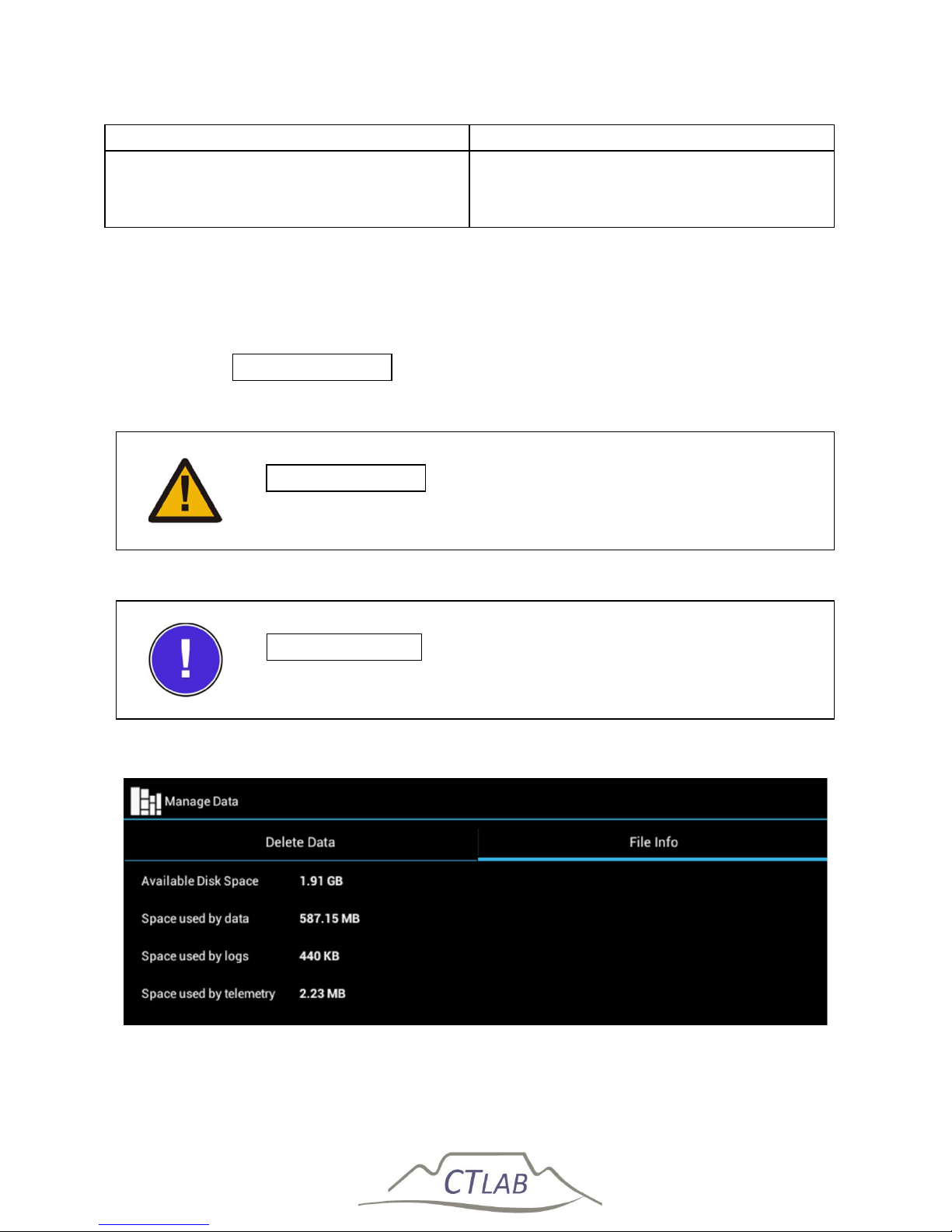
Impedo DUO User Guide
87
Delete data for all meter points
Delete all data, but no configuration
Delete data
for meter point
Delete all date for the specified meter
point, but keep the meter point and its
configuration
Manage Data also allows the user to return the instrument to its factory settings. All
meter points, data, and instrument settings such as passwords, time zone, and Space
Reclaimer configuration will be deleted. After a factory reset the instrument will
reboot. Press Reset Instrument to reset the instrument to its factory default.
The File Info tab provides internal storage usage information (see Figure 51).
Reset Instrument will delete all PQ data captured to date, as
well as all instrument configuration settings from the device
Reset Instrument will reboot the device once to complete the
reset process
Figure 51: Manage Data – File Info
Page 88
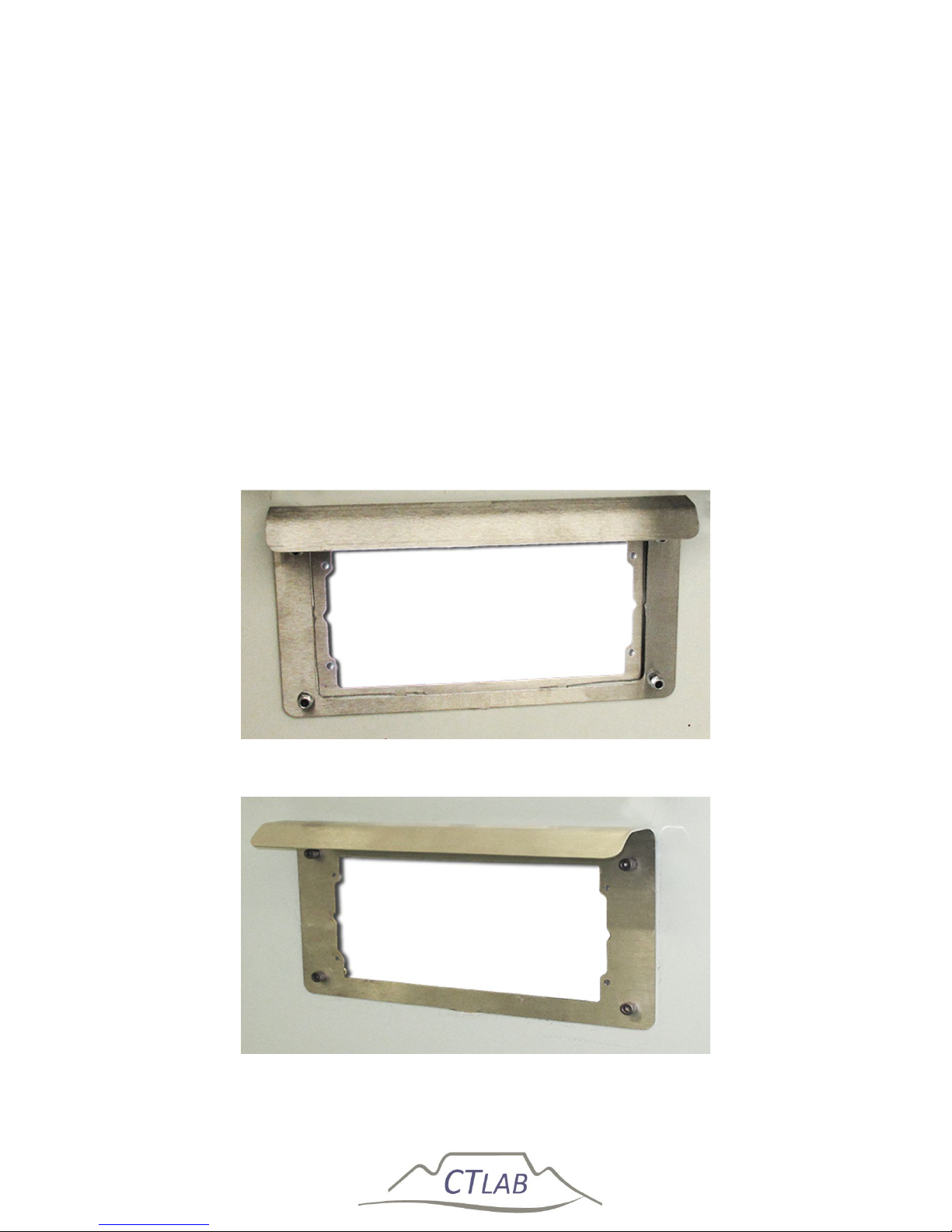
Impedo DUO User Guide
88
6 Impedo Duo Installation
6.1 Mounting the Impedo Duo
6.1.1 Panel Mounting Installation
Installation components:
a) Back Plate: The plate with the bigger cavity of the two and four drilled holes
as shown in Figure 52.
b) Front Plate: The plate with the smaller cavity of the two plates and eight
drilled holes as shown in Figure 53.
c) Four mounting screws and four holding screws as shown in Figure 54.
Figure 52: The back plate with the bigger cavity of the two, and four drilled holes
Figure 53: The front plate with the smaller cavity of the two plates, and eight
drilled holes
Page 89
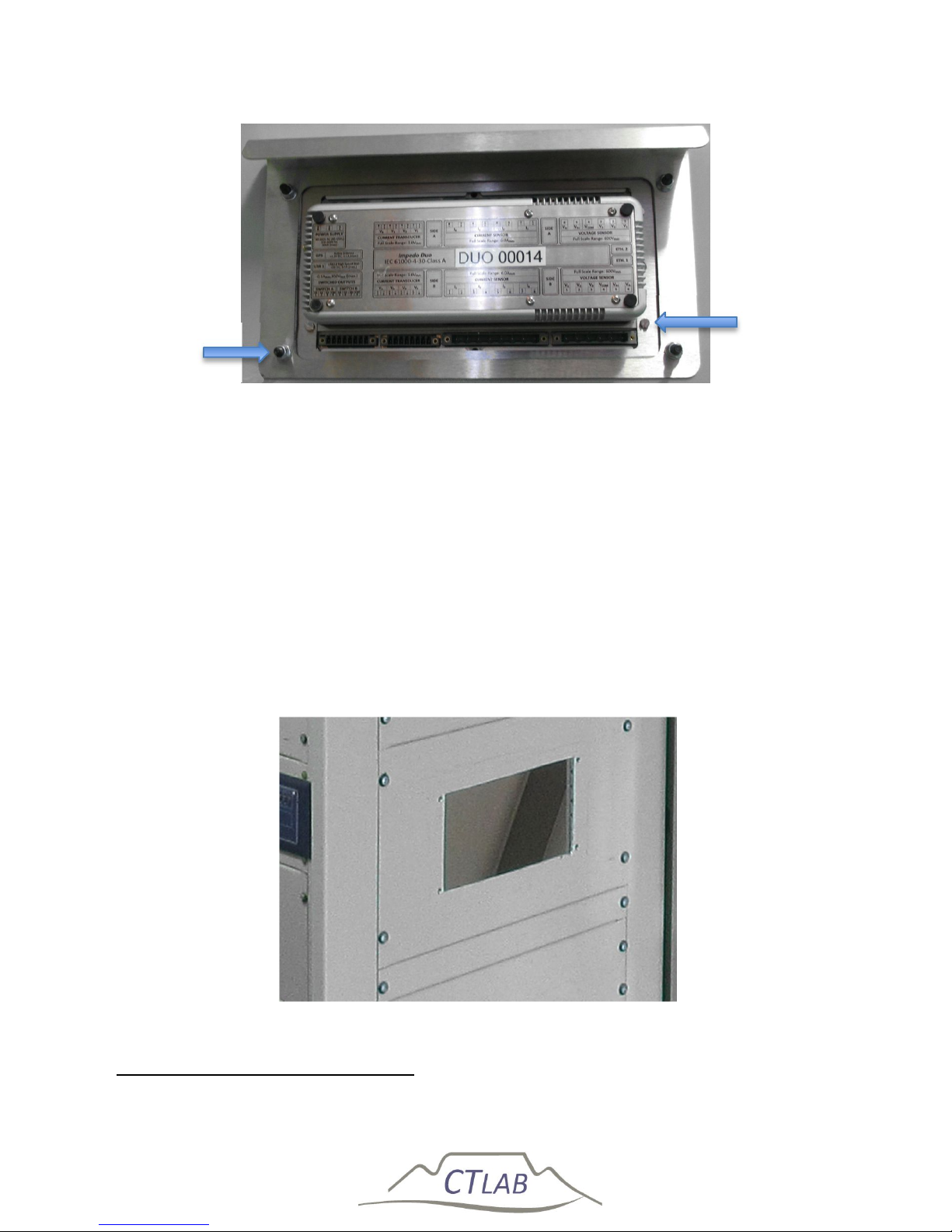
Impedo DUO User Guide
89
Figure 54: Four mounting and holding screws
Step 1:
Fit the back plate6 (see Figure 52) on the panel door where the instrument should be
installed, mark the inside cavity and mounting holes on the panel door.
Step 2:
Cut the marked cavity into the panel door and drill the mounting holes as shown in
Figure 55.
Figure 55: Panel door with cut-out
6
Optional accessory
Mounting
Screw
Holding
Screw
Page 90
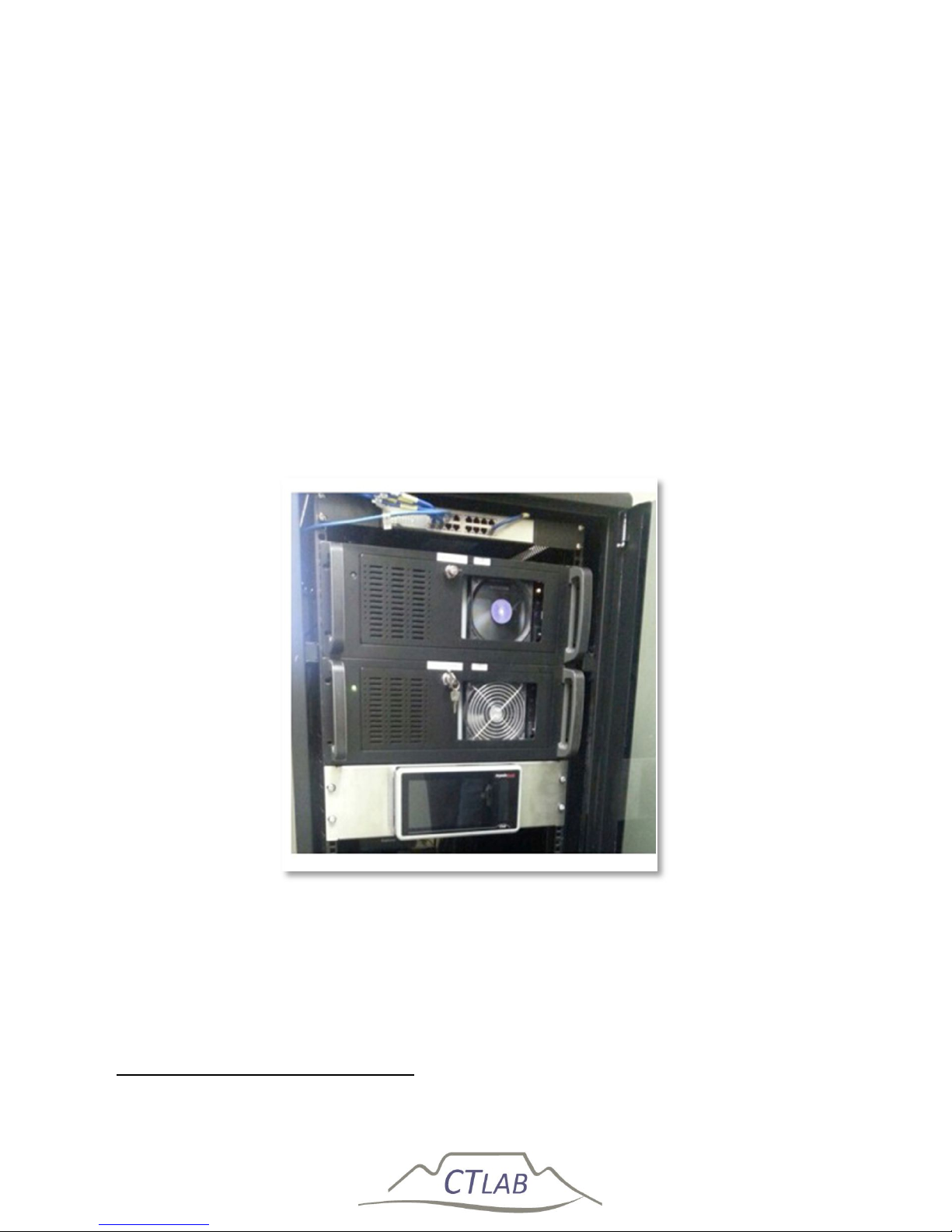
Impedo DUO User Guide
90
Step 3:
Install the front and back plates on the panel door using the mounting screws as
shown in Figure 54.
Step 4:
Fit the Impedo Duo into the installation plates and screw the holding screws into the
Impedo Duo.
6.1.2 19” Rack Mounting Installation
A 19” rack (4U) stainless steel mounting plate carry the Impedo Duo while providing
a mechanical interface for 19” racks7.
Figure 56: 19’’ rack with Impedo Duo
7
Optional accessory
Page 91
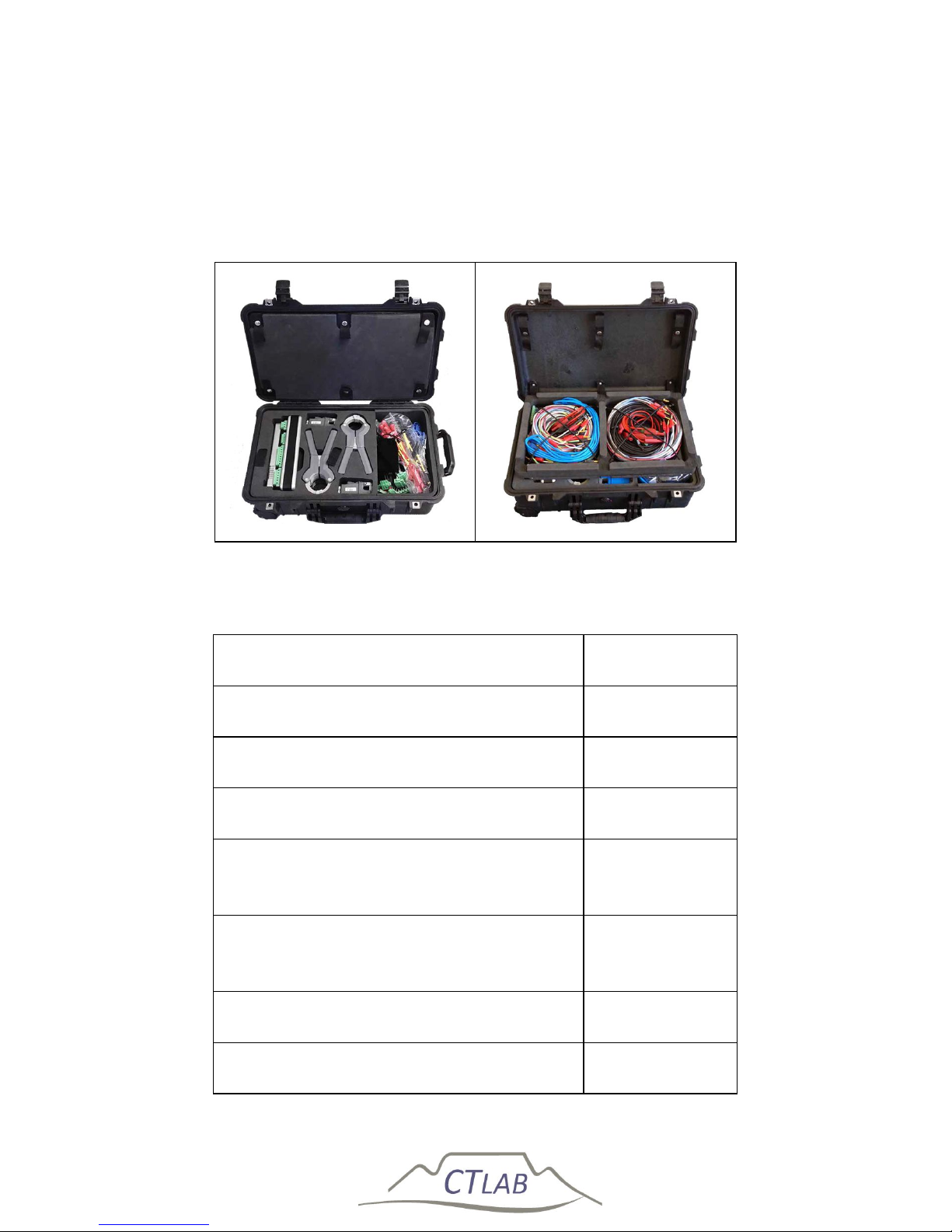
Impedo DUO User Guide
91
6.1.3 Portable version
The ImpedoDUO can also be supplied as a portable unit for PQ investigations as
shown in Figure 57. The accessories included in the portable unit are listed in Table 8.
Figure 57: Impedo DUO portable unit
Table 8: List of accessories
Accessory description Qty.
Portable Impedo DUO case 1
GPS antenna + 15m extension cable 1
Power Connection set 1
Voltage connection set (Wiring and six
clips included)
2
Current sensor and current transducer
connection set
2
US Current Clamp 250/500/1000:5A 6
Micro Clamps 5A:1V 6
Page 92
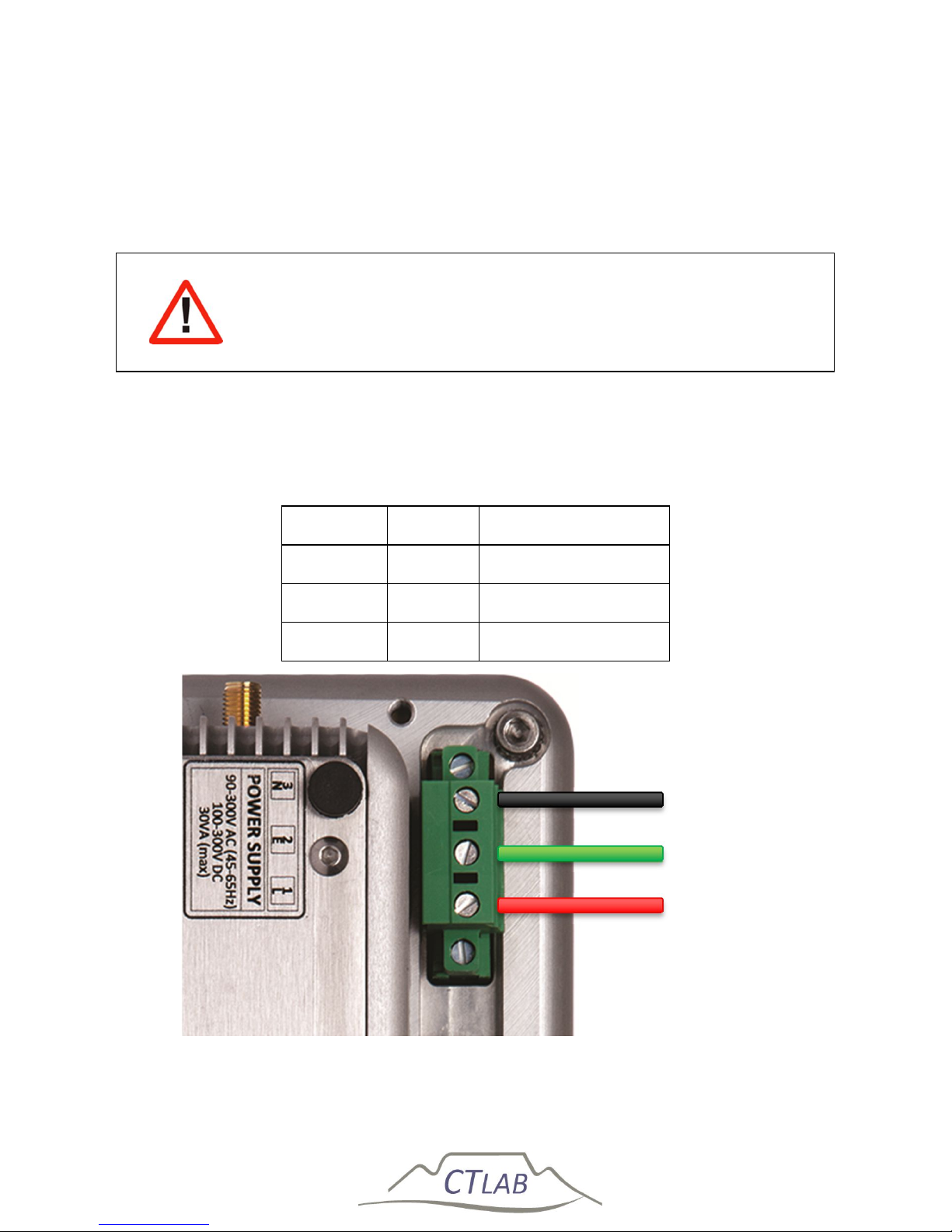
Impedo DUO User Guide
92
6.2 Connections
6.2.1 AC Power
Always connect the safety earth terminal located on the power
connector first!
Table 9 and Figure 58 depict how to connect the AC power supply.
Table 9: AC power connection layout
Terminal Legend Description
1. L Live Terminal
2. E Safety Earth
3. N Neutral Terminal
Figure 58: Impedo Duo AC power supply connection
Neutral
Earth
Live
Page 93
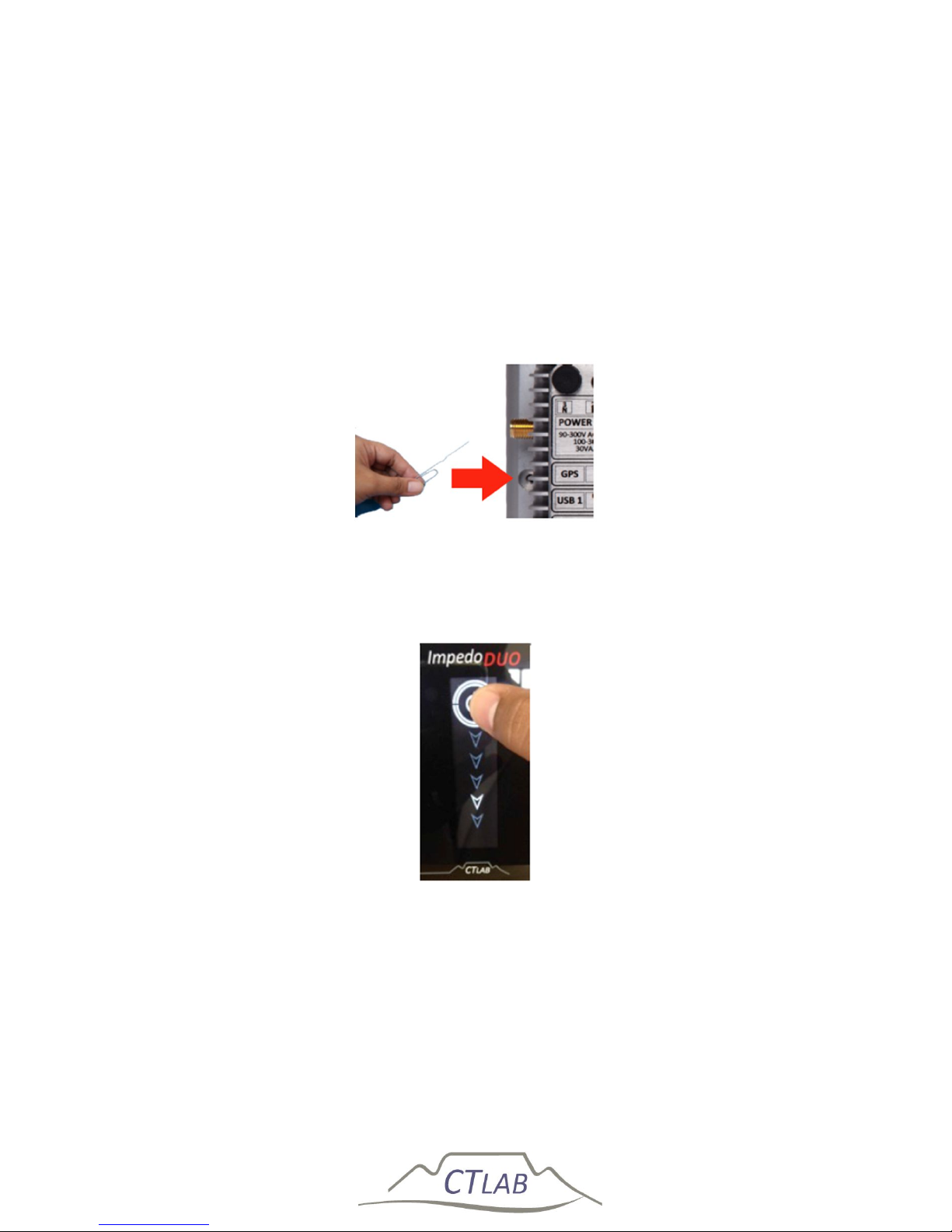
Impedo DUO User Guide
93
6.2.2 Power Over Ethernet (PoE)
In addition to, or as alternative to AC power, the instrument can be powered via any
of the Ethernet ports using an IEEE 802.3-2008 compliant power source.
6.2.3 Instrument Activation
The instrument is shipped with the reset switch switched off to protect the battery
and increase the storage live of the Impedo DUO. The reset switch is reachable via a
small hole close to the GPS port on the right side of the instrument as shown below.
Figure 59: Impedo DUO reset button
If power is connect to the instrument and the reset button is pressed the Power
switch icon can be slide down as shown below.
Figure 60: Power switch icon on the OLED
Page 94
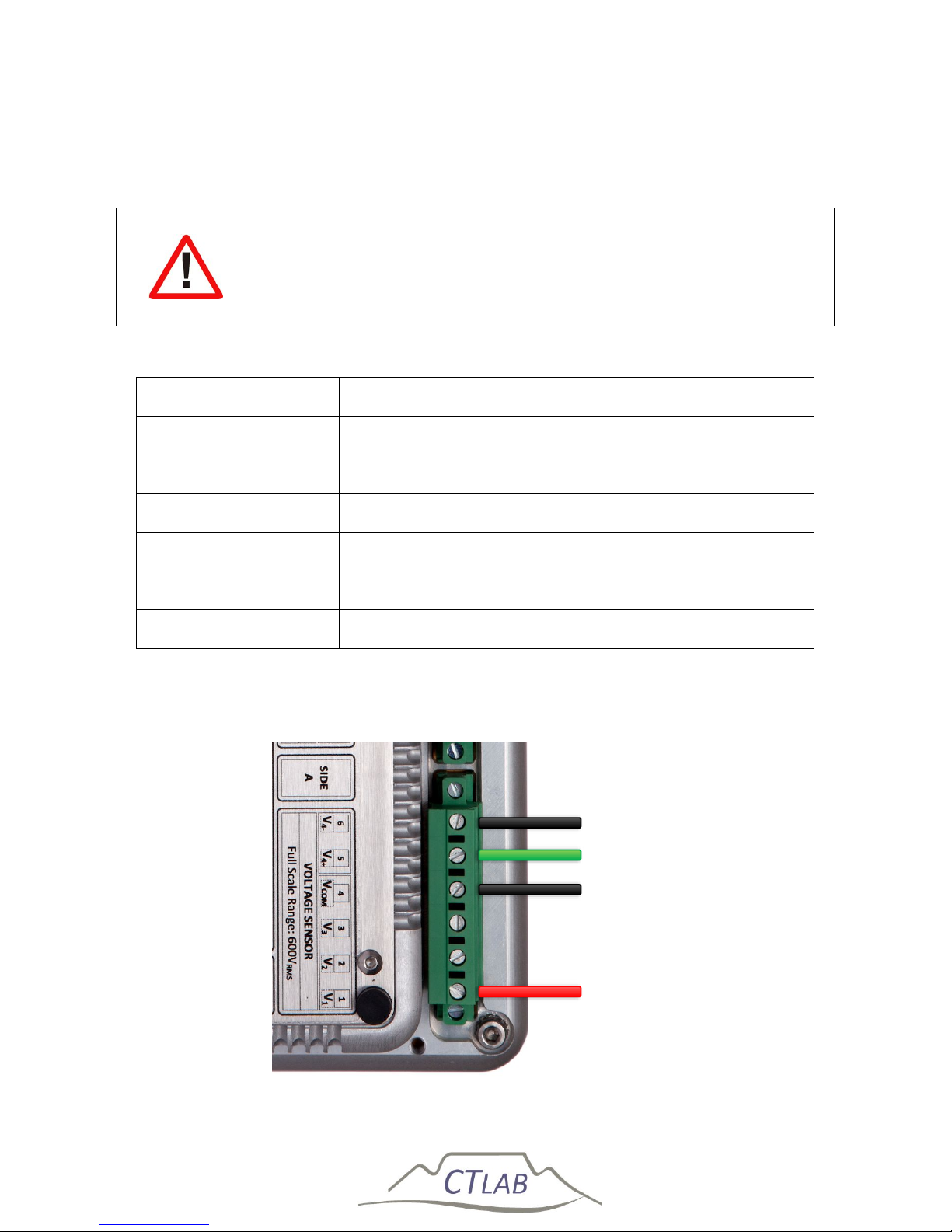
Impedo DUO User Guide
94
6.2.4 Voltage connections
6.2.4.1 Single phase connection
Always connect the safety earth terminal located on the power
connector first!
Table 10: VT circuit connection layout for single phase connection
Terminal Legend 110V VT Circuit or 400V/550V Star (4-wire) Systems
1. V1 Phase Voltage
2. V2 Open
3. V3 Open
4. V
com
Neutral
5. V4+ Earth
6. V4- Neutral
Connect the phase Voltage to Voltage Inputs 1 as shown in Figure 61.
Connect Neutral (400 V systems) or the star-point (110 V VT circuits) to V
com
.
The fourth voltage input may be used to measure Neutral-Earth voltage.
Figure 61: Impedo DUO single-phase connection
Phase 1
Phase 4 Ref
Phase 4
Neutral
Page 95
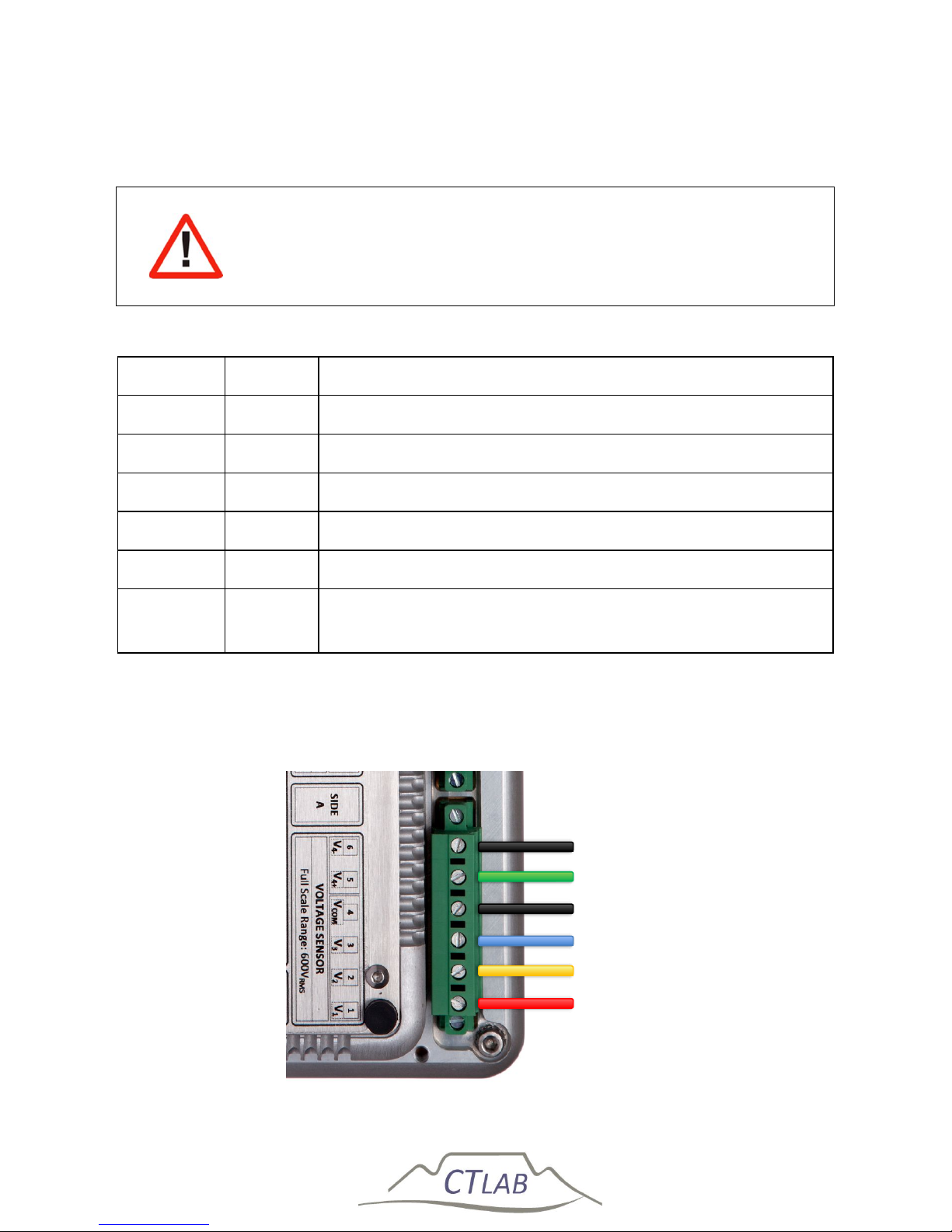
Impedo DUO User Guide
95
6.2.4.2 110 V Voltage Transformer (VT) Circuits & 400V Direct (Star/ 4-wire
systems)
Always connect the safety earth terminal located on the power
connector first!
Table 11: VT circuit connection layout for 4-wire star connection
Terminal Legend 110V VT Circuit or 400V/550V Star (4-wire) Systems
1. V1 Phase 1
2. V2 Phase 2
3. V3 Phase 3
4. V
com
Neutral (Star connection point)
5. V4+ Earth (optional for 400V systems only)
6. V4-
Star connection point (Neutral) (Optional for 400V
systems only)
Connect Phase 1,2 and 3 to Voltage Inputs 1-3 as shown in Figure 62 below.
Connect Neutral (400V systems) or the star-point (110V VT circuits) to V
com
.
The fourth voltage input may be used on 400V systems to measure Neutral-
Earth voltage.
Figure 62: Impedo Duo 4-wire star connection
Phase 3
Phase 2
Phase 1
Phase 4 Ref
Phase 4
Neutral
Page 96
Impedo DUO User Guide
96
Meter A and B are not conformed to specifically measure single
phase, 4-wire (Star) or 3-wire (Delta) but rather handle all
topologies.
Page 97
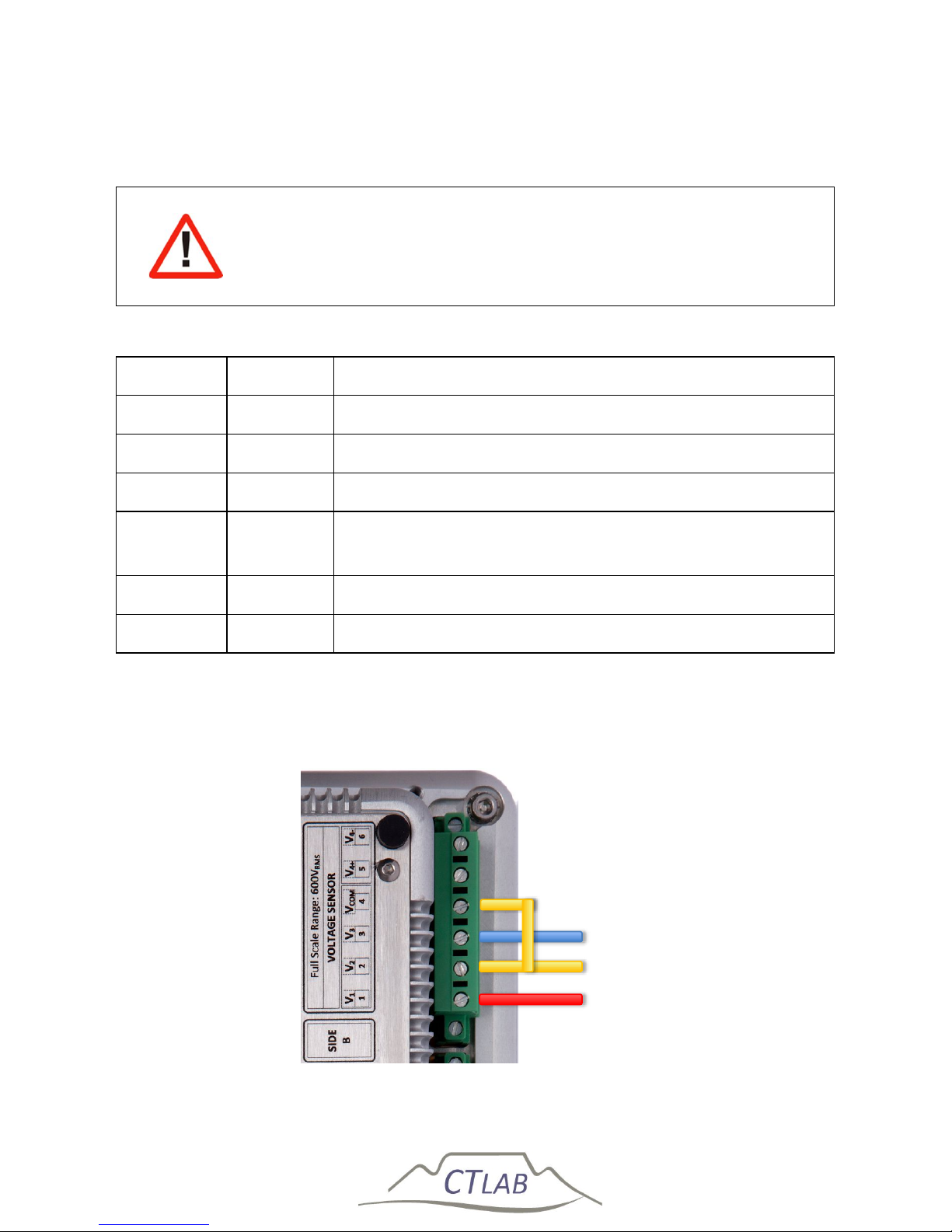
Impedo DUO User Guide
97
6.2.4.3 110V Voltage Transformer (VT) Circuits or 400V/550V Direct (Delta/3-
wire systems)
Always connect the safety earth terminal located on the power
connector first!
Table 12: VT circuit connection layout for 3-wire delta connection
Terminal Legend 110V VT Circuit or 400V/550V Delta (3-wire) Systems
1. V1 Phase 1
2. V2 Phase 2
3. V3 Phase 3
4. V
com
Open (Note: V
com
may also be connected to the earthed
Phase/Phase 2 on 110V VT circuits)
5. V4+ Open
6. V4- Open
1) Connect Phase 1,2 and 3 to Voltage Inputs 1-3 as shown in the Figure 60.
2) Leave V
com
open or connect V
com
to the earthed Phase (Phase 2) on 110V VT
circuits.
Figure 63: Impedo Duo 3-wire delta connection
Phase 3
Phase 2
Phase 1
Page 98
Impedo DUO User Guide
98
Meter A and B are not conformed to specifically measure single
phase, 4-wire (Star) or 3-wire (Delta) but rather handle all
topologies.
Page 99
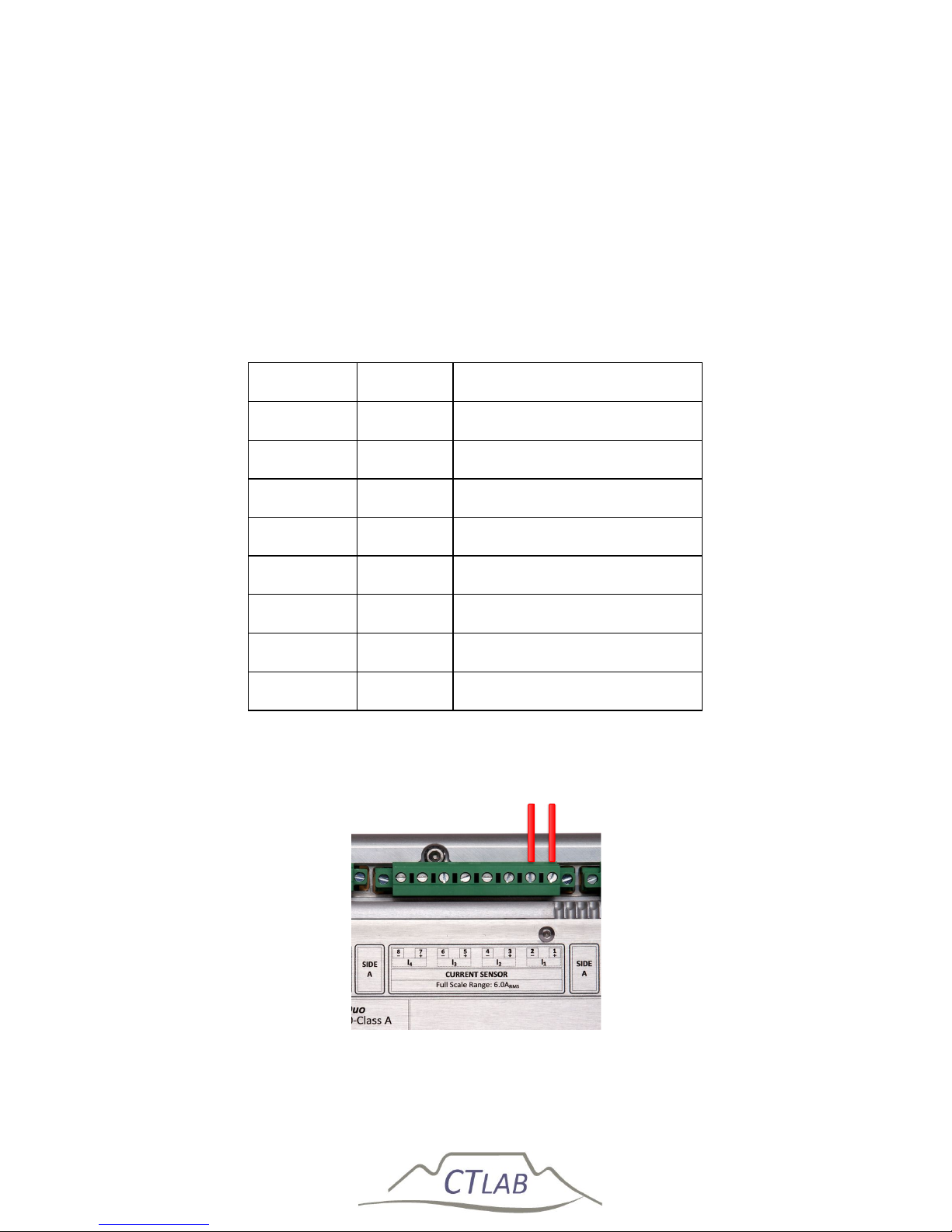
Impedo DUO User Guide
99
6.2.5 Current connections
6.2.5.1 Direct (1A/5A Current Transformer (CT) Circuits)
6.2.5.1.1 Single phase connection
The Impedo DUO can interface with 1 A or 5 A CT circuits and has a peak long-term
current withstand of 6 A and 50 A for 3 seconds.
Table 13: CT circuit connection layout
Terminal Legend Description
1. I
1+
Phase 1 Current Input
2. I
1-
Phase 1 Current Return
3. I
2+
None
4. I
2-
None
5. I
3+
None
6. I
3-
None
7. I
4+
None
8. I
4-
None
Figure 64: CT circuit connection layout
Phase 1 Return Phase 1
Page 100
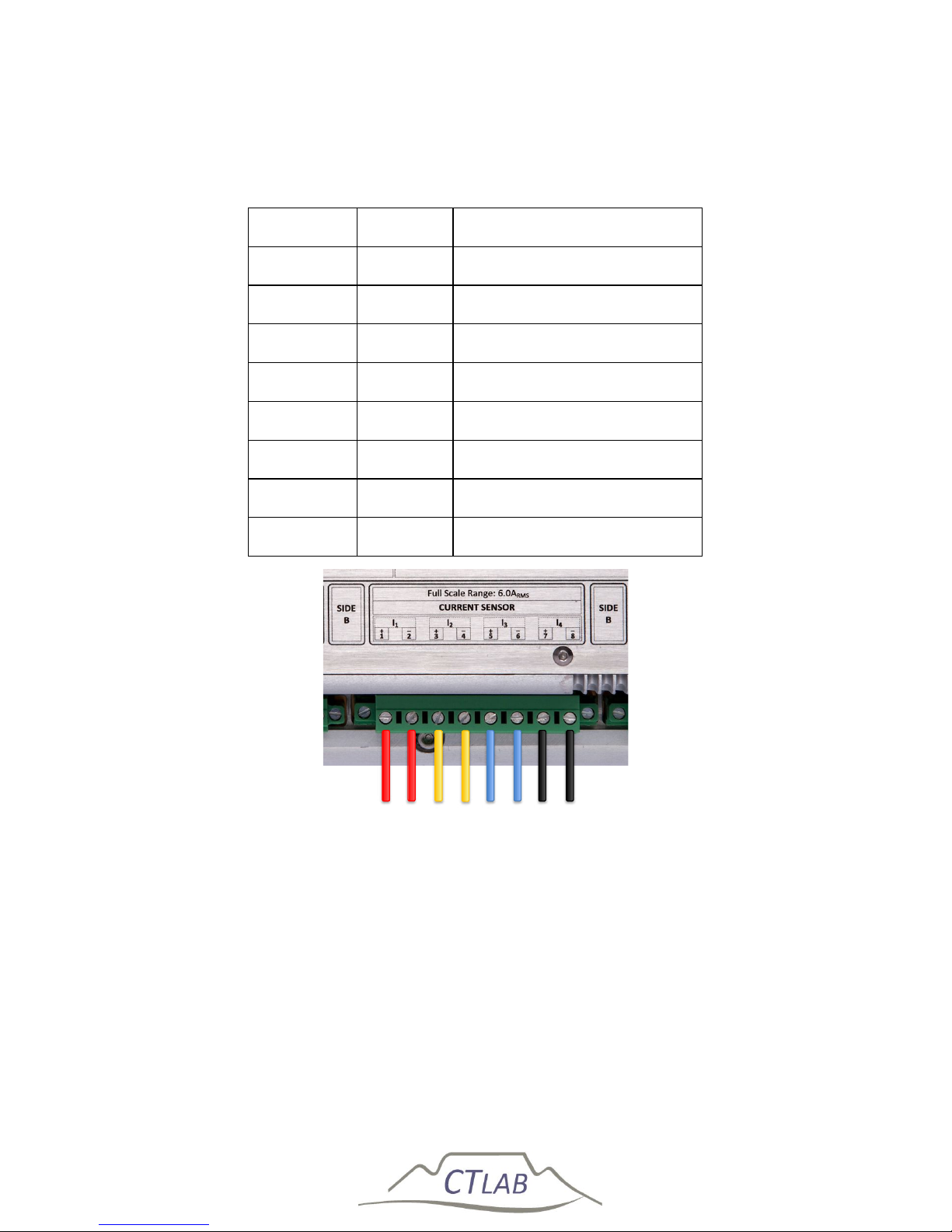
Impedo DUO User Guide
100
6.2.5.1.2 Three phase connection
Table 14: CT circuit connection layout
Terminal Legend Description
1. I
1+
Phase 1 Current Input
2. I
1-
Phase 1 Current Return
3. I
2+
Phase 2 Current Input
4. I
2-
Phase 2 Current Return
5. I
3+
Phase 3 Current Input
6. I
3-
Phase 3 Current Return
7. I
4+
Phase 4 Current Input
8. I
4-
Phase 4 Current Return
Figure 65: CT circuit connection layout
The Duo can be configured to derive the Neutral current by the summation
of the 3 line currents in star connected (4-wire) circuits.
The Duo can be programmed to derive any one of the missing line currents
by the summation of the other 2 currents in Delta connected (3-wire)
circuits
Phase 3
Phase 2
Phase 1
Phase 4 Return Phase 4
Phase 1 Return
Phase 2 Return
Phase 3 Return
 Loading...