

Page 1
CTAB
User Manual
Page 2

http://www.ctab.pl/
Welcome ........................................................................................................................ 3
Important Notices .......................................................................................................... 4
Keys and Functions ........................................................................................................ 5
I. Getting Started ............................................................................................................ 6
1.1 Turn on/of ......................................................................................................... 6
1.1.1 Turn on .................................................................................................... 6
1.1.2 Turn off .................................................................................................... 6
1.2 Lock/unlock the screen (sleep mode) ............................................................... 6
1.3 Connect to computer ........................................................................................ 6
II. Home Screen .............................................................................................................. 7
2.1 Add applications on home screen..................................................................... 7
2.2 Delete applications on home screen ................................................................ 7
2.3 Add widgets to home screen ............................................................................ 8
2.4 Multitasking ...................................................................................................... 8
III. Network Connection ................................................................................................. 8
3.1 Wi-Fi .................................................................................................................. 8
3.1.1 Turn on Wi-Fi........................................................................................... 8
3.1.2 Turn off Wi-Fi .......................................................................................... 9
3.1.3 Add a Wi-Fi network ............................................................................... 9
3.2 Bluetooth .......................................................................................................... 9
3.2.1 Make device discoverable ....................................................................... 9
3.2.2 Scan for devices ...................................................................................... 9
3.2.3 Pair with the Bluetooth device ............................................................... 9
3.2.4 Unpair a Bluetooth device .................................................................... 10
3.3 3G Network ..................................................................................................... 10
IV. Web browser .......................................................................................................... 10
4.1 Browse the web .............................................................................................. 10
V. Install and Manage Apps ......................................................................................... 11
5.1 Install Apps ...................................................................................................... 11
5.1 Manage Apps .................................................................................................. 11
VI. Multimedia .............................................................................................................. 12
6.1 Music ............................................................................................................... 12
6.2 Video ............................................................................................................... 13
6.2.1 HDMI output ......................................................................................... 14
6.3 Gallery ............................................................................................................. 14
6.4 Camera ............................................................................................................ 15
6.5 E-book reader .................................................................................................. 16
VII. Settings .................................................................................................................. 17
VII. Battery information ............................................................................................... 18
Troubleshooting ........................................................................................................... 19
Additional Information................................................................................................. 20
Page 3
Welcome
Thank you for purchasing this tablet.
It brings you much convenience for your business (supports Word, Excel, send &
receive e-mails...) and entertainment (supports 3D game, chatting, movie playback,
eBooks.....).
Running on Android 4.1, with a dual-core 1.6 GHz processor and highly responsive
capacitive touch screen, it brings you wonderful user experience.
Before beginning, please refer to this user manual carefully.
Page 4
http://www.ctab.pl/
Important Notices
The new battery will be in its best condition after 2-3 times full charge and
discharge.
While using the earphone, if the volume is excessively high it may cause
hearing damage. So please adjust the volume of the player to a moderate
level and balance the time of using.
Do not disconnect the tablet suddenly when formatting or uploading and
downloading, which can lead to program errors.
Do not dismantle the tablet by yourself, and do not use alcohol, thinner or
benzene to clean its surface.
Do not use the tablet while driving or walking.
The tablet is not moisture and water resistant. Please do not use it in a damp
environment.
Do not drop or hit it to hard surface, or the screen may get damaged.
Do not upgrade the firmware by yourself. This would cause damage to your
tablet.
Page 5
http://www.ctab.pl/
Keys and Functions
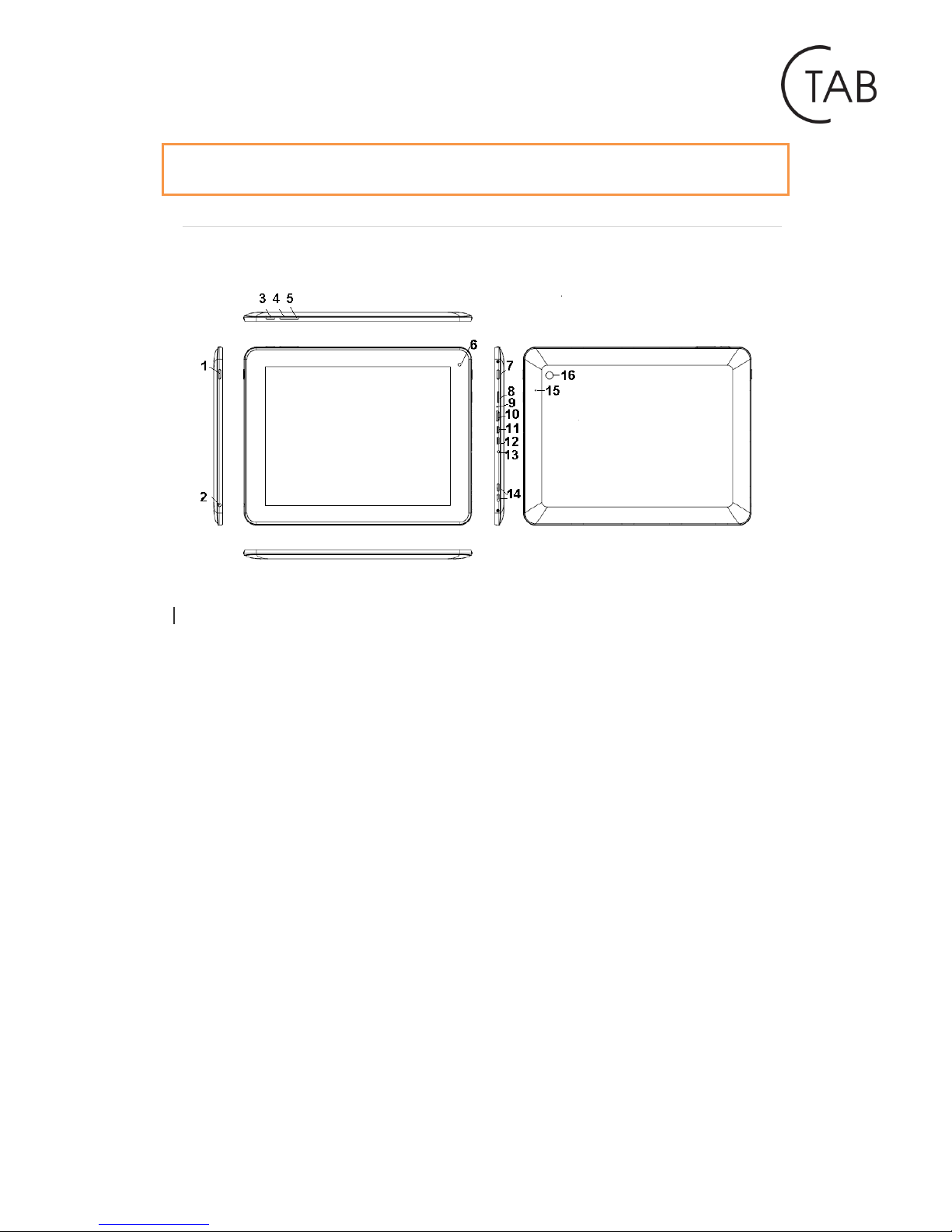
1. Power and lock key
2. Earphone jack
3. Menu key
4. Vol + key
5. Vol - key
6. Front camera
7. Home key
8. TFcard key
9. MIC
10. HDMI
11. Mini-USB slot
12. USB OTG
13. Power Jack (DC input)
14. Speakers
15. Reset
16. Rear camera
Page 6
http://www.ctab.pl/
I. Getting Started
1.1 Turn on/of
1.1.1 Turn on
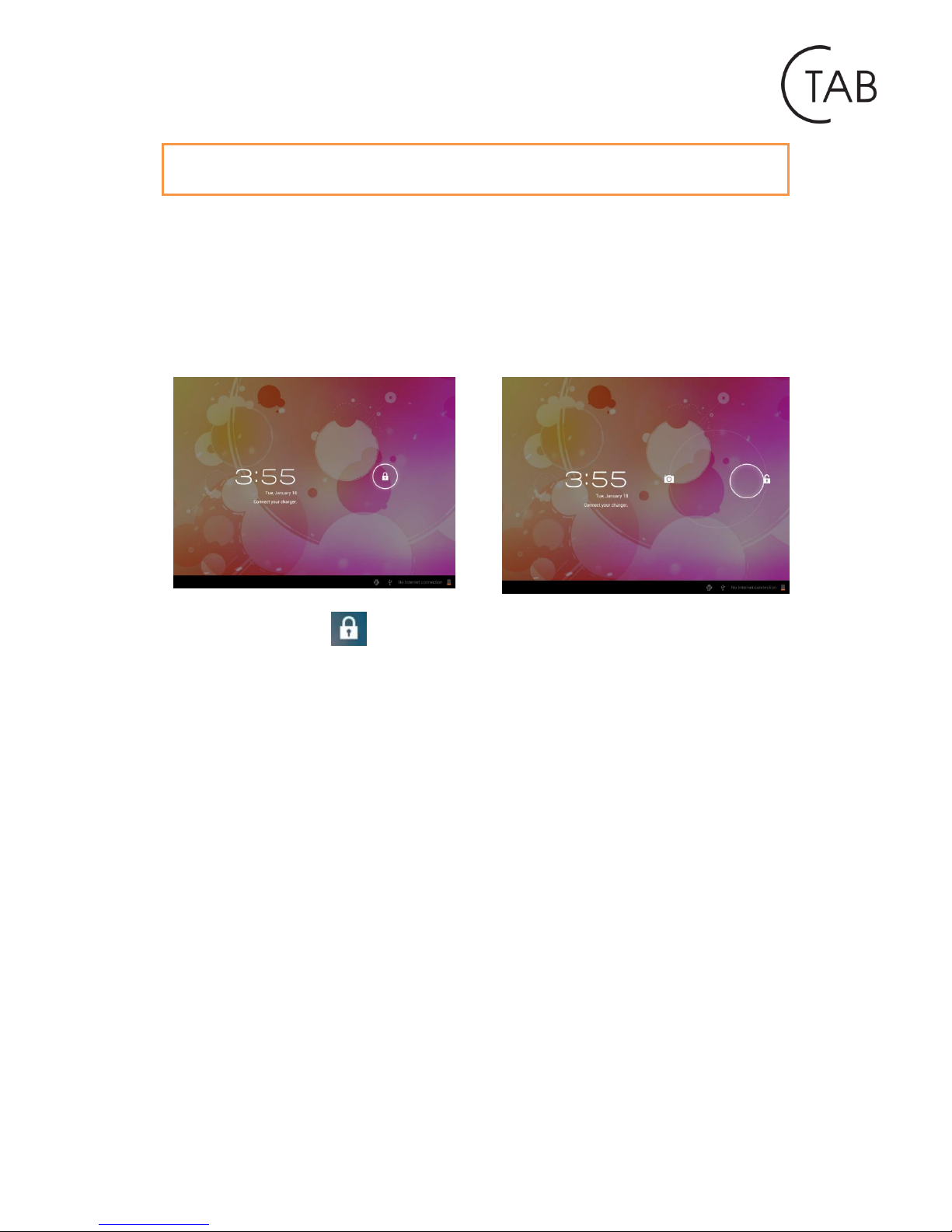
To start your tablet, press and hold the power key at the right side of your tablet for
a while. Tab and drag the lock out of the circle to unlock.
→
Tab and drag the lock out of the circle to unlock.
Drag the lock to right: you will go to the home screen.
Drag the lock to left: you will go to camera directly.
1.1.2 Turn off
To power off your tablet, press and hold the power button until the “Would you
like to shut down?” dialog appears and tap “OK” to power it off.
1.2 Lock/unlock the screen (sleep mode)
To save battery, you should put your tablet in sleep mode by turning off the LCD
display. To do this, shortly press the power key. Press it again to wake up the screen.
1.3 Connect to computer
You can connect your tablet to your computer with the supplied USB cable so you
can transfer media files.
If your computer is XP system, please install a Windows Media Player 11 for your
computer before transfer media files as Android 4.1 system needs Windows Media
Player 11 support.
Page 7
http://www.ctab.pl/
II. Home Screen
2.1 Add applications on home screen
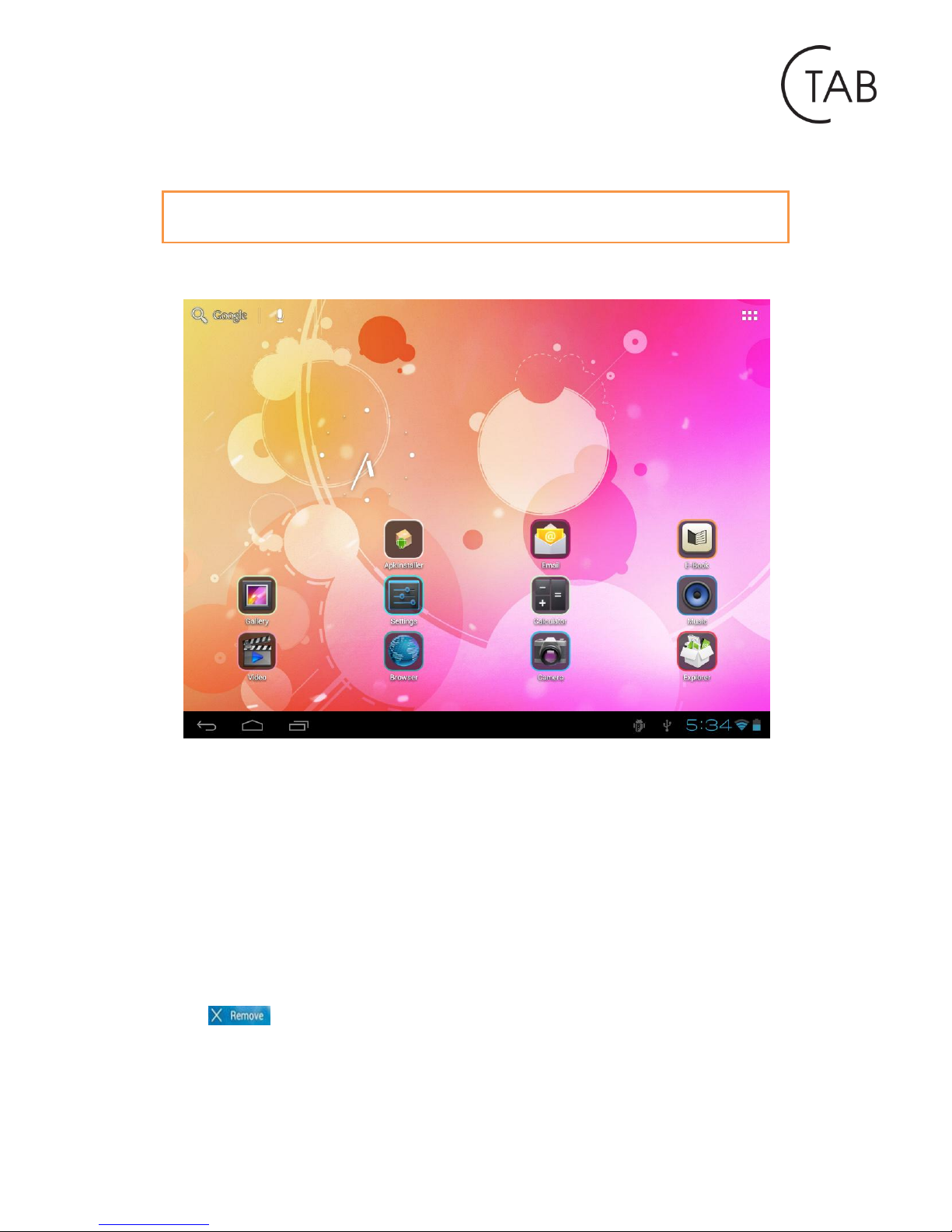
Tap the app launcher in the top right corner to go to all apps panel, tap and move
the app you want to the home screen.
2.2 Delete applications on home screen
To delete an app from home screen, tap and hold it, and then move it to the remove
icon
d e f g h i j
Page 8
http://www.ctab.pl/
2.3 Add widgets to home screen
Tab all Apps launcher→Tab WIDGETS. There are Analog clock, bookmarks, calendar,
Email, and lots of other widgets. Drag the widget you want to the home screen.
Tips: Besides your home screen, you can access to other four panels by sliding left or
right in your home screen. You can also customize these panels.
2.4 Multitasking
CTAB is a multitask device. To get to the programs, which recently have used, press
and hold the icon . To restore the previously used application, simply select it
from the list.
III. Network Connection
3.1 Wi-Fi
Wi-Fi can only be used when it connects with home Wi-Fi Access Point (AP) or a free
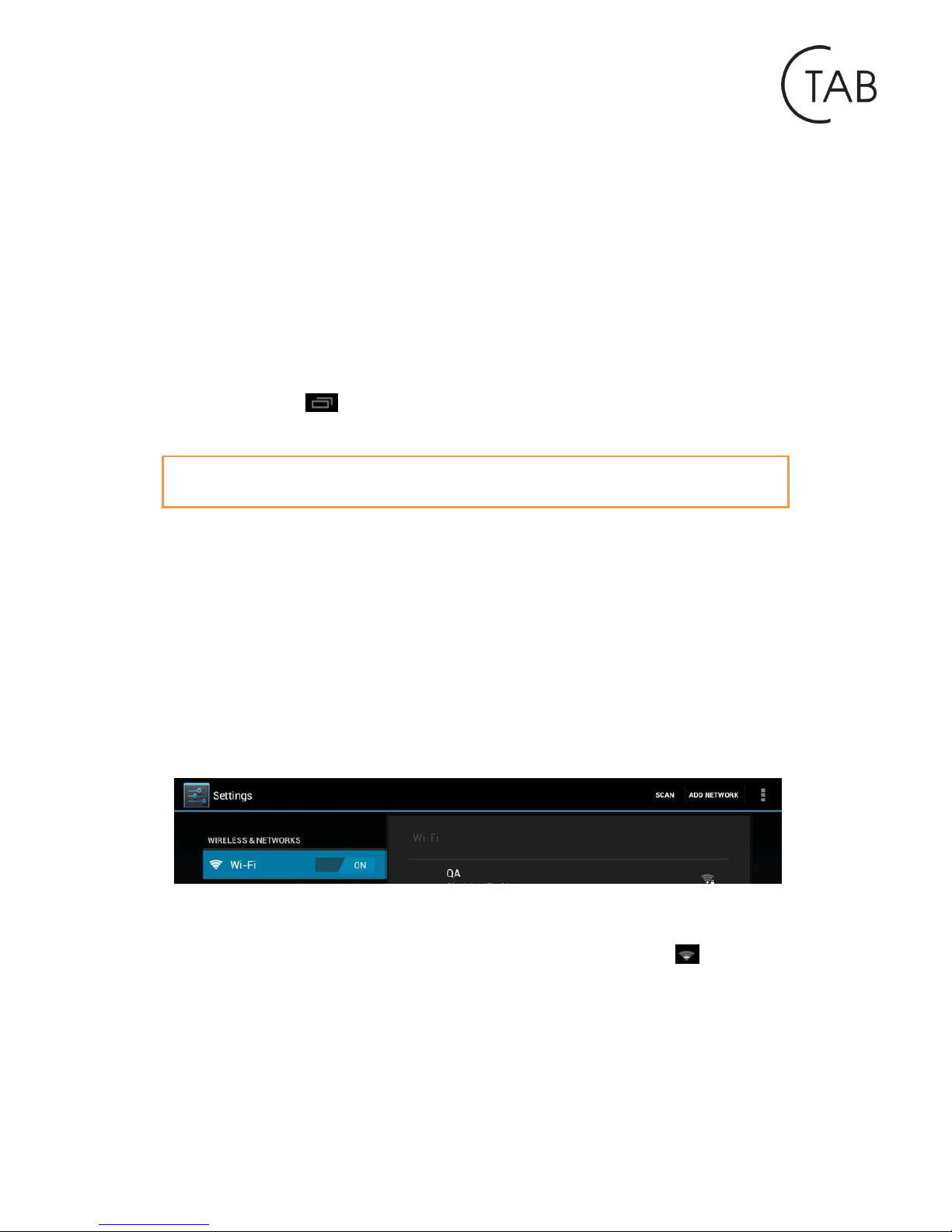
unsecured Wi-Fi hotpot. Under “Wireless & networks”, tap “Wi-Fi” to turn it on.
After a moment, your Wi-Fi networks list should populate. If you need to rescan for
available networks, tap "scan"
3.1.1 Turn on Wi-Fi
Within the App Panel, tap “Settings” → then “Wireless & networks” → “Wi-Fi” to
turn on WI-FI.
Your tablet lists the networks it finds within range. Tap a network to connect. If
necessary, enter Network SSID, Security, and Wireless password, and tap “Connect”.
When your tablet is connected to the network, the wireless indicator appears in
the status bar. Waves indicate connection strength.
Page 9
http://www.ctab.pl/
3.1.2 Turn off Wi-Fi
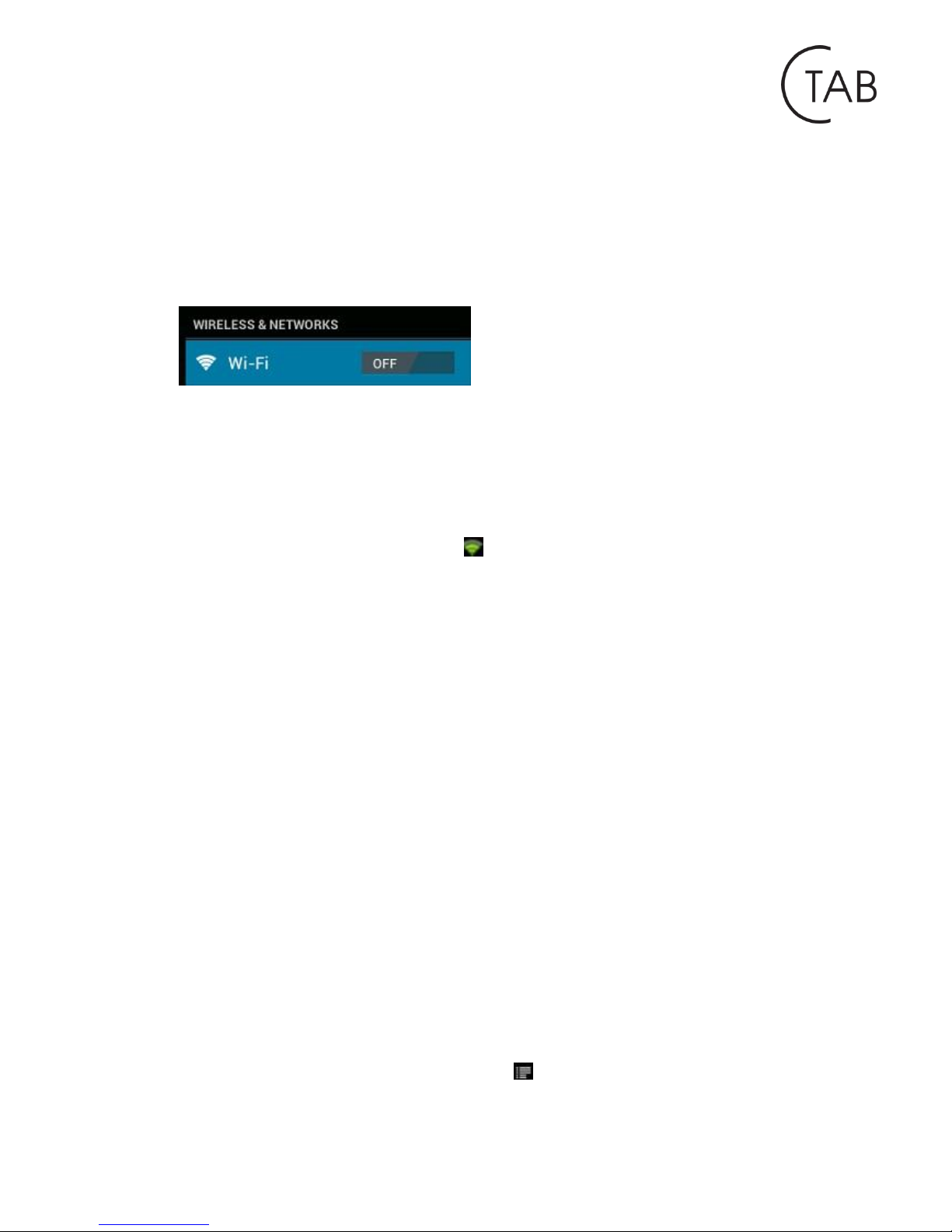
Please turn off Wi-Fi if you’re not using it to save the battery. To turn off Wi-Fi, tap it
again.
3.1.3 Add a Wi-Fi network
Users may also add a Wi-Fi network under “Wi-Fi settings”. In “Wi-Fi settings”, tap
“Add network”. Enter the SSID (name) of the network. If necessary, enter security or
other network configuration details. Touch Save.
Note: Network status icons turn green if you have a Google Account added to
your tablet and the tablet is connected to Google services, for syncing your Gmail,
Calendar events, contacts, for backing up your settings, and so on.
3.2 Bluetooth
3.2.1 Make device discoverable
Under “Settings”, tap “Wireless & networks” → “Bluetooth settings”. Tap Bluetooth
to turn on Bluetooth power and tap “Discoverable”. The Bluetooth indicator then
appears in the status bar.
3.2.2 Scan for devices
After scanning, there will be a list of the IDs of all available Bluetooth devices in
range. If the device you want to pair with isn’t in the list, ensure that the other
device is turned on and set to be discoverable.
3.2.3 Pair with the Bluetooth device
Tap the name of an available Bluetooth device to pair with. In the popup “Bluetooth
pairing request” dialog, type a PIN.
If the pairing is successful, your tablet connects to the device.
Example: to transmit a photo
Go to “Gallery”, choose a photo to share. Tap icon or any spot on the photo to
Page 10
http://www.ctab.pl/
view a submenu. Tap → → , and then choose the device name in
the Paired devices list. The photo will then be sent.
3.2.4 Unpair a Bluetooth device
To unpair your Tablet from a Bluetooth device, touch and hold the device name in
the devices list. Tap “Unpair” in the popup dialog.
Note: After pairing, it shows under the Bluetooth device “Paired but not connected”,
but file transmission is still possible.
At present, the Bluetooth function only supports files transmission.
To extend battery life, turn Bluetooth power off when not in use.
3.3 3G Network
A 3G network is a mobile network that allows high-speed data access and advanced
network capacity. It features a wider range of services and advanced network
capacity over the previous 2G network.
Your tablet supports external 3G network by a 3G dongle. 3G dongles are connected
via the USB HOST port.
Note: some models support 3G network optional. If you purchase this tablet with a
SIM card slot, you can access to the Internet via your 3G SIM card while Wi-Fi
network is not available. Please insert your 3G card into the SIM card slot of the
tablet, and the tablet will obtain 3G signal automatically. If you purchase this tablet
without a SIM card slot, you can also try to access to Internet with a USB 3G dongle.
IV. Web browser
4.1 Browse the web
Before using your browser, make sure Wi-Fi or internet is connected.
In your app panel, tap the icon browser to open your browser.
Tap the address bar, the Android keyboard will appear for your entry of keywords or
URL.
Tab the icon in the top corner of the browser page to open the submenu.
Page 11
http://www.ctab.pl/
V. Install and Manage Apps
5.1 Install Apps
Go to the “ApkInstaller” to install and manage your apps. To install an
application, follow below steps:
1. Tap to open the ‘ApkInstaller’ → ‘Install’ → then tap “Internal Memory” or “TF
Card”. Available .apk files will appear at the right side. Touch the required one to
install it.
Note: Make sure the .apk file is workable on Android 4.1, and the suffix is .apk. e.g.
“angrybirds.apk”.
In some cases, there may be no icon on in the App Panel after a .apk file is installed.
Possible reasons may be that this app is not compatible with your OS or the
downloaded .apk file is a broken one so you may need to download a full version.
5.1 Manage Apps
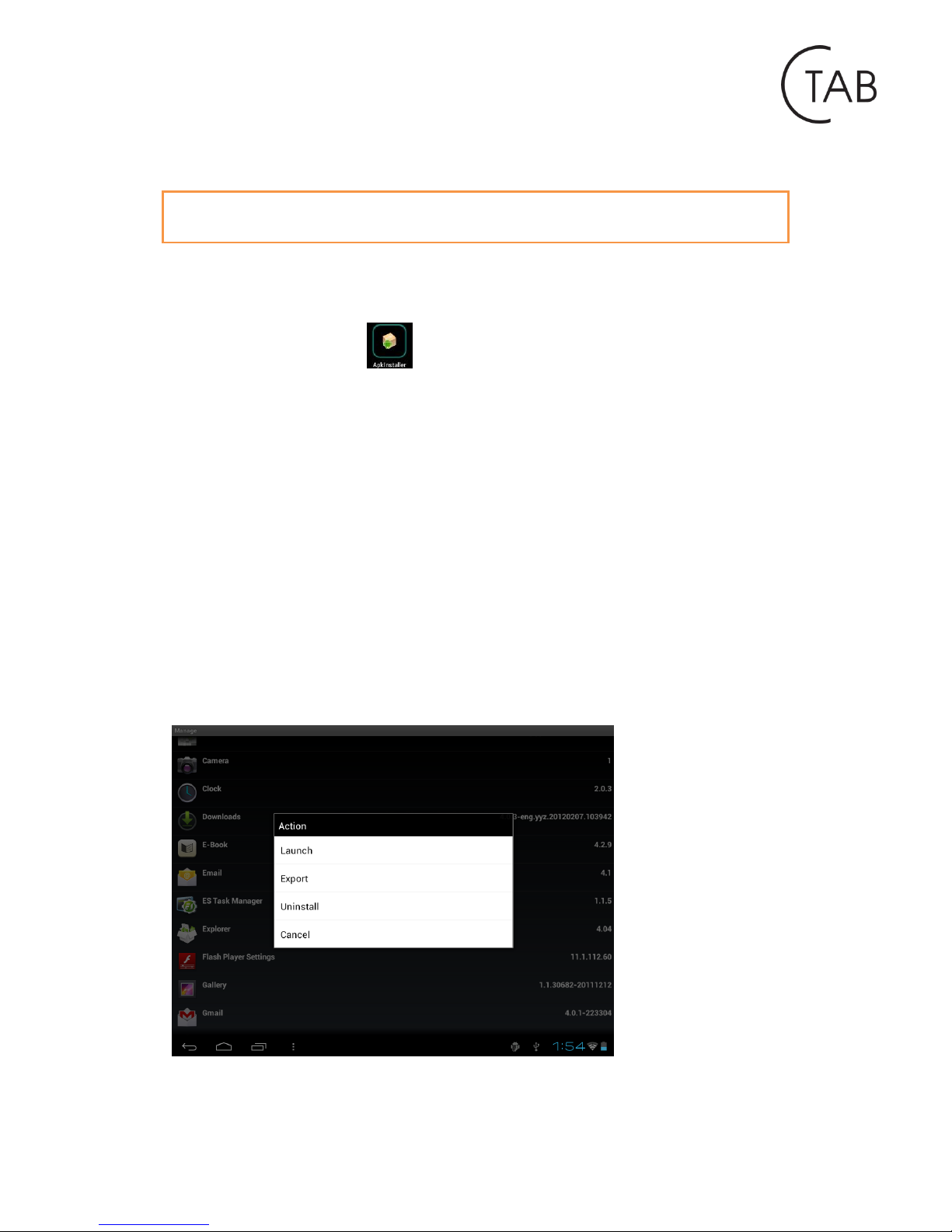
Tap to open the ‘ApkInstaller’ → ‘Manage’. Tab the app and then you can launch,
export, and uninstall it.
You can also go to “Apps” under “Settings” to manage apps.
Page 12
http://www.ctab.pl/
VI. Multimedia
6.1 Music
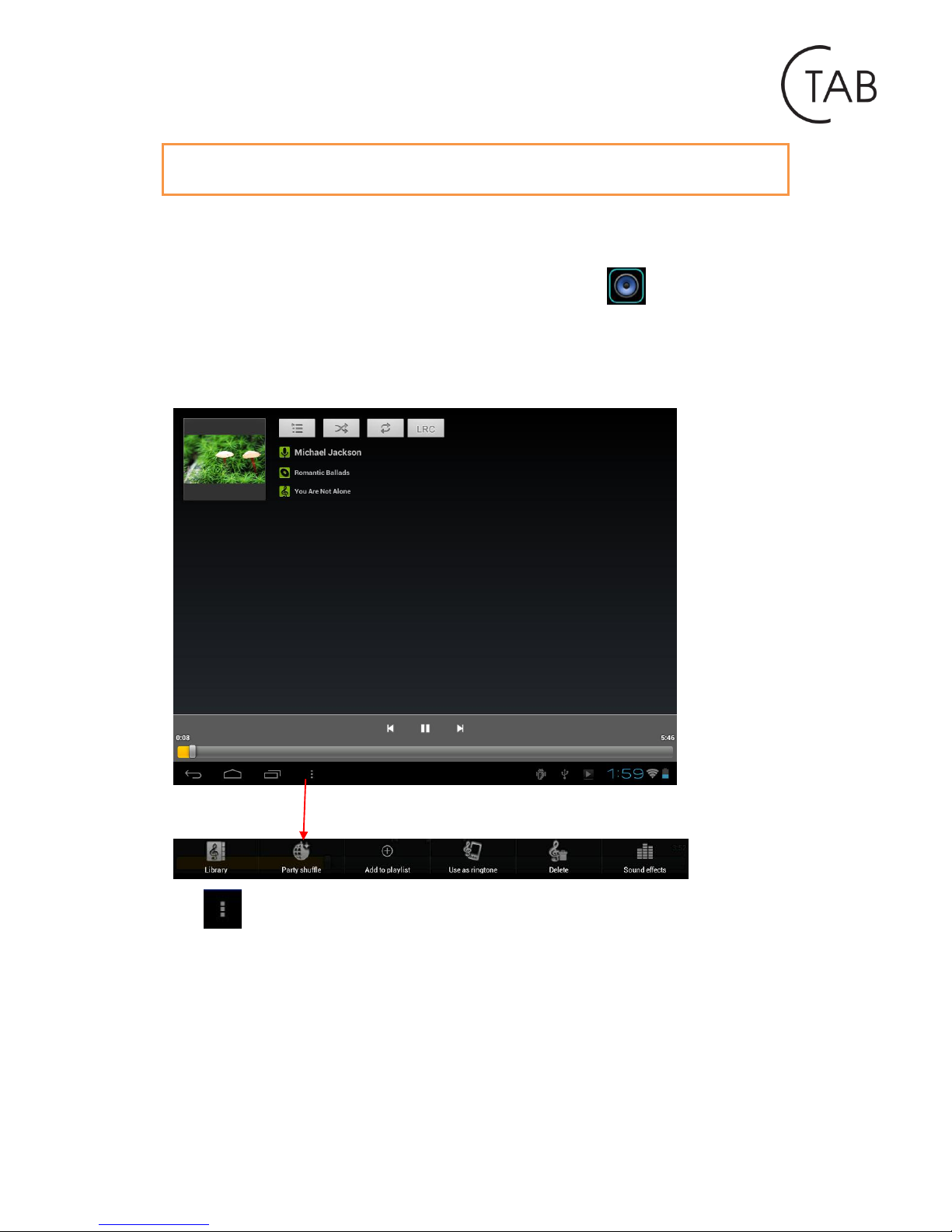
After loading your music into your tablet, tap the music icon to open the music
player. You can select songs by Artist, Albums, songs or Play lists. Tap to select. The
media player allows you to shuffle, skip, or pause your current selection and even
displays the album artwork when available.
Tab in the bottom line to open a submenu in music playing page.
Page 13
http://www.ctab.pl/
6.2 Video
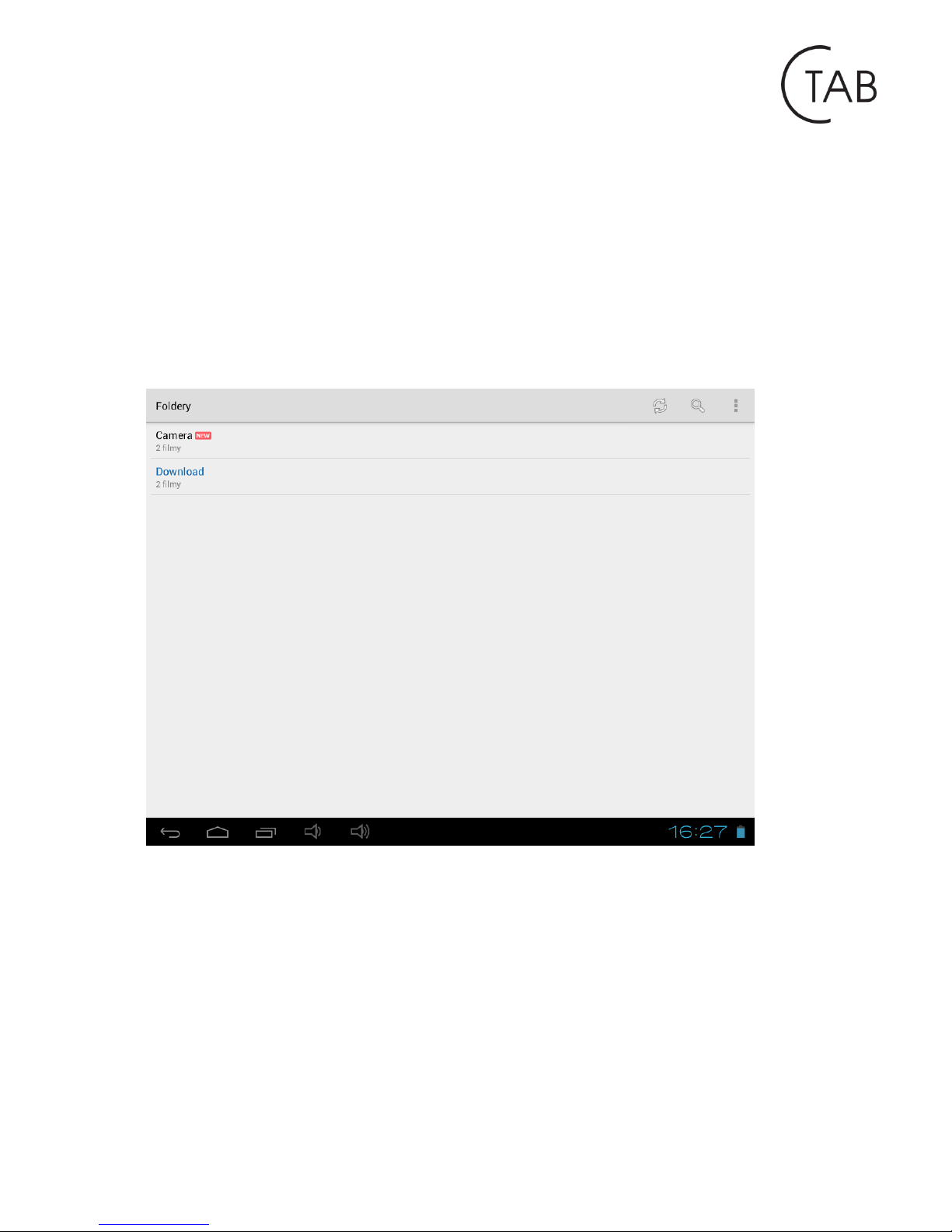
You can play videos saved in your tablet or TF card.
To play, tap icon “MX Player” to launch the video player: select a movie that
interests you. Playback should start automatically. Click anywhere on the screen to
see the sound bar. You can withdraw the film, rewind it or stop it. You can also
adjust the aspect ratio. To change the brightness of the screen, slide your finger
vertically up and down the left side of the screen. To change the volume while
playing a movie, slide your finger vertically up and down the right side of the screen.
With the Wi-Fi on, you are also able to view an on-line video.
Page 14
http://www.ctab.pl/
6.2.1 HDMI output
Connect the tablet to your TV via an HDMI cable and wait for the signal to the TV. If
this fails, set the correct reception of the TV. The HDMI cable is not included with the
CTAB.
Resolution, sent by HDMI cable, you can adjust the HDMI settings, which are located
in the settings menu.
Note: Connecting your TV to the HDMI port will cause the tablet screen expires. To
continue, we recommend that you use the mouse.
6.3 Gallery
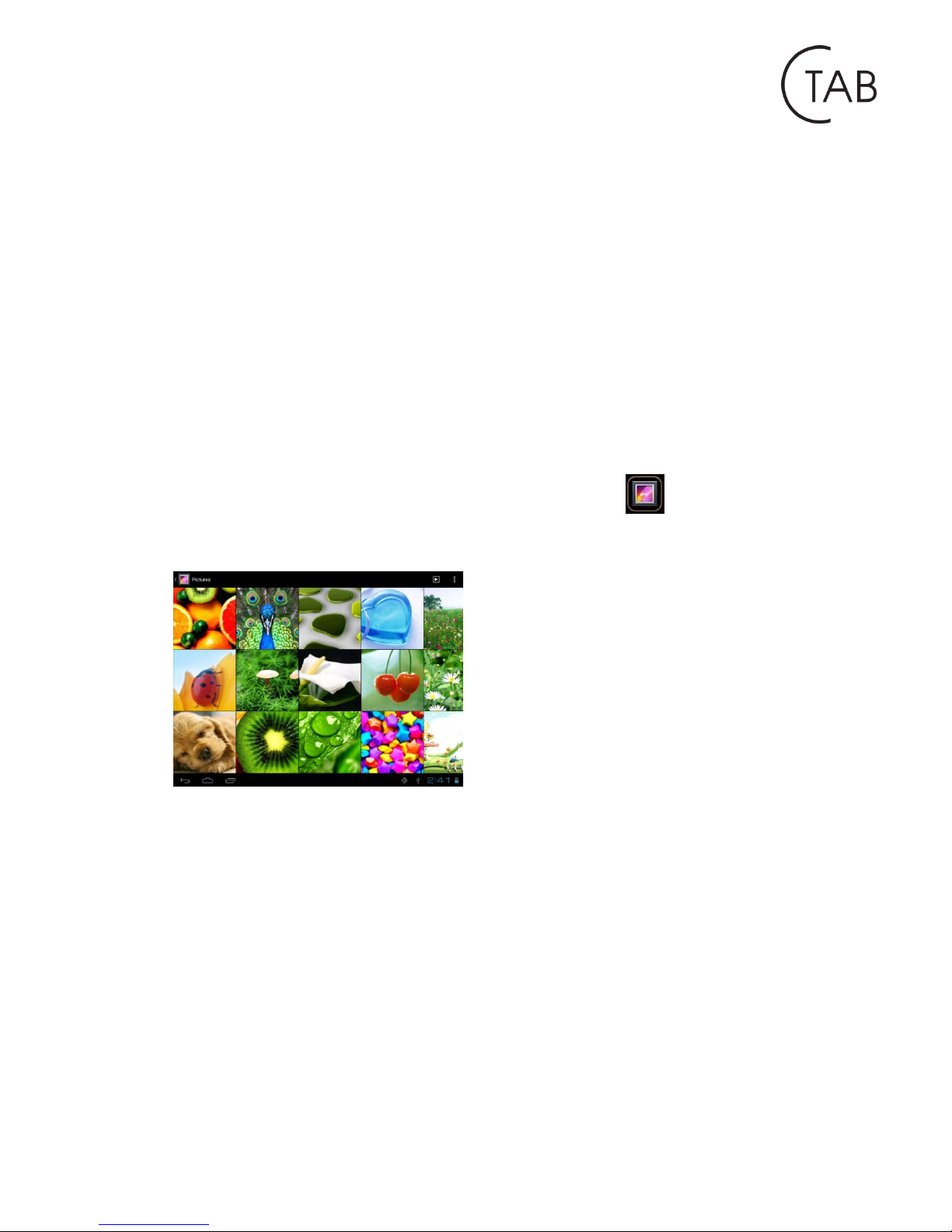
You can view, show off, and even edit your digital pictures on the tablet’s full color,
high-resolution display. After loading your media, tap Gallery to display your
pictures:
Tab the picture you want to display it, and slide right or left to show other pictures.
Tap the menu icon, you can edit, rotate, crop, or set it as wallpaper.
Page 15
http://www.ctab.pl/
6.4 Camera
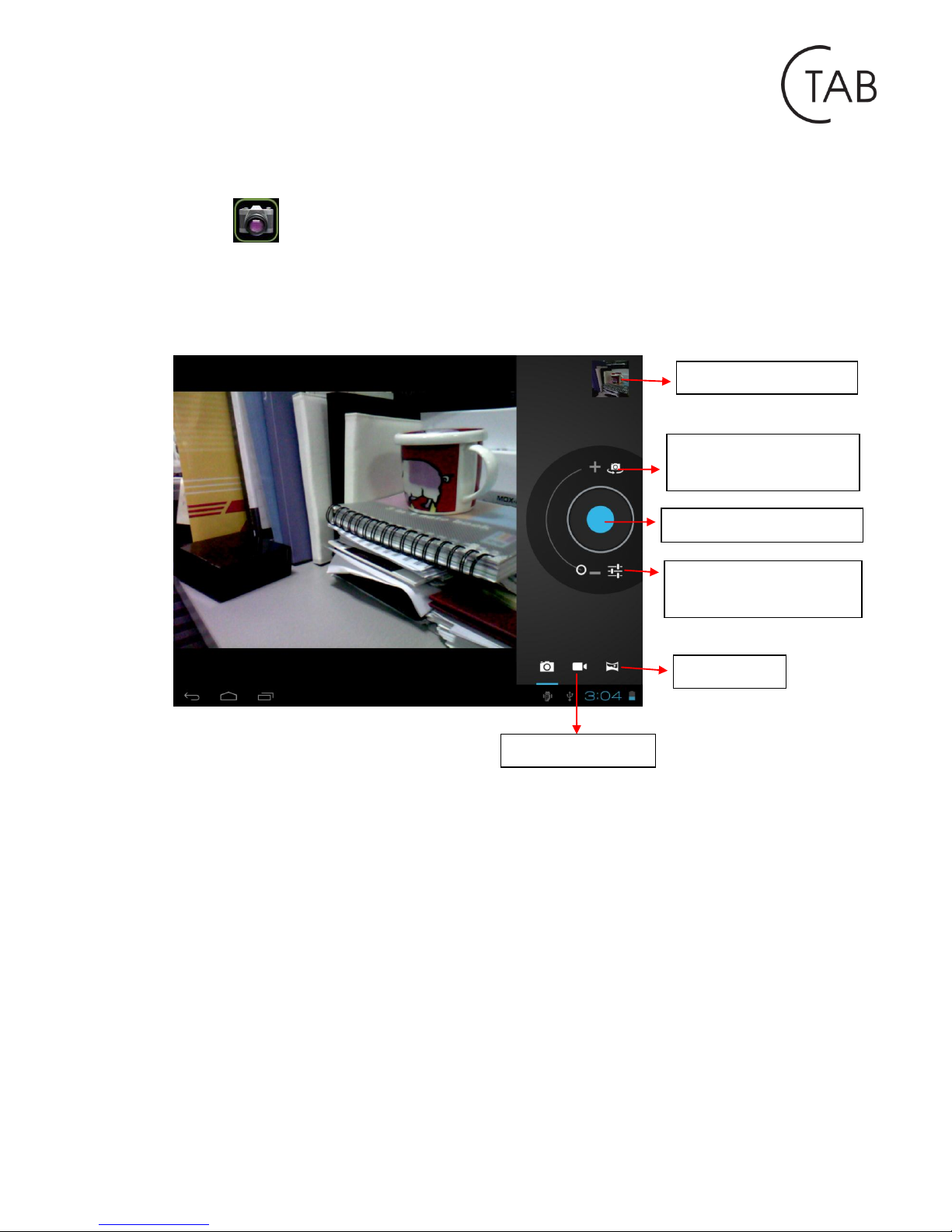
Tap the icon to open camera. Your tablet is built in 2M front camera and 2M
rear camera. You can take a photo, or a video both by front camera and rear camera.
Note: After you power on your tablet, you can go to camera directly by drag the lock
to left.
To view photos
To select Front/
back camera
Tab to take a photo
Set white balance,
Scene mode, etc.
Pan-shot
Camera switch
Page 16
http://www.ctab.pl/
6.5 E-book reader
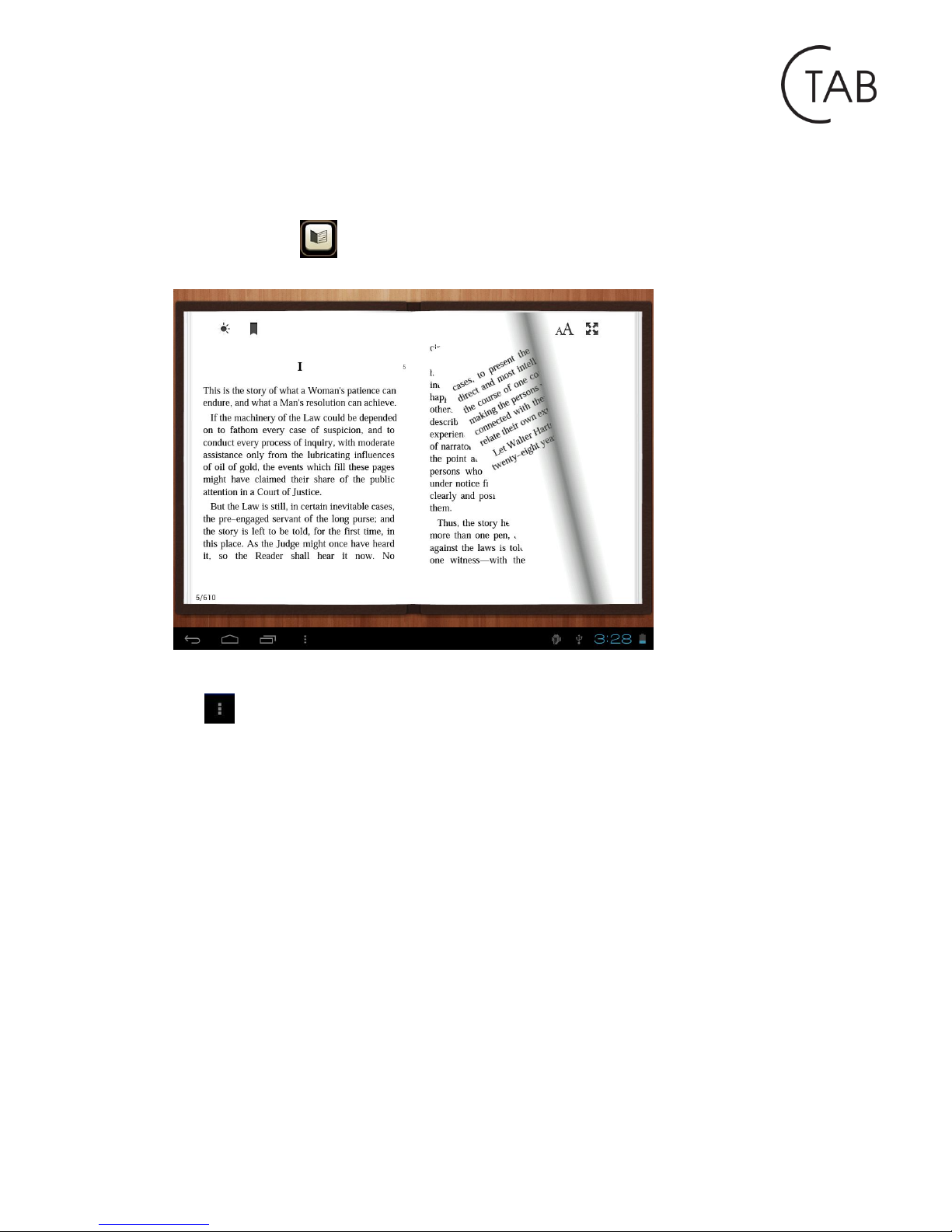
The tablet supports many eBook formats like PDF, Text, E-Pub, FB2....
Tap the “e-book” icon to open e-book shelves. Tab an e-book to open the book
and read.
You can page up or page down by sliding your finger right or left.
Tab or the menu button to check the sub-menus. You can set the font size, Go
to Page jump; check your bookmarks, set the auto flip time, etc.
Page 17
http://www.ctab.pl/
VII. Settings
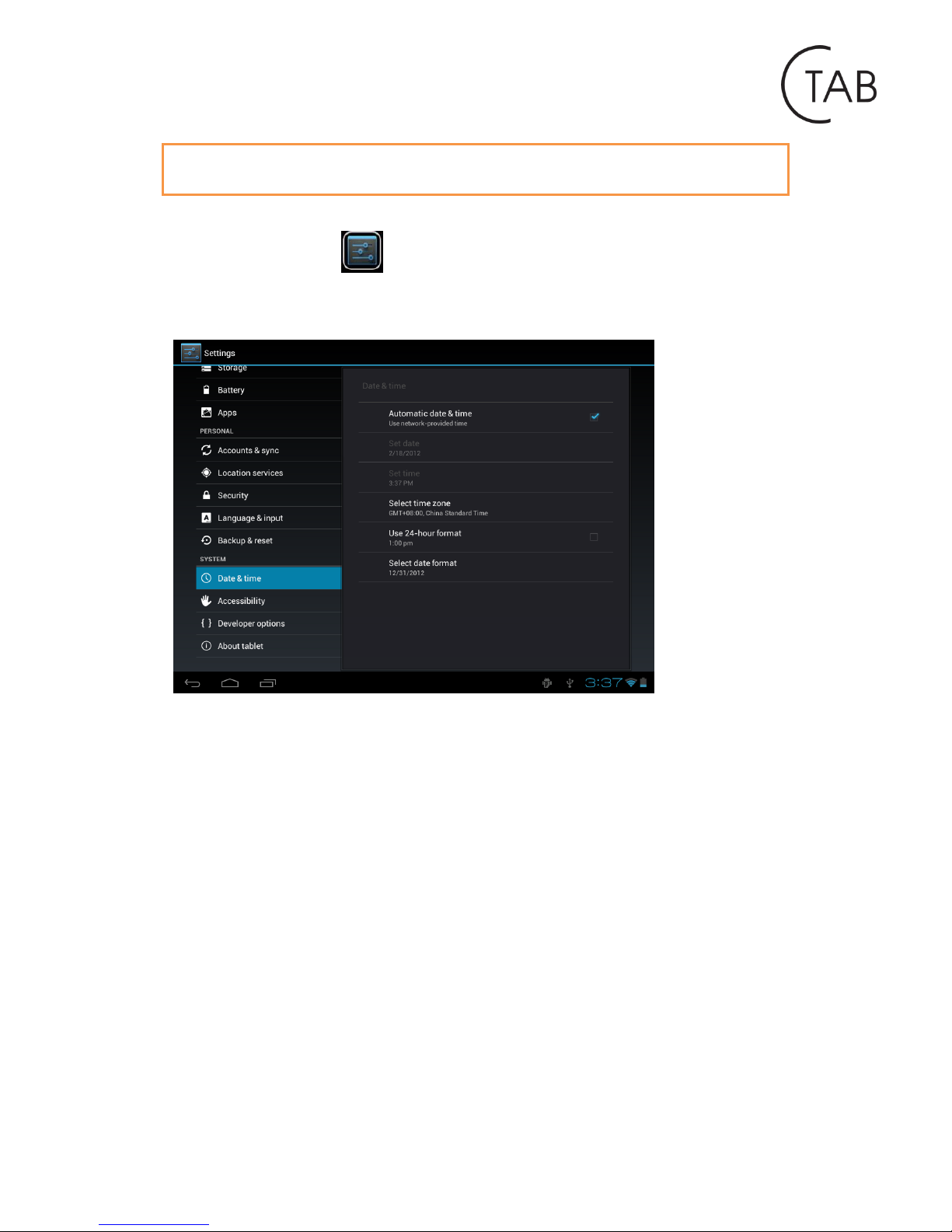
Tap the “Settings” icon to go to settings.
You can check and set wireless&networks, sound, display, storage, Battery, Accounts
&sync, security, language, date&time, about tablet, etc.
Wi-Fi: tap “Settings” → “Wireless & networks” to turn on wifi and scan. It will show
a list of Wi-Fi networks scanned in range. Choose a strong Wi-Fi network to connect.
(You may need to input the password).
Display: To set Brightness, Wallpaper, Sleep time-out, Font size here.
Storage: Check internal storage here. If you insert a Micro SD card, or USB disk, you
can check the total and available space for your Micro SD card or USB disk. Please
unmount it to safely remove it.
Battery: Check the Battery status here.
Display: Tap “Settings” → “Display” to set brightness, screen time-out, etc.
Language & input: to set language and keyboard input.
Backup & reset: to go to submenu "back up my data" and "Factory data reset". If
you choose factory data reset, all data from your tablet's internal storage will be
erased. Choose this option carefully.
About Tablet: To check information about your tablet, such as Model number,
android version, etc.
Page 18
http://www.ctab.pl/
VII. Battery information
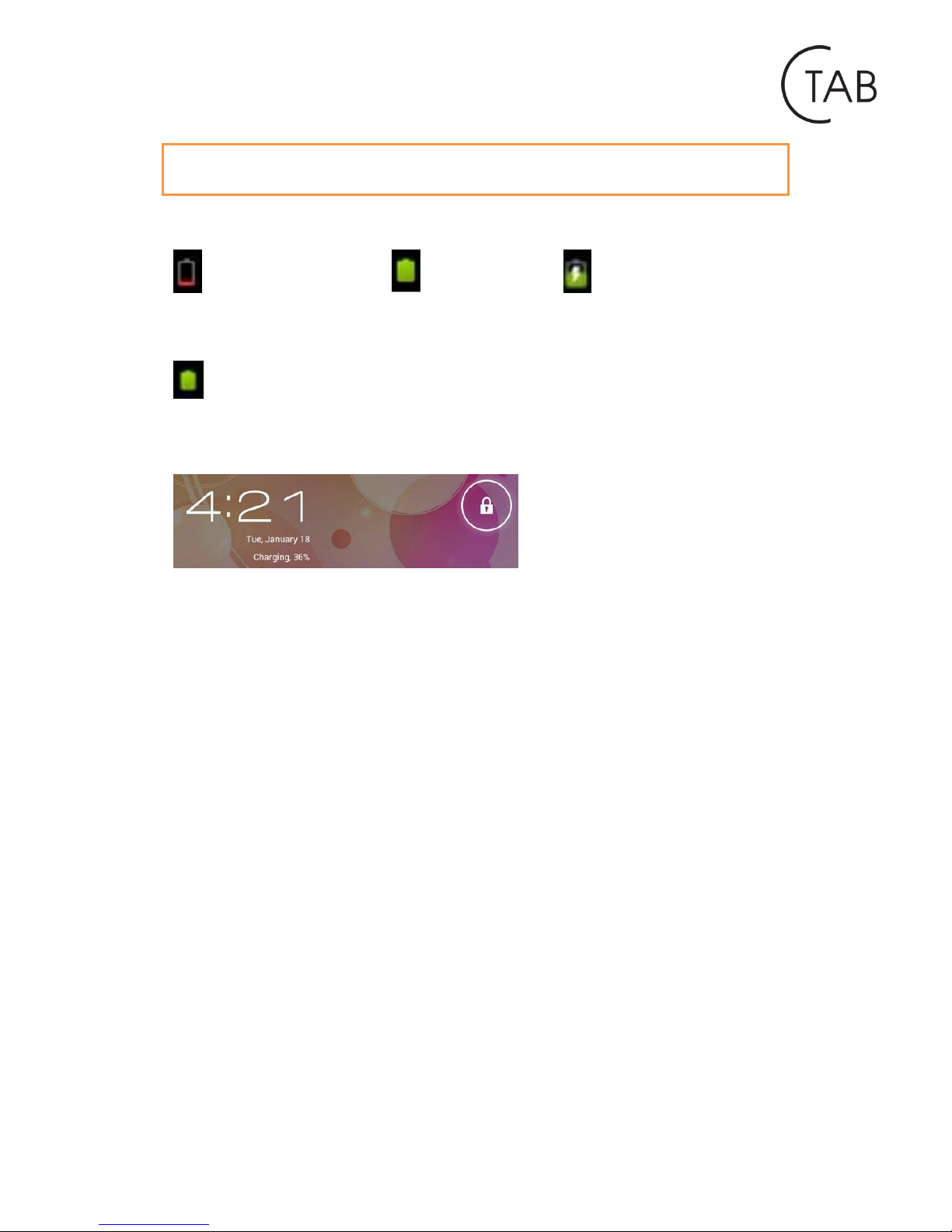
Very Low Battery
Full Battery
Charging Battery
indicates that the power of Battery is full. When the battery level becomes too
low, a prompt comes up to note you to charge your tablet.
While charging, you can check the charging status in the lock screen:
It takes around 5 hours to charge your tablet to full battery. Please only use a 5V
/2.5A adaptor included in the gift box to charge it.
Page 19
http://www.ctab.pl/
Troubleshooting
1. Cannot turn on the tablet
Check the tablet’s power level; please charge it before starting it. In case your tablet
still cannot be turned on, you may try to reset it
2. No sound from earphone
Check if volume is set to ‘0’. Or earphone may be broken, please change for another
one.
3. Big noise
Check if there is dust in the earphone or speaker. Check if the file is broken.
4. Screen drift or unresponsive screen
To pin the reset button to reset your tablet and power it on again.
5. Application not workable
Possible reasons may be that this app is not compatible with your OS or the
downloaded .apk file is broken so you may need to download a full version.
6. How to delate a Google account?
If an account is added, the account is shown in “Accounts & sync” of “Settings”,
where you may also add another account. To delete an undesired account, go to
“Settings” → “Privacy settings” → “Factory data reset”. Your tablet’s internal
storage, downloaded apps, etc. will also be deleted, except the info in your flash
memory. Be careful before you carry out this operation.
Page 20
http://www.ctab.pl/
Additional Information
CTAB was produced for company Compendium Education Center.
Information on the warranty on page: http://www.ctab.pl/.
Distribution in Poland: Veracomp S.A.
 Loading...