

Page 1
CSL Router Quick Guide
CSL800V2 04012018
Introduction
The CSL Router is a compact 4G Router which includes Wi-Fi and two 10/100 Ethernet ports. It is designed in a rugged
aluminium case with a click-in bracket included for wall mounting.
Installation
The CSL Router is preconfigured with the SIM already fitted in SIM1. Follow the simple steps below to ensure a quick and
reliable installation:
1. Device location – find a suitable location with good 4G coverage and away from sources of interference i.e. monitors,
fridges, power supplies, etc.
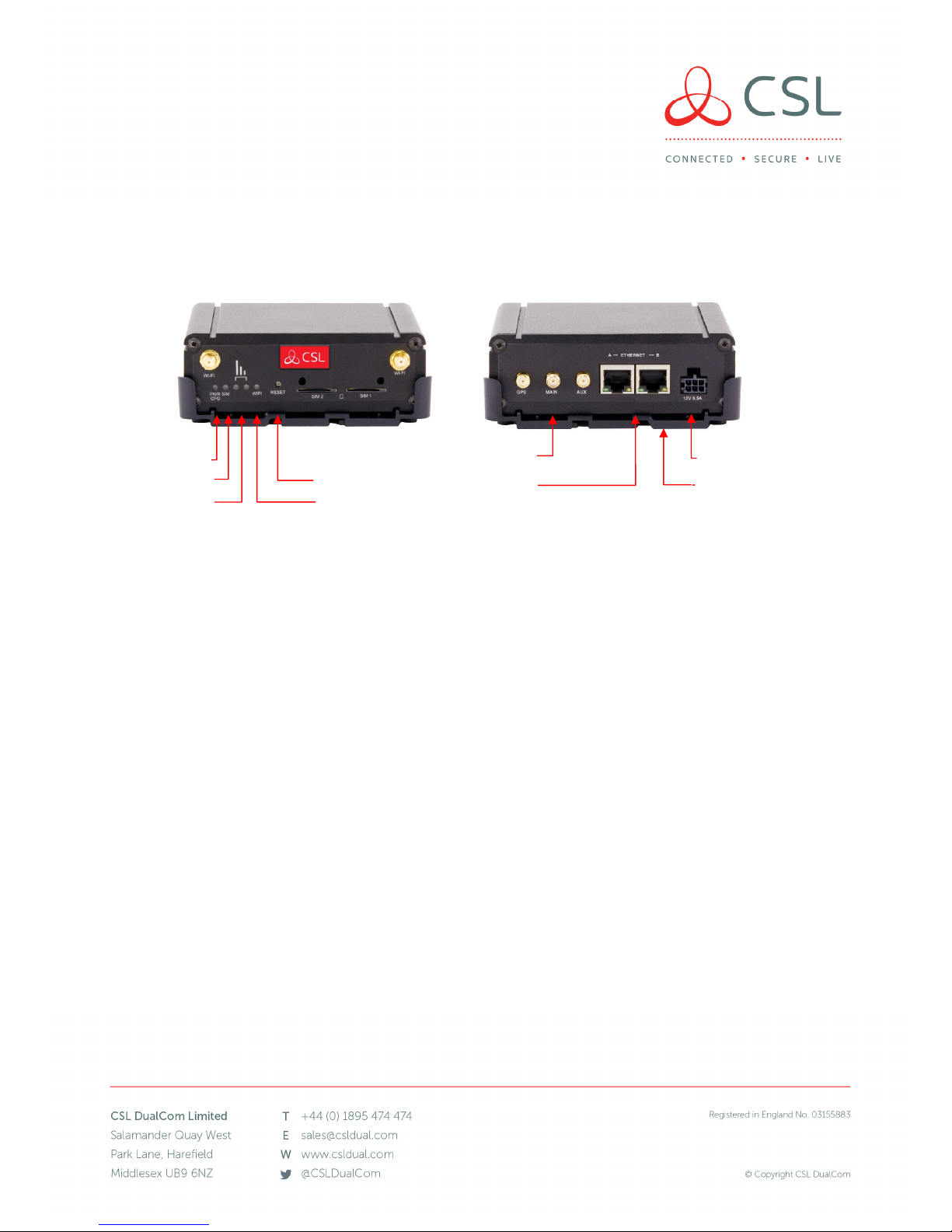
2. Aerial and power connections – fit the included Aerial to the rear connection port marked MAIN and power up the
Router using the supplied PSU. Once powered the front Green LEDs will indicate the device status according to the
table below.
3. Sufficient signal strength – for best results ensure that both Green Signal Strength LEDs are ON to indicate the Router
has established good signal strength. OFF/ON LED status indicates a medium signal strength which is also acceptable.
4. Connect devices – IP devices can now be connected using the supplied Ethernet cable or wirelessly.
Please note:
The CSL Router has an optional Wi-Fi capability which will require the CSL Router Wi-Fi Aerial (antenna) pack. Please
contact CSL Support if you wish to order the pack and utilise this feature.
The CSL Router is shipped with a single 4G antenna. The device also has an AUX connector for connection of a second
4G antenna (not supplied) to allow for antenna diversity. Antenna diversity can sometimes improve the quality and
reliability of a wireless link. Please contact CSL Support for more information.
External wall mounted High Gain Aerials are available as an optional accessory. Please contact CSL for more
information.
Back
Front
Power
SIM Status
Signal Strength
Reset
Wi-Fi Status
3G/4G Antenna PSU Connector
Ethernet
Mounting Bracket
Page 2
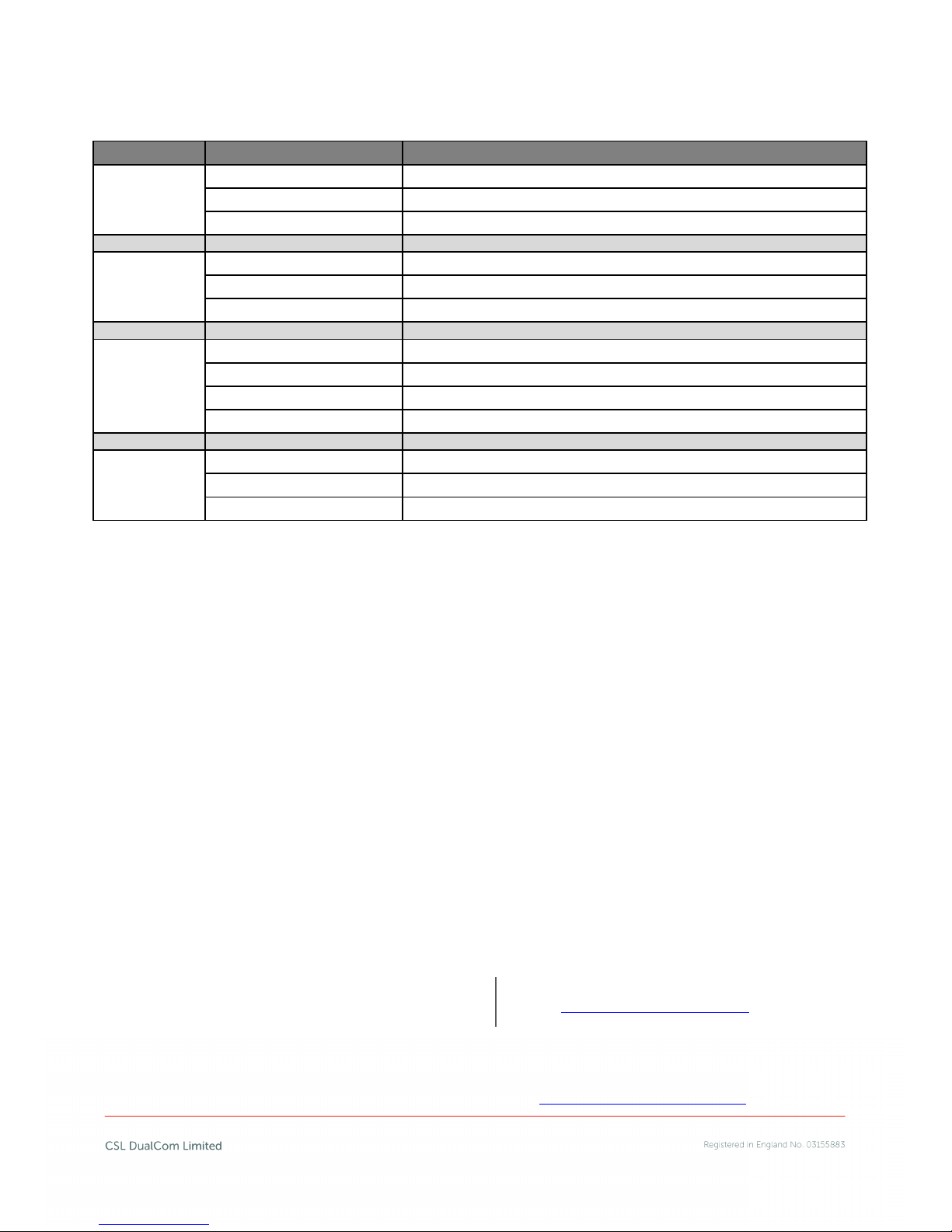
LED STATUS CONDITIONS:
LED Behaviour Status
Power / CFG
Green – double flash Router is booting after power up
Green – flashing quickly Router is in factory config mode
Green – Permanently on Router has completed boot process and is ready
SIM Status
Off Router is not connected to a Mobile Data Network
Green – flashing Router is attempting to connect to a Mobile Data Network
Green – on Router has successfully connected to a Mobile Data Network
Signal Strength
Green – off/off No cellular radio signal detected
Green – on/off Low cellular radio signal detected
Green – off/on Medium cellular radio signal detected
Green – on/on Good cellular radio signal detected
Wi-Fi Status
Off Optional Wi-Fi capability not enabled
Green – on Wi-Fi capability enabled
Green – on/flashing Data activity is occurring via Wi-Fi
Troubleshooting
Q: Why do my signal LEDs not light or show low signal strength?
A: Ensure that the supplied antenna is attached to the MAIN connector. Reposition the Router away from interference or
in a better position for mobile signal coverage using the Green LEDs as guidance. Alternatively try using an external High
Gain Aerial.
Q: Why does my PWR Config LED flash quickly?
A: The Router is in factory configuration mode. Check you have a me dium t o go od sig nal st r ength and wa i t for 4 -5 min utes.
If the Config LED continues to flash contact CSL Technical Support.
Q: I have connected my IP device to the Ethernet port but do not see any activity and cannot connect to the device.
A: Check the IP device is connected properly and configured. Power down the device and re-power whilst connected to
the Router.
Q: What is the reset button for?
A: Pressing reset for 1-2 seconds will perform a soft reboot of the device which can be used to force the unit to reconnect
to the mobile network. Do not press the button for longer than three seconds unless advised by CSL Technical Support
services.
For further assistance please contact CSL Technical Support via telephone or email:
Our opening hours are 08:30 to 18:00 week days and 10:00 to 16:00 Saturday (all times GMT). Please ensure you have the
Router’s Serial Number, IP address and ICCID available when contacting the Technical Support Team. For all the latest
copies of CSL’s quick guides and Installation Manuals visit the website: www.csldual.com/installer-zone
UK Tel: +44 (0) 1895 474469
Ireland Tel: 1800 855695
Netherlands Tel: 010-7145413
Email: [email protected]
 Loading...