

Page 1
millenium
Downloaded from www.cbradio.nl
MOBILE CB TRANSCEIVER AM- FM
CITIZEN BAND EUROPEAN MULTI-NORMS
USER MANUAL
copyright CRT France 2017
Page 2
Page 3
2
Page 4
3 4
Page 5
1、Introduction
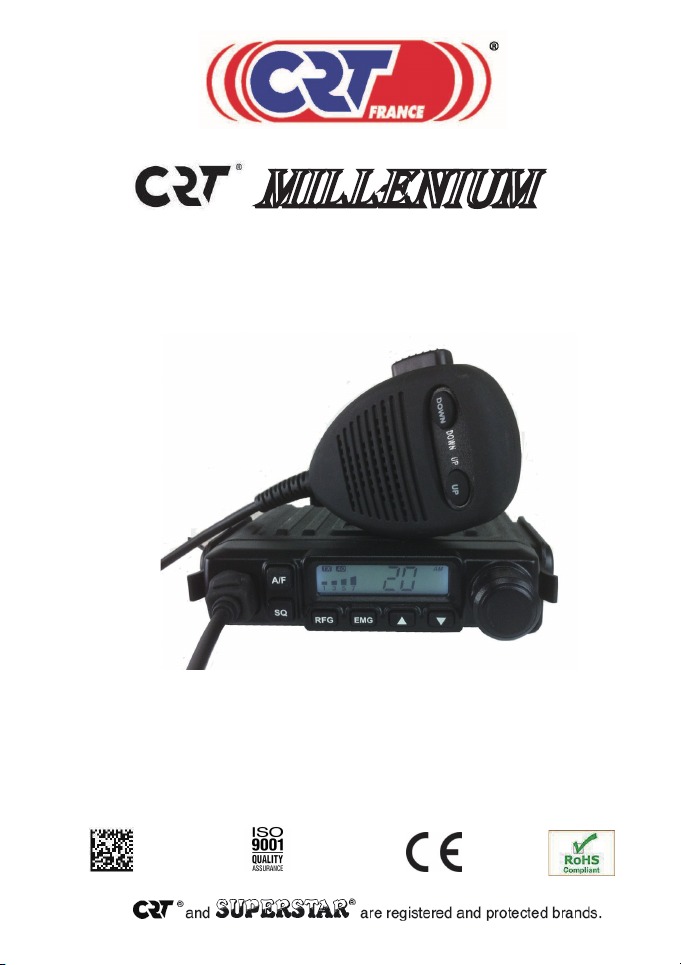
Thank you for your choose and buy the CRT MILLENIUM CB radio . In order
to make your CB Radio to use in the best condition, please read this
manual in detail.CRT MILLENIUM is a small, simple operation and
convenient vehicle CB Radio which has good performance.
Up/down keys on the microphone
Scan channel
LCD display
Auto ASQ/SQ adjustable
RF GAIN
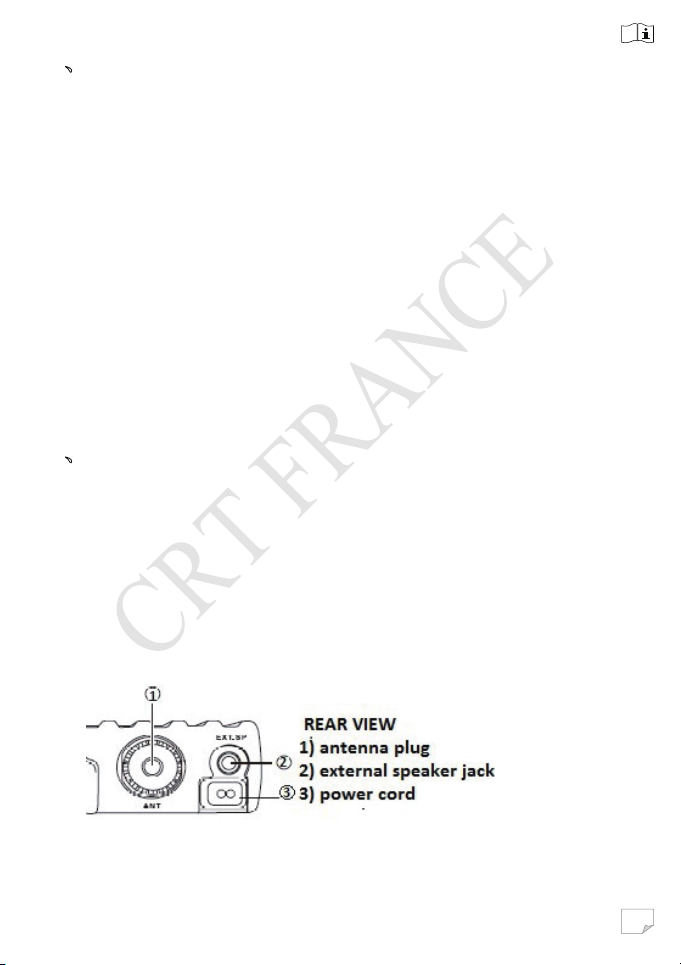
External Speaker
2、Installation instructions
Check the materials before the installation, car charger is
connected to the car's 12 v power supply socket,the radio’s positive
and negative electrode connected to the car charger’s. Power
supply support 12 V to 13.8 V. Check all wiring are in good condition
before starting, ensure do not short circuit, ensure the radio can
boot running normally.
Page 6
5
3、Control panel function
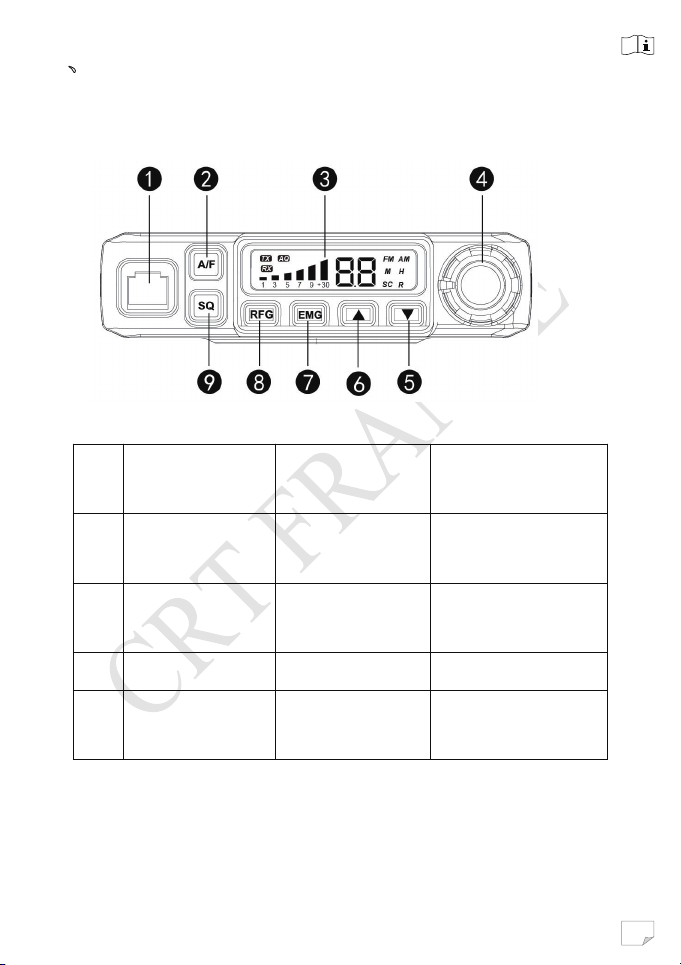
Front view
No Name
①
② A/F
③ LCD Display
④
Microphone
socket
Power On/Off
Volume
Short Press
Function
AM/FM Mode
Switch
Long Press
Function
Scan Function
Page 7
6
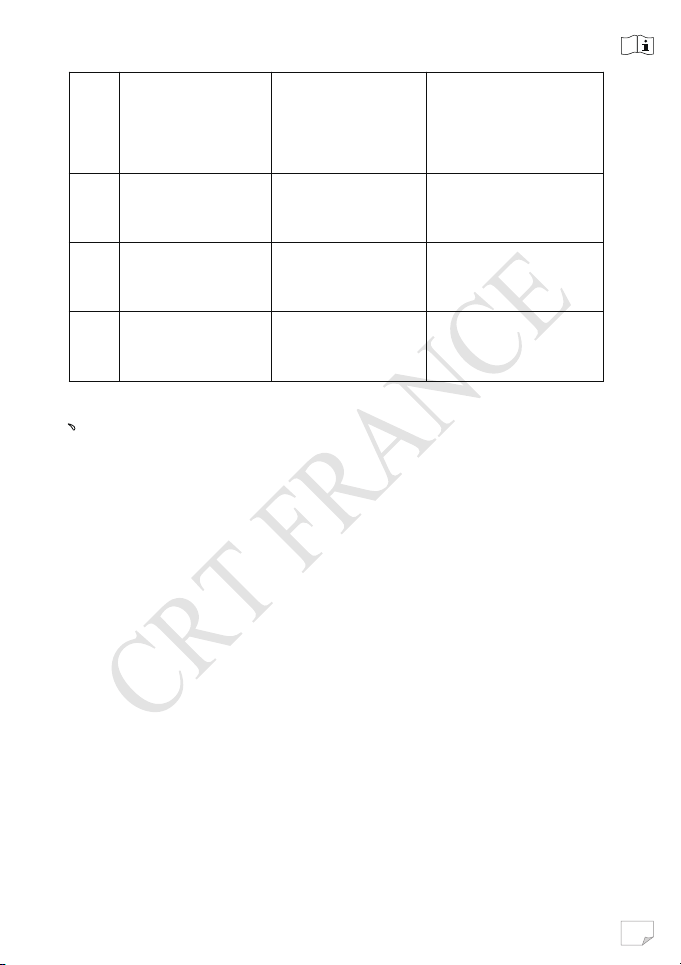
⑤
⑥
、
Channel
UP/DOWN
select
EMG(Emergen
⑦
c
y Channel )
⑧ RFG
⑨
SQ/ASQ
Function Switch
9/19 Channel
Switch
Enter RF GAIN
Model
Enter SQ (ASQ)
Level Switch
Switch To ASQ
4、Operation
4.1 Power On/Off the radio
1. Turn VOL switch clockwise to power on the radio, the LCD
full screen display after spectrum model 1 s into the channel
state.
2. Turn the VOL Knob counterclockwise, until it clicks. The
radio is power off.
4.2 Volume Control
Turn clockwise to increase volume, turn counterclockwise to
decreases volume.
Mode
4.3 Channel Selection
1. Shortly press microphone【UP】or【DOWN】to change
working channel.
Page 8
7
2.Hold microphone 【UP】or【DOWN】to change working
…
…
channel fast.
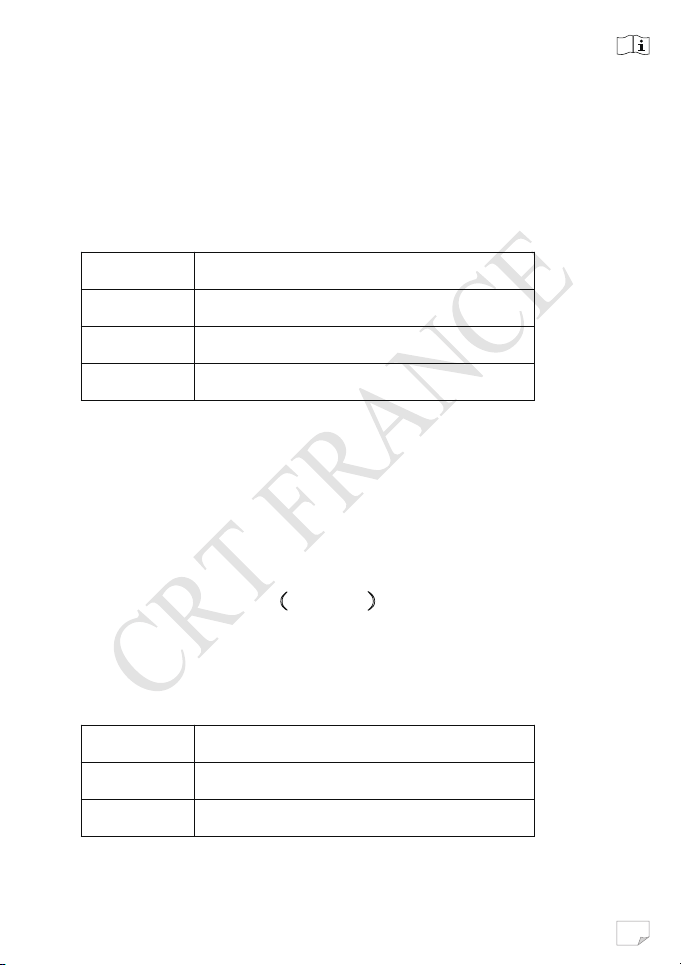
4.4 Squelch level control
1.Shortly press【SQ】,until LCD shortly displays SQ and then
display X.X。X.X stands for the SQ level
0.F SQ off
0.1 Lowest SQ level
… …
2.8 Highest SQ level
2.Press microphone【UP】/【DOWN】shortly to change SQ
level.
3.Hold microphone【UP】/【DOWN】to change the SQ level
fast.
4.Hold【SQ】or wait for 3 seconds to store and exit.
4.5 ASQ control(9 level)
1. Hold【SQ】 key,until LCD display AQ,the ASQ function
is turned on. The LCD will display A.X。X stands for the
ASQ level。
A.1 Lowest ASQ level
A.9 Highest ASQ level
Page 9
8
2. Shortly press microphone【UP】/【DOWN】to change
ASQ level.
3. Hold microphone【UP】/【DOW N】to change ASQ level
fast.
4. Hold【SQ】or wait for 3 seconds to store and exit.
4.6 Modulation Type
Shortly press【A/F】key to switch between AM/FM mode
and the LCD displays the selected mode.
4.7 RF GAIN control
1.Shortly press【RFG】key,LCD displays R and the present
RF GAIN level flashes.
2.Shortly press microphone【UP】/【DOWN】to change the
level.
3.Shortly press【RFG】key
to exit RF GAIN level control.
4.8 Emergency Channel
1.Shortly press【EMG】 key to choose CH9,the channel
number flashes.
2.Shortly press 【EMG】key again to choose CH19,the
channel number flashes.
3. Shortly press【EMG】key third time to return to last normal
channel.
LC »
Page 10
9
4.9 Key Lock
1.Hold【EMG】key for over 2 seconds to lock the keys, LCD
displays “LC”.
2.Hold【EMG】for over 2 seconds again to unlock the keys,
LCD displays “OF”.
4.10 Scan Function
1.Hold【A/F】to start scan function,LCD displays“SC”.
2.Press microphone【UP】/【DOWN】can choose scanning
clockwise or counterclockwise.
3.Press【A/F】or【PTT】key to exit scan function.
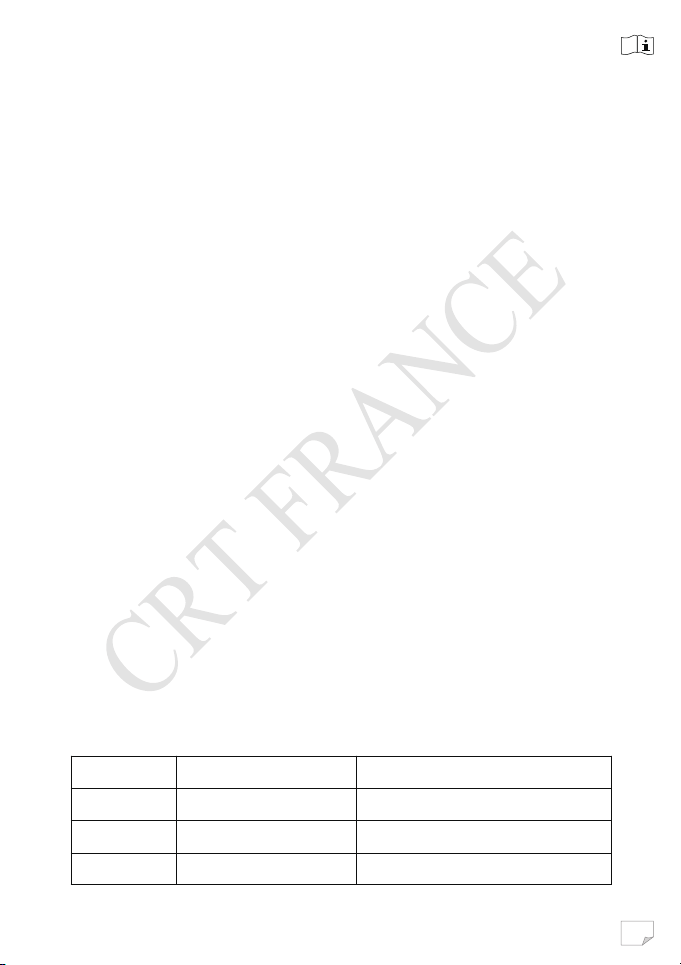
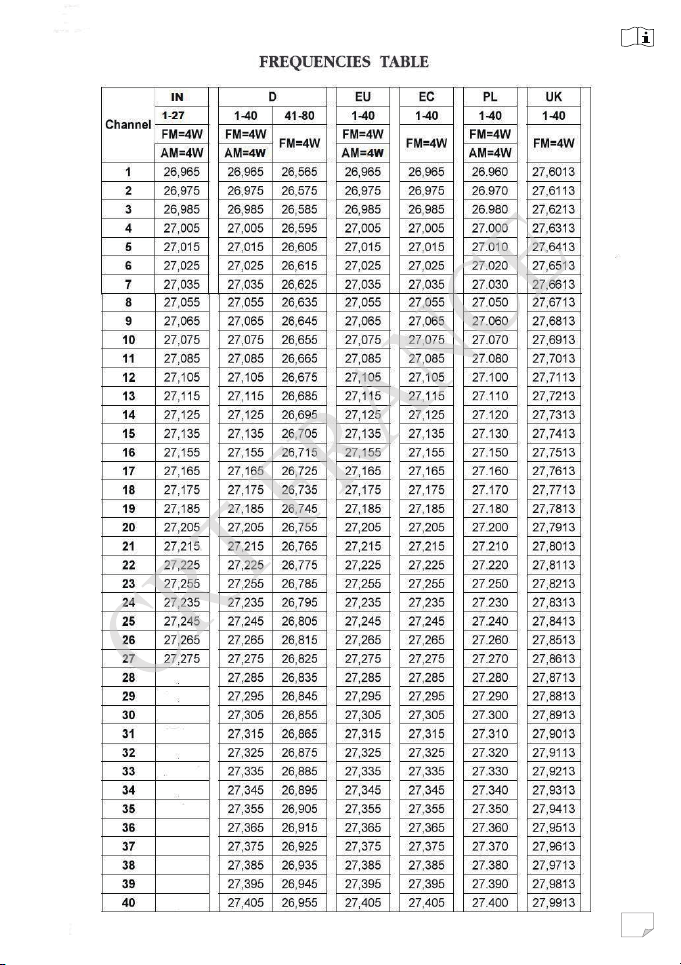
4.11 Changing the CB-Standard
1. Hold【A/F】while powering the radio on, until LCD
displays the norms.
2.Pr
ess microphone【UP】/【DOWN】to choose wanted
Norms.
3.Power off and power on again
Standard Channels Fequency Range
EU 40FM/40AM 26.965-27.405MHZ
CE 40 FM 26.965-27.405MHZ
UK 40 FM 27.60125-27.99125MHZ
Page 11
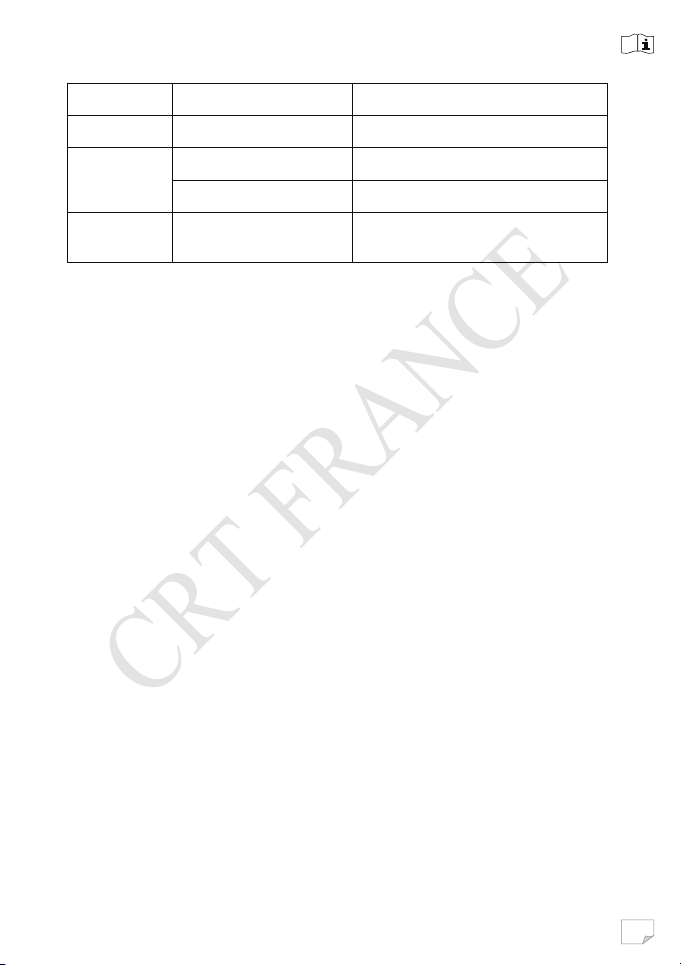
10
PL 40FM/40AM 26.960-27.400MHZ
I2 34FM/34AM 26.965-26.865MHZ
DE 40FM/40AM 26.965-27.405MHZ
80FM 26.565-26.955MHZ
IN 27FM/27AM 26.965-27.275MHZ
4.12 Restore factory default
1.Hold【SQ】key while powering the radio on, until the LCD
displays “rt”.
2. All channel and function setting will resume factory default
after above operation.
Page 12
11
Page 13
12
Page 14
13
Page 15
14
Page 16
15
Page 17
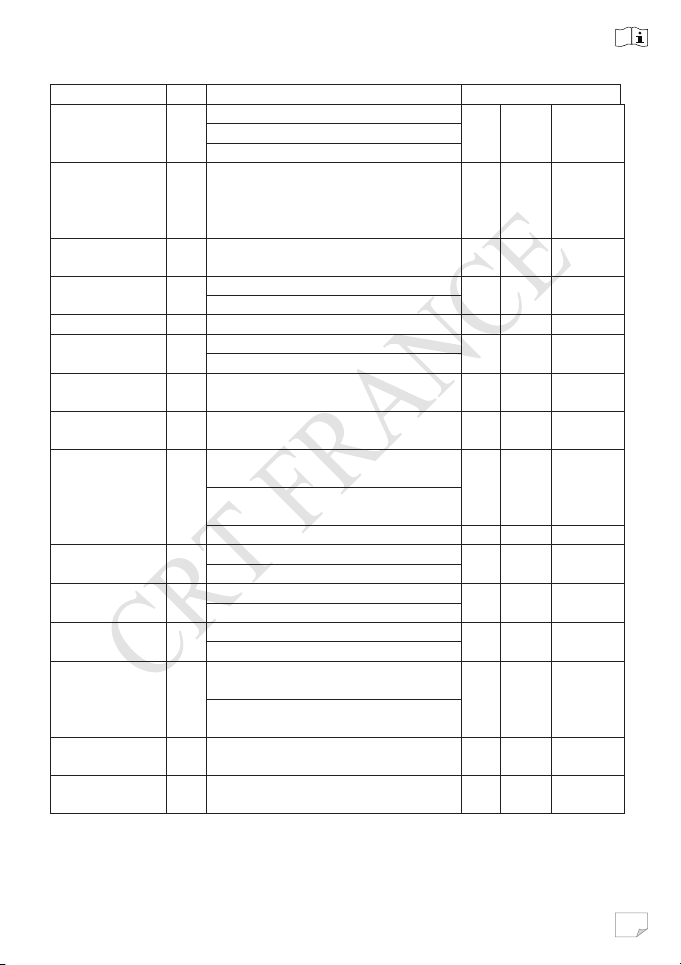
16
RESTRICTIONS
PAYS
CB
RESTRICTIONS
REGLAGE
GERMANY
YES
80 ch – 4W FM – free use
40 ch – 4 W AM - free use
40 ch – 4 W FM – free use
EC
UK
YES
Cept 40 ch – 4 W FM
AM : Not authorized
EC
AUSTRIA
YES
40 ch – 4 W FM
AM : Not authorized
EC
BELGIUM
YES
40 ch – 4 W FM - free use
EC
40 ch – 4 W AM - free use
BULGARIA
YES
40 ch – 4 W FM - free use
EC
CYPRUS
YES
40 ch – 4 W FM - free use
EC
40 ch – 4 W AM - free use
CROATIA
YES
40 ch – 4 W FM - free use
EC
DANEMARK
YES
40 ch – 4 W FM - free use
EC
SPAIN
YES
40 ch – 4 W FM – individual license
EC
40 ch – 4 W AM – individual license
12 W pep BLU/SSB
ESTONIA
YES
40 ch – 4 W FM - free use
EC
40 ch – 4 W AM - free use
FINLAND
YES
40 ch – 4 W FM - free use
EC
40 ch – 4 W AM - free use
FRANCE
YES
40 ch – 4 W FM - free use
EC
40 ch – 4 W AM – free use
GREECE
YES
40 ch – 4 W FM - individual license
EC
40 ch – 4 W AM - individual license
HUNGARY
YES
40 ch – 4 W FM - free use
EC
IRELAND
YES
40 ch – 4 W FM – free use
AM : Not authorized
EC
D
EU
+ ENG 40 ch – 4 W FM – individual
license required
AM : Not authorized
AM : Not authorized
required
required
required
required
AM : Not authorized
UK
EU
EU
E
EU
EU
EU
EU
EU
E
Page 18
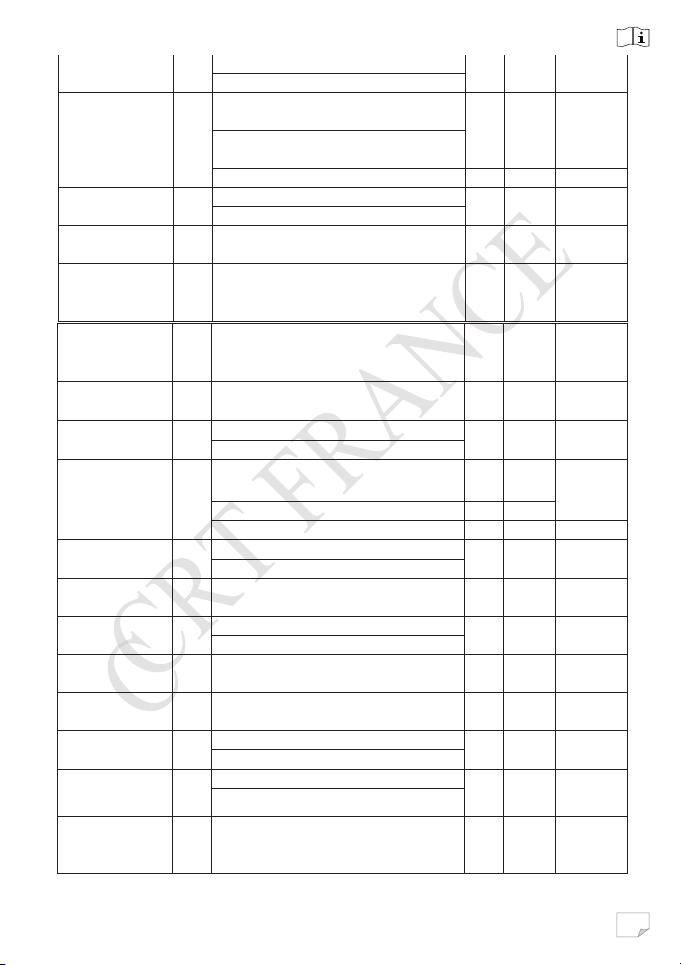
17
ISLAND
YES
40 ch – 4 W FM - free use
EC
40 ch – 4 W AM - free use
ITALY
YES
40 ch – 4 W FM – general autorisaon
EC
40 ch – 4 W AM - general autorisaon
12 W pep BLU/SSB
LATVIA
YES
40 ch – 4 W FM - free use
EC
40 ch – 4 W AM - free use
LITHUANIA
YES
40 ch – 4 W FM - free use
AM : Not authorized
EC
LUXEMBOURG
YES
40 ch – 4 W FM - free use
EC
MALTA
YES
40 ch – 4 W FM - individual license
EC
NORWAY
YES
40 ch – 4 W FM - free use
EC
NETHERLAND
YES
40 ch – 4 W FM - free use
EC
40 ch – 4 W AM - free use
POLAND
YES
40 ch – 4 W FM - free use
EC
40 ch – 4 W AM/FM - free use
PL
12 W pep BLU/SSB
PORTUGAL
YES
40 ch – 4 W FM - free use
EC
40 ch – 4 W AM - free use
CZECH
YES
80 ch – 4 W FM - free use
AM : Not authorized
EC
ROMANIA
YES
40 ch – 4 W FM - free use
EC
40 ch – 4 W AM - free use
SLOVAKIA
YES
40 ch – 4 W FM - free use
EC
SLOVENIA
YES
40 ch – 4 W FM - free use
EC
SWEDEN
YES
40 ch – 4 W FM - free use
EC
40 ch – 4 W AM - free use
SWITZERLAND
YES
40 ch – 4 W FM – free use
EC
40 ch – 4 W AM - free use
LIECHTENSTEIN
YES
40 ch – 4 W FM - individual license
EC
EU
required
E
required
EU
EU
AM : Not authorized
required
AM : Not authorized
AM : Not authorized
EU
EU
EU
AM : Not authorized
AM : Not authorized
required
AM : individual license required
EU
EU
Page 19
18
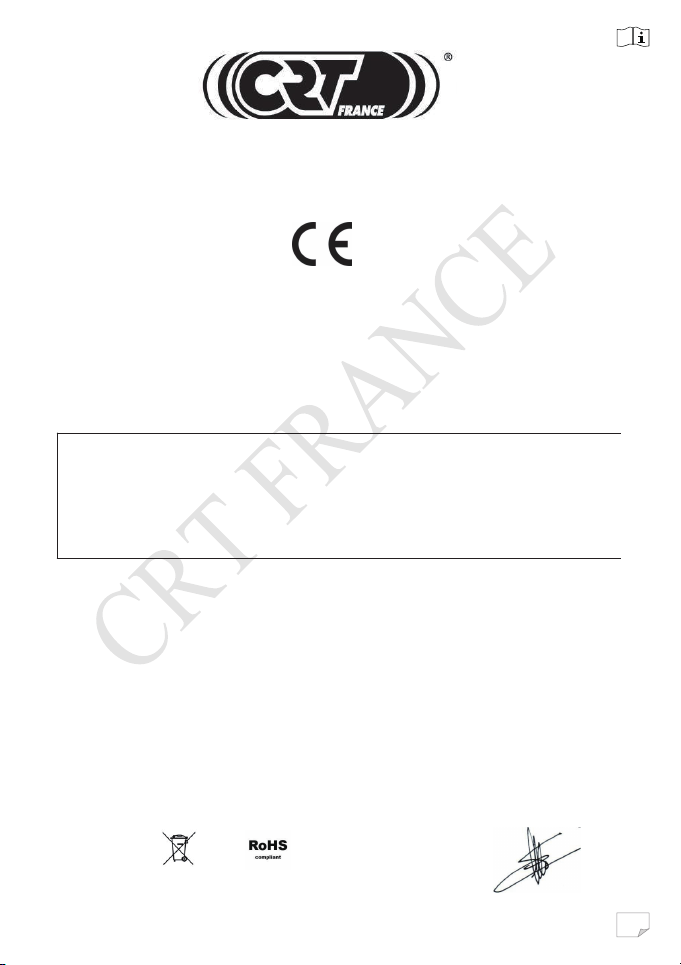
EN 60950-1 +A1+A11+A12+A2
DECLARATION OF CONFORMITY
We hereby declare under our responsability that the product :
BRAND : CRT
Model : MILLENIUM
Description : Mobile transceiver
Satisfies all the technical regulations applicable to the product within the scope of
EN 300 433-1 V 1.3.1
directive R .TTE 1999/5/CE european standarts
EN 301 489-1 V 1.9.2
EN 301 489-13 V 1.2.1
EN 300 433-2 V 1.3.1
EN 300 135-1 V 1.2.1
EN 300 135-2 V 1.2.1
EMF : EN 62311
C.R.T. FRANCE INTERNATIONAL S.A.R.L.
Route de Pagny - 21250 SEURRE - FRANCE
Capital de 762 500 euros
Tél. 03 80 26 91 91 - Fax : 03 80 26 91 00
E-mail : [email protected]
Web site : www.crtfrance.com
Mr CELESTRANO PHILIPPE
GERANT
Le 04/01/2017
Page 20

19
CONDITIONS OF GUARANTEE
Our tra nsceivers CRT SUPERSTAR a re gua ranteed on 2 year. The other
equipments: 6 months.
Any abnormality of functioning must be indicated to your retailer, who will
intervene or will send it to our technical service for
control.
The spare parts of our devices are the object of no sending under guarantee.
Are excluded of the guarantee:
- T he damages caused by accidents, shocks, natural elem ents (lightning,
thunderstorm, static electricity etc.)
- The transistors of power, the microphones, the fuses, the bad uses: badly
adjusted antenna (tos excessive), inversion of polarity, surge, bad connection etc.
recognized by our technical service.
- The interventions having modified the standards of approval of the device.
PROCEDURE ON RETURNING TO
THE AFTER-SALES SERVICE CRT
- If you send back a radio under guarantee for repair: You must pay the freight
costs to go. CRT will pay the freight costs return.
If the radio is not under guarantee postal charges are at your expense.
- Each device must be sent accompanied with a photocopy of the invoice as well
as with a descriptive note of the noticed defect.
If our AFTER-SALES SERVICE estimates the repair more expensive than the
value of the device, this one will send you an estimate which must have returned
to him accepted or refused. If the estimate is refused, the device will have carriage
forward return.
 Loading...