

Page 1
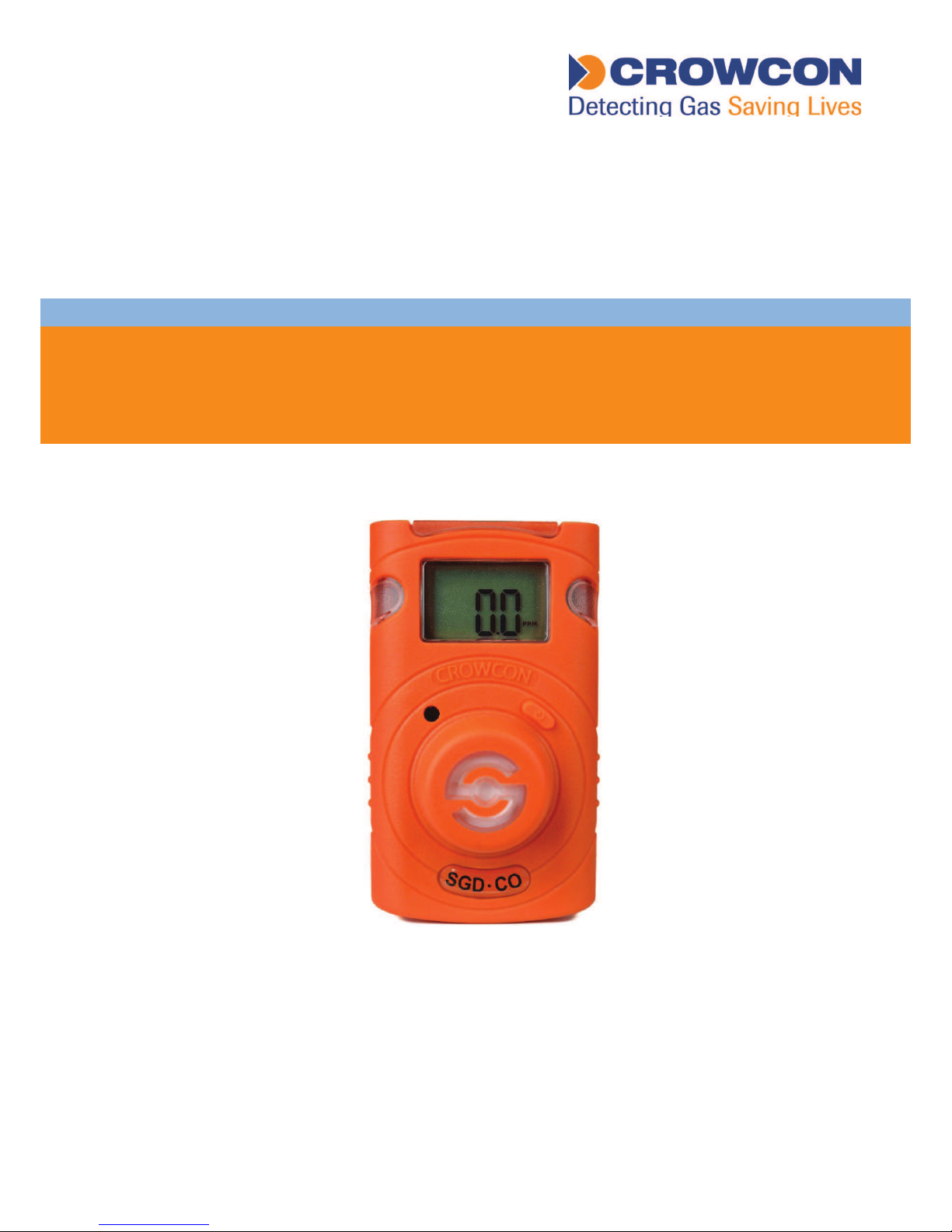
User manual
M07716
Issue 1
October 2017
Clip SGD
Portable single Gas Detector
Page 2

⚠ WARNING
•ClipSGDisahazardousareacertiedgasdetectorandassuchmustbeoperatedand
maintainedinstrictaccordancewiththeinstructions,warningsandlabelinformation
includedinthemanual.
•Beforeoperatingthisdevice,pleasereadcarefullyandunderstandallinstructionsinthe
manual.
•Understandthescreendisplayandalarmwarningspriortouse.
•Beforeuse,pleasechecktheactivationdate,andiftheactivationdatehasexpiredplease
donotusethedevice.
•Beforeuseensurethatthedeviceisingoodconditionandtheenclosure,thedisplay
window,alarmLEDwindowsandsounderapertureareundamagedandclearfrom
contaminants.
•Beforeuseperformtheself-testoftheLED’s,sounderandvibrator.
•Bumptestthedeviceregularlybyapplyingagasconcentrationexceedingthealarmset
point.Itisrecommendedthatabumptestisperformedatleastevery90days.
•FortheO
2
detectorperformacalibrationevery30daysinafreshairenvironment.
•Ifthedevicefailsabumptest,calibrationorself-testpleasedonotusethedevice.
•Donotdisassembleorsubstitutecomponents,oroperatebeyondtheintendedrange
ofuseasthismayimpairintrinsicsafety,invalidatesafetycerticationandwillvoidthe
warranty.
•DonotattempttoreplacethebatteryorsensorastheClipSGDisdesignedtobe
maintenancefreeanddisposable.Changingthebatteryorsensormayimpairintrinsic
safety,invalidatesafetycerticationandwillvoidthewarranty.
•UseIRcommunicationsonlyinasafeareathatisfreefromhazardousgases
•TopreventthegenerationofstaticelectricitydonotcleanorrubtheLCDscreenofthe
devicewithadryclothorhandsinahazardousareaenvironment
•Performcleaningandmaintenanceofthedeviceinasafeareaonlythatisfreefrom
hazardousgases.
•TheClipSGDisshippedwithdefaultalarmlevelsettings.Itistheusersresponsibilityto
ensurethealarmlevelsettingsareappropriateforthespecicapplication;thesecanbe
changedasrequiredviatheIR_Link_PCSoftware.
•Gasconcentrationmeasurementsbythesensorcanvarybasedontheenvironment
(temperature,pressureandhumidity).ThereforecalibrationofClipSGDshouldbe
performedinthesame(orsimilar)environmentofthedevice’sactualuse.
•Severevibrationorshocktothedevicemaycauseasuddengasreadingchange.Pleaseuse
ClipSGDafterthevalueofgasconcentrationhasstabilized.
•ExcessiveshocktoClipSGDcancausethedeviceand/orsensortomalfunction.
•Ifthetemperaturechangessharplyduringuseofthedevice(forexamplemovingfrom
indoorstooutdoors),thevalueofthemeasuredgasconcentrationcansuddenlychange.
PleaseusetheClipSGDafterthegasconcentrationvaluehasstabilized.
•Thedeviceisintendedforuseinnormalatmosphericconditions,pressure80kPa(0.8
bar)to110kPa(1.1bar);andairwithnormaloxygencontent,typically21%v/v(volume/
volume).
Page 3
⚠ CAUTION
•Thisdeviceisnotameasurementdevice,butagasdetector.
•Cleandetectorswithasoftclothanddonotusechemicalsubstancesforcleaning.
•Toensurea24monthsbatterylifeisattaineditisimportanttoavoidthefollowingactivities
asthiswilldepletethebatterylifetimetolessthan24months.
1. Allowing the detector to be in gas alarm frequently or for prolonged periods
(Normal Alarm Use: No more than 4 minutes alarm time per day)
2. Operating the detector user button frequently.
3. Connecting the detector with the Clip SGD IR Link frequently, except for regular bump
testing.
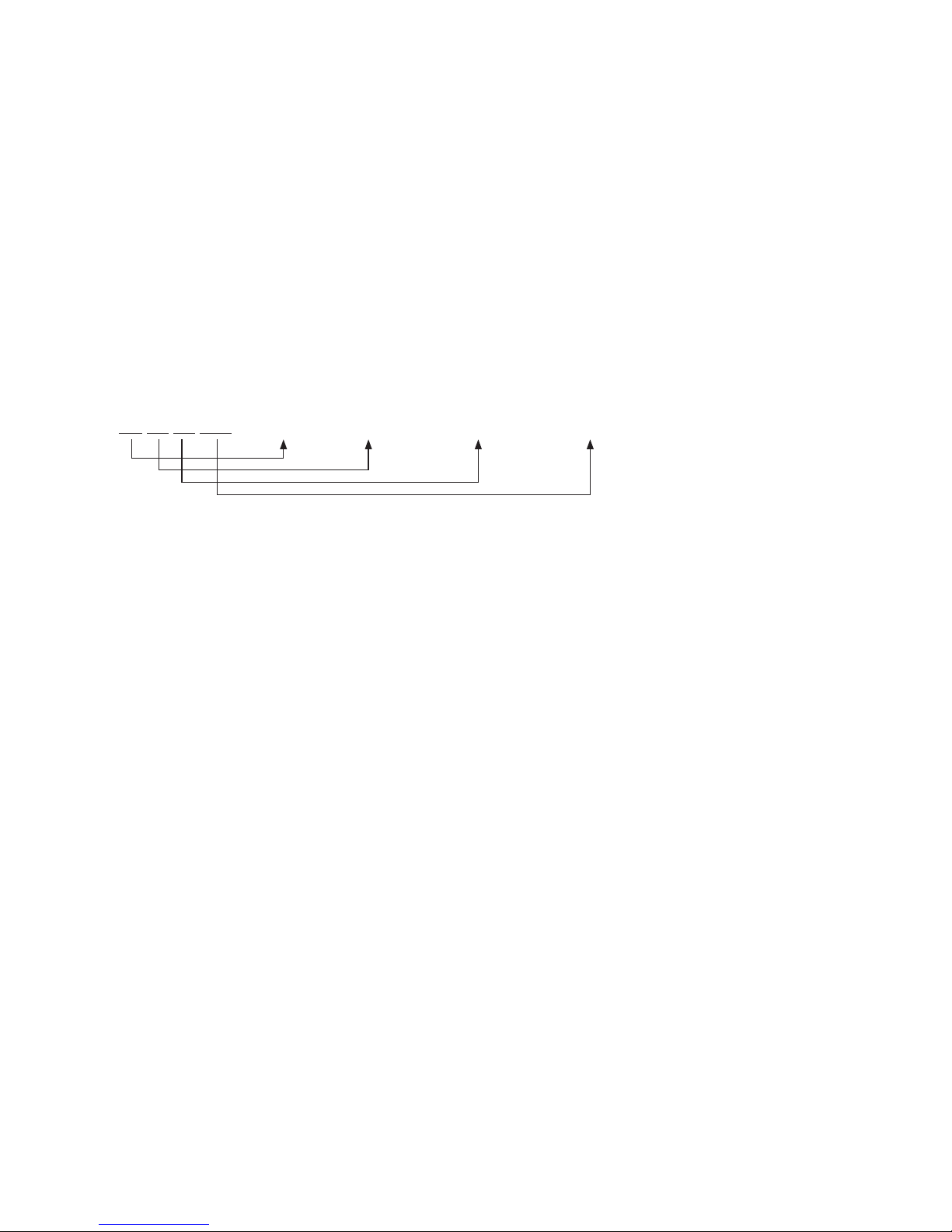
•Viewaserialnumberonthelabelatthebacksideofthedevice.(ex,20170101)
1. The serial number indicates below.
ex)SG01010012017(Year)01(Months)01(Day)001(ManufactureOrder)
Page 4

Page 5

Table of Contents
1.DiagramandLCD...............................................6
2.Activation...........................................................7
3.Mode..................................................................8
3.1GasMeasurementMode...........................8
3.2DisplayDeviseSettings..............................8
3.3AlarmsandAlerts......................................8
4.EventLog.........................................................11
5.Calibration........................................................12
5.1FreshAirCalibration................................12
5.2StandardGasCalibration........................13
5.3ReturntoGasMeasurementMode.........14
6.Specification.....................................................15
7.SelfTestandBumpTest....................................16
7.1Selftest...................................................16
7.2BumpTest...............................................16
8.Certificates.......................................................18
Appendix1ClipSGDDockingStation...................19
Appendix2IRLinkUserGuide...............................26
LimitedWarranty....................................................29
Page 6
6
Clip SGD
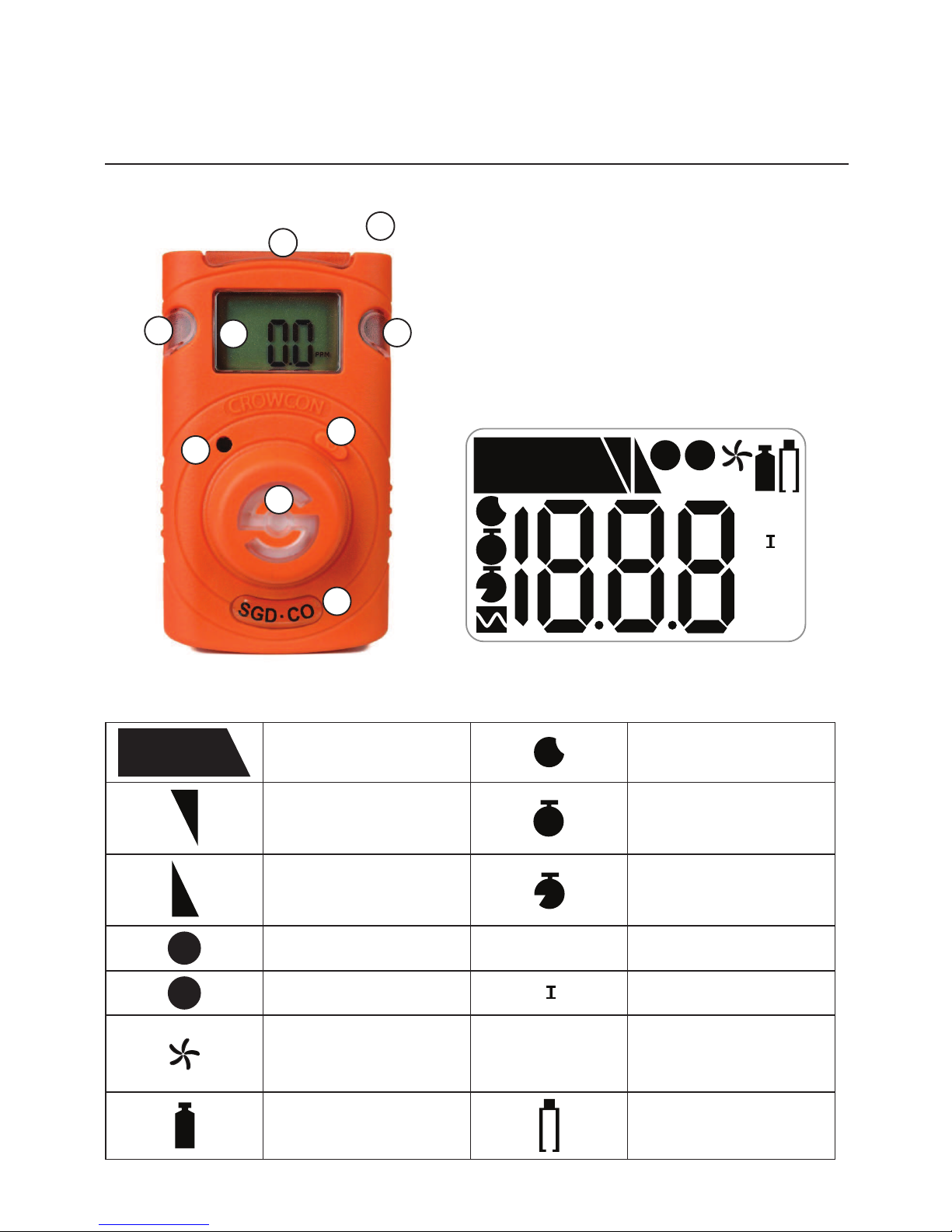
1. Diagram and LCD
1. IRPort
2. LCDdisplay
3. AlarmLED
4. Buzzer
5. Button
6. Gassensor
7. GasType
LCD display symbols
ALARM
Alarmcondition
M
Monthsremaining
1
Lowalarm
D
Daysremaining
2
Highalarm
T
Timeremaining(hours)
v
Testsuccess
MAX
Maximumpeakvalue
x
Testfailure
MN
I
Minimumpeakvalue
Freshaircalibration
LEL
PPM
VOL
%
%
MeasurementUnit
Standardgascalibration
Lowbatterylife
(Lessthan30days)
1
2
4
5
6
7
3
3
3
MAX
LEL
PPM
VOL
%
%
MN
I
ALARM
1
V
M
D
T
X
2
Page 7
7
Clip SGD
2. Activation
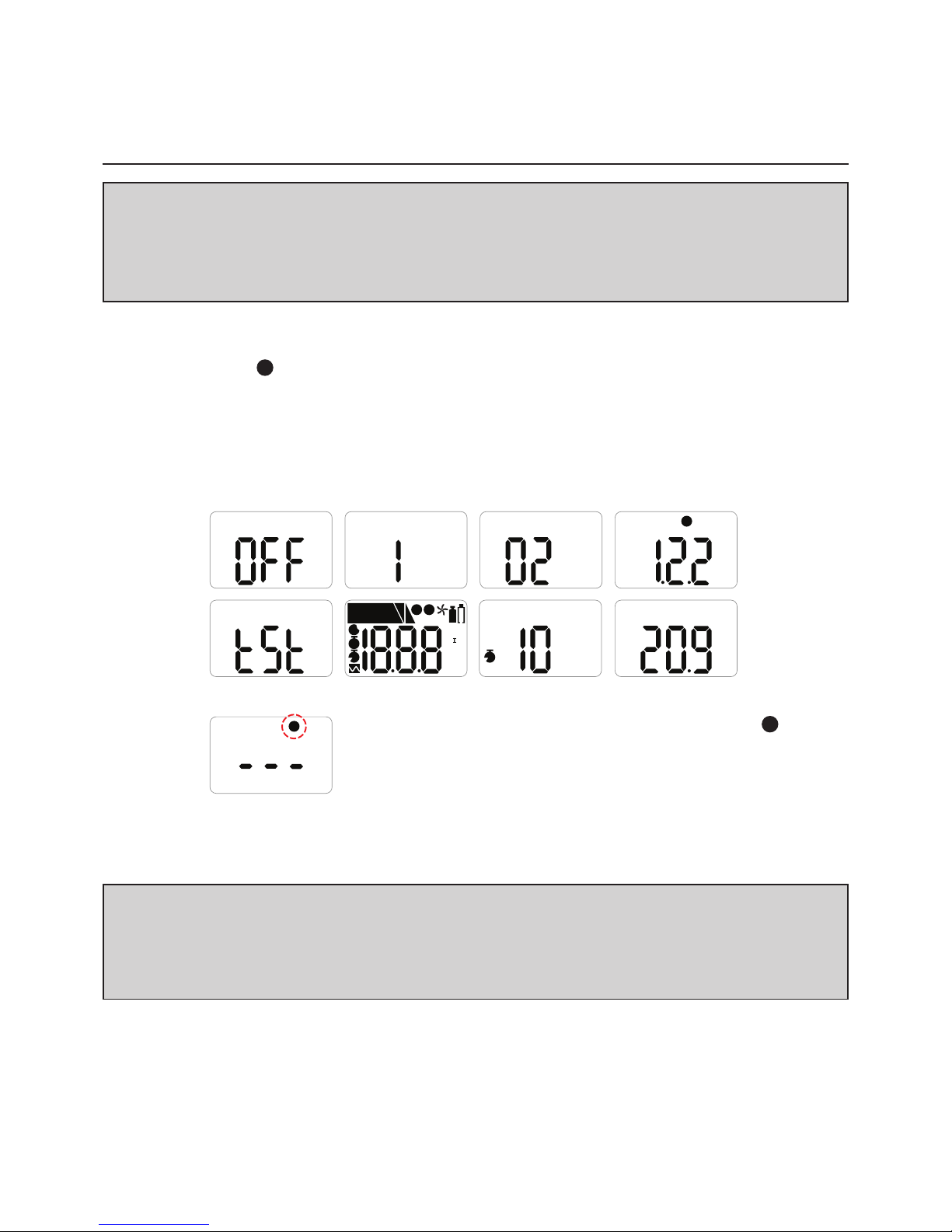
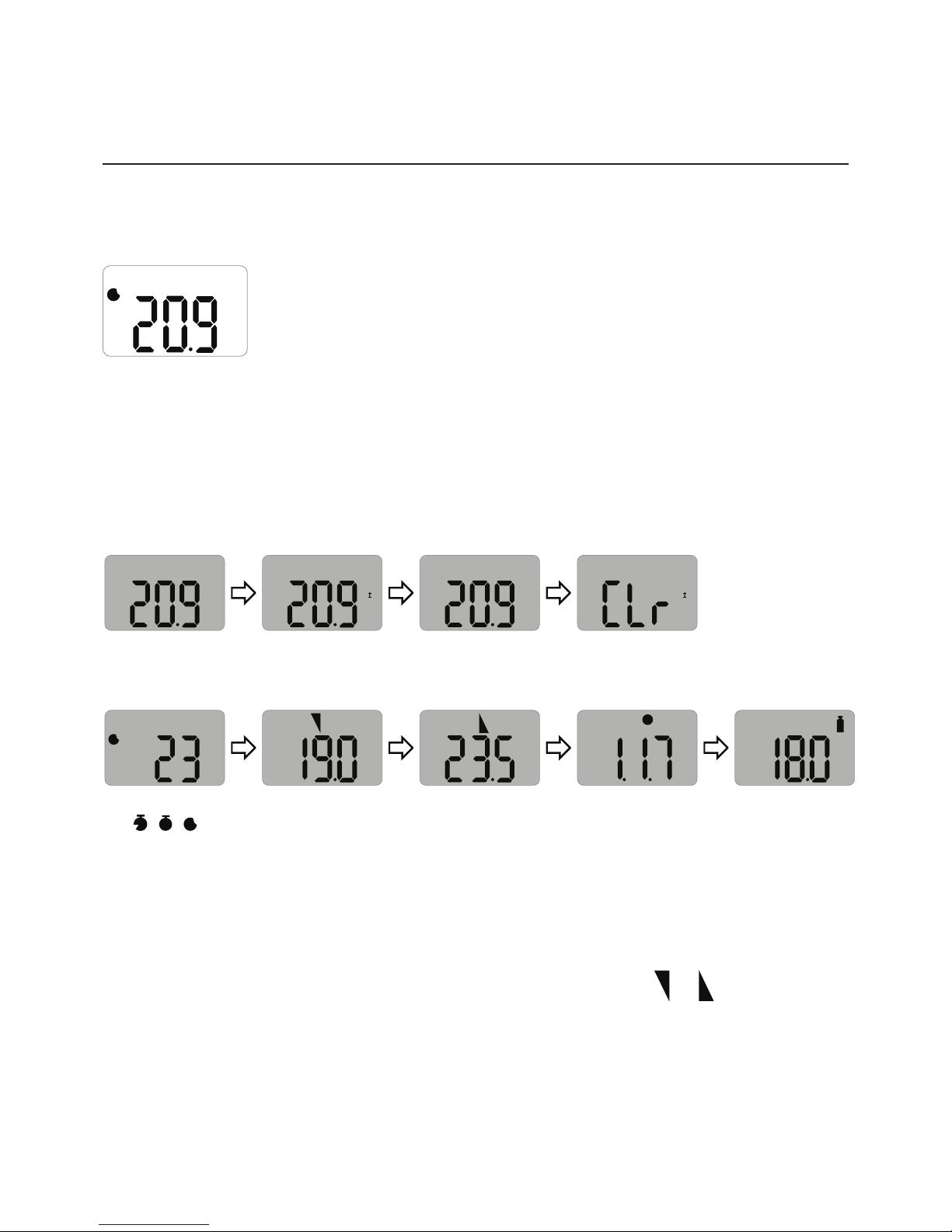
Only activate in a safe environment.Pressthebuttonfor3secs;gastypeandrmware
version(e.g.v2.2)willbedisplayed.Followingthe10secscountdown,thedevicewillbe
fullyactivated,the
V
iconwillashonthedisplayscreenandthedevicewillbeinGas
Measurementmode.
Afterturningonthedevice,theremaininglifeisdisplayed;23monthsoriginally.Afterthe
remaininglifereaches1month,30daysremainingisdisplayed.When1dayisleft,24
hours(T)remainingisdisplayed.
⚠ CAUTION
Beforeuse,checktheactivatebydateonthebox.Iftheactivationdateispast,donot
activatethedevice.
ShelfLifewithin6monthsfrommanufacture.
V
%
D
X
MAX
LEL
PPM
VOL
%
%
MN
I
ALARM
1
V
M
D
T
X
2
%
T
⚠ CAUTION
Appropriatecalibrationofthedeviceisrequiredpriortooperation.Alwaysensurethat
thedevicerespondscorrectlytotherelevantgas.Verifythatforeignmaterialsthatcould
interferewiththedetectionofgasarenotblockingthesensor.
Intheeventthatactivationofthedevicefails,the
X
iconwillappearonthedisplayandGasMeasurement
modewillnotbeentered.Inthiscase,performcalibration
orcontactauthorizedresellerorCrowconDetection
Instrumentscustomersupportat+44(0)1235557711
forrepair/returninformation.
Page 8
8
Clip SGD
3. Mode
3.1 Gas Measurement Mode
FollowingactivationthedevicewilloperateinGasMeasurementMode.
Theremainingsensorlife(defaultsetting)orgasconcentration
(congurableoption)willbedisplayedonthescreen.
Oxygenconcentrationisdisplayedinpercentbyvolume(%Vol)and
toxicconcentrationisdisplayedinpartspermillion(PPM).
3.2 Display Device Settings
InGasMeasurementModetoviewthedevicesettingspressthebuttontocyclethrough
thesettings.Thesettingswillbedisplayedinthefollowingorderuponeachbuttonpress.
VOL
%
VOL
%
MN
I
MAX
VOL
%
MAX
VOL
%
MN
I
Detectionmode
Minlevelseen
(onlyfor
oxygen)
Maxlevelseen
Clearmin/max
levels
M
VOL
%
1
VOL
%
2
V
VOL
%
Remaininglife
(
T
,D,M)
1stalarm
setpoint
2ndalarm
setpoint
Firmware
version
Calibration
concentration
AtthelaststepthedevicewillreturntoGasMeasurementMode.
3.3 Alarms and Alerts
Whenagasconcentrationexceedstheconguredalarmsetpoints,1or2willbe
displayedonthescreen,thedevicewillvibrate,alarmLEDswillash,andthebuzzerwill
sound.Thealarmswillstopwhenthedeviceismovedtoacleanairenvironment.
%
M
Page 9
9
Clip SGD
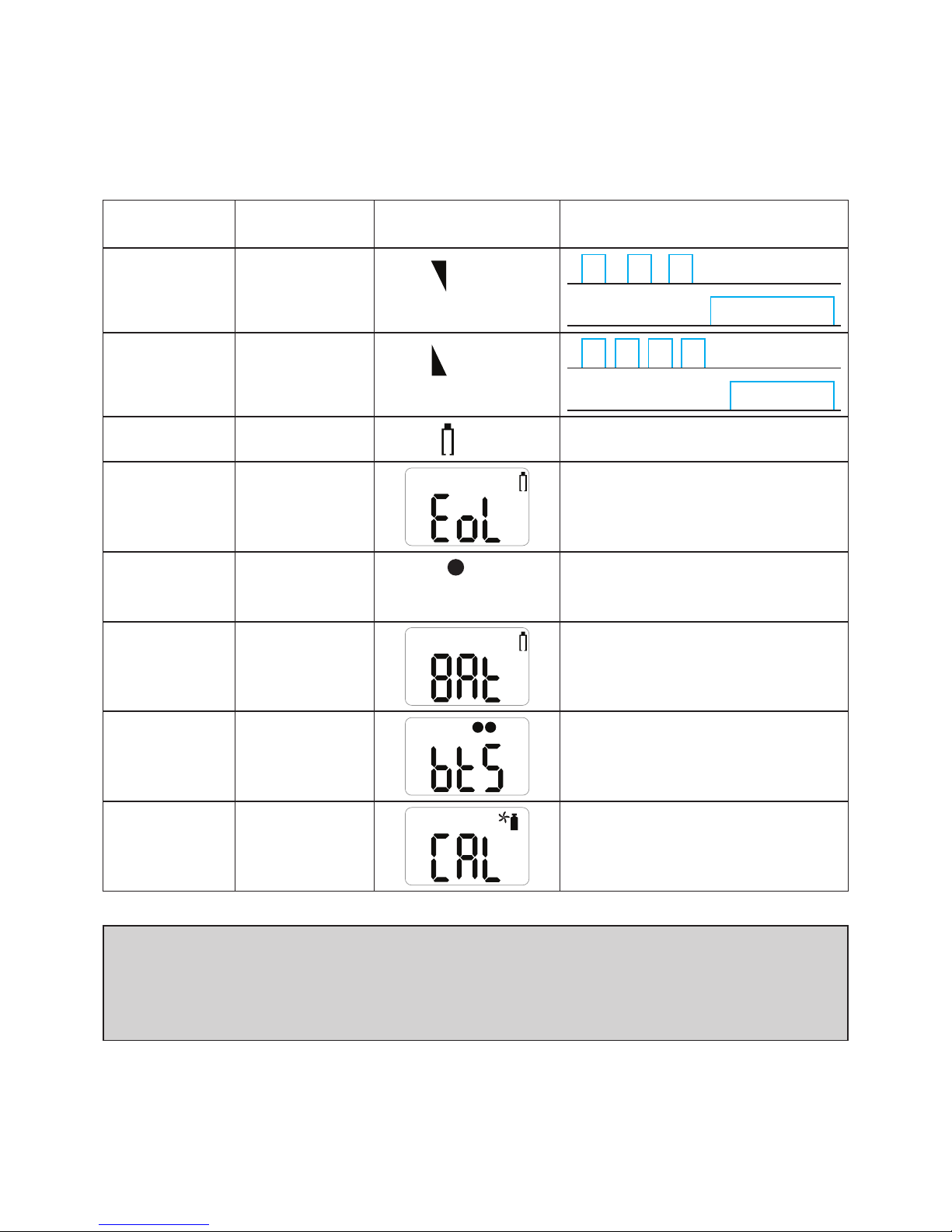
Thetablebelowshowsthe‘alarms’and‘alerts’thatmaybeshownonthedisplayduring
operation.
AlarmAlarmStandardShownonLCD
Display
AlarmandVibrationDisplay
LowAlarmExceeds1st
Alarmsetpoint
1
icon&
concentration
Buzzer,LED
Vibration
HighAlarmExceeds2nd
Alarmsetpoint
2
icon&
concentration
Buzzer,LED
Vibration
RemaininglifeBelow30days
icon
Lifetime
expiration
Past24months
Servicelifeisover
(ReplacewithanewClipSGD)
TestfailureFailureof
sensortest/
calibration
Display
X
iconwith
beeping
BatterytestLowpower
BumptestBumptest
period
VX
Pressthepushbuttontoturnoff
thealarm
CalibrationCalibration
period
Pressthepushbuttontoturnoff
thealarm
⚠ CAUTION
Defaultalarmsetpointsarebasedoncommoninternationalstandards.Itisuser
responsibilitytoensuretheconguredalarmsetpointsareinaccordancewithlocal
regulationsandsiteprocedures.
Page 10
10
Clip SGD
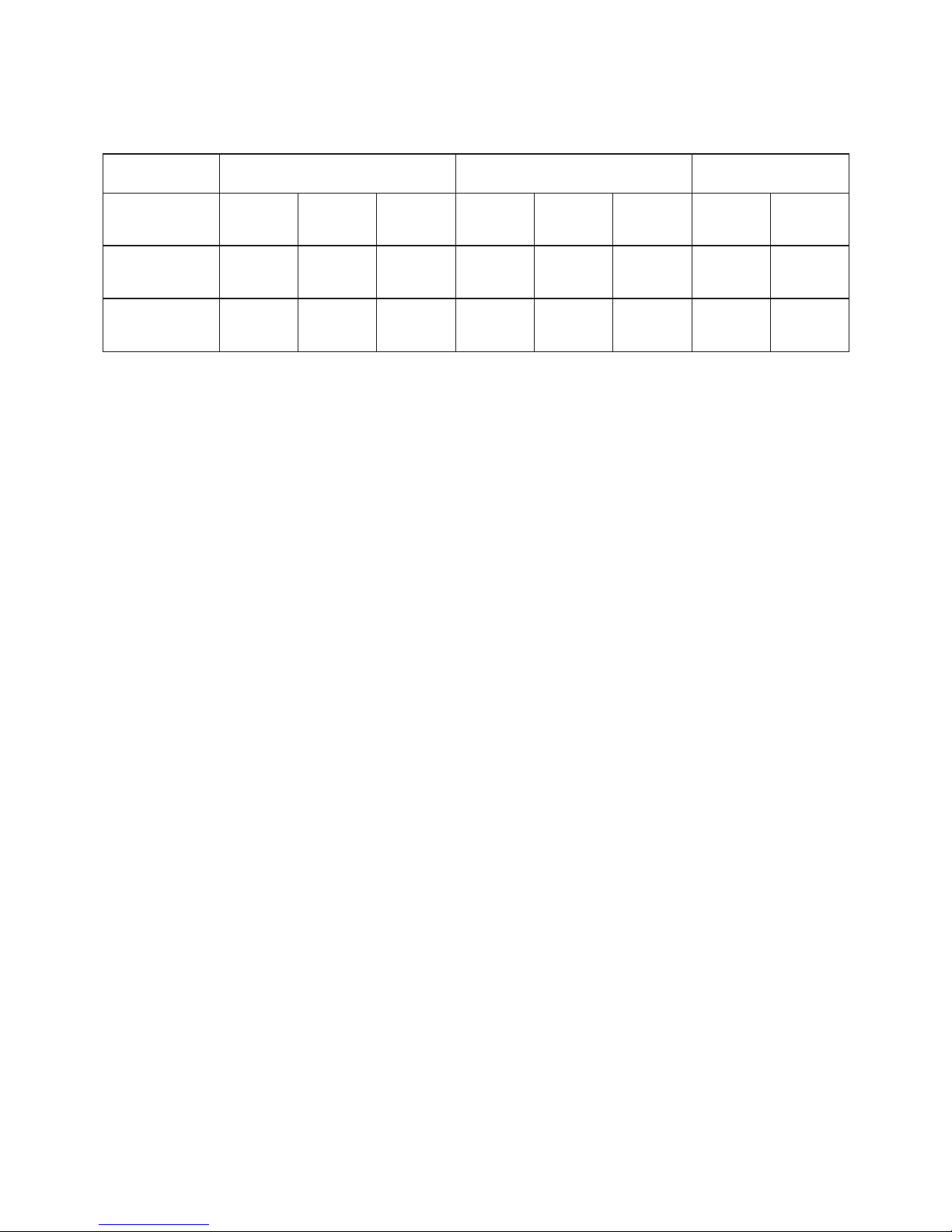
Default Alarm Set Point
Gas Type CO H2S O
2
Part
Number
CL-C-25CL-C-30CL-C-35CL-H-2CL-H-5CL-H-10CL-O-19CL-O-19.5
Lower
Alarm Level
25ppm30ppm35ppm2ppm5ppm10ppm19%19.5%
Upper
Alarm Level
50ppm100ppm50ppm5ppm10ppm15ppm23.5%23.5%
Page 11
11
Clip SGD
4. Event Log
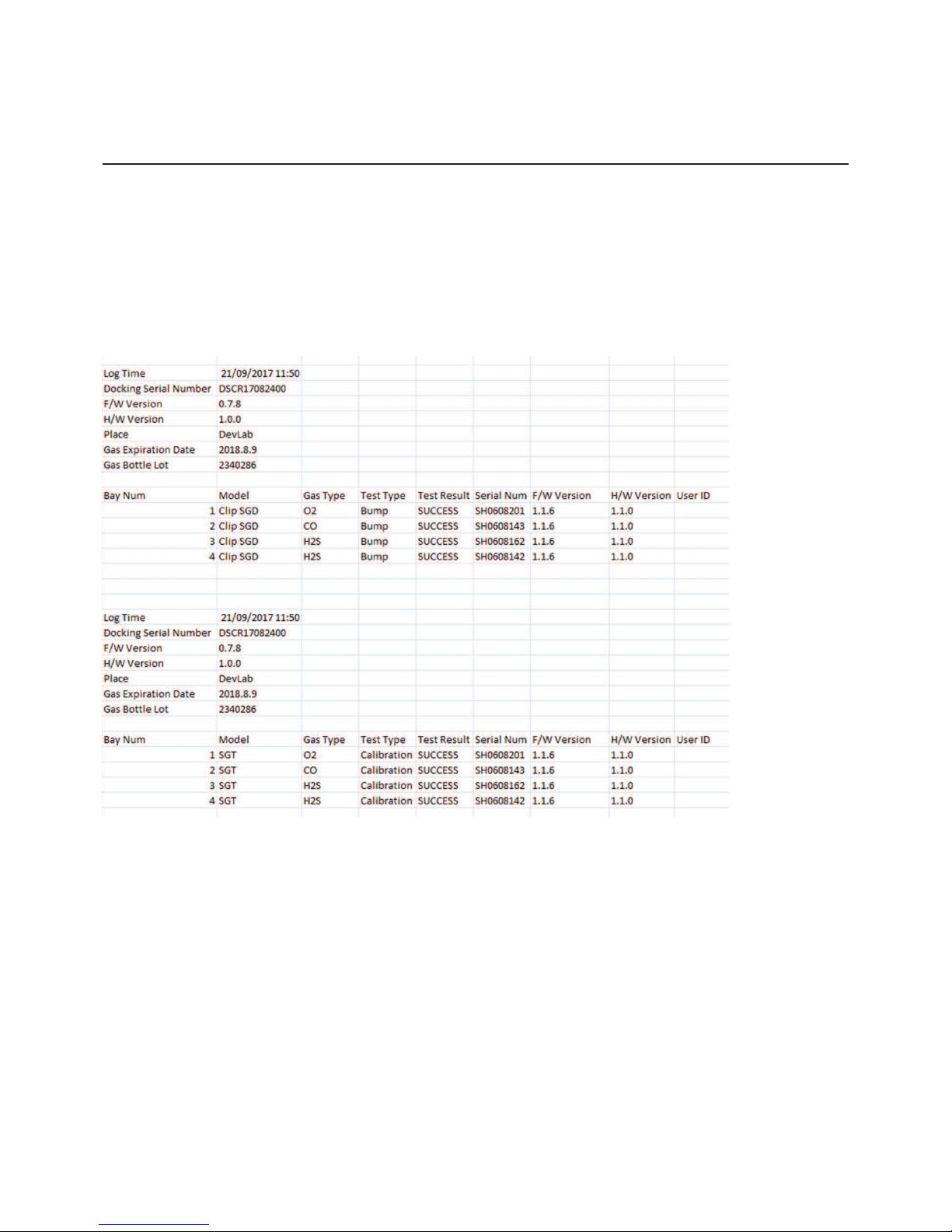
Thelast30eventsarestoredonadevice.Once30eventsarestored,thelogeventsare
removedautomaticallyintheorderstartingatEvent1.Thestoredlogeventscanbe
downloadedusingtheIRLinkortheDockingStation(refertoAppendix1and2).Each
alarmeventrecordsthefollowing:
•Alarmtype(1stor2nd)
•Alarmconcentrationinppmor%
•Peakconcentration
Event log
Page 12
12
Clip SGD
5. Calibration
5.1 Fresh Air Calibration
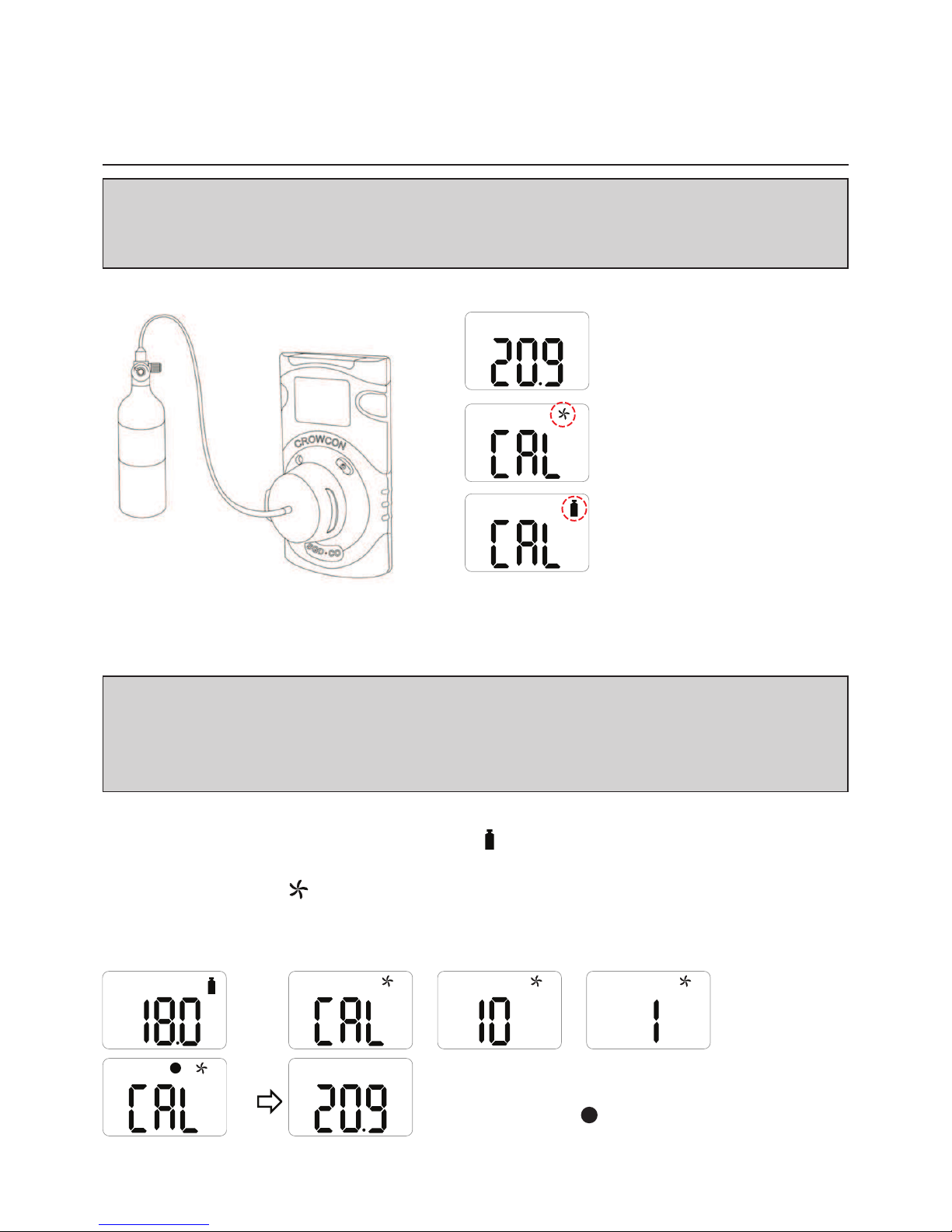
ToperformaFreshAirCalibrationpressthebuttontonavigatetoCalibrationMode,the
calibrationiconwillbedisplayedonthescreen
.
•Pressandholdthebuttonfor5seconds,‘CAL’andthefreshaircalibrationiconwillbe
seenonthescreen
.
•Pressandholdthebuttonfor3secondstoinitiatetheFreshAirCalibration.
Whenthecalibrationbegins,acountdown(startingat10)willbedisplayedonthescreen.
VOL
%
V
%
PressESCtoshowGasMeasuremntmode.
Oncecompleted,
V
iconwillappearontheLCD.
%
Fresh Air Calibration
Standard Gas Calibration
⚠ CAUTION
ForO2unitsonly.Initialcalibrationisperformedonalldevicespriortoshipment.Oncereceived,
calibrationshouldbeperformedmonthly(orquarterly)dependingonfrequencyofuse.
⚠ CAUTION
Calibrationshouldbeperformedinafresh-airenvironmentthatisfreefromtheinuenceofother
gases(calibrationisassumedtobeperformedinanenvironmentwithaconcentrationof20.9%
oxygen).Itisalsorecommendedthatcalibrationshouldnotbeperformedinaconnedspace.
Page 13
13
Clip SGD
%
X
%
X
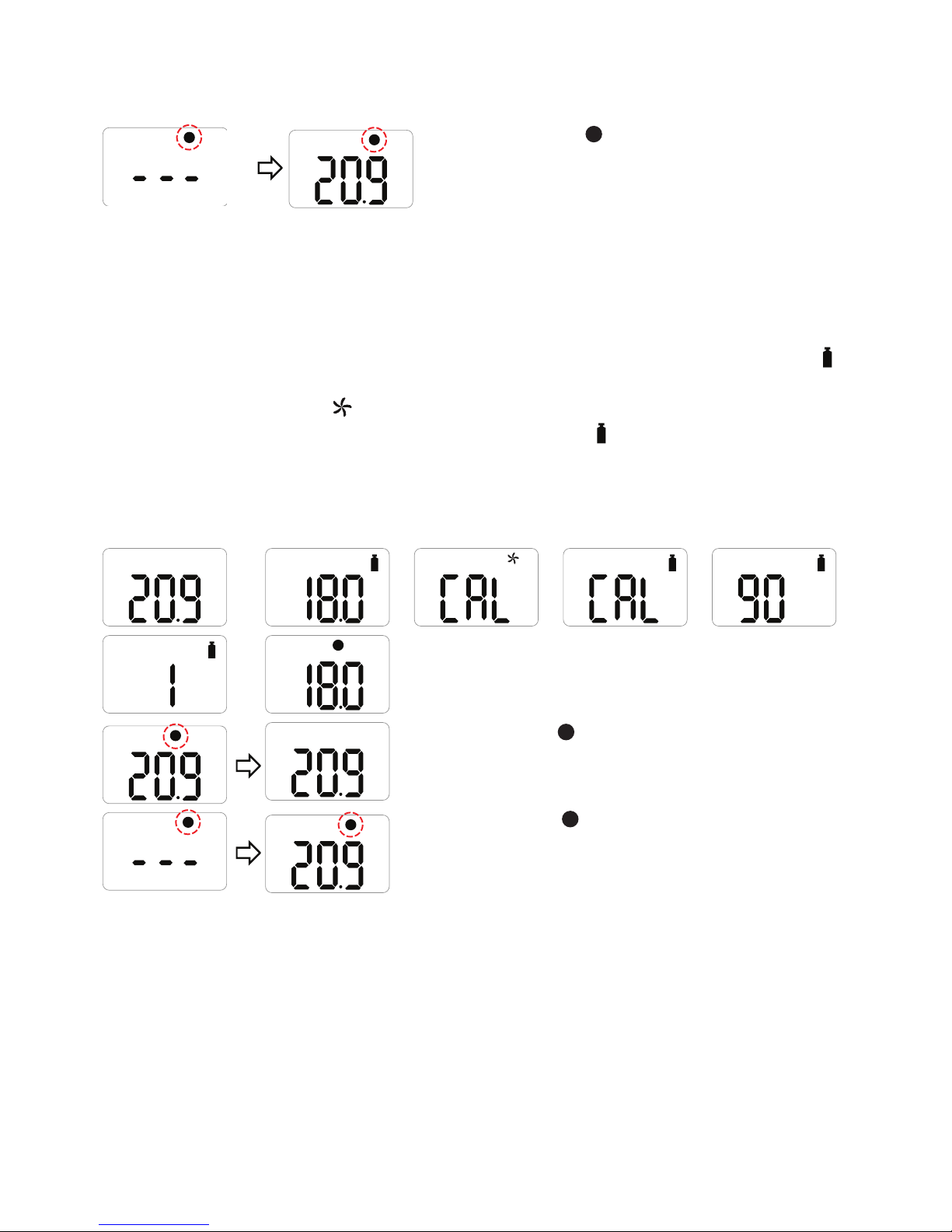
Ifcalibrationfails,
X
iconwillappearonthe
display.Ifthiscontinues,pleasecontactthesales
representativeorCrowconcustomersupport.
5.2 Standard Gas Calibration
ToperformaStandardGasCalibration,usingthesuppliedcalibrationcapconnectthe
appropriategascylindertothedevice.
•PressthebuttontonavigatetoCalibrationMode,thecalibrationiconwillbeshown,
.
•Pressandholdthebuttonfor5seconds,‘CAL’andthefreshaircalibrationiconwillbe
displayedonthescreen,
.
•Pressthebuttononceuntilthecalibrationiconisshown,
.
•Pressandholdthebuttonfor3secondstoinitiatetheStandardCalibration.Whenthe
calibrationbegins,acountdown(60secondsormoredependingonthegastype)will
appearonthescreen.
%
VOL
%
VOL
%
V
%
V
%
Oncecompleted,
V
iconwillappearforseveral
secondsonthedisplay.Thedevicewillthenreturnto
GasMeasurementmode.
%
X
%
X
Ifcalibrationfails,
X
iconwillappearonthedisplay.
Ifthiscontinues,pleasecontacttheauthorised
resellerortheCrowconcustomersupportteam.
Page 14
14
Clip SGD
5.3 Return to Gas Measurement Mode
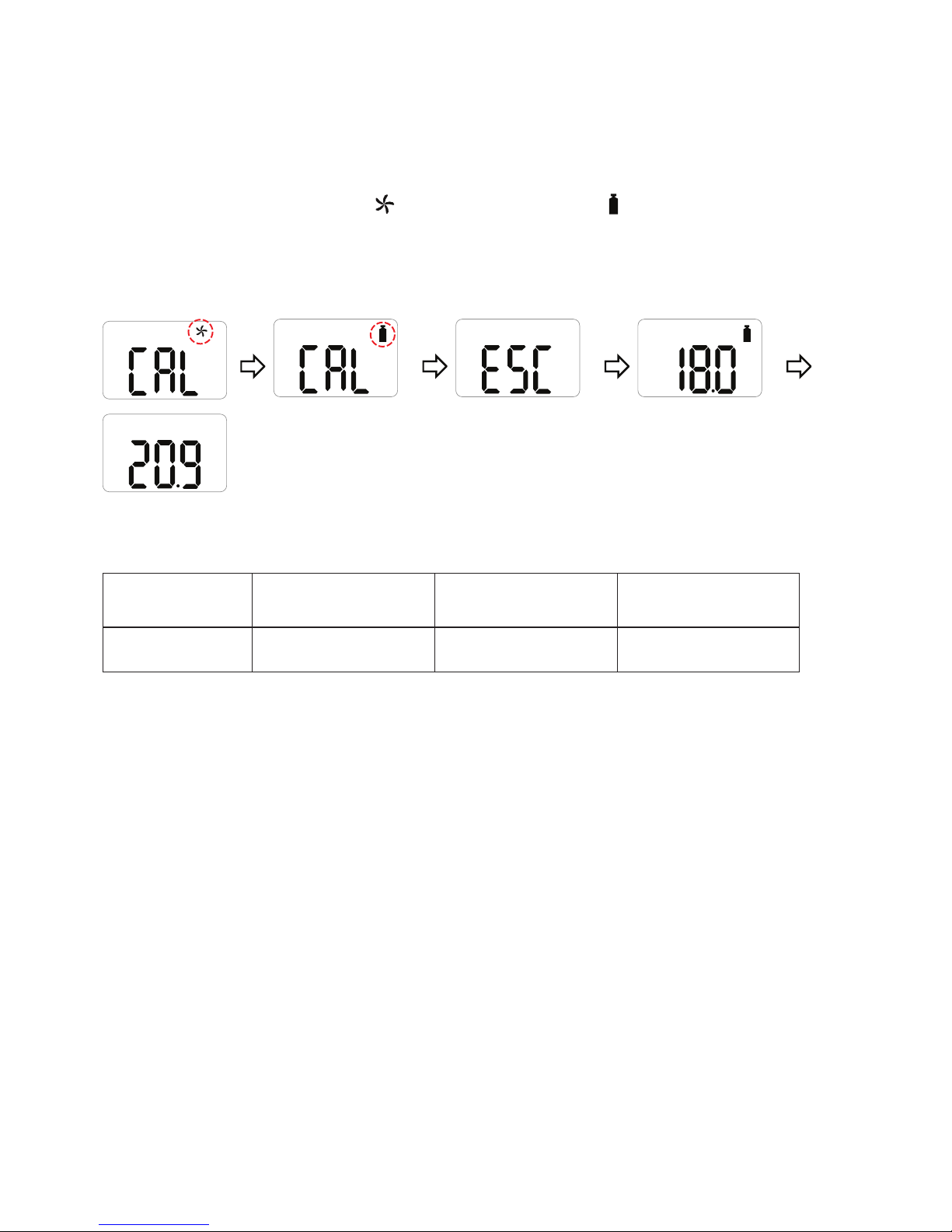
ToreturntoGasMeasurementModefromCalibrationMode,pressthebuttontocycle
throughtheFreshAirCalibration
andStandardCalibration
screensuntil‘ESC’isshown
onthedisplay.
Whilst‘ESC’isshownonthedisplaypressandholdthebuttonfor3seconds,thedevice
willreturntotheGasMeasurementscreen.
VOL
%
%
Calibration concentration.
Gas O
2
CO H2S
Concentration 18%Vol100ppm25ppm
Page 15
15
Clip SGD
6. Specification
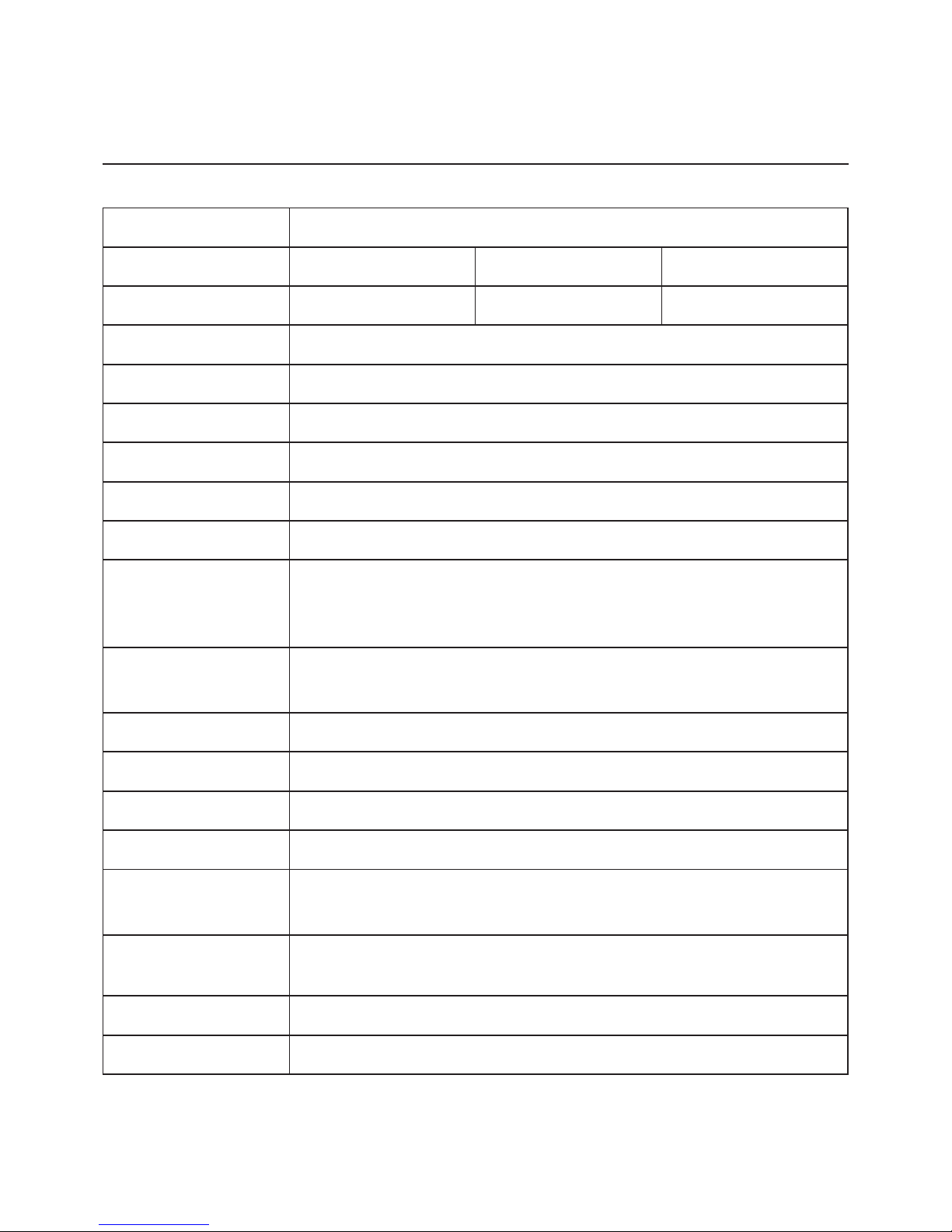
Model ClipSGD
Measure Gas O
2
COH2S
Sensor range 0-30%Vol0-300ppm0-100ppm
Sensor Type Electrochemical
Measurement Diffusiontype
Display LCDdisplay
Audible 90dBat10cm
Warning Lamp RedFlashingLEDs(Light-EmittingDiode)
Vibration VibrationAlarm
Battery Manufacture:Vitzrocell/P/N:SB-AA02(P)/System:LithiumPrimary
Battery
Nominalvoltage:3.6V/Nominalcapacity:1.2Ah
Temperature &
Humidity
-40°Cto+50°C(forToxic)/-35°Cto+50°C(forO
2
)
5%to95%RH(non-condensing)
Ingress protection IP65andIP67
Case RubberEnclosure
Accessories Calibrationcap,manual,calibrationandtestcerticate
Option IRLink,DockingStation
Size & Weight Size:54mm(W)x91mm(H)x32mm(D)
Weight:93g(Toxic),104g(O
2
)(Battery,clipincluded)
Operating Life 24months,basedon4minutesofalarmperday(>2900Alarm
minutes)
Event Log Recent30alarms
Approval SeeCerticationonpage16
Page 16
16
Clip SGD
7. Self Test and Bump Test
7.1 Self Test
TheClipSGDprovidesaSelfTestfunction.
ThedefaultintervaloftheSelfTestreminderis20hrs.
UsetheIRLinkorDockingStationtoconguretheintervalbetween1hrand20hrs,orsetto
“off”.
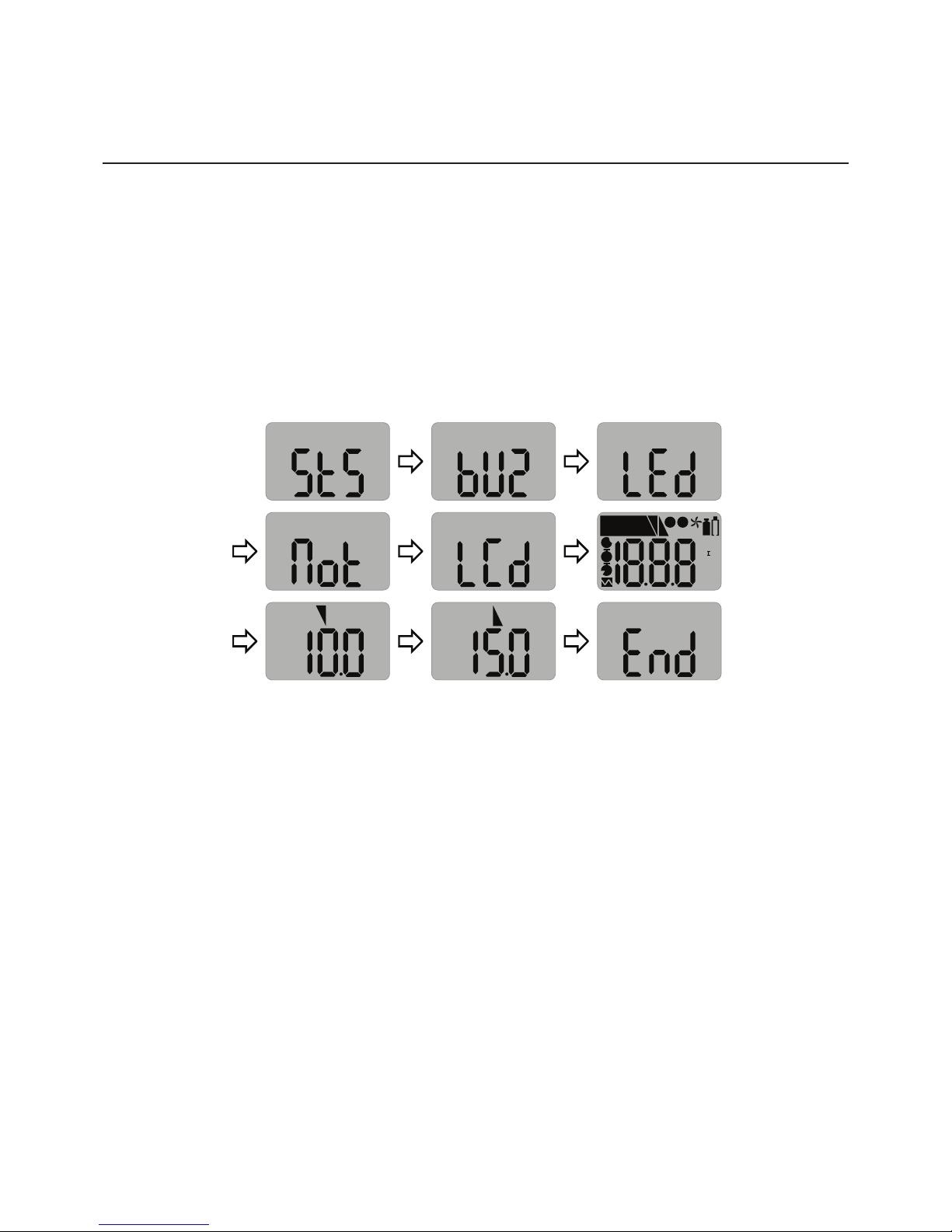
WhentheconguredSelfTestisdue,“STS”willashonthescreen(themessagewill
continuetoashuntiltheuserperformsasuccessfulSelfTest).
MAX
LEL
PPM
VOL
%
%
MN
I
ALARM
1
V
M
D
T
X
2
PPM
1
PPM
2
•PressthebuttontoinitiatetheSelfTestfunction.
Thedevicewillperformaselftestbyoperatingthebuzzer,LED’s,vibratorandLCD.Itwillalso
showtheconguredlowandhighalarmsetpointsonthedisplay.
Afterthetestiscompleted,“END”willbedisplayedonthescreen.(Theuserisrequiredto
checkthattheitemsoperatedintheselftest,performedasexpected).
7.2 Bump Test
ThedevicecanbeconguredtoprovideanonscreenBumpTestreminder.
ThedefaultsettingfortheBumpTestreminderis“off”,noBumpTestreminderwillbe
displayed.
IfaBumpTestreminderintervalisrequireditcanbeconguredusingtheIRLinkorDocking
Station.Theintervalcanbeconguredfrom1dayto365days.
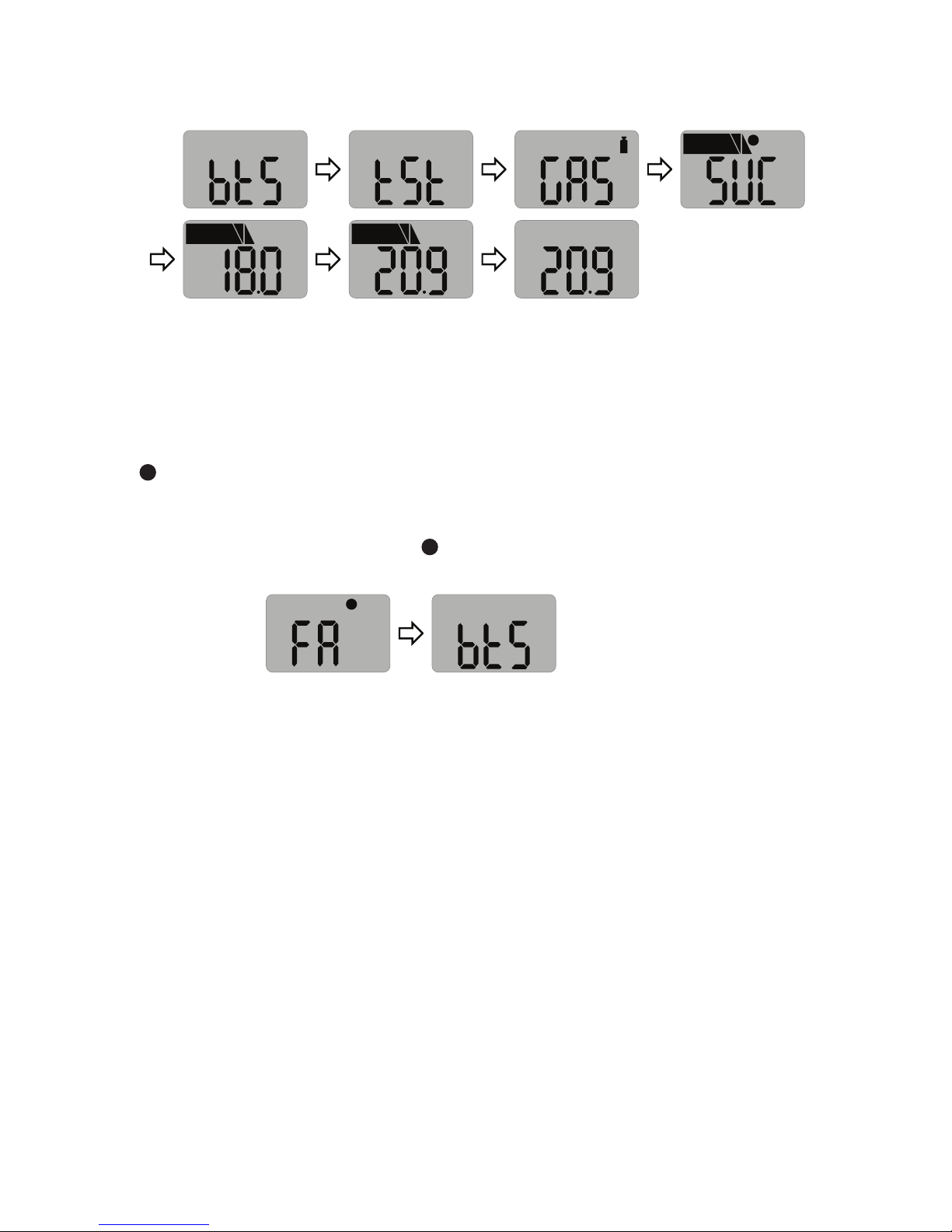
WhenconguredandaBumpTestisdue,the“bts”messagebedisplayedandwillashon
thescreen.
Page 17
17
Clip SGD
ALARM
1
V
2
VOL
%
ALARM
1
2
VOL
%
ALARM
1
2
VOL
%
•Pressandholdthebuttonfor3seconds,andthe“tst”messagewillbedisplayedfor45
seconds(tocancel,pressthebuttonforonesecond).
•Applythegasusingthecalibrationcapandgastubewithinthe45secondperiod.If
aBumpTestisnotundertakenwithinthisperiodthe“bts”messagewillashuntila
successfultestisconducted.
Aftertheselectedgasisappliedandifthetestissuccessful,the“SUC”messagewith
the
V
iconwillbedisplayedfor3secondsthenimmediatelyreturntoGasMeasurement
Mode.Thecalibrationcapandgastubecanthenberemoved.
Ifthetestfails,the“FA”messagewith
X
iconwillbedisplayedand“bts”messagewill
ashuntilasuccessfultestisconducted.
X
Page 18
18
Clip SGD
8. Certificates
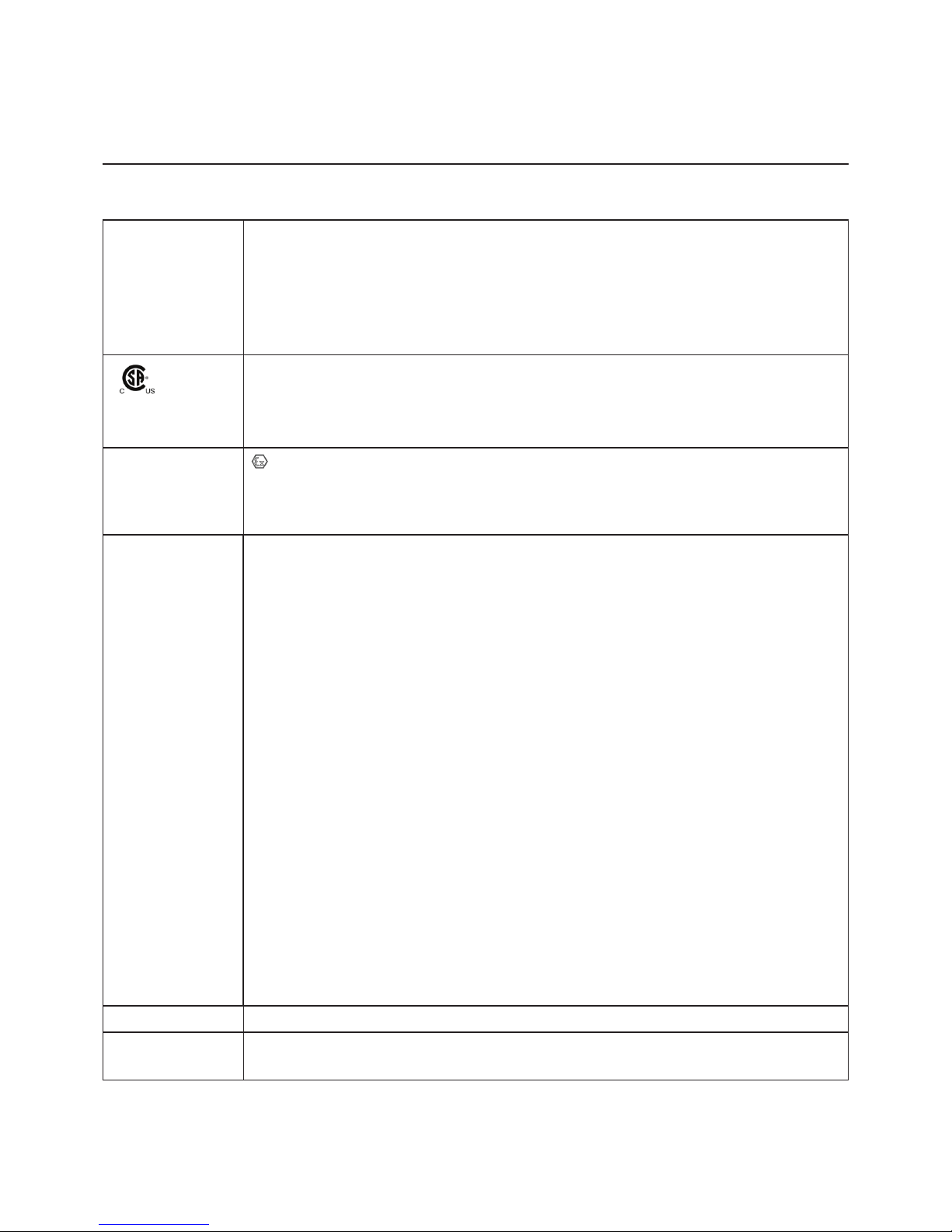
TheSGDClipmeetsthefollowingcerticationsandstandards
IECEx:ExiaIICT4Ga
➀ ➁ ➂ ➃ ➄
1:Explosionprotected
2:ProtectionConcept
3:GasGroup
4:TemperatureClassication
5:Equipmentprotectionlevel
ExiaIICT4Ga
ClassI,Zone0,AExiaIICT4Ga
ClassI,Division1,GroupsA,B,C,D,T4
ATEX:
II1GExiaIICT4Ga
KRH17ATEX0013
Directive2014/34/EU
StandardsTheelectricalapparatusandanyacceptablevariationstoitspeciedin
thescheduleofthiscerticateandtheidentieddocuments,wasfound
tocomplywiththefollowingstandards:
IEC60079-0:2011Ed6
IEC60079-11:2011Ed6
UL61010-1,Ed.3
UL913,Ed.8
UL60079-0,Ed.6
UL60079-11,Ed.6
C22.2No.60079-0:2015
C22.2No.60079-11:2014
C22.2No.61010-1-12:2012
EN60079-0:2012+A11:2013
EN60079-11:2012
ComplianceElectromagneticCompatibilityDirective2014/30/EU
Manufacturing
Approval:
ThedetectormanufactureriscertiedcompliantwithISO9001:2000
provisions
Page 19
19
Clip SGD
Appendix 1
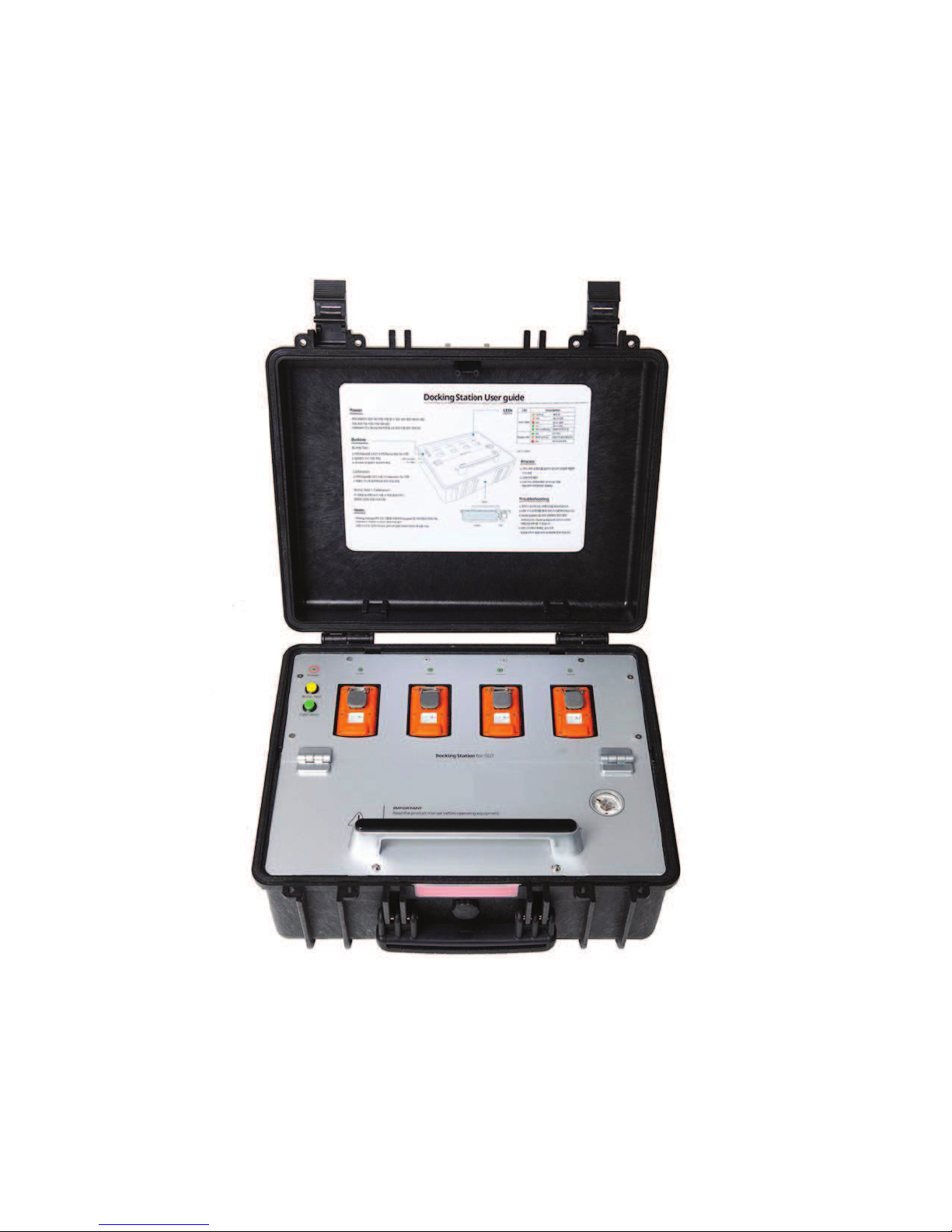
Clip SGD Docking Station
User Manual
Clip SGD Docking Station Configuration
Userscanchangesettings,upgradermware,anddownloadlogeventsthroughthe
DockingStationIRlink(seeAppendix2).
Page 20
20
Clip SGD
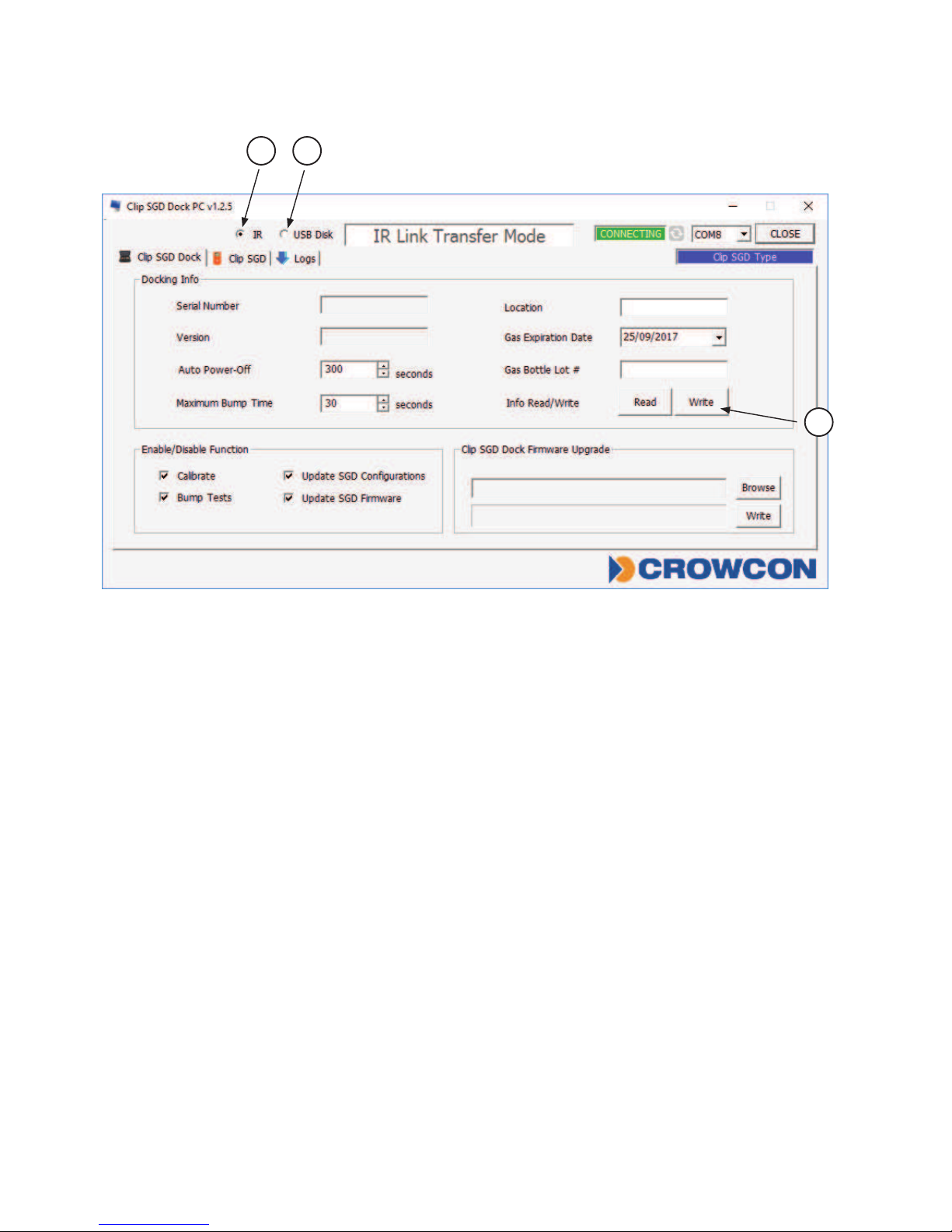
Figure 1: Clip SGD Dock PC Application
IR / USB Disk
ChoseeitherIRLinkorUSBSticktotransfercongurationtoandfromDockingStation.
•Click‘IR’➀tocongureDockingStationviatheClipSGDIRLink.
•Click‘USBDisk’➁toselectUSBStickconnectedtoPCandtransfercongurationto
theUSBStick–thiscanthenbeinsertedintotheDockingStationandtheconguration
uploaded.
•InfoRead/Write:Selectto‘Read’or‘Write’conguration➂toDockingStationviaIRlink
ortoUSBStick
Docking Station
ThelayoutoftheClipSGDDockPCApplicationisshownaboveFigure1.
•TointeractwithDockingStationviatheClipSGDIRLink,itmustbeturnedon.
•EnsurethePChastheClipSGDDockPCApplicationinstalledandconnecttheClipSGD
IRLinktothePC.
•PlacethetopsideoftheClipSGDIRLinkfacedownindetectorbaylabelled“Unit1”.
N.B.:TheIRlinkonlyinteractswithdetectorbaylabelled“Unit1”.
3
1 2
Page 21
21
Clip SGD
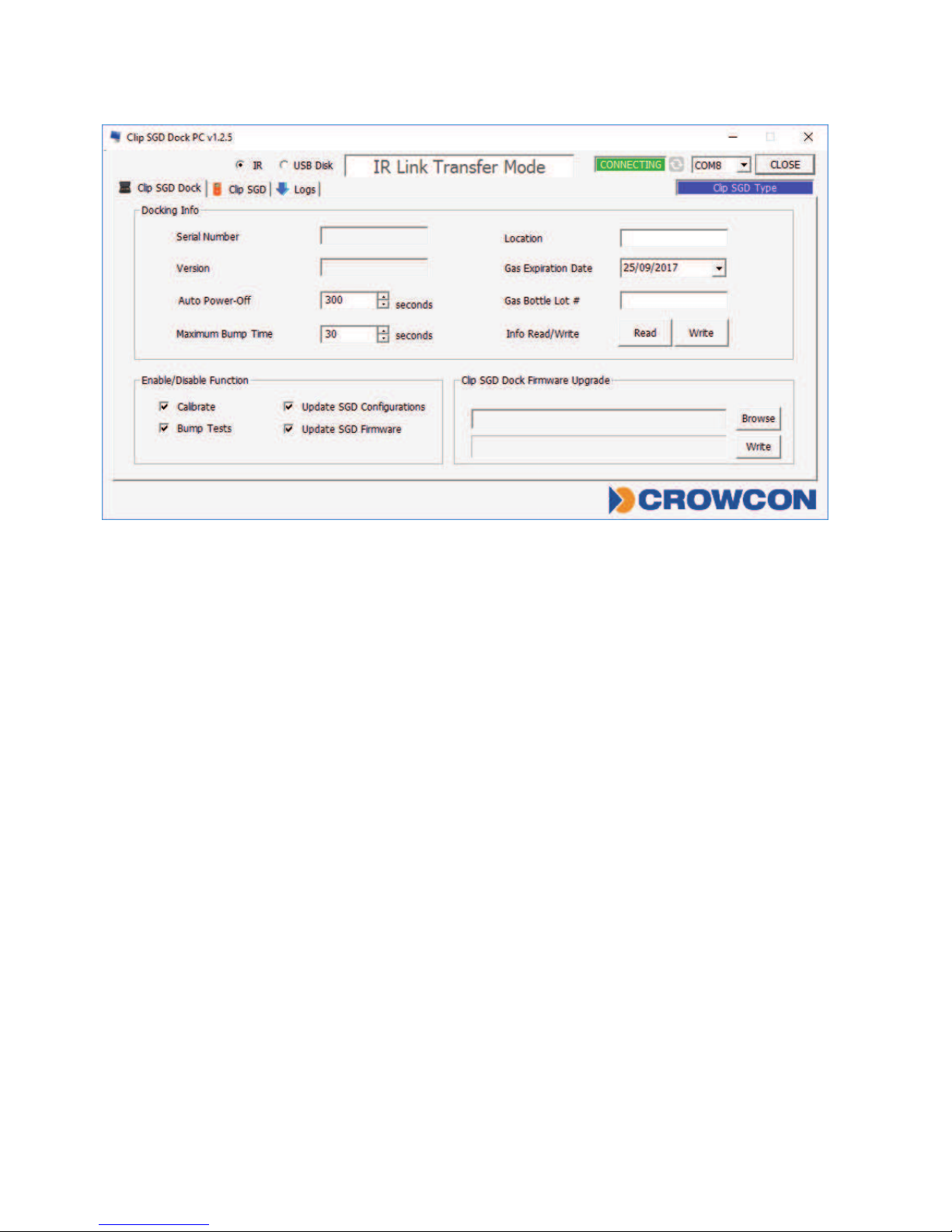
Figure 2
Docking Info
•SerialS/N:Factoryserialnumber
•Version:DockingStationrmwareversion
•AutoPower-Off:DockingStationautomaticpower-offtime(Max3600seconds)
•MaximumBumpTime:Bumptesttime(seconds)–Default:30/Min:20/Max:120
•Location:Conguretheinstalledlocation
•GasExpirationDate:Entertheexpirationdateofthegascylinder.
•GasBottleLot#:Enterthelotnumberofthegascylinder.
•InfoRead/Write:RetrieveorwritesettingsfromDockingStation
Enable/Disable Function
Checkboxtoenableordisablefunctions;atickmeansenabled.
•Calibrate:enables/disablesDockingStation‘Calibration’button.
•Bumptest:enables/disablesDockingStation‘BumpTest’button.
•UpdateSGDConguration:enables/disablesClipSGDcongurationupdatesduring
bumptestorcalibration.
•UpdateSGDFirmware:enables/disablesClipSGDrmwareupdateduringbumptestor
calibration.
Docking Firmware Upgrade
•AllowsDockingStationrmwaretobeupgraded–click‘Browse’tonavigatetole.
•Click‘Write’todownloadle.
Page 22
22
Clip SGD
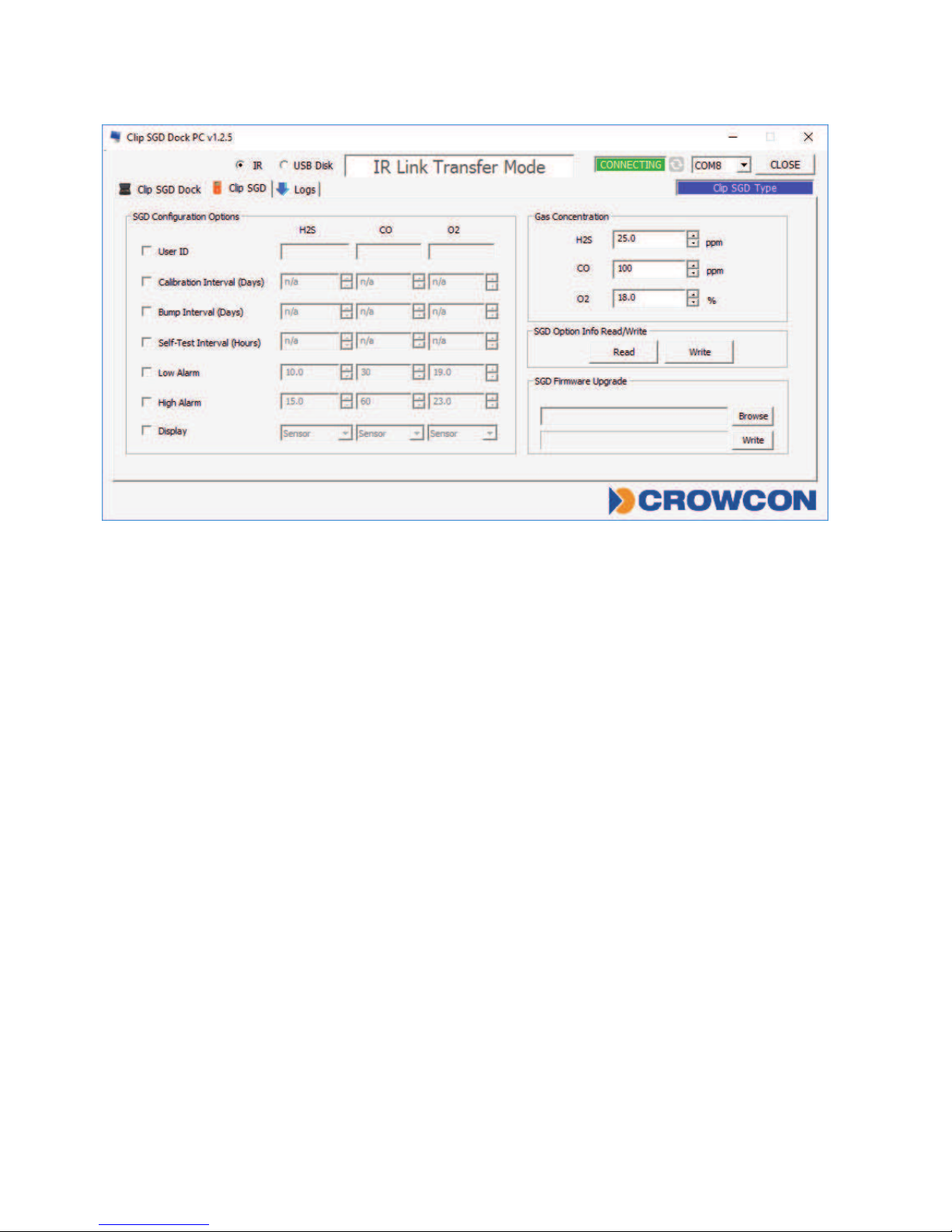
Figure 3
SGD Configuration Options
AllowsthecongurationoftheClipSGDtobemodiedwhilsttheDockingStation
performsabumptestoracalibration.
•UserID:EnterauserIDifrequired
•CalibrationInterval(0-365days):Settheintervalofthecalibrationalert
•BumpInterval(0-365days):Settheintervalofthebumptestalert
•SelfTestInterval(0-24hours):Settheintervaloftheselftestreminder.
•LowAlarmandHighAlarm:Settherequiredlowandhighlevelgasalarms.
•Display:ChooseforClipSGDtodisplayeithergasreading(“Sensor”)orinstrumentlife
remaining(“Life”)
SGD Options Info Read/Write
•Read:RetrievethestoredsettingsfromClipSGDDockingStation
•Write:WritetheadjustedsettingstotheClipSGDDockingStation
Page 23
23
Clip SGD
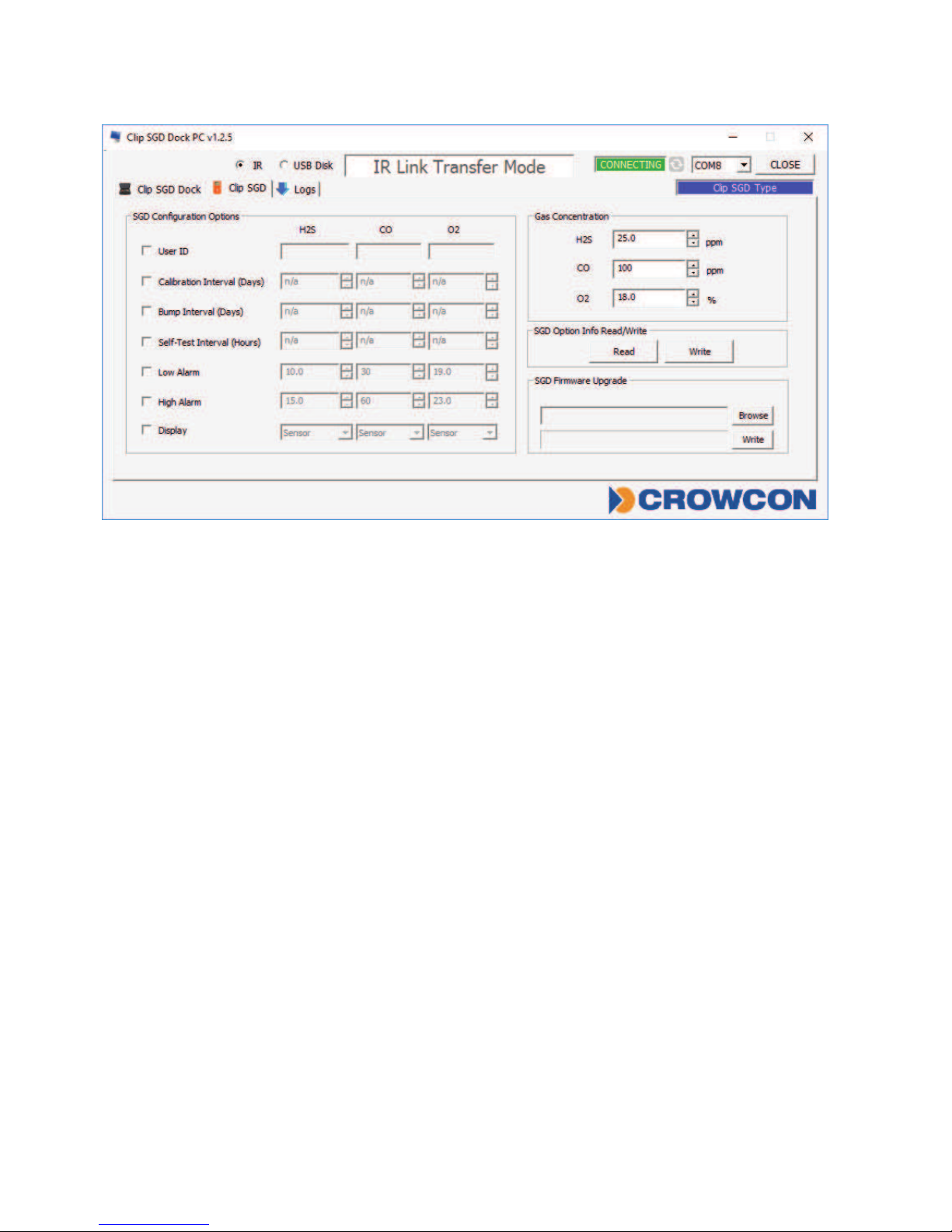
Figure 4
Gas Concentration
AllowsthegaslevelsinthecylinderconnectedtotheClipSGDDockingStationtobe
entered
•Choosegasconcentrationrequiredforcalibration,defaultsettingsareasfollows:
H
2
S:25ppm,CO:100ppm,O2:18%Vol
SGD Firmware Upgrade
•AllowstheClipSGDrmwareupgradeletobespecied–click‘Browse’tonavigateto
le.
•Click‘Write’todownloadle.
IR / USB Disk
ChoseeitherIRLinkorUSBSticktotransfercongurationtoandfromDockingstation
•Click‘IR’toconguredockingstationviatheClipSGDIRLink.
•Click‘USBDisk’toselectUSBStickconnectedtoPCandtransfercongurationtothe
USBStick–thiscanthenbeinsertedintotheDockingStationandtheconguration
uploaded.
•SGDOptionInfoRead/Write:Selectto‘Read’or‘Write’congurationtoDockingStation
viaIRlinkortoUSBStick
Page 24
24
Clip SGD
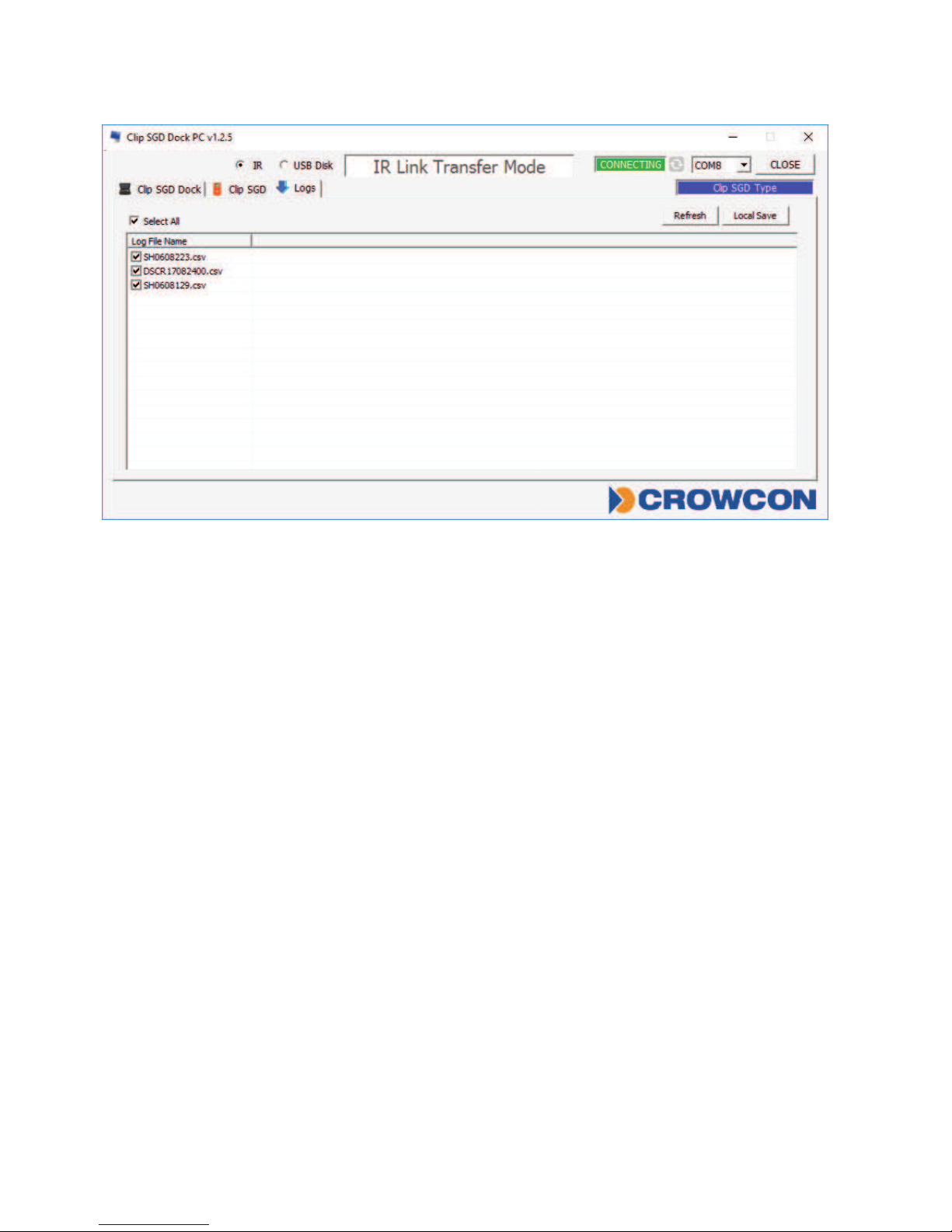
Figure 5
Logs
•Refresh:Viewavailableloglesfromdockingstation
•SelectAll:Selectallloglesavailableinthedockingstation
•LocalStore:SaveselectedloglestoPC–theloglenamewillbesavedbasedonthe
serialnumber
Page 25
25
Clip SGD
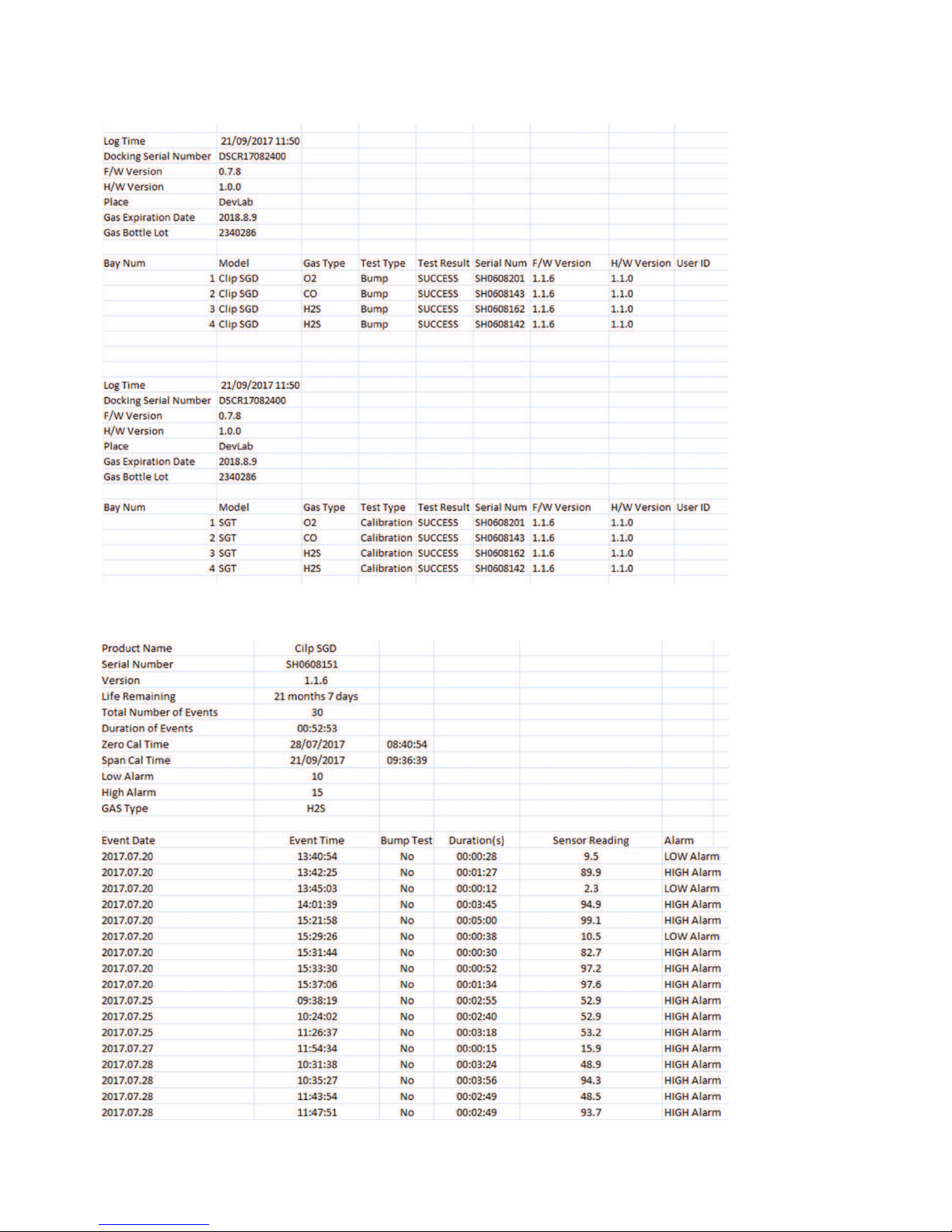
Figure 6 Docking Station Log
Figure 7 Clip SGD Event Log
Page 26
26
Clip SGD
Appendix 2
IR Link User Guide
Use IR Link to change settings, upgrade firmware, download log events,
and perform calibration
Getting started
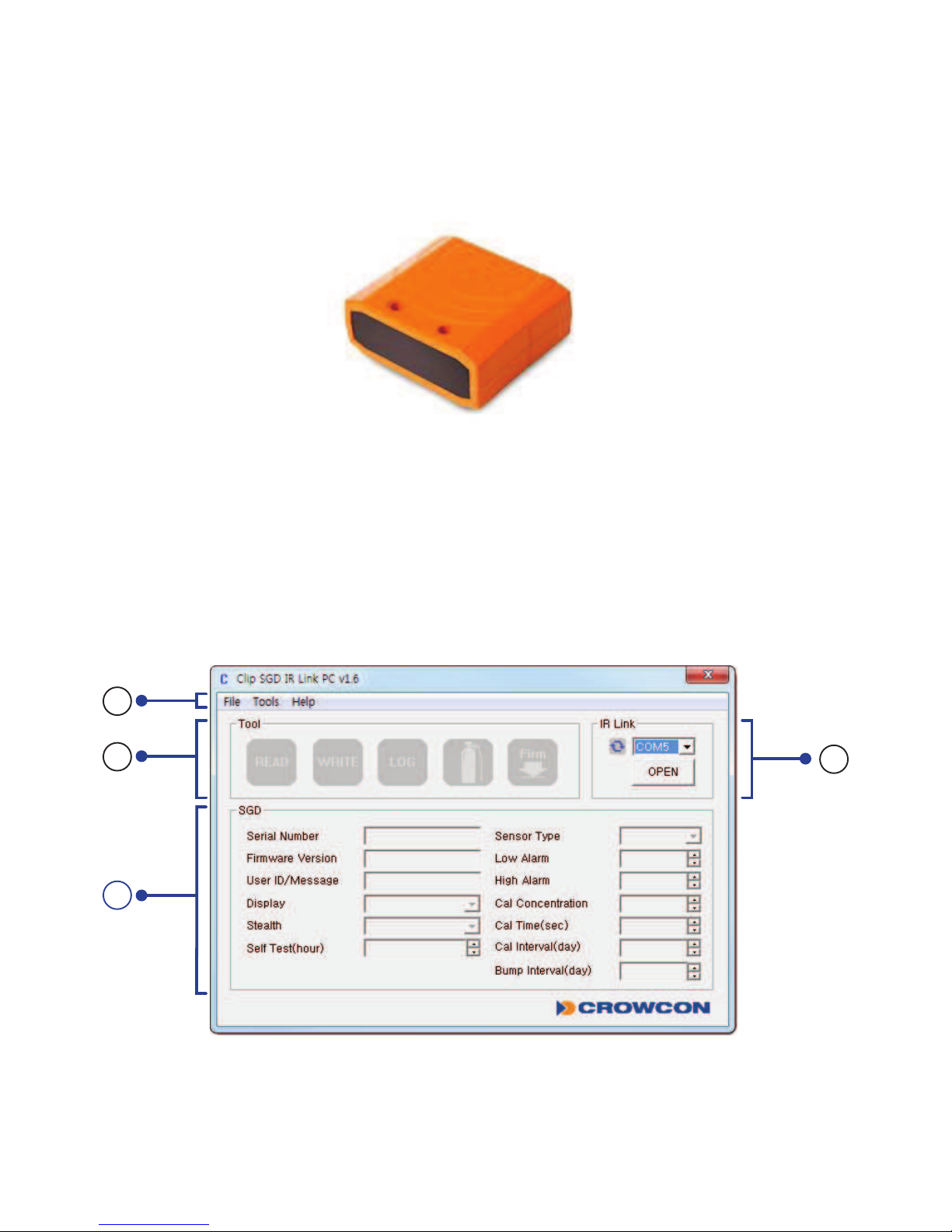
TointeractwithClipSGD,thesoftwaremustbeinstalledonyourcomputer.PlugintheIR
Linkcable.Then,placethetopsideoftheSGDfacedowntotheIRLinkLCD.
4
2
1
3
Page 27

27
Clip SGD
Software overview
1 Tab menus
File
•Load:Opentheinstalledsettings.(*cfg)
•Save:Savethecurrentsettings.(*cfg)
•Exit:Closetheprogram.
Tools
•Calibration:PerformtheZERO/SPANcalibration.
•LogRead:Retrievethelogevents.
•LogErase:Eraselogevents.
•SelfTest:TestifLED,LCD,Buzzer,vibration,batteryandtemperatureworkproperly.
•FirmwareUpgrade:Forthelatestrmwareversion,gotowww.crowcon.comorcontact
yourlocalserviceagent.Afterarmwareupdate,thedetectorMUSTberecalibrated.
•FactoryDefault:Removealldataandrestoretheinitialfactorysettings.Afterfactory
settingsarerestored,thedetectormustberecalibrated.
Help
•About:Displayabriefcompanyprole.
2 Tool Interface
•READ:Retrievesettings
•WRITE:Updateandadjustsettings.
•LOG:Displaythesavedlogevents.
•CALIBRATION:PerformtheZEROandSPANcalibration
•FIRMWAREUPGRADE:Upgradermware.
3 IR Link Interface
•InordertointeractwiththeClipSGDusingtheIRLink,click“OPEN”.WhentheClip
SGDsettingshavebeensuccessfullyretrieveduserswillsee“ReadComplete”.
4 Clip SGD Interface
•SerialNumber:Displayapresetserialnumber.
•FirmwareVersion:Displayarmwareversion.
•UserID/Message:Userscanprogramadesiredmessage/ID.
•Display:Userscanchoosetodisplayeithertherealtime“SensorReading”or“Sensor
LifeRemaining”
•Stealth(Option):Userscanturnoffthebuzzer,LED,andvibration.
Page 28

28
Clip SGD
•SelfTest(Hour):SetanintervaloftheSelfTestalert.
•SensorType:Displaythesensortypeofthedevice.
•LowAlarm:Adjustthelowalarmsetpointincompliancewithinternationalorlocal
standards.
•HighAlarm:Adjustthehighalarmsetpointincompliancewithinternationalorlocal
standards
•CalConcentration:Setastandardcalibrationvalue.
•CalTime(sec):Setastandardcalibrationtime.
•CalInterval(day):Setanintervalofthecalibrationalert.
•BumpInterval(day):Setanintervalofthebumptestalert.
Page 29

29
Clip SGD
Warranty
1.1. Limited Warranty
Crowconwarrantsthisproducttobefreefromdefectsinmaterialandworkmanshipunder
normaluseandserviceforaperiodoftwoyearsbeginninguponthedateofactivation
forallClipSGDproducts.Thiswarrantyisvalidonlyifthepersonalmonitorisactivatedby
the‘activateby’dateontheexternalpackaging.Thiswarrantyextendsonlytothesaleof
newandunusedproductstotheoriginalbuyer.Shouldthebatterydepletepriortothe24
monthsofactivation,thiswilldemonstratethatthemonitor(s)haveexperienced>2900
alarmminutesandwillthereforebeclassedasoutsidewarranty.
Warranty Procedure
Tofacilitateefcientprocessingofanyclaim,contactyourlocalCrowconagent/distributor,
aCrowconregionalofceorourglobalcustomersupportteam(Englishworkinglanguage)
on+44(0)1235557711or[email protected]toobtainareturnsformfor
identicationandtraceabilitypurposes.Thisformmaybedownloadedfromourwebsite
‘crowconsupport.com’andrequiresthefollowinginformation:
•Yourcompanyname,contactname,phonenumberandemailaddress.
•Descriptionandquantityofgoodsbeingreturned,includinganyaccessories.
•Instrumentserialnumber(s).
•Reasonforreturn.
ProductswillnotbeacceptedforwarrantywithoutaCrowconReturnsNumber(CRN).Itis
essentialthattheaddresslabelissecurelyattachedtotheouterpackagingofthereturned
goods.Theguaranteewillberenderedinvalidiftheinstrumentisfoundtohavebeen
altered,incorrectlystored,modied,dismantled,tamperedwith,orhasnotusedCrowcon
sparesforreplacementpartsincludingsensors)orhasbeenservicedorrepairedbyanyparty
notauthorisedandcertiedbyCrowcontodoso.Thewarrantydoesnotcovermisuseor
abuseoftheunitincludinguseoutsideofspeciedlimits.
1.2. Warranty Disclaimer
Crowconacceptnoliabilityforconsequentialorindirectlossordamagehowsoeverarising
(includinganylossordamagearisingoutoftheuseoftheinstrument)andallliabilityin
respectofanythirdpartyisexpresslyexcluded.Thiswarrantydoesnotcovertheaccuracy
ofthecalibrationoftheunitorthecosmeticnishoftheproduct.Theunitmustbe
maintainedinaccordancewiththeinstructionsinthismanual.Thewarrantyonreplacement
consumableitemssuppliedunderwarrantytoreplacefaultyitems,willbelimitedtothe
unexpiredwarrantyoftheoriginalsupplieditem.Crowconreservestherighttodetermine
areducedwarrantyperiod,ordeclineawarrantyperiodforanysensorsuppliedforusein
anenvironmentorforanapplicationknowntocarryriskofdegradationordamagetothe
Page 30

30
Clip SGD
sensor.Ourliabilityinrespectofdefectiveequipmentshallbelimitedtotheobligationsset
outintheguaranteeandanyextendedwarranty,conditionorstatement,expressorimplied
statutoryorotherwiseastothemerchantablequalityofourequipmentoritstnessfor
anyparticularpurposeisexcludedexceptasprohibitedbystatute.Thisguaranteeshallnot
affectacustomer’sstatutoryrights.
Crowconreservestherighttoapplyahandlingandcarriagechargewherebyunitsreturned
asfaulty,arefoundtorequireonlynormalcalibrationorservicing,whichthecustomerthen
declinestoproceedwith.
For warranty and technical support enquiries please contact:
Customer Support
Tel: +44 (0) 1235 557711
Fax: +44 (0) 1235 557722
Email: [email protected]
Page 31

Page 32

Contact/www.crowcon.com/[email protected]/44(0)1235-557711
 Loading...