

Page 1

Crestron CNAMPX-16X60
16 Channel Professional Audio Amplifier
Operations Guide
Page 2

This document was prepared and written by the Technical Documentation department at:
Crestron Electronics, Inc.
15 Volvo Drive
Rockleigh, NJ 07647
1-888-CRESTRON
All brand names, product names and trademarks are the property of their respective owners.
©2000 Crestron Electronics, Inc.
Page 3

Crestron CNAMPX-16X60 16 Channel Professional Audio Amplifier
Contents
16 Channel Professional Audio Amplifier: CNAMPX-16X60 1
Description.................................................................................................................................1
Functional Description ................................................................................................1
Physical Description.................................................................................................... 1
Leading Specifications...............................................................................................................5
Setup .......................................................................................................................................... 6
Network Wiring........................................................................................................... 6
Rack Mount Ear Installation........................................................................................ 7
Rack Mounting ............................................................................................................ 8
Hookup ........................................................................................................................ 9
Identity Code ............................................................................................................... 9
Programming with SIMPL Windows ......................................................................................10
CNAMPX-16X60 Symbol ........................................................................................11
Example Basic Touchpanel Pages............................................................................. 13
How the Example Program Works............................................................................ 14
Problem Solving ......................................................................................................................16
Troubleshooting......................................................................................................... 16
Further Inquiries........................................................................................................ 17
Future Updates ..........................................................................................................17
Return and Warranty Policies.................................................................................................. 18
Merchandise Returns / Repair Service ......................................................................18
CRESTRON Limited Warranty.................................................................................18
Operations Guide – DOC. 8155 Contents • i
Page 4

Page 5

Crestron CNAMPX-16X60 16 Channel Professional Audio Amplifier
16 Channel Professional Audio
Amplifier: CNAMPX-16X60
Description
Functional Description
The CNAMPX-16X60 is a Crestron control network (Cresnet) 16 channel, 60-
Watts per channel audio amplifier. Typically installed in addition to the CNX-PAD8,
the unit provides remote system power on/off and remote zone on/off capabilities.
The CNAMPX-16X60 reports any electrical fault within itself or from a speaker
load. The voltage from each speaker terminal is monitored and ambient temperature
within the enclosure is reported via Cresnet and is available as Fahrenheit or Celsius.
These signals can be used to reduce the audio volume, activate an external cooling
fan, or turn the unit off under program control.
All audio connectors are gold plated to prevent corrosion and five types of wire
terminations can connect to the audio outputs. Highly efficient twin toroid
transformers provide ample power to eight two-channel amplifier modules. The eight
modules are of Crestron Detachable Modular Component (CDMC) design that
allows rapid field repair. Each channel (two per module) of each module has its own
power supply and filter capacitors that produce over 108,000 microFarads for
enhanced dynamic range. The heat sinks of each channel contain more than 300
square inches of radiating surface allowing cooler operation. No fans are required but
the unit must have a minimum of one rack space above and below for adequate
ventilation.
Physical Description
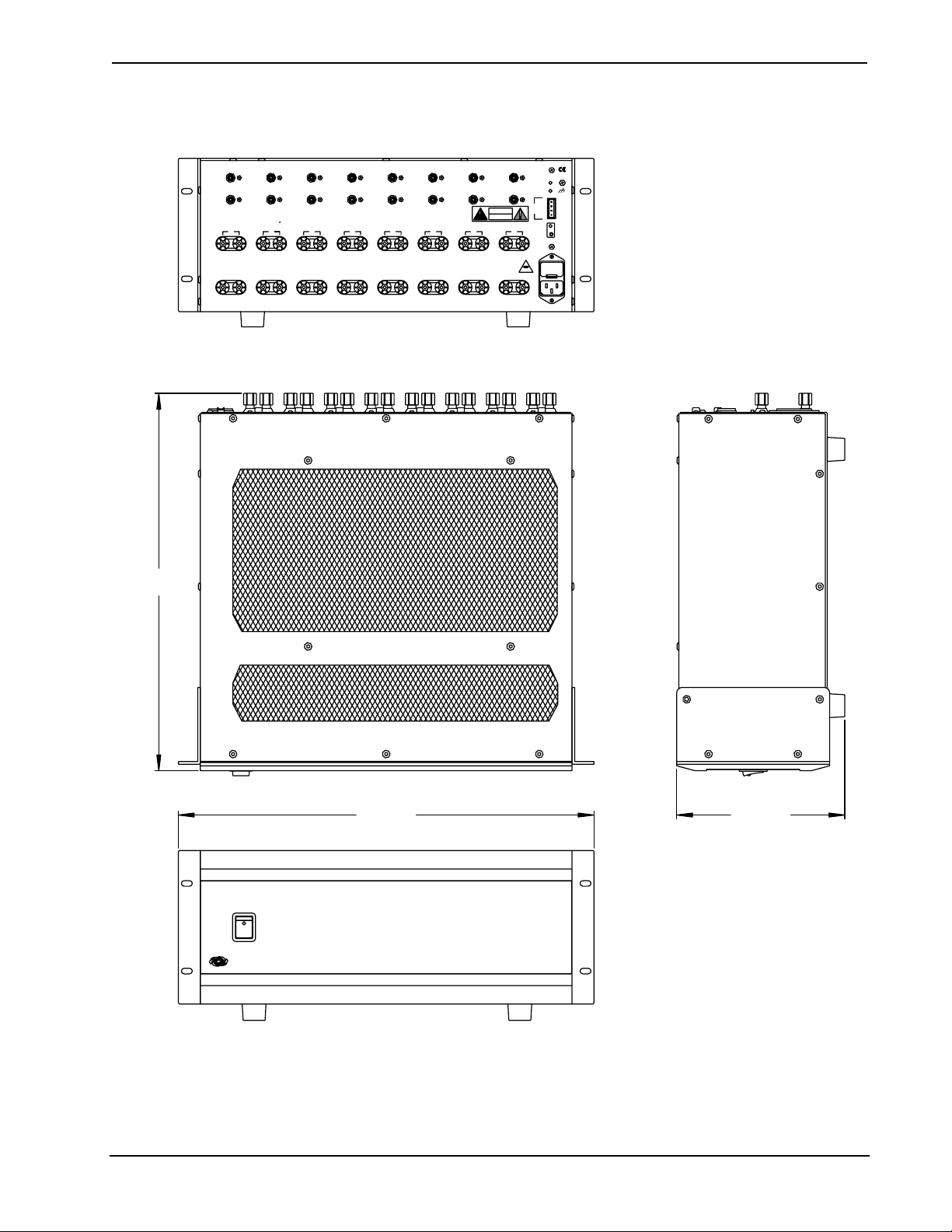
The CNAMPX-16X60, shown on the next page, is housed in a black enclosure with
silk-screened labels on the front and rear panels. The enclosure consists of 13-gauge
powder-coated steel with stainless steel screws. The front panel contains the main
power switch and light-emitting diode (LED). All audio input and output, Cresnet,
and power connections are made on the rear panel. There are four rubber feet on the
base of the unit for stability and to prevent slippage and two mounting ears with
screws are provided for rack mounting.
Operations Guide – DOC. 8155 16 Channel Professional Audio Amplifier: CNAMPX-16X60 • 1
Page 6
16 Channel Professional Audio Amplifier Crestron CNAMPX-16X60
CNAMPX-16X60 Physical Views
17.22 in
(43.74 cm)
1 2
LEFT
RIGHT
PRECAUCIÓN:
PARA LA PROTECCIÓN CONTINUADA CONTRA EL USO DEL
RIESGO DE INCENDIOS USE SOLAMENTE EL MI SMO TIPO Y
FUSIBLE DEL GRADO. DESCONECTE LA CUERDA DE LA
FUENTE ANTES DE CAMBIAR EL FUSIBLE.
1 2
LEFT
+- +- +- +- +- +- +- +-
RIGHT
+- +- +- +- +- +- +- +-
CRESTRON
ELECTRONICS INC., ROCKLEIGH, N.J. 07670 USA
3 4
ACHTUNG:
AUFGRUND BRANDSCHUTZRECHTLICHER BESTIMMUNGEN,
BITTE NUR SICHERUNG EN DES SELBEN TYPS UND MIT DER
SELBEN BELASTBRAKEI T VERWENDEN. TRENNEN SIE DAS
GERAT VOM NETZ BEVOR SIE DIE SICH ERUNG
AUSTAUSCHEN.
3 4
ATTENTION:
POUR LA PROTECTION CONTRE LES RISQUES D'INCEN DIES
N'UTILISEZ SEULEMENT LE MÊMES TYPE DE FUSIBLE.
DÉBRANCHEZ LE CÂBLE D'ALIMENTATION AVANT DE
CHANGER LE FUSIBLE.
U.S.A
5 6
ROOM INPUTS
5 6
ROOM OUTPUTS
8 OHM / 60 WATTS
4 OHM / 90 WATTS
MADE IN THE USA DATE:
CAUTION:
FOR CONTINUED PROTEC TION AGAINST FIRE
HAZARD USE ONLY SAME TYPE AND RATING F USE.
DISCONNECT SUPPLY CORD BEF ORE CHANGING FUSE.
7 8
CAUTION
RISK OF ELECTRIC SHOCK
AVIS:
RISQUE DE CHOC ELECTRIQUE NE PAS OUVRIR
7 8
DO NOT OPEN
120V AC 60Hz
1800 WATTS MAX.
PWR
NET
24
Y
NET
Z
G
OVERRIDE
15A 125V
POWER
CRESTRON
19.00 in
(48.25 cm)
PROFESSIONAL AUDIO AMPLIFIER
16 CHANNEL 60 WATTS
CNAMPX-16X60
7.69 in
(19.53 cm)
2 • 16 Channel Professional Audio Amplifier: CNAMPX-16X60 Operations Guide – DOC. 8155
Page 7
Crestron CNAMPX-16X60 16 Channel Professional Audio Amplifier
General Safety Precautions
Read all information and instructions provided in this operations guide.
Retain this operations guide.
Heed all warnings and cautions printed in this operations guide.
Follow all instructions in the order that they are provided.
Do not use this unit near water.
Clean only with a damp cloth.
Do not block any of the ventilation openings. Install in accordance with the
instructions in this operations guide.
Do not install near any heat sources such as radiators, heat registers, stoves, or
other apparatus that produce heat. If installing multiple CNAMPX-16X60s,
follow the instructions provided in this operations guide.
Do not defeat the safety purpose of the polarized or ground-type plug. A
polarized plug has two blades with one wider that the other. A grounding type
plug has two blades and a third grounding prong. The wide blade or the third
prong is provided for your safety. When the provided plug does not fit into an
outlet, consult an electrician for replacement of the obsolete outlet.
Protect the power cord from being walked on or pinched particularly at plugs,
convenience receptacles (if provided), and the point where they exit from the
unit.
Use only attachments/accessories specified in this operations guide.
When an equipment rack is used, use caution when moving the rack/unit
combination to avoid injury or tip-over.
Unplug this unit during lighting storms or when unused for long periods of time.
Refer all service to certified Crestron service personnel. Servicing is required
when the unit has been damaged in a way, such as power cord or plug is
damaged, liquid has been spilled or objects have fallen into the unit, the unit has
been exposed to rain or moisture, does not operate normally, or has been
dropped.
CNAMPX-16X60 Rear Ports and Indicators
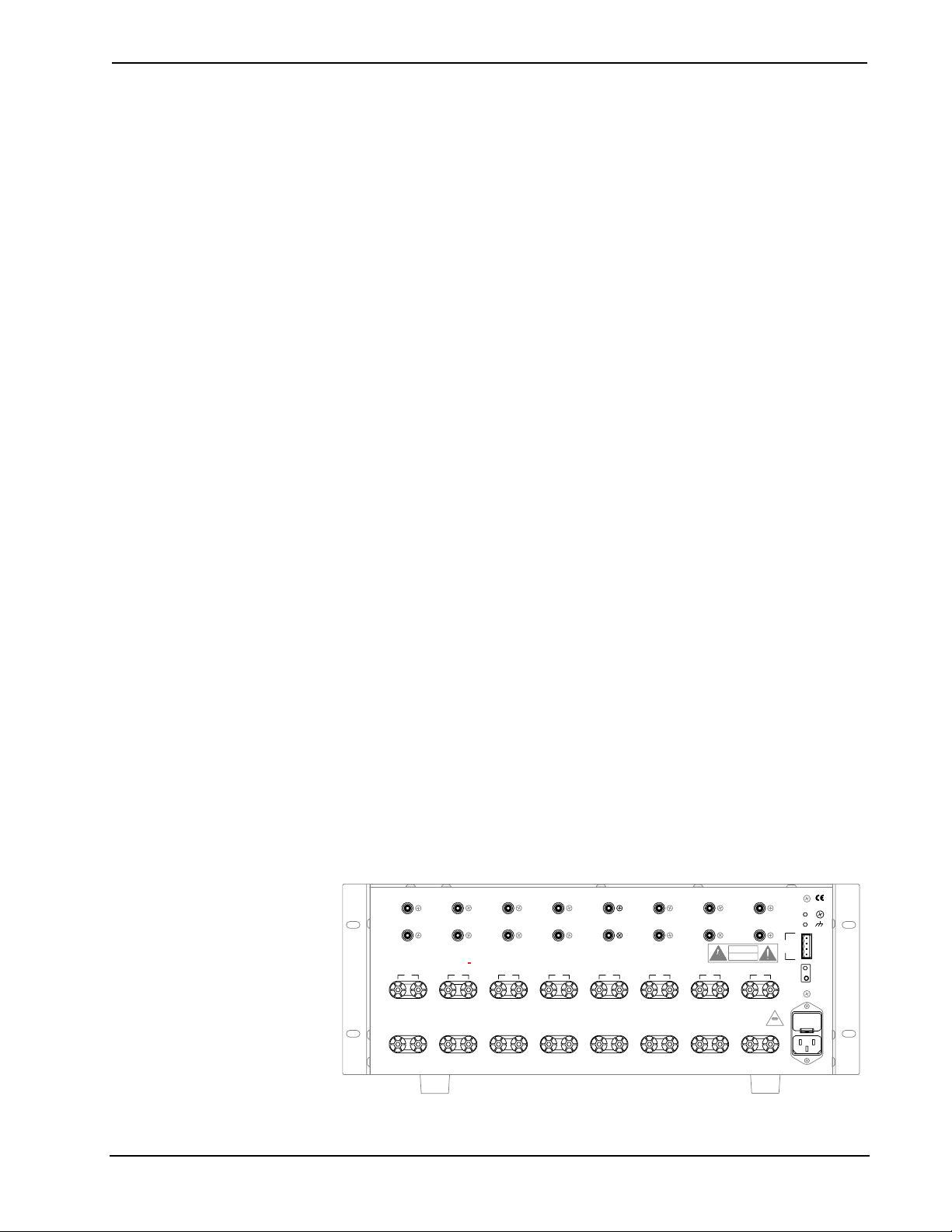
A number of ports and indicators are provided on the rear of the CNAMPX-16X60.
Refer to the illustration below and the descriptions on the next page.
CNAMPX-16X60 Rear Panel
1 2
LEFT
RIGHT
PRECAUCIÓN:
PARA LA PROTECCIÓN CONTINUADA CONTRA EL USO DEL
RIESGO DE INCENDIOS USE SOLAMENTE EL MISMO TIPO Y
FUSIBLE DEL GRADO. DESCONECTE LA CUERDA DE LA
FUENTE ANTES DE CAMBIAR EL FUSIBLE.
1 2
LEFT
+- +- +- +- +- +- +- + -
RIGHT
+- +- +- +- +- +- +- +-
CRESTRON
ELECTRONICS INC., ROCKLEIGH, N.J. 07670 USA
Operations Guide – DOC. 8155 16 Channel Professional Audio Amplifier: CNAMPX-16X60 • 3
3 4
ACHTUNG:
AUFGRUND BRANDSCHUTZRECHTLICHER BESTIMMUNGEN,
BITTE NUR SICHERUNGEN DES SELBEN TYPS UND MIT DER
SELBEN BELASTBRAKEIT VERWENDEN. TRENNEN SIE DAS
GERAT VOM NETZ BEVOR SIE DIE SICHERUNG
AUSTAUSCHEN.
3 4
ATTENTION:
POUR LA PROTECTION CONTRE LES RISQUES D'INCENDIES
N'UTILISEZ SEULEMENT LE MÊMES TYPE DE FUSIBLE.
DÉBRANCHEZ LE CÂBLE D'ALIMENTATION AVANT DE
CHANGER LE FUSIBLE.
U.S.A
5 6
ROOM INPUTS
5 6
ROOM OUTPUTS
8 OHM / 60 WATTS
4 OHM / 90 WATTS
MADE IN THE USA DATE:
CAUTION:
FOR CONTINUED PROTECTION AGAINST FIRE
HAZARD USE ONLY SAME TYPE AND RATING FUSE.
DISCONNECT SUPPLY CORD BEFORE CHANGING FUSE.
7 8
CAUTION
RISK OF ELECTRIC SHOCK
DO NOT OPEN
AVIS:
RISQUE DE CHOC ELECTRIQUE NE PAS OUVRIR
7 8
120V AC 60Hz
1800 WATTS MAX.
PWR
NET
24
Y
NET
Z
G
OVERRIDE
15A 125V
Page 8

16 Channel Professional Audio Amplifier Crestron CNAMPX-16X60
PWR Indicator
This LED (green) is illuminated when operating power is supplied to the CNAMPX-
16X60.
NET Indicator
This LED (yellow) indicates that the SIMPL program currently loaded in the control
system has a network device defined at the same NET ID code as the CNAMPX-
16X60. The LED flashes when communication with the Cresnet system and the
CNAMPX-16X60 is occurring.
G (Chassis Ground)
Use this chassis screw to connect the audio device(s) common ground(s) to the
CNAMPX-16X60.
NET
The 4-pin network connector is used to connect the CNAMPX-16X60 to the Cresnet
system. Review the Network Interconnection Diagram (latest revision of Doc. 5411).
OVERRIDE Button and Indicator
The OVERRIDE button is used to activate AC power to the CNAMPX-16X60 and
activate all room outputs. This button functions only when 24VDC is applied to the
NET connector. The LED (red) illuminates when the OVERRIDE is activated.
Power Connector and Fuse Compartment
The power connector provides AC operating power to the CNAMPX-16X60 via the
supplied power cord. The fuse electrically protects the internal circuitry from power
overloads and is located (a spare fuse is included) within the compartment above the
power connector.
CAUTION: If it becomes necessary to replace the fuse(s), replace only with same
type, size and amperage rating.
ROOM INPUTS 1 - 8
Each of the eight pair of RCA connectors is typically used to connect the pre-
amplified audio from the CNX-PAD8 to the CNAMPX-16X60. The left channel
audio is input to the connectors with the white center insulators and right channel
audio connectors have red center insulators.
ROOM OUTPUTS 1 – 8
These eight pair of speaker dual-binding posts output the left and right amplified
audio to the corresponding speakers. The audio positive posts have RED screw-on
caps and the audio negative posts have BLACK screw-on caps. Each post is gold-
plated and accepts bare wire, banana plugs, or spade lugs.
CNAMPX-16X60 Front Panel Power Switch
As shown on the next page, the front panel of the CNAMPX-16X60 contains a
power switch with an LED indicator. This two-position (ON/OFF) switch enables
operating power to the CNAMPX-16X60 circuitry and must be positioned to ON
when the unit is controlled by the control system. When the Cresnet 24VDC is
applied to the proper pin of the NET connector, power is applied to the circuitry and
the LED (green) illuminates.
4 • 16 Channel Professional Audio Amplifier: CNAMPX-16X60 Operations Guide – DOC. 8155
Page 9

Crestron CNAMPX-16X60 16 Channel Professional Audio Amplifier
CNAMPX-16X60 Front Panel
POWER
PROFESSIONAL AUDIO AMPLIFIER
16 CHANNEL 60 WATTS
CRESTRON
Leading Specifications
The table below and continued on the next page provides a summary of leading
specifications for the CNAMPX-16X60.
Leading Specifications of the CNAMPX-16X60
SPECIFICATION DETAILS
Power Input Requirements: US version 120VAC +/-10%, 50-60Hz, 1800 Watts
International version 230VAC +/-10%, 50-60Hz, 1800 Watts
Cresnet Power Requirements 24VDC @ .5A, 12 Watts
Channels 16 grouped into 8 stereo pairs
Output Power
Input Impedance 28Kohms
Power Bandwidth - 3dB 3Hz to 50KHz
Frequency Response @ 1W 8ohm Flat +0, -0.1dB from 20Hz to 20KHz
CNAMPX-16X60
60 Watts/Channel into 8 ohm loads, all
channels driven, 20Hz to 20KHz, at rated THD
90 Watts/Channel into 4 ohm loads
220 Watts/Channel Bridged
Total Harmonic Distortion (THD) @ full power 0.03% or less
IHF I.M. Distortion
SMPTE I.M. Distortion
0.01% or less
0.03% or less
Dynamic Headroom 2dB or more
Signal to Noise Ratio (S/N) "A" Weighted better than 110dB
Gain 28dB
Damping Factor Greater Than 1000
Rise Time 2.2ms
Slue Rate 25vms
Channel Separation over full bandwidth over 100dB
SIMPL™ Windows
Crestron VisionTools® Pro-e Version 2.1.8 or later.
CEN-TVAV Upgrade File
CNMXS-AV/Pro Upgrade File
CNRACKX/-DP Upgrade File
®
Version 1.40.07 or later 1 with the addition of
smwlib87.exe and smwlib87.txt.
1
Version 51013V.UPZ or later.
Version 51011X.UPZ or later.
Version 51011W.UPZ or later.
1
2
2
2
Operations Guide – DOC. 8155 16 Channel Professional Audio Amplifier: CNAMPX-16X60 • 5
Page 10

16 Channel Professional Audio Amplifier Crestron CNAMPX-16X60
Leading Specifications of the CNAMPX-16X60 (Continued)
SPECIFICATION DETAILS
Rack Space Required 4U
Environmental Temperature Range
Environmental Humidity 10% to 90% RH (non-condensing)
Dimensions & Weight Height: 7.69 in (19.53 cm)
41 to 104
Width: 19.00 in w/mounting ears (48.26 cm)
Depth: 17.22 in (43.74 cm)
Weight: 90.20 lb (41.00 kg)
o
Fahrenheit (5 to 40o Celsius)
Setup
1 The latest software versions can be obtained from the Downloads | Software Updates section of the
Crestron website (www.crestron.com)
2 CNX update files are required for either CNMSX-AV/Pro or CNRACKX/-DP. Filenames for CNX
update files have a UPZ extension and are in one EXE or zipped UPZ file. To avoid program
problems, make certain you are using the update file with the correct suffix letter (e.g., V, W, X).
. Refer to the NOTE after the last footnote.
NOTE: Crestron software and any files on the website are for Authorized Crestron
dealers and Crestron Authorized Independent Programmers (CAIP) only. New users
may be required to register to obtain access to certain areas of the site (including the
FTP site).
As of the date of manufacture, the CNAMPX-16X60 has been tested and found to
comply with specifications for CE marking.
NOTE: This device complies with part 15 of the FCC rules. Operation is subject to
the following two conditions: (1) these devices may not cause harmful interference,
and (2) these devices must accept any interference received, including interference
that may cause undesired operation.
Network Wiring
When calculating the wire gauge for a particular Cresnet run, the length of the run
and the power factor of each network unit to be connected must be taken into
consideration. If Cresnet units are to be daisy-chained on the run, the power factor of
each unit to be daisy-chained must be added together to determine the power factor
of the entire chain. If the unit is a home-run from a Crestron system power supply
network port, the power factor of that unit is the power factor of the entire run. The
length of the run in feet and the power factor of the run should be used in the
following resistance equation to calculate the value on the right side of the equation.
Resistance Equation
40,000
Where:
R <
L x PF
The required wire gauge should be chosen such that the resistance value is less than
the value calculated in the resistance equation. Refer to the table after this paragraph.
6 • 16 Channel Professional Audio Amplifier: CNAMPX-16X60 Operations Guide – DOC. 8155
R = Resistance (refer to table below).
L = Length of run (or chain) in feet.
PF = Power factor of entire run (or chain).
Page 11

Crestron CNAMPX-16X60 16 Channel Professional Audio Amplifier
Wire Gauge Values
RESISTANCE (R) WIRE GAUGE
4
6
10
15
13
8.7
NOTE: All Cresnet wiring must consist of two twisted-pairs. One twisted pair is the
+24V conductor and the GND conductor and the other twisted pair is the Y
conductor and the Z conductor.
NOTE: When daisy-chaining Cresnet units, strip the ends of the wires carefully to
avoid nicking the conductors. Twist together the ends of the wires that share a pin on
the network connector, and tin the twisted connection. Apply solder only to the ends
of the twisted wires. Avoid tinning too far up the wires or the end becomes brittle.
Insert the tinned connection into the Cresnet connector and tighten the retaining
screw. Repeat the procedure for the other three conductors.
16
18
20
22
Doubled CAT5
Tripled CAT5
Rack Mount Ear Installation
Two rack mount ears are provided with the CNAMPX-16X60 and must be installed
prior to mounting. To attach the ears to the unit, position as shown below and install
the provided screws finger-tight. With provided Allen key, tighten the screws an
additional 1/8-turn.
Ear Attachment for Rack Mounting
Operations Guide – DOC. 8155 16 Channel Professional Audio Amplifier: CNAMPX-16X60 • 7
Page 12

16 Channel Professional Audio Amplifier Crestron CNAMPX-16X60
Rack Mounting
WARNING: To prevent bodily injury when mounting or servicing this unit in a
rack, you must take special precautions to ensure that the system remains stable. The
following guidelines are provided to ensure your safety:
If the rack is provided with stabilizing devices, install the stabilizers before
mounting or servicing the unit in the rack.
WARNING: The CNAMPX-16X60 weighs in excess of 90 pounds. Use more than
one person to install unit into rack.
When mounting this unit in a partially filled rack, load the rack from the bottom
to the top with the heaviest component at the bottom of the rack.
The unit should be mounted at the bottom of the rack if it is the only unit in the
rack.
CAUTION: Due to the heat dissipation of the CNAMPX-16X60 (and all audio
amplifiers in general), allow at least one free rack space above and below the
CNAMPX-16X60 for proper circulation. Refer to the diagram after this note.
CNAMPX-16X60 Rack Spacing
NOTE: Reliable grounding of rack mounted equipment should be maintained.
Particular attention should be given to supply connections other than direct
connections to the branch circuit. (e.g., use of power strips).
8 • 16 Channel Professional Audio Amplifier: CNAMPX-16X60 Operations Guide – DOC. 8155
Page 13

Crestron CNAMPX-16X60 16 Channel Professional Audio Amplifier
Hookup
Refer to the hookup diagram after this paragraph. Other than making the power
connection last, complete the connections in any order. The power cord is supplied
but RCA, speaker, or Cresnet cables are not.
NOTE: If making four-wire connections to Cresnet devices, review the latest
revision of the network interconnection drawing (Doc. 5411). The document can be
obtained from the Downloads | Product Manuals section of the Crestron website
(www.crestron.com). The name of the file is 5411i-cresnet.pdf.
Hookup Connections for the CNAMPX-16X60
FROM CNX-PAD8
ROOM OUTPUTS
TO CRESNET
CONTROL
TO CNX-PAD8
GROUND SCREW
SYSTEM
1 2
LEFT
RIGHT
PRECAUCIÓN:
PARA LA PROTECCIÓN CONTINUADA CONTRA EL USO DEL
RIESGO DE INCENDIOS USE SOLAMENTE EL MISMO TIPO Y
FUSIBLE DEL GRADO. DESCONECTE LA CUERDA DE LA
FUENTE ANTES DE CAMBIAR EL FUSIBLE.
1 2
LEFT
+- +- +- +- +- +- +- +-
RIGHT
+- +- +- +- +- +- +- +-
ELECTRONICS INC., ROCKLE IGH, N.J. 07670 USA
CRESTRON
3 4
ACHTUNG:
AUFGRUND BRANDSCHUTZRECHTLICHER BESTIMMUNGEN,
BITTE NUR SICHERUNGEN DES SELBEN TYPS UND MIT DER
SELBEN BELASTBRAKEIT VERWENDEN. TRENNEN SIE DAS
GERAT VOM NETZ BEVOR SIE DIE SICHERUNG
AUSTAUSCHEN.
3 4
ATTENTION:
POUR LA PROTECTION CONTRE LES RISQUES D'INCEN DIES
N'UTILISEZ SEULEMENT LE MÊMES TYPE DE FUSIBLE.
DÉBRANCHEZ LE CÂBLE D'ALIMENTATION AVANT DE
CHANGER LE FUSIBLE.
U.S.A
AUDIO TO
SPEAKERS
5 6
ROOM INPUTS
5 6
ROOM OUTPUTS
8 OHM / 60 WATTS
4 OHM / 90 WATTS
MADE IN THE USA DATE:
CAUTION:
FOR CONTINUED PROTECTION AGAINST FIRE
HAZARD USE ONLY SAME TYPE AND RATING FUSE.
DISCONNECT SUPPLY CORD BEFORE CHANGING FUSE.
7 8
CAUTION
RISK OF ELECTRIC SHOCK
DO NOT OPEN
AVIS:
RISQUE DE CHOC ELECTRIQUE NE PAS OUVRIR
7 8
120V AC 60Hz
15A 125V
1800 WATTS MAX.
FROM AC OUTLET
OR POWER STRIP
PWR
NET
24
Y
NET
Z
G
OVERRIDE
Identity Code
Every equipment and user interface within the Cresnet network requires a unique
NET ID. These codes are recognized by a two-digit hexadecimal number from 03 to
FE. The NET ID of the unit must match an ID code specified in the SIMPL
Windows program. The NET ID of the CNAMPX-16X60 is factory set to 3D. The
NET IDs of multiple CNAMPX-16X60 must all be unique and changed from a PC
via SIMPL Windows or Crestron VisionTools
Pro-e (VT Pro-e).
The method for changing the unit’s NET ID is identical regardless of the software
chosen. Attach one of the CNAMPX-16X60s to the control system (verify that the
software is running) and complete the following steps to change the NET ID:
1. Disconnect all Cresnet devices from the control system, except for the
unit that needs to have its NET ID changed.
2. Select Tools | Viewport to open the “Crestron Viewport” window.
3. Select Functions | Set Network ID. The software checks the baud rate
and then opens the “Set Network ID” window.
4. In the “Set Network ID” window, highlight the unit.
Operations Guide – DOC. 8155 16 Channel Professional Audio Amplifier: CNAMPX-16X60 • 9
Page 14

16 Channel Professional Audio Amplifier Crestron CNAMPX-16X60
5. The NET ID of the unit appears in the box below the list. Use the scroll
arrow to assign another NET ID.
6. When the assigned NET ID appears, select the Set ID button to initiate
the change.
7. The software responds with a successful message to confirm the
changed NET ID.
8. Observe the Viewport re-poll the network to verify that the NET ID has
been changed.
9. Reconnect other Cresnet devices that were disconnected in step 1.
Programming with SIMPL Windows
SIMPL (Symbol Intensive Master Programming Language) is an easy-to-use
programming language that is completely integrated and compatible with all
Crestron system hardware. The objects that are used in SIMPL are called symbols.
SIMPL Windows offers drag and drop functionality in a familiar Windows®
environment.
SIMPL Windows is Crestron's software for programming Crestron control systems.
It provides a well-designed graphical environment with a number of workspaces
(i.e., windows) in which a programmer can select, configure, program, test, and
monitor a Crestron control system.
The next three sections describe a CNAMPX-16X60 within a SIMPL Windows
program. The first section details the SIMPL symbol and the second section
describes how an example program works by using a textual description and a block
diagram.
NOTE: The following descriptions assume that the reader has knowledge of SIMPL
Windows. If not, refer to the extensive help information provided with the software.
NOTE: VT Pro-e is a Windows compatible software package for creating Crestron
touchpanel screen designs.
NOTE: VT Pro-e (version 2.1.8 or later) is required to produce the CNAMPX16X60 example touchpanel pages. The latest version of VT Pro-e can be obtained
from the Downloads | Software Updates section of the Crestron website
(www.crestron.com ). New users are required to register in order to obtain access to
the FTP site.
NOTE: There is no need to recreate the CNAMPX-16X60 example touchpanel
pages or example SIMPL Windows program. Both are available from the Crestron
FTP site (ftp://ftp.crestron /Examples). Search for CNAMPXEX.ZIP that contains
CNAMPX-EX.SMW, CNAMPX-EX.VTP and associated macros required to
complete the program.
10 • 16 Channel Professional Audio Amplifier: CNAMPX-16X60 Operations Guide – DOC. 8155
Page 15

Crestron CNAMPX-16X60 16 Channel Professional Audio Amplifier
CNAMPX-16X60 Symbol
The diagram below shows the CNAMPX-16X60 symbol in SIMPL Windows. The
two tables following the diagram list the inputs and outputs, respectively, and their
functional descriptions.
NOTE: All inputs listed in the following table are DIGITAL signals unless noted
otherwise. A digital signal can be high (logic level of 1), low (logic level of 0), and
also have rising edge (when it goes from low to high) and falling edge (from high to
low) transitions. Depending upon how the symbol was created, symbol inputs may
work at the logic levels, some may work on transitions.
Detail View of the CNAMPX-16X60 Symbol in SIMPL Windows’ Programming Manager
Operations Guide – DOC. 8155 16 Channel Professional Audio Amplifier: CNAMPX-16X60 • 11
Page 16

16 Channel Professional Audio Amplifier Crestron CNAMPX-16X60
-
-
g
CNAMPX-16X60 Symbol Input Signal Descriptions
INPUT(S) DESCRIPTION(S)
Main_Power This signal activates the main operating power to the CNAMPX
16X60 circuitry. High/1=power on, low/0=power off.
Rm1 through
Rm8_En
Enable_Temp_Rpt This signal selects whether or not the
Temp_Format This signal selects the format of the temperature to be
Rm_To_Monitor
These signals enable (or activate) the audio outputs for the
corresponding amplifier module. High/1 = room is enabled,
low/0 = room disabled.
Temp(x10)
output described in the next table is updated with the CNAMPX
16X60 enclosure temperature. High/1 = update temperature,
low/0/default = temperature not updated.
displayed. High/1 = Celsius, low/0/default = Fahrenheit.
This analog signal indicates the specific room for which the
audio levels will be displayed. The room number to monitor
corresponds to the value of the analog signal. For example, to
monitor room 1, the value should be initialized to 1. The
default is Room 0, which means monitoring is disabled.
(Although the example program provides only the logic to
monitor rooms 1 through 4, additional logic for rooms 5 through
9 may be programmed.)
analog
NOTE: All outputs listed in the following table are DIGITAL signals unless noted
otherwise.
CNAMPX-16X60 Symbol Output Signal Descriptions
OUTPUT(S) DESCRIPTION(S)
OverRide_F This signal indicates that the audio output override function is
activated. High/1 = override active, low/0 = override not active.
Rm1 through
Rm8_Amp_Fault
Rm1 through
Rm8_Wire_Fault
Temp(x10) This analog signal corresponds to the ambient temperature
LeftSigLevel &
RghtSigLevel
These signals indicate that there is an overcurrent or over
temperature fault within the corresponding amplifier module.
High/1 = fault is present, low/0 = fault present. (There is no
sound when an amp fault is present. It will automatically
attempt to reset after a short duration, attempting to turn the
output on again.)
These signals indicate that there is an error with the audio
output wiring (or cables). High/1 = fault is present, low/0 = fault
present. This only occurs after the amp fault has attempted to
reset but fault still exists. This will not reset automatically. (The
room must be turned off, problem resolved and then room
turned on.)
within the CNAMPX-16X60 enclosure. The temperature reports
approximately once every 2-seconds. (The
Enable_temp_report
high/1 for this to update.)
These analog signals correspond to the audio level that is sent
to a room. The specific room is determined by the
Rm_To_Monitor
The ran
to 100%). (These signals are for diagnostics and are not VU
meters that function in real time.)
e of measurement is from 1 to 60 watts @ 8 ohms (0
entry in previous table must be driven
input signal described in the previous table.
12 • 16 Channel Professional Audio Amplifier: CNAMPX-16X60 Operations Guide – DOC. 8155
Page 17

Crestron CNAMPX-16X60 16 Channel Professional Audio Amplifier
Example Basic Touchpanel Pages
NOTE: VT Pro-e is required to produce the CNAMPX-16X60 example basic
touchpanel pages. The latest version of VT Pro-e can be obtained from the
Downloads | Software Updates section of the Crestron website (www.crestron.com).
New users are required to register in order to obtain access to the FTP site.
The example touchpanel page shown below is provided to demonstrate the basic
capabilities of the CNAMPX-16X60. After selecting a room to control, the desired
audio source is selected. Each source has a “Controls” subpage that is unique for the
particular type of device. As shown, the jukebox that is available as an audio source
can be programmed to skip to the next or previous track. Skipping to the next or
previous disk can also be programmed as an available function. The audio volume
can be increased, decreased or muted by the three buttons at the lower-left of the
page. Pressing the button in the upper-right corner of the display accesses the
CNAMPX-16X60 diagnostics page.
Example Touchpanel Main Page
Operations Guide – DOC. 8155 16 Channel Professional Audio Amplifier: CNAMPX-16X60 • 13
Page 18

16 Channel Professional Audio Amplifier Crestron CNAMPX-16X60
The diagnostic page shown below may be used to monitor outputs of the CNAMPX16X60. The status of the override button is displayed, the circuitry of the eight
amplifier modules is each monitored for electrical errors, and the output of each
module is monitored for wire faults. The ambient temperature within the CNAMPX16X60 enclosure may be displayed and the audio level (rooms 1 through 4 for this
example) can be monitored. Pressing the BACK button in the lower-left corner of the
display returns the display to the main page.
Example Touchpanel Diagnostic Page
How the Example Program Works
The example SIMPL program for the CNAMPX-16X60 is shown on the next page as
a block diagram. The diagram shows only the components and logic associated with
example touchpanel. The actual program involves extensive CNX-PAD8 logic and
certain inputs and outputs have been rearranged or omitted for clarity.
In the block diagram, the signals labeled A through F are feedback to the touchpanel.
14 • 16 Channel Professional Audio Amplifier: CNAMPX-16X60 Operations Guide – DOC. 8155
Page 19

Crestron CNAMPX-16X60 16 Channel Professional Audio Amplifier
Example CNAMPX-16X60 SIMPL Program
Operations Guide – DOC. 8155 16 Channel Professional Audio Amplifier: CNAMPX-16X60 • 15
Page 20

16 Channel Professional Audio Amplifier Crestron CNAMPX-16X60
Problem Solving
Troubleshooting
The table below provides corrective action for possible trouble situations. If further
assistance is required, please contact a Crestron customer service representative.
CNAMPX-16X60 Troubleshooting
TROUBLE
No functions and
no indicators
illuminate.
Green PWR LED
does not illuminate.
Yellow NET LED
does not illuminate.
Hum on audio. Grounding problem. Either connect or remove chassis ground wire.
Audio is supplied
to all rooms
regardless of
programming.
Audio distorted or
not present at one
room output.
POSSIBLE
CAUSE(S)
CNAMPX-16X60 is not
receiving VAC power.
CNAMPX-16X60 is not
receiving 24VDC Cresnet
power.
CNAMPX-16X60 in
SIMPL Windows program
not properly configured.
CNAMPX-16X60 is not
receiving 24VDC Cresnet
power.
Improper NET ID. Verify that CNAMPX-16X60 NET ID matches
Override function
selected.
Audio input cable(s)
loose or not connected.
Room output (speaker)
wire(s) loose or not
connected.
CNAMPX-16X60 has
detected a wire fault at
the room output.
CNX-PAD8 not operating
properly.
Amplifier module faulty. Refer to "CNAMPX-16X60 Service Guide" to
Verify that POWER switch is positioned to ON,
AC power cord is plugged into CNAMPX-16X60
power port and cord is plugged into a good
power source.
Replace fuse.
Verify that 24VDC is present at cable plugged
into NET port.
Verify SIMPL Windows CNAMPX-16X60
program.
Verify that 24VDC is present at cable plugged
into NET port.
NET ID in software program.
Press OVERRIDE button on rear panel of
CNAMPX-16X60.
Verify that audio input cable(s) plugged into
ROOM INPUTS port(s) are secure.
Verify that speaker wire(s) connected to ROOM
OUTPUTS terminal(s) are secure.
From control system, turn room output off,
correct speaker wiring (or replace shorted
speaker), and turn room output back on to reset
fault.
Refer to "CNX-PA8 Operations Guide" for
troubleshooting. *
replace module. *
CORRECTIVE ACTION
* For further instructions, refer to the latest revisions of the CNAMPX-16X60
Service Guide (Doc. 5885) or the CNX-PAD8 Operations Guide (Doc. 8137).
These documents can be obtained from the Downloads | Product Manuals
section of the Crestron website (www.crestron.com ). The name of the files is
cnampx-12x60_16x60-service.pdf and cnx-pad8.pdf, respectively.
16 • 16 Channel Professional Audio Amplifier: CNAMPX-16X60 Operations Guide – DOC. 8155
Page 21

Crestron CNAMPX-16X60 16 Channel Professional Audio Amplifier
Further Inquiries
If after reviewing this Operations Guide for the CNAMPX-16X60, you cannot locate
specific information or have questions, please take advantage of Crestron's award
winning customer service team by calling:
• In the US and Canada, call Crestron’s corporate headquarters at
1-888-CRESTRON [1-888-273-7876].
• In Europe, call Crestron International at +32-15-50-99-50.
• In Asia, call Crestron Asia at +852-2341-2016.
• In Latin America, call Crestron Latin America at +5255-5093-2160.
• In Australia and New Zealand, call Crestron Pacific at +613-9480-2999.
Future Updates
As Crestron improves functions, adds new features, and extends the capabilities of
the CNAMPX-16X60, additional information and programming examples may be
made available as manual updates. These updates are solely electronic and serve as
intermediary supplements prior to the release of a complete technical documentation
revision.
Check the Crestron website (www.crestron.com)
availability and its subjective value. Updates are available from the Download |
Product Manuals section and are identified as an “Addendum” in the Download
column.
periodically for manual update
Operations Guide – DOC. 8155 16 Channel Professional Audio Amplifier: CNAMPX-16X60 • 17
Page 22

16 Channel Professional Audio Amplifier Crestron CNAMPX-16X60
Return and Warranty Policies
Merchandise Returns / Repair Service
1. No merchandise may be returned for credit, exchange, or service without prior
authorization from CRESTRON. To obtain warranty service for CRESTRON
products, contact the factory and request an RMA (Return Merchandise
Authorization) number. Enclose a note specifying the nature of the problem, name
and phone number of contact person, RMA number, and return address.
2. Products may be returned for credit, exchange, or service with a CRESTRON Return
Merchandise Authorization (RMA) number. Authorized returns must be shipped
freight prepaid to CRESTRON, Cresskill, N.J., or its authorized subsidiaries, with
RMA number clearly marked on the outside of all cartons. Shipments arriving freight
collect or without an RMA number shall be subject to refusal. CRESTRON reserves
the right in its sole and absolute discretion to charge a 15% restocking fee, plus
shipping costs, on any products returned with an RMA.
3. Return freight charges following repair of items under warranty shall be paid by
CRESTRON, shipping by standard ground carrier. In the event repairs are found to
be non-warranty, return freight costs shall be paid by the purchaser.
CRESTRON Limited Warranty
CRESTRON ELECTRONICS, Inc. warrants its products to be free from manufacturing defects in
materials and workmanship under normal use for a period of three (3) years from the date of
purchase from CRESTRON, with the following exceptions: disk drives and any other moving or
rotating mechanical parts, pan/tilt heads and power supplies are covered for a period of one (1)
year; touchscreen display and overlay components are covered for 90 days; batteries and
incandescent lamps are not covered.
This warranty extends to products purchased directly from CRESTRON or an authorized
CRESTRON dealer. Purchasers should inquire of the dealer regarding the nature and extent of the
dealer's warranty, if any.
CRESTRON shall not be liable to honor the terms of this warranty if the product has been used in
any application other than that for which it was intended, or if it has been subjected to misuse,
accidental damage, modification, or improper installation procedures. Furthermore, this warranty
does not cover any product that has had the serial number altered, defaced, or removed.
This warranty shall be the sole and exclusive remedy to the original purchaser. In no event shall
CRESTRON be liable for incidental or consequential damages of any kind (property or economic
damages inclusive) arising from the sale or use of this equipment. CRESTRON is not liable for
any claim made by a third party or made by the purchaser for a third party.
CRESTRON shall, at its option, repair or replace any product found defective, without charge for
parts or labor. Repaired or replaced equipment and parts supplied under this warranty shall be
covered only by the unexpired portion of the warranty.
Except as expressly set forth in this warranty, CRESTRON makes no other warranties, expressed
or implied, nor authorizes any other party to offer any warranty, including any implied warranties
of merchantability or fitness for a particular purpose. Any implied warranties that may be imposed
by law are limited to the terms of this limited warranty. This warranty statement supercedes all
previous warranties.
Trademark Information
All brand names, product names, and trademarks are the sole property of their respective owners. Windows is a registered
trademark of Microsoft Corporation. Windows 95/98/Me/XP and Windows NT/2000 are trademarks of Microsoft
Corporation.
18 • 16 Channel Professional Audio Amplifier: CNAMPX-16X60 Operations Guide – DOC. 8155
Page 23

Crestron CNAMPX-16X60 16 Channel Professional Audio Amplifier
This page intentionally left blank.
Operations Guide – DOC. 8155 16 Channel Professional Audio Amplifier: CNAMPX-16X60 • 19
Page 24

Crestron Electronics, Inc. Operations Guide – DOC. 8155
15 Volvo Drive Rockleigh, NJ 07647 06.00
Tel: 888.CRESTRON
Fax: 201.767.7576 Specifications subject to
www.crestron.com change without notice.
 Loading...