

Page 1
5925 Heisley Road • Mentor, OH 44060-1833
OPERATING and MAINTENANCE INSTRUCTIONS
for CCB-150 Series Banquet Warming Cabinet
ELECTRICAL SPECIFICATIONS: AC SERVICE
Volts Watts Amps Hertz Phase NEMA *NEMA
120 1650 13.8 60 1 5-15P 5-20P
240 1650 6.9 60 1 6-15P 6-15P
* For Canadian use
HOW TO INSTALL UNIT:
1. Remove all packing materials from inside the cabinet and clean the cabinet thoroughly.
2. Install all angles and shelves before the unit is
turned on.
3. Plug the power cord into the proper wall outlet.
Banquet
Cabinets
Rev. 5 (8/10) Page 1 of 4
ON
OFF
FL-2252
HOW TO START UNIT:
1. Push the power switch to “ON”. Yellow light will
turn on.
2. Turn the thermostat to #10 (220°F/105°C).
3. Preheat (assuming a “cold” cabinet of 75°F/25°C)
a) To 150°F/65°C takes about 30 minutes
b) To 175°F/79°C takes about 45 minutes
c) To 190°F/88°C takes about 1 hour.
4. Put food into the cabinet.
5. Turn the thermostat to the required temperature.
NOTE: No. 8 is about 175°F/79°C
No. 7 is about 160°F/71°C.
No. 6 is about 145°F/63°C
Proper food holding temperature is
140°F/60°C or higher.
HOW TO TURN OFF UNIT:
Push power switch to “OFF”. The yellow light will
turn off.
FOR CANNED FUEL USE:
The canned heat drawers on this unit have cutouts that
will permit the 7-oz. can (size 3-3/8” dia. x 2-7/16” hi.)
of STERNO to be used. The burn time of this size can
is a nominal two (2) hours.
STERNO brand of canned heat is from the Candle
Corp. of America.
1
REMOVABLE HOT UNIT
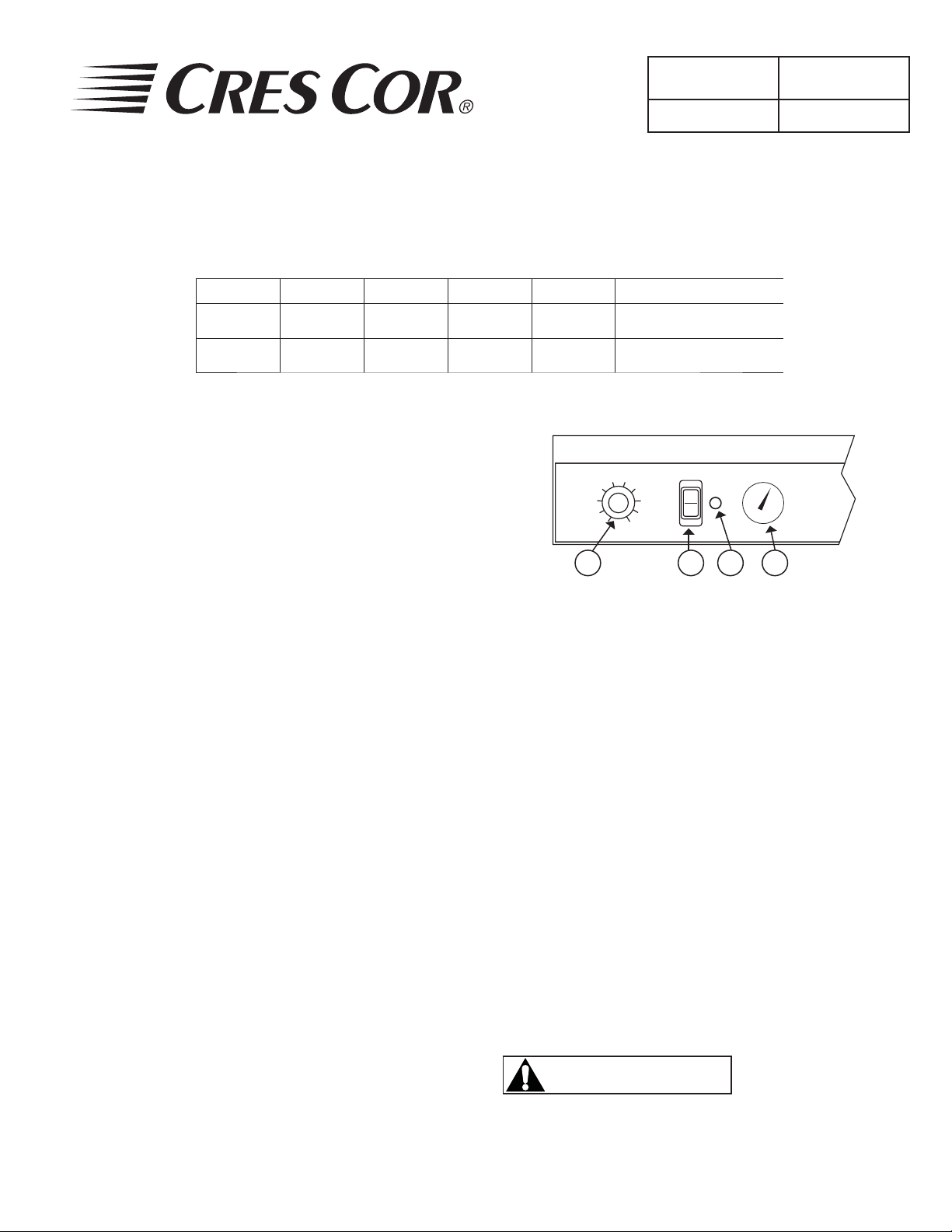
PARTS IDENTIFICATION
1. Thermostat
2. Power Switch
3. Yellow Indicator Light
4. T emperature Display
2 3 4
HOW TO INSERT CANNED FUEL:
1. Install all channels and shelves before unit is put
into operation.
2. Lift and pull drawer open and inset canned fuel.
3. Remove lids from canned fuel; light with external
fl ame.
4. Close drawers completely.
It is recommended to electrically pre-heat the cabinet
to at least 160°F/71°C before inserting and/or lighting
the canned fuel. This will take about 45 minutes.
Approximate cabinet temperature, using a total of
two(2) cans of canned fuel, will be 180°F/82°C
WARNING
Risk of Fire!
Do NOT store combustible materials or
fl ammable liquids near this appliance.
Call Toll-free: 877-CRES COR (273-7267) • Fax: 800-822-0393 • www.crescor.com
Page 2
5925 Heisley Road • Mentor, OH 44060-1833
OPERATING and MAINTENANCE INSTRUCTIONS
for CCB-150 Series Banquet Warming Cabinet
MAINTENANCE:
1. Unplug power cord from wall outlet.
2. Lift unit off from front and rear of cabinet.
Banquet
Cabinets
Rev. 5 (8/10) Page 2 of 4
Cleaning Notes:
1. Wipe up spills as soon as possible.
FL-2252
HOW TO CLEAN THE UNIT:
WARNING
BEFORE
1. Allow cabinet to cool.
2. Remove Hot Unit BEFORE cleaning. (Unit
is designed to lift off from front and rear.)
3. Do NOT use abrasives or harsh chemicals.
CLEANING THE CABINET:
Routine Cleaning Soap, ammonia, or
Stubborn spots
and stains
Burnt-on foods or
CABINETS
(Stainless Steel)
grease.
Hard water spots
and scale.
*Mild detergents include soaps and non-abrasive cleaners.
Soil Cleaner Method
2. Clean cabinet regularly to avoid heavy dirt build-up.
3. Make a test spot with cleaner.
4. Follow manufacturer’s directions on cleaner.
5. Do not mix cleaners.
6. Avoid drips and splashes.
1. Sponge on with cloth.
detergent* and water
Mild abrasive made for
stainless steel
Chemical oven cleaner 1. Apply generous coating.
Vinegar 1. Swab or wipe with cloth.
2. Rinse.
1. Apply with damp cloth.
2. Rub lightly.
2. Allow to stand for 10-15
minutes.
3. Rinse.
4. Repeat application if
necessary.
2. Rinse dry.
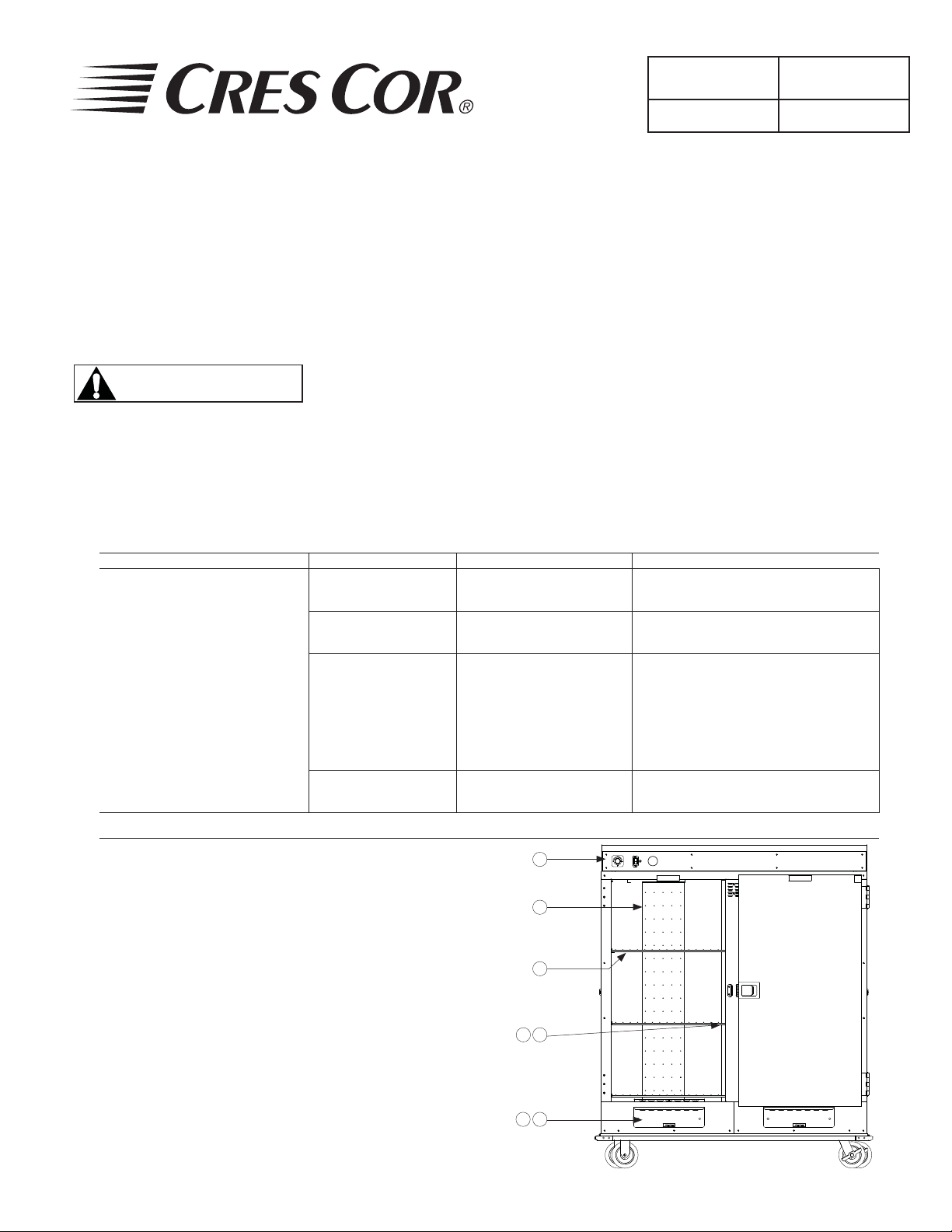
REMOVABLE PARTS IDENTIFICATION:
Description Qty.
1. Hot Unit .......................................1
2. Air Tunnels...................................2
3. Wire Grids ....................................6
4. Channel Post ................................1
5. Shelf Channels .............................3
6. Canned Fuel Drawers ...................2
7. Canned Fuel Covers ..................... 2
Call Toll-free: 877-CRES COR (273-7267) • Fax: 800-822-0393 • www.crescor.com
1
2
3
4 5
6 7
Page 3
5925 Heisley Road • Mentor, OH 44060-1833
OPERATING and MAINTENANCE INSTRUCTIONS
for CCB-150 Series Banquet Warming Cabinet
TROUBLE-SHOOTING CHART:
FAILURE POSSIBLE CAUSE
1a. Circuit breaker/fuse to wall outlet blown.
Banquet
Cabinets
Rev. 5 (8/10) Page 3 of 4
FL-2252
1. Yellow light at switch does NOT light.
2a. Cord is unplugged from wall outlet.
3a. Switch is “OFF.”
2. Unit does not get hot.
3. Unit gets too hot or won’t shut off
2a. Thermostat set too low or are off.
2b. Switch is “OFF.”
3a. Defective electrical parts.
3b. UNPLUG UNIT FROM WALL OUTLET
4. Blower does not work or makes noise. 4a. Defective Blower
5a. Open vent.
5. Excess moisture in cabinet.
5b. Foods taken from oven or fryer should be “slacked
out” for 5 minutes before placing in hot cabinet.
NOTE: Optional digital thermometer will fl ash if cabinet temperature is below 140°F or above 250°F.
Call the Factory if you need different settings.
If cause is none of the above, refer to our list of Authorized Service Centers, FL-1400.
REPLACEMENT PARTS:
DESCRIPTION 120 VOLT 240 VOLT DESCRIPTION PART NO.
Hot Unit HU18671-164* HU18671-165 Door Latch Kit 1006-143-K
Blower Kit 0769-180-K 0769-182-K Door Strike 1006-144-K
Heater Kit 0811-214-01 0811-215-01 Door Hinge 0519-084
Thermostat Kit 0848-062-K 0848-062-K Door Gasket 0861-225
Thermometer Kit 5238-030-K 5238-030-K Door Assembly Complete 1221-462-K
Power Cord 0810-029-02* 0810-039-03 Wire Grid 1170-204
Switch Kit 0808-116-K 0808-116-K Push Handle 1072-089
Pilot Light 0766-094 0766-095 Canned Heat Drawer 5069-009-K
For Canadian Use:* Center Channel Assembly 1043-049-K
Hot Unit (120 Volt) HU18671-164C
Power Cord Plug 0713-017
CABINET PARTS:
Canned Heat Cover Ass’y 0977-080-K
Call Toll-free: 877-CRES COR (273-7267) • Fax: 800-822-0393 • www.crescor.com
Page 4
5925 Heisley Road • Mentor, OH 44060-1833
OPERATING and MAINTENANCE INSTRUCTIONS
for CCB-150 Series Banquet Warming Cabinet
5-15P
120V, 15A
GREEN
G
G
W
SLEEVING
Banquet
Cabinets
FL-2252
Rev. 5 (8/10) Page 4 of 4
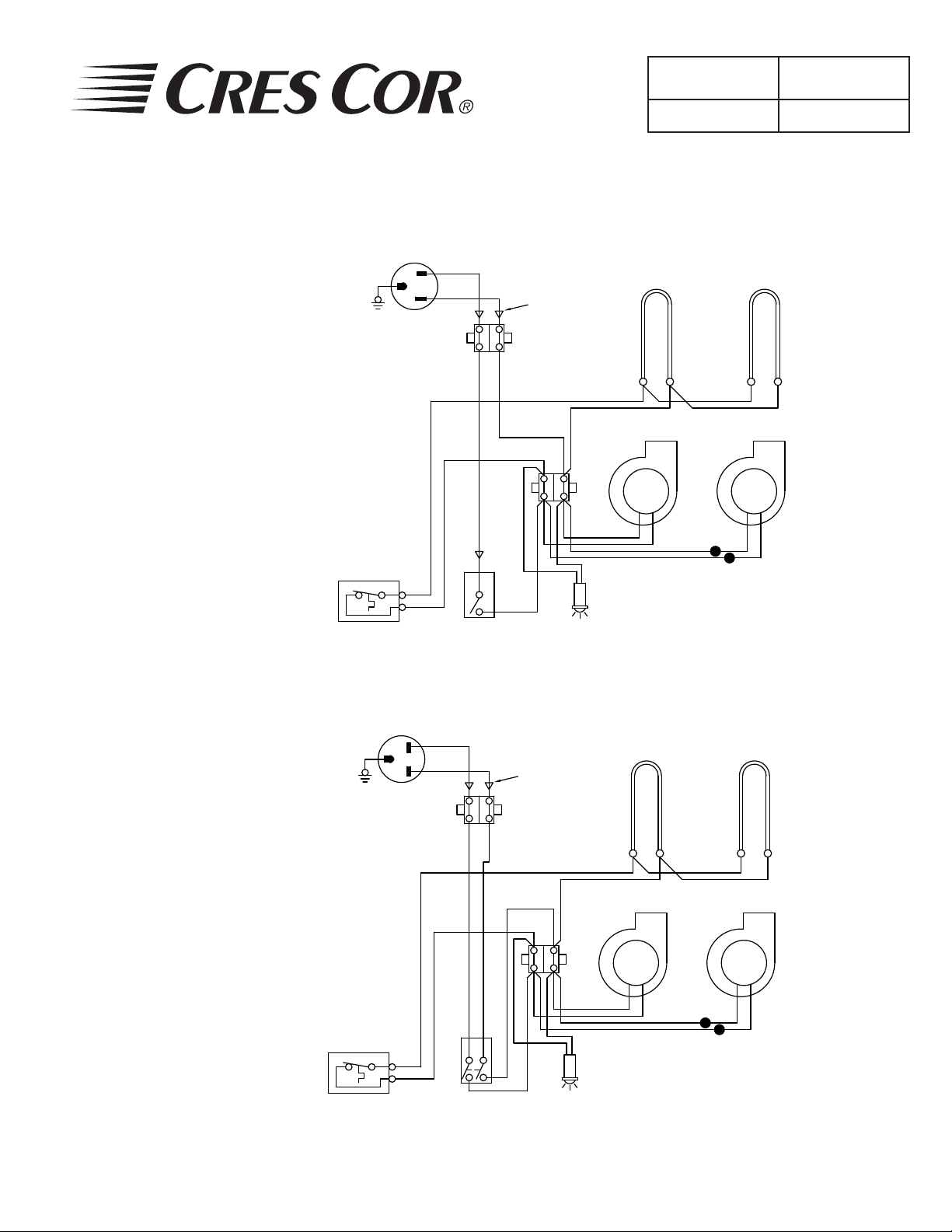
ELECTRICAL SPECS
HOT UNIT #0671-164
1650W, 120V, 60Hz, 1 Ph
AC SERVICE
THERMOSTAT
240V, 15A
GREEN
G
6-15P
G
W
TERMINAL
BLOCK
8
7
BROWN
12
1
POWER
SWITCH
BLUE
7 2
3
13
3
DIAGRAM FOR 120V UNITS
SLEEVING
11
12
PILOT
LIGHT
10118 9
BLOWER
12
13
HEATER
HEATER
9
10
BLOWER
HOT UNIT #0671-165
1650W, 240V, 60Hz, 1 Ph
AC SERVICE
Call Toll-free: 877-CRES COR (273-7267) • Fax: 800-822-0393 • www.crescor.com
THERMOSTAT
TERMINAL
BLOCK
8
7
BROWN
12
1
3
POWER
SWITCH
BLUE
7 41211
3
2
13
4
DIAGRAM FOR 240V UNITS
PILOT
LIGHT
8
9 11 10
12
HEATER
BLOWER
13
HEATER
9
10
BLOWER
 Loading...