

Page 1

User Manual
© 2011 Cregle All Rights Reservered
© 2011 Cregle All Rights Reservered
The Penbook™ platform is built for content creation not just consumption. Jot down notes, edit documents, draw
in the margins and share it all with your peers and colleagues on the first truly social handwriting platform.
Page 2

Features
© 2011 Cregle All Rights Reservered
Liberate yourself with Penbook™ . Get the
freedom of Windows and its built-in application library, multi-touch and digitizer pen,
replaceable battery, and side touch bars for
custom input.
Palm rejection
multi touch + digitizer pen
Palm Rejection technology automatically disables multi-touch so you can doodle, take
notes, and compose on your Penbook while resting the palm of your hand on the screen
- just like you would write in a traditional notebook. It is a big plus for everyone, and a
game-changer for left-handers.
Touch Bars
unique gesture customization
Quickly access common commands with gesture-controlled touch bars. With a swipe of
your ngers, You can adjust the screen brightness or use the bars to enter keyboard combinations such as Page Up/Down and Ctrl+Alt+Del. You can even use Touch Bar gestures
to trigger a whole range of customized commands.
Replaceable Battery
your ultimate backup
Get up to 6 hours of continuous battery life in Windows 7 and swap your 5000mAh
replaceable battery anytime for added power. But no matter how long you need to use it,
your PenBook oers the ultimate comfort zone--the option of a replaceable battery--so
you'll never run out of power when you need it.
Page 3
Tech Specs
© 2011 Cregle All Rights Reservered
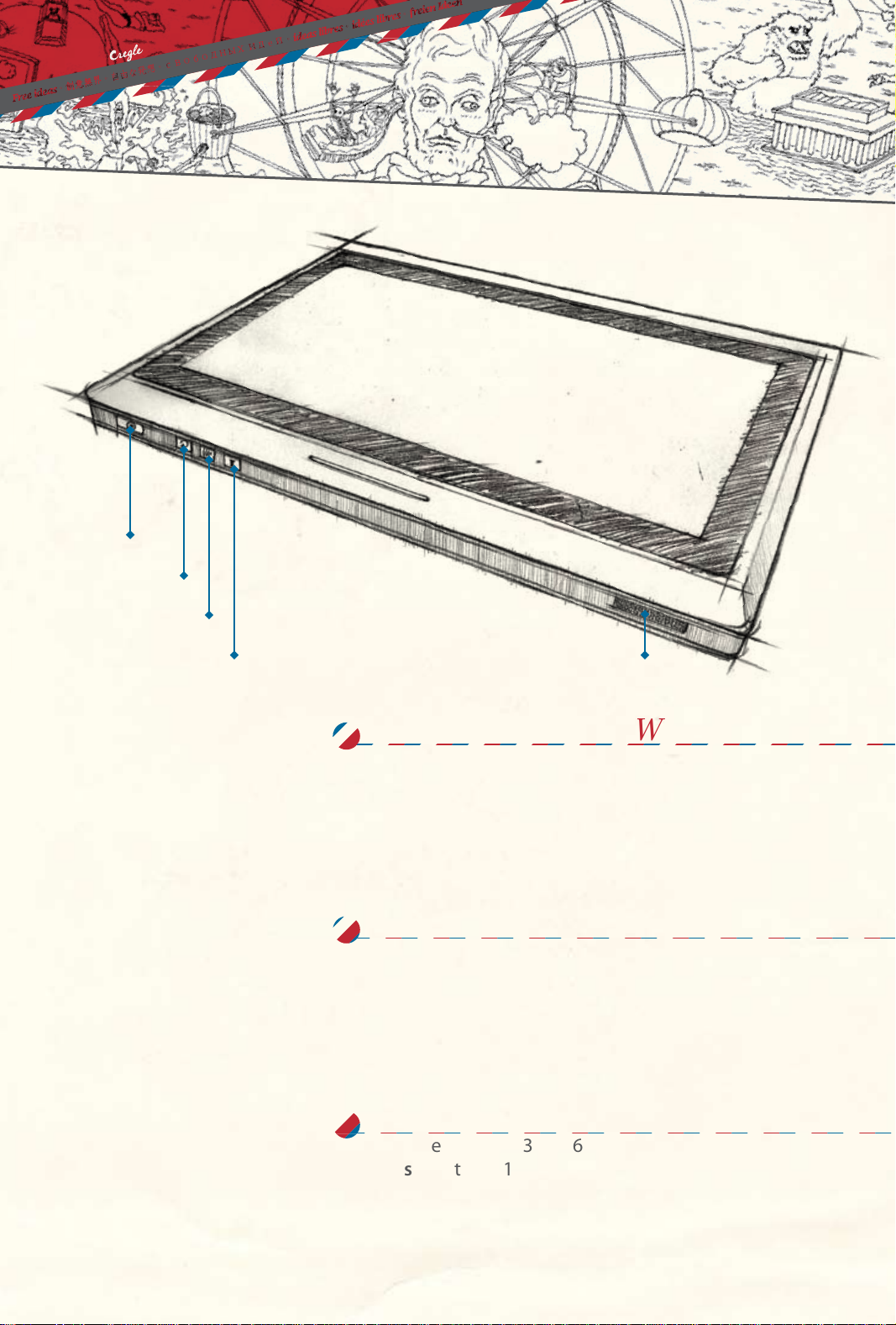
Power Key
Display Rotation
Wi On/O
Sound On/O
Speaker
Dimension and Weight
Length 264mm
Width 184mm
Thickness 17mm
Net Weight 2.3lb
LCD & Touch
LCD Size 10.1" TFT LCD
Brightness 200 nits
Resolution 1024 x 600 / 1024 x 768
Pen Input Device Wacom 10.1" Digitizer
Motherboard
CPU Intel Atom Z530@1.6GHz
Chipset Intel US15WP
SDRAM Standard 1GB, Max. 2GB
Page 4
Tech Specs
© 2011 Cregle All Rights Reservered
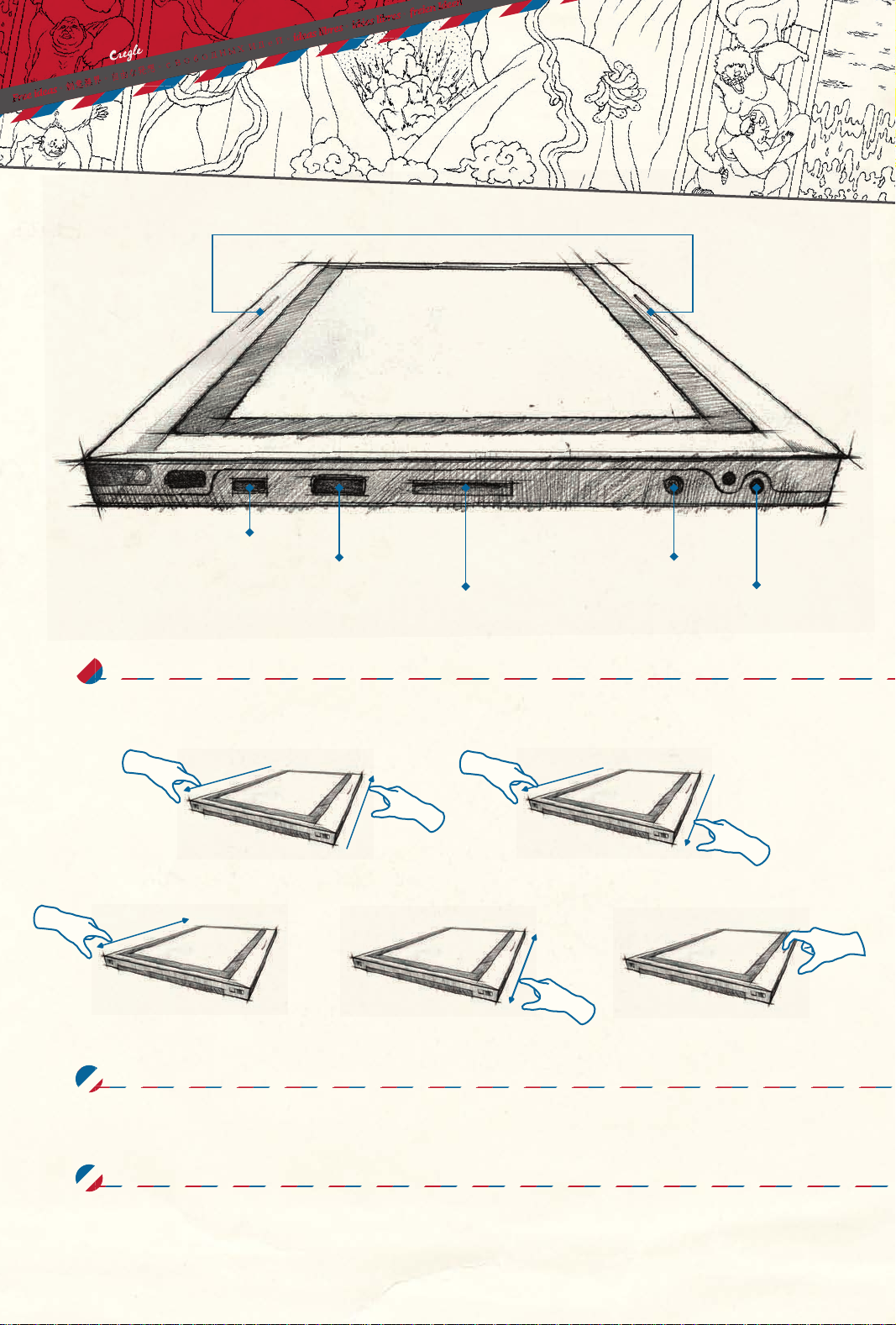
Touch Bar
Mini USB Port
USB Port
Digital Media Slot
Headphone &
Microphone Jack
Buttons ,Touch Bar & Gestures
1D touch bar x 2 To specify functions
Ctrl+Alt+Del
Slide both touch bars opposite
Adjust Screen Brightness
Slide left hand touch bar
Page Up/Down
Slide right hand touch bar Up/Down
Show Desktop
Slide both touch bars down
Power Connector
Enter
Double click any touch bars
2 x
Storage & Expansion
Hard Disk Device (HDD) 16G/32GB SSD
Memory Card Reader SD/MMC slot x 1
Input/Output Ports
USB 2.0 Two ports
Audio Jack 1 x Headphone & Microphone Jack
Microphone 1 x Built-in
Speaker 2 x 1 W (Built-in)
Page 5
Tech Spec
© 2011 Cregle All Rights Reservered
s
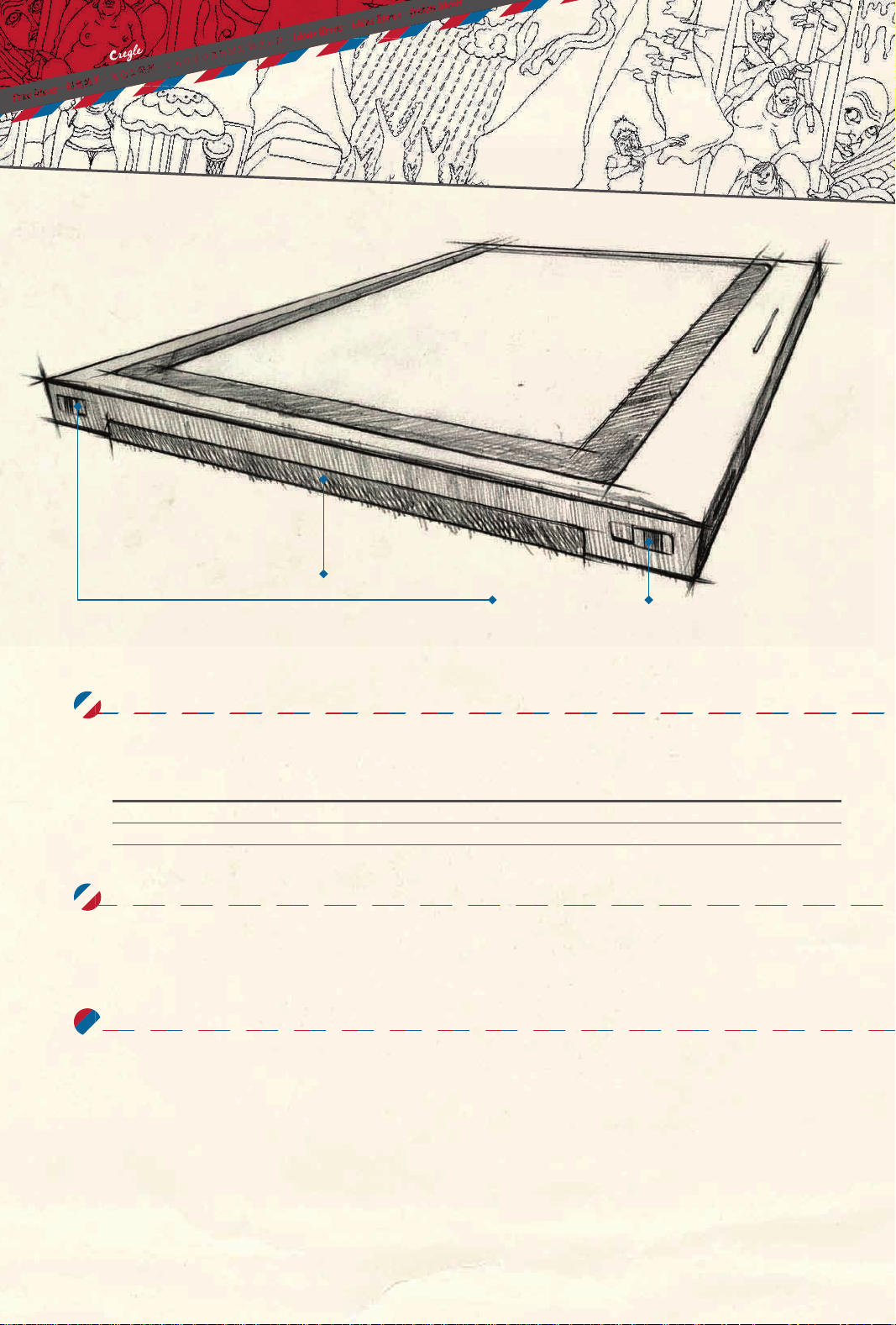
Battery Bay
Battery Release Latch
Wireless
Wi-Fi Built-in 802.11 b/g/n module
Bluetooth Built-in V2.1 +EDR module
Antenna List
No.
1
2
Manufacturer
MSI
MSI
Part No.
N/A
N/A
Antenna Type
Printed on PCB
Printed on PCB
4.4 dBi for2.5GHz
-3.38dBi for 2.5GHz
Power & Battery
Power Adapter/Supply 12V@3A/(100~240V)
Battery Running Time up to 6 hours
Others
OS Microsoft Windows 7™ Home Premium or Professional
Wacom Stylus Pen
Peak Gain
Note : The antrnnaof EUT is conform to FCC 15.203.
Note
WLAN
Bluetooth
This device complies with Part 15 of the FCC Rules. Operation is subject to the following two conditions: (1) This device may not cause harmful
interference, and(2) This device must accept any interference received, including interference that may cause undesired operation.
SAR Exposure Statement
This EUT is compliancewith SAR for general population/uncontrolled exposure limits in and had been testedin accordancewith the measurement
methods and procedures specified in OET 65. This equipment should be installed and operated with minimumdistance 0cmbetween the radiator
& your body.
This device and its antenna(s) must notbe co-located or operating in conjunction with any other antenna or transmitter. The County CodeSelection
feature is disabled for products marketed in the US.
Fo
r product available in the USA markets, only channel 1~11 can be operated. Selection of other channels is not possible.
Per FCC 15.21, you are cautioned that changes or modifications not expressly approved by he part responsible for compliance
could void the user’s authority to operate the equipment.
 Loading...