

Page 1
WINDHAM CORNER MEDIA STAND
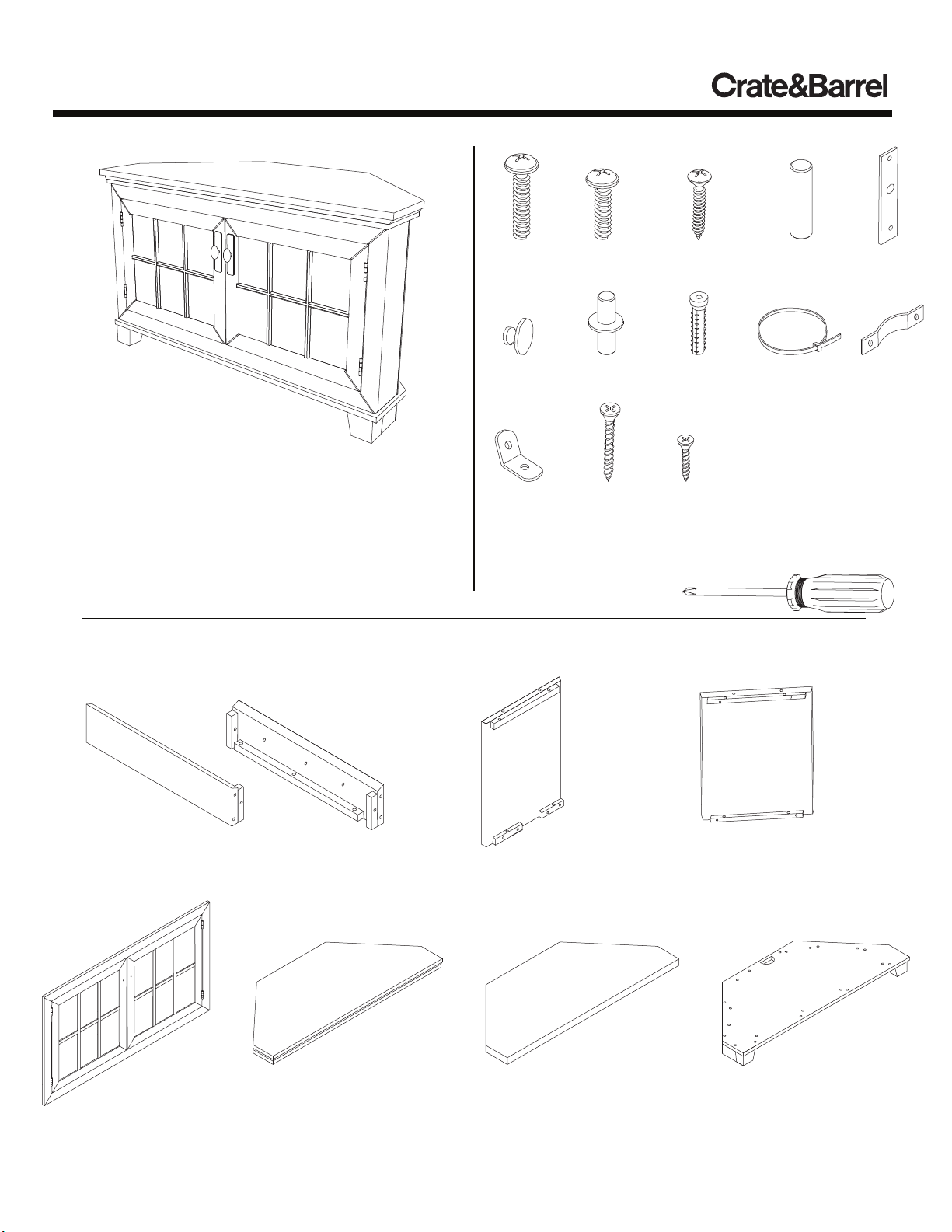
HARDWARE
Thank you for purchasing the Windham Corner Media
Stand. This page lists all the contents included in the
box. Please take time to identify the hardware as well as
the individual components of this product. As you
unpack and prepare for assembly, place the contents on
a carpeted or padded area to protect them from damage.
Note: 2 people are required to safely assemble this product.
COMPONENTS
30 - large
bolts
2 - pulls 4 - shelf
2 - wall
brackets
2 - small
bolts
pins
2 - large
screws
TOOLS REQUIRED
phillips head screwdriver
12 - medium
screws
2 - plastic
anchors
4 - small
screws
34 - wood
dowels
2 - wall
straps
Missing hardware?
Please call 800.606.6387
for replacements.
2 - plates
2 - anti-tip
brackets
2 - side panels
(1 left, 1 right)
1 - front
frame
Made in China - r05 Page 1 of 5
1 - top
panel
Customer Service 800.967.6696 | www.crateandbarrel.com
1 - center back
panel
1 - adjustable
shelf
2 - back panels
( 1 left, 1 right)
1 - bottom
panel
Page 2
WINDHAM CORNER MEDIA STAND
A
right side
panel
B
B
left side
panel
front
frame
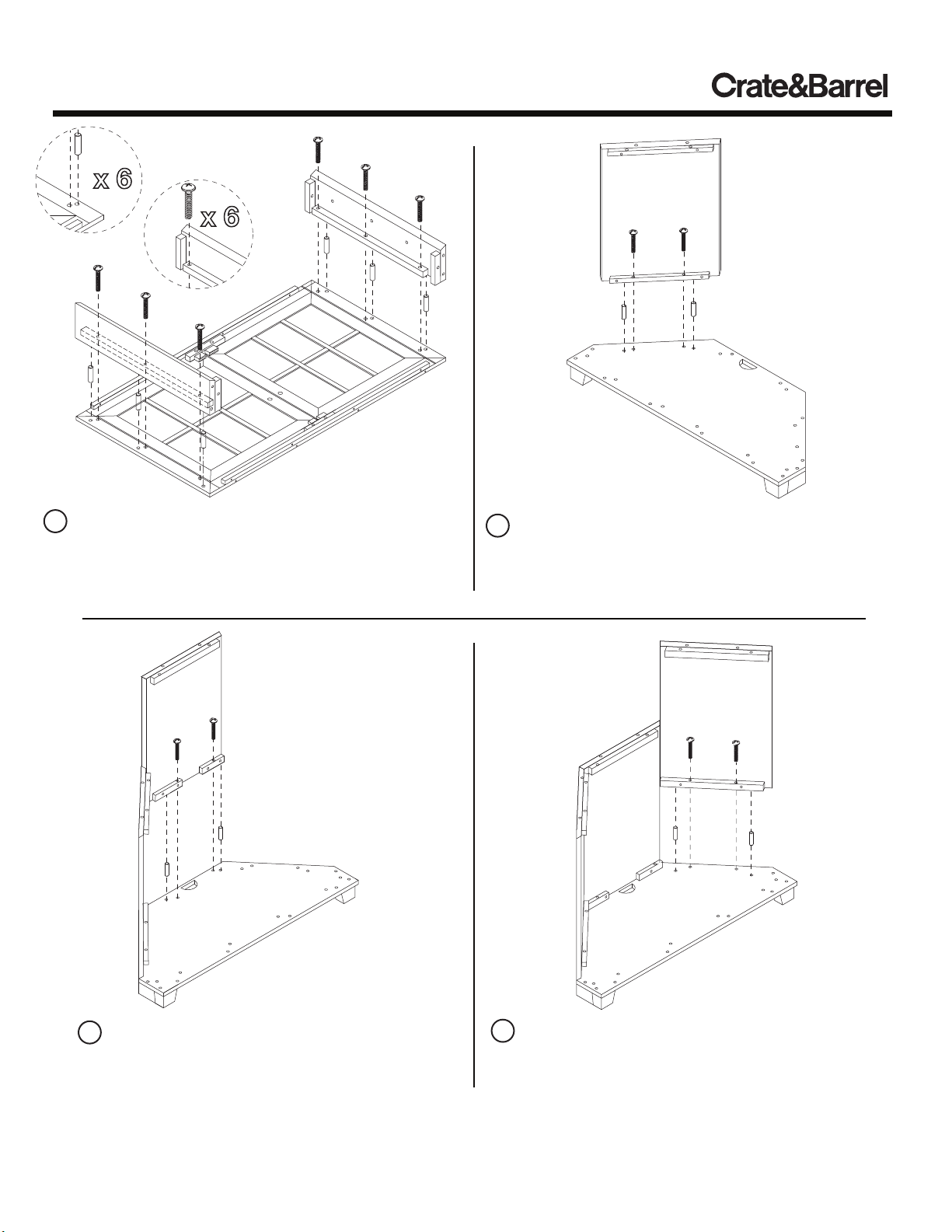
1 A) Insert 6 wood dowels into front frame as shown.
B) Fit dowels of front frame into corresponding holes of
left and right side panels as shown. Attach side panels
with 6 large bolts as shown. Secure bolts with a phillips
head screwdriver.
A
left back
panel
B
A
bottom
panel
2 A) Insert 2 wood dowels into bottom panel as
shown.
B) Fit dowels of bottom panel into corresponding
holes of left back panel, and secure left back panel
with 2 large bolts as shown.
center back
panel
B
A
bottom
panel
3 A) Insert 2 wood dowels into bottom panel as
shown.
B) Fit dowels of bottom panel into corresponding
holes of center back panel, and secure with 2 large
bolts as shown.
right back
panel
B
A
bottom
panel
4 A) Insert 2 wood dowels into bottom panel as
shown.
B) Fit dowels of bottom panel into corresponding
holes of right back panel, and secure with 2 large
bolts as shown.
Made in China - r05 Page 2 of 5
Customer Service 800.967.6696 | www.crateandbarrel.com
Page 3

WINDHAM CORNER MEDIA STAND
front frame
assembly
B
B
A
A
bottom
panel
5 A) Insert 8 wood dowels into bottom panel as shown.
B) With the assistance of another adult, fit dowels of bottom
panel into corresponding holes of front frame assembly.
Secure front frame assembly with 6 large bolts as shown.
6 Insert 12 medium screws into left and right back
panels of assembled unit as shown. Secure screws
with a screwdriver.
top
panel
B
A
B
A
7 A) Insert 14 wood dowels into top of assembly as
shown.
B) Fit top panel onto corresponding dowels of
assembly. Secure from the inside with 12 large bolts
as shown.
A
A
adjustable
B
shelf
8 A) Insert 4 shelf pins at desired shelf heights as
shown.
B) Place adjustable shelf into assembled unit. Make sure
each shelf pin is securely supported by each shelf pin.
Made in China - r05 Page 3 of 5
Customer Service 800.967.6696 | www.crateandbarrel.com
Page 4

WINDHAM CORNER MEDIA STAND
plate
pull
small
bolt
9 Attach 2 pulls and 2 plates to doors of assembled
unit with 1 small bolt per pull as shown. Secure bolts
with a screwdriver.
Assembly is now complete.
CLEANING AND CARE
Clean surfaces with a dry or damp soft cloth. Do not use
abrasive cleaners. Do not use furniture wax or polish as the
wood is finished with a protective clear lacquer.
Made in China - r05 Page 4 of 5
Customer Service 800.967.6696 | www.crateandbarrel.com
Page 5

WINDHAM CORNER MEDIA STAND
wall
D
strap
large
screw
A
small
screw
F
anti-tip
bracket
plastic
anchor
C
wall
bracket
10 Safety Mounting Instructions
For added safety and stability, it is recommended that the wall
mounting hardware be installed. For safe mounting, it is
essential to use wall anchors appropriate to your wall type (i.e.
plaster, drywall, concrete, etc.). Mount to wood studs
whenever possible.
A) Attach anti-tip bracket to top of media stand using 2 small
screws as shown.
B) Determine the final location of media stand. Mark position
on the wall, approximately 2" below the anti-tip bracket
mounted to the back of the media stand.
C) Drill a hole in the wall stud. If the wall stud is not available,
drill a hole in the wall that is slightly smaller in diameter than
the anchor. Gently tap the plastic anchor until the flange of
the anchor is flush with the wall.
D) Attach the wall bracket to the wall by inserting 1 large
screw through the wall bracket and into the wall anchor in the
wall.
E) Place the unit so the anti-tip bracket on the back edge is
allowed with the wall bracketl.
F) Lace one end of the wall strap through both brackets, and
into the other end of the strap.
G) Pull the strap tightly until secure.
NOTE:
If you are unsure about your wall type or what
mounting method you should use, consult a
qualified professional or your local hardware
store.
Repeat steps A-G for remaining anti-tip and wall bracket.
Made in China - r05 Page 5 of 5
Customer Service 800.967.6696 | www.crateandbarrel.com
 Loading...