

Page 1
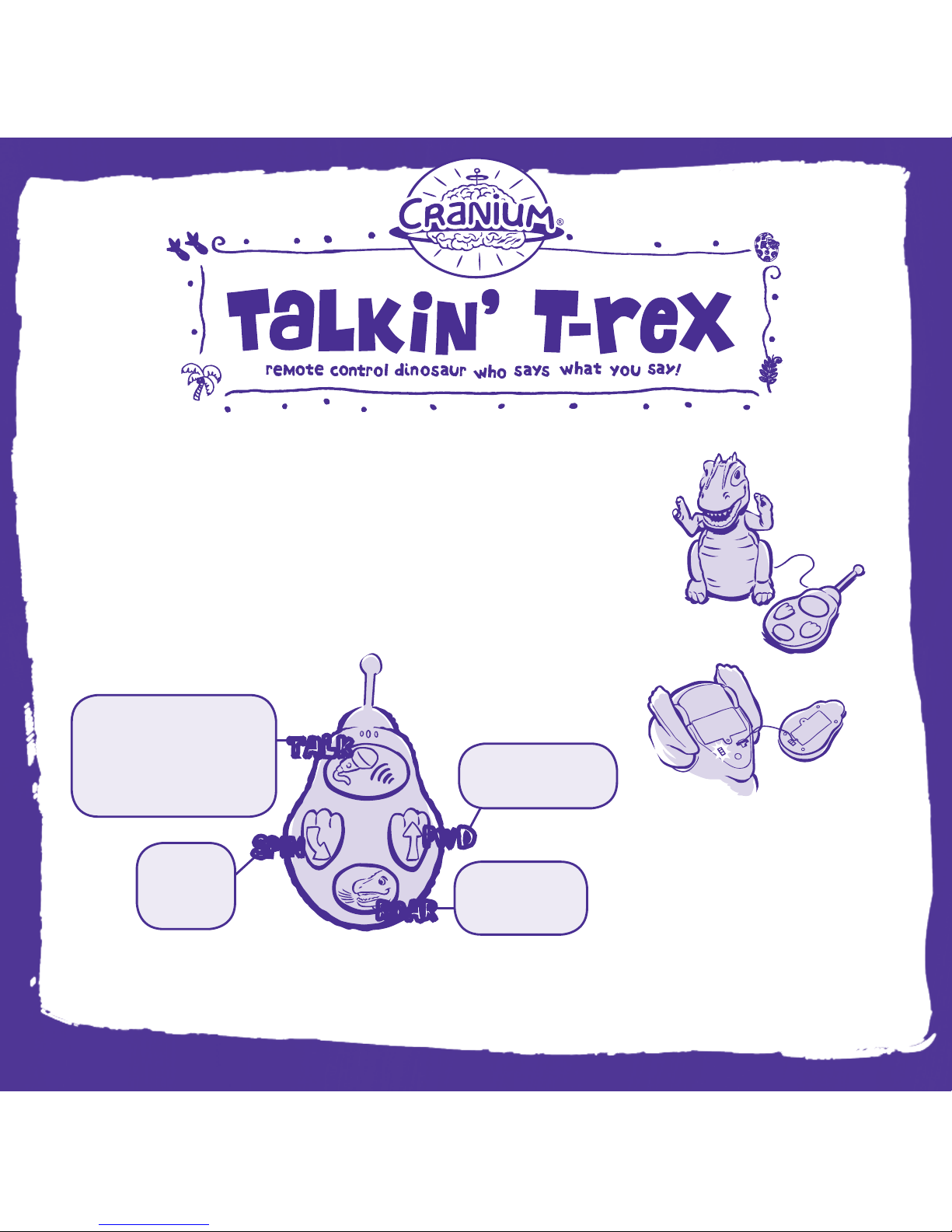
1. Remove the battery door on the remote control. Disconnect and discard
the cable between the remote and the Talkin’ T. rex.
2. Insert a new 9-volt battery into the remote control and four new AA
batteries into T. rex. (Please see instructions for inserting
batteries on the back of this sheet.)
3. First, slide the power switch on your remote control to I (ON).
4. Then slide the power switch on your T. rex to I (ON).
5. Use the remote to control your T. rex:
6. You can pose T. rex’s head and tail for a new look.
7. Now go and make someone giggle. Have fun!
For even more fun, visit cranium.com!
Please note:
• Your Talkin’ T. rex wo rks best
on smooth sur fa ces indoors—
avoid taking it onto t hick carp et
or ou tdoors.
• First t urn off your T. rex and th en turn
off the r emote control by sliding each
switch to O (OFF ).
• When you let go of the Talk button,
you’ll hear a beep. This means you’re
not t alking through T. rex anymore.
Get Started
SPIN
TALK
ROAR
FWD
Press this
button to
make your
T. rex spin.
Press and hold this button,
then talk into the remote
control. Your T. rex will
say what you say! Watch
his mouth move and his
eyes light up!
Press this button to
make your T. rex
move forward.
Press this button
to make your
T. rex ROAR!
WOeng01
Page 2
CHANGING THE BATTERIES
If your remote control needs a new battery, ask an adult to get one new 9-volt battery and follow these instructions.
1. Turn your remote over and remove the battery cover.
2. Insert the battery as indicated.
3. Replace the battery cover and tighten the screw.
If your T. rex needs new batteries, ask an adult to get four new AA batteries and follow the above instructions, but remove
the battery box.
TROUBLESHOOTING Are you having trouble with your Talkin’ T. rex?
For even more fun, visit cranium.com!
WARNING: CHANGES OR MODIFICATIONS TO THIS UNIT NOT EXPRESSLY APPROVED BY THE
PARTY RESPONSIBLE FOR COMPLIANCE COULD VOID THE USER’S AUTHORITY TO OPERATE
THE EQUIPMENT.
WARNING:
This equipment has been tested and found to comply with the limits for a Class
B digital device, pursuant to Part 15 of the FCC rules. These limits are designed to provide
reasonable protection against harmful interference in a residential installation. This equipment
generates, uses, and can radiate radio frequency energy and, if not installed and used in
accordance with the instructions, may cause harmful interference to radio communications.
However, there is no guarantee that interference will not occur in a particular installation. If
this equipment does cause harmful interference to radio or television reception, which can be
determined by turning the equipment off and on, the user is encouraged to try to correct the
interference by one or more of the following measures:
• Reorient or relocate the receiving antenna.
• Increase the separation between the equipment and receiver.
• Connect the equipment into an outlet on a circuit different from that to which the receiver
is connected
• Consult the dealer or an experienced radio/TV technician for help.
Model no. 304022600. Canada 310. Carrier frequency: 27.145 MHz, field strength:
50.4 dBuV/m at 3m. This radiocommunication device complies with all the requirements of
Industry Canada Standard RSS-310. Ce dispositif de radiocommunication rencontre toutes les
exigences de la norme CNR-310 d’Industrie Canada. Operation is subject to the following two
conditions:
(1) this device may not cause harmful interference, and
(2) this device must accept any interference received, including interference
that may cause undesired operation.
This Category II radiocommunication device complies with Industry Canada Standard
RSS-310. Ce dispositif de radiocommunication de catégorie II respecte la norme CNR-310
d’Industrie Canada.
BATTERY SAFETY
• Do not put the batteries in backwards. Positive (+) and negative (-) ends must
be inserted in the correct directions following the polarity (+/-) diagram in the
battery compartment.
• Do not mix alkaline, standard (carbon-zinc), or rechargeable
(nickel-cadmium) batteries.
• Only batteries of the same or equivalent type as recommended are to be used.
• Do not mix old and new batteries.
• Rechargeable batteries must be removed before recharging.
• Rechargeable batteries must be recharged by an adult only.
• Batteries must be installed and removed by an adult only.
• Remove exhausted batteries and dispose of them properly.
• Do not try to recharge non-rechargeable batteries.
• The supply terminals are not to be short-circuited.
WARNING: TO AVOID
BATTERY LEAKAGE
Please follow these battery usage
instructions. Failure to follow these
instructions can result in batter y
acid leakage that may cause burns,
personal injury, and property damage.
© 2007 CRANIUM, INC. ALL RIGHTS RESERVED. THE FO LLOWING ARE T RADEMA RKS OR REGISTERED TRADEM ARKS O F CRANIUM, INC. IN T HE U.S. AND/OR
OTHER JURISDICTIO NS: CRANIUM, CREATIVE CAT, DATA HEAD, EVE RYONE SHINES, STAR PERFO RME R, WORD WORM , THE CRANIUM LOGO, AND THE BR AIN
LOGO. WE PACK EVE RY CR ANIUM TOY WITH A VARIET Y OF OUTRAGEOUS ACTIVITIE S. IT’S UP TO YOU TO USE CAUT ION, PLAY IT SMART, AND HAVE FUN.
WARNING:
CHOKING HAZARD–Small parts.
Not f or children under 3 years.
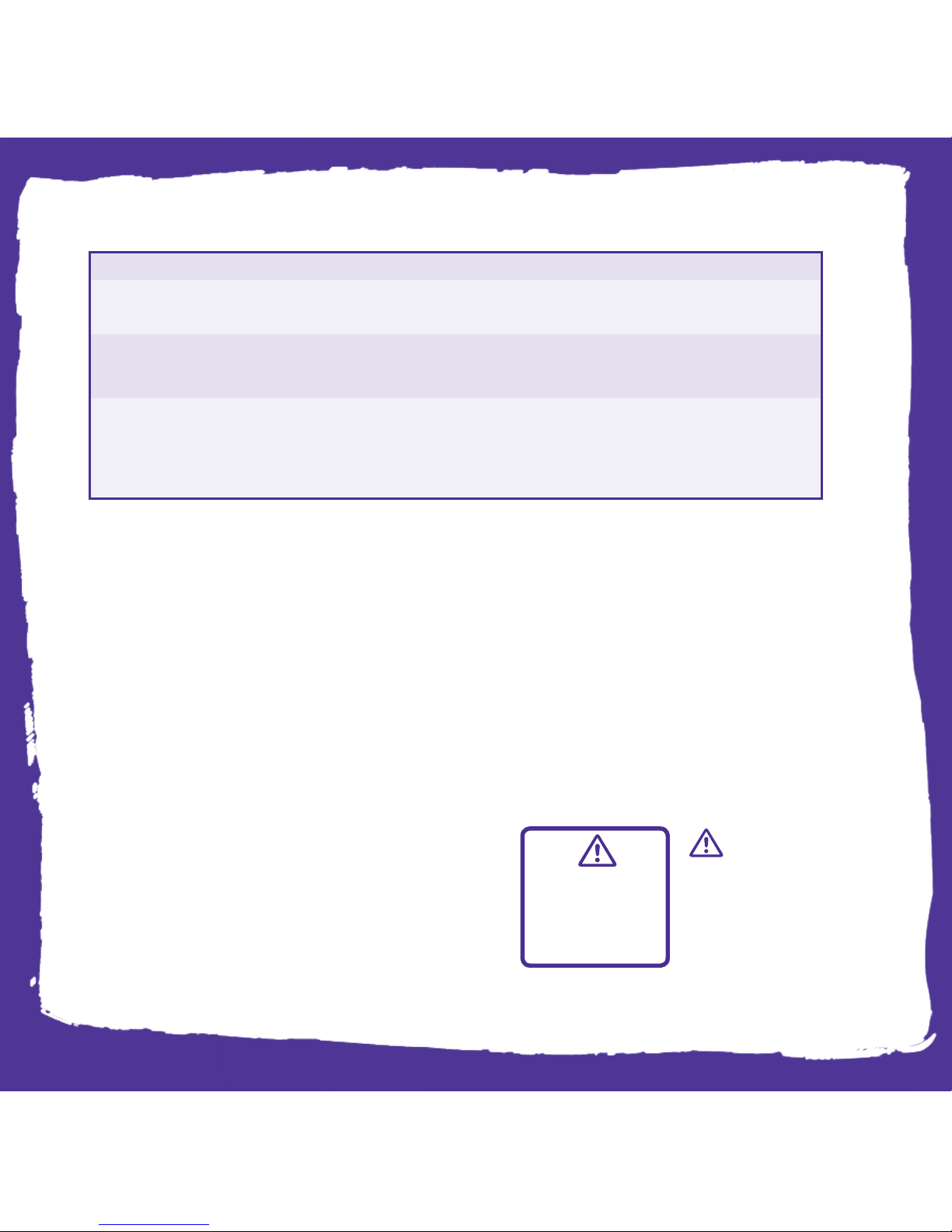
Won’t turn on, light up, move its mouth,
or play sounds...
Sounds garbled…
Has static…
Install four new AA batteries in T. rex.
Install one new 9-volt battery in the remote control.
Stand within 30 ft (9m) of your T. rex.
Speak directly into the microphone.
Press only one button at a time.
Move your T. rex away from microwaves, cell phones,
cordless phones, etc.
Always turn on the remote control first before turning on your T. rex.
Slide the power switch on T. rex to O (OFF), and then follow step
3 of the instructions.
If your T. rex... Try this !
If you’ve tried these steps and you’re still having trouble, go to cranium.com/support or call 1-877-CRANIUM.
 Loading...