

Page 1
P. O. Box 1037
650 S. Royal Lane, Suite 100
Coppell, TX 75019 EE.UU.
(800) 486- 4892
8:00 a 5:00 CST (Hora local central)
Número de fax sin cargo: (877) 304-1728
Correo electrónico: [email protected]
www. craftmade.com
®
MEJOR DISEÑO
®
UNE CONCEPTION EXCEPTIONNELLE
P. O. Box 1037
650 S. Royal Lane, Suite 100
Coppell, TX 75019 EE.UU.
de 8 heures à 17 heures (Heure standard du centre)
Numéro de télécopieur gratuit : (877) 304-1728
Email: [email protected]
www. craftmade.com
P.O. Box 1037
650 S. Royal Lane, Suite 100
Coppell, TX 75019
(800) 486-4892
8:00 to 5:00 CST (Central Standard Time)
Toll Free Fax: (877) 304-1728
email: [email protected]
www.craftmade.com
®
BETTER BY DESIGN
TCS-Plus
®
Installation Instructions
TCS-Plus® Remote Control System
®
BETTER BY DESIGN
OFF
12V BAT.
ON
HI
MED
LOW
OFF
L-1
L-2
REV
Page 2
Do's and Don'ts for Installation of
Craftmade TCS-PLUS Wall Control
Do's
Don'ts
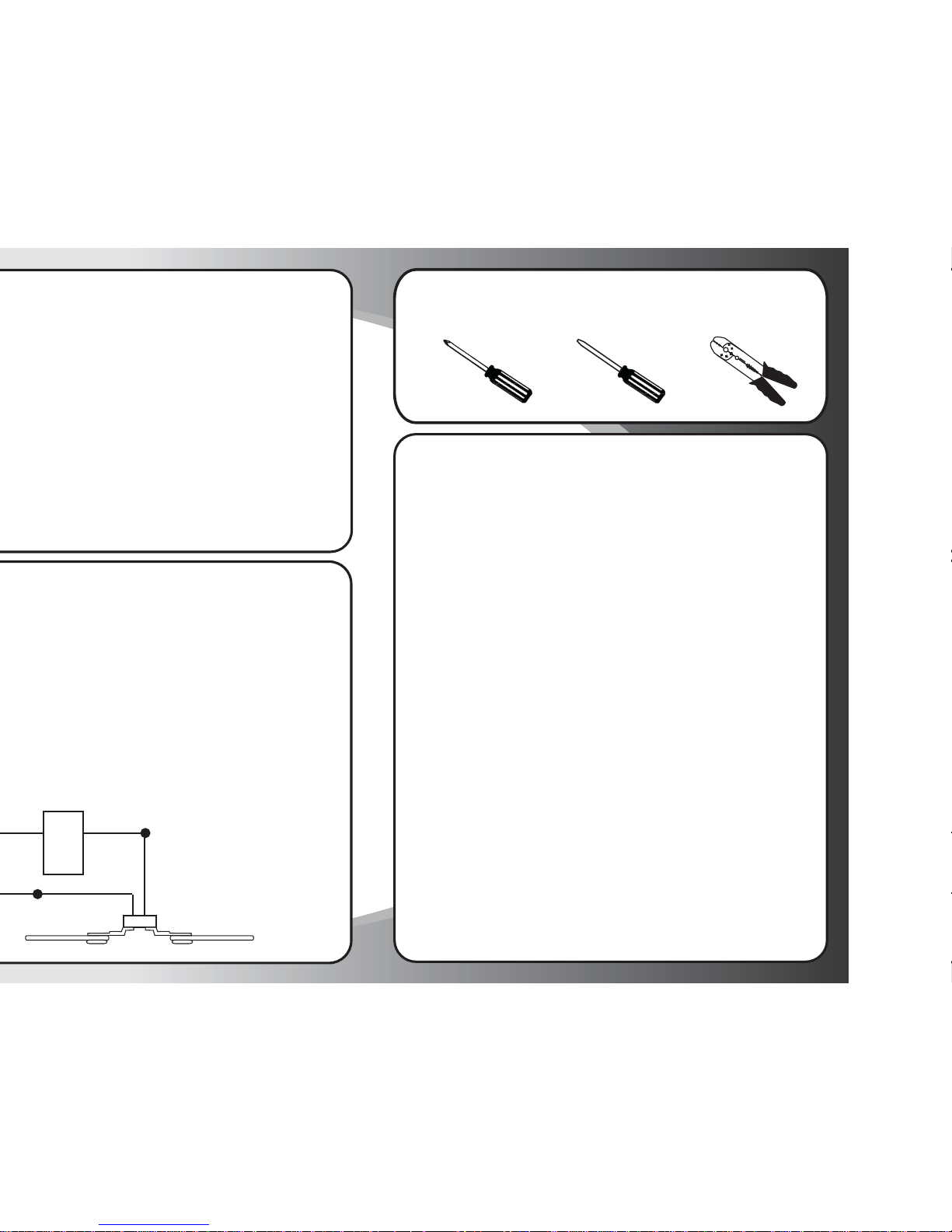
DO NOT ever wire a leg of the TCSPLUS wall control to a neutral wire.
This will immediately short out the
control.
DO NOT operate more than one
ceiling fan with a single TCS-PLUS
WALL control.
DO NOT change the frequency "DIP"
switches in the TCS-PLUS wall control
without making an identical change
to the "DIP" switches located in the
fan receiver module. ""DIP" switches
have been factory preset to the same
positions)
DO NOT exceed 1.5 amps or 300
watts combined fan and light kit.
FAN
MOTOR
LOAD
Operation Instructions
ON/OFF For emergency shut off.
HIGH Controls fan motor speed. To select desired speed,
MEDIUM press button once and release
LOW
REVERSE Controls direction of fan blades. To reverse fan blades, press once and
release.
FAN OFF Turns fan motor speed off. Press once to turn off. To start motor speed
again, hit one of the motor speed buttons.
L-1 Controls the on/off and intensity for optional bottom light kit for
Constantina, Crescent, Fresco, Light Rays, Ol’ Madrid, Valencia, &
Wellington models. Push and release for on/off function. Hold down
for full range light dimming.
Controls the on/off and intensity for side body lighting on Constantina,
& Fresco models. Push and release for on/off function. Hold down for
full range light dimming.
Note: This button will not operate any functions for fan models not
listed above.
L-2 Controls the on/off and intensity for the optional bottom light kit.
Push and release for on/off function. Hold down for full range light
dimming.
Controls the on/off and intensity for the indirect uplighting. Push and
release for on/off function. Hold down for full range light dimming.
Note: Uplight control for the Constantina, Crescent, Fresco, Light Rays,
Ol’ Madrid, & Wellington.
Controls the on/off and intensity for side body lighting for the Valencia
model. Push and release for on/off function. Hold down for full range
light dimming.
NOTE: The "High", "Medium" or "Low" buttons may be used to start the fan
motor. The speed of the fan may be changed at any time.
Tools You Need
1. Phillips Screwdriver (included) 3. Wire Strippers2. Flat Screwdriver
Page 3
Step 2
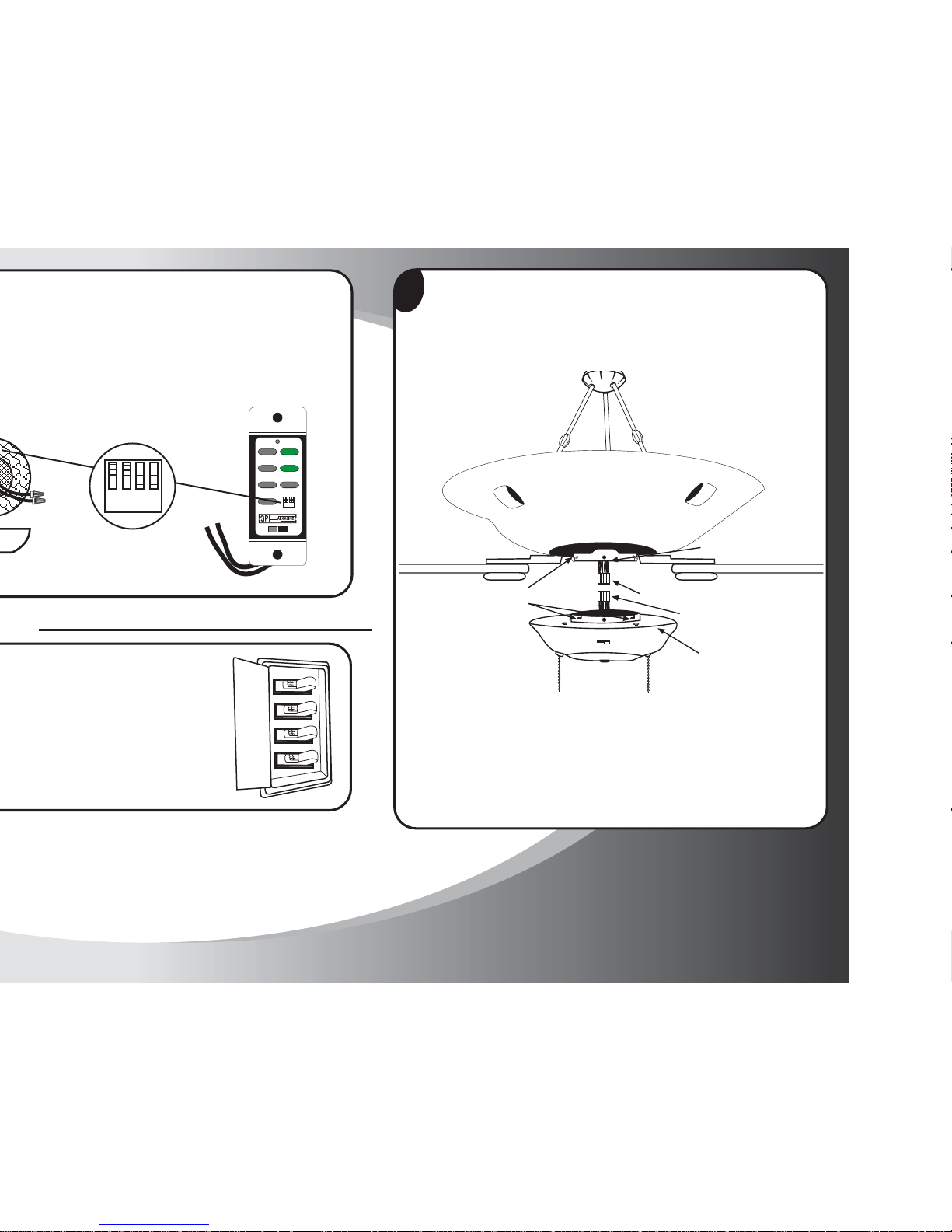
Remove existing switch housing cover by unscrewing the side screws (F)
on unit. This will allow switch housing unit to drop. Unplug the modular
wiring (A) and (B) and remove the existing switch housing unit.
2
Using the TCS-PLUS® module, locate both modular wiring plugs (A)
& (B), one extending from the mounting plate on the bottom of the
motor housing and one on the switch housing. Align the two plugs so
that when pushed together the latch on the sides of the plugs will engage.
Push the two plugs firmly together until latched. (Make sure that all wires
are firmly seated into plastic connectors.
Modular Wiring Plug (A)
Modular Wiring Plug (B)
Switch Housing (9)
Screws (F)
Mounting Slots (D)
Mounting Plate (E)
Step 1
Setting Frequency Switches
HI
MED
LOW
OFF
L-1
L-2
REV
OFF
ON
12V. BATT.
SUPER
23A 12V
1234
ON
1234
ON
Page 4
Step 3
Modular Wiring Plug (A)
Modular Wiring Plug (B)
Switch Housing (9)
Screws (F)
Placa de montaje (E)
4
Step 4
Wiring Instructions
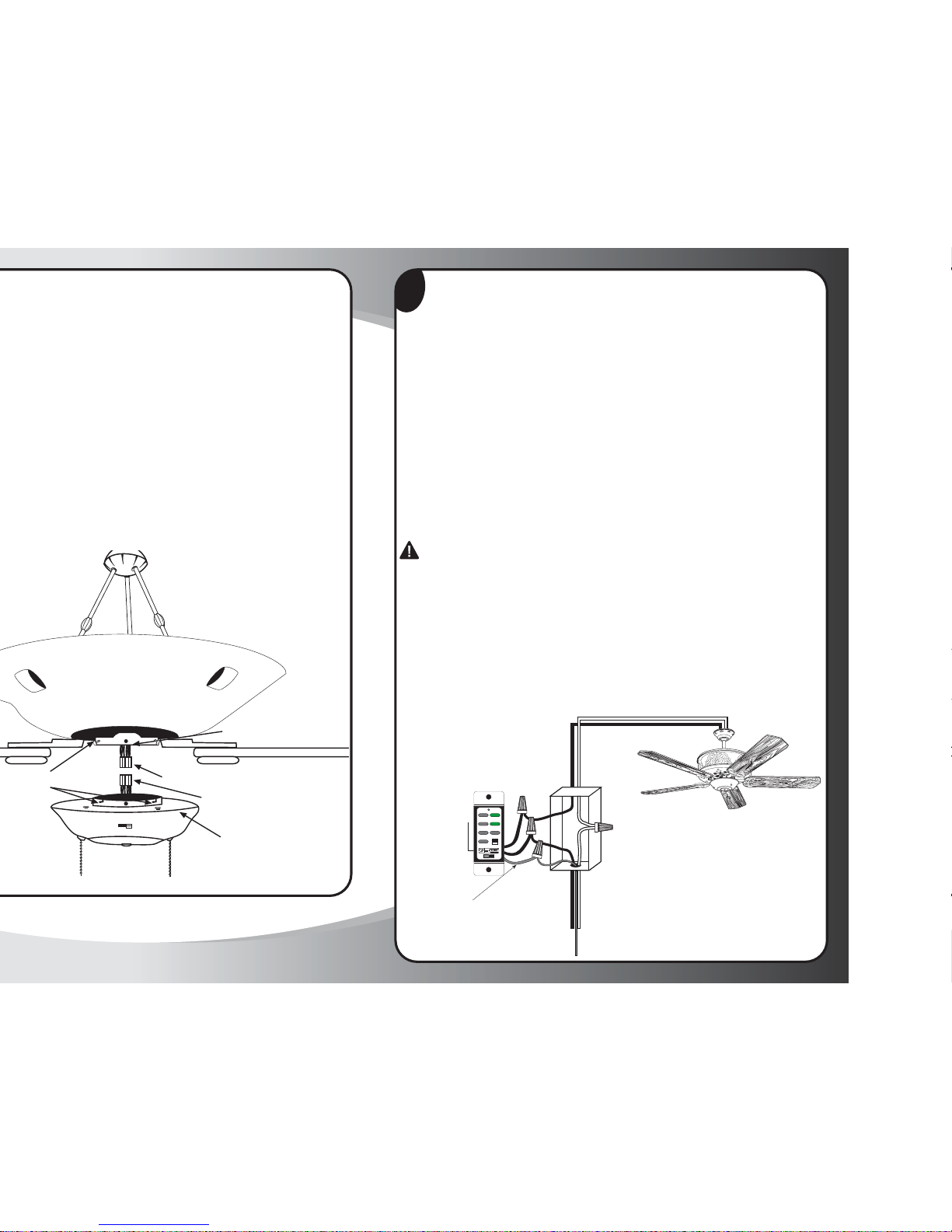
NOTE: Use instructions packed with celing fan to wire ceiling fan.
WARNING: To avoid overheating and possible damage to his device and
other equipment, do not install to control a receptacle, fluorescent lighting,
transformer, or motor-operated appliance other than the fans for which this
control is intended. Use this device only with copper or copper clad wire.
With aluminum wire use only devices marked CO/ALR.
1. Remove insulation to expose 3/4" bare copper wire at end of circuit
conductors. Keep wire ends straight.
2. Connect wires per wiring diagram as follows: black leads (one each) to
black (hot) line, green ground wire to copper outlet wire. Hold bare
ends together. Push wires firmly into wire connector. Screw connector
on clockwise until no bare copper shows. Secure connector with electrical
tape.
CAUTION: Never attach white neutral wire to TCS+ Control
3. Make sure battery is properly installed in switch. The switch should
already have this preinstalled, but double check before installing the
mounting plate (see diagram). Note: The battery replacement code is
23A 12Volt.
4. Mount device with long mounting screws (provided). Install wallplate
and tighten cover screws.
5. Restore power at circuit breaker or fuse. Installation is complete.
Neutral
(White Wire)
Hot Line
(Black Wire)
SINGLE POLE
Neutral
(White Wire)
Load
(Black Wire)
23A 12Volt
Battery
HI
MED
LOW
OFF
L-1
L-2
REV
OFF
ON
12V. BATT.
SUPER
23A 12V
1234
ON
Ground Wire
(Copper Wire)
Ground Wire
(Green Wire)
Page 5
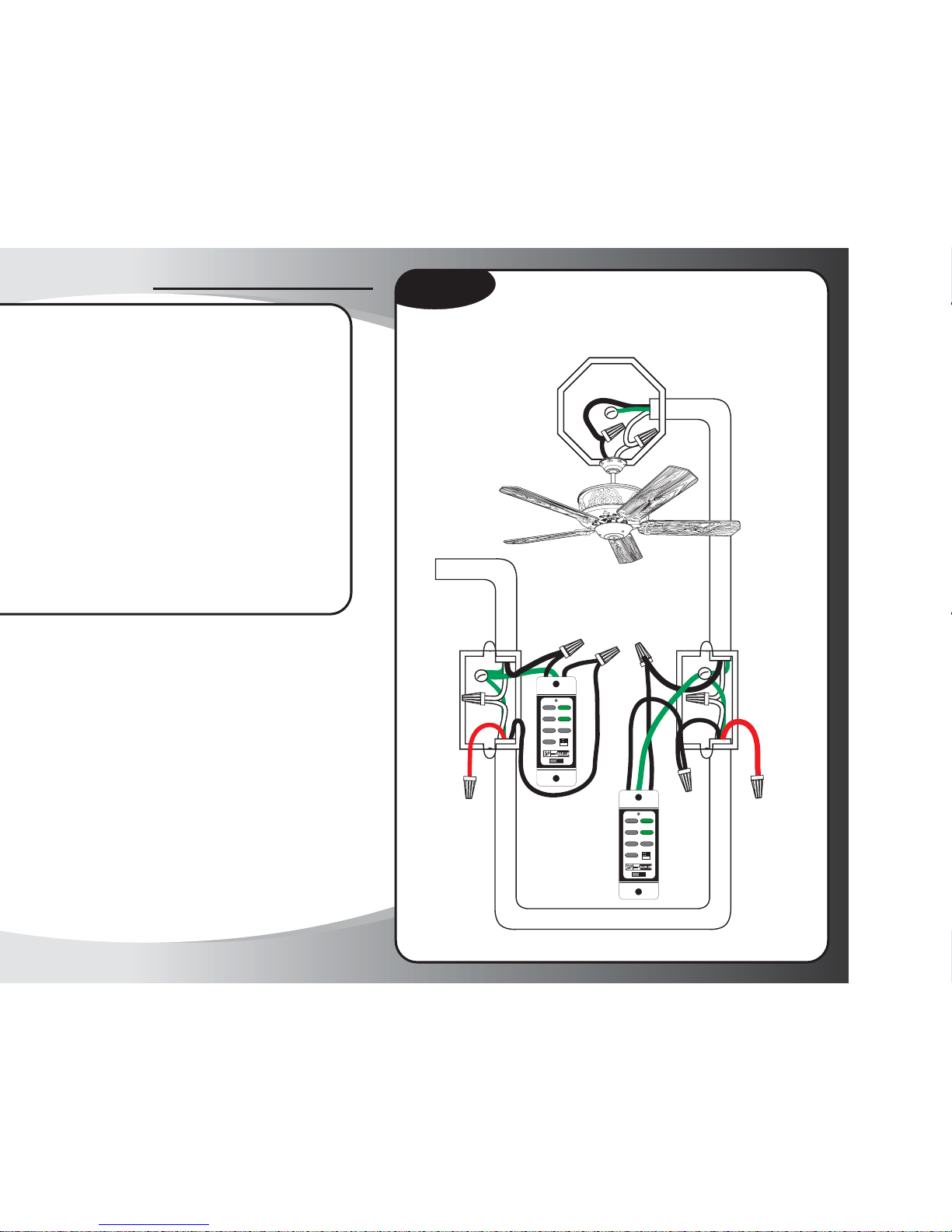
Fixture Controlled by Two Switches,
Powered through a Switch Box
Diagram #1
3-wire cable and ground
red wire
(not used)
Power In
3-wire cable and ground
red wire
(not used)
#5
#3
#2
#1
#4
3-wire cable and ground
from power source
HIGH
MED.
LOW
FAN OFF
L-1
L-2
REVERSE
OFF
ON
12V. BATT.
SUPER
23A 12V
1234
ON
HIGH
MED.
LOW
FAN OFF
L-1
L-2
REVERSE
OFF
ON
12V. BATT.
SUPER
23A 12V
1234
ON
Page 6
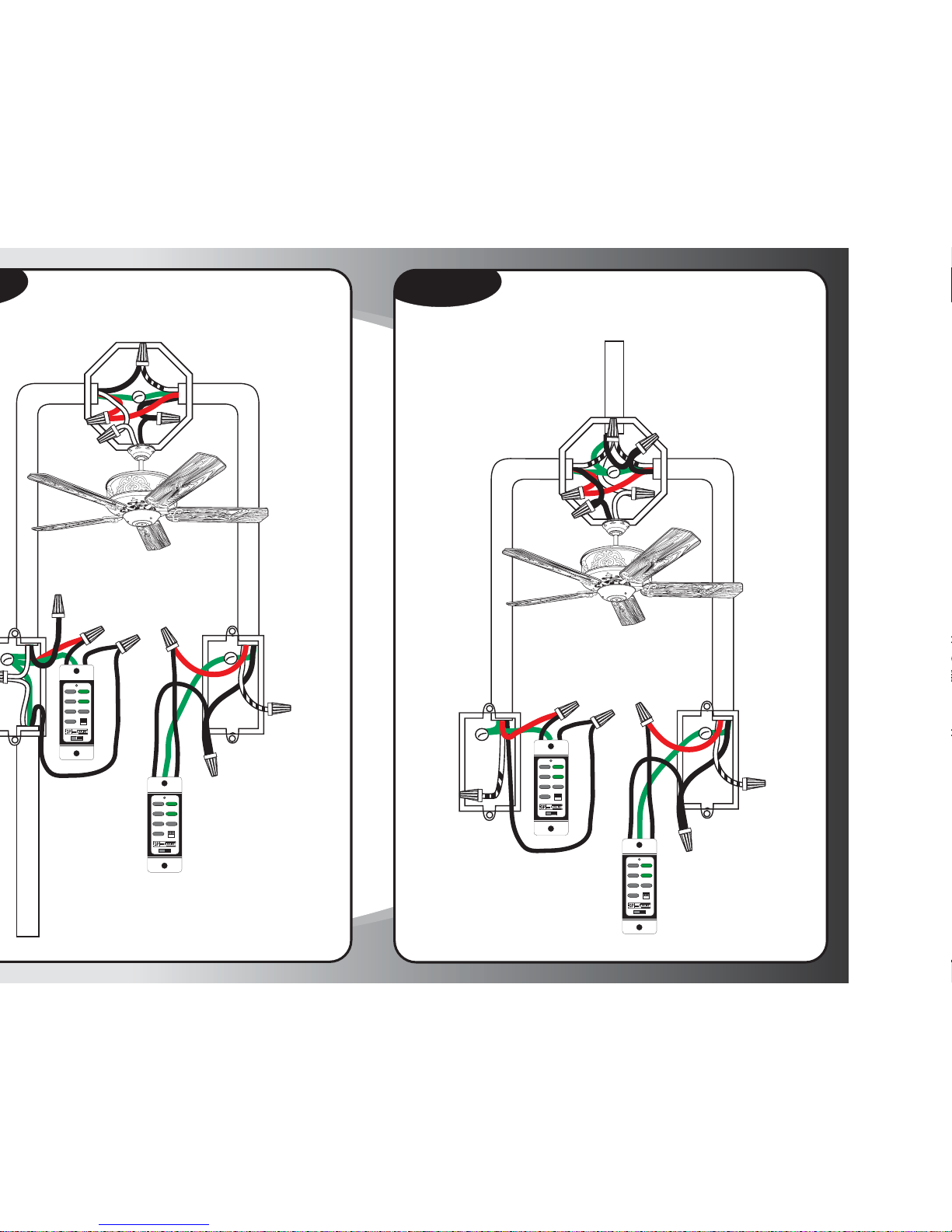
Fixture Between Two Three-way
Switches, Powered through Switch
3-wire cable and ground
Power In
3-wire cable and ground
#5
#3
#2
#1
#4
neutro o tierra
(no se usa)
black wire
(not used)
red wire
traveller for the
hot circuit
HIGH
MED.
LOW
FAN OFF
L-1
L-2
REVERSE
OFF
ON
12V. BATT.
SUPER
23A 12V
1234
ON
HIGH
MED.
LOW
FAN OFF
L-1
L-2
REVERSE
OFF
ON
12V. BATT.
SUPER
23A 12V
1234
ON
Fixture Between Three-way
Switches with Power Source at the Light Box
Diagram #3
neutral or
ground
(not used)
3-wire cable and ground
neutral or
ground
(not used)
Power In
2-wire cable and ground
#5
#3
#2
#1
#4
3-wire cable and ground
red wire
traveller for the
hot circuit
HIGH
MED.
LOW
FAN OFF
L-1
L-2
REVERSE
OFF
ON
12V. BATT.
SUPER
23A 12V
1234
ON
HIGH
MED.
LOW
FAN OFF
L-1
L-2
REVERSE
OFF
ON
12V. BATT.
SUPER
23A 12V
1234
ON
Page 7
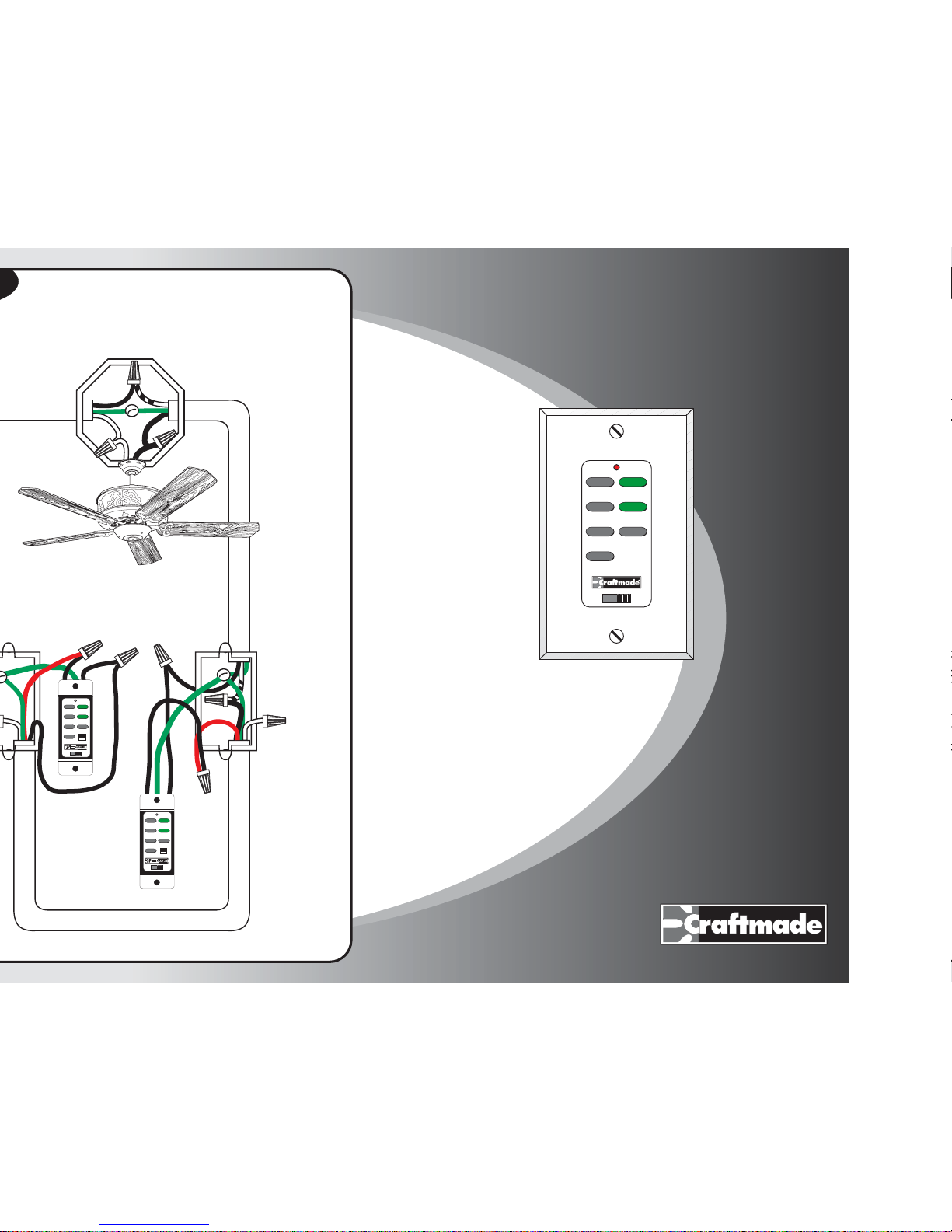
Fixture Controlled by Two Switches,
Powered Through Fixture Ceiling Box
3-wire cable and ground
#5
#3
#2
#1
#4
2-wire cable and ground
neutral or
ground
(not used)
HIGH
MED.
LOW
FAN OFF
L-1
L-2
REVERSE
OFF
ON
12V. BATT.
SUPER
23A 12V
1234
ON
HIGH
MED.
LOW
FAN OFF
L-1
L-2
REVERSE
OFF
ON
12V. BATT.
SUPER
23A 12V
1234
ON
TCS-Plus
®
®
MEJOR DISEÑO
Instrucciones de instalación
Sistema de control remoto TCS-Plus®
OFF
12V BAT.
ON
HI
MED
LOW
OFF
L-1
L-2
REV
Page 8
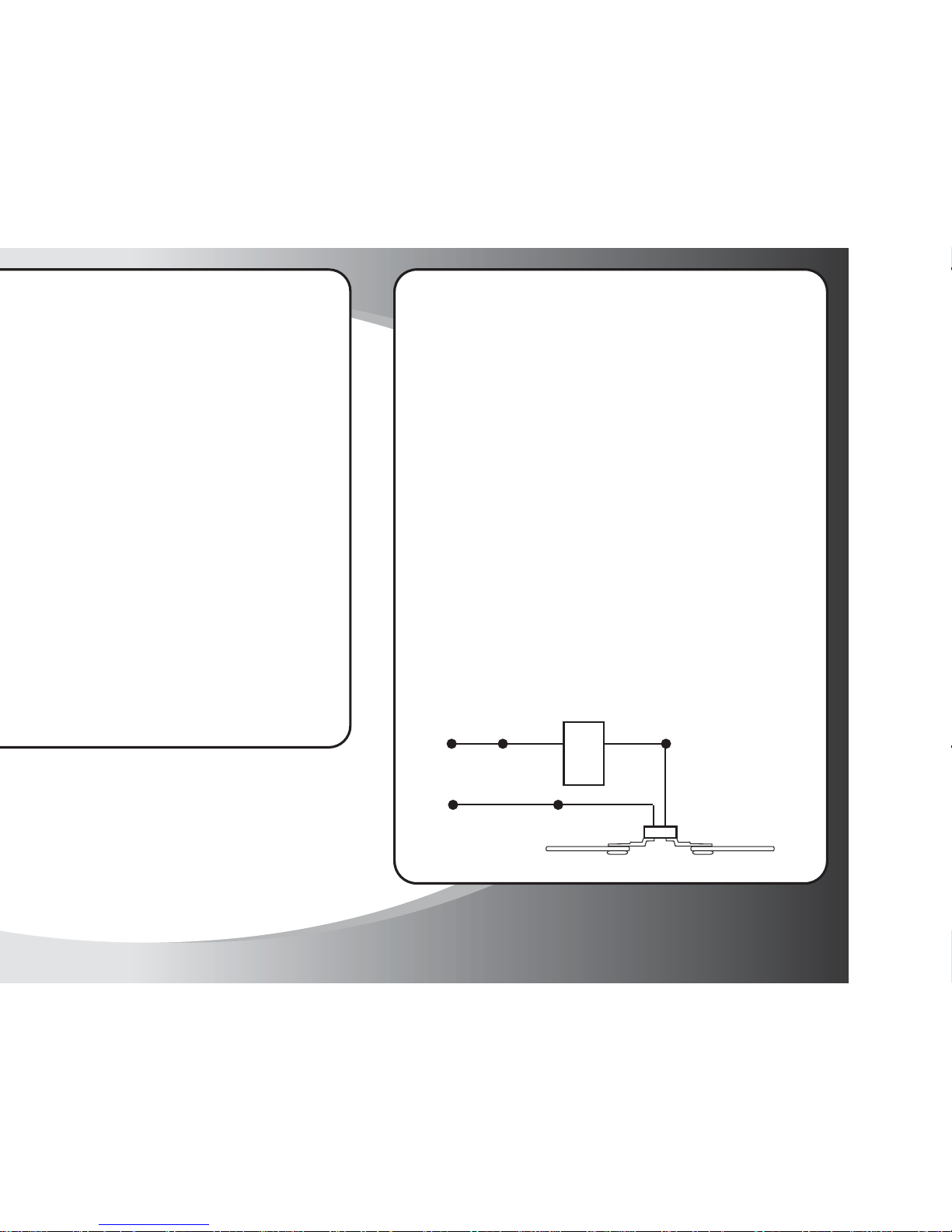
HOT BLACK BLACK
NEUTRAL WHITE
FAN
MOTOR
LOAD
Qué hacer
Cablee el control de TCS-PLUS
para la pared de la misma manera
que un interruptor de luz
monopolar estándar.
Cablee una derivación del control
de TCS-Plus para la pared al
cableado energizado de la casa y
la segunda derivación al lado de
carga del ventilador de techo.
Siga las instrucciones incluidas con
el ventilador de techo para
cablearlo.
Siga este diagrama esquemático de
cableado si tiene alguna duda con
respecto a su aplicación específica.
Qué no hacer
NUNCA conecte una derivación del
control de TCS-PLUS para la pared
al alambre neutro. Esto producirá un
cortocircuito inmediato del control.
NO opere más de un ventilador de
techo con un solo control de TCSPLUS para la pared.
NO cambie los interruptores “DIP”
de frecuencia en el control de TCSPLUS para la pared sin hacer un
cambio idéntico a los interruptores
“DIP” situados en el módulo receptor
del ventilador. Los interruptores “DIP”
vienen preajustados de fábrica a las
mismas posiciones)
El ventilador y el juego de luz
combinados no deben exceder 1,5
amperios o 300 vatios.
Qué hacer y qué no hacer durante la Instalación del
Control Craftmade TCS-PLUS para la pared
Page 9
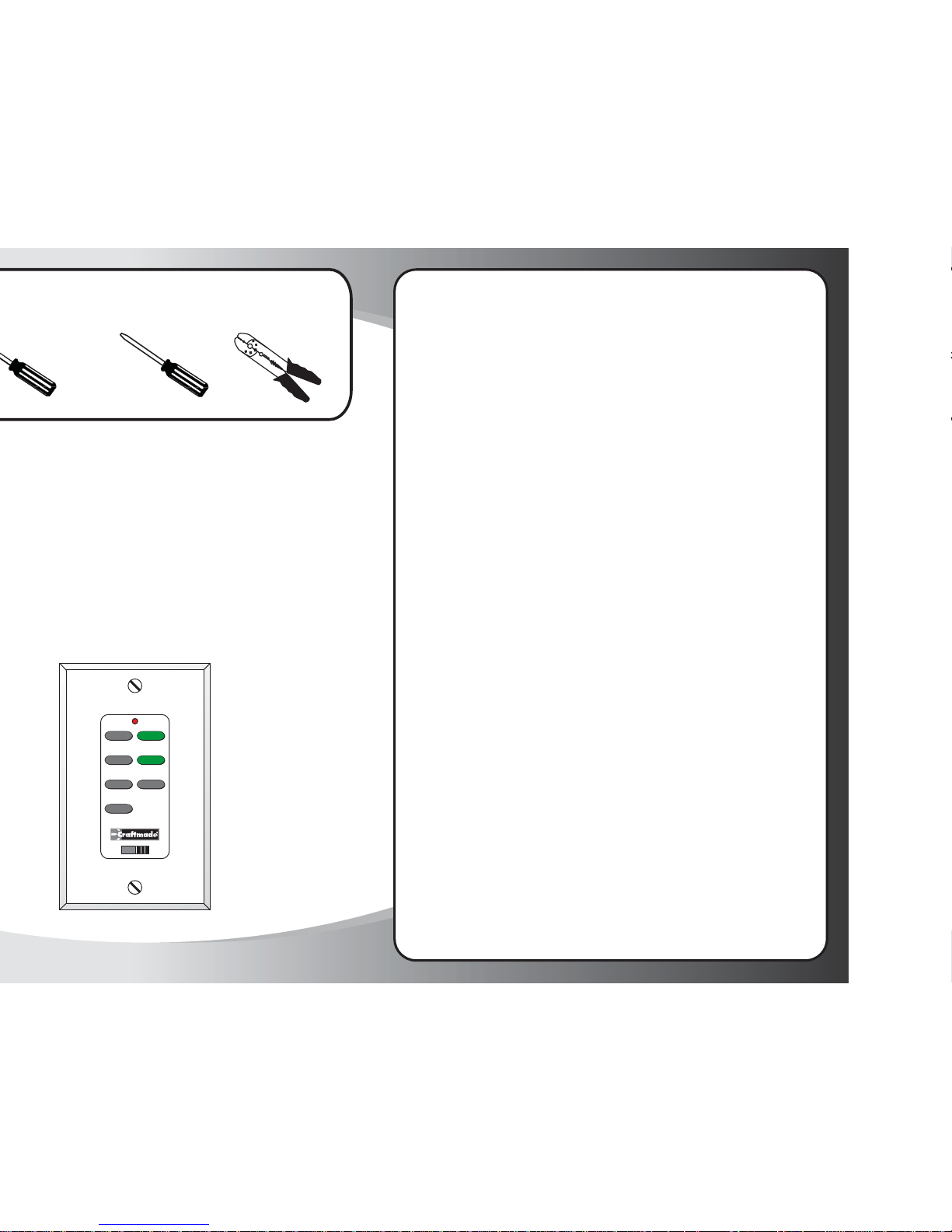
OFF
12V BAT.
ON
HI
MED
LOW
OFF
L-1
L-2
REV
Herramientas necesarias
de hoja plana
Operation Instructions, Continued
Instrucciones de uso, Continuación…
ENCENDIDO/APAGADO Para un paro de emergencia.
ALTO Controla la velocidad del motor del ventilador Oprima el botón
MEDIO una vez y suéltelo para seleccionar la velocidad deseada
BAJO
REVERSA Controla de dirección de las aspas del ventilador. Oprima una vez
y suéltelo para invertir la dirección de las aspas del ventilador.
VENTILADOR Apaga el motor del ventilador. Oprima una vez para apagar.
APAGADO Para arrancar nuevamente el motor, oprima uno de los botones
de velocidad del motor.
L-1 En los modelos Constantina, Crescent, Fresco, Light Rays, Ol'
Madrid, Valencia y Wellington, controla el encendido y apagado
(on/off) así como la intensidad para el juego de luz opcional para
iluminar hacia abajo. Empuje y suelte para apagar y encender;
mantenga empujado hacia abajo para reducir toda la gama de luz.
En los modelos Constantina y Fresco, controla el encendido y apagado
(on/off) para la iluminación del cuerpo lateral. Empuje y suelte
para apagar y encender; mantenga empujado hacia abajo para
reducir toda la gama de luz.
Nota: Este botón no controlará ninguna función para los modelos
de ventilador no enumerados arriba.
L-2 Controla la función de encendido y apagado (on/off) así como la
intensidad para el juego integrado de luz para iluminar hacia abajo.
Empuje y suelte para encender y apagar; mantenga empujado hacia
abajo para reducir toda la gama de luz.
Controla la función de encendido y apagado (on/off) así como la
intensidad para la iluminación indirecta hacia arriba. Empuje y
suelte para encender y apagar; mantenga empujado hacia abajo
para reducir toda la gama de luz. Nota: Control de la iluminación
ascendente en los modelos Constantina, Crescent, Fresco, Light Rays,
Ol' Madrid, Valencia y Wellington.
En el modelo Valencia, controla el encendido y apagado (on/off )
para la iluminación del cuerpo lateral. Empuje y suelte para encender
y apagar; mantenga empujado hacia abajo para reducir toda la
gama de luz.
NOTA: Los botones “Alto”, “Medio” o “Bajo” pueden usarse para arrancar
el motor del ventilador. La velocidad del ventilador puede cambiarse
en cualquier momento.
Page 10
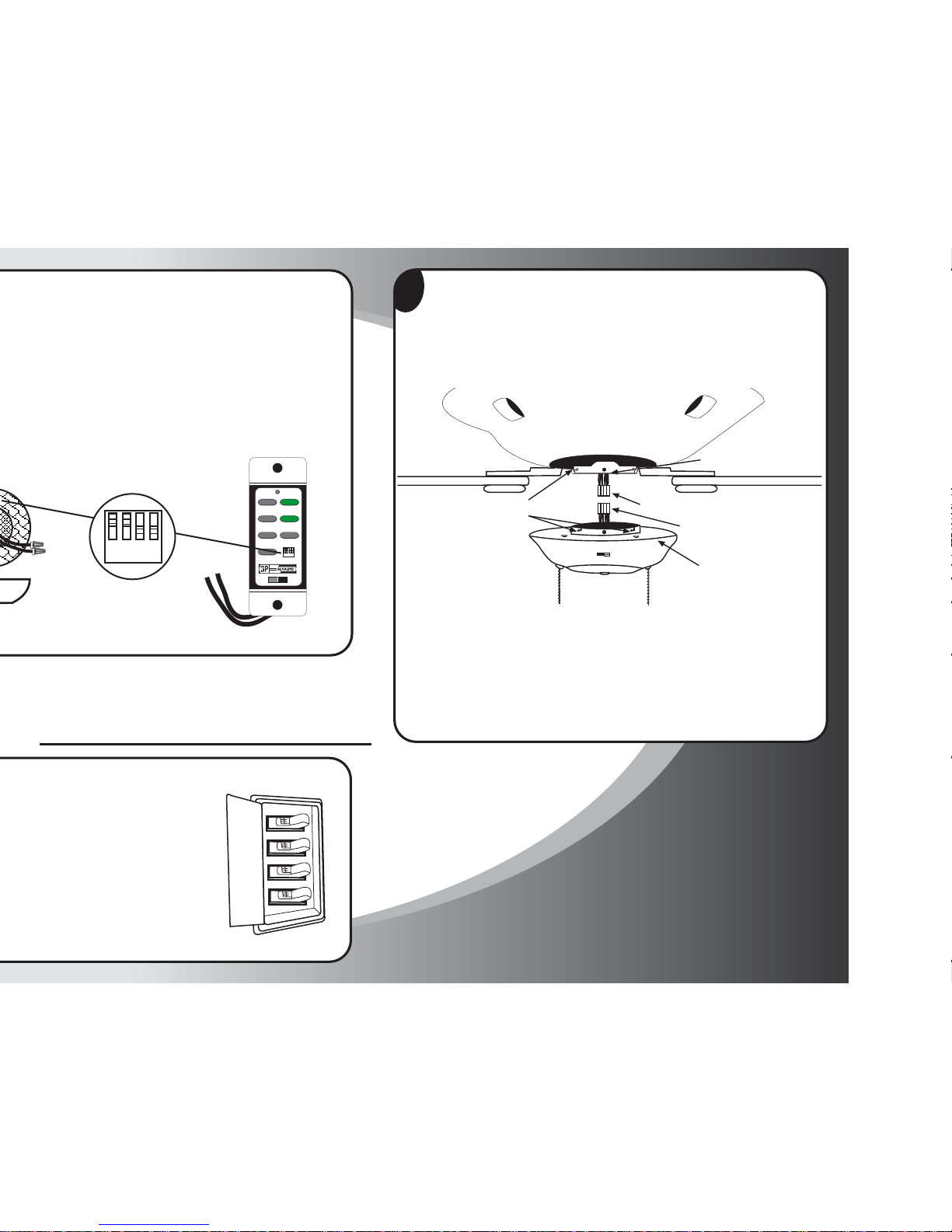
Paso 2
Quite la cubierta de la caja del interruptor existente destornillando los tornillos
laterales (F) de la unidad. Al hacerlo, la caja del interruptor se desprenderá.
Desenchufe el cableado modular (A) y (B) y retire la unidad de la caja del
interruptor existente.
2
Utilizando el módulo TCS-PLUS®, identifique ambos enchufes modulares
de cableado (A) y (B), uno extendiéndose de la placa de montaje en el extremo
inferior de la caja del motor y el otro sobre la caja del interruptor. Alinee los
dos enchufes de manera que cuando se unan, el retén en los costados de los
enchufes se enganchará. Conecte firmemente los dos enchufes, hasta que el retén
esté enganchado. (Asegúrese de que todos los cables estén firmemente asentados
en los conectores plásticos.
Enchufe modular de cableado (A)
Enchufe modular de
cableado (B)
Caja del interruptor (9)
Tornillos (F)
Ranuras de montaje (D)
Placa de montaje (E)
Ajuste de los interruptores de frecuencia
HI
MED
LOW
OFF
L-1
L-2
REV
OFF
ON
12V. BATT.
SUPER
23A 12V
1234
ON
1234
ON
Paso 1
Page 11
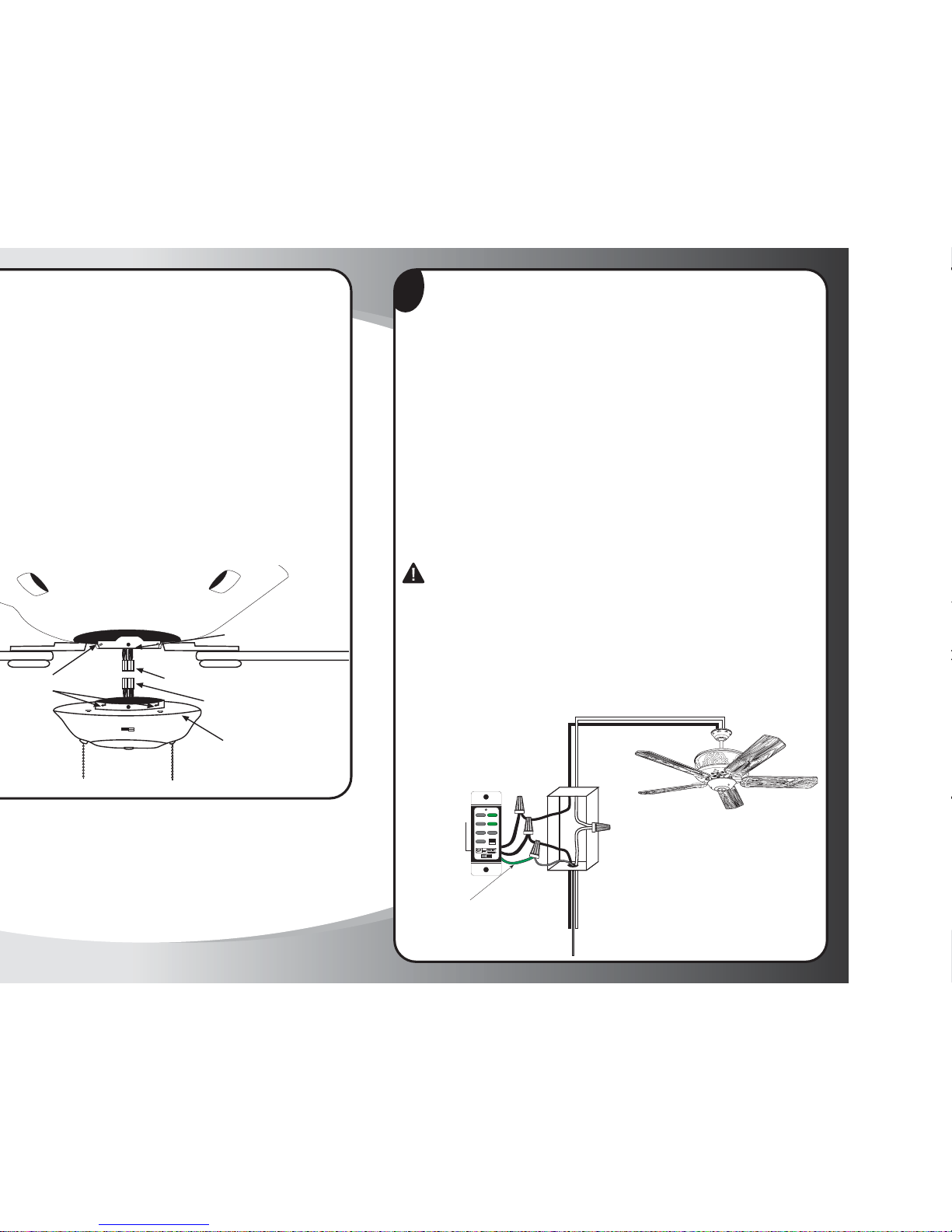
Paso 3
Enchufe modular de cableado (A)
Enchufe modular de
cableado (B)
Caja del interruptor (9)
Tornillos (D)
Placa de montaje (E)
4
Paso 4
Instrucciones de cableado
NOTA: Siga las instrucciones incluidas con el ventilador de techo para cablearlo.
ADVERTENCIA: Para evitar el recalentamiento y posible daño a este dispositivo
y otro equipo, no lo instale para controlar un tomacorriente, luces fluorescentes,
transformador o electrodoméstico a motor, excepto por los ventiladores para los
cuales se diseñó este control. Use este dispositivo con alambre de cobre o revestido
en cobre únicamente. Con alambre de aluminio, use dispositivos marcados
CO/ALR únicamente.
1. Quite el aislamiento para exponer el alambre de cobre de _ pulg. al extremo
de los conductores del circuito. Mantenga rectos los extremos de los cables.
2. 2. Conecte los cables según el diagrama de cableado de la siguiente manera:
las terminales negras (cada una de ellas) a la línea negra (energizada),
el cable verde a tierra al cable de cobre de salida. Una los extremos desnudos.
Empuje firmemente los cables en el conector. Atornille el conector de tornillo
en sentido horario hasta que no quede cobre desnudo a la vista. Afiance
el conector con cinta aislante.
PRECAUCIÓN: Nunca conecte el cable neutro blanco al Control TCS+
3. Asegúrese de que la pila esté instalada correctamente en el interruptor.
Ésta ya debería estar instalada en el interruptor, pero confírmelo antes de
instalar la placa de montaje (ver diagrama). Nota: El código de reemplazo
de la pila es 23 A, 12 Voltios.
4. Monte el dispositivo con los tornillos largos de montaje (incluidos). Instale
la placa para la pared y apriete los tornillos de la cubierta.
5. Restaure el suministro eléctrico en el cortacircuitos o fusible. Esto completa
la instalación.
Neutro
(Cable blanco)
Carga
(Cable negro)
MONOPOLAR
Línea
energizada
(Cable negro)
Pila de 23 A
y 12 Voltios
Neutro
(Cable blanco)
HI
MED
LOW
OFF
L-1
L-2
REV
OFF
ON
12V. BATT.
SUPER
23A 12V
1234
ON
Cable Tierre
(Cable Verde)
Cable Tierre
(Cable Cobre)
Page 12
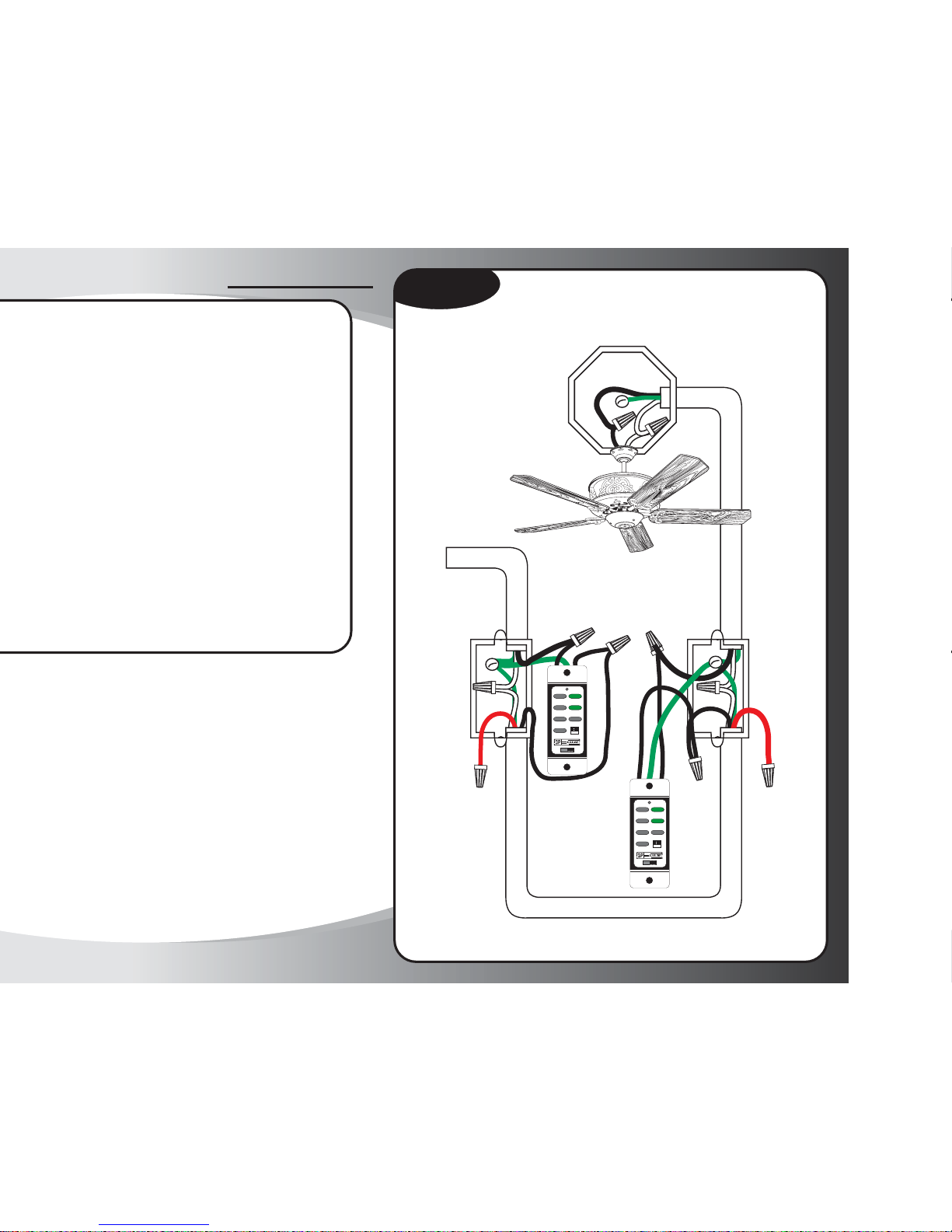
Artefacto controlado por dos interruptores,
alimentado a través de una caja de interruptor
Diagrama #1
cable trifilar y tierra
cable trifilar y tierra
de la fuente de alimentación
Entrada de corriente
cable trifilar y tierra
#5
#3
#2
#1
#4
cable rojo
(no se usa)
cable rojo
(no se usa)
HIGH
MED.
LOW
FAN OFF
L-1
L-2
REVERSE
OFF
ON
12V. BATT.
SUPER
23A 12V
1234
ON
HIGH
MED.
LOW
FAN OFF
L-1
L-2
REVERSE
OFF
ON
12V. BATT.
SUPER
23A 12V
1234
ON
Page 13
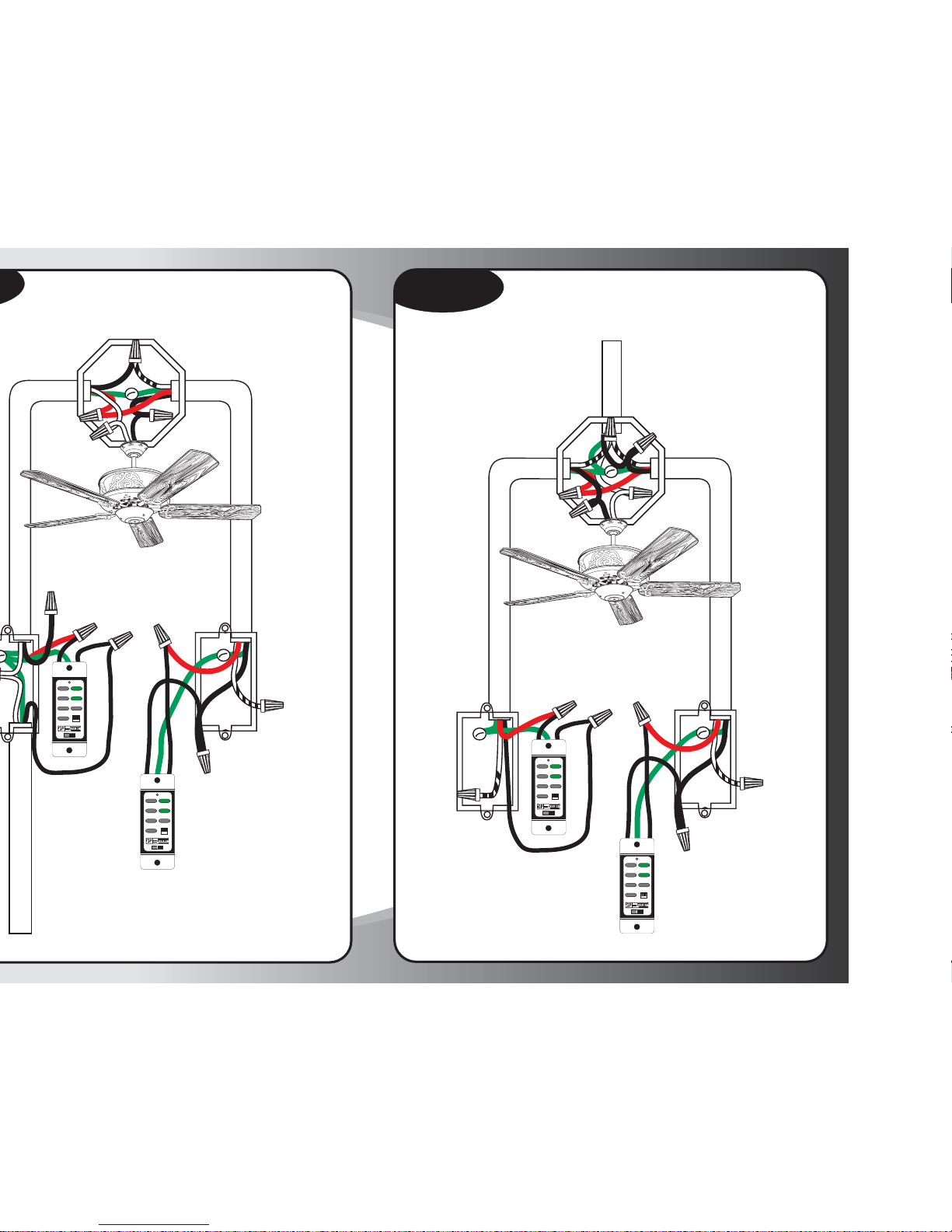
Artefacto entre dos interruptores tridireccionales,
alimentado a través de un interruptor
cable trifilar y tierra
Entrada de
corriente
cable trifilar y tierra
cable negro
(no se usa)
#5
#3
#2
#1
#4
cable rojo corredizo
para el circuito
energizado
neutro o tierra
(no se usa)
HIGH
MED.
LOW
FAN OFF
L-1
L-2
REVERSE
OFF
ON
12V. BATT.
SUPER
23A 12V
1234
ON
HIGH
MED.
LOW
FAN OFF
L-1
L-2
REVERSE
OFF
ON
12V. BATT.
SUPER
23A 12V
1234
ON
Artefacto entre interruptores tridireccionales,
con la fuente de alimentación en la caja de la luz
Diagrama #3
neutro o tierra
(no se usa)
cable trifilar y tierra
cable bifilar y tierra
#5
#3
#2
#1
#4
cable trifilar y tierra
cable rojo corredizo
para el circuito
energizado
neutro o tierra
(no se usa)
HIGH
MED.
LOW
FAN OFF
L-1
L-2
REVERSE
OFF
ON
12V. BATT.
SUPER
23A 12V
1234
ON
HIGH
MED.
LOW
FAN OFF
L-1
L-2
REVERSE
OFF
ON
12V. BATT.
SUPER
23A 12V
1234
ON
Entrada de corriente
Page 14
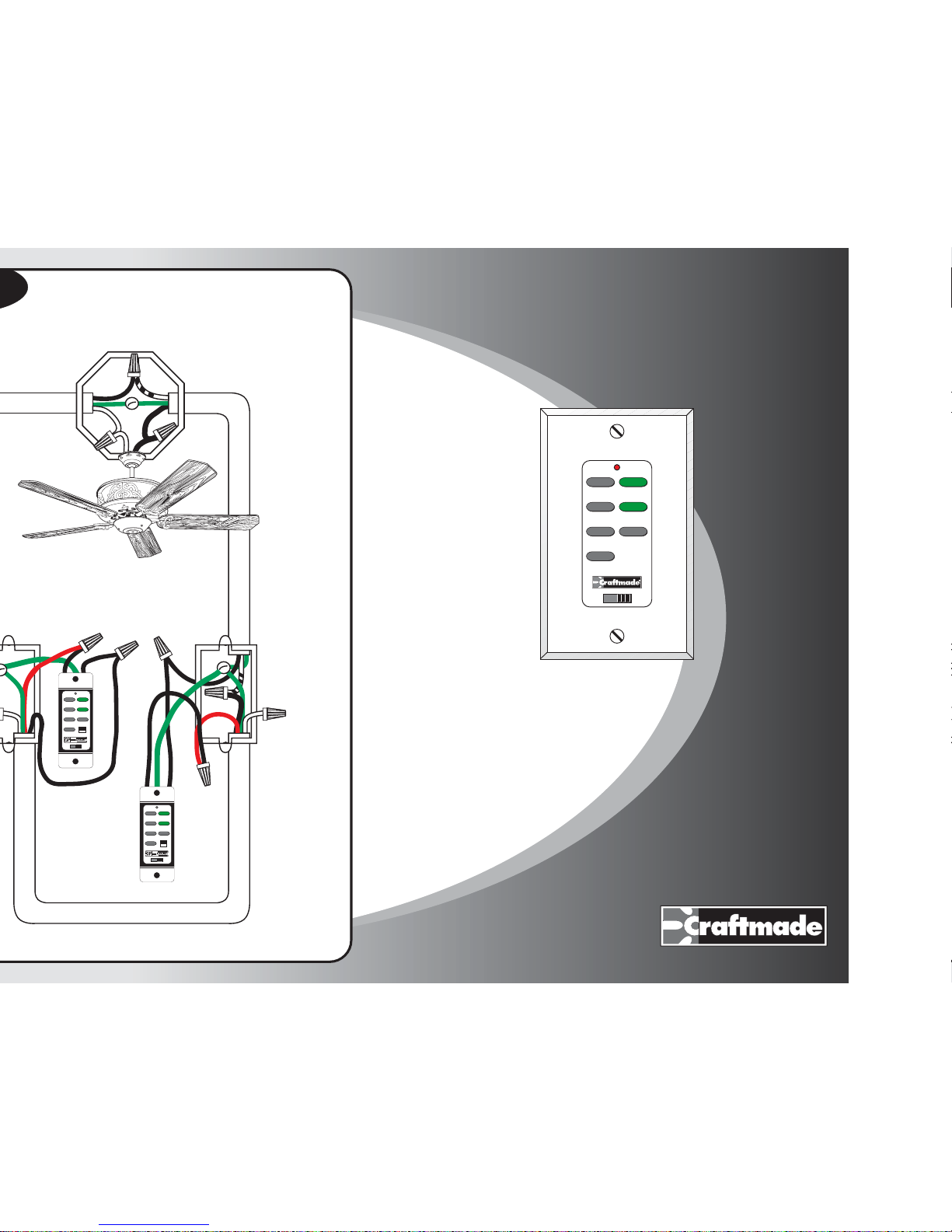
Artefacto controlado por dos interruptores,
alimentado a través de la caja del techo
cable trifilar y tierra
#5
#3
#2
#1
#4
cable bifilar y tierra
neutro o tierra
(no se usa)
HIGH
MED.
LOW
FAN OFF
L-1
L-2
REVERSE
OFF
ON
12V. BATT.
SUPER
23A 12V
1234
ON
HIGH
MED.
LOW
FAN OFF
L-1
L-2
REVERSE
OFF
ON
12V. BATT.
SUPER
23A 12V
1234
ON
TCS-Plus
®
OFF
12V BAT.
ON
HI
MED
LOW
OFF
L-1
L-2
REV
®
UNE CONCEPTION EXCEPTIONNELLE
Notice d'installation
Système télécommandé TCS-Plus®
Page 15
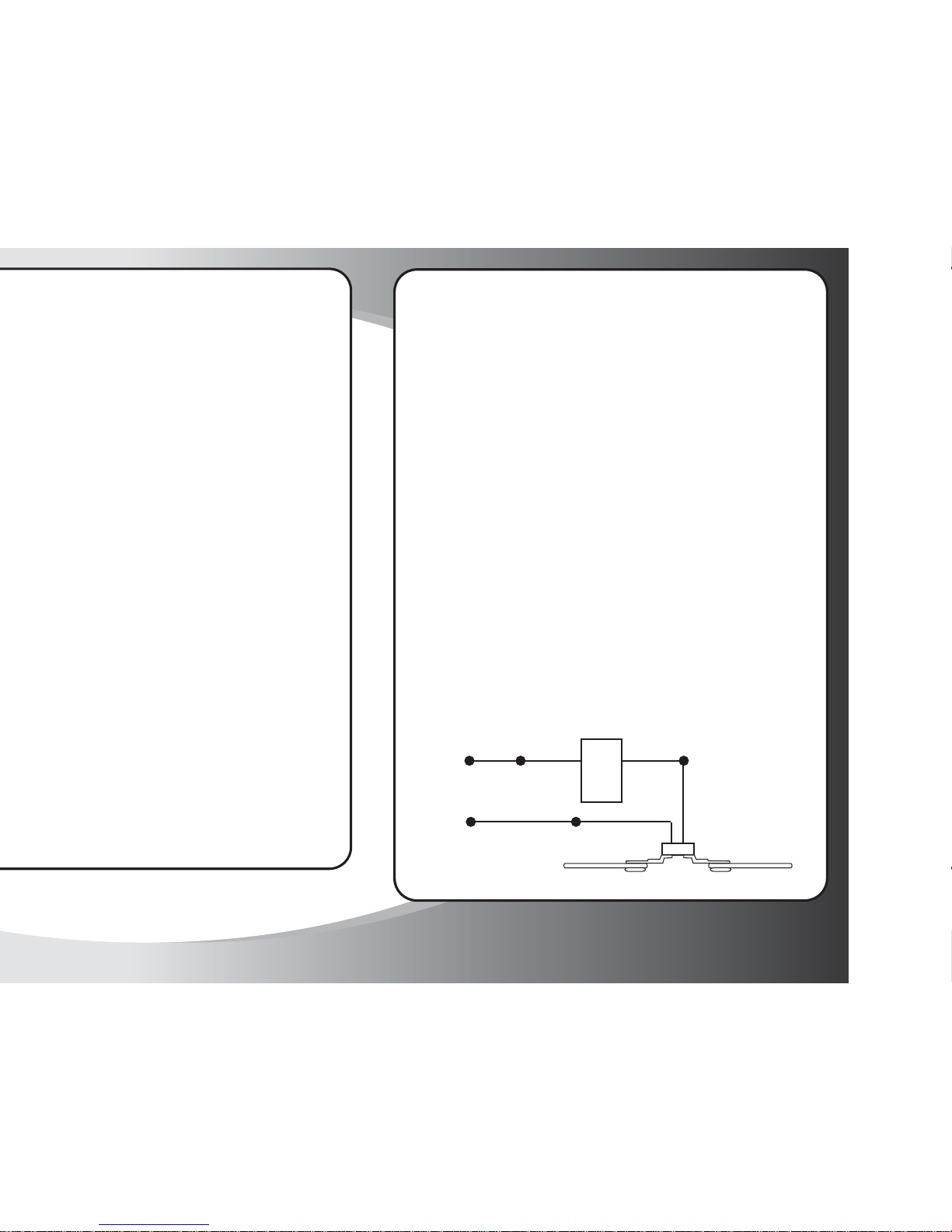
Recommandations pour l'installation du dispositif
de commande mural TCS-Plus de Craftmade
À faire
Effectuez le câblage du dispositif
de commande mural TCS-PLUS
comme pour tout autre
interrupteur de luminaire
unipolaire standard.
Câblez une sortie du dispositif de
commande mural TCS-PLUS sur
le câblage chargé du domicile et
la seconde sortie sur le côté charge
du ventilateur.
Suivez les instructions fournies
avec le ventilateur pour câbler ce
dernier.
Suivez le schéma de câblage cidessous si vous avez le moindre
doute quant à votre application
spécifique.
À ne pas faire
NE câblez JAMAIS une sortie du
dispositif de commande mural
TCS-PLUS sur le neutre. Cela fera
immédiatement court-circuiter le
dispositif de commande.
NE faites PAS fonctionner plus
d'un ventilateur avec un seul
dispositif de commande mural
TCS-PLUS.
NE changez PAS la fréquence des
commutateurs DIP sur le dispositif
de commande mural TCS-PLUS
sans effectuer une modification
identique sur les commutateurs
DIP situés sur le module du
récepteur du ventilateur. Les
commutateurs DIP ont été réglés
en usine sur la même position.
Ne dépassez PAS 1,5 amp ou 300
watts combinés pour le ventilateur
et le kit d'éclairage.
EN CHARGE
NOIR
NEUTRE BLANC
NOIR
CHARGE DU
MOTEUR DU
VENTILATEUR
Page 16
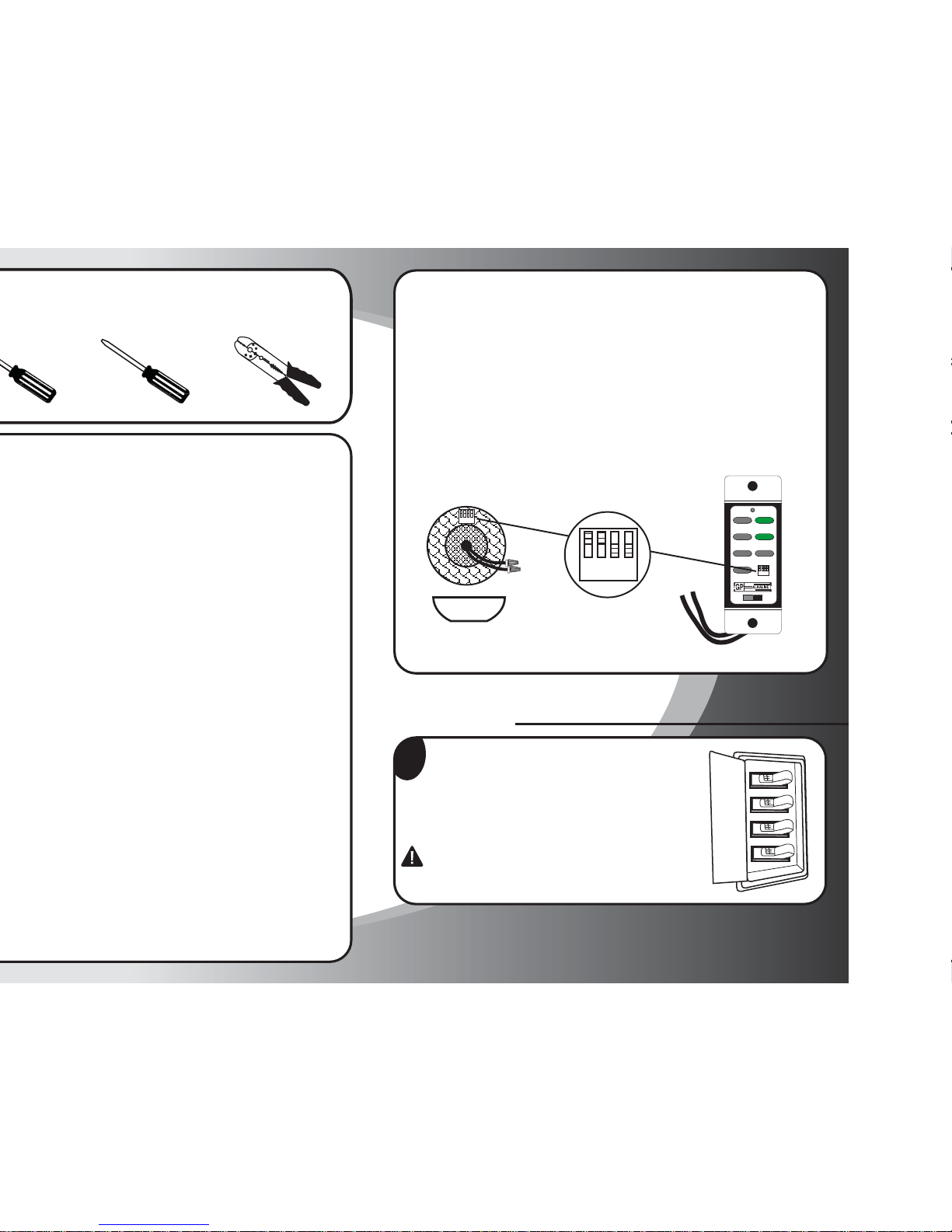
Réglage des interrupteurs à fréquence
L'unité de commande murale fonctionne grâce à un ensemble d'interrupteurs
à fréquence qui sont préréglés en usine. Il existe deux ensembles
d'interrupteurs à fréquence. Les interrupteurs sur la commande murale se
situent sur le panneau frontal, sous la plaque. Les interrupteurs sur le
ventilateur se situent sur le module de réception placé sur le haut du
ventilateur (voir schéma). Les interrupteurs peuvent être réglés sur n'importe
quelle position, à condition toutefois que les interrupteurs de l'unité murale
et du module de réception soient positionnés sur les mêmes réglages. Tous
les modules (RF) et émetteurs sont livrés de l'usine avec les commutateurs
DIP réglés en position ON (Marche).
1234
ON
HI
MED
LOW
OFF
L-1
L-2
REV
OFF
ON
12V. BATT.
SUPER
23A 12V
1234
ON
1234
ON
Préparation
1
Étape 1
Désactivez les disjoncteurs et l'interrupteur mural
régissant les conducteurs d'alimentation du ventilateur.
Avertissement: le non débranchement de l'alimentation
électrique avant l'installation du ventilateur peut entraîner
de graves blessures, voire la mort. Pour éviter les décharges
électriques, ce ventilateur doit être installé avec un
interrupteur mural isolant.
Instructions d’utilisation
le sens de rotation des pales, appuyez une fois et relâchez.
remettre le moteur en marche, appuyez sur l'un des boutons de vitesse
du moteur.
inférieur optionnel sur les modèles Constantina, Crescent, Fresco, Light
Rays, Ol' Madrid, Valencia et Wellington. Appuyez sur ce bouton puis
relâchez-le pour la mise en marche et l'arrêt. Maintenez le bouton
enfoncé pour passer sur toute la plage d'intensité lumineuse.
Contrôle la marche et l'arrêt ainsi que l'intensité de l'éclairage latéral
sur les modèles Constantina et Fresco. Appuyez sur ce bouton puis
relâchez-le pour la mise en marche et l'arrêt. Maintenez le bouton
enfoncé pour passer sur toute la plage d'intensité lumineuse.
Remarque : Ce bouton ne fonctionnera pas sur les modèles autres que
ceux énumérés ci-dessus.
inférieur optionnel. Appuyez sur ce bouton puis relâchez pour la mise
en marche et l'arrêt. Maintenez le bouton enfoncé pour passer sur toute
la plage d'intensité lumineuse.
Contrôle la marche et l'arrêt ainsi que l'intensité de l'éclairage indirect
vers le haut. Appuyez sur ce bouton puis relâchez-le pour la mise en
marche et l'arrêt. Maintenez le bouton enfoncé pour passer sur toute
la plage d'intensité lumineuse.
Remarque : Contrôle de l'éclairage vers le haut pour les modèles
Constantina, Crescent, Fresco, Light Rays, Ol' Madrid et Wellington.
Contrôle la marche et l'arrêt ainsi que l'intensité de l'éclairage latéral
sur le modèle Valencia. Appuyez sur ce bouton puis relâchez-le pour
la mise en marche et l'arrêt. Maintenez le bouton enfoncé pour passer
sur toute la plage d'intensité lumineuse.
3. Pince à dénuder les fils2. Tournevis plat
Outils nécessaires à l'installation
Page 17
3
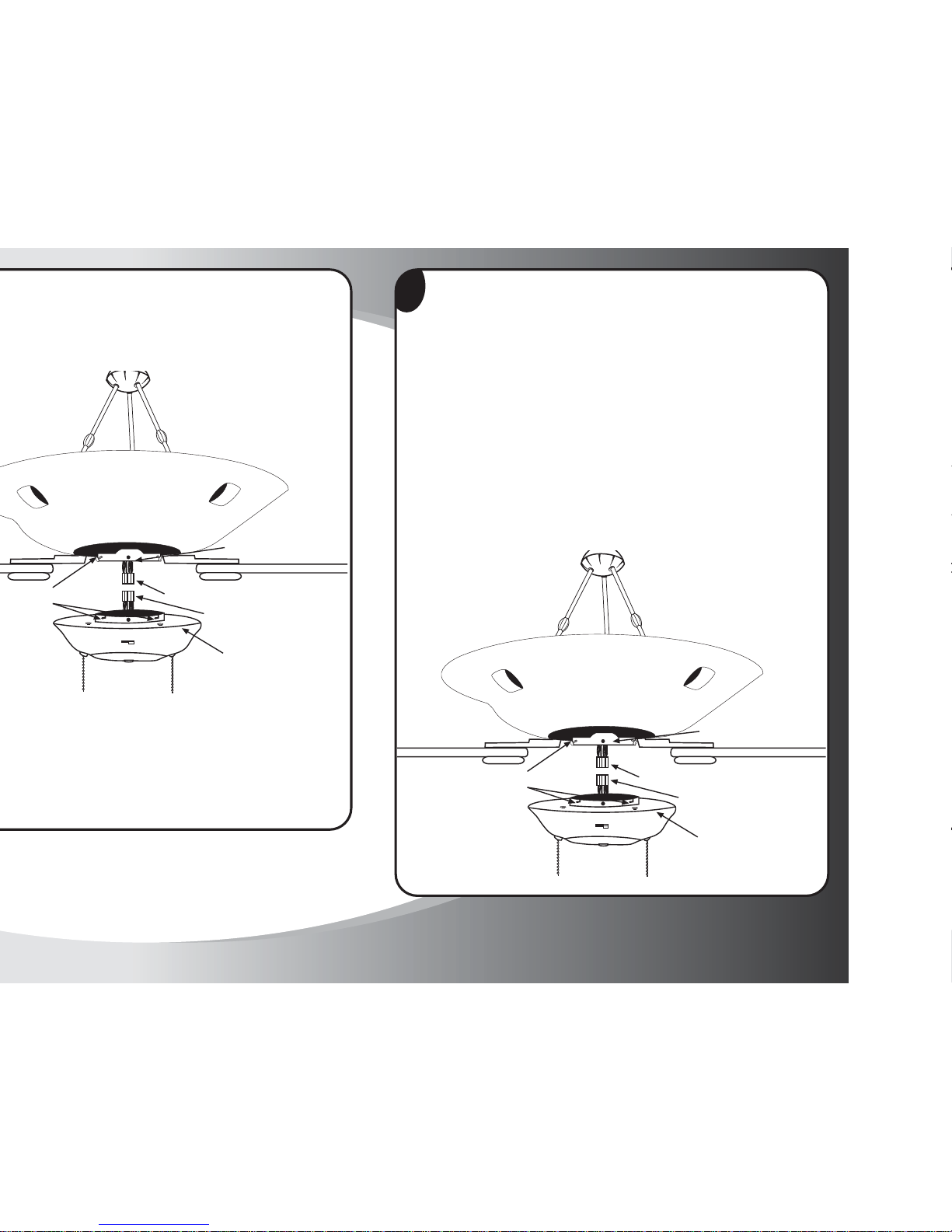
Étape 3
1. Pour installer l'assemblage de boîtier d'interrupteur (n° 9), repérez les
prises de câblage modulaire (A) et (B). L'une d'entre elles sort de la plaque
de montage (E), au bas du corps du ventilateur et l'autre sort du boîtier
d'interrupteur (n° 9). Alignez les deux prises de manière à ce que les verrous
situés sur leurs côtés puissent s'enclencher. Enfoncez fermement les deux
prises jusqu'à ce qu'elles s’emboîtent.
2. Repérez les fils de boîtier d'interrupteur (S9). Soulevez le couvercle de
boîtier d’interrupteur (n° 9) et alignez les trous de montage avec les trous
de la plaque de montage (E). Une fois que les trous sont alignés, fixez le
couvercle de boîtier d'interrupteur au moyen des vis de boîtier d'interrupteur
(S9) et serrez-les fermement.
IMPORTANT : vérifiez qu'aucun fil n'a été coincé ou pincé durant le montage.
Prises de câblage modulaire (A)
Prises de câblage
modulaire (B)
Assemblage du boîtier
de l'interrupteur
(9)
Vis (F)
Fentes de montage (D)
Plaque de montage (E)
Étape 2
Prises de câblage modulaire (A)
Prises de câblage
modulaire (B)
Assemblage du boîtier
de l'interrupteur
(9)
Plaque de montage (E)
Vis (F)
Page 18
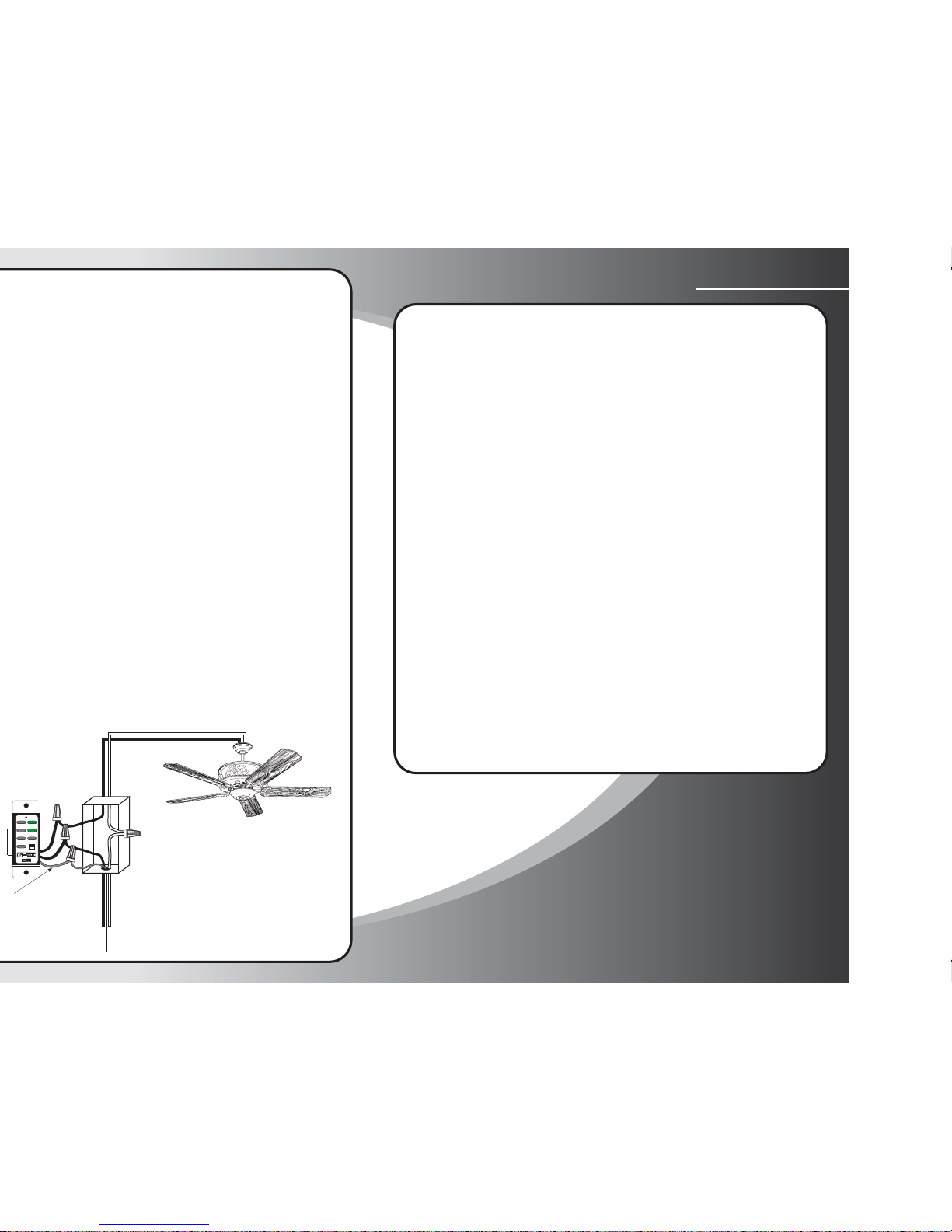
Étape 4
Instructions de câblage
Neutre (fil blanc)Fil secteur sous
tension (noir)
UNIPOLAIRE
Neutre (fil blanc)Charge (fil noir)
HI
MED
LOW
OFF
L-1
L-2
REV
OFF
ON
12V. BATT.
SUPER
23A 12V
1234
ON
Fil de terre
(en cuivre)
Applications avec câblage à 3 sorties
1. Déterminez quel fil est la source d'alimentation (entrée d'alimentation).
Ne connectez JAMAIS un fil du TCS Plus à un fil blanc neutre. Dans
les installations à 3 sorties, assurez-vous que le disjoncteur est déclenché.
2. Retirez les interrupteurs à bascule à 3 sorties des boîtiers muraux.
Tracez l'intensité du courant. Commencez avec le nº 1 et continuez
jusqu'au nº 5.
3. Avec toutes les commandes hors du circuit, connectez le nº 1 au nº
2 et le nº 3 au nº 4. Laissez le nº 5 ouvert. Enclenchez de nouveau le
disjoncteur.
4. À l'aide d'une ampoule témoin au niveau du plafonnier, maintenez
un côté sur le fil noir nº 5 et l'autre côté sur le neutre. Si l'ampoule
témoin s'allume, le circuit est fermé.
Avant de raccorder les interrupteurs du TCS Plus, mettez l'interrupteur
de marche / arrêt en position d'arrêt (Off). Assurez-vous que le
disjoncteur est déclenché.
5. Installez les deux interrupteurs TCS Plus comme indiqué sur le schéma.
Dans le 1er exemple, le fil noir est utilisé comme un fil de propagation
de 110 v. Le fil rouge ou le fil vert ne sont pas utilisés dans cette
installation.
REMARQUE : Pour les schémas 2, 3 et 4, utilisez le troisième fil. La plupart
du temps, le fil rouge sera utilisé comme fil de propagation de circuit en
charge.
Reprenez les étapes 1 à 5.
Page 19
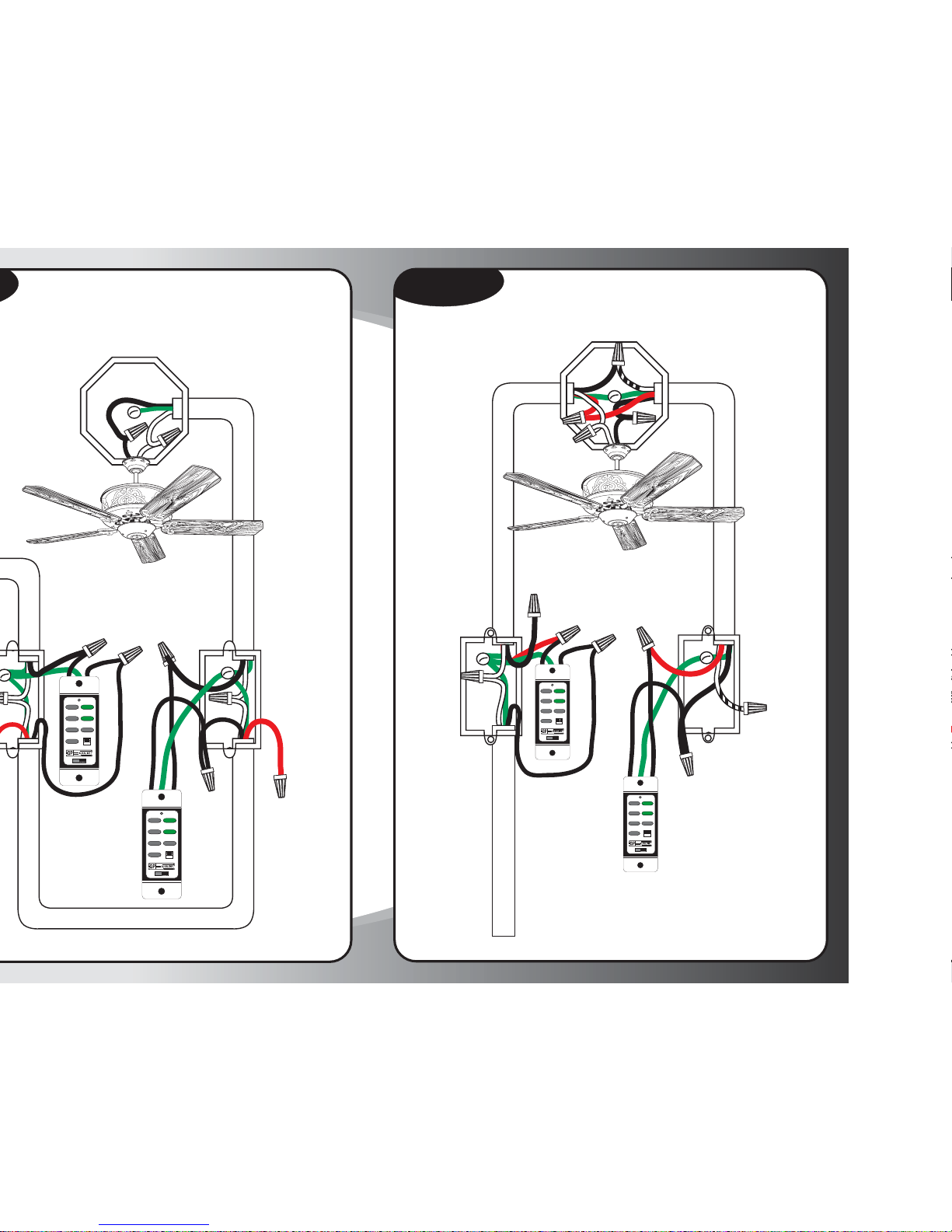
Luminaire entre deux interrupteurs à
3 sorties et alimenté par un interrupteur
Schéma nº 2
Entrée de
l'alimentation
Nº 5
Nº 3
Nº 2
Nº 1
Nº 4
Câble à 3 fils et mise à la terre
Neutre ou mise
à la terre
(pas utilisé)
Fil noir
(pas utilisé)
Fil de propagation
rouge pour le
circuit en charge
HIGH
MED.
LOW
FAN OFF
L-1
L-2
REVERSE
OFF
ON
12V. BATT.
SUPER
23A 12V
1234
ON
HIGH
MED.
LOW
FAN OFF
L-1
L-2
REVERSE
OFF
ON
12V. BATT.
SUPER
23A 12V
1234
ON
Câble à 3 fils et mise à la terre
Câble à 3 fils et mise à la terre
Luminaire commandé par deux interrupteurs
et alimenté par un boîtier d'interrupteur
Câble à 3 fils et mise à la terre
Câble à 3 fils et mise à la terre
#5
Nº 3
Nº 2
Nº 1
Nº 4
HIGH
MED.
LOW
FAN OFF
L-1
L-2
REVERSE
OFF
ON
12V. BATT.
SUPER
23A 12V
1234
ON
HIGH
MED.
LOW
FAN O FF
L-1
L-2
REVERSE
OFF
ON
12V. BATT.
SUPER
23A 12V
1234
ON
Fil rouge
(pas utilisé)
Page 20
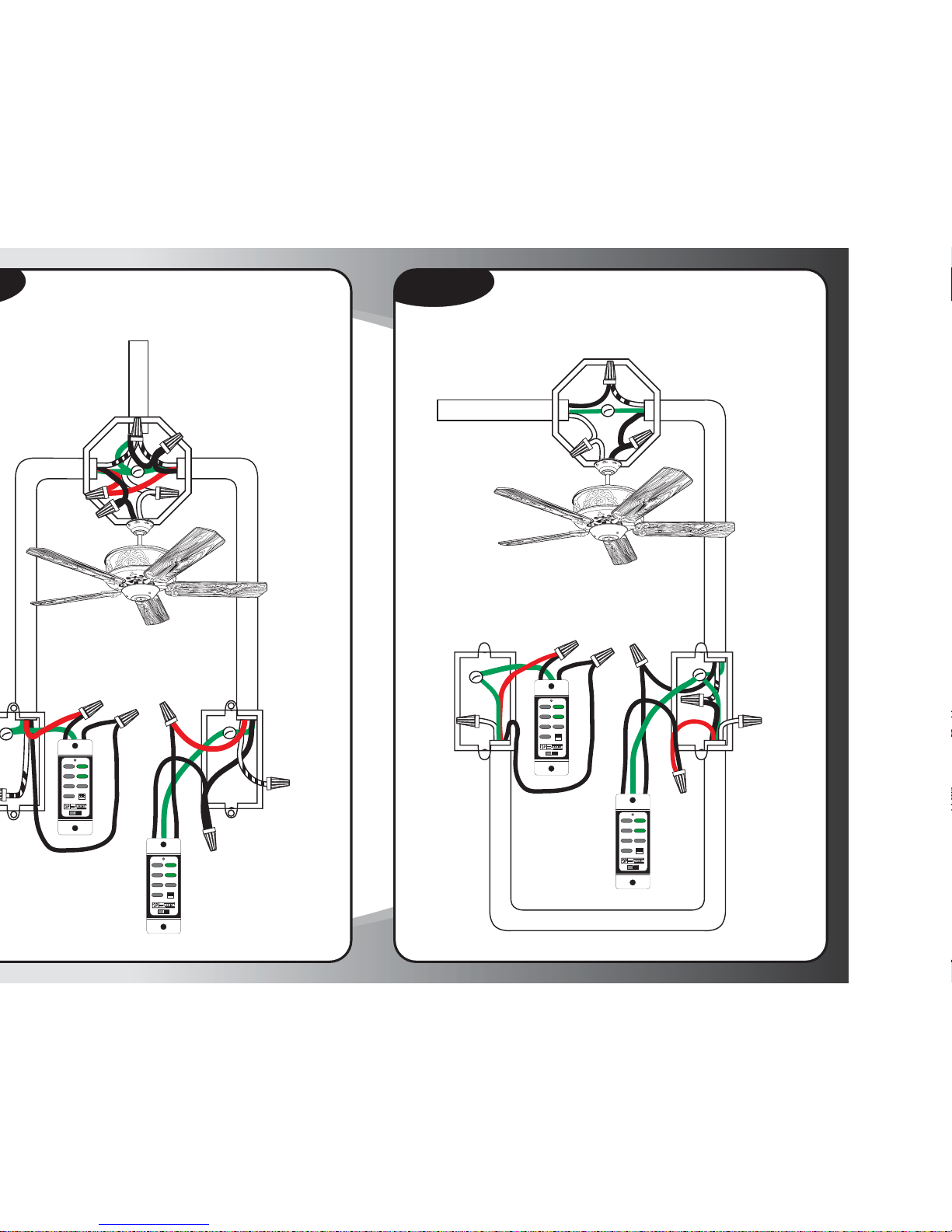
Luminaire entre des interrupteurs à
3 sorties avec source d'alimentation au
boîtier du luminaire
Entrée de
l'alimentation
Câble à 2 fils et mise à la terre
#5
Nº 3
Nº 2
Nº 1
Nº 4
Fil de propagation
rouge pour le
circuit en charge
HIGH
MED.
LOW
FAN OFF
L-1
L-2
REVERSE
OFF
ON
12V. BATT.
SUPER
23A 12V
1234
ON
HIGH
MED.
LOW
FAN OFF
L-1
L-2
REVERSE
OFF
ON
12V. BATT.
SUPER
23A 12V
1234
ON
Câble à 3 fils et mise à la terre
Neutre ou mise
à la terre
(pas utilisé)
Luminaire commandé par deux interrupteurs
et alimenté par le boîtier du luminaire
Schéma nº 4
Câble à 3 fils et mise à la terre
Entrée de l'alimentation
Câble à 2 fils et mise à
la terre depuis la
source d'alimentation
Nº 5
Nº 3
Nº 2
Nº 1
Nº 4
Câble à 2 fils et mise à la terre
Neutre ou mise
à la terre
(pas utilisé)
HIGH
MED.
LOW
FAN OFF
L-1
L-2
REVERSE
OFF
ON
12V. BATT.
SUPER
23A 12V
1234
ON
HIGH
MED.
LOW
FAN OFF
L-1
L-2
REVERSE
OFF
ON
12V. BATT.
SUPER
23A 12V
1234
ON
Neutre ou mise
à la terre
(pas utilisé)
 Loading...