

Page 1
USER GUIDE
Protect
Page 2

www.cprcallblocker.com
Thank you
for purchasing CPR Call Blocker.
You are now in control of your privacy.
The CPR Team
Page 3

INTRODUCTION
1
Congratulations on your new purchase!
Before using the Call Blocker please read the following important information:-
• Call Blocker protects a single corded phone, or a cordless phone with additional handsets.
• Caller Identity service (Caller ID) is required from your telephone provider for the Call
Blocker to work effectively.
• Caller ID is a telephone service that provides the telephone number of a caller, which
appear on a display as the call is being received. To register for Caller ID contact your
telephone provider.
• The CPR Call Blocker will work with a wide range of telephone equipment including corded
and cordless phones. It protects all the phones that are plugged into it. If you need a number
of extensions in your home, we recommend that you use a modern multi-cordless handset
known as a DECT phone (Digital Enhanced Cordless Telephone). Call Blocker can then protect
all of your phones.
• We recommend that you connect the CPR Call Blocker to a telephone at the main telephone
socket (The rst point where the connection comes into your property). Intermittence and
extension ringing issues may arise if the CPR Call Blocker is connected to telephones that are
plugged into extension sockets.
• Some phones automatically check the network voice mail service at regular intervals and
display a ‘Message waiting’ light. We recommend that you do not use these types of phones
with the CPR Call Blocker. In the UK these are called 1571 button phones.
• For convenience the CPR Protect + can be remotely setup and programmed by CPR customer
support. They can be contacted on (+44) 0800 652 7780 Monday - Friday 9:00am-18:00pm.
Congratulations on your new purchase!
Before using the Call Blocker please read the following important information:-
• Call Blocker protects a single corded phone, or a cordless phone with additional handsets.
• Caller Identity service (Caller ID) is required from your telephone provider for the Call
Blocker to work effectively.
• Caller ID is a telephone service that provides the telephone number of a caller, which
appear on a display as the call is being received. To register for Caller ID contact your
telephone provider.
• The CPR Call Blocker will work with a wide range of telephone equipment including corded
and cordless phones. It protects all the phones that are plugged into it. If you need a number
of extensions in your home, we recommend that you use a modern multi-cordless handset
known as a DECT phone (Digital Enhanced Cordless Telephone). Call Blocker can then protect
all of your phones.
• We recommend that you connect the CPR Call Blocker to a telephone at the main telephone
socket (The rst point where the connection comes into your property). Intermittence and
extension ringing issues may arise if the CPR Call Blocker is connected to telephones that are
plugged into extension sockets.
• Some phones automatically check the network voice mail service at regular intervals and
display a ‘Message waiting’ light. We recommend that you do not use these types of phones
with the CPR Call Blocker. In the UK these are called 1571 button phones.
• For convenience the CPR Protect + can be remotely setup and programmed by CPR customer
support. They can be contacted on (+44) 0800 652 7780 Monday - Friday 9:00am-18:00pm.
Page 4
SETTING UP
CPR CALL BLOCKER
02.
Step 1
Remove the line cable from your telephone and plug into the LINE 2 port of the Call
Blocker.
Step 2
Use the small Black cable provided to connect one end to the TEL 2 port of the Call
Blocker and the other end back to your telephone.
Step 3
Make sure that all cables are connected securely and then check for a dial tone. If the
red lights display on top of the unit when checking for a dial tone or making an
outgoing call then this will conrm that the call blocker is setup correctly.
Step 1
Remove the line cable from your telephone and plug into the LINE 2 port of the Call
Blocker.
Step 2
Use the small Black cable provided to connect one end to the TEL 2 port of the Call
Blocker and the other end back to your telephone.
Step 3
Make sure that all cables are connected securely and then check for a dial tone. If the
red lights display on top of the unit when checking for a dial tone or making an
outgoing call then this will conrm that the call blocker is setup correctly.
2
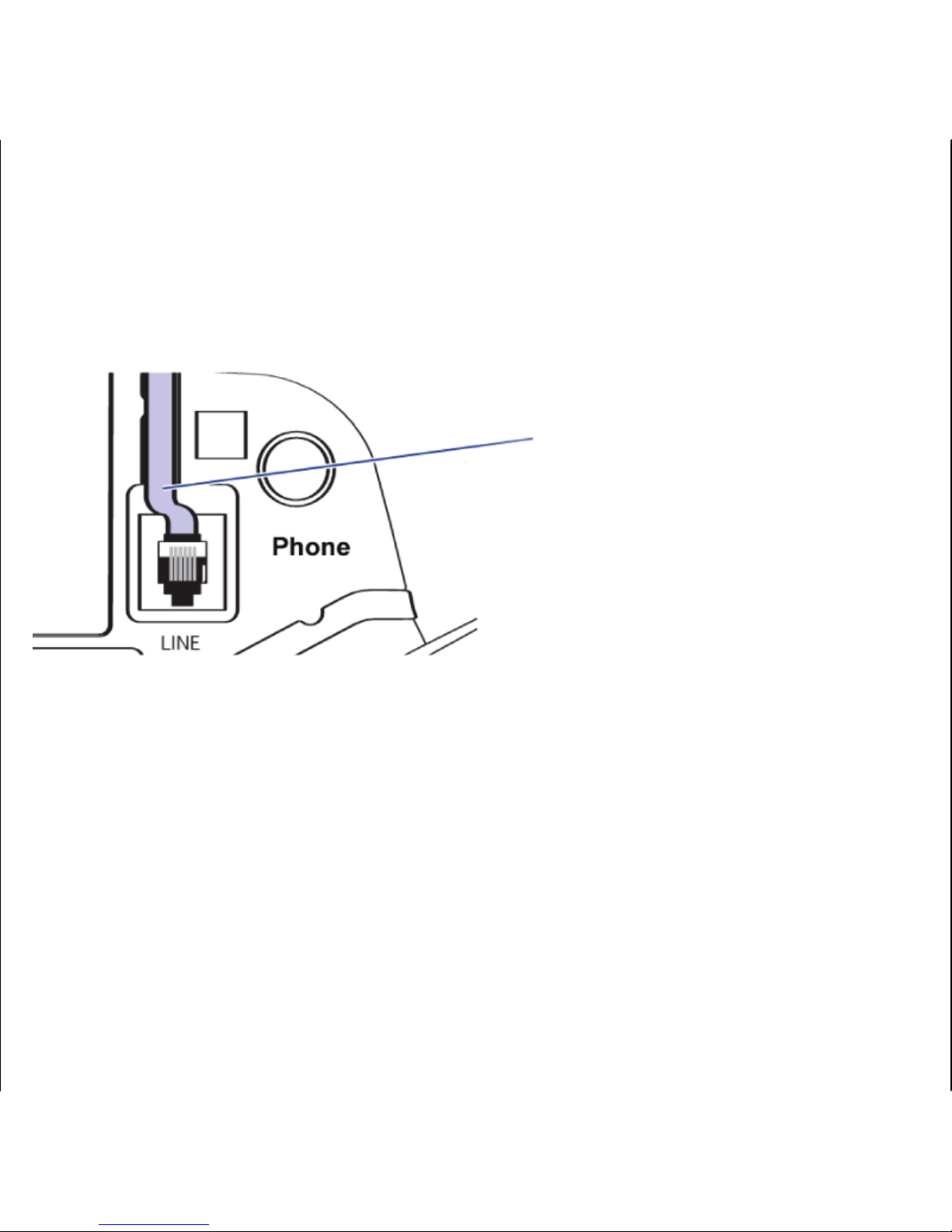
Disconnect the line cable
from your telephone and
plug into the LINE 2 port of
the Call Blocker
Page 5
INSTALLATION
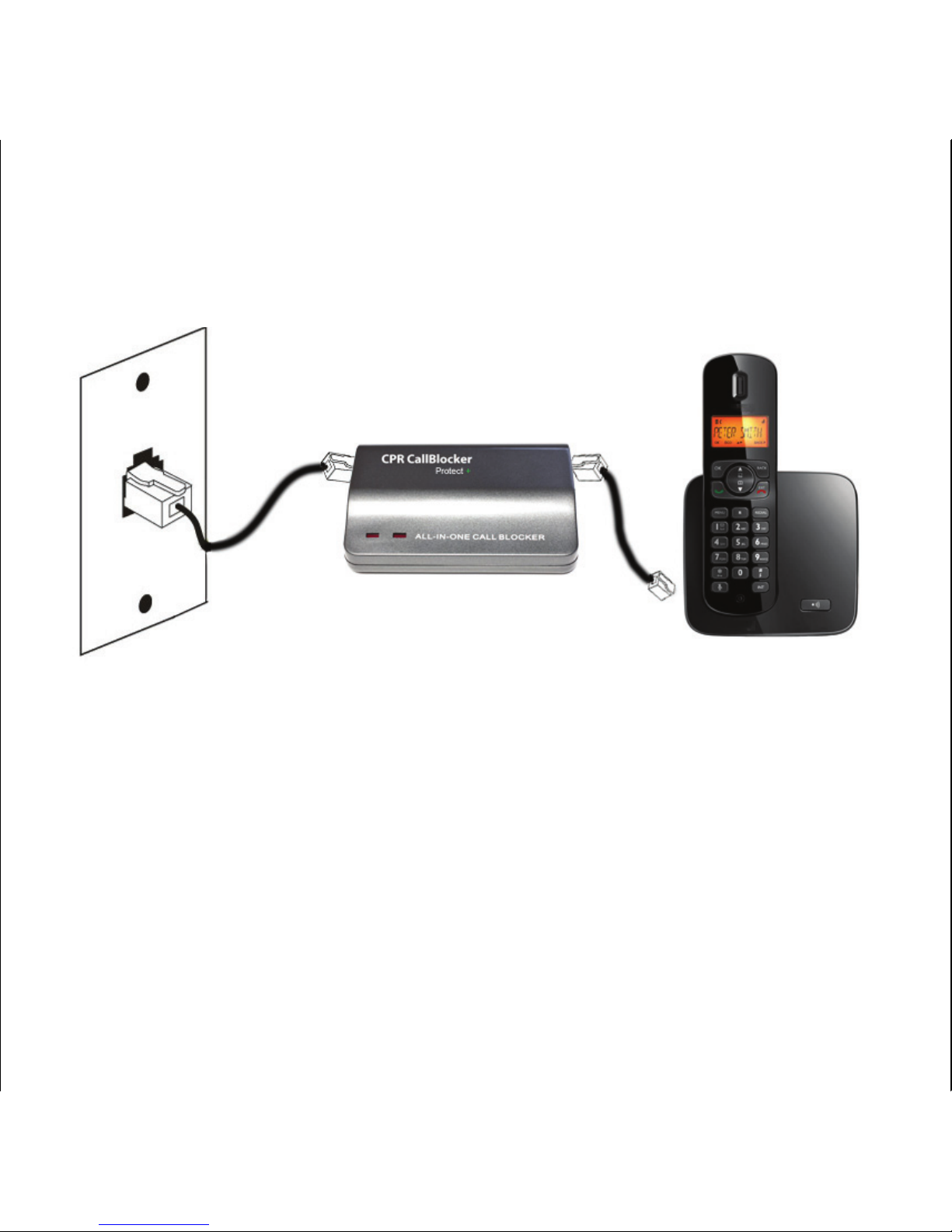
DIAGRAM-IN-LINE
Line
Cable
Short Black
Cable Provided
Telephone
3
Main Wall
Socket
Page 6
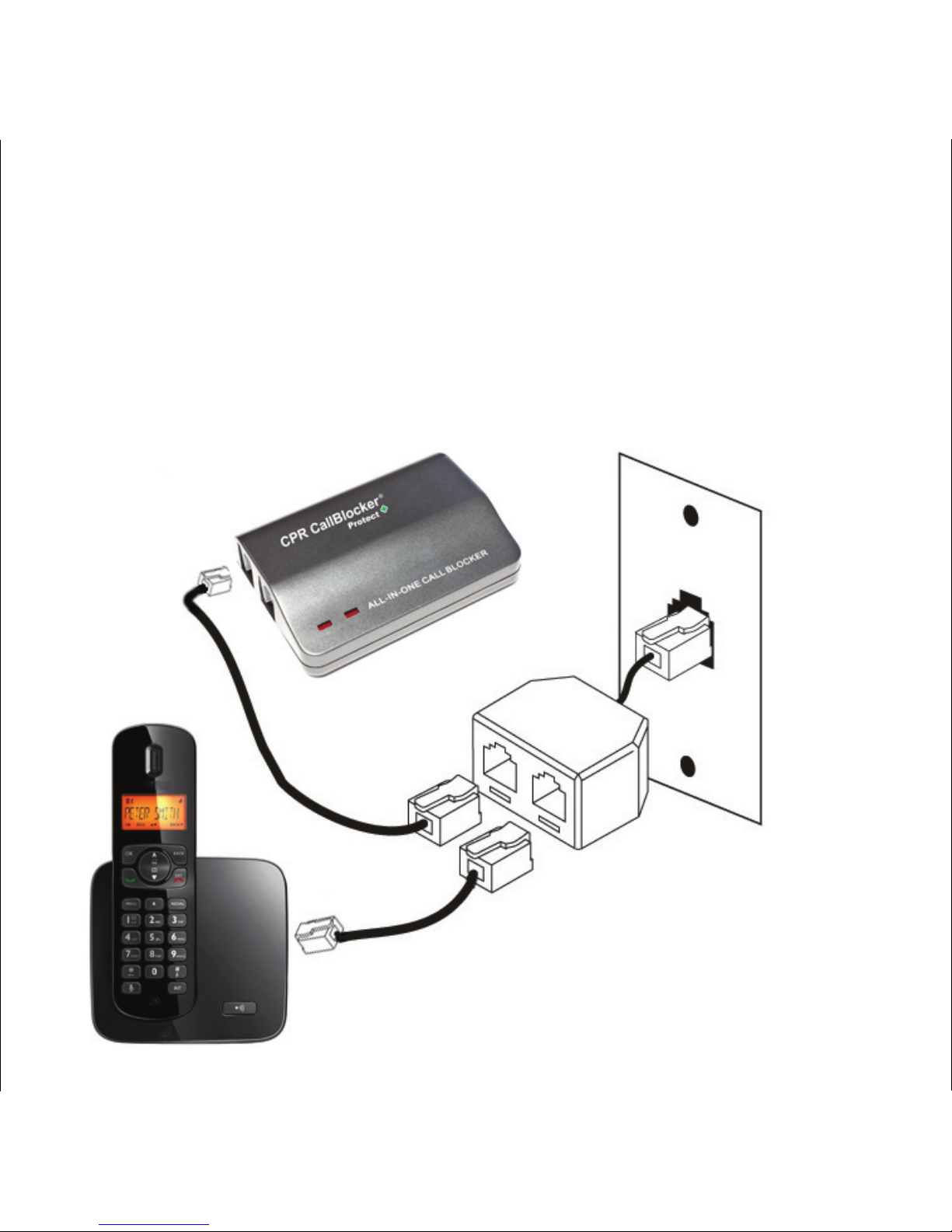
Connect the additional line cable
from the splitter to the LINE 2 port
Telephone
Additional
Line Cable
Line Cable
Main Wall
Socket
4
Splitter
If caller ID or ringing issues arise with the IN-LINE setup then change to a PARALLEL
connection.
INSTALLATION
DIAGRAM-PARALLEL -
(FOR OUTSIDE THE UK)
Page 7

PROGRAMMING
CODES
5
Programming a number into "Allowed" list
1. Pick up the telephone and input
* * 8 # you will hear a “Beep”
2. Then enter the telephone number you wish to be allowed through, followed
by the
# key,
You will hear a ‘beep’ after each # to conrm success.
3. Hang up to complete setup.
Erasing one number or area code from the "Allowed" list
1. Pick up the telephone and input
* * 6 # you will hear a “Beep”
2. Then enter the telephone number you wish to delete followed by the # key,
You will hear a ‘beep’ after each # to conrm success.
3. Hang up to complete setup.
Resetting the Call Blocker back to factory settings
1. Get a dial tone and input
* * 1 # * 1 #
You will hear a ‘beep’ after each # to conrm success.
Note: Three
“Beeps” indicates that an error has occurred - Either a number has
already been entered or the specied blocking function is already turned ON
Programming a number into "Allowed" list
1. Pick up the telephone and input
* * 8 # you will hear a “Beep”
2. Then enter the telephone number you wish to be allowed through, followed
by the
# key,
You will hear a ‘beep’ after each # to conrm success.
3. Hang up to complete setup.
Erasing one number or area code from the "Allowed" list
1. Pick up the telephone and input
* * 6 # you will hear a “Beep”
2. Then enter the telephone number you wish to delete followed by the # key,
You will hear a ‘beep’ after each # to conrm success.
3. Hang up to complete setup.
Resetting the Call Blocker back to factory settings
1. Get a dial tone and input
* * 1 # * 1 #
You will hear a ‘beep’ after each # to conrm success.
Note: Three
“Beeps” indicates that an error has occurred - Either a number has
already been entered or the specied blocking function is already turned ON
All programming codes can be turned ON or OFF, they come turned ON as defaultAll programming codes can be turned ON or OFF, they come turned ON as default
Page 8

FREQUENTLY ASKED QUESTIONS
6
Q. The red lights are not showing on my call blocker?
A. If you have the Call Blocker connected up using LINE 1 and TEL 1 and are unable to
display the red lights then switch the cables over to the LINE 2 and TEL 2 ports. The
same goes if you have the cables in the LINE 2 / TEL 2 ports, switch them over to the
LINE 1 / TEL1 ports.
Please note that the red lights only display when the phone has a dial tone.
Q. I am unable to enter the programming codes?
A. Some telephone line providers network codes conict with the call blocker’s
* *
command. Just ignore the operators voice and enter the codes , they will go through.
Q. Do I need caller ID for this product to work?
A. Yes, caller ID should be enabled on your telephone line for the product to work
eectively.
Q. Can I use any telephone with the CPR Call Blocker?
A. The CPR Call Blocker will work with a wide range of modern telephone equipment cordless DECT phones , corded phones and cordless analogue phones.
Q. Will the CPR Call Blocker work with my internet connection?
A. Yes, the CPR Call Blocker will work alongside all types of ADSL, DSL and Fibre optic
connections.
Q. Can I use the CPR Call Blocker with extension telephone sockets?
A. Yes, you can but problems can arise. The CPR Call Blocker is designed to work on one
telephone socket (main socket). If you wish to have additional phones around the
house it’s best to use a DECT (Digital Enhanced Cordless Telephone) setup with multiple
cordless handsets so that the Call Blocker can protect all the phones connected to the
base station at the main socket.
Q. The red lights are not showing on my call blocker?
A. If you have the Call Blocker connected up using LINE 1 and TEL 1 and are unable to
display the red lights then switch the cables over to the LINE 2 and TEL 2 ports. The
same goes if you have the cables in the LINE 2 / TEL 2 ports, switch them over to the
LINE 1 / TEL1 ports.
Please note that the red lights only display when the phone has a dial tone.
Q. I am unable to enter the programming codes?
A. Some telephone line providers network codes conict with the call blocker’s
* *
command. Just ignore the operators voice and enter the codes , they will go through.
Q. Do I need caller ID for this product to work?
A. Yes, caller ID should be enabled on your telephone line for the product to work
eectively.
Q. Can I use any telephone with the CPR Call Blocker?
A. The CPR Call Blocker will work with a wide range of modern telephone equipment cordless DECT phones , corded phones and cordless analogue phones.
Q. Will the CPR Call Blocker work with my internet connection?
A. Yes, the CPR Call Blocker will work alongside all types of ADSL, DSL and Fibre optic
connections.
Q. Can I use the CPR Call Blocker with extension telephone sockets?
A. Yes, you can but problems can arise. The CPR Call Blocker is designed to work on one
telephone socket (main socket). If you wish to have additional phones around the
house it’s best to use a DECT (Digital Enhanced Cordless Telephone) setup with multiple
cordless handsets so that the Call Blocker can protect all the phones connected to the
base station at the main socket.
Page 9

If you need further help setting up the CPR Call Blocker, please email or phone through to our
technical support team who will be more than happy to help with any problems or queries you
may have.
CPR Call Blocker
York Chambers
York Street
Swansea
UK
SA1 3LZ
E-mail : [email protected]
UK Tech support: 0800 652 7780
Europe Tech support: (+44) 800 652 7780
USA Tech support: (408) 872-6822
Australia Tech Support: (02) 8005 5793
© CPR Global 2014
Patent Number - 1200049.3
If you need further help setting up the CPR Call Blocker, please email or phone through to our
technical support team who will be more than happy to help with any problems or queries you
may have.
CPR Call Blocker
York Chambers
York Street
Swansea
UK
SA1 3LZ
E-mail : [email protected]
UK Tech support: 0800 652 7780
Europe Tech support: (+44) 800 652 7780
USA Tech support: (408) 872-6822
Australia Tech Support: (02) 8005 5793
© CPR Global 2014
Patent Number - 1200049.3
NEED MORE
HELP?
Disposal instructions
Waste electronic equipment should be
separated from your normal household
waste and taken to your local recycling
centre for disposal, or back to where you
bought the equipment. Proper recycling of
electronic equipment will help the environment..
7
Page 10

For more products from CPR Global, please visit our website
www.cprdistribution.com
and view our fantastic range of innovative products
Page 11

For more products from CPR Global, please visit our website
www.cprdistribution.com
and view our fantastic range of innovative products
 Loading...