

Page 1
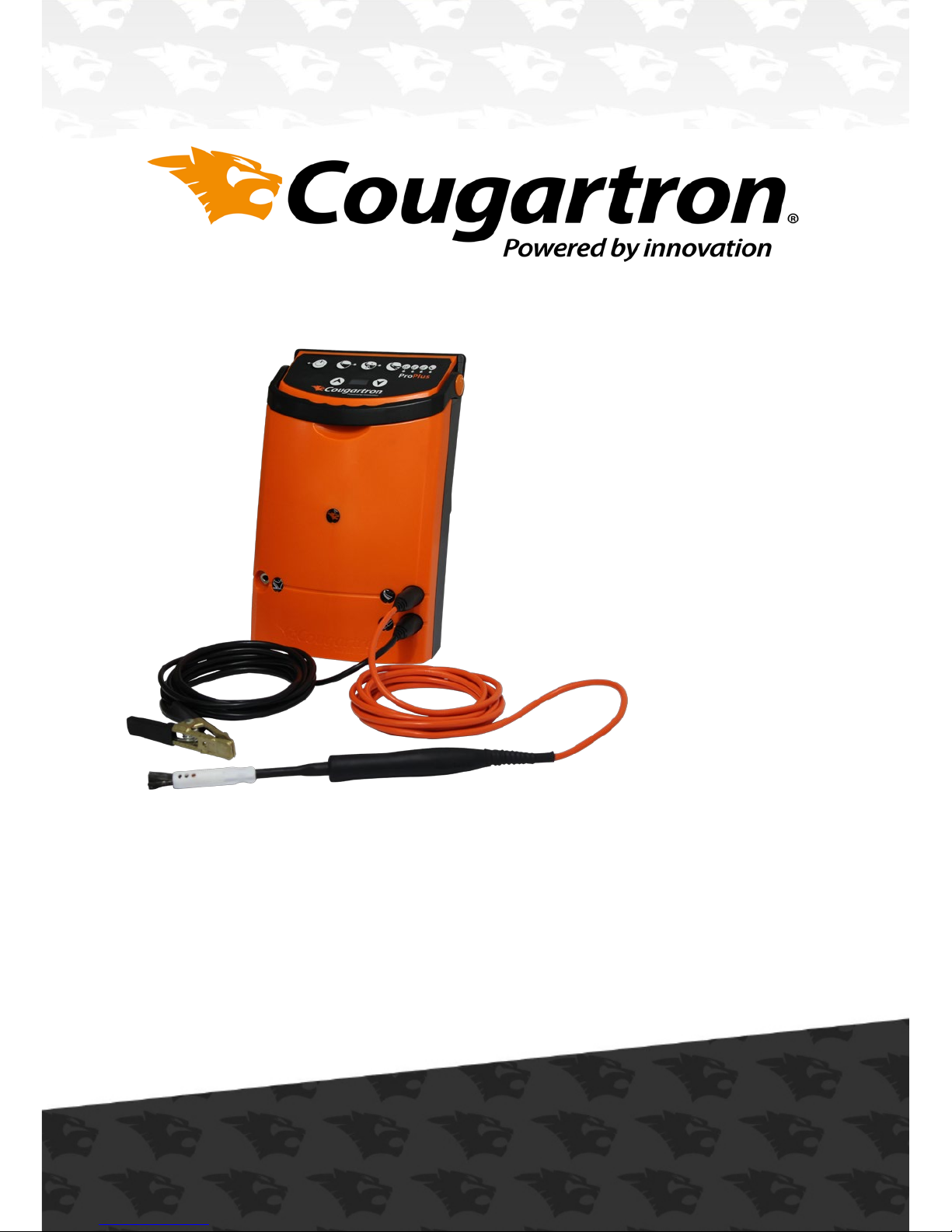
User Manual
ProPlus
Page 2
Dear Customer
Thank you for purchasing a Cougartron ProPlus Weld Cleaning
Machine.
We would like to reward you with an exclusive extended 2 year
warranty!
To qualify for this, please ll in the all the information below and send
it to us by the below details;
Email: [email protected]
Fax: 0045 4346 2050
Alternatively you can register Online: www.cougartron.com/register
We love hearing from our customers and are very happy to help if you
have any questions.
Best Regards
The Cougartron Team
Congratulations!
a.
Machine Model:
Serial Number:
Customer Name:
Date of Purchase:
Customer Phone Number:
Customer Address:
Distributor Name and Address:
Customer Email:
(we hate spam, we won’t send you any)
Scan the Code to register
your machine online
Page 3

Foreword
This User Manual is a very important tool!
Keep it with the machine at all times. The purpose of this manual is to
provide users with the necessary operating procedures and precautions, essential for the safe and proper operation of the Cougartron
Machine.
Due to continuous improvements, BM Group I/S reserves the right to
make specication changes.
FOR:
• Accident reporting
• Product safety publications
• Current owner updates
• Questions regarding product safety
• Standards and regulations compliance information
• Questions regarding special product applications
• Questions regarding product modications
CONTACT
Your local Cougartron distributor. You can nd out your local
distributor by contacting;
[email protected]
0045 4346 2010
BM Group I/S
Marielundvej 48D
2730, Herlev
Denmark
b.
Page 4

Contents
Subject Page
1. Introduction 2
2. Safety Information 3 - 4
3. Description of Apparatus 5 - 6
3.1 Control Box 5
3.2 Leads 6
3.3 Handle and Wand 6
3.4 Earth Clamp 6
4. Cougartron Cleaning Method 7 - 8
4.1 Preparation 7
4.2 Assembly of the ProPlus 7
4.3 Cleaning Fluid 7
4.4 Operation 8
5. Power and Function Settings 9-10
5.1 ProPlus Power Settings 9
5.2 ProPlus Function Settings 10
6. Maintenance 11
7. Consumables 12
7.1 Cougartron Brushes 12
7.2 Cougartron Sliding Shrouds 12
7.3 Cougartron Fluids 12
8. Troubleshooting 13-14
9. Warranty Terms 15
10. Notes 16
1.
Page 5

1. Introduction
The Cougartron ProPlus is a metal cleaner which uses the interaction
between an alternating electric current (ac) and a conductive uid to
remove weld marks from stainless steel.
The Cougartron ProPlus will also polish metal, by passing a negative dc
current through the same conductive uid.
This is called electro-polishing.
By using the Etching mode, and replacing the standard uid with an
etching solution, the Cougartron ProPlus, can Etch the pattern in an
overlay stencil onto the surface of the metal.
The Cougartron ProPlus comprises a machine unit and wand with a
soft bristle tip which, after wetting with a conductive uid, is applied
to the weld mark in a painting action. This unique cleaning system is
quick, eliminates the need for pickling paste, or abrasives, and
provides a superior nish.
The Cougartron ProPlus Cleaning uid is based on phosphoric acid
and supplies may be purchased from your supplier in quantities of one
litre or ve litre bottles. Refer to www.cougartron.com for your
nearest authorized supplier.
The Cougartron ProPlus is light and portable, and is powered by a 230
volts A.C. mains power source. The Cougartron ProPlus is provided
with a one year warranty on the control box, provided the unit is used
only for the purpose for which it was designed. Cougartron
accessories (brushes, insulating shrouds and leads) are not covered by
the warranty
2.
Page 6

2. Safety Information
Protect yourself and others by observing all safety information,
warnings and cautions. Failure to comply with instructions could result
in personal injury and/or damage to the product or property.
Read this documentation carefully before operating the equipment.
Please retain these instructions for future reference.
Before using the Cougartron ProPlus, make sure the work environment
is well ventilated and away from any combustible substances. Ensure
that all required equipment is available.
Do not use the Cougartron ProPlus for any purpose other than that
described in this manual. Failure to observe this warning may result in
permanent damage to the Cougartron ProPlus, cause damage to the
workpiece, cause injury to the operator and void the warranty.
The Cougartron ProPlus is amongst the safest appliances in its class.
However some precautions must be taken with the use of the
Cougartron ProPlus, as with any electro-cleaner.
• The Cougartron ProPlus uses mild acids; gloves should be used to
avoid prolonged contact with any of the uids.
• Goggles should be worn to prevent uid being splashed in the
eyes.
• Fluid spilled on the skin should be washed o as soon as practical.
• Material Safety Data Sheet is available for all uids ands hould be
read before use.
• The brush gets extremely hot, around 200°C degrees centigrade.
Be very careful touching the brush. Do not place the brush near
any ammable materials.
• The Cougartron ProPlus produces an electric current which may
generate small sparks between the brush and the metal being
cleaned.
3.
Page 7

• Hydrogen gas may also be generated (which is an invisible but
explosive gas). Always use the apparatus in a well ventilated area.
Do not use near ammable substances, or in areas where dense
ammable gases (such as petrol vapour) may accumulate.
• The Cougartron ProPlus uses 240V AC only. Do not use with any
other voltage. If the power cord is damaged or if the Cougartron
ProPlus has been dropped from a height and damaged, do not use
the unit. Contact your Cougartron supplier to have the Cougartron
ProPlus inspected and repaired.
• Do not short out the terminals, or use the Cougartron ProPlus with
a damaged wand or cables. Doing so may permanently damage
the Cougartron ProPlus and cause damage to the workpiece being
cleaned. The high currents involved may also cause intense heating of the shorted or damaged part, which could result in burns to
the operator.
• Ensure that the Cougartron ProPlus is located where it cannot
easily fall and cause injury. Ensure that the cables do not present
a trip hazard.
4.
Page 8
3. Description of Apparatus
3.1 ProPlus Control Box
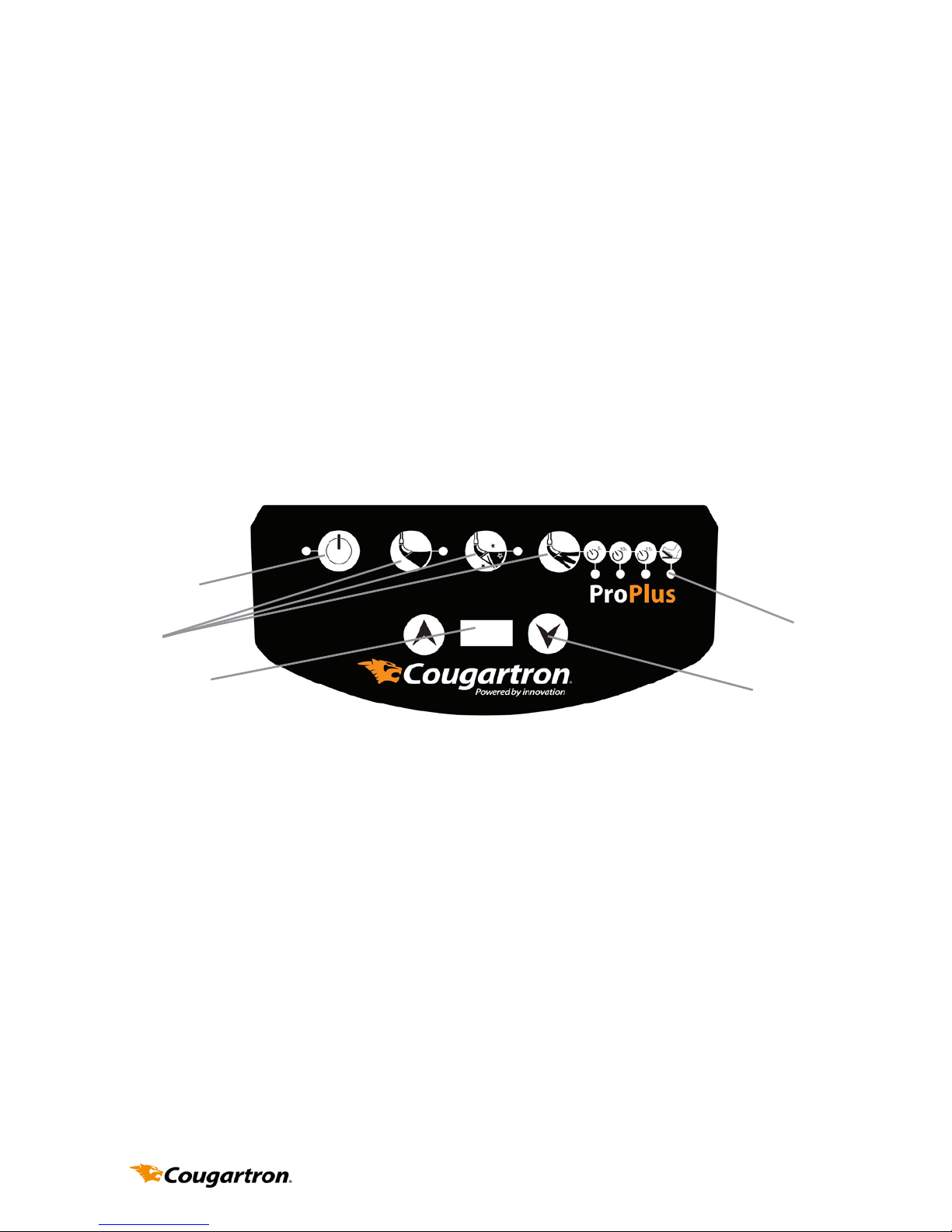
The mains power ON/OFF switch is on the rear of the unit.
The Control Panel is the sloping panel on the top of the Cougartron
ProPlus containing the Power setting switches and the Function
selection switches. Each Function has a LED that lights up when that
function is active.
The Functions are selected using the buttons along the top of the
Conrol Panel. The dierent functions alter the way the Cougartron
ProPlus works to achieve dierent eects (i.e., cleaning, polishing,
etching)
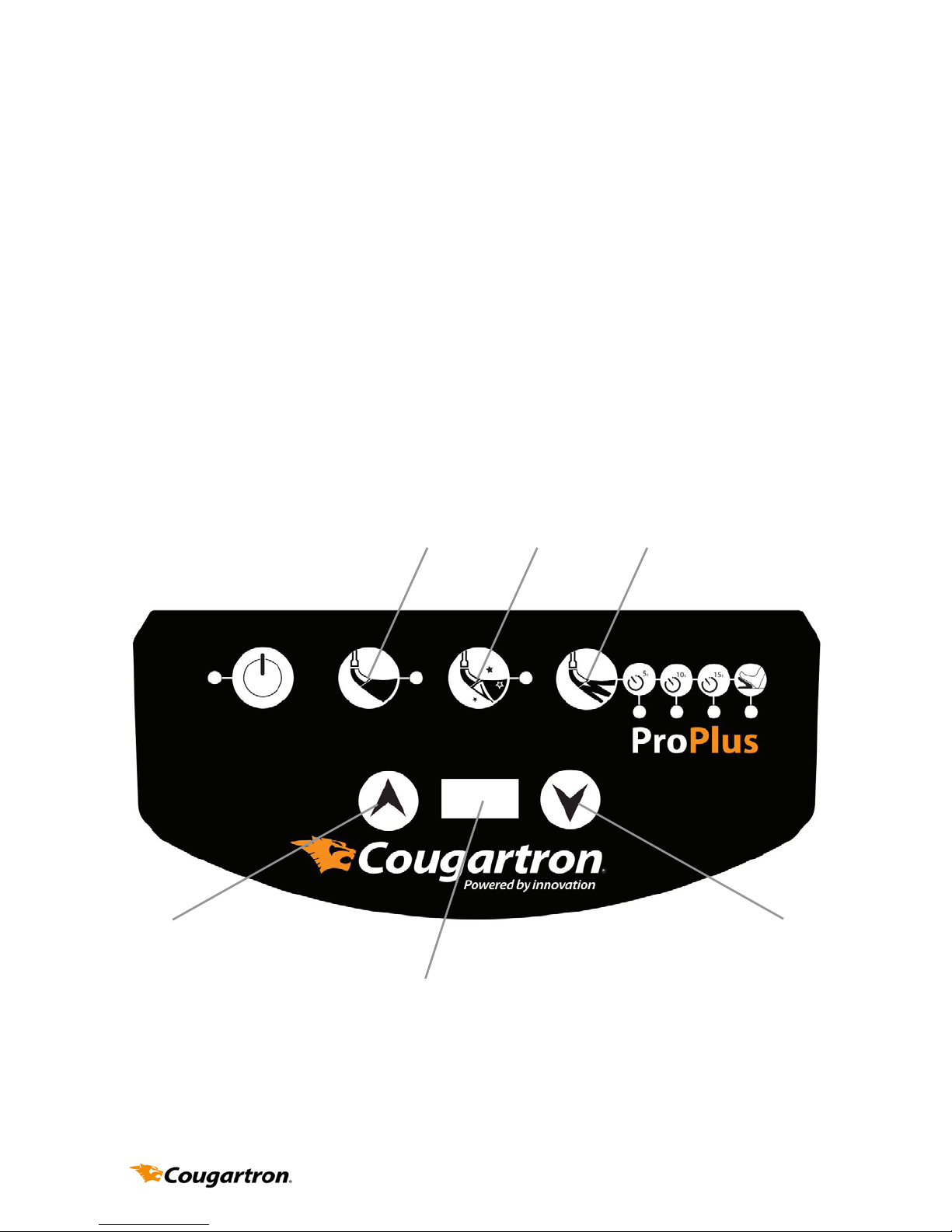
The Power is adjusted by the 2 buttons either side of the small screen.
The power is adjustable in increments of 5 amps from 20 to 50. The
screen displays how many amps the machine is running on. The Power
setting switch is used to adjust the amount of voltage applied to the
brush, and therefore how fast the Cougartron ProPlus cleans.
The two sockets on the front of the machine towards the bottom right
hand side are the sockets into which the leads are connected. The
orange power lead connects into the socket with the “brush” icon and
the earth lead connects into the socket with the “clamp” icon.
The socket on the front of the machine towards the bottom left hand
side is the socket for the Etching Footswitch. This can be found in the
Cougartron ProPlus Etching Set. (Part Number WELC4035)
5.
LEDs
Power
On
Functions
Power
Display
Power
Control
Page 9

3.2 ProPlus Leads
The leads are 4 metres long, and connect the Cougartron ProPlus to
the Earth Clamp and the Handle/Wand. The Orange lead is the Power
lead, used for cleaning and the Black lead is the earth lead.
3.3 ProPlus Handle and Wand
The power cable extends in one piece from the cable end connector at
the Control Box, through to the end of the Wand. The Handle is
insulated from electricity and heat, and can be held safely. The Wand
screws into Handle. The brush tip screws into the Wand.
The brush tip bristles are conductive and can withstand high
temperatures. The brush tip has a teon sliding-shroud covering
the tip base to prevent direct shorting of the current to the work. The
shroud can be moved along the wand to change the prole of the
brush bristles. The shroud must be tted to the wand at all times when
the Cougartron ProPlus is in use. Extra shrouds can be purchased from
your supplier or from Cougarton at www.cougartron.com
The Cougartron ProPlus cleaner will survive the occasional, brief,
accidental short of the brush shell. A prolonged short of the shell may
cause damage to the Cougartron ProPlus cleaner, and will void the
warranty. Please ensure that the shroud always covers the shell.
The brush tip should be removed and cleaned after use and before
storage.
3.4 ProPlus Earth Clamp
The Earth Clamp is a spring loaded clamp for connecting one
terminal of the Cougartron ProPlus to the work piece.
The Earth Clamp can become dirty or coated in residue and should be
cleaned regularly.
6.
Page 10
4. Cleaning Method
4.1 Preparation
1. Inspect unit and all cables for damage before use.
2. Ensure the unit is dry.
3.
Ensure the work environment is well ventilated and away from any
combustible substances.
4. Ensure that cables do not present a trip hazard.
5. If the items to be cleaned are small, place the parts in a plastic container
that can hold acidic uids safely.
6. Parts will need to be sprayed with the recommended
7. Cougartron neutraliser or washed down with water after cleaning.
Ensure there is ready access to water and a suitable place for washing.
8. Wear suitable personal protective equipment as recommended in the
MSDS. The minimum requirement is for gloves to protect hands from the
uid, and goggles to prevent uid splashing into the eyes.
4.2 Assembly of the ProPlus
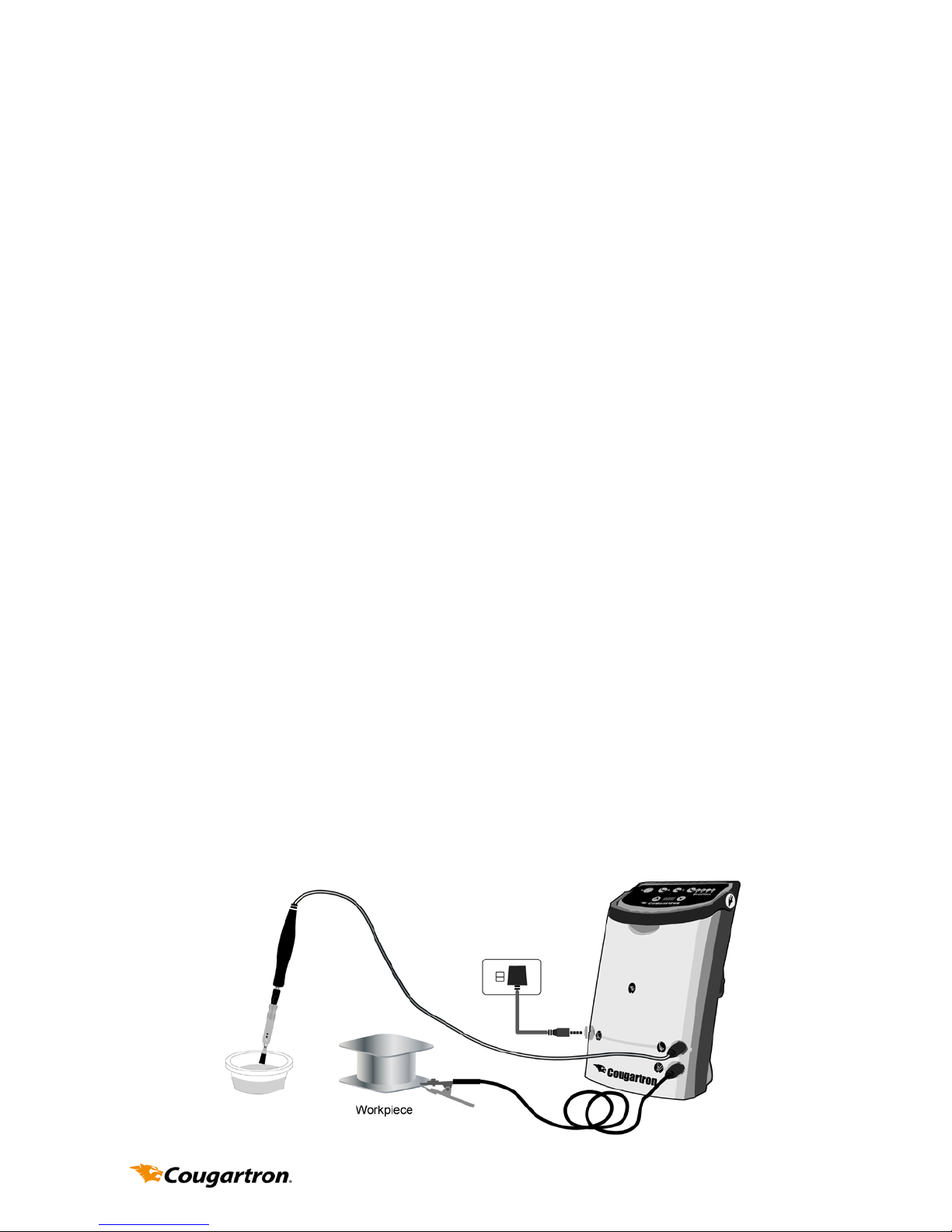
1. Attach connector of orange cable to top connector of Cougartron ProPlus
Unit.
2. Screw wand into handle.
3. Place shroud on brush and screw into wand.
4. Attach connector of black cable to bottom connector of the Cougartron
ProPlus Unit.
5. Set POWER switch to “OFF”.
6. Attach power cord to mains outlet and Cougartron ProPlus Unit.
7. Attach clamp to workpiece.
7.
Page 11

4.3 Cleaning Fluid
Pour a reasonable quantity of the Cleaning Fluid into a shallow container.
Place the container close to the work because the tip will be dipped into the
uid regularly during operation.
4.4 Operation
1. Set POWER control to STANDBY. Always use this setting when connecting
the clamp or changing the tip.
2. Ensure the power cord is connected to a suitable 240V AC power outlet
and connected to the Cougartron ProPlus power socket.
3. Turn the On/O switch to ON. The amp reader on the screen will begin
at 20
4. Make sure the brush tip has its insulating shroud and the insulation on
the wand is undamaged.
5.
Ensure the Cougartron ProPlus is switched on and all equipment is
correctly connected as described in section 4.2.
6. Select power level and operating mode using the push switches. See
section 5 below for details.
7. Dip brush in cleaning uid and apply brush tip to weld area to be cleaned.
Use only recommended cleaning uids, see S7.2.
8. Ensure brush and work area remain wet with the uid during cleaning.
9. Apply brush only for as long as necessary to remove discolouration.
Prolonged application may aect surface quality.
10. Some light sparking may occur where brush tip contacts workpiece,
particularly on higher power settings, and this is normal. Excessive sparking for a prolonged time in one area may cause surface pitting.
11. When desired surface nish is achieved, turn the Cougartron ProPlus
Power Control to OFF.
12. After use put the brush down on a non-ammable surface as it may be
very hot.
13. Be careful touching the work as it may be hot.
14. Rinse thoroughly with clean water to remove all traces of cleaning uid.
To ensure acidic residue is removed, use the recommended Cougartron
neutralising uid, see S7.3.
8.
Page 12
5. Power and Function Settings
5.1 ProPlus Power Settings
Choose the cleaning intensity required by selecting the appropriate
setting using the Power Control.
The below settings are what we reccomend;
• 20-30 amps for thin material and light discolouration
• 30-40 amps for normal tig welds and mild discolouration
• 40-50amps for thick material and heavy discolouration
9.
Power Up Power Down
Power Display
Screen
CLEAN POLISH ETCH
Page 13
10.
5.2 ProPlus Function Settings
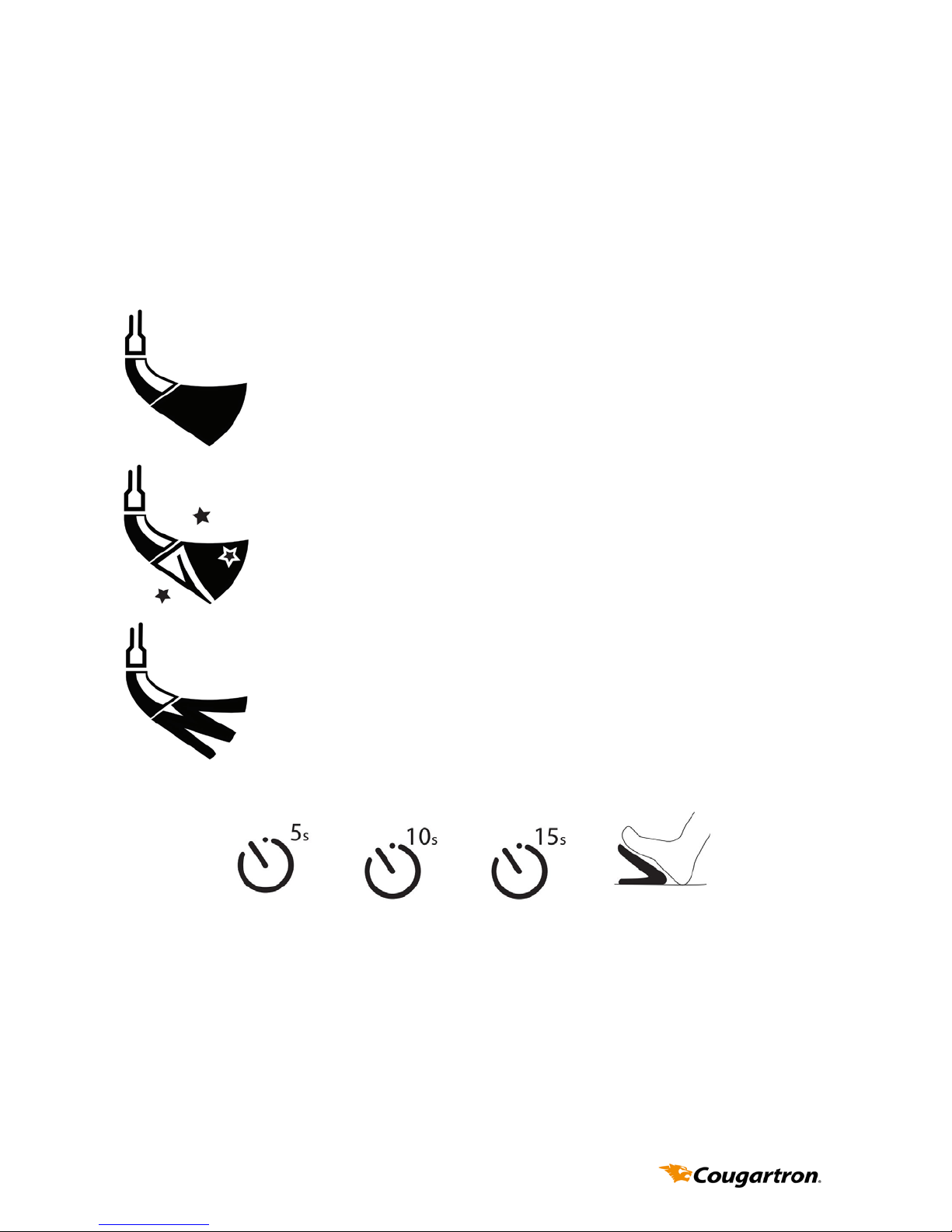
Choose the type of function required by selecting the
appropriate setting using the function selection buttons at the top of
the control panel.
CLEAN - This mode provides the fastest cleaning at each
power setting. However, prolonged use may cause a
milky appearance on the surface of the metal. If this
happens, use POLISH to rectify.
POLISH - This mode provides metal polishing. Use this
grade to repair a dull white surface, including one
caused by over-use of CLEAN.
ETCH - This mode provides surface marking, when used
with the appropriate power setting and marking uid.
This model that you own also has advanced etching
cababilities incorporated into its electronics.
Each rst 3 icons left to right represent the time that the power is
owing for. 5 sec, 10 sec and 15 sec. The footswitch setting is
the last icon on the right and to use this setting you need the
Cougartron Footswitch. This is part of the Cougartron ProPlus Etching
Set. (WELC4035)
Page 14
11.
6. Maintenance
• When not in use, ensure the On/O switch is OFF. The power light
on the front panel should not be illuminated and the red band on
the On/O switch should not be visible.
• Rinse brush with water to remove excess cleaning uid.
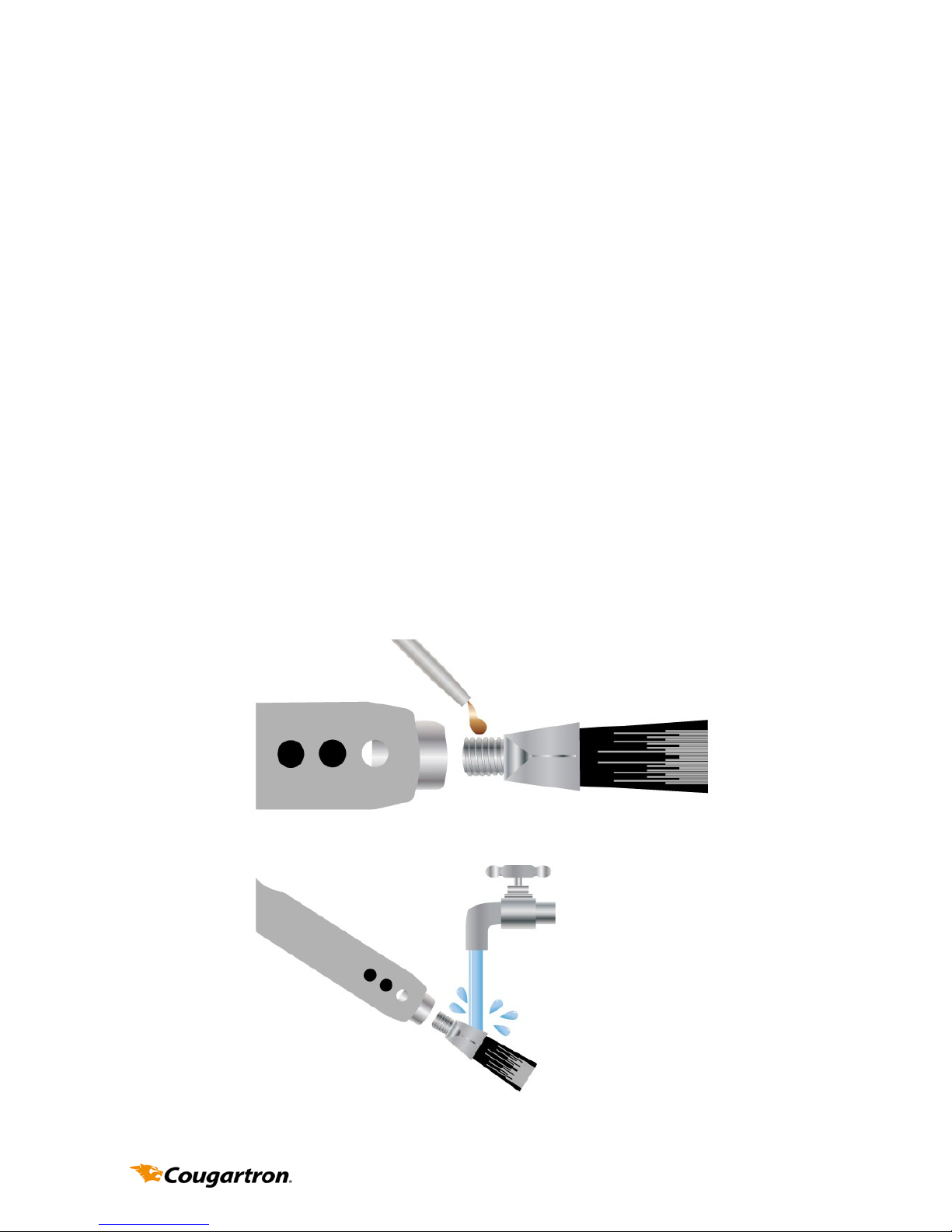
• At completion of a work shift, unscrew the brush from wand. Re-
move the brush from the insulating shroud and rinse brush, shroud
and end of wand with water to remove cleaning solution. Allow to
dry before re-assembling.
• Before assembling the brush to the wand, coat threads with copper lled anti-seize compound. This will exclude the acidic solution
from the joints and prevent corrosion.
• Rinse clamp with water to remove solution and prevent corrosion.
• Use a wet cloth to wipe uid splashes o the Cougartron ProPlus
control unit. After some time splashes and marks may accumulate
and become dicult to remove.
Copper Grease
Wand
Brush
Rinse Brush
components
after use
Page 15

12.
7. Consumables
Consumable supplies are available from authorised Cougartron
distributors.
7.1 Cougartron Brushes
The brush will wear down with use and should be replaced when the
bristles reach approximately 12mm in length.
7.2 Cougartron Sliding Shrouds
The insulating sliding shroud may become damaged or heat aected.
If this happens, replacement shrouds may be purchased.
7.3 Cougartron Fluids
A range of genuine Cougartron uids is available. Please check with
your local Cougartron distributor for details of uids available in your
region.
Types of uids include:
• Pre-Weld Cleaning Fluids: to remove dirt and oil prior to welding to
minimise contamination during welding.
• Weld Cleaning Fluids: for cleaning and, optionally, polishing.
• Neutralising Fluids: to ensure removal of all cleaning uid residue.
• Finishing Fluid: to provide a clean, mark-free nish.
• Marking Fluids: can be used with custom stencils to indelibly mark
metals.
Page 16

13.
8. Troubleshooting
If the Cougartron is not operating correctly, please refer to the
following trouble shooting guide before contacting your Cougartron
distributor.
8.1 Green Power Light on the Control Panel Not Illuminated
• Ensure the On/O switch on the back is ON.
• Ensure the power cable is pushed completely into the socket on
the back of the Cougartron.
• Ensure power is present at the power point (possibly by plugging
in another appliance, such as an inspection light).
• If the Cougartron was being used prior to it turning o, the unit
may have over-heated. Wait 10 minutes for the unit to cool down
before trying to use it again.
8.1 Green Power Light on the Control Panel Illuminated but the
Machine is not working
• Ensure the Power Control is not set to STANDBY.
• Ensure the cables are securely plugged into the front of the
Cougartron.
• Ensure the clamp is gripping the work securely. Sometimes the
clamp position may need adjusting to make a good contact. If dirt
or debris has built up on the clamp, clean it as this may prevent a
good contact
• being made.
• Ensure the brush is wet with uid.
• Ensure that the work is conductive. If the metal has a plastic lm or
a thick layer of oxide, the current cannot ow through the work. A
mechanical or chemical method may need to be used to remove
any insulating lm before the Cougartron can be used.
• Examine all cables for damage and ensure they are properly
connected.
Page 17

• Ensure the brush is securely screwed into the wand. NOTE: Be
careful when checking, as a loose connection may be extremely
hot.
• Check screw threads on the handle, wand and brush for dirt and
contamination and clean if required.
Contact your Cougartron distributor or visit the website for more help
www.cougartron.com
14.
Page 18

15.
9. Warranty Terms
This warranty is given by BM Group I/S of Marielundvej 48D, 2730, Herelv, Denmark,
Tel: +45 4346 2010, Email: [email protected] The benets given by each
warranty set out in this document are in addition to any other rights and remedies
you may have under a law in relation to the services or goods to which the warranty
relates.
What this warranty covers
This warranty applies to any defects in the goods that appears within 12 months
from the date of delivery of the goods to you. To claim under this warranty, the defects must be notied to Cougartron and the goods returned to Cougartron within
two weeks of their appearance. Cougartron will, at its option, replace or repair the
goods within a reasonable time of receiving a valid warranty claim. Cougartron will
pay for the repair or replacement but you must pay all other costs including all transport costs of returning the defective goods to Cougartron and Cougartron delivering
the repaired or replacement part back to you.
How to make a claim
If you want to make a claim under your warranty, please contact Cougartron in
writing by sending a prepaid letter to BM Group I/S, Marielundvej 48D, 2730, Herelv,
Denmark, or email to [email protected]. You must include your full name,
address and contact telephone number and the details of the defect in relation to
which you make your claim. Cougartron will tell you whether you need to return the
goods to BM Group I/S or the approved local distributor. You will need to return the
goods together with all accessories and parts for a full assessment and report.
Additional limitations, exclusions and requirements
This warranty does not extend to:
• consumables such as the brush, insulating shroud and wand;
• any defect caused by normal wear and tear or incidental or inconsequential
damage;
• any defect caused by misuse, negligence or other abuse of the goods;
• any defect caused by accidents or alterations;
• goods that have not been cleaned and maintained in accordance with the user’s
manual supplied with the goods;
• loss or damage, including consequential loss or damage, to your work or facili-
ties arising out of or in connection with the use of the Cougartron Machine; or
• unless otherwise expressly stated, any right to be reimbursed or compensated
for physical or nancial injury, loss, damage, expense, time or inconvenience
(whether direct or indirect) arising out of the occurrence of the defect in the
product or your inability to use the product.
To Qualify for an exclusive 24 month warranty please go to
www.cougartron.com/register and ll in your details
Page 19

16.
10. Notes
_________________________________________________________
_________________________________________________________
_________________________________________________________
_________________________________________________________
_________________________________________________________
_________________________________________________________
_________________________________________________________
_________________________________________________________
_________________________________________________________
_________________________________________________________
_________________________________________________________
_________________________________________________________
_________________________________________________________
_________________________________________________________
_________________________________________________________
_________________________________________________________
_________________________________________________________
_________________________________________________________
_________________________________________________________
_________________________________________________________
_________________________________________________________
_________________________________________________________
_________________________________________________________
_________________________________________________________
_________________________________________________________
_________________________________________________________
Page 20
Proudly Distributed By:
Machine Serial: __________________
www.cougartron.com
 Loading...