

Page 1
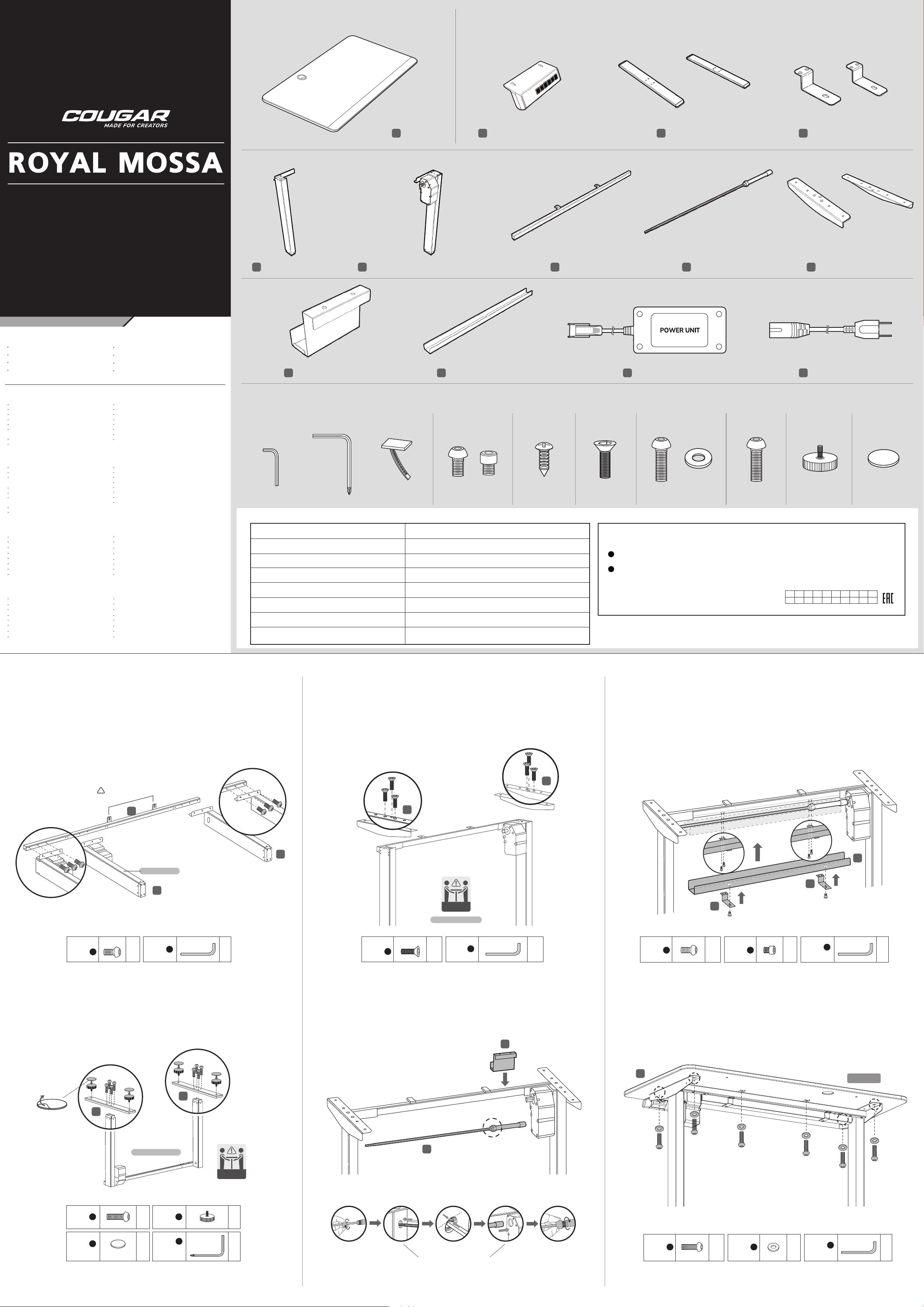
PACKAGE CONTENTS
CARTON #1
CARTON #2
ELECTRIC STANDING DESK
FEATURES
Electric Height Adjustment
Premium and Ergonomic Desktop
Grommet Design for Wire Organization
LCD Height Display Controller
4 Programmable Memory Settings
Panel Lock for Avoiding Risk
Stable and Reliable Lifting System
Shields for Transmission Shaft and Motor
CARTON #2
Left Lifting Column
E
Bracket for Power Unit Cover of Drive Rod Power Unit Power Cord
J K L M
A
Desktop
Right Lifting Column with Motor Main Beam Drive Rod L-shape Supports
F
B C D
G H I
Holders for Rod CoverColumn FootsLifting Controller with Cables
DEUTSCH
Elektrische Höhenverstellung
Hochwertige und ergonomische Tischplatte
Tüllen für die Organisation von elektrischen Kabeln
Steuerung der LCD-Höhenanzeige
4 Speichereinstellungen
Verriegelung des Bedienfelds zum Schutz vor
versehentlichem Kontakt
Stabiles und zuverlässiges Hebesystem
Schutzvorrichtungen für Antriebswelle und Motor
FRANÇAIS
Réglage électrique de la hauteur
Plateau de table premium et ergonomique
Conception des passe-fils pour l'organisation des
câbles électriques
Contrôleur d'affichage de hauteur LCD
4 réglages de la mémoire
Verrouillage du panneau pour éviter tout contact
involontaire
Système de levage stable et fiable
Protections de l'arbre d'entraînement et du moteur
한국어
전동 높이 조절
프리미엄 인체공학적 데스크탑
전선 정리를 위한 단춧구멍 디자인
LCD 높이 디스플레이 컨트롤러
4개의 메모리 설정 그룹
우발적인 터치를 방지하기 위한 패널 잠금
안정적이고 안정적인 리프팅 시스템
구동축 및 모터 가드
简 中
电动桌面高度调节
高级和符合人体工程学的桌面设计
桌面出线孔设计易于理线
LCD高度显示控制器
4组高度记忆设置
面板锁定避免误触
稳定而可靠的升降系统
传动轴及马达防护罩
ESPAÑOL
Regulación eléctrica de la altura
Tablero premium y ergonómico
Diseño de ojal para organizar los cables eléctricos
Controlador de la pantalla de altura LCD
4 ajustes de memoria
Bloqueo del panel para evitar el contacto involuntario
Sistema de elevación estable y fiable
Eje de transmisión y protectores del motor
PORTUGUÊS
Ajuste de altura eléctrico
Tampo de mesa Premium e ergonómico
Desenho de grânulos para organização de cabos eléctricos
Controlador de ecrã LCD em altura
4 configurações de memória
Bloqueio de painel para evitar contacto inadvertido
Sistema de elevação estável e fiável
Eixo de transmissão e protecções do motor
日本語
電動高さ調節機能
プレミアムで人間工学に基づいたデスクトップ
ワイヤー整理のためのグロメット設計
液晶高さ表示コントローラー
4つのプログラマブルメモリ設定
不用意な接触を防ぐパネルロック
安定した信頼性の高い昇降システム
トランスミッションシャフトとモーターのシールド
繁 中
電動桌面高度調節
高級和符合人體工程學的桌面設計
桌面出線孔設計易於理線
LCD高度顯示控制器
4組高度記憶設置
面板鎖定避免誤觸
穩定而可靠的升降系統
傳動軸及馬達防護罩
ACCESSORY KIT
CARTON #2
Bag #1 Tools
M6
x 1
SPECIFICATIONS
Product Name
Preassembled Desk Frame
Desk Dimension (W x D x Thickness)
Height range (with desktop)
Travel Speed
Lifting Capacity
Noise level
Input
x 1 x 3
Bag #2 Bag #3 Bag #4 Bag #5 Bag #6 Bag #7 Bag #8
x 10 x 2 x 2 x 6 x 6 x 6 x 4x 4x 8
ROYAL MOSSA
2 stage columns and single motor desk frame
47 x 24 (in) ; 1200 x 600 (mm)
28 – 45 (in) ; 720-1150 (mm)
1 (in /sec) ; 25 (mm /sec)
176 (lb) ; 80 (kg)
≦50 decibels during motion
100-240V AC, 50/60Hz
ДАТА ИЗГОТОВЛЕНИЯ ПРОДУКЦИИ
год и месяц изготовления продукции указаны в серийном номере продукта.
(существует 2 способа определения даты изготовления, оба способа описаны ниже)
После S/N: первые две цифры означают год, вторые две – месяц изготовления.
A
Например, S/N: H1702000001 означает, что товар был произведен в феврале 2017 года.
B
После S/N: если указаны буквы, то две буквы представляют цифры из таблицы ниже,
и означают год, последующие две цифры – месяц изготовления.
Например, S/N: DAG02REVI000001 означает, что товар был произведен в феврале 2017 года.
БЪЛГАРИЯ
•
Подробни инструкции за употреба изтеглете от: https://cougargaming.com/bg
България QR код
A B C D E F G H I J
1 2 3 4 5 6 7 8 9 0
●
Например, AG = 17 = 2017 год
Put the “Left Lifting Column” and “Right Lifting Column with
1 3
Motor” on the ground.
Screw the “Main Beam” on both columns.
Holes aim at this direction.
!
G
E
Right column
F
Reversely turn and stand the structure and install the
“L-shape Supports.”
I
I
MOVE
WITH 2 PEOPLE
Stand the structure
5
Install the “Cover of Drive Rod” with “Holders.”
5-2
K
D
5-1
D
Bag #
Bag #
2
x6
Tools
M6 M6 M6
1
x1
Stand the columns right up and screw the “Column Foots.”
C
F
C
Hoist the Columns
4
Bag #
Bag #
4
x6
Tools
1
Insert the “Drive Rod” and install the
“Bracket for Power Unit.”
J
H
x1
Bag #
2
Bag #
62
Install the ”Desktop.”
x4
Bag #
2
x2
A
Tools
1
x1
BACK
Bag #
Bag #
MOVE
WITH 2 PEOPLE
4-1
6
8
x8
x4
Bag #
Bag #
Tools
7
1
x4
x1
Unscrew the cap.
4-2
4-3
Insert to the bump Tighten the cap.
Make sure the full insert.
4-4
4-5
Bag #
Bag #
5
x6
Bag #
5
x6
Tools
1
M6
x1
Page 2
7
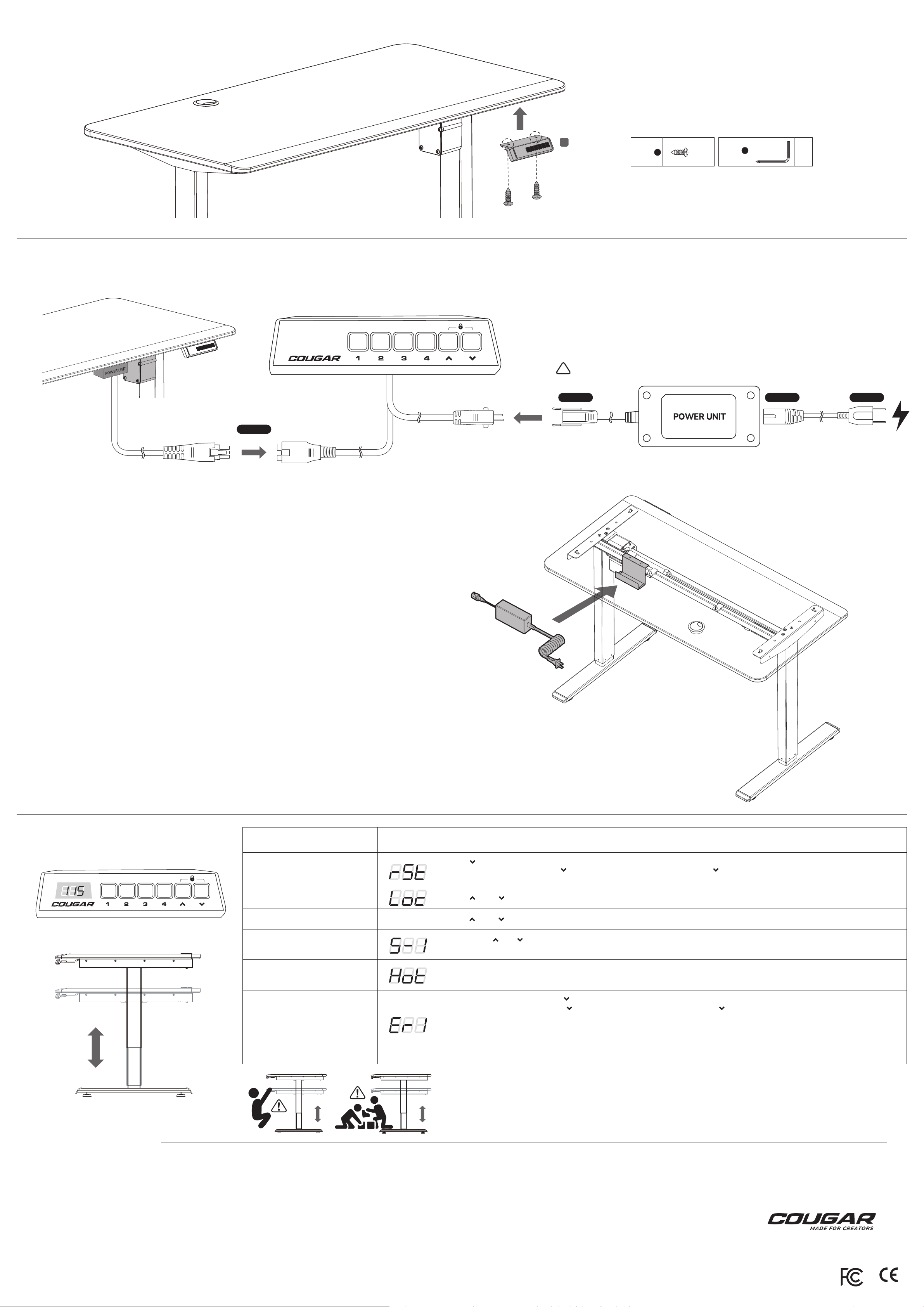
Install the “Lifting Controller .”
HOW TO CONNECT
LIFTING CONTROLLER
B
Bag #
Bag #
3
Tools
1
x1x2
STEP 1
Make sure to connect the controller before AC Power plugging.
!
STEP 3 STEP 4STEP 2
AC Power plugging
Locate the Power Unit into the Bracket after connecting.
FUNCTION &
TROUBLESHOOTING
Reset the Lifting System
DISPLAY INSTRUCTION
Press “
Then release the button and press “
It will display the lowest height to complete the reset.
” to the lowest height.
” for 5 seconds, it will show "rSt" and press “
” again.
GLOBAL WARRANTY POLICY
WARRANTY PERIODS OF COUGAR GAMING DEVICES
Product : ROYAL MOSSA Electric Standing Desk
Warranty : 1 Year
This warranty gives you specific legal rights. You may also have other rights granted under local law.
These rights may vary.
WARRANTY AGREEMENT
●
If the product has defects in material or manufacture, COUGAR will provide product repair and
replacement service within the warranty period.
●
Our warranty service is based on the date of the invoice or warranty card.
CONDITIONS WHERE FREE MAINTENANCE IS NOT PROVIDED
●
Any fault or damage caused by natural disasters (including storm, fire, flood, thunder, ear thquake, etc).
●
Any fault or damage caused by accidental factors and man-made reasons (including hit, scrape, crash,
moving, compression, stain, corrosion, riot, misuse, malicious damage, etc).
●
Use in an improper operating environment (including high temperature, high humidity, water inflow, etc).
●
Inability to provide the product warranty card, purchase receipt or invoice to prove the product is still
within the warranty period and the shipping date of the product is out of warranty.
●
The warranty card has been altered or its number is hard to identify.
●
The warranty period has expired.
●
Any fault or damage caused by non-compliance with regulations stated on the user manual or improper,
rough and careless treatment.
●
Any fault or damage caused by use of parts not certified by COUGAR original manufacturer.
●
The problem is caused by improper repair or adjustment by the buyer or any manufacturer without
authorization from COUGAR.
●
The product is not acquired from an authorized distributor of the company or is acquired from illicit sources.
●
Paper carton, instruction and other accessories are not warranted.
Lock the Height Adjustment
Unlock the Height Adjustment
Height Memory
Overheat Protection
Temporary Malfunction
DISCLAIMERS
●
COUGAR products should not be used as critical components in life support devices.
●
COUGAR is not liable for any damage of life and limb or damage or loss of property caused by or during
COUGAR products’ use as or with medical equipment, military equipment, traffic equipment and disaster
prevention systems.
●
COUGAR's warranty liability is limited to repair or replacement. The decision on whether to repair
or replace belongs exclusively to COUGAR.
●
COUGAR is, to the extent not prohibited by law, not liable for any damages; expenses; lost data,
revenues, savings or profits; or any incidental or consequential damages happened while the use
of a defective product from COUGAR or due to its use.
WARNING
●
Please wear protective gloves when assembling the Desk. It is your own responsibility to use
appropriate protection to prevent any physical damage.
●
Do not use abrasive products or scrub energetically when cleaning. Please stick to gentle products
suitable for delicate materials.
●
All parts should be checked monthly to confirm their integrity and to make sure that the screws
are not loose.
●
If any part of the product is or appears to be damaged, missing or loose, please contact the local
distributor and do not use the product. WARNING
Press “ ” and “ ” simultaneously for 5 seconds.
Press “
Firstly, press “
” and “
” simultaneously for 5 seconds again.
” or “
” to adjust the height.
While the height is as expected, press the “number” button for 3 seconds to memorize the height with the corresponding button.
While the lifting unit is over-loading, the height adjustment will automatically inoperable for protection, please wait for 15~20
minutes.
1.Follow the "rSt" procedure. Press “
Then release the button and press “
” to the lowest height.
” for 5 seconds, it will show "rSt" and press “
” again.
It will display the lowest height to complete the reset.
If the issue remains, follow the next step.
2.Unplug the AC plug.Check every connection followed by the manual and examine the connectors.
3.Re-connect the AC and Reset the desk.If the malfunction issue remains, please contact the distributor for after-service.
Do not fix or open the system by yourself.
CAUTION
Make sure no obstacles are in the desk’s path.
It is highly suggested to avoid the human underneath as the height movement.
The physical injuries from height adjustment are excluded from the after-service.
LEGAL NOTICES
This manual was created by Compucase Enterprise and may not be completely or partially
copied, passed on, distributed or stored without written consent by Compucase Enterprise.
COUGAR® is a registered brand of Compucase Enterprise Other product and company names
mentioned in this documentation may be brands or trademarks of their respective owners.
Compucase Enterprise reserves the right to make changes concerning the contents of the
manual and the technical data of the product without previous announcement.
MANUFACTURER CONTACT
LOYALTY FOUNDER ENTERPRISE CO., LTD.
13F, NO.859, Jingguo Rd, Taoyuan Taiwan
TEL:+886-3-3269123
Service email : https://cougargaming.com/support/contact/upload/
Made in China
www.cougargaming.com
Made in China
 Loading...