

Page 1
Find thousands more
great ideas online
Wireless Surround
321964
©Brookstone 2017
Sound Earphones
WITH REVERSE SOUND TECHNOLOGY
321964_Wireless Surround Sound Earphones
Size: 101mm W x 114 mm H_Output:100%_Prints:1/1,Blk
Page 2

TABLE OF CONTENTS
FCC Information .........................................................................................................1
Caution .............................................................................................................................3
Lithium-Polymer Battery Warning ............................................................... 4
Location of Parts and Controls ..................................................................... 5
Charging the Battery ............................................................................................. 6
Pairing with Bluetooth
Operation ........................................................................................................................ 8
LED Indicator............................................................................................................10
Care and Maintenance ......................................................................................10
Specifi cations ........................................................................................................... 11
Warranty ... ....................... ...... ....................... ....................... ....................... ...... .............12
®
. . . . . . . . . . . . . . . . . . . . . . . . . . . . . . . . . . . . . . . . . . . . . . . . . . . . . . . . . . . . . . . . . . . . . . . . . . . . . . . . . . . . . . . . 7
This warranty does not apply to: a) damage caused by failure
to follow instructions relating to product’s use or the installation of
components; b) damage caused by accident, abuse, misuse, fire,
floods, earthquake or other external causes; c) damage caused
by service performed by anyone who is not a representative of
Brookstone; d) accessories used in conjunction with a covered
product; e) a product or part that has been modified to alter
functionality or capability; f) items intended to be periodically
replaced by the purchaser during the normal life of the product
including, without limitation, batteries or light bulbs; g) any product
sold “as is” including, without limitation, floor demonstration models
and refurbished items; or h) a product that is used commercially or
for a commercial purpose.
Some states disallow the exclusion or limitation of incidental or
consequential damages or how long an implied warranty lasts,
so the above exclusions or limitations may not apply to you. This
warranty gives you specific legal rights and you may also have other
rights, which vary from state to state.
13
Page 3

ONE (1) YEAR LIMITED WARRANTY
warrants this product against defects in materials and/
or workmanship under normal use for a period of ONE (1) YEAR
from the date of purchase by the original purchaser (“Warranty
Period”). If a defect arises and a valid claim is received within
the Warranty Period, at its option, 1) repair
the defect at no charge, using new or refurbished replacement
parts, or 2) replace the product with a new product that is at least
functionally equivalent to the original product, or 3) provide a store
credit in the amount of the purchase price of the original product.
A replacement product or part, including a user-installable part
installed in accordance with instructions provided by us,
assumes the remaining warranty of the original product. When a
product or part is exchanged, any replacement item becomes your
property and the replaced item becomes our property.
When a store credit is given, the original product must be returned
to our company.
Obtaining Service: To obtain warranty service, call
]Warranty Service at 1-800-292-9819. Please be prepared
to describe the product that needs service and the nature of
the problem. A purchase receipt is required. All repairs and
replacements must be authorized in advance. Service options, parts
availability and response times will vary. You are responsible for
delivery and the cost of delivery of the product or any parts to the
authorized service center for replacement, per our instructions.
Limits and Exclusions: Coverage under this Limited Warranty
is limited to the United States of America, including the District
of Columbia and the U.S. Territories of Guam, Puerto Rico, and
the U.S. Virgin Islands. This Limited Warranty applies only to
products manufactured for
the “Brookstone” trademark, trade name, or logo affixed to them
or their packaging. The Limited Warranty does not apply to any
non-Brookstone products.
12
FCC INFORMATION
Caution: Changes or modifications not expressly approved
by the party responsible for compliance could void the user's
authority to operate the equipment.
This equipment complies with part 15 of the FCC Rules.
Operation is subject to the following two conditions:
1. This equipment may not cause harmful interference.
2.This equipment must accept any interference received,
including interference that may cause undesired operation.
This equipment has been tested and found to comply with
the limits for a Class B Digital Device, pursuant to Part 15
of the FCC Rules. These limits are designed to provide
reasonable protection against harmful interference in a
residential installation. This equipment generates, uses, and
can radiate radio frequency energy and, if not installed and
used in accordance with the instructions, may cause harmful
interference to radio communications. However, there is
no guarantee that interference will not occur in a particular
installation.
If this equipment does cause harmful interference to radio or
television reception, which can be determined by turning the
equipment off and on, the user is encouraged to try to correct the
interference by one or more of the following measures:
• Reorient or relocate the receiving antenna.
• Increase the distance between the equipment and receiver.
• Connect the equipment to an outlet on a circuit different from
that to which the receiver is connected.
• Consult the dealer or an experienced radio/TV technician for
help.
1
Page 4

WARNI NG: To comply with FCC's RF radiation exposure limits
for general population/uncontrolled exposure,
and must
not be collocated or operating in conjunction with any other
antenna or transmitter.
FCC ID: 2AMRE-CBTRS065
SPECIFICATIONS
Bluetooth® Version Support ..............................................................................................................V4.1
®
Bluetooth
Battery .....................................................................................................................................Lithium Polymer
Battery Capacity .................................................................................................................................90 mAh
Battery Life ...............................................................................................................................Up to 5 hours
Charging Time ...............................................................................................................Approx. 1.5 hours
IPX Rating .......................................................................................................................................................IPX4
Dimensions .....................................................................................Approx. 24.80 x 2.44 x 0.71 in.
(63 x 6 x 1.8 cm)
Wei ght .... ..... ..... ..... ..... ..... ..... ..... ..... ..... ..... ..... ..... ..... ..... ..... ..... ..... ..... ..... ..... ..... App rox. 0.6 oz (17 grams)
Profile Support ............................................................HSP, HFP, A2DP, AVRCP
2
11
Page 5
LED INDICATOR
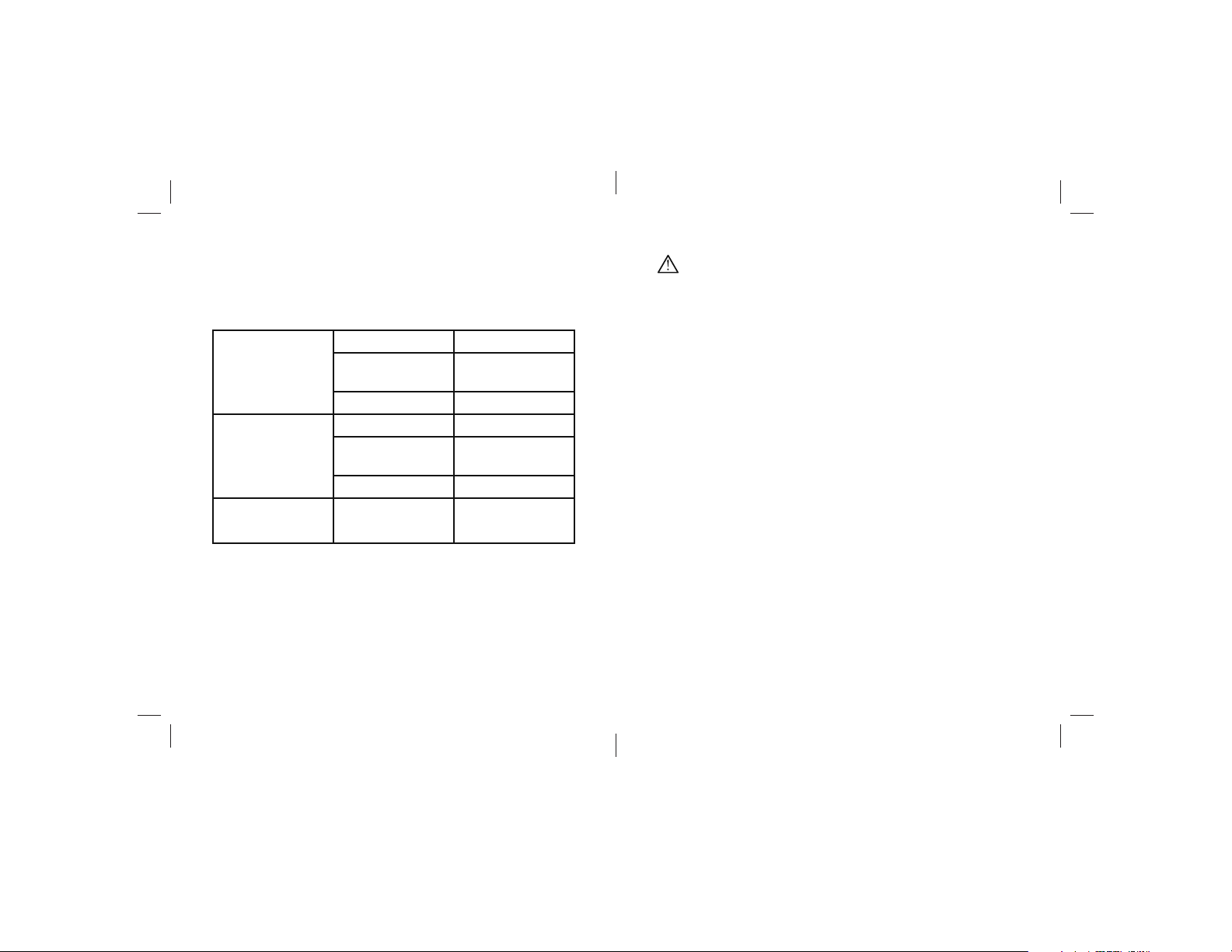
The color displayed by the LED Indicator reflects the current
operation and status.
Blue Flash once Power on
Flash every 10
seconds
Solid Fully charged
Red Flash once Power off
Solid Charging in
Flash 3 times Low battery
Red and Blue Alternating In pairing mode
Connected
progress
CARE AND MAINTENANCE
Clean the earphones with a soft cloth or damp chamois leather.
Never use solvents.
CAUTION
• Use of earphones diminishes your ability to hear background
noise. For your safety and the safety of others, do not use
while driving, cycling, or in any situation where reduced ability
to hear your surroundings may be hazardous.
• Reverse sound technology directs sound waves away from
your ear, then bounces them back into the ear canal. This
helps to protect your eardrums from excessive volume levels,
but damage can still occur if the volume is sufficiently high.
• Do not drop, crush, bend or apply excessive force to the
device.
• Do not expose the device to moisture, extreme or prolonged
heat, cold, humidity, or other adverse conditions. Avoid
storage in damp, humid or wet locations.
• The unit can only be opened by qualified personnel.
10
3
Page 6
LITHIUM-POLYMER BATTERY WARNING
This device contains a rechargeable Lithium-Polymer battery.
The battery must be recycled or disposed of properly. Contact
your local waste management office for information on battery
recycling or disposal.
Use only the supplied cable to recharge the battery. Improper
charging may damage the battery and the device.
Do not attempt to open the rechargeable battery or battery
pack. There are no serviceable parts inside.
Keep the battery out of reach of children. If swallowed, consult
a physician immediately.
Do not dispose of battery in a fire as it may explode. The battery
may also explode if damaged.
BC
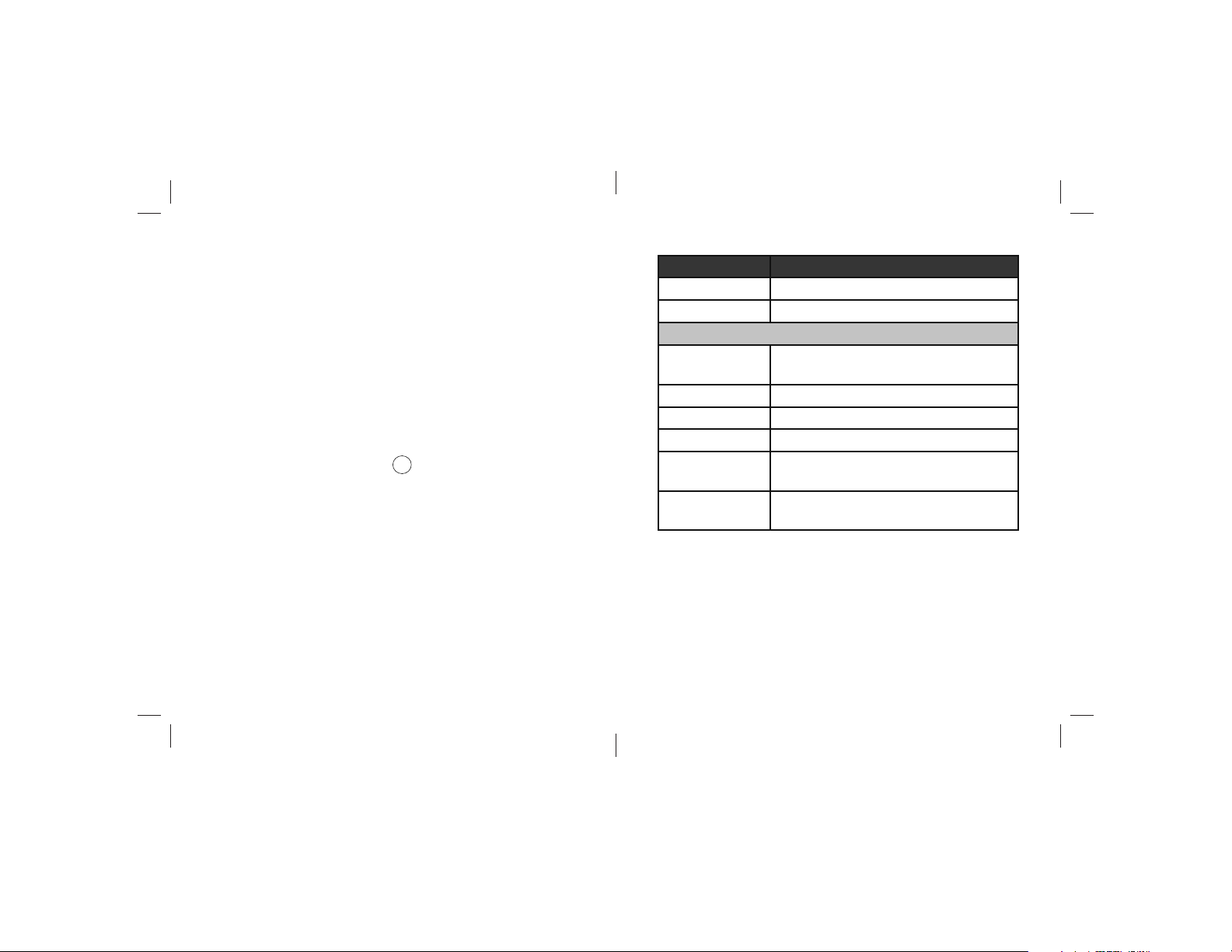
Function Operation
Next Track Long press Volume +
Previous Track Long press Volume —
PHONE OPTIONS
Answer a call When there is an incoming call, short
press MFB once
Enable mute While on a call, double-click MFB
Disable mute While muted, double-clilck MFB
End a call While on a call, short press MFB once
Reject a call When there is an incoming call, press and
hold MFB for 1 second
Last Number
Redial
Double-click MFB
4
9
Page 7
OPERATION
After pairing with your device, you can listen to music or answer
phone calls using your Wireless Surround Sound Earphones
whenever you are connected to your device through Bluetooth
To u se , p l ac e o n e of t h e 3 p r o v id e d e a rt i p p ai r s o nt o t h e
earphones. Place the earphone in your outer ear. Earphones are
marked with R (right) and L (left). The curved stabilizer fin fits in
the fold of your ear, holding the earphone in place.
Power on and enjoy your music and phone calls, as described
in the following table. Operations are confirmed by the LED
Indicator and by voice validation.
Function Operation
Power on Press and hold M FB for 3 seconds. The
LED Indicator will flash blue once.
Power off Press and hold M FB for 3 seconds. The
LED Indicator will flash red once.
MUSIC OPTIONS
Play/Pause Press MFB
Volume Up Short press Volume +
Volume Dow n Short pre ss Volu me —
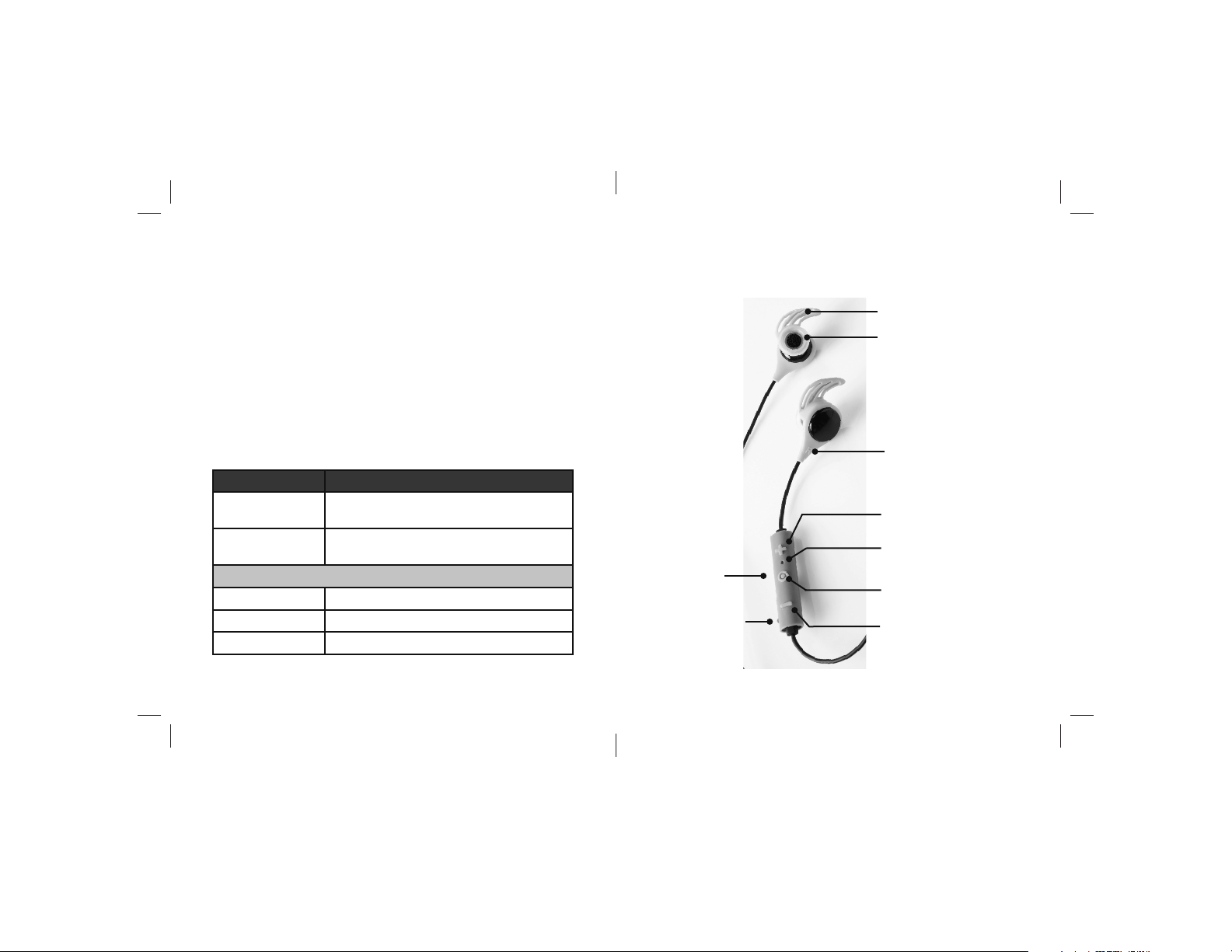
LOCATION OF PARTS AND CONTROLS
®
.
Back Side of
Controller:
Microphone
Micro USB Port
Stabilizer fin
Earphone with eartip
R(ight) and L(eft)
Indicators
Volume +
LED Indicator
Multi-function Button
(MFB)
Volume —
8
5
Page 8

CHARGING TH E BATTERY
Charge the battery before first use. A full charge takes
approximately 1.5 hours. After charging, the device can be used
without the power connection. When the battery is low, the LED
indicator flashes red three times periodically, and a low battery
warning repeats every 5 seconds.
If the device is not used for an extended period of time, the
battery may require recharging.
To charge the battery:
1. Plug the USB connector into a USB port on an active device.
2. Plug the Micro USB end of the USB connector into the
Micro USB port on the earphones. The LED light turns red
during charging. The light turns blue when the earphones
are fully charged.
PAIRING WITH BLUETOOTH
To pair for first-time use:
1. Prepare your device (e.g., smartphone) to pair using
Bluetooth
of the earphones. Refer to your device's owner’s manual for
information on using
2. Press and hold the earphone's Multi-Function Button (MFB)
for about 5 seconds, until the LED alternates between red
and blue, indicating that the earphones are in pairing mode.
3. On your device, search the list of available devices and
select Reverse Sound. Note that it may take a few seconds
for the earphones to be listed as an available device.
Depending on your device, you may have to tap SCAN to
update the device list. Consult your device's owner's manual.
®
, making sure that the device is within 33 feet
the Bluetooth
®
®
function.
4. If prompted, type the password or PIN 0000.
A message will display on your device confirming that your
device is now p
aired/connected and the earphone's LED will
flash blue every 10 seconds, indicating that the device is paired.
The devices will remain paired, even after being turned off.
When you next power on the earphones, they will search
for previously paired devices. To cancel pairing, consult your
device's owner's manual.
The Bluetooth® word mark and logos are registered trademarks owned by Bluetooth
SIG, Inc. and any use of such marks by Brookstone is under license.
6 7
 Loading...