

Page 1
C
T602A(1S)
User Manual
1
Page 2

C
T602A(1S)
User Manual
2
CONNECTING C
T602
A(1S)Bathroom Telephone
Included with the C
T602A
(1S)
phone are (one each):
Base uni
tCoiled handset cord
User guide
Handset
Line cord
INSTALLATION
The phone can be used on desktop and wall mount.
1.
Place bracket under base unit; connec
t one end
coiled handset
cord to outer RJ11 line
interface on base unit and another end to
the handset RJ11 Socket
.2.Connec
t one end of the RJ11
tele
phone
connector
to
the
junction box and another end
to the telephone
RJ11 socket
located at the back of the
telephone.
3.
For Wall
-
mount configuration, remove the bracket under the base unit;
align the slot at
the base of the telephone to the screw on the wall.
C
T602
A(1S)
FEATURE
S
1-LineAnalog
Surf
aceMountTechnology with CPU control
High
immunity to electro
-
mag
netic radiation
Ringer volume control
(
HI-LO)slide switch
Hold,
flash
and redial
Auto disconnect on busy tone detection
Adjustable flash
-
hook timer
Page 3
C
T602A(1S)
User Manual
3
C
T602
A(1S)
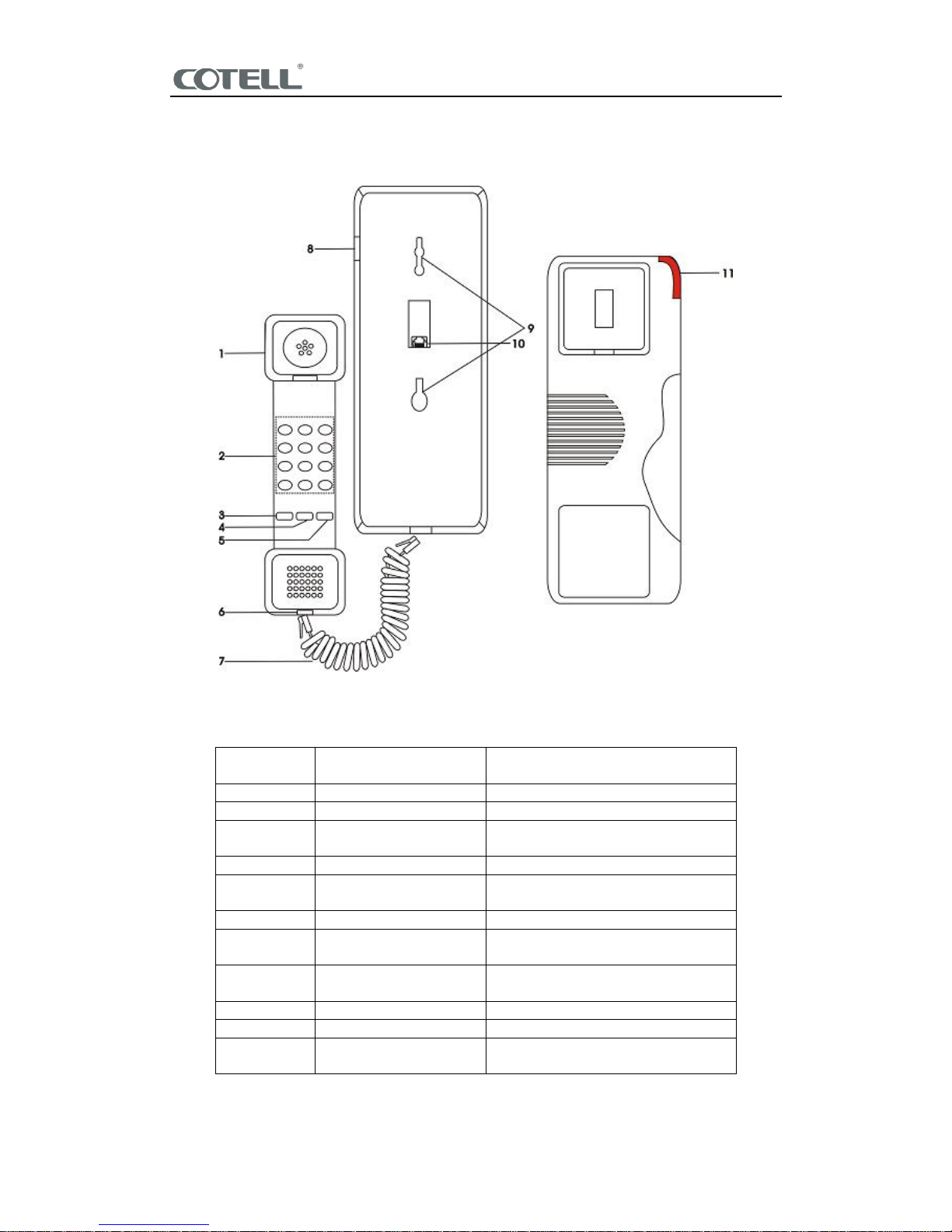
DIAGRAM
C
T602
A(1S)
BUTTON ASSIGNMENT
FUNCTION
KEY
FEATURE
DESCRIPTION
1
HANDSET
F
or answering the call
.2DIAL
PAD
Keypad for dialing
.3FLASH
Act as
an electronic hook
-
switch
to
activate call transfer
.4REDIAL
REDIAL last number dialed
.5MUTE
P
ress key
activate or
deactivates
MUTE
function.
6
HANDSET JACK
M
odular jack for handset
.7HANDSET
CORD
Co
nnecting the handset jack to
the base unit
.8RINGER(
HI-LO)A
djust the ringer volume to
high or
low.9SCREW SLOT
Wall mount slot.
10
TEL JACK
Telephone line jack
.11MSG
Light up as message or
incoming
call indicator
.
Page 4
C
T602A(1S)
User Manual
4
PLACING A CALL
1.
Lift up the ha
ndset
.2.Listen for dial tone
, d
ial the desired
telephone
number
or press a
memory key to
automatically dial a number
.3.To end the call, hang up by placing the handset back
on
the cradle.
RECEIVING A CALL
An audible ring
ing
and flickering red
message
waiting
light will indicate an incoming call
.1.Liftupthe handset
.2.To end the call, hang up by placing the handset back
on
the cradle
.
ADJUSTING THE RING VOLUME
1.
Locate the
volume
control
atthe back of the telephone labeled
RINGER
HI-LOW slide
switch.
2.
Slide the
switch to the desired
HI-LOW
ring volume.
REDIAL
To REDIAL the last telephone number dialed
,1.Lift up the handset
or press the SPEAKER.
2.
Press the REDIAL key
to activate the last number dialed.
MUTE
T
o place calls on mute
mode
during
conversation.
1.
Press M
UTE
key,place the handset back on the cradle
,
the
caller
will hear background
music.
2.Lift up the handset
,
press MUTE
key again will
return
to
the original
conversation
.
AUTO DISCONNECT
The telephone will auto disconnect the line after detecting 8x busy t
one upon calling party
on-hook
.
Page 5

C
T602A(1S)
User Manual
5
IMPORTANT SAFETY INSTRUCTIONS
WHEN USING YOUR TELEPHONE EQUIPMENT, BASIC SAFETY PRECAUTIONS SHOULD ALWAYS
BE FOLLOWED TO REDUCE THE RISK OF FIRE, ELECTRIC SHOCK AND INJURY TO PERSONS.
INCLUDING THE FO
LLOWING:
1.
READ
AND UNDERSTAND ALLINSTRUCTIONS
IN THIS MANUAL.
2.
FOLLOW ALL WARNINGSAND INSTRUCTIONS MARKED ON THE PRODUCT.
3.
UNPLUG THE PRODUCT FROM THE WALL OUTLET BEFORE CLEANING.DO NOT USE LIQUID
CLEANER ORAEROSOL CLEANERS. USEA DAMP CLOTH FOR CLEANING.
4.
DO NOT USE THIS PRODUCT NEAR WATER FOR EXAMPLE NEAR ABATHTUB,WASH BOWL,
KITCHEN SINK OR LAUNDRY TUB, IN A WET BASEMENT, OR NEAR A SWIMMING POOL.
5.
DO NOT PLACE THIS PRODUCT ONAN UNSTABLE
CART, STAND OR TABLE. THE PROD
UCT
MAYFALL, CAUSING SERIOUS DAMAGE
TO THE PRODUCT.
6.
SLOTS AND OPENINGS IN THE CABINET AND THE BACK OF BOTTOMARE PROVIDED FOR
VENTILATION, TO PROTECT IT FROM OVERHEATING, THESE OPENINGS MUST NOT BE
BLOCKED OR COVERED. THE OPENINGS SHOULD NEVER BE BLOCKED BY PLACING THE
PRODUCT ON THE BED, SO
FA, RUG OR ANY OTHER SIMILAR SURFACE.THIS PRODUCT
SHOULD NEVER BE PLACED NEAR OR OVER A RADIATOR OR HEAT REGISTER. THIS
PRODUCT SHOULD NOT
BE PLACED INA BUILT
-
IN INSTALLATION UNLESS PROPER
VENTILATION IS PROVIDED.
7.
NEVER PUSH OBJECTS OF ANY KIND INTO THIS
PRODUCT THROUGH CABINET SLOTS
AS
THEY MAY TOUCH DANGEROUS VOLTAGE POINTS OR SHORT OUT PARTS THAT
COULD
RESULT INA RISK OF FIRE OR ELECTRIC SHOCK. NEVER SPILL LIQUID OF ANY
KIND ON
THE PRODUCT.
8.
TO REDUCE THE RISK OF ELECTRIC SHOCK DO NOT DISASSEMBLE THIS
PRODUC
T,
BUT
TAKE IT TO A QUALIFIED SERVICEMEN WHEN SOME SERVICE OR REPAIRWOR
KISREQUIRED. OPENING OR REMOVING COVERS MAY EXPOSE YOU TO DANGEROUS
VOLTAGESOR OTHER RISKS. INCORRECT REASSEMBLE CAN CAUSE ELECTRIC
SHOCK
WHEN THEAPPLIANCE IS SUBSEQUENTLY US
ED.9.UNPLUG THIS PRODUCT
FROM THE WALL OUTLETAND REFER
SERVICING TO QUALIFIED
SERVICE PERSONNEL
UNDER THE FOLLOWINGCONDITIONS
:-WHEN THE POWER SUPPLY CORD OR PLUG IS DAMAGED OR
FRAYED
-
LIQUID HAS BEEN SPILLED INTO THE PRODUCT.
-
IF THE PRODUCT HAS BEEN EXPOSED
TO RAIN OR WATER.
10.
IF THE PRODUCT DOES NOT OPERATE NORMALLY BY FOLLOWING THE OPERATING
INSTRUCTIONS. ADJUST ONLYTHOSE CONTROLS THATARE COVERED BY THE
OPERATING INSTRUCTIONS BECAUSE IMPROPERADJUSTMENT OF OTHER CONTROLS
MAYRESULT IN DAMAGEAND WILL
OFTEN
REQUIRE EXTENSIVE WORK BYA
QUALIFIED
TECHNICIAN TO RESTORE THE PRODUCT TO NORMAL OPERATION.
-
IF THE PRODUCT HAS BEEN DROPPED OR THE CABINET HAS BEEN DAMAGED.
-
THE PRODUCT EXHIBIT ADISTINCT CHANGE IN PERFORMANCE.
11.
AVOID USING A TELEPHONE (OTHER THAN A CORDL
ESS TYPE) DURING AN
ELECTRICAL
STORM. THERE MAY BE A REMOTE RISK OF ELECTRIC SHOCK FROM LIGHTING.
12.
DO NOT USE THE TELEPHONE TO REPORT A GAS LEAK IN THE VICINITY OF THE LEAK.SAVE
THESE INSTRUCTIONS
Page 6

C
T602A(1S)
User Manual
6
WARRANTY EXCLUSIONS
This warranty does not c
over, or may be voided by, the following
s:1.
Any damage resulting from abuse or misuse (i.e. liquid spills, abuse, or customer
’smodification
(
warranty label broken) of the telephone
.2.Any damage caused by failure to follow operating or installation instruct
ions provided
with
the telephone
.3.New faceplates or damage to the faceplate or discoloration of the telephone
.4.Any damage resulting from improper connection of the telephone to other equipment
.5.A telephone used in a harsh or corrosive environment
.
6.
Incompat
ibility with anything other than the PBX for which the telephone was
intended
during
purchased
.7.Cords, connectors and replaceable batteries
.8.Force majeure
.9.Damages in transit
.
10.
Any damage resulting from unauthorized modification or repair of the telephone
.
COTELL
PRODUCT SUPPORT
If you need technical assistance with this product,
please contact
COT
ELLINTERNATIONAL LIMITED
via one of the following methods:
Telephone
:86-
755-88859898
Fax:86-
755-8885989
9
Email
:
Website
:www.cotell.cn
Please contact us should the above operating instructions do not match the actual
telephone
.
 Loading...