

Page 1
2MP 1080P 4-in-1 WDR Camera
Operating Instruction
CCT2L00
DESCRIPTION
This camera resolution HD ode VI VI HD each o 080P na
log ode VBS each o 60H and the industry-leading wide dynamic range
mC r t9
() ,
DR is upto 120dB. This WDR ensures brilliant image quality underany lightin
W
()
g environment.The image and color qualityis also excellent in low illumination en
vironments. Thiscamera series is a ultra wide dynamic range camera in the real sen
se using digitalsampling which can't be paralleled by average wide dynamic range c
ameras usingolder generation sensor imagers. The application of 3D-DNR technol
ogy ensureshigher S/N, which efficiently reduces the digitalstorageand transmissi
on datasaving system cost. Fashionable and professionalexteriordesign and specia
l 3-axisbracket, makes round-the-clock surveillance easy and convenientt.
(/ / ) ,
mTCArt1 a
★3D Noise Eliminating Technology
Adopts Sony fully digitalized 3D noise reduction technology to minimize
noise, extending DVR storage by 30%+.
★3-axis bracket
All directional bracket, easy control.
★IR-CUT
Built-in filter switch-over device, ensures the cameraswork properlybothin day andnight.
★OSD Menu(optional)
Powerful OSD menu allows for various function settings.
★Auto D/N shift mode
Adopt co lor mo de in day, b ecause th e ligh t is enough in day; at night the
illumination is lower which need higher sensitivity and better image quality, so
it change to B/W mode automatically.
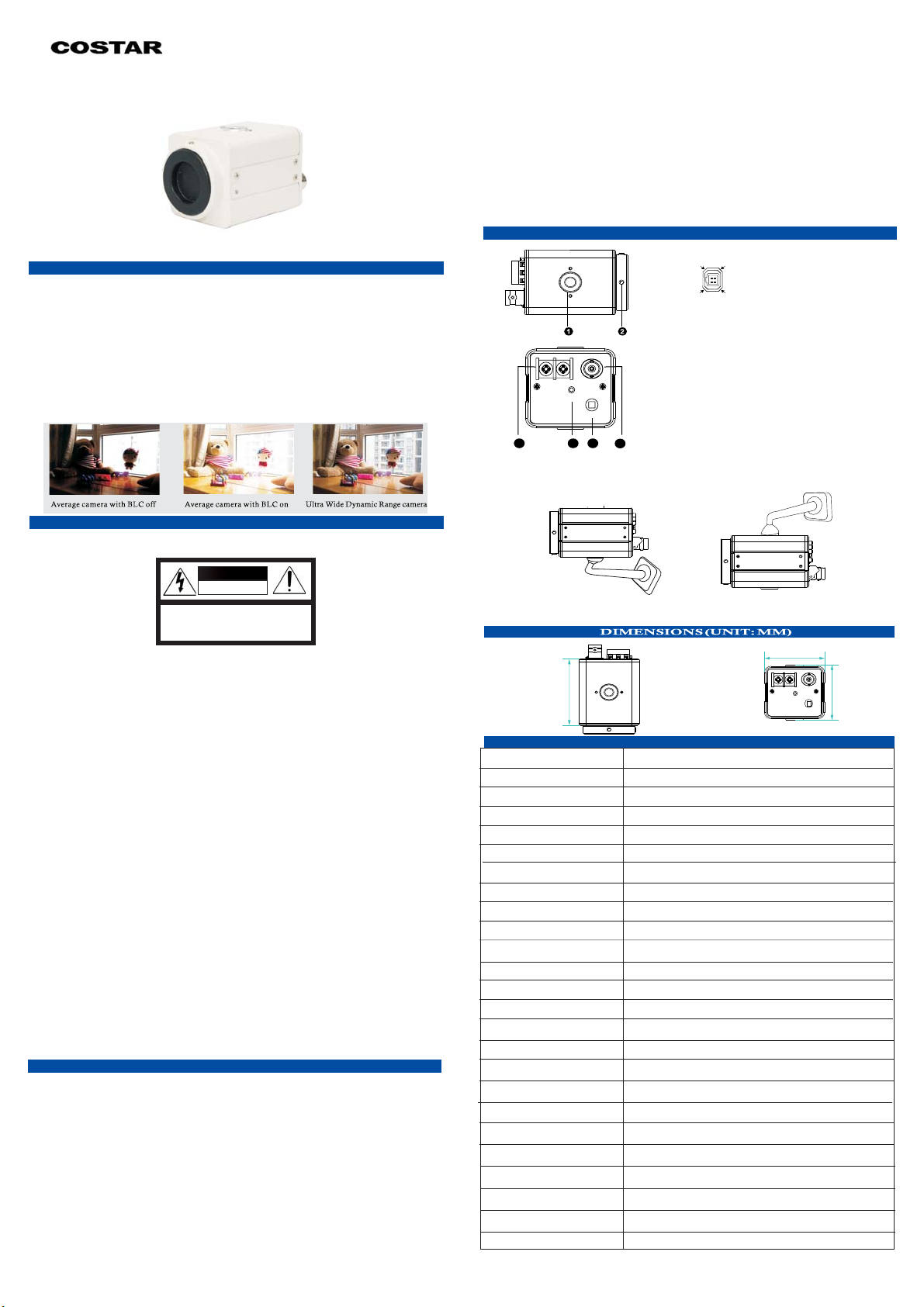
PARTS INSTRUCTION AND INSTALLATION
1
234
1 2
NO.DC Drive
1 Contro l 2 Contro l +
3 Dri ve +
4 Dri ve -
Auto Iris Interface
Definition
1.The hole for Bracket screw
2.Fixed Lens Screw
VIDEO OUT
DC12V/AC24V
PL
4 5 6
MENU
3
.
3 Video Output
4.Power Input
.
5 Power Indicator
.
6 Button for OSD menu
Camera Installation
This camera can be installed by brackets from both upside and bottom,
fixed the bracket o n the wall b y screw or other location.
Thank you for your purchasing thisproduct. Before attempting to connect or operate
this product,please read these instructions carefully and save this manual for futureuse.
CAUTION
RISK OF ELECTRIC
SHOCK DO NOTOPEN
CAUTION:TO REDUCE THE RISK OF ELECTRIC
SHOCK, DO NOTREMOVE COVER
(OR BACK).
NO USER-SERVICEABLE PARTS INSIDE. REFER
SERVICINGTO QUALIFIED SERVICE PERSONNEL
1.
Use theAppropriate Power Supply
The inputpower for thecamera Be sureto connect it to the
is DC12V/AC24V.
appropriatepower. Wrongconnection may cause malfunction and/or damagetothe
video camera.
ATTENTION
2.
Do notattempt to disassemble the camera.
To prevent electric shock, do not removescrewsor covers. There are no user
serviceable parts inside. Ask a qualified service person for servicing.
3.
Handle thecamera with care.
Do notabusethecamera.Avoid striking,shaking,etc. The cameracouldbedamaged
by improper handling or storage
4. Donot expose the camera to rain or moisture, or try to operate it in wet areas.
Do notplace the camera in the following locations:
Locations wheretemperature is lower than -10C or higher than 50C;
①
Locations wherehumidity is higher than 95%;
②
Locations wherethere are large amounts of water vapor and steam.
③
5
. Donote use strong or abrasive detergents when cleaning the camerabody.
.
Use adry cloth to clean the camera when dirty. In case thedirt is hard to remove.
Use amild detergent and wipe gently.
6.
Clean thesensor faceplate with care.
When cleaningthe sensor panel, do not use strong or abrasive detergents.Use a piece
of lens tissue or cotton tipped applicator and ethanol.
7.
Do notattempt to aim the camera at the sun
Do notattempt to aim the camera at the sun or other extremely brightobjects that
causes mearto appear irrespective of whether the camera isoperating or not. This
can damage thesensor.
8.
Do notput the camera in a place with interference.
When thiscameraisinstallednearthe equipment like wireless communicationdevice
which emitsstrong electromagnetic field, some irregularity such as noise on monitor
screen may happen.
FEATURES
★SONY 2.13Mp CMOS Image Sensor
This cameraadopts SONY 2 13Mp CMOS image sensorand Eyenix SP techno
.
D
logy. Thesensor picks up details from each pixel based on hundreds of samples pe
r videoframe. Vs CCD's limited exposures, to ensurewider dynamic range than is
possible withanalog CCD. The image quality is even brilliant under extreme light
ing conditions.
★Ultra Wide Dynamic Range
The captured wide dynamic rangecanreach120dB maximum.
★High Effective Resolution
Image resolution reach to 1080P in HD mode TVI CVI AHD and to 960H
in analog mode CVBS , offering enhanced horizontaland vertical resolution u
seable in existing as well as new CCTV systems
★Low illumination working capability
()
(/ / )
.
Color DSS: 0.00008 Lux, BW DSS: 0.00008 Lux
Installation from bottom
3.86"
Model
Image Sensor
Singal Mode
Effective Pixels
Max Resolution
Frame Rate
Electronic Shutter
Min. Illumination
S/N Ratio
Video Output
Synchronization
Day/Night
Noise Reduction
Wide Dynamic Range
Backlight Compensation
Auto White Balance.
Auto Gain Control
Sence Up
Defog
OSD Menu
Power Supply
Working Temperature
Humidity
Dimensions
Weight
Off / Low / Middle / High: WDR SNR: 120dB
Sony 1/2.8" imx290LQR CMOS
NTSC / PAL; Progessive Scan
1945 (H) × 1097 (V) approx. 2.13M pixels
1080P @25/30 fps / 720P @50/60 fps
AUTO/ Manual 1/50()-1/60 1/60,000sec
Color DSS: 0.00008 Lux, BW DSS: 0.00008 Lux
HD: AHD / CVI / TVI. Analog: CVBS(960H)
Auto (ICR) / Color / B&W / External
3D-NR (Off / Low / Middle / High)
Aut o / Auto ex t / Prese t / Manua l
Off / X 2 / X4 / X8 / X16 / X 32
Off / On: Low / Middle / High
via DVR Coaxial Controlled or via OSD Black Button
-4℉ - 122℉ (-20°C ~ +50°C)
2.05" x 2.20" x 3.86" (52mm x 56mm x 98mm)
*Specifications subject to change without notice.
installation from upside
2.05"
CCT2L00
1920 x 1080
≥50dB (AGC OFF)
Internal
Off / BLC
YES ( 0 - 20 Steps)
DC12V / AC24V
0% ~ 90 %
0.48 lbs. (216g)
CCL2L00-20180725
2.
20"
Page 2
O S D M E N U
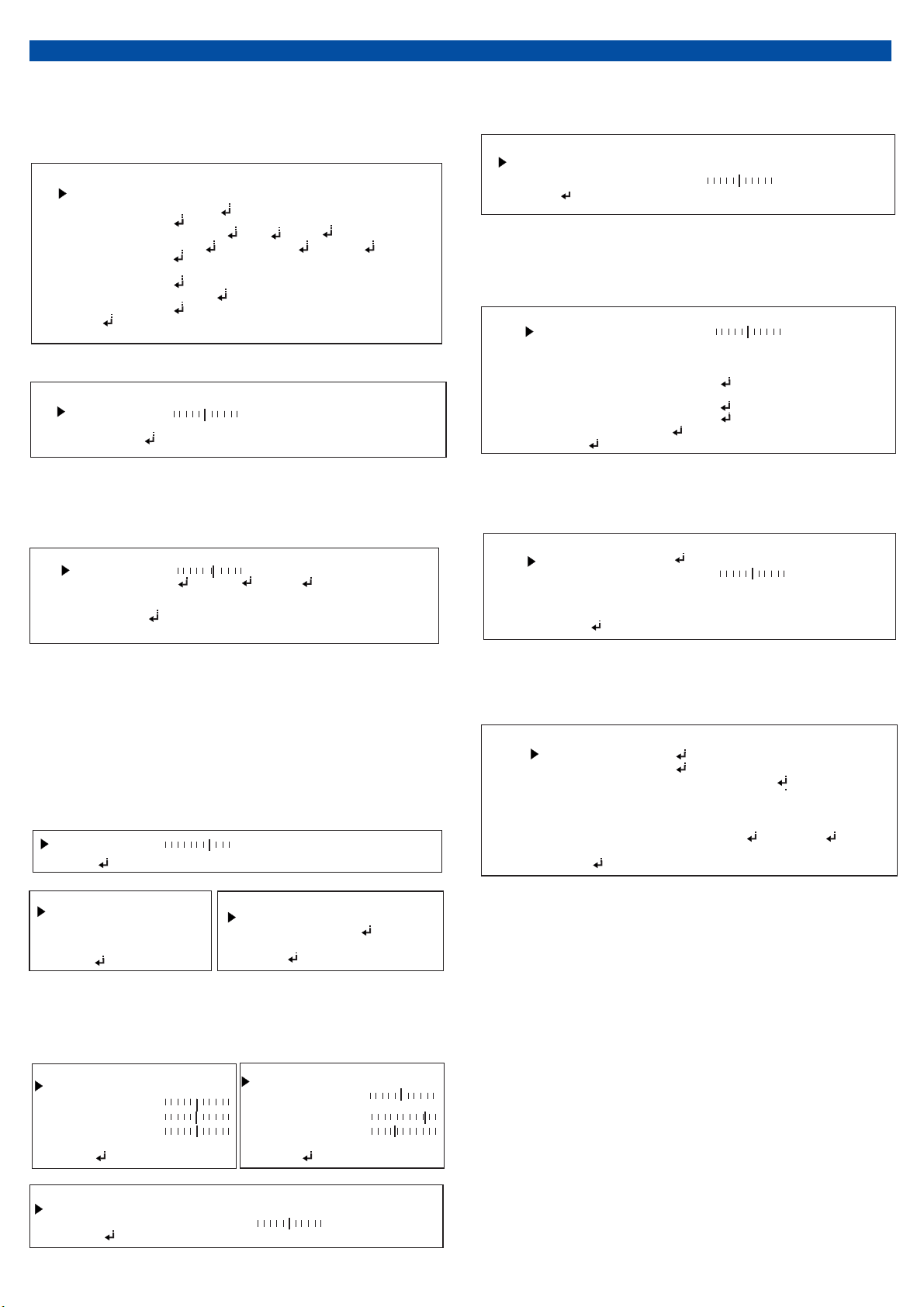
MENU:
Press the MENU button to display MENU. You can set the IRIS, EDGE
DET,EXPOSURE, BACKLIGHT, DAY&NIGHT, COLOR,DNR,IMA
GE,MOTION and SYSTEM to ensure the image quality.
IRIS
EDGE DET
EXPOSURE
BACKLIGHT
DAY&NIGHT
COLOR
DNR
IMAGE
MOTION
SYSTEM
EXIT
MENU
ELC(ALC)
ELC(ALC)
OFF(ON )
OFF( HLC WDR )、、BLC
OFF( HLC WDR )、、BLC
AUTO COLOR ,B&W ,EXTERN()
HIGH OFF LOW MIDDLE()、、
OFF(ON )
EDGE DET:
EDGE DET
LEVRL
COLOR
RETURN
5
YEL CYN GRN RED BLU BLK WHT)
(
、、 、、、、MAG
EXPOSURE:
Press the MENU button into the exposure submenu,and can setup the
BRIGHTMESS, SHUTTER, SENS-UP, AGC to what you need.
EXPOSURE
BRIGHTMESS
SHUTTER
SENS-UP
AGC
RETURN
7
AUTO (MAMUAL ,FLICKER )
OFF X2 X4 X8 X16 X32
7
COLOR:
Press the MENU button into the MANUAL submenu, can adjust
AWB,COLOR GAIN.
COLOR
AWB
COLOR GAIN
RETURN
AUTO(AUTOEXT PRESET MANUAL)、、
10
IMAGE:
Press the MENU button into the IMAGE submenu, can as needed SHAR
PN-ESS, GAMMA,MIRROR,FLIP,D-ZOOM,ACE,DEFOG,SHADING,
PRIVACY
SHARPNESS
GAMMA
MIRROR
FLIP
D-ZOOM
ACE
DEFOG
SHADING
PRIVACY
RETURN
IMAGE
5
0.55
OFF ON()
OFF ON()
0 1X N
.
OFF LOW MIDDLE HIGH(、 、 )
OFF ON()
OFF ON()
MOTION:
Press the MENU button into the IMAGE submenu, can as needed DET
WINDOW,SENSITIVITY,MOTION,TEXT ALARM,SIGNAL OUT
MOTION
DET WINDOW
SENSITIVITY
MOTION
TEXT ALARM
SIGNAL OUT
RETURN
5
OFF (ON)
OFF(ON)
OFF(ON)
BACKLIGHT:
1.BLACKLIGHT-HLC
:
Press theMENUbutton into the HLC submenu, can adjust HLC’s level .
2.BLACKLIGHT-BLC
:
Press the MENU button into the BLC submenu, can adjust BLC area’s
position and size.
3.BLACKLIGHT-WDR
:
Press the MENU button into the WDR submenu, can adjust WDR MODE
to: HIGH, MID DLE a nd LOW.
HLC
LEVEL
COLOR
RETURN
H-POS
V-POS
H-SIZE
V-SIZE
RETURN
10
BLK WHT YEL CYN GRN MAG RED BLU(、、、、、、
BLC
8
7
3
3
DRW
WDR MODE
ROI MODE
WEIGHT
RETURN
)
LINE(FRAME)
OFF(ON )
HIGH(LOW MIDDLE)、
DAY&NIGHT
Press the MENU button into the DAY&NIGHT submenu, can adjust
AUTO , COLO R, B&W, EXTERN etc.
AUTO
IR-LED
ANTI-S T.A
AGC THRES
AGC M ARGIN
DELAY
RETURN
ON OFF()
10
10
10
MIDDLE(HIGH LOW)、
EXTERN
IR-LED
ANTI-S T.A
EXTERN SW
DNTHRDS﹥
NDTHRES﹥
DELAY
RETURN
ON OFF()
10
LOW(HIGH)
13
7
MIDDLE(HIGH LOW)、
SYSTEM:
Press the MENU button into the SYSTEM submenu,set the CAMERA ID,
SYSTEM,LANGUAGE,RESET as needed.
COM.
OUTPUT
IMAGE RANGE
COLOR SPACE
COLOR BAR
LANGUAGE
CAM TITLE
RESET
RETURN
SYSTEM
FULL(COMP、USE R )
HD-CBCR(YUV SD CBCR、- )
OFF
ENG(CHN CHN[S] JPN KOR)、、、
OFF(RIGHT UP ,LEFT DOWN )
ON
B&W
IR LED
ANT-SAT
RETURN
ON(OFF))
10
 Loading...