

Page 1
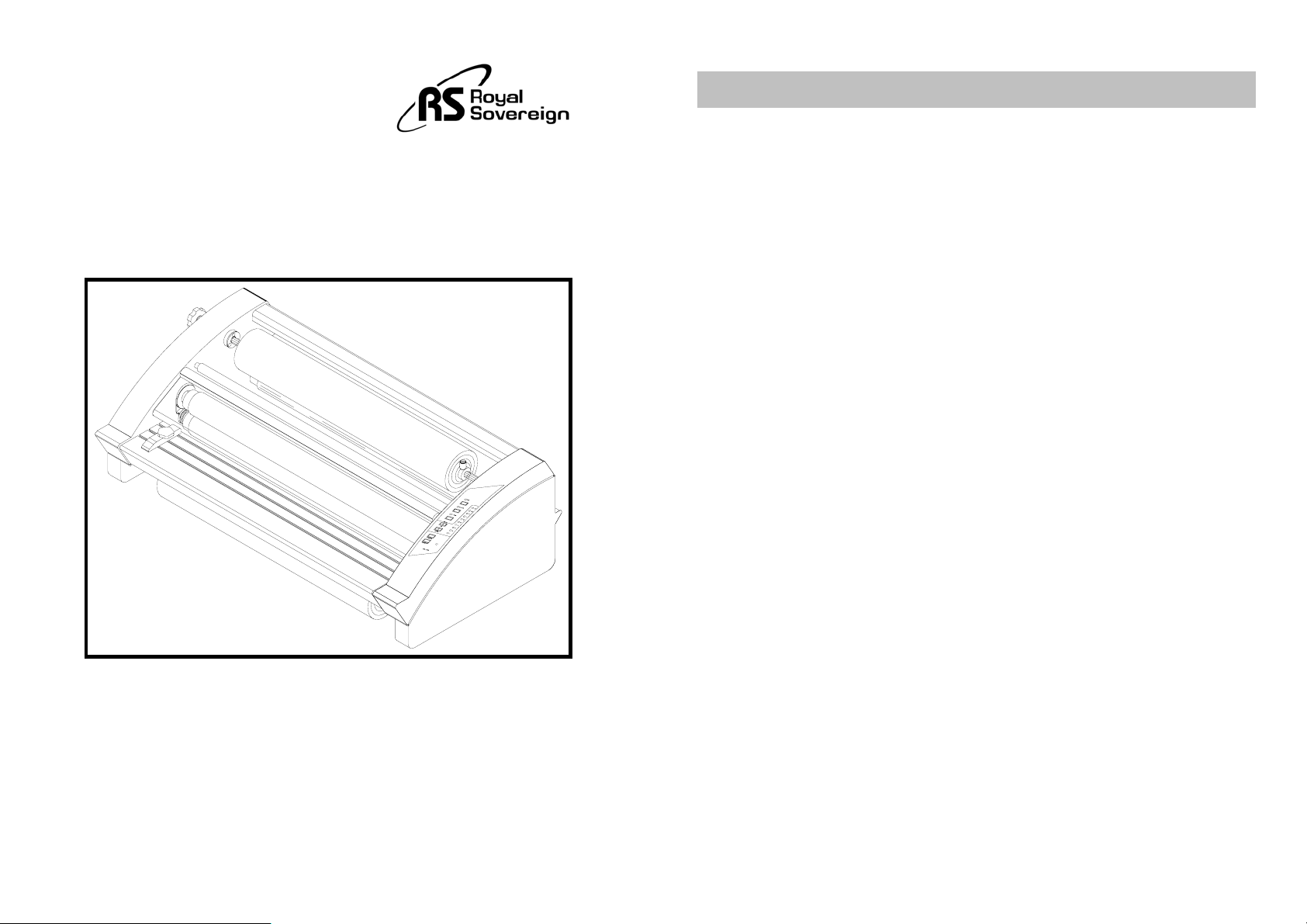
TABLE TOP LAMINATOR
RSL-2701 OWNER’S MANUAL
Please read instructions carefully before use.
TABLE OF CONTENTS
▣Introduction ----------------------------------------------------------------------------------- 3
▣Package Contents --------------------------------------------------------------------------- 3
▣Safety Precautions --------------------------------------------------------------------------- 4
▣Parts -------------------------------------------------------------------------------------------- 5
▣Features Guide ------------------------------------------------------------------------------- 6
▣Operating Instructions -------------------------------------------------------------------- 8
▣Film Loading and Threading ------------------------------------------------------------ 8
▣Maintenance --------------------------------------------------------------------------------- 11
▣Trouble shooting guide ------------------------------------------------------------------- 12
▣Specifications ------------------------------------------------------------------------------- 13
▣Warranty ----------------------------------------------------------------------------------- 14
2
Page 2
(
)
INTRODUCTION
Thank you for purchasing RSL-2701 Table Top Laminator. It has been
designed and manufactured to provide years of continuous service. For
high quality lamination, please read this instruction manual thoroughly.
This manual will provide you with complete operating and maintenance
information.
PACKAGE CONTENTS
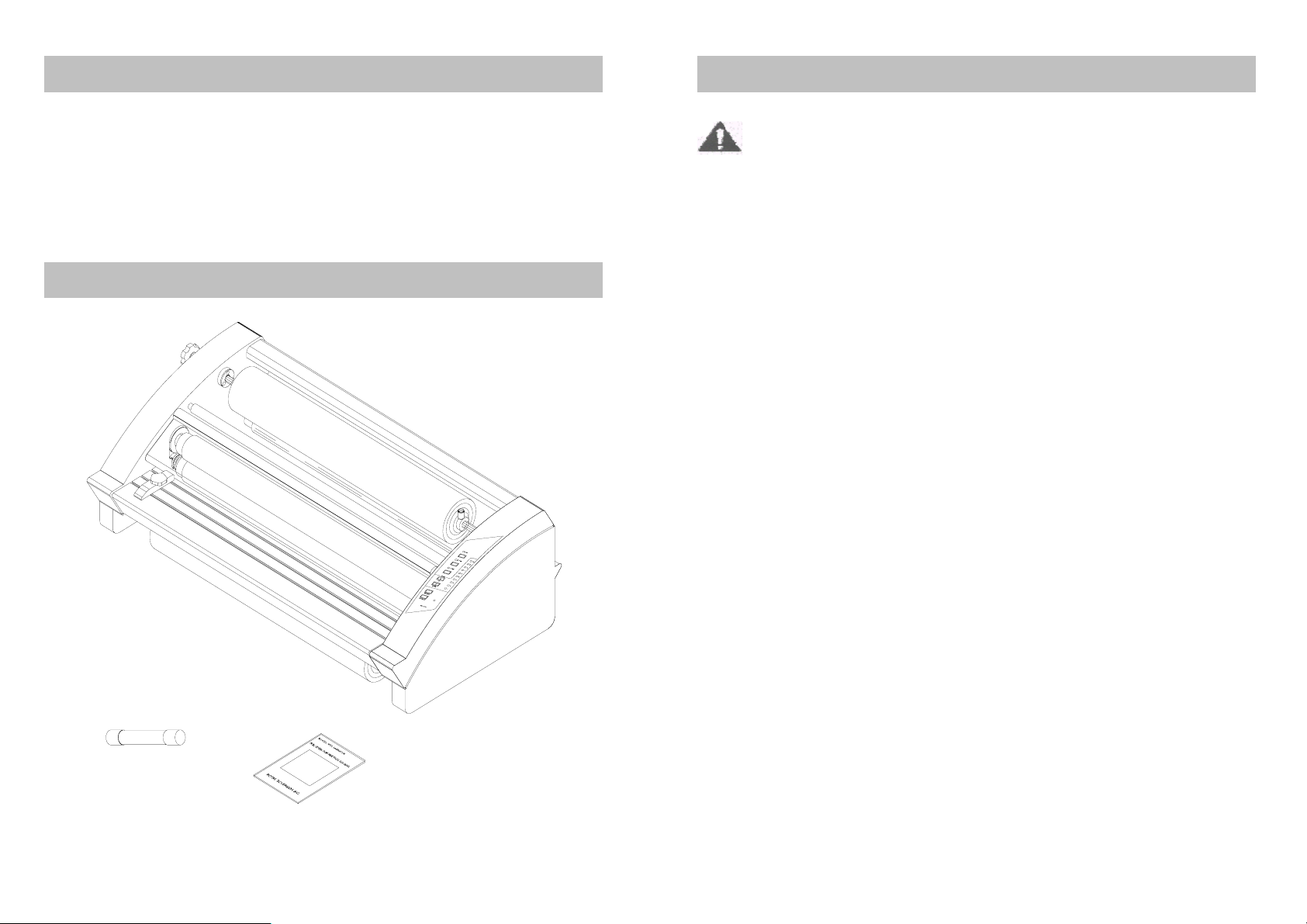
RSL-2701
Preloaded Roll Films
(635mm x 75mic x 30m)
25in x 3mil x 98.4ft
SPARE FUSE
(250V / 15A)
Owner's
Manual
SAFETY PRECAUTIONS
WARNING
Failure to comply with any of the following safety procedures could result in serious
injury.
1. Insure the unit is plugged into a properly grounded outlet with the correct voltage.
2. Only licenses electricians should service or repair the electrical wiring.
3. Keep flammable and wet objects away from the machine.
4. Place machine on a level sturdy surface.
5. Avoid excessive sunlight, humidity and temperatures.
6. Unplug the machine when moving it or when it's not in use.
7. Keep out of reach of children.
8. Only authorized maintenance and service technician are permitted to make repairs.
9. Do not cover the surface of the machine until the machine is completely cooled.
10. When cleaning the machine, don't use flammable sprays or materials.
11. Do not touch the rollers or allow foreign objects inside the machine.
3
4
Page 3
(
)
(
)
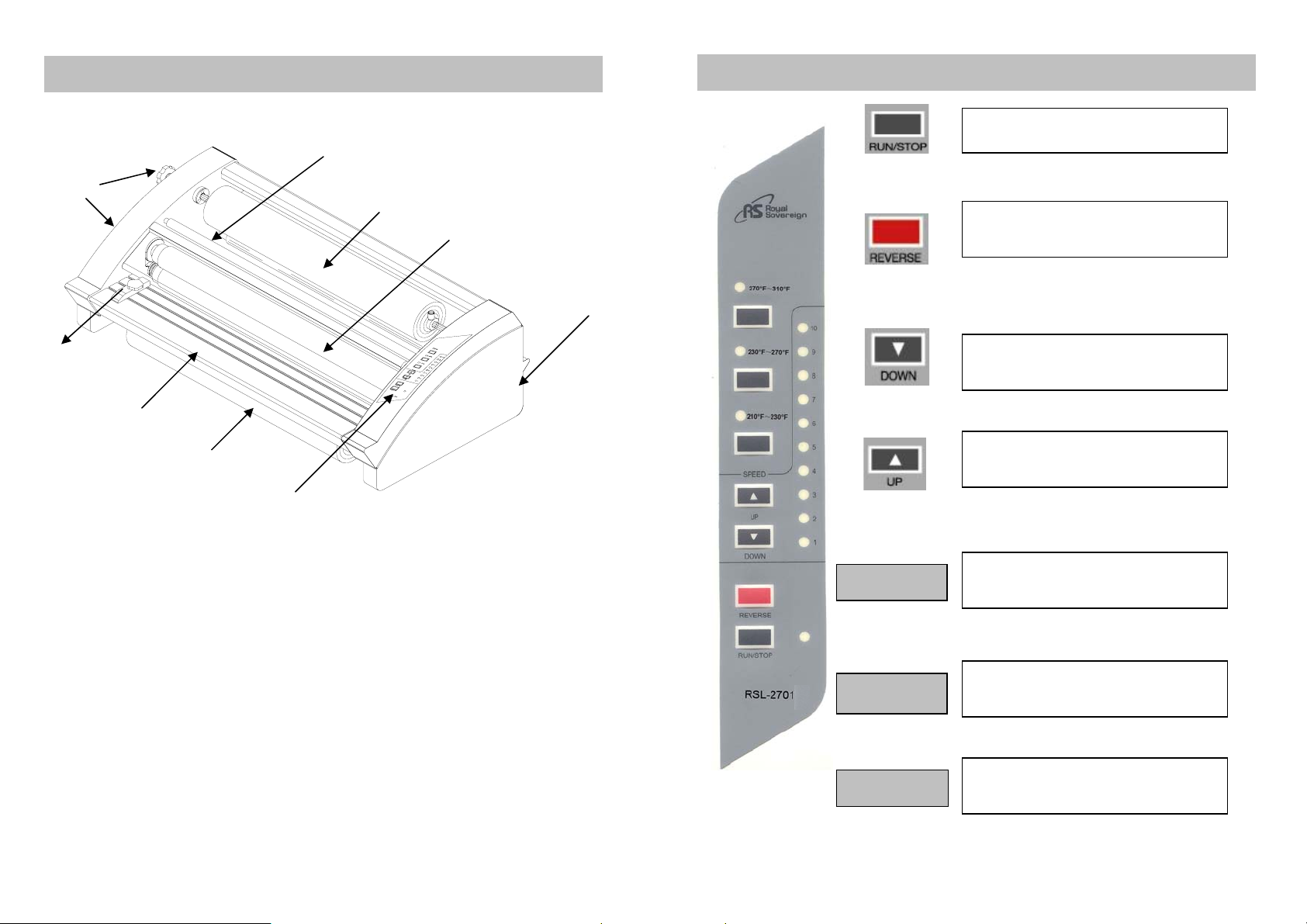
PARTS
⑧
⑥
⑤
1- Upper Film
2- Lower Film
3- Idle Bar
4- Hot Rollers
5- Feed Table
6- Paper Guide
7- Control Panel
8- Tension Knob
9- Power Switch
②
⑦
③
①
④
FEATURES GUIDE
Run and stop the machine
Reverse the rollers to undo jams
and correct misfed documents
⑨
Reduce roller speed
1~10 speed settings
Increase roller speed
1~10 speed settings
210° F~230° F
Film Application Temperature
210° F~230° F
230° F~270° F
Film Application Temperature
230° F~270° F
Figure 1
270° F~310° F
Film Application Temperature
270° F~310° F
5
6
Page 4
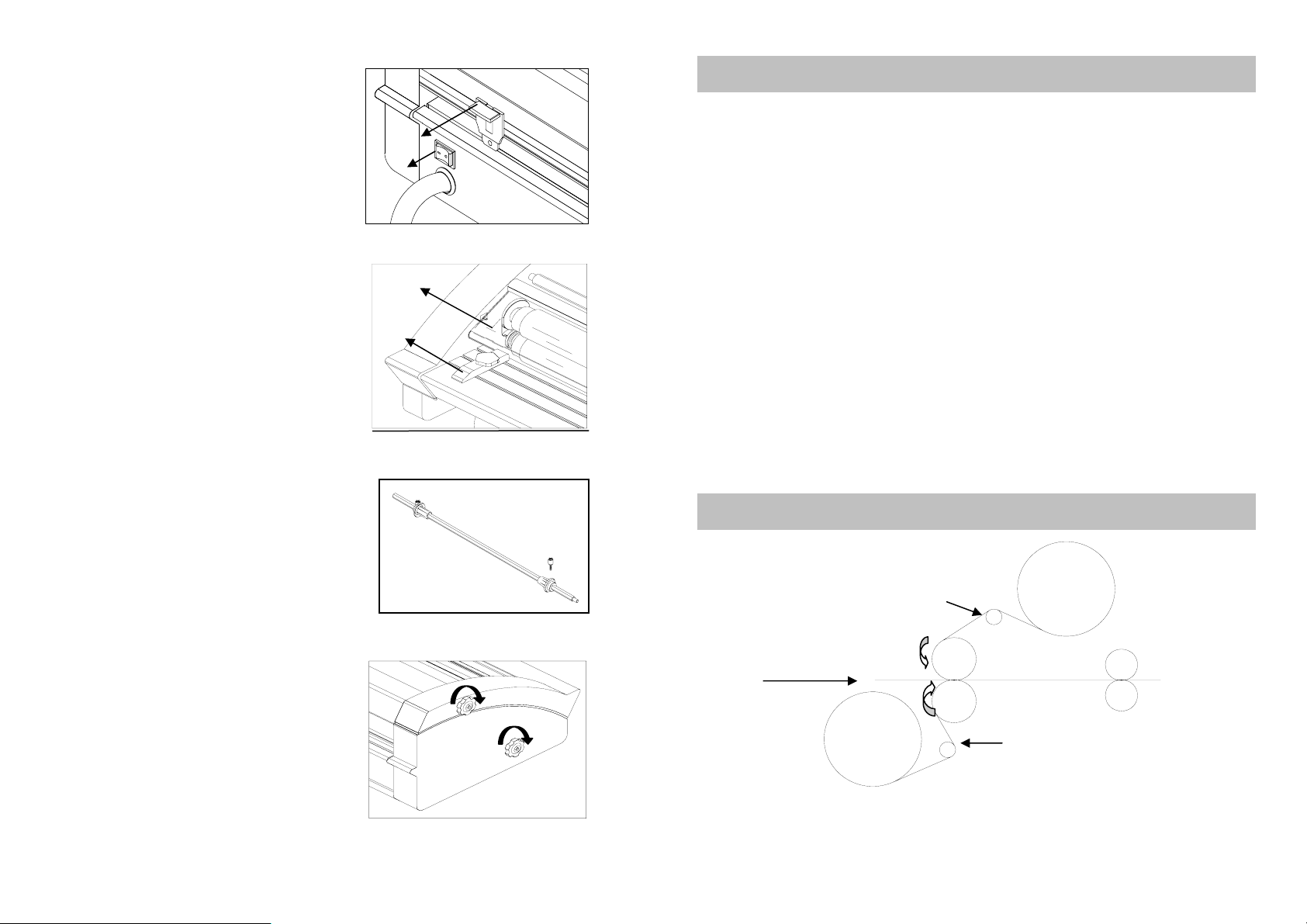
FPower Switch (1) - Located on the rear of
the machine. “I” (on) “0” (off). (Fig. 2)
Cross Cutter (2) - Used to cut off the
laminated web. (Fig. 2)
Feed Guide (3) –The feed guide permits
alignment of the item(s) to be laminated. To
position the adjustable guide, loosen the knob,
slide it to the desired position and tighten the
knob to secure the feed guide in place. (Fig.3)
②
①
Figure 2
④
③
Safety Shield (4) – It prevents entanglement
NOTE: If the safety shield is opened, the power
to the motor will turn off.
Figure 3
Film Shaft and Locking
Core Adapter (5) –
The film shaft holds the film supply on the
machine. The locking core holds and locks the
film on the shaft to prevent shifting. (Fig.4)
Figure 4
Film Tension Adjustment (6) – Allows the
operator to increase or decrease film web
tension. To increase the tension turn the knob
clockwise and to decrease tension turn the
knob counterclockwise. (Fig. 5)
Figure 5
7
OPERATING INSTRUCTION
1. Turn the laminator ON (I) located on the rear of the machine. (Fig. 2)
2. Choose appropriate laminating thickness and speed. (Fig. 1)
3. Do not begin laminating until the blinking light is steady (approximately 10 minutes).
4. Position the item to be laminated on the feed table.
5. Press the RUN button. The rollers will begin to turn, wait for heat line to disappear,
feed the item into the machine.
6. Stop the laminator when all of the items have completely exited the rear of the
machine.
Repeat the above steps until all of your lamination is completed. When lamination is
completed the machine is not in use for an extended period of time turn the power off.
NOTE: Stand by mode and auto power off mode
- Stand by mode: If no activity is made within 30 minutes after each use the
machine will automatically switch into stand by mode. (In stand-by mode the
temperature will decrease to 80~90℃ (176~194°F) and the three film thickness
setting indicators will blink).
- Auto power off mode: If the machine is in stand by mode and no activity is
made for 60 minutes the machine will automatically power off.
- If any activity is made while in stand by or auto power off mode the machine
will return to it’s previous stage.
FILM LOADING & THREADING
Idler bar
Upper
roll film
Laminating
direction
Roller
Lower
roll film
Idler bar
Figure 6
8
Page 5
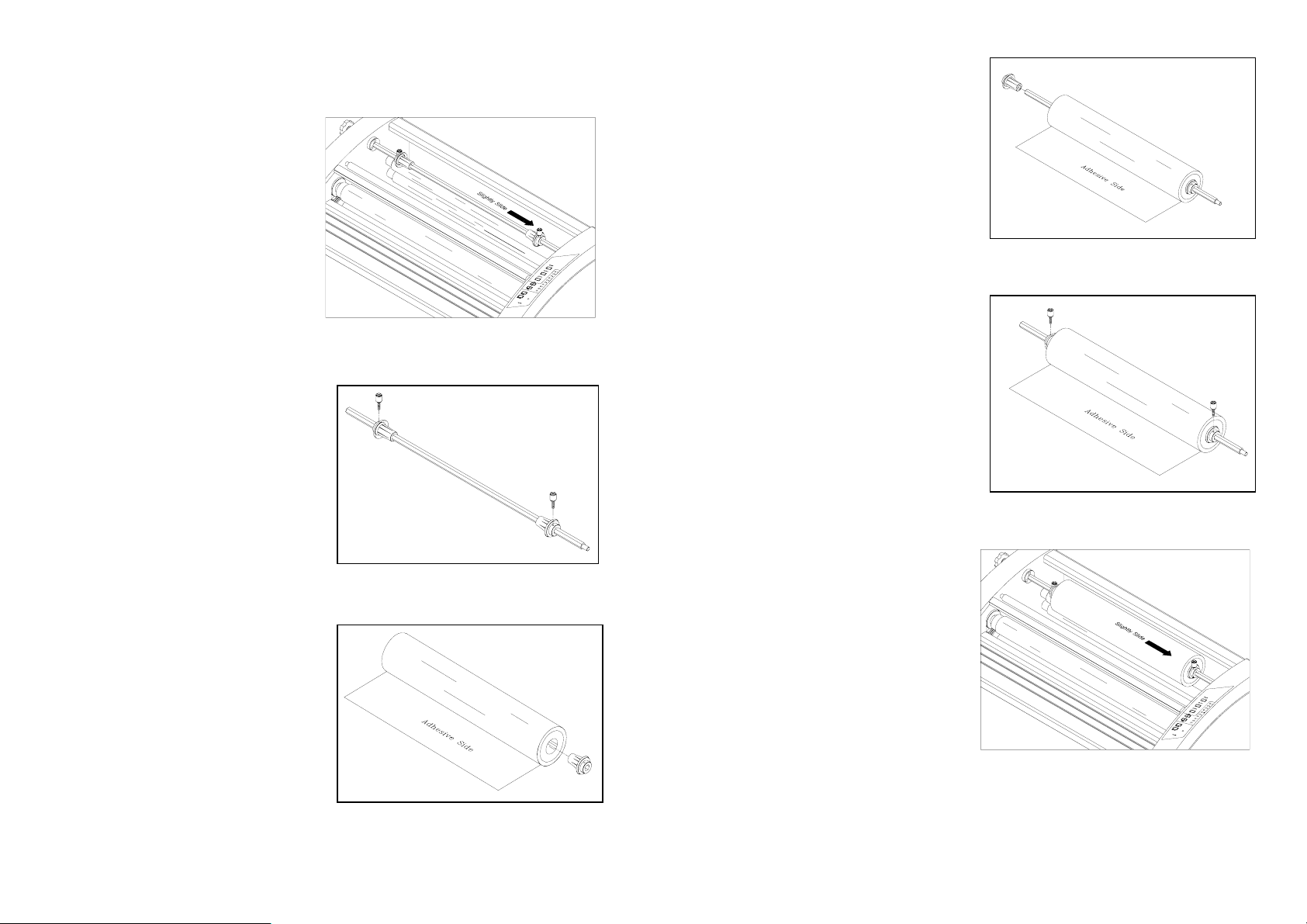
▲ LOADING UPPER ROLL FILM
1. Slightly slide the shaft to the right and
pull it out from the machine.
Figure 7
2. Take both lock core adapters off from the
shaft.
Figure 8
3. Insert one of the core adapters into the
right end of the film core. For film with
poly-in (adhesive side is inside the web),
make sure the adhesive side is facing
upward. (Fig. 9)
Figure 9
4. Insert the film shaft into the roll of film
from the right side with the copper end last.
Align and insert the core adapter on the left
end of the film core.
Figure 10
5. Center the film on the shaft and lock it in
place with the locking core adapters
Figure 11
6. Carefully return the film shaft back into
place.
Figure 12
9
10
Page 6

▲ LOADING LOWER ROLL FILM
1. Repeat steps 1-5 to load lower roll film.
2. Once the upper and lower film is on the shaft, pull the film from the top roll down to
the bottom roll to make certain that the film is aligned properly. Then tighten the
lower locking core screws.
NOTE: If the film is not aligned properly exposed adhesive will adhere to the rollers
and may cause the film to jam.
▲ FILM THREADING
Refer to Figure 6
MAINTENANCE
1. Do not apply any cleaning fluids to the rollers certain fluids may cause damage.
2. Do not clean rollers with sharp or pointed objects.
3. Use adhesive remover to clean resin off of the rollers.
4. Use a damp cloth with water to clean the body of the machine.
5. Store machine in a dry clean area.
TROUBLE SHOOTING GUIDE
Problem Cause Remedy
1. Safety cover is opened.
Rollers do not operate
after the RUN/STOP
Button is pressed
Roller is not heating Call your authorized dealer Call your authorized dealer
Poor Lamination
2. Power cord is not
plugged in
3. Machine is not turned
on.
1. Unbalanced film
tension.
2. Lower idler bar is not
properly positioned
3. Wrong
temperature/speed
setting
1. Check safety cover is
properly closed.
2. Plug in the power
cord.
3. Turn the machine on.
1.Adjust film tension
2. Push idler bar in proper
position
3. Follow manufacturers
recommended
temperature and speed.
11
12
Page 7
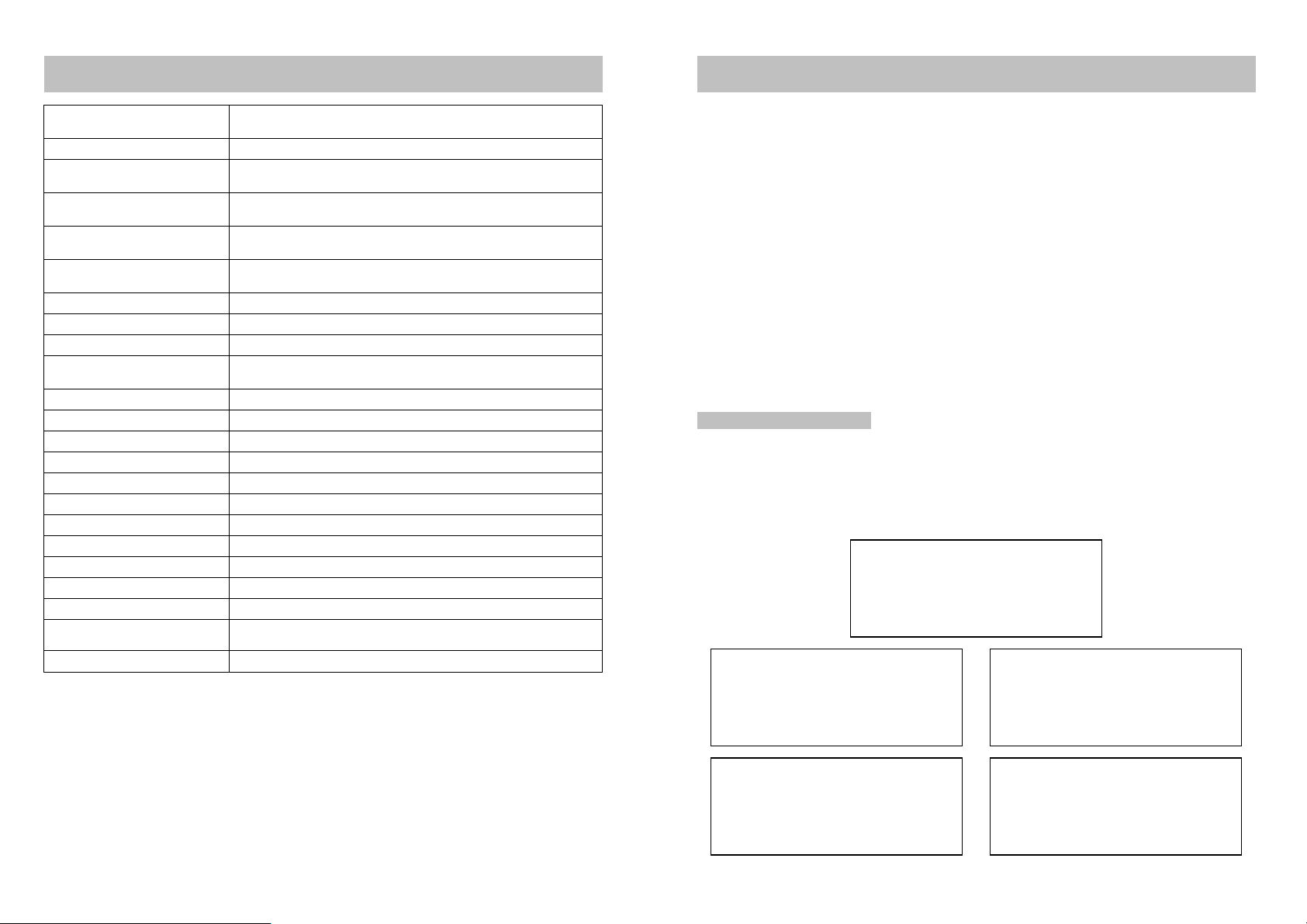
SPECIFICATIONS
MODEL RSL-2701
Power supply AC 120V / 60Hz
Power consumption 1450W
Max laminating width 685(mm) / 27(in)
Film thickness 25~125(mic) / 1~5(mil)
Max laminating speed 2.4(m/min) / 7.9(ft/min)
Ready time 10 min
Heating method Hot Roller
Driving motor DC geared motor
Temperature control Digital(micom)
Speed control Digital(10steps)
Transport type 4 Roller
Cooling system no
Side cutter no
Cross cutter yes
Film alignment no
Hot lamination yes
Cold lamination no
Reverse yes
Remote control no
Foot switch no
Dimensions(w x d x h) 920 x 520 x 320(mm) / 36.2 x 20.5 x 12.6(i n)
Unit weight 50 (kg) / 110.2 (lbs)
Royal Sovereign International warrants the equipment sold is free from defects in material and
workmanship for a period of One (1) year for Parts and Labor from the date of installation,
excluding lamination rollers which are warranted for Six (6) months. This warranty is extended only
to the original purchaser. This warranty is the only warranty made by Royal Sovereign International
and cannot be modified or amended. Royal Sovereign’s sole and exclusive liability and the
customer’s sole and exclusive remedy under this warranty shall be, at Royal Sovereign’s option, to
repair or replace any such defective part or product. These remedies are only available if Royal
Sovereign’s examination of the product discloses to Royal Sovereign’s satisfaction that such defects
actually exist and were not caused by misuse, neglect, attempt to repair, unauthorized alternation or
modification, incorrect line voltage, fire, accident, flood or other hazard.All warranty claims must be
filed through the authorized Royal Sovereign dealer or reseller through which the equipment was
originally purchased. Model, serial number and date of delivery are required for all claims.
The warranty made herein is in lieu of all other warranties, expressed or implied, including any
warranty or merchantability or fitness for a particular purpose. Royal Sovereign will not be liable for
personal damage or personal injury (unless primarily caused by its negligence), loss of profit, or
other incidental or consequential damages arising out of the use or inability to use this equipment.
LIMITED WARRANTY
This warranty specifically does not cover damage to laminating rollers caused by knives, razor
blades, or any sharp objects or abrasives, or failure caused by adhesives, or damage caused by lifting,
tilting or improper use of the machine. Warranty repair or replacement by Royal Sovereign or its
authorized Reseller(s) does not extend the warranty beyond the initial one year period from the date
of installation. Unauthorized customer alterations will void this warranty.
WARRANTY
CORPORATE HEADQUARTERS
Royal Sovereign International Inc.
2 Volvo Drive, Rockleigh, NJ 07647 U.S.A.
TEL : +1) 800-397-1025 FAX : +1) 201-750-1022
E-mail : [email protected]
RS Holland B.V.
Planetenweg 75 2132HM Hoofddorp, The Netherlands.
TEL : +31) 23-5626620, +31) 23-5654451
FAX : +31) 23-5654565
E-mail : [email protected]
Royal Sovereign Inc. <Oversea Sales Office>
1001, World Meridian II, 426-5, Gasan-dong,
Geumcheon-gu, Seoul, 153-759, KOREA
TEL : +82)2-2025-8800 FAX : +82)2-2025-8830
E-mail : [email protected]
RS Canada Inc.
164 Oakdale Road, Toronto, Ontario M3N 2S5
CANADA
TEL : +1) 416-741-8400 FAX : +1) 416-741-8185
E-mail : [email protected]
13
RS International Australia PTY. LTD.
30 Prime Drive, Seven Hills, NSW 2147, Australia
TEL : +61) 2-9674-2127
FAX : +61) 2-9674-2027
E-mail : [email protected]
14
 Loading...