

Page 1
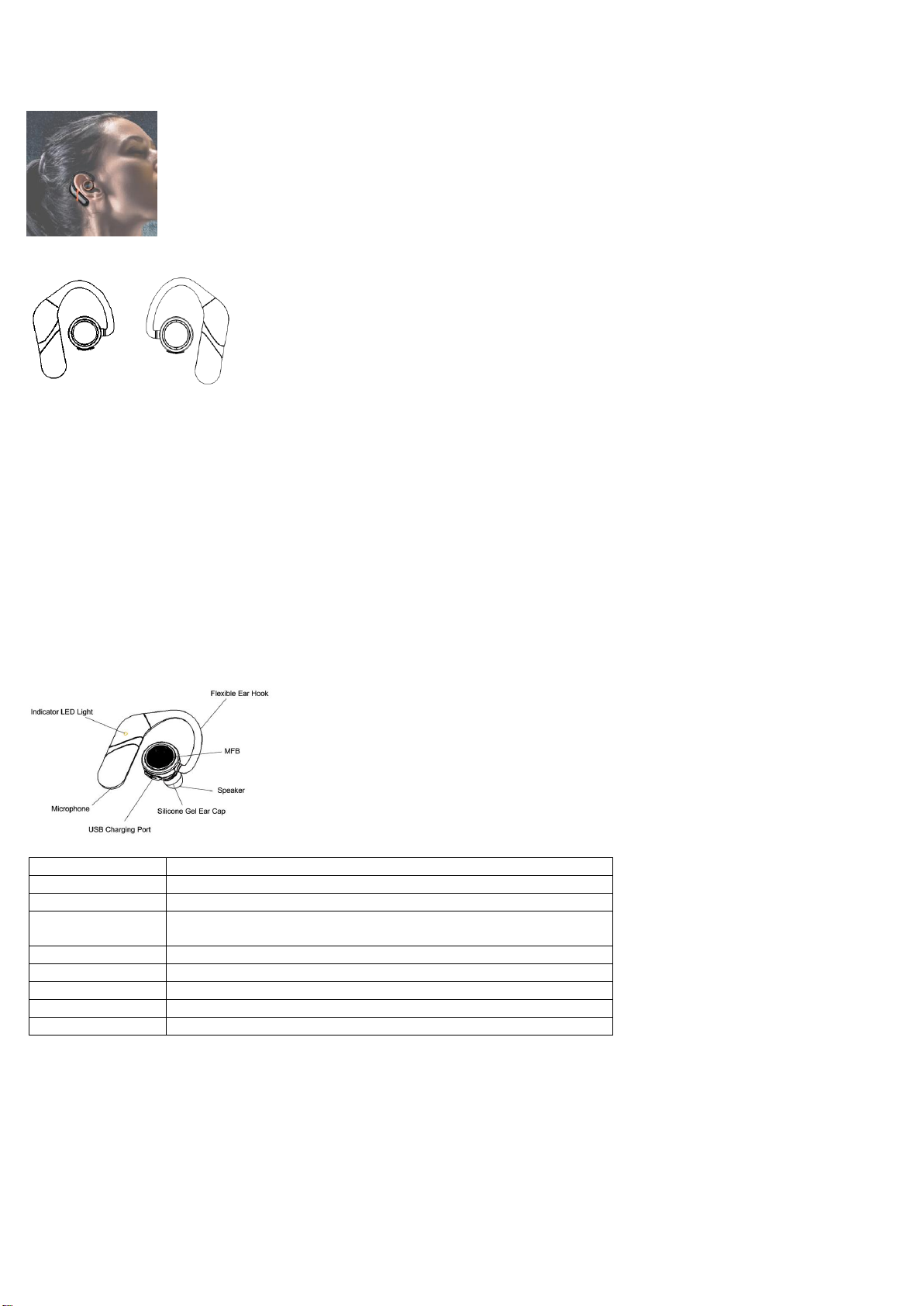
Function
Operation
Power on
Long press the MFB for 2 seconds till the Indicator Light become red
Power off
Long press the MFB for 3 seconds till the Indicator Light go out
In paring mode
Long press the MFB for about 5 seconds till the Indicator Light entering into
red and blue flashing status
Answering call
Short press the MFB 1 time to connect
End call
Short press the MFB 1 time to disconnect
Reject call
Short press the MFB 2 times to reject call
Pause, Play
Short press the MFB 1 time
Next song
Short press the MFB 2 times
1. Wearing
1.1 Position to wear: Please refer to the below picture.
User Manual
1.2 Right and Left Earphone
Right Left
2. Specifications
Bluetooth version: Bluetooth 4.2
Supporting profiles: A2DP, AVRCP, HFP, HSP
Music playback time: 7 hours
Talking time: 8 hours
Standby time: 8 days
Charging time: 1.5 hours
Charge port: Micro USB Type B
Wireless range: 10-15m (Free space)
Battery status display on IOS device: yes
Weight: 13.8gx2
Dimension (L*W*H): 60*50*26mm
3. Operations
3.1 How to connect S800 with cell phones
Step 1: Long press the MFB of the either Right or Left Earphone for about 5 seconds till the Indicator LED Light entering into red & blue flashing
status.
Step 2: Turn on the Bluetooth mold of your mobile phones and search Bluetooth devices.
Step 3: Select S800 to connect. The earphone paired to your mobile phone first is the main device.
Step 4: Press the MFB of the other earphone (auxiliary earphone) for about 3 seconds till the light turn on. Release it. The auxiliary earphone
connect to the main earphone automatically if the Indicator LED Light of the auxiliary earphone entering into blue flashing status.
3.2 How to reconnect S800 with cell phones
3.2.1 The devices will reconnect with your mobile phones automatically after “power on” (not in pairing mode).
3.2.2 If the devices cannot reconnect, please press the MFB for about 5 minutes to do re-pairing.
Page 2

NOTE: This equipment has been tested and found to comply with the limits for a
Class B digital device, pursuant to part 15 of the FCC Rules. These limits are
designed to provide reasonable protection against harmful interference in a
residential installation. This equipment generates uses and can radiate radio
frequency energy and, if not installed and used in accordance with the instructions,
may cause harmful interference to radio communications. However, there is no
guarantee that interference will not occur in a particular installation. If this
equipment does cause harmful interference to radio or television reception, which
can be determined by turning the equipment off and on, the user is encouraged to
try to correct the interference by one or more of the following measures:
- Reorient or relocate the receiving antenna.
- Increase the separation between the equipment and receiver.
-Connect the equipment into an outlet on a circuit different from that to which the
receiver is connected.
-Consult the dealer or an experienced radio/TV technician for help
Changes or modifications not expressly approved by the party responsible for compliance
could void the user's authority to operate the equipment. This device complies with Part
15 of the FCC Rules. Operation is subject to the following two conditions:
(1) this device may not cause harmful interference, and
(2) this device must accept any interference received, including interference that may
cause undesired operation.
 Loading...