

Page 1
Induction
Cooker
CIC-ES2008
User Manual
Page 2

2
C O N T E N T S
PARTS IDENTIFICATION
SAFETY PRECAUTIONS
SETTING UP INDUCTION COOKER
CONTROL PANEL DISPLAY
OPERATING INSTRUCTIONS
CLEANING AND CARE
TROUBLESHOOTING
SPECIFICATIONS
4
4
5
5
6
6
7
7
3
Page 3
5
SETTING UP INDUCTION COOKER
CONTROL PANEL DISPLAY
1. Check the device for visible damages.
2. Place the device on a stable and level surface.
3. Never place the device on a flammable surface (e.g. table cloth, carpet, etc.).
4. Do not block the ventilation slots of the device. This may overheat the Induction Cooker. Keep a
minimum distance of 5 to 10cm from the walls or other items.
5. Do not place the device next to open fires, heater or other sources of heat.
6. Make sure that the power cable is not bent, damaged or squashed beneath the device and does
not come into contact with sharp edges and /or hot surface.
7. The device should be connected to a rolled-out extension cable with a maximum length of 3m and
a cross section of 2mm. If an intermediate switch is used, it must be rated at a minimum of 16A.
8. Only magnetic steel or metal-based pots and pans with a flat bottom and with diameter of 12cm
to 26cm can be used with the Induction Cooker.
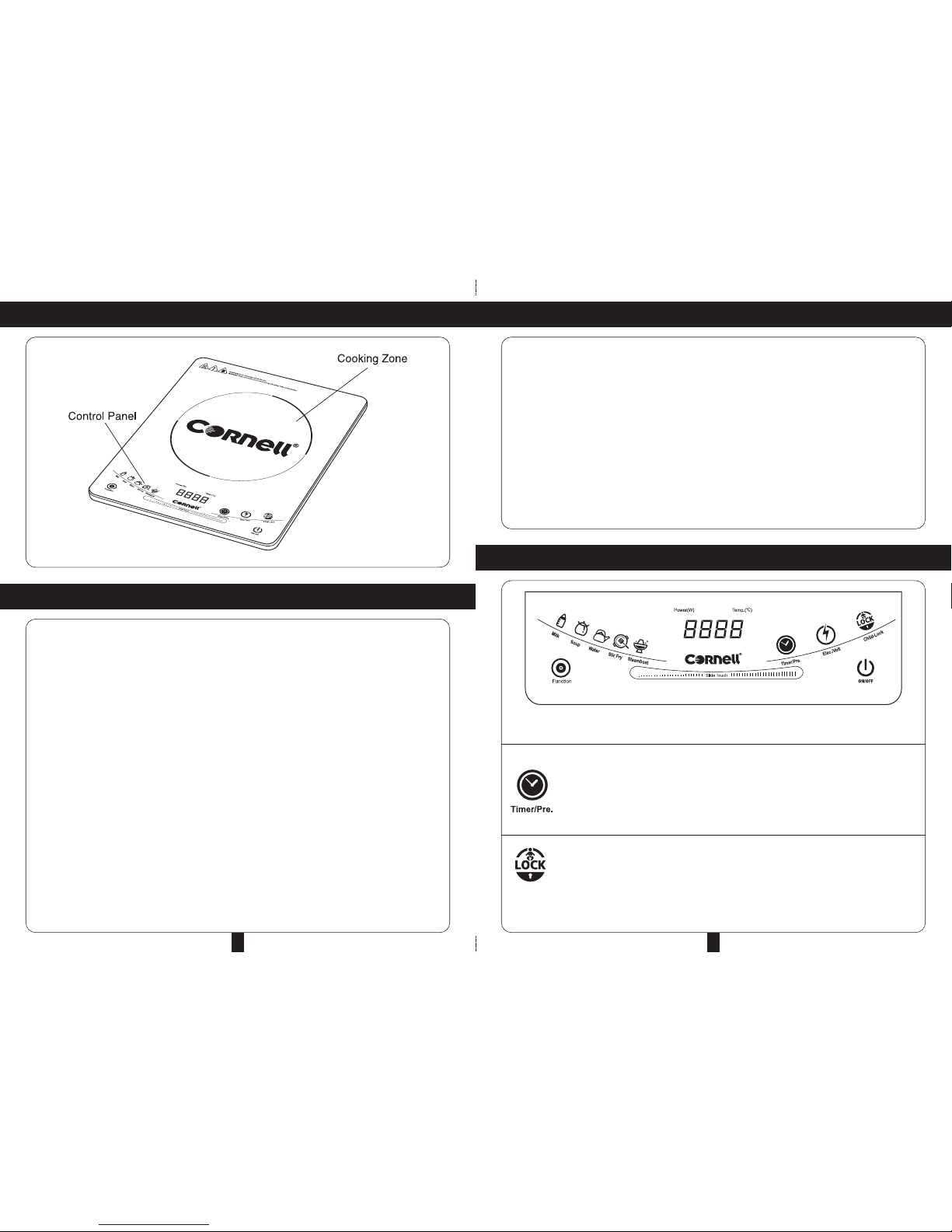
• The touch and slide panel is for the adjustment of heating levels and also for time setting in the
Preset Timer / Timer function.
The Preset Timer / Timer function works selectively for all cooking functions
(*refer to
Operation Instruction for further information).
Use Preset Timer to start cooking at a specific
time. Use Timer to stop cooking at a specific time. Press the Preset Timer / Timer button
and use the touch and slide panel to set the preferred time. Press and hold the most
left or right side of the panel to decrease/increase the time rapidly. After selecting a
preferred time, wait for several seconds for activation.
Whenever the Induction Cooker is working, pressing the Child Lock function disables
selection for all functions except the On/Off button. Press the Child Lock function again
to enable selection for all functions.
4
PARTS INDENTIFICATION
1. Thank you for your purchase of this Induction Cooker. Read all instructions carefully. Keep this User
Manual for future reference.
2. The Induction Cooker must not be left unattended while it is operating.
3. Always unplug the Induction Cooker from the power supply before cleaning or when not in use.
4. If it is a detachable power cord, always attach the power cord to the Induction Cooker BEFORE
plugging it into the power supply. To disconnect the Induction Cooker, switch it off first before
removing the power plug from the power supply.
5. Close supervision is necessary when operating the Induction Cooker near children. Ensure that the
power cord does not hang over the work surface.
6. Do not use this Induction Cooker for other than its intended use.
7. Do not operate the Induction Cooker with a damaged power cord set or plug. Any repairs should
always be undertaken by an authorized service centre.
8. Always place the Induction Cooker on a flat sturdy surface. When moving it, always ensure not to
touch hot surfaces to avoid possible spillage of hot liquids it may contain.
9. Do not immerse the Induction Cooker or its electrical parts into water or any other liquids.
10.Use of accessories or equipment not recommended by the manufacturer may result in damages
or malfunction on the Induction Cooker or injuries to the user.
11.This Induction Cooker should not be used by people who are physically or mentally impaired
(including children) unless proper guidance is provided during operation.
SAFETY PRECAUTIONS
Page 4
6 7
SPECIFICATIONS
MODEL NO. CIC-ES2008
RATED VOLTAGE / FREQUENCY 220-240V~ 50/60Hz
RATED WATTAGE 2000 W
TROUBLESHOOTINGOPERATING INSTRUCTIONS
After the device has been turned on, select the appropriate function according to cooking preference
by using the function selector button. Press the Function button and the LED light will light up to show
the selected function.
CLEANING AND CARE
1. Disconnect the power plug and wait until the device is cooled down completely. Clean after using
it every time.
2. If pots/pans are used without being cleaned, discoloration or cooking stain may appear.
3. Do not use benzene, thinner, scrubbing brush or polishing powder to clean the Induction Cooker.
4. Wipe using a damp cloth with dish washing agent.
5. To remove dirt from the air intake and exhaust vent, use a vacuum cleaner to extract it.
6. Never clean the device over running water. The Induction Cooker is not waterproof and water that
gets inside may cause malfunction.
Note: After finished cooking, turn off the device but do not turn off and remove the power plug
yet. Its fan will be running to cool down the device. Remove only when the fan stops.
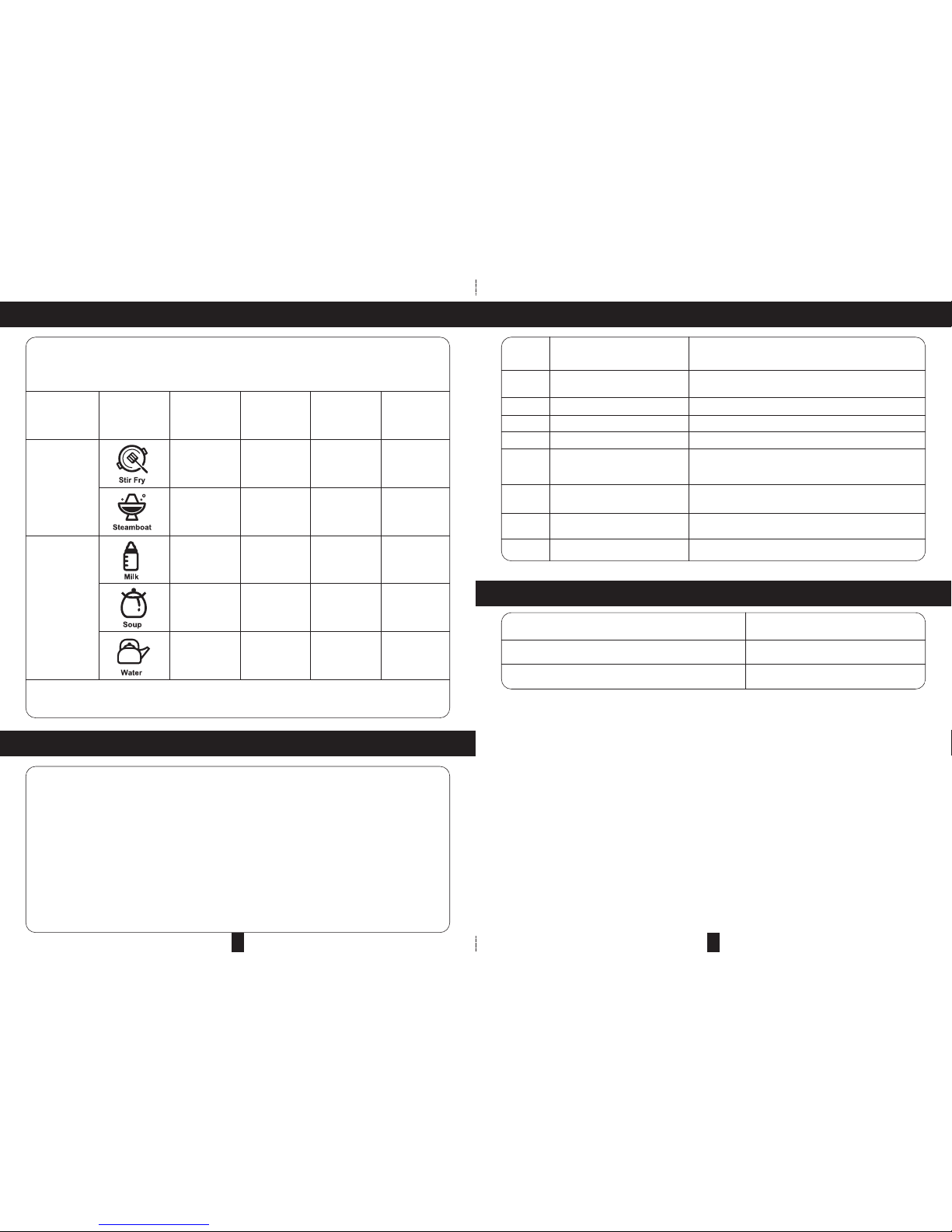
Function Type Function Default Adjustable Preset Timer Timer
Temperature Temperature
Range
Manual 280°C 10 levels: – 4 hours
60°C to 280°C
1400W 10 levels: – 4 hours
120W to 2000W
Automatic 300W – 24 hours –
1600W – 24 hours –
2000W – 24 hours –
ERROR POSSIBLE CAUSES SOLUTION
CODE
E1 P
late surface temperature sensor Contact the supplier or send it to an authorized service center.
malfunction.
E2 IGBT temperature sensor malfunction. Contact the supplier or send it to an authorized service center.
E3 A
bnormal power voltage. Voltage too high. Check power supply. Power on after power supply is back to normal.
E4 A
bnormal power voltage. Voltage too low. Check power supply. Power on after power supply is back to normal.
E5 Plate surface temperature sensor Wait for a few minutes until the device cools down and check pot/pan.
short-circuited because empty pot/pan
is used.
E6 Fan failure. Air intake/exhaust vent blocked. Contact the supplier or send it to an authorized service center. Clean the
vent after the device cools down. Restart.
E7 Coil panel is not well connected. Contact the supplier or send it to an authorized service center.
Circuit malfunction.
E8 No or non-usable pot/pan on the cooktop. Use suitable cooking pot/pan on the cooktop.
 Loading...