

Page 1
Air Cooler
CAC33
Page 2
WARNING:
1. This appliance can be used by children aged
from 8 years and above and persons with
reduced physical, sensory or mental
capabilities or lack of experience and
knowledge if they have been given
supervision or instruction concerning use of
the appliance in a safe way and understand
the hazards involved. Children shall not play
with the appliance.
2. Cleaning and user maintenance shall not be
made by children without supervision.
3. If the supply cord is damaged, it must be
replaced by the manufacturer, its service
agent or similarly qualified persons in order to
avoid a hazard.
4. Unplug the appliance during filling and
cleaning.
5. The appliance is only for household and
indoor use.
Safety Warnings and Precautions
1
Page 3
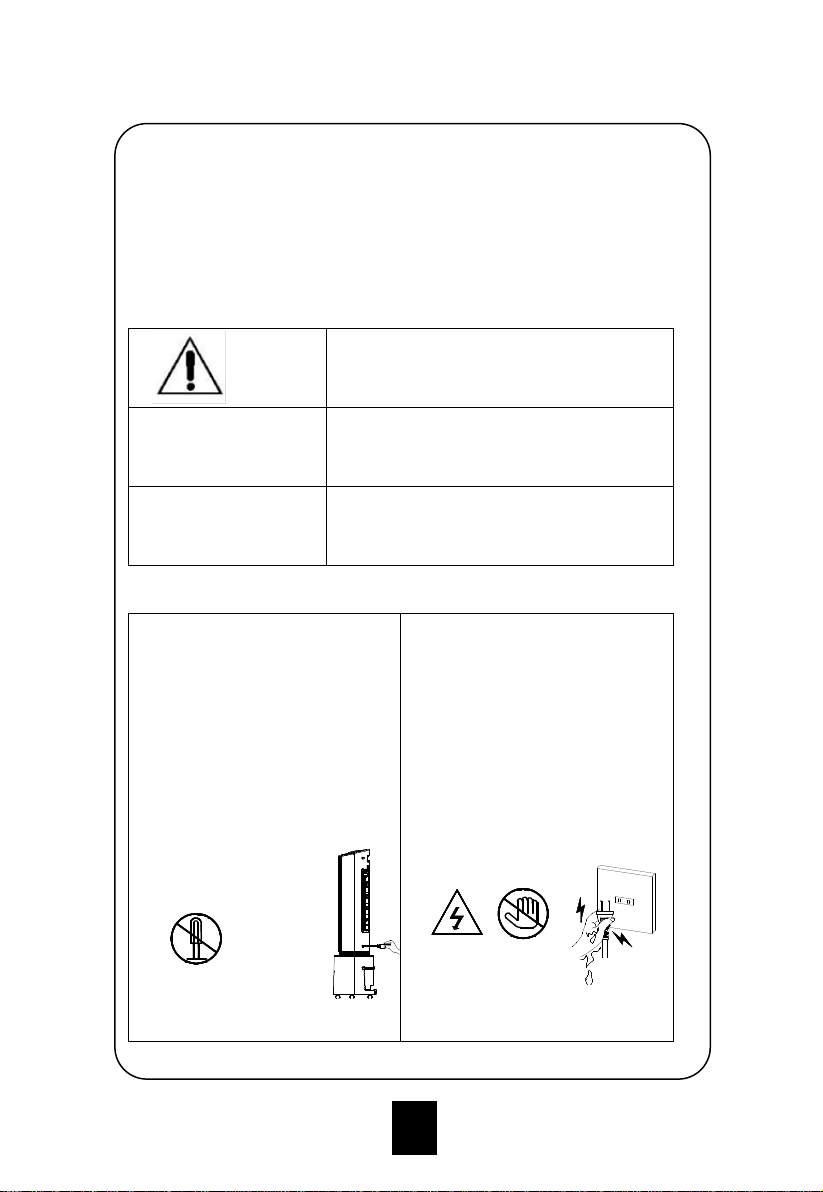
To avoid the dangers caused by misoperation and to use the device
more conveniently, several considerations are given through the
following icons. Please get familiar with the icons below, and read the
User Guide.
Symbol Meaning Description
Warning
Indicate that could result in death or
serious injury, or property damage
General
prohibition
Indicate the behaviors that must be
absolutely prohibited
Must
Obey
Indicate the content that must be
enforced
If the product has any failure,
please send it to the repair
station or notify the service
center; do not disassemble
or replace the parts.
Disassembly or modification
without permission will affect
the safety of the product.
Do not touch the power cord
plug with wet hands.
Risk of electric shock.
Disassembly prohibited
Electric
shock
Do not
touch
2
Page 4
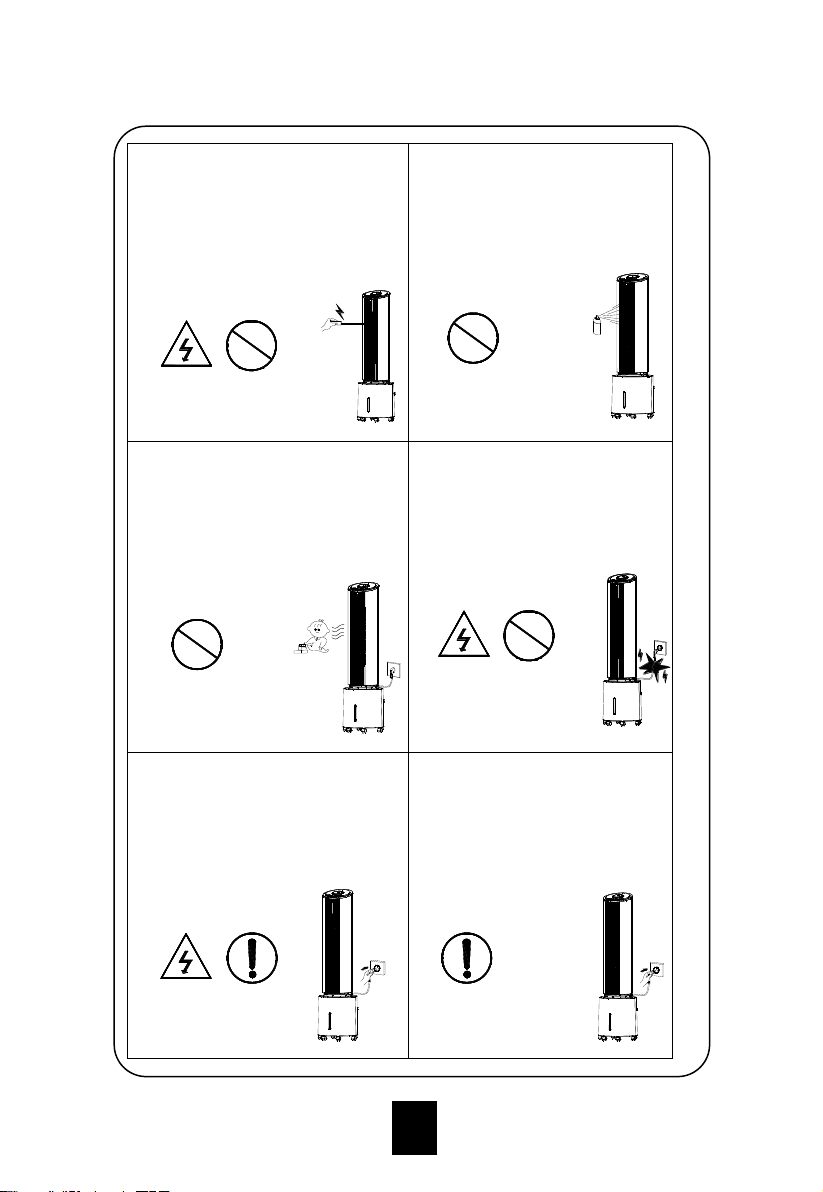
Never insert wooden sticks,
metal sticks and other objects
into the inlet and the outlet.
It may cause leakage, short
circuit and damage to the
product.
Do not spray insecticides
and flammable sprays
around the product.
It may cause damage to the
product.
Avoid placing the product at
the outlet for long time or blow
to the children directly.
It may cause illness or affect
the health of young children.
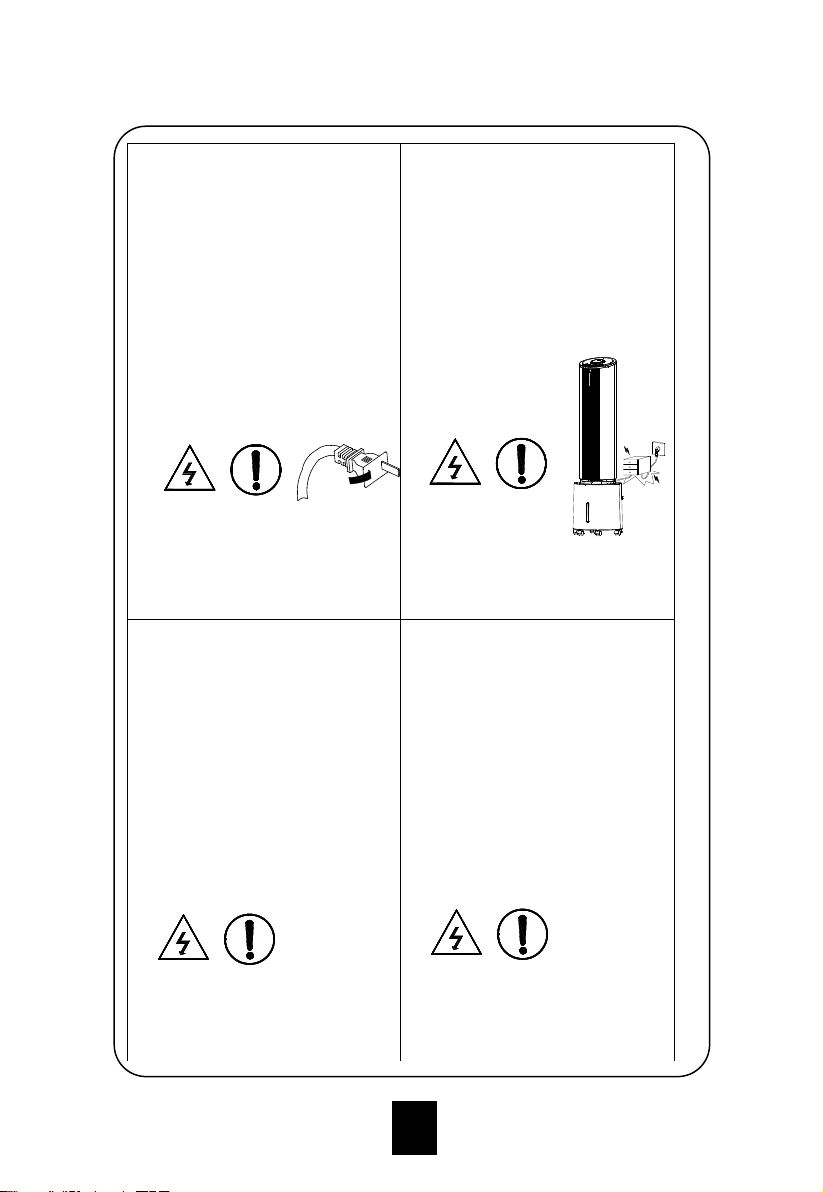
Do not pull the cord when
removing the power plug.
It may cause power cord
damage, electric leakage
and other hazards.
Make sure that the power plug
doesn’t stick foreign body, and
fully insert the plug.
It will lead to the risk of electric
leakage.
Exception handling
When the product has
unpleasant smell or
abnormal noise in use,
immediately stop using and
unplug the power.
Electric
shock
General
prohibition
General
prohibition
General
prohibition
Electric
shock
General
prohibition
Electric
shock
Must
Obey
Must
Obey
3
Page 5
Do not use exposed or
damaged power cord.
It may cause electric
leakage, short circuit or fire.
If the power cord is
damaged, it should be
replaced by the
manufacturer, authorized
service center or qualified
personnel in order to avoid
hazards.
Do not bend the power cord
or place heavy objects on it.
It will lead to the risk of
electric leakage.
The water level of the tank
shouldn’t exceed the
maximum level, and
shouldn’t be lower than the
minimum level when the
cooling/humidification
function is turned on.
After water is filled, do not tilt
or collide while placing or
moving, to prevent water
splashing.
If the product has been
dumped and there is water
inside, immediately pull out
the plug and wait for 24 hours
before starting.
Electric
shock
Must
Obey
Electric
shock
Must
Obey
Electric
shock
Must
Obey
Electric
shock
Must
Obey
4
Page 6
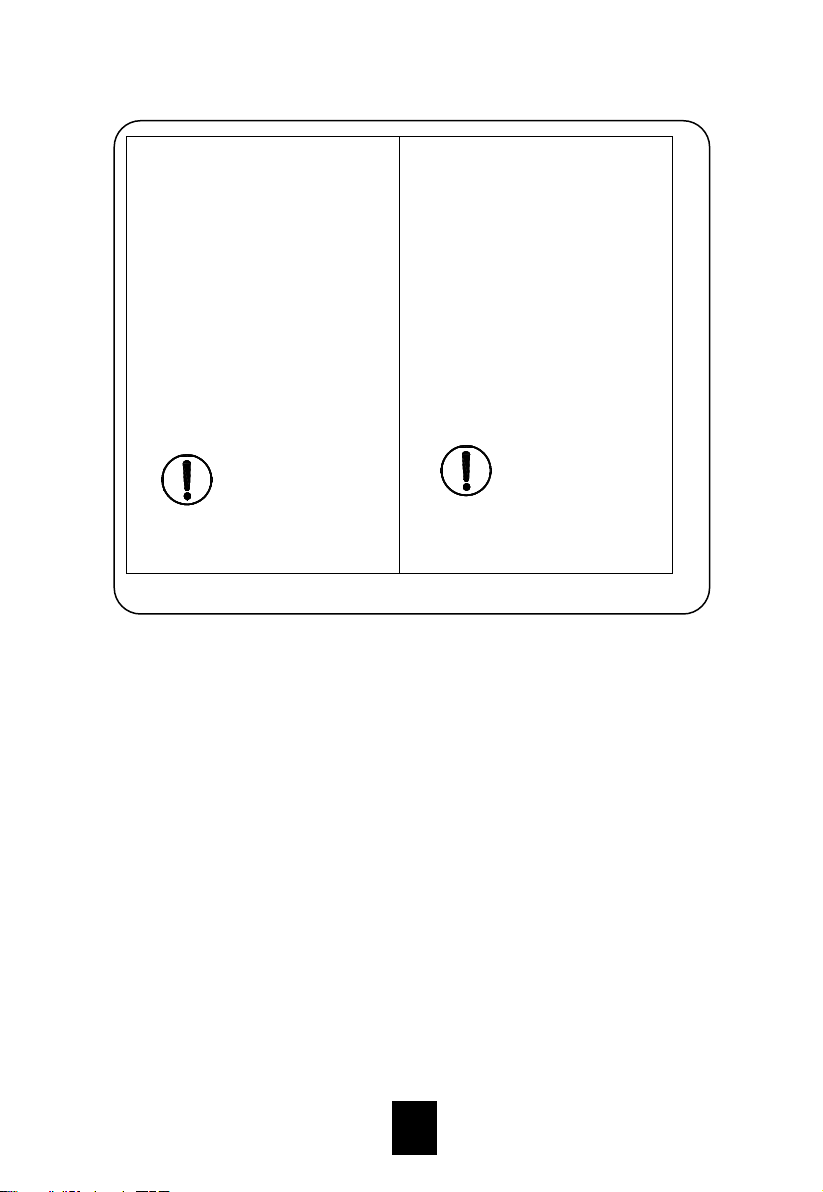
When you go out or if the
device won’t be used for a
long time, shut down the
device and disconnect the
power plug from the outlet.
Do not use the device when
there is unattended child,
animal or handicapped
person.
Only use the device with
qualified power outlet, and
the carrying capacity of the
outlet shouldn’t be lower than
10A/220V.
Make sure that the operating
voltage is consistent with the
voltage specified on the
nameplate (AC220V).
Confirm the operating
voltage before relocating.
Must
Obey
Must
Obey
5
Page 7
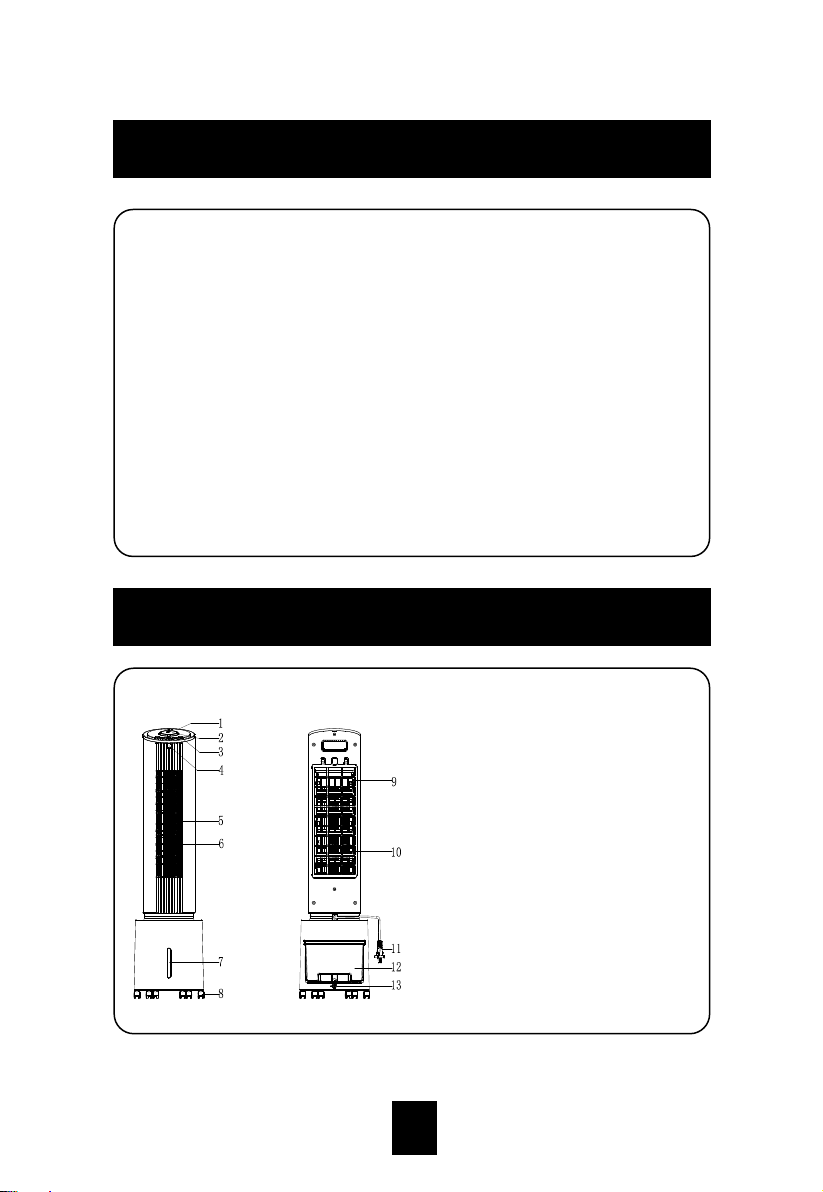
1. Function display window
2. High/medium/low knob
3. Keypad
4. Remote control receiver
window
5. Wind outlet
6. Guide vanes
7. Water level display window
8. Caster
9. Air filter mesh
10. Wet curtain bracket
11. Power cord
12. Water tank
13. Tank lock
Names of Product Components
1. Three wind types: normal wind, natural wind, and sleep wind.
2. Three wind speeds: high, medium, and low.
3. Use wet curtain water circulation cooling technology, featuring
large water recycling and faster cooling.
4. Ice crystal energy storage for cooling, featuring large cold storage
capacity, long releasing time, and better effect.
5. The level swing air feeding.
6. 1 -9 hours timer can be set.
7. Long-distance remote control for easy operation.
8. Water shortage protection and rear net protection.
Features
6
Page 8
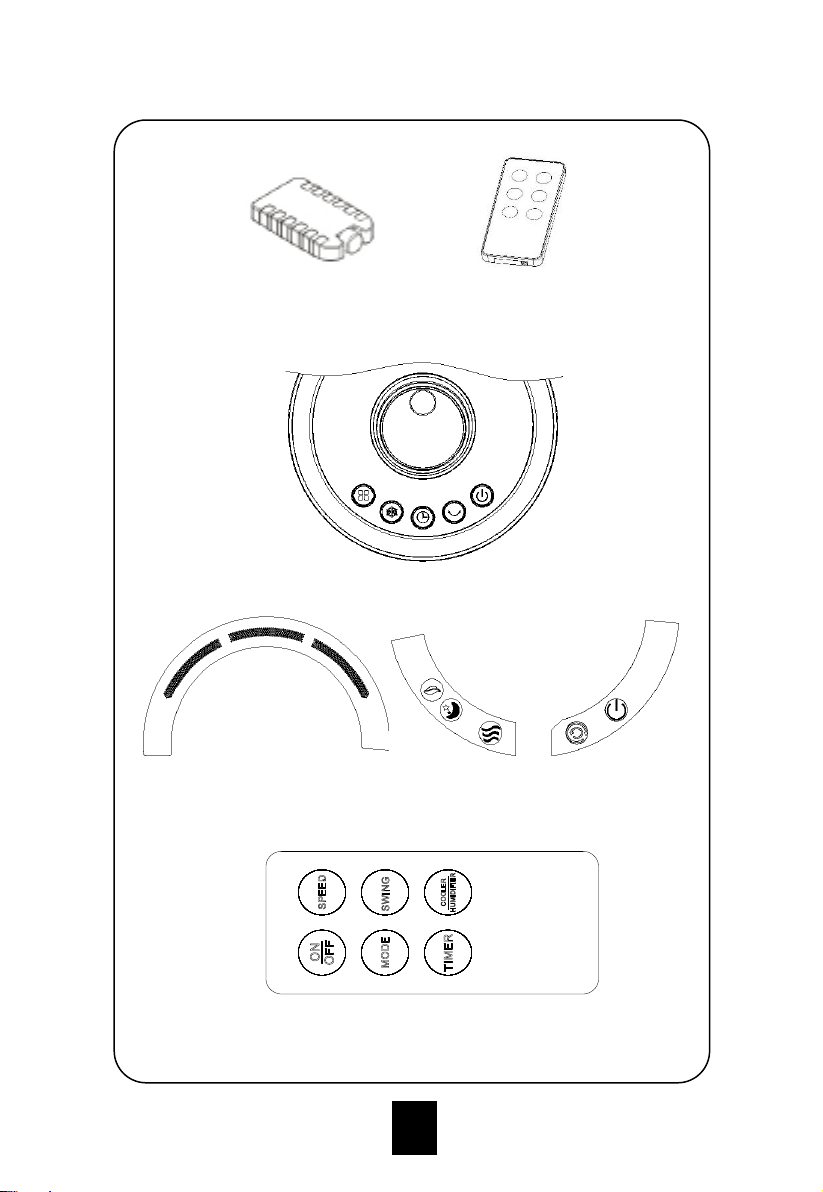
Accessories
Ice box Remote control
Keypad
Display panel
Remote control panel
7
Page 9
Installation method
The product can be used directly after removing the package (without
installation).
Usage of various function buttons
The buttons are touch buttons. You can tap the buttons on the
operation panel to trigger the corresponding functions.
1. When the power is turned on for the first time, the buzzer beeps
twice and enters standby mode; except the ON/OFF button, other
buttons are invalid;
2. ON/OFF button: in power on state, press this button to turn on/off
the device; after turning on, the system returns to standby mode,
on/off indicator light will twinkle once per second; when the device
is first turned on, the wind speed is level 2, and changes to level
after three seconds; the timer is turned off; swing is turned off;
pump absorbing is turned off; power indicator turns on; the wind
mode is normal. After turning off, the state will be saved, but the
timer setting won’t be saved; if the mode is sleep wind before
turning off, the mode won’t be saved, and it will change to normal
wind. In power on state, if there is no button (or remote control)
operation in one minute, the brightness of all LEDs reduces by
half; press the button again, the brightness resumes and
performs appropriate action;
3. Speed button: in power on state, rotate this button clockwise to
increase the wind speed from level 1 to level 3; rotate this button
counterclockwise to reduce the wind speed from level 3 to level 1.
LED indicator shows the appropriate speed state;
4. Mode button: the device first enters normal wind mode; press
this button to enter the natural wind mode, press it again to enter
sleep wind mode, and press it again to enter normal wind mode.
Product Installation and Usage
8
Page 10
Press the Mode button to switch the wind modes, which run as
follows:
① Normal wind:
High speed: High
Medium speed: Medium
Low Speed: Low
② Natural wind:
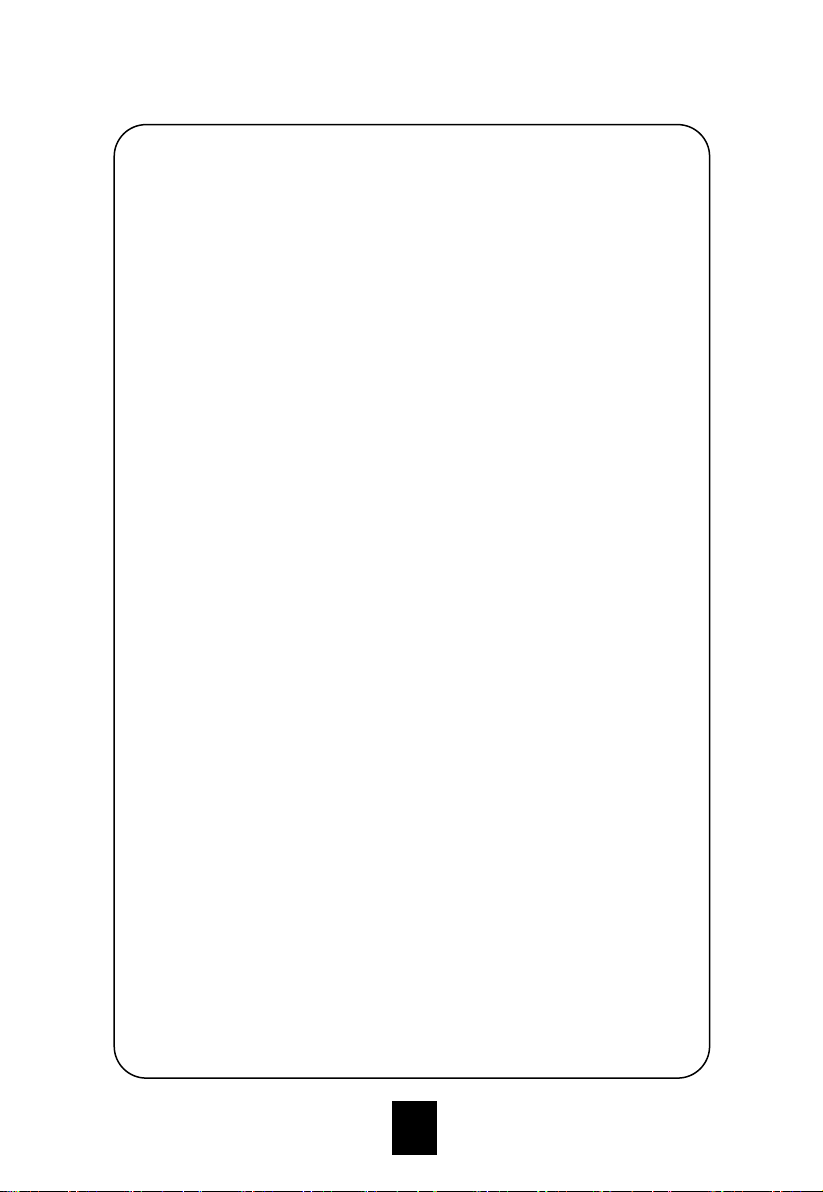
The main motor of the fan performs irregular operation according to
pre-programmed computer program. Combined with the wind speed
button, the natural wind can be set to high, medium and low level to
simulate the effect of nature wind, and make the wind more soft and
comfortable. The wind speed LED displays the corresponding speed,
and the natural wind mode indicator turns on;
Waveform of natural wind:
③ Sleep wind:
High speed: 30 minutes high speed natural wind -30 minutes medium
speed natural wind - low speed natural wind (hold).
Medium speed: 30 minutes natural wind - low speed natural wind
(hold).
9
Page 11
Medium speed: 30 minutes natural wind - low speed natural wind
(hold).
Low speed: low speed natural wind.
5. Direction button: in power on state, press this button to turn
on/off swing function, and the corresponding indicator displays its
function; press this button to turn on swing function and the swing
indicator turns on; press it again to turn off swing function;
6. Cool/Humidify button: in power on state, press this button to
turn on/off cooling/humidification, and the corresponding indicator
displays its function;
7. Timer button: after connecting the power, the timer function is
turned off in initial state, and the digitron displays 0; after turning
on, press this button to switch among OFF, 1h, 2h, 3h, to 9h, and
the digitron of corresponding level also changes accordingly: "0"
on → "1" on→ "2" on→ "3" on→"4 on→"5" on→"6 " on→"7" on→
"8" on→"9" on→ 0" on. No memory is saved after restart, and
changes back to "0";
8. Water shortage protection: If the software detects water
protection switch off (lacking water) for 5 seconds continuously
when the water pump has been working for 50 seconds, the
water pump stops working; and the buzzer beeps 10 seconds.
9. Rear net protection switch: If the rear net is opened when the
device is working, the power supply will be disconnected;
If the rear net is not installed, the switch is in off state, the power
input is cut off, and the device enters standby state;
Filling water
If need refrigeration or humidification function, please add water into
the water tank. Before adding water, please open the water tank lock,
take the water tank out and add water in it slowly (Figure 1, 2, 3 and
4): put the water tank to the original location after adding water and
lock the water tank lock.
10
Page 12
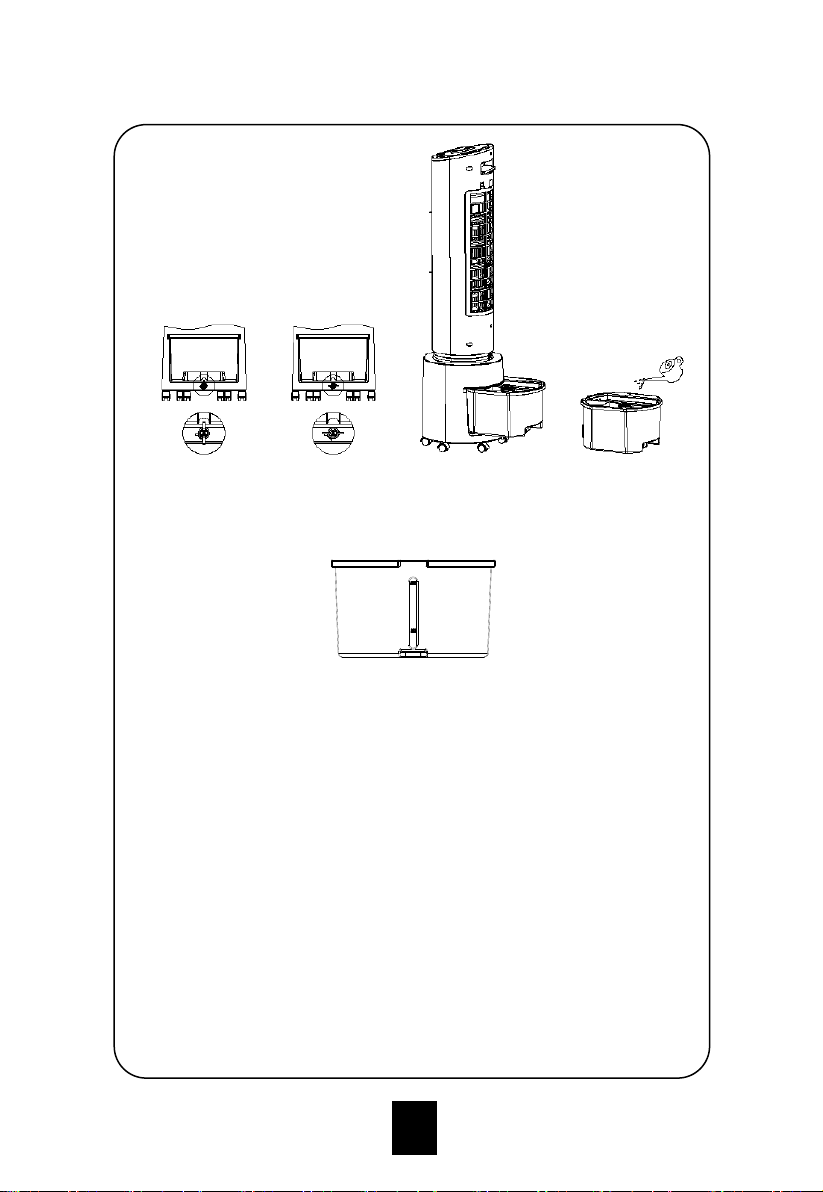
For manual water filling, please note the level indicator in the front of
the air cooler (Fig. 5).
1. Do not fill the water exceeding the maximum water level (Fig. 5).
2. Be sure to use clean tap water.
3. Tip: It is normal, non-toxic, and will not affect your health if the
device has slight odor or the water in the tank has a slight
discoloration when it is used for the first time.
Using the remote control:
1. Open the battery cover of the remote control, and insert a 3V
CR2032 battery.
Water tank Locked
(Fig. 1)
Water tank unlocked
(Fig. 2)
Water tank pulled out
(Fig. 3)
Filling water
(Fig. 4)
Fig. 5
11
Page 13
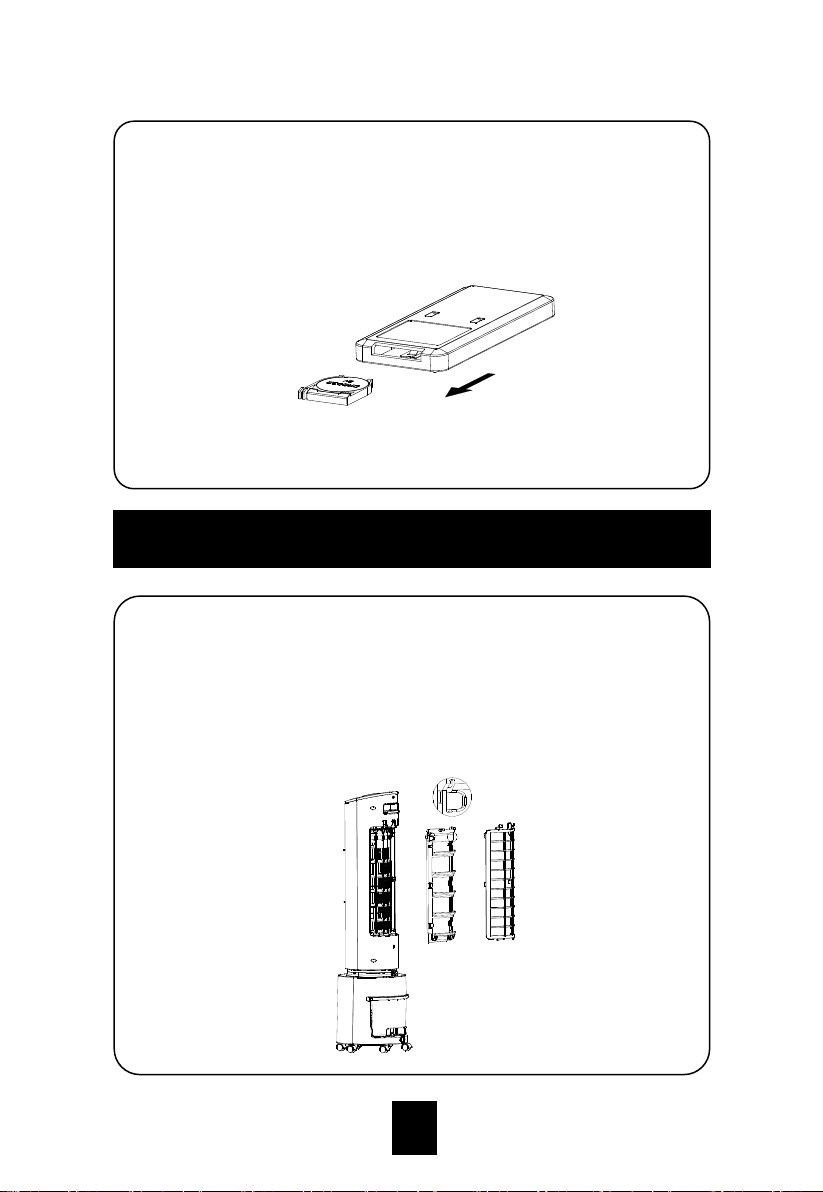
Air filter net and wet curtain assembly cleaning
If there are too many dust on the air filter net, the wind effect will be
impacted, therefore, it should be cleaned at least once a month.
1. Take the air filter net out firstly, then the wet curtain assembly can
also be taken out (operation is as below).
Cleaning and Maintenance
2. Please point to the receiver when using the remote control.
3. If the battery voltage is low, please open the battery cover as
shown in the figure and replace with new battery (CR2032).
Please note the positive pole and the negative pole of the battery;
then, put on the battery cover.
12
Page 14
2. Use cleanser and banister brush to clean the air filter net.
3. Dip the wet curtain assembly into cleanser for several minutes,
then clean and dry it.
Water tank cleaning
1. Cut off the power and rotate the water tank lock to horizontal
direction, then take the water tank out.
2. Use the towel to clean the incrustation of the water tank by
cleanser, and then use water to wash and pour the dirty water
out.
Machine body cleaning
1. Use wet towel to clean the machine body, washing by water
directly is forbidden.
2. Do not wash by corrosive cleanser or solvent.
3. The power should be off and power cable should be pulled out
when cleaning the machine body, or there is electric shock risk.
Installation after cleaning
1. Install the air filter net, wet curtain assembly and water tank
orderly and ensure the installation is correct.
2. Link the power and confirm the machine runs smoothly.
Maintenance
1. If the machine has not been used for a long time, the power cable
should be pulled out and the machine should be packed to
prevent dust.
2. Please ensure the wet curtain and air filter net is dry and there is
no water in the tank before packing.
13
Page 15
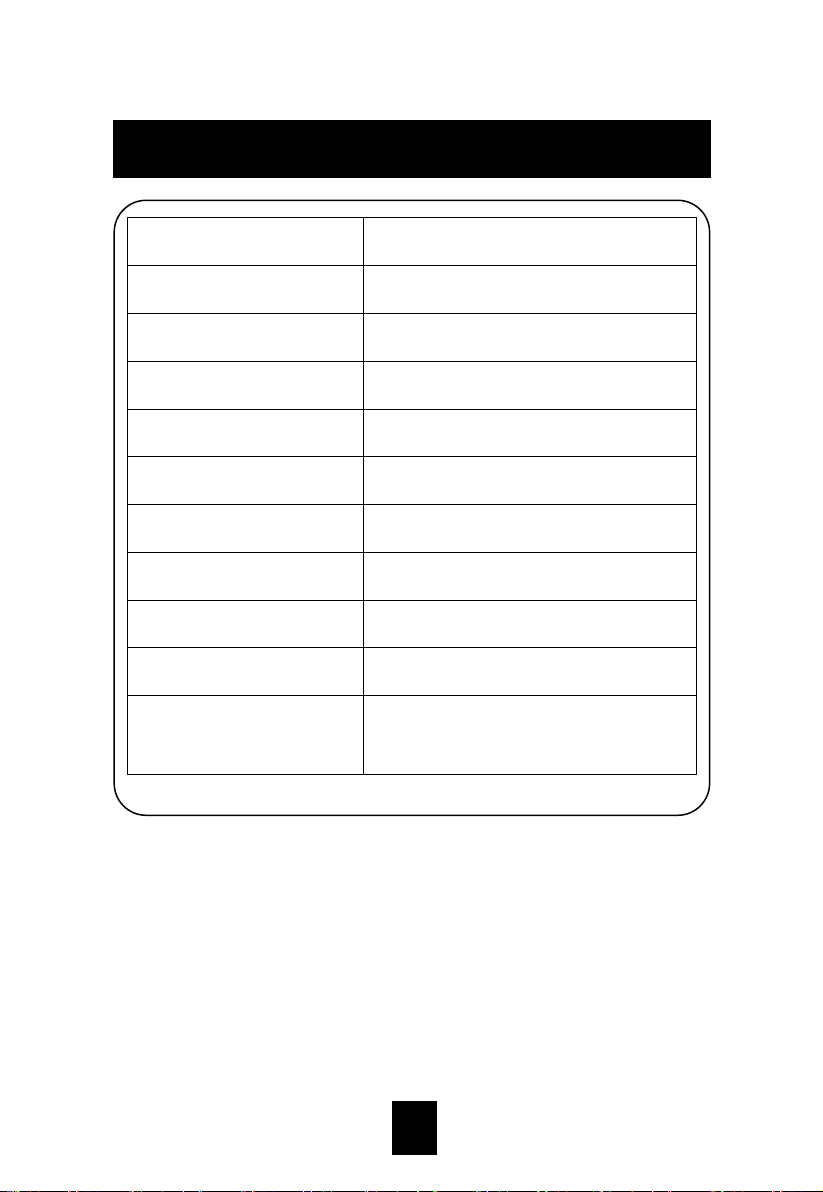
Product model
CAC-E33
Rated voltage
220-240V
Rated frequency
50 Hz
Rated power
45W
Noise (strong mode)
≤65dB
Rated wind output
120 m3/h
Rated evaporation
400mL/h
Energy efficiency ratio
≥5W/W
Dimensions
Φ260mm*959mm
Applicable environment
5~43℃, RH < 95% (at 25℃)
Standard
IEC/EN 60335-1, IEC/EN 60335-2-80,
IEC/EN 60335-2-98
Technical Parameters
14
Page 16
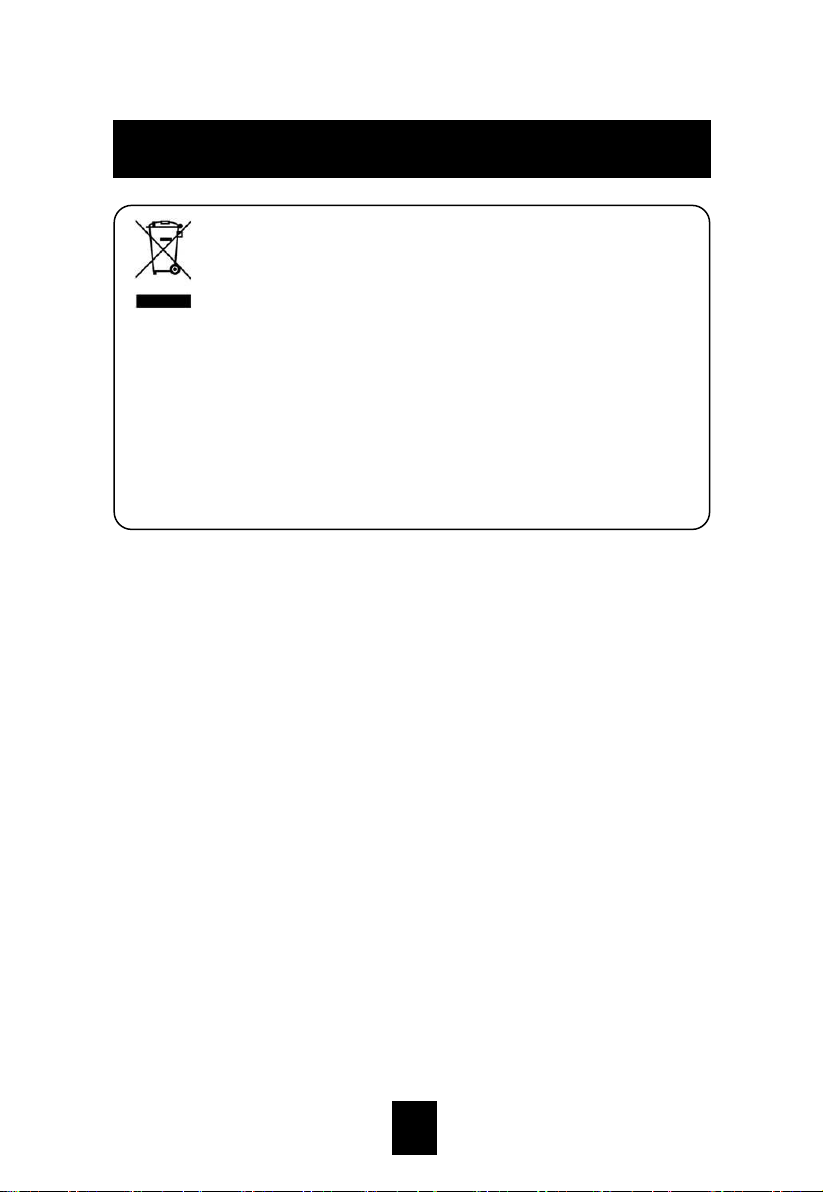
This marking indicates that this product should not be disposed
with other household wastes throughout the EU. To prevent possible
harm to the environment or human health from uncontrolled waste
disposal, recycle it responsibly to promote the sustainable reuse of
material resources. To return your used device, please use the return
and collection systems or contact the retailer where the product was
purchased. They can take this product for environmental safe
recycling.
Environmental Protection
15
Page 17
16
 Loading...